|
|
|
|
|
|
| |
| |
|
|
|
|
| |
| |
|
|
Someone care to explain the following from the manual:

"It's usually best to only use one interval with method 3. Too many
intervals can lead to artefacts, and POV will create more intervals if
it needs them."

It seems with one interval, I don't get good results. If I up the
intervals to 5 or 10, it seems to work better, but is slower in general.

Anyone have any clue about the relationship and why the manual asks to
use only 1 interval?


--
~Mike
Post a reply to this message
|
|
| |
| |
|
|
|
|
| |
| |
|
|
> It seems with one interval, I don't get good results. If I up the
> intervals to 5 or 10, it seems to work better, but is slower in general.
>
> Anyone have any clue about the relationship and why the manual asks to
> use only 1 interval?


Well, more intervals causes more sampling since there are the same number of
samples per interval.

What the documentation is saying is that, if you need better results, you
should increase the sample count rather than the interval count.

 - Slime
 [ http://www.slimeland.com/ ]
Post a reply to this message
|
|
| |
| |
|
|
From: Jellby
Subject: Re: Media, Intervals, samples and getting results
Date: 3 Jan 2005 13:47:49
Message: <41d99354@news.povray.org>
|
|
|
| |
| |
|
|
Among other things, Slime wrote:

> What the documentation is saying is that, if you need better results, you
> should increase the sample count rather than the interval count.

What I don't quite understand is why the number of samples has so much
effect over the overall brightness of the media (I'm thinking of dense
scattering media to simulate SSS). Sure, the sample number should affect
the quality and presence of possible artifacts, but why is "samples 15" so
much brighter than "samples 75" (method 3, intervals 1)? Is this maybe due
to some bad coding on my part?

--
light_source{9+9*x,1}camera{orthographic look_at(1-y)/4angle 30location
9/4-z*4}light_source{-9*z,1}union{box{.9-z.1+x clipped_by{plane{2+y-4*x
0}}}box{z-y-.1.1+z}box{-.1.1+x}box{.1z-.1}pigment{rgb<.8.2,1>}}//Jellby
Post a reply to this message
|
|
| |
| |
|
|
From: Mike Raiford
Subject: Re: Media, Intervals, samples and getting results
Date: 3 Jan 2005 13:57:22
Message: <41d99592@news.povray.org>
|
|
|
| |
| |
|
|
Slime wrote:

> What the documentation is saying is that, if you need better results, you
> should increase the sample count rather than the interval count.

Interesting that the defaults for media would be set up as such:

aa_level     : 4
aa_threshold : 0.1
absorption   : <0,0,0>
confidence   : 0.9
emission     : <0,0,0>
 >> intervals    : 10
 >> method       : 3
ratio        : 0.9
 >> samples      : Min 1, Max 1
variance     : 1/128
SCATTERING
   COLOR        : <0,0,0>
   eccentricity : 0.0
   extinction   : 1.0

I'm beginning if they meant samples should be at 1 in the documentation
and not intervals.

I'm hopelessly confused.

--
~Mike
Post a reply to this message
|
|
| |
| |
|
|
From: Mike Raiford
Subject: Re: Media, Intervals, samples and getting results
Date: 3 Jan 2005 14:01:36
Message: <41d99690$1@news.povray.org>
|
|
|
| |
| |
|
|
Mike Raiford wrote:

> I'm hopelessly confused.

The better question is: Is there a really good tutorial on using media?

--
~Mike
Post a reply to this message
|
|
| |
| |
|
|
From: "Jérôme M. Berger"
Subject: Re: Media, Intervals, samples and getting results
Date: 3 Jan 2005 14:16:02
Message: <41d999f2@news.povray.org>
|
|
|
| |
| |
|
|
-----BEGIN PGP SIGNED MESSAGE-----
Hash: SHA1
Jellby wrote:
| What I don't quite understand is why the number of samples has so much
| effect over the overall brightness of the media (I'm thinking of dense
| scattering media to simulate SSS). Sure, the sample number should
affect
| the quality and presence of possible artifacts, but why is "samples
15" so
| much brighter than "samples 75" (method 3, intervals 1)? Is this
maybe due
| to some bad coding on my part?
|
That's because the darkening you see is an artefact :) It's due to
the fact that when you don't take many samples, a lot of them
proportionnaly get taken deep inside the media where it's dark.
Increasing the number of samples ensures that more and more get taken
in the thin layer near the surface where the SSS effect occurs which
leads POV to notice that the result should be bright. BTW, you
shouldn't increase the number of samples too much. Instead you should
increase the aa_level and possibly decrease the aa_threshold. This
will ensure that the additional samples get taken in places where
they will have a useful impact on the result.
Jerome
- --
******************************
* Jerome M. Berger *
* mailto:jbe### [at] ifrance com *
* http://jeberger.free.fr/ *
******************************
-----BEGIN PGP SIGNATURE-----
Version: GnuPG v1.2.4 (GNU/Linux)
iD8DBQFB2ZnwqIYJdJhyixIRAjCoAJ9Mh12iDLjNYBtmUPJZg5HthQ5zTwCeIjar
AuqaKLzmlYjCRPrfbUjynlA=
=2sxH
-----END PGP SIGNATURE----- com *
* http://jeberger.free.fr/ *
******************************
-----BEGIN PGP SIGNATURE-----
Version: GnuPG v1.2.4 (GNU/Linux)
iD8DBQFB2ZnwqIYJdJhyixIRAjCoAJ9Mh12iDLjNYBtmUPJZg5HthQ5zTwCeIjar
AuqaKLzmlYjCRPrfbUjynlA=
=2sxH
-----END PGP SIGNATURE-----
Post a reply to this message
|
|
| |
| |
|
|
From: Jellby
Subject: Re: Media, Intervals, samples and getting results
Date: 3 Jan 2005 14:35:22
Message: <41d99e79@news.povray.org>
|
|
|
| |
| |
|
|
Among other things, "Jérôme M. Berger" saw fit to write:

> That's because the darkening you see is an artefact :) It's due to
> the fact that when you don't take many samples, a lot of them
> proportionnaly get taken deep inside the media where it's dark.
> Increasing the number of samples ensures that more and more get taken
> in the thin layer near the surface where the SSS effect occurs which
> leads POV to notice that the result should be bright.

According to this, more samples -> brighter media. But I see the opposite,
as if the influence of the samples was "averaged" (since most samples are
deep inside, the effect of the surface ones is weaker). I would have
thought that the sampling algorithm (and colour calculation) would be
smarter than that, but maybe that's not so easy...

> BTW, you
> shouldn't increase the number of samples too much. Instead you should
> increase the aa_level and possibly decrease the aa_threshold. This
> will ensure that the additional samples get taken in places where
> they will have a useful impact on the result.

I couldn't get the same effect... Even if the "darkening" due to many
samples (or intervals) is an artifact, I didn't find a reliable way to get
what I needed other than increasing the number of samples.

--
light_source{9+9*x,1}camera{orthographic look_at(1-y)/4angle 30location
9/4-z*4}light_source{-9*z,1}union{box{.9-z.1+x clipped_by{plane{2+y-4*x
0}}}box{z-y-.1.1+z}box{-.1.1+x}box{.1z-.1}pigment{rgb<.8.2,1>}}//Jellby
Post a reply to this message
|
|
| |
| |
|
|
From: "Jérôme M. Berger"
Subject: Re: Media, Intervals, samples and getting results
Date: 3 Jan 2005 17:29:02
Message: <41d9c72e$1@news.povray.org>
|
|
|
| |
| |
|
|
-----BEGIN PGP SIGNED MESSAGE-----
Hash: SHA1

Jellby wrote:
| According to this, more samples -> brighter media.
	That is correct. If you push this to the extreme, you'll get this
image (10 samples):
http://jeberger.free.fr/mpov/sphere_bl.png

	Increasing the number of samples (to 200) gives this one:
http://jeberger.free.fr/mpov/sphere_no.png

| But I see the opposite,
| as if the influence of the samples was "averaged" (since most
samples are
| deep inside, the effect of the surface ones is weaker). I would have
| thought that the sampling algorithm (and colour calculation) would be
| smarter than that, but maybe that's not so easy...
|
	Do you have a sample code that produces this effect?

|
|>BTW, you
|>shouldn't increase the number of samples too much. Instead you should
|>increase the aa_level and possibly decrease the aa_threshold. This
|>will ensure that the additional samples get taken in places where
|>they will have a useful impact on the result.
|
| I couldn't get the same effect... Even if the "darkening" due to many
| samples (or intervals) is an artifact, I didn't find a reliable way
to get
| what I needed other than increasing the number of samples.
|
	It takes some trial and error, but it should be possible to get the
same effect with a much faster render. Of course, it all depends on
whether you can afford to waste more time fiddling with the
parameters or simply letting the computer render in the background
while you're doing something else ;) To make accurate comparisons,
you also need to make sure that the maximum number of samples is the
same in both cases (I'm not talking of the second parameter of the
"samples" keyword here, but of the number of potential samples which
is something in the order of min_samples * 2^aa_level). Then if you
set aa_threshold to 0 the results should be the same (and take
*forever* to render) so all you need to do is find a value that's low
enough to get the effect you want while not being exactly 0.

	Note that this only applies to subsurface scattering simulations: eg
in cases when you have a very dense nearly uniform media. If you have
a density with areas of very dense media and other areas that are
empty, you will need the increased number of samples

		Jerome
- --
******************************
*      Jerome M. Berger      *
* mailto:jbe### [at] ifrancecom *
*  http://jeberger.free.fr/  *
******************************
-----BEGIN PGP SIGNATURE-----
Version: GnuPG v1.2.4 (GNU/Linux)

iD8DBQFB2cctqIYJdJhyixIRAh5MAJwNx+lC7Jw+TJml4MXtT7bAedh8MgCdHgrM
GTqdVZYfJXewymGtk1yKX4Y=
=uGCQ
-----END PGP SIGNATURE-----
Post a reply to this message
|
|
| |
| |
|
|
From: Jellby
Subject: Re: Media, Intervals, samples and getting results
Date: 3 Jan 2005 18:25:53
Message: <41d9d47f@news.povray.org>
|
|
|
| |
| |
|
|
Among other things, "Jérôme M. Berger" saw fit to write:

> | But I see the opposite,
> | as if the influence of the samples was "averaged" (since most
> samples are
> | deep inside, the effect of the surface ones is weaker). I would have
> | thought that the sampling algorithm (and colour calculation) would be
> | smarter than that, but maybe that's not so easy...
> |
> Do you have a sample code that produces this effect?

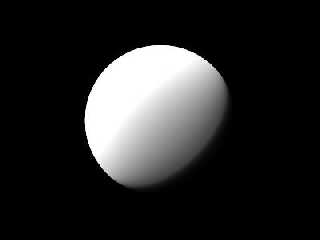
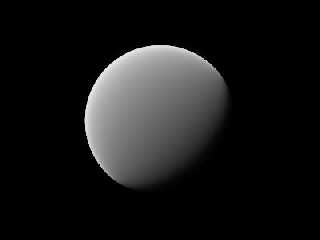
Yep, try this (povray 3.6.1, custom compile):

---------------------------------------
camera { location <0, 0, -10> look_at 0 }

light_source { <-20, 20, -20>, rgb 1 }

sphere {
  0, 3
  hollow
  pigment { color transmit 1 }
  interior {
    media {
      scattering { 5, rgb 3 }
      method 3
      intervals 1
      samples 10 // try also with 200
    }
  }
}
---------------------------------------

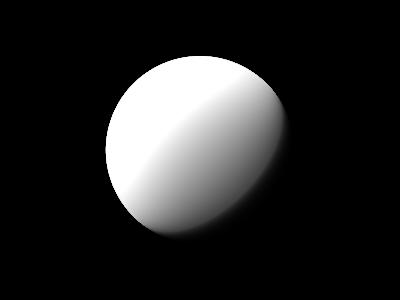
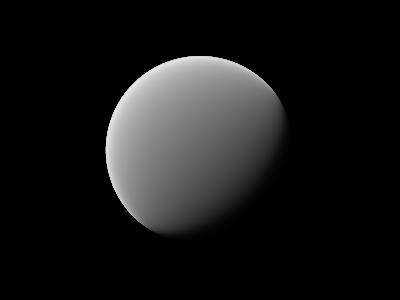
I've attached two images: "test1" has samples 10, "test2" has samples 200.

> It takes some trial and error, but it should be possible to get the
> same effect with a much faster render. Of course, it all depends on
> whether you can afford to waste more time fiddling with the
> parameters or simply letting the computer render in the background
> while you're doing something else ;) To make accurate comparisons,
> you also need to make sure that the maximum number of samples is the
> same in both cases (I'm not talking of the second parameter of the
> "samples" keyword here, but of the number of potential samples which
> is something in the order of min_samples * 2^aa_level). Then if you
> set aa_threshold to 0 the results should be the same (and take
> *forever* to render) so all you need to do is find a value that's low
> enough to get the effect you want while not being exactly 0.

In my experiments, I did not see any significant difference in the output by
fiddling with aa. According to your explanation, "samples 10 aa_level 8
aa_threshold 0.0001" should give similar results to "samples 160 aa_level 4
aa_threshold 0.0001", and I don't see that with the above example. Could
you give a more clear example?

> Note that this only applies to subsurface scattering simulations: eg
> in cases when you have a very dense nearly uniform media.

Yes, my experiments are confined to uniform media. I wonder if this adaptive
sampling and antialiasing is only valid for non-uniform media (opposite to
your sentence above), maybe uniform media makes adaptive sampling
unnecessary...

Or maybe I'm making some mistakes.

--
light_source{9+9*x,1}camera{orthographic look_at(1-y)/4angle 30location
9/4-z*4}light_source{-9*z,1}union{box{.9-z.1+x clipped_by{plane{2+y-4*x
0}}}box{z-y-.1.1+z}box{-.1.1+x}box{.1z-.1}pigment{rgb<.8.2,1>}}//Jellby
Post a reply to this message
Attachments:
Download 'test1.jpg' (3 KB)
Download 'test2.jpg' (3 KB)
Preview of image 'test1.jpg'
Preview of image 'test2.jpg'
|
|
| |
| |
|
|
From: Slime
Subject: Re: Media, Intervals, samples and getting results
Date: 3 Jan 2005 21:01:35
Message: <41d9f8ff@news.povray.org>
|
|
|
| |
| |
|
|
> Interesting that the defaults for media would be set up as such:


You should see the thread "default media setting inconsistancies (?)" on
12/27/2004 (about 15 threads down). Assuming I gave correct information in
that thread (and I may be wrong; no one's confirmed), it should clarify
things for you.

 - Slime
 [ http://www.slimeland.com/ ]
Post a reply to this message
|
|
| |
| |
|
|
From: Slime
Subject: Re: Media, Intervals, samples and getting results
Date: 3 Jan 2005 21:10:15
Message: <41d9fb07@news.povray.org>
|
|
|
| |
| |
|
|
> I've attached two images: "test1" has samples 10, "test2" has samples 200.

I would guess that what is happening is in test1, the first sample of a ray
is well lit and the other 9 are poorly lit or dark (due to self shadowing).
While in test2, the first sample is well lit and the other 199 are poorly
lit or dark. So the percentage of lit samples in the first is much greater,
causing it to be significantly brighter. This is only happening because the
media is so dense that it becomes dark at a very shallow level.

I would assume that the greater number of samples is producing the more
accurate result.

One thing to try: make two nested spheres, the inner one about 4/5 the
diameter of the outer one. Give them the same media, but give the outer one
much more samples. Then the edge of the media (in the outer sphere) will be
well sampled - as it needs to be to avoid this problem, but the inside of
the media (the inner sphere) will be poorly sampled, which is ok since it's
all dark in there anyway. If this works, it may be the fastest way to get
the effect with accuracy. (Be sure, of course, to avoid having the sphere's
volume's overlap (use a difference on the outer sphere to do this), and to
avoid coincident surfaces.)

> In my experiments, I did not see any significant difference in the output
by
> fiddling with aa. According to your explanation, "samples 10 aa_level 8
> aa_threshold 0.0001" should give similar results to "samples 160 aa_level
4
> aa_threshold 0.0001", and I don't see that with the above example. Could
> you give a more clear example?

When the media has a constant density, the first case will take 10 samples
and the latter case will take 160 samples. Only if the aa_threshold is set
to 0 (or if the media has a very noisy density) will the two samplings be
equivalent.

 - Slime
 [ http://www.slimeland.com/ ]
Post a reply to this message
|
|
| |
| |
|
|
From: Mike Raiford
Subject: Re: Media, Intervals, samples and getting results
Date: 4 Jan 2005 07:55:04
Message: <41da9228$1@news.povray.org>
|
|
|
| |
| |
|
|
Slime wrote:
> You should see the thread "default media setting inconsistancies (?)" on
> 12/27/2004 (about 15 threads down). Assuming I gave correct information in
> that thread (and I may be wrong; no one's confirmed), it should clarify
> things for you.

Its still clear as mud. Whats needed is for someone with a really good
understanding of how media works in POV-Ray to chime in and let us all
know whats what.

--
~Mike
Post a reply to this message
|
|
| |
| |
|
|
From: Jellby
Subject: Re: Media, Intervals, samples and getting results
Date: 4 Jan 2005 09:27:45
Message: <41daa7e0@news.povray.org>
|
|
|
| |
| |
|
|
Among other things, Slime saw fit to write:

>> I've attached two images: "test1" has samples 10, "test2" has samples
>> 200.

(Sorry for attaching images to this non-binary group. I thought this was
p.b.i. and it was too late when I realized it wasn't)

> I would guess that what is happening is in test1, the first sample of a
> ray is well lit and the other 9 are poorly lit or dark (due to self
> shadowing). While in test2, the first sample is well lit and the other 199
> are poorly lit or dark. So the percentage of lit samples in the first is
> much greater, causing it to be significantly brighter. This is only
> happening because the media is so dense that it becomes dark at a very
> shallow level.
>
> I would assume that the greater number of samples is producing the more
> accurate result.

That was my impression and that could be the reason. There's little
difference between "samples 200" and "samples 2000"

> One thing to try: make two nested spheres, the inner one about 4/5 the
> diameter of the outer one. Give them the same media, but give the outer
> one much more samples. Then the edge of the media (in the outer sphere)
> will be well sampled - as it needs to be to avoid this problem, but the
> inside of the media (the inner sphere) will be poorly sampled, which is ok
> since it's all dark in there anyway. If this works, it may be the fastest
> way to get the effect with accuracy. (Be sure, of course, to avoid having
> the sphere's volume's overlap (use a difference on the outer sphere to do
> this), and to avoid coincident surfaces.)

Hmm... It didn't seem to be quicker in this case, the effect of the samples
was very similar and the inner surface was visible (in fact, the inner
media didn't have much influence).

I guess it's best to have as few samples as possible, as long as there are
enough to accurately sample the media (i.e. the appearance doesn't change
much with increasing samples)

> When the media has a constant density, the first case will take 10 samples
> and the latter case will take 160 samples. Only if the aa_threshold is set
> to 0 (or if the media has a very noisy density) will the two samplings be
> equivalent.

Unfortunately, povray doesn't like "aa_threshold 0". So, it seems the
adaptive sampling refers to the possible variation in the media density,
not to the effect on the image.

--
light_source{9+9*x,1}camera{orthographic look_at(1-y)/4angle 30location
9/4-z*4}light_source{-9*z,1}union{box{.9-z.1+x clipped_by{plane{2+y-4*x
0}}}box{z-y-.1.1+z}box{-.1.1+x}box{.1z-.1}pigment{rgb<.8.2,1>}}//Jellby
Post a reply to this message
|
|
| |
| |
|
|
|
|
| |
| |
|
|
While it is probably bad form to continue one thread in another, I'll do
it anyway here. :)

Slime, you mentioned some method 3 default settings which you understood
to be different from the method 1 defaults (but not listed in the docs).
Those were intervals 1 and (min) samples 5. These values, by the way,
are explicitly set in many of the media example scenes distributed with POV.

Anyway, I fiddled around with a couple of different settings on the
example test scene given earlier in the thread. Going by the media
samples listed in the render stats I get this:

method=3
intervals=default (not explicitly set)
samples=default (not explicitly set)
Media Samples: 2668281

method=3
intervals=10 (default as per the docs)
samples=1 (default as per the docs)
Media Samples: 30730560

method=3
intervals=1
samples=5
Media Samples: 1515497

method=3
intervals=1
samples=10
Media Samples: 2668281

Which leads me to conclude that the method 3 default intervals is 1 and
samples 10, if the media samples in the render stats are an appropriate
indicator.


-Abe
Post a reply to this message
|
|
| |
| |
|
|
From: Abe
Subject: Re: Media, Intervals, samples and getting results
Date: 4 Jan 2005 11:12:27
Message: <41dac06b@news.povray.org>
|
|
|
| |
| |
|
|
Jellby wrote:
> Among other things, "Jérôme M. Berger" saw fit to write:
>
>
>>| But I see the opposite,
>>| as if the influence of the samples was "averaged" (since most
>>samples are
>>| deep inside, the effect of the surface ones is weaker). I would have
>>| thought that the sampling algorithm (and colour calculation) would be
>>| smarter than that, but maybe that's not so easy...
>>|
>>Do you have a sample code that produces this effect?
>
>
> Yep, try this (povray 3.6.1, custom compile):
>
> ---------------------------------------
> camera { location <0, 0, -10> look_at 0 }
>
> light_source { <-20, 20, -20>, rgb 1 }
>
> sphere {
>   0, 3
>   hollow
>   pigment { color transmit 1 }
>   interior {
>     media {
>       scattering { 5, rgb 3 }
>       method 3
>       intervals 1
>       samples 10 // try also with 200
>     }
>   }
> }
> ---------------------------------------
>
> I've attached two images: "test1" has samples 10, "test2" has samples 200.
>
>
>>It takes some trial and error, but it should be possible to get the
>>same effect with a much faster render. Of course, it all depends on
>>whether you can afford to waste more time fiddling with the
>>parameters or simply letting the computer render in the background
>>while you're doing something else ;) To make accurate comparisons,
>>you also need to make sure that the maximum number of samples is the
>>same in both cases (I'm not talking of the second parameter of the
>>"samples" keyword here, but of the number of potential samples which
>>is something in the order of min_samples * 2^aa_level). Then if you
>>set aa_threshold to 0 the results should be the same (and take
>>*forever* to render) so all you need to do is find a value that's low
>>enough to get the effect you want while not being exactly 0.
>
>
> In my experiments, I did not see any significant difference in the output by
> fiddling with aa. According to your explanation, "samples 10 aa_level 8
> aa_threshold 0.0001" should give similar results to "samples 160 aa_level 4
> aa_threshold 0.0001", and I don't see that with the above example. Could
> you give a more clear example?
>
>
>>Note that this only applies to subsurface scattering simulations: eg
>>in cases when you have a very dense nearly uniform media.
>
>
> Yes, my experiments are confined to uniform media. I wonder if this adaptive
> sampling and antialiasing is only valid for non-uniform media (opposite to
> your sentence above), maybe uniform media makes adaptive sampling
> unnecessary...
>
> Or maybe I'm making some mistakes.
>
>
>
> ------------------------------------------------------------------------
>
>
> ------------------------------------------------------------------------
>

Interestingly, in this particular case, method 2 with intervals 1 and
samples 100 (or possibly less) gets pretty close to method 3 with
samples set to 200.

Abe
Post a reply to this message
|
|
| |
| |
|
|
From: "Jérôme M. Berger"
Subject: Re: Media, Intervals, samples and getting results
Date: 4 Jan 2005 17:31:38
Message: <41db194a$1@news.povray.org>
|
|
|
| |
| |
|
|
-----BEGIN PGP SIGNED MESSAGE-----
Hash: SHA1

Slime wrote:
| I would guess that what is happening is in test1, the first sample
of a ray
| is well lit and the other 9 are poorly lit or dark (due to self
shadowing).
| While in test2, the first sample is well lit and the other 199 are
poorly
| lit or dark. So the percentage of lit samples in the first is much
greater,
| causing it to be significantly brighter. This is only happening
because the
| media is so dense that it becomes dark at a very shallow level.
|
	You are essentially correct, except that the adaptive sampling
*should* take care of that. However it looks like there are some
speed optimizations in POV that prevent it from working in the case
of a constant density media (see my reply to Jellby).

		Jerome
- --
******************************
*      Jerome M. Berger      *
* mailto:jbe### [at] ifrancecom *
*  http://jeberger.free.fr/  *
******************************
-----BEGIN PGP SIGNATURE-----
Version: GnuPG v1.2.4 (GNU/Linux)

iD8DBQFB2xlJqIYJdJhyixIRAuamAKCO+9IqhkrMF30DUBrqLovNIW3vxACfdR5Z
QpMMYDPJj3r4xCDVCM1WBo0=
=uyYr
-----END PGP SIGNATURE-----
Post a reply to this message
|
|
| |
| |
|
|
From: "Jérôme M. Berger"
Subject: Re: Media, Intervals, samples and getting results
Date: 4 Jan 2005 17:34:29
Message: <41db19f5@news.povray.org>
|
|
|
| |
| |
|
|
-----BEGIN PGP SIGNED MESSAGE-----
Hash: SHA1

Jellby wrote:
| In my experiments, I did not see any significant difference in the
output by
| fiddling with aa. According to your explanation, "samples 10 aa_level 8
| aa_threshold 0.0001" should give similar results to "samples 160
aa_level 4
| aa_threshold 0.0001", and I don't see that with the above example.
Could
| you give a more clear example?
|
	Like Slime said, you'd need to have aa_threshold set to 0 to get the
same results (if pov accepted). You can however get the same effect
by using a ridiculously small value. Moreover I wrote a little too
fast yesterday: the precise formula is (min_samples-1) * 2^aa_level +
1, assuming of course that min_samples is at least 3.

|
|>Note that this only applies to subsurface scattering simulations: eg
|>in cases when you have a very dense nearly uniform media.
|
|
| Yes, my experiments are confined to uniform media. I wonder if this
adaptive
| sampling and antialiasing is only valid for non-uniform media
(opposite to
| your sentence above), maybe uniform media makes adaptive sampling
| unnecessary...
|
| Or maybe I'm making some mistakes.
|
	It looks like povray does some optimizations in the case of a
constant density media. I did a quick check by adding the following
density to your code:

density {
~  spherical
~  color_map {
~    [ 0.0 rgb 1.0 ]
~    [ 1.0 rgb 1.0 ]
~  }
}

	Since the colormap is rgb 1.0 everywhere, this should give the same
results as the original but it doesn't. The result is pretty much
what I described in my previous post (except that samples 129 takes
much longer to render since there are a lot of pure black samples
taken that get culled in the samples 3 case). You may take a look for
example at those pictures done with aa_threshold 1e-200:

aa_level 8
samples 3
http://jeberger.free.fr/tmp/media-3-8.png
aa_level 2
samples 129
http://jeberger.free.fr/tmp/media-129-2.png

	I'd say that this is a bug.

	Note that you can probably get the correct result with a faster
render time if you disable this optimization by adding a pseudo
density like I just did...

		Jerome

PS: If the pictures aren't there, try again a bit later: as of this
posting, the second one hadn't finished rendering...

- --
******************************
*      Jerome M. Berger      *
* mailto:jbe### [at] ifrancecom *
*  http://jeberger.free.fr/  *
******************************
-----BEGIN PGP SIGNATURE-----
Version: GnuPG v1.2.4 (GNU/Linux)

iD8DBQFB2xn0qIYJdJhyixIRAq1IAJ0aa4m+mH6jtx8gp/ak293dlMu1fACgnglN
9sSSzvW20+Za6LOJn1rGj34=
=/Pz9
-----END PGP SIGNATURE-----
Post a reply to this message
|
|
| |
| |
|
|
From: "Jérôme M. Berger"
Subject: Re: Media, Intervals, samples and getting results
Date: 4 Jan 2005 17:49:43
Message: <41db1d87$1@news.povray.org>
|
|
|
| |
| |
|
|
-----BEGIN PGP SIGNED MESSAGE-----
Hash: SHA1

	If your file doesn't contain a #version directive, or if the version
specified is higher than 3.5, then the default for media are:
method 3
intervals 1
samples 10, 10

	Note that this means that if you only change the method, you'll
still get 1 interval and 10 samples unless you change them too. For
compatibility reason, if your file has a #version lower than 3.5, the
defaults are those written in the doc. I guess that the doc should be
updated...

		Jerome
- --
******************************
*      Jerome M. Berger      *
* mailto:jbe### [at] ifrancecom *
*  http://jeberger.free.fr/  *
******************************
-----BEGIN PGP SIGNATURE-----
Version: GnuPG v1.2.4 (GNU/Linux)

iD8DBQFB2x2FqIYJdJhyixIRAmM+AJsFL9V6ng9mxywUUXIbNEiTTNEg5ACgoWT3
xJak+RLSsidTwNhWOKkDikc=
=sZfU
-----END PGP SIGNATURE-----
Post a reply to this message
|
|
| |
| |
|
|
From: Slime
Subject: Re: Media, Intervals, samples and getting results
Date: 4 Jan 2005 20:16:38
Message: <41db3ff6@news.povray.org>
|
|
|
| |
| |
|
|
> You are essentially correct, except that the adaptive sampling
> *should* take care of that.

I was under the impression that the adaptive sampling only took into account
the values of the media density, and not the lighting.

 - Slime
 [ http://www.slimeland.com/ ]
Post a reply to this message
|
|
| |
| |
|
|
From: Slime
Subject: Re: Media, Intervals, samples and getting results
Date: 4 Jan 2005 20:20:09
Message: <41db40c9@news.povray.org>
|
|
|
| |
| |
|
|
> Which leads me to conclude that the method 3 default intervals is 1 and
> samples 10, if the media samples in the render stats are an appropriate
> indicator.

Ah, thanks.

 - Slime
 [ http://www.slimeland.com/ ]
Post a reply to this message
|
|
| |
| |
|
|
From: Jellby
Subject: Re: Media, Intervals, samples and getting results
Date: 5 Jan 2005 12:20:56
Message: <41dc21f7@news.povray.org>
|
|
|
| |
| |
|
|
Among other things, "Jérôme M. Berger" saw fit to write:

> It looks like povray does some optimizations in the case of a
> constant density media. I did a quick check by adding the following
> density to your code:
>
> density {
> ~  spherical
> ~  color_map {
> ~    [ 0.0 rgb 1.0 ]
> ~    [ 1.0 rgb 1.0 ]
> ~  }
> }
>
> Since the colormap is rgb 1.0 everywhere, this should give the same
> results as the original but it doesn't. The result is pretty much
> what I described in my previous post (except that samples 129 takes
> much longer to render since there are a lot of pure black samples
> taken that get culled in the samples 3 case). You may take a look for
> example at those pictures done with aa_threshold 1e-200:

Which POV-Ray version and platform are you using? I could not reproduce your
results, I got quite the same effect I was getting with constant density:
overbright media with "aa_level 8 samples 3" even if I introduce a slope in
the color_map (then the media is different, of course, but still not
similar when the samples and aa_level are varied).

--
light_source{9+9*x,1}camera{orthographic look_at(1-y)/4angle 30location
9/4-z*4}light_source{-9*z,1}union{box{.9-z.1+x clipped_by{plane{2+y-4*x
0}}}box{z-y-.1.1+z}box{-.1.1+x}box{.1z-.1}pigment{rgb<.8.2,1>}}//Jellby
Post a reply to this message
|
|
| |
| |
|
|
From: "Jérôme M. Berger"
Subject: Re: Media, Intervals, samples and getting results
Date: 5 Jan 2005 14:12:43
Message: <41dc3c2b$1@news.povray.org>
|
|
|
| |
| |
|
|
-----BEGIN PGP SIGNED MESSAGE-----
Hash: SHA1

Slime wrote:
| I was under the impression that the adaptive sampling only took
into account
| the values of the media density, and not the lighting.
|
	Nope, adaptive sampling takes into account the total contribution of
the samples to the resulting color. For emission media, this is only
the density, for absorption it depends on whatever's behind the
media, and for scattering you add the light source(s).

		Jerome
- --
******************************
*      Jerome M. Berger      *
* mailto:jbe### [at] ifrancecom *
*  http://jeberger.free.fr/  *
******************************
-----BEGIN PGP SIGNATURE-----
Version: GnuPG v1.2.4 (GNU/Linux)

iD8DBQFB3DwrqIYJdJhyixIRAjpyAJ4s+yIsb7IQDzQT9u9TogE48TaBsQCdHBV7
2XU+XpIdy//srMOljpobRNg=
=ICRU
-----END PGP SIGNATURE-----
Post a reply to this message
|
|
| |
| |
|
|
|
|
| |
| |
|
|
In article <41db3ff6@news.povray.org>, "Slime" <fak### [at] emailaddress>
wrote:

> > You are essentially correct, except that the adaptive sampling
> > *should* take care of that.
>
> I was under the impression that the adaptive sampling only took into account
> the values of the media density, and not the lighting.

If it does so, it should probably be considered a bug...I can't see how
it would discard any samples that don't actually need to be taken.

--
Christopher James Huff <cja### [at] earthlinknet>
http://home.earthlink.net/~cjameshuff/
POV-Ray TAG: <chr### [at] tagpovrayorg>
http://tag.povray.org/
Post a reply to this message
|
|
| |
| |
|
|
From: "Jérôme M. Berger"
Subject: Re: Media, Intervals, samples and getting results
Date: 5 Jan 2005 14:57:39
Message: <41dc46b3@news.povray.org>
|
|
|
| |
| |
|
|
-----BEGIN PGP SIGNED MESSAGE-----
Hash: SHA1

Jellby wrote:
| Which POV-Ray version and platform are you using? I could not
reproduce your
| results, I got quite the same effect I was getting with constant
density:
| overbright media with "aa_level 8 samples 3" even if I introduce a
slope in
| the color_map (then the media is different, of course, but still not
| similar when the samples and aa_level are varied).
|
	I was using MegaPov 0.7 on linux. A quick try with version 3.6.1
shows the same results as you. I think MP0.7 has the correct behavior
here...

		Jerome
- --
******************************
*      Jerome M. Berger      *
* mailto:jbe### [at] ifrancecom *
*  http://jeberger.free.fr/  *
******************************
-----BEGIN PGP SIGNATURE-----
Version: GnuPG v1.2.4 (GNU/Linux)

iD8DBQFB3EayqIYJdJhyixIRAgc+AKCNfpPRAuN5CIiwOvqLAWOYCtUKUgCgiPvL
9RDWgfaY0weIFB20JealIlU=
=Mtl/
-----END PGP SIGNATURE-----
Post a reply to this message
|
|
| |
| |
|
|
|
|
| |
| |
|
|
Mike Raiford <mra### [at] hotmailcom> wrote:
> Someone care to explain the following from the manual:
>
> "It's usually best to only use one interval with method 3. Too many
> intervals can lead to artefacts, and POV will create more intervals if
> it needs them."
>
> It seems with one interval, I don't get good results. If I up the
> intervals to 5 or 10, it seems to work better, but is slower in general.
>
> Anyone have any clue about the relationship and why the manual asks to
> use only 1 interval?
>
>
> --
> ~Mike

Btw, I think it would be a great idea to put the valuable info learned here
into the new POV-Ray Wiki at http://www.wikipov.org/

(see this thread:
http://news.povray.org/povray.general/thread/%3C41dd4071%40news.povray.org%3E/?mtop=13
)

George
Post a reply to this message
|
|
| |
| |
|
|
|
|
| |
|
|