|
|
|
|
|
|
| |
| |
|
|
From: Cousin Ricky
Subject: Gamma and the sRGB Keywords in POV-Ray 3.7: a Tutorial
Date: 18 Apr 2024 16:44:36
Message: <66218634$1@news.povray.org>
|
|
|
| |
| |
|
|
THE ISSUE

What is gamma, why should assumed_gamma be set to 1, and how should we
use the sRGB keywords introduced with POV-Ray 3.7?

In the real world, a 1,600 lumen lamp emits twice as much light as an
800 lumen lamp, and a 40% gray object reflects half as much light as an
80% gray object.  To render this reality, POV-Ray must use linear color.
 Setting global_settings { assumed_gamma 1 } accomplishes this goal, and
has been the recommended setting since POV-Ray 3.7.

The problem is that our perceptions are non-linear, and our monitors and
software often reflect that non-linearity.  Gamma is the measure of this
non-linearity.  Typically, RGB colors are specified with the non-linear
sRGB standard, so in order for them to look correct with assumed_gamma
1, they must be decoded to a linear format.  This is what the sRGB
series of keywords (srgb, srgbf, srgbt, and srgbft) does[1].

In addition, many scene files written prior to POV-Ray 3.7 failed to
specify an assumed_gamma, so the resulting image defaulted to whatever
gamma was used by the computer--usually 2.2, which is similar to sRGB.
When rendered with POV-Ray 3.7, these scenes look pale and washed out.
The quick fix is to specify global_settings { assumed_gamma 2.2 }, but
if you wish to put in the work to make the scene physically realistic,
the new keywords can help.

However, confusion often arises over the use of these keywords.

HOW TO USE THE sRGB KEYWORDS

The first thing to remember is that POV-Ray has *one* and only *one*
color format.  The srgb keyword does not create a different kind of
color than the rgb keyword; it simply interprets its argument
differently.  When you #declare a color, the resulting variable has no
memory of which keyword was used to declare it.

The second thing to remember is that the keywords in the sRGB series
decode from sRGB to linear, not the other way around!

It is also important to remember that the entire expression following
the keyword is evaluated before the conversion is applied; and that the
standard sRGB function is defined for the domain 0...1.

Here is the general sequence for usage of these keywords:

  1. Set global_settings { assumed_gamma 1 } *before* using any of the
     keywords.

  2. An sRGB triplet that comes from a color picker, eyedropper tool,
     or published Web source is typically in the range <0,0,0> ...
     <255,255,255>.  These are byte triplets.  However, POV-Ray does not
     use byte triplets; these must be divided by 255 to bring them into
     the range <0,0,0> ... <1,1,1>.  This *must* be done first thing,
     and is the *only* math that should ever be done at this stage,
     though it may be combined with step 3.  If the color is specified
     in percentages, of course you would divide by 100 instead of 255.

  3. #declare (or #local) the color with the srgb keyword.  The
     resulting identifier contains a linear color.  *If and only if* no
     additional math is required, you may skip the #declare/#local and
     use the srgb directly in a pigment or light_source.

  4. Now, do whatever additional math you need on the identifier.  You
     may do this in a pigment or light_source or wherever.

If your color is from colors.inc, then you *must* skip step 2, because
these colors are already within <0,0,0> ... <1,1,1>.  For these colors,
you should use the srgbft keyword in step 3, because they are already
declared with filter and transmit components.

If your color comes from function eval_pigment(), you must skip steps 2
*and* 3.  Such colors are already within POV-Ray's working space, and
starting with POV-Ray 3.7, this includes image maps.

EXAMPLES

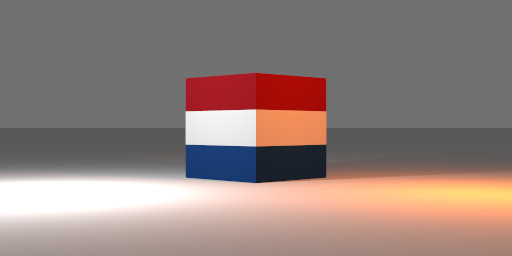
Example 1: the Dutch flag.  Steps 2 & 3 are combined.  Since no
additional math is required on the colors, there is no need to declare
them as identifiers.

  pigment
  { gradient y color_map
    { [1/3 srgb <32, 71, 133> / 255] // Steps 2 & 3
      [1/3 White]
      [2/3 White]
      [2/3 srgb <170, 28, 38> / 255] // Steps 2 & 3
    }
  }

Example 2: an orange light.  Since this example doesn't use a byte
triplet, step 2 is unnecessary.

  #declare C = srgb <1, 0.5, 0>; // This must be declared separately!
                                 // (step 3)
  #declare Ld = 100;
  #declare Fd = 1;
  light_source
  { <100, 50, 0>,
    C * (1 + pow (Ld/Fd, 2)) / 2 // Step 4: math is applied to
                                 // identifier C
    fade_power 2
    fade_distance Fd
  }

EPILOGUE

Linear color applies only to the tracing phase. The output command line
options Display_Gamma and File_Gamma should remain at their default sRGB
setting. The gamma option for image maps should normally be left
unspecified.

RESOURCES

This tutorial, plus discussion links and the scene file for the image,
can be found at: https://github.com/CousinRicky/POV-Gamma-sRGB

---
[1] Technically, these keywords convert an sRGB-specified color to match
whatever assumed_gamma you are using.  Using assumed_gamma 1 means they
will convert to linear.

---
Copyright (C) 2024 Richard Callwood III, CC-BY-SA 4.0.
Post a reply to this message
Attachments:
Download 'gamma-srgb.jpg' (12 KB)
Download 'gamma-srgb.pov.zip' (1 KB)
Preview of image 'gamma-srgb.jpg'
|
|
| |
| |
|
|
From: yesbird
Subject: Re: Gamma and the sRGB Keywords in POV-Ray 3.7: a Tutorial
Date: 19 Apr 2024 08:36:08
Message: <66226538$1@news.povray.org>
|
|
|
| |
| |
|
|
On 18/04/2024 23:44, Cousin Ricky wrote:
> THE ISSUE
>
> What is gamma, why should assumed_gamma be set to 1, and how should we
> use the sRGB keywords introduced with POV-Ray 3.7?

Thanks, Cousin.
This question was always interesting to me - very clean and detailed
explanation.
--
YB
Post a reply to this message
|
|
| |
| |
|
|
From: kurtz le pirate
Subject: Re: Gamma and the sRGB Keywords in POV-Ray 3.7: a Tutorial
Date: 19 Apr 2024 09:37:57
Message: <662273b5$1@news.povray.org>
|
|
|
| |
| |
|
|
On 18/04/2024 22:44, Cousin Ricky wrote:
> THE ISSUE
>
> ...
>
> EXAMPLES
>
> Example 1: the Dutch flag.  Steps 2 & 3 are combined.  Since no
> additional math is required on the colors, there is no need to declare
> them as identifiers.
>
>   pigment
>   { gradient y color_map
>     { [1/3 srgb <32, 71, 133> / 255] // Steps 2 & 3
>       [1/3 White]
>       [2/3 White]
>       [2/3 srgb <170, 28, 38> / 255] // Steps 2 & 3
>     }
>   }
>

Red, white and blue... it's more the flag of the Netherlands than of
Germany, isn't it?


Apart from that, a very good and useful explanation.
It's always good to get back to basics.


--
Kurtz le pirate
Compagnie de la Banquise
Post a reply to this message
|
|
| |
| |
|
|
From: Cousin Ricky
Subject: Re: Gamma and the sRGB Keywords in POV-Ray 3.7: a Tutorial
Date: 19 Apr 2024 10:27:13
Message: <66227f41$1@news.povray.org>
|
|
|
| |
| |
|
|
On 2024-04-19 09:37 (-4), kurtz le pirate wrote:
>>
>> Example 1: the Dutch flag.  [snip]
>
> Red, white and blue... it's more the flag of the Netherlands than of
> Germany, isn't it?

At least in English, "Dutch" means "of the Netherlands."  It does not
mean "Deutsch," although the words have a common etymology.

(To confuse things, there's also Pennsylvania Dutch, which *is* a
dialect of German, but that is another matter.)
Post a reply to this message
|
|
| |
| |
|
|
From: kurtz le pirate
Subject: Re: Gamma and the sRGB Keywords in POV-Ray 3.7: a Tutorial
Date: 19 Apr 2024 11:48:04
Message: <66229234$1@news.povray.org>
|
|
|
| |
| |
|
|
On 19/04/2024 16:27, Cousin Ricky wrote:
> On 2024-04-19 09:37 (-4), kurtz le pirate wrote:
>>>
>>> Example 1: the Dutch flag.  [snip]
>>
>> Red, white and blue... it's more the flag of the Netherlands than of
>> Germany, isn't it?
>
> At least in English, "Dutch" means "of the Netherlands."  It does not
> mean "Deutsch," although the words have a common etymology.
>
> (To confuse things, there's also Pennsylvania Dutch, which *is* a
> dialect of German, but that is another matter.)
>

I read too fast and my English is really bad.
Sorry :(


--
Kurtz le pirate
Compagnie de la Banquise
Post a reply to this message
|
|
| |
| |
|
|
From: Thomas de Groot
Subject: Re: Gamma and the sRGB Keywords in POV-Ray 3.7: a Tutorial
Date: 20 Apr 2024 02:23:41
Message: <66235f6d$1@news.povray.org>
|
|
|
| |
| |
|
|
Op 18/04/2024 om 22:44 schreef Cousin Ricky:
> THE ISSUE
>
> What is gamma, why should assumed_gamma be set to 1, and how should we
> use the sRGB keywords introduced with POV-Ray 3.7?
>
> [snip]
> ---
> Copyright (C) 2024 Richard Callwood III, CC-BY-SA 4.0.

Excellent! Thank you very much indeed!

[Real Life: so much to do; so little time... :(  ]

--
Thomas
Post a reply to this message
|
|
| |
| |
|
|
|
|
| |
| |
|
|
hi,
Cousin Ricky <ric### [at] yahoo com> wrote:
> ...
> The first thing to remember is that POV-Ray has *one* and only *one*
> color format. The srgb keyword does not create a different kind of
> color than the rgb keyword; it simply interprets its argument
> differently. ...
(belated) thanks.
so, the "take away" is to not mix RGB types and 's' variants in the same scene ?
and use RGB types only if values, due to arithmetic, may go "out of range" ?
(a sort of "conclusion" with recommendation would have been ideal)
regards, jr. com> wrote:
> ...
> The first thing to remember is that POV-Ray has *one* and only *one*
> color format. The srgb keyword does not create a different kind of
> color than the rgb keyword; it simply interprets its argument
> differently. ...
(belated) thanks.
so, the "take away" is to not mix RGB types and 's' variants in the same scene ?
and use RGB types only if values, due to arithmetic, may go "out of range" ?
(a sort of "conclusion" with recommendation would have been ideal)
regards, jr.
Post a reply to this message
|
|
| |
| |
|
|
|
|
| |
| |
|
|
"jr" <cre### [at] gmailcom> wrote:
> hi,
>
> Cousin Ricky <ric### [at] yahoocom> wrote:
> > ...
> > The first thing to remember is that POV-Ray has *one* and only *one*
> > color format.  The srgb keyword does not create a different kind of
> > color than the rgb keyword; it simply interprets its argument
> > differently.  ...
>
> (belated) thanks.
>
> so, the "take away" is to not mix RGB types and 's' variants in the same scene ?
>  and use RGB types only if values, due to arithmetic, may go "out of range" ?
>
> (a sort of "conclusion" with recommendation would have been ideal)
>
>
> regards, jr.

WHEEEEEEEEEEEEEEEEEEEEEEEEEEEEEEEEEEEEEEEEEEEEEEEE!

'Round and 'round we go, when we'll stop NOBODY KNOWS!!!!!

https://news.povray.org/web.64b18904b039fa5d1f9dae3025979125%40news.povray.org


Can we do gamma again?  Oh please oh please oh please.....     ;)
Post a reply to this message
|
|
| |
| |
|
|
|
|
| |
| |
|
|
"Bald Eagle" <cre### [at] netscapenet> wrote:

> Can we do gamma again?  Oh please oh please oh please.....     ;)

Maybe our Cousin can add a simple demo what srgb input results in what rgb being
used?

#version 3.8;
global_settings{ assumed_gamma 1.0 }

#for (i,0,1,0.1)
  #declare c = srgb i;
  #debug concat(str(i,0,2)," : ",vstr(3,c,", ",0,2), "\n")
#end

maybe add splines to it to show the relationship.

or the relation with gamma in photography how exposure time and development time
influence gamma while having the same min and max density as a result. And how
you can play with photographic paper to compensate for gamma errors a bit or use
it for artistic expression, kind of changing assumed_gamma .... sorry, got
carried a way, thoughts of red lights and darkrooms


ingo
Post a reply to this message
|
|
| |
| |
|
|
From: Thomas de Groot
Subject: Re: Gamma and the sRGB Keywords in POV-Ray 3.7: a Tutorial
Date: 23 Apr 2024 02:19:42
Message: <662752fe$1@news.povray.org>
|
|
|
| |
| |
|
|
Op 22/04/2024 om 19:18 schreef Bald Eagle:
>
> WHEEEEEEEEEEEEEEEEEEEEEEEEEEEEEEEEEEEEEEEEEEEEEEEE!
>
> 'Round and 'round we go, when we'll stop NOBODY KNOWS!!!!!
>
> https://news.povray.org/web.64b18904b039fa5d1f9dae3025979125%40news.povray.org
>
>
>
> Can we do gamma again?  Oh please oh please oh please.....     ;)
>

<large grin>

I imagine that hell is paved with white hot gamma, rgb, and srgb slabs....

--
Thomas
Post a reply to this message
|
|
| |
| |
|
|
|
|
| |
| |
|
|
hi,

Thomas de Groot <tho### [at] degrootorg> wrote:
> Op 22/04/2024 om 19:18 schreef Bald Eagle:
> > ...
> > Oh please oh please oh please.....     ;)
>
> <large grin>
>
> I imagine that hell is paved ...

Hell yes !!  (I only got as far as tarring & feathering) </grin>


regards, jr.
Post a reply to this message
|
|
| |
| |
|
|
|
|
| |
| |
|
|
"ingo" <nomail@nomail> wrote:

> Maybe our Cousin can add a simple demo what srgb input results in what rgb being
> used?

I totally agree about the darkroom - with the timer and trays - and the
thermometer.  Ansel Adams taught me a lot.

And we _have_ covered this topic extensively, and it's likely time that we ALL
put our heads together and hammered out some good macros with commentary, and
then putting together a scene / graph / animation would be trivial.

A spreadsheet would not be a bad idea either.

https://news.povray.org/web.5f8cb1fd76c60ba81f9dae300%40news.povray.org
https://news.povray.org/povray.general/thread/%3Cweb.60649d9bb9b7dccdd98418916e066e29%40news.povray.org%3E/?mtop=434374


I do believe it was stated somewhere above that POV-Ray takes into account the
effective scene gamma... so I would recommend digging around in the source code.


- BE
Post a reply to this message
|
|
| |
| |
|
|
|
|
| |
| |
|
|
I forgot that there was also this post:

https://news.povray.org/povray.text.scene-files/thread/%3C58da4065%241%40news.povray.org%3E/
Post a reply to this message
|
|
| |
| |
|
|
From: Thomas de Groot
Subject: Re: Gamma and the sRGB Keywords in POV-Ray 3.7: a Tutorial
Date: 23 Apr 2024 08:14:40
Message: <6627a630$1@news.povray.org>
|
|
|
| |
| |
|
|
Op 23-4-2024 om 11:16 schreef jr:
> hi,
>
> Thomas de Groot <tho### [at] degrootorg> wrote:
>> Op 22/04/2024 om 19:18 schreef Bald Eagle:
>>> ...
>>> Oh please oh please oh please.....     ;)
>>
>> <large grin>
>>
>> I imagine that hell is paved ...
>
> Hell yes !!  (I only got as far as tarring & feathering) </grin>
>
>
> regards, jr.
>

That is bad enough already ;-)

--
Thomas
Post a reply to this message
|
|
| |
| |
|
|
|
|
| |
| |
|
|
So, I did a little spreadsheet dabbing, and the srgb-to-rgb and inverse both
work perfectly and as expected.

So the real question at this point, is what do people want to know, have
available to them, and see in a documentation render, animation, macro,
function, etc?

It should unambiguously answer any questions that you have, and provide you with
any visual explanations that you might need, and data that you might to
copy/paste into a scene to solve whatever problem you might be experiencing.

- BW
Post a reply to this message
|
|
| |
| |
|
|
|
|
| |
| |
|
|
"Bald Eagle" <cre### [at] netscapenet> wrote:

> I do believe it was stated somewhere above that POV-Ray takes into account the
> effective scene gamma... so I would recommend digging around in the source code.

https://news.povray.org/web.5f8799f076c60ba860e0cc3d0%40news.povray.org

"The srgb keyword always returns a color that *looks* the same across all
assumed_gamma settings.  To take your example, srgb 0.75 will *look* the same
whether your scene uses assumed_gamma 1, assumed_gamma 2.2, or assumed_gamma
srgb.  But this implies that, internally, it will evaluate to different rgb
values depending on the assumed_gamma setting.

When you use assumed_gamma srgb, the scene's nonlinearity aligns with the color
definition, which is why rgb and srgb return the same value.  And since sRGB is
close to gamma 2.2, rgb and srgb return close, but not identical, values under
assumed_gamma 2.2."
Post a reply to this message
|
|
| |
| |
|
|
|
|
| |
| |
|
|
"Bald Eagle" <cre### [at] netscapenet> wrote:

> "The srgb keyword [...]"

The problem is I don't understand the problem,

There's three ways in dealing with colour:
1. the easy way, everything in linear space (as POV-Ray does)
2. the proper way, CIE colour space.
3. the messy way (srgb et all)

in 1 & 2 every operations is done within the same colour space  so the results
are always the same. In linear colour space operations are easy, in CIE they are
hard(er) as it is a curved space. Only at the very end of the chain of
operations the result is adapted to the presentation method screen (nowadays
srgb), print on paper, print on slide, print om film, carve in wood, etch in
zinc, etc.

The messy way (3) kind off starts at the output and you have to adapt the input,
that's a strange way. The output isn't a fixed thing.

I kind of understand why the srgb colour was introduced in POV-Ray, but it feels
very wrong to me. A build in function, fromsrgb( ) would have been fine and
explicit. Maybe it can still be changed?

ingo
Post a reply to this message
|
|
| |
| |
|
|
|
|
| |
| |
|
|
"ingo" <nomail@nomail> wrote:

> The problem is I don't understand the problem,

So, it looks to me to be like this:

When POV-Ray uses an assumed_gamma that is <> 1, it funnels everything through a
function that translates all of the colors from a line to a curve.

Also, when images are encoded using a gamma <> 1, the same thing happens.

So if you're going to use byte-encoded (s)rgb values from a color picker, then
you're not going to be funneling them through any kind of software that "reads
the image in" - you're manually bypassing that.  So you wind up having to
manually do the correction yourself with the srgb keyword to pull all of the
colors back into the linear space _of the pre-rendered SDL file_ before then
rendering your image with what may be a(nother) non-linear gamma <>1.
So if you just used the byte-encoded color values, you'd wind up applying gamma
adjustments twice - the one that is inherent in the sampled image color values,
and then the one that POV-Ray applies when you render the image with a gamma <>
1.

Now, anyone familiar with film gamma knows that higher gamma values give you a
more "contrasty" look than a gamma=1 image.   So think about what happens when
you think you're using srgb values, but you're using rgb values, and then
correct for a higher gamma to translate that into linear space --- you bend that
gamma curve in the _opposite_ direction - giving rise to that "washed out" look,
because you've _decreased_ the contrast of the color space.

SO, I think what we may want to see are several things.
An RGB cube viewed from a corner to give that nice RGB hexagon.
(I think that having a function {} using hexagonal coordinates to just color a
hexagonal prism would be nice little tool.)
A single image rendered as strips of increasing gamma, to show the differences.
Color strips and graphs to show the change in hue and brightness.
Do we have a mathematical way to express "gamma" or "contrast", given the full
range of color values in an image?


It's early, and the coffee is still sinking in, so I don't fully understand why
gamma gets applied to an image in the first place - unless it's just a way to
preserve the original gamma=1 color values for image-editing purposes.

- BW
Post a reply to this message
|
|
| |
| |
|
|
|
|
| |
| |
|
|
"Bald Eagle" <cre### [at] netscapenet> wrote:

> It's early, and the coffee is still sinking in, so I don't fully understand why
> gamma gets applied to an image in the first place - unless it's just a way to
> preserve the original gamma=1 color values for image-editing purposes.
>

That is the core, or origin of the problem. In the early day it seemed wise to
safe files "gamma encoded" so they didn't need that process every time they put
an image on screen. It save clock cycles.

But when you operate on them you first have to go back to linear. But, but, we
didn't even know from what gamma we had to go to linear.... as no format stored
any metadata and Apple did it different any way. (PNM uses BT.709, but now often
srgb...). Even Adobe (Photoshop) did it wrong and happily operated on non linear
data.

For me, in POV-Ray, for a single data point this srgb is a non-issue. "One
tweaks a colour anyway". For importing images as texture it is a different
issue, but there also, tweak the image data to your desire to fit the scene or a
proper reference. I wouldn't miss srgb.


ingo
Post a reply to this message
|
|
| |
| |
|
|
|
|
| |
| |
|
|
Thanks Cousin Ricky, that's a really good and useful distillation of the rgb vs.
srgb multiplication rules. I shall refer to it often. Those rules are easy to
forget :-(

> [jr wrote:]
> so, the "take away" is to not mix RGB types and 's' variants in the
> same scene ?

I don't think it causes any technical problems 'under the hood'-- I sometimes
mix the two 'flavors' in *object* colors, depending on...whim ;-) But as a
*general* rule, it is probably not a good idea to mix one flavor in LIGHTS with
another flavor on objects-- only because the resulting object colors would be
somewhat unexpected.  Consider the following combinations (while using
assumed_gamma 1.0):

the usual standard or typical way, no srgb:
light_source{ rgb <.3,.5,.7>}
object{... pigment{rgb <.5,.3,.1>}

vs.

light_source{ srgb <.3,.5,.7>} // srgb now
object{... pigment{rgb <.5,.3,.1>}

vs.

light_source{ srgb <.3,.5,.7>} // srgb now
object{... pigment{srgb <.5,.3,.1>} // srgb now

The object in each case will appear with a different brightness and a slightly
different hue...possibly not what you expect, given the unchanging triplet
values that you choose.

Personally, I like to use the 3rd combination...just a personal choice due to
familiarity with how colors in other graphics apps appear to me. No 'washed-out'
colors, in other words. I have never been very good at choosing plain rgb
triplets to get what I want.
Post a reply to this message
|
|
| |
| |
|
|
From: Cousin Ricky
Subject: Re: Gamma and the sRGB Keywords in POV-Ray 3.7: a Tutorial
Date: 26 Apr 2024 13:55:04
Message: <662bea78$1@news.povray.org>
|
|
|
| |
| |
|
|
On 4/25/24 08:40 (-4), Bald Eagle wrote:
>
> So, it looks to me to be like this:
>
> When POV-Ray uses an assumed_gamma that is <> 1, it funnels everything through a
> function that translates all of the colors from a line to a curve.
>
> Also, when images are encoded using a gamma <> 1, the same thing happens.
>
> So if you're going to use byte-encoded (s)rgb values from a color picker, then
> you're not going to be funneling them through any kind of software that "reads
> the image in" - you're manually bypassing that.  So you wind up having to
> manually do the correction yourself with the srgb keyword to pull all of the
> colors back into the linear space _of the pre-rendered SDL file_ before then
> rendering your image with what may be a(nother) non-linear gamma <>1.
> So if you just used the byte-encoded color values, you'd wind up applying gamma
> adjustments twice - the one that is inherent in the sampled image color values,
> and then the one that POV-Ray applies when you render the image with a gamma <>
> 1.

Sounds like you've got it.

> It's early, and the coffee is still sinking in, so I don't fully understand why
> gamma gets applied to an image in the first place - unless it's just a way to
> preserve the original gamma=1 color values for image-editing purposes.

I can't speak for the old pre-standardization days, but nowadays I
believe it's to minimize storage requirements.  If the image is stored
with a linear format, our non-linear perception would lead to banding in
darker areas of the image, and storage overkill in the lighter areas.
Eliminating the banding while keeping a linear format would require
significantly more storage.  By using a gamma that approximates our
perception, we shift the resolution balance towards the darker end, thus
reducing banding without increasing storage requirements.

Note that HDR formats such as EXR can get away with linear storage,
because they use floating point, rather than binary.
Post a reply to this message
|
|
| |
| |
|
|
|
|
| |
| |
|
|
hi,

"Kenneth" <kdw### [at] gmailcom> wrote:
> ...
> > so, the "take away" is to not mix RGB types and 's' variants in the
> > same scene ?
>
> I don't think it causes any technical problems 'under the hood'-- I sometimes
> mix the two 'flavors' in *object* colors, depending on...whim ;-) But as a
> *general* rule, it is probably not a good idea to mix one flavor in LIGHTS with
> another flavor on objects-- only because the resulting object colors would be
> somewhat unexpected.

ouch.  exactly the habit I've fallen into, srgb light + rgb all else.  </grin>


> Consider the following combinations ...

thank you very much for that.  simple and effective.


> Personally, I like to use the 3rd combination...just a personal choice due to
> familiarity with how colors in other graphics apps appear to me. No 'washed-out'
> colors, in other words. I have never been very good at choosing plain rgb
> triplets to get what I want.

same here, I need a visual of the colour, usually.  may try and address "the
habit".


@ingo, "I wouldn't miss srgb."

thanks for providing a "sideways perspective", appreciated.


regards, jr.
Post a reply to this message
|
|
| |
| |
|
|
|
|
| |
|
|