|
|
|
|
|
|
| |
| |
|
|
|
|
| |
| |
|
|
Greetings Folks,
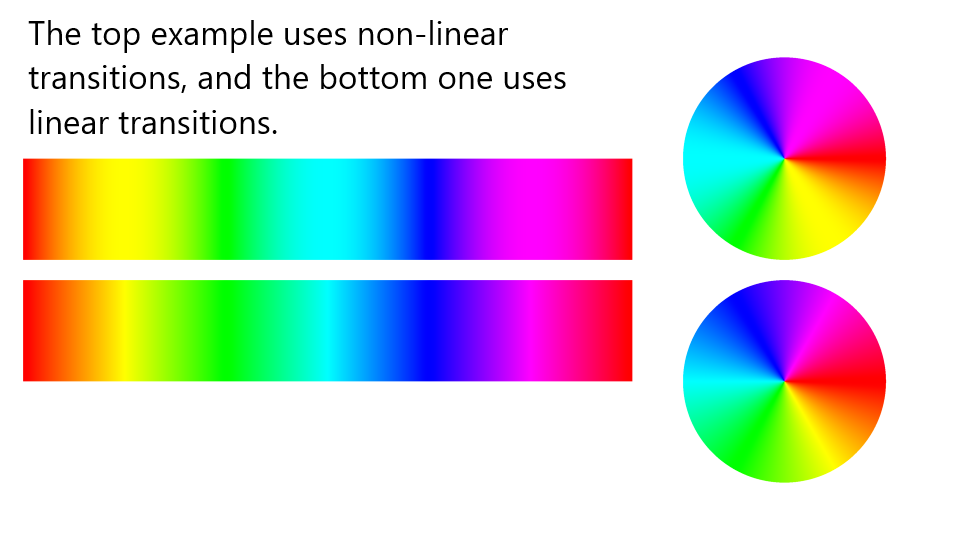
I'll share this here in case anyone ever finds it useful... The RGB rainbow
gradient is useless for data visualization but it's still popular for artistic
purposes. It has some limitations such as excessively bright points at the pure
yellow, cyan, and purple points, visually unbalanced proportions of the base
colors, and extreme differences in brightness values over the entire gradient
with the blue area being most noticeably dim. Here's a version with non-linear
transitions between the base colors that solves some of the problems. (The blue
part is still dim compared to the rest of the colors.) It also introduces a new
problem, which is that more transition points between the base colors are
required. In my opinion, at least five transition points are necessary to
achieve acceptable results. The maximum that POV-Ray 3.7 will allow is
forty-three.
Have an awesome day everyone!
Kind regards,
Dave Blandston
* * * I hope this "copy-and-pastes" OK!
#local NColorMapEntries = 7;
#local ColorMapEntry = array [NColorMapEntries] {
<255, 0, 0 >, //0 Red
<255, 255, 0 >, //1 Yellow
<0, 255, 0 >, //2 Green
<0, 255, 255>, //3 Cyan
<0, 0, 255>, //4 Blue
<255, 0, 255>, //5 Purple
<255, 0, 0 > //6 Red
} //array
#local NTransitionPoints = 43;
#local RainbowGradient_NonLinear = texture {
pigment {
radial
color_map {
#for (I, 0, NColorMapEntries - 2)
#for (J, 0, NTransitionPoints - 2)
#local Ratio = J / (NTransitionPoints - 1); //0 .. 1
#switch (I)
#case (0) //Red to yellow
#local A = 270 + Ratio * 90; //Fast to slow
#local Ratio = cos (radians (A)); //0 .. 1
#break
#case (1) //Yellow to green
#local A = 180 + Ratio * 90; //Slow to fast
#local Ratio = cos (radians (A)) + 1; //0 .. 1
#break
#case (2) //Green to cyan
#local A = 270 + Ratio * 90; //Fast to slow
#local Ratio = cos (radians (A)); //0 .. 1
#break
#case (3) //Cyan to blue
#local A = 180 + Ratio * 90; //Slow to fast
#local Ratio = cos (radians (A)) + 1; //0 .. 1
#break
#case (4) //Blue to purple
#local A = 270 + Ratio * 90; //Fast to slow
#local Ratio = cos (radians (A)); //0 .. 1
#break
#case (5) //Purple to red
#local A = 180 + Ratio * 90; //Slow to fast
#local Ratio = cos (radians (A)) + 1; //0 .. 1
#break
#end //#switch
#local CurrentColor = ColorMapEntry [I] * (1 - Ratio) +
ColorMapEntry [I + 1] * Ratio;
#local CurrentPoint = (I * NTransitionPoints + J) /
((NColorMapEntries - 1) * NTransitionPoints - 1);
[CurrentPoint color CurrentColor / 255]
#end //#for
#end //#for
} //color_map
} //pigment
rotate -90 * x
finish {emission .9}
} //texture
Post a reply to this message
Attachments:
Download 'sine wave transition.png' (48 KB)
Preview of image 'sine wave transition.png'
|
|
| |
| |
|
|
|
|
| |
| |
|
|
"Dave Blandston" <nomail@nomail> wrote:
> Greetings Folks,
>
> I'll share this here in case anyone ever finds it useful... The RGB rainbow
> gradient is useless for data visualization but it's still popular for artistic
> purposes. It has some limitations such as excessively bright points at the pure
> yellow, cyan, and purple points, visually unbalanced proportions of the base
> colors, and extreme differences in brightness values over the entire gradient
> with the blue area being most noticeably dim. Here's a version with non-linear
> transitions between the base colors that solves some of the problems. (The blue
> part is still dim compared to the rest of the colors.) It also introduces a new
> problem, which is that more transition points between the base colors are
> required. In my opinion, at least five transition points are necessary to
> achieve acceptable results. The maximum that POV-Ray 3.7 will allow is
> forty-three.
>
> Have an awesome day everyone!
>
> Kind regards,
> Dave Blandston
>
> * * * I hope this "copy-and-pastes" OK!
>
> #local NColorMapEntries = 7;
>
> #local ColorMapEntry = array [NColorMapEntries] {
> <255, 0, 0 >, //0 Red
> <255, 255, 0 >, //1 Yellow
> <0, 255, 0 >, //2 Green
> <0, 255, 255>, //3 Cyan
> <0, 0, 255>, //4 Blue
> <255, 0, 255>, //5 Purple
> <255, 0, 0 > //6 Red
> } //array
>
> #local NTransitionPoints = 43;
>
> #local RainbowGradient_NonLinear = texture {
> pigment {
> radial
> color_map {
> #for (I, 0, NColorMapEntries - 2)
> #for (J, 0, NTransitionPoints - 2)
> #local Ratio = J / (NTransitionPoints - 1); //0 .. 1
> #switch (I)
> #case (0) //Red to yellow
> #local A = 270 + Ratio * 90; //Fast to slow
> #local Ratio = cos (radians (A)); //0 .. 1
> #break
> #case (1) //Yellow to green
> #local A = 180 + Ratio * 90; //Slow to fast
> #local Ratio = cos (radians (A)) + 1; //0 .. 1
> #break
> #case (2) //Green to cyan
> #local A = 270 + Ratio * 90; //Fast to slow
> #local Ratio = cos (radians (A)); //0 .. 1
> #break
> #case (3) //Cyan to blue
> #local A = 180 + Ratio * 90; //Slow to fast
> #local Ratio = cos (radians (A)) + 1; //0 .. 1
> #break
> #case (4) //Blue to purple
> #local A = 270 + Ratio * 90; //Fast to slow
> #local Ratio = cos (radians (A)); //0 .. 1
> #break
> #case (5) //Purple to red
> #local A = 180 + Ratio * 90; //Slow to fast
> #local Ratio = cos (radians (A)) + 1; //0 .. 1
> #break
> #end //#switch
> #local CurrentColor = ColorMapEntry [I] * (1 - Ratio) +
> ColorMapEntry [I + 1] * Ratio;
> #local CurrentPoint = (I * NTransitionPoints + J) /
> ((NColorMapEntries - 1) * NTransitionPoints - 1);
> [CurrentPoint color CurrentColor / 255]
> #end //#for
> #end //#for
> } //color_map
> } //pigment
> rotate -90 * x
> finish {emission .9}
> } //texture
Very nice work!
If you want to get around the 3.7 color_map limit. Make an array of colors any
size you want then cut the array into peaces that are under 3.7 limits. Make
pigments with color_maps from those peaces with locations that match the
original location values of a color_map with all the colors in it. Then make a
pigment of all those pigments. Of course All the pigment should use the same
pattern!
I made a pigment with a 1000 colors as a test. I never did push the limit of
the number of colors. Now with 3.8 we wont need to :)
Have Fun!
Post a reply to this message
|
|
| |
| |
|
|
|
|
| |
| |
|
|
"Leroy" <whe### [at] gmail com> wrote:
> Very nice work!
> If you want to get around the 3.7 color_map limit. Make an array of colors any
> size you want then cut the array into peaces that are under 3.7 limits. Make
> pigments with color_maps from those peaces with locations that match the
> original location values of a color_map with all the colors in it. Then make a
> pigment of all those pigments. Of course All the pigment should use the same
> pattern!
Thank you Leroy, that's great advice!
Best regards,
Dave Blandston com> wrote:
> Very nice work!
> If you want to get around the 3.7 color_map limit. Make an array of colors any
> size you want then cut the array into peaces that are under 3.7 limits. Make
> pigments with color_maps from those peaces with locations that match the
> original location values of a color_map with all the colors in it. Then make a
> pigment of all those pigments. Of course All the pigment should use the same
> pattern!
Thank you Leroy, that's great advice!
Best regards,
Dave Blandston
Post a reply to this message
|
|
| |
| |
|
|
|
|
| |
|
|