|
|
|
|
|
|
| |
| |
|
|
|
|
| |
| |
|
|
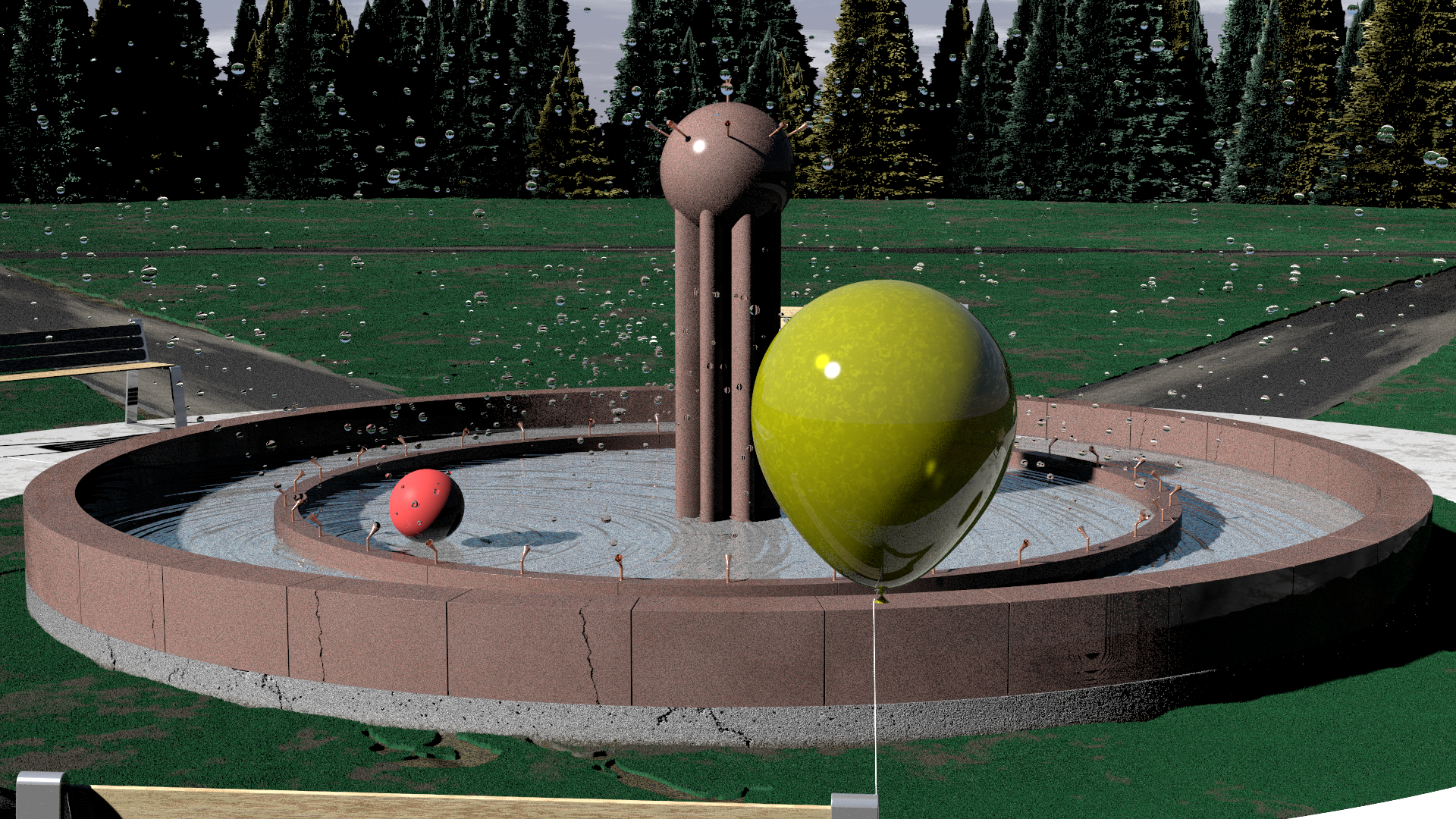
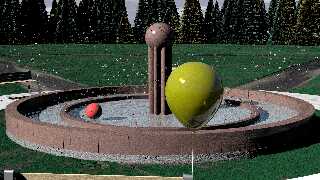
This is a work-in-progress inspired by a photo I took of my grandson
chasing soap bubbles in his yard.  As usual, it was supposed to be a
brief doodle, but has morphed beyond that.  I have started adding other
things that "float" in various ways to model in the scene as well.


--
-- Chris R
Post a reply to this message
Attachments:
Download 'scene.png' (3833 KB)
Preview of image 'scene.png'
|
|
| |
| |
|
|
|
|
| |
| |
|
|
"RATH, CHRISTOPHER A" <car### [at] comcast net> wrote:
> This is a work-in-progress inspired by a photo I took of my grandson
> chasing soap bubbles in his yard. As usual, it was supposed to be a
> brief doodle, but has morphed beyond that. I have started adding other
> things that "float" in various ways to model in the scene as well.
Are those floating objects intended to be bubbles? They look like solid water
droplets. Hollow bubbles do not invert the scene behind them.
The cracks in the pink granite blocks are conspicuously regular, but I'm sure
you already have plans for those. net> wrote:
> This is a work-in-progress inspired by a photo I took of my grandson
> chasing soap bubbles in his yard. As usual, it was supposed to be a
> brief doodle, but has morphed beyond that. I have started adding other
> things that "float" in various ways to model in the scene as well.
Are those floating objects intended to be bubbles? They look like solid water
droplets. Hollow bubbles do not invert the scene behind them.
The cracks in the pink granite blocks are conspicuously regular, but I'm sure
you already have plans for those.
Post a reply to this message
|
|
| |
| |
|
|
|
|
| |
| |
|
|
On 4/13/2024 2:55 PM, Cousin Ricky wrote:
> "RATH, CHRISTOPHER A" <car### [at] comcastnet> wrote:
>> This is a work-in-progress inspired by a photo I took of my grandson
>> chasing soap bubbles in his yard.  As usual, it was supposed to be a
>> brief doodle, but has morphed beyond that.  I have started adding other
>> things that "float" in various ways to model in the scene as well.
>
> Are those floating objects intended to be bubbles?  They look like solid water
> droplets.  Hollow bubbles do not invert the scene behind them.
>
> The cracks in the pink granite blocks are conspicuously regular, but I'm sure
> you already have plans for those.
>
>
>
Yes, the are supposed to be bubbles.  I'm not sure what I'm doing wrong
yet, but I have noticed that effect.  They are isosurface shells with
very thin walls.  The material has an ior of 1.33, which is wrong and is
probably causing the issue.  I guess a soap bubble has an ior pretty
close to 1, so I'll have to play with that.  I think when I was trying
to get the irrid right I pushed the ior back up, but got that side-effect.

The balloon isn't quite right either.  It's too glossy so it looks more
like glass.

I think the cracks need to line up with the cracks in the foundation as
well.  More things to play with.
--
-- Chris R
Post a reply to this message
|
|
| |
| |
|
|
|
|
| |
| |
|
|
Le 2024-04-13 à 15:07, RATH, CHRISTOPHER A a écrit :
> On 4/13/2024 2:55 PM, Cousin Ricky wrote:
>> "RATH, CHRISTOPHER A" <car### [at] comcastnet> wrote:
>>> This is a work-in-progress inspired by a photo I took of my grandson
>>> chasing soap bubbles in his yard.  As usual, it was supposed to be a
>>> brief doodle, but has morphed beyond that.  I have started adding other
>>> things that "float" in various ways to model in the scene as well.
>>
>> Are those floating objects intended to be bubbles?  They look like
>> solid water
>> droplets.  Hollow bubbles do not invert the scene behind them.
>>
>> The cracks in the pink granite blocks are conspicuously regular, but
>> I'm sure
>> you already have plans for those.
>>
>>
>>
> Yes, the are supposed to be bubbles.  I'm not sure what I'm doing wrong
> yet, but I have noticed that effect.  They are isosurface shells with
> very thin walls.  The material has an ior of 1.33, which is wrong and is
> probably causing the issue.  I guess a soap bubble has an ior pretty
> close to 1, so I'll have to play with that.  I think when I was trying
> to get the irrid right I pushed the ior back up, but got that side-effect.
>
> The balloon isn't quite right either.  It's too glossy so it looks more
> like glass.
>
> I think the cracks need to line up with the cracks in the foundation as
> well.  More things to play with.
Check with your isosurface that it actually have an inner opening.
Render just a single one cut in half using a difference or intersection.
Assuming that Bubble_Object is defined at the origin and having it's own
texture :
difference{
	Bubble_Object
	box{<100, 100, 0><-100, -100, -100> pigment<1,0,0>}
   }
or
intersection{
	Bubble_Object
	box{<100, 100, 0><-100, -100, 100> pigment<1,0,0>}
   }
You need to see only a thin line of red around the shape. If the whole
surface is red, then, it's not hollowed out properly.

The ior is correct. Bubbles are mostly water, and water's ior is 1.33.
The best/easiest way to model those is the difference of two spheres.
difference{
	sphere{Centre, Radius}
	sphere{Centre, Radius-0.001}
	pigment{rgbt 1}
	finish{reflection 1 specular 1 fresnel irid Value}
	interior{ ior 1.33 }
   }

The balloon need to have some blurring in the reflection. Probably also
need to reduce the amount of reflection.
Post a reply to this message
|
|
| |
| |
|
|
|
|
| |
| |
|
|
"RATH, CHRISTOPHER A" <car### [at] comcastnet> wrote:
> This is a work-in-progress inspired by a photo I took of my grandson
> chasing soap bubbles in his yard.  As usual, it was supposed to be a
> brief doodle, but has morphed beyond that.  I have started adding other
> things that "float" in various ways to model in the scene as well.
>
>
> --
> -- Chris R

I like the way you play. Why not use Iridescence on the soap bubbles?
That is what it was made for.
Have Fun!
Post a reply to this message
|
|
| |
| |
|
|
|
|
| |
| |
|
|
On 4/13/2024 2:55 PM, Cousin Ricky wrote:
> "RATH, CHRISTOPHER A" <car### [at] comcastnet> wrote:
>> This is a work-in-progress inspired by a photo I took of my grandson
>> chasing soap bubbles in his yard.  As usual, it was supposed to be a
>> brief doodle, but has morphed beyond that.  I have started adding other
>> things that "float" in various ways to model in the scene as well.
>
> Are those floating objects intended to be bubbles?  They look like solid water
> droplets.  Hollow bubbles do not invert the scene behind them.
>
> The cracks in the pink granite blocks are conspicuously regular, but I'm sure
> you already have plans for those.
>
>
>
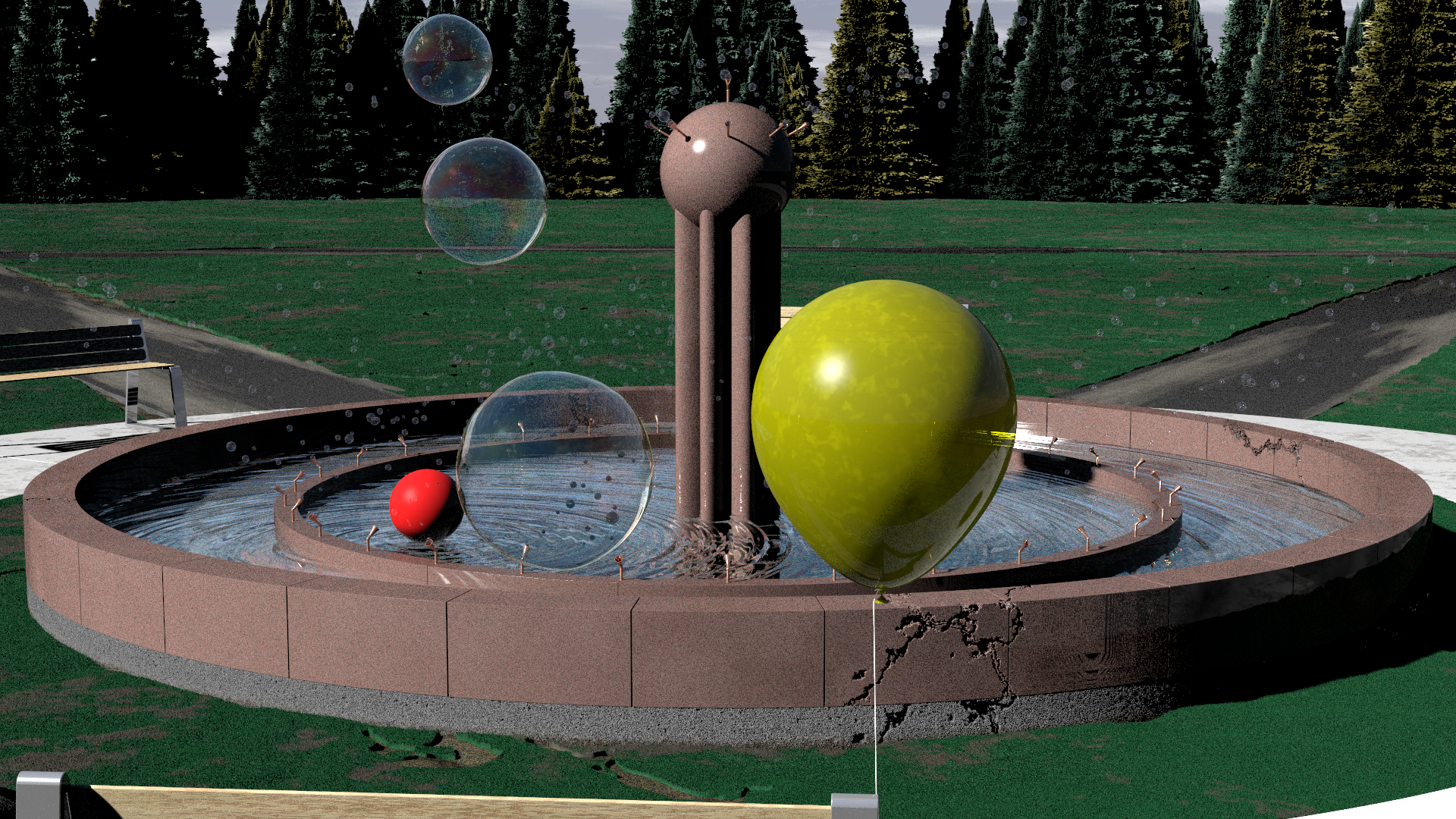
I fixed the issue with the bubbles.  The objects were defined to allow
for a variable wall thickness between 0.33 and 2 microns.  In my
experiments the test bubbles were all 1 micron or more thick and they
always looked right.  However, when I used a value < 1, I was running
into the floating point range problem that was giving very weird results.

So, I changed the thickness range so no bubble is ever less than 1
micron thick and now they look much better.

I'm playing with the fountain crack and the balloon texture now and will
post an update later.

--
-- Chris R
Post a reply to this message
|
|
| |
| |
|
|
|
|
| |
| |
|
|
On 4/15/24 15:31, RATH, CHRISTOPHER A wrote:
> However, when I used a value < 1, I was running into the floating point
> range problem that was giving very weird results.

Moving to a smaller isosurface accuracy setting(a) might well help too,
if you've not already tried it.

Bill P.

(a) - As a rough rule, accuracy values of 1e-5 / 1e=6 are about the best
we can actually achieve with isosurfaces.
Post a reply to this message
|
|
| |
| |
|
|
|
|
| |
| |
|
|
"RATH, CHRISTOPHER A" <car### [at] comcastnet> wrote:

> I'm playing with the fountain crack and the balloon texture now and will
> post an update later.

This is looking great - I think what you need for the balloon is
transparency/filter, double_illumination, and SSLT.

How did you make that cracked brick?   It looks awesome!
Post a reply to this message
|
|
| |
| |
|
|
|
|
| |
| |
|
|
Le 2024-04-16 à 06:33, Bald Eagle a écrit :
> "RATH, CHRISTOPHER A" <car### [at] comcastnet> wrote:
>
>> I'm playing with the fountain crack and the balloon texture now and will
>> post an update later.
>
> This is looking great - I think what you need for the balloon is
> transparency/filter, double_illumination, and SSLT.
>
More like back side illumination + radiosity with recursion_level 3 or
4. That would simulate the thin walls of a balloon way better than SSLT.
Yes, add a small amount of filter.
pigment{Yellow filter 0.1}//maybe even less
Post a reply to this message
|
|
| |
| |
|
|
|
|
| |
| |
|
|
On 4/15/2024 1:03 PM, Leroy wrote:
> "RATH, CHRISTOPHER A" <car### [at] comcastnet> wrote:
>> This is a work-in-progress inspired by a photo I took of my grandson
>> chasing soap bubbles in his yard.  As usual, it was supposed to be a
>> brief doodle, but has morphed beyond that.  I have started adding other
>> things that "float" in various ways to model in the scene as well.
>>
>>
>> --
>> -- Chris R
>
> I like the way you play. Why not use Iridescence on the soap bubbles?
> That is what it was made for.
> Have Fun!
>
The bubbles do have iridescence; the bug in the shape is probably making
it too hard to see.  I will probably put a few bubbles closer to the
camera so you can see it better in the final image.

--
-- Chris R
Post a reply to this message
|
|
| |
| |
|
|
|
|
| |
| |
|
|
On 4/15/2024 10:51 PM, William F Pokorny wrote:
> On 4/15/24 15:31, RATH, CHRISTOPHER A wrote:
>> However, when I used a value < 1, I was running into the floating
>> point range problem that was giving very weird results.
>
> Moving to a smaller isosurface accuracy setting(a) might well help too,
> if you've not already tried it.
>
> Bill P.
>
> (a) - As a rough rule, accuracy values of 1e-5 / 1e=6 are about the best
> we can actually achieve with isosurfaces.
>
I'm actually using 1e-7, which seems to make a difference from 1e-6.
I'm not getting any artifacts at 1e-7, but there are a few on the front
of bubbles at 1e-6.

--
-- Chris R
Post a reply to this message
|
|
| |
| |
|
|
|
|
| |
| |
|
|
On 4/16/2024 6:33 AM, Bald Eagle wrote:
> "RATH, CHRISTOPHER A" <car### [at] comcastnet> wrote:
>
>> I'm playing with the fountain crack and the balloon texture now and will
>> post an update later.
>
> This is looking great - I think what you need for the balloon is
> transparency/filter, double_illumination, and SSLT.
>
> How did you make that cracked brick?   It looks awesome!
>
>
>
I'm playing with a bunch of suggestions for the balloon.  Currently the
texture is:

     #local _p1  = pigment { color rgbf <0.6, 0.6, 0.005, 0.7> }
     #local _p2  = pigment { color rgbf <0.6, 0.6, 0.005, 0.6> }

         material {
             texture {
                 pigment {
                     bozo
                     pigment_map {
                         [0.0 _p1]
                         [0.5 _p1]
                         [0.8 _p2]
                         [1.0 _p2]
                     }
                     warp { turbulence 0.9 }
                     scale 2
                 }
                 //normal { bumps 0.01 scale 0.01 }
                 finish {
                     fresnel 0.4
                     specular albedo 1.0
                     roughness 0.005
                     diffuse albedo 1.0
                     reflection { 0.4 }
                 }
             }
             interior { ior 1.5 }
         }

I'm working out how to get a more realistic reflection and will look at
the suggestions provided here.  I haven't tried rendering this with
radiosity yet.
--
-- Chris R
Post a reply to this message
|
|
| |
| |
|
|
|
|
| |
| |
|
|
On 4/16/2024 6:33 AM, Bald Eagle wrote:
> "RATH, CHRISTOPHER A" <car### [at] comcastnet> wrote:
>
>> I'm playing with the fountain crack and the balloon texture now and will
>> post an update later.
>
> This is looking great - I think what you need for the balloon is
> transparency/filter, double_illumination, and SSLT.
>
> How did you make that cracked brick?   It looks awesome!
>
>
>

As for the brick, (which is changing slightly in the updated version), I
do almost everything with isosurfaces.  The bricks are just slices of a
cylindrical tube, and I subtract out a pigment function based on the
marble pattern.  In the first version, each block had its own random
cracked marble pattern applied to it.  In the new one, there is a global
crack pattern that gets applied to the foundation and each block so
there is consistency with the way the fountain is cracking.

--
-- Chris R
Post a reply to this message
|
|
| |
| |
|
|
|
|
| |
| |
|
|
On 4/16/2024 9:35 AM, RATH, CHRISTOPHER A wrote:
> On 4/15/2024 1:03 PM, Leroy wrote:
>> "RATH, CHRISTOPHER A" <car### [at] comcastnet> wrote:
>>> This is a work-in-progress inspired by a photo I took of my grandson
>>> chasing soap bubbles in his yard.  As usual, it was supposed to be a
>>> brief doodle, but has morphed beyond that.  I have started adding other
>>> things that "float" in various ways to model in the scene as well.
>>>
>>>
>>> --
>>> -- Chris R
>>
>> I like the way you play. Why not use Iridescence on the soap bubbles?
>> That is what it was made for.
>> Have Fun!
>>
> The bubbles do have iridescence; the bug in the shape is probably making
> it too hard to see.  I will probably put a few bubbles closer to the
> camera so you can see it better in the final image.
>
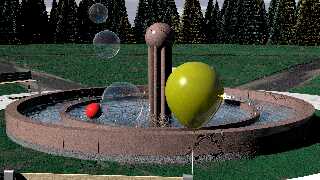
This is a ways from being done, but I wanted to share the updated image
with the bubbles fixed.  The balloon texture is still not quite right,
even when I render with radiosity (which this version does not).

--
-- Chris R
Post a reply to this message
Attachments:
Download 'scene.png' (3793 KB)
Preview of image 'scene.png'
|
|
| |
| |
|
|
|
|
| |
| |
|
|
On 2024-04-17 08:28 (-4), RATH, CHRISTOPHER A wrote:
>>
> This is a ways from being done, but I wanted to share the updated image
> with the bubbles fixed.  The balloon texture is still not quite right,
> even when I render with radiosity (which this version does not).

I doubt radiosity makes any difference here.  I would give Alain's
suggestion of blurred reflection a try.  If you haven't seen it yet, the
technique is at:

https://wiki.povray.org/content/Knowledgebase:Language_Questions_and_Tips#Topic_13

To avoid having this technique stall and take forever, use Alain's
modification:

https://news.povray.org/49b9809b%241%40news.povray.org

And I would cut the reflection in half or even lower; and if you're
using finish-level Fresnel, remember to use the reduced reflection as
its argument:

finish
{ fresnel 0.5
  reflection { 0.5 fresnel }
  conserve_energy
  ...
}

The reflection of the water highlights on the right edge of the balloon
looks suspiciously metallic.  Is this not a rubber balloon?
Post a reply to this message
|
|
| |
| |
|
|
|
|
| |
| |
|
|
Le 2024-04-17 à 12:17, Cousin Ricky a écrit :
> On 2024-04-17 08:28 (-4), RATH, CHRISTOPHER A wrote:
>>>
>> This is a ways from being done, but I wanted to share the updated image
>> with the bubbles fixed.  The balloon texture is still not quite right,
>> even when I render with radiosity (which this version does not).
>
> I doubt radiosity makes any difference here.  I would give Alain's
> suggestion of blurred reflection a try.  If you haven't seen it yet, the
> technique is at:
>
> https://wiki.povray.org/content/Knowledgebase:Language_Questions_and_Tips#Topic_13
>
> To avoid having this technique stall and take forever, use Alain's
> modification:
>
> https://news.povray.org/49b9809b%241%40news.povray.org
>
> And I would cut the reflection in half or even lower; and if you're
> using finish-level Fresnel, remember to use the reduced reflection as
> its argument:
>
> finish
> { fresnel 0.5
>    reflection { 0.5 fresnel }
>    conserve_energy
>    ...
> }
>
> The reflection of the water highlights on the right edge of the balloon
> looks suspiciously metallic.  Is this not a rubber balloon?
>
I agree about toning the transparency down. I'd go as far as dividing it
by 3 to 4.
Post a reply to this message
|
|
| |
| |
|
|
|
|
| |
| |
|
|
I really like the trees.
Wondering if you can divvy them up by progressively subtracting inverted cones
from them and recombining the sections with some randomness to make them a
little less perfectly conical.

The planks on the bench need to be far thicker.

I have no doubt that you can figure out what to do with the granite blocks.

I'd experiment with jiggling and bending the water spouts, and adding in a
verdigris patina to the texture.

The grass and paths are looking good.
For the paths, consider that grass usually grows inward from the edges, you may
have rogue tufts in the middle of the path, and perhaps ruts with water /
different texture or color - maybe cracked mud.
Wildflowers, dandelions, bees, butterflies...

Would be great if you could throw a few birds into the scene.
Maybe a squirrel.

The field looks rather - empty.  Not saying dump some trash onto it, but maybe a
bike, a sunbathing towel, ... just some more indicators that it's been recently
visited and used.  A trash can and or a drinking fountain would be cool too.

- BE
Post a reply to this message
|
|
| |
| |
|
|
|
|
| |
| |
|
|
On 4/17/2024 5:32 PM, Bald Eagle wrote:
> I really like the trees.
> Wondering if you can divvy them up by progressively subtracting inverted cones
> from them and recombining the sections with some randomness to make them a
> little less perfectly conical.
>
> The planks on the bench need to be far thicker.
>
> I have no doubt that you can figure out what to do with the granite blocks.
>
> I'd experiment with jiggling and bending the water spouts, and adding in a
> verdigris patina to the texture.
>
> The grass and paths are looking good.
> For the paths, consider that grass usually grows inward from the edges, you may
> have rogue tufts in the middle of the path, and perhaps ruts with water /
> different texture or color - maybe cracked mud.
> Wildflowers, dandelions, bees, butterflies...
>
> Would be great if you could throw a few birds into the scene.
> Maybe a squirrel.
>
> The field looks rather - empty.  Not saying dump some trash onto it, but maybe a
> bike, a sunbathing towel, ... just some more indicators that it's been recently
> visited and used.  A trash can and or a drinking fountain would be cool too.
>
> - BE
>
>
The trees are isosurfaces using a cone function with noise added in to
get the layers of branches.  I can add some noise to the slope function
that drives the main shape and perturb the central access as well.  I
was surprised, though, by how nice they look with so little effort.

The spouts actually shoot bubbles, but you are right, the texture is
just a pure RC3Metal.  They need a little texture as well as some
corrosion, and the directions they are pointing don't have any noise in
them either.

I started working on better grass for the foreground, but then got
distracted by the balloon.  I'll have to work out some ways to get the
grass to grow more realistically into the sides of the path.  I'll
probably use whatever near-view grass shapes to create tufts in the path
as well.

The current working version has a cluster of balloons floating over the
field.  I'll be adding more elements as I get the existing ones cleaned up.

-- Chris R
--
-- Chris R
Post a reply to this message
|
|
| |
| |
|
|
|
|
| |
| |
|
|
On 4/17/2024 12:17 PM, Cousin Ricky wrote:
> On 2024-04-17 08:28 (-4), RATH, CHRISTOPHER A wrote:
>>>
>> This is a ways from being done, but I wanted to share the updated image
>> with the bubbles fixed.  The balloon texture is still not quite right,
>> even when I render with radiosity (which this version does not).
>
> I doubt radiosity makes any difference here.  I would give Alain's
> suggestion of blurred reflection a try.  If you haven't seen it yet, the
> technique is at:
>
> https://wiki.povray.org/content/Knowledgebase:Language_Questions_and_Tips#Topic_13
>
> To avoid having this technique stall and take forever, use Alain's
> modification:
>
> https://news.povray.org/49b9809b%241%40news.povray.org
>
> And I would cut the reflection in half or even lower; and if you're
> using finish-level Fresnel, remember to use the reduced reflection as
> its argument:
>
> finish
> { fresnel 0.5
>    reflection { 0.5 fresnel }
>    conserve_energy
>    ...
> }
>
> The reflection of the water highlights on the right edge of the balloon
> looks suspiciously metallic.  Is this not a rubber balloon?
>
I looked at the code for doing the blurred reflections and started
experimenting with it.  I was able to get a nice blurring mirror using
CSG objects and this technique where I can play with the variables.

However, the balloon is an isosurface with a pretty small accuracy value
to remove artifacts, so hitting it with 40X more rays drops the
rendering to a halt.  I can get it to go with a small blur count, but I
don't think that will give me the blur effect.

I'm still playing with it.  If I can find a good way to create the
balloon using CSG instead of isosurfaces that may be the better
solution, since I don't need a bumpy surface.

-- Chris R
--
-- Chris R
Post a reply to this message
|
|
| |
| |
|
|
|
|
| |
| |
|
|
Le 2024-04-18 à 08:56, RATH, CHRISTOPHER A a écrit :
> On 4/17/2024 12:17 PM, Cousin Ricky wrote:
>> On 2024-04-17 08:28 (-4), RATH, CHRISTOPHER A wrote:
>>>>
>>> This is a ways from being done, but I wanted to share the updated image
>>> with the bubbles fixed.  The balloon texture is still not quite right,
>>> even when I render with radiosity (which this version does not).
>>
>> I doubt radiosity makes any difference here.  I would give Alain's
>> suggestion of blurred reflection a try.  If you haven't seen it yet, the
>> technique is at:
>>
>> https://wiki.povray.org/content/Knowledgebase:Language_Questions_and_Tips#Topic_13
>>
>> To avoid having this technique stall and take forever, use Alain's
>> modification:
>>
>> https://news.povray.org/49b9809b%241%40news.povray.org
>>
>> And I would cut the reflection in half or even lower; and if you're
>> using finish-level Fresnel, remember to use the reduced reflection as
>> its argument:
>>
>> finish
>> { fresnel 0.5
>>    reflection { 0.5 fresnel }
>>    conserve_energy
>>    ...
>> }
>>
>> The reflection of the water highlights on the right edge of the balloon
>> looks suspiciously metallic.  Is this not a rubber balloon?
>>
> I looked at the code for doing the blurred reflections and started
> experimenting with it.  I was able to get a nice blurring mirror using
> CSG objects and this technique where I can play with the variables.
>
> However, the balloon is an isosurface with a pretty small accuracy value
> to remove artifacts, so hitting it with 40X more rays drops the
> rendering to a halt.  I can get it to go with a small blur count, but I
> don't think that will give me the blur effect.
>
> I'm still playing with it.  If I can find a good way to create the
> balloon using CSG instead of isosurfaces that may be the better
> solution, since I don't need a bumpy surface.
>
> -- Chris R
Then, you need to use the micro-normal technique. Add a normal statement
scaled very small.

normal{granite scale 0.01}

Then use a reasonable amount of antialiasing. Without antialiasing, the
micro-normal will result in a grainy image.

Optionally : You may add some averaged blurring using a small number of
textures. Using averaged textures and micro-normals, you can use about 4
to 6 averaged textures and get very good results.
Post a reply to this message
|
|
| |
| |
|
|
|
|
| |
| |
|
|
"RATH, CHRISTOPHER A" <car### [at] comcastnet> wrote:

> The trees are isosurfaces using a cone function with noise added in to
> get the layers of branches.  I can add some noise to the slope function
> that drives the main shape and perturb the central access as well.  I
> was surprised, though, by how nice they look with so little effort.

Those are _isosurfaces_??!
That's amazing.

I'm glad you share your WIPs as things develop.
You have a lot of interesting approaches, and your scene turn out really well!

- BE
Post a reply to this message
|
|
| |
| |
|
|
|
|
| |
| |
|
|
On 4/18/2024 1:35 PM, Alain Martel wrote:
> Le 2024-04-18 à 08:56, RATH, CHRISTOPHER A a écrit :
>> On 4/17/2024 12:17 PM, Cousin Ricky wrote:
>>> On 2024-04-17 08:28 (-4), RATH, CHRISTOPHER A wrote:
>>>>>
>>>> This is a ways from being done, but I wanted to share the updated image
>>>> with the bubbles fixed.  The balloon texture is still not quite right,
>>>> even when I render with radiosity (which this version does not).
>>>
>>> I doubt radiosity makes any difference here.  I would give Alain's
>>> suggestion of blurred reflection a try.  If you haven't seen it yet, the
>>> technique is at:
>>>
>>> https://wiki.povray.org/content/Knowledgebase:Language_Questions_and_Tips#Topic_13
>>>
>>> To avoid having this technique stall and take forever, use Alain's
>>> modification:
>>>
>>> https://news.povray.org/49b9809b%241%40news.povray.org
>>>
>>> And I would cut the reflection in half or even lower; and if you're
>>> using finish-level Fresnel, remember to use the reduced reflection as
>>> its argument:
>>>
>>> finish
>>> { fresnel 0.5
>>>    reflection { 0.5 fresnel }
>>>    conserve_energy
>>>    ...
>>> }
>>>
>>> The reflection of the water highlights on the right edge of the balloon
>>> looks suspiciously metallic.  Is this not a rubber balloon?
>>>
>> I looked at the code for doing the blurred reflections and started
>> experimenting with it.  I was able to get a nice blurring mirror using
>> CSG objects and this technique where I can play with the variables.
>>
>> However, the balloon is an isosurface with a pretty small accuracy
>> value to remove artifacts, so hitting it with 40X more rays drops the
>> rendering to a halt.  I can get it to go with a small blur count, but
>> I don't think that will give me the blur effect.
>>
>> I'm still playing with it.  If I can find a good way to create the
>> balloon using CSG instead of isosurfaces that may be the better
>> solution, since I don't need a bumpy surface.
>>
>> -- Chris R
> Then, you need to use the micro-normal technique. Add a normal statement
> scaled very small.
>
> normal{granite scale 0.01}
>
> Then use a reasonable amount of antialiasing. Without antialiasing, the
> micro-normal will result in a grainy image.
>
> Optionally : You may add some averaged blurring using a small number of
> textures. Using averaged textures and micro-normals, you can use about 4
> to 6 averaged textures and get very good results.

I noticed, (duh), that my complex shape function for the balloons, (A 2D
polar function I found that I then turn into an SOR in the isosurface),
looks remarkably like the built-in ovus shape with a slightly stretched
distance value.  So, I recreated the balloons using that and was able to
get a reasonable rendering time with a small scale blur and 10 blur
samples that looks pretty good "in the lab", which included a wavy
reflective pool to mimic the reflections in the fountain.  It isn't as
fast as a simple box or sphere, but better than the isosurface.

However, now that I've inserted it into the scene my rendering is
getting stuck on the balloon again, even with pretty bad anti-aliasing,
so I will go back to the drawing board with your suggestion above using
the micro-normals.  I think dropping the fresnel and reflection values
to 0.3 or lower is at least removing the unexpected shininess, but maybe
the micro-normals will give enough of the blurring to make it realistic
enough.

--
-- Chris R
Post a reply to this message
|
|
| |
| |
|
|
|
|
| |
| |
|
|
On 4/18/2024 8:08 PM, Bald Eagle wrote:
> "RATH, CHRISTOPHER A" <car### [at] comcastnet> wrote:
>
>> The trees are isosurfaces using a cone function with noise added in to
>> get the layers of branches.  I can add some noise to the slope function
>> that drives the main shape and perturb the central access as well.  I
>> was surprised, though, by how nice they look with so little effort.
>
> Those are _isosurfaces_??!
> That's amazing.
>
> I'm glad you share your WIPs as things develop.
> You have a lot of interesting approaches, and your scene turn out really well!
>
> - BE
>
>
>
Isosurfaces are my go-to for most of the elements in my scenes, unless
they are too far away for surface texture to be noticeable.  In close-up
views, I never find that just using normals gives me the look that I
want, whereas I have complete control with an isosurface.

I pay for this, though, as my scenes tend to render pretty slowly...

--
-- Chris R
Post a reply to this message
|
|
| |
| |
|
|
|
|
| |
| |
|
|
On 4/18/2024 1:35 PM, Alain Martel wrote:
> Le 2024-04-18 à 08:56, RATH, CHRISTOPHER A a écrit :
>> On 4/17/2024 12:17 PM, Cousin Ricky wrote:
>>> On 2024-04-17 08:28 (-4), RATH, CHRISTOPHER A wrote:
>>>>>
>>>> This is a ways from being done, but I wanted to share the updated image
>>>> with the bubbles fixed.  The balloon texture is still not quite right,
>>>> even when I render with radiosity (which this version does not).
>>>
>>> I doubt radiosity makes any difference here.  I would give Alain's
>>> suggestion of blurred reflection a try.  If you haven't seen it yet, the
>>> technique is at:
>>>
>>> https://wiki.povray.org/content/Knowledgebase:Language_Questions_and_Tips#Topic_13
>>>
>>> To avoid having this technique stall and take forever, use Alain's
>>> modification:
>>>
>>> https://news.povray.org/49b9809b%241%40news.povray.org
>>>
>>> And I would cut the reflection in half or even lower; and if you're
>>> using finish-level Fresnel, remember to use the reduced reflection as
>>> its argument:
>>>
>>> finish
>>> { fresnel 0.5
>>>    reflection { 0.5 fresnel }
>>>    conserve_energy
>>>    ...
>>> }
>>>
>>> The reflection of the water highlights on the right edge of the balloon
>>> looks suspiciously metallic.  Is this not a rubber balloon?
>>>
>> I looked at the code for doing the blurred reflections and started
>> experimenting with it.  I was able to get a nice blurring mirror using
>> CSG objects and this technique where I can play with the variables.
>>
>> However, the balloon is an isosurface with a pretty small accuracy
>> value to remove artifacts, so hitting it with 40X more rays drops the
>> rendering to a halt.  I can get it to go with a small blur count, but
>> I don't think that will give me the blur effect.
>>
>> I'm still playing with it.  If I can find a good way to create the
>> balloon using CSG instead of isosurfaces that may be the better
>> solution, since I don't need a bumpy surface.
>>
>> -- Chris R
> Then, you need to use the micro-normal technique. Add a normal statement
> scaled very small.
>
> normal{granite scale 0.01}
>
> Then use a reasonable amount of antialiasing. Without antialiasing, the
> micro-normal will result in a grainy image.
>
> Optionally : You may add some averaged blurring using a small number of
> textures. Using averaged textures and micro-normals, you can use about 4
> to 6 averaged textures and get very good results.
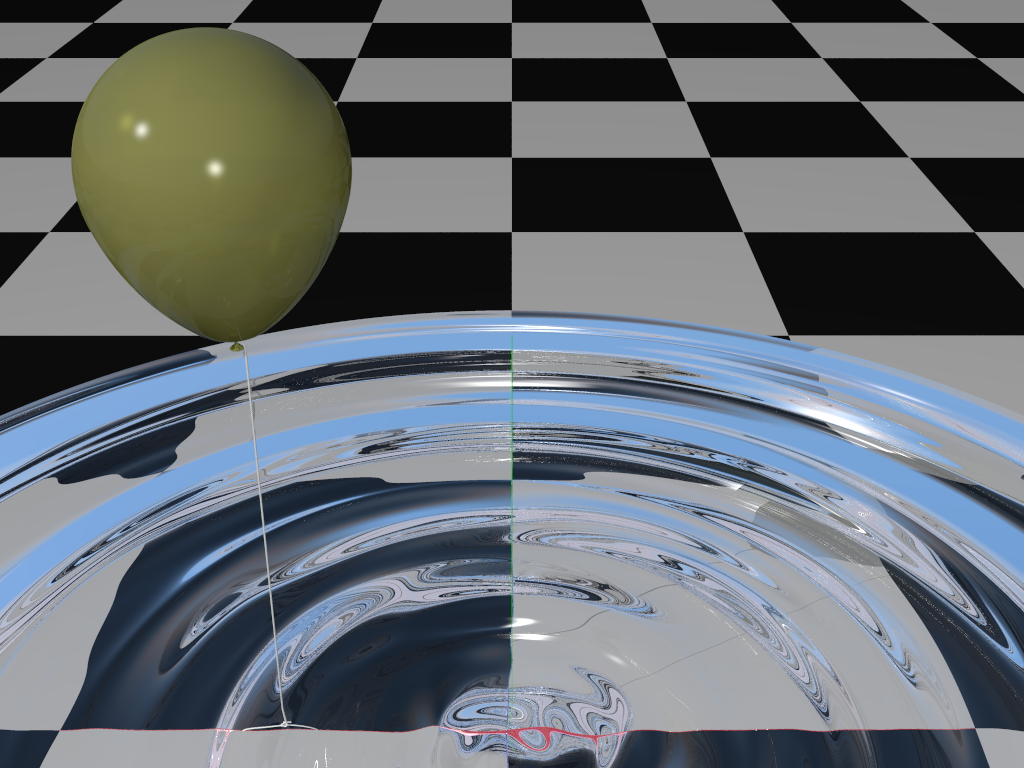
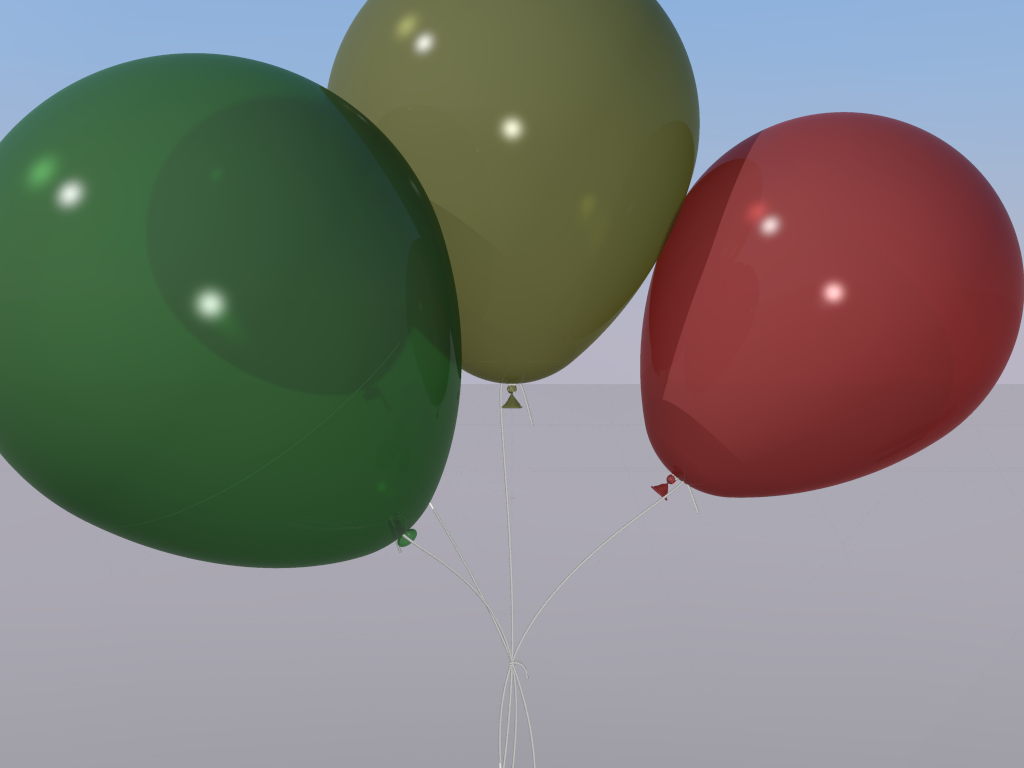
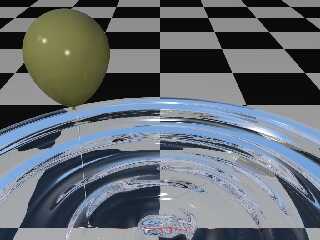
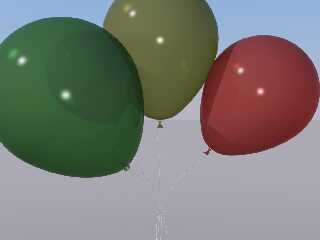
Here's what I've come up with so far.  I abandoned the texture-averaging
blurring technique because it's just too slow, even using the ovus.  I'm
using a micro-normal instead.  I also added a small transmit value along
with the filter to the pigments.  The colors have also been muted to
better reflect what happens when you inflate a balloon.  The reflection
has been toned down quite a bit.

These are test renderings of the distant balloon cluster and the nearby
balloon.  Getting them to look like this in the full scene is still a
bit of a challenge.

--
-- Chris R
Post a reply to this message
Attachments:
Download 'balloon-bench.png' (613 KB)
Download 'balloon-cluster.png' (305 KB)
Preview of image 'balloon-bench.png'
Preview of image 'balloon-cluster.png'
|
|
| |
| |
|
|
|
|
| |
| |
|
|
"RATH, CHRISTOPHER A" <car### [at] comcastnet> wrote:
> On 4/18/2024 1:35 PM, Alain Martel wrote:
> > Le 2024-04-18 à 08:56, RATH, CHRISTOPHER A a écrit :
> >> On 4/17/2024 12:17 PM, Cousin Ricky wrote:
> >>> On 2024-04-17 08:28 (-4), RATH, CHRISTOPHER A wrote:
> >>>>>
> >>>> This is a ways from being done, but I wanted to share the updated image
> >>>> with the bubbles fixed.  The balloon texture is still not quite right,
> >>>> even when I render with radiosity (which this version does not).
> >>>
> >>> I doubt radiosity makes any difference here.  I would give Alain's
> >>> suggestion of blurred reflection a try.  If you haven't seen it yet, the
> >>> technique is at:
> >>>
> >>>
https://wiki.povray.org/content/Knowledgebase:Language_Questions_and_Tips#Topic_13
> >>>
> >>> To avoid having this technique stall and take forever, use Alain's
> >>> modification:
> >>>
> >>> https://news.povray.org/49b9809b%241%40news.povray.org
> >>>
> >>> And I would cut the reflection in half or even lower; and if you're
> >>> using finish-level Fresnel, remember to use the reduced reflection as
> >>> its argument:
> >>>
> >>> finish
> >>> { fresnel 0.5
> >>>    reflection { 0.5 fresnel }
> >>>    conserve_energy
> >>>    ...
> >>> }
> >>>
> >>> The reflection of the water highlights on the right edge of the balloon
> >>> looks suspiciously metallic.  Is this not a rubber balloon?
> >>>
> >> I looked at the code for doing the blurred reflections and started
> >> experimenting with it.  I was able to get a nice blurring mirror using
> >> CSG objects and this technique where I can play with the variables.
> >>
> >> However, the balloon is an isosurface with a pretty small accuracy
> >> value to remove artifacts, so hitting it with 40X more rays drops the
> >> rendering to a halt.  I can get it to go with a small blur count, but
> >> I don't think that will give me the blur effect.
> >>
> >> I'm still playing with it.  If I can find a good way to create the
> >> balloon using CSG instead of isosurfaces that may be the better
> >> solution, since I don't need a bumpy surface.
> >>
> >> -- Chris R
> > Then, you need to use the micro-normal technique. Add a normal statement
> > scaled very small.
> >
> > normal{granite scale 0.01}
> >
> > Then use a reasonable amount of antialiasing. Without antialiasing, the
> > micro-normal will result in a grainy image.
> >
> > Optionally : You may add some averaged blurring using a small number of
> > textures. Using averaged textures and micro-normals, you can use about 4
> > to 6 averaged textures and get very good results.
> Here's what I've come up with so far.  I abandoned the texture-averaging
> blurring technique because it's just too slow, even using the ovus.  I'm
> using a micro-normal instead.  I also added a small transmit value along
> with the filter to the pigments.  The colors have also been muted to
> better reflect what happens when you inflate a balloon.  The reflection
> has been toned down quite a bit.
>
> These are test renderings of the distant balloon cluster and the nearby
> balloon.  Getting them to look like this in the full scene is still a
> bit of a challenge.
>
> --
> -- Chris R

Finished a radiosity rendering with updated materials for the balloons.  I think
it's better than the original.

-- Chris R
Post a reply to this message
Attachments:
Download 'scene-v1.1-hd-mq-rad-2024-05-29.png' (4204 KB)
Preview of image 'scene-v1.1-hd-mq-rad-2024-05-29.png'

|
|
| |
| |
|
|
|
|
| |
|
|