|
|
|
|
|
|
| |
| |
|
|
|
|
| |
| |
|
|
Updated train on workbench. Added Santa hat on mannequin, ribbon/bow on train,
and a few Christmas cards. Getting close on this one. May tweak the view angle a
bit.
Miller.
Post a reply to this message
Attachments:
Download 'workbench_train_02.png' (3004 KB)
Preview of image 'workbench_train_02.png'

|
|
| |
| |
|
|
|
|
| |
| |
|
|
"Mike Miller" <mil### [at] gmail com> wrote:
> Updated train on workbench. Added Santa hat on mannequin, ribbon/bow on train,
> and a few Christmas cards. Getting close on this one. May tweak the view angle a
> bit.
> Miller.
The textures of the metal trimmings on the locomotive look milky. I suggest
lowering the diffuse and ambient values in the finish. com> wrote:
> Updated train on workbench. Added Santa hat on mannequin, ribbon/bow on train,
> and a few Christmas cards. Getting close on this one. May tweak the view angle a
> bit.
> Miller.
The textures of the metal trimmings on the locomotive look milky. I suggest
lowering the diffuse and ambient values in the finish.
Post a reply to this message
|
|
| |
| |
|
|
|
|
| |
| |
|
|
"Cousin Ricky" <rickysttATyahooDOTcom> wrote:
> "Mike Miller" <mil### [at] gmailcom> wrote:
> > Updated train on workbench. Added Santa hat on mannequin, ribbon/bow on train,
> > and a few Christmas cards. Getting close on this one. May tweak the view angle a
> > bit.
> > Miller.
>
> The textures of the metal trimmings on the locomotive look milky.  I suggest
> lowering the diffuse and ambient values in the finish.

Thanks...I'll take a look at that.
Post a reply to this message
|
|
| |
| |
|
|
|
|
| |
| |
|
|
Le 2023-11-29 à 09:20, Mike Miller a écrit :
> "Cousin Ricky" <rickysttATyahooDOTcom> wrote:
>> "Mike Miller" <mil### [at] gmailcom> wrote:
>>> Updated train on workbench. Added Santa hat on mannequin, ribbon/bow on train,
>>> and a few Christmas cards. Getting close on this one. May tweak the view angle a
>>> bit.
>>> Miller.
>>
>> The textures of the metal trimmings on the locomotive look milky.  I suggest
>> lowering the diffuse and ambient values in the finish.
>
> Thanks...I'll take a look at that.
> Usually, a metallic finish should have an ambient of zero, or a very
small value for a very dull surface.
Then, a diffuse should be less than 0.3. 0.3 for the dullest finish,
down to zero for the very shiny.
Use reflection with the metallic attribute.
The finishes in metals.inc and golds.inc are totally wrong. They have
insane ambient values. They where made to look good in an empty scene
with nothing but black to reflect.


If the metal is to have a varnish coat, add a second mostly to fully
transparent pigment layer above the metallic one. Add an interior
statement for the IOR : interior{ ior 1.5 } And use the fresnel
attribute : reflection{ 1 fresnel }.

That way, at high angle, you'll see almost only the metallic surface,
but, at grazing angles, you get the fresnel reflection dominating.
Tried that and compared with actual metals, brass actually, coated with
a varnish, and the result matched my physical samples.
Post a reply to this message
|
|
| |
| |
|
|
|
|
| |
| |
|
|
Alain Martel <kua### [at] videotronca> wrote:
> > "Cousin Ricky" <rickysttATyahooDOTcom> wrote:
> >> "Mike Miller" <mil### [at] gmailcom> wrote:
> >>> Updated train on workbench. Added Santa hat on mannequin, ribbon/bow on train,
> >>> and a few Christmas cards. Getting close on this one. May tweak the view angle a
> >>> bit.
> >>> Miller.
> >>
> >> The textures of the metal trimmings on the locomotive look milky.  I suggest
> >> lowering the diffuse and ambient values in the finish.
> >
> > Thanks...I'll take a look at that.
> > Usually, a metallic finish should have an ambient of zero, or a very
> small value for a very dull surface.
> Then, a diffuse should be less than 0.3. 0.3 for the dullest finish,
> down to zero for the very shiny.
> Use reflection with the metallic attribute.
> The finishes in metals.inc and golds.inc are totally wrong. They have
> insane ambient values. They where made to look good in an empty scene
> with nothing but black to reflect.
>
>
> If the metal is to have a varnish coat, add a second mostly to fully
> transparent pigment layer above the metallic one. Add an interior
> statement for the IOR : interior{ ior 1.5 } And use the fresnel
> attribute : reflection{ 1 fresnel }.
>
> That way, at high angle, you'll see almost only the metallic surface,
> but, at grazing angles, you get the fresnel reflection dominating.
> Tried that and compared with actual metals, brass actually, coated with
> a varnish, and the result matched my physical samples.

Thanks for the info. The metal finishes I used have been tweaked from files long
ago. :) I'll review what I'm using and test out your suggestions. I'm sure I've
not tried adding a clear coat to basic metals.
Best regards,
Mike.
Post a reply to this message
|
|
| |
| |
|
|
|
|
| |
| |
|
|
Op 29-11-2023 om 16:04 schreef Alain Martel:
> If the metal is to have a varnish coat, add a second mostly to fully
> transparent pigment layer above the metallic one. Add an interior
> statement for the IOR : interior{ ior 1.5 } And use the fresnel
> attribute : reflection{ 1 fresnel }.
>
> That way, at high angle, you'll see almost only the metallic surface,
> but, at grazing angles, you get the fresnel reflection dominating.
> Tried that and compared with actual metals, brass actually, coated with
> a varnish, and the result matched my physical samples.

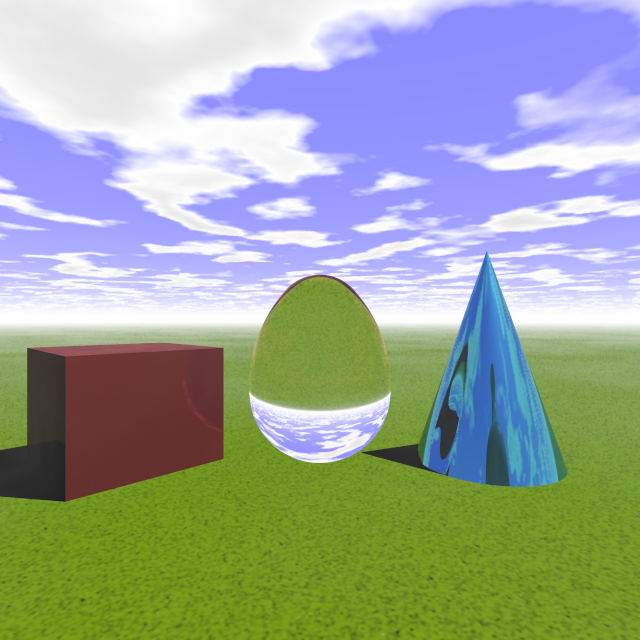
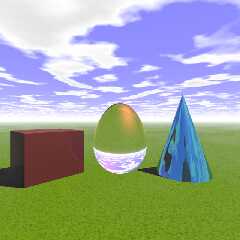
I probably made a mistake somewhere, but I have a problem with this. The
object looses its shadow in my code (see the egg in attached image).

This is the code used for the egg finish:

ovus { 1.00, 0.65
   pigment {rgb <0.4, 0.9, 0.4>}
   pigment {rgbt <0.9, 0.1, 0.1, 0.99>} //varnish coating!
   finish {
     metallic
     diffuse 0.0
     specular 0.80
     roughness 1/20
     reflection {0.90 fresnel metallic}
   }
   interior {ior 1.5}
   scale 0.5
   translate <0, 0.5, 0>
} // end of ovus --------------------------------------

specular / roughness can be left out without visible changes btw.

Thanks for any light on this!

--
Thomas
Post a reply to this message
Attachments:
Download 'am_metallic finish.png' (297 KB)
Preview of image 'am_metallic finish.png'
|
|
| |
| |
|
|
|
|
| |
| |
|
|
Op 7-12-2023 om 09:37 schreef Thomas de Groot:

> specular / roughness can be left out without visible changes btw.
>
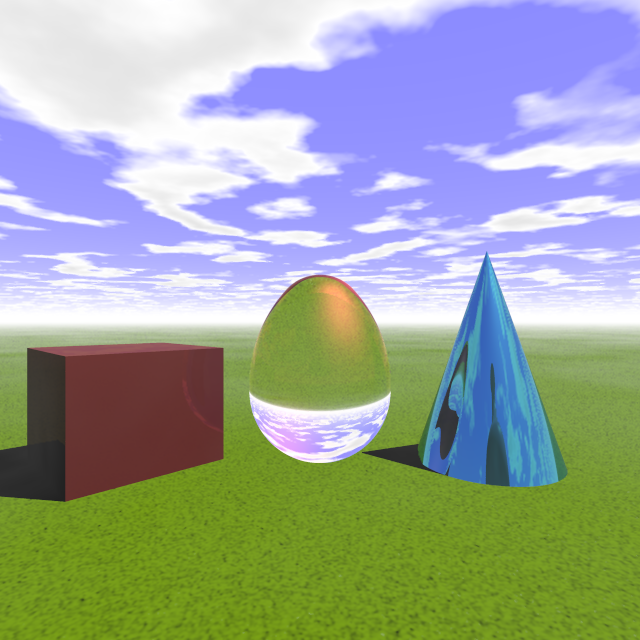
Not entirely true. Better leave those in place for the varnish (see image)

--
Thomas
Post a reply to this message
Attachments:
Download 'am_metallic finish.png' (297 KB)
Preview of image 'am_metallic finish.png'
|
|
| |
| |
|
|
|
|
| |
| |
|
|
Thomas de Groot <tho### [at] degrootorg> wrote:
> Op 29-11-2023 om 16:04 schreef Alain Martel:
> > If the metal is to have a varnish coat, add a second mostly to fully
> > transparent pigment layer above the metallic one. Add an interior
> > statement for the IOR : interior{ ior 1.5 } And use the fresnel
> > attribute : reflection{ 1 fresnel }.
> >
> > That way, at high angle, you'll see almost only the metallic surface,
> > but, at grazing angles, you get the fresnel reflection dominating.
> > Tried that and compared with actual metals, brass actually, coated with
> > a varnish, and the result matched my physical samples.
>
> I probably made a mistake somewhere, but I have a problem with this. The
> object looses its shadow in my code (see the egg in attached image).
>
> This is the code used for the egg finish:
>
> ovus { 1.00, 0.65
>    pigment {rgb <0.4, 0.9, 0.4>}
>    pigment {rgbt <0.9, 0.1, 0.1, 0.99>} //varnish coating!
>    finish {
>      metallic
>      diffuse 0.0
>      specular 0.80
>      roughness 1/20
>      reflection {0.90 fresnel metallic}
>    }
>    interior {ior 1.5}
>    scale 0.5
>    translate <0, 0.5, 0>
> } // end of ovus --------------------------------------

Try it this way:

ovus { 1.00, 0.65
   texture {
      pigment {rgb <0.4, 0.9, 0.4>}
      finish {
         metallic
         diffuse 0.0
         ambient 0.0
         specular 0.80
         roughness 1/20
         reflection {0.90 metallic}
      }
   }
   texture {
      pigment {rgbt <0.9, 0.1, 0.1, 0.99>} //varnish coating!
      finish {
         reflection {0.90 fresnel}
      }
   }
   interior {ior 1.5}
   scale 0.5
   translate <0, 0.5, 0>
} // end of ovus --------------------------------------
Post a reply to this message
|
|
| |
| |
|
|
|
|
| |
| |
|
|
Op 7-12-2023 om 14:19 schreef Cousin Ricky:
> Try it this way:
>
> ovus { 1.00, 0.65
>     texture {
>        pigment {rgb <0.4, 0.9, 0.4>}
>        finish {
>           metallic
>           diffuse 0.0
>           ambient 0.0
>           specular 0.80
>           roughness 1/20
>           reflection {0.90 metallic}
>        }
>     }
>     texture {
>        pigment {rgbt <0.9, 0.1, 0.1, 0.99>} //varnish coating!
>        finish {
>           reflection {0.90 fresnel}
>        }
>     }
>     interior {ior 1.5}
>     scale 0.5
>     translate <0, 0.5, 0>
> } // end of ovus --------------------------------------
>
>
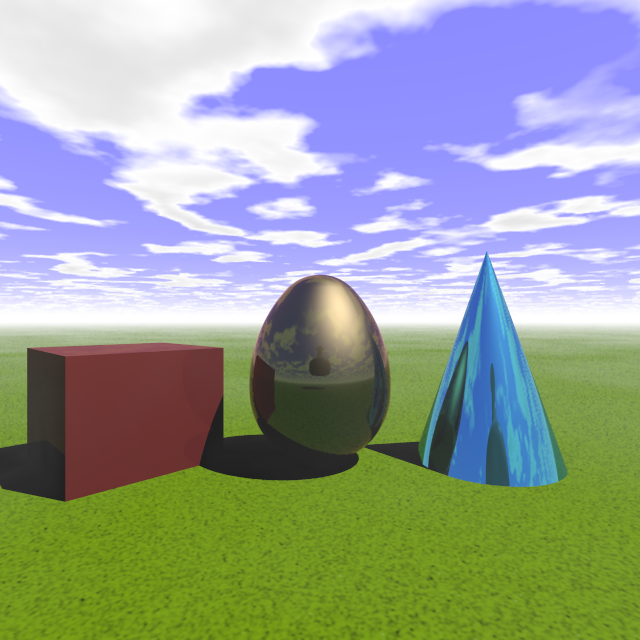
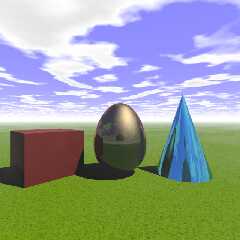
Aaa...! Of course. Thanks so much!

The coating is improved with specular, roughness and metallic added.

--
Thomas
Post a reply to this message
Attachments:
Download 'am_metallic finish.png' (284 KB)
Preview of image 'am_metallic finish.png'
|
|
| |
| |
|
|
|
|
| |
| |
|
|
On 12/7/23 03:37, Thomas de Groot wrote:
> ovus { 1.00, 0.65
>    pigment {rgb <0.4, 0.9, 0.4>}
>    pigment {rgbt <0.9, 0.1, 0.1, 0.99>} //varnish coating!

This syntax makes use of the shorthand 'texture-aspect' update method
mentioned not too long ago as aside(1) here:

https://news.povray.org/povray.pov4.discussion.general/thread/%3C65518d6d%241%40news.povray.org%3E/

The first pigment{} updates the default texture's pigment, the second
updates the modified texture again.

As also mentioned in that aside(1) in povray.pov4.discussion.general,
when the interior_texture{} capability got added years ago this
texture-aspect update method didn't get extended to the
interior_teture{} too as should have been done. In other words, the
shorthand update trick, ignores any defined interior_texture{} without a
peep.

Well, on digging into the code recently with the idea of fixing that
long-standing oversight in yuqk, I found there are additional criteria
related to the type of pattern / special patterns in play too as to
whether the short hand texture aspect updates work - even for texture{}.

So... I'm now toying with the idea of making all shorthand updates,
parse errors in yuqk and suggesting this for v4.0 too. Essentially, yuqk
would be forcing the texture{} block specification(s), always, as a path
to consistent overall behavior.

This idea is easier for me to swallow because I tend to assign finish{},
normal{}, pigment{} (and interior{}) blocks to IDs before using them in
texture{} or material{} blocks - also assigned to IDs - prior to use
with objects. In other words, I already often code in this style. I do
it because it makes modifications easier - but, it also avoids some of
the subtle shifts / inconsistencies in parsing behavior which happen
today with the texture shorthand / aspect update methods.

Aside: As an additional plus, forcing texture{} block(s) would enable
eventual simplifications in the parsing code. This, rather than
extending already complicated code to support interior_texture{}
shorthand / aspect updates.

Thoughts / comments?

Bill P.
Post a reply to this message
|
|
| |
| |
|
|
|
|
| |
| |
|
|
Op 11/12/2023 om 03:29 schreef William F Pokorny:
> On 12/7/23 03:37, Thomas de Groot wrote:
>> ovus { 1.00, 0.65
>>    pigment {rgb <0.4, 0.9, 0.4>}
>>    pigment {rgbt <0.9, 0.1, 0.1, 0.99>} //varnish coating!
>
> This syntax makes use of the shorthand 'texture-aspect' update method
> mentioned not too long ago as aside(1) here:
>
>
https://news.povray.org/povray.pov4.discussion.general/thread/%3C65518d6d%241%40news.povray.org%3E/
>
> The first pigment{} updates the default texture's pigment, the second
> updates the modified texture again.
>
> As also mentioned in that aside(1) in povray.pov4.discussion.general,
> when the interior_texture{} capability got added years ago this
> texture-aspect update method didn't get extended to the
> interior_teture{} too as should have been done. In other words, the
> shorthand update trick, ignores any defined interior_texture{} without a
> peep.
>
> Well, on digging into the code recently with the idea of fixing that
> long-standing oversight in yuqk, I found there are additional criteria
> related to the type of pattern / special patterns in play too as to
> whether the short hand texture aspect updates work - even for texture{}.
>
> So... I'm now toying with the idea of making all shorthand updates,
> parse errors in yuqk and suggesting this for v4.0 too. Essentially, yuqk
> would be forcing the texture{} block specification(s), always, as a path
> to consistent overall behavior.
>
> This idea is easier for me to swallow because I tend to assign finish{},
> normal{}, pigment{} (and interior{}) blocks to IDs before using them in
> texture{} or material{} blocks - also assigned to IDs - prior to use
> with objects. In other words, I already often code in this style. I do
> it because it makes modifications easier - but, it also avoids some of
> the subtle shifts / inconsistencies in parsing behavior which happen
> today with the texture shorthand / aspect update methods.
>
> Aside: As an additional plus, forcing texture{} block(s) would enable
> eventual simplifications in the parsing code. This, rather than
> extending already complicated code to support interior_texture{}
> shorthand / aspect updates.
>
> Thoughts / comments?
>
You are the expert here ;-) but I am very much in favour of your
suggestion/intention. The problem with the shorthand is very much that
it allows for inconsistencies in the coding. I certainly fell into that
trap here, which probably would not have happened otherwise. So yes,
please do. Thanks for your great work over the years btw.

--
Thomas
Post a reply to this message
|
|
| |
| |
|
|
|
|
| |
| |
|
|
On 2023-12-10 22:29 (-4), William F Pokorny wrote:
>
> So... I'm now toying with the idea of making all shorthand updates,
> parse errors in yuqk and suggesting this for v4.0 too. Essentially, yuqk
> would be forcing the texture{} block specification(s), always, as a path
> to consistent overall behavior.
>
> This idea is easier for me to swallow because I tend to assign finish{},
> normal{}, pigment{} (and interior{}) blocks to IDs before using them in
> texture{} or material{} blocks - also assigned to IDs - prior to use
> with objects. In other words, I already often code in this style. I do
> it because it makes modifications easier - but, it also avoids some of
> the subtle shifts / inconsistencies in parsing behavior which happen
> today with the texture shorthand / aspect update methods.

When I was developing RC3Wood v2.0, I found unblocked textures, normals,
etc. so difficult to shoehorn through the parser that I just made the
macros return blocks.  While this was not a shorthand update issue, the
resolution was the same: work with enclosed blocks.

> [snip]
>
> Thoughts / comments?

I'm fine with yanking shorthand updates.  I never use the technique
anyway, so I would not miss them; and since it uses a seemingly
ambiguous syntax to merely duplicate functionality of less confusing
code, I would discourage other people from using it.

On the other hand, I would not require all finish{}, normal{} and
pigment{} blocks to be enclosed in a texture{} block.  This is too
useful and too often used in existing code to be discontinued.  I don't
know if you had this in mind, but I'm just trying to keep my position clear.
Post a reply to this message
|
|
| |
| |
|
|
|
|
| |
| |
|
|
On 12/11/23 07:59, Cousin Ricky wrote:
> I'm fine with yanking shorthand updates.  I never use the technique
> anyway, so I would not miss them; and since it uses a seemingly
> ambiguous syntax to merely duplicate functionality of less confusing
> code, I would discourage other people from using it.
>
> On the other hand, I would not require all finish{}, normal{} and
> pigment{} blocks to be enclosed in a texture{} block.  This is too
> useful and too often used in existing code to be discontinued.  I don't
> know if you had this in mind, but I'm just trying to keep my position clear.

Thanks both for the feedback. I'll need to think about all this some
more and play with more varieties of code.


-------- Thinking aloud

Our current documentation for pigment has this:


---
A pigment statement is part of a texture specification. However it can
be tedious to use a texture statement just to add a color to an object.
Therefore you may attach a pigment directly to an object without
explicitly specifying that it as part of a texture. For example instead
of this:

object { My_Object texture {pigment { color Red } } }

you may shorten it to:

object { My_Object pigment {color Red } }

Doing so creates an entire texture structure with default normal and
finish statements just as if you had explicitly typed the full texture
{...} around it.

Note: an explicit texture statement is required, if you want to layer
pigments.
---


It looks to me from the code that the documentation is lying some. That
second shorter form is doing a shorthand update (albeit by another path
through code for complicated reasons...).

In other words, when we write:

     object { My_Object texture {pigment { color Red } } }

what happens is the default texture is copied as the starting texture
and then the pigment{} aspect is updated to "color Red".

When we write the 'supposedly compatible' shorter form:

     object { My_Object pigment {color Red } }

We are updating the pigment aspect of the texture already attached to
My_Object. This might be the default texture - if no explicit texture
has been specified for My_Object - or it might be updating the pigment
aspect of whatever explicit texture was most recently attached to
My_Object(a)

(a) - I'm ignoring some complicating factors for the sake of a simpler
description.

We can update aspects of a texture ID for both texture{} and
interior_texture{} with the form:

     #declare Txtr00 = texture { pigment { color rgb <1,1,1> } }
     object { My_Object
         texture { Txtr00 pigment { color <1,0,0> } }
         interior_texture { Txtr00 pigment { color <1,1,0> } }
     }

and this what I was toying with for consistency.

I'm understanding you to be saying you'd like to keep the shorter form.
I do see it in some of the code you've written. I use the short form
myself often enough too - and no doubt a great deal of exiting SDL makes
use of this shorter form...

I'll look again at making interior_texture{} behavior consistent with
texture{}. This wouldn't fix the consistency issue we are talking about
here with dual pigment{} updates, but it's probably the most compatible
way to go.

Bill P.
Post a reply to this message
|
|
| |
| |
|
|
|
|
| |
| |
|
|
Thomas de Groot <tho### [at] degrootorg> wrote:
> Op 11/12/2023 om 03:29 schreef William F Pokorny:
> >
> > So... I'm now toying with the idea of making all shorthand updates,
> > parse errors in yuqk and suggesting this for v4.0 too. Essentially, yuqk
> > would be forcing the texture{} block specification(s), always, as a path
> > to consistent overall behavior.
> >
> > This idea is easier for me to swallow because I tend to assign finish{},
> > normal{}, pigment{} (and interior{}) blocks to IDs before using them in
> > texture{} or material{} blocks - also assigned to IDs - prior to use
> > with objects. In other words, I already often code in this style. I do
> > it because it makes modifications easier - but, it also avoids some of
> > the subtle shifts / inconsistencies in parsing behavior which happen
> > today with the texture shorthand / aspect update methods.
> >
> > Aside: As an additional plus, forcing texture{} block(s) would enable
> > eventual simplifications in the parsing code. This, rather than
> > extending already complicated code to support interior_texture{}
> > shorthand / aspect updates.
> >

Hi William!

I am wondering how your idea would affect an explicitly-specified
         #default [texture/pigment/etc].

When I want to quickly get an idea for a scene into POV-ray, I usually use a
#default{...something...} at the start, whether a full texture of just a finish,
etc...which I understand to be a full behind-the-scenes 'default' texture that I
am just updating there with a shorthand change. Then I can additionally use more
shorthand updates for the objects I make, while still getting the #default stuff
that I originally specified:

sphere{0,1 pigment{rgb <.2,.4,.6>}} // already including my #default stuff

It's a nice quick method to sketch-out the basics of a scene.

But if I understand your proposed fix-- of making all shorthand updates into
parse errors-- it seems that I would have to pre-#declare even a #default
texture with an ID, then specify the ID in an object (with another shorthand
update if desired.) That would seem to negate the easy usefulness of the
#default{...} feature as-is.

Am I mistaken?

[As you can tell, I LIKE POV-ray's 'shorthand' ability ;-)  ]
Post a reply to this message
|
|
| |
| |
|
|
|
|
| |
| |
|
|
On 12/13/23 10:48, Kenneth wrote:
> i William!
>
> I am wondering how your idea would affect an explicitly-specified
>           #default [texture/pigment/etc].
>
> When I want to quickly get an idea for a scene into POV-ray, I usually use a
> #default{...something...} at the start, whether a full texture of just a finish,
> etc...which I understand to be a full behind-the-scenes 'default' texture that I
> am just updating there with a shorthand change. Then I can additionally use more
> shorthand updates for the objects I make, while still getting the #default stuff
> that I originally specified:
>
> sphere{0,1 pigment{rgb <.2,.4,.6>}} // already including my #default stuff
>
> It's a nice quick method to sketch-out the basics of a scene.
>
> But if I understand your proposed fix-- of making all shorthand updates into
> parse errors-- it seems that I would have to pre-#declare even a #default
> texture with an ID, then specify the ID in an object (with another shorthand
> update if desired.) That would seem to negate the easy usefulness of the
> #default{...} feature as-is.
>
> Am I mistaken?
>
> [As you can tell, I LIKE POV-ray's 'shorthand' ability 😉  ]
>
Hi.

In the no shorthand, texture aspect, update(a) approach you'd tweak the
default texture by specifying no initial texture ID.

     object { My_Object
         texture { pigment { color <1,0,0> } }
         interior_texture { pigment { color <1,1,0> } }
     }

Specifying the texture{} or interior_texture{} with or without a initial
texture ID will, I believe, always behave in a consistent and simple to
understand way, but yes, the short methods are handy.

(a) - Internally POV-Ray considers many of the shorthand forms to be
object modifiers where they directly follow an 'object' definition or
reference. FWIW.

---

One of a few confusing things with the short form updates is you have to
know whether 'My_Object' already has a non-default texture - and what it
is - to know what you get for a final complete texture.

     #declare Sph00  = sphere { 0, 0.7 }
     #declare Sph00p = sphere { 0, 0.7 pigment { color Green } }
...
     object { Sph00 normal { granite } }  // White with granite normal
     object { Sph00p normal {granite } }  // Green with granite normal

Where as the texture{}, internal_texture{} wrap always starts with the
default texture and updates one to all the texture aspects.

---

In a related and FWIW category, how many know the following is a valid
way to specify a texture?

#declare Sph00 = sphere { 0, 0.7 }

#declare P = pigment { rgb <1,0.6,0.3> }
#declare N = normal { quilted 0.5 scale 1/3 }
#declare F = finish { emission 1/3 }

object { Sph00 texture { P N F  }  } // Aspect updates by ID type!

Bill P.
Post a reply to this message
|
|
| |
| |
|
|
|
|
| |
| |
|
|
On 2023-12-13 20:16(-4), William F Pokorny wrote:
>
> In a related and FWIW category, how many know the following is a valid
> way to specify a texture?
>
> #declare Sph00 = sphere { 0, 0.7 }
>
> #declare P = pigment { rgb <1,0.6,0.3> }
> #declare N = normal { quilted 0.5 scale 1/3 }
> #declare F = finish { emission 1/3 }
>
> object { Sph00 texture { P N F  }  } // Aspect updates by ID type!

I'm not even going to touch that!  Why tempt fate--or the parser?
Post a reply to this message
|
|
| |
| |
|
|
|
|
| |
| |
|
|
Op 14/12/2023 om 01:16 schreef William F Pokorny:
> In a related and FWIW category, how many know the following is a valid
> way to specify a texture?
>
> #declare Sph00 = sphere { 0, 0.7 }
>
> #declare P = pigment { rgb <1,0.6,0.3> }
> #declare N = normal { quilted 0.5 scale 1/3 }
> #declare F = finish { emission 1/3 }
>
> object { Sph00 texture { P N F  }  } // Aspect updates by ID type!
>
>

<shudder>  I didn't, but I don't like it.

--
Thomas
Post a reply to this message
|
|
| |
| |
|
|
|
|
| |
| |
|
|
On 12/13/23 19:16, William F Pokorny wrote:
> Specifying the texture{} or interior_texture{} with or without a initial
> texture ID will, I believe, always behave in a consistent and simple to
> understand way, but yes, the short methods are handy.

Simple to understand... Something worth mentioning with respect to
default textures though perhaps obvious. The default texture changes -
and can change any number of times while SDL is parsed.

//...
// Here there is a POV-Ray default (which itself changed v3.7 to v3.8)
default { pigment { Green } }  // Pigment aspect of texture to Green
#declare Sph00 = sphere { 0, 0.7 }

object { Sph00 texture { normal { N } } translate -x } // Green
default { pigment { Red } }
object { Sph00 texture { normal { N } } } // Red
#include "defaultPigToBlue.inc" // defaults not scoped; Always global
object { Sph00 texture { normal { N } } translate +x } // Blue

The exposure with default{} statements and include files is we might not
know they've been used therein and the previous default state is not
restored when we leave the include. (Yes, default statements in macros
can cause similar confusion)

Bill P.
Post a reply to this message
|
|
| |
| |
|
|
|
|
| |
| |
|
|
On 12/13/23 20:31, Cousin Ricky wrote:
> On 2023-12-13 20:16(-4), William F Pokorny wrote:
>>
>> In a related and FWIW category, how many know the following is a valid
>> way to specify a texture?
>>
>> #declare Sph00 = sphere { 0, 0.7 }
>>
>> #declare P = pigment { rgb <1,0.6,0.3> }
>> #declare N = normal { quilted 0.5 scale 1/3 }
>> #declare F = finish { emission 1/3 }
>>
>> object { Sph00 texture { P N F  }  } // Aspect updates by ID type!
>
> I'm not even going to touch that!  Why tempt fate--or the parser?
>

:-) The method was news to me too. A detail which popped out while
looking at making interior_texture{} support more consistent with
texture{}.

Though it rang an old bell. I think this form is something I'd seen in
some SDL years ago where I didn't understand how what was coded worked.

I expect this method of update has been used as much by accident as by
intent. Use by someone forgetting - or accidentally deleting - a
pigment{}, normal{} or finish{} wrap of an ID. It is a short way to
specify texture aspects I guess - especially if you don't want to pick
up any part of the 'current' default texture.

Bill P.
Post a reply to this message
|
|
| |
| |
|
|
|
|
| |
| |
|
|
William F Pokorny <ano### [at] anonymousorg> wrote:

> It is a short way to
> specify texture aspects I guess - especially if you don't want to pick
> up any part of the 'current' default texture.
>
> Bill P.

I think that most people completely miss this, because although it _is_ stated
in the documentation, it's not stated in a way that really highlights the fact
that you're _always_ starting out with a default texture and then _modifying_
it.

I think most people operate on the (obvious in hindsight) faulty assumption that
they are _creating_ a texture with those statements.

Maybe just start the documentation section off with a bold, unambiguous
statement that when an object is created, it is assigned a default texture, and
then only when the parser hits a texture component assignment is the default
texture modified.

https://wiki.povray.org/content/Reference:Texture

I have noticed that my quickie scenes that I use to puzzle out various things
look a lot dimmer and grayer compared to the way they used to, and I need to
change my default finish to diffuse 1.

There are definitely lots of shortcuts that I use and enjoy, but I realize that
yuqk is an arrow pointing toward 4.0, and we need to "do the work" to get there,
and may have to abandon certain conveniences to get there.    Then, once we
establish a firm foundation, certain convenbience tools might then be able to be
reimplemented, albeit in a different way.
Post a reply to this message
|
|
| |
| |
|
|
|
|
| |
| |
|
|
On 12/13/23 10:48, Kenneth wrote:
> I am wondering how your idea would affect an explicitly-specified
>           #default [texture/pigment/etc].

While we are discussing short hand texture aspect updates, I'll mention
another awkward bit we have today with default{}. Suppose someone does
this in their default statement:

default { normal { quilted 0.5 scale 1/3 } }
...

And later they want a sphere without that default normal?

The following of course uses the default normal:

     object { Sph00 pigment { Red } }

Maybe this ? :

     object { Sph00 pigment { Red } normal {} }
or
     object { Sph00 texture { pigment { Red } normal {} } }

No, those empty normal{} blocks also evaluate to the default quilted
normal(a).

(a) - And should the current default texture's normal be a null pointer,
those empty normal{} blocks cause the parser to fail with a 'no normal
type/pattern message'. I guess the thinking was if a user specified a
normal{} block they probably wanted the texture's normal set to
something valid...


The only way I know to get back to an initial, normal 'nullptr', POV-Ray
default is to capture the default texture before any 'default updates' with:

     #declare InitDfltTxtID = texture{}

So we can later code:

     object { Sph00 texture { InitDfltTxtID pigment { Red } } }

But that initial default texture capture is iffy where we don't
completely control whether or when 'default{}' might be used.

Aside 1 : I've had the thought of perhaps adding a 'nnoop' (normal
no-op), normal{} block perturbation pattern. Unlike texture's pigment
and finish which always end up set to a color or finish prior to
rendering, normal starts as a nullptr (null pointer) and can remain that
way through the render phase - and it being a null pointer is how we get
no normal{} perturbation in any texture{}. A 'nnoop' normal{} method
could be used too when users want to 'null' a texture ID's normal{}
setting.

Aside 2 : Where we can be sure of capturing the initial inbuilt
default{} texture as an ID, the initial default texture can be restored
with:

     default { texture { InitDfltTxtID } }

at any point later in the SDL for the scene.


What I suspect is most folks are not using default{} to set up a
defaulted normal, but maybe I'm missing something and there is some way
a default{normal{}} works well?

Bill P.
Post a reply to this message
|
|
| |
| |
|
|
|
|
| |
| |
|
|
On 12/14/23 06:37, Bald Eagle wrote:
> I have noticed that my quickie scenes that I use to puzzle out various things
> look a lot dimmer and grayer compared to the way they used to, and I need to
> change my default finish to diffuse 1.

The dimmer bit is probably that the finish default for ambient was
changed from 0.1 to 0.0 relatively late during v3.8 development. With
assumed_gamma 1.0 the older default ambient of 0.1 was far too large. It
should be something like 0.006 - if you want results as affected by the
ambient finish default to act similar to the 0.1 at the old
assumed_gamma of 2.2.

The greyer could be a lot of things including a little of the ambient
default change above. The _maps with respect to color blend somewhat
differently at an assumed_gamma of 1.0 than 2.2 - this a reason clipka
added the blend_mode and blend_gamma options.

Bill P.
Post a reply to this message
|
|
| |
| |
|
|
|
|
| |
|
|