|
|
|
|
|
|
| |
| |
|
|
|
|
| |
| |
|
|
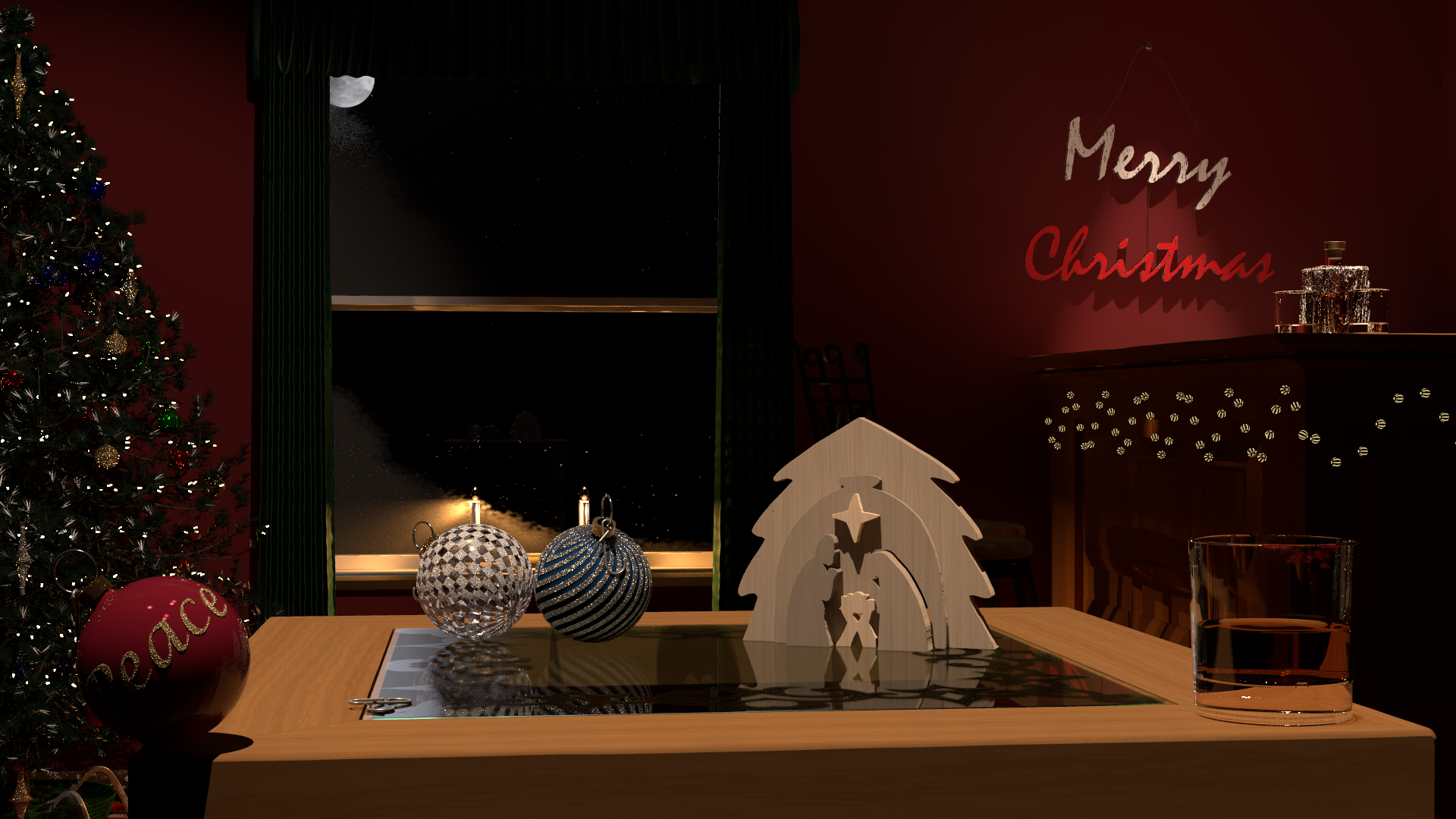
I'm about done with this scene, but before I do the final high-quality render I
thought I'd post this version to see if there are any suggestions.  This took
about 10 hours to render; when I jack up the anti-aliasing and the radiosity
settings it will take 2-4x that, so I'm planning to start it before leaving for
the Thanksgiving holidays.

Nothing terribly new here in terms of techniques.  I used some procedures I had
previously played with for stained glass windows to do the nativity set and the
"Merry Christmas" wall hanging.  A bunch of the models are reused from earlier
renders, but updated with the latest techniques.

Enjoy, comment soon, and I'll post the final render next week.

-- Chris R.
Post a reply to this message
Attachments:
Download 'scene-v1.1-hd-mq-rad11-2023-11-21.png' (1614 KB)
Preview of image 'scene-v1.1-hd-mq-rad11-2023-11-21.png'

|
|
| |
| |
|
|
|
|
| |
| |
|
|
hi,
"Chris R" <car### [at] comcast net> wrote:
> I'm about done with this scene, ...
> Enjoy, comment soon, and I'll post the final render next week.
am not big on Xmas and things but "enjoy", yes. the "jigsawed" crib is simply
very beautiful.
fwiw, the moon needs shifting a little to the left (I think), and, perhaps, to
appear a fraction less "luminous".
regards, jr.
Post a reply to this message
|
|
| |
| |
|
|
|
|
| |
| |
|
|
"Chris R" <car### [at] comcastnet> wrote:
> I'm about done with this scene, but before I do the final high-quality render I
> thought I'd post this version to see if there are any suggestions.  This took
> about 10 hours to render; when I jack up the anti-aliasing and the radiosity
> settings it will take 2-4x that, so I'm planning to start it before leaving for
> the Thanksgiving holidays.
>
> Nothing terribly new here in terms of techniques.  I used some procedures I had
> previously played with for stained glass windows to do the nativity set and the
> "Merry Christmas" wall hanging.  A bunch of the models are reused from earlier
> renders, but updated with the latest techniques.
>
> Enjoy, comment soon, and I'll post the final render next week.
>
> -- Chris R.

Looking good, the tree especially is really nice and detailed! The only
suggestion I have is that the "Peace" bauble maybe looks a bit flat and might
benefit from being being shinier and more reflective. Looking forward to the
final render!
Post a reply to this message
|
|
| |
| |
|
|
|
|
| |
| |
|
|
"Chris R" <car### [at] comcastnet> wrote:
> I'm about done with this scene, but before I do the final high-quality render I
> thought I'd post this version to see if there are any suggestions.  This took
> about 10 hours to render; when I jack up the anti-aliasing and the radiosity
> settings it will take 2-4x that, so I'm planning to start it before leaving for
> the Thanksgiving holidays.
>
> Nothing terribly new here in terms of techniques.  I used some procedures I had
> previously played with for stained glass windows to do the nativity set and the
> "Merry Christmas" wall hanging.  A bunch of the models are reused from earlier
> renders, but updated with the latest techniques.
>
> Enjoy, comment soon, and I'll post the final render next week.
>
> -- Chris R.

I love it...very well done.
Mike.
Post a reply to this message
|
|
| |
| |
|
|
|
|
| |
| |
|
|
"Chris R" <car### [at] comcastnet> wrote:
> I'm about done with this scene, but before I do the final high-quality render I
> thought I'd post this version to see if there are any suggestions.  This took
> about 10 hours to render; when I jack up the anti-aliasing and the radiosity
> settings it will take 2-4x that, so I'm planning to start it before leaving for
> the Thanksgiving holidays.
>
> Nothing terribly new here in terms of techniques.  I used some procedures I had
> previously played with for stained glass windows to do the nativity set and the
> "Merry Christmas" wall hanging.  A bunch of the models are reused from earlier
> renders, but updated with the latest techniques.
>
> Enjoy, comment soon, and I'll post the final render next week.
>
> -- Chris R.

Nice scene composition.
Post a reply to this message
|
|
| |
| |
|
|
|
|
| |
| |
|
|
"jr" <cre### [at] gmailcom> wrote:
> hi,
>
> "Chris R" <car### [at] comcastnet> wrote:
> > I'm about done with this scene, ...
> > Enjoy, comment soon, and I'll post the final render next week.
>
> am not big on Xmas and things but "enjoy", yes.  the "jigsawed" crib is simply
> very beautiful.
>
> fwiw, the moon needs shifting a little to the left (I think), and, perhaps, to
> appear a fraction less "luminous".
>
>
> regards, jr.

Thanks!

The jigsaw was done by taking a png-file of a black-and-white pattern actually
used for creating a real jigsaw cutout.  I used gimp to color each "piece" a
distinct color, and then in POV-Ray I wrote a function that compares the color
of a pixel in the image-map to the color of the piece I am rendering.  If it is
close enough, the point is in the piece, if not, then it is excluded.  This
became the isosurface shape function.

One issue I ran into is that the black cutting lines were fairly thick, so I had
to decide which "piece" each one belonged to and color them in.  Since the lines
from the original were anti-aliased, I had to go back after doing a fill and
paint by hand over the anti-aliased sections to make them solid.  There are
still artifacts from this that a real wood-cut, especially if you sanded it,
wouldn't show.  I added some turbulence to the image-map pigment I was using and
that helped a little.

To get rid of the squarish edges and make them softer, I would like to figure
out how to do a gradient fill in gimp that would start with the color of the
piece, and when it gets near the black line edges start fading to black.  I
could then use the distance to change the "thickness" of the wood near the
edges.  My freehand drawing in gimp is terrible, and I don't know enough about
all of the tools to figure out how to do it in a neat and consistent manner,
though.

-- Chris R
Post a reply to this message
|
|
| |
| |
|
|
|
|
| |
| |
|
|
"Chris R" <car### [at] comcastnet> wrote:
> This became the isosurface shape function.

That's an isosurface?  :O


> To get rid of the squarish edges and make them softer, I would like to figure
> out how to do a gradient fill in gimp that would start with the color of the
> piece, and when it gets near the black line edges start fading to black.

Have you tried just changing the threshold that you're evaluating the isosurface
at?
At 0, it should be crisp, as you increase the threshold, you should start to
round over any corners.
So what you eventually do is determine how much you need to "inflate" your shape
by, scale it down by that much, and then re-inflate to the original size by
increasing the threshold.   Then you have a rounded version of the same size.

- BW
Post a reply to this message
|
|
| |
| |
|
|
|
|
| |
| |
|
|
"Bald Eagle" <cre### [at] netscapenet> wrote:
> "Chris R" <car### [at] comcastnet> wrote:
> > This became the isosurface shape function.
>
> That's an isosurface?  :O
>
>
> > To get rid of the squarish edges and make them softer, I would like to figure
> > out how to do a gradient fill in gimp that would start with the color of the
> > piece, and when it gets near the black line edges start fading to black.
>
> Have you tried just changing the threshold that you're evaluating the isosurface
> at?
> At 0, it should be crisp, as you increase the threshold, you should start to
> round over any corners.
> So what you eventually do is determine how much you need to "inflate" your shape
> by, scale it down by that much, and then re-inflate to the original size by
> increasing the threshold.   Then you have a rounded version of the same size.
>
> - BW

Almost everything I do is an isosurface unless I know for sure I don’t need a
surface texture beyond what normals provide.  To be clear, here, each piece of
the nativity is an isosurface, but they all use the same image map, just picking
different colors to determine which piece to create from it.

I generally leave the threshold at 0, and subtract off fudge factors or noise
functions from the actual shape function instead.  It has the same effect.
Here, because my image map currently has a single solid color for each piece,
the color distance function essentially returns a fixed negative number if the
thickness/2 and add in noise for scratches and varnish strokes.  If I could find
a way to get the image map to bleed the colors at the edges of the pieces, I
could have gradation in the color distance function and that would modify the
thickness of the wood at that point so I could bevel or round the edges.

#local imgpfn = function {
   pigment {
   }
}

#local Color_match = function(r1,g1,b1,r2,g2,b2) {
   max(
      abs(r1-r2),
      abs(g1-g2),
      abs(b1-b2)
   )
}

function {
   max(

Color_match(imgpfn(x,y,0).red,imgpfn(x,y,0).blue,imgpfn(x,y,0).green,R,G,B),
      abs(z) - thickness/2
   )
}
Post a reply to this message
|
|
| |
| |
|
|
|
|
| |
| |
|
|
"Chris R" <car### [at] comcastnet> wrote:
If I could find
> a way to get the image map to bleed the colors at the edges of the pieces, I
> could have gradation in the color distance function and that would modify the
> thickness of the wood at that point so I could bevel or round the edges.

That's very impressive, and clever.
I was trying to figure out a way to use the object pattern to do something
similar, maybe this might give me some ideas.

Attached, please find a simple convolution kernel scene I was playing with a
while back.

Try applying the box blur filter, and only modifying the color channel of
interest.

- BW
Post a reply to this message
Attachments:
Download 'edgedetectionmatrix.pov.txt' (4 KB)
|
|
| |
| |
|
|
|
|
| |
| |
|
|
Nice, I too think the bauble with Peace on it looks a bit flat/too matte a
finish.

The other two on the table look great though and the tree is really good.

The other point I would add is the lights on the fireplace, they are too dull
and don't appear to be emitting any light onto the surface right next to them. I
would try either a dim light source for each (will slow things down) or union
each fairy light with a sphere with emitting media. Something like below:

          sphere{ 0,1
                  pigment { rgbt 1 } hollow
                           interior
                           { media
                             {
                               emission colour rgb <1,0.8, 0.6> samples 20,100
                               density
                               { spherical turbulence 0.05 omega 0.7 density_map
                                 {
                                   [0.0 rgb <0, 0, 0> ]
                                   [0.8 rgb <0.2, 0.2, .1>]
                                   [1 rgb <1.5, 1.2 0.8> ]
                                 }
                               }
                             }
                           }
          }

The above media is incredibly quick to render so shouldn't slow things down.

Sean
Post a reply to this message
|
|
| |
| |
|
|
|
|
| |
| |
|
|
"Chris R" <car### [at] comcastnet> wrote:
> I'm about done with this scene, but before I do the final high-quality render I
> thought I'd post this version to see if there are any suggestions.  This took
> about 10 hours to render; when I jack up the anti-aliasing and the radiosity
> settings it will take 2-4x that, so I'm planning to start it before leaving for
> the Thanksgiving holidays.
>
> Nothing terribly new here in terms of techniques.  I used some procedures I had
> previously played with for stained glass windows to do the nativity set and the
> "Merry Christmas" wall hanging.  A bunch of the models are reused from earlier
> renders, but updated with the latest techniques.
>
> Enjoy, comment soon, and I'll post the final render next week.
>
> -- Chris R.

Looks nice, but that peace bulb is scarily close to the edge...

Sam
Post a reply to this message
|
|
| |
| |
|
|
|
|
| |
| |
|
|
"s.day" <s.d### [at] uelacuk> wrote:
> Nice, I too think the bauble with Peace on it looks a bit flat/too matte a
> finish.
>
> The other two on the table look great though and the tree is really good.
>
> The other point I would add is the lights on the fireplace, they are too dull
> and don't appear to be emitting any light onto the surface right next to them. I
> would try either a dim light source for each (will slow things down) or union
> each fairy light with a sphere with emitting media. Something like below:
>
>           sphere{ 0,1
>                   pigment { rgbt 1 } hollow
>                            interior
>                            { media
>                              {
>                                emission colour rgb <1,0.8, 0.6> samples 20,100
>                                density
>                                { spherical turbulence 0.05 omega 0.7 density_map
>                                  {
>                                    [0.0 rgb <0, 0, 0> ]
>                                    [0.8 rgb <0.2, 0.2, .1>]
>                                    [1 rgb <1.5, 1.2 0.8> ]
>                                  }
>                                }
>                              }
>                            }
>           }
>
> The above media is incredibly quick to render so shouldn't slow things down.
>
> Sean
Thanks for your comments.

It’s actually a bar, not a fireplace, but from the angle that may not be clear.

Those lights were originally modeled as both a light source and emitting media
for an earlier scene.  However this scene has many more of them and rendering
ground to a halt, so I am currently only using emitting media for them.  I am
playing with how bright to make them, and the radiosity settings have a big
influence on that.  I will compare my media to yours when I get back to it.
Post a reply to this message
|
|
| |
| |
|
|
|
|
| |
| |
|
|
"Samuel B." <stb### [at] hotmailcom> wrote:
> "Chris R" <car### [at] comcastnet> wrote:
> > I'm about done with this scene, but before I do the final high-quality render I
> > thought I'd post this version to see if there are any suggestions.  This took
> > about 10 hours to render; when I jack up the anti-aliasing and the radiosity
> > settings it will take 2-4x that, so I'm planning to start it before leaving for
> > the Thanksgiving holidays.
> >
> > Nothing terribly new here in terms of techniques.  I used some procedures I had
> > previously played with for stained glass windows to do the nativity set and the
> > "Merry Christmas" wall hanging.  A bunch of the models are reused from earlier
> > renders, but updated with the latest techniques.
> >
> > Enjoy, comment soon, and I'll post the final render next week.
> >
> > -- Chris R.
>
> Looks nice, but that peace bulb is scarily close to the edge...
>
> Sam

Creative tension… 😉
Post a reply to this message
|
|
| |
| |
|
|
|
|
| |
| |
|
|
"Chris R" <car### [at] comcastnet> wrote:
> "Samuel B." <stb### [at] hotmailcom> wrote:
> > "Chris R" <car### [at] comcastnet> wrote:
> > > I'm about done with this scene, but before I do the final high-quality
render[...]
> >
> > Looks nice, but that peace bulb is scarily close to the edge...
> >
> > Sam

Was there supposed to be a comment here? I ask because I tried to send a reply
/before/ that one, but it never showed up. It is possible I left the window
before sending it fully. (But I'm getting kind of paranoid...)

Sam
Post a reply to this message
|
|
| |
| |
|
|
|
|
| |
| |
|
|
On 2023-11-25 20:50 (-4), Samuel B. wrote:
>
> Was there supposed to be a comment here? I ask because I tried to send a reply
> /before/ that one, but it never showed up. It is possible I left the window
> before sending it fully. (But I'm getting kind of paranoid...)

The Web interface software is still choking on non-ASCII characters.
Chris wrote "Creative tension... <winky face>," but the Web interface
deleted the line because of the non-ASCII ellipsis, and perhaps the
winky face.  The winky face showed in my newsreader as HTML entity code,
which I had to investigate to learn that it was a winky face.
Post a reply to this message
|
|
| |
| |
|
|
|
|
| |
| |
|
|
Cousin Ricky <ric### [at] yahoocom> wrote:
> On 2023-11-25 20:50 (-4), Samuel B. wrote:
> >
> > Was there supposed to be a comment here? I ask because I tried to send a reply
> > /before/ that one, but it never showed up. It is possible I left the window
> > before sending it fully. (But I'm getting kind of paranoid...)
>
> The Web interface software is still choking on non-ASCII characters.
> Chris wrote "Creative tension... <winky face>," but the Web interface
> deleted the line because of the non-ASCII ellipsis, and perhaps the
> winky face.  The winky face showed in my newsreader as HTML entity code,
> which I had to investigate to learn that it was a winky face.

Thanks Ricky, that makes sense. (I've tried emojis on the web interface before
and nothing showed up.) I've not attempted to use a newsreader since Thunderbird
on Windows 8... I couldn't get it configured properly, so I gave up. Maybe I
should try again.

Sam
Post a reply to this message
|
|
| |
| |
|
|
|
|
| |
| |
|
|
Cousin Ricky <ric### [at] yahoocom> wrote:
> On 2023-11-25 20:50 (-4), Samuel B. wrote:
> >
> > Was there supposed to be a comment here? I ask because I tried to send a reply
> > /before/ that one, but it never showed up. It is possible I left the window
> > before sending it fully. (But I'm getting kind of paranoid...)
>
> The Web interface software is still choking on non-ASCII characters.
> Chris wrote "Creative tension... <winky face>," but the Web interface
> deleted the line because of the non-ASCII ellipsis, and perhaps the
> winky face.  The winky face showed in my newsreader as HTML entity code,
> which I had to investigate to learn that it was a winky face.

Good to remember.  I had been away and was using my iPad to reply.  One of my
earlier replies (about the isosurface for the nativity set), was missing the
first line, and the second about with the emoji was only a single line anyway,
so I thought maybe the browser on the iPad was truncating the form data for the
posting on the web interface.

-- Chris R.
Post a reply to this message
|
|
| |
| |
|
|
|
|
| |
| |
|
|
"Chris R" <car### [at] comcastnet> wrote:
> I'm about done with this scene, but before I do the final high-quality render I
> thought I'd post this version to see if there are any suggestions.  This took
> about 10 hours to render; when I jack up the anti-aliasing and the radiosity
> settings it will take 2-4x that, so I'm planning to start it before leaving for
> the Thanksgiving holidays.
>
> Nothing terribly new here in terms of techniques.  I used some procedures I had
> previously played with for stained glass windows to do the nativity set and the
> "Merry Christmas" wall hanging.  A bunch of the models are reused from earlier
> renders, but updated with the latest techniques.
>
> Enjoy, comment soon, and I'll post the final render next week.
>
> -- Chris R.

Here is a more final rendering, although the string of lights hanging on the bar
did not come out as I expected them to, so I'll probably end up doing some more
experiments to get them right and then render again.  I may do a rendering with
focal blur too, but given that this took almost 4 days without any blur, that
may have to wait until I'm away from my computer for at least a week.

-- Chris R.
Post a reply to this message
Attachments:
Download 'scene.png' (1549 KB)
Preview of image 'scene.png'
|
|
| |
| |
|
|
|
|
| |
| |
|
|
"s.day" <s.d### [at] uelacuk> wrote:
> Nice, I too think the bauble with Peace on it looks a bit flat/too matte a
> finish.
>
> The other two on the table look great though and the tree is really good.
>
> The other point I would add is the lights on the fireplace, they are too dull
> and don't appear to be emitting any light onto the surface right next to them. I
> would try either a dim light source for each (will slow things down) or union
> each fairy light with a sphere with emitting media. Something like below:
>
>           sphere{ 0,1
>                   pigment { rgbt 1 } hollow
>                            interior
>                            { media
>                              {
>                                emission colour rgb <1,0.8, 0.6> samples 20,100
>                                density
>                                { spherical turbulence 0.05 omega 0.7 density_map
>                                  {
>                                    [0.0 rgb <0, 0, 0> ]
>                                    [0.8 rgb <0.2, 0.2, .1>]
>                                    [1 rgb <1.5, 1.2 0.8> ]
>                                  }
>                                }
>                              }
>                            }
>           }
>
> The above media is incredibly quick to render so shouldn't slow things down.
>
> Sean

In the rendered image, I had been using a finish emission on the actual glass
bulb, rather than creating a hollow sphere with an emitting media.  I switched
that out and recreated the bulb to separate the containing glass ball from the
light using media, and after fixing my radiosity settings to take media into
account, it looks much better.  Thanks for the suggestion...
Post a reply to this message
Attachments:
Download 'bar.png' (124 KB)
Preview of image 'bar.png'

|
|
| |
| |
|
|
|
|
| |
| |
|
|
"Chris R" <car### [at] comcastnet> wrote:
> "Chris R" <car### [at] comcastnet> wrote:
> > I'm about done with this scene, but before I do the final high-quality render I
> > thought I'd post this version to see if there are any suggestions.  This took
> > about 10 hours to render; when I jack up the anti-aliasing and the radiosity
> > settings it will take 2-4x that, so I'm planning to start it before leaving for
> > the Thanksgiving holidays.
> >
> > Nothing terribly new here in terms of techniques.  I used some procedures I had
> > previously played with for stained glass windows to do the nativity set and the
> > "Merry Christmas" wall hanging.  A bunch of the models are reused from earlier
> > renders, but updated with the latest techniques.
> >
> > Enjoy, comment soon, and I'll post the final render next week.
> >
> > -- Chris R.
>
> Here is a more final rendering, although the string of lights hanging on the bar
> did not come out as I expected them to, so I'll probably end up doing some more
> experiments to get them right and then render again.  I may do a rendering with
> focal blur too, but given that this took almost 4 days without any blur, that
> may have to wait until I'm away from my computer for at least a week.
>
> -- Chris R.

Very nice, the peace bauble looks much better now!
Post a reply to this message
|
|
| |
| |
|
|
|
|
| |
| |
|
|
"Chris R" <car### [at] comcastnet> wrote:
> "s.day" <s.d### [at] uelacuk> wrote:
> > Nice, I too think the bauble with Peace on it looks a bit flat/too matte a
> > finish.
> >
> > The other two on the table look great though and the tree is really good.
> >
> > The other point I would add is the lights on the fireplace, they are too dull
> > and don't appear to be emitting any light onto the surface right next to them. I
> > would try either a dim light source for each (will slow things down) or union
> > each fairy light with a sphere with emitting media. Something like below:
> >
> >           sphere{ 0,1
> >                   pigment { rgbt 1 } hollow
> >                            interior
> >                            { media
> >                              {
> >                                emission colour rgb <1,0.8, 0.6> samples 20,100
> >                                density
> >                                { spherical turbulence 0.05 omega 0.7 density_map
> >                                  {
> >                                    [0.0 rgb <0, 0, 0> ]
> >                                    [0.8 rgb <0.2, 0.2, .1>]
> >                                    [1 rgb <1.5, 1.2 0.8> ]
> >                                  }
> >                                }
> >                              }
> >                            }
> >           }
> >
> > The above media is incredibly quick to render so shouldn't slow things down.
> >
> > Sean
>
> In the rendered image, I had been using a finish emission on the actual glass
> bulb, rather than creating a hollow sphere with an emitting media.  I switched
> that out and recreated the bulb to separate the containing glass ball from the
> light using media, and after fixing my radiosity settings to take media into
> account, it looks much better.  Thanks for the suggestion...

That look's great, nice job on those lights.
Post a reply to this message
|
|
| |
| |
|
|
|
|
| |
| |
|
|
"Chris R" <car### [at] comcastnet> wrote:
>
> In the rendered image, I had been using a finish emission on the actual glass
> bulb, rather than creating a hollow sphere with an emitting media.  I switched
> that out and recreated the bulb to separate the containing glass ball from the
> light using media, and after fixing my radiosity settings to take media into
> account, it looks much better.  Thanks for the suggestion...

Indeed, this does look much better, glad it helped.
Post a reply to this message
|
|
| |
| |
|
|
|
|
| |
|
|