|
|
|
|
|
|
| |
| |
|
|
|
|
| |
| |
|
|
After looking at tx2378's problem ("bad display of utf8 code u00ed
letter i-accute in times new roman" in p.programming) and becoming
increasingly confused by what POV-Ray is doing, I rendered a suite of
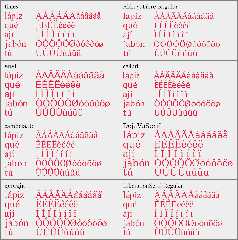
Latin-1 accented characters with various fonts.  The results are
bafflingly inconsistent:

Times New Roman, Arial, Liberation Serif
  Lowercase 'i' diacritical marks are shifted right and clipped.
  The ring above capital 'A' is incomplete at the bottom; the ring is
  complete when rendered by a word processor, so the gap is not part of
  the font definitions.
Calibri
  All diacritical marks are aligned with their letter, but upper and
  lowercase 'I's with diacriticals are kerned badly.
Cambria
  Lowercase 'i' acute is rendered properly; the other lowercase 'i'
  diacritical marks are shifted right and clipped.
Georgia
  For all lowercase 'a's except 'a' acute, lowercase 'e' grave, and all
  uppercase 'I's, the diacritical marks are shifted right and clipped.
Abhaya Libre (thanks, Bill!), DejaVu Serif
  All the diacritical marks are aligned properly.

Keep staring at the attachment; I may have missed some anomalies.  It's
all so capricious.

Note that my Liberation font may not be the latest version; there was a
licensing dispute a few years ago, resulting in updated fonts not being
bundled with GNU/Linux distros.  I also have not updated my Arial,
Georgia, and Times New Roman since Microsoft withdrew the free
downloads.  They are certainly up-to-date on my Windows partition, but
between UEFI and Win11 encryption, accessing that partition is a PITA
that I have not been moved to subject myself to in quite a while.
Post a reply to this message
Attachments:
Download 'i-diacrits-montage.png' (90 KB)
Preview of image 'i-diacrits-montage.png'
|
|
| |
| |
|
|
|
|
| |
| |
|
|
Cousin Ricky <ric### [at] yahoo com> wrote:
Thanks for looking into this, it bothered me too, but it wasn't something that I
was prepared to invest a whole lot of time investigating.
> The results are bafflingly inconsistent:
Yes, I think someone is going to have to sift through some of the source to see
what's going on.
I do recall clipka saying that POV-Ray takes the font files and makes prisms
from them - so maybe something gets messed up in that process, or there's some
fork in the process when the algorithm encounters something in the code that it
doesn't like, and POV-Ray somehow sorta does its own thing.
I wonder if a font editor or hex editor would reveal any attributes/properties
that are common denominators among the borked character glyph definitions.
Otherwise, I don't really see how it can be any different than the WYSIWYG word
processor result.
(I _have_ actually wanted to see if it were possible to read a font file with
POV-Ray and export a standalone prism include...)
> accessing that partition is a PITA
> that I have not been moved to subject myself to in quite a while.
Yeah - I tried to do that once so that I didn't have to make copies of all my
fonts, and just access them directly on the Windows partition, but I was never
successful. Maybe I'll try again on the next machine. com> wrote:
Thanks for looking into this, it bothered me too, but it wasn't something that I
was prepared to invest a whole lot of time investigating.
> The results are bafflingly inconsistent:
Yes, I think someone is going to have to sift through some of the source to see
what's going on.
I do recall clipka saying that POV-Ray takes the font files and makes prisms
from them - so maybe something gets messed up in that process, or there's some
fork in the process when the algorithm encounters something in the code that it
doesn't like, and POV-Ray somehow sorta does its own thing.
I wonder if a font editor or hex editor would reveal any attributes/properties
that are common denominators among the borked character glyph definitions.
Otherwise, I don't really see how it can be any different than the WYSIWYG word
processor result.
(I _have_ actually wanted to see if it were possible to read a font file with
POV-Ray and export a standalone prism include...)
> accessing that partition is a PITA
> that I have not been moved to subject myself to in quite a while.
Yeah - I tried to do that once so that I didn't have to make copies of all my
fonts, and just access them directly on the Windows partition, but I was never
successful. Maybe I'll try again on the next machine.
Post a reply to this message
|
|
| |
| |
|
|
|
|
| |
| |
|
|
Le 22/01/2023 à 21:38, Bald Eagle a écrit :
> Cousin Ricky <ric### [at] yahoocom> wrote:
>
> Thanks for looking into this, it bothered me too, but it wasn't something that I
> was prepared to invest a whole lot of time investigating.
>
>> The results are bafflingly inconsistent:
>
> Yes, I think someone is going to have to sift through some of the source to see
> what's going on.
>
> I do recall clipka saying that POV-Ray takes the font files and makes prisms
> from them - so maybe something gets messed up in that process, or there's some
> fork in the process when the algorithm encounters something in the code that it
> doesn't like, and POV-Ray somehow sorta does its own thing.
>
> I wonder if a font editor or hex editor would reveal any attributes/properties
> that are common denominators among the borked character glyph definitions.
>

I would recommend looking at the font files in FontForge (also available
in Linux)


> Otherwise, I don't really see how it can be any different than the WYSIWYG word
> processor result.
>

IIRC, font files can have various descriptions (Mac vs non Mac...)
usually both, but they might diverge. Also the kerning informations
might be tricky.

Any share of the font files from initial post ?
Post a reply to this message
|
|
| |
| |
|
|
|
|
| |
| |
|
|
[somewhat off-topic. Running Windows 10, with latest update of Firefox]

While writing a recent post to the newsgroups-- using the official web portal
like I'm using now--I happened to include the word 'expose', but with the final
'e' having an accent mark. In the Windows Character Map app (for the Calibri
font), that specific e is "U+00E9 Latin Small Letter E With Acute" and the
keystroke to create it is Alt+0233.

When I went back to view my own post later, any full line of text with that
word/letter in it was completely missing; just a blank line there.

I rarely if ever use such special text characters, so this was an unwelcome
surprise.

Doing another test, I've discovered that the web-portal 'editor' for writing
posts is where the problem lies-- it wipes out the sentence before sending it,
when the "Preview Message" button is pressed.
Post a reply to this message
|
|
| |
| |
|
|
|
|
| |
| |
|
|
"Kenneth" <kdw### [at] gmailcom> wrote:
> [somewhat off-topic. Running Windows 10, with latest update of Firefox]
>
> While writing a recent post to the newsgroups-- using the official web portal
> like I'm using now--I happened to include the word 'expose', but with the final
> 'e' having an accent mark. In the Windows Character Map app (for the Calibri
> font), that specific e is "U+00E9 Latin Small Letter E With Acute" and the
> keystroke to create it is Alt+0233.
>
> When I went back to view my own post later, any full line of text with that
> word/letter in it was completely missing; just a blank line there.
>
> I rarely if ever use such special text characters, so this was an unwelcome
> surprise.
>
> Doing another test, I've discovered that the web-portal 'editor' for writing
> posts is where the problem lies-- it wipes out the sentence before sending it,
> when the "Preview Message" button is pressed.

I think that this issue has been touched on before.

The line may either still be there, and only visible in the newsreader (like
Thunderbird), or you have to post it with a newsreader, and then it works.

Searching for threads in these forums is nearly impossible.   I haven't yet
acquired sufficient search engine fu to ever find what I know exists.
Post a reply to this message
|
|
| |
| |
|
|
|
|
| |
| |
|
|
"Bald Eagle" <cre### [at] netscapenet> wrote:
> "Kenneth" <kdw### [at] gmailcom> wrote:
> > [somewhat off-topic. Running Windows 10, with latest update of Firefox]
> >
> > While writing a recent post to the newsgroups-- using the official web portal
> > like I'm using now--I happened to include the word 'expose', but with the final
> > 'e' having an accent mark. In the Windows Character Map app (for the Calibri
> > font), that specific e is "U+00E9 Latin Small Letter E With Acute" and the
> > keystroke to create it is Alt+0233.
> >
> > When I went back to view my own post later, any full line of text with that
> > word/letter in it was completely missing; just a blank line there.
> >
> > I rarely if ever use such special text characters, so this was an unwelcome
> > surprise.
> >
> > Doing another test, I've discovered that the web-portal 'editor' for writing
> > posts is where the problem lies-- it wipes out the sentence before sending it,
> > when the "Preview Message" button is pressed.
>
> I think that this issue has been touched on before.
>
> The line may either still be there, and only visible in the newsreader (like
> Thunderbird), or you have to post it with a newsreader, and then it works.
>
> Searching for threads in these forums is nearly impossible.   I haven't yet
> acquired sufficient search engine fu to ever find what I know exists.
Post a reply to this message
|
|
| |
| |
|
|
|
|
| |
| |
|
|
"Bald Eagle" <cre### [at] netscapenet> wrote:
> "Kenneth" <kdw### [at] gmailcom> wrote:
>
 (sorry, I hit the 'send message' button too early by mistake)
> >
> > Doing another test, I've discovered that the web-portal 'editor' for writing
> > posts is where the problem lies-- it wipes out the sentence before sending it,
> > when the "Preview Message" button is pressed.
>
> The line may either still be there, and only visible in the newsreader (like
> Thunderbird), or you have to post it with a newsreader, and then it works.
>

I was wondering the same thing. I would imagine that I would have to use a
newsreader to *send* it, since the line disappears on my end before it's
actually sent.

A test:
The following sentence has a special character in one of the words. If you can
see it in Thunderbird, that would be useful to know. I will not see it using the
web portal, once it is posted:

This sentence uses the word exposé.
Post a reply to this message
|
|
| |
| |
|
|
|
|
| |
| |
|
|
Le 2023-01-30 à 20:17, Kenneth a écrit :
> "Bald Eagle" <cre### [at] netscapenet> wrote:
>> "Kenneth" <kdw### [at] gmailcom> wrote:
>>
>   (sorry, I hit the 'send message' button too early by mistake)
>>>
>>> Doing another test, I've discovered that the web-portal 'editor' for writing
>>> posts is where the problem lies-- it wipes out the sentence before sending it,
>>> when the "Preview Message" button is pressed.
>>
>> The line may either still be there, and only visible in the newsreader (like
>> Thunderbird), or you have to post it with a newsreader, and then it works.
>>
>
> I was wondering the same thing. I would imagine that I would have to use a
> newsreader to *send* it, since the line disappears on my end before it's
> actually sent.
>
> A test:
> The following sentence has a special character in one of the words. If you can
> see it in Thunderbird, that would be useful to know. I will not see it using the
> web portal, once it is posted:
>
> This sentence uses the word exposé.
>
>
>
Everything show up correctly. Viewed in Thunderbird.
Post a reply to this message
|
|
| |
| |
|
|
|
|
| |
| |
|
|
Alain Martel <kua### [at] videotronca> wrote:
> >
> > A test:
> > The following sentence has a special character in one of the words...
> >
> > This sentence uses the word exposé.

> >
> Everything show up correctly. Viewed in Thunderbird.

Thanks! It seems that the problem is only with the newsgroups' web-portal and
message editor.
Post a reply to this message
|
|
| |
| |
|
|
|
|
| |
| |
|
|
On 1/22/23 11:57, Cousin Ricky wrote:
> After looking at tx2378's problem ("bad display of utf8 code u00ed
> letter i-accute in times new roman" in p.programming) and becoming
> increasingly confused by what POV-Ray is doing, I rendered a suite of
> Latin-1 accented characters with various fonts.  The results are
> bafflingly inconsistent:

In a thread about povr/v4.0's cmap{} code changes, Bald Eagle asked me
if I'd dug into this issue. I'd not - though I had some guesses as to
what might be wrong.

Well, I'm going to take a run at this issue. Due cmap{} I got some light
exposure to several unix/linux font utilities. Plus I'll be busy with
real life over the next couple months and this work the right sort to
fit here and there as time allows.

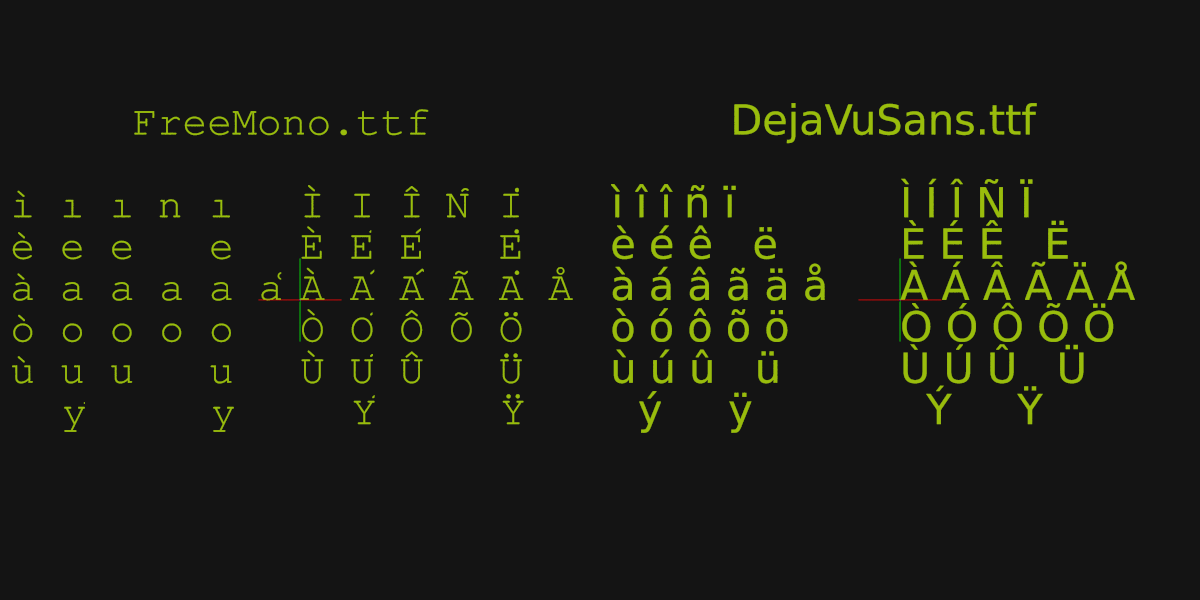
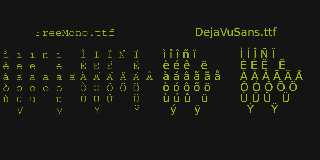
I created a test case(a) to see if I could turn up some similar issues
with linux Ubuntu shipped fonts. The first I tried in FreeMono.ttf fails
wonderfully! Plenty of issues when Rendered in POV-Ray(povr). :-)

Aside: I can see already there are two tables in the working DejaVuSans
not in the FreeMono. I have no idea at the moment if that affects anything.

Bill P.

(a) - Yep. The acute lower case i (í) was wrong.
Post a reply to this message
Attachments:
Download 'accentedvowelsstory.png' (32 KB)
Preview of image 'accentedvowelsstory.png'
|
|
| |
| |
|
|
|
|
| |
| |
|
|
On 4/3/23 08:33, William F Pokorny wrote:
> Bald Eagle asked me if I'd dug into this issue. I'd not - though I had
> some guesses as to what might be wrong.

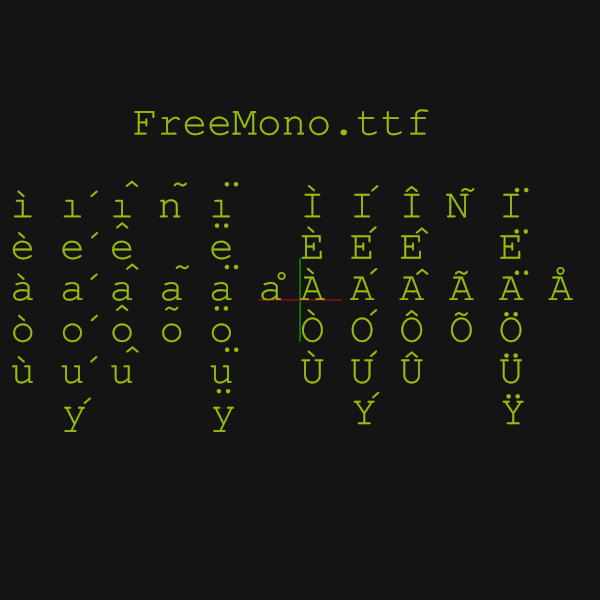
One of those guesses was that the marks were all present, but not
correctly placed. Meaning they were getting cut off by the automatic
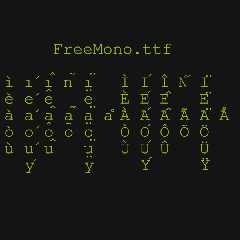
bounding for each character.

Attached is a render turning off all automatic bounding(a) in the povr
fork with -mb - which confirms this is indeed happening.

Bill P.

(a) - The -mb option here fully works only in povr where the v3.6 and
prior '-mb' behavior was restored.

You can use -mb in official v3.7, v3.8 and v4.0 releases, but it no
longer turns off the very last level of bounding around an object.
Post a reply to this message
Attachments:
Download 'accentedvowels_bndsoff.png' (39 KB)
Preview of image 'accentedvowels_bndsoff.png'
|
|
| |
| |
|
|
|
|
| |
| |
|
|
On 4/3/23 21:51, William F Pokorny wrote:
> Attached is a render turning off all automatic bounding(a) in the povr
> fork with -mb - which confirms this is indeed happening.

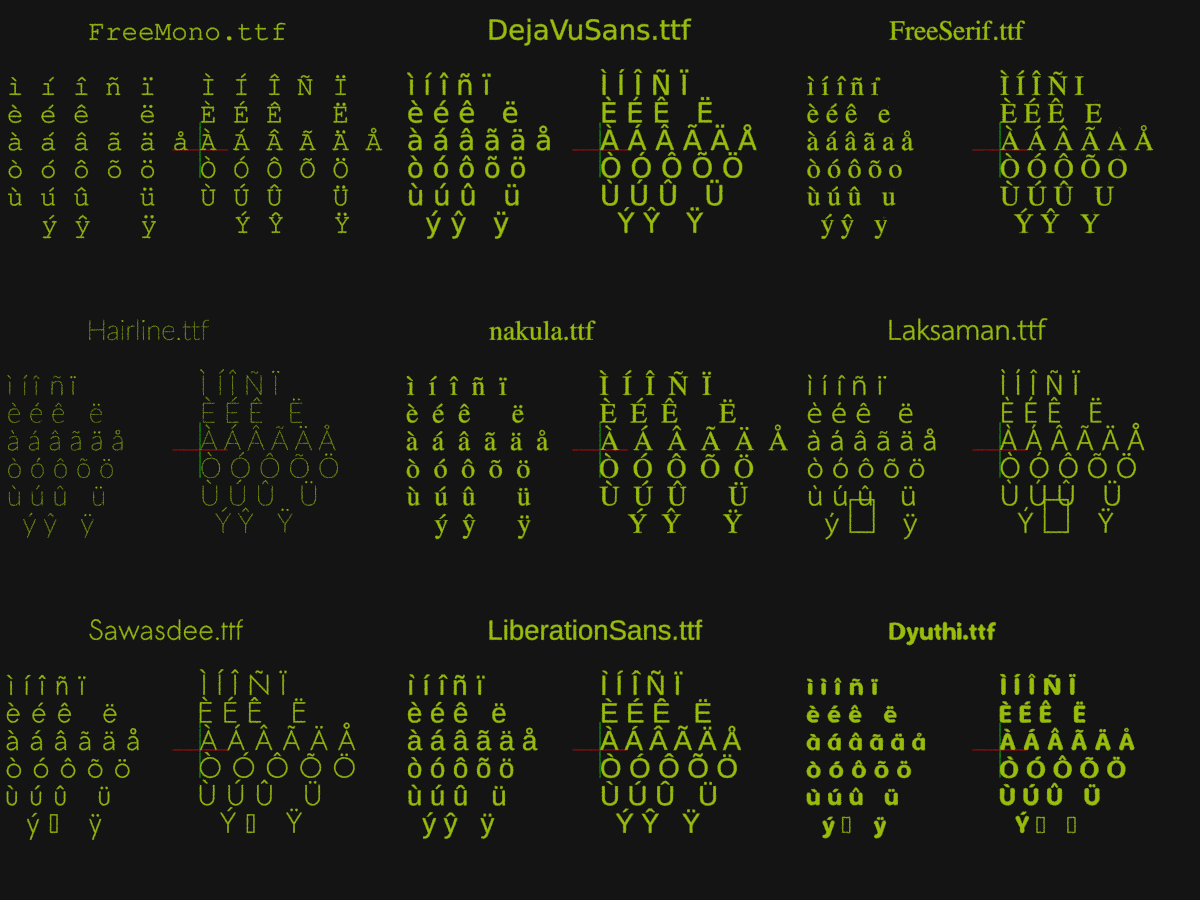
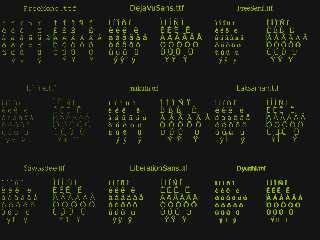
Update. Found and fixed two issues in the povr fork.

The first accounted for most of the problems where characters were made
up of multiple sub-glyphs. It goes as far back as I checked - to v3.0
source.

It's been the case that x & y offsets for the sub-glyphs, when of
non-word (aka byte) size, have been read as uint_8 and not int8_t
(signed char).

The unsigned values are used with a point offset method not supported in
our code at all. The x & y int8_t (signed char) method is - and it's
what all font's I checked use. The sometimes correct - and sometimes
completely wild results - come more from not handling he twos complement
representation correctly for the read values than having read bad values.

The second issue hits here and there and it is bounding. The bounding
was sometimes too tight for the resulting, flattened point loop
representation of the font.

I don't see a hard problem, say in not looking at all the points or
something. I believe, rather it's that the curve sometimes bulges
outside the least enclosing rectangles of point lists representing the
contours making up the character.

I sized up the bounding x,y size a little and fixed all but the edge of
one case. That one case looks to me like it needs 'too much' expansion.
Leaving it to look at in more detail later.

There is one definite issue is that the umlaut accented characters are
not rendered correctly in the FreeSerif.ttf font. No idea what is going
on there - those characters look OK to me for that font in other utilities.

Test images attached.

Bill P.
Post a reply to this message
Attachments:
Download 'povrfontfixes.png' (265 KB)
Preview of image 'povrfontfixes.png'
|
|
| |
| |
|
|
|
|
| |
| |
|
|
William F Pokorny <ano### [at] anonymousorg> wrote:

> The unsigned values are used with a point offset method not supported in
> our code at all. The x & y int8_t (signed char) method is - and it's
> what all font's I checked use. The sometimes correct - and sometimes
> completely wild results - come more from not handling he twos complement
> representation correctly for the read values than having read bad values.

Nice catch.  That certainly accounts for the wild placement, whereas bounding
was just an incidental problem.

Now that you've stuck your head deep into the glyph-handling code, how difficult
would you say it would be to write code in SDL that would take a font file and
create splines and/or prisms?

Or make the internal conversion exposed to SDL so that the result could be
written to a file?

Nice work   :)

- BW
Post a reply to this message
|
|
| |
| |
|
|
|
|
| |
| |
|
|
On 4/5/23 06:34, Bald Eagle wrote:
> Now that you've stuck your head deep into the glyph-handling code, how difficult
> would you say it would be to write code in SDL that would take a font file and
> create splines and/or prisms?

That is what text{} does - more or less. You just don't see the result
is a union of a bunch of prisms (one per character) - where 'nested'
splines making up a character have been flattened.

>
> Or make the internal conversion exposed to SDL so that the result could be
> written to a file?

I thought about capturing the result too, and as a complete code hack,
not too bad to do.

Really supporting such a thing in SDL, much harder for sure. I doubt
worth it, but not thought much about performance differences, for example.

There are a large number of font tools out there which can do things
like dump particular glyphs. It's probably not too hard to create
something base on one of those too utilities too.

>
> Nice work   😄

Thanks.

Oh, I sorted that FreeSerif.ttf umlaut issue - 'twas me having left some
hacked code in place.

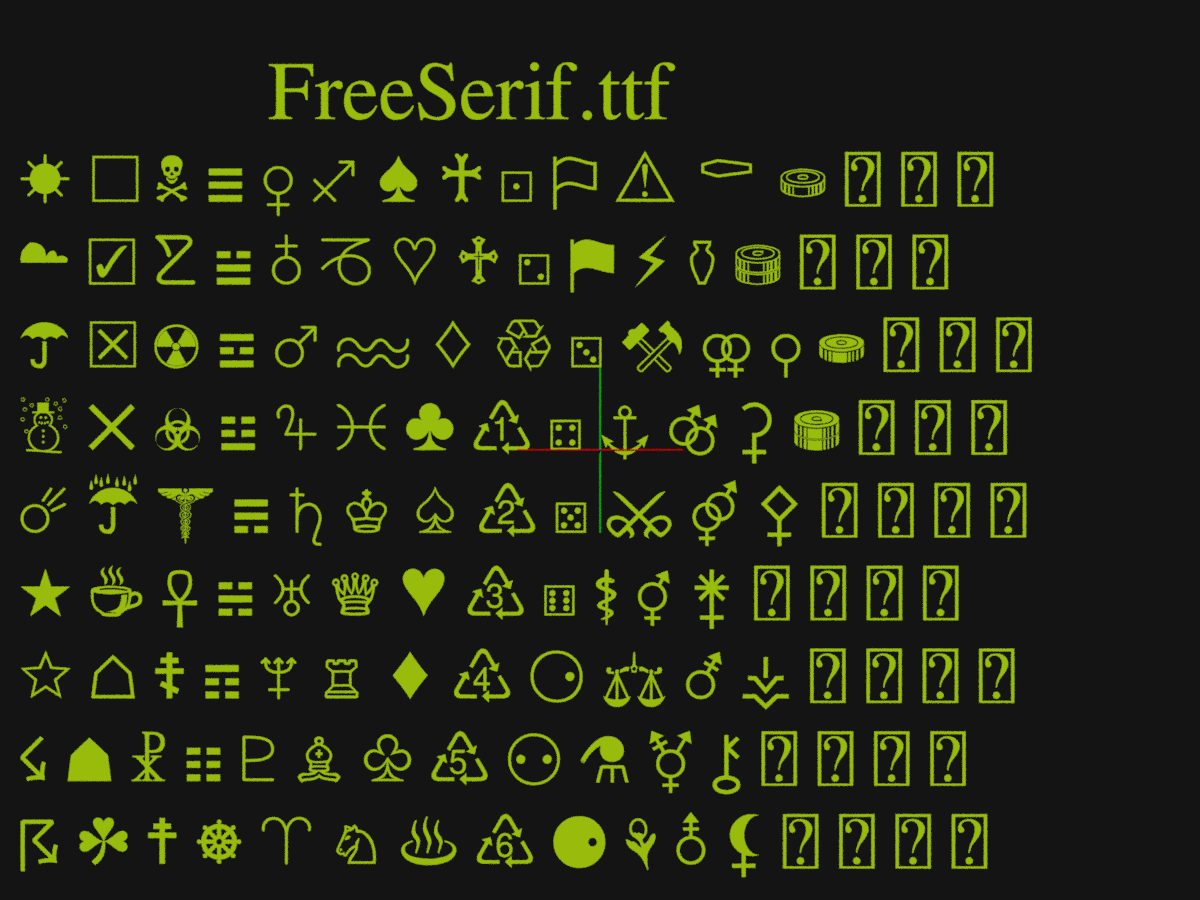
I've been playing with other fonts and symbols as a way to test a bit
more. Looking good thus. You do realize somewhat quickly there are
gazillions of free-ish fonts out there, but most cover only a small
number of Unicode character space. Anyhow. Attached another example
image - of some symbols this time.

One thing not working (and not expected to) is anything outside the
Basic Multilingual Plane (BMP). I pushed there a little - and it's all
crash, boom, bang at the moment.

Bill P.
Post a reply to this message
Attachments:
Download 'miscsymbols3.png' (308 KB)
Preview of image 'miscsymbols3.png'

|
|
| |
| |
|
|
|
|
| |
| |
|
|
On 2023-04-05 04:38 (-4), William F Pokorny wrote:
> On 4/3/23 21:51, William F Pokorny wrote:
>> Attached is a render turning off all automatic bounding(a) in the povr
>> fork with -mb - which confirms this is indeed happening.
>
> Update. Found and fixed two issues in the povr fork.

Any chance of pulling these changes into POV-Ray 3.8?
Post a reply to this message
|
|
| |
| |
|
|
|
|
| |
| |
|
|
William F Pokorny <ano### [at] anonymousorg> wrote:
> On 4/5/23 06:34, Bald Eagle wrote:
> > Now that you've stuck your head deep into the glyph-handling code, how difficult
> > would you say it would be to write code in SDL that would take a font file and
> > create splines and/or prisms?
>
> That is what text{} does - more or less. You just don't see the result
> is a union of a bunch of prisms (one per character) - where 'nested'
> splines making up a character have been flattened.
>
> >
> > Or make the internal conversion exposed to SDL so that the result could be
> > written to a file?
>
> I thought about capturing the result too, and as a complete code hack,
> not too bad to do.
>
> Really supporting such a thing in SDL, much harder for sure. I doubt
> worth it, but not thought much about performance differences, for example.

I was sort of thinking about this as an infrequently used tool to export the
splines/prisms to an include file.

Currently, Cousin Ricky and I have resorted to using spreadsheets to convert
font files to splines.  If the extant source code could be easily "fixed" to
remove any C/C++ tricky coding stuff, then I'm sure the rest of us could take it
from there and convert the rest of the C/C++ syntax to SDL to make a nice
include file that could take a font filename as an argument and write out a
series of objects as splines and prisms.

I also look at things like that as a great instructional/learning tool for
people to understand how things happen under the hood, and maybe enough dots get
connected where we have people want to step up to do development work.

(Also, IIRC, since the STL file format is virtually a clone of POV-Ray's
mesh/triangle syntax, it would be fantastic if that geometry could be read from
the file directly without conversion.  Even if it were an experimental feature
that didn't do everything perfectly, it would still be a start, and a handy tool
for importing those kinds of meshes into scenes.)

- BW
Post a reply to this message
|
|
| |
| |
|
|
|
|
| |
| |
|
|
On 4/6/23 14:17, Cousin Ricky wrote:
> On 2023-04-05 04:38 (-4), William F Pokorny wrote:
>> On 4/3/23 21:51, William F Pokorny wrote:
>>> Attached is a render turning off all automatic bounding(a) in the povr
>>> fork with -mb - which confirms this is indeed happening.
>>
>> Update. Found and fixed two issues in the povr fork.
>
> Any chance of pulling these changes into POV-Ray 3.8?
>

In this case I think my code changes could be pulled directly into the
v3.8 code base, but it's not something I tried or tested.

See:

http://news.povray.org/povray.beta-test/message/%3C642f33e8%241%40news.povray.org%3E/

or

Message: <642f33e8$1@news.povray.org>

Bill P.
Post a reply to this message
|
|
| |
| |
|
|
|
|
| |