|
|
|
|
|
|
| |
| |
|
|
|
|
| |
| |
|
|
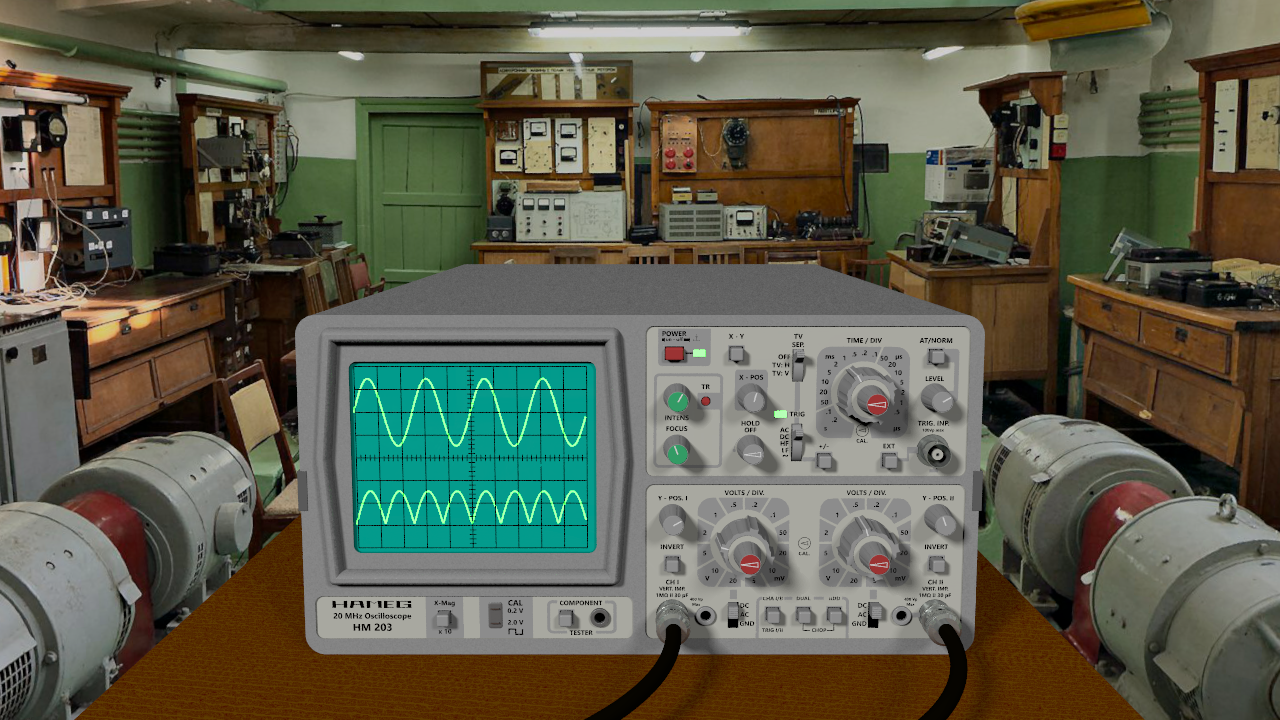
My latest effort.

Background from here: <https://polyhaven.com/a/vintage_measuring_lab>

m@
Post a reply to this message
Attachments:
Download 'cro 01a.png' (1180 KB)
Preview of image 'cro 01a.png'
|
|
| |
| |
|
|
|
|
| |
| |
|
|
Nice!

Try it with radiosity and using the background image as an hdr light source:

global_settings {
 assumed_gamma 1
 #if (Radiosity)
  radiosity {
   pretrace_start 0.04
   pretrace_end 0.01
   count 200
   recursion_limit 3
   nearest_count 10
   error_bound 0.5
  }
 #end
}


#declare Environment =
sphere {
 0, 1
 hollow on
 material {
  texture { uv_mapping
   pigment {
    image_map {
     hdr "FILENAME.hdr"
     gamma 1.5
     map_type 0
     interpolate 2
     once
    }
   }
  finish {emission 1}
  }
 interior { ior 1.0 }
 }
 no_shadow
}

object { Environment scale 1000} // might have to adjust  ;)
Post a reply to this message
|
|
| |
| |
|
|
|
|
| |
| |
|
|
"m@b" <sai### [at] googlemail com> wrote:
> My latest effort.
>...
Nice modelling. I guess it was a lot of work.
I really like these old analogue oscilloscopes.
I even have an Advance Instruments OS1000A laying round somewhere IIRC.
--
Tor Olav
http://subcube.com
https://github.com/t-o-k com> wrote:
> My latest effort.
>...
Nice modelling. I guess it was a lot of work.
I really like these old analogue oscilloscopes.
I even have an Advance Instruments OS1000A laying round somewhere IIRC.
--
Tor Olav
http://subcube.com
https://github.com/t-o-k
Post a reply to this message
|
|
| |
| |
|
|
|
|
| |
| |
|
|
On 04/02/2023 11:09 PM, Bald Eagle wrote:
>
> Nice!
>
> Try it with radiosity and using the background image as an hdr light source:
>
> global_settings {
>   assumed_gamma 1
>   #if (Radiosity)
>    radiosity {
>     pretrace_start 0.04
>     pretrace_end 0.01
>     count 200
>     recursion_limit 3
>     nearest_count 10
>     error_bound 0.5
>    }
>   #end
> }
>
>
>
> #declare Environment =
> sphere {
>   0, 1
>   hollow on
>   material {
>    texture { uv_mapping
>     pigment {
>      image_map {
>       hdr "FILENAME.hdr"
>       gamma 1.5
>       map_type 0
>       interpolate 2
>       once
>      }
>     }
>    finish {emission 1}
>    }
>   interior { ior 1.0 }
>   }
>   no_shadow
> }
>
> object { Environment scale 1000} // might have to adjust  ;)
>


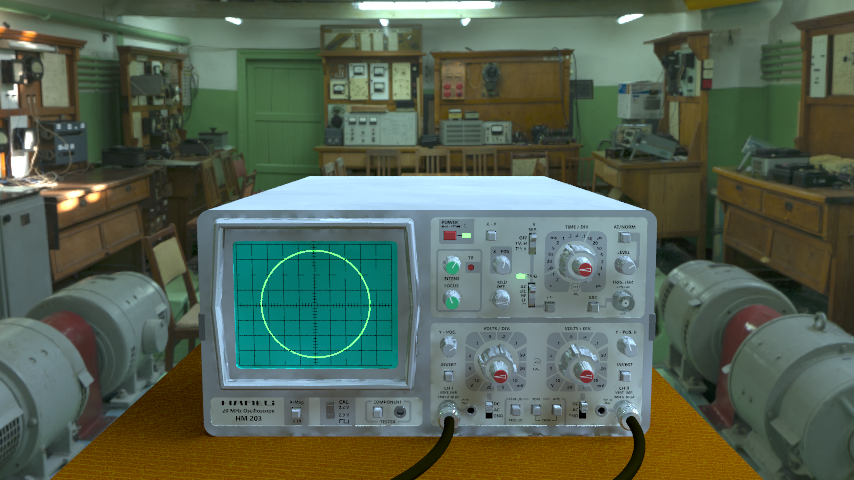
Thanks for that. I am getting a patchy illumination, when I animate it
there is inconsistency between frames. Any thoughts?

The only change I made was to reduce the Environment gamma to 1, the
scene was over-illuminated at 1.5.

m@
Post a reply to this message
Attachments:
Download 'cro 01.png' (492 KB)
Download 'povout.mp4.dat' (329 KB)
Preview of image 'cro 01.png'
|
|
| |
| |
|
|
|
|
| |
| |
|
|
"m@b" <sai### [at] googlemailcom> wrote:

> Thanks for that. I am getting a patchy illumination, when I animate it
> there is inconsistency between frames. Any thoughts?

I would say #include the rad_def.inc file and then put this in your scenefile
"header":

#include "rad_def.inc"
global_settings {
     radiosity {
          Rad_Settings(Radiosity_Default, off, off)
     }
}

leave the last two switches to off, as they are for normals and media.

I think you can use one of the text definitions in the beginning of the file, or
use a number from 1-10;

- BE
Post a reply to this message
|
|
| |
| |
|
|
|
|
| |
| |
|
|
Le 2023-02-05 à 05:42, m@b a écrit :


You need to increase the sample value.
Using the two values version may help.
Have the pretrace go deeper.
As for the count, use the two values version for nearest_count.

Try this version :

global_settings {
  assumed_gamma 1
  #if (Radiosity)
   radiosity {
    pretrace_start 0.04
    pretrace_end 0.0025 // or even 0.00125
  // more pretrace sampling almost always reduce noise and artefacts.
    count 350 999 // Should reduce those dark splotches.
  // Second value set a sampling direction pool.
  // Second value MUST be greater than the first
    recursion_limit 2 // 1 may even be enough.
    nearest_count 20 5 // enable adaptive sampling and pretrace
  // second value must be the smaller one.
  // Larger first value often help to reduce the dark splotches,
  // and also make then less sharp.
    error_bound 0.35
   }
  #end
}

Try raising the oscilloscope a little bit above the table. After all,
most have rubber pads under them acting as short legs.
Post a reply to this message
|
|
| |
| |
|
|
|
|
| |
| |
|
|
On 2/5/23 05:42, m@b wrote:
>>    texture { uv_mapping
>>     pigment {
>>      image_map {
>>       hdr "FILENAME.hdr"
>>       gamma 1.5
>>       map_type 0
>>       interpolate 2
>>       once
>>      }
>>     }
>>    finish {emission 1}
>>    }
>>   interior { ior 1.0 }
>>   }
>>   no_shadow
>> }
>>
>> object { Environment scale 1000} // might have to adjust  😉
>>
>
> Thanks for that. I am getting a patchy illumination, when I animate it
> there is inconsistency between frames. Any thoughts?
>
> The only change I made was to reduce the Environment gamma to 1, the
> scene was over-illuminated at 1.5.

Bill W. - Is there a reason for using uv_mapping with map_type 0 over
map_type 1 only in the image_map block? I think what you have OK, but
it's not how I would have coded the mapping. :-)

Random thoughts / questions.
---------------------------

- With .exr and .hdr images the file gamma should always be left at 1.0.
These files have values in both the [0,1) range and [1,1+]. This means
any gamma other than 1.0 creates adjustments which move in opposite
directions depending upon whether particular color channel values at a
given pixel <1 or >=1. It 'should be' any .hdr, .exr file one finds out
and about was written at a gamma of 1.0. IIRC, POV-Ray itself cannot
write .hdr / .exr files at other than 1.0.

- With .exr and .hdr images, interpolation is I believe iffy. The image
interpolation code was written for [0,1] ranges. I usually use no
interpolation with high dynamic range images and move to higher
resolution environment maps if need be. However, I've not 'really'
looked at how the different interpolation options work with typical .exr
and .hdr images.

- With respect to blotchiness frame to frame, remember, v3.7 introduced
the radiosity high reproducibility option. Use High_Reproducibility /
+HR on the command line or in the ini file. An more reliable alternative
is to use single threads for each frame (+wt1). This, though, might lead
one to manually break up the rendering of frames into buckets to make
use of all your cores / threads.

- Puzzling to me - some of the dark grid lines on the screen flicker in
and out of existence during the render...? Unsure why this would happen
unless perhaps using method 3 anti aliasing? If using method 3 remember
you need to specify the seed used (can't recall the ini/command line
option +ss maybe?) to keep results consistent render to render.

Bill P.
Post a reply to this message
|
|
| |
| |
|
|
|
|
| |
| |
|
|
William F Pokorny <ano### [at] anonymousorg> wrote:

> Bill W. - Is there a reason for using uv_mapping with map_type 0 over
> map_type 1 only in the image_map block? I think what you have OK, but
> it's not how I would have coded the mapping. :-)

Well I didn't code it either - IIRC, it was a code block that someone suggested
when I was trying to use an hdr environment to get a better looking render.

The scene looked flat, and I figured that maybe he was just using a "background"
and not exploiting the full benefit of the (what seemed to me to be) and hdr
image.

So I just dipped into the archive, found the scene, and copy-pasted.

"Because I'm lazy, and don't know anything about all those specialized options
and flags....?"  :)

Good points below, I figured there was also some sort of randomization invoved
with radiosity, but didn't know what, or if it was user controllable.   I just
felt that we'd deal with that issue if and when it came up.

> Random thoughts / questions.
> ---------------------------
>
> - With .exr and .hdr images the file gamma should always be left at 1.0.
> These files have values in both the [0,1) range and [1,1+]. This means
> any gamma other than 1.0 creates adjustments which move in opposite
> directions depending upon whether particular color channel values at a
> given pixel <1 or >=1. It 'should be' any .hdr, .exr file one finds out
> and about was written at a gamma of 1.0. IIRC, POV-Ray itself cannot
> write .hdr / .exr files at other than 1.0.
>
> - With .exr and .hdr images, interpolation is I believe iffy. The image
> interpolation code was written for [0,1] ranges. I usually use no
> interpolation with high dynamic range images and move to higher
> resolution environment maps if need be. However, I've not 'really'
> looked at how the different interpolation options work with typical .exr
> and .hdr images.
>
> - With respect to blotchiness frame to frame, remember, v3.7 introduced
> the radiosity high reproducibility option. Use High_Reproducibility /
> +HR on the command line or in the ini file. An more reliable alternative
> is to use single threads for each frame (+wt1). This, though, might lead
> one to manually break up the rendering of frames into buckets to make
> use of all your cores / threads.
>
> - Puzzling to me - some of the dark grid lines on the screen flicker in
> and out of existence during the render...? Unsure why this would happen
> unless perhaps using method 3 anti aliasing? If using method 3 remember
> you need to specify the seed used (can't recall the ini/command line
> option +ss maybe?) to keep results consistent render to render.
>
> Bill P.
Post a reply to this message
|
|
| |
| |
|
|
|
|
| |
| |
|
|
William F Pokorny <ano### [at] anonymousorg> wrote:
>
> - Puzzling to me - some of the dark grid lines on the screen flicker in
> and out of existence during the render...? Unsure why this would happen
> unless perhaps using method 3 anti aliasing? If using method 3 remember
> you need to specify the seed used (can't recall the ini/command line
> option +ss maybe?) to keep results consistent render to render.

That would be Stochastic_Seed= -some number-, or +SSn. I was wondering about
those dark grid lines too; maybe a result of the animation's render size as
well? I would imagine that a larger render would keep the lines intact.

> - With respect to blotchiness frame to frame, remember, v3.7 introduced
> the radiosity high reproducibility option. Use High_Reproducibility /
> +HR on the command line or in the ini file. A more reliable alternative
> is to use single threads for each frame (+wt1)...
>

I tried this single-thread experiment in the past and still saw flickering
radiosity color patches during animation-- but that was probably because I
mistakenly used a moving camera.

But it does indeed completely eliminate the flicker! (Neither high-quality rad
settings nor the 'high reproducibility' switch can do that so well, according to
my own tests.) The only restriction is that the scene has to be completely
static (like m@b's  here)-- no moving objects or camera. Even the moving
waveform on the  oscilloscope could cause some tiny amount of flickering on
other objects, although it would probably be unnoticeable.

Some interesting facts when using this single-thread idea:
My machine has 8 cores/16 threads. Using just 1 thread, my own animation test
was only about 3 times slower-- not 16 times or even 8 times, which is what I
was expecting. That's good news!

But  the statictics in the 'messages' pane are,
"Render Time:
          Radiosity Time: ... using 2 threads
          Trace Time: ... using 1 thread"

Two threads for the radiosity?

This flickering effect of rad during animation would seem to come from one of
two sources: Either the SMP nature of multi-threading, or the random nature of
the light patches themselves from frame to frame (i.e., chosen from different
locations in the scene for each new frame.) Currently, there is no 'switch' to
lock-in those locations-- which would be kind of similar 'in concept' to the
newer antialiasing/jitter mechanism of AA Sampling_Method 3 and Stochastic_Seed,
which eliminates otherwise-random AA jitter during animation:

"(By default,) the corresponding pseudo-random number generators are seeded with
a value derived from the current date and time. If the Stochastic_Seed=n or +SSn
option is specified, the seed will instead be derived from the specified value,
allowing to produce exactly the same output each time by specifying that same
value."

A similar concept for radiosity would be really helpful.

My guess is that running an *animation* with radiosity was never taken into
account when rad was first added to POV-ray...possibly because it took so long
to render even a single image then!
Post a reply to this message
|
|
| |
| |
|
|
|
|
| |
| |
|
|
On 2/6/23 01:33, Kenneth wrote:
> Two threads for the radiosity?

Not sure. Faint ding, ding in my empty skull - along the lines of my
having looked a little at this question in the past, but just getting
nothing clear.

In addition to any camera (or other) movement / change affecting a
frame's radiosity results - area_light jitter, photon jitter, crand (and
perhaps other options) introduce render to render changes too.

While reading your post I wondered if re-using radiosity samples would
result in more frame to frame stability. A while ago now we looked some
at radiosity sampling in animations IIRC.

On the screen changes being an issue. If we change the screen's finish
to { emission 0 ambient 1 }, would we get the bright screen without any
light contribution to radiosity? I don't know...?

Bill P.
Post a reply to this message
|
|
| |
| |
|
|
|
|
| |
| |
|
|
On 05/02/2023 8:33 PM, Bald Eagle wrote:
> "m@b" <sai### [at] googlemailcom> wrote:
>
>> Thanks for that. I am getting a patchy illumination, when I animate it
>> there is inconsistency between frames. Any thoughts?
>
> I would say #include the rad_def.inc file and then put this in your scenefile
> "header":
>
> #include "rad_def.inc"


I did try that file, even on the best settings I still get flicker.

m@
Post a reply to this message
|
|
| |
| |
|
|
|
|
| |
| |
|
|
On 06/02/2023 5:41 AM, William F Pokorny wrote:
> On 2/5/23 05:42, m@b wrote:
>>>    texture { uv_mapping
>>>     pigment {
>>>      image_map {
>>>       hdr "FILENAME.hdr"
>>>       gamma 1.5
>>>       map_type 0
>>>       interpolate 2
>>>       once
>>>      }
>>>     }
>>>    finish {emission 1}
>>>    }
>>>   interior { ior 1.0 }
>>>   }
>>>   no_shadow
>>> }
>>>
>>> object { Environment scale 1000} // might have to adjust  😉
>>>
>>
>> Thanks for that. I am getting a patchy illumination, when I animate it
>> there is inconsistency between frames. Any thoughts?
>>
>> The only change I made was to reduce the Environment gamma to 1, the
>> scene was over-illuminated at 1.5.
>
> Bill W. - Is there a reason for using uv_mapping with map_type 0 over
> map_type 1 only in the image_map block? I think what you have OK, but
> it's not how I would have coded the mapping. :-)
>
> Random thoughts / questions.
> ---------------------------
>
> - With .exr and .hdr images the file gamma should always be left at 1.0.
> These files have values in both the [0,1) range and [1,1+]. This means
> any gamma other than 1.0 creates adjustments which move in opposite
> directions depending upon whether particular color channel values at a
> given pixel <1 or >=1. It 'should be' any .hdr, .exr file one finds out
> and about was written at a gamma of 1.0. IIRC, POV-Ray itself cannot
> write .hdr / .exr files at other than 1.0.
>
Yes - Already discovered :-)

> - With .exr and .hdr images, interpolation is I believe iffy. The image
> interpolation code was written for [0,1] ranges. I usually use no
> interpolation with high dynamic range images and move to higher
> resolution environment maps if need be. However, I've not 'really'
> looked at how the different interpolation options work with typical .exr
> and .hdr images.

Interpolation turned off – no change in timing, no improvement observed.
I turned it back on again!

>
> - With respect to blotchiness frame to frame, remember, v3.7 introduced
> the radiosity high reproducibility option. Use High_Reproducibility /
> +HR on the command line or in the ini file. An more reliable alternative
> is to use single threads for each frame (+wt1). This, though, might lead
> one to manually break up the rendering of frames into buckets to make
> use of all your cores / threads.
>
High_Reproducibility increased the frame time from 0:53 to 3:30.
The exhibit below has High_Reproducibility on for the first half then
off. Some improvement.

> - Puzzling to me - some of the dark grid lines on the screen flicker in
> and out of existence during the render...? Unsure why this would happen
> unless perhaps using method 3 anti aliasing? If using method 3 remember
> you need to specify the seed used (can't recall the ini/command line
> option +ss maybe?) to keep results consistent render to render.
>
> Bill P.

Changed to anti aliasing method 1 – no visible difference. This problem
goes away when I do a final render at higher resolution.

m@
Post a reply to this message
Attachments:
Download 'high_reproducibility=on then off.mp4.dat' (176 KB)
|
|
| |
| |
|
|
|
|
| |
| |
|
|
This helped, the blotchiness is acceptable for a still image but still
jumpy in animation.

Raising the 'scope - yes, good point.

On 06/02/2023 2:14 AM, Alain Martel wrote:
> Le 2023-02-05 à 05:42, m@b a écrit :
>
>
> You need to increase the sample value.
> Using the two values version may help.
> Have the pretrace go deeper.
> As for the count, use the two values version for nearest_count.
>
> Try this version :
>
> global_settings {
>   assumed_gamma 1
>   #if (Radiosity)
>    radiosity {
>     pretrace_start 0.04
>     pretrace_end 0.0025 // or even 0.00125
> Content-Type: multipart/mixed;
> boundary="------------0rgDYJuCNp1Z4Md0WnOykdJ3"
> Date: Sun, 5 Feb 2023 18:42:09 +0800
> MIME-Version: 1.0
> User-Agent: Mozilla/5.0 (Windows NT 10.0; Win64; x64; rv:102.0)
> Gecko/20100101
> Thunderbird/102.6.1
> Subject: Re: Oscilloscope
> Content-Language: en-US
> Newsgroups: povray.binaries.images
> References: <63de46eb@news.povray.org>
> <web.63de754733e903b1f9dae3025979125@news.povray.org>
> From: "m@b" <sai### [at] googlemailcom>
> In-Reply-To: <web.63de754733e903b1f9dae3025979125@news.povray.org>
> NNTP-Posting-Host: 122.2.111.112
> Message-ID: <63df880b@news.povray.org>
> X-Trace: news.povray.org 1675593739 122.2.111.112 (5 Feb 2023 05:42:19
> -0500)
> Lines: 15631
> X-No-Archive: Yes
> X-Copyright: This copyrighted article comes from a private news server
> and may NOT be distributed on USENET or other news servers.
> X-POV-Header: --- --- --- --- --- --- --- --- --- --- --- ---
> Path: news.povray.org!not-for-mail
> Xref: news.povray.org povray.binaries.images:146685
>
> This is a multi-part message in MIME format.
> --------------0rgDYJuCNp1Z4Md0WnOykdJ3
> Content-Type: text/plain; charset=UTF-8; format=flowed
> Content-Transfer-Encoding: 7bit
>
> On 04/02/2023 11:09 PM, Bald Eagle wrote:
>>
>> Nice!
>>
>> Try it with radiosity and using the background image as an hdr light
>> source:
>>
>> global_settings {
>>   assumed_gamma 1
>>   #if (Radiosity)
>>    radiosity {
>>     pretrace_start 0.04
>>     pretrace_end 0.01
>>     count 200
>>     recursion_limit 3
>>     nearest_count 10
>>     error_bound 0.5
>>    }
>>   #end
>> }
>>
>>
>>
>> #declare Environment =
>> sphere {
>>   0, 1
>>   hollow on
>>   material {
>>    texture { uv_mapping
>>     pigment {
>>      image_map {
>>       hdr "FILENAME.hdr"
>>       gamma 1.5
>>       map_type 0
>>       interpolate 2
>>       once
>>      }
>>     }
>>    finish {emission 1}
>>    }
>>   interior { ior 1.0 }
>>   }
>>   no_shadow
>> }
>>
>> object { Environment scale 1000} // might have to adjust  ;)
>>
>
>
>
> Thanks for that. I am getting a patchy illumination, when I animate it
> there is inconsistency between frames. Any thoughts?
>
> The only change I made was to reduce the Environment gamma to 1, the
> scene was over-illuminated at 1.5.
>
> m@
> --------------0rgDYJuCNp1Z4Md0WnOykdJ3
> Content-Type: image/png; name="CRO 01.png"
> Content-Disposition: attachment; filename="CRO 01.png"
> Content-Transfer-Encoding: base64
>
> iVBORw0KGgoAAAANSUhEUgAAA1YAAAHgCAIAAAApMmt9AAAABGdBTUEAALGPC/xhBQAAAANz
> QklUCAgI2+FP4AAAAAd0SU1FB+cCBQonGTmyvbsAAAAedEVYdFNvZnR3YXJlAFBPVi1SYXkg
> djMuOC4wLWJldGEuMeAriKEAAABXdEVYdENvbW1lbnQAUmVuZGVyIERhdGU6IDIwMjMtMDIt
> MDUgMTA6Mzk6MjVaClBsYXRmb3JtOiBpNjg2LXBjLXdpbi1zc2UyCkNvbXBpbGVyOiBtc3Zj
> IDE0ClqZthsAACAASURBVHic7L1Lr23bcR72VdWYa+/zuk9e8vJNiTIpxZTlJHYsCVaCJAJs
> A0ksIG5YQFppBPlX6aWdAIHhjhUYMBTFii1ZpiVcipJFUnxe3se555y915pzVJUbVTXGWOdK
> gNVgoIYWL/fZe6015xyPenz1HPSP/tf/DnCYAyAgfzoAYiICxYuJmYiJiZjjVyI4HESA5wvu
> 7oC7uQNwc4fD6wsA8oe7mYMov+oez447IH6NSz3/8HGlu7sTMC6sS8jdchL1XeS9AMy7Ony+
> Fc8B4HC38UAiGk/EuDoHMK9EjtHN6mtEpm6qbkZELMxEQCwYAUQUw6th5l3hbsub46vxBtXN
> EctOuQHLvBzMFNcxMxGZqbsTCzPPG6N2FBT3HXePzY67mbubE+etxvrHFMzM3c0sro5Pzd3M
> 3HILYotzCc1NzcxVrWs3Nbe4B5JqQICbKUjb1l5/61Nvf/7zW9u20ybbdjnv9y/uP/jRu8/e
> f79rByHoETVaV8sRuMHV4W4+hgEAxLWslEQVWyMUaxN7kEtKRiDUrJnYQYMsAfTDTI3g3JhF
>   // more pretrace sampling almost always reduce noise and artefacts.
>     count 350 999 // Should reduce those dark splotches.
>   // Second value set a sampling direction pool.
>   // Second value MUST be greater than the first
>     recursion_limit 2 // 1 may even be enough.
>     nearest_count 20 5 // enable adaptive sampling and pretrace
>   // second value must be the smaller one.
>   // Larger first value often help to reduce the dark splotches,
>   // and also make then less sharp.
>     error_bound 0.35
>    }
>   #end
> }
>
> Try raising the oscilloscope a little bit above the table. After all,
> most have rubber pads under them acting as short legs.
Post a reply to this message
|
|
| |
| |
|
|
|
|
| |
| |
|
|
On 04/02/2023 7:51 PM, m@b wrote:
> My latest effort.
>
> Background from here: <https://polyhaven.com/a/vintage_measuring_lab>
>
> m@

Thanks for the input everybody. It seems likely that there will always
be some flicker when using radiosity in an animation. (As explained by
Kenneth above)

The answer in this case is to save a radiosity data file and then load
it in each frame, this has time advantages as well. Obviously this
method will not work when I start moving the camera around.

I was not happy with the background contrast, so I added the a png
sphere just inside the hdr sphere with no_shadow and no_radiosity so I
cam mess with the background emission and gamma without affecting radiosity.
Post a reply to this message
Attachments:
Download 'cro ws 02.mp4.dat' (153 KB)
|
|
| |
| |
|
|
|
|
| |
| |
|
|
"m@b" <sai### [at] googlemailcom> wrote:
> >
> High_Reproducibility increased the frame time from 0:53 to 3:30.
> The exhibit below has High_Reproducibility on for the first half then
> off. Some improvement.
>

You got a more obvious improvement re: High_Reproducibility than I did in my own
tests. Thanks for the comparison. I need to revisit that feature, to find out
if/ how much other rad settings affect it.
Post a reply to this message
|
|
| |
| |
|
|
|
|
| |
| |
|
|
Le 2023-02-06 à 02:41, m@b a écrit :
> This helped, the blotchiness is acceptable for a still image but still
> jumpy in animation.
>
> Raising the 'scope - yes, good point.
>

Try those one by one :
Slightly increasing error_bound (this will make the rendering go a
little bit faster)
(your actual value is 0.35)
error_bound 0.37
error_bound 0.4
error_bound 0.44

Increase count
count 450 12347
count 700 25000
nearest_count 20 7

Set minimum_reuse slightly smaller than pretrace_end such as :
(default is minimum_reuse 0.015 for a default pretrace_end of 0.04)
pretrace_end 0.0025
minimum_reuse 0.002

pretrace_end 0.00125
minimum_reuse 0.001

Set low_error_factor to a smaller value (default is 0.5)
low_error_factor 0.3
low_error_factor 0.1
Post a reply to this message
|
|
| |
| |
|
|
|
|
| |
| |
|
|
William F Pokorny <ano### [at] anonymousorg> wrote:
>
> On the screen changes being an issue. If we change the screen's finish
> to { emission 0 ambient 1 }, would we get the bright screen without any
> light contribution to radiosity? I don't know...?
>
Well, unfortunately (or fortunately, depending on how you look at it!), ambient
is now completely turned off when radiosity is used, so I can't test the idea in
v3.8. Only emission and diffuse are active.

I also thought about the 'no_radiosity' switch for certain objects. If the
oscilloscope screen is actually a separate object, maybe that would help?
Honestly, I'm not completely sure I understand that feature, from the docs'
description. But in my own test scene, I have a sky_sphere with a pigment; if I
add 'no_radiosity' to it, that does indeed turn off any radiosity-light
contribution from it.
Post a reply to this message
|
|
| |
| |
|
|
|
|
| |
| |
|
|
On 2/6/23 02:37, m@b wrote:
> High_Reproducibility increased the frame time from 0:53 to 3:30.
> The exhibit below has High_Reproducibility on for the first half then
> off. Some improvement.

Thanks much for all the performance and visual difference animations!!!

I once stumbled across the +HR code. IIRC the ordering mechanism isn't
as optimized as it could be - with much more complicated code. That
said, any +HR mechanism will always be slower.

Bill P.
Post a reply to this message
|
|
| |
| |
|
|
|
|
| |
| |
|
|
On 2/6/23 09:26, Kenneth wrote:
> William F Pokorny <ano### [at] anonymousorg> wrote:
>>
>> On the screen changes being an issue. If we change the screen's finish
>> to { emission 0 ambient 1 }, would we get the bright screen without any
>> light contribution to radiosity? I don't know...?
>>
> Well, unfortunately (or fortunately, depending on how you look at it!), ambient
> is now completely turned off when radiosity is used, so I can't test the idea in
> v3.8. Only emission and diffuse are active.
>
> I also thought about the 'no_radiosity' switch for certain objects. If the
> oscilloscope screen is actually a separate object, maybe that would help?
> Honestly, I'm not completely sure I understand that feature, from the docs'
> description. But in my own test scene, I have a sky_sphere with a pigment; if I
> add 'no_radiosity' to it, that does indeed turn off any radiosity-light
> contribution from it.
>
>
Thanks for the confirmation on ambient and emission together with
radiosity.

I too forgot about the no_radiosity keyword! I believe this the better
approach to make the screen invisible to radiosity rays, but as you said
it would need to be built in such a way all the glowing bits are
represented as stand alone objects such that the keyword could be used.

Bill P.
Post a reply to this message
|
|
| |
| |
|
|
|
|
| |
| |
|
|
William F Pokorny <ano### [at] anonymousorg> wrote:

> I too forgot about the no_radiosity keyword! I believe this the better
> approach to make the screen invisible to radiosity rays, but as you said
> it would need to be built in such a way all the glowing bits are
> represented as stand alone objects such that the keyword could be used.

I professional photography, they will use an-off camera reflector for
fill-lighting.

Can the reverse be done?  What if you shielded the screen with a black square or
mesh, and used no_object so that it wasn't visible?  Or something semi-opaque
that would still allow lighting, like a diffuser on a light-bulb?

This is a beautiful scope model, and the animated lissajous curves are nice  :)

- BE
Post a reply to this message
|
|
| |
| |
|
|
|
|
| |
| |
|
|
Thanks for those. The low_error_factor was the one that shows the best
improvement.
If I throw everything at it the dithering goes away, although the render
time is rather long at 21 min/frame.

Here are my "Everything" settings:

     radiosity {
     pretrace_start 0.04
     pretrace_end 0.00125
     minimum_reuse 0.001
     count 700 25000
     recursion_limit 2
     nearest_count 20, 7
     error_bound 0.44
     low_error_factor 0.05
     }


On 06/02/2023 10:22 PM, Alain Martel wrote:
> Le 2023-02-06 à 02:41, m@b a écrit :
>> This helped, the blotchiness is acceptable for a still image but still
>> jumpy in animation.
>>
>> Raising the 'scope - yes, good point.
>>
>
> Try those one by one :
> Slightly increasing error_bound (this will make the rendering go a
> little bit faster)
> (your actual value is 0.35)
> error_bound 0.37
> error_bound 0.4
> error_bound 0.44
>
> Increase count
> count 450 12347
> count 700 25000
> nearest_count 20 7
>
> Set minimum_reuse slightly smaller than pretrace_end such as :
> (default is minimum_reuse 0.015 for a default pretrace_end of 0.04)
> pretrace_end 0.0025
> minimum_reuse 0.002
>
> pretrace_end 0.00125
> minimum_reuse 0.001
>
> Set low_error_factor to a smaller value (default is 0.5)
> low_error_factor 0.3
> low_error_factor 0.1
>
>
Post a reply to this message
Attachments:
Download 'everything.mp4.dat' (54 KB)
Download 'low_error_factor 0.05 .mp4.dat' (54 KB)
Download 'low_error_factor 0.1 .mp4.dat' (54 KB)
Download 'low_error_factor 0.3.mp4.dat' (54 KB)
Download 'pretrace_end 0.00125 .mp4.dat' (56 KB)
Download 'pretrace_end 0.0025.mp4.dat' (55 KB)
Download 'count 700 25000 nearest 20 7.mp4.dat' (54 KB)
Download 'count 450 12347.mp4.dat' (55 KB)
Download 'error_bound 0.4.mp4.dat' (55 KB)
Download 'error_bound 0.37.mp4.dat' (55 KB)
|
|
| |
| |
|
|
|
|
| |
| |
|
|
Some reason the mp3s did not attach. Try again:
Post a reply to this message
Attachments:
Download 'low_error_factor 0.05 .mp4.dat' (54 KB)
Download 'low_error_factor 0.1 .mp4.dat' (54 KB)
Download 'low_error_factor 0.3.mp4.dat' (54 KB)
Download 'pretrace_end 0.00125 .mp4.dat' (56 KB)
Download 'pretrace_end 0.0025.mp4.dat' (55 KB)
Download 'count 700 25000 nearest 20 7.mp4.dat' (54 KB)
Download 'count 450 12347.mp4.dat' (55 KB)
Download 'error_bound 0.4.mp4.dat' (55 KB)
Download 'error_bound 0.37.mp4.dat' (55 KB)
|
|
| |
| |
|
|
|
|
| |
| |
|
|
On 07/02/2023 4:53 PM, m@b wrote:
> Some reason the mp3s did not attach. Try again:
Hmm - It only lets me attach one mp3????
Post a reply to this message
Attachments:
Download 'pretrace_end 0.00125 .mp4.dat' (56 KB)
Download 'pretrace_end 0.0025.mp4.dat' (55 KB)
Download 'count 700 25000 nearest 20 7.mp4.dat' (54 KB)
Download 'count 450 12347.mp4.dat' (55 KB)
Download 'error_bound 0.4.mp4.dat' (55 KB)
Download 'error_bound 0.37.mp4.dat' (55 KB)
|
|
| |
| |
|
|
|
|
| |
| |
|
|
On 07/02/2023 4:54 PM, m@b wrote:
> On 07/02/2023 4:53 PM, m@b wrote:
>> Some reason the mp3s did not attach. Try again:
> Hmm - It only lets me attach one mp3????
They are only small files!
Post a reply to this message
Attachments:
Download 'count 700 25000 nearest 20 7.mp4.dat' (54 KB)
Download 'count 450 12347.mp4.dat' (55 KB)
Download 'error_bound 0.4.mp4.dat' (55 KB)
Download 'error_bound 0.37.mp4.dat' (55 KB)
|
|
| |
| |
|
|
|
|
| |
| |
|
|
On 07/02/2023 4:55 PM, m@b wrote:
> On 07/02/2023 4:54 PM, m@b wrote:
>> On 07/02/2023 4:53 PM, m@b wrote:
>>> Some reason the mp3s did not attach. Try again:
>> Hmm - It only lets me attach one mp3????
> They are only small files!
One more.
Post a reply to this message
Attachments:
Download 'error_bound 0.4.mp4.dat' (55 KB)
|
|
| |
| |
|
|
|
|
| |
| |
|
|
"Bald Eagle" <cre### [at] netscapenet> wrote:
>
> What if you shielded the screen with a black square or
> mesh, and used no_object so that it wasn't visible?

That idea intrigued me, so I just spent several interesting hours(!) testing it
in all sorts of ways. I thought the answer would be a simple and obvious YES--
but it turned out to be a deceptively complex question. ;-)

The short answer is... YES and NO. My test scene is different from m@b's of
course, but I'll use an analogy to his oscilloscope. Yes, the no_image black
square does block radiosity light that's emanating from the screen's waveform--
but it does not eliminate the animation flicker caused by the waveform's
movement...even if the screen 'object' (assuming it's a separate object) has the
no_radiosity flag. That's rather strange, IMO. It's as if the black object is
blocking the light in one paradigm, but allowing the light to pass in another.

To put it another way: If the entire oscilloscope used the no_radiosity flag,
and was totally enclosed in a big black box that's made no_image-- the moving
waveform would still cause flicker throughout the scene.

There seems to be a simple 'rule of thumb' here: If the camera can 'see' any
movement in the scene at all, there is going to be flicker. (Saving and
reloading rad data from frame to frame can certainly minimize that, like m@b
finally used. Assuming that there are no actual moving OBJECTS in the scene.)

But this no-radiosity behavior seems odd. My current grasp of the docs'
description is that it should not only allow radiosity rays to pass through an
object as if it was invisible, but also to stop an object from *producing*
radiosity light. I'm obviously wrong about that last bit. The other surprise is
that a no_rad object still 'collects' rad-light patches from other objects (even
though it's supposed to be 'invisible' to them.) That may or may not be logical
and consistent, I don't know.
Post a reply to this message
|
|
| |
| |
|
|
|
|
| |
| |
|
|
"m@b" <sai### [at] googlemailcom> wrote:

> One more.

That one looks like only a single animation frame came through :-(
Post a reply to this message
|
|
| |
| |
|
|
|
|
| |
| |
|
|
"Kenneth" <kdw### [at] gmailcom> wrote:
> "Bald Eagle" <cre### [at] netscapenet> wrote:
> >
> > What if you shielded the screen with a black square or
> > mesh, and used no_object so that it wasn't visible?
>
> That idea intrigued me, so I just spent several interesting hours(!) testing it
> in all sorts of ways...

Forgot to mention that I went back to using a single thread for the tests, to
eliminate most of the scene's other radiosity flicker.

>
> But this no-radiosity behavior seems odd. My current grasp of the docs'
> description is that it should...stop an object from *producing*
> radiosity light. I'm obviously wrong about that...

Sorry, that was a bit confused. What I meant to say was, it DOES keep the object
from emitting radiosity light-- but it does not stop the same 'non-light' from
causing animation flicker in the rest of the scene's radiosity when the object
has a moving pigment, like the oscilloscope screen. That's the paradox.
Post a reply to this message
|
|
| |
| |
|
|
|
|
| |
| |
|
|
Le 2023-02-07 à 03:54, m@b a écrit :
> On 07/02/2023 4:53 PM, m@b wrote:
>> Some reason the mp3s did not attach. Try again:
> Hmm - It only lets me attach one mp3????

The first one showed all 10 MP4s, then,  9, 6, 4 and 1.
The problem is that none show anything more than a black frame.
Post a reply to this message
|
|
| |
| |
|
|
|
|
| |