POV-Ray : Newsgroups : povray.binaries.images : 3D Text with Sphere_sweeps Server Time
12 Nov 2026 13:25:42 EST (-0500)
  3D Text with Sphere_sweeps (Message 1 to 19 of 19)  
From: Dave Blandston
Subject: 3D Text with Sphere_sweeps
Date: 18 Jun 2022 05:05:00
Message: <web.62ad94fdac40b3a1cf03b124607c1b34@news.povray.org>
In case anyone is interested, here's an easy way to make 3D text using
sphere_sweeps. To get the data points, I made a bit-map image of the letter "L"
and drew several dots along the path of the character. It was a little tedious
to type the <x, y> coordinates of the dots. I suppose it's bad form to use the
third vector component for something unrelated to the first two but it's very
convenient.

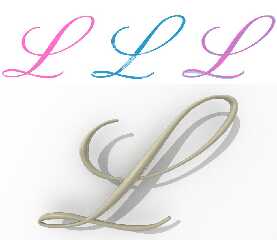
In the example picture, the pink "L" in the upper left corner is the original.
The TrueType font is called "Pinyon Script." The blue "L" in the middle is the
sphere_sweep character. Using the orthographic camera causes spots to appear.
The sphere_sweep character is overlaid with the original in the upper right
corner. The bottom shows the sphere_sweep character with a normal camera.

This was a first attempt and I didn't put much effort into placing the dots
along the original letter but it turned out pretty well anyway. Adjusting the
diameter multipliers was pretty easy.

Have a great day everyone!

Kind regards,
Dave Blandston


The code is so short I'll just include it here:
-----------------------------------------------

#local NPoints = 32;

#local Coordinate = array [NPoints] { //<x, y, diameter multiplier>
   <516, 451, 1>,
   <513, 457, 1>,
   <475, 485, 1>,
   <422, 497, 1.8>,
   <360, 495, 1.8>,
   <264, 475, 1>,
   <175, 451, 2>,
   <93,  454, 2>,
   <75,  473, 1>,
   <94,  489, 1>,
   <194, 490, 1>,
   <277, 452, 2>,
   <390, 328, 4>,
   <532, 135, 1.5>,
   <579, 93,  1.5>,
   <631, 65,  1>,
   <678, 56,  1>,
   <719, 69,  2>,
   <728, 104, 2>,
   <683, 179, 2>,
   <596, 255, 1>,
   <500, 307, 1>,
   <415, 334, 1>,
   <329, 336, 1>,
   <260, 313, 2>,
   <228, 272, 2>,
   <223, 236, 3>,
   <234, 201, 2>,
   <261, 167, 1>,
   <300, 144, 1>,
   <339, 137, 1>,
   <349, 138, 1>
} //array

#local MinX = 9999;
#local MaxX = 0;
#local MinY = 9999;
#local MaxY = 0;

#for (I, 0, NPoints - 1)
   #if (Coordinate [I].x < MinX) #local MinX = Coordinate [I].x; #end
   #if (Coordinate [I].x > MaxX) #local MaxX = Coordinate [I].x; #end
   #if (Coordinate [I].y < MinY) #local MinY = Coordinate [I].y; #end
   #if (Coordinate [I].y > MaxY) #local MaxY = Coordinate [I].y; #end
#end //#for

#local MaxY = MaxY - MinY;

#local S = 1 / MaxY;

#for (I, 0, NPoints - 1)
   #local Coordinate [I] = Coordinate [I] - <MinX, MinY, 0>;
   #local Coordinate [I] = <Coordinate [I].x, MaxY - Coordinate [I].y,
Coordinate [I].z> * <S, S, 1>;
#end //#for

#local BaseRadius = .011;

#local ThreeDText = object {
   sphere_sweep {
      b_spline
      NPoints
      #for (I, 0, NPoints - 1)
         <Coordinate [I].x, Coordinate [I].y, 0>, BaseRadius * Coordinate [I].z
      #end //#for
   } //sphere_sweep
} //object


Post a reply to this message


Attachments:
Download 'test.jpg' (48 KB)

Preview of image 'test.jpg'
test.jpg


From: Thomas de Groot
Subject: Re: 3D Text with Sphere_sweeps
Date: 19 Jun 2022 02:22:20
Message: <62aec09c$1@news.povray.org>
Op 18/06/2022 om 11:03 schreef Dave Blandston:
> In case anyone is interested, here's an easy way to make 3D text using
> sphere_sweeps. To get the data points, I made a bit-map image of the letter "L"
> and drew several dots along the path of the character. It was a little tedious
> to type the <x, y> coordinates of the dots. I suppose it's bad form to use the
> third vector component for something unrelated to the first two but it's very
> convenient.
> 

Fascinating. That went pretty well indeed.

-- 
Thomas


Post a reply to this message

From: jr
Subject: Re: 3D Text with Sphere_sweeps
Date: 19 Jun 2022 04:35:00
Message: <web.62aedf9c18b1901cd6bf93276cde94f1@news.povray.org>
hi,

"Dave Blandston" <IsN### [at] protonmailch> wrote:
> In case anyone is interested, here's an easy way to make 3D text using
> sphere_sweeps. To get the data points, I made a bit-map image of the letter "L"
> and drew several dots along the path of the character. It was a little tedious
> to type the <x, y> coordinates of the dots. I suppose it's bad form to use the
> third vector component for something unrelated to the first two but it's very
> convenient.
>
> In the example picture, the pink "L" in the upper left corner is the original.
> The TrueType font is called "Pinyon Script." The blue "L" in the middle is the
> sphere_sweep character. Using the orthographic camera causes spots to appear.
> The sphere_sweep character is overlaid with the original in the upper right
> corner. The bottom shows the sphere_sweep character with a normal camera.
> ...

interested, yes (and fascinated, too :-)), and thanks for including code.  the
top-right "overlaid" is very impressive, with only 32 data points.


regards, jr.


Post a reply to this message

From: Dave Blandston
Subject: Re: 3D Text with Sphere_sweeps
Date: 20 Jun 2022 05:50:00
Message: <web.62b0418218b1901ccf03b124607c1b34@news.povray.org>
OK, I finished the word I wanted to make and it turned out fairly well. It's
certainly not perfect but close enough, and I'm pleased with the appearance.
Using a cursive font complicated things a little but forced me to improve the
code. I'll post the improved code in the povray.text.scene-files section.

This picture shows the original TrueType font on the top, the rounded font with
only emission for lighting in the middle, and the rounded font with regular
lighting on the bottom.

Have a wonderful day folks!

Kind regards,
Dave Blandston


Post a reply to this message


Attachments:
Download 'comparison.jpg' (119 KB)

Preview of image 'comparison.jpg'
comparison.jpg


From: Dave Blandston
Subject: Re: 3D Text with Sphere_sweeps
Date: 20 Jun 2022 19:20:00
Message: <web.62b1000918b1901c22d125f7607c1b34@news.povray.org>
There's a lot of room for improvement...


Post a reply to this message


Attachments:
Download 'untitled.jpg' (128 KB)

Preview of image 'untitled.jpg'
untitled.jpg


From: Alain Martel
Subject: Re: 3D Text with Sphere_sweeps
Date: 21 Jun 2022 14:47:18
Message: <62b21236$1@news.povray.org>
Le 2022-06-20 à 19:17, Dave Blandston a écrit :
> There's a lot of room for improvement...

How so ?
What we see in those circled areas is exactly as expected.

To smooth out those areas out, you'd probably need to convert the whole 
thing into an iso_surface and apply some blobing.


Post a reply to this message

From: Dave Blandston
Subject: Re: 3D Text with Sphere_sweeps
Date: 21 Jun 2022 16:05:00
Message: <web.62b223b718b1901ccf03b124607c1b34@news.povray.org>
Alain Martel <kua### [at] videotronca> wrote:
> How so ?
> What we see in those circled areas is exactly as expected.
>
> To smooth out those areas out, you'd probably need to convert the whole
> thing into an iso_surface and apply some blobing.


Yes that's what I'm thinking of trying. Bald Eagle has made some amazing code
that does the smoothing. It's a small detail but I think it would make the
letters look better.


Post a reply to this message

From: Bald Eagle
Subject: Re: 3D Text with Sphere_sweeps
Date: 21 Jun 2022 18:25:00
Message: <web.62b2444b18b1901c1f9dae3025979125@news.povray.org>
"Dave Blandston" <IsN### [at] protonmailch> wrote:
> Alain Martel <kua### [at] videotronca> wrote:
> > How so ?
> > What we see in those circled areas is exactly as expected.
> >
> > To smooth out those areas out, you'd probably need to convert the whole
> > thing into an iso_surface and apply some blobing.
>
>
> Yes that's what I'm thinking of trying. Bald Eagle has made some amazing code
> that does the smoothing. It's a small detail but I think it would make the
> letters look better.

I just translated Inigo Quilez's Shadertoy code into SDL.  I'm sure he got the
basics of that from OpenGL

"jr" wrote:

> that's an interesting page, some of the other posts I scanned cursorily looked
> worth returning to.  thanks.

> (sticking my neck out) I think we'd need WFP to become interested, make 'povr'
> export/make visible the TTF data it (as pointed out) already has, in the parser;
> pass in a text{} and get back metrics, that sort of thing.

Well, I would say that as "purists", we tend to dismiss 3rd party/"other"
software, but I would strongly encourage everyone to explore what's out there
and _make use of_ those software packages and programming languages and use them
as inspiration for functions, macros, and other things that are in SDL.

If I was going to pursue this project, I'd probably start out by contacting
Inigo Quilez or Martijn Steinrucker (Art of Code on YouTube) and asking about
how to write functions to make the required sphere sweep segments.  I'd also
find somewhere to post on the ShaderToy forums to see if anyone has written code
to translate TTF into renderable ShaderToy code.
Look for TTF importing/decoding libraries in languages that you understand.
Perhaps Freya Holmer has done some work on this in relation to ... her ...
presentations on Bezier curves.

Casting about on the internet in places you don't often go can broaden your
horizons, give you new idea and inspiration, and you can _communicate with
people about POV-Ray_ which may spark their interest in some way.

I'm confident that a lot of the necessary steps can be done in SDL, but perhaps
there's a simple command-line thing that will spit out the bezier spline control
points of the segments that make up the glyphs in a font.  Then you could use
that to generate a text file for use in POV-Ray.
I'd say first get it to work, then if you want, you can do the programming
needed to gather it all into an SDL-only scene file.

But rule #1 is usually "See if this has been done before" and use other people's
code - it will save a ton of time, mistakes, and debugging frustration.

The other point/aside I wanted to make, is that if there was a way to make a
signed distance function for the whole glyph, then you could probably just code
them at an undersized diameter, and then "inflate" them to get the rounding
automatically, but I think that would be a very very long shot, and probably not
something that would lend itself to automation.


Post a reply to this message

From: ingo
Subject: Re: 3D Text with Sphere_sweeps
Date: 23 Jun 2022 13:01:18
Message: <XnsAEBFC17E328D2seed7@news.povray.org>
in news:web.62b1000918b1901c22d125f7607c1b34@news.povray.org Dave 
Blandston wrote:

> There's a lot of room for improvement...
> 

Have you considered blob-sweeps? You could use the .z in the vector for 
the strength of the blob.

-- 
https://ingoogni.nl


Post a reply to this message

From: Dave Blandston
Subject: Re: 3D Text with Sphere_sweeps
Date: 23 Jun 2022 17:30:00
Message: <web.62b4d93618b1901cb80481b2607c1b34@news.povray.org>
ingo <ing### [at] tagpovrayorg> wrote:

> Have you considered blob-sweeps? You could use the .z in the vector for
> the strength of the blob.


This looks like a solution. If the b_spline function could be converted to SDL
in such a manner that it would generate points and corresponding diameters at
specific intervals (the distance between points would have to remain constant
regardless of the curvature) then a blob element could be placed at each point
and the diameter could be converted to a blob strength.

This works perfectly when the two character strokes that are intersecting each
other differ greatly in diameter but when their diameters are similar then a
little bump results so some tweaking would be necessary.

Thanks for the suggestion Ingo! Even if the b_spline math turns out to be beyond
my capabilities, I think you have provided a solution. More testing would be
necessary to make sure that tight turns don't cause blob elements to connect
that shouldn't connect.

Here's the test code that generated the sample image:

#local BlobStrength = array [2] {.8, .4}
#local DeltaTheta = .1;

blob {
   threshold 20
   #for (I, 0, 1)
      #for (Theta, 0, 360 - DeltaTheta, DeltaTheta)
         sphere {<cos (radians (Theta)) * 6 + 4 * (I * 2 - 1), sin (radians
(Theta)) * 6, 0>, BlobStrength [I], 1}
      #end //#for
   #end //#for
} //blob


Post a reply to this message


Attachments:
Download 'blob.jpg' (83 KB)

Preview of image 'blob.jpg'
blob.jpg


From: Dave Blandston
Subject: Re: 3D Text with Sphere_sweeps
Date: 23 Jun 2022 22:15:00
Message: <web.62b51dce18b1901cb80481b2607c1b34@news.povray.org>
Varying the radii works...


Post a reply to this message


Attachments:
Download 'blob.jpg' (31 KB)

Preview of image 'blob.jpg'
blob.jpg


From: Paolo Gibellini
Subject: Re: 3D Text with Sphere_sweeps
Date: 24 Jun 2022 02:44:33
Message: <62b55d51$1@news.povray.org>
Il 23/06/2022 23:27, Dave Blandston ha scritto:
 > ingo <ing### [at] tagpovrayorg> wrote:
 >
 >> Have you considered blob-sweeps? You could use the .z in the vector for
 >> the strength of the blob.
 >
 >
 > This looks like a solution. If the b_spline function could be 
converted to SDL
 > in such a manner that it would generate points and corresponding 
diameters at
 > specific intervals (the distance between points would have to remain 
constant
 > regardless of the curvature) then a blob element could be placed at 
each point
 > and the diameter could be converted to a blob strength.
 >

Very nice!
Paolo


Post a reply to this message

From: ingo
Subject: Re: 3D Text with Sphere_sweeps
Date: 24 Jun 2022 03:22:55
Message: <XnsAEC05F6EB3AF9seed7@news.povray.org>
in news:web.62b4d93618b1901cb80481b2607c1b34@news.povray.org Dave 
Blandston wrote:

> If the b_spline function could be converted to SDL

Have a look at curve.zip https://ingoogni.nl/download/ it has cubic-bsline 
and beta spline, amongst others.

-- 
https://ingoogni.nl


Post a reply to this message

From: Dave Blandston
Subject: Re: 3D Text with Sphere_sweeps
Date: 24 Jun 2022 06:45:00
Message: <web.62b5952018b1901cb80481b2607c1b34@news.povray.org>
ingo <ing### [at] tagpovrayorg> wrote:
> Have a look at curve.zip https://ingoogni.nl/download/ it has cubic-bsline
> and beta spline, amongst others.


Oh wow that's really amazing! Arrays of arrays! Also the book referenced in the
file appears to be very well written. Thanks for sharing this. I will see if I
can make use of this code. As is often the case with POV-Ray, the limitation
will be my own limited intellect.


Post a reply to this message

From: Cousin Ricky
Subject: Re: 3D Text with Sphere_sweeps
Date: 24 Jun 2022 11:37:26
Message: <62b5da36$1@news.povray.org>
On 2022-06-23 17:27 (-4), Dave Blandston wrote:
> ingo <ing### [at] tagpovrayorg> wrote:
> 
>> Have you considered blob-sweeps? You could use the .z in the vector for
>> the strength of the blob.
> 
> 
> This looks like a solution. If the b_spline function could be converted to SDL
> in such a manner that it would generate points and corresponding diameters at
> specific intervals (the distance between points would have to remain constant
> regardless of the curvature) then a blob element could be placed at each point
> and the diameter could be converted to a blob strength.
> 
> This works perfectly when the two character strokes that are intersecting each
> other differ greatly in diameter but when their diameters are similar then a
> little bump results so some tweaking would be necessary.
> 
> Thanks for the suggestion Ingo! Even if the b_spline math turns out to be beyond
> my capabilities, I think you have provided a solution. More testing would be
> necessary to make sure that tight turns don't cause blob elements to connect
> that shouldn't connect.

My SphereSweep module has two kinds of B-spline blob capability, so you
don't have to do any math.  And for the purists out there, it's all SDL.
 See if it's something you can use.

https://github.com/CousinRicky/POV-SphereSweep


Post a reply to this message

From: Dave Blandston
Subject: Re: 3D Text with Sphere_sweeps
Date: 24 Jun 2022 21:20:00
Message: <web.62b662b918b1901cb80481b2607c1b34@news.povray.org>
Cousin Ricky <ric### [at] yahoocom> wrote:
> My SphereSweep module has two kinds of B-spline blob capability, so you
> don't have to do any math.  And for the purists out there, it's all SDL.
>  See if it's something you can use.
>
> https://github.com/CousinRicky/POV-SphereSweep


This will work for my project with some slight modifications - is that OK?
Specifically, I'll add one more argument to the SphereSweep_Blob_field () macro,
which is the blob threshold setting, and I'll need to modify the
SphereSweep_Blob_field () macro to allow multiple data sets/arrays to be
processed as one blob.

I recall seeing your airplane demo image quite a while ago and now that I'm
looking at the entire project I do recall its purpose - I wish I had remembered
it when I started my project! Thanks for pointing it out. After looking at your
code I see that it's extremely well-done and the documentation is exceptional. I
appreciate your efforts greatly.


Post a reply to this message

From: Cousin Ricky
Subject: Re: 3D Text with Sphere_sweeps
Date: 25 Jun 2022 11:52:35
Message: <62b72f43$1@news.povray.org>
On 2022-06-24 21:19 (-4), Dave Blandston wrote:
> Cousin Ricky <ric### [at] yahoocom> wrote:
>>
>> https://github.com/CousinRicky/POV-SphereSweep
> 
> 
> This will work for my project with some slight modifications - is that OK?

Of course, as long as you attach your name and the date that you made
the changes.  The license text is included with the download.

> I recall seeing your airplane demo image quite a while ago and now that I'm
> looking at the entire project I do recall its purpose - I wish I had remembered
> it when I started my project! Thanks for pointing it out. After looking at your
> code I see that it's extremely well-done and the documentation is exceptional. I
> appreciate your efforts greatly.

You're welcome!


Post a reply to this message

From: Dave Blandston
Subject: Re: 3D Text with Sphere_sweeps
Date: 25 Jun 2022 17:10:00
Message: <web.62b7790418b1901cb80481b2607c1b34@news.povray.org>
Cousin Ricky <ric### [at] yahoocom> wrote:
> My SphereSweep module has two kinds of B-spline blob capability, so you
> don't have to do any math.  And for the purists out there, it's all SDL.
>  See if it's something you can use.


Success! I can't believe that what I needed already existed. Awesome Cousin
Ricky!


Post a reply to this message


Attachments:
Download 'untitled.jpg' (117 KB)

Preview of image 'untitled.jpg'
untitled.jpg


From: Thomas de Groot
Subject: Re: 3D Text with Sphere_sweeps
Date: 26 Jun 2022 02:01:05
Message: <62b7f621$1@news.povray.org>
Op 25/06/2022 om 23:07 schreef Dave Blandston:
> Cousin Ricky <ric### [at] yahoocom> wrote:
>> My SphereSweep module has two kinds of B-spline blob capability, so you
>> don't have to do any math.  And for the purists out there, it's all SDL.
>>   See if it's something you can use.
> 
> 
> Success! I can't believe that what I needed already existed. Awesome Cousin
> Ricky!

Wow! :-)

-- 
Thomas


Post a reply to this message

Copyright 2003-2023 Persistence of Vision Raytracer Pty. Ltd.