|
|
|
|
|
|
| |
| |
|
|
|
|
| |
| |
|
|
Hi

Since this post:

From: kurtz le pirate
Subject: How to ...
Date: 2021-11-22 11:23:08
http://news.povray.org/povray.general/thread/%3C619bc3ec%241%40news.povray.org%3E/

- I've been working on some some macros that create functions for calculating
with complex numbers.

And yesterday I made some functions that can be used for HSV-coloring of
pigments.

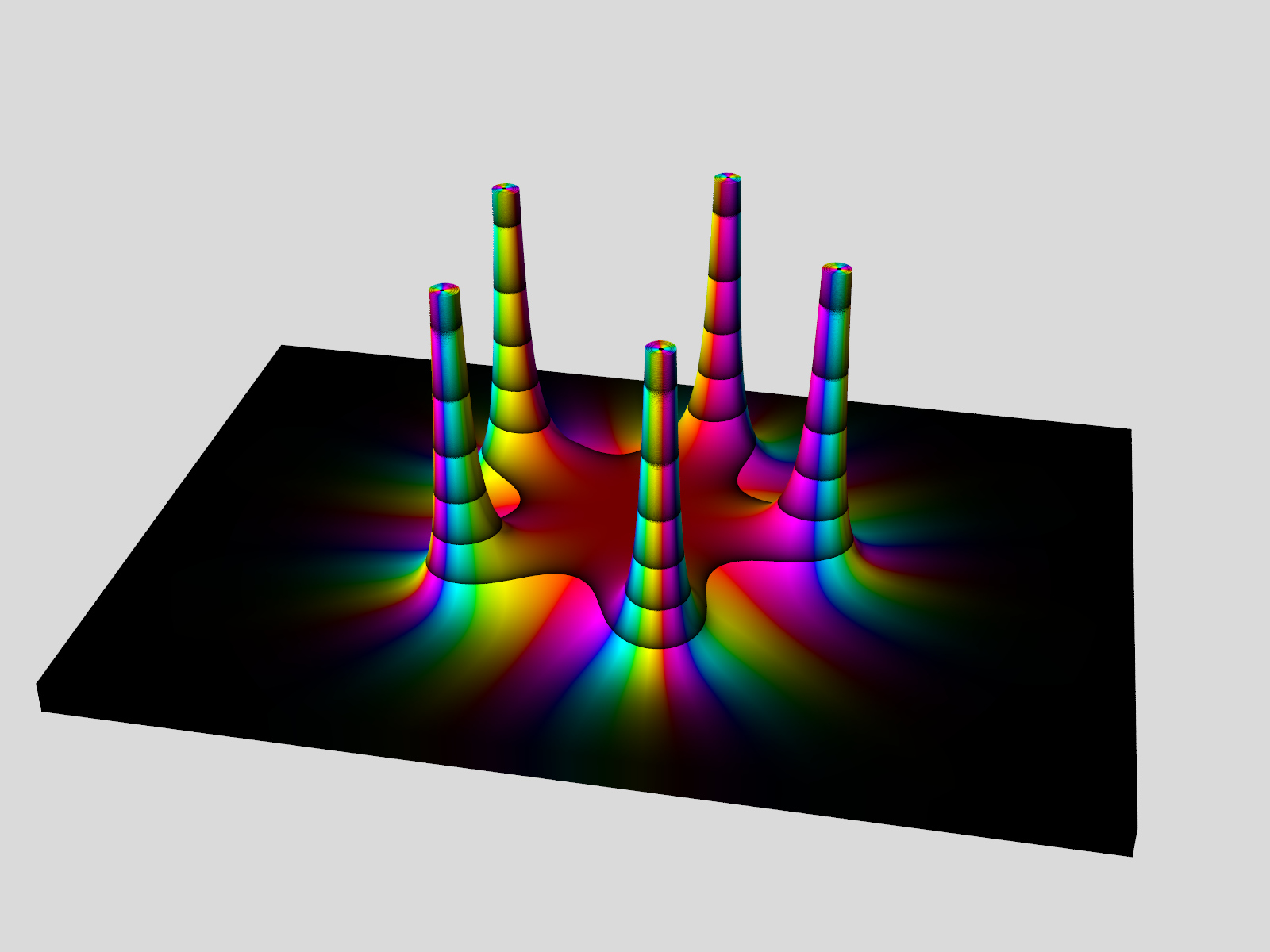
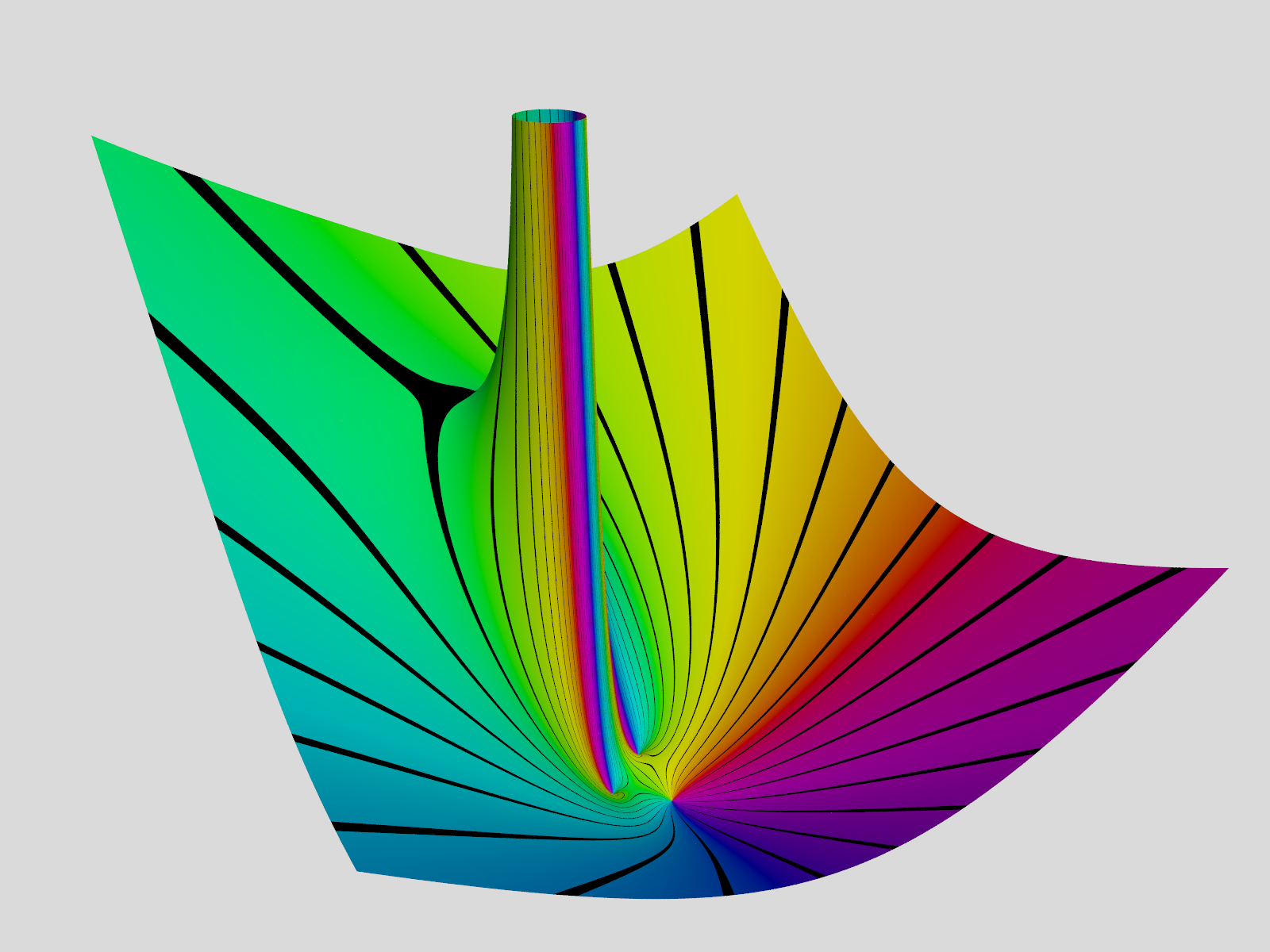
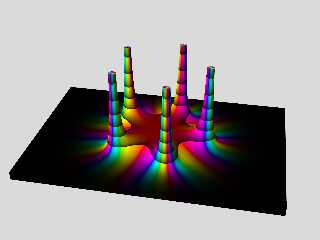
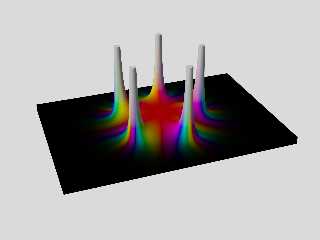
The isosurface in the attached image shows the magnitude (or modulus) of this
function:

  Fn(Z) = 1/(Z^5 - 2)^2

- as the height above a complex plane:. I found that function here:
https://matlabarticlesworld.blogspot.com/2020/01/what-is-coolest-thing-you-can-do-with.html

The colors are chosen so that the hue follows the phase (or argument) of the
function, while the lightness goes from 0.0 to 0.5 in intervals along the height
axis. The saturation is 100% everywhere.

--
Tor Olav
http://subcube.com
https://github.com/t-o-k
Post a reply to this message
Attachments:
Download 'isosurface from magnitude of complex function.png' (344 KB)
Preview of image 'isosurface from magnitude of complex function.png'
|
|
| |
| |
|
|
|
|
| |
| |
|
|
"Tor Olav Kristensen" <tor### [at] TOBEREMOVEDgmail com> wrote:
> Hi
>
> Since this post:
>
> From: kurtz le pirate
> Subject: How to ...
> Date: 2021-11-22 11:23:08
> http://news.povray.org/povray.general/thread/%3C619bc3ec%241%40news.povray.org%3E/
>
> - I've been working on some some macros that create functions for calculating
> with complex numbers.
>
> And yesterday I made some functions that can be used for HSV-coloring of
> pigments.
>
> The isosurface in the attached image shows the magnitude (or modulus) of this
> function:
>
> Fn(Z) = 1/(Z^5 - 2)^2
>
> - as the height above a complex plane:. I found that function here:
>
https://matlabarticlesworld.blogspot.com/2020/01/what-is-coolest-thing-you-can-do-with.html
>
> The colors are chosen so that the hue follows the phase (or argument) of the
> function, while the lightness goes from 0.0 to 0.5 in intervals along the height
> axis. The saturation is 100% everywhere.
>
> --
> Tor Olav
> http://subcube.com
> https://github.com/t-o-k
I hope you won't mind that I love it... without understanding it :-) com> wrote:
> Hi
>
> Since this post:
>
> From: kurtz le pirate
> Subject: How to ...
> Date: 2021-11-22 11:23:08
> http://news.povray.org/povray.general/thread/%3C619bc3ec%241%40news.povray.org%3E/
>
> - I've been working on some some macros that create functions for calculating
> with complex numbers.
>
> And yesterday I made some functions that can be used for HSV-coloring of
> pigments.
>
> The isosurface in the attached image shows the magnitude (or modulus) of this
> function:
>
> Fn(Z) = 1/(Z^5 - 2)^2
>
> - as the height above a complex plane:. I found that function here:
>
https://matlabarticlesworld.blogspot.com/2020/01/what-is-coolest-thing-you-can-do-with.html
>
> The colors are chosen so that the hue follows the phase (or argument) of the
> function, while the lightness goes from 0.0 to 0.5 in intervals along the height
> axis. The saturation is 100% everywhere.
>
> --
> Tor Olav
> http://subcube.com
> https://github.com/t-o-k
I hope you won't mind that I love it... without understanding it :-)
Post a reply to this message
|
|
| |
| |
|
|
|
|
| |
| |
|
|
"Mr" <nomail@nomail> wrote:
>...
> I hope you won't mind that I love it... without understanding it :-)

I don't mind at all =))

Learning the basics of imaginary and complex numbers is not very hard. It's
about learning new ways of adding, subtracting, multiplying, dividing etc. It's
understanding how they can be used and how to interpret the results that can be
challenging.

--
Tor Olav
http://subcube.com
https://github.com/t-o-k
Post a reply to this message
|
|
| |
| |
|
|
|
|
| |
| |
|
|
"Tor Olav Kristensen" <tor### [at] TOBEREMOVEDgmailcom> wrote:
> Hi
>
> Since this post:
>
> From: kurtz le pirate
> Subject: How to ...
> Date: 2021-11-22 11:23:08
> http://news.povray.org/povray.general/thread/%3C619bc3ec%241%40news.povray.org%3E/
>
> - I've been working on some some macros that create functions for calculating
> with complex numbers.
>
> And yesterday I made some functions that can be used for HSV-coloring of
> pigments.
>
> The isosurface in the attached image shows the magnitude (or modulus) of this
> function:
>
>   Fn(Z) = 1/(Z^5 - 2)^2
>
> - as the height above a complex plane:. I found that function here:
>
https://matlabarticlesworld.blogspot.com/2020/01/what-is-coolest-thing-you-can-do-with.html
>
> The colors are chosen so that the hue follows the phase (or argument) of the
> function, while the lightness goes from 0.0 to 0.5 in intervals along the height
> axis. The saturation is 100% everywhere.
>
> --
> Tor Olav
> http://subcube.com
> https://github.com/t-o-k


Very nice.

The "multi-layered" aspect of the result is intriguing me. Does it come from a
property of the function you've choosen, or from the way you choose to visualise
it ?

Pascal
Post a reply to this message
|
|
| |
| |
|
|
From: Thomas de Groot
Subject: Re: Isosurface from magnitude of complex function with domain coloring
Date: 23 Dec 2021 02:32:24
Message: <61c42608$1@news.povray.org>
|
|
|
| |
| |
|
|
Somehow, this makes me think of black hole gravity wells...

Intriguing!


--
Thomas
Post a reply to this message
|
|
| |
| |
|
|
From: Alain Martel
Subject: Re: Isosurface from magnitude of complex function with domain coloring
Date: 24 Dec 2021 13:16:26
Message: <61c60e7a$1@news.povray.org>
|
|
|
| |
| |
|
|
Le 2021-12-22 à 19:34, BayashiPascal a écrit :
> "Tor Olav Kristensen" <tor### [at] TOBEREMOVEDgmailcom> wrote:
>> Hi
>>
>> Since this post:
>>
>> From: kurtz le pirate
>> Subject: How to ...
>> Date: 2021-11-22 11:23:08
>> http://news.povray.org/povray.general/thread/%3C619bc3ec%241%40news.povray.org%3E/
>>
>> - I've been working on some some macros that create functions for calculating
>> with complex numbers.
>>
>> And yesterday I made some functions that can be used for HSV-coloring of
>> pigments.
>>
>> The isosurface in the attached image shows the magnitude (or modulus) of this
>> function:
>>
>>    Fn(Z) = 1/(Z^5 - 2)^2
>>
>> - as the height above a complex plane:. I found that function here:
>>
https://matlabarticlesworld.blogspot.com/2020/01/what-is-coolest-thing-you-can-do-with.html
>>
>> The colors are chosen so that the hue follows the phase (or argument) of the
>> function, while the lightness goes from 0.0 to 0.5 in intervals along the height
>> axis. The saturation is 100% everywhere.
>>
>> --
>> Tor Olav
>> http://subcube.com
>> https://github.com/t-o-k
>
>
> Very nice.
>
> The "multi-layered" aspect of the result is intriguing me. Does it come from a
> property of the function you've choosen, or from the way you choose to visualise
> it ?
>
> Pascal
>
>
>
Do you mean the repeating gradient ?
It comes from the way the «V» of the HSV value is computed, and values
larger than 1 get their integer part zeroed.

Then, it's mapped to a 0..0.5 range.

It could look something like this :
colour_map{
	[0 hsv2rgb(<Hvalue, 1, 0>)]
	[1 hsv2rgb(<Hvalue, 1, 0.5>)]
   }
Post a reply to this message
|
|
| |
| |
|
|
|
|
| |
| |
|
|
"Tor Olav Kristensen" <tor### [at] TOBEREMOVEDgmailcom> wrote:

>
> The colors are chosen so that the hue follows the phase (or argument) of the
> function, while the lightness goes from 0.0 to 0.5 in intervals along the height
> axis. The saturation is 100% everywhere.
>

Those beautiful color gradations remind me of old-style blown-glass/metallic
Christmas tree ornaments; it even appears as if they have blurred reflections.
That's an amazing result. Nice!
Post a reply to this message
|
|
| |
| |
|
|
|
|
| |
| |
|
|
"Tor Olav Kristensen" <tor### [at] TOBEREMOVEDgmailcom> wrote:

> - I've been working on some some macros that create functions for calculating
> with complex numbers.

Very nice.

I was consulting the stuff that Paul Nylander wrote.  I'm assuming yours are
similar.

(He's using loops and macros to make triangles...)

//Complex Functions
#macro Square(X) X*X #end
#macro Complex(X,Y) <X,Y> #end
#declare I=Complex(0,1);
#macro Re(Z) Z.x #end
#macro Im(Z) Z.y #end
#macro Abs(Z) vlength(Z) #end // sqrt(square(Re(Z))+square(Im(Z)))
#macro Arg(Z)
 #if(Abs(Z)=0)
  #local theta=0;
 #else
  #local theta=atan2(Im(Z),Re(Z));
 #end
 theta
#end

#macro Sqr(Z) Complex(square(Re(Z))-square(Im(Z)),2*Re(Z)*Im(Z)) #end

#macro Pow(Z,n)
 #local r=Abs(Z);
 #if(r=0)
  #local z2=Complex(0,0);
 #else
  #local theta=n*Arg(Z);

  #local z2=pow(r,n)*Complex(cos(theta),sin(theta));
 #end
 z2
#end

#macro Mult(z1,z2)
Complex(Re(z1)*Re(z2)-Im(z1)*Im(z2),Im(z1)*Re(z2)+Re(z1)*Im(z2)) #end
#macro Exp(Z) exp(Re(Z))*Complex(cos(Im(Z)),sin(Im(Z))) #end
#macro Sinh(Z) Complex(cos(Im(Z))*sinh(Re(Z)),sin(Im(Z))*cosh(Re(Z))) #end
#macro Cosh(Z) Complex(cos(Im(Z))*cosh(Re(Z)),sin(Im(Z))*sinh(Re(Z))) #end

I made these two to just keep track

#macro Argument (Re, Im)
 atan2 (Re, Im)
#end

#macro Modulus (Re, Im)
 sqrt (pow (Re, 2) + pow (Im, 2))
#end

> And yesterday I made some functions that can be used for HSV-coloring of
> pigments.

I worked those out from the macros in colors.inc.  A little challenging at first
to turn that whole thing into a function.  ;)


This is looking great!  I'm sure there are a lot of other interesting complex
surfaces to be explored.  I'm also wondering how hard it would be to use mod()
to have an infinite array of those "black hole vortices" on a plane - in either
a rectangular or an alternating/hexagonal arrangement...
Post a reply to this message
|
|
| |
| |
|
|
|
|
| |
| |
|
|
Alain Martel <kua### [at] videotronca> wrote:
> Do you mean the repeating gradient ?
> It comes from the way the «V» of the HSV value is computed, and values
> larger than 1 get their integer part zeroed.
>
> Then, it's mapped to a 0..0.5 range.
>
> It could look something like this :
> colour_map{
>  [0 hsv2rgb(<Hvalue, 1, 0>)]
>  [1 hsv2rgb(<Hvalue, 1, 0.5>)]
>    }

I mean, looking at the bottom-left corner, or the concentric pattern in the cut
at the top of the singularities, I see it as a superposition of several
surfaces. Also, the shape of the singularities seems to have slight steps, at
the border of what I believe to be each layer. But the more I look at it the
more I feel like I'm just completely confused by the repeating colour pattern
and the shape of the isosurface... which makes this image even more intriguing
:-)

Pascal
Post a reply to this message
|
|
| |
| |
|
|
From: kurtz le pirate
Subject: Re: Isosurface from magnitude of complex function with domain coloring
Date: 25 Dec 2021 04:56:55
Message: <61c6eae7@news.povray.org>
|
|
|
| |
| |
|
|
On 22/12/2021 06:51, Tor Olav Kristensen wrote:
> Hi
>
> Since this post:
>
> From: kurtz le pirate
> Subject: How to ...
> Date: 2021-11-22 11:23:08
> http://news.povray.org/povray.general/thread/%3C619bc3ec%241%40news.povray.org%3E/
>
> - I've been working on some some macros that create functions for calculating
> with complex numbers.
>
> And yesterday I made some functions that can be used for HSV-coloring of
> pigments.
>
> The isosurface in the attached image shows the magnitude (or modulus) of this
> function:
>
>   Fn(Z) = 1/(Z^5 - 2)^2
>
> - as the height above a complex plane:. I found that function here:
>
https://matlabarticlesworld.blogspot.com/2020/01/what-is-coolest-thing-you-can-do-with.html
>
> The colors are chosen so that the hue follows the phase (or argument) of the
> function, while the lightness goes from 0.0 to 0.5 in intervals along the height
> axis. The saturation is 100% everywhere.

Very good job !

The basic operators on the complexes is much more elaborate than mine. I
use simple macros. This makes the definitions a little more difficult to
work out. For example, for f(z) = z + 1/z, I have to write
complexAdd(cc,complexInverse(cc)).

The really interesting part is the use of isosurfaces. Good job. I just
used colored triangles which give me a {} mesh. The coloring model is
also very clever because the hue and luminosity depend on the value of
the function.

I will see how to add the same coloring scheme as you.

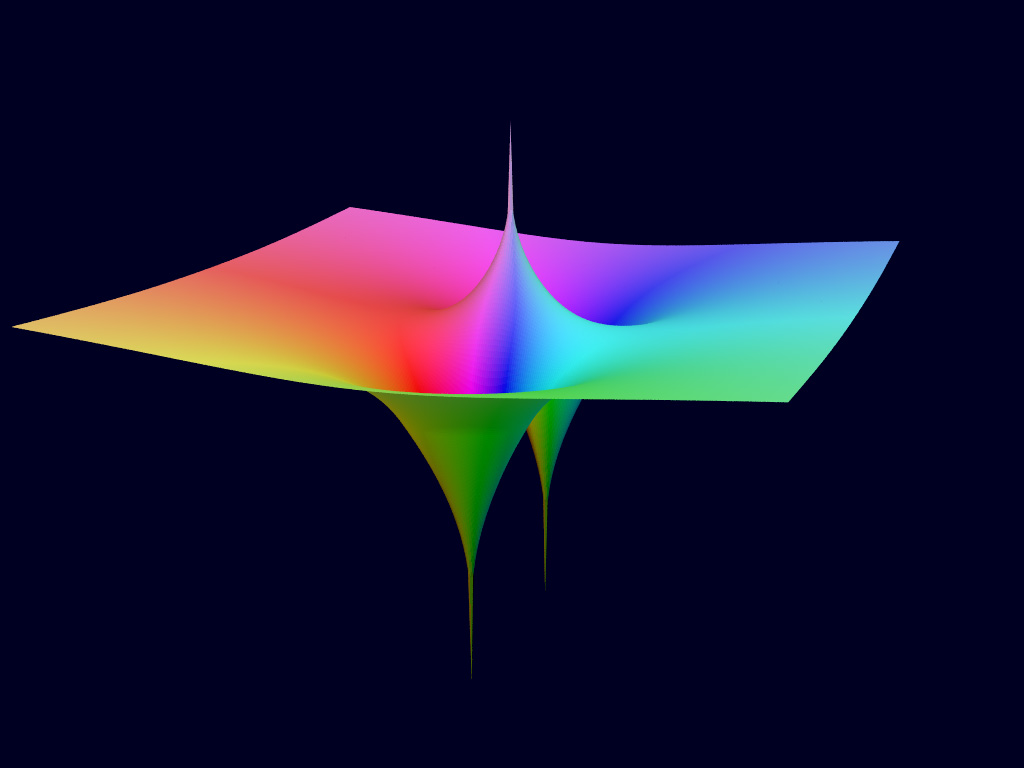
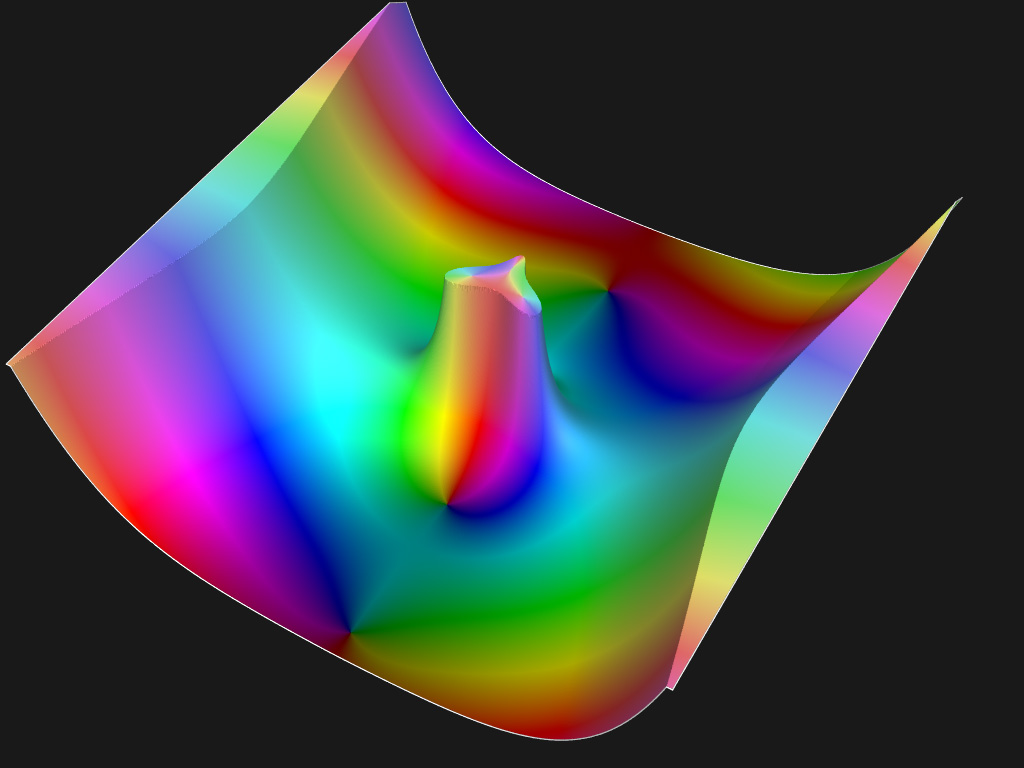
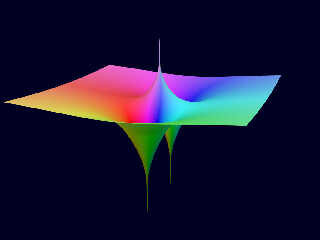
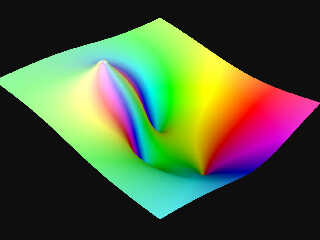
Here, one sample of f(z) = (-z^3 + iz^2 + 1) / (z - 1 + i)^2.


--
Kurtz le pirate
Compagnie de la Banquise
Post a reply to this message
Attachments:
Download 'complex3dmesh_02_fn2.jpg' (48 KB)
Preview of image 'complex3dmesh_02_fn2.jpg'
|
|
| |
| |
|
|
|
|
| |
| |
|
|
"BayashiPascal" <bai### [at] gmailcom> wrote:
>...
> Very nice.
>
> The "multi-layered" aspect of the result is intriguing me. Does it come from a
> property of the function you've choosen, or from the way you choose to visualise
> it ?

Thank you Pascal

The layered appearance is just a result from the coloring.
Here's how I did it:

#declare H_Fn =
    function(re, im) {
        degrees(mod(2*pi + ArgumentFn(re, im), 2*pi))
    }
;
#declare S = 1.0;
#declare A = 0.6; // 0 < A < 1
#declare L_Fn =
    function(re, im) {
        mod(10*(1 - pow(A, MagnitudeFn(re, im))), 1)/2
    }
;
isosurface {
    function { y - MagnitudeFn(x, z) }

    ...

    FunctionsPigmentRGB(
        function { Rd_Fn(H_Fn(x, z), S, L_Fn(x, z)) },
        function { Gn_Fn(H_Fn(x, z), S, L_Fn(x, z)) },
        function { Bu_Fn(H_Fn(x, z), S, L_Fn(x, z)) }
    )
}

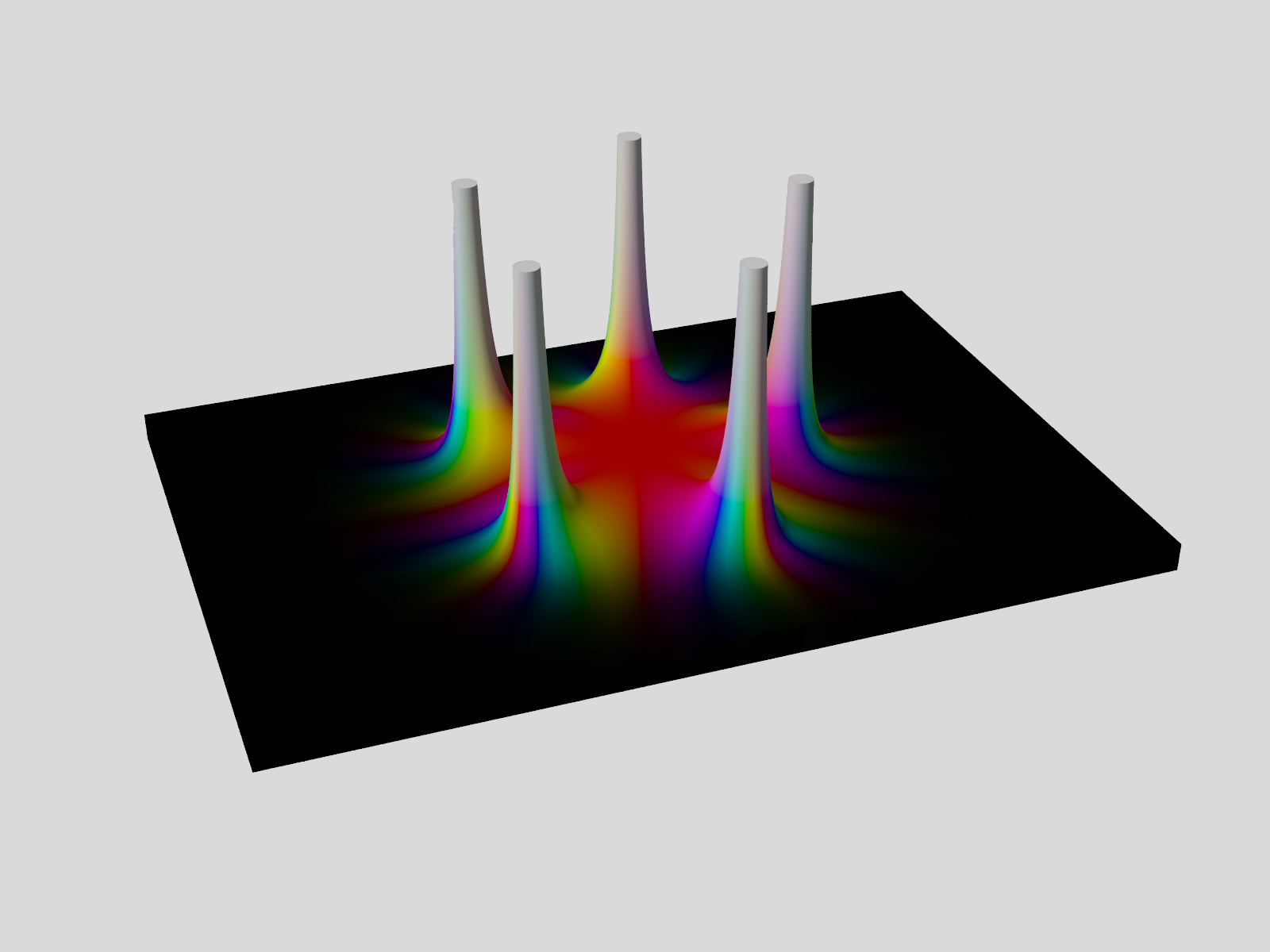
In the attached image L_Fn() was changed to this:

#declare A = 0.2; // 0 < A < 1
#declare L_Fn =
    function(re, im) {
        (1 - pow(A, MagnitudeFn(re, im)))
    }
;

--
Tor Olav
http://subcube.com
https://github.com/t-o-k
Post a reply to this message
Attachments:
Download 'fivepoles_isosurface_otherlightness.png' (202 KB)
Preview of image 'fivepoles_isosurface_otherlightness.png'
|
|
| |
| |
|
|
|
|
| |
| |
|
|
Alain Martel <kua### [at] videotronca> wrote:
> Le 2021-12-22 à 19:34, BayashiPascal a écrit :
> > "Tor Olav Kristensen" <tor### [at] TOBEREMOVEDgmailcom> wrote:
> >>...
> >> And yesterday I made some functions that can be used for HSV-coloring of
> >> pigments.
> >>...
> >
> > The "multi-layered" aspect of the result is intriguing me. Does it come from a
> > property of the function you've choosen, or from the way you choose to visualise
> > it ?
> >...
> Do you mean the repeating gradient ?
> It comes from the way the «V» of the HSV value is computed, and values
> larger than 1 get their integer part zeroed.
>
> Then, it's mapped to a 0..0.5 range.
>
> It could look something like this :
> colour_map{
>  [0 hsv2rgb(<Hvalue, 1, 0>)]
>  [1 hsv2rgb(<Hvalue, 1, 0.5>)]
>    }

Sorry Alain. I made a mistake and wrote "HSV-coloring" above. I meant to write
"HSL-coloring". (I haven't yet looked at how HSV formulas works.)

Also see my answer to Pascal in my previous post.

--
Tor Olav
http://subcube.com
https://github.com/t-o-k
Post a reply to this message
|
|
| |
| |
|
|
|
|
| |
| |
|
|
"Kenneth" <kdw### [at] gmailcom> wrote:
> "Tor Olav Kristensen" <tor### [at] TOBEREMOVEDgmailcom> wrote:
>
> >
> > The colors are chosen so that the hue follows the phase (or argument) of the
> > function, while the lightness goes from 0.0 to 0.5 in intervals along the height
> > axis. The saturation is 100% everywhere.
> >
>
> Those beautiful color gradations remind me of old-style blown-glass/metallic
> Christmas tree ornaments; it even appears as if they have blurred reflections.
> That's an amazing result. Nice!

Thank you Kenneth !

The nice color gradients resulting from the formulas was a surprise to me.

I don't think that I have seen such old style blown glass ornaments.
Are they like this ?
https://www.nordichouse.co.uk/vintage-bordeaux-glass-bauble-p-4022.html

--
Tor Olav
http://subcube.com
https://github.com/t-o-k
Post a reply to this message
|
|
| |
| |
|
|
|
|
| |
| |
|
|
"Bald Eagle" <cre### [at] netscapenet> wrote:
>...
> Very nice.

Thank you Bill !


> I was consulting the stuff that Paul Nylander wrote.  I'm assuming yours are
> similar.

I'm not very familier wit Paul Nylander's work. Those macros seem like a good
start for a library for complex calculations. But the Pow() macro could need
some work to allow for the exponent to also be a complex number.

I did not create macros to do the calculations, but arrays of functions and
macros that assemble functions into new functions. For each complex operator
there's two functions; one for calculating the real part and one for calculating
the imaginary part.


>...
> I made these two to just keep track
>
> #macro Argument (Re, Im)
>  atan2 (Re, Im)
> #end
>
> #macro Modulus (Re, Im)
>  sqrt (pow (Re, 2) + pow (Im, 2))
> #end

I like your Modulus() macro better than the Abs() macro, because it does not
rely on the underlying implementation of how the complex numbers are
represented. I think that as few as possible of the macros should depend on the
underlying implementations. Btw.: Why have you chosen to have a different
atan2() call in your Argument() macro than in the Arg() macro ?


> I worked those out from the macros in colors.inc.  A little challenging at first
> to turn that whole thing into a function.  ;)

Yes, that's a bit of a struggle.


>...
> This is looking great!  I'm sure there are a lot of other interesting complex
> surfaces to be explored.

I've started on a Github repository for my library. It's here:
https://github.com/t-o-k/POV-Ray-complex-functions

Please note that this is a work in progress, so some features hasn't been added
yet and much of it may change.


> I'm also wondering how hard it would be to use mod()
> to have an infinite array of those "black hole vortices" on a plane - in either
> a rectangular or an alternating/hexagonal arrangement...

That's an interesting idea: to have a mod() operator that can handle complex
values. But I don't know how to implement that...

--
Tor Olav
http://subcube.com
https://github.com/t-o-k
Post a reply to this message
|
|
| |
| |
|
|
|
|
| |
| |
|
|
kurtz le pirate <kur### [at] gmailcom> wrote:
>...
> Very good job !
>
> The basic operators on the complexes is much more elaborate than mine. I
> use simple macros. This makes the definitions a little more difficult to
> work out. For example, for f(z) = z + 1/z, I have to write
> complexAdd(cc,complexInverse(cc)).

Yes, that's like a prefix notation, which is natural for such a macro library.


> The really interesting part is the use of isosurfaces. Good job. I just
> used colored triangles which give me a {} mesh. The coloring model is
> also very clever because the hue and luminosity depend on the value of
> the function.

Thank you. I'm glad that you like this Kurtz.

It wanted my library to also work with isosufaces and pigments, so I had to use
functions to do all the calculations.

I read about domain coloring with HSL-colors here:

https://en.wikipedia.org/wiki/Domain_coloring


> I will see how to add the same coloring scheme as you.

You could have a peek at my implementation here:

https://github.com/t-o-k/POV-Ray-complex-functions


> Here, one sample of f(z) = (-z^3 + iz^2 + 1) / (z - 1 + i)^2.

Here's how I have to enter that function in order to process it with my current
macros. It's a kind of postfix notation/implementation.

#declare No = 16;

#declare PartTypes = array[No];
#declare Arguments = array[No];

#declare PartTypes[0] = "Z";
#declare Arguments[0] = ZFn();

#declare PartTypes[1] = "Const";
#declare Arguments[1] = RealConstFn(+3.0);

#declare PartTypes[2] = "Pow";
#declare Arguments[2] = Arg2Fn(0, 1);

#declare PartTypes[3] = "Neg";
#declare Arguments[3] = Arg1Fn(2);

#declare PartTypes[4] = "Z";
#declare Arguments[4] = ZFn();

#declare PartTypes[5] = "Const";
#declare Arguments[5] = ImagConstFn(+1.0);

#declare PartTypes[6] = "Sqr";
#declare Arguments[6] = Arg1Fn(4);

#declare PartTypes[7] = "Mul";
#declare Arguments[7] = Arg2Fn(5, 6);

#declare PartTypes[8] = "Add";
#declare Arguments[8] = Arg2Fn(3, 7);

#declare PartTypes[9] = "Const";
#declare Arguments[9] = RealConstFn(+1.0);

#declare PartTypes[10] = "Add";
#declare Arguments[10] = Arg2Fn(8, 9);

#declare PartTypes[11] = "Z";
#declare Arguments[11] = ZFn();

#declare PartTypes[12] = "Const";
#declare Arguments[12] = ComplexConstFn(-1.0, +1.0);

#declare PartTypes[13] = "Add";
#declare Arguments[13] = Arg2Fn(11, 12);

#declare PartTypes[14] = "Sqr";
#declare Arguments[14] = Arg1Fn(13);

#declare PartTypes[15] = "Div";
#declare Arguments[15] = Arg2Fn(10, 14);

I'm a bit worried though, because my renderings of that function is quite
different from mine.

What is your rendering showing ?
The magnitude, the real part or the imaginary part ? - or something else ?

--
Tor Olav
http://subcube.com
https://github.com/t-o-k
Post a reply to this message
|
|
| |
| |
|
|
|
|
| |
| |
|
|
"Tor Olav Kristensen" <tor### [at] TOBEREMOVEDgmailcom> wrote:
>...
> #declare PartTypes[4] = "Z";
> #declare Arguments[4] = ZFn();
>
> #declare PartTypes[5] = "Const";
> #declare Arguments[5] = ImagConstFn(+1.0);
>
> #declare PartTypes[6] = "Sqr";
> #declare Arguments[6] = Arg1Fn(4);
>
> #declare PartTypes[7] = "Mul";
> #declare Arguments[7] = Arg2Fn(5, 6);
>

Oops.
I should have written those assignments like this:

#declare PartTypes[4] = "Const";
#declare Arguments[4] = ImagConstFn(+1.0);

#declare PartTypes[5] = "Z";
#declare Arguments[5] = ZFn();

#declare PartTypes[6] = "Sqr";
#declare Arguments[6] = Arg1Fn(5);

#declare PartTypes[7] = "Mul";
#declare Arguments[7] = Arg2Fn(4, 6);

- But the resulting functions would yield the same values.

--
Tor Olav
http://subcube.com
https://github.com/t-o-k
Post a reply to this message
|
|
| |
| |
|
|
|
|
| |
| |
|
|
"Tor Olav Kristensen" <tor### [at] TOBEREMOVEDgmailcom> wrote:
> Thank you Pascal
>
> The layered appearance is just a result from the coloring.

Thank you ! Now my confusion is entirely cleared up. :-)

Pascal
Post a reply to this message
|
|
| |
| |
|
|
|
|
| |
| |
|
|
"Tor Olav Kristensen" <tor### [at] TOBEREMOVEDgmailcom> wrote:
> "Kenneth" <kdw### [at] gmailcom> wrote:
> >
> > Those beautiful color gradations remind me of old-style blown-glass/metallic
> > Christmas tree ornaments...
>
> I don't think that I have seen such old style blown glass ornaments.

These three examples come closest to what I remember seeing, when I was a kid
visiting my grandmother for the holidays...

https://www.pinterest.com/pin/210824826294535957/

https://www.pinterest.com/pin/645281452835747592/

https://www.pinterest.com/pin/550002173251947194/

.... but your colors are even better and more saturated. And you have managed to
capture that blurred metallic 'sheen'. It's probably an optical illusion, but
the effect is quite magical.
Post a reply to this message
|
|
| |
| |
|
|
From: kurtz le pirate
Subject: Re: Isosurface from magnitude of complex function with domain coloring
Date: 26 Dec 2021 06:13:42
Message: <61c84e66$1@news.povray.org>
|
|
|
| |
| |
|
|
On 26/12/2021 03:00, Tor Olav Kristensen wrote:
>> ...
>
>> Here, one sample of f(z) = (-z^3 + iz^2 + 1) / (z - 1 + i)^2.
>
> ...
>
> I'm a bit worried though, because my renderings of that function is quite
> different from mine.

Sorry, I put the wrong picture :(
here, it's the good one.

> What is your rendering showing ?
> The magnitude, the real part or the imaginary part ? - or something else ?

let z = a + ib
f(z) = c +i d

Represented in POV in this way :
a >> x axis
b >> z axis

arg(c + id) >> the color in HSL space with H = arg and L = logaritmic
function of module between 0 and 1.

module(c + id) >> y axis with a logarithmic scale


--
Kurtz le pirate
Compagnie de la Banquise
Post a reply to this message
Attachments:
Download 'complex3dmesh_fn00.jpg' (82 KB)
Preview of image 'complex3dmesh_fn00.jpg'
|
|
| |
| |
|
|
|
|
| |
| |
|
|
"Tor Olav Kristensen" wrote:

> Thank you Bill !

Knowing partly what goes into all of this, I can see that it required a lot of
time and attention to detail - and you always post fairly polished images, even
if they are only WIPS.

>

> I'm not very familier wit Paul Nylander's work. Those macros seem like a good
> start for a library for complex calculations. But the Pow() macro could need
> some work to allow for the exponent to also be a complex number.

http://bugman123.com/index.html

Complex exponents --- Oh, it makes my head hurt to even thing about that.

> I did not create macros to do the calculations, but arrays of functions and
> macros that assemble functions into new functions. For each complex operator
> there's two functions; one for calculating the real part and one for calculating
> the imaginary part.

Yes, since you are doing isosurfaces, it would have to be that way.
Not having done a great deal personally with complex math, I wasn't about to
start writing things from scratch, and wanted to just see what "known good code"
would spit out.

>
> >...
> > I made these two to just keep track
> >
> > #macro Argument (Re, Im)
> >  atan2 (Re, Im)
> > #end
> >
> > #macro Modulus (Re, Im)
> >  sqrt (pow (Re, 2) + pow (Im, 2))
> > #end
>
> I like your Modulus() macro better than the Abs() macro, because it does not
> rely on the underlying implementation of how the complex numbers are
> represented. I think that as few as possible of the macros should depend on the
> underlying implementations.

I was just working off of the definitions of the terms.  Sometimes I mix and
match things without worrying about things too much, just to see what works
without overcomplicating things early on.

> Btw.: Why have you chosen to have a different
> atan2() call in your Argument() macro than in the Arg() macro ?

I believe the first one is Paul's, and the last one is one I wrote from scratch.
 Again, just from definition of the term.  If that gave rise to any "errors" - I
figured I could go back and fix them once I had some geometry rendered to
visually see what the problems were.


> > This is looking great!  I'm sure there are a lot of other interesting complex
> > surfaces to be explored.
>
> I've started on a Github repository for my library. It's here:
> https://github.com/t-o-k/POV-Ray-complex-functions
>
> Please note that this is a work in progress, so some features hasn't been added
> yet and much of it may change.

Nice.   That would probably be well suited to printing out and looking over
during coffee break.

> > I'm also wondering how hard it would be to use mod()
> > to have an infinite array of those "black hole vortices" on a plane - in either
> > a rectangular or an alternating/hexagonal arrangement...
>
> That's an interesting idea: to have a mod() operator that can handle complex
> values. But I don't know how to implement that...

Naive question: Wouldn't you just process the Re and Im parts with mod first
before passing them on to the subsequent functions?


Maybe check out
http://www.dimensions-math.org/Dim_E.htm

and perhaps get in touch with the authors, since they seem to have an amazing
grasp of both the math as well as POV-Ray.
Post a reply to this message
|
|
| |
| |
|
|
From: Alain Martel
Subject: Re: Isosurface from magnitude of complex function with domain coloring
Date: 26 Dec 2021 12:32:39
Message: <61c8a737$1@news.povray.org>
|
|
|
| |
| |
|
|
Le 2021-12-25 à 19:17, Tor Olav Kristensen a écrit :
> Alain Martel <kua### [at] videotronca> wrote:
>> Le 2021-12-22 à 19:34, BayashiPascal a écrit :
>>> "Tor Olav Kristensen" <tor### [at] TOBEREMOVEDgmailcom> wrote:
>>>> ...
>>>> And yesterday I made some functions that can be used for HSV-coloring of
>>>> pigments.
>>>> ...
>>>
>>> The "multi-layered" aspect of the result is intriguing me. Does it come from a
>>> property of the function you've choosen, or from the way you choose to visualise
>>> it ?
>>> ...
>> Do you mean the repeating gradient ?
>> It comes from the way the «V» of the HSV value is computed, and values
>> larger than 1 get their integer part zeroed.
>>
>> Then, it's mapped to a 0..0.5 range.
>>
>> It could look something like this :
>> colour_map{
>>   [0 hsv2rgb(<Hvalue, 1, 0>)]
>>   [1 hsv2rgb(<Hvalue, 1, 0.5>)]
>>     }
>
> Sorry Alain. I made a mistake and wrote "HSV-coloring" above. I meant to write
> "HSL-coloring". (I haven't yet looked at how HSV formulas works.)
>
> Also see my answer to Pascal in my previous post.
>
> --
> Tor Olav
> http://subcube.com
> https://github.com/t-o-k
>
>
The HSV and HSL colour spaces are almost the same. The «V» component in
HSV does pretty much the same as the «L» in HSL.
Post a reply to this message
|
|
| |
| |
|
|
From: Cousin Ricky
Subject: Re: Isosurface from magnitude of complex function with domaincoloring
Date: 26 Dec 2021 20:43:03
Message: <61c91a27@news.povray.org>
|
|
|
| |
| |
|
|
On 2021-12-26 13:32, Alain Martel wrote:
>>
> The HSV and HSL colour spaces are almost the same. The «V» component in
> HSV does pretty much the same as the «L» in HSL.

That depends on what you mean by "pretty much the same."  (There was an
argument on Usenet about 20-ish years ago over exactly this term
regarding pointers vs. arrays in C.  I commented that I once blew a job
interview for tacitly considering them "pretty much the same.")  I'm
amused that you're saying this on a thread by the same person who
schooled us on the difference between points and vectors.

The difference between L and V actually changes the meaning of
saturation between HSL and HSV.  Michael Horvath gives a pretty good
visualization here:

https://github.com/LeForgeron/PovContributions/blob/master/colorsolid/sharkd%201.3.0/colorsolid.png
Post a reply to this message
|
|
| |
| |
|
|
|
|
| |
| |
|
|
kurtz le pirate <kur### [at] gmailcom> wrote:
> On 26/12/2021 03:00, Tor Olav Kristensen wrote:
> >> ...
> >
> >> Here, one sample of f(z) = (-z^3 + iz^2 + 1) / (z - 1 + i)^2.
> >
> > ...
> >
> > I'm a bit worried though, because my renderings of that function is quite
> > different from mine.
>
> Sorry, I put the wrong picture :(
> here, it's the good one.
>
> > What is your rendering showing ?
> > The magnitude, the real part or the imaginary part ? - or something else ?
>
> let z = a + ib
> f(z) = c +i d
>
> Represented in POV in this way :
> a >> x axis
> b >> z axis
>
> arg(c + id) >> the color in HSL space with H = arg and L = logaritmic
> function of module between 0 and 1.
>
> module(c + id) >> y axis with a logarithmic scale

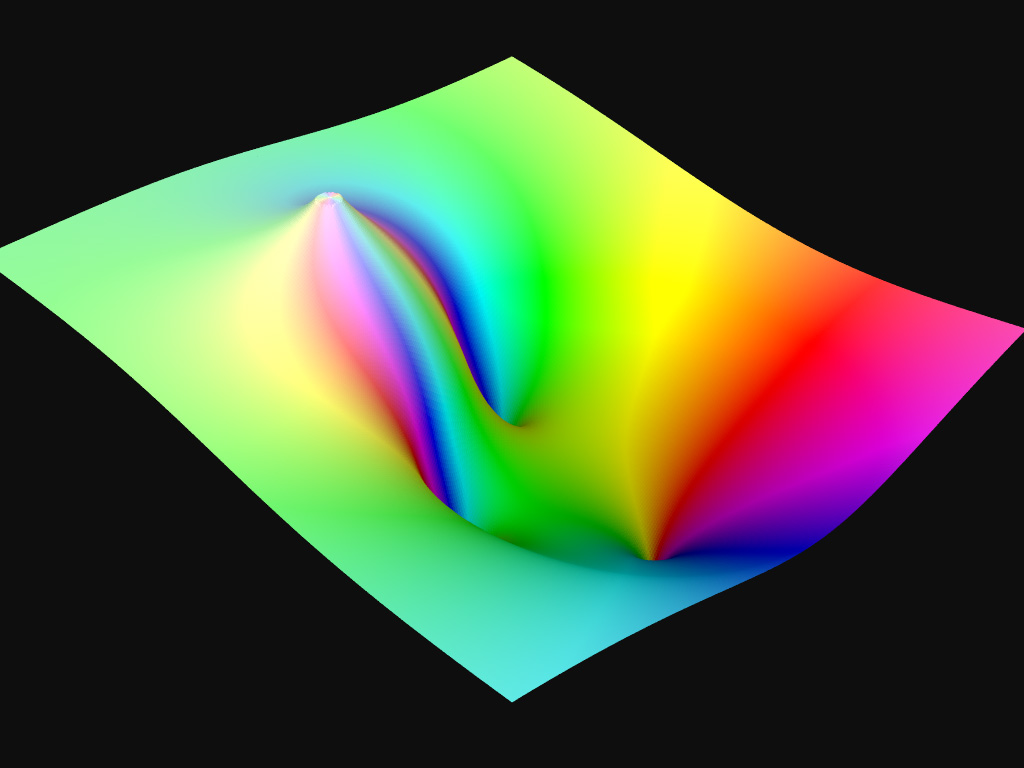
Ok, I see.

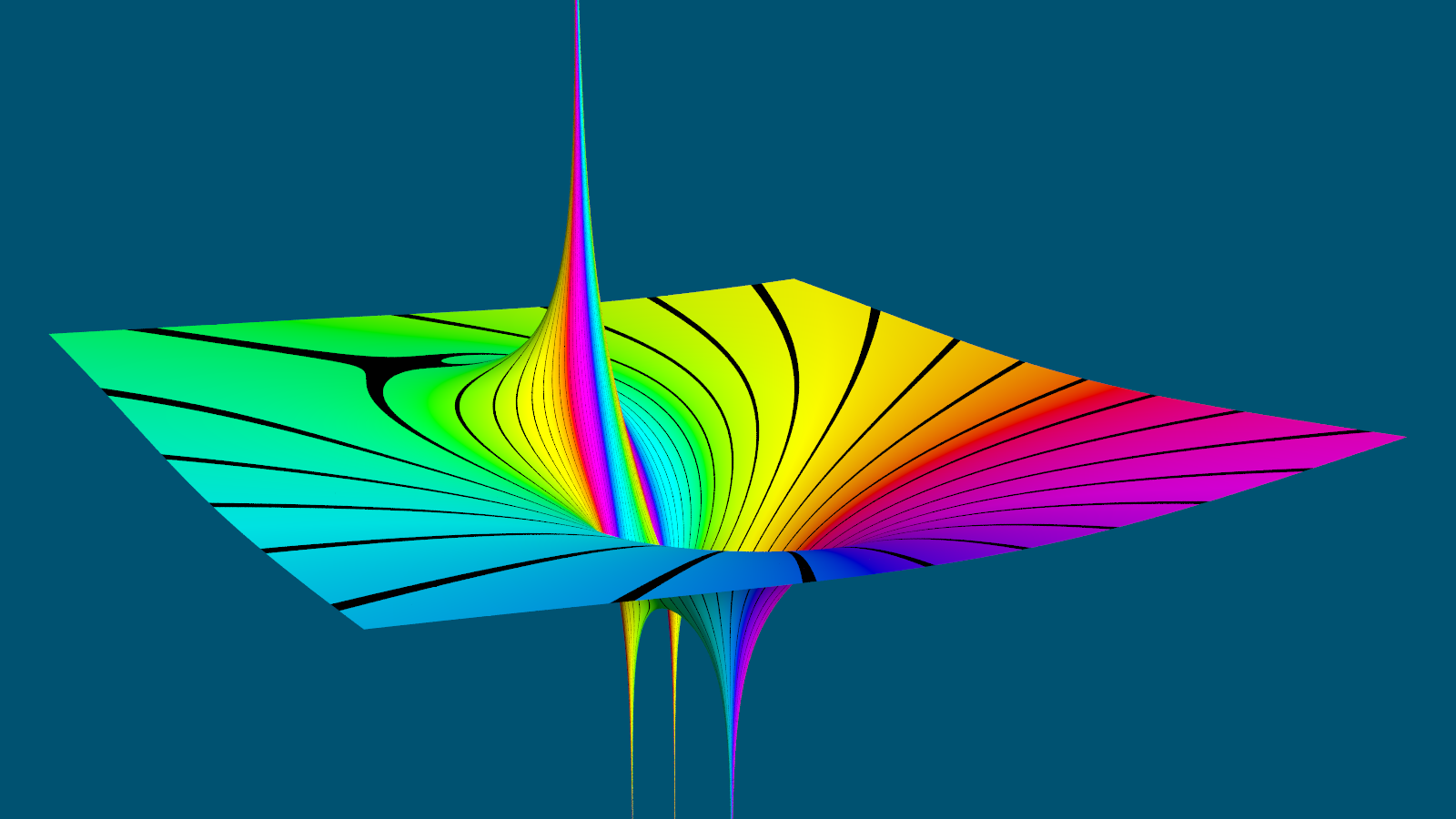
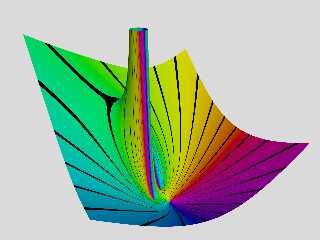
I've attached a similar rendering that I just I made of that function.
This time I've used used a mesh2 for the surface and added some black 1.5
degrees wide lines at 15 degrees intervals for the phase.

As you can see, the pole and the zeros seem to be located in a similar pattern,
but the area around the pole seems to be quite different.

I've tried to verify the functions I've created by feeding expressions to
Wolfram Alpha, like this:

https://www.wolframalpha.com/input/?i=%28-%283-4*i%29%5E3%2B%283-4*i%29%5E2*i%2B1%29%2F%28%283-4*i%29-1%2Bi%29%5E2

For the values of Z that I've tried, the results are the same as mine.
Perhaps you could do the same and compare with the results from your macros (?)

--
Tor Olav
http://subcube.com
https://github.com/t-o-k
Post a reply to this message
Attachments:
Download 'klps function.png' (396 KB)
Preview of image 'klps function.png'
|
|
| |
| |
|
|
|
|
| |
| |
|
|
"Tor Olav Kristensen" <tor### [at] TOBEREMOVEDgmailcom> wrote:
> kurtz le pirate <kur### [at] gmailcom> wrote:
> ...
> > module(c + id) >> y axis with a logarithmic scale
>
> Ok, I see.

What I did not notice was that you've used a logarithmic scale for y-axis.

That could explain the differences. Sorry.

--
Tor Olav
http://subcube.com
https://github.com/t-o-k
Post a reply to this message
|
|
| |
| |
|
|
From: kurtz le pirate
Subject: Re: Isosurface from magnitude of complex function with domain coloring
Date: 28 Dec 2021 10:10:28
Message: <61cb28e4@news.povray.org>
|
|
|
| |
| |
|
|
On 27/12/2021 03:46, Tor Olav Kristensen wrote:
> "Tor Olav Kristensen" <tor### [at] TOBEREMOVEDgmailcom> wrote:
>> kurtz le pirate <kur### [at] gmailcom> wrote:
>> ...
>>> module(c + id) >> y axis with a logarithmic scale
>>
>> Ok, I see.
>
> What I did not notice was that you've used a logarithmic scale for y-axis.
>
> That could explain the differences. Sorry.


Yes, I used a logarithmic scale for this image.This is really not a good
idea. In fact the use of logarithms comes from my previous frameworks
for visualizing complex functions in 2D.

For the argument, it works fine. For the modulus, you have to take
precautions. Everything depends on the values of the functions you want
to plot. The growth at infinity can be very brutal and you lose a lot of
information with a linear scale ... that's why I used logs. But that was
for 2D ! In 3D now, no need for that.

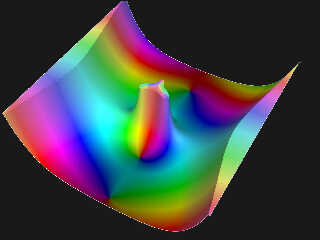
Attached is my latest work with some cosmetic additions.
The represented function is :
  f(z)= (sin(z) + cos(z)) / (z^2 - iz)
with Re and Im between -6 and +6.


--
Kurtz le pirate
Compagnie de la Banquise
Post a reply to this message
Attachments:
Download 'complex3dmesh_fn6.jpg' (91 KB)
Preview of image 'complex3dmesh_fn6.jpg'
|
|
| |
| |
|
|
|
|
| |
| |
|
|
kurtz le pirate <kur### [at] gmailcom> wrote:
> On 27/12/2021 03:46, Tor Olav Kristensen wrote:
> > "Tor Olav Kristensen" <tor### [at] TOBEREMOVEDgmailcom> wrote:
> >> kurtz le pirate <kur### [at] gmailcom> wrote:
> >> ...
> >>> module(c + id) >> y axis with a logarithmic scale
> >>
> >> Ok, I see.
> >
> > What I did not notice was that you've used a logarithmic scale for y-axis.
> >
> > That could explain the differences. Sorry.
>
>
> Yes, I used a logarithmic scale for this image.This is really not a good
> idea. In fact the use of logarithms comes from my previous frameworks
> for visualizing complex functions in 2D.
>...

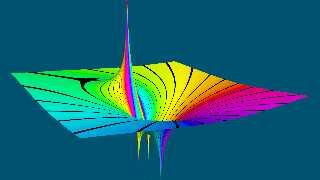
I have now made a couple of rendering of this function with both the natural
logarithm and the base 10 logarithm of the magnitude.

It looks like your rendering was done with the base 10 logarithm. The attached
rendering was done with the natural logarithm.

It seems to me that using a logarithmic scale can sometimes reveal some extra
information also in 3D.

--
Tor Olav
http://subcube.com
https://github.com/t-o-k
Post a reply to this message
Attachments:
Download 'klps function _ ln.png' (244 KB)
Preview of image 'klps function _ ln.png'
|
|
| |
| |
|
|
|
|
| |
| |
|
|
kurtz le pirate <kur### [at] gmailcom> wrote:
>...
> Attached is my latest work with some cosmetic additions.
> The represented function is :
>   f(z)= (sin(z) + cos(z)) / (z^2 - iz)
> with Re and Im between -6 and +6.

That is a very nice looking function.
I really like the thin white edges and the small folds/bends at the ends.
The colors also seem to have a pleasant glow.

--
Tor Olav
http://subcube.com
https://github.com/t-o-k
Post a reply to this message
|
|
| |
| |
|
|
|
|
| |
| |
|
|
Thomas de Groot <tho### [at] degrootorg> wrote:
> Somehow, this makes me think of black hole gravity wells...

Yes, and when one plots the logarithm of the magnitude, like Kurtz le pirate
did, the zeros appear like those depicted wells.


> Intriguing!

=)

--
Tor Olav
http://subcube.com
https://github.com/t-o-k
Post a reply to this message
|
|
| |
| |
|
|
|
|
| |
| |
|
|
"Bald Eagle" <cre### [at] netscapenet> wrote:
>...
> Knowing partly what goes into all of this, I can see that it required a lot of
> time and attention to detail - and you always post fairly polished images, even
> if they are only WIPS.

Yes, it takes some time, but as long as it's interesting work I don't mind.

I seldom have time to polish finishes, textures or materials, so I mostly use
the default ones. But I do spend some time on the pigments and where to place
the light source and the camera.


> > I'm not very familier wit Paul Nylander's work. Those macros seem like a good
> > start for a library for complex calculations. But the Pow() macro could need
> > some work to allow for the exponent to also be a complex number.
>
> http://bugman123.com/index.html

Yes, I have seen his web pages some years ago, but I have never looked very
closely at them. They are quite "busy" with a layout that makes them a bit hard
to read - but they have many interesting topics. AFAIK he too lives in Norway.


> Complex exponents --- Oh, it makes my head hurt to even thing about that.

;-)

    A^B = e^ln(A^B) = e^(B*ln(A))

    pow(A, B) = exp(B*ln(A))

You already have formulas for complex exp() and multiplication - and
implementing ln() is not very hard.


> > I'm also wondering how hard it would be to use mod()
> > to have an infinite array of those "black hole vortices" on a plane - in either
> > a rectangular or an alternating/hexagonal arrangement...
>
> That's an interesting idea: to have a mod() operator that can handle complex
> values. But I don't know how to implement that...

Yes, that could be a way to create such repetitive patterns.

But it would be even better if a POV-Ray library could be made that can preserve
the repetitive nature of several of the complex operators (i.e. those that are
multi valued). I think that that would be quite hard to make...


> Maybe check out
> http://www.dimensions-math.org/Dim_E.htm
>
> and perhaps get in touch with the authors, since they seem to have an amazing
> grasp of both the math as well as POV-Ray.

That looks like an nice and interesting film. Thank you.


--
Tor Olav
http://subcube.com
https://github.com/t-o-k
Post a reply to this message
|
|
| |
| |
|
|
|
|
| |
| |
|
|
"Tor Olav Kristensen" <tor### [at] TOBEREMOVEDgmailcom> wrote:
>...
>
> I have now made a couple of rendering of this function with both the natural
> logarithm and the base 10 logarithm of the magnitude.
>
> It looks like your rendering was done with the base 10 logarithm. The attached
> rendering was done with the natural logarithm.
>
> It seems to me that using a logarithmic scale can sometimes reveal some extra
> information also in 3D.

Now my work with my POV-Ray library for complex functions has come a bit
further.

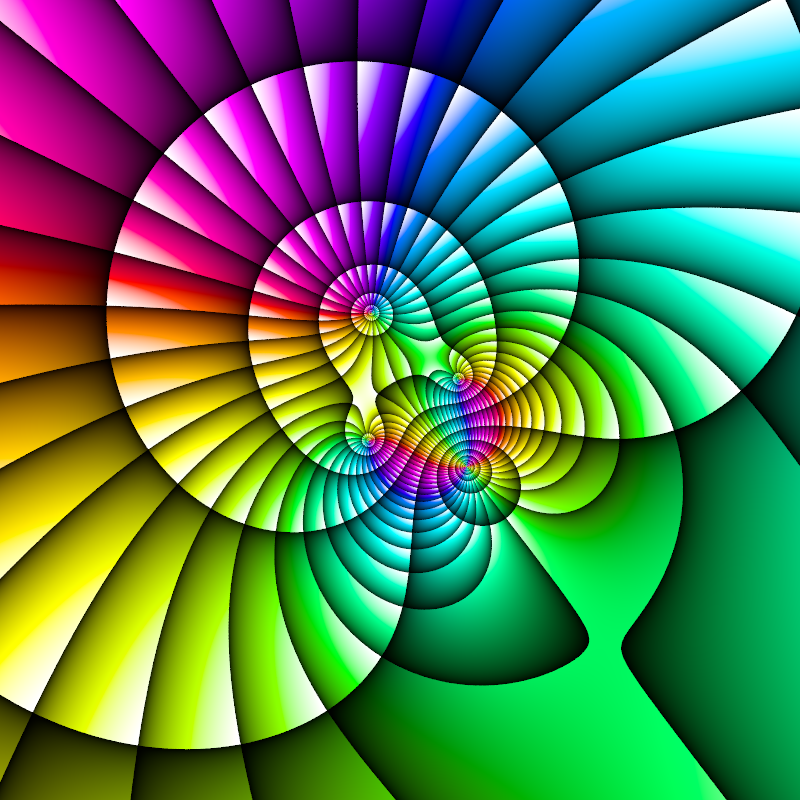
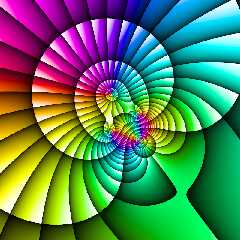
Here's an image where the domain colors for the function above are shown on a
plane. Here the lightness value for the colors are ramped up in intervals both
for the phase angle and the natural logarithm of the magnitude.

There are more images here for those that are interested:
https://github.com/t-o-k/POV-Ray-complex-functions

--
Tor Olav
http://subcube.com
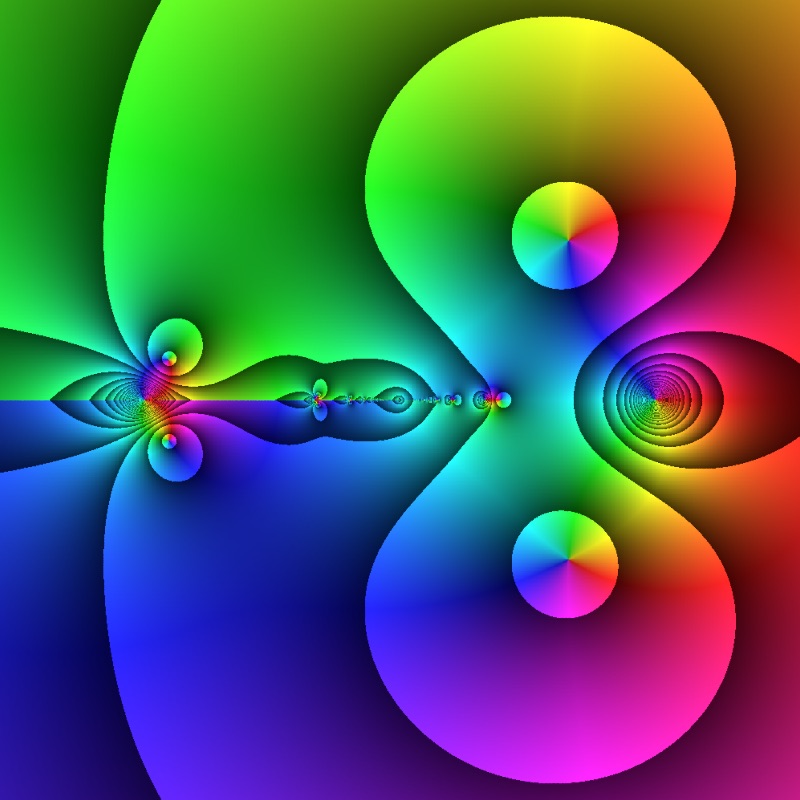
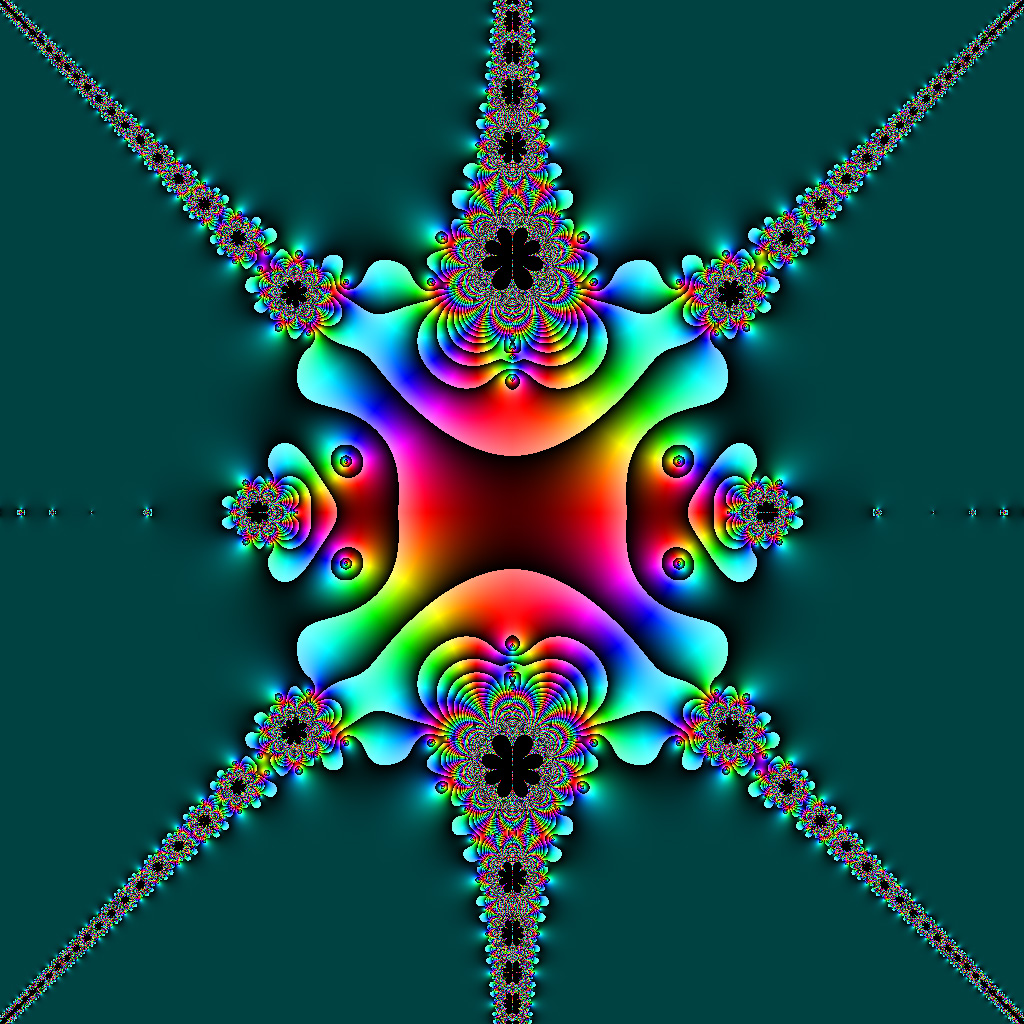
https://github.com/t-o-k
Post a reply to this message
Attachments:
Download 'hueramps_magnramps.png' (493 KB)
Preview of image 'hueramps_magnramps.png'
|
|
| |
| |
|
|
From: Paolo Gibellini
Subject: Re: Isosurface from magnitude of complex function with domain coloring
Date: 21 Jan 2022 09:18:31
Message: <61eac0b7$1@news.povray.org>
|
|
|
| |
| |
|
|
Il 19/01/2022 17:22, Tor Olav Kristensen ha scritto:
 > "Tor Olav Kristensen" <tor### [at] TOBEREMOVEDgmailcom> wrote:
 > Here's an image where the domain colors for the function above are
shown on a
 > plane. Here the lightness value for the colors are ramped up in
intervals both
 > for the phase angle and the natural logarithm of the magnitude.
 >
 > There are more images here for those that are interested:
 > https://github.com/t-o-k/POV-Ray-complex-functions
 >
 > --
 > Tor Olav
 > http://subcube.com
 > https://github.com/t-o-k


This image is just beautiful!

Paolo
Post a reply to this message
|
|
| |
| |
|
|
|
|
| |
| |
|
|
Paolo Gibellini <p.g### [at] gmailcom> wrote:
> Il 19/01/2022 17:22, Tor Olav Kristensen ha scritto:
>  > "Tor Olav Kristensen" <tor### [at] TOBEREMOVEDgmailcom> wrote:
>  >...
>
> This image is just beautiful!

Thank you very much Paolo!

I was a bit worried that it might be only me that liked it.

--
Tor Olav
http://subcube.com
https://github.com/t-o-k
Post a reply to this message
|
|
| |
| |
|
|
From: Thomas de Groot
Subject: Re: Isosurface from magnitude of complex function with domain coloring
Date: 22 Jan 2022 02:21:48
Message: <61ebb08c$1@news.povray.org>
|
|
|
| |
| |
|
|
Op 22/01/2022 om 04:25 schreef Tor Olav Kristensen:
> Paolo Gibellini <p.g### [at] gmailcom> wrote:
>> Il 19/01/2022 17:22, Tor Olav Kristensen ha scritto:
>>   > "Tor Olav Kristensen" <tor### [at] TOBEREMOVEDgmailcom> wrote:
>>   >...
>>
>> This image is just beautiful!
>
> Thank you very much Paolo!
>
> I was a bit worried that it might be only me that liked it.
>
<grin> no.

--
Thomas
Post a reply to this message
|
|
| |
| |
|
|
|
|
| |
| |
|
|
"Tor Olav Kristensen" <tor### [at] TOBEREMOVEDgmailcom> wrote:
>
> Here's an image where the domain colors for the function above are shown on a
> plane. Here the lightness value for the colors are ramped up in intervals both
> for the phase angle and the natural logarithm of the magnitude.

This image reminds me of turbofan jet engine fan blades.
Post a reply to this message
|
|
| |
| |
|
|
From: kurtz le pirate
Subject: Re: Isosurface from magnitude of complex function with domain coloring
Date: 22 Jan 2022 13:33:32
Message: <61ec4dfc$1@news.povray.org>
|
|
|
| |
| |
|
|
On 22/01/2022 04:25, Tor Olav Kristensen wrote:
> Paolo Gibellini <p.g### [at] gmailcom> wrote:
>> Il 19/01/2022 17:22, Tor Olav Kristensen ha scritto:
>>  > "Tor Olav Kristensen" <tor### [at] TOBEREMOVEDgmailcom> wrote:
>>  >...
>>
>> This image is just beautiful!
>
> Thank you very much Paolo!
>
> I was a bit worried that it might be only me that liked it.

No, no... me too of course;)
Very good job.

I don't have too much time right now, but I'm continuing my research.


--
Kurtz le pirate
Compagnie de la Banquise
Post a reply to this message
Attachments:
Download 'complex_frameworke_fn009.jpg' (100 KB)
Preview of image 'complex_frameworke_fn009.jpg'
|
|
| |
| |
|
|
|
|
| |
| |
|
|
Thomas de Groot <tho### [at] degrootorg> wrote:
> Op 22/01/2022 om 04:25 schreef Tor Olav Kristensen:
> > Paolo Gibellini <p.g### [at] gmailcom> wrote:
> >> Il 19/01/2022 17:22, Tor Olav Kristensen ha scritto:
> >>   > "Tor Olav Kristensen" <tor### [at] TOBEREMOVEDgmailcom> wrote:
> >>   >...
> >>
> >> This image is just beautiful!
> >
> > Thank you very much Paolo!
> >
> > I was a bit worried that it might be only me that liked it.
> >
> <grin> no.

Good   =))

--
Tor Olav
http://subcube.com
https://github.com/t-o-k
Post a reply to this message
|
|
| |
| |
|
|
|
|
| |
| |
|
|
kurtz le pirate <kur### [at] gmailcom> wrote:
> On 22/01/2022 04:25, Tor Olav Kristensen wrote:
> > Paolo Gibellini <p.g### [at] gmailcom> wrote:
> >> Il 19/01/2022 17:22, Tor Olav Kristensen ha scritto:
> >>  > "Tor Olav Kristensen" <tor### [at] TOBEREMOVEDgmailcom> wrote:
> >>  >...
> >>
> >> This image is just beautiful!
> >
> > Thank you very much Paolo!
> >
> > I was a bit worried that it might be only me that liked it.
>
> No, no... me too of course;)
> Very good job.

Thank you Kurtz. I'm glad to hear that !


> I don't have too much time right now, but I'm continuing my research.

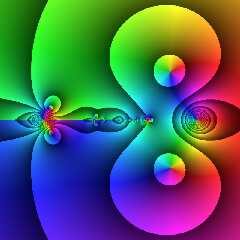
That's yet another function with nice domain colors. It seems that you have a
talent for finding such functions.

Are your functions related for some physics related project that you are working
on ?

--
Tor Olav
http://subcube.com
https://github.com/t-o-k
Post a reply to this message
|
|
| |
| |
|
|
|
|
| |
| |
|
|
"Cousin Ricky" <rickysttATyahooDOTcom> wrote:
> "Tor Olav Kristensen" <tor### [at] TOBEREMOVEDgmailcom> wrote:
> >
> > Here's an image where the domain colors for the function above are shown on a
> > plane. Here the lightness value for the colors are ramped up in intervals both
> > for the phase angle and the natural logarithm of the magnitude.
>
> This image reminds me of turbofan jet engine fan blades.

When you mention it; yes I agree.

And that would be a nice and colorful engine  ;-)

--
Tor Olav
http://subcube.com
https://github.com/t-o-k
Post a reply to this message
|
|
| |
| |
|
|
From: kurtz le pirate
Subject: Re: Isosurface from magnitude of complex function with domain coloring
Date: 5 Feb 2022 06:44:09
Message: <61fe6309@news.povray.org>
|
|
|
| |
| |
|
|
On 24/01/2022 01:14, Tor Olav Kristensen wrote:

> That's yet another function with nice domain colors. It seems that you have a
> talent for finding such functions.

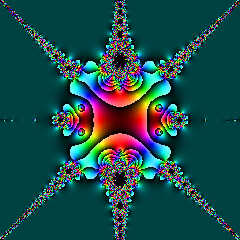
May be, may be ... but i don't do it deliberately ;)

Here a new field of investigation z = f(f(z)).
with f(z) = cos(z) / sin(z^4-1)
Found on <https://www.jedsoft.org/fun/complex/index.html>


> Are your functions related for some physics related project that you are working
> on ?

Not at all. It's just for fun and the beauty of mathematics.


--
Kurtz le pirate
Compagnie de la Banquise
Post a reply to this message
Attachments:
Download 'f(f(z)).jpg' (422 KB)
Preview of image 'f(f(z)).jpg'
|
|
| |
| |
|
|
|
|
| |
| |
|
|
kurtz le pirate <kur### [at] gmailcom> wrote:
> On 24/01/2022 01:14, Tor Olav Kristensen wrote:
>
> > That's yet another function with nice domain colors. It seems that you have a
> > talent for finding such functions.
>
> May be, may be ... but i don't do it deliberately ;)

;)


> Here a new field of investigation z = f(f(z)).
> with f(z) = cos(z) / sin(z^4-1)
> Found on <https://www.jedsoft.org/fun/complex/index.html>

That's a nice image. With your coloring it looks better than the one John has on
that page.


> > Are your functions related for some physics related project that you are working
> > on ?
>
> Not at all. It's just for fun and the beauty of mathematics.

I see. At the moment it's the same for me.

--
Tor Olav
http://subcube.com
https://github.com/t-o-k
Post a reply to this message
|
|
| |
| |
|
|
|
|
| |