|
|
|
|
|
|
| |
| |
|
|
|
|
| |
| |
|
|
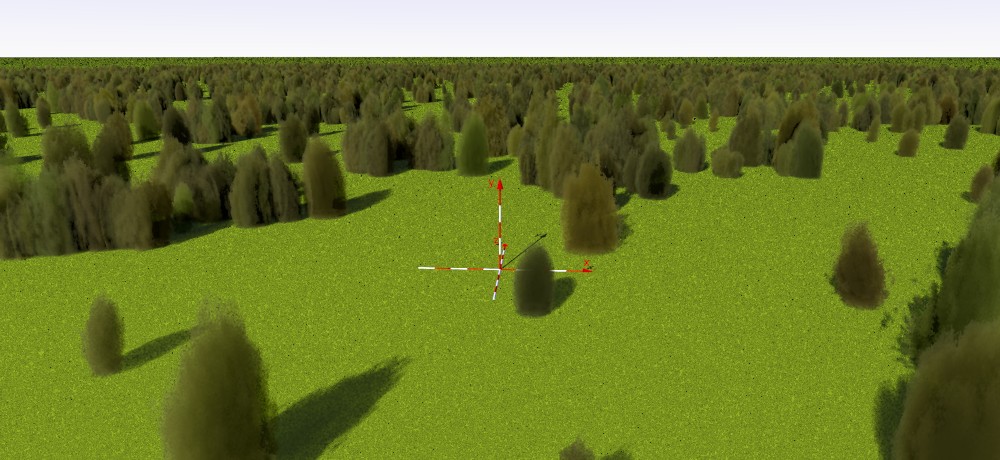
Continuing to visit ancient code, this time something that attracted my
attention years ago: the media trees used by Gilles Tran in his
MakeCloud application
http://www.oyonale.com/image.php?code=431&mode=info§ion=2003&lang=fr
I took the relevant code out of the application and updated it to POV
version 3.8 into a tree macro. The result is slightly different from the
original but very useful (and fast) to be used as background trees in a
landscape. Maybe I can improve further.
I take the liberty to attach the code here, with the image.
Hope you find it useful.
--
Thomas
Post a reply to this message
Attachments:
Download '00-mediatree_test.jpg' (120 KB)
Download '00-mediatree_test.pov.txt' (6 KB)
Preview of image '00-mediatree_test.jpg'
|
|
| |
| |
|
|
|
|
| |
| |
|
|
Il 13/12/2021 17:35, Thomas de Groot ha scritto:
> Continuing to visit ancient code, this time something that attracted my
> attention years ago: the media trees used by Gilles Tran in his
> MakeCloud application
> http://www.oyonale.com/image.php?code=431&mode=info§ion=2003&lang=fr
>
> I took the relevant code out of the application and updated it to POV
> version 3.8 into a tree macro. The result is slightly different from the
> original but very useful (and fast) to be used as background trees in a
> landscape. Maybe I can improve further.
>
> I take the liberty to attach the code here, with the image.
>
> Hope you find it useful.
>
Wow, fluffy trees! They can lend themselves to many experiments.
Nice work!
Paolo
Post a reply to this message
|
|
| |
| |
|
|
|
|
| |
| |
|
|
Op 13/12/2021 om 22:09 schreef Paolo Gibellini:
>
> Wow, fluffy trees! They can lend themselves to many experiments.
> Nice work!
>    Paolo

Thanks Paolo. I am not entirely done, I think. But yes, there is much
room for experiments indeed.

--
Thomas
Post a reply to this message
|
|
| |
| |
|
|
|
|
| |
| |
|
|
Thomas de Groot <tho### [at] degroot org> wrote:
> Op 13/12/2021 om 22:09 schreef Paolo Gibellini:
> >
> > Wow, fluffy trees! They can lend themselves to many experiments.
> > Nice work!
> > Paolo
>
> Thanks Paolo. I am not entirely done, I think. But yes, there is much
> room for experiments indeed.
>
> --
> Thomas
This would obviously be great to make "smoke trees" of the genus Cotinus.
I first discovered these on my commute up Route 287 in NJ when I was working at
(now defunct - thanks, Monsanto) American Cyanamid in the early 90's. org> wrote:
> Op 13/12/2021 om 22:09 schreef Paolo Gibellini:
> >
> > Wow, fluffy trees! They can lend themselves to many experiments.
> > Nice work!
> > Paolo
>
> Thanks Paolo. I am not entirely done, I think. But yes, there is much
> room for experiments indeed.
>
> --
> Thomas
This would obviously be great to make "smoke trees" of the genus Cotinus.
I first discovered these on my commute up Route 287 in NJ when I was working at
(now defunct - thanks, Monsanto) American Cyanamid in the early 90's.
Post a reply to this message
|
|
| |
| |
|
|
|
|
| |
| |
|
|
Op 14-12-2021 om 12:46 schreef Bald Eagle:
> Thomas de Groot <tho### [at] degrootorg> wrote:
>> Op 13/12/2021 om 22:09 schreef Paolo Gibellini:
>>>
>>> Wow, fluffy trees! They can lend themselves to many experiments.
>>> Nice work!
>>>     Paolo
>>
>> Thanks Paolo. I am not entirely done, I think. But yes, there is much
>> room for experiments indeed.
>>
>> --
>> Thomas
>
> This would obviously be great to make "smoke trees" of the genus Cotinus.
>
> I first discovered these on my commute up Route 287 in NJ when I was working at
> (now defunct - thanks, Monsanto) American Cyanamid in the early 90's.
>

Indeed. Beautiful plants. Shall put them in the ToDo List, Volume 15,
Page 532... ;-)

--
Thomas
Post a reply to this message
|
|
| |
| |
|
|
|
|
| |
| |
|
|
Thomas de Groot <tho### [at] degrootorg> wrote:
> Continuing to visit ancient code, this time something that attracted my
> attention years ago: the media trees used by Gilles Tran in his
> MakeCloud application
> http://www.oyonale.com/image.php?code=431&mode=info§ion=2003&lang=fr
>
> I took the relevant code out of the application and updated it to POV
> version 3.8 into a tree macro. The result is slightly different from the
> original but very useful (and fast) to be used as background trees in a
> landscape. Maybe I can improve further.
>
> I take the liberty to attach the code here, with the image.
>
> Hope you find it useful.
>
> --
> Thomas
Very exciting! the shading is spot on !
Post a reply to this message
|
|
| |
| |
|
|
|
|
| |
| |
|
|
Thomas de Groot <tho### [at] degrootorg> wrote:
>
> Thanks Paolo. I am not entirely done, I think. But yes, there is much
> room for experiments indeed.
>

That is clever and effective. I have always been interested in the possibilities
of using 'solid' (or semi-solid) media for creating interesting shapes.
Currently, I'm working on using POV-Ray's 'object' pattern and filling that with
media, along with applying an image_map for the media's colors. The code is
complex and uses functions, which is why I haven't posted about it yet; it needs
some detailed comments added, to explain how it works.

Anyway...

Examining your code, it looks like there are two different color schemes for the
trees, in  #macro Tree(rd_)...

  #local R1 = rd_;
  #local R2 = RRand(0.0, 1.0, R1);
  #if (R1 < 0.2) // yellowish-green
     #local C_Media = <RRand(180, 200, R1), RRand(180, 200, R1), 90>/255;
  #else // blue-ish
    #local C_Media = <RRand(50, 100, R1), RRand(155, 200, R1), 87>/255;
  #end

...... but when the macro is actually called later in the 'woods' #while loop to
create the many trees, it's like this (in two places):
       Tree(0)  // zero

If I understand the code correctly, that imposes the same 'initial'
yellowish-green color on *all* the trees-- because 0.0 is always less than
         #if (R1 < 0.2)
in the macro. To get a good distribution of the TWO colors, I used
         Tree(rand(rd))
for both of the macro calls in 'woods'. Or maybe some version of RRand(...)
would work better.

----------
[Somewhat off-topic):
I am also curious about RRand(...) itself, and how it is used here. If rd_ (i.e.
R1) in the 'Tree' macro *is* 0.0, than that is used as the random-number stream
for RRand(...). I didn't know that 0.0 could be successfully used for that-- or
even for seed(0). I have always used at least 1. But zero does work!

I guess I need to take a look at 'math.inc', to see how RRand() is actually
constructed. And to re-read the docs concerning seed() and rand() too  ;-)
Post a reply to this message
|
|
| |
| |
|
|
|
|
| |
| |
|
|
BTW, I was genuinely surprised that a media/samples count of only 1 would
produce such a visually-appealing result! And a reasonably fast render, too.
Post a reply to this message
|
|
| |
| |
|
|
|
|
| |
| |
|
|
Op 15-12-2021 om 11:34 schreef Kenneth:
> BTW, I was genuinely surprised that a media/samples count of only 1 would
> produce such a visually-appealing result! And a reasonably fast render, too.
>
I didn't even think about that really ;-) I guess it is mainly the
absorption which does the trick...

--
Thomas
Post a reply to this message
|
|
| |
| |
|
|
|
|
| |
| |
|
|
Op 15-12-2021 om 11:00 schreef Kenneth:
> Thomas de Groot <tho### [at] degrootorg> wrote:
>>
>> Thanks Paolo. I am not entirely done, I think. But yes, there is much
>> room for experiments indeed.
>>
>
> That is clever and effective. I have always been interested in the possibilities
> of using 'solid' (or semi-solid) media for creating interesting shapes.
> Currently, I'm working on using POV-Ray's 'object' pattern and filling that with
> media, along with applying an image_map for the media's colors. The code is
> complex and uses functions, which is why I haven't posted about it yet; it needs
> some detailed comments added, to explain how it works.
>
> Anyway...
>
> Examining your code, it looks like there are two different color schemes for the
> trees, in  #macro Tree(rd_)...
>
>    #local R1 = rd_;
>    #local R2 = RRand(0.0, 1.0, R1);
>    #if (R1 < 0.2) // yellowish-green
>       #local C_Media = <RRand(180, 200, R1), RRand(180, 200, R1), 90>/255;
>    #else // blue-ish
>      #local C_Media = <RRand(50, 100, R1), RRand(155, 200, R1), 87>/255;
>    #end
>
> ...... but when the macro is actually called later in the 'woods' #while loop to
> create the many trees, it's like this (in two places):
>         Tree(0)  // zero
>
yeah... there are still a couple of bugs in the code which I have not
yet squashed under my heels. Left overs from Gilles, wild mindless
changes by me, lack of dried frog pills, you name them.

> If I understand the code correctly, that imposes the same 'initial'
> yellowish-green color on *all* the trees-- because 0.0 is always less than
>           #if (R1 < 0.2)
> in the macro. To get a good distribution of the TWO colors, I used
>           Tree(rand(rd))
> for both of the macro calls in 'woods'. Or maybe some version of RRand(...)
> would work better.
>
> ----------
> [Somewhat off-topic):
> I am also curious about RRand(...) itself, and how it is used here. If rd_ (i.e.
> R1) in the 'Tree' macro *is* 0.0, than that is used as the random-number stream
> for RRand(...). I didn't know that 0.0 could be successfully used for that-- or
> even for seed(0). I have always used at least 1. But zero does work!
>
> I guess I need to take a look at 'math.inc', to see how RRand() is actually
> constructed. And to re-read the docs concerning seed() and rand() too  ;-)
>
I love RRand! you have a fine control over the range within which you
want your random number to be. For me, who suffers from some mild
dyscalculia, things remain much clearer. :-/


--
Thomas
Post a reply to this message
|
|
| |
| |
|
|
|
|
| |
| |
|
|
Op 15-12-2021 om 10:12 schreef Mr:
>
> Very exciting! the shading is spot on !
>
Gilles preceded me there. :-)

--
Thomas
Post a reply to this message
|
|
| |
| |
|
|
|
|
| |
| |
|
|
Thomas de Groot <tho### [at] degrootorg> wrote:
> I take the liberty to attach the code here, with the image.
>
> Hope you find it useful.

I will definitely grab this for later tinkering. For some reason I've never been
able to get media to look opaque like this - and this is so simple too! I wonder
what blindingly obvious thing I've been doing wrong...

Thanks for posting!
Bill
Post a reply to this message
|
|
| |
| |
|
|
|
|
| |
| |
|
|
Op 15-12-2021 om 15:34 schreef Bill Pragnell:
> Thomas de Groot <tho### [at] degrootorg> wrote:
>> I take the liberty to attach the code here, with the image.
>>
>> Hope you find it useful.
>
> I will definitely grab this for later tinkering. For some reason I've never been
> able to get media to look opaque like this - and this is so simple too! I wonder
> what blindingly obvious thing I've been doing wrong...
>
> Thanks for posting!
> Bill
>
Thanks Bill! Just wait one or two days until I have tracked down the
last bugs.

--
Thomas
Post a reply to this message
|
|
| |
| |
|
|
From: Thomas de Groot
Subject: Re: Gilles Tran's media trees as a macro
Date: 16 Dec 2021 08:36:45
Message: <61bb40ed@news.povray.org>
|
|
|
| |
| |
|
|
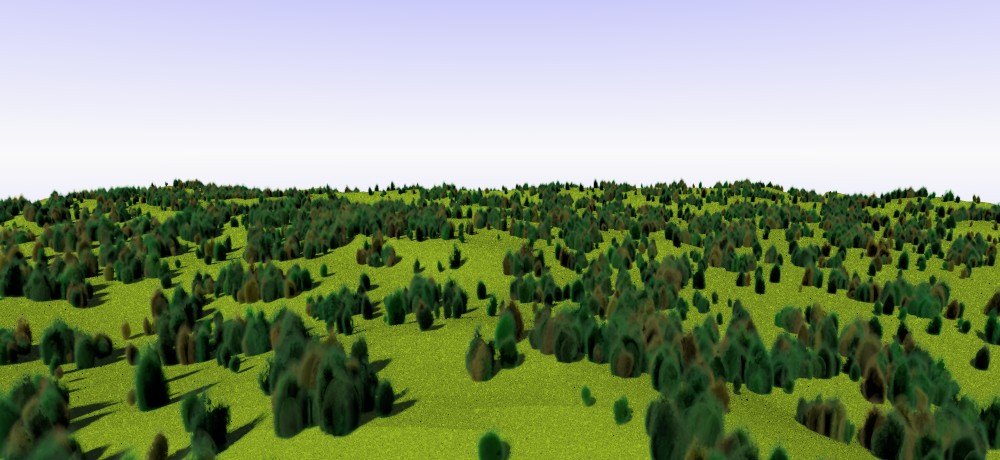
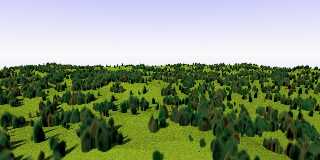
I believe that I tracked down all the inconsistencies and errors
remaining. The scene file is also easier to use, either as a single tree
tester (change the random seed!) or as a parkland development scheme, by
changing the camera location switch (CamLoc).

The scene file with macro, this time, has been provided in
p.b.scene-files folder under the identical subject line as the present
message.

Enjoy!

--
Thomas
Post a reply to this message
Attachments:
Download '00-mediatree_test2.jpg' (105 KB)
Preview of image '00-mediatree_test2.jpg'
|
|
| |
| |
|
|
|
|
| |
| |
|
|
That looks *really* nice. Good job! I haven't yet peeked at the revised code,
but will.

I like the grainy 'grass' texture too. I reminds me very much of a kind of
coated-paper material I bought when I was a kid, for making model-train
landscapes. It had a rough surface texture-- not just printed on-- that was made
of various green shades of some kind of ground-up material glued to it, maybe
cork(?) As I remember it, the visual effect looked almost exactly like your
render. I loved playing with that stuff; it added a very realistic look to my
train layouts and other models.
Post a reply to this message
|
|
| |
| |
|
|
|
|
| |
| |
|
|
Op 16-12-2021 om 15:55 schreef Kenneth:
> That looks *really* nice. Good job! I haven't yet peeked at the revised code,
> but will.
>
You will like it, I am sure. :-)

> I like the grainy 'grass' texture too. I reminds me very much of a kind of
> coated-paper material I bought when I was a kid, for making model-train
> landscapes. It had a rough surface texture-- not just printed on-- that was made
> of various green shades of some kind of ground-up material glued to it, maybe
> cork(?) As I remember it, the visual effect looked almost exactly like your
> render. I loved playing with that stuff; it added a very realistic look to my
> train layouts and other models.
>
Yes, I know what you refer to indeed. I remember that paper too: iirc,
it was some tough paper which you could wrinkle with your hands and it
could simulate mountains and meadows. Aaah...! modelling landscapes
before POV-Ray! ;-)

--
Thomas
Post a reply to this message
|
|
| |
| |
|
|
|
|
| |
| |
|
|
"Kenneth" <kdw### [at] gmailcom> wrote:
> That looks *really* nice. Good job! I haven't yet peeked at the revised code,
> but will.
>
> I like the grainy 'grass' texture too. I reminds me very much of a kind of
> coated-paper material I bought when I was a kid, for making model-train
> landscapes. It had a rough surface texture-- not just printed on-- that was made
> of various green shades of some kind of ground-up material glued to it, maybe
> cork(?) As I remember it, the visual effect looked almost exactly like your
> render. I loved playing with that stuff; it added a very realistic look to my
> train layouts and other models.

https://blog.modeltrainstuff.com/adding-grass-and-greenery-to-your-layout/

This would make a great combination with (and tribute to) Friedrich Lohmueller's
trains and tracks, along with many other objects that people have modeled over
the years.

http://www.f-lohmueller.de/pov_tut/modelling/model_000e.htm
Post a reply to this message
|
|
| |
| |
|
|
|
|
| |
| |
|
|
Op 17/12/2021 om 00:38 schreef Bald Eagle:
>
> https://blog.modeltrainstuff.com/adding-grass-and-greenery-to-your-layout/
>
> This would make a great combination with (and tribute to) Friedrich Lohmueller's
> trains and tracks, along with many other objects that people have modeled over
> the years.
>
> http://www.f-lohmueller.de/pov_tut/modelling/model_000e.htm
>
What an excellent idea! Going to seriously think about this. Let you
know. Got a few ideas maybe, that would rekindle a couple of scenes that
got on hold somehow.

--
Thomas
Post a reply to this message
|
|
| |
| |
|
|
From: Thomas de Groot
Subject: Re: Gilles Tran's media trees as a macro [2]
Date: 17 Dec 2021 11:03:40
Message: <61bcb4dc$1@news.povray.org>
|
|
|
| |
| |
|
|
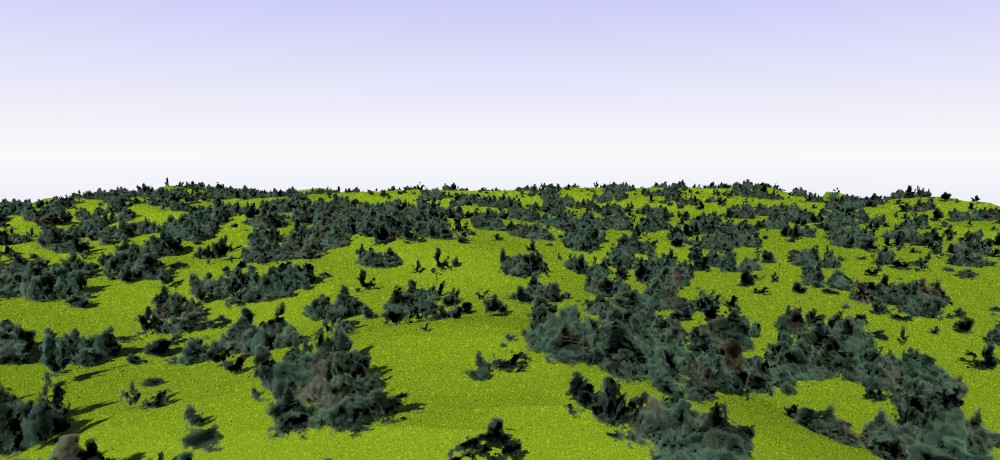
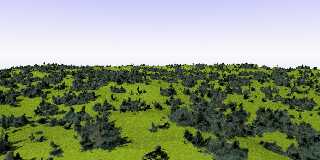
The project could not be complete without the original macro of Gilles
Tran. So, with a few minor changes, I added the original macro, with the
possibility to switch between the two and, why not? mix both into the
same scene.

Latest version to be found in p.b.scene-files.


--
Thomas
Post a reply to this message
Attachments:
Download '00-mediatree_test3.jpg' (121 KB)
Preview of image '00-mediatree_test3.jpg'
|
|
| |
| |
|
|
|
|
| |
| |
|
|
Thomas de Groot <tho### [at] degrootorg> wrote:
> The project could not be complete without the original macro of Gilles
> Tran. So, with a few minor changes, I added the original macro, with the
> possibility to switch between the two and, why not? mix both into the
> same scene.
>
> Latest version to be found in p.b.scene-files.
>
>
> --
> Thomas

Hi Thomas,

I haven't looked at the code but the result is very interesting. From a distance
it produces a very nice forest.

Pascal
Post a reply to this message
|
|
| |
| |
|
|
From: Thomas de Groot
Subject: Re: Gilles Tran's media trees as a macro [2]
Date: 19 Dec 2021 02:15:28
Message: <61bedc10$1@news.povray.org>
|
|
|
| |
| |
|
|
Op 19/12/2021 om 03:41 schreef BayashiPascal:
> Hi Thomas,
>
> I haven't looked at the code but the result is very interesting. From a distance
> it produces a very nice forest.
>
> Pascal
>
Yes, it does, doesn't it? I am somewhat surprised why this trick has not
been used more often. As far as I can tell presently, Gilles Tran has
been the only one and not that often either.

--
Thomas
Post a reply to this message
|
|
| |
| |
|
|
|
|
| |
| |
|
|
Thomas de Groot <tho### [at] degrootorg> wrote:
> The project could not be complete without the original macro of Gilles
> Tran. So, with a few minor changes, I added the original macro, with the
> possibility to switch between the two and, why not? mix both into the
> same scene.
>
> Latest version to be found in p.b.scene-files.
>
>
> --
> Thomas

It seems you're getting very good control over this !
Post a reply to this message
|
|
| |
| |
|
|
From: Thomas de Groot
Subject: Re: Gilles Tran's media trees as a macro [2]
Date: 20 Dec 2021 07:14:41
Message: <61c073b1$1@news.povray.org>
|
|
|
| |
| |
|
|
Op 20-12-2021 om 10:20 schreef Mr:
> Thomas de Groot <tho### [at] degrootorg> wrote:
>> The project could not be complete without the original macro of Gilles
>> Tran. So, with a few minor changes, I added the original macro, with the
>> possibility to switch between the two and, why not? mix both into the
>> same scene.
>>
>> Latest version to be found in p.b.scene-files.
>>
>>
>> --
>> Thomas
>
> It seems you're getting very good control over this !
>
My many years of total isolation in a cave, deep in the desert, seem to
finally bear their fruits... :-)

--
Thomas
Post a reply to this message
|
|
| |
| |
|
|
From: Thomas de Groot
Subject: Re: Gilles Tran's media trees as a macro - correcting two train track include files (Lohmueller)
Date: 3 Jan 2022 07:48:29
Message: <61d2f09d$1@news.povray.org>
|
|
|
| |
| |
|
|
Op 17-12-2021 om 00:38 schreef Bald Eagle:
>
> This would make a great combination with (and tribute to) Friedrich Lohmueller's
> trains and tracks, along with many other objects that people have modeled over
> the years.
>
> http://www.f-lohmueller.de/pov_tut/modelling/model_000e.htm
>
Finally getting round to the train tracks, and I found a couple of bugs
(missing lines) in two of the include files. In both
RT_Track_Switch_B_00.inc and RT_Track_Switch_Y_00.inc, /before/ line
221, the following line is missing:

#local Height_Top_Edge_Rail =  Height_Rail_Top;

It should then be followed by:

#local Rail_H = Height_Top_Edge_Rail-SH;

So you can check.

--
Thomas
Post a reply to this message
|
|
| |
| |
|
|
|
|
| |