|
|
|
|
|
|
| |
| |
|
|
|
|
| |
| |
|
|
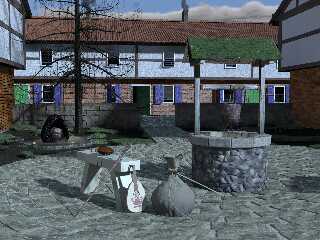
I have been playing around with POV-Ray again after a many-year hiatus.  Here is
my first scene using 3.7.

Credits where credit is due:
Sunlight and sky is from LightSys macros.
Tree and bush are from Arbaro
Various ropes are from the POV-Library ropes macros

I use isosurfaces with pigment-pattern perturbation a lot for stone and wood
surfaces.

About the only rendering feature I didn't try out with this was camera blur.

Appreciate any comments or suggestions for future improvements.
Post a reply to this message
Attachments:
Download 'the_well 1600x1200 aa0.0 r3 radiosity 2021-04-18.png' (3442 KB)
Preview of image 'the_well 1600x1200 aa0.0 r3 radiosity 2021-04-18.png'
|
|
| |
| |
|
|
|
|
| |
| |
|
|
hi,
"Chris R" <car### [at] comcast net> wrote:
> I have been playing around with POV-Ray again after a many-year hiatus. Here is
> my first scene using 3.7.
> ...
> Appreciate any comments or suggestions for future improvements.
pleasant to look at. the foreground "paraphernalia" suggests a time from before
electricity, so I wonder how the fountain (in "egg") is powered. also, even
though there are no "people" in view, the dripping water (nice!) would require
the bucket to just have been raised.
regards, jr.
Post a reply to this message
|
|
| |
| |
|
|
|
|
| |
| |
|
|
Op 29-4-2021 om 21:39 schreef Chris R:
> I have been playing around with POV-Ray again after a many-year hiatus.  Here is
> my first scene using 3.7.
>
> Credits where credit is due:
> Sunlight and sky is from LightSys macros.
> Tree and bush are from Arbaro
> Various ropes are from the POV-Library ropes macros
>
> I use isosurfaces with pigment-pattern perturbation a lot for stone and wood
> surfaces.
>
> About the only rendering feature I didn't try out with this was camera blur.
>
> Appreciate any comments or suggestions for future improvements.
>
Good to have you back!

Maybe just one point of attention for now: The textures and/or features
modelled from textures, work well at a distance but need more/finer
detail close to the camera.

--
Thomas
Post a reply to this message
|
|
| |
| |
|
|
|
|
| |
| |
|
|
Am 29.04.2021 um 21:39 schrieb Chris R:
> I have been playing around with POV-Ray again after a many-year hiatus.  Here is
> my first scene using 3.7.
>
> Credits where credit is due:
> Sunlight and sky is from LightSys macros.
> Tree and bush are from Arbaro
> Various ropes are from the POV-Library ropes macros
>
> I use isosurfaces with pigment-pattern perturbation a lot for stone and wood
> surfaces.
>
> About the only rendering feature I didn't try out with this was camera blur.
>
> Appreciate any comments or suggestions for future improvements.
> Very nice image. But you asked for improvement. The blue textures of the
shutters are a little bit too blue IMO as are the green textures. And
the crackle pattern at the well should be exchanged. You can create a
better well with the blockwall macros (search the POV-Object collection).

Best regards
Michael
Post a reply to this message
|
|
| |
| |
|
|
|
|
| |
| |
|
|
"jr" <cre### [at] gmailcom> wrote:
> hi,
>
> "Chris R" <car### [at] comcastnet> wrote:
> > I have been playing around with POV-Ray again after a many-year hiatus.  Here is
> > my first scene using 3.7.
> > ...
> > Appreciate any comments or suggestions for future improvements.
>
> pleasant to look at.  the foreground "paraphernalia" suggests a time from before
> electricity, so I wonder how the fountain (in "egg") is powered.  also, even
> though there are no "people" in view, the dripping water (nice!) would require
> the bucket to just have been raised.
>
>
> regards, jr.

Thanks for the comments!  This scene is from a vision of the surroundings in a
fantasy RPG I have been playing, so I took some liberties with "magic" powering
things.

I have just started looking at modeling tools for people and animals.  Once I am
comfortable with them, I envisioned having the traveler at the well in the scene
raising the bucket from the well.
Post a reply to this message
|
|
| |
| |
|
|
|
|
| |
| |
|
|
Thomas de Groot <tho### [at] degrootorg> wrote:
> Op 29-4-2021 om 21:39 schreef Chris R:
> > I have been playing around with POV-Ray again after a many-year hiatus.  Here is
> > my first scene using 3.7.
> >
> > Credits where credit is due:
> > Sunlight and sky is from LightSys macros.
> > Tree and bush are from Arbaro
> > Various ropes are from the POV-Library ropes macros
> >
> > I use isosurfaces with pigment-pattern perturbation a lot for stone and wood
> > surfaces.
> >
> > About the only rendering feature I didn't try out with this was camera blur.
> >
> > Appreciate any comments or suggestions for future improvements.
> >
> Good to have you back!
>
> Maybe just one point of attention for now: The textures and/or features
> modelled from textures, work well at a distance but need more/finer
> detail close to the camera.
>
> --
> Thomas

Thanks for the suggestion.  Surprisingly, while working on the models for this
scene I often found really nice textures that looked good close up, (at least to
me), but looked like a grainy mess from a distance.  I have scene macros that
use camera distance to add or remove details from textures.  I should probably
play around with that some more.
Post a reply to this message
|
|
| |
| |
|
|
|
|
| |
| |
|
|
MichaelJF <fri### [at] t-onlinede> wrote:
> Am 29.04.2021 um 21:39 schrieb Chris R:
> > I have been playing around with POV-Ray again after a many-year hiatus.  Here is
> > my first scene using 3.7.
> >
> > Credits where credit is due:
> > Sunlight and sky is from LightSys macros.
> > Tree and bush are from Arbaro
> > Various ropes are from the POV-Library ropes macros
> >
> > I use isosurfaces with pigment-pattern perturbation a lot for stone and wood
> > surfaces.
> >
> > About the only rendering feature I didn't try out with this was camera blur.
> >
> > Appreciate any comments or suggestions for future improvements.
> > Very nice image. But you asked for improvement. The blue textures of the
> shutters are a little bit too blue IMO as are the green textures. And
> the crackle pattern at the well should be exchanged. You can create a
> better well with the blockwall macros (search the POV-Object collection).
>
> Best regards
> Michael

Thanks for the comments!  I didn't have any real-world shutters and doors to
model the colors, so it isn't surprising they stick out.  I could revert to my
earlier comments about a fantasy world scene, so the colors are more intense,
but I could certainly see dulling them to make it look more medieval instead.

I am working on a new project with bricks around a lighthouse (cone).  I'll look
into the blockwall macros for that as well.  I have had issues getting access to
the POV-Object collection after the server crash.
Post a reply to this message
|
|
| |
| |
|
|
|
|
| |
| |
|
|
Op 30/04/2021 om 21:36 schreef Chris R:
> Thomas de Groot <tho### [at] degrootorg> wrote:
>> Op 29-4-2021 om 21:39 schreef Chris R:
>>> I have been playing around with POV-Ray again after a many-year hiatus.  Here is
>>> my first scene using 3.7.
>>>
>>> Credits where credit is due:
>>> Sunlight and sky is from LightSys macros.
>>> Tree and bush are from Arbaro
>>> Various ropes are from the POV-Library ropes macros
>>>
>>> I use isosurfaces with pigment-pattern perturbation a lot for stone and wood
>>> surfaces.
>>>
>>> About the only rendering feature I didn't try out with this was camera blur.
>>>
>>> Appreciate any comments or suggestions for future improvements.
>>>
>> Good to have you back!
>>
>> Maybe just one point of attention for now: The textures and/or features
>> modelled from textures, work well at a distance but need more/finer
>> detail close to the camera.
>>
>> --
>> Thomas
>
> Thanks for the suggestion.  Surprisingly, while working on the models for this
> scene I often found really nice textures that looked good close up, (at least to
> me), but looked like a grainy mess from a distance.  I have scene macros that
> use camera distance to add or remove details from textures.  I should probably
> play around with that some more.
>
Yes, that is certainly true indeed. Try to find the balance.
Sometimes/often, stochastic anti-aliasing helps for the grainy distance
mess.

--
Thomas
Post a reply to this message
|
|
| |
| |
|
|
|
|
| |
| |
|
|
hi,

"Chris R" <car### [at] comcastnet> wrote:
> "jr" <cre### [at] gmailcom> wrote:
> > ...
> Thanks for the comments!  This scene is from a vision of the surroundings in a
> fantasy RPG I have been playing, so I took some liberties with "magic" powering
> things.

:-)

> I have just started looking at modeling tools for people and animals.  Once I am
> comfortable with them, I envisioned having the traveler at the well in the scene
> raising the bucket from the well.

it will be interesting to see the shape this traveller will take.


regards, jr.
Post a reply to this message
|
|
| |
| |
|
|
|
|
| |
| |
|
|
Thomas de Groot <tho### [at] degrootorg> wrote:

> Yes, that is certainly true indeed. Try to find the balance.
> Sometimes/often, stochastic anti-aliasing helps for the grainy distance
> mess.

Presumably, this is what all this "mip-mapping" business is about.   Has anyone
ever tried to emulate that process, that we know of?
Post a reply to this message
|
|
| |
| |
|
|
|
|
| |
| |
|
|
Am 30.04.2021 um 21:40 schrieb Chris R:
> MichaelJF <fri### [at] t-onlinede> wrote:
>> Am 29.04.2021 um 21:39 schrieb Chris R:
>>> I have been playing around with POV-Ray again after a many-year hiatus.  Here is
>>> my first scene using 3.7.
>>>
>>> Credits where credit is due:
>>> Sunlight and sky is from LightSys macros.
>>> Tree and bush are from Arbaro
>>> Various ropes are from the POV-Library ropes macros
>>>
>>> I use isosurfaces with pigment-pattern perturbation a lot for stone and wood
>>> surfaces.
>>>
>>> About the only rendering feature I didn't try out with this was camera blur.
>>>
>>> Appreciate any comments or suggestions for future improvements.
>>> Very nice image. But you asked for improvement. The blue textures of the
>> shutters are a little bit too blue IMO as are the green textures. And
>> the crackle pattern at the well should be exchanged. You can create a
>> better well with the blockwall macros (search the POV-Object collection).
>>
>> Best regards
>> Michael
>
> Thanks for the comments!  I didn't have any real-world shutters and doors to
> model the colors, so it isn't surprising they stick out.  I could revert to my
> earlier comments about a fantasy world scene, so the colors are more intense,
> but I could certainly see dulling them to make it look more medieval instead.
>
> I am working on a new project with bricks around a lighthouse (cone).  I'll look
> into the blockwall macros for that as well.  I have had issues getting access to
> the POV-Object collection after the server crash.
>
>
>
If you cannot download the blockwall macros from the POV server I can
provide them here if you want. Obviously you don't live in Germany,
shutters are very common here.

Best regards
Michael
Post a reply to this message
|
|
| |
| |
|
|
|
|
| |
| |
|
|
On 2021-04-30 3:40 PM (-4), Chris R wrote:
>
> I am working on a new project with bricks around a lighthouse (cone).  I'll look
> into the blockwall macros for that as well.  I have had issues getting access to
> the POV-Object collection after the server crash.

I believe the Object Collection is still down.  It does not respond to
pings.  Chris Cason reported that bringing it back online will take more
time than he can budget right now.

In the meantime, Le Forgeron has mirrored all the modules as of April 2019:

  https://github.com/LeForgeron/PovContributions
Post a reply to this message
|
|
| |
| |
|
|
|
|
| |
| |
|
|
Op 01/05/2021 om 13:26 schreef Bald Eagle:
> Thomas de Groot <tho### [at] degrootorg> wrote:
>
>> Yes, that is certainly true indeed. Try to find the balance.
>> Sometimes/often, stochastic anti-aliasing helps for the grainy distance
>> mess.
>
> Presumably, this is what all this "mip-mapping" business is about.   Has anyone
> ever tried to emulate that process, that we know of?
>
Good question. It would be interesting to try indeed. RoundTuits are
needed however!

--
Thomas
Post a reply to this message
|
|
| |
| |
|
|
|
|
| |
| |
|
|
Thomas de Groot <tho### [at] degrootorg> wrote:

> > Presumably, this is what all this "mip-mapping" business is about.   Has anyone
> > ever tried to emulate that process, that we know of?
> >
> Good question. It would be interesting to try indeed. RoundTuits are
> needed however!

https://www.youtube.com/watch?v=0flY11lVCwY
He covers this briefly in the first 2 minutes.

Just shooting from the hip here, but it sounds like a functional emulation of
this would be to start with a very large, high-def version of the texture and
then make a few smaller versions.   Then just have an array of the filenames and
the texture could probably be automagically sampled at the desired resolution
using a polynomial function like I did in the vortex scene or using a spline
like Ingo is doing.

Maybe there's some kind of MOA (minutes of angle) calculation that initially
gets done to optimally set the different image_map resolutions...?
Post a reply to this message
|
|
| |
| |
|
|
|
|
| |
| |
|
|
Op 02/05/2021 om 14:11 schreef Bald Eagle:
> Thomas de Groot <tho### [at] degrootorg> wrote:
>
>>> Presumably, this is what all this "mip-mapping" business is about.   Has anyone
>>> ever tried to emulate that process, that we know of?
>>>
>> Good question. It would be interesting to try indeed. RoundTuits are
>> needed however!
>
> https://www.youtube.com/watch?v=0flY11lVCwY
> He covers this briefly in the first 2 minutes.
>
> Just shooting from the hip here, but it sounds like a functional emulation of
> this would be to start with a very large, high-def version of the texture and
> then make a few smaller versions.   Then just have an array of the filenames and
> the texture could probably be automagically sampled at the desired resolution
> using a polynomial function like I did in the vortex scene or using a spline
> like Ingo is doing.
>
By default, a factor 2 scaling is used, I understand. That is not
difficult; what is (at least for me) is how to chose the right texture
for each render or location in the scene (for instance the background of
a chequered plane smoothly grading into the foreground). Well, I have an
idea of course, but no time to test it out presently. :-/

> Maybe there's some kind of MOA (minutes of angle) calculation that initially
> gets done to optimally set the different image_map resolutions...?
>
Hmm... possibly. I have no idea at this stage however.

--
Thomas
Post a reply to this message
|
|
| |
| |
|
|
|
|
| |
| |
|
|
Op 03/05/2021 om 08:36 schreef Thomas de Groot:
> Op 02/05/2021 om 14:11 schreef Bald Eagle:
>> Thomas de Groot <tho### [at] degrootorg> wrote:
>>
>>>> Presumably, this is what all this "mip-mapping" business is about.
>>>> Has anyone
>>>> ever tried to emulate that process, that we know of?
>>>>
>>> Good question. It would be interesting to try indeed. RoundTuits are
>>> needed however!
>>
>> https://www.youtube.com/watch?v=0flY11lVCwY
>> He covers this briefly in the first 2 minutes.
>>
>> Just shooting from the hip here, but it sounds like a functional
>> emulation of
>> this would be to start with a very large, high-def version of the
>> texture and
>> then make a few smaller versions.   Then just have an array of the
>> filenames and
>> the texture could probably be automagically sampled at the desired
>> resolution
>> using a polynomial function like I did in the vortex scene or using a
>> spline
>> like Ingo is doing.
>>
> By default, a factor 2 scaling is used, I understand. That is not
> difficult; what is (at least for me) is how to chose the right texture
> for each render or location in the scene (for instance the background of
> a chequered plane smoothly grading into the foreground). Well, I have an
> idea of course, but no time to test it out presently. :-/
>
>> Maybe there's some kind of MOA (minutes of angle) calculation that
>> initially
>> gets done to optimally set the different image_map resolutions...?
>>
> Hmm... possibly. I have no idea at this stage however.
>

And I immediately come back to the matter as I suddenly realise that
this would be a crucial technique for using the same granite textures
(forgive me my present obsession with granites) in close foreground
views and landscape-sized backgrounds. Or wouldn't it? Is mipmapping
only useful with image_maps? The examples I have seen so far are just
that. Could it be applied successfully to traditional POV-Ray textures?

--
Thomas
Post a reply to this message
|
|
| |
| |
|
|
|
|
| |
| |
|
|
hi,

Thomas de Groot <tho### [at] degrootorg> wrote:
> Op 03/05/2021 om 08:36 schreef Thomas de Groot:
> > Op 02/05/2021 om 14:11 schreef Bald Eagle:
> >> Thomas de Groot <tho### [at] degrootorg> wrote:
> >>
> >>>> Presumably, this is what all this "mip-mapping" business is about.
> >>>> ...
> ...
>  Could it be applied successfully to traditional POV-Ray textures?

no idea but reading yr exchange led me to this Wiki page:
<https://en.wikipedia.org/wiki/Mipmap>


regards, jr.
Post a reply to this message
|
|
| |
| |
|
|
|
|
| |
| |
|
|
Op 03/05/2021 om 09:19 schreef jr:
> hi,
>
> Thomas de Groot <tho### [at] degrootorg> wrote:
>> Op 03/05/2021 om 08:36 schreef Thomas de Groot:
>>> Op 02/05/2021 om 14:11 schreef Bald Eagle:
>>>> Thomas de Groot <tho### [at] degrootorg> wrote:
>>>>
>>>>>> Presumably, this is what all this "mip-mapping" business is about.
>>>>>> ...
>> ...
>>   Could it be applied successfully to traditional POV-Ray textures?
>
> no idea but reading yr exchange led me to this Wiki page:
> <https://en.wikipedia.org/wiki/Mipmap>
>
Thanks, yes, I also found that page indeed :-)

Well, should have done that first of all, but the following (hot)
discussion about mimapping with POV-Ray from 2005 can be found here:
http://news.povray.org/povray.newusers/thread/%3C4282a2e9%40news.povray.org%3E/

I conclude from that, that aa is the ray-tracing answer to mipmapping,
and I guess that my initial suggestion of stochastic aa is the correct one.

--
Thomas
Post a reply to this message
|
|
| |
| |
|
|
|
|
| |
| |
|
|
hi,

Thomas de Groot <tho### [at] degrootorg> wrote:
> Op 03/05/2021 om 09:19 schreef jr:
> > ...
> I conclude from that [thread], that aa is the ray-tracing answer to mipmapping,
> and I guess that my initial suggestion of stochastic aa is the correct one.

taking the 'El Capitan' cliff face as an example, say I want to render two
images: object near base of, and object some distance from.  then I need to
choose a scale for the texture(s)?  I think that I (as in "numpty" etc) would
benefit from having some row/col table, in the documentation and or as array, of
all parameters involved ("lambda", "octave", such) by scale/suggested distance
(in POV-units?).  (and perhaps a macro which expands to the texture at the given
scale/index)  (just thinking aloud :-))


regards, jr.

btw, re "graveyards".  had to put on an anorak, even for a cursory read.  :-)
found out that what I associate with "granite" really is "dolerite".  thanks.
Post a reply to this message
|
|
| |
| |
|
|
|
|
| |
| |
|
|
Thomas de Groot <tho### [at] degrootorg> wrote:
what is (at least for me) is how to chose the right texture
> for each render or location in the scene (for instance the background of
> a chequered plane smoothly grading into the foreground).

I guess you could have a macro generate the texture, and have an AutoScale
argument.  The distance from the camera to the closest object (user-supplied
value) could be used to set the scale.  Might need to set a pov unit = real
world measurement ratio and base everything off that.
Post a reply to this message
|
|
| |
| |
|
|
|
|
| |
| |
|
|
Op 3-5-2021 om 11:11 schreef jr:
> hi,
>
> Thomas de Groot <tho### [at] degrootorg> wrote:
>> Op 03/05/2021 om 09:19 schreef jr:
>>> ...
>> I conclude from that [thread], that aa is the ray-tracing answer to mipmapping,
>> and I guess that my initial suggestion of stochastic aa is the correct one.
>
> taking the 'El Capitan' cliff face as an example, say I want to render two
> images: object near base of, and object some distance from.  then I need to
> choose a scale for the texture(s)?  I think that I (as in "numpty" etc) would
> benefit from having some row/col table, in the documentation and or as array, of
> all parameters involved ("lambda", "octave", such) by scale/suggested distance
> (in POV-units?).  (and perhaps a macro which expands to the texture at the given
> scale/index)  (just thinking aloud :-))
>
Yes, I guess that is the crucial point here. Otoh, It can also be solved
by using a much simpler texture for the background, involving the same
colour_map scaled down, and without all the fancy stuff...

>
> regards, jr.
>
> btw, re "graveyards".  had to put on an anorak, even for a cursory read.  :-)
> found out that what I associate with "granite" really is "dolerite".  thanks.
>
<grin> They are often mixed-up.

--
Thomas
Post a reply to this message
|
|
| |
| |
|
|
|
|
| |
| |
|
|
Op 3-5-2021 om 12:34 schreef Bald Eagle:
> Thomas de Groot <tho### [at] degrootorg> wrote:
> what is (at least for me) is how to chose the right texture
>> for each render or location in the scene (for instance the background of
>> a chequered plane smoothly grading into the foreground).
>
> I guess you could have a macro generate the texture, and have an AutoScale
> argument.  The distance from the camera to the closest object (user-supplied
> value) could be used to set the scale.  Might need to set a pov unit = real
> world measurement ratio and base everything off that.
>
>
Yes something like that is needed anyway.

--
Thomas
Post a reply to this message
|
|
| |
| |
|
|
|
|
| |
| |
|
|
Some decent modelling, areas I would look at to improve are:

Bricks look too uniform especially on the floor and garden wall.
The join of the garden wall to the house looks odd, particularly on the left
where it is well lit.

Some of the textures need more work, particurarly on the floor, think of
layering some dirt over the top and when doing that try to add dirt in realistic
areas (darker in the corners/nearer the ground etc).
I can't say exactly what it is but the lighting looks odd maybe better radiosity
settings.

The roof looks great and the modelling/texture on the bucket in the well is very
good.

I tend to always add focal blur (not that I have done much with Pov for a
while).

Sean
Post a reply to this message
|
|
| |
| |
|
|
|
|
| |
| |
|
|
"Bald Eagle" <cre### [at] netscapenet> wrote:
> Thomas de Groot <tho### [at] degrootorg> wrote:
>
> > Yes, that is certainly true indeed. Try to find the balance.
> > Sometimes/often, stochastic anti-aliasing helps for the grainy distance
> > mess.
>
> Presumably, this is what all this "mip-mapping" business is about.   Has anyone
> ever tried to emulate that process, that we know of?

I have done "mip-mapping" but that was for Quake2 video game graphics, using POV
to make them. I might add badly. The trouble is selecting what to drop and what
to keep. When working on Quake2 the first mip is half the size of the main
texture and the next is half the size of first mip and so on. I guess that if
you wanted to use a mip type texture in POV that the texture would have to be
scaled up and simple-fided for the distance from the camera. A tough feat.

Have Fun!
Post a reply to this message
|
|
| |
| |
|
|
|
|
| |
| |
|
|
"s.day" <s.d### [at] uelacuk> wrote:
> Some decent modelling, areas I would look at to improve are:
>
> Bricks look too uniform especially on the floor and garden wall.
> The join of the garden wall to the house looks odd, particularly on the left
> where it is well lit.
>
> Some of the textures need more work, particurarly on the floor, think of
> layering some dirt over the top and when doing that try to add dirt in realistic
> areas (darker in the corners/nearer the ground etc).
> I can't say exactly what it is but the lighting looks odd maybe better radiosity
> settings.
>
> The roof looks great and the modelling/texture on the bucket in the well is very
> good.
>
> I tend to always add focal blur (not that I have done much with Pov for a
> while).
>
> Sean

Thanks for the comments!

The garden wall is an isosurface that uses a brick pigment pattern to add the
individual blocks.  I had added turbulence to the brick pattern so the edges of
the blocks are uneven, but the limitation is that all of the blocks are
basically the same size and offset by 1/2.  I could redo it and randomly
generate blocks with a more complicated layout.

At one point I had added a sand layer to the floor of the well/garden area.  I
had tried to add some mossy coloring as well, but I didn't like how green
everything got, so I took it out and didn't go back again.  The blocks for the
floor could have more variability in size and shape as well.

I have only done a little work with radiosity, especially in outdoor scenes, so
I'm not surprised there may be issues.

I think if I were doing a view of this scene that was more zoomed in on one of
the elements I'd be more inclined to invest the time into adding focal blur.  As
an overview shot, if I were using my camera, I'd be using f6 or more, so I
didn't bother.  A closeup of the bucket dripping water would be a good time to
break out the f2.8 or f1.4 lens, though.
Post a reply to this message
|
|
| |
| |
|
|
|
|
| |
| |
|
|
"Chris R" <car### [at] comcastnet> wrote:
> "s.day" <s.d### [at] uelacuk> wrote:
> > Some decent modelling, areas I would look at to improve are:
> >
> > Bricks look too uniform especially on the floor and garden wall.
> > The join of the garden wall to the house looks odd, particularly on the left
> > where it is well lit.
> >
> > Some of the textures need more work, particurarly on the floor, think of
> > layering some dirt over the top and when doing that try to add dirt in realistic
> > areas (darker in the corners/nearer the ground etc).
> > I can't say exactly what it is but the lighting looks odd maybe better radiosity
> > settings.
> >
> > The roof looks great and the modelling/texture on the bucket in the well is very
> > good.
> >
> > I tend to always add focal blur (not that I have done much with Pov for a
> > while).
> >
> > Sean
>
> Thanks for the comments!
>
> The garden wall is an isosurface that uses a brick pigment pattern to add the
> individual blocks.  I had added turbulence to the brick pattern so the edges of
> the blocks are uneven, but the limitation is that all of the blocks are
> basically the same size and offset by 1/2.  I could redo it and randomly
> generate blocks with a more complicated layout.
>
> At one point I had added a sand layer to the floor of the well/garden area.  I
> had tried to add some mossy coloring as well, but I didn't like how green
> everything got, so I took it out and didn't go back again.  The blocks for the
> floor could have more variability in size and shape as well.
>
> I have only done a little work with radiosity, especially in outdoor scenes, so
> I'm not surprised there may be issues.
>
> I think if I were doing a view of this scene that was more zoomed in on one of
> the elements I'd be more inclined to invest the time into adding focal blur.  As
> an overview shot, if I were using my camera, I'd be using f6 or more, so I
> didn't bother.  A closeup of the bucket dripping water would be a good time to
> break out the f2.8 or f1.4 lens, though.
I went back and looked at the brick texture I used for the buildings and did
some more work.  The attached image is a closeup of a brick wall as an
isosurface using a brick pigment pattern, applying some noise for the brick face
texture, and added some variability in the depth of the brick so they aren't all
flush with the face of the wall.

Still not completely happy with the look and texture of the mortar, but I think
these bricks are a big improvement on the original without individually creating
each brick.
Post a reply to this message
Attachments:
Download 'brick_wall_iso_close.png' (1588 KB)
Preview of image 'brick_wall_iso_close.png'

|
|
| |
| |
|
|
|
|
| |
| |
|
|
Op 23-6-2021 om 20:17 schreef Chris R:

> Still not completely happy with the look and texture of the mortar, but I think
> these bricks are a big improvement on the original without individually creating
> each brick.
>
Agreed. Still, I have a problem with the vertical 'roughness' of the
bricks and the horizontal 'roughness' of the mortar. Try to give that
some turbulence (warp {turbulence <0.01, 0.1, 0.01>} for instance for
the mortar and warp {turbulence <0.1, 0.01, 0.01>} for the bricks) and
scale that 'roughness' also up for the bricks. It should not have the
same apparent size as the mortar.

--
Thomas
Post a reply to this message
|
|
| |
| |
|
|
|
|
| |
| |
|
|
Le 2021-06-24 à 10:50, Thomas de Groot a écrit :
> Op 23-6-2021 om 20:17 schreef Chris R:
>
>> Still not completely happy with the look and texture of the mortar,
>> but I think
>> these bricks are a big improvement on the original without
>> individually creating
>> each brick.
>>
> Agreed. Still, I have a problem with the vertical 'roughness' of the
> bricks and the horizontal 'roughness' of the mortar. Try to give that
> some turbulence (warp {turbulence <0.01, 0.1, 0.01>} for instance for
> the mortar and warp {turbulence <0.1, 0.01, 0.01>} for the bricks) and
> scale that 'roughness' also up for the bricks. It should not have the
> same apparent size as the mortar.
>

The vertical roughness of the bricks is very similar to what an actual
«brushed» brick looks like. Yes, there are really bricks that are
intentionally made like that.
Post a reply to this message
|
|
| |
| |
|
|
|
|
| |
| |
|
|
Thomas de Groot <tho### [at] degrootorg> wrote:
> Op 23-6-2021 om 20:17 schreef Chris R:
>
> > Still not completely happy with the look and texture of the mortar, but I think
> > these bricks are a big improvement on the original without individually creating
> > each brick.
> >
> Agreed. Still, I have a problem with the vertical 'roughness' of the
> bricks and the horizontal 'roughness' of the mortar. Try to give that
> some turbulence (warp {turbulence <0.01, 0.1, 0.01>} for instance for
> the mortar and warp {turbulence <0.1, 0.01, 0.01>} for the bricks) and
> scale that 'roughness' also up for the bricks. It should not have the
> same apparent size as the mortar.
>
> --
> Thomas

Thanks for the suggestions.  I am using the builtin f_wrinkles and f_bumps for
the roughness, but I have my own way of adding turbulence to those.  I made some
much larger changes to the grout roughness to improve that as well.

The rough wood panels on the sides are to give context for the scene I am
developing.

(The green line is an axis I use in my test scenes so I can see where noise
extends beyond the basic shape.)

--
Chris
Post a reply to this message
|
|
| |
| |
|
|
|
|
| |
| |
|
|
"Chris R" <car### [at] comcastnet> wrote:
> Thomas de Groot <tho### [at] degrootorg> wrote:
> > Op 23-6-2021 om 20:17 schreef Chris R:
> >
> > > Still not completely happy with the look and texture of the mortar, but I think
> > > these bricks are a big improvement on the original without individually creating
> > > each brick.
> > >
> > Agreed. Still, I have a problem with the vertical 'roughness' of the
> > bricks and the horizontal 'roughness' of the mortar. Try to give that
> > some turbulence (warp {turbulence <0.01, 0.1, 0.01>} for instance for
> > the mortar and warp {turbulence <0.1, 0.01, 0.01>} for the bricks) and
> > scale that 'roughness' also up for the bricks. It should not have the
> > same apparent size as the mortar.
> >
> > --
> > Thomas
>
> Thanks for the suggestions.  I am using the builtin f_wrinkles and f_bumps for
> the roughness, but I have my own way of adding turbulence to those.  I made some
> much larger changes to the grout roughness to improve that as well.
>
> The rough wood panels on the sides are to give context for the scene I am
> developing.
>
> (The green line is an axis I use in my test scenes so I can see where noise
> extends beyond the basic shape.)
>
> --
> Chris
Sorry, somehow I didn't get the image attached...
Post a reply to this message
Attachments:
Download 'brick_wall_closeup.png' (1488 KB)
Preview of image 'brick_wall_closeup.png'

|
|
| |
| |
|
|
|
|
| |
| |
|
|
Op 24/06/2021 om 17:17 schreef Alain Martel:
>
> The vertical roughness of the bricks is very similar to what an actual
> «brushed» brick looks like. Yes, there are really bricks that are
> intentionally made like that.

I had not been aware of that. In this "bricks country", they are not
very common apparently, or at least I have never seen them. ;-)

--
Thomas
Post a reply to this message
|
|
| |
| |
|
|
|
|
| |
| |
|
|
Op 24/06/2021 om 19:16 schreef Chris R:
> "Chris R" <car### [at] comcastnet> wrote:
>> Thomas de Groot <tho### [at] degrootorg> wrote:
>>> Op 23-6-2021 om 20:17 schreef Chris R:
>>>
>>>> Still not completely happy with the look and texture of the mortar, but I think
>>>> these bricks are a big improvement on the original without individually creating
>>>> each brick.
>>>>
>>> Agreed. Still, I have a problem with the vertical 'roughness' of the
>>> bricks and the horizontal 'roughness' of the mortar. Try to give that
>>> some turbulence (warp {turbulence <0.01, 0.1, 0.01>} for instance for
>>> the mortar and warp {turbulence <0.1, 0.01, 0.01>} for the bricks) and
>>> scale that 'roughness' also up for the bricks. It should not have the
>>> same apparent size as the mortar.
>>>
>>> --
>>> Thomas
>>
>> Thanks for the suggestions.  I am using the builtin f_wrinkles and f_bumps for
>> the roughness, but I have my own way of adding turbulence to those.  I made some
>> much larger changes to the grout roughness to improve that as well.
>>
>> The rough wood panels on the sides are to give context for the scene I am
>> developing.
>>
>> (The green line is an axis I use in my test scenes so I can see where noise
>> extends beyond the basic shape.)
>>

Much better indeed. Personally, I would like to see some more randomness
in those brick's patterns but that is just my own feeling.


--
Thomas
Post a reply to this message
|
|
| |
| |
|
|
|
|
| |
| |
|
|
Le 2021-06-25 à 02:17, Thomas de Groot a écrit :
> Op 24/06/2021 om 17:17 schreef Alain Martel:
>>
>> The vertical roughness of the bricks is very similar to what an actual
>> «brushed» brick looks like. Yes, there are really bricks that are
>> intentionally made like that.
>
> I had not been aware of that. In this "bricks country", they are not
> very common apparently, or at least I have never seen them. ;-)
>

Not common here, but I've seen several houses and other buildings that
use those. Those where «in» in the 80's and 90's, but seems to having
loss some popularity lately.
Post a reply to this message
|
|
| |
| |
|
|
|
|
| |
| |
|
|
"Chris R" <car### [at] comcastnet> wrote:

> Still not completely happy with the look and texture of the mortar, but I think
> these bricks are a big improvement on the original without individually creating
> each brick.

I like this particular render of the bricks, since I know exactly what type of
brick you are making.   The later render with all of the turbulence wrecks that.

https://www.masonsmasonry.com/usercontent/Brick/No9Blend.jpg
Post a reply to this message
|
|
| |
| |
|
|
|
|
| |
| |
|
|
"Bald Eagle" <cre### [at] netscapenet> wrote:
> "Chris R" <car### [at] comcastnet> wrote:
>
> > Still not completely happy with the look and texture of the mortar, but I think
> > these bricks are a big improvement on the original without individually creating
> > each brick.
>
> I like this particular render of the bricks, since I know exactly what type of
> brick you are making.   The later render with all of the turbulence wrecks that.
>
> https://www.masonsmasonry.com/usercontent/Brick/No9Blend.jpg

The nice thing is that with about 2 lines of code changes I can have either
version.

I am also thinking about other ways of varying the depth of the bricks.  I am
currently using a moderately scaled f_snoise3d function to push the bricks out
and in from the intended plane of the wall.  It gives interesting effects where
bricks get pushed out at angles.  But there are other ways using warp repeat
patters where I could get the bricks to push out or in as a whole, allowing some
more interesting patterns of brick layout.

--
Chris
Post a reply to this message
|
|
| |
| |
|
|
|
|
| |
| |
|
|
On 5/7/2021 7:31 AM, s.day wrote:
> I can't say exactly what it is but the lighting looks odd maybe better radiosity
> settings.
>

I have no clue why, but with LightSys I find I always have to crank up
the lumens in order to get nice looking results. Otherwise, 90% of the
time the colors are super washed out. Maybe the default behavior is
realistic, but it doesn't look nice. To me it looks "wrong".


Mike
Post a reply to this message
|
|
| |
| |
|
|
|
|
| |
| |
|
|
On 5/3/2021 7:33 AM, Thomas de Groot wrote:
> Yes, I guess that is the crucial point here. Otoh, It can also be solved
> by using a much simpler texture for the background, involving the same
> colour_map scaled down, and without all the fancy stuff...
>

But mipmapping has nothing to do with scaling, it is reducing the
resolution or clarity. Is there a simple way to take a (traditional)
povray texture and apply blurring to it? Is there a "blur" warp? In
Photoshop or GIMP this is simple.


Mike
Post a reply to this message
|
|
| |
| |
|
|
|
|
| |
| |
|
|
On 5/3/2021 4:19 AM, Thomas de Groot wrote:
> I conclude from that, that aa is the ray-tracing answer to mipmapping,
> and I guess that my initial suggestion of stochastic aa is the correct one.
>

Not just aa, but atmospheric media too, probably.


Mike
Post a reply to this message
|
|
| |
| |
|
|
|
|
| |
| |
|
|
On 6/27/2021 4:52 PM, Mike Horvath wrote:
> On 5/3/2021 7:33 AM, Thomas de Groot wrote:
>> Yes, I guess that is the crucial point here. Otoh, It can also be
>> solved by using a much simpler texture for the background, involving
>> the same colour_map scaled down, and without all the fancy stuff...
>>
>
> But mipmapping has nothing to do with scaling, it is reducing the
> resolution or clarity. Is there a simple way to take a (traditional)
> povray texture and apply blurring to it? Is there a "blur" warp? In
> Photoshop or GIMP this is simple.
>
>
> Mike


https://github.com/t-o-k/POV-Ray-gaussian-blur

Just need to make the effect dependent on distance from camera.


Mike
Post a reply to this message
|
|
| |
| |
|
|
|
|
| |
| |
|
|
I tried making a nice brick wall a few years ago and gave up.

https://upload.wikimedia.org/wikipedia/commons/archive/e/e4/20210131003342%21Rbg_spotlights.png

It's hopeless.


Mike
Post a reply to this message
|
|
| |
| |
|
|
|
|
| |
| |
|
|
Op 27/06/2021 om 22:59 schreef Mike Horvath:
> On 6/27/2021 4:52 PM, Mike Horvath wrote:
>> On 5/3/2021 7:33 AM, Thomas de Groot wrote:
>>> Yes, I guess that is the crucial point here. Otoh, It can also be
>>> solved by using a much simpler texture for the background, involving
>>> the same colour_map scaled down, and without all the fancy stuff...
>>>
>>
>> But mipmapping has nothing to do with scaling, it is reducing the
>> resolution or clarity. Is there a simple way to take a (traditional)
>> povray texture and apply blurring to it? Is there a "blur" warp? In
>> Photoshop or GIMP this is simple.
>>
>>
>> Mike
>
>
> https://github.com/t-o-k/POV-Ray-gaussian-blur
>
> Just need to make the effect dependent on distance from camera.
>

Ah! Good reminder, thanks! Never used it though but got it in a dark
corner of my memory. ;-)

--
Thomas
Post a reply to this message
|
|
| |
| |
|
|
|
|
| |