 |
|
|
|
|
|
| |
| |
|
|
From: Cousin Ricky
Subject: Stock colors and assumed_gamma 1 in POV-Ray 3.6
Date: 11 Oct 2020 23:55:55
Message: <5f83d3cb@news.povray.org>
|
|
|
| |
| |
|
|
I have some new findings for POVers who wish to use the named colors in
colors.inc with assumed_gamma 1 in old versions of POV-Ray.

You may recall that I noted a few years ago that the named colors in
colors.inc seemed to have been determined without taking non-linear
representation into consideration.  In other words, they don't look
right with assumed_gamma 1.  So, I recommended applying srgb to these
colors, as one would do with color values from third-party software, and
ignoring the "suspicious expression" warning.  Shortly thereafter, I
discovered the srgbft keyword, which eliminates the warning on colors
that are already defined.

But while fooling around with my render rig wish list the other day, I
discovered that 3.5 and 3.6 renders of the dark grays were lighter than
3.7 and 3.8 renders!

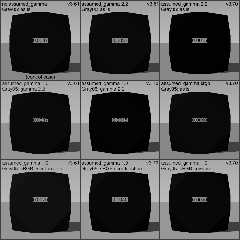
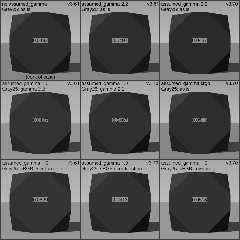
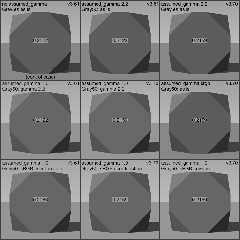
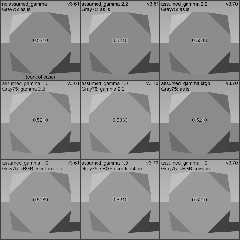
So I wrote a scene to render some of the grays with different gamma
configurations under different POV-Ray versions, then sampled the output
images and created montages with the sampled values.  The ground plane,
sky colors, and ambient were adjusted per frame to be comparable
regardless of assumed_gamma, which is why the assumed_gamma 1 renders do
not appear much different from the others.  In each frame, the light
source is rgb 1 and diffuse was set such that the sum of diffuse and
ambient is exactly one; this ensures that a Lambertian surface facing
the light source reflects the pigment value.

The number in the center of each frame is a sample of the upper left
facet, which directly faces the light source.

My goal was to use the unregulated color (upper left frame) as a
control, and match that color using assumed_gamma 1.  The closest
results are:

   Color    Control   POV-Ray 3.6          POV-Ray 3.7
   -----    -------   -----------          -----------
   Gray05   0.0037    Gamma 2.2 (0.0037)   sRGB (0.0040)
   Gray25   0.0497    Gamma 2.2 (0.0497)   sRGB (0.0513)
   Gray50   0.2122    Gamma 2.2 (0.2122)   Either (0.2159)
   Gray75   0.5210    Gamma 2.2 (0.5210)   sRGB (0.5210)

So, it appears that my initial recommendation holds for POV-Ray 3.7:

   #version 3.7;
   global_settings { assumed_gamma 1 }
   #include "colors.inc"
   pigment { srgbft ColorFromColorsDotInc }

But for earlier versions of POV-Ray, the power function should be used:

   #version 3.6; // or #version 3.5;
   global_settings { assumed_gamma 1 }
   #include "colors.inc"
   #include "math.inc"
   pigment { rgb VPow (ColorFromColorsDotInc, 2.2) }

The 3.5 renders are not shown because they sampled identical to the
corresponding 3.6 frames.  I haven't sampled 3.8 frames, but unless
someone knows differently, I have no reason to believe that changes were
made in its gamma handling.  I have not tested any versions prior to
3.5, nor have I tested any versions on an old Macintosh, which I
understand used an unconventional gamma.

An implication that I have realized is that this rendering difference is
not limited to stock colors.  *Any* color you define with rgb will look
slightly different from 3.6 to 3.7.

In doing the automated sampling, I also discovered that a 3.7 image map
loaded from a 3.5 or 3.6 rendered PNG source will look different from
the source image!  To avoid this, put gamma 2.2 into the image_map
block.  Whether this is a property of the rendering engine or just how
the PNG chunks were set up, I don't know.  At the moment, I have no
means of a proper comparison of the other supported image formats.
Post a reply to this message
Attachments:
Download 'stock_gamma-montage1.png' (77 KB)
Download 'stock_gamma-montage2.png' (77 KB)
Download 'stock_gamma-montage3.png' (75 KB)
Download 'stock_gamma-montage4.png' (73 KB)
Preview of image 'stock_gamma-montage1.png'
Preview of image 'stock_gamma-montage2.png'
Preview of image 'stock_gamma-montage3.png'
Preview of image 'stock_gamma-montage4.png'
|
|
| |
| |
|
|
|
|
| |
| |
|
|
Thank you very much for the detailed report. This actually quite interests me as
I had trouble with the same matter a while ago, and your insight may help me
understand what was happening there.
Pascal
Cousin Ricky <ric### [at] yahoo com> wrote:
> I have some new findings for POVers who wish to use the named colors in
> colors.inc with assumed_gamma 1 in old versions of POV-Ray.
>
> You may recall that I noted a few years ago that the named colors in
> colors.inc seemed to have been determined without taking non-linear
> representation into consideration. In other words, they don't look
> right with assumed_gamma 1. So, I recommended applying srgb to these
> colors, as one would do with color values from third-party software, and
> ignoring the "suspicious expression" warning. Shortly thereafter, I
> discovered the srgbft keyword, which eliminates the warning on colors
> that are already defined.
>
> But while fooling around with my render rig wish list the other day, I
> discovered that 3.5 and 3.6 renders of the dark grays were lighter than
> 3.7 and 3.8 renders!
>
> So I wrote a scene to render some of the grays with different gamma
> configurations under different POV-Ray versions, then sampled the output
> images and created montages with the sampled values. The ground plane,
> sky colors, and ambient were adjusted per frame to be comparable
> regardless of assumed_gamma, which is why the assumed_gamma 1 renders do
> not appear much different from the others. In each frame, the light
> source is rgb 1 and diffuse was set such that the sum of diffuse and
> ambient is exactly one; this ensures that a Lambertian surface facing
> the light source reflects the pigment value.
>
> The number in the center of each frame is a sample of the upper left
> facet, which directly faces the light source.
>
> My goal was to use the unregulated color (upper left frame) as a
> control, and match that color using assumed_gamma 1. The closest
> results are:
>
> Color Control POV-Ray 3.6 POV-Ray 3.7
> ----- ------- ----------- -----------
> Gray05 0.0037 Gamma 2.2 (0.0037) sRGB (0.0040)
> Gray25 0.0497 Gamma 2.2 (0.0497) sRGB (0.0513)
> Gray50 0.2122 Gamma 2.2 (0.2122) Either (0.2159)
> Gray75 0.5210 Gamma 2.2 (0.5210) sRGB (0.5210)
>
> So, it appears that my initial recommendation holds for POV-Ray 3.7:
>
> #version 3.7;
> global_settings { assumed_gamma 1 }
> #include "colors.inc"
> pigment { srgbft ColorFromColorsDotInc }
>
> But for earlier versions of POV-Ray, the power function should be used:
>
> #version 3.6; // or #version 3.5;
> global_settings { assumed_gamma 1 }
> #include "colors.inc"
> #include "math.inc"
> pigment { rgb VPow (ColorFromColorsDotInc, 2.2) }
>
> The 3.5 renders are not shown because they sampled identical to the
> corresponding 3.6 frames. I haven't sampled 3.8 frames, but unless
> someone knows differently, I have no reason to believe that changes were
> made in its gamma handling. I have not tested any versions prior to
> 3.5, nor have I tested any versions on an old Macintosh, which I
> understand used an unconventional gamma.
>
> An implication that I have realized is that this rendering difference is
> not limited to stock colors. *Any* color you define with rgb will look
> slightly different from 3.6 to 3.7.
>
> In doing the automated sampling, I also discovered that a 3.7 image map
> loaded from a 3.5 or 3.6 rendered PNG source will look different from
> the source image! To avoid this, put gamma 2.2 into the image_map
> block. Whether this is a property of the rendering engine or just how
> the PNG chunks were set up, I don't know. At the moment, I have no
> means of a proper comparison of the other supported image formats. com> wrote:
> I have some new findings for POVers who wish to use the named colors in
> colors.inc with assumed_gamma 1 in old versions of POV-Ray.
>
> You may recall that I noted a few years ago that the named colors in
> colors.inc seemed to have been determined without taking non-linear
> representation into consideration. In other words, they don't look
> right with assumed_gamma 1. So, I recommended applying srgb to these
> colors, as one would do with color values from third-party software, and
> ignoring the "suspicious expression" warning. Shortly thereafter, I
> discovered the srgbft keyword, which eliminates the warning on colors
> that are already defined.
>
> But while fooling around with my render rig wish list the other day, I
> discovered that 3.5 and 3.6 renders of the dark grays were lighter than
> 3.7 and 3.8 renders!
>
> So I wrote a scene to render some of the grays with different gamma
> configurations under different POV-Ray versions, then sampled the output
> images and created montages with the sampled values. The ground plane,
> sky colors, and ambient were adjusted per frame to be comparable
> regardless of assumed_gamma, which is why the assumed_gamma 1 renders do
> not appear much different from the others. In each frame, the light
> source is rgb 1 and diffuse was set such that the sum of diffuse and
> ambient is exactly one; this ensures that a Lambertian surface facing
> the light source reflects the pigment value.
>
> The number in the center of each frame is a sample of the upper left
> facet, which directly faces the light source.
>
> My goal was to use the unregulated color (upper left frame) as a
> control, and match that color using assumed_gamma 1. The closest
> results are:
>
> Color Control POV-Ray 3.6 POV-Ray 3.7
> ----- ------- ----------- -----------
> Gray05 0.0037 Gamma 2.2 (0.0037) sRGB (0.0040)
> Gray25 0.0497 Gamma 2.2 (0.0497) sRGB (0.0513)
> Gray50 0.2122 Gamma 2.2 (0.2122) Either (0.2159)
> Gray75 0.5210 Gamma 2.2 (0.5210) sRGB (0.5210)
>
> So, it appears that my initial recommendation holds for POV-Ray 3.7:
>
> #version 3.7;
> global_settings { assumed_gamma 1 }
> #include "colors.inc"
> pigment { srgbft ColorFromColorsDotInc }
>
> But for earlier versions of POV-Ray, the power function should be used:
>
> #version 3.6; // or #version 3.5;
> global_settings { assumed_gamma 1 }
> #include "colors.inc"
> #include "math.inc"
> pigment { rgb VPow (ColorFromColorsDotInc, 2.2) }
>
> The 3.5 renders are not shown because they sampled identical to the
> corresponding 3.6 frames. I haven't sampled 3.8 frames, but unless
> someone knows differently, I have no reason to believe that changes were
> made in its gamma handling. I have not tested any versions prior to
> 3.5, nor have I tested any versions on an old Macintosh, which I
> understand used an unconventional gamma.
>
> An implication that I have realized is that this rendering difference is
> not limited to stock colors. *Any* color you define with rgb will look
> slightly different from 3.6 to 3.7.
>
> In doing the automated sampling, I also discovered that a 3.7 image map
> loaded from a 3.5 or 3.6 rendered PNG source will look different from
> the source image! To avoid this, put gamma 2.2 into the image_map
> block. Whether this is a property of the rendering engine or just how
> the PNG chunks were set up, I don't know. At the moment, I have no
> means of a proper comparison of the other supported image formats.
Post a reply to this message
|
|
| |
| |
|
|
|
|
| |
| |
|
|
Funny thing: This week, I've been running tests that are very similar to yours,
solely in v3.8 (the latest development version). For my city buildings scene, I
am trying to figure out why two colors-- both evaluated using the eval_pigment()
macro-- return slightly different values, when the values should be identical.

My *current* belief is that the reason has to do with the 'srgb' gamma itself,
as opposed to gamma 2.2. SRGB has a gamma that is not a straight power law (like
2.2), but rather a sort of combination of gammas-- with both a power law segment
and a linear segment. The 'average' of those is not quite 2.2. Wikipedia has a
good article about it. My own results so far show that an SRGB color vs. a
'linear' RGB color (that has been re-transformed into a gamma 2.2 color by using
an inverse power law) produce the slightly different values. AFAIU, the
Wikipedia article gives a rather complex formula which better approximates this
'gamma inversion' of RGB to arrive at the SRGB gamma color, with a better match
between expected values.

I *think* that POV-ray version 3.6 and earlier did not make use of 'srgb' as a
gamma in any way, but rather 1.0 or 2.2, depending on the "user's preference",
ha. I used to use 2.2, but that was because of a basic 'color misunderstanding'
on my part, prior to the introduction of srgb colors. ;-)

I'm still absorbing your comments, and thinking it all through. I need to do a
visual test like yours, in v3.8.
Post a reply to this message
|
|
| |
| |
|
|
|
|
| |
| |
|
|
"Kenneth" <kdw### [at] gmailcom> wrote:
>
> My *current* belief is that the reason has to do with the 'srgb' gamma itself,
> as opposed to gamma 2.2.
[snip]
>
> I *think* that POV-ray version 3.6 and earlier did not make use of 'srgb' as a
> gamma in any way, but rather 1.0 or 2.2, depending on the "user's preference"...

Sorry, I probably didn't make my point very clear.

n POV-ray versions prior to 3.7(?), and using an assumed_gamma of 1.0 for a
scene back then, the colors in 'colors.inc' (being 'linear colors') didn't look
right when used as-is-- they had a washed-out appearance, due to the
assumed_gamma of 1.0. Changing assumed_gamma to 2.2 'corrected' those colors to
be what we (I?) might expect, or so it appeared. (but disregarding the other
'internal' computational problems that this probably caused vis a vis using a
suggested assumed_gamma of 1.0)

Jump forward to v3.7xx and 3.8, with its 'proper' use of assumed_gamma 1.0 and
the introduction of the srgb color keyword for using 'gamma-corrected' color
values that do not look washed out-- for example, using srgb to change a
'linear' rgb color in colors.inc.

SO... using assumed_gamma of 2.2 in earlier POV-ray versions along with linear
color values there, but then in later versions using assumed_gamma 1.0 and with
srgb-corrected colors, the respective gamma appearance (and value) of a
particular color might be slightly off when the two schemes are compared-- due
to the slight difference in gamma-bending between srgb and 'straight' 2.2


Or so my reasoning goes ;-)
Post a reply to this message
|
|
| |
| |
|
|
|
|
| |
| |
|
|
Hi Kenneth - this is something that I was concerned about, tried to address, and
IIRC, did it backwards.

Maybe you can take a look, and see what you think.

http://news.povray.org/povray.text.scene-files/thread/%3Cweb.58cc101945a951b1c437ac910%40news.povray.org%3E/

Apparently there's something with the linear interpolation of the color map that
needs to be addressed as well.

I'm accumulating one of those "infinite to-do lists..."   ;)
Post a reply to this message
|
|
| |
| |
|
|
|
|
| |
| |
|
|
"Bald Eagle" <cre### [at] netscapenet> wrote:
> Hi Kenneth - this is something that I was concerned about, tried to
> address, and IIRC, did it backwards.
>
> Maybe you can take a look, and see what you think.
>
>
http://news.povray.org/povray.text.scene-files/thread/%3Cweb.58cc101945a951b1c437ac910%40news.povray.org%3E/
>

I'm genuinely sorry to say that I didn't take note of your color-conversion
macros at the time (March 2017.) That is some NICE work.

I just spent a couple of enjoyable and challenging hours, going through your
macros' code there, and comparing it to the Wikipedia 'conversion' formulae (at
Wikipedia's "srgb" entry). Your math looks to be spot-on-- but of course you're
better at math than I am. ;-) Thanks for the opportunity for the mathematical
'brain boost'.

And you are correct-- your two macros are *reversed* as to their respective
operations! Through no fault of your own: the Wikipedia formulae themselves are
REVERSED. Which may mean that Wikipedia's source for those formulae is also
wrong. I'm amazed that no one has yet corrected the Wikipedia article.

'Fixing' your two macros is a simple matter-- just rename RGB2SRGB(C_linear) as
SRGB2RGB(C_exponential), ha. And vice-versa.

Having done so myself, I converted rgb <.75,.75,.75> to its srgb equivalent.
Result: <0.522522,0.522522,0.522522>

Compare that to:
#declare MY_PIG = pigment{srgb .75}
#debug concat(
"\n","srgb color = <",vstr(3,eval_pigment(MY_PIG, <.2,.2,.2>),",
",0,6),">","\n")
// Result: <0.522522,0.522522,0.522522>

A perfect match. Congrats!

As I experimented with your macros, three things pointed me to the conclusion
that the macro operations were reversed:
1) Your own hint ;-)
2) My *original* <.75,.75,.75> rgb-to-srgb result was 0.880825 -- which was
clearly wrong.
3) In the (mis-named) RGB2SRGB macro, at the near-ending line of
       #local C_srgb = ...
I changed that on a whim to
       #local C_srgb = srgb ....
and the #debug result was... <.75,.75,.75> -- the same as the original color! In
other words, it was first converting the color to (rgb) 0.880825 by the formula,
then #re*-converting it back to (srgb) 0.75. So *something* was amiss somewhere!

Btw, it may not be clear that to *use* your macros, the macro call in a scene
should include  srgb (or rgb, as the case may be). Like so:

box{0,1
pigment{srgb RGB2SRGB(<.75,.75,.75>)}
....
}

If it is left out, POV-ray apparently assumes the color to be 'linear' RGB by
default.

I would humbly suggest that you make a few changes to your March 2017 post. ;-)
Post a reply to this message
|
|
| |
| |
|
|
|
|
| |
| |
|
|
"Kenneth" <kdw### [at] gmailcom> wrote:

>
> 'Fixing' your two macros is a simple matter-- just
> rename RGB2SRGB(C_linear) as SRGB2RGB(C_exponential), ha. And vice-versa.

Well, I guess the macros do need a bit more than that in their code... only to
have consistency among the names of their internal variables. Minor work.

>
> Btw, it may not be clear that to *use* your macros, the macro call in a scene
> should include  srgb (or rgb, as the case may be). Like so:

Sorry, I didn't notice that you already gave examples of use, within the macros'
comments.
Post a reply to this message
|
|
| |
| |
|
|
|
|
| |
| |
|
|
"Kenneth" <kdw### [at] gmailcom> wrote:
> "Kenneth" <kdw### [at] gmailcom> wrote:
>
> >
> > 'Fixing' your two macros is a simple matter-- just
> > rename RGB2SRGB(C_linear) as SRGB2RGB(C_exponential), ha. And vice-versa.
>
> Well, I guess the macros do need a bit more than that in their code... only to
> have consistency among the names of their internal variables. Minor work.
>

I had some free time, so I 're-packaged' the macros for you, with all the
(minor) changes, and the switch of the macro names. All should work well, but
re-test them for any last-minute typos I may have made.
Post a reply to this message
Attachments:
Download 'color_conversion_macros_redone.txt' (3 KB)
|
|
| |
| |
|
|
|
|
| |
| |
|
|
Cousin Ricky <ric### [at] yahoocom> wrote:
>
> So I wrote a scene to render some of the grays with different gamma
> configurations under different POV-Ray versions, then sampled the output
> images and created montages with the sampled values...

Getting back to your original post here, about the slight discrepancies in color
values among the various versions of POV-ray:

I did some *basic* tests, solely in v3.8, using a simple pigment plus the
eval_pigment{...) macro, and I still get slight discrepancies in compared color
values. It somehow comes from the use of  srgb  vs.  rgb  in a color, AND on the
assumed_gamma of the scene.

#declare PIG_C = pigment{rgb <.75,.75,.75>} // CHANGE this from srgb to rgb

#debug concat("\n","PIGMENT_C evaluation = <",vstr(3,eval_pigment(PIG_C,
<.2,.2,.2>),", ",0,6),">","\n\n")

The various results using different assumed_gamma values:
--- With assumed_gamma 1.0:
1) using srgb: eval_pigment = <0.522522,0.522522,0.522522> // correct
2) using rgb:  eval_pigment = <0.750000,0.750000,0.750000> // correct
--- With assumed_gamma 2.2:
// 1) using srgb: eval_pigment = <0.744501,0.744501,0.744501> // ??
// 2) using rgb:  eval_pigment = <0.750000,0.750000,0.750000>
--- with assumed_gamma srgb:
// 1) using srgb: eval_pigment = <0.750000,0.750000,0.750000>
// 2) using rgb:  eval_pigment = <0.750000,0.750000,0.750000>

Under assumed_gamma 1.0, the evaluated values are correct. But under
assumed_gamma 2.2, the result with srgb is *slightly* off from the original
value. I have no idea why. (I would have thought that those two values would be
MUCH different, like under assumed_gamma 1.0).
Post a reply to this message
|
|
| |
| |
|
|
|
|
| |
| |
|
|
"Kenneth" <kdw### [at] gmailcom> wrote:
>
> The various results using different assumed_gamma values:
> --- With assumed_gamma 1.0:
> 1) using srgb: eval_pigment = <0.522522,0.522522,0.522522> // correct
> 2) using rgb:  eval_pigment = <0.750000,0.750000,0.750000> // correct
> --- With assumed_gamma 2.2:
> // 1) using srgb: eval_pigment = <0.744501,0.744501,0.744501> // ??
> // 2) using rgb:  eval_pigment = <0.750000,0.750000,0.750000>
> --- with assumed_gamma srgb:
> // 1) using srgb: eval_pigment = <0.750000,0.750000,0.750000>
> // 2) using rgb:  eval_pigment = <0.750000,0.750000,0.750000>
>
> Under assumed_gamma 1.0, the evaluated values are correct. But under
> assumed_gamma 2.2, the result with srgb is *slightly* off from the original
> value. I have no idea why. (I would have thought that those two values would be
> MUCH different, like under assumed_gamma 1.0).

The srgb keyword always returns a color that *looks* the same across all
assumed_gamma settings.  To take your example, srgb 0.75 will *look* the same
whether your scene uses assumed_gamma 1, assumed_gamma 2.2, or assumed_gamma
srgb.  But this implies that, internally, it will evaluate to different rgb
values depending on the assumed_gamma setting.

When you use assumed_gamma srgb, the scene's nonlinearity aligns with the color
definition, which is why rgb and srgb return the same value.  And since sRGB is
close to gamma 2.2, rgb and srgb return close, but not identical, values under
assumed_gamma 2.2.
Post a reply to this message
|
|
| |
| |
|
|
|
|
| |
| |
|
|
"Cousin Ricky" <rickysttATyahooDOTcom> wrote:

> When you use assumed_gamma srgb, the scene's nonlinearity aligns with the color
> definition, which is why rgb and srgb return the same value.  And since sRGB is
> close to gamma 2.2, rgb and srgb return close, but not identical, values under
> assumed_gamma 2.2.

"Unlike most other RGB color spaces, the sRGB gamma cannot be expressed as a
single numerical value. The overall gamma is approximately 2.2, consisting of a
linear (gamma 1.0) section near black, and a non-linear section elsewhere
involving a 2.4 exponent and a gamma (slope of log output versus log input)
changing from 1.0 through about 2.3. The purpose of the linear section is so the
curve does not have an infinite slope at zero, which could cause numerical
problems."

https://en.wikipedia.org/wiki/SRGB

So there needs to be a function(_r, _g, _b) {} with a select () statement in it.
Post a reply to this message
|
|
| |
| |
|
|
|
|
| |
| |
|
|
"Bald Eagle" <cre### [at] netscapenet> wrote:

> So there needs to be a function(_r, _g, _b) {} with a select () statement in it.

Which of course you have, (duh) but what I'm thinking is that the specific way
you implemented the sRGB standard might be one of the slightly different ways
mentioned, compared to how it's actually implemented in POV-Ray.

So, I'd either play with some of the gobbledygook in the wikipedia page, or look
at what Mike Horvath has done
https://github.com/mjhorvath/Mike-Wikipedia-Illustrations
(the whole zip is like 78MB) to see what sorts of color conversion functions he
uses.

because I'm hoping that since he worked closely with clipka on this, that it's
"as-per-POV-Ray"

or we need to dig up the part in the POV-Ray source code where rgb gets
converted to sRGB to see exactly what gets done.

But I got zippo-zero done today, so now I'm going to bed.  :D

Super nice work with the updating - I'm glad you tracked down that Wikipedia was
_wrong_   :O   That's actually been bothering me this whole time, whenever I'd
hearken back to why I wrote them in the first place.   Makes me feel better to
know that I was doing the right thing but with wrong information.  :)

THANK YOU

Strange that neither Mike nor Christoph picked up on it - but maybe they
mentioned it in one of his scene development threads?
Post a reply to this message
|
|
| |
| |
|
|
From: Ash Holsenback
Subject: Re: Stock colors and assumed_gamma 1 in POV-Ray 3.6
Date: 15 Oct 2020 05:02:52
Message: <5f88103c$1@news.povray.org>
|
|
|
| |
| |
|
|
On 10/14/20 10:24 PM, Bald Eagle wrote:
> Super nice work with the updating - I'm glad you tracked down that Wikipedia was
> _wrong_   :O   That's actually been bothering me this whole time, whenever I'd
> hearken back to why I wrote them in the first place.   Makes me feel better to
> know that I was doing the right thing but with wrong information.  :)

would one of you guys PLEASE be a little bit more specific about what is
wrong on wiki... several of you are so darn verbose my eyes have just
glazed over
Post a reply to this message
|
|
| |
| |
|
|
|
|
| |
| |
|
|
Ash Holsenback <no### [at] spamcom> wrote:

> would one of you guys PLEASE be a little bit more specific about what is
> wrong on wiki... several of you are so darn verbose my eyes have just
> glazed over

There once was a man named Jim
My verbosity was getting to him
So instead of Wikipedia
I rendered some media {}
And sent a pretty picture to him

:)   <curtsy>

Don't take this as the final answer, but what I THINK Kenneth found is where it
says

"These linear RGB values are not the final result; gamma correction must still
be applied. The following formula transforms the linear values into sRGB:"

and then immediately following those formulae

The reverse transformation
"Again the sRGB component values Rsrgb, Gsrgb, Bsrgb are in the range 0 to 1.
(Values in the range of 0 to 255 can simply be divided by 255.0)."

should be reversed.


But I haven't re-wrapped my head around the whole gamma thing _again_....

my macros originated from this discussion:

http://news.povray.org/58cb2917%241%40news.povray.org
Post a reply to this message
|
|
| |
| |
|
|
|
|
| |
| |
|
|
"Kenneth" <kdw### [at] gmailcom> wrote:
> "Bald Eagle" <cre### [at] netscapenet> wrote:
> > Hi Kenneth - this is something that I was concerned about, tried to
> > address, and IIRC, did it backwards.
> >
>
> And you are correct-- your two macros are *reversed* as to their respective
> operations! Through no fault of your own: the Wikipedia formulae themselves are
> REVERSED...
>
Well, I never like to base my ideas on a single source of information, so I
looked at other web sources that have these 'color conversion' equations-- and
ALL the sources I've seen match the order of the equations in Wikipedia.  So I'm
obviously wrong about the two equations being 'backward' there. I gave this a
lot of thought, and realized that it's our *use* of those equations **in
POV-ray** that makes them seem so. To really explain why would take paragraphs,
and I'm still wrapping my brain around it. And I might put Ash to sleep... :-P

But the re-edited macros are still correct for their use in POV-ray... a
consequence of this 'new thinking'.

This NVIDIA article really opened my eyes to the correct way of visualizing the
situation, although it may not be immediately obvious...

https://developer.nvidia.com/gpugems/gpugems3/part-iv-image-effects/chapter-24-importance-being-linear
Post a reply to this message
|
|
| |
| |
|
|
|
|
| |
| |
|
|
Ash Holsenback <no### [at] spamcom> wrote:

>
> would one of you guys PLEASE be a little bit more specific about what is
> wrong on wiki... several of you are so darn verbose my eyes have just
> glazed over

The Wikipedia page about "sRGB" has two nasty-looking math equations for
converting 'linear' RGB colors (like in colors.inc) into SRGB colors, and vice
versa. But Bald Eagle and I thought that the equations were 'reversed' there--
because the math *results* of each equation had the opposite effect of what we
wanted them to do in POV-ray. But the equations ARE correct-- it's just that
their intended use *in POV-ray* was the opposite of what the wiki article is
actually describing. That's hard to explain without a lengthy essay on the
subject ;-)
Post a reply to this message
|
|
| |
| |
|
|
|
|
| |
| |
|
|
"Kenneth" <kdw### [at] gmailcom> wrote:

> But the equations ARE correct-- it's just that
> their intended use *in POV-ray* was the opposite of what the wiki article is
> actually describing. That's hard to explain without a lengthy essay on the
> subject ;-)

The POV-Ray Essay Commission will now come to order.
{reverberating gavel sound, muffled coughing and shuffling}

Kenneth Walker has been nominated to author The Essay on sRGB conversion
formulas.

Do I hear a second?
"Second!"

All those in favor of Kenneth writing a lengthy essay say Aye...
"Aye!"     "Aye!"     "Aye!"     "Aye!"     "Aye!"     "Aye!"     "Aye!"

The Aye's have it.

Kenneth Walker is now appointed as the Maintainer of the Gamma, and The
Commission anxiously awaits his proffered essay....

:P
Post a reply to this message
|
|
| |
| |
|
|
|
|
| |
| |
|
|
"Bald Eagle" <cre### [at] netscapenet> wrote:

>
> Kenneth Walker is now appointed as the Maintainer of the Gamma, and The
> Commission anxiously awaits his proffered essay....
>
> :P

Hmm, a dubious distinction :-0

OK, you asked for it. But gamma is such a tricky and complex subject that I may
come across as either sounding like a genius, or sounding  like an idiot. :P
There are aspects of this business that still puzzle me, and I have left out a
lot of extraneous details; but this is how I see it so far. (And this is the
SHORT-version, ha.) I await judgement ;-)

I'll concentrate on the RGB-to-SRGB conversion formula. I 'borrowed' a diagram
from the NVIDIA article and posted it here, to help explain things (it should be
on the Wikipedia page too, which would go a long way to explain the actual
intended use of the equations there.)

In a nutshell:

Our computers/monitors have an intrinsic built-in  'gamma' of generally around
2.2. That computer gamma is the curved "CRT gamma line" in the diagram. The
straight line represents color values fed to the display.

When we save an image in POV-ray (i.e., the rendered image), it contains
*linear* image data, but with a gamma chunk to tell the computer what to do with
it-- either 2.2 (automatic for older versions) or, for v3.7xx-3.8xx, either 2.2
or srgb by way of the newer File_Gamma keyword in our .ini file.  (These gamma
chunks are possibly the 'inverse' of the values, but that's too much technical
detail for this discussion.)

The RGB-to-SRGB conversion equation as-is on the Wikipedia page (and elsewhere)
refers to this image-ENCODING gamma-- the gamma chunk-- when an image is finally
sent to the computer/monitor for display. The surprise (as regards POV-ray's use
of the SRGB keyword for colors) is that the equation actually 'brightens'  the
image values, to prepare them for the counter- 'gamma-bending' by the computer's
intrinsic 2.2 gamma-- so that their final perceptual appearance is once again
along  the straight line. These gamma-encoded values are represented by the
dashed line in the diagram.

This is what the equation itself is meant to do-- it's for gamma-ENCODING an
image.  But that's the *opposite* of what we want it to do **within POV-ray**;
we want to take a too-bright linear RGB color there -- say, 50% gray, which
*appears* too bright in our assumed_gamma 1.0 world-- and *darken* it to look
perceptually correct in our preview render.

So, the 'opposite' SRGB-to-RGB equation on the page is the one to use, even
though that seems counter-intuitive.

Using POV-ray's assumed_gamma 1.0 in a scene is like having a self-contained
'box' in the computer with its own 'linear gamma atmosphere' of 1.0, sealed off
from the computer's gamma 2.2  environment. We work within that box, visually
and computationally.  Now, because *linear* RGB color values in such an
environment look kind of washed-out to our own eyes, we need a way within
POV-ray to mimic the surrounding gamma-2.2 world-- not by using assumed_gamma
2.2 there (for subtle computational reasons), but with SRGB colors. Of course,
you *could* use linear colors along with assumed_gamma 1.0, and simply tweak the
visual results to your liking in the preview-- using 22% gray instead of 50% so
that it 'looks' correct as middle-gray-- but most if not all other image-making
programs don't operate in a gamma 1.0 environment like that; we are simply used
to the visual preview results of, say, 50% linear gray automatically looking
like 22%. Working with colors is just easier this way-- we can specify srgb and
'get' 22%, which is perceptually midway between black and white.

For older versions of POV-ray without the srgb color keyword, setting
assumed_gamma to 2.2 was an expedient way around this, but with its own mess of
subtle problems as to internal computations.
Post a reply to this message
Attachments:
Download 'gamma_slopes_image.jpg' (56 KB)
Preview of image 'gamma_slopes_image.jpg'

|
|
| |
| |
|
|
|
|
| |
| |
|
|
"Kenneth" <kdw### [at] gmailcom> wrote:

> Hmm, a dubious distinction :-0
>
> OK, you asked for it. But gamma is such a tricky and complex subject that I may
> come across as either sounding like a genius, or sounding  like an idiot.

I think gamma is one of things that _seems_ complex simply because there's no
visual and interactive roadmap.

I've had to memorize things, and use or teach subjects that people's popular
perception is that they are "lofty" or "complicated" - yet these same people
know THOUSANDS of song lyrics, driving directions, and play very layered,
conditional video and other games all the time.

In the same way that the graph shows arrows representing conversions between the
different curves, I'd like it if we could have a collection macros that do the
same thing - with a switch to turn on some text output to the debug stream
describing the inputs and results.  "Converting linear rgb <r, g, b> to sRGB
<sr, sg, sb>..."   or some such thing.

and if everything were expressed as function{}s, then it would be easy to have a
macro that creates a graph like you attached.

I would also like to have a way to do what clipka was cautioning me about -
where a palette of srgb colors could be lightened or darkened using a
multiplier, and the math would be correct to do it in the proper color space.

Because we've all been around the block enough times to _know_ that this kind of
thing is going to crop up again and again and again.

I think you invested a few well-spent hours familiarizing yourself with the
topic, and now it's time to "write it down" in a way that exactly matches how
POV-Ray handles the conversion, and is accessible in a way that users don't have
to reinvent the wheel in order to ascend that learning curve.

I have the POV-planet project, the Bezier stuff, the quilted pattern all
swirling around - but I can help out with getting the function {} structure and
syntax right, and maybe dig up POV-Ray's source code to see exactly what's going
on there.

Good work, Sir.
It's a pleasure to have you back   :)
Post a reply to this message
|
|
| |
| |
|
|
|
|
| |
| |
|
|
It seems to me that the color conversion code is in
source/base/image/colourspace.cpp
Post a reply to this message
|
|
| |
| |
|
|
|
|
| |
| |
|
|
"Bald Eagle" <cre### [at] netscapenet> wrote:
> It seems to me that the color conversion code is in
> source/base/image/colourspace.cpp

This is what was in the source code, which seems to be exactly what you have.
Maybe it has something to do with the way POV-Ray does math through SDL vs
through compiled code (float vs double, etc)

#declare SRGB_Encode = function (C) {
 select (0.0031308-C, C*12.92, C*12.92, 1.055 * pow (C, 1/2.4) - 0.055)
}

#declare SRGB_Decode = function (C) {
 select (0.04045-C, C/12.92, 1.055 * pow ((C+0.055)/1.055, 2.4))
Post a reply to this message
|
|
| |
| |
|
|
|
|
| |
| |
|
|
"Bald Eagle" <cre### [at] netscapenet> wrote:
> "Bald Eagle" <cre### [at] netscapenet> wrote:
> > It seems to me that the color conversion code is in
> > source/base/image/colourspace.cpp
>
> This is what was in the source code, which seems to be exactly what you have.
> Maybe it has something to do with the way POV-Ray does math through SDL vs
> through compiled code (float vs double, etc)
>
> #declare SRGB_Encode = function (C) {
>  select (0.0031308-C, C*12.92, C*12.92, 1.055 * pow (C, 1/2.4) - 0.055)
> }
>
> #declare SRGB_Decode = function (C) {
>  select (0.04045-C, C/12.92, 1.055 * pow ((C+0.055)/1.055, 2.4))

Now, hearkening back to clipka's point,
http://news.povray.org/povray.advanced-users/message/%3C58cb2917%241%40news.povray.org%3E/#%3C58cb2917%241%40news.povra
y.org%3E

All we would need to do is include a multiplier m as a second argument, and
multiply the result by that.

The other issue that was brought up (somewhere, by someone) is trying to use
sRGB values in a color map - because the color_map will interpolate linearly,
whereas the sRGB color space is nonlinear.

I have no idea if we have control over color_map interpolation - a user_function
would be useful....  I have a real problem trying to search and find these
things....
Post a reply to this message
|
|
| |
| |
|
|
|
|
| |
| |
|
|
"Bald Eagle" <cre### [at] netscapenet> wrote:

> The other issue that was brought up (somewhere, by someone) is trying to use
> sRGB values in a color map - because the color_map will interpolate linearly,
> whereas the sRGB color space is nonlinear.
>
> I have no idea if we have control over color_map interpolation - a user_function
> would be useful....  I have a real problem trying to search and find these
> things....

New in version 3.8 non-linear pigment map interpolation support has been added.
http://wiki.povray.org/content/Reference:Pigment_Map

So, I guess all of the components exist to write some demo scenes to illustrate
how gamma and rgb/srgb work, and how to best use them in scenes with things like
pigment maps...

It seems to me that we have a lot of things like maps and pigment patterns, and
a lot of things like splines and functions, and there should be some way to
cross reference them with each other to take advantage of existing code.

At some point I'll have to start trying to map this out somehow.
Post a reply to this message
|
|
| |
| |
|
|
|
|
| |
| |
|
|
OK, so I'm going to get some shut-eye, but figured I'd post this WIP.

Looks like I reversed the select() conditions, so I corrected that, and graphed
linear and both formulas.
The green one looks off.   No idea why right now.   Maybe someone has insights.

Source code follows SDL.


#version 3.8;
global_settings {assumed_gamma 1.0 }


camera {
 location <1/2, 0.5, -1.5>
 //location <0, 10, 3>
 right x*image_width/image_height
 up y
 look_at <1/2, 0.5, 0>
}

light_source {<0, 0, -5> rgb 1} // for documentation illustrations
sky_sphere {pigment {rgb 1}}


// Functions modeled directly from POV-Ray source code
// Bill Walker "Bald Eagle" October 2020

#declare SRGB_Encode = function (C) {
 select (C-0.0031308, C*12.92, C*12.92, 1.055 * pow (C, 1/2.4) - 0.055)
}

#declare SRGB_Decode = function (C) {
 select (C-0.04045, C/12.92, 1.055 * pow ((C+0.055)/1.055, 2.4))
}


#declare Line = 0.005;
union {
 cylinder {<0, 0, 0>, <0, 1, 0> Line}
 cylinder {<1, 0, 0>, <1, 1, 0> Line}
 cylinder {<0, 1, 0>, <1, 1, 0> Line}
 cylinder {<0, 0, 0>, <1, 0, 0> Line}
 no_shadow
 pigment {rgb 0}
}

cylinder {<0, 0, 0>, <1, 1, 0> Line pigment {rgb <0.5, 0, 0>}}

union {
 #for (X, 0, 1, 0.01)
  #local Current = <X, SRGB_Encode (X), 0>;
  sphere {Current Line}
  #if (X > 0)
   cylinder {Current, Last Line}
  #end
  #local Last = Current;
 #end
 texture {pigment {rgb <0, 0, 0.5>}}
}

union {
 #for (X, 0, 1, 0.01)
  #local Current = <X, SRGB_Decode (X), 0>;
  sphere {Current Line}
  #if (X > 0)
   cylinder {Current, Last Line}
  #end
  #local Last = Current;
 #end
 texture {pigment {rgb <0, 0.5, 0>}}
}

/*******************************************************************************

SRGBGammaCurve::SRGBGammaCurve() {}
SimpleGammaCurvePtr SRGBGammaCurve::Get()
{
    if (!instance)
        instance.reset(new SRGBGammaCurve());
    return SimpleGammaCurvePtr(instance);
}
float SRGBGammaCurve::Encode(float x) const
{
    // (the threshold of 0.00304 occasionally found on the net was from an older
draft)
    if (x <= 0.0031308f) return x * 12.92f;
    else                 return 1.055f * pow(x, 1.0f/2.4f) - 0.055f;
}
float SRGBGammaCurve::Decode(float x) const
{
    // (the threshold of 0.03928 occasionally found on the net was from an older
draft)
    if (x < 0.04045f) return x / 12.92f;
    else              return pow((x + 0.055f) / 1.055f, 2.4f);
}
float SRGBGammaCurve::ApproximateDecodingGamma() const
{
    return 2.2f;
}
int SRGBGammaCurve::GetTypeId() const
{
    return kPOVList_GammaType_SRGB;
}

*******************************************************************************/
Post a reply to this message
Attachments:
Download 'colorconversionformulas_fromsource.png' (39 KB)
Preview of image 'colorconversionformulas_fromsource.png'

|
|
| |
| |
|
|
|
|
| |
| |
|
|
No worries.
Copy/paste error.
Just forgot to delete the "1.055 * " preceding the pow() formula.

I also think that 0.04045 should be replaced by the true value of
0.0031308 * 12.92 = 0.040449936


#version 3.8;
global_settings {assumed_gamma 1.0 }


camera {
 location <1/2, 0.5, -1.5>
 //location <0, 10, 3>
 right x*image_width/image_height
 up y
 look_at <1/2, 0.5, 0>
}

light_source {<0, 0, -5> rgb 1} // for documentation illustrations
sky_sphere {pigment {rgb 1}}


// Functions modeled directly from POV-Ray source code
// Bill Walker "Bald Eagle" October 2020

#declare SRGB_Encode = function (C) {
 select (C-0.0031308, C*12.92, C*12.92, 1.055 * pow (C, 1/2.4) - 0.055)
}


#declare _SRGB_Decode = function (C) {
 select (C-0.04045, C/12.92, pow ((C+0.055)/1.055, 2.4))
}

#declare SRGB_Decode = function (C) {
 select (C-0.040449936, C/12.92, pow ((C+0.055)/1.055, 2.4))
}

#declare Line = 0.005;
union {
 cylinder {<0, 0, 0>, <0, 1, 0> Line}
 cylinder {<1, 0, 0>, <1, 1, 0> Line}
 cylinder {<0, 1, 0>, <1, 1, 0> Line}
 cylinder {<0, 0, 0>, <1, 0, 0> Line}
 no_shadow
 pigment {rgb 0}
}

cylinder {<0, 0, 0>, <1, 1, 0> Line pigment {rgb <0.5, 0, 0>}}

union {
 #for (X, 0, 1, 0.01)
  #local Current = <X, SRGB_Encode (X), 0>;
  sphere {Current Line}
  #if (X > 0)
   cylinder {Current, Last Line}
  #end
  #local Last = Current;
 #end
 texture {pigment {rgb <0, 0, 0.5>}}
}

union {
 #for (X, 0, 1, 0.01)
  #local Current = <X, SRGB_Decode (X), 0>;
  sphere {Current Line}
  #if (X > 0)
   cylinder {Current, Last Line}
  #end
  #local Last = Current;
 #end
 texture {pigment {rgb <0, 0.5, 0>}}
}

/*******************************************************************************

SRGBGammaCurve::SRGBGammaCurve() {}
SimpleGammaCurvePtr SRGBGammaCurve::Get()
{
    if (!instance)
        instance.reset(new SRGBGammaCurve());
    return SimpleGammaCurvePtr(instance);
}
float SRGBGammaCurve::Encode(float x) const
{
    // (the threshold of 0.00304 occasionally found on the net was from an older
draft)
    if (x <= 0.0031308f) return x * 12.92f;
    else                 return 1.055f * pow(x, 1.0f/2.4f) - 0.055f;
}
float SRGBGammaCurve::Decode(float x) const
{
    // (the threshold of 0.03928 occasionally found on the net was from an older
draft)
    if (x < 0.04045f) return x / 12.92f;
    else              return pow((x + 0.055f) / 1.055f, 2.4f);
}
float SRGBGammaCurve::ApproximateDecodingGamma() const
{
    return 2.2f;
}
int SRGBGammaCurve::GetTypeId() const
{
    return kPOVList_GammaType_SRGB;
}

*******************************************************************************/
Post a reply to this message
Attachments:
Download 'colorconversionformulas_fromsource.png' (39 KB)
Preview of image 'colorconversionformulas_fromsource.png'

|
|
| |
| |
|
|
From: Cousin Ricky
Subject: Re: Stock colors and assumed_gamma 1 in POV-Ray 3.6
Date: 16 Oct 2020 22:35:49
Message: <5f8a5885$1@news.povray.org>
|
|
|
| |
| |
|
|
On 2020-10-15 1:05 PM (-4), Kenneth wrote:
> "Kenneth"<kdw### [at] gmailcom>  wrote:
>> "Bald Eagle"<cre### [at] netscapenet>  wrote:
>>> Hi Kenneth - this is something that I was concerned about, tried to
>>> address, and IIRC, did it backwards.
>>>
>> And you are correct-- your two macros are*reversed*  as to their respective
>> operations! Through no fault of your own: the Wikipedia formulae themselves are
>> REVERSED...
>>
> Well, I never like to base my ideas on a single source of information, so I
> looked at other web sources that have these 'color conversion' equations-- and
> ALL the sources I've seen match the order of the equations in Wikipedia.  So I'm
> obviously wrong about the two equations being 'backward' there. I gave this a
> lot of thought, and realized that it's our*use*  of those equations **in
> POV-ray** that makes them seem so. To really explain why would take paragraphs,
> and I'm still wrapping my brain around it. And I might put Ash to sleep...:-P

Indeed, the very reason I didn't chime in on this matter is that I
sometimes get my directions mixed up on this, and didn't feel the
confidence to take a hard look.  It can be brain busting.  Sometimes I
get lazy (or frustrated) and just run a formula, and if the result turns
out backwards, I know I need to use the other formula.
Post a reply to this message
|
|
| |
| |
|
|
|
|
| |
| |
|
|
Cousin Ricky <ric### [at] yahoocom> wrote:

> ...Sometimes I
> get lazy (or frustrated) and just run a formula, and if the result turns
> out backwards, I know I need to use the other formula.

Same here, ha. But this gamma business has *always* been a thorny subject to me,
and any chance to get a better understanding of it-- as painful as it can be--
is worth some turtured brain cells. Seems that it's a never-ending quest. And I
*still* have nagging questions about my analysis, which will hopefully become
clear with more thought.
Post a reply to this message
|
|
| |
| |
|
|
|
|
| |
| |
|
|
hi,

"Kenneth" <kdw### [at] gmailcom> wrote:
> ...
> Our computers/monitors have an intrinsic built-in  'gamma' of generally around
> 2.2. That computer gamma is the curved "CRT gamma line" in the diagram. The
> straight line represents color values fed to the display.

monitors tend to have an OSD where colour "profiles" can be selected; eg I can
choose from 9300K, 6500K, custom, and srgb.  so should I (continue to) go with
'srgb' and use 'assumed_gamma 1' in all my scenes, or...?


regards, jr.
Post a reply to this message
|
|
| |
| |
|
|
|
|
| |
| |
|
|
"jr" <cre### [at] gmailcom> wrote:
> hi,
>
> "Kenneth" <kdw### [at] gmailcom> wrote:
> > ...
> > Our computers/monitors have an intrinsic built-in  'gamma' of generally around
> > 2.2. That computer gamma is the curved "CRT gamma line" in the diagram. The
> > straight line represents color values fed to the display.
>
> monitors tend to have an OSD where colour "profiles" can be selected; eg I can
> choose from 9300K, 6500K, custom, and srgb.  so should I (continue to) go with
> 'srgb' and use 'assumed_gamma 1' in all my scenes, or...?
>
>
I wish I had a monitor like yours, with more sophisticated controls; mine is
currently a cheap LED-backlit LCD 'TV'. It doesn't have choices like 6500K etc,
just the dumb 'consumer' choices like 'sports', 'movies', 'baseball'(!), etc.,
along with manual custom settings.  (I'm researching new monitors at the moment,
looking for something that has spot-on color accuracy re: sRGB. It's turning
into a lengthy search!)

My understanding is that 6500K is the 'standard' color temperature for a
monitor; take a look here...

https://www.eizo.com/library/basics/color_temperature_on_an_LCD_monitor/

I assumed color temperature was a different 'thing' than  'srgb'; it's a
surprise to me that your monitor gives you that particular choice, but I could
be wrong (or  ill-informed at present.) I wish I could be more helpful.

In POV-ray, I presently use assumed_gamma 1.0, the long-recommended value (along
with srgb colors rather than linear rgb.) But one of the new nagging questions
that I currently have is about the use of the newer assumed_gamma srgb, and what
effect *it* may have on a rendered scene. The documentation isn't clear as to
why it's an alternative. Since it is nearly a 2.2 gamma, it is bound to have a
rather profound effect, at least in the render preview. I've never used it
before, but I plan to run some tests.
Post a reply to this message
|
|
| |
| |
|
|
|
|
| |
| |
|
|
"Bald Eagle" <cre### [at] netscapenet> wrote:
> No worries.
> Copy/paste error.
> Just forgot to delete the "1.055 * " preceding the pow() formula.
>
> I also think that 0.04045 should be replaced by the true value of
> 0.0031308 * 12.92 = 0.040449936
> [code...]

That is some ingenious coding! I haven't run your SDL code yet, but will do so
ASAP-- just to see the graphing results on MY computer screen ;-) Your coding
skills continue to amaze me.

I'm still assessing the 'totality' of how and what those Wikipedia equations +
POV-ray do as a combo, to get a nice and correct image file. It seems to me that
it follows these steps:

1) We work on a POV-ray scene in an assumed_gamma 1.0 'world', which is a linear
world (except for the use of more-pleasing srgb colors, which are NOT linear, at
least in the visual preview). Everything else in the scene is (or should be)
'linear'--lighting, radiosity effects, etc. (Well, as a simplification).

2) For the rendered output file, the scene is encoded as srgb (assuming that
POV-ray's File_Gamma is set that way.) This essentially 'brightens' the scene by
way of the *actual* RGB-to-SRGB formula, before sending it to the video
card/monitor. (My previous assessment, anyway.)

3) The 2.2-gamma monitor then 're-darkens' the scene, to be what we saw in
POV-ray's preview.

What that means (to my thinking) is that the saved image file's on-screen
appearance, as viewed on the 2.2-gamma monitor, is actually a 'linear image'
again, so to speak-- just like in POV-ray's preview-- the scene's lighting, etc,
etc. EXCEPT for the colors that we used, which were 'srgb darkened' when we
worked on the scene. (I know that when we use such colors, POV-ray actually
works with their 'linear' values internally-- so I guess that, for example, srgb
0.50 becomes 'linear 0.22' behind the scene; that's the only way it makes sense
to me, in order for the saved file to properly show 0.22 later.)

Some of this may be conjecture, of course. I know that Clipka spent a good deal
of time in the past, attempting to explain this pipeline and its many arcane
details. My explanations and understanding may differ from his; he knew a LOT
more about this stuff than I currently do.
Post a reply to this message
|
|
| |
| |
|
|
From: Cousin Ricky
Subject: Re: Stock colors and assumed_gamma 1 in POV-Ray 3.6
Date: 18 Oct 2020 00:28:25
Message: <5f8bc469$1@news.povray.org>
|
|
|
| |
| |
|
|
On 2020-10-17 9:20 PM (-4), Kenneth wrote:
>
> My understanding is that 6500K is the 'standard' color temperature for a
> monitor; take a look here...

My monitor is set to sRGB with a white point of D65 (6504 K), but I also
have an app that lowers the color temperature to 3500 K at night.  Aside
from the greens appearing more vivid and green shades less easy to tell
apart, I barely notice the change; my eyes adjust, and my sleep is
probably better for it.  Of course, if the app abruptly quits (like when
I accidentally shut it off just now while checking the settings), the
difference is shockingly.  It's like the whole computer turns bright blue!

Prior to my current computer, which has a backlit LCD with an sRGB
preset, I had manually set the gamma curves using clipka's gamma
checking scene and a few test patterns of my own as benchmarks.

> In POV-ray, I presently use assumed_gamma 1.0, the long-recommended value (along
> with srgb colors rather than linear rgb.) But one of the new nagging questions
> that I currently have is about the use of the newer assumed_gamma srgb, and what
> effect *it* may have on a rendered scene. The documentation isn't clear as to
> why it's an alternative. Since it is nearly a 2.2 gamma, it is bound to have a
> rather profound effect, at least in the render preview. I've never used it
> before, but I plan to run some tests.

As I see it, assumed_gamma srgb is useful for updating legacy scenes
that did not have an assumed_gamma, so they would run without warnings
in POV-Ray 3.7, or at least render predictably in any POV-Ray version.
(assumed_gamma has been available since 3.0, if not earlier, but 3.7 was
the first version to fuss about it.)  With all the tweaks necessary to
get the lighting right in the original scene, inserting assumed_gamma 1
into a legacy scene and slapping srgb on all of the pigments is unlikely
to end well.  Short of a rewrite of the entire scene (which some POVers
have done), it's best to just make explicit in the code the sort of
monitor it was developed under.

At least that's my take as someone who has used assumed_gamma 1 from the
beginning.  Some POVers (I can name a couple) prefer an unrealistic
gamma for artistic reasons.

But assumed_gamma 2.2 (or 1.8 or whatever) would be used for the same
reasons.  I guess assumed_gamma srgb was added for the sake of ungamma'd
scenes that were developed with an sRGB monitor.  Or maybe it's just for
completeness.  I don't know.  Maybe Chris Cason knows?
Post a reply to this message
|
|
| |
| |
|
|
|
|
| |
| |
|
|
"hi,

Kenneth" <kdw### [at] gmailcom> wrote:
> "jr" <cre### [at] gmailcom> wrote:
> > "Kenneth" <kdw### [at] gmailcom> wrote:
> > > ...
> > > Our computers/monitors have an intrinsic built-in  'gamma' of generally around
> > > 2.2. That computer gamma is the curved "CRT gamma line" in the diagram. The
> > > straight line represents color values fed to the display.
> >
> > monitors tend to have an OSD where colour "profiles" can be selected; eg I can
> > choose from 9300K, 6500K, custom, and srgb.  so should I (continue to) go with
> > 'srgb' and use 'assumed_gamma 1' in all my scenes, or...?
> >
> >
> I wish I had a monitor like yours, with more sophisticated controls; mine is
> currently a cheap LED-backlit LCD 'TV'. It doesn't have choices like 6500K etc,
> just the dumb 'consumer' choices like 'sports', 'movies', 'baseball'(!), etc.,

you probably don't.  :-)  the monitor is years old and, by today's standards,
quite small (1280x1024).  (it's a 17" Hewlett Packard, model HP1702.  there's
also a 19" version (HP1902).  saw a 2nd hand for £20 the other day)

and thanks for the Eizo link.  apparently, "movies" == 6500K.

> ... I wish I could be more helpful.

you were!  (as was Cousin Ricky's post)


regards, jr.
Post a reply to this message
|
|
| |
| |
|
|
|
|
| |
| |
|
|
"Kenneth" <kdw### [at] gmailcom> wrote:

> That is some ingenious coding! I haven't run your SDL code yet, but will do so
> ASAP-- just to see the graphing results on MY computer screen ;-) Your coding
> skills continue to amaze me.

I hadn't ever really understood functions - I'm not sure why - probably some
frustrating syntactical thing - until I worked on my pattern value scenes and
jr's moving media.  W. Pokorny truly helped clarify what was going on, and from
time to time I just find the functions easier to implement than a macro.
You also can't make a pigment pattern with a macro - it _has_ to be done with a
function, so that the global <x,y,z> coordinates are what control the pattern
values.
"Each of the various pattern types available is in fact a mathematical function
that takes any x, y, z location and turns it into a number between 0.0 and 1.0
inclusive. That number is used to specify what mix of colors to use from the
color map."
http://wiki.povray.org/content/Reference:Color_Map
It's a giant headache, but I just keep practicing.  30 error messages later, I
come up with something that works...   :D


> I'm still assessing the 'totality' of how and what those Wikipedia equations +
> POV-ray do as a combo, to get a nice and correct image file. It seems to me that
> it follows these steps:

We do a lot of speculating here, and what I've found is that (for me, anyway) a
diagram of what's happening really helps me follow the text.  Especially when
there's a way that works correctly and a way that doesn't.

The next step that really cements the concept in my head is to sit down and code
it out.  If I want to show how POV-Ray does something, then I should be able to
scribble out some SDL that actually does what I'm talking about.  Say, take some
sphere with a mid-range color and convert the colors to sRGB for comparison.
Then convert the colors back to RGB and make sure the spheres are exactly the
same color.  Compare any user-defined formulas to the internal conversion done
with the srgb keyword by listing the eval_pigment results of both spheres...

It's really only when I start doing the above that I really start to understand
the concepts, the limitations, and the problems.  And of course, there's some
unexpected bug that's been lurking in there...   ;)
It's really a slow and painful thing to do, but the parser is like the military
school, and I'm the remedial student.  And I just keep running the gauntlet
until I get it right, or at least I get something that runs with no errors.  ;)

So, my "coding skill" is really just the result of 8 years of parser (and
clipka) enforced aversion therapy.  :D

Maybe reading some of these discussions will help.

http://wiki.povray.org/content/User:Clipka/Gamma
http://www.povray.org/documentation/view/3.8.0/260/
http://wiki.povray.org/content/HowTo:Migrate_old_scenes_to_work_with_the_new_gamma_system
http://news.povray.org/581b1660%40news.povray.org

http://news.povray.org/povray.binaries.images/thread/%3C585abdb8%40news.povray.org%3E/
Post a reply to this message
|
|
| |
| |
|
|
|
|
| |
| |
|
|
"Bald Eagle" <cre### [at] netscapenet> wrote:
>
> I hadn't ever really understood functions - I'm not sure why - probably some
> frustrating syntactical thing - until I worked on my pattern value scenes and
> jr's moving media.  W. Pokorny truly helped clarify what was going on...

Yeah, functions are still somewhat of a mysterious 'black box' for me; I'm
probably where you were 8 years ago! But I try to s*l*o*w*l*y keep learning
(ouch).

> It's really a slow and painful thing to do, but the parser is like the military
> school, and I'm the remedial student.  And I just keep running the gauntlet
> until I get it right...

Ha, a perfect analogy. LOL!
>
> So, my "coding skill" is really just the result of 8 years of parser (and
> clipka) enforced aversion therapy.  :D

Funny!
>
> Maybe reading some of these discussions will help.
>

THANKS for the "gamma/Clipka" link-- I don't think I've ever seen that specific
explanation in the wiki(!)
Post a reply to this message
|
|
| |
| |
|
|
|
|
| |
| |
|
|
Cousin Ricky <ric### [at] yahoocom> wrote:
> On 2020-10-17 9:20 PM (-4), Kenneth wrote:
>
> > But one of [my] new nagging questions...is about the use of the newer
> > assumed_gamma srgb, and whateffect *it* may have on a rendered scene.
> > The documentation isn't clear as to why it's an alternative. Since it
> > is nearly a 2.2 gamma, it is bound to have a rather profound effect,
> > at least in the render preview.
>
[Ricky wrote:]
> As I see it, assumed_gamma srgb is useful for updating legacy scenes
> that did not have an assumed_gamma, so they would run without warnings
> in POV-Ray 3.7, or at least render predictably in any POV-Ray version.
> ...With all the tweaks necessary to
> get the lighting right in the original scene, inserting assumed_gamma 1
> into a legacy scene and slapping srgb on all of the pigments is unlikely
> to end well.  Short of a rewrite of the entire scene (which some POVers
> have done), it's best to just make explicit in the code the sort of
> monitor it was developed under.
>
> At least that's my take...

Yep, that was the conclusion I was coming to as well: using assumed_gamma srgb
along with linear RGB colors in the scene, as in the 'old days'-- to get the
previous image results we expected when some of us used assumed_gamma 2.2 then
(against the recommendation of assumed_gamma 1.0). Admittedly, I was one of
those folks :-O
Thanks for the concurring opinion; I see now that I don't necessarily need to
re-write some of my old and complex scenes, IF I want to reproduce them in
v3.7xx/3.xx *as they were* in the v3.6 days. But I also see that they DO need
updating for my current assumed_gamma 1.0 use (at least updated with sgrb
colors, if not lighting tweaks etc) if I want them to look as realistic as they
*should*.
>
> But assumed_gamma 2.2 (or 1.8 or whatever) would be used for the same
> reasons.  I guess assumed_gamma srgb was added for the sake of ungamma'd
> scenes that were developed with an sRGB monitor.

I agree. (I have no real clue or memory as to whether my old PC computers and
monitors worked in 'gamma 2.2' space as opposed to 'gamma srgb' space. That was
before I even understood what it was all about. I think is was just 'plain' 2.2
then, but who knows.)
Post a reply to this message
|
|
| |
| |
|
|
|
|
| |
| |
|
|
I just came across a discussion by Clipka (in answer to a question by Mike
Horwath in 2015) about LIGHT use in v3.7xx-3.8xx, when using assumed_gamma 1.0:
"Should we use rgb or srgb colors in light sources?"

http://news.povray.org/povray.binaries.images/attachment/%3Cweb.5dc98ba0982994b4e0c1802f0%40news.povray.org%3E/clipkas%
20gamma%20tutorial.pdf

It is definitely worth reading, as it covers other gamma-related color topics as
well.
Post a reply to this message
|
|
| |
| |
|
|
|
|
| |
| |
|
|
"Kenneth" <kdw### [at] gmailcom> wrote:
> I just came across a discussion by Clipka (in answer to a question by Mike
> Horwath in 2015) about LIGHT use in v3.7xx-3.8xx, when using assumed_gamma 1.0:
> "Should we use rgb or srgb colors in light sources?"
>
>
http://news.povray.org/povray.binaries.images/attachment/%3Cweb.5dc98ba0982994b4e0c1802f0%40news.povray.org%3E/clipka
s%
> 20gamma%20tutorial.pdf
>
> It is definitely worth reading, as it covers other gamma-related color topics as
> well.

[Bald Eagle wrote earlier:]
> The other issue that was brought up (somewhere, by someone) is trying to use
> sRGB values in a color map - because the color_map will interpolate linearly,
> whereas the sRGB color space is nonlinear.

Here's a link from 2010(!) that Warp posted, which I think was the initial
'seed' for the Clipka/Horwath discussion-- although it was specifically about
color-map interpolation post-v3.6xx. I made few comments there as well, but
that was at a time when I was rather dogmatic about using assumed_gamma 2.2 in a
scene. Sorry! :-O

Between Clipka and Warp with their differing viewpoints, it was a battle of epic
proportions! ;-)

http://news.povray.org/povray.beta-test/thread/%3C4d0e666b@news.povray.org%3E/
Post a reply to this message
|
|
| |
| |
|
|
|
|
| |
| |
|
|
So, I'm tired, and my eyeballs hurt, so I sought out some
isobutylphenylpropionic acid and a gin & tonic.

Warp and clipka always went at it with gusto!   :D
We should email Warp and drag him back in....

I think, if we're going to play with these things, and be able to reliably and
usefully understand WTH is going on, then some sort of visual correspondence
roadmap ought to be made.

Consider:

A box has a pigment with 2 image_maps, blended in a pigment_map, illuminated by
a light source, rendered by POV-Ray, displayed on a monitor, and seen by you.

Each of those things has a gamma associated with it.

My idea is to start with a point on the light source graph, draw a line to the
object graph, then the monitor, then the observer.

I'm almost over here crying with laughter, because I can just hear my girlfriend
now:
"And this....   ***THIS*** is what you do ..... for "fun" ???!"

Let the games begin.

=================================================================

The new tone-adjusting formulas are:

#declare SRGB_Encode = function (C, M) {
 select (C-0.0031308, C*12.92*M, C*12.92*M, (1.055 * pow (C, 1/2.4) - 0.055)*M)
}

#declare SRGB_Decode = function (C, M) {
 select (C-0.040449936, C/12.92, pow ((C+0.055)/1.055, 2.4)*M)
}

using M as a multiplier.  Looks like it works correctly, even with  M > 1.
Perhaps it's not "right", but it's the way I envisioned its usage.


The gradients are made with the following syntax:
Note the gray in the interpolation across the 0 saturation region.
This is what Jerome was pointing out in that thread.

 box {<0, 0, 0> <1, 0.25, 0.01>
  pigment {gradient x
   pigment_map {
    blend_gamma 1
    blend_mode 2
    [0 rgb <1, 0, 1>]
    [1 rgb <0, 1, 0>]
   }
  }
  scale <6.5, 1, 1>
 }
Post a reply to this message
Attachments:
Download 'colorconversionformulas_fromsource.png' (115 KB)
Preview of image 'colorconversionformulas_fromsource.png'

|
|
| |
| |
|
|
|
|
| |
| |
|
|
"Bald Eagle" <cre### [at] netscapenet> wrote:
>
> I'm almost over here crying with laughter, because I can just hear my girlfriend
> now:
> "And this....   ***THIS*** is what you do ..... for "fun" ???!"
>
Ha! I know the feeling; *everything* takes a back seat when I'm hunkerd down
with POV-ray. As I keep explaining to friends, it's the only way to *learn*!
>

> The new tone-adjusting formulas are:
>
> #declare SRGB_Encode = function (C, M) {
>  select (C-0.0031308, C*12.92*M, C*12.92*M, (1.055 * pow (C, 1/2.4) - 0.055)*M)
> }
>
> #declare SRGB_Decode = function (C, M) {
>  select (C-0.040449936, C/12.92, pow ((C+0.055)/1.055, 2.4)*M)
> }
>
> using M as a multiplier.  Looks like it works correctly, even with  M > 1.
> Perhaps it's not "right", but it's the way I envisioned its usage.
>
That's...brilliant. As are your graphing results. Congrats on the hard work!

I've been re-reading that NVIDIA article that I mentioned; it has some really
astute observations to make. I'm paraphrasing quite a lot here, to try and make
it applicable to POV-ray; and I borrowed another illustration from there (posted
below):

"If the linear lighting values as seen in POV-ray's assumed_gamma 1.0
environment are properly encoded for the saved file, when you view the final
image file it should again look like a real object with those reflective
properties." In other words, by using the true RGB to SRGB conversion formula to
'encode'  the file to preliminarily 'brighten' the image even more, before
sending it to the 'reverse' 2.2-gamma monitor, the end result will be linear
lighting again. Absolute realism (but only as good as it can be, of course, when
perceived on a typical non-HDR monitor.)
As in Image A, with its sharp shadow-terminator line.

"But if you were to display the assumed_gamma 1.0 image file on a gamma 2.2
monitor *without* pre-encoding the file with the formula,  the image will
actually look darker." Or rather, with incorrect gamma interpretation.
As in Image B.
(And as *I* used to do in a different way in v3.6xx days-- using 'plain' RGB
colors and assumed_gamma 2.2; essentially the same result.)

"With more 'advanced' lighting techniques that you use (such as HDR, global
illumination of any kind, and subsurface scattering), the more critical it will
become to stick to a linear color space to match the linear calculations of your
sophisticated lighting."

Apparently, Image A *is* how we see things in the real world, with our eyes.
Which is of course combined with real-world 'radiosity' and fill light, so we
probably don't perceive things *exactly* that way, but close to it. Whereas,
Image B is what many of us *think* we should see-- probably based on how photos
and films of the real world look, at least with older film technology. I think
that was part of Warp's fundamental argument with Clipka, back in 2010 (and my
own argument then too.)

But digressing a bit, and getting back to fundamentals:
It seems to me that there are two 'schools of thought' when rendering in
POV-ray: the *absolute lighting realism* of the assumed_gamma 1.0 way-- Image
A-- and the 'photographically pleasing or expected' look of the assumed_gamma
2.2 (or gamma srgb) way, Image B...even with its 'incorrect' lighting
computations and gamma. (Incorrect as to absolute realism.) Such images
generally have higher contrast and richer colors. Did old photos and films
reproduce absolute 'linear light' realism? No. But they looked nice anyway. ;-)
I wouldn't call this an artistic choice; it's more of a visual expectation.

Personally, I'm *still* straddling the fence as to which scheme I personally
like, visually speaking; but I'll stick to assumed_gamma 1.0 and
'realistic/correct' lighting for now.

Btw, this is interesting:
In professional CGI environments, artists apparently work in a 'complete' and
rather austere  assumed_gamma 1.0 world-- even when using image_maps and the
like:
"Any input textures that are already gamma-corrected [like JPEGs] need to be
brought back to a linear color space before they can be used for shading or
compositing. Ordinary JPEG files viewed with Web browsers and the like will look
washed out. Film studios don't care if random images on the Internet look wrong
on an artist's workstation, as long as their actual work product—the film
itself—looks perfect in the theatre."

Wow.
Post a reply to this message
Attachments:
Download 'gamma_moon_images.jpg' (18 KB)
Preview of image 'gamma_moon_images.jpg'

|
|
| |
| |
|
|
|
|
| |
| |
|
|
"Kenneth" <kdw### [at] gmailcom> wrote:

> Btw, this is interesting:
> In professional CGI environments, artists apparently work in a 'complete' and
> rather austere  assumed_gamma 1.0 world-- even when using image_maps and the
> like:

Yes, and that's the gist of what I'm trying to figure out.
Because with multiple encodings and decodings, it's next to impossible to figure
out where some fundamental thing went wrong or how to fix it.   Therefore you're
forever doing all of that artistic fiddling.

If you get a chance, you should check out Ansel Adams' 3-part series on The
Print, The Negative, and The Camera.  Or just look up a good explanation of the
zone system.  It uses film gamma as an explanation, but it's where I started.


I also forgot to throw assumed_gamma into the mix.

So there are all of those things playing off one another, and they all add up to
a result.  The idea is to 1:1 graph it, or come up with some sort of test suite
that allows one to use an image or pattern and unambiguously verify if what one
is using is in linear color space.   Then if the monitor converts it to sRGB to
display it, who cares - that's the expected end result anyway.

But we should be careful to not "double-convert" one way or the other.
Post a reply to this message
|
|
| |
| |
|
|
From: Alain Martel
Subject: Re: Stock colors and assumed_gamma 1 in POV-Ray 3.6
Date: 20 Oct 2020 14:32:20
Message: <5f8f2d34$1@news.povray.org>
|
|
|
| |
| |
|
|
Le 2020-10-20 à 11:01, Kenneth a écrit :

> Apparently, Image A *is* how we see things in the real world, with our eyes.
> Which is of course combined with real-world 'radiosity' and fill light, so we
> probably don't perceive things *exactly* that way, but close to it. Whereas,
> Image B is what many of us *think* we should see-- probably based on how photos
> and films of the real world look, at least with older film technology. I think
> that was part of Warp's fundamental argument with Clipka, back in 2010 (and my
> own argument then too.)
>
When looking at the Moon, what I see is more like A, but with the dark
part similar to B.
When the object is MUCH closer, like a close by concrete ball, then,
it's A all the way.
Post a reply to this message
|
|
| |
| |
|
|
|
|
| |
| |
|
|
"Bald Eagle" <cre### [at] netscapenet> wrote:
> So, I'm tired, and my eyeballs hurt, so I sought out some
> isobutylphenylpropionic acid and a gin & tonic.
>
> Warp and clipka always went at it with gusto!   :D
> We should email Warp and drag him back in....
>
> I think, if we're going to play with these things, and be able to reliably and
> usefully understand WTH is going on, then some sort of visual correspondence
> roadmap ought to be made.
>
> Consider:
>
> A box has a pigment with 2 image_maps, blended in a pigment_map, illuminated by
> a light source, rendered by POV-Ray, displayed on a monitor, and seen by you.
> ...

I'm afraid that we also need to take into account any changes made by the driver
for the graphic card, the driver for the monitor and perhaps the operating
system.

--
Tor Olav
http://subcube.com
https://github.com/t-o-k
Post a reply to this message
|
|
| |
| |
|
|
From: Cousin Ricky
Subject: Re: Stock colors and assumed_gamma 1 in POV-Ray 3.6
Date: 20 Oct 2020 20:26:46
Message: <5f8f8046$1@news.povray.org>
|
|
|
| |
| |
|
|
On 2020-10-20 2:32 PM (-4), Alain Martel wrote:
>>
> When looking at the Moon, what I see is more like A, but with the dark
> part similar to B.
> When the object is MUCH closer, like a close by concrete ball, then,
> it's A all the way.

That's because there is very little back lighting in outer space, unless
the Moon is in a crescent phase.
Post a reply to this message
|
|
| |
| |
|
|
|
|
| |
| |
|
|
"Tor Olav Kristensen" <tor### [at] TOBEREMOVEDgmailcom> wrote:
[Bald Eagle wrote:}
> >
> > Consider:
> >
> > A box has a pigment with 2 image_maps, blended in a pigment_map, illuminated by
> > a light source, rendered by POV-Ray, displayed on a monitor, and seen by you.
> > ...
>
> I'm afraid that we also need to take into account any changes made by the driver
> for the graphic card, the driver for the monitor and perhaps the operating
> system.
>
Yes-- and I am currently grappling with such changes, on my Win 7 computer
(built-in video card) and my cheap-o 'TV monitor': basically, increased
orange/yellow color-intensity in any 'saved' image file, from any source. And
slightly darkened image files from POV-ray. It is either due to the monitor
itself, or I am using the wrong ICC profile in the computer (currently sRGB,
which I thought would be correct.) In any case, the only *reliable* viewing
environments that I completely trust are 1) the POV-ray preview window, and 2)
Ive's IC/Lilysoft image-viewing app. Everything else is skewed.

A new *real* computer monitor would certainly help...unless the problem is
somewhere in the computer itself.

I miss my old and trustworthy CRT monitor.
Post a reply to this message
|
|
| |
| |
|
|
|
|
| |
| |
|
|
"Bald Eagle" <cre### [at] netscapenet> wrote:

> In the same way that the graph shows arrows representing conversions between
> the different curves, I'd like it if we could have a collection macros that
> do the same thing - with a switch to turn on some text output to the debug
> stream describing the inputs and results.  "Converting linear rgb <r, g, b>
> to sRGB <sr, sg, sb>..."   or some such thing.
....

> I would also like to have a way to do what clipka was cautioning me
> about - where a palette of srgb colors could be lightened or darkened using
> a multiplier, and the math would be correct to do it in the proper color
> space.
>
> The new tone-adjusting formulas are:
>
> #declare SRGB_Encode = function (C, M) {
>  select (C-0.0031308, C*12.92*M, C*12.92*M, (1.055 * pow (C, 1/2.4) - 0.055)*M)
> }
>
> #declare SRGB_Decode = function (C, M) {
>  select (C-0.040449936, C/12.92, pow ((C+0.055)/1.055, 2.4)*M)
> }
>
> using M as a multiplier.  Looks like it works correctly, even with  M > 1.
> Perhaps it's not "right", but it's the way I envisioned its usage.
>

I took your advice-- I'm currently working on a complex text scene, taking into
account assumed_gamma, and rgb/srgb colors for both objects AND light sources--
because I personally want to form an opinion about whether or not to use srgb
colors for lights as well, simply to get the color I 'visually' expect as
opposed to 'linear' rgb colors that are intrinsically washed-out in an
assumed_gamma 1.0 environment. I know that Clipka recommended we stick with
'rgb' there, but my test scene will compare the difference.

And I plan to use your excellent conversion functions; it looks like you figured
out how to 'correctly' multiply srgb colors with an M, which is a more complex
situation than multiplying simple rgb colors. Your coding skills are more
sophisticated than mine, so I'll take your word for it ;-)

Can I assume that, if I choose *not* to use the M-multiplier in your functions
(for my simpler test scene), I could just change the function like so? and with
C being a typical 3-part color vector like <.3,.6,.9>)?:

#declare SRGB_Encode = function (C) {
 select (C-0.0031308, C*12.92, C*12.92, (1.055 * pow (C, 1/2.4) - 0.055))

The reason being, that I might restrict any color values to between 0.0 and 1.0,
for a better 'basic' test of things. (Although, I might change my mind.)

When my test scene is complete and working properly, I'll post it elsewhere.
Post a reply to this message
|
|
| |
| |
|
|
|
|
| |
| |
|
|
"Kenneth" <kdw### [at] gmailcom> wrote:

> I took your advice-- I'm currently working on a complex text scene, taking into
> account assumed_gamma, and rgb/srgb colors for both objects AND light sources--
> because I personally want to form an opinion about whether or not to use srgb
> colors for lights as well, simply to get the color I 'visually' expect as
> opposed to 'linear' rgb colors that are intrinsically washed-out in an
> assumed_gamma 1.0 environment. I know that Clipka recommended we stick with
> 'rgb' there, but my test scene will compare the difference.

Yes, the washed-out thing is very off-putting.
In situations where there is no readily-available and easily-understood
documentation that adequately explains how all of the pieces influence the final
result, I think it's just as important to understand what _doesn't_ work (and
why ) as it is to be aware of what does work.

In the absence of any "proper" way to achieve an end result, the Warp et al
approach of using assumed_gamma 2.2 is both understandable and unavoidable.
However, if there _exists_ a "proper" method by which to achieve the exact same
results, then it's important to people who spend a lot of time using the system
to be proficient with that, even though there may be specific instances where
they purposefully don't.  (In this instance, using the "proper" gamma for all of
the reasons that clipka outlined involving lighting, monitors, highlights and
shadows, etc.)


> Can I assume that, if I choose *not* to use the M-multiplier in your functions
> (for my simpler test scene), I could just change the function like so? and with
> C being a typical 3-part color vector like <.3,.6,.9>)?:


A multiplier of 1 is ... no multiplier at all.   ;)
Post a reply to this message
|
|
| |
| |
|
|
|
|
| |
| |
|
|
> "Bald Eagle" <cre### [at] netscapenet> wrote:

> >
> > The new tone-adjusting formulas are:
> >
> > #declare SRGB_Encode = function (C, M) {
> >  select (C-0.0031308, C*12.92*M, C*12.92*M, (1.055 * pow (C, 1/2.4) - 0.055)*M)
> > }
> >
> > #declare SRGB_Decode = function (C, M) {
> >  select (C-0.040449936, C/12.92, pow ((C+0.055)/1.055, 2.4)*M)
> > }
> >
> > using M as a multiplier.  Looks like it works correctly, even with  M > 1.
> > Perhaps it's not "right", but it's the way I envisioned its usage.
> >
>

[off-topic, sort of...]
Here's some food for thought, which just occured to me-- not about your
functions, but about the conversion formulae themselves (Wikipedia and
elsewhere):

The conversion formulae use a "2.4 gamma" in the computations-- whereas, in
POV-ray, and running antialiasing in a scene, Clipka chose a "2.5 gamma" for the
antialiasing gamma (this in v3.8xx). Maybe I'm cluelessly 'comparing apples to
oranges', but I wonder why Clipka didn't choose "2.4 gamma" instead? I suppose
there *is* a reason, but... :-O

Just something to keep you and me up at nights, wondering about the
difference... ;-)
Post a reply to this message
|
|
| |
| |
|
|
|
|
| |
| |
|
|
Am 10/18/2020 um 23:22 schrieb Bald Eagle:
>
> The new tone-adjusting formulas are:
>
> #declare SRGB_Encode = function (C, M) {
>   select (C-0.0031308, C*12.92*M, C*12.92*M, (1.055 * pow (C, 1/2.4) - 0.055)*M)
> }
>
> #declare SRGB_Decode = function (C, M) {
>   select (C-0.040449936, C/12.92, pow ((C+0.055)/1.055, 2.4)*M)
> }
>
> using M as a multiplier.  Looks like it works correctly
 >


Nope. Both functions are wrong far all M <> 1.0!

If you do not already see this by looking at the formulas just check it:
Use SRGB_Encode for any value of C and then the result for SRGB_Decode.
This should give the original value of C.


The correct functions would be

#declare SRGB_Encode = function (C, M) {
  select (C*M-0.0031308, C*12.92*M, C*12.92*M, (1.055 * pow (C*M, 1/2.4)
- 0.055))
}

#declare SRGB_Decode = function (C, M) {
  select (C-0.040449936, C/12.92, pow ((C+0.055)/1.055, 2.4))*M
}


It worries me for this NG that stuff like this stays uncorrected for
over 10 days.

-Ive
Post a reply to this message
|
|
| |
| |
|
|
|
|
| |
| |
|
|
Ive <ive### [at] lilysoftorg> wrote:

>
> The correct functions would be
>
> #declare SRGB_Encode = function (C, M) {
>   select (C*M-0.0031308, C*12.92*M, C*12.92*M, (1.055 * pow (C*M, 1/2.4)
> - 0.055))
> }
>
> #declare SRGB_Decode = function (C, M) {
>   select (C-0.040449936, C/12.92, pow ((C+0.055)/1.055, 2.4))*M
> }
>
> It worries me for this NG that stuff like this stays uncorrected for
> over 10 days.
>

Well, see? It did get corrected :-) (Not that I would know which is which,
mathematically speaking; functions are sometimes a 'black box' to me.) I like to
think that the newsgroups are *eventually* self-correcting, like after-the-fact
letters to a scientific publication.

I hate to admit that I have not yet tried Bald Eagle's functions; perhaps a
purely visual test would have shown that something might be amiss. [Sorry, B.E.,
I've been busy with other coding.]

He did say, ..."Perhaps it's not "right", but it's the way I envisioned its
usage."

In any case, thanks for the update.
Post a reply to this message
|
|
| |
| |
|
|
|
|
| |
| |
|
|
"Kenneth" <kdw### [at] gmailcom> wrote:
> Ive <ive### [at] lilysoftorg> wrote:
>
> >
> > The correct functions would be
> > [snip]

Just to clarify, in my own mind, some things about the use of these functions
(because I'm currently working on an all-inclusive test scene about this stuff):

When using assumed_gamma 1.0, and in POV-ray's preview render:

If I want to *multiply* an RGB color,  rgb 0.7*<.3,.5,.7> would be OK to do.

But if I want to multiply an SRGB color,  srgb 0.7*<.3,.5,.7> would NOT be the
correct way to do it, to get the 'expected' color result (if I understand some
of Clipka's older remarks); I would instead need to use a somewhat different
multiplication scheme. Is that what these 'multiplication functions' are for--
the way to properly 'multiply' an SRGB color?

Or is   srgb 0.7*<.3,.5,.7>  perfectly OK by itself?

Or am I way off base as to what the functions themselves are meant for?
Post a reply to this message
|
|
| |
| |
|
|
|
|
| |
|
|








