|
|
|
|
|
|
| |
| |
|
|
|
|
| |
| |
|
|
I was browsing some time ago through Christoph Hormann's site, when my
attention was caught by this:

http://www.imagico.de/pov/asia/making.php

Lo! Using splines in isosurfaces! Something I had never done before. So,
I started testing and soon discovered that (1) Christoph's explanation
was not complete (how do you /really/ add curves to the road?) and (2)
using splines in isosurfaces was not really a trivial matter to get right.

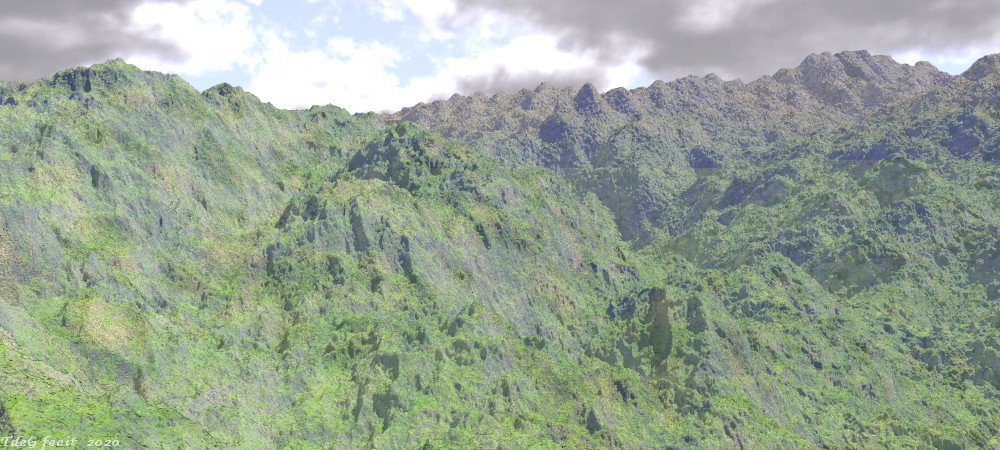
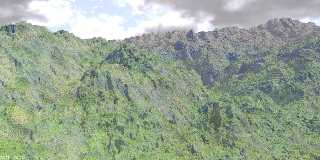
On my way, I got the attached landscape where a spline controls the
ravine cutting the landscape from the lower right hand corner to the
upper left.

Rendering is slow, even with a far from optimal max_gradient, so the
render was restarted using +C a couple of times. Total render time was
about six to seven hours.

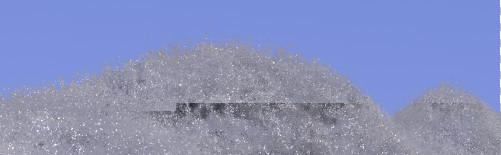
What puzzles me in the resulting image here is the visible boundary
between the first partial render and the first restart at about one
third down the image. You cannot miss it. I never experienced something
like that before. From a couple of experiments, I guess that it has to
do with the isosurface but I am at a loss about /why/. Any idea?

Using version 3.8 (also shows with 3.7 as far as I can tell), 6 threads,
on a i5 laptop.

--
Thomas
Post a reply to this message
Attachments:
Download 'into the wild_07.jpg' (164 KB)
Preview of image 'into the wild_07.jpg'
|
|
| |
| |
|
|
|
|
| |
| |
|
|
Wow, the things you can do with Povray! I also like the last line in his article
of the mountains: Rendering took 12 days, and you complain about six hours!
It is too bad there is no example source file, it looks rather complicated, but
looks good.

Cheers
Ton.
Post a reply to this message
|
|
| |
| |
|
|
|
|
| |
| |
|
|
Op 12/08/2020 om 01:51 schreef Ton:
> Wow, the things you can do with Povray! I also like the last line in his article
> of the mountains: Rendering took 12 days, and you complain about six hours!
> It is too bad there is no example source file, it looks rather complicated, but
> looks good.
>

LOL! I am not complaining: I know what to expect with isosurfaces. I am
worried though, about that +c matter.

--
Thomas
Post a reply to this message
|
|
| |
| |
|
|
|
|
| |
| |
|
|
What you could try to do is render the whole scene non-stop with +ec0.25, so it
doesn't take so long, and see whether that difference still shows up. That way
you are sure it is the +c.

Cheers
Ton.
Post a reply to this message
|
|
| |
| |
|
|
|
|
| |
| |
|
|
On 8/11/20 4:52 AM, Thomas de Groot wrote:
...
>
> What puzzles me in the resulting image here is the visible boundary
> between the first partial render and the first restart at about one
> third down the image. You cannot miss it. I never experienced something
> like that before. From a couple of experiments, I guess that it has to
> do with the isosurface but I am at a loss about /why/. Any idea?
>
> Using version 3.8 (also shows with 3.7 as far as I can tell), 6 threads,
> on a i5 laptop.
>

Interesting. Not sure.

While you were experimenting with continuations, did the discontinuity
at the continuation move around substantially enough to be sure it's not
related to camera rays and slope in some fashion? Guessing you are using
a slope based pattern?

There are what I think of as 2.5 bugs in the shadow cache mechanism of
v37 and v38 which are fixed in povr. And with povr, users can set the
shadow tolerance which is in play with the bugs too. These bugs /
limitations have the potential to behave differently depending upon the
objects in play and so too isosurfaces over other objects. The shadow
cache state wouldn't be carried through on a continuation so 'suppose'
those 2.5 shadow cache bugs could be the cause.

There is too an isosurface/thread based cache mechanism specific to the
isosurface, but looking at the code doubt it could cause the discontinuity.

I don't really have the machine for this scene..., but is the scene
small enough you could package it up  - without the cloud media if
possible? Maybe, if I render vertical slices or something I could
reproduce it in v38, then try a similar continuation with povr without
tying my machine up too long.

Bill P.
Post a reply to this message
|
|
| |
| |
|
|
|
|
| |
| |
|
|
Op 12/08/2020 om 16:41 schreef William F Pokorny:
> Interesting. Not sure.

I am even less sure now to tell the truth. Rendering again a vertical
slice covering the upper right area where the effect was most visible, I
could not recreate the effect! I am continuing to do a couple of tests
today, but I wonder now if this is not a clear sign of the Jekyll/Hyde
Syndrome ;-) I /may/ have made a slight change, in particular to the
haze media code I use, between render sessions... Only I do not remember
having done that at all. You could even hold a gun to my head and I
would say the same ;-)

>
> While you were experimenting with continuations, did the discontinuity
> at the continuation move around substantially enough to be sure it's not
> related to camera rays and slope in some fashion? Guessing you are using
> a slope based pattern?

In a slightly different setting (of which I shall talk later) the
discontinuity moved with the location where I interrupted/restarted the
render. That seemed clearly to be related to the isosurface somehow.

>
> There are what I think of as 2.5 bugs in the shadow cache mechanism of
> v37 and v38 which are fixed in povr. And with povr, users can set the
> shadow tolerance which is in play with the bugs too. These bugs /
> limitations have the potential to behave differently depending upon the
> objects in play and so too isosurfaces over other objects. The shadow
> cache state wouldn't be carried through on a continuation so 'suppose'
> those 2.5 shadow cache bugs could be the cause.
>
> There is too an isosurface/thread based cache mechanism specific to the
> isosurface, but looking at the code doubt it could cause the discontinuity.
>
> I don't really have the machine for this scene..., but is the scene
> small enough you could package it up  - without the cloud media if
> possible? Maybe, if I render vertical slices or something I could
> reproduce it in v38, then try a similar continuation with povr without
> tying my machine up too long.
>

Thanks, I shall do that if my own suspicions are cleared away. The scene
is not large at all. I shall report back.

--
Thomas
Post a reply to this message
|
|
| |
| |
|
|
|
|
| |
| |
|
|
Op 12/08/2020 om 09:39 schreef Ton:
> What you could try to do is render the whole scene non-stop with +ec0.25, so it
> doesn't take so long, and see whether that difference still shows up. That way
> you are sure it is the +c.
>

Yes, I was going to do that indeed. See also my answer to Bill.

--
Thomas
Post a reply to this message
|
|
| |
| |
|
|
|
|
| |
| |
|
|
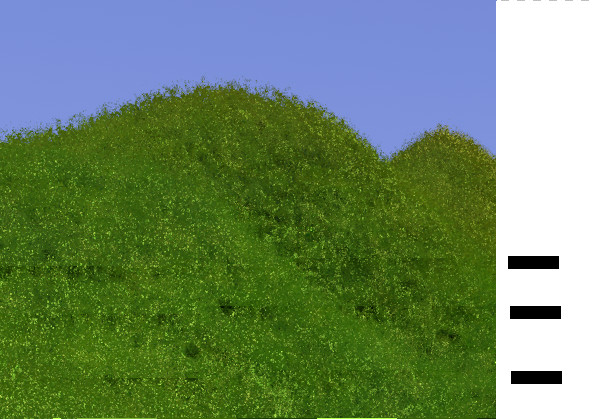
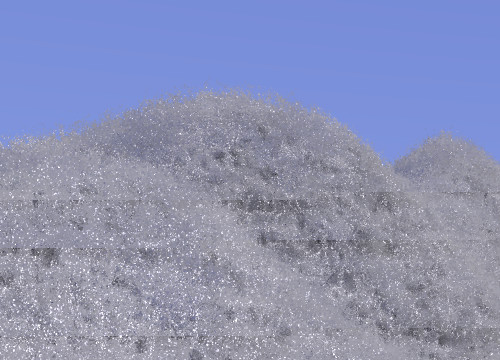
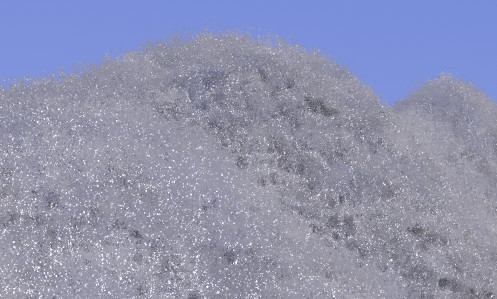
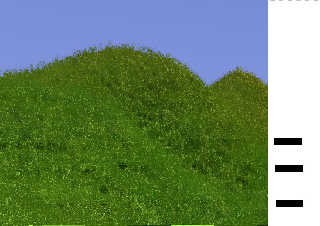
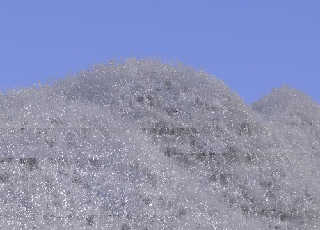
This is the other issue I mentioned above. Here the isosurface simulates
vegetation. At the bars'levels, I stopped the render and restarted with
+c. A boundary is visible from the exact point of start onwards.

No media used here; just the isosurface.

The green image with a complex slope texture.
The grey image with a simple pigment. I restarted three times there too;
can you see them? ;-)

--
Thomas
Post a reply to this message
Attachments:
Download 'continueissue.jpg' (87 KB)
Download 'continueissue_grey.jpg' (62 KB)
Preview of image 'continueissue.jpg'
Preview of image 'continueissue_grey.jpg'
|
|
| |
| |
|
|
|
|
| |
| |
|
|
On 8/13/20 3:59 AM, Thomas de Groot wrote:
> This is the other issue I mentioned above. Here the isosurface simulates
> vegetation. At the bars'levels, I stopped the render and restarted with
> +c. A boundary is visible from the exact point of start onwards.
>
> No media used here; just the isosurface.
>
> The green image with a complex slope texture.
> The grey image with a simple pigment. I restarted three times there too;
> can you see them? ;-)
>
I do indeed. Aside from the continuity on continuations issue those
results look pretty good for quick vegetation, frosted vegetation. :-)

I await the test scene.

Bill P.
Post a reply to this message
|
|
| |
| |
|
|
|
|
| |
| |
|
|
Op 13/08/2020 om 13:47 schreef William F Pokorny:
> On 8/13/20 3:59 AM, Thomas de Groot wrote:
>> This is the other issue I mentioned above. Here the isosurface
>> simulates vegetation. At the bars'levels, I stopped the render and
>> restarted with +c. A boundary is visible from the exact point of start
>> onwards.
>>
>> No media used here; just the isosurface.
>>
>> The green image with a complex slope texture.
>> The grey image with a simple pigment. I restarted three times there
>> too; can you see them? ;-)
>>
> I do indeed. Aside from the continuity on continuations issue those
> results look pretty good for quick vegetation, frosted vegetation. :-)

My original image seems to be definitely due to an uncontrolled change
to the code by me. I was misled by this present issue apparently.

Yes, this makes up for an interesting vegetation indeed. However, it is
not fast of course.

>
> I await the test scene.

Posted the scene in p.t.scene-files.


--
Thomas
Post a reply to this message
|
|
| |
| |
|
|
|
|
| |
| |
|
|
On 8/14/20 2:20 AM, Thomas de Groot wrote:
> Op 13/08/2020 om 13:47 schreef William F Pokorny:
...
>>>
>>> The green image with a complex slope texture.
>>> The grey image with a simple pigment. I restarted three times there
>>> too; can you see them? ;-)
>>>
>> I do indeed. Aside from the continuity on continuations issue those
>> results look pretty good for quick vegetation, frosted vegetation. :-)
>
> My original image seems to be definitely due to an uncontrolled change
> to the code by me. I was misled by this present issue apparently.
>
> Yes, this makes up for an interesting vegetation indeed. However, it is
> not fast of course.
>>
>> I await the test scene.
>
> Posted the scene in p.t.scene-files.
>
Thank you.

Is it easy to post one or both of the simpler isosurface fuzzy
vegetation scenes too. I was thinking I would start there over the
complete scene.

Trying your scene currently in v3.8 master and the first thing I notice
is the radiosity blocks on continuation appear to be generated just
short, below the position where the render re-starts. Do you see
something similar?

Aside: Suppose I would have expected those looking to continue renders
to save radiosity results (photon results) to a file? Maybe I'm not
running the right flags with your scene. I didn't look at it that
closely as yet...

See the scene is using f_bicorn() which I dumped from povr so I have
that too in the way of a quick 'is it the shadow cache bugs.' More if/as
I figure more out.

Bill P.
Post a reply to this message
|
|
| |
| |
|
|
|
|
| |
| |
|
|
On 8/14/20 7:34 AM, William F Pokorny wrote:
...
> See the scene is using f_bicorn() which I dumped from povr
...
Ignore this bit. Just clicked this is me running my development povr2
and not a correctly configured povr. I was picking up the wrong
functions.inc which has f_bicorn in it.

Bill P.
Post a reply to this message
|
|
| |
| |
|
|
|
|
| |
| |
|
|
On 8/14/20 7:34 AM, William F Pokorny wrote:
...
>
> Is it easy to post one or both of the simpler isosurface fuzzy
> vegetation scenes too. I was thinking I would start there over the
> complete scene.
>

Hold off. I now have something simpler running in povr showing
differences on continuations, but seeing other issues too. Perhaps
jitter related. Need to sort it out, but but render turns fast so
hopefully can get to some better understanding.

Bill P.
Post a reply to this message
|
|
| |
| |
|
|
|
|
| |
| |
|
|
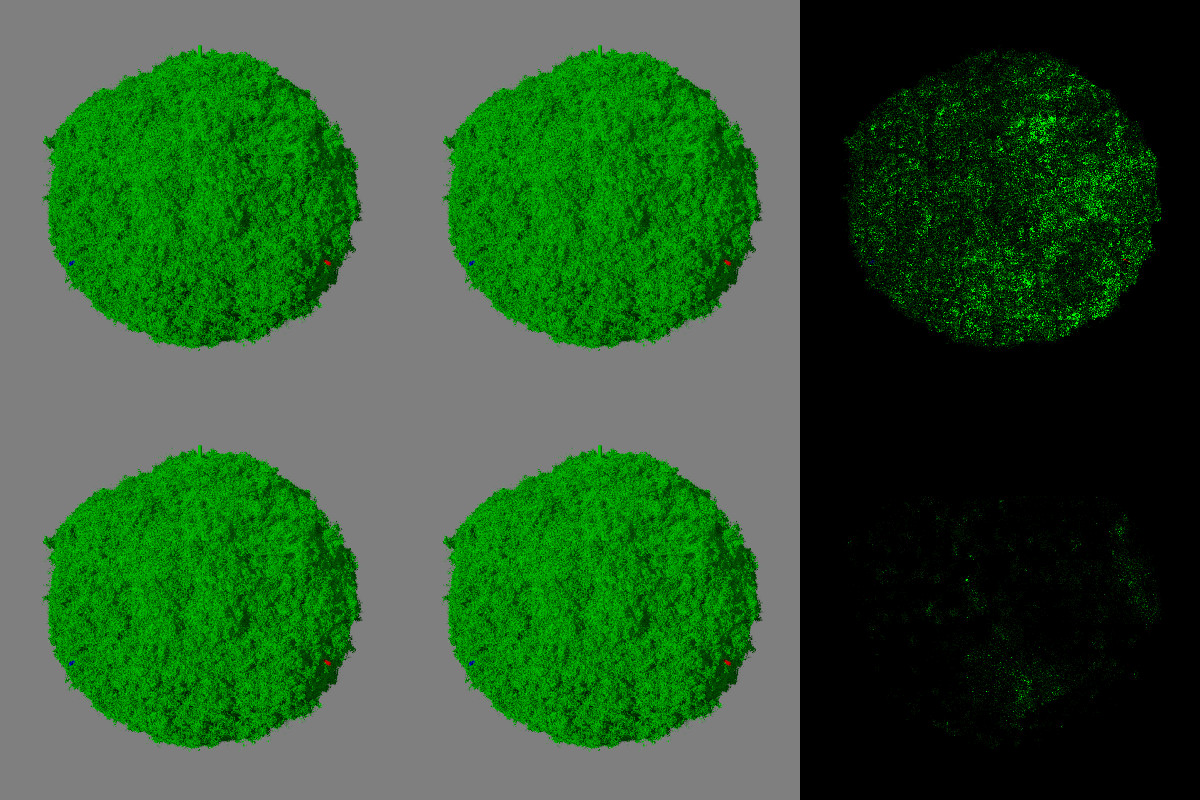
On 8/14/20 9:18 AM, William F Pokorny wrote:
> On 8/14/20 7:34 AM, William F Pokorny wrote:
> ...
>
> Hold off. I now have something simpler running in povr showing
> differences on continuations, but seeing other issues too. Perhaps
> jitter related. Need to sort it out, but but render turns fast so
> hopefully can get to some better understanding.
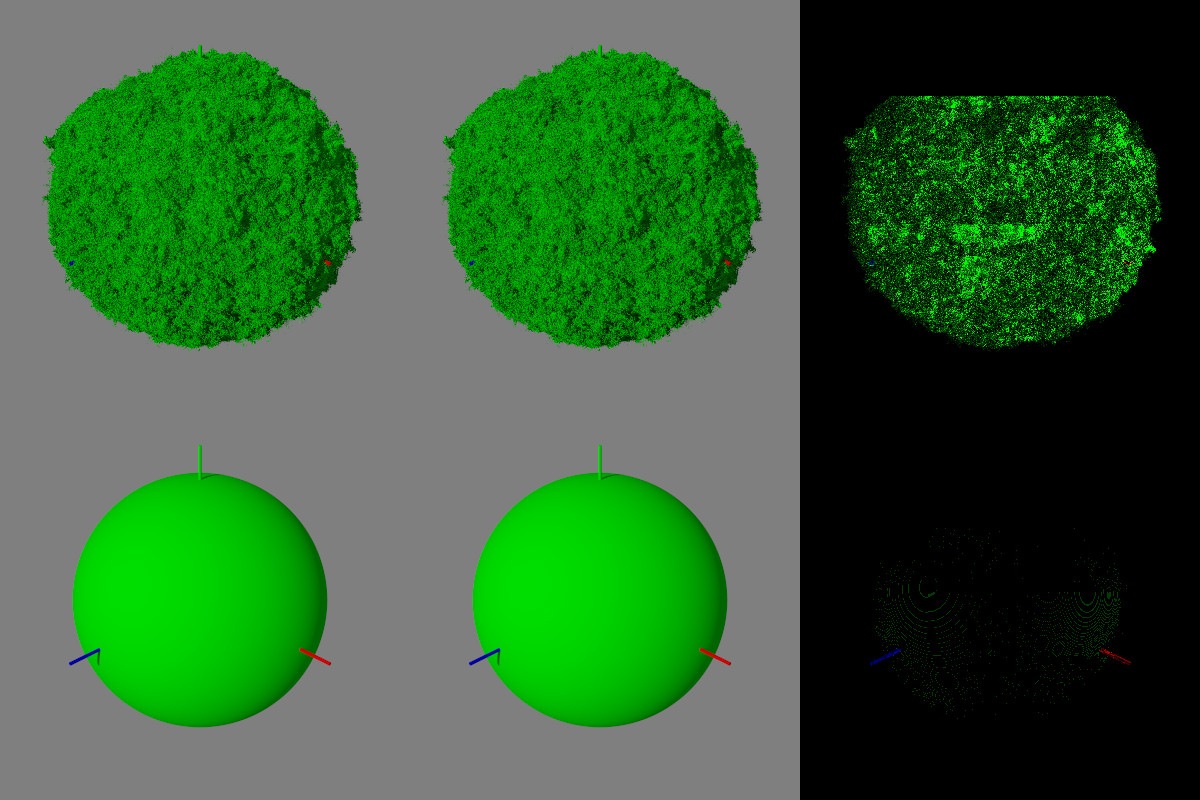
>

OK. You found a continuation bug with radiosity (non saved).

Using my current povr and after turning jitter off somewhat easy to see
you can use continuation when using just lights, but not with radiosity.

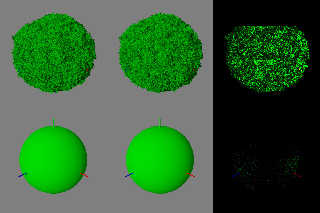
The top row in the attached image is a foliage like isosurface sphere
which matches perfectly up to the first continuation. I stopped and
restarted roughly every render block row. I used a multiplier of 15 for
the isosurface image differences.

In the second row of the image I used a regular sphere, but used a
multiplier of 60 for the image differences. The issue is there with all
shapes, it's just harder to see on something like a sphere.

If I get fired up maybe I'll try saving radiosity samples (couldn't get
it to work trying quickly...). An outside chance that might fix it, but
given the circular patterns we see on the sphere, I suspect there is
some sort of offset in the sampling pattern on continuation. A bug no
matter saved samples or not - good find.

Bill P.
Post a reply to this message
Attachments:
Download 'continuestory.jpg' (279 KB)
Preview of image 'continuestory.jpg'
|
|
| |
| |
|
|
|
|
| |
| |
|
|
Op 14/08/2020 om 13:34 schreef William F Pokorny:
> Is it easy to post one or both of the simpler isosurface fuzzy
> vegetation scenes too. I was thinking I would start there over the
> complete scene.

Late but sorry, I should have been more explicit. Both isosurfaces
Isoveg and Isorock are there at the bottom of the scene; just
comment/uncomment the one you need.

>
> Trying your scene currently in v3.8 master and the first thing I notice
> is the radiosity blocks on continuation appear to be generated just
> short, below the position where the render re-starts. Do you see
> something similar?

Yes, but I assume that depends on the pretrace_end size. Change that to,
e.g. 0.004, and the gap is much smaller, controlled by that size value.

>
> Aside: Suppose I would have expected those looking to continue renders
> to save radiosity results (photon results) to a file? Maybe I'm not
> running the right flags with your scene. I didn't look at it that
> closely as yet...

Well, I never save radiosity data (in contrast to photon data of course)
so I would not know.

>
> See the scene is using f_bicorn() which I dumped from povr so I have
> that too in the way of a quick 'is it the shadow cache bugs.' More if/as
> I figure more out.
>
> Bill P.


--
Thomas
Post a reply to this message
|
|
| |
| |
|
|
|
|
| |
| |
|
|
Op 14/08/2020 om 16:16 schreef William F Pokorny:
> On 8/14/20 9:18 AM, William F Pokorny wrote:
>> On 8/14/20 7:34 AM, William F Pokorny wrote:
>> ...
>>
>> Hold off. I now have something simpler running in povr showing
>> differences on continuations, but seeing other issues too. Perhaps
>> jitter related. Need to sort it out, but but render turns fast so
>> hopefully can get to some better understanding.
>>
>
> OK. You found a continuation bug with radiosity (non saved).
>
> Using my current povr and after turning jitter off somewhat easy to see
> you can use continuation when using just lights, but not with radiosity.
>
> The top row in the attached image is a foliage like isosurface sphere
> which matches perfectly up to the first continuation. I stopped and
> restarted roughly every render block row. I used a multiplier of 15 for
> the isosurface image differences.
>
> In the second row of the image I used a regular sphere, but used a
> multiplier of 60 for the image differences. The issue is there with all
> shapes, it's just harder to see on something like a sphere.
>
> If I get fired up maybe I'll try saving radiosity samples (couldn't get
> it to work trying quickly...). An outside chance that might fix it, but
> given the circular patterns we see on the sphere, I suspect there is
> some sort of offset in the sampling pattern on continuation. A bug no
> matter saved samples or not - good find.
>

Right! I shall try on my side to see if there is a difference when
radiosity data is saved in the scene.

--
Thomas
Post a reply to this message
|
|
| |
| |
|
|
|
|
| |
| |
|
|
Op 15/08/2020 om 08:22 schreef Thomas de Groot:
> Right! I shall try on my side to see if there is a difference when
> radiosity data is saved in the scene.
>

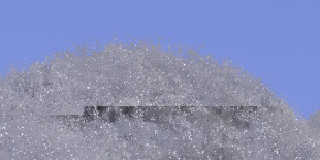
Did a test: not better, maybe even worse!

--
Thomas
Post a reply to this message
Attachments:
Download 'continueissue_grey_2.jpg' (24 KB)
Preview of image 'continueissue_grey_2.jpg'
|
|
| |
| |
|
|
|
|
| |
| |
|
|
Op 15/08/2020 om 08:51 schreef Thomas de Groot:
> Op 15/08/2020 om 08:22 schreef Thomas de Groot:
>> Right! I shall try on my side to see if there is a difference when
>> radiosity data is saved in the scene.
>>
>
> Did a test: not better, maybe even worse!
>

Question: /where/ is the radiosity data file saved??? I am unable to
find it anywhere...

I assumed it was into the same folder as the scene.

--
Thomas
Post a reply to this message
|
|
| |
| |
|
|
|
|
| |
| |
|
|
Op 15/08/2020 om 09:09 schreef Thomas de Groot:
> Op 15/08/2020 om 08:51 schreef Thomas de Groot:
>> Op 15/08/2020 om 08:22 schreef Thomas de Groot:
>>> Right! I shall try on my side to see if there is a difference when
>>> radiosity data is saved in the scene.
>>>
>>
>> Did a test: not better, maybe even worse!
>>
>
> Question: /where/ is the radiosity data file saved??? I am unable to
> find it anywhere...
>
> I assumed it was into the same folder as the scene.
>

Well... Not sure what happens but somehow /reading/ (+RFI) makes the
render to fail when restarting. I do not completely understand the use
of RF from the explanation in the wiki.

I tested this time in version 3.7.1 with identical results as 3.8.

--
Thomas
Post a reply to this message
|
|
| |
| |
|
|
|
|
| |
| |
|
|
On 8/15/20 3:27 AM, Thomas de Groot wrote:
> Op 15/08/2020 om 09:09 schreef Thomas de Groot:
>> Op 15/08/2020 om 08:51 schreef Thomas de Groot:
>>> Op 15/08/2020 om 08:22 schreef Thomas de Groot:
>>>> Right! I shall try on my side to see if there is a difference when
>>>> radiosity data is saved in the scene.
>>>>
>>>
>>> Did a test: not better, maybe even worse!
>>>
>>
>> Question: /where/ is the radiosity data file saved??? I am unable to
>> find it anywhere...
>>
>> I assumed it was into the same folder as the scene.
>>
>
> Well... Not sure what happens but somehow /reading/ (+RFI) makes the
> render to fail when restarting. I do not completely understand the use
> of RF from the explanation in the wiki.
>
> I tested this time in version 3.7.1 with identical results as 3.8.
>
Thanks for digging. Remembering now something like radiosity's save and
load got moved to flag/ini control (v3.7 to v3.8 ?) while the photon
load and save did not.

Aside: I got no errors (or saved radiosity file) using save_file,
load_file in the radiosity block which, in the moment, allowed me to
think the changes and state were the other way around.

Aside 2: There is the +hr and vain pretrace radiosity stuff too. For
exact image compares when running radiosity I've always had to drop back
to one thread.

I'm not a big radiosity user, but I'll play a little with the flags
while my coffee brews and post if I figure more out.

Bill P.
Post a reply to this message
|
|
| |
| |
|
|
|
|
| |
| |
|
|
On 8/15/20 5:42 AM, William F Pokorny wrote:
> On 8/15/20 3:27 AM, Thomas de Groot wrote:
...
>
> I'm not a big radiosity user, but I'll play a little with the flags
> while my coffee brews and post if I figure more out.
>

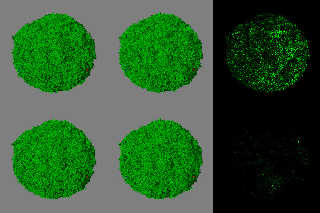
OK. I found to create/save radiosity results I had to use "+rfRad.sav
+rfo". To use the samples I had to use "+rfRad.sav +rfi".

Further, as shown in the top row of the attached image the "+rfRad.sav
+rfo" result on the left is not identical to the "+rfRad.sav +rfi"
results in the middle. Any two +rfo, +rfi renders are identical.

The perhaps helpful news, when comparing a complete "+rfRad.sav +rfi"
render on the left bottom to one which had be stopped and continued
every two render block rows in the bottom middle, the results are
closer. The issue is still there, but the effect is not as pronounced.

This is with your radiosity block - always sample is off. It looks as if
even loading radiosity samples some radiosity calculation / smaller
number of rays are shot. Didn't explore whether there was some way to
better suppress some/all of these and so get a closer match on continuation.

If you're using radiosity and think you might stop and start your
render, using save radiosity samples is for that render is better, but
not a complete fix/workaround.

Bill P.
Post a reply to this message
Attachments:
Download 'continueradsavbetter.jpg' (389 KB)
Preview of image 'continueradsavbetter.jpg'
|
|
| |
| |
|
|
|
|
| |
| |
|
|
Op 15/08/2020 om 13:02 schreef William F Pokorny:
>
> OK. I found to create/save radiosity results I had to use "+rfRad.sav
> +rfo". To use the samples I had to use "+rfRad.sav +rfi".

Ah! So it is the .sav extension that is mandatory. I used .inc but that
did not work apparently. The wiki is silent about this and I think it
should be mentioned there and wherever the .sav is needed. The use of
+rfo and +rf1 in this context also needs some more explanation.

>
> Further, as shown in the top row of the attached image the "+rfRad.sav
> +rfo" result on the left is not identical to the "+rfRad.sav +rfi"
> results in the middle. Any two +rfo, +rfi renders are identical.

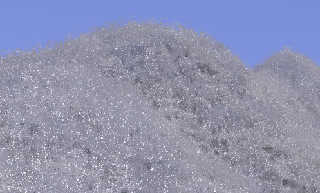
OK. Having done a bit of experimentation of my own now, I see that using
"+rfRad.sav +rfo" for the first run, and then "+rfRad.sav +rfo +rfi" for
all continuations, results in a - visually - seamless render (see
attachment where I continued several times randomly). VERY good indeed!
Thanks Bill, for this insight.

>
> The perhaps helpful news, when comparing a complete "+rfRad.sav +rfi"
> render on the left bottom to one which had be stopped and continued
> every two render block rows in the bottom middle, the results are
> closer. The issue is still there, but the effect is not as pronounced.
>
> This is with your radiosity block - always sample is off. It looks as if
> even loading radiosity samples some radiosity calculation / smaller
> number of rays are shot. Didn't explore whether there was some way to
> better suppress some/all of these and so get a closer match on
> continuation.
>
> If you're using radiosity and think you might stop and start your
> render, using save radiosity samples is for that render is better, but
> not a complete fix/workaround.
>

Indeed, but as I said above, visually, the render /looks/ faultless and
this is a workable solution.

Thanks again indeed for your help, Bill. I am glad we brought this
little bug to light.

--
Thomas
Post a reply to this message
Attachments:
Download 'continueissue_grey_3.jpg' (55 KB)
Preview of image 'continueissue_grey_3.jpg'
|
|
| |
| |
|
|
|
|
| |
| |
|
|
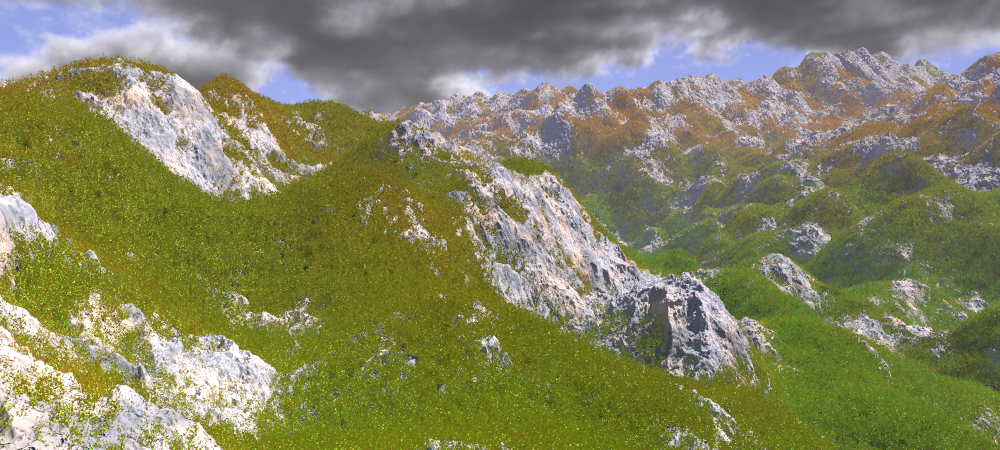
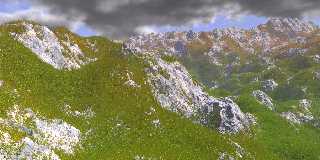
And so we reach the final scene.

The two isosurfaces (see p.t.scene-files) are superposed.

--
Thomas
Post a reply to this message
Attachments:
Download 'into the wild_final2.png' (887 KB)
Preview of image 'into the wild_final2.png'
|
|
| |
| |
|
|
|
|
| |
| |
|
|
Thomas de Groot wrote on 02/09/2020 08:31:
> And so we reach the final scene.
>
> The two isosurfaces (see p.t.scene-files) are superposed.
>

Really a great image!

  Paolo
Post a reply to this message
|
|
| |
| |
|
|
|
|
| |
| |
|
|
Thomas de Groot <tho### [at] degroot org> wrote:
> And so we reach the final scene.
>
> The two isosurfaces (see p.t.scene-files) are superposed.
>
That looks really good. I certainly like the 'fuzzy vegetation' effect; well
done! And thanks for posting the code. org> wrote:
> And so we reach the final scene.
>
> The two isosurfaces (see p.t.scene-files) are superposed.
>
That looks really good. I certainly like the 'fuzzy vegetation' effect; well
done! And thanks for posting the code.
Post a reply to this message
|
|
| |
| |
|
|
|
|
| |
| |
|
|
Op 02/09/2020 om 20:08 schreef Kenneth:
> Thomas de Groot <tho### [at] degrootorg> wrote:
>> And so we reach the final scene.
>>
>> The two isosurfaces (see p.t.scene-files) are superposed.
>>
>
> That looks really good. I certainly like the 'fuzzy vegetation' effect; well
> done! And thanks for posting the code.
>
>

Thanks indeed, Paolo and Kenneth.

The fuzzy vegetation code was a chance hit :-) and it is as fast (or as
slow) to render as the rocky part. Overall, while I like isosurfaces to
build landscapes, I am reluctant to use them because of their slow
render speed, although I do not complain for this particular one. But if
you want to complete the landscapes with vegetation, dwellings, roads
and such, the testing time becomes prohibitive indeed.

--
Thomas
Post a reply to this message
|
|
| |
| |
|
|
|
|
| |