|
|
|
|
|
|
| |
| |
|
|
From: William F Pokorny
Subject: Patterns / functions. Obscure details. Noise etc.
Date: 8 Apr 2020 10:23:18
Message: <5e8dde56$1@news.povray.org>
|
|
|
| |
| |
|
|
I've been tuning / reworking the pattern and function handling in povr.

Reference:

pattern / function work postings in the not web mirrored
povray.beta-test.binaries group.

http://news.povray.org/povray.beta-test.binaries/thread/%3C5e8a0353%241%40news.povray.org%3E/

The work of the past day or two I think generally useful to POV-Ray
official use - so posting here.


Performance stuff.
---------
Today, using the f_dents definition in functions.inc, we get:

#declare f_dents = function {pow(f_noise3d(x, y, z), 3)}

which as measured used as the pattern for a dents pigment is 26.7%
slower than using the dents pattern directly(a) and 3.3% slower than coding:

#declare f_dents = function {pattern {dents}}

and 7.7% slower than using a custom inbuilt f_dents which I've coded up
in povr.


Results stuff due function noise generator handling!
---------
If you work enough with functions and patterns, you'll eventually stub
your toe on the fact functions use only the scene setting for the noise
generator(b) and not any pattern specific ones. This can be really
confusing. In my povr I'm moving all inbuilt functions using noise
generators directly or not to forms which require a noise generator
parameter.

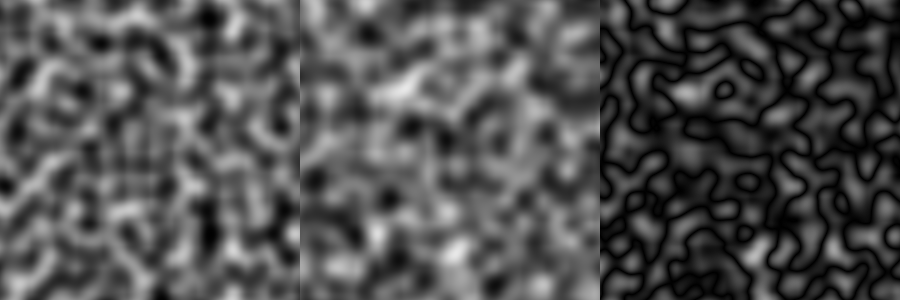
Today, with something like dents, we can be working up a dents based
pattern planning some eventual functional customization - fading the
center portion to 1.0 or whatever. We start with:

#declare Pigm00 = pigment {
     dents  // The render is quicker starting with the pattern dents.
//  function { f_dents(x,y,z)*f_fade(x,y,z) }
     noise_generator 3   // Get the scene's setting - or 2 in demo.
     scale 1/6
}

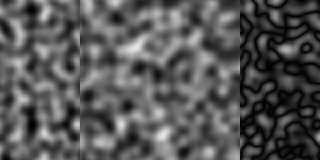
In the attached dents_to_f_dents_patNoise3.png the dents / ng(3) is
shown on the left. The function { f_dents...} ng(3), but really (2) is
shown on the middle. And yeah, I think the difference "pattern" between
the two noise generators on the right might be a useful pattern itself...

Not all patterns were updated noise gen 1 to 2.
---------
Patterns like granite were adjusted on the change from noise generator
Skinner form 1 to 2 so they more or less look similar with both. The
dents and f_dents was not one of these and the form 1 version is quite
different.

Aside: I've not run across any pattern making 2 vs Perlin(3) pattern
commonality adjustments.

For many years I wrongly assumed pattern distributions were somewhat
normalized in the 0-1 range so 0-1 maps could more or less be reasonably
switched between patterns. It's not always so. Pattern distributions
differ quite a lot and understanding this is important when best using
them. Be aware of each pattern's value distribution.

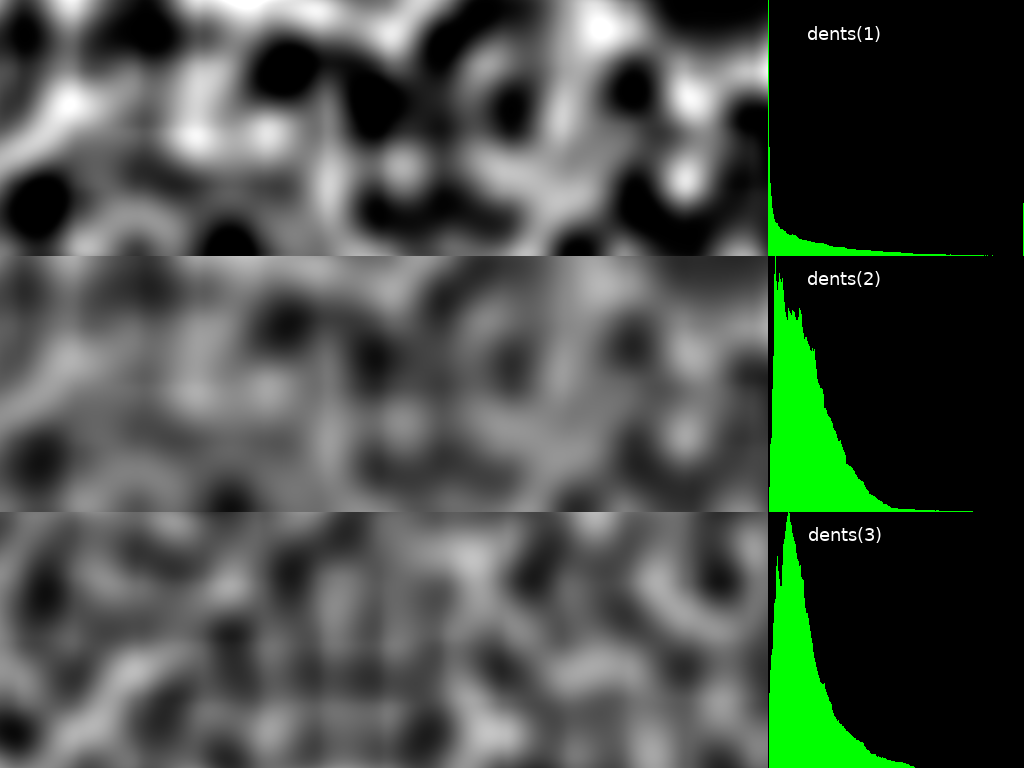
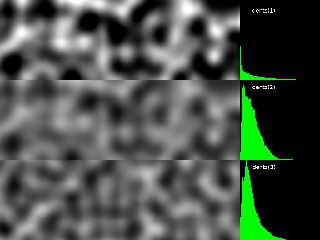
To this end I've been thinking about additional pattern related
documentation; The form it might take. See attached
dentsPatternDistDoc.png image for an idea on how this could be done. The
distribution show in green is the linear value distribution for the
dents pattern.

Bill P.

(a) - Mostly due the overhead of passing the function back into the
pattern mechanism. For maps use the inbuilt patterns if there is one
over any equivalent function.

(b) - Excepting there is an inbuilt f_noise_generator() function which
has a parameter which allows the noise generator to always be set. It's
indentical f_noise3d() except the latter - in official POV-Ray - always
uses the scene's noise generator setting.
Post a reply to this message
Attachments:
Download 'dentspatterndistdoc.png' (177 KB)
Download 'dents_to_f_dents_patnoise3.png' (120 KB)
Preview of image 'dentspatterndistdoc.png'
Preview of image 'dents_to_f_dents_patnoise3.png'
|
|
| |
| |
|
|
|
|
| |
| |
|
|
William F Pokorny <ano### [at] anonymous org> wrote:
> Performance stuff.
Very educational. Certainly something to aware of when writing more advanced
scenes.
> Results stuff due function noise generator handling!
> ---------
> If you work enough with functions and patterns, you'll eventually stub
> your toe on the fact functions use only the scene setting for the noise
> generator(b) and not any pattern specific ones. This can be really
> confusing.
Thanks for documenting this here. I'm not sure I would have noticed if/when it
mattered, and would have been tearing my hair out trying to debug the SDL....
> For many years I wrongly assumed pattern distributions were somewhat
> normalized in the 0-1 range so 0-1 maps could more or less be reasonably
> switched between patterns. It's not always so. Pattern distributions
> differ quite a lot and understanding this is important when best using
> them. Be aware of each pattern's value distribution.
As you're aware, I've made a few stabs at visualizing that.
I'm also curious about the details of exactly what you've discovered.
> To this end I've been thinking about additional pattern related
> documentation; The form it might take. See attached
> dentsPatternDistDoc.png image for an idea on how this could be done. The
> distribution show in green is the linear value distribution for the
> dents pattern.
I'm still interested in this, especially from a design and implementation
stance.
While creating new documentation is a good idea, it's extremely arduous to craft
language of sufficient breadth and specificity to communicate something as
complex as a 3D pattern function, especially with all the modifiers.
We all know that a render if worth 1000 lines of docs, so maybe the step
preceding any writing would be to illustrate the intent of the documentation
with scene files/renders/animations that show ranges, variations, and best
practices.
Your comparison reminds me of the contour plots done by Mike Williams and Paul
Nylander.
http://www.econym.demon.co.uk/isotut/isobars.htm
http://bugman123.com/Programs/index.html
Great work as always, Bill. Will there be a simple way to install and update
povr at some point so that folks can play along at home? org> wrote:
> Performance stuff.
Very educational. Certainly something to aware of when writing more advanced
scenes.
> Results stuff due function noise generator handling!
> ---------
> If you work enough with functions and patterns, you'll eventually stub
> your toe on the fact functions use only the scene setting for the noise
> generator(b) and not any pattern specific ones. This can be really
> confusing.
Thanks for documenting this here. I'm not sure I would have noticed if/when it
mattered, and would have been tearing my hair out trying to debug the SDL....
> For many years I wrongly assumed pattern distributions were somewhat
> normalized in the 0-1 range so 0-1 maps could more or less be reasonably
> switched between patterns. It's not always so. Pattern distributions
> differ quite a lot and understanding this is important when best using
> them. Be aware of each pattern's value distribution.
As you're aware, I've made a few stabs at visualizing that.
I'm also curious about the details of exactly what you've discovered.
> To this end I've been thinking about additional pattern related
> documentation; The form it might take. See attached
> dentsPatternDistDoc.png image for an idea on how this could be done. The
> distribution show in green is the linear value distribution for the
> dents pattern.
I'm still interested in this, especially from a design and implementation
stance.
While creating new documentation is a good idea, it's extremely arduous to craft
language of sufficient breadth and specificity to communicate something as
complex as a 3D pattern function, especially with all the modifiers.
We all know that a render if worth 1000 lines of docs, so maybe the step
preceding any writing would be to illustrate the intent of the documentation
with scene files/renders/animations that show ranges, variations, and best
practices.
Your comparison reminds me of the contour plots done by Mike Williams and Paul
Nylander.
http://www.econym.demon.co.uk/isotut/isobars.htm
http://bugman123.com/Programs/index.html
Great work as always, Bill. Will there be a simple way to install and update
povr at some point so that folks can play along at home?
Post a reply to this message
|
|
| |
| |
|
|
From: William F Pokorny
Subject: Re: Patterns / functions. Obscure details. Noise etc.
Date: 9 Apr 2020 03:55:53
Message: <5e8ed509$1@news.povray.org>
|
|
|
| |
| |
|
|
On 4/8/20 2:23 PM, Bald Eagle wrote:
> William F Pokorny <ano### [at] anonymousorg> wrote:
>
...
>
>> To this end I've been thinking about additional pattern related
>> documentation; The form it might take. See attached
>> dentsPatternDistDoc.png image for an idea on how this could be done. The
>> distribution show in green is the linear value distribution for the
>> dents pattern.
>
> I'm still interested in this, especially from a design and implementation
> stance.
>
> While creating new documentation is a good idea, it's extremely arduous to craft
> language of sufficient breadth and specificity to communicate something as
> complex as a 3D pattern function, especially with all the modifiers.
>
> We all know that a render if worth 1000 lines of docs, so maybe the step
> preceding any writing would be to illustrate the intent of the documentation
> with scene files/renders/animations that show ranges, variations, and best
> practices.
>
> Will there be a simple way to install and update
> povr at some point so that folks can play along at home?
>

Yes, I'll publish a release at some point - assuming the virus, or
something else, doesn't take this old guy out beforehand...

I'm an example, or ten, is better guy too. I was leaning toward
additional documentation here because to get the histograms shown I was
using an external utility and another to glue the images together.

A thought experiment I've been playing with for a while is decoupling
textures and interiors from our shape-shapes. Breaking - except where we
have triangles / patches - from the model which ties everything together
on the 'shape' surfaces.

The idea would be to maintain completely different internal structures
for the material aspects of a scene - excepting perhaps a surface ior in
addition today's interior one. Related too to today's inefficiency with
interior tests, using complex object patterns to texture and even I
think to multiple camera views - been thinking about internal self
contained scenes with shapes as interior, texturing / inside test
mechanisms.

It's part of the general idea of exploiting the fact we are in a
ray-tracer and have bounding and search structures set up for tracing
rays. As a scene renders there would be the visible scene and then -
potentially - many additional scenes internally getting rendered ray by
ray for information which helps render the top scene. I think of the
concept at a high level as ray tracer folding.

Today, it's not uncommon to create a scene used only to create a texture
map image. I did this with that isosurface pumpkin years ago. It was
really two scenes - one for the texture map and the second the final
scene. Why not enable a mechanism the lets us do all of this and much
more in one go.

We introduced an object uv_mapping mechanism, but it's buggy and very
unlikely to ever work through CSG in any clean-ish way (interpolation at
edge boundaries is the key hang up I see). It's also in my opinion today
not very useful - excepting, maybe, with parametric surfaces (bicubic
patch?) - mostly because we don't have with it good ways to create the
uv mapped textures. With povr, the feature is squarely on my try to lose
it list.

In the simplest folded scene as texture method the shapes natural
surface normal would create a ray traced into the texture-scene which
would return a pigment etc. I see it as potentially a much more powerful
object pattern method - which better exploits what a ray tracer can do.

So, back to the scenes as documentation idea. With such a mechanism it
would be easier to create such feature-self documentation scenes as one
render.

Aside: Had the thought last night it might be possible to create an
inbuilt f_histogram function which would calculate the histogram pixels
on the fly. Though, it's simplest implementation wouldn't be very
efficient. As a debug/doc thing maybe it would be OK...

Anyway, wild dreams. Today. Off to kill the spotted pattern, f_spotted,
f_bumps, f_bozo and change bozo's inbuilt default color_map to black and
white. Simpler things first.

Bill P.
Post a reply to this message
|
|
| |
| |
|
|
From: William F Pokorny
Subject: Re: Patterns / functions. Obscure details. Noise etc.
Date: 12 Apr 2020 12:52:26
Message: <5e93474a$1@news.povray.org>
|
|
|
| |
| |
|
|
On 4/9/20 3:55 AM, William F Pokorny wrote:
> On 4/8/20 2:23 PM, Bald Eagle wrote:
...
>
> Anyway, wild dreams. Today. Off to kill the spotted pattern, f_spotted,
> f_bumps, f_bozo and change bozo's inbuilt default color_map to black and
> white. Simpler things first.
>
>

Bald Eagle's question in advanced about the slope pattern got me to
thinking it might be helpful to talk more about why I am dropping all
the continuous pattern default color_maps back to black(0) to white(1).

It's the case today some patterns have default color maps and others
don't in the official POV-Ray implementations. For example, though bozo,
bump and spotted are all really just calls to 3d noise; Only bozo has a
many color default color map. The radial pattern has a many color
default, the granite pattern does not and so on. At least some of this
behavior is documented, but I've never done a complete survey to see if
it's all there and correct.

I ran into considerable confusion back when I was playing with the
peeling paint isosurface stuff and trying to come up with ways to
implement the method on the fly. I was trying something similar to what
you are trying with the color channels.

With access to the five color channels (and v3.8's blend mode/gamma for
the rgb channels) what we have is a powerful way to 'skew' a single
function's resulting values. What happened with me as I was working is I
kept commenting out my color_map line while debugging as in:

// color_map { CM_skewFunctionResults }

but I wasn't always getting then a default black to white color_map I
expected, but sometimes a - whatever colors - internally set up one.

I expect one can run into similar confusion working with media densities
and defaulted many color maps.

In my personal povr all continuous patterns will default to black to
white maps - though I've only modified bozo and radial thus far.

Aside: I think it probably makes sense for the block patterns to have
default color maps. I cannot think of a good reason for continuous
patterns to have defaults other than black to white. Is there, or was
there one back in the early days of many gammas or something?

Aside 2: I have modified the default brick (block pattern) colors for
the 2.2 to 1.0 default gamma change. If you run brick with the default
color map the result is very washed out compared to v3.6 and prior
results. True too for our color include which I plan to lose or replace
entirely in povr. New users should not be pulling colors out of colors
inc. Those color definitions today correspond to no common standard that
I can see. (Wikipedia has a very complete set of color names and common
value definitions if you've not come across it:
https://en.wikipedia.org/wiki/Lists_of_colors)

Bill P.
Post a reply to this message
|
|
| |
| |
|
|
|
|
| |
| |
|
|
William F Pokorny <ano### [at] anonymousorg> wrote:

> I ran into considerable confusion back when I was playing with the
> peeling paint isosurface stuff and trying to come up with ways to
> implement the method on the fly. I was trying something similar to what
> you are trying with the color channels.

Thanks for confirming what I suspected.
I'll just have to figure out a way to code the normal of an isosurface function
into another function.

> Aside: I think it probably makes sense for the block patterns to have
> default color maps. I cannot think of a good reason for continuous
> patterns to have defaults other than black to white. Is there, or was
> there one back in the early days of many gammas or something?

I think the block patterns should have scalar values, such that a black/white
color map will return shades of gray.  It's simpler, more consistent, and less
confusing.
You might consider having "default" or standard color maps for those patterns
that are pre-defined and easily available.

pigment {brick color_map{CM_brick_default}}

> New users should not be pulling colors out of colors
> inc. Those color definitions today correspond to no common standard that
> I can see.

I do because I'm lazy :D  but I do think that there are a lot of legacy code
snippets and practices that need to be re-examined.
I've been working on a few ideas to make POV-Ray more usable and flexible, and
might help code-up and debug scenes much faster.

Ping / email me if you're interested in the details.
Post a reply to this message
|
|
| |
| |
|
|
From: William F Pokorny
Subject: Re: Patterns / functions. Obscure details. Noise etc.
Date: 13 Apr 2020 07:05:46
Message: <5e94478a$1@news.povray.org>
|
|
|
| |
| |
|
|
On 4/12/20 1:43 PM, Bald Eagle wrote:
> William F Pokorny <ano### [at] anonymousorg> wrote:
>
>> I ran into considerable confusion back when I was playing with the
>> peeling paint isosurface stuff and trying to come up with ways to
>> implement the method on the fly. I was trying something similar to what
>> you are trying with the color channels.
>
> Thanks for confirming what I suspected.
> I'll just have to figure out a way to code the normal of an isosurface function
> into another function.

One thing long on my todo list is to dive into core isosurface code. Not
sure how it today handles the normals, though I can imagine ways to do it.

>
>> Aside: I think it probably makes sense for the block patterns to have
>> default color maps. I cannot think of a good reason for continuous
>> patterns to have defaults other than black to white. Is there, or was
>> there one back in the early days of many gammas or something?
>
> I think the block patterns should have scalar values, such that a black/white
> color map will return shades of gray.  It's simpler, more consistent, and less
> confusing.
> You might consider having "default" or standard color maps for those patterns
> that are pre-defined and easily available.
>
> pigment {brick color_map{CM_brick_default}}

Yes, think you are right on this. I'd not been burned by the default
color maps on the block patterns. I happened to see the brick colors at
ag2.2 while removing maps from continuous patterns.

I have it in my head unless accessing the color channels with .red or
whatever we do today get the pattern's value back (it acts like a black
to white map). And with a quick test with f_brick -> function {pattern {
brick }} looks like this is so. For some quirks I am trying to flatten,
finding the vm / function / pattern inter-workings quite clean.

Reminds me, our .grey and general color to grey conversion also has
issues with being - off standard, I guess. A question on my - think more
deeply about it someday - list, is whether on the fly color to grey
conversion should get pulled from povr. I have this feeling it isn't
'really' necessary today.

>
>> New users should not be pulling colors out of colors
>> inc. Those color definitions today correspond to no common standard that
>> I can see.
>
> I do because I'm lazy :D  but I do think that there are a lot of legacy code
> snippets and practices that need to be re-examined.
> I've been working on a few ideas to make POV-Ray more usable and flexible, and
> might help code-up and debug scenes much faster.
>
> Ping / email me if you're interested in the details.
>
>
I don't have much for free bandwidth beyond what I'm trying to do
currently, but, is your email as used in your posts to the news groups
one I can use?

Might not always be apparent, but I do read most all news group posts -
though perhaps I don't completely digest them all. The parser dictionary
changes and rules are still really fuzzy to me, for example.

Your posts, John Greenwood's on the -1 to 1 blobbing, and many others
over the years, all influencing to some degree whatever hacking I'm
doing, not doing or might do in povr.

Bill P.
Post a reply to this message
|
|
| |
| |
|
|
|
|
| |
| |
|
|
William F Pokorny <ano### [at] anonymousorg> wrote:

> One thing long on my todo list is to dive into core isosurface code. Not
> sure how it today handles the normals, though I can imagine ways to do it.

Indeed.  I may look into the gradient functions and see what lies therein.
I scored some code from a ShaderToy script and watched some painfully presented
CalcIII lectures.   Confident I'll get it soon enough.


> Yes, think you are right on this. I'd not been burned by the default
> color maps on the block patterns. I happened to see the brick colors at
> ag2.2 while removing maps from continuous patterns.
>
> I have it in my head unless accessing the color channels with .red or
> whatever we do today get the pattern's value back

It would be lovely to get some code to handle vector functions.
Curious if your reading of the present scalar function source code gives you an
idea about how much extra work that would be to implement.

Also of interest would be some extra dot notations to rearrange vectors.
So if Vector = <x, y, z>, then Vector.yzx would give <y, z, x>.

> Reminds me, our .grey and general color to grey conversion also has
> issues with being - off standard, I guess. A question on my - think more
> deeply about it someday - list, is whether on the fly color to grey
> conversion should get pulled from povr. I have this feeling it isn't
> 'really' necessary today.

I suppose - though I see no harm either.
Now, having brought that up, it reminds me that all 3 channels get combined into
a single scalar output.
If that could be done in a deterministic manner such that the channels could be
extracted back out (albeit with lower, but usable precision) then it would be a
nice way to cheat / work-around vector function output.
"Pairing functions" could be used, and maybe there are other better ways...
https://stackoverflow.com/questions/919612/mapping-two-integers-to-one-in-a-unique-and-deterministic-way


> I don't have much for free bandwidth beyond what I'm trying to do
> currently, but, is your email as used in your posts to the news groups
> one I can use?

Yes.  :)

I only mention it because sometime it helps to have things brought up at the
outset, rather than the ole' "Oh!  I wish I had known about that before ..."


> Your posts, John Greenwood's on the -1 to 1 blobbing, and many others
> over the years, all influencing to some degree whatever hacking I'm
> doing, not doing or might do in povr.

Well, I'm glad that you get something out of it.   I think we all get to the
point where our experiments serve to inspire each other to experiment, push the
envelope, and try things we might not ever have thought of doing.

I of course have learned much from your experience and informative posts, as
well as so many others.
Post a reply to this message
|
|
| |
| |
|
|
From: William F Pokorny
Subject: Re: Patterns / functions. Obscure details. Noise etc.
Date: 14 Apr 2020 07:51:24
Message: <5e95a3bc$1@news.povray.org>
|
|
|
| |
| |
|
|
On 4/13/20 2:03 PM, Bald Eagle wrote:
> William F Pokorny <ano### [at] anonymousorg> wrote:
>
...
>
>> Reminds me, our .grey and general color to grey conversion also has
>> issues with being - off standard, I guess. A question on my - think more
>> deeply about it someday - list, is whether on the fly color to grey
>> conversion should get pulled from povr. I have this feeling it isn't
>> 'really' necessary today.
>
> I suppose - though I see no harm either.
> Now, having brought that up, it reminds me that all 3 channels get combined into
> a single scalar output.

That, today, only happens when you somehow invoke the rgb to grey
functionality as with .grey, output to grey, etc. If you code
function { pattern brick } what that function returns is the single
pattern value that would normally be used to drive the *map.

I got tangled up because I was using .<channel> to grab particular
colors and some patterns had default maps while others did not.

> If that could be done in a deterministic manner such that the channels could be
> extracted back out (albeit with lower, but usable precision) then it would be a
> nice way to cheat / work-around vector function output.
> "Pairing functions" could be used, and maybe there are other better ways...
>
https://stackoverflow.com/questions/919612/mapping-two-integers-to-one-in-a-unique-and-deterministic-way
>

Thanks for links.

Today I have the vector support sitting in the job pile with some sort
of more general just in time compiling which would be used for all the
language elements of the 'SDL' scene input. However, I'm unlikely to do
such support as today's SDL, but rather by moving to tcl, lua - or maybe
python. That work is way down the list though now and again I spend some
days looking at the how of using chunks of POV-Ray as callable functions
with bindings to whatever language.

Aside: IIRC lua has moved to llvm, but it's first vm in structure looked
to me to be pretty similar to the vm and function handling in POV-Ray
today. Which by the way I'm finding pretty efficient performance wise. I
plan to post about some new povr inbuilt functions later today, two of
which are 1 to 8 pairwise min/max implementations. In my performance
comparisons these, at 8 pairs, with a min or max of those results on the
back end, were only a little over 20% faster than using 15 min()s/max()s
in a de-nested/flat way to do the same thing. This is in line with
results from work I did more a decade ago where I created C++ versions
of some complex SDL function/vm stuff hoping for big performance gains
that did not materialize.

So, I see 'ease' of coding up what you want as the primary reason for
something better - which gets back to your request to better vector
support.

The v.zyx syntax has a name - like twizzling or something - and it's
offered in some C++ vector template classes at significant complexity to
those and with hits to compile time and compile memory requirements. We
too have some issue internal to our current code with single value
references being awkward - and somewhat inefficient - with our current
vector template implementation (mostly for reasons of the more limited
C++ version for which it was coded). Inside the code you'll see v.[X]
and v.x() everywhere which are both ugly in C++. The former requires an
overload on the [] - which inhibits optimizations all too often for one
and sometimes doesn't get optimized away at all. The latter is a
function/method call hard coded to the position in the vector which is
often more efficient, but yep, still uglier than being able to code v.x.


Anyway... Off to other efforts.

Bill P.
Post a reply to this message
|
|
| |
| |
|
|
|
|
| |
| |
|
|
William F Pokorny <ano### [at] anonymousorg> wrote:

> That, today, only happens when you somehow invoke the rgb to grey
> functionality as with .grey, output to grey, etc. If you code
> function { pattern brick } what that function returns is the single
> pattern value that would normally be used to drive the *map.


> The v.zyx syntax has a name - like twizzling or something - and it's
> offered in some C++ vector template classes at significant complexity to
> those

Swizzling - yes that rang a bell, and a search confirmed.

Given the above .gray / .grey capability, I must admit it's a bit surprising
that .yzx would be more complex than either of those or .hf.

I will need to look at the source - wherever that might be.
Post a reply to this message
|
|
| |
| |
|
|
|
|
| |
| |
|
|
Any idea if I can [successfully] use the object{} pigment pattern in an
isosurface function, and what the proper syntax is?
Post a reply to this message
|
|
| |
| |
|
|
From: William F Pokorny
Subject: Re: Patterns / functions. Obscure details. Noise etc.
Date: 15 Apr 2020 07:14:16
Message: <5e96ec88$1@news.povray.org>
|
|
|
| |
| |
|
|
On 4/14/20 3:19 PM, Bald Eagle wrote:
> William F Pokorny <ano### [at] anonymousorg> wrote:
>
...
>
>> The v.zyx syntax has a name - like twizzling or something - and it's
>> offered in some C++ vector template classes at significant complexity to
>> those
>
> Swizzling - yes that rang a bell, and a search confirmed.
>
> Given the above .gray / .grey capability, I must admit it's a bit surprising
> that .yzx would be more complex than either of those or .hf.
>
>

Suppose up front I'll admit I'm in large part repeating what I've heard
other say or what I've read as to the impacts - I've not played a lot
myself with really complex vector template libraries. But, I believe the
impact statements probably true to a large degree.

Aside: There was a cppcon presentation by some effects guru in the last
few years where he was describing his company's code and C++ experience.
As an aside he mentions/complains at one point the C++ vector template
class they use requires a 64GB machine for their compiles(1).

In isolation, v.yzx is not complicated. It, however, adds to the
combinatorial complexity of any vector template class which support
arbitrary floating point types and on those many methods such as
v.yzx.length(), v.yzx.normalize(), v.zyx * v2.yxz, etc. The behavior of
all the methods and overloads you want to generically work have to be
enumerated by the template class in some way such that it turns into
compilable code.

Bill P.

(1) - And people make fun of M4... ;-) Want to side track yourself some
day, look into all the C++ template assist/creation tools...
Post a reply to this message
|
|
| |
| |
|
|
From: William F Pokorny
Subject: Re: Patterns / functions. Obscure details. Noise etc.
Date: 15 Apr 2020 07:26:46
Message: <5e96ef76$1@news.povray.org>
|
|
|
| |
| |
|
|
On 4/14/20 9:10 PM, Bald Eagle wrote:
> Any idea if I can [successfully] use the object{} pigment pattern in an
> isosurface function, and what the proper syntax is?
>
>
Yep, you can by sampling enough to create continuous values, but it's
not all that usable implemented in SDL. Look for some zip file called
ObjectAsISO maybe I put out on the news server in 2008 or maybe 2009.

The hard_object pattern in povr is an inbuilt version of the approach.
The soft_object pattern another alternative.

The limiter in an object pattern (AKA inside test) based function is the
normal bounding structure searches are bypassed. If you have one or just
a few simple shapes - all with effecient inside test code (1) -
something like hard_object is workable. The soft_object approach less so.

If your shape / structure is complex csg, things become unbearably slow
-  because POV-Ray today tests each shape one by one.

Bill P.

(1) - Some shapes like the superellipsoid have extremely slow inside
tests. Others like mesh and mesh2 are really quick as they have an
internal bounding structure that gets used to do the inside test.
Post a reply to this message
|
|
| |
| |
|
|
|
|
| |
| |
|
|
William F Pokorny <ano### [at] anonymousorg> wrote:

> Yep, you can by sampling enough to create continuous values, but it's
> not all that usable implemented in SDL. Look for some zip file called
> ObjectAsISO maybe I put out on the news server in 2008 or maybe 2009.

Excellent - that's exactly the approach I began exploring upon understanding
what the problem was after reading
http://www.econym.demon.co.uk/isotut/dont.htm

It's kinda like calculating normals, combined with dithering / convolving.

http://news.povray.org/povray.binaries.scene-files/thread/%3Cweb.4aae23151285f23f15ee2c550%40news.povray.org%3E/

Downloaded.

I will compare my notes with your working code.   :)

> The hard_object pattern in povr is an inbuilt version of the approach.
> The soft_object pattern another alternative.

I'm sure you've thought about /succeeded in writing the shape out to a df3 -
maybe that would speed things up after the initial conversion...

> If your shape / structure is complex csg, things become unbearably slow
> -  because POV-Ray today tests each shape one by one.

Hmmm.  Can I manually bound the individual elements to mitigate that?
Post a reply to this message
|
|
| |
| |
|
|
|
|
| |
| |
|
|
"Bald Eagle" <cre### [at] netscapenet> wrote:
> William F Pokorny <ano### [at] anonymousorg> wrote:
>
> > Yep, you can by sampling enough to create continuous values, but it's
> > not all that usable implemented in SDL.

I was able to puzzle things out and experiment a bit with parameters.
It works, but is still a bit rough.   Only takes 28 seconds though.   :)

> I will compare my notes with your working code.   :)

Somewhat similar approaches - I'm using an average of the function evaluated at
a variable number of delta-h's (function constructed with a #for loop) along
each of the 3 axes.   You sample around a sphere, and do some complex binary
searching stuff...

I tried using f_r, but I got a lot of weird results.

When my function values cross 0, I get rounding of the corners in the +x and +z
directions, and the same thing happens to a lesser extent when I use too many
samples and flatten the gradient too much.

Shown is a test object, good function results, graph of good function, and the
bad results just mentioned.
Post a reply to this message
Attachments:
Download 'curvedprism.png' (57 KB)
Preview of image 'curvedprism.png'

|
|
| |
| |
|
|
|
|
| |
| |
|
|
"Bald Eagle" <cre### [at] netscapenet> wrote:

> When my function values cross 0, I get rounding of the corners in the +x and +z
> directions, and the same thing happens to a lesser extent when I use too many
> samples and flatten the gradient too much.

Fixed that 5 min after posting, and understood exactly why at 4:30 this morning.
  :|

Low accuracy setting for the isosurface gives it the speed and terrible look.
;)
Higher accuracy obviously makes it much smoother and slows it way down.

Will see if RL gives me time to hammer out some more experiments and discover
anything of value.
Post a reply to this message
|
|
| |
| |
|
|
From: William F Pokorny
Subject: Re: Patterns / functions. Obscure details. Noise etc.
Date: 16 Apr 2020 08:38:18
Message: <5e9851ba$1@news.povray.org>
|
|
|
| |
| |
|
|
On 4/15/20 4:56 PM, Bald Eagle wrote:
> William F Pokorny <ano### [at] anonymousorg> wrote:
>
>> Yep, you can by sampling enough to create continuous values, but it's
>> not all that usable implemented in SDL. Look for some zip file called
>> ObjectAsISO maybe I put out on the news server in 2008 or maybe 2009.
>
> Excellent - that's exactly the approach I began exploring upon understanding
> what the problem was after reading
> http://www.econym.demon.co.uk/isotut/dont.htm
>
> It's kinda like calculating normals, combined with dithering / convolving.
>
>
http://news.povray.org/povray.binaries.scene-files/thread/%3Cweb.4aae23151285f23f15ee2c550%40news.povray.org%3E/
>
> Downloaded.
>
> I will compare my notes with your working code.   :)
>
>> The hard_object pattern in povr is an inbuilt version of the approach.
>> The soft_object pattern another alternative.
>
> I'm sure you've thought about /succeeded in writing the shape out to a df3 -
> maybe that would speed things up after the initial conversion...
>
>> If your shape / structure is complex csg, things become unbearably slow
>> -  because POV-Ray today tests each shape one by one.
>
> Hmmm.  Can I manually bound the individual elements to mitigate that?
>

I know of no way today to do that well from a user view.

I have on my possible list of new in built functions one to replace low
count object patterns where we use functions for the insides tests and
possible some simple bounding to make it faster for maybe 8-16 'shapes'.
Really need to finish some of my 'repeatN times' as inbuilts. Many of
those I already have as SDL.

Another function (or function set) I have less well thought out would
use multiple functions instead of one into the isosurface by providing a
wrapper. The name 'f_dual" is what I have in my head as a first try. It
would use a simple shape(2) until the value fell below an amount enough
to contain any noise, turbulence or other deformations at which point it
would switch to the much more complicated - and less gradient friendly -
function to complete the isosurface.

I didn't post details, but I've played with alternate methods to code,
f_sphere, for example. Something to avoid the sqrt() because it's
expensive CPU wise. The other forms have higher gradients and we always
lose big in isosurface time. In other words the gradient is king with
our current solver.

This result is why my new f_mult1to8pairs() function includes sqrt as
options and standard method on the defaut mode. Ah dang I need to post
details no those don't I.. I got side tracked by the f_superellipsoid
business, which I had scheduled as a small side job while running test
scenes.

This response somewhat rushed - sorry about typos and gibberish. Doing
other stuff much of the day.

Bill P.
Post a reply to this message
|
|
| |
| |
|
|
From: William F Pokorny
Subject: Re: Patterns / functions. Obscure details. Noise etc.
Date: 16 Apr 2020 08:42:58
Message: <5e9852d2$1@news.povray.org>
|
|
|
| |
| |
|
|
On 4/16/20 7:01 AM, Bald Eagle wrote:
> "Bald Eagle" <cre### [at] netscapenet> wrote:
>
>> When my function values cross 0, I get rounding of the corners in the +x and +z
>> directions, and the same thing happens to a lesser extent when I use too many
>> samples and flatten the gradient too much.
>
> Fixed that 5 min after posting, and understood exactly why at 4:30 this morning.
>    :|
>
> Low accuracy setting for the isosurface gives it the speed and terrible look.
> ;)
> Higher accuracy obviously makes it much smoother and slows it way down.
>
> Will see if RL gives me time to hammer out some more experiments and discover
> anything of value.
>
>

Yes, in general when working with isosurfaces, you get into the habit of
working with awful looking results as you work up the structure of a
scene before cranking down and doing the real render - and even there
it's often better to render larger and scale down.

It's the case with many shapes there are always ray approaches which
just catch or miss an edge. These always end up a little more jaggy than
they should with AA (and drive AA time some). (1)

Rushed...

Bill P.

(1) - Yes, this same effect is there with non-isosurface shapes too, but
to a lessor extent. Basically for those glancing edges to be clean the
ray aim must be perfect and due numerical noise, it's not.
Post a reply to this message
|
|
| |
| |
|
|
From: Cousin Ricky
Subject: Re: Patterns / functions. Obscure details. Noise etc.
Date: 17 Apr 2020 11:09:25
Message: <5e99c6a5@news.povray.org>
|
|
|
| |
| |
|
|
On 20200416 8:38 AM (-4), William F Pokorny wrote:
>
> I didn't post details, but I've played with alternate methods to code,
> f_sphere, for example. Something to avoid the sqrt() because it's
> expensive CPU wise. The other forms have higher gradients and we always
> lose big in isosurface time. In other words the gradient is king with
> our current solver.

I have found non-linear gradients to be more expensive than sqrt()
calls.  If I have a quadratic isosurface function (which is the case
with RE_fn_Blob2() in the Object Collection), I will use a sqrt()
without hesitation in my SDL to flatten out the gradient.  I imagine
that the contrast would be even greater with native sqrt() calls, since
they would not have to go through an interpreter.
Post a reply to this message
|
|
| |
| |
|
|
From: William F Pokorny
Subject: Re: Patterns / functions. Obscure details. Noise etc.
Date: 18 Apr 2020 07:31:51
Message: <5e9ae527$1@news.povray.org>
|
|
|
| |
| |
|
|
On 4/17/20 11:09 AM, Cousin Ricky wrote:
> On 20200416 8:38 AM (-4), William F Pokorny wrote:
>>
>> I didn't post details, but I've played with alternate methods to code,
>> f_sphere, for example. Something to avoid the sqrt() because it's
>> expensive CPU wise. The other forms have higher gradients and we
>> always lose big in isosurface time. In other words the gradient is
>> king with our current solver.
>
> I have found non-linear gradients to be more expensive than sqrt()
> calls.  If I have a quadratic isosurface function (which is the case
> with RE_fn_Blob2() in the Object Collection), I will use a sqrt()
> without hesitation in my SDL to flatten out the gradient.  I imagine
> that the contrast would be even greater with native sqrt() calls, since
> they would not have to go through an interpreter.

Yes, think so. Your post a reminder I should review the object
collection isosurface work. Been years since I played with those files much.

Bill P.
Post a reply to this message
|
|
| |
| |
|
|
|
|
| |
|
|