|
|
|
|
|
|
| |
| |
|
|
|
|
| |
| |
|
|
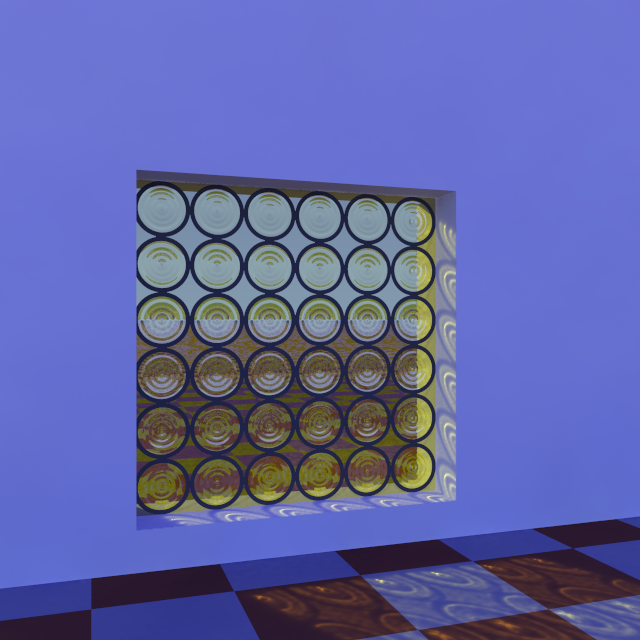
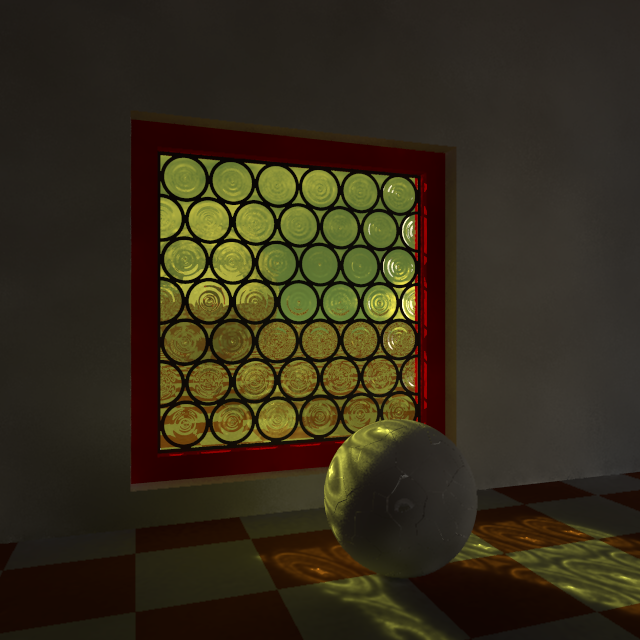
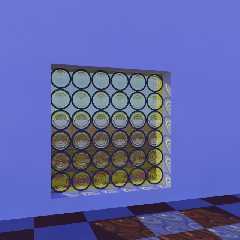
I came across some examples of Medieval windows made with the "cives"
technique ("fenêtre à cives") and thought that it would be interesting
to experiment a bit with the concept. This is just a test scene, using
photons of course. Very promising

A bit of documentation:
http://enverreetcontrefil.net/technique-du-vitrail-redige-pour-art-et-histoire/

--
Thomas
Post a reply to this message
Attachments:
Download 'cive medieval_test.png' (315 KB)
Preview of image 'cive medieval_test.png'
|
|
| |
| |
|
|
|
|
| |
| |
|
|
in news:5c80dc5f@news.povray.org Thomas de Groot wrote:

> I came across some examples of Medieval windows made with the "cives"
> technique ("fenêtre à cives")
>

OMG, "Buzenscheiben", I've had to recreate and colourise those many times
for printing on self adhesive window films.

ingo
Post a reply to this message
|
|
| |
| |
|
|
|
|
| |
| |
|
|
On 7-3-2019 16:02, ingo wrote:
> in news:5c80dc5f@news.povray.org Thomas de Groot wrote:
>
>> I came across some examples of Medieval windows made with the "cives"
>> technique ("fenêtre à cives")
>>
>
> OMG, "Buzenscheiben", I've had to recreate and colourise those many times
> for printing on self adhesive window films.
>

LOL Indeed, that is where those are mostly found nowadays.

To all: What are those windows called in other languages?

--
Thomas
Post a reply to this message
|
|
| |
| |
|
|
|
|
| |
| |
|
|
in news:5c821989@news.povray.org Thomas de Groot wrote:
> On 7-3-2019 16:02, ingo wrote:
>> in news:5c80dc5f@news.povray.org Thomas de Groot wrote:
>>
>>> I came across some examples of Medieval windows made with the
>>> "cives" technique ("fenêtre àcives")
>>>
>>
>> OMG, "Buzenscheiben", I've had to recreate and colourise those many
>> times for printing on self adhesive window films.
>>
>
> LOL Indeed, that is where those are mostly found nowadays.
>
> To all: What are those windows called in other languages?
>
In dutch, rondglas, maanglas or schijvenglas for the butzen and
cylinderglas or kroonglas for the method where they first make a cilinder
and then cut it open.
https://www.youtube.com/watch?v=TuDl27MZDnY
https://www.youtube.com/watch?v=ddA1PiGd8wc
https://www.youtube.com/watch?v=CelmpVdo7Kc
Ingo
Post a reply to this message
|
|
| |
| |
|
|
|
|
| |
| |
|
|
Am 08.03.2019 um 08:28 schrieb Thomas de Groot:
> On 7-3-2019 16:02, ingo wrote:
>> in news:5c80dc5f@news.povray.org Thomas de Groot wrote:
>>
>>> I came across some examples of Medieval windows made with the "cives"
>>> technique ("fenêtre à cives")
>>>
>>
>> OMG, "Buzenscheiben", I've had to recreate and colourise those many times
>> for printing on self adhesive window films.
>>
>
> LOL Indeed, that is where those are mostly found nowadays.
>
> To all: What are those windows called in other languages?
>
In German, it is Butzenglas, Batzenscheibe, Nabelscheibe or Ochsenauge.
I modelled it some years ago with wings 3d, but never posted the code
(mesh) and the macros to produce windows from it. If someone is
interested, I will clean up the code a little bit and post it.

Beste regard
Michael
Post a reply to this message
|
|
| |
| |
|
|
|
|
| |
| |
|
|
Thomas de Groot <tho### [at] degroot org> wrote:
.....
> To all: What are those windows called in other languages?
According to Wikipedia its English name is crown glass:
https://en.wikipedia.org/wiki/Crown_glass_(window)
I find Wikipedia useful for finding names for things in other languages.
If one reads the article above in the available languages;
German, English, French, Dutch, Polish, Czech, Pashto
(See the Languages links at the bottom of the left menu.)
- one can find names for crown glass in these languages.
--
Tor Olav
http://subcube.com
https://github.com/t-o-k/ org> wrote:
.....
> To all: What are those windows called in other languages?
According to Wikipedia its English name is crown glass:
https://en.wikipedia.org/wiki/Crown_glass_(window)
I find Wikipedia useful for finding names for things in other languages.
If one reads the article above in the available languages;
German, English, French, Dutch, Polish, Czech, Pashto
(See the Languages links at the bottom of the left menu.)
- one can find names for crown glass in these languages.
--
Tor Olav
http://subcube.com
https://github.com/t-o-k/
Post a reply to this message
|
|
| |
| |
|
|
|
|
| |
| |
|
|
On 11-3-2019 0:42, Tor Olav Kristensen wrote:
> Thomas de Groot <tho### [at] degrootorg> wrote:
> .....
>> To all: What are those windows called in other languages?
>
> According to Wikipedia its English name is crown glass:
> https://en.wikipedia.org/wiki/Crown_glass_(window)
>
> I find Wikipedia useful for finding names for things in other languages.
>
> If one reads the article above in the available languages;
> German, English, French, Dutch, Polish, Czech, Pashto
> (See the Languages links at the bottom of the left menu.)
>
> - one can find names for crown glass in these languages.
>

Obvious! I regularly use this but somehow failed to apply it to the
present topic! ;-/

--
Thomas
Post a reply to this message
|
|
| |
| |
|
|
|
|
| |
| |
|
|
On 10-3-2019 20:57, MichaelJF wrote:
> Am 08.03.2019 um 08:28 schrieb Thomas de Groot:
>> On 7-3-2019 16:02, ingo wrote:
>>> in news:5c80dc5f@news.povray.org Thomas de Groot wrote:
>>>
>>>> I came across some examples of Medieval windows made with the "cives"
>>>> technique ("fenêtre à cives")
>>>>
>>>
>>> OMG, "Buzenscheiben", I've had to recreate and colourise those many
>>> times
>>> for printing on self adhesive window films.
>>>
>>
>> LOL Indeed, that is where those are mostly found nowadays.
>>
>> To all: What are those windows called in other languages?
>>
> In German, it is Butzenglas, Batzenscheibe, Nabelscheibe or Ochsenauge.
> I modelled it some years ago with wings 3d, but never posted the code
> (mesh) and the macros to produce windows from it. If someone is
> interested, I will clean up the code a little bit and post it.
>

Interesting! I modelled the glass in Silo and am currently writing
macros for the different types of windows. I certainly shall continue
till completion, but I would be curious to compare eventually. So, yes,
please?

--
Thomas
Post a reply to this message
|
|
| |
| |
|
|
|
|
| |
| |
|
|
Thomas de Groot wrote on 07/03/2019 09:54:
> I came across some examples of Medieval windows made with the "cives"
> technique ("fenêtre à cives") and thought that it would be interesting
> to experiment a bit with the concept. This is just a test scene, using
> photons of course. Very promising
>
> A bit of documentation:
> http://enverreetcontrefil.net/technique-du-vitrail-redige-pour-art-et-histoire/
>
>
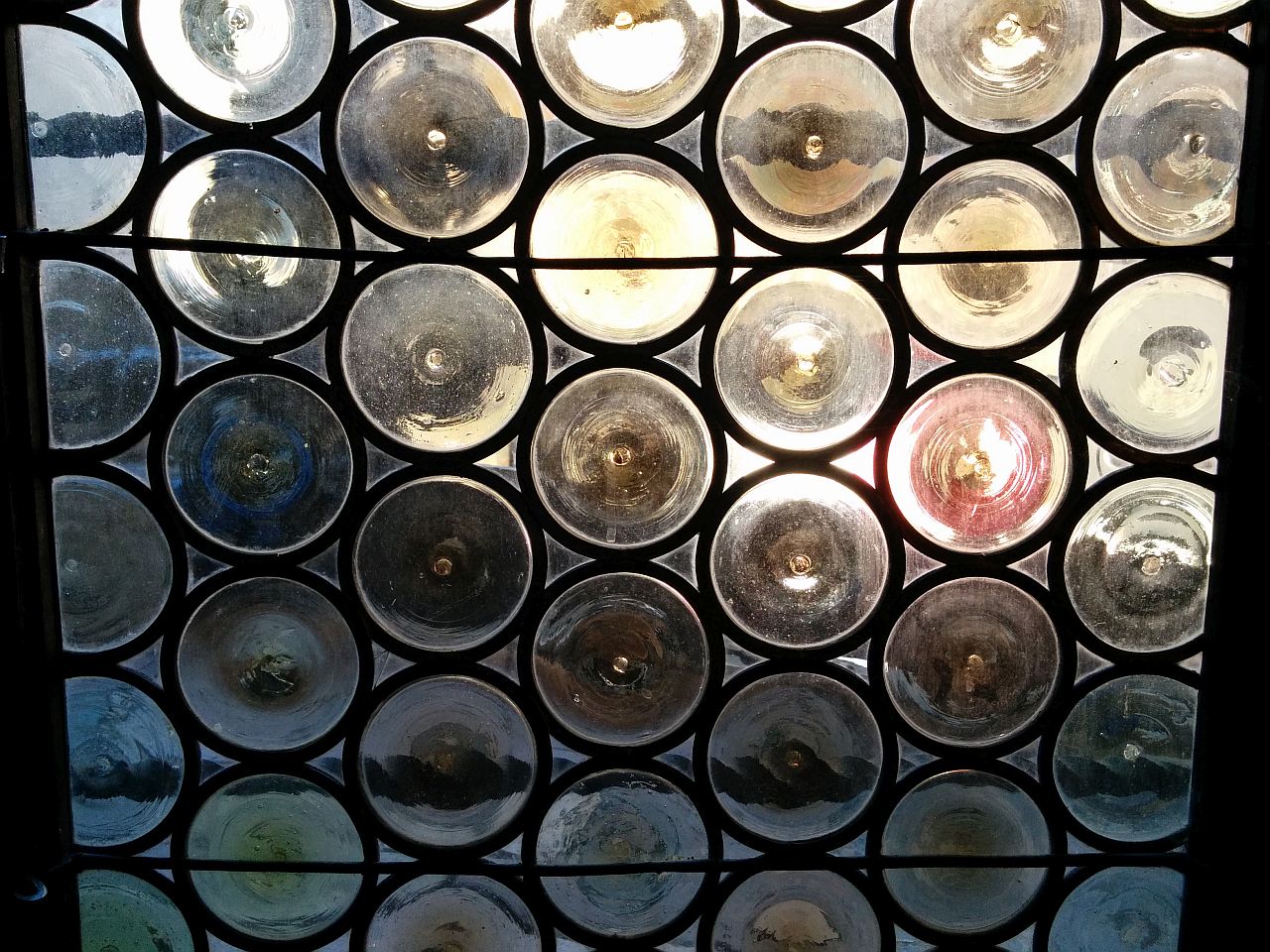
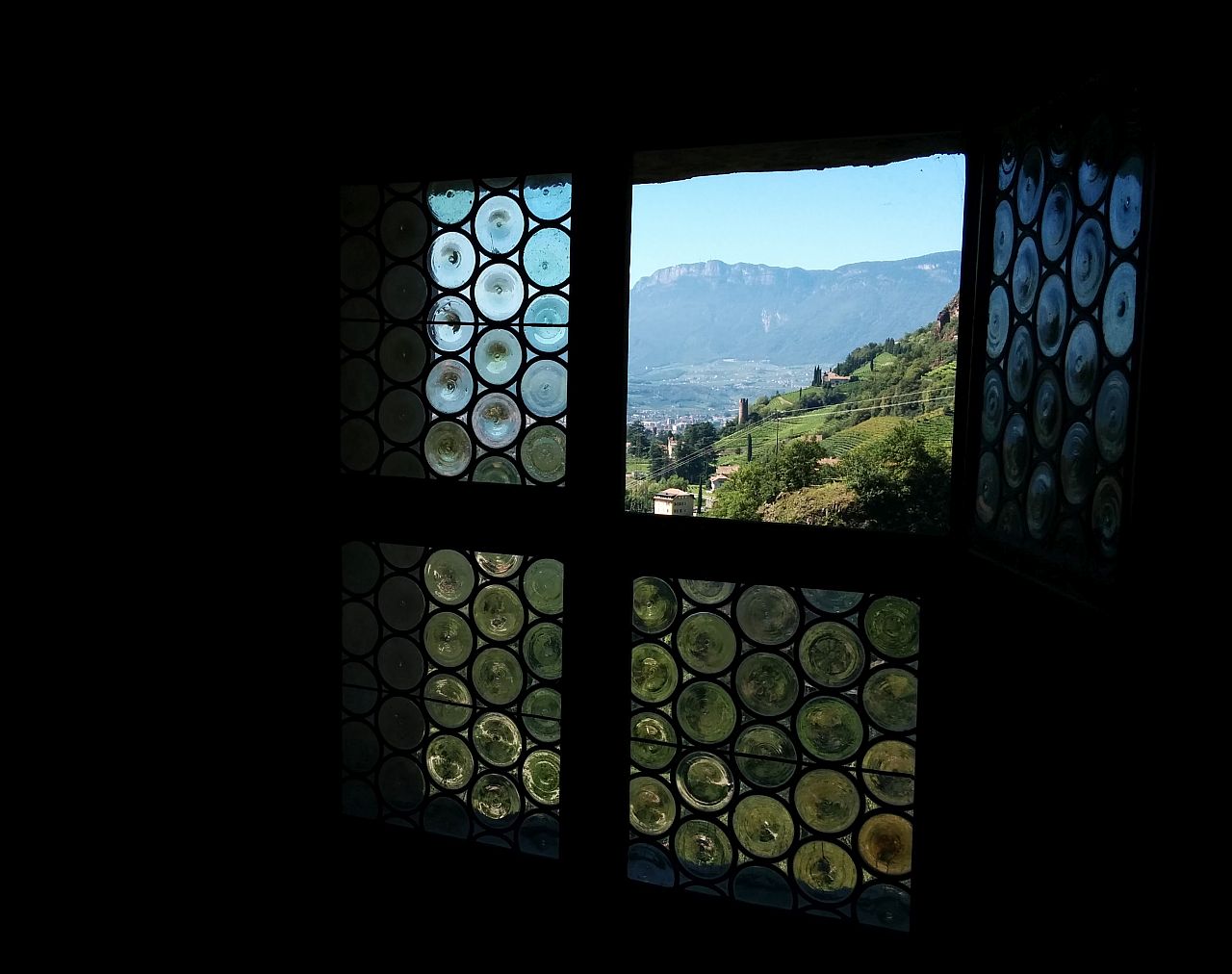
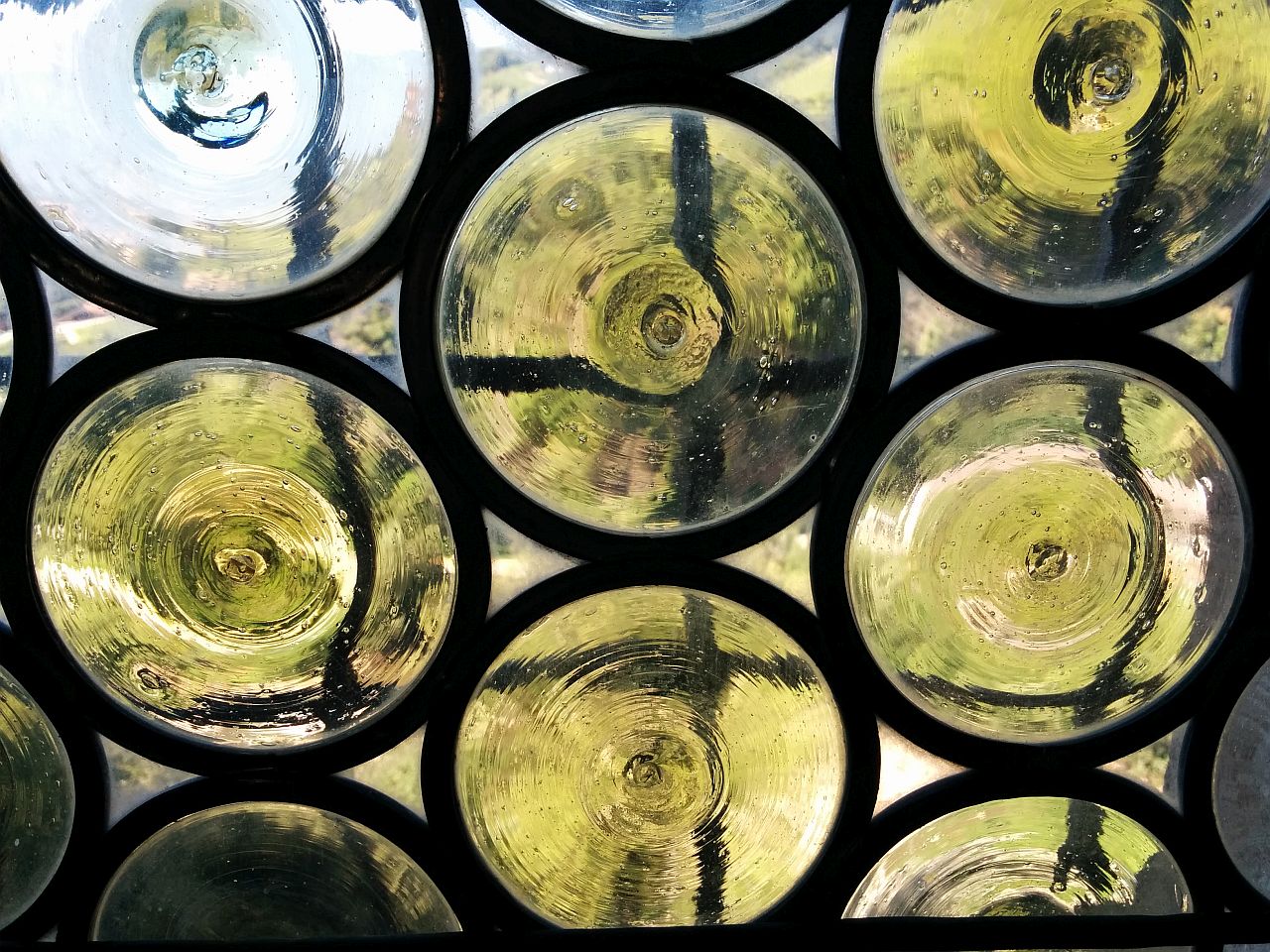
A nice work, Thomas.
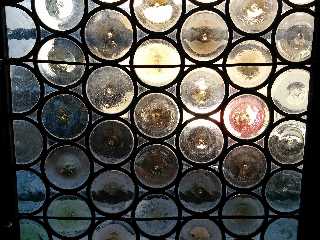
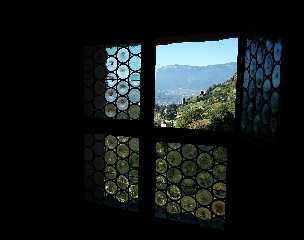
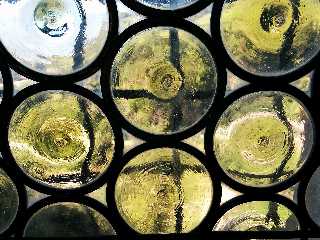
Sometimes you find also the circles arranged to fit the available space
(like these pictures taken near Bolzano in Italy).

Paolo
Post a reply to this message
Attachments:
Download 'img_20160824_02.jpg' (303 KB)
Download 'img_20160824_03.jpg' (125 KB)
Download 'img_20160824_01.jpg' (314 KB)
Preview of image 'img_20160824_02.jpg'
Preview of image 'img_20160824_03.jpg'
Preview of image 'img_20160824_01.jpg'
|
|
| |
| |
|
|
|
|
| |
| |
|
|
On 11-3-2019 12:34, Paolo Gibellini wrote:
> Thomas de Groot wrote on 07/03/2019 09:54:
>> I came across some examples of Medieval windows made with the "cives"
>> technique ("fenêtre à cives") and thought that it would be interesting
>> to experiment a bit with the concept. This is just a test scene, using
>> photons of course. Very promising
>>
>> A bit of documentation:
>> http://enverreetcontrefil.net/technique-du-vitrail-redige-pour-art-et-histoire/
>>
>>
> A nice work, Thomas.
> Sometimes you find also the circles arranged to fit the available space
> (like these pictures taken near Bolzano in Italy).
>

Yes indeed. I am currently working on these now, also on the variations
of tints within one window.

It started as a small testing project, just for the fun of it, and
before I knew, it grew into a full-fledged project. :-)

--
Thomas
Post a reply to this message
|
|
| |
| |
|
|
|
|
| |
| |
|
|
Am 11.03.2019 um 08:30 schrieb Thomas de Groot:
> On 10-3-2019 20:57, MichaelJF wrote:
>> Am 08.03.2019 um 08:28 schrieb Thomas de Groot:
>>> On 7-3-2019 16:02, ingo wrote:
>>>> in news:5c80dc5f@news.povray.org Thomas de Groot wrote:
>>>>
>>>>> I came across some examples of Medieval windows made with the "cives"
>>>>> technique ("fenêtre à cives")
>>>>>
>>>>
>>>> OMG, "Buzenscheiben", I've had to recreate and colourise those many
>>>> times
>>>> for printing on self adhesive window films.
>>>>
>>>
>>> LOL Indeed, that is where those are mostly found nowadays.
>>>
>>> To all: What are those windows called in other languages?
>>>
>> In German, it is Butzenglas, Batzenscheibe, Nabelscheibe or
>> Ochsenauge. I modelled it some years ago with wings 3d, but never
>> posted the code (mesh) and the macros to produce windows from it. If
>> someone is interested, I will clean up the code a little bit and post it.
>>
>
> Interesting! I modelled the glass in Silo and am currently writing
> macros for the different types of windows. I certainly shall continue
> till completion, but I would be curious to compare eventually. So, yes,
> please?
>
Hello Thomas,

I was on an occupational journey and had to congratulate my father to
his eighty-first birthday today, living at the same location at Essen,
Germany. I hope I can post the code tomorrow. It is just a mesh and some
macros to put the tiles into a window with rounded frames and a frame
all around them to have a window.

Best regards
Michael
Post a reply to this message
|
|
| |
| |
|
|
|
|
| |
| |
|
|
On 11-3-2019 22:32, MichaelJF wrote:
> Am 11.03.2019 um 08:30 schrieb Thomas de Groot:
>> On 10-3-2019 20:57, MichaelJF wrote:
>>> Am 08.03.2019 um 08:28 schrieb Thomas de Groot:
>>>> On 7-3-2019 16:02, ingo wrote:
>>>>> in news:5c80dc5f@news.povray.org Thomas de Groot wrote:
>>>>>
>>>>>> I came across some examples of Medieval windows made with the "cives"
>>>>>> technique ("fenêtre à cives")
>>>>>>
>>>>>
>>>>> OMG, "Buzenscheiben", I've had to recreate and colourise those many
>>>>> times
>>>>> for printing on self adhesive window films.
>>>>>
>>>>
>>>> LOL Indeed, that is where those are mostly found nowadays.
>>>>
>>>> To all: What are those windows called in other languages?
>>>>
>>> In German, it is Butzenglas, Batzenscheibe, Nabelscheibe or
>>> Ochsenauge. I modelled it some years ago with wings 3d, but never
>>> posted the code (mesh) and the macros to produce windows from it. If
>>> someone is interested, I will clean up the code a little bit and post
>>> it.
>>>
>>
>> Interesting! I modelled the glass in Silo and am currently writing
>> macros for the different types of windows. I certainly shall continue
>> till completion, but I would be curious to compare eventually. So,
>> yes, please?
>>
> Hello Thomas,
>
> I was on an occupational journey and had to congratulate my father to
> his eighty-first birthday today, living at the same location at Essen,
> Germany. I hope I can post the code tomorrow. It is just a mesh and some
> macros to put the tiles into a window with rounded frames and a frame
> all around them to have a window.
>

That is ok, Michael. Happy Birthday to your father! I hope he is in good
health.

--
Thomas
Post a reply to this message
|
|
| |
| |
|
|
|
|
| |
| |
|
|
Am 12.03.2019 um 11:03 schrieb Thomas de Groot:
> On 11-3-2019 22:32, MichaelJF wrote:
>> Am 11.03.2019 um 08:30 schrieb Thomas de Groot:
>>> On 10-3-2019 20:57, MichaelJF wrote:
>>>> Am 08.03.2019 um 08:28 schrieb Thomas de Groot:
>>>>> On 7-3-2019 16:02, ingo wrote:
>>>>>> in news:5c80dc5f@news.povray.org Thomas de Groot wrote:
>>>>>>
>>>>>>> I came across some examples of Medieval windows made with the
>>>>>>> "cives"
>>>>>>> technique ("fenêtre à cives")
>>>>>>>
>>>>>>
>>>>>> OMG, "Buzenscheiben", I've had to recreate and colourise those
>>>>>> many times
>>>>>> for printing on self adhesive window films.
>>>>>>
>>>>>
>>>>> LOL Indeed, that is where those are mostly found nowadays.
>>>>>
>>>>> To all: What are those windows called in other languages?
>>>>>
>>>> In German, it is Butzenglas, Batzenscheibe, Nabelscheibe or
>>>> Ochsenauge. I modelled it some years ago with wings 3d, but never
>>>> posted the code (mesh) and the macros to produce windows from it. If
>>>> someone is interested, I will clean up the code a little bit and
>>>> post it.
>>>>
>>>
>>> Interesting! I modelled the glass in Silo and am currently writing
>>> macros for the different types of windows. I certainly shall continue
>>> till completion, but I would be curious to compare eventually. So,
>>> yes, please?
>>>
>> Hello Thomas,
>>
>> I was on an occupational journey and had to congratulate my father to
>> his eighty-first birthday today, living at the same location at Essen,
>> Germany. I hope I can post the code tomorrow. It is just a mesh and
>> some macros to put the tiles into a window with rounded frames and a
>> frame all around them to have a window.
>>
>
> That is ok, Michael. Happy Birthday to your father! I hope he is in good
> health.
>
Hello Thomas,
you will find the macros now in p.b.s-f. I haven't used them in
closeups, so the textures could need improvement.

As to my father: He was very happy about my unheralded visit and I would
be happy to have his health condition if I ever reach his age.

Best regards
Michael
Post a reply to this message
|
|
| |
| |
|
|
|
|
| |
| |
|
|
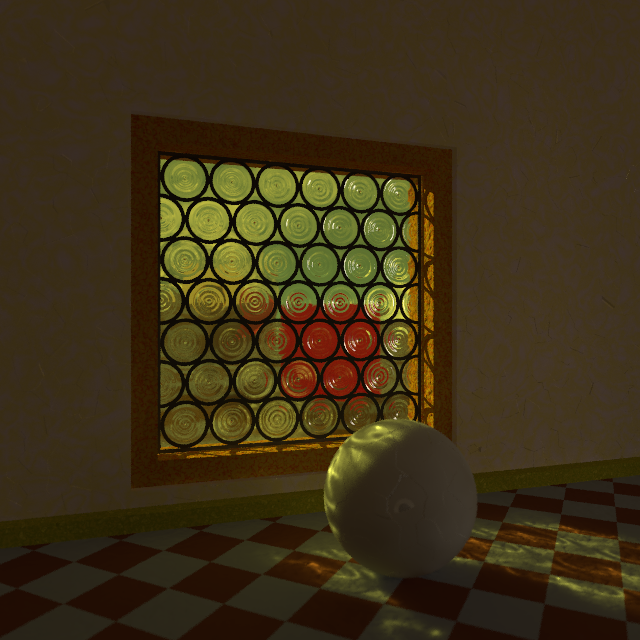
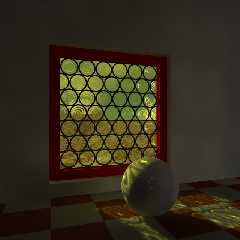
This is #2.

Basic frame texture and some small issues (code needs cleaning up).

--
Thomas
Post a reply to this message
|
|
| |
| |
|
|
|
|
| |
| |
|
|
This is #2.

Basic frame texture and some small issues (code needs cleaning up).
--
Thomas
Post a reply to this message
Attachments:
Download 'cive medieval_test_#2.png' (344 KB)
Preview of image 'cive medieval_test_#2.png'
|
|
| |
| |
|
|
|
|
| |
| |
|
|
Am 13.03.2019 um 12:49 schrieb Thomas de Groot:
> This is #2.
>
> Basic frame texture and some small issues (code needs cleaning up).
Hello Thomas,

congratulations, you crafted this very well. It's very to close to my
macros and showing, that I overlooked a small issue. But with sane
definitions of the width of the wooden frame no one will notice my fault;)

Best regards
Michael
Post a reply to this message
|
|
| |
| |
|
|
|
|
| |
| |
|
|
On 13-3-2019 19:47, MichaelJF wrote:
> Am 13.03.2019 um 12:49 schrieb Thomas de Groot:
>> This is #2.
>>
>> Basic frame texture and some small issues (code needs cleaning up).
> Hello Thomas,
>
> congratulations, you crafted this very well. It's very to close to my
> macros and showing, that I overlooked a small issue. But with sane
> definitions of the width of the wooden frame no one will notice my fault;)
>

Thank you indeed, Michael. I have not yet looked at your code but will
do that soon. However, your test image is very explicit and shows the
good work already.

The small issue I was talking about is the thin line of light visible
between the glass/lead and the window frame. It could be the window
being a tiny bit too small but I guess it is light "leaking" at angles.
Something similar is shown at the angle between floor and wall. I dimly
remember this phenomenon was discussed many years ago and I do not
remember the way to correct that, except, I believe, by using stochastic
anti-aliasing. I shall test that in any case.

--
Thomas
Post a reply to this message
|
|
| |
| |
|
|
|
|
| |
| |
|
|
On 14-3-2019 8:43, Thomas de Groot wrote:
> The small issue I was talking about is the thin line of light visible
> between the glass/lead and the window frame. It could be the window
> being a tiny bit too small but I guess it is light "leaking" at angles.
> Something similar is shown at the angle between floor and wall. I dimly
> remember this phenomenon was discussed many years ago and I do not
> remember the way to correct that, except, I believe, by using stochastic
> anti-aliasing. I shall test that in any case.
>

As I supposed indeed, stochastic antialiasing (with no_cache) solves the
issue.

--
Thomas
Post a reply to this message
|
|
| |
| |
|
|
|
|
| |
| |
|
|
On 14-3-2019 13:28, Thomas de Groot wrote:
> On 14-3-2019 8:43, Thomas de Groot wrote:
>> The small issue I was talking about is the thin line of light visible
>> between the glass/lead and the window frame. It could be the window
>> being a tiny bit too small but I guess it is light "leaking" at
>> angles. Something similar is shown at the angle between floor and
>> wall. I dimly remember this phenomenon was discussed many years ago
>> and I do not remember the way to correct that, except, I believe, by
>> using stochastic anti-aliasing. I shall test that in any case.
>>
>
> As I supposed indeed, stochastic antialiasing (with no_cache) solves the
> issue.
>

The downside of this is that combining stochastic aa with photons, will
dramatically decrease render speed. A rough calculation for the image
above, with a crude setting of aa (+a0.1) and with photons enabled,
shows that it will take at least 24 hours to render. :-(

--
Thomas
Post a reply to this message
|
|
| |
| |
|
|
|
|
| |
| |
|
|
On 15-3-2019 9:35, Thomas de Groot wrote:
> On 14-3-2019 13:28, Thomas de Groot wrote:
>> On 14-3-2019 8:43, Thomas de Groot wrote:
>>> The small issue I was talking about is the thin line of light visible
>>> between the glass/lead and the window frame. It could be the window
>>> being a tiny bit too small but I guess it is light "leaking" at
>>> angles. Something similar is shown at the angle between floor and
>>> wall. I dimly remember this phenomenon was discussed many years ago
>>> and I do not remember the way to correct that, except, I believe, by
>>> using stochastic anti-aliasing. I shall test that in any case.
>>>
>>
>> As I supposed indeed, stochastic antialiasing (with no_cache) solves
>> the issue.
>>
>
> The downside of this is that combining stochastic aa with photons, will
> dramatically decrease render speed. A rough calculation for the image
> above, with a crude setting of aa (+a0.1) and with photons enabled,
> shows that it will take at least 24 hours to render. :-(
>

Not precise enough I am afraid. I need to give you more relevant info:

+ The issue mentioned above was solved using UberPOV, without photons,
and with no_cache on in the radiosity block. Command line: +w640 +h640
+am3 +a0.01 +ac0.995 +r3 +bm2 +bs8 +wt6. Radiosity's count was lowered
to 10. Render time seemed acceptably "low" (I didn't render a complete
image).

+ The same settings using UberPOV, this time with photons on, the render
time soared up to the estimate of 24 hours+.

+ Using the latest version of 3.8, and with identical settings for +am3
on the command line (no_cache is /not/ available in this version), both
with or without photons available, the render time was "low" i.e.
acceptable for a test and within the hour. However, the issue mentioned
above was *not* solved. I tried to increase dramatically the count value
in the radiosity block but to no avail where the issue was concerned.

I would like some expert's view on the matter please.

--
Thomas
Post a reply to this message
|
|
| |
| |
|
|
|
|
| |
| |
|
|
Le 19-03-15 à 07:54, Thomas de Groot a écrit :
> On 15-3-2019 9:35, Thomas de Groot wrote:
>> On 14-3-2019 13:28, Thomas de Groot wrote:
>>> On 14-3-2019 8:43, Thomas de Groot wrote:
>>>> The small issue I was talking about is the thin line of light
>>>> visible between the glass/lead and the window frame. It could be the
>>>> window being a tiny bit too small but I guess it is light "leaking"
>>>> at angles. Something similar is shown at the angle between floor and
>>>> wall. I dimly remember this phenomenon was discussed many years ago
>>>> and I do not remember the way to correct that, except, I believe, by
>>>> using stochastic anti-aliasing. I shall test that in any case.
>>>>
>>>
>>> As I supposed indeed, stochastic antialiasing (with no_cache) solves
>>> the issue.
>>>
>>
>> The downside of this is that combining stochastic aa with photons,
>> will dramatically decrease render speed. A rough calculation for the
>> image above, with a crude setting of aa (+a0.1) and with photons
>> enabled, shows that it will take at least 24 hours to render. :-(
>>
>
> Not precise enough I am afraid. I need to give you more relevant info:
>
> + The issue mentioned above was solved using UberPOV, without photons,
> and with no_cache on in the radiosity block. Command line: +w640 +h640
> +am3 +a0.01 +ac0.995 +r3 +bm2 +bs8 +wt6. Radiosity's count was lowered
> to 10. Render time seemed acceptably "low" (I didn't render a complete
> image).
>
> + The same settings using UberPOV, this time with photons on, the render
> time soared up to the estimate of 24 hours+.
>
> + Using the latest version of 3.8, and with identical settings for +am3
> on the command line (no_cache is /not/ available in this version), both
> with or without photons available, the render time was "low" i.e.
> acceptable for a test and within the hour. However, the issue mentioned
> above was *not* solved. I tried to increase dramatically the count value
> in the radiosity block but to no avail where the issue was concerned.
>
> I would like some expert's view on the matter please.
>

The most obvious issue that I see is where the wall meet the floor. It
looks like you are getting radiosity samples from the back of the wall.
Some possibility :
Make the wall go slightly lower than the floor.
Place another box inside the wall at the floor's level.
Add a plinth in front of the wall. It can make the scene more realistic
at the same time.
Scale up the whole scene by some factor, like 10 times. If using spacing
for the photons, increase it by the same factor.

If you have some problem with the window, try making the outer edge
broader so that it goes into the red frame.


Alain
Post a reply to this message
|
|
| |
| |
|
|
|
|
| |
| |
|
|
On 15-3-2019 22:39, Alain wrote:
> Le 19-03-15 à 07:54, Thomas de Groot a écrit :
>> On 15-3-2019 9:35, Thomas de Groot wrote:
>>> On 14-3-2019 13:28, Thomas de Groot wrote:
>>>> On 14-3-2019 8:43, Thomas de Groot wrote:
>>>>> The small issue I was talking about is the thin line of light
>>>>> visible between the glass/lead and the window frame. It could be
>>>>> the window being a tiny bit too small but I guess it is light
>>>>> "leaking" at angles. Something similar is shown at the angle
>>>>> between floor and wall. I dimly remember this phenomenon was
>>>>> discussed many years ago and I do not remember the way to correct
>>>>> that, except, I believe, by using stochastic anti-aliasing. I shall
>>>>> test that in any case.
>>>>>
>>>>
>>>> As I supposed indeed, stochastic antialiasing (with no_cache) solves
>>>> the issue.
>>>>
>>>
>>> The downside of this is that combining stochastic aa with photons,
>>> will dramatically decrease render speed. A rough calculation for the
>>> image above, with a crude setting of aa (+a0.1) and with photons
>>> enabled, shows that it will take at least 24 hours to render. :-(
>>>
>>
>> Not precise enough I am afraid. I need to give you more relevant info:
>>
>> + The issue mentioned above was solved using UberPOV, without photons,
>> and with no_cache on in the radiosity block. Command line: +w640 +h640
>> +am3 +a0.01 +ac0.995 +r3 +bm2 +bs8 +wt6. Radiosity's count was lowered
>> to 10. Render time seemed acceptably "low" (I didn't render a complete
>> image).
>>
>> + The same settings using UberPOV, this time with photons on, the
>> render time soared up to the estimate of 24 hours+.
>>
>> + Using the latest version of 3.8, and with identical settings for
>> +am3 on the command line (no_cache is /not/ available in this
>> version), both with or without photons available, the render time was
>> "low" i.e. acceptable for a test and within the hour. However, the
>> issue mentioned above was *not* solved. I tried to increase
>> dramatically the count value in the radiosity block but to no avail
>> where the issue was concerned.
>>
>> I would like some expert's view on the matter please.
>>
>

Thank you Alain, much appreciated. some answers:

> The most obvious issue that I see is where the wall meet the floor. It
> looks like you are getting radiosity samples from the back of the wall.
> Some possibility :
> Make the wall go slightly lower than the floor.

That is already the case.

> Place another box inside the wall at the floor's level.
> Add a plinth in front of the wall. It can make the scene more realistic
> at the same time.

That is certainly something to do.

> Scale up the whole scene by some factor, like 10 times. If using spacing
> for the photons, increase it by the same factor.

That is an interesting idea to follow up upon. I seem dimly to remember
now that this was the best solution given in the past. This time, I am
going to write that down in my notes book. ;-) [and then forget about it
of course]

>
> If you have some problem with the window, try making the outer edge
> broader so that it goes into the red frame.

That also is already the case. I shall see what happens when scaling the
scene up.

Thanks again!

--
Thomas
Post a reply to this message
|
|
| |
| |
|
|
|
|
| |
| |
|
|
Thomas de Groot wrote on 13/03/2019 12:49:
> This is #2.
>
> Basic frame texture and some small issues (code needs cleaning up).
A beautiful light.
Paolo
Post a reply to this message
|
|
| |
| |
|
|
|
|
| |
| |
|
|
On 15-3-2019 22:39, Alain wrote:
> The most obvious issue that I see is where the wall meet the floor. It
> looks like you are getting radiosity samples from the back of the wall.
> Some possibility :
> Make the wall go slightly lower than the floor.
> Place another box inside the wall at the floor's level.
> Add a plinth in front of the wall. It can make the scene more realistic
> at the same time.
> Scale up the whole scene by some factor, like 10 times. If using spacing
> for the photons, increase it by the same factor.
>
> If you have some problem with the window, try making the outer edge
> broader so that it goes into the red frame.
>

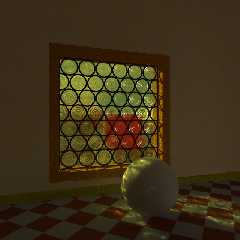
This image version has been scaled up x10. Initially, the bleeding did
not disappear, only after I gave the walls a more complex texture was it
reduced. I think that it was mostly the uniform pigment that was at issue.

The window's edge still shows the issue; I need to look deeper.

To brighten up the room, I gave the walls a tiny bit of emission.

Instead of aa, I used a bit of focal blur.

--
Thomas
Post a reply to this message
Attachments:
Download 'cive medieval_test_#2b.png' (464 KB)
Preview of image 'cive medieval_test_#2b.png'
|
|
| |
| |
|
|
|
|
| |
| |
|
|
Le 19-03-20 à 04:53, Thomas de Groot a écrit :
> On 15-3-2019 22:39, Alain wrote:
>> The most obvious issue that I see is where the wall meet the floor. It
>> looks like you are getting radiosity samples from the back of the wall.
>> Some possibility :
>> Make the wall go slightly lower than the floor.
>> Place another box inside the wall at the floor's level.
>> Add a plinth in front of the wall. It can make the scene more
>> realistic at the same time.
>> Scale up the whole scene by some factor, like 10 times. If using
>> spacing for the photons, increase it by the same factor.
>>
>> If you have some problem with the window, try making the outer edge
>> broader so that it goes into the red frame.
>>
>
> This image version has been scaled up x10. Initially, the bleeding did
> not disappear, only after I gave the walls a more complex texture was it
> reduced. I think that it was mostly the uniform pigment that was at issue.
>
> The window's edge still shows the issue; I need to look deeper.
>
> To brighten up the room, I gave the walls a tiny bit of emission.
>
> Instead of aa, I used a bit of focal blur.
>

Try making the window edges a little bit thicker, or add some thin
strips around it. The strips will act a little like the plinths at the
bottom of the walls. Make them black.
Post a reply to this message
|
|
| |
| |
|
|
|
|
| |
| |
|
|
On 20-3-2019 16:25, Alain wrote:

> Try making the window edges a little bit thicker, or add some thin
> strips around it. The strips will act a little like the plinths at the
> bottom of the walls. Make them black.

That does not do the trick. Like the plinths in the room, the bleeding
is just moved to the corner plinth/frame, as was the corner plinth/wall
before I changed the wall texture. So, the solution lies elsewhere, but
I do not know where at the moment.

--
Thomas
Post a reply to this message
|
|
| |
| |
|
|
|
|
| |
|
|