|
|
|
|
|
|
| |
| |
|
|
|
|
| |
| |
|
|
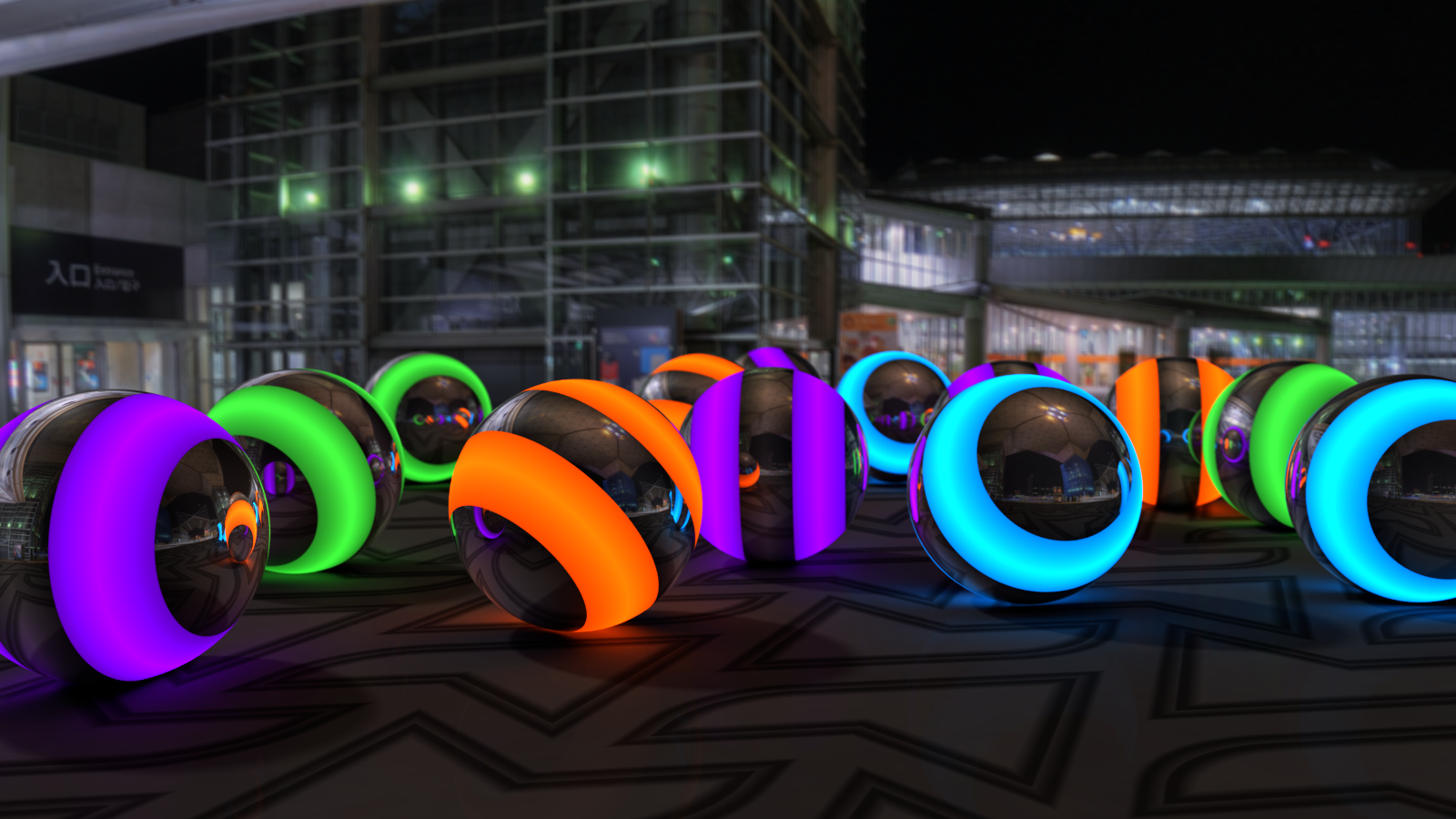
glowing spheres on pavement plane ....
Post a reply to this message
Attachments:
Download 'gsopp.png' (4392 KB)
Preview of image 'gsopp.png'
|
|
| |
| |
|
|
|
|
| |
| |
|
|
Jim Holsenback <ash### [at] nospam com> wrote:
> glowing spheres on pavement plane ....
Those are _cool_ :)
I can imagine them being used as lights for a real parking lot :D
I think that some focal blur will make it look better (more realistic).
And you pavement looks - like a carpet. Too soft.
My first instinct is:
Tighten up the color map, add a normal map, and some specular and reflection in
the finish block to give it a 'harder' look, possibly with a small granite
normal to give it some graininess.
Very nice - I'm glad you got the radiosity worked out - it's coming along very
well :) com> wrote:
> glowing spheres on pavement plane ....
Those are _cool_ :)
I can imagine them being used as lights for a real parking lot :D
I think that some focal blur will make it look better (more realistic).
And you pavement looks - like a carpet. Too soft.
My first instinct is:
Tighten up the color map, add a normal map, and some specular and reflection in
the finish block to give it a 'harder' look, possibly with a small granite
normal to give it some graininess.
Very nice - I'm glad you got the radiosity worked out - it's coming along very
well :)
Post a reply to this message
|
|
| |
| |
|
|
|
|
| |
| |
|
|
Jim Holsenback wrote on 25/09/2018 10:06:
> glowing spheres on pavement plane ....

Flynn's favorite marbles...
A nice image!
Paolo
Post a reply to this message
|
|
| |
| |
|
|
|
|
| |
| |
|
|
On 9/25/18 6:50 AM, Bald Eagle wrote:
> Jim Holsenback <ash### [at] nospamcom> wrote:
>> glowing spheres on pavement plane ....
>
> Those are _cool_   :)
> I can imagine them being used as lights for a real parking lot   :D
>
> I think that some focal blur will make it look better (more realistic).

i guess you didn't notice there is already focal blur ... follow the
three spheres on the far left (magenta, green, green). look in the
reflections

> And you pavement looks - like a carpet.   Too soft.
>
> My first instinct is:
> Tighten up the color map, add a normal map, and some specular and reflection in
> the finish block to give it a 'harder' look, possibly with a small granite
> normal to give it some graininess.

it's slightly reflective (1e-3) ... look in the foreground. i decided on
no normal because it was breaking up the appearance of the glow too much

>
>
> Very nice - I'm glad you got the radiosity worked out - it's coming along very
> well   :)

lol (coming along) ... i'm calling this the final version.
Post a reply to this message
|
|
| |
| |
|
|
|
|
| |
| |
|
|
On 9/26/18 3:58 AM, Paolo Gibellini wrote:
> Jim Holsenback wrote on 25/09/2018 10:06:
>> glowing spheres on pavement plane ....
>
> Flynn's favorite marbles...
> A nice image!
> Paolo

thanks!
Post a reply to this message
|
|
| |
| |
|
|
|
|
| |
| |
|
|
On 26/09/2018 09:44, Jim Holsenback wrote:
>>
>>
>> Very nice - I'm glad you got the radiosity worked out - it's coming
>> along very
>> well :)
>
> lol (coming along) ... i'm calling this the final version.


With a bit of tiding up it could be a HoF entry. ;)

Or it could be one now. :D

--

Regards
     Stephen
Post a reply to this message
|
|
| |
| |
|
|
|
|
| |
| |
|
|
On 9/26/18 5:40 AM, Stephen wrote:
> On 26/09/2018 09:44, Jim Holsenback wrote:
>>>
>>>
>>> Very nice - I'm glad you got the radiosity worked out - it's coming
>>> along very
>>> well :)
>>
>> lol (coming along) ... i'm calling this the final version.
>
>
> With a bit of tiding up it could be a HoF entry. ;)
>
> Or it could be one now. :D
>

lofty praise indeed ... i'll take it!

/there/ is one item i'll admit might benefit from a little attention. i
settled for a pretty basic matte finish on the ground plane because
anything else just didn't showcase the glow like i wanted...for me
that's what this image was all about.

since i used radiosity, area lights, focal blur and am3...next time i
have 62 hrs of free computer time i /might/ give it some more attention
Post a reply to this message
|
|
| |
| |
|
|
|
|
| |
| |
|
|
On 25-9-2018 10:06, Jim Holsenback wrote:
> glowing spheres on pavement plane ....

I love it. Now for a little challenge: the spheres obviously do not
reflect in the background scene, either directly or as seen in the
reflections on the spheres. It is not immediately apparent happily. I
would be at a loss about how to solve that however.

Never mind. It is a great scene.

--
Thomas
Post a reply to this message
|
|
| |
| |
|
|
|
|
| |
| |
|
|
Am 26.09.2018 um 12:10 schrieb Jim Holsenback:

> since i used radiosity, area lights, focal blur and am3...next time i
> have 62 hrs of free computer time i /might/ give it some more attention

While quality settings normally have a tendency to stack up pretty
brutally, am3 is somewhat different in this respect, as it lets you get
away with lower settings on other features - provided they can be set to
produce random noise instead of biased artifacts.

For example, area lights can be set to produce random noise by turning
on jitter. If you're using am3 anyway, you can then crank down on the
other area light quality settings.

(Radiosity, on the other hand, is an example where this doesn't work, as
its artifacts are biased, not random-noise-ish.)


This comes in particularly handy when combining multiple "jitterable"
features, e.g. area lights + media + SSLT + micronormals (the latter two
always being "jittery" by nature).
Post a reply to this message
|
|
| |
| |
|
|
|
|
| |
| |
|
|
On 9/26/18 8:12 AM, clipka wrote:
> Am 26.09.2018 um 12:10 schrieb Jim Holsenback:
>
>> since i used radiosity, area lights, focal blur and am3...next time i
>> have 62 hrs of free computer time i /might/ give it some more attention
>
> While quality settings normally have a tendency to stack up pretty
> brutally, am3 is somewhat different in this respect, as it lets you get
> away with lower settings on other features - provided they can be set to
> produce random noise instead of biased artifacts.
>
> For example, area lights can be set to produce random noise by turning
> on jitter. If you're using am3 anyway, you can then crank down on the
> other area light quality settings.
>
> (Radiosity, on the other hand, is an example where this doesn't work, as
> its artifacts are biased, not random-noise-ish.)
>
>
> This comes in particularly handy when combining multiple "jitterable"
> features, e.g. area lights + media + SSLT + micronormals (the latter two
> always being "jittery" by nature).
>

yeah i think i might give relaxing area light parameters and see if i
can see any gains in time. you didn't say anything about focal blur. not
jitter per se but it's mechanism noise based... right?
Post a reply to this message
|
|
| |
| |
|
|
|
|
| |
| |
|
|
Am 27.09.2018 um 13:08 schrieb Jim Holsenback:

> yeah i think i might give relaxing area light parameters and see if i
> can see any gains in time. you didn't say anything about focal blur. not
> jitter per se but it's mechanism noise based... right?

That was intentional, because I'm currently not sure how random it is,
and how reproducible the randomness is.

If focal blur uses a random seed based on "pixel address", for instance,
then oversampling the same pixel again and again will always give the
same blur sample directions, which means -am3 can't improve the blur result.
Post a reply to this message
|
|
| |
| |
|
|
|
|
| |
| |
|
|
Le 18-09-27 à 07:08, Jim Holsenback a écrit :
> On 9/26/18 8:12 AM, clipka wrote:
>> Am 26.09.2018 um 12:10 schrieb Jim Holsenback:
>>
>>> since i used radiosity, area lights, focal blur and am3...next time i
>>> have 62 hrs of free computer time i /might/ give it some more attention
>>
>> While quality settings normally have a tendency to stack up pretty
>> brutally, am3 is somewhat different in this respect, as it lets you get
>> away with lower settings on other features - provided they can be set to
>> produce random noise instead of biased artifacts.
>>
>> For example, area lights can be set to produce random noise by turning
>> on jitter. If you're using am3 anyway, you can then crank down on the
>> other area light quality settings.
>>
>> (Radiosity, on the other hand, is an example where this doesn't work, as
>> its artifacts are biased, not random-noise-ish.)
>>
>>
>> This comes in particularly handy when combining multiple "jitterable"
>> features, e.g. area lights + media + SSLT + micronormals (the latter two
>> always being "jittery" by nature).
>>
>
> yeah i think i might give relaxing area light parameters and see if i
> can see any gains in time. you didn't say anything about focal blur. not
> jitter per se but it's mechanism noise based... right?

It's possible that you may be able to use adaptive 0 for those. If it's
not good, try adaptive 1.
With adaptive 0, you can use some insane values for your area_light, like :
area_light x y  1025 1025 circular orient adaptive 0

and still get good performances.
Using adaptive 0 don't turn the feature off, neither will using adaptive
off.
The only way to turn adaptive off is to remove adaptive from the definition.
Post a reply to this message
|
|
| |
| |
|
|
|
|
| |
| |
|
|
On 9/27/18 7:39 PM, Alain wrote:
> It's possible that you may be able to use adaptive 0 for those. If it's
> not good, try adaptive 1.
> With adaptive 0, you can use some insane values for your area_light, like :
> area_light x y  1025 1025 circular orient adaptive 0
>
> and still get good performances.
> Using adaptive 0 don't turn the feature off, neither will using adaptive
> off.
> The only way to turn adaptive off is to remove adaptive from the
> definition.

i removed jitter and used adaptive 0 (with /no/ other area light
changes) and cut 20 hours off the render time...3 cheers for +am3...i'm
a fan!
Post a reply to this message
|
|
| |
| |
|
|
|
|
| |
| |
|
|
On 30-9-2018 11:18, Jim Holsenback wrote:
> On 9/27/18 7:39 PM, Alain wrote:
>> It's possible that you may be able to use adaptive 0 for those. If
>> it's not good, try adaptive 1.
>> With adaptive 0, you can use some insane values for your area_light,
>> like :
>> area_light x y  1025 1025 circular orient adaptive 0
>>
>> and still get good performances.
>> Using adaptive 0 don't turn the feature off, neither will using
>> adaptive off.
>> The only way to turn adaptive off is to remove adaptive from the
>> definition.
>
> i removed jitter and used adaptive 0 (with /no/ other area light
> changes) and cut 20 hours off the render time...3 cheers for +am3...i'm
> a fan!

Out of curiosity, what were your values for +a, +ac, and +r, using +am3?

--
Thomas
Post a reply to this message
|
|
| |
| |
|
|
|
|
| |
| |
|
|
On 9/30/18 7:06 AM, Thomas de Groot wrote:
> On 30-9-2018 11:18, Jim Holsenback wrote:
>> On 9/27/18 7:39 PM, Alain wrote:
>>> It's possible that you may be able to use adaptive 0 for those. If
>>> it's not good, try adaptive 1.
>>> With adaptive 0, you can use some insane values for your area_light,
>>> like :
>>> area_light x y  1025 1025 circular orient adaptive 0
>>>
>>> and still get good performances.
>>> Using adaptive 0 don't turn the feature off, neither will using
>>> adaptive off.
>>> The only way to turn adaptive off is to remove adaptive from the
>>> definition.
>>
>> i removed jitter and used adaptive 0 (with /no/ other area light
>> changes) and cut 20 hours off the render time...3 cheers for
>> +am3...i'm a fan!
>
> Out of curiosity, what were your values for +a, +ac, and +r, using +am3?
>
+am3 +a0.015 +ac0.995 +r3
Post a reply to this message
|
|
| |
| |
|
|
|
|
| |
| |
|
|
On 30-9-2018 14:56, Jim Holsenback wrote:
> On 9/30/18 7:06 AM, Thomas de Groot wrote:
>> On 30-9-2018 11:18, Jim Holsenback wrote:
>>> On 9/27/18 7:39 PM, Alain wrote:
>>>> It's possible that you may be able to use adaptive 0 for those. If
>>>> it's not good, try adaptive 1.
>>>> With adaptive 0, you can use some insane values for your area_light,
>>>> like :
>>>> area_light x y  1025 1025 circular orient adaptive 0
>>>>
>>>> and still get good performances.
>>>> Using adaptive 0 don't turn the feature off, neither will using
>>>> adaptive off.
>>>> The only way to turn adaptive off is to remove adaptive from the
>>>> definition.
>>>
>>> i removed jitter and used adaptive 0 (with /no/ other area light
>>> changes) and cut 20 hours off the render time...3 cheers for
>>> +am3...i'm a fan!
>>
>> Out of curiosity, what were your values for +a, +ac, and +r, using +am3?
>>
> +am3 +a0.015 +ac0.995 +r3

OK, thanks. Confirms what I am using in general; been using +r4 for
serious cases. With hindsight, I see that in my Paris scene I used
adaptive 1 and jitter on for the street lights. I should turn them off
to gain much needed render time.

--
Thomas
Post a reply to this message
|
|
| |
| |
|
|
|
|
| |