|
|
|
|
|
|
| |
| |
|
|
|
|
| |
| |
|
|
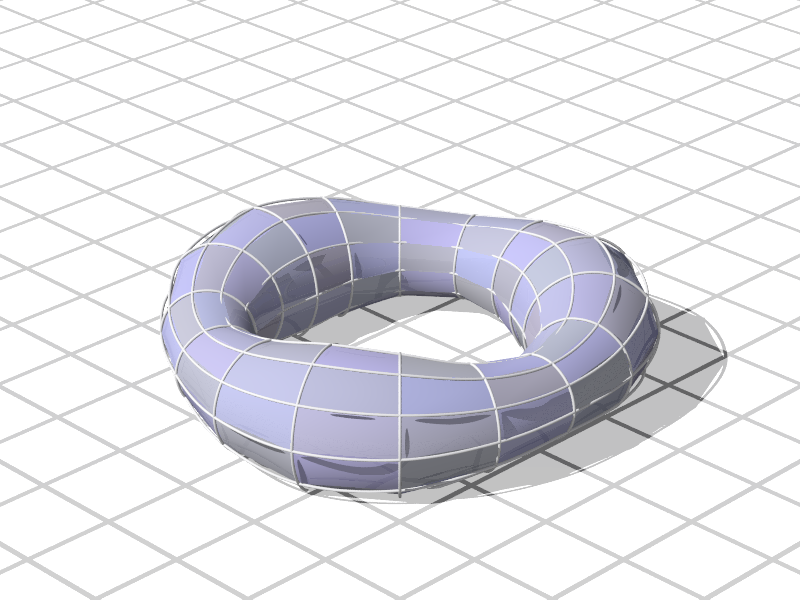
Can someone think of a better way for cover the gaps left by these
sphere_sweep (cubic_spline) curves with bicubic_patch?. I've been
looking at before posting this message and I am stuck at the point at
which, for the example given in the documentation I arrived to a
self-referential loop. (in short: being a circular shape you need to
know previously the point B to know point A and point A to calculate the
point B).
doc: http://www.povray.org/documentation/view/3.6.1/64/

Another point is commented by clipka a 2015 post on this issue.
http://news.povray.org/povray.tools.general/thread/%3Cweb.54e9d43835fbd8f37a3e03fe0%40news.povray.org%3E/

If it is mathematically impossible to make a perfect circle based on
patches, I suppose that the task of adjusting them smoothly to this form
can not be carried out either.

Any help or idea to the respective one is welcome, thank you very much
in advance.

Bruno Gimeno
Post a reply to this message
Attachments:
Download 'tbtsfh2.png' (165 KB)
Preview of image 'tbtsfh2.png'
|
|
| |
| |
|
|
|
|
| |
| |
|
|
BGimeno <bru### [at] gmail com> wrote:
> Can someone think of a better way for cover the gaps left by these
> sphere_sweep (cubic_spline) curves with bicubic_patch?. I've been
> looking at before posting this message and I am stuck at the point at
> which, for the example given in the documentation I arrived to a
> self-referential loop. (in short: being a circular shape you need to
> know previously the point B to know point A and point A to calculate the
> point B).
> doc: http://www.povray.org/documentation/view/3.6.1/64/
>
> Another point is commented by clipka a 2015 post on this issue.
>
http://news.povray.org/povray.tools.general/thread/%3Cweb.54e9d43835fbd8f37a3e03fe0%40news.povray.org%3E/
>
> If it is mathematically impossible to make a perfect circle based on
> patches, I suppose that the task of adjusting them smoothly to this form
> can not be carried out either.
>
> Any help or idea to the respective one is welcome, thank you very much
> in advance.
>
> Bruno Gimeno
Hi Bruno - IIRC, you can't use a bezier spline to make a circle.
https://stackoverflow.com/questions/1734745/how-to-create-circle-with-b%C3%A9zier-curves
But you may be able to sufficiently approximate it with several end-to-end.
When it comes to the patch, if you want to specify the points that the patch
will intersect, you need a matrix of 3x3 patches. Otherwise, with only one
patch, you're left specifying the control points of the bezier splines, which
aren't on the surface of the patch.
I started working to address exactly this a while back, and got to the point
where I was just ripping my hair out.
http://news.povray.org/povray.binaries.animations/thread/%3Cweb.56d9fbdd155fef445e7df57c0%40news.povray.org%3E/?mtop=40
6768&moff=22
http://news.povray.org/povray.binaries.animations/thread/%3Cweb.56ded7545a67670a5e7df57c0%40news.povray.org%3E/
http://news.povray.org/povray.binaries.images/thread/%3Cweb.56d9fcdc4ecdf5285e7df57c0%40news.povray.org%3E/
Maybe we look at it with fresh eyes and get a good 3x3 patch that works. com> wrote:
> Can someone think of a better way for cover the gaps left by these
> sphere_sweep (cubic_spline) curves with bicubic_patch?. I've been
> looking at before posting this message and I am stuck at the point at
> which, for the example given in the documentation I arrived to a
> self-referential loop. (in short: being a circular shape you need to
> know previously the point B to know point A and point A to calculate the
> point B).
> doc: http://www.povray.org/documentation/view/3.6.1/64/
>
> Another point is commented by clipka a 2015 post on this issue.
>
http://news.povray.org/povray.tools.general/thread/%3Cweb.54e9d43835fbd8f37a3e03fe0%40news.povray.org%3E/
>
> If it is mathematically impossible to make a perfect circle based on
> patches, I suppose that the task of adjusting them smoothly to this form
> can not be carried out either.
>
> Any help or idea to the respective one is welcome, thank you very much
> in advance.
>
> Bruno Gimeno
Hi Bruno - IIRC, you can't use a bezier spline to make a circle.
https://stackoverflow.com/questions/1734745/how-to-create-circle-with-b%C3%A9zier-curves
But you may be able to sufficiently approximate it with several end-to-end.
When it comes to the patch, if you want to specify the points that the patch
will intersect, you need a matrix of 3x3 patches. Otherwise, with only one
patch, you're left specifying the control points of the bezier splines, which
aren't on the surface of the patch.
I started working to address exactly this a while back, and got to the point
where I was just ripping my hair out.
http://news.povray.org/povray.binaries.animations/thread/%3Cweb.56d9fbdd155fef445e7df57c0%40news.povray.org%3E/?mtop=40
6768&moff=22
http://news.povray.org/povray.binaries.animations/thread/%3Cweb.56ded7545a67670a5e7df57c0%40news.povray.org%3E/
http://news.povray.org/povray.binaries.images/thread/%3Cweb.56d9fcdc4ecdf5285e7df57c0%40news.povray.org%3E/
Maybe we look at it with fresh eyes and get a good 3x3 patch that works.
Post a reply to this message
|
|
| |
| |
|
|
|
|
| |
| |
|
|
Le 08/08/2018 à 18:48, BGimeno a écrit :
> Can someone think of a better way for cover the gaps left by these
> sphere_sweep (cubic_spline) curves with bicubic_patch?. I've been
> looking at before posting this message and I am stuck at the point at
> which, for the example given in the documentation I arrived to a
> self-referential loop. (in short: being a circular shape you need to
> know previously the point B to know point A and point A to calculate the
> point B).
> doc: http://www.povray.org/documentation/view/3.6.1/64/
>
> Another point is commented by clipka a 2015 post on this issue.
>
http://news.povray.org/povray.tools.general/thread/%3Cweb.54e9d43835fbd8f37a3e03fe0%40news.povray.org%3E/
>
>
> If it is mathematically impossible to make a perfect circle based on
> patches, I suppose that the task of adjusting them smoothly to this form
> can not be carried out either.
>
> Any help or idea to the respective one is welcome, thank you very much
> in advance.
>
> Bruno Gimeno

I presume you can transfer each sphere_sweep into its own spline
(cubic_spline too), so you can generate as many points as you need along
each curve

Then you are at the problem of generating a surface from a non-plane
canvas of four sides.
And there is a lot of different results.

If you can compute a point as the center of the face, or if you can
compute parallel lines between two opposite sides, you can generate
meshes to fill the canvas.

With a central point, each triangle is connected to the central point
and the other side is along one spline of the side. Make as many
triangles as needed to cover the side, repeat for each side.

Probably more to your desire, we could distinguish the side as being
rather circular (the sphere_sweep make a small circle around the torus)
or rather straignt (the sphere_sweep follow the major circle of the torus).

Which mean you can draw straight line between the circular opposite
segments. And if you have straight lines, you can compute by
interpolation some intermediate circular segments on which to fix the
triangles of your mesh.
Post a reply to this message
|
|
| |
| |
|
|
|
|
| |
| |
|
|
BGimeno <bru### [at] gmailcom> wrote:

> Any help or idea to the respective one is welcome, thank you very much
> in advance.

The other thing to consider, is if you have a grid that follows the surface of
the "torus", then you can determine the intersections and fill every "rectangle"
with two smooth_triangles.
Post a reply to this message
|
|
| |
| |
|
|
|
|
| |
| |
|
|
Here's the thread I was trying to find and link to:

http://news.povray.org/povray.binaries.scene-files/thread/%3Cweb.56e1ce6a2f1b67735e7df57c0%40news.povray.org%3E/
Post a reply to this message
|
|
| |
| |
|
|
|
|
| |
| |
|
|
BGimeno <bru### [at] gmailcom> wrote:
> Can someone think of a better way for cover the gaps left by these
> sphere_sweep (cubic_spline) curves with bicubic_patch?.
> ...
> ...
> If it is mathematically impossible to make a perfect circle based on
> patches, I suppose that the task of adjusting them smoothly to this form
> can not be carried out either.
>
> Any help or idea to the respective one is welcome, thank you very much
> in advance.

If you add more patches, your cross sections can get very close to circles.

In the two 'Bezier_Patches_Stitched' images here:

http://dataduppedings.no/subcube/POV-Ray_Images/

- I have tried to show how one can construct the control grid so that the
patches are joined smoothly. All the 8 control points surrounding each corner of
the patches are placed in the same plane.

The 'Bezier_Patches_Torus' image shows a torus that is made with individually
colored bicubic Bezier patches. I made some macros that stitches together the
patches automatically. (The macro takes an array with the positions of the white
spheres as an argument.)

I finally found the source code for these images (that I made back in 2003), so
I've now made some more images where I've tried to illustrate this better.

I'll post them here.

--
Tor Olav
http://subcube.com
Post a reply to this message
Attachments:
Download 'bicubicbezierpatches.png' (397 KB)
Preview of image 'bicubicbezierpatches.png'

|
|
| |
| |
|
|
|
|
| |
| |
|
|
"Tor Olav Kristensen" <tor### [at] TOBEREMOVEDgmailcom> wrote:
> BGimeno <bru### [at] gmailcom> wrote:
> > Can someone think of a better way for cover the gaps left by these
> > sphere_sweep (cubic_spline) curves with bicubic_patch?.
> > ...
> > ...
> I've now made some more images where I've tried to illustrate this better.
>
> I'll post them here.

--
Tor Olav
http://subcube.com
Post a reply to this message
Attachments:
Download 'bicubicbezierpatches_manualgrid.png' (512 KB)
Preview of image 'bicubicbezierpatches_manualgrid.png'

|
|
| |
| |
|
|
|
|
| |
| |
|
|
"Tor Olav Kristensen" <tor### [at] TOBEREMOVEDgmailcom> wrote:
> "Tor Olav Kristensen" <tor### [at] TOBEREMOVEDgmailcom> wrote:
> > BGimeno <bru### [at] gmailcom> wrote:
> > > Can someone think of a better way for cover the gaps left by these
> > > sphere_sweep (cubic_spline) curves with bicubic_patch?.
> > > ...
> > > ...
> > I've now made some more images where I've tried to illustrate this better.
> >
> > I'll post them here.

--
Tor Olav
http://subcube.com
Post a reply to this message
Attachments:
Download 'bicubicbezierpatches_controlgrids.png' (730 KB)
Preview of image 'bicubicbezierpatches_controlgrids.png'

|
|
| |
| |
|
|
|
|
| |
| |
|
|
"Tor Olav Kristensen" <tor### [at] TOBEREMOVEDgmailcom> wrote:
> "Tor Olav Kristensen" <tor### [at] TOBEREMOVEDgmailcom> wrote:
> > BGimeno <bru### [at] gmailcom> wrote:
> > > Can someone think of a better way for cover the gaps left by these
> > > sphere_sweep (cubic_spline) curves with bicubic_patch?.
> > > ...
> > > ...
> > I've now made some more images where I've tried to illustrate this better.
> >
> > I'll post them here.

The points in the blue sphere sweeps in this image follows cubic Bezier splines
made with the control points that lies along the edges of the bicubic Bezier
patches.

--
Tor Olav
http://subcube.com
Post a reply to this message
Attachments:
Download 'bicubicbezierpatches_spheresweeps.png' (480 KB)
Preview of image 'bicubicbezierpatches_spheresweeps.png'

|
|
| |
| |
|
|
|
|
| |
| |
|
|
"Tor Olav Kristensen" <tor### [at] TOBEREMOVEDgmailcom> wrote:
> "Tor Olav Kristensen" <tor### [at] TOBEREMOVEDgmailcom> wrote:
> > BGimeno <bru### [at] gmailcom> wrote:
> > > Can someone think of a better way for cover the gaps left by these
> > > sphere_sweep (cubic_spline) curves with bicubic_patch?.
> > > ...
> > > ...
> > I've now made some more images where I've tried to illustrate this better.
> >
> > I'll post them here.

--
Tor Olav
http://subcube.com
Post a reply to this message
Attachments:
Download 'bicubicbezierpatches_controlgridsandspheresweeps.png' (757 KB)
Preview of image 'bicubicbezierpatches_controlgridsandspheresweeps.png'

|
|
| |
| |
|
|
|
|
| |
| |
|
|
"- I have tried to show how one can construct the control grid so that the
patches are joined smoothly. All the 8 control points surrounding each corner of
the patches are placed in the same plane."

Thanks - this may help me re-think things.

Can you elaborate a little bit on the implied relationship between the small
vectors between the corner and control points, and the larger vector between
corners is?  And why?

I understand the necessity of having the same slope which I believe is what the
small patch shows, and can understand that in isolation, but I haven't yet made
the connection to understand the relation between that and the large vectors.
Post a reply to this message
|
|
| |
| |
|
|
|
|
| |
| |
|
|
"Bald Eagle" <cre### [at] netscapenet> wrote:
> "- I have tried to show how one can construct the control grid so that the
> patches are joined smoothly. All the 8 control points surrounding each corner of
> the patches are placed in the same plane."
>
> Thanks - this may help me re-think things.
>
> Can you elaborate a little bit on the implied relationship between the small
> vectors between the corner and control points, and the larger vector between
> corners is?  And why?
>
> I understand the necessity of having the same slope which I believe is what the
> small patch shows, and can understand that in isolation, but I haven't yet made
> the connection to understand the relation between that and the large vectors.

I assume that you are looking at my 'Bezier_Patches_Stitched' files.

IIRC I added the large vectors as a suggestion for how one can create the
smaller vectors between the points in the control grid around the white corner
points. (The positions for these white corner points were specified "manually".)

The white corner points, together with their corresponding two small vectors,
defines the planes for the 8 control points surrounding each corner point. The
small vectors are also used to control the distances between these control
points.

AFAIK it is common to let the small vectors have the same direction as the large
vectors and to let their lengths be 1/6 of the length of the large vectors.

But I think that one can choose other orientations and lengths for the small
vectors (but I have not had time to experiment with this yet).

In the attached image I have given each Bezier patch a random color and placed
the camera at a different position.

--
Tor Olav
http://subcube.com
Post a reply to this message
Attachments:
Download 'colored_bezier_patches_stitched.png' (275 KB)
Preview of image 'colored_bezier_patches_stitched.png'

|
|
| |
| |
|
|
|
|
| |
| |
|
|
"Tor Olav Kristensen" <tor### [at] TOBEREMOVEDgmailcom> wrote:
> "Bald Eagle" <cre### [at] netscapenet> wrote:
> ...

> ...
> In the attached image I have given each Bezier patch a random color and placed
> the camera at a different position.

And here's an image where the camera is placed above the colored Bezier patches.

--
Tor Olav
http://subcube.com
Post a reply to this message
Attachments:
Download 'colored_bezier_patches_stitched_above.png' (252 KB)
Preview of image 'colored_bezier_patches_stitched_above.png'

|
|
| |
| |
|
|
|
|
| |
| |
|
|
"Tor Olav Kristensen" <tor### [at] TOBEREMOVEDgmailcom> wrote:
> "Tor Olav Kristensen" <tor### [at] TOBEREMOVEDgmailcom> wrote:
> > BGimeno <bru### [at] gmailcom> wrote:
> > > Can someone think of a better way for cover the gaps left by these
> > > sphere_sweep (cubic_spline) curves with bicubic_patch?.
> > > ...
> > > ...
> > I've now made some more images where I've tried to illustrate this better.
> >
> > I'll post them here.

Here's an image where the planes for the control grid points around the Bezier
patch corners are shown as dark squares. I've also added spheres at the control
grid points.

Perhaps I've now posted too many images about stitching of bicubic Bezier
patches...

--
Tor Olav
http://subcube.com
Post a reply to this message
Attachments:
Download 'bicubicbezierpatches_controlgridplanes.png' (799 KB)
Preview of image 'bicubicbezierpatches_controlgridplanes.png'

|
|
| |
| |
|
|
|
|
| |
| |
|
|
"Tor Olav Kristensen" <tor### [at] TOBEREMOVEDgmailcom> wrote:

> I assume that you are looking at my 'Bezier_Patches_Stitched' files.

Yes.   They were, in fact, the motivation for my original attempts at stitching
9 patches together.

> (The positions for these white corner points were specified "manually".)

Yes, that would make sense.

> The
> small vectors are also used to control the distances between these control
> points.

Mmmmmm... I'll have to think about that.

> AFAIK it is common to let the small vectors have the same direction as the large
> vectors and to let their lengths be 1/6 of the length of the large vectors.

That makes sense from what I've tried to do, and is consistent with your
diagrams / renders.

> But I think that one can choose other orientations and lengths for the small
> vectors (but I have not had time to experiment with this yet).

Yes, and I think that I may have tried to bite off more than I could chew at the
time.

How did you smoothly connect the corner points in
http://news.povray.org/web.5b7398619b869b61264be49d0%40news.povray.org ?
Is that a bezier spline sphere-sweep?
[Is it /beh-ZHEER/?]

I spent some time pondering the boundary conditions, and how to process 16
patches like the stitched renders.
What I've come up with is to
create an array of 25 corner points
create an array of 16 points, and "copy" the relevant corner points into the
appropriate places
calculate the linear vectors between the corners of each side
set the control points on those sides to 1/3 and 2/3 of the vector
Use those control points to interpolate the 4 inner control points in an
analogous manner

I hope to get a little bit more time tonight to try and implement that, and see
how it goes.

Then I can start to think about how to write a macro and set up a data structure
to instantiate arbitrarily selected patches, given the corner points.  It's the
lone corners and edges that might be tricky for me.


Now, having better grasped what you were doing here, I'd say that based on my
reading, this would give "G1 continuity".

I think that my first time approaching this, I was trying to use 3x3 patches to
give 4 control points and then do deCastejau to subdivide the super-pseudo
Bezier spline suggested by those 4 points so that I could interpolate the inner
control points of the edges in a "Bezier manner", if that makes sense.

Then having a series of X-alined splines, I could use all of those control
points to do the same with the z-aligned splines

But there may be an inherent error in trying to do it that way.
Post a reply to this message
|
|
| |
| |
|
|
|
|
| |
| |
|
|
"Bald Eagle" <cre### [at] netscapenet> wrote:

> I spent some time pondering the boundary conditions, and how to process 16
> patches like the stitched renders.
> What I've come up with is to
> create an array of 25 corner points
> create an array of 16 points, and "copy" the relevant corner points into the
> appropriate places
> calculate the linear vectors between the corners of each side
> set the control points on those sides to 1/3 and 2/3 of the vector
> Use those control points to interpolate the 4 inner control points in an
> analogous manner

So, I tried a slight modification of the above, following your suggestion, and
what your diagrams/renders imply, and I got 16 connecting patches - but with
sharp seams.

I used 4 vectors describing the edges between the 4 corners, and divided them by
3.   I then used those vectors to describe the control points by adding them to
the corners, and adding 2 vectors to a corner to get the 4 inner control points.

It makes sense that it's not smooth, or curved, because everything is just on a
line, and the non-corner control points aren't really control points by this
method - they're just passively following along with the corners.

So I ignored the y part of the vectors and just made "level" sub-patches, and
that seemed to give me something resembling your stitched patch render.


I know I'm still probably a ways off from what you've got - and pretty far off
from what I originally envisioned, but that might possibly be overkill.
Post a reply to this message
Attachments:
Download '12_smooth_bicubic_patches.png' (604 KB)
Preview of image '12_smooth_bicubic_patches.png'

|
|
| |
| |
|
|
|
|
| |
| |
|
|
I just added some code to draw the Bezier splines across the patch, using Cousin
Ricky's spheresweep.inc v1.2 from the Object Collection.

The splines don't quite line up - but I suppose, more concerning is that the
splines don't intersect with the corner points.

Probably just some wee little bug in there somewhere.
I'm using the web interface, so I can't rename the message title.

MAYBE I might try to code up a quick Bezier spline macro, if the formula I found
here:
http://wiki.povray.org/content/HowTo:Use_Splines_and_Bezier_Curves
(with the bad math code)
is correct.

P(t) = A*pow((1-t),3) + 3*B*t*pow((1-t),2) + 3*C*pow(t,2)*(1-t) + D*pow(t,3)

which seems to jive with
http://idav.ucdavis.edu/education/CAGDNotes/Matrix-Cubic-Bezier-Curve/img1.gif
Post a reply to this message
|
|
| |
| |
|
|
|
|
| |
| |
|
|
Whoops.
Render attached.
Post a reply to this message
Attachments:
Download '12_smooth_bicubic_patches.png' (988 KB)
Preview of image '12_smooth_bicubic_patches.png'

|
|
| |
| |
|
|
|
|
| |
| |
|
|
So, I played with some parametric Bezier splines, and that went -- horribly.
:D

But it hinted at the source of the problem - the interpolated control points are
control points - NOT on the surface of the patch - so a spline based on those
doesn't touch the surface.

I got rid of the intermediate sweeps and all is well.

Ricky's off the hook.
Good job.

:)
Post a reply to this message
Attachments:
Download '12_smooth_bicubic_patches.png' (963 KB)
Preview of image '12_smooth_bicubic_patches.png'

|
|
| |
| |
|
|
From: Thomas de Groot
Subject: Re: Smoothing bicubic_patchs. A pain.
Date: 19 Aug 2018 02:38:45
Message: <5b791075@news.povray.org>
|
|
|
| |
| |
|
|
On 18-8-2018 23:14, Bald Eagle wrote:
> So, I played with some parametric Bezier splines, and that went -- horribly.
> :D
>
> But it hinted at the source of the problem - the interpolated control points are
> control points - NOT on the surface of the patch - so a spline based on those
> doesn't touch the surface.
>
> I got rid of the intermediate sweeps and all is well.
>
> Ricky's off the hook.
> Good job.
>
> :)
>

Well done, sir! Well done!

Last night, I dreamed about Klein Bottles. That would be a hellish job
to model I guess. ;-)

--
Thomas
Post a reply to this message
|
|
| |
| |
|
|
|
|
| |
| |
|
|
Thomas de Groot <tho### [at] degrootorg> wrote:


> Last night, I dreamed about Klein Bottles. That would be a hellish job
> to model I guess. ;-)

Probably pour a hell of a cocktail too   :)

I was actually inspecting TOK's tori more closely to to try and understand where
my first attempt (this round) went off the rails.  I think it's because I kept
all my data isolated to the patch instead of "looking over" to see if there was
another patch adjacent to that edge.

And that got me thinking about how he automates the patching of a torus - and
the kind of data structure and algorithms that are needed.

I think I get it.   I also think I might need to write some macros to do things
with arrays that we don't have yet, or that can only be done "the long way" - so
macros it is.

Thanks for the kind words.   It's been slow going.

It seems like there are a few projects hovering around some common things, and
it would be great if there were some breakthroughs and they could coalesce.

Very interested in JimT's work on the triangular patch, and BGimeno's excellent
patterned tori.  I think the triangular patch would open up some new
possibilities, or at least make them easier to implement.
Post a reply to this message
|
|
| |
| |
|
|
|
|
| |
| |
|
|
Thinking about this a little more - and thinking back, it was a combination of
TOK's work and the question about the vibrating plate that combined to start me
investigating how to control a bicubic patch - or a network of them - such that
the surface could be made to intersect specifically designated points.

Going in the opposite direction:

(ignoring trace(), and approaching this a priori / ab initio)

Given that a Bezier patch can be interpreted as a Bezier spline in one dimension
whose control points slide along Bezier splines oriented in the other dimension,
and that this can be expressed as a parametiric equation, then

It ought to be possible to define a parametric {} object in POV-Ray based on a
set of control points and the basis functions of the Bezier splines.

Then, given a point <m, n> (or <u, v>) on the surface, one could place things ON
the surface of the patch.

This should also allow the generation of _any_ spline between the ordinate /
cardinal splines defined by the corners.  In theory one should be able to
simulate a patch by juxtaposing a series of splines from one side to the other
in either dimension.

I think that it also might be possible to define an isosurface {} in the same
way, and since there's a method for creating offset surfaces with isosurfaces,
then I'd be interested in seeing what's possible with a 3D rectangular mesh
skinned in Bezier patches and making a thickened hollow shell by that method.

Just some thoughts.


I also have a question that I have not answered for myself yet - is there a type
of spline that is coincident with a Bezier spline, but that contains / is
coincident with its own control points?
Post a reply to this message
|
|
| |
| |
|
|
|
|
| |
| |
|
|
"Bald Eagle" <cre### [at] netscapenet> wrote:
> I just added some code to draw the Bezier splines across the patch, using Cousin
> Ricky's spheresweep.inc v1.2 from the Object Collection.
>
> The splines don't quite line up - but I suppose, more concerning is that the
> splines don't intersect with the corner points.
>
> Probably just some wee little bug in there somewhere.
> I'm using the web interface, so I can't rename the message title.
>
> MAYBE I might try to code up a quick Bezier spline macro, if the formula I found
> here:
> http://wiki.povray.org/content/HowTo:Use_Splines_and_Bezier_Curves
> (with the bad math code)
> is correct.
>
> P(t) = A*pow((1-t),3) + 3*B*t*pow((1-t),2) + 3*C*pow(t,2)*(1-t) + D*pow(t,3)
>
> which seems to jive with
> http://idav.ucdavis.edu/education/CAGDNotes/Matrix-Cubic-Bezier-Curve/img1.gif

I explain why I did it the way I did in p.o-c:

On 2015-09-11 08:21 PM (-4), Cousin Ricky wrote:
>
> My calculation uses brute force rather than the single reduced formula
> with all the pow() calls.  This was because my ability to concentrate is
> so bad nowadays that I just gave up on trying to figure it out.  I
> figured that the internal math of the reduced formula would be more
> complicated anyway.  Had I known how simple the final formula was, and
> recalled Clipka's observation that the complexity of the SDL always
> trumps the math, I would have taken that route.  However, the parse time
> is so short, there would be little difference either way.

Rewriting the code to match the reduced formula might give people peace of mind
that my SDL is correct, but as long as the current version works, there's no
urgency to mess with it.
Post a reply to this message
|
|
| |
| |
|
|
|
|
| |
| |
|
|
"Cousin Ricky" <rickysttATyahooDOTcom> wrote:

> I explain why I did it the way I did in p.o-c:

Yes, I read that part - no complaints here.
I'm very happy with what you were able to achieve - I read through the code, and
it's pretty impressive.
You still have 1000x times the drive and attention span of most people.

> Rewriting the code to match the reduced formula might give people peace of mind
> that my SDL is correct, but as long as the current version works, there's no
> urgency to mess with it.

"Never worry about theory as long as the machinery does what it's supposed to
do." - Robert A. Heinlein

Again, excellent work - it does exactly what I need it to do.  :)
Post a reply to this message
|
|
| |
| |
|
|
|
|
| |
| |
|
|
This had some interesting data on the equations for the 1st and 2nd derivatives
of the curves, so I'm just going to drop this here.

https://www.codeproject.com/Articles/31859/Draw-a-Smooth-Curve-through-a-Set-of-2D-Points-wit
Post a reply to this message
|
|
| |
| |
|
|
|
|
| |
| |
|
|
"Bald Eagle" <cre### [at] netscapenet> wrote:
> "Tor Olav Kristensen" <tor### [at] TOBEREMOVEDgmailcom> wrote:
>
> > I assume that you are looking at my 'Bezier_Patches_Stitched' files.
>
> Yes.   They were, in fact, the motivation for my original attempts at stitching
> 9 patches together.
>...

=)

>...
> How did you smoothly connect the corner points in
> http://news.povray.org/web.5b7398619b869b61264be49d0%40news.povray.org ?
> Is that a bezier spline sphere-sweep?
> [Is it /beh-ZHEER/?]

Yes, that was done with sphere sweeps. As I have not found a Bezier type spline
in POV-Ray, I used linear_spline sphere_sweeps with many points placed along a
Bezier curve (that I calculated with some self made Bezier functions).

From your later posts in this thread it seems like you have now figured out how
to do something similar.

Anyway, for others that may be interested, I've attached an image which shows
which contol points to use for these "cubic Bezier sphere sweeps". I've colored
the relevant "sweeps" red and their control points green.


> I spent some time pondering the boundary conditions, and how to process 16
> patches like the stitched renders.
> What I've come up with is to
> create an array of 25 corner points
> create an array of 16 points, and "copy" the relevant corner points into the
> appropriate places
> calculate the linear vectors between the corners of each side
> set the control points on those sides to 1/3 and 2/3 of the vector
> Use those control points to interpolate the 4 inner control points in an
> analogous manner

I'm not sure if I follow you, but some of it sounds ok.


> I hope to get a little bit more time tonight to try and implement that, and see
> how it goes.
>
> Then I can start to think about how to write a macro and set up a data structure
> to instantiate arbitrarily selected patches, given the corner points.  It's the
> lone corners and edges that might be tricky for me.
>...

Yes, be very careful with what you do at the corners and along the edges.


> Now, having better grasped what you were doing here, I'd say that based on my
> reading, this would give "G1 continuity".

Yes, that is also my understanding.

Here's more theory about this:
https://people.eecs.berkeley.edu/~sequin/CS284/LECT12/L4.html


> I think that my first time approaching this, I was trying to use 3x3 patches to
> give 4 control points and then do deCastejau to subdivide the super-pseudo
> Bezier spline suggested by those 4 points so that I could interpolate the inner
> control points of the edges in a "Bezier manner", if that makes sense.

When experimenting with these Bezier curves and patches I find it easier to use
Bernstein polynomials than to use de Castejau's algorithm.

>...

--
Tor Olav
http://subcube.com
Post a reply to this message
Attachments:
Download 'control_points_for_cubic_bezier_splines_along_edges_of_bicubic_bezier_patches.jp.jpg' (253 KB)
Preview of image 'control_points_for_cubic_bezier_splines_along_edges_of_bicubic_bezier_patches.jp.jpg'

|
|
| |
| |
|
|
|
|
| |
| |
|
|
"Bald Eagle" <cre### [at] netscapenet> wrote:
>...
> Given that a Bezier patch can be interpreted as a Bezier spline in one dimension
> whose control points slide along Bezier splines oriented in the other dimension,
> and that this can be expressed as a parametiric equation, then
>
> It ought to be possible to define a parametric {} object in POV-Ray based on a
> set of control points and the basis functions of the Bezier splines.
>...

Yes, that is possible. Just create 3 bivariate functions with the appropriate
Bernstein polynomials and feed them to the parametric object. But you need
patience for that...


> Then, given a point <m, n> (or <u, v>) on the surface, one could place things ON
> the surface of the patch.

Yes, this image shows some white spheres and cylinders following a path in the
UV-space on the surface of a NURBS-patch:

http://dataduppedings.no/subcube/POV-Ray_Images/NURBS_Grid.jpg

See also the attached image where the I've put some sphere sweeps on a Bezier
patch. (Notice that you can read out the radii for the sphere swept curves
(0.06, 0.46 and 0.48) in the UV-mapped texture.)


>...

--
Tor Olav
http://subcube.com
Post a reply to this message
Attachments:
Download 'sphere sweeps on a bicubic bezier patch.jpg' (333 KB)
Preview of image 'sphere sweeps on a bicubic bezier patch.jpg'

|
|
| |
| |
|
|
|
|
| |
| |
|
|
"Bald Eagle" <cre### [at] netscapenet> wrote:
>...
> Given that a Bezier patch can be interpreted as a Bezier spline in one dimension
> whose control points slide along Bezier splines oriented in the other dimension,
> and that this can be expressed as a parametiric equation, then
>
> It ought to be possible to define a parametric {} object in POV-Ray based on a
> set of control points and the basis functions of the Bezier splines.
>
> Then, given a point <m, n> (or <u, v>) on the surface, one could place things ON
> the surface of the patch.
>
> This should also allow the generation of _any_ spline between the ordinate /
> cardinal splines defined by the corners.  In theory one should be able to
> simulate a patch by juxtaposing a series of splines from one side to the other
> in either dimension.

If you calculate the two partial derivatives (d/dU and d/dV) for each of the
bivariate functions for a Bezier patch you can use these to reorient objects to
align with the U-, V- and normal directions of the surface.

This article contains some useful information about that:

https://www.scratchapixel.com/lessons/advanced-rendering/bezier-curve-rendering-utah-teapot/bezier-patch-normal

The attached image shows cubes that are reoriented to align with the directions
I mentioned above. It also shows a lot of splines that creates a grid on the
surface of the patch.


>...

--
Tor Olav
http://subcube.com
Post a reply to this message
Attachments:
Download 'cubes on the surface of a bicubic bezier patch.jpg' (432 KB)
Preview of image 'cubes on the surface of a bicubic bezier patch.jpg'

|
|
| |
| |
|
|
|
|
| |
| |
|
|
"Tor Olav Kristensen" <tor### [at] TOBEREMOVEDgmailcom> wrote:
> "Bald Eagle" <cre### [at] netscapenet> wrote:
> >...
>...
> If you calculate the two partial derivatives (d/dU and d/dV) for each of the
> bivariate functions for a Bezier patch you can use these to reorient objects to
> align with the U-, V- and normal directions of the surface.
>
> This article contains some useful information about that:
>
>
https://www.scratchapixel.com/lessons/advanced-rendering/bezier-curve-rendering-utah-teapot/bezier-patch-normal
>
> The attached image shows cubes that are reoriented to align with the directions
> I mentioned above. It also shows a lot of splines that creates a grid on the
> surface of the patch.


Here's another image where the cubes have been scaled in the U/V-directions by
the lengths of the vectors used for reorienting them. (These vectors were
created with the partial derivatives of the bivariate functions for the Bezier
patch.)

--
Tor Olav
http://subcube.com
Post a reply to this message
Attachments:
Download 'scaled_cubes_on_the_surface_of_a_bicubic_bezier_patch.jpg' (426 KB)
Preview of image 'scaled_cubes_on_the_surface_of_a_bicubic_bezier_patch.jpg'

|
|
| |
| |
|
|
|
|
| |
| |
|
|
"Tor Olav Kristensen" <tor### [at] TOBEREMOVEDgmailcom> wrote:
>...
> The attached image shows cubes that are reoriented to align with the directions
> I mentioned above. It also shows a lot of splines that creates a grid on the
> surface of the patch.

I don't know why the preview of that image is not shown properly. (Perhaps the
height/width-dimensions are too big ?). Here's a try with smaller dimensions.

--
Tor Olav
http://subcube.com
Post a reply to this message
Attachments:
Download 'cubes_on_the_surface_of_a_bicubic_bezier_patch.jpg' (172 KB)
Preview of image 'cubes_on_the_surface_of_a_bicubic_bezier_patch.jpg'

|
|
| |
| |
|
|
|
|
| |
| |
|
|
"Tor Olav Kristensen" <tor### [at] TOBEREMOVEDgmailcom> wrote:
>...
> Here's another image where the cubes have been scaled in the U/V-directions by
> the lengths of the vectors used for reorienting them. (These vectors were
> created with the partial derivatives of the bivariate functions for the Bezier
> patch.)

Here's the same image with smaller dimensions.

--
Tor Olav
http://subcube.com
Post a reply to this message
Attachments:
Download 'scaled_cubes_on_the_surface_of_a_bicubic_bezier_patch.jpg' (165 KB)
Preview of image 'scaled_cubes_on_the_surface_of_a_bicubic_bezier_patch.jpg'

|
|
| |
| |
|
|
|
|
| |
| |
|
|
"Tor Olav Kristensen" <tor### [at] TOBEREMOVEDgmailcom> wrote:

> Yes, that is possible. Just create 3 bivariate functions with the appropriate
> Bernstein polynomials and feed them to the parametric object. But you need
> patience for that...

Pffft.    Then forget it.  None of us Povvers have any patience for that kind of
thing..
We want the instant gratification of hand-coding 1776 lines of SDL that hands us
that first frame of a 3600-frame animation by the very next day!


> > Then, given a point <m, n> (or <u, v>) on the surface, one could place things ON
> > the surface of the patch.
>
> Yes, this image shows some white spheres and cylinders following a path in the
> UV-space on the surface of a NURBS-patch:
>
> http://dataduppedings.no/subcube/POV-Ray_Images/NURBS_Grid.jpg

Right - I've admired that one also.
I haven't yet gotten to coding any NURBS objects - but I'm sure it's an
inevitability   ;)

> See also the attached image where the I've put some sphere sweeps on a Bezier
> patch. (Notice that you can read out the radii for the sphere swept curves
> (0.06, 0.46 and 0.48) in the UV-mapped texture.)

Yes - that's a neat trick.  I can already see the 2 rotating sets of rolling
spheres in a bowl-shaped Bezier patch, oscillating in simple harmonic motion.


Very nice images as always - you surely have some great macros worked out in
order to be able to make all these "custom" renders in short order.
Post a reply to this message
|
|
| |
| |
|
|
|
|
| |
| |
|
|
"Tor Olav Kristensen" <tor### [at] TOBEREMOVEDgmailcom> wrote:

> If you calculate the two partial derivatives (d/dU and d/dV) for each of the
> bivariate functions for a Bezier patch you can use these to reorient objects to
> align with the U-, V- and normal directions of the surface.

One more thing to ponder the full import of.
Just keep raising the bar.   :P

> This article contains some useful information about that:
>
>
https://www.scratchapixel.com/lessons/advanced-rendering/bezier-curve-rendering-utah-teapot/bezier-patch-normal

I do believe I've seen that one, but haven't had the time to fullly dissect and
digest it.

> The attached image shows cubes that are reoriented to align with the directions
> I mentioned above. It also shows a lot of splines that creates a grid on the
> surface of the patch.

Well, assuming the patch is bounded by a unit sphere, then those are ---
subcubes.

:D

I have a vague notion that some of this might be accomplished via matrix
transforms.   But that's only a tenuous supposition at this point.


....
Care to make a MEDIA Bezier patch?  :)
Post a reply to this message
|
|
| |
| |
|
|
|
|
| |
| |
|
|
Le 23/08/2018 à 00:59, Bald Eagle a écrit :
> Right - I've admired that one also.
> I haven't yet gotten to coding any NURBS objects - but I'm sure it's an
> inevitability   ;)

If you can find a modeller from which you can export the two
knot-vectors and the grid of of weighted control points, I would be very
interested.
Post a reply to this message
|
|
| |
| |
|
|
|
|
| |
| |
|
|
Thomas de Groot <tho### [at] degrootorg> wrote:

> Last night, I dreamed about Klein Bottles. That would be a hellish job
> to model I guess. ;-)

Perhaps, but of course, someone has done it.   :)
http://t-kita.net/gnuplot_povrml/

I remembered this and figured I'd post you a link to the scene code.

http://t-kita.net/gnuplot_povrml/povray-demo/povray-demo3.pov
Post a reply to this message
|
|
| |
| |
|
|
|
|
| |
| |
|
|
Op 30/08/2020 om 16:51 schreef Bald Eagle:
> Thomas de Groot <tho### [at] degrootorg> wrote:
>
>> Last night, I dreamed about Klein Bottles. That would be a hellish job
>> to model I guess. ;-)
>
> Perhaps, but of course, someone has done it.   :)
> http://t-kita.net/gnuplot_povrml/
>
> I remembered this and figured I'd post you a link to the scene code.
>
> http://t-kita.net/gnuplot_povrml/povray-demo/povray-demo3.pov
>

/Of course/ somebody did just that! Very nice; thanks for the links.

--
Thomas
Post a reply to this message
|
|
| |
| |
|
|
From: Thomas de Groot
Subject: Re: Smoothing bicubic_patchs. A pain.
Date: 1 Sep 2020 02:35:33
Message: <5f4debb5@news.povray.org>
|
|
|
| |
| |
|
|
Op 31/08/2020 om 08:26 schreef Thomas de Groot:
> Op 30/08/2020 om 16:51 schreef Bald Eagle:
>> Thomas de Groot <tho### [at] degrootorg> wrote:
>>
>>> Last night, I dreamed about Klein Bottles. That would be a hellish job
>>> to model I guess. ;-)
>>
>> Perhaps, but of course, someone has done it.   :)
>> http://t-kita.net/gnuplot_povrml/
>>
>> I remembered this and figured I'd post you a link to the scene code.
>>
>> http://t-kita.net/gnuplot_povrml/povray-demo/povray-demo3.pov
>>
>
> /Of course/ somebody did just that! Very nice; thanks for the links.
>

Which got me thinking that, while the modelling of the Klein bottle
might be simple, the orientation of the face normals is not. My best
guess would be to switch those round at the point where the bottle
intersects itself. Modelling software (like Silo) don't like that. :-)

--
Thomas
Post a reply to this message
|
|
| |
| |
|
|
|
|
| |