 |
|
|
|
|
|
| |
| |
|
|
|
|
| |
| |
|
|
trace(OBJECT_IDENTIFIER, A, B, [VECTOR_IDENTIFIER]). trace helps you finding the
exact location of a ray intersecting with an object's surface. It traces a ray
beginning at the point A in the direction specified by the vector B. If the ray
hits the specified object, this function returns the coordinate where the ray
intersected the object. If not, it returns <0,0,0>. If a fourth parameter in the
form of a vector identifier is provided, the normal of the object at the
intersection point (not including any normal perturbations due to textures) is
stored into that vector. If no intersection was found, the normal vector is
reset to <0,0,0>.

Add vector identifier to your trace () and you'll get the normal vector back.
Then you can calculate the angle between that and any axis, or the point that
you're tracing from.
Post a reply to this message
|
|
| |
| |
|
|
From: Sven Littkowski
Subject: Re: INVITATION: Join the Mississippi Paddle-Wheel Steamer!
Date: 7 Apr 2018 21:26:54
Message: <5ac96fde@news.povray.org>
|
|
|
| |
| |
|
|
Thanks a lot! I copied all information about TRACE for my reference.
Great spirit here in this group!


On 07.04.2018 19:31, Bald Eagle wrote:
> trace(OBJECT_IDENTIFIER, A, B, [VECTOR_IDENTIFIER]). trace helps you find
ing the
> exact location of a ray intersecting with an object's surface. It traces
a ray
> beginning at the point A in the direction specified by the vector B. If t
he ray
> hits the specified object, this function returns the coordinate where the
 ray
> intersected the object. If not, it returns <0,0,0>. If a fourth parameter
 in the
> form of a vector identifier is provided, the normal of the object at the
> intersection point (not including any normal perturbations due to texture
s) is
> stored into that vector. If no intersection was found, the normal vector
is
> reset to <0,0,0>.
>
> Add vector identifier to your trace () and you'll get the normal vector b
ack.
> Then you can calculate the angle between that and any axis, or the point
that
> you're tracing from.

---
Diese E-Mail wurde von AVG auf Viren geprüft.
http://www.avg.com
Post a reply to this message
|
|
| |
| |
|
|
From: Sven Littkowski
Subject: Re: INVITATION: Join the Mississippi Paddle-Wheel Steamer!
Date: 11 Apr 2018 11:47:48
Message: <5ace2e24@news.povray.org>
|
|
|
| |
| |
|
|
UPDATE

- Continuing to work on the textures or correcting them
- Hunting down mercilessly placement errors I become aware of

This image: the perch that was used for horses or cattle. Still missing:
the food and water troughs, animals, details.


---
Diese E-Mail wurde von AVG auf Viren geprüft.
http://www.avg.com
Post a reply to this message
Attachments:
Download 'sl - mississippi paddle-wheel steamer - perch - 01.jpg' (1197 KB)
Preview of image 'sl - mississippi paddle-wheel steamer - perch - 01.jpg'

|
|
| |
| |
|
|
From: Sven Littkowski
Subject: Re: INVITATION: Join the Mississippi Paddle-Wheel Steamer!
Date: 12 Apr 2018 02:02:41
Message: <5acef681@news.povray.org>
|
|
|
| |
| |
|
|
UPDATE

Still working on the textures, and correcting errors as I discover them.
making a good and steady progress, but the days are too short...


---
Diese E-Mail wurde von AVG auf Viren geprüft.
http://www.avg.com
Post a reply to this message
Attachments:
Download 'sl - mississippi paddle-wheel steamer - midships - 02.jpg' (1287 KB)
Download 'sl - mississippi paddle-wheel steamer - perch - 02.jpg' (733 KB)
Preview of image 'sl - mississippi paddle-wheel steamer - midships - 02.jpg'

Preview of image 'sl - mississippi paddle-wheel steamer - perch - 02.jpg'

|
|
| |
| |
|
|
From: Stephen
Subject: Re: INVITATION: Join the Mississippi Paddle-Wheel Steamer!
Date: 12 Apr 2018 02:45:19
Message: <5acf007f@news.povray.org>
|
|
|
| |
| |
|
|
On 12/04/2018 07:02, Sven Littkowski wrote:
> UPDATE
>
> Still working on the textures, and correcting errors as I discover them.
> making a good and steady progress, but the days are too short...
>
>

Sorry for the criticism, Sven. The planks of wood look as they have been
cut across the grain. Mostly, the grain should run along the length of
the plank.


--

Regards
     Stephen
Post a reply to this message
|
|
| |
| |
|
|
|
|
| |
| |
|
|
Stephen <mca### [at] aol com> wrote:
> Sorry for the criticism, Sven. The planks of wood look as they have been
> cut across the grain. Mostly, the grain should run along the length of
> the plank.
> Regards
> Stephen
Right. I don't think he's going to mind that sort of constructive criticism -
so no need to be sorry :)
I was going to point that out as well, and say that the contrasts in the wood
grain and the surface normals need to be much more pronounced. Especially on
the cut ends.
Start with a wood pattern, figure out its orientation, and align your plank with
that.
Then you can translate around in that texture-space to vary the wood grain from
plank to plank. Then you can place that plank in its final location.
It's likely you're going to want certain features in your end product - wisps of
wood sticking up along the corners of rough-sawn lumber, tool marks, wear, dirt,
gouges and tool-marks, nails, pegs, wear from traffic, etc.
I'd say that if you're going to carry all of that through, you're quickly going
to realize that creating and placing all of that by hand for each plank is
impossible - and so you're going to need macros to do that.
Then you may need to overlay the floor as a whole with a mask of some sort to
apply dirt, hay, wear marks, changes in normals and reflectivity, etc.
I'd do those experiments in a small test scene to make it easier to see what
happens up close, keep render times down, and speed up your development.
It's a lot to work on, but if you modularize it so that you can make small
piece-wise changes, it will be manageable. com> wrote:
> Sorry for the criticism, Sven. The planks of wood look as they have been
> cut across the grain. Mostly, the grain should run along the length of
> the plank.
> Regards
> Stephen
Right. I don't think he's going to mind that sort of constructive criticism -
so no need to be sorry :)
I was going to point that out as well, and say that the contrasts in the wood
grain and the surface normals need to be much more pronounced. Especially on
the cut ends.
Start with a wood pattern, figure out its orientation, and align your plank with
that.
Then you can translate around in that texture-space to vary the wood grain from
plank to plank. Then you can place that plank in its final location.
It's likely you're going to want certain features in your end product - wisps of
wood sticking up along the corners of rough-sawn lumber, tool marks, wear, dirt,
gouges and tool-marks, nails, pegs, wear from traffic, etc.
I'd say that if you're going to carry all of that through, you're quickly going
to realize that creating and placing all of that by hand for each plank is
impossible - and so you're going to need macros to do that.
Then you may need to overlay the floor as a whole with a mask of some sort to
apply dirt, hay, wear marks, changes in normals and reflectivity, etc.
I'd do those experiments in a small test scene to make it easier to see what
happens up close, keep render times down, and speed up your development.
It's a lot to work on, but if you modularize it so that you can make small
piece-wise changes, it will be manageable.
Post a reply to this message
|
|
| |
| |
|
|
From: Sven Littkowski
Subject: Re: INVITATION: Join the Mississippi Paddle-Wheel Steamer!
Date: 12 Apr 2018 11:07:37
Message: <5acf7639$1@news.povray.org>
|
|
|
| |
| |
|
|
I agree fully. I am still in the process to adjust the texture details.

And I welcome critical opinions, no need to apologize formally.   :-)

---
Diese E-Mail wurde von AVG auf Viren geprüft.
http://www.avg.com
Post a reply to this message
|
|
| |
| |
|
|
From: Sven Littkowski
Subject: Re: INVITATION: Join the Mississippi Paddle-Wheel Steamer!
Date: 12 Apr 2018 11:16:57
Message: <5acf7869@news.povray.org>
|
|
|
| |
| |
|
|
Yes, all of what you are stating, is true - and already in progress. Hay
- I started to work on a WHILE that places thin yellow cylinders in the
rectangular area of the perch.

My main concern right now, however, is to get the textures right. The
grain visibility of the brown and yellow painted woods is how I want it,
but the directions cause me headache. I might have to develop a texture
for each direction, lots of rewriting. At the moment, the texture is
TRANSLATED randomly to avoid repeating patterns.

Another thing I really want to do is to apply some nice surface
reflections to the lumber, like those you see in these two attached,
wonderful images that are the result of other POV-Ray artists. A
challenge is that since I use a RANDOM TRANSLATE for the wood grain, I
need to apply the same values for the TRANSLATE inside the FINISH
statement. Lots of rewriting...

The deck texture is going to be a real hardship. I want to use a
modified BRICK pattern, where a wood texture is replacing the red brick
texture. That's the easy part and done already. But I also need to find
a way, to randomly TRANSLATE each texture INSIDE each brick to avoid
that the grain continues from brick field to brick field. That's my
challenge now. I opened already, days ago, another thread where I was
talking about this challenge.


---
Diese E-Mail wurde von AVG auf Viren geprüft.
http://www.avg.com
Post a reply to this message
Attachments:
Download '0007.jpg' (135 KB)
Download 'unnamed.jpg' (111 KB)
Preview of image '0007.jpg'

Preview of image 'unnamed.jpg'

|
|
| |
| |
|
|
From: Sven Littkowski
Subject: Re: INVITATION: Join the Mississippi Paddle-Wheel Steamer!
Date: 12 Apr 2018 11:54:33
Message: <5acf8139$1@news.povray.org>
|
|
|
| |
| |
|
|
MACRO Question:

I can declare a double texture this way:

#declare MyTexture =
 texture { Texture1 }
 texture { Texture2 }
;

But a similar construct seems to be impossible as macro. I tried
successless this:

#macro MyTexture(SomeParameter)
 texture { Texture1 }
 texture { Texture2 }
#end

Is there any way to create a macro with a double texture?

---
Diese E-Mail wurde von AVG auf Viren geprüft.
http://www.avg.com
Post a reply to this message
|
|
| |
| |
|
|
|
|
| |
| |
|
|
> Is there any way to create a macro with a double texture?

Yes.

> #macro MyTexture(SomeParameter)
> #declare MyTexture =
>  texture { Texture1 }
>  texture { Texture2 }
> #end


The macro is just a "wrapper" when you invoke a macro, it's just a directive to
tell the POV-Ray parser "and now use the following bit of code [using the
supplied parameters, if any]:"
Post a reply to this message
|
|
| |
| |
|
|
From: Alain
Subject: Re: INVITATION: Join the Mississippi Paddle-Wheel Steamer!
Date: 12 Apr 2018 14:03:04
Message: <5acf9f58@news.povray.org>
|
|
|
| |
| |
|
|
Le 18-04-12 à 11:16, Sven Littkowski a écrit :
> Yes, all of what you are stating, is true - and already in progress. Hay
> - I started to work on a WHILE that places thin yellow cylinders in the
> rectangular area of the perch.
>
> My main concern right now, however, is to get the textures right. The
> grain visibility of the brown and yellow painted woods is how I want it,
> but the directions cause me headache. I might have to develop a texture
> for each direction, lots of rewriting. At the moment, the texture is
> TRANSLATED randomly to avoid repeating patterns.
>
> Another thing I really want to do is to apply some nice surface
> reflections to the lumber, like those you see in these two attached,
> wonderful images that are the result of other POV-Ray artists. A
> challenge is that since I use a RANDOM TRANSLATE for the wood grain, I
> need to apply the same values for the TRANSLATE inside the FINISH
> statement. Lots of rewriting...
>
> The deck texture is going to be a real hardship. I want to use a
> modified BRICK pattern, where a wood texture is replacing the red brick
> texture. That's the easy part and done already. But I also need to find
> a way, to randomly TRANSLATE each texture INSIDE each brick to avoid
> that the grain continues from brick field to brick field. That's my
> challenge now. I opened already, days ago, another thread where I was
> talking about this challenge.
>
>
> ---
> Diese E-Mail wurde von AVG auf Viren geprüft.
> http://www.avg.com
>

The first use isosurfaces for each plank.
Here is the code for the planks (not mine):
/* --------------------------
IRTC Entry fractals: 0007
WWW:
Title: Oops, I dropped it on the floor!
Author: Juha Nieminen
   Since I'm not artistically very talented nor I know too much about
making fractals,
   I resorted to a cheap trick: Photorealism (or sort of). Perhaps that
will give me a vote or two... :)
   The object itself is naturally a (3D slice of a) 4D julia fractal.
Nothing unconventional per se,
   and not really fancy in itself, but when used in a proper scene with
some photorealistic effects
   (lighting, floor shape and texture, focal blur) it looks like a cool
mole of metal.
---------------------------*/

union
{ #declare Seed = seed(0);
   #declare Ind = -1;
   #while(Ind < 16)
     object { Plank translate<-8+2*Ind, 0, -10*rand(Seed)> }
     #declare Ind = Ind+1;
   #end
   texture// Base wood texture
   { pigment
     { wood color_map
       { [0 rgb <.8,.5,.3>][.5 rgb <.7,.45,.2>][1 rgb <.65,.4,.2>]
       }
       turbulence .5
       scale <1,1,10>
     }
     finish { specular albedo .8 reflection { 1 fresnel } }
     normal
     { average normal_map
       { [1 bumps .4 scale <.1, .1, 1>]
         [1 dents 1 scale .1]
       }
     }
   }
   texture// Weathering and dirt texture
   { pigment
     { bozo color_map
       { [0 rgb 0 transmit .5]
         [.5 rgbt 1]
       }
       scale 5
       warp { turbulence 2 }
       scale 1/5
     }
   }interior{ior 1.7}
   translate z*(rand(Seed)-rand(Seed))*10
}
Post a reply to this message
|
|
| |
| |
|
|
From: Sven Littkowski
Subject: Re: INVITATION: Join the Mississippi Paddle-Wheel Steamer!
Date: 12 Apr 2018 16:10:22
Message: <5acfbd2e$1@news.povray.org>
|
|
|
| |
| |
|
|
Yes, I think, i get that. But even so, I am not yet figuring out how to
use it properly with two textures. I wonder even, if I need to declare a
texture as seen with the other example, inside the macro.

---
Diese E-Mail wurde von AVG auf Viren geprüft.
http://www.avg.com
Post a reply to this message
|
|
| |
| |
|
|
From: Sven Littkowski
Subject: Re: INVITATION: Join the Mississippi Paddle-Wheel Steamer!
Date: 14 Apr 2018 22:45:24
Message: <5ad2bcc4@news.povray.org>
|
|
|
| |
| |
|
|
Still not succeeding with the texture macro (while I know how to use
macros for other things). Here is, what I have. Doesn't work the one or
other way.


#macro MyYellowSimpleDir(MyOrientation)
 #if(MyOrientation="X")
//  #declare MyYellowSimple =
   texture { MyYellowWood rotate < 00.0, 00.0, 90.0 > rotate < 00.0,
00.0, 00.0 > }
   texture { MyYellowSimple }
//  ;
 #elseif(MyOrientation="Y")
//  #declare MyYellowSimple =
   texture { MyYellowWood rotate < 0.0, 0.0, 00.0 > rotate < 00.0, 00.0,
00.0 > }
   texture { MyYellowSimple }
//  ;
 #elseif(MyOrientation="Z")
//  #declare MyYellowSimple =
   texture { MyYellowWood rotate < 0.0, 0.0, 90.0 > rotate < 00.0, 00.0,
00.0 > }
   texture { MyYellowSimple }
//  ;
 #end
#end

---
Diese E-Mail wurde von AVG auf Viren geprüft.
http://www.avg.com
Post a reply to this message
|
|
| |
| |
|
|
|
|
| |
| |
|
|
There are any number of ways to do this, coding the macro for readability,
flexibility, or compactness of code.

Here are just a few quick examples:


#version 3.7;

global_settings {
 assumed_gamma 1.0
}
#include "colors.inc"

sky_sphere {pigment {rgb <1, 1, 1>*0.2}}

camera {
   location <50, 90, -80>    // position & direction of view
  look_at  <0, 0, 0>
  right x*image_width/image_height           // horizontal size of view
  up y // vertical size of view
 }

light_source {<25, 25, -50> color White}

/*
3.6.2.1.30 Wood Pattern
The wood pattern consists of concentric cylinders centered on the z-axis.
When appropriately colored, the bands look like the growth rings and veins
in real wood. Small amounts of turbulence should be added to make it look
more realistic. By default, wood has no turbulence.
Unlike most patterns, the wood pattern uses the  triangle_wave wave type by
default.
This means that like marble, wood uses color map values 0.0 to 1.0 then repeats
the
colors in reverse order from 1.0 to 0.0. However you may use any wave type.
The wood pattern has a default color_map built in that results in a light and
dark brown pattern with sharp transitions.
*/

#declare Size = 10;
#declare Box = box {<1,1,1>*(-Size), <1,1,1>*Size}

#declare WoodZ = texture {pigment{wood}}
#declare WoodY = texture {WoodZ rotate x*90}
#declare WoodX = texture {WoodZ rotate y*90}

#declare Woods = array [3] {WoodX, WoodY, WoodZ}

#for (N, -1, 1)
 object {Box texture {Woods[N+1]} translate x*N*Size*3}
#end


#macro Assign_Wood_Texture (Orientation)
 #declare A = Orientation*<1, 2, 3>;
 #declare Alignment = A.x + A.y + A.z;
 #switch (Alignment)

 #case (1)
  texture {WoodX}
 #break

 #case (2)
  texture {WoodY}
 #break

 #case (3)
  texture {WoodZ}
 #break

 #else
  #debug "Not a valid orientation vector \n\n"
 #end // end switch - case/range - break
#end

#macro Assign_Wood_Texture2 (Orientation)
 #declare A = Orientation*<1, 2, 3>;
 #declare Alignment = A.x + A.y + A.z;
 texture {Woods[Alignment-1]}
#end


object {Box  Assign_Wood_Texture (x) translate x*(-1)*Size*3 translate z*40}
object {Box  Assign_Wood_Texture (y) translate x*( 0)*Size*3 translate z*40}
object {Box  Assign_Wood_Texture (z) translate x*( 1)*Size*3 translate z*40}


object {Box  Assign_Wood_Texture2 (x) translate x*(-1)*Size*3 translate z*90}
object {Box  Assign_Wood_Texture2 (y) translate x*( 0)*Size*3 translate z*90}
object {Box  Assign_Wood_Texture2 (z) translate x*( 1)*Size*3 translate z*90}
Post a reply to this message
|
|
| |
| |
|
|
From: Sven Littkowski
Subject: Re: INVITATION: Join the Mississippi Paddle-Wheel Steamer!
Date: 15 Apr 2018 18:04:11
Message: <5ad3cc5b@news.povray.org>
|
|
|
| |
| |
|
|
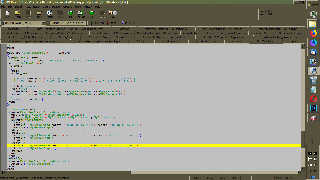
Still no success. I believe, I converted your example into my code, but
I am getting the error:
"Parse Error: No matching } in 'texture', 'texture' found instead."


And this is the code that called this macro:


box { < -1.2, 0.0, -1.1 > < -1.1, 1.0,  1.1 > texture {
MyYellowSimpleDir(z) } } // Z

box { < -0.8, 0.0, -1.1 > <  1.2, 1.0, -1.0 > texture {
MyYellowSimpleDir(x) } } // X

box { < -0.2, 0.0,  0.0 > <  0.2, 2.0,  0.1 > texture {
MyYellowSimpleDir(y) } } // Y


Do you see anything that I don't see? I admit, I am rendering in the
evening hours until I fall asleep. I am often enough over-tired.


---
Diese E-Mail wurde von AVG auf Viren geprüft.
http://www.avg.com
Post a reply to this message
Attachments:
Download 'pov-ray error.jpg' (228 KB)
Preview of image 'pov-ray error.jpg'
|
|
| |
| |
|
|
|
|
| |
| |
|
|
Sven Littkowski <I### [at] SvenLittkowskiname> wrote:
> Still no success. I believe, I converted your example into my code, but
> I am getting the error:
> "Parse Error: No matching } in 'texture', 'texture' found instead."

So then instead of

box { < -1.2, 0.0, -1.1 > < -1.1, 1.0,  1.1 > texture {
MyYellowSimpleDir(z) } } // Z

do

box { < -1.2, 0.0, -1.1 > < -1.1, 1.0,  1.1 >
MyYellowSimpleDir(z) } // Z
Post a reply to this message
|
|
| |
| |
|
|
From: Sven Littkowski
Subject: Re: INVITATION: Join the Mississippi Paddle-Wheel Steamer!
Date: 15 Apr 2018 21:44:57
Message: <5ad40019$1@news.povray.org>
|
|
|
| |
| |
|
|
Oh man, THAT was it!!! Thanks!

To declare a texture macro, is somewhat different to declare an item
macro (object)! A texture macro has no wrapping before its call.

Trust me, I could have spent many more days and weeks with this problem.
i learned something new today about the POV-Ray scene language. That
opens many doors to many new future usages...

---
Diese E-Mail wurde von AVG auf Viren geprüft.
http://www.avg.com
Post a reply to this message
|
|
| |
| |
|
|
From: Sven Littkowski
Subject: Re: INVITATION: Join the Mississippi Paddle-Wheel Steamer!
Date: 28 Apr 2018 03:59:37
Message: <5ae429e9@news.povray.org>
|
|
|
| |
| |
|
|
UPDATE

Did excessive works on many textures, more to come. In zoom, the ship
textures start finally to look remarkable.

The water area around the ship looks different because it will work with
photons. But that's still to come. Once I have a photon map, I will make
all water looking the same again.

Corrosion spots added. Dirt and paint irregularities added.
Constructional irregularities added. 1855s US flag added.


---
Diese E-Mail wurde von AVG auf Viren geprüft.
http://www.avg.com
Post a reply to this message
Attachments:
Download 'sl - mississippi paddle-wheel steamer - stern.jpg' (1053 KB)
Preview of image 'sl - mississippi paddle-wheel steamer - stern.jpg'

|
|
| |
| |
|
|
From: Stephen
Subject: Re: INVITATION: Join the Mississippi Paddle-Wheel Steamer!
Date: 3 May 2018 07:30:29
Message: <5aeaf2d5$1@news.povray.org>
|
|
|
| |
| |
|
|
On 28/04/2018 08:59, Sven Littkowski wrote:
> UPDATE
>
> Did excessive works on many textures, more to come. In zoom, the ship
> textures start finally to look remarkable.
>
> The water area around the ship looks different because it will work with
> photons. But that's still to come. Once I have a photon map, I will make
> all water looking the same again.
>
> Corrosion spots added. Dirt and paint irregularities added.
> Constructional irregularities added. 1855s US flag added.
>

This is coming along nicely.
Unique drive mechanism. :-)
I'm not too sure about the "Eye shaped pattern" on the crank linkage.

Bolts are generally in straight lines on girders. Although if space is
tight every second row can be staggered to allow spanner room.


--

Regards
     Stephen
Post a reply to this message
|
|
| |
| |
|
|
From: Alain
Subject: Re: INVITATION: Join the Mississippi Paddle-Wheel Steamer!
Date: 3 May 2018 13:45:56
Message: <5aeb4ad4@news.povray.org>
|
|
|
| |
| |
|
|
Le 18-05-03 à 07:30, Stephen a écrit :
> On 28/04/2018 08:59, Sven Littkowski wrote:
>> UPDATE
>>
>> Did excessive works on many textures, more to come. In zoom, the ship
>> textures start finally to look remarkable.
>>
>> The water area around the ship looks different because it will work with
>> photons. But that's still to come. Once I have a photon map, I will make
>> all water looking the same again.
>>
>> Corrosion spots added. Dirt and paint irregularities added.
>> Constructional irregularities added. 1855s US flag added.
>>
>
> This is coming along nicely.
> Unique drive mechanism. :-)
> I'm not too sure about the "Eye shaped pattern" on the crank linkage.
>
> Bolts are generally in straight lines on girders. Although if space is
> tight every second row can be staggered to allow spanner room.
>
>
>
The key word here is "generally". In this case, where the mechanism is
visible, and in a time when aesthetics was more of a concern, it was not
uncommon to add some extra bolts, or rivets, that where mostly for
decoration.
Post a reply to this message
|
|
| |
| |
|
|
From: Stephen
Subject: Re: INVITATION: Join the Mississippi Paddle-Wheel Steamer!
Date: 3 May 2018 14:38:34
Message: <5aeb572a$1@news.povray.org>
|
|
|
| |
| |
|
|
On 03/05/2018 18:46, Alain wrote:
> Le 18-05-03 à 07:30, Stephen a écrit :

>>
>> Bolts are generally in straight lines on girders. Although if space is
>> tight every second row can be staggered to allow spanner room.
>>
>>
>>
> The key word here is "generally". In this case, where the mechanism is
> visible, and in a time when aesthetics was more of a concern, it was not
> uncommon to add some extra bolts, or rivets, that where mostly for
> decoration.


Funnily enough, when I was writing that post. I remembered some of the
decorative wrought ironwork. I have seen in Paris.
The extra rivets were the "golden rivets", I suppose. ;-)


--

Regards
     Stephen
Post a reply to this message
|
|
| |
| |
|
|
From: clipka
Subject: Re: INVITATION: Join the Mississippi Paddle-Wheel Steamer!
Date: 4 Jun 2018 16:35:24
Message: <5b15a28c$1@news.povray.org>
|
|
|
| |
| |
|
|
Am 07.04.2018 um 07:26 schrieb Sven Littkowski:
> I went to DAZ 3D, and also to MakeHuman, and also to Poser 3D, as well
> as even to SketchUp. Nothing that can be used. I am condemned by the gods.

Update: DAZ 3D currently has clothes on sale labeled "Victorian", so
that should match the era; not sure if they work for the Americas though.
Post a reply to this message
|
|
| |
| |
|
|
From: Sven Littkowski
Subject: Re: INVITATION: Join the Mississippi Paddle-Wheel Steamer!
Date: 15 Jun 2018 21:30:21
Message: <5b24682d$1@news.povray.org>
|
|
|
| |
| |
|
|
Hi.

Yes, i saw them. They are better for English scenes. The 1850s Southern
USA had very different styles, and much more colorful, too. :-)

But big thanks anyway! It is the spirit that counts!   :-)

---
Diese E-Mail wurde von AVG auf Viren geprüft.
http://www.avg.com
Post a reply to this message
|
|
| |
| |
|
|
|
|
| |
|
|








