|
|
|
|
|
|
| |
| |
|
|
|
|
| |
| |
|
|
Hi,

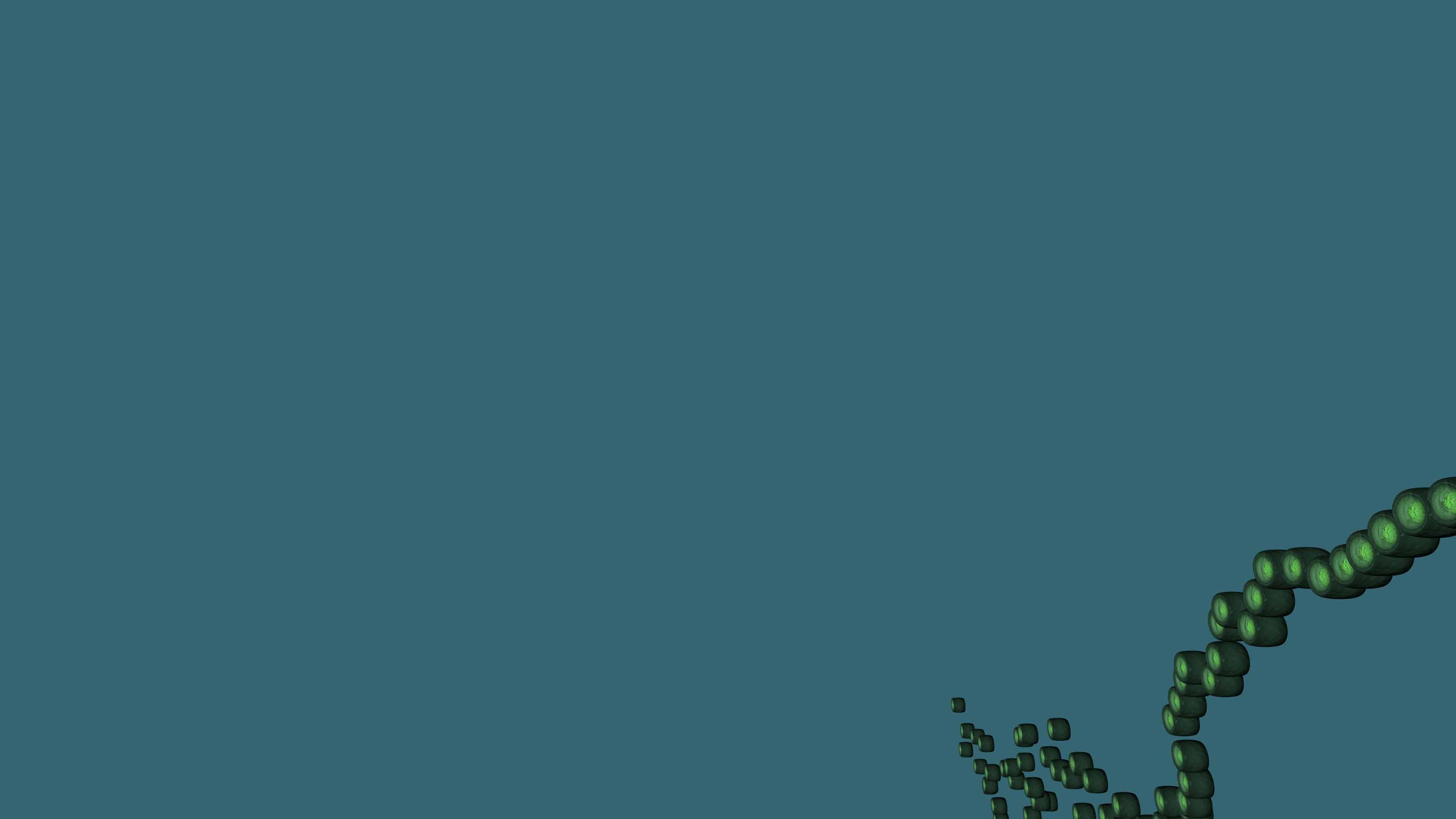
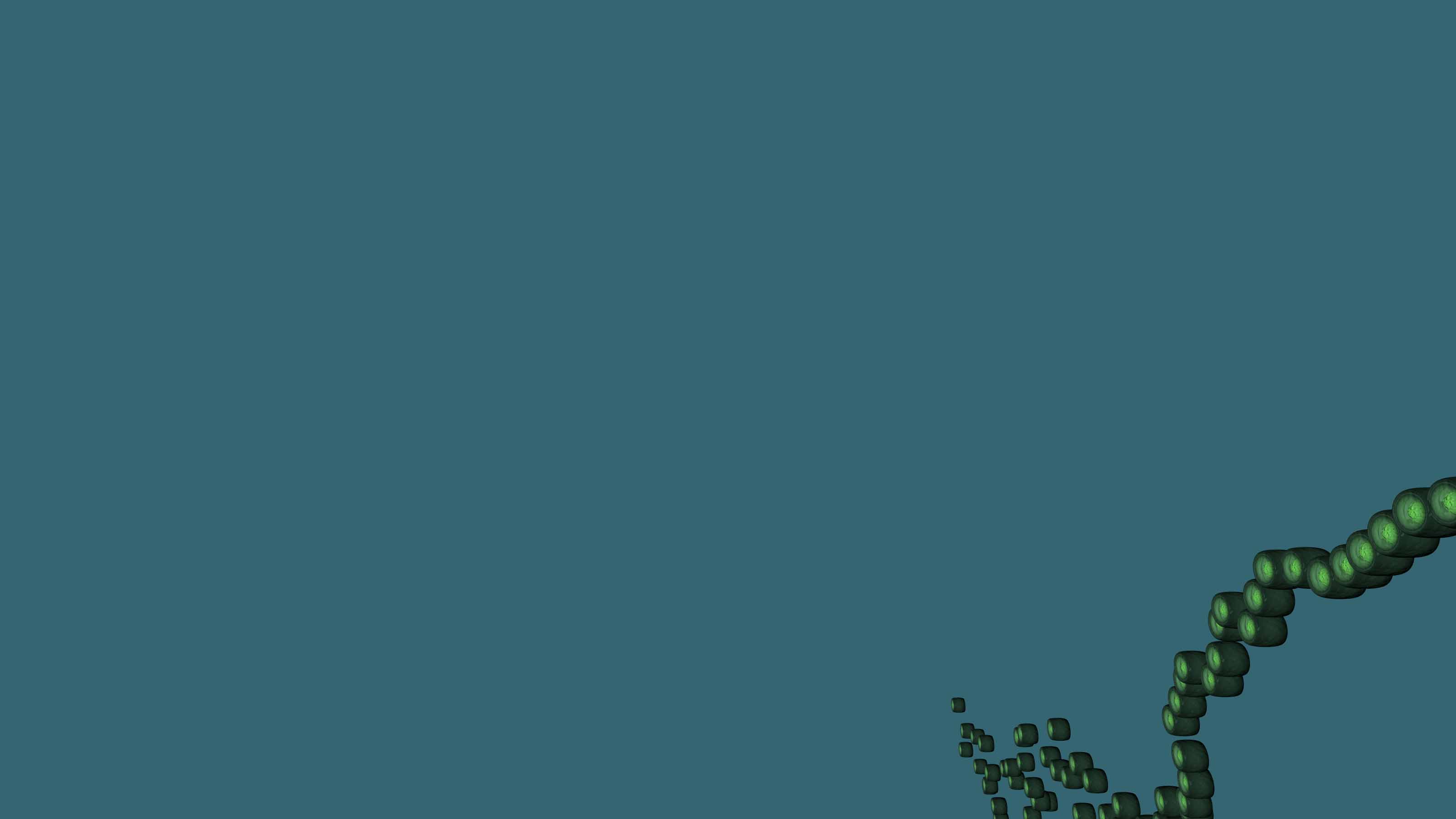
please have a look to the attached image.

I try to create a snake-alike chain of these tiny bodies, but I fail to
get them to look the way I need them to look. Ideally, each small body
is attached to each other, and the chain they create has some gentle
curves in it: a gentle bend upwards, and tiny bends towards the left and
right sides. But i fail. Heck, sometimes I even get many bodies that are
not connected at all!

Who has an idea how to implement an algorithm that is giving better results?

ENTIRE SCENE CODE
-----------------------------------------------------

#version 3.7;

#declare MyRadiosity = off;
#declare MyClouds = off;
#declare MyLight = on;
#declare MySuns = off;
#declare MyForest = off;
#declare MyPlanet = off;
#declare MyAir = off;
#declare MyTowers = off;
#declare MyBubble = on;
#declare MyBubbleTextures = off;


#declare MyNature = pigment { color rgb < 0.16863,  0.32941,  0.070588 > };


global_settings
{
 assumed_gamma 1.4
 #if(MyRadiosity=on)
  radiosity
  {
   media on
//   pretrace_start 0.08
//   pretrace_end   0.001
   count 400
//   error_bound 0.75
//   recursion_limit 1
   normal on
  }
 #end
 subsurface        {}
 adc_bailout       0.0039
 ambient_light     rgb < 0.000, 0.000, 0.000 >
 assumed_gamma     1.000
 irid_wavelength   rgb < 0.250, 0.180, 0.140 >
 max_trace_level   5
 number_of_waves   10
 noise_generator   3
 charset           ascii
}

#default
{
 finish { ambient 0.0 diffuse 1.0 }
}

//------------------------------------------------------------------------
#include "colors.inc"
#include "textures.inc"
#include "glass.inc"
#include "metals.inc"
#include "golds.inc"
#include "functions.inc"
#include "shapes.inc"
//------------------------------------------------------------------------

light_source
{
 < -3000, 1000, -3000 >
 color rgb < 0.4862745,  0.9803922,  0.6823529 >
}

//------------------------------------------------------------------------

camera
{
 location  < 0.0 , 0.0 , -10.0 >
 look_at   < 0.0 , 0.0 , 0.0 >
}

// Element ---------------------------------------------------------------

#declare Element = union
{
 union
 {
  torus
  {
   0.425, 0.075
   rotate < 0.0, 0.0, 90.0 >
   scale < 4.5, 1.125, 1.125 >
  }
  torus
  {
   0.425, 0.075
   rotate < 0.0, 0.0, 90.0 >
   translate < -0.25, 0.0, 0.0 >
  }
  torus
  {
   0.425, 0.075
   rotate < 0.0, 0.0, 90.0 >
   translate < 0.25, 0.0, 0.0 >
  }
  texture
  {
   pigment
   {
    onion
    color_map
    {
     [ 0.0 color rgb 1 ]
     [ 1.0 color rgb < 0.075,  0.0751,  0.075 > ]
    }
    rotate < 0.0, 0.0, 90.0 >
    scale 0.6000
   }
   normal
   {
    granite 0.15 scale 1.0
   }
   finish { phong 0.1 }
  }
 }

 union
 {
  cylinder { < -0.323, 0.0, 0.0 > < -0.322, 0.0, 0.0 > 0.425 }
  cylinder { <  0.323, 0.0, 0.0 > <  0.322, 0.0, 0.0 > 0.425 }
  texture
  {
   pigment
   {
    onion
    color_map
    {
     [ 0.00 color rgbt < 0.7764706,  0.8941176,  0.545098, 0.85 > ]
     [ 0.65 color rgbt < 0.7764706,  0.8941176,  0.545098, 0.85 > ]
     [ 1.00 color rgbt < 0.075,  0.0755,  0.075, 0.35 > ]
    }
    rotate < 0.0, 0.0, 90.0 >
    scale 0.52
   }
   normal
   {
    granite 0.15 scale 1.0
   }
   finish { phong 0.1 }
  }
 }
 sphere
 {
  < 0.0, 0.0, 0.0 > 0.315
  scale < 1.0, 1.0, 1.0 >
  texture
  {
   pigment
   {
    onion
    color_map
    {
     [ 0.0 color rgb < 0.5019608,  0.772549,  0.227451 > ]
     [ 1.0 color rgb < 0.5019608,  0.772549,  0.227451 > ]
    }
    rotate < 0.0, 0.0, 90.0 >
    scale 0.52
   }
   normal
   {
    granite 0.75 scale 0.5
   }
   finish { phong 0.1 }
  }
 }
}

// ---------------------------------------------------------


#macro MyOrbisiana(MyRandomizer)
 #declare MyRandomer = seed((MyRandomizer)+3);
 #declare MyLength   = int(rand(MyRandomer)*200);   // Anzahl der Glieder
 #declare MyNegative = rand(MyRandomer);
 #if(MyNegative<0.5)
  #declare Negative = -1;
 #else
  #declare Negative =  1;
 #end
 #declare MyX        = rand(MyRandomer)*04*Negative;
 #declare MyY        = rand(MyRandomer)*01*Negative;
 #declare MyZ        = rand(MyRandomer)*00*Negative;
 #declare MyPosition = 0.00;
 #declare MyElement  = 0;

 union
 {
  #while (MyElement<MyLength)
   object { Element translate < 0.0, 0.0, MyPosition > rotate < MyX,
MyY, MyZ > }
   #declare MyNegative = rand(MyRandomer);
   #if(MyNegative<0.5)
    #declare Negative = -1;
   #else
    #declare Negative =  1;
   #end
   #declare MyX        = MyX+rand(MyRandomer)*04*Negative;
   #declare MyY        = MyY+rand(MyRandomer)*01*Negative;
   #declare MyZ        = MyZ+rand(MyRandomer)*00*Negative;
   #declare MyPosition = MyPosition+0.925;
   #declare MyElement  = MyElement+1;
  #end
  no_shadow
 }
#end

// Water -----------------------------------------------------------------

background { color rgb < 0.1843137,  0.4666667,  0.5490196 > * 0.5 }

#declare ThisRandom   = seed (now);
#declare ThisNegative = rand(ThisRandom);
#if(ThisNegative<0.5)
 #declare ANegative   = -1;
#else
 #declare ANegative   =  1;
#end
#declare ThisX        = rand(ThisRandom)*02*ANegative;
#declare ThisY        = rand(ThisRandom)*05*ANegative;
#declare ThisZ        = rand(ThisRandom)*02*ANegative;
#declare ThisPX       = rand(ThisRandom)*3*ANegative;
#declare ThisPY       = rand(ThisRandom)*3*ANegative;
#declare ThisPZ       = rand(ThisRandom)*3*ANegative;
#declare ThisLife     = int(rand(ThisRandom)*50);   // Anzahl der
Orbisianas
#declare ThisLife     = 1;   // Anzahl der Orbisianas - only one for now
#declare ALife        = 0;

#while (ALife<ThisLife)
 #declare MyRandom     = int(rand(ThisRandom)*1000);
 object { MyOrbisiana(MyRandom) scale 0.5 rotate < MyX, MyY, MyZ >
translate < 7.0+ThisPX, ThisPY, ThisPZ > }
 #declare ThisX        = ThisX+(rand(ThisRandom)*02*ANegative);
 #declare ThisY        = ThisY+(rand(ThisRandom)*05*ANegative);
 #declare ThisZ        = ThisZ+(rand(ThisRandom)*02*ANegative);
 #declare ThisPX       = ThisPX+(rand(ThisRandom)*3*ANegative);
 #declare ThisPY       = ThisPY+(rand(ThisRandom)*3*ANegative);
 #declare ThisPZ       = ThisPZ+(rand(ThisRandom)*3*ANegative);
 #declare ALife        = ALife+1;
#end


---
Diese E-Mail wurde von AVG auf Viren geprüft.
http://www.avg.com
Post a reply to this message
Attachments:
Download 'sl - uwe-m.jpg' (41 KB)
Preview of image 'sl - uwe-m.jpg'
|
|
| |
| |
|
|
|
|
| |
| |
|
|
On 2/18/2018 10:38 PM, Sven Littkowski wrote:
>     #declare MyX        = MyX+rand(MyRandomer)*04*Negative;
>     #declare MyY        = MyY+rand(MyRandomer)*01*Negative;
>     #declare MyZ        = MyZ+rand(MyRandomer)*00*Negative;

Instead of the above, I think you should use a radius and rotation by an
angle.


#declare MyAngle    = rand(MyRandomer)*2*pi;
#declare MyX        = MyX+MyRadius*cos(MyAngle);
#declare MyY        = MyY+MyRadius*sin(MyAngle);
#declare MyZ        = MyZ;


Or something similar.


Mike
Post a reply to this message
|
|
| |
| |
|
|
|
|
| |
| |
|
|
On 18.02.2018 23:18, Mike Horvath wrote:
> #declare MyAngle    = rand(MyRandomer)*2*pi;
> #declare MyX        = MyX+MyRadius*cos(MyAngle);
> #declare MyY        = MyY+MyRadius*sin(MyAngle);
> #declare MyZ        = MyZ;


Thanks. I want to give a try. But for now, "MyRadius" causes problems
because it has nowhere initialized. With what value do you initialize it?


---
Diese E-Mail wurde von AVG auf Viren geprüft.
http://www.avg.com
Post a reply to this message
|
|
| |
| |
|
|
|
|
| |
| |
|
|
On 2/19/2018 8:13 PM, Sven Littkowski wrote:
> On 18.02.2018 23:18, Mike Horvath wrote:
>> #declare MyAngle    = rand(MyRandomer)*2*pi;
>> #declare MyX        = MyX+MyRadius*cos(MyAngle);
>> #declare MyY        = MyY+MyRadius*sin(MyAngle);
>> #declare MyZ        = MyZ;
>
>
>
> Thanks. I want to give a try. But for now, "MyRadius" causes problems
> because it has nowhere initialized. With what value do you initialize it?
>
>
>
> ---
> Diese E-Mail wurde von AVG auf Viren geprüft.
> http://www.avg.com
>


Something like this:

#declare MyRadius    = 4;

Change it to whatever size you need.
Post a reply to this message
|
|
| |
| |
|
|
|
|
| |
| |
|
|
Thanks again!

I was rendering the scene, but the result is still not good - often, the
individual bodies are not touching each other.

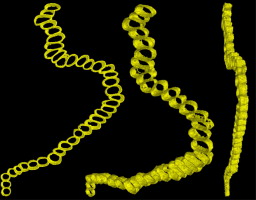
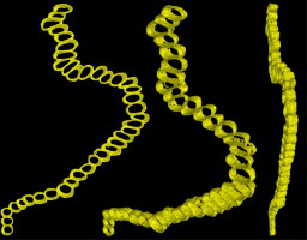
See the attached image, that is what I try to achieve. It is a very,
very ancient life form, that lived long before the Cambrium in our oceans.


---
Diese E-Mail wurde von AVG auf Viren geprüft.
http://www.avg.com
Post a reply to this message
Attachments:
Download 'orbisiana.jpg' (18 KB)
Preview of image 'orbisiana.jpg'
|
|
| |
| |
|
|
|
|
| |
| |
|
|
Thanks again!

I was rendering the scene, but the result is still not good - often, the
individual bodies are not touching each other.

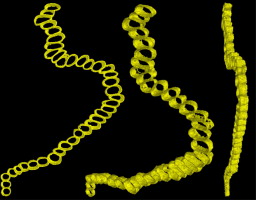
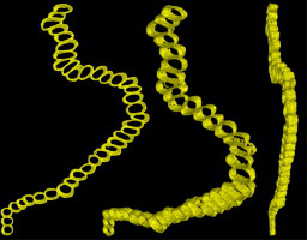
See the attached image, that is what I try to achieve. It is a very,
very ancient life form, that lived long before the Cambrium in our oceans.

------------------------------

#version 3.7;

#declare MyRadiosity = off;
#declare MyClouds = off;
#declare MyLight = on;
#declare MySuns = off;
#declare MyForest = off;
#declare MyPlanet = off;
#declare MyAir = off;
#declare MyTowers = off;
#declare MyBubble = on;
#declare MyBubbleTextures = off;


#declare MyNature = pigment { color rgb < 0.16863,  0.32941,  0.070588 >
};


global_settings
{
 assumed_gamma 1.4
 #if(MyRadiosity=on)
  radiosity
  {
   media on
//   pretrace_start 0.08
//   pretrace_end   0.001
   count 400
//   error_bound 0.75
//   recursion_limit 1
   normal on
  }
 #end
 subsurface        {}
 adc_bailout       0.0039
 ambient_light     rgb < 0.000, 0.000, 0.000 >
 assumed_gamma     1.000
 irid_wavelength   rgb < 0.250, 0.180, 0.140 >
 max_trace_level   5
 number_of_waves   10
 noise_generator   3
 charset           ascii
}

#default
{
 finish { ambient 0.0 diffuse 1.0 }
}

//------------------------------------------------------------------------
#include "colors.inc"
#include "textures.inc"
#include "glass.inc"
#include "metals.inc"
#include "golds.inc"
#include "functions.inc"
#include "shapes.inc"
//------------------------------------------------------------------------

light_source
{
 < -3000, 1000, -3000 >
 color rgb < 0.4862745,  0.9803922,  0.6823529 >
}

//------------------------------------------------------------------------

camera
{
 location  < 0.0 , 0.0 , -10.0 >
 look_at   < 0.0 , 0.0 , 0.0 >
}

// Element ---------------------------------------------------------------

#declare Element = union
{
 union
 {
  torus
  {
   0.425, 0.075
   rotate < 0.0, 0.0, 90.0 >
   scale < 4.5, 1.125, 1.125 >
  }
  torus
  {
   0.425, 0.075
   rotate < 0.0, 0.0, 90.0 >
   translate < -0.25, 0.0, 0.0 >
  }
  torus
  {
   0.425, 0.075
   rotate < 0.0, 0.0, 90.0 >
   translate < 0.25, 0.0, 0.0 >
  }
  texture
  {
   pigment
   {
    onion
    color_map
    {
     [ 0.0 color rgb 1 ]
     [ 1.0 color rgb < 0.075,  0.0751,  0.075 > ]
    }
    rotate < 0.0, 0.0, 90.0 >
    scale 0.6000
   }
   normal
   {
    granite 0.15 scale 1.0
   }
   finish { phong 0.1 }
  }
 }

 union
 {
  cylinder { < -0.323, 0.0, 0.0 > < -0.322, 0.0, 0.0 > 0.425 }
  cylinder { <  0.323, 0.0, 0.0 > <  0.322, 0.0, 0.0 > 0.425 }
  texture
  {
   pigment
   {
    onion
    color_map
    {
     [ 0.00 color rgbt < 0.7764706,  0.8941176,  0.545098, 0.85 > ]
     [ 0.65 color rgbt < 0.7764706,  0.8941176,  0.545098, 0.85 > ]
     [ 1.00 color rgbt < 0.075,  0.0755,  0.075, 0.35 > ]
    }
    rotate < 0.0, 0.0, 90.0 >
    scale 0.52
   }
   normal
   {
    granite 0.15 scale 1.0
   }
   finish { phong 0.1 }
  }
 }
 sphere
 {
  < 0.0, 0.0, 0.0 > 0.315
  scale < 1.0, 1.0, 1.0 >
  texture
  {
   pigment
   {
    onion
    color_map
    {
     [ 0.0 color rgb < 0.5019608,  0.772549,  0.227451 > ]
     [ 1.0 color rgb < 0.5019608,  0.772549,  0.227451 > ]
    }
    rotate < 0.0, 0.0, 90.0 >
    scale 0.52
   }
   normal
   {
    granite 0.75 scale 0.5
   }
   finish { phong 0.1 }
  }
 }
}

// ---------------------------------------------------------


#macro MyOrbisiana(MyRandomizer)
 #declare MyRandomer = seed((MyRandomizer)+3);
 #declare MyLength   = int(rand(MyRandomer)*200);   // Anzahl der Glieder

 #declare MyNegative = rand(MyRandomer);
 #if(MyNegative<0.5)
  #declare Negative = -1;
 #else
  #declare Negative =  1;
 #end
 #declare MyX = 0;
 #declare MyY = 0;
 #declare MyZ = 0;
 #declare MyRadius    = 4;
 #declare MyAngle    = rand(MyRandomer)*2*pi;
 #declare MyX        = MyX+MyRadius*cos(MyAngle);
 #declare MyY        = MyY+MyRadius*sin(MyAngle);
 #declare MyZ        = MyZ;
 #declare MyPosition = 0.00;
 #declare MyElement  = 0;

 union
 {
  #while (MyElement<MyLength)
   object { Element translate < 0.0, 0.0, MyPosition > rotate < MyX,
MyY, MyZ > }
   #declare MyNegative = rand(MyRandomer);
   #if(MyNegative<0.5)
    #declare Negative = -1;
   #else
    #declare Negative =  1;
   #end
   #declare MyAngle    = rand(MyRandomer)*2*pi;
   #declare MyX        = MyX+MyRadius*cos(MyAngle);
   #declare MyY        = MyY+MyRadius*sin(MyAngle);
   #declare MyZ        = MyZ;
   #declare MyPosition = MyPosition+0.925;
   #declare MyElement  = MyElement+1;
  #end
  no_shadow
 }
#end

// Water -----------------------------------------------------------------

background { color rgb < 0.1843137,  0.4666667,  0.5490196 > * 0.5 }

#declare ThisRandom   = seed (now * 24*60*60);
#declare ThisNegative = rand(ThisRandom);
#if(ThisNegative<0.5)
 #declare ANegative   = -1;
#else
 #declare ANegative   =  1;
#end
#declare ThisX        = rand(ThisRandom)*02*ANegative;
#declare ThisY        = rand(ThisRandom)*05*ANegative;
#declare ThisZ        = rand(ThisRandom)*02*ANegative;
#declare ThisPX       = rand(ThisRandom)*3*ANegative;
#declare ThisPY       = rand(ThisRandom)*3*ANegative;
#declare ThisPZ       = rand(ThisRandom)*3*ANegative;
#declare ThisLife     = int(rand(ThisRandom)*50);   // Anzahl der
Orbisianas
#declare ThisLife     = 1;   // Anzahl der Orbisianas
#declare ALife        = 0;

#while (ALife<ThisLife)
 #declare MyRandom     = int(rand(ThisRandom)*1000);
 object { MyOrbisiana(MyRandom) scale 0.5 rotate < MyX, MyY, MyZ >
translate < 7.0+ThisPX, ThisPY, ThisPZ > }
 #declare ThisX        = ThisX+(rand(ThisRandom)*02*ANegative);
 #declare ThisY        = ThisY+(rand(ThisRandom)*05*ANegative);
 #declare ThisZ        = ThisZ+(rand(ThisRandom)*02*ANegative);
 #declare ThisPX       = ThisPX+(rand(ThisRandom)*3*ANegative);
 #declare ThisPY       = ThisPY+(rand(ThisRandom)*3*ANegative);
 #declare ThisPZ       = ThisPZ+(rand(ThisRandom)*3*ANegative);
 #declare ALife        = ALife+1;
#end


---
Diese E-Mail wurde von AVG auf Viren geprüft.
http://www.avg.com
Post a reply to this message
Attachments:
Download 'orbisiana.jpg' (18 KB)
Preview of image 'orbisiana.jpg'
|
|
| |
| |
|
|
|
|
| |
| |
|
|
Sven Littkowski <I### [at] SvenLittkowski name> wrote:
> I was rendering the scene, but the result is still not good - often, the
> individual bodies are not touching each other.
If you need your nice little "cells" touching each other, why not using
equidistant splines?
I made a quick example (source is in pbs-f).
Original code is from ABX - Place and orient objects along spline -
http://news.povray.org/povray.general/message/%3Cttoenucoq6fcgkun57la24s9ia4ij5o573%404ax.com%3E/#%3Cttoenucoq6fcgkun57
la24s9ia4ij5o573%404ax.com%3E
..
Of course you would have to generate some semirandom splines...
Norbert name> wrote:
> I was rendering the scene, but the result is still not good - often, the
> individual bodies are not touching each other.
If you need your nice little "cells" touching each other, why not using
equidistant splines?
I made a quick example (source is in pbs-f).
Original code is from ABX - Place and orient objects along spline -
http://news.povray.org/povray.general/message/%3Cttoenucoq6fcgkun57la24s9ia4ij5o573%404ax.com%3E/#%3Cttoenucoq6fcgkun57
la24s9ia4ij5o573%404ax.com%3E
..
Of course you would have to generate some semirandom splines...
Norbert
Post a reply to this message
Attachments:
Download 'equidistant spline_example.jpg' (125 KB)
Preview of image 'equidistant spline_example.jpg'

|
|
| |
| |
|
|
|
|
| |
| |
|
|
Man-oh-man, that looks quite cool! Yes, this is getting close to what I
need!

I need them to touch each other, but I guess, this can be done by
altering your code a little bit. I also need them to curve a tiny bit
towards both side, but that, too, can surely done by tweaking your code.

That life form, by the way, is called Orbisiana.


---
Diese E-Mail wurde von AVG auf Viren geprüft.
http://www.avg.com
Post a reply to this message
|
|
| |
| |
|
|
|
|
| |
| |
|
|
On 2/20/2018 10:10 PM, Sven Littkowski wrote:
> That life form, by the way, is called Orbisiana.
>

Actually, what you see in the image is a colony of Orbisiana.

An individual Orbisiana has a barrel like shape.


Mike
Post a reply to this message
|
|
| |
| |
|
|
|
|
| |
| |
|
|
Le 18-02-21 à 02:08, Mike Horvath a écrit :
> On 2/20/2018 10:10 PM, Sven Littkowski wrote:
>> That life form, by the way, is called Orbisiana.
>>
>
> Actually, what you see in the image is a colony of Orbisiana.
>
> An individual Orbisiana has a barrel like shape.
>
>
> Mike

Those are very old life forms, almost proto-life, from before the
cellular nuclei appeared. I also think they mostly did not contain any
DNA nor RNA.
Post a reply to this message
|
|
| |
| |
|
|
|
|
| |
| |
|
|
"Norbert Kern" <nor### [at] t-onlinede> wrote:
>
> If you need your nice little "cells" touching each other, why not using
> equidistant splines?
>
> I made a quick example (source is in pbs-f).

Thanks for that. Making such multi-object equidistant spline shapes was never
easy for me; I did manage to do it once-- with much work-- for a long-ago scene.
But I lost it years ago :-(
Post a reply to this message
|
|
| |
| |
|
|
|
|
| |
| |
|
|
Here is my new problem, and it has nothing to do with POV-Ray: the BLACK
SCREEN.

I am using an Intel i3 processor, and the Intel HD Graphics driver. That
combination is known to cause the Black Screen during graphical works.
In my case, i tried to do a simple animation with the modified scene,
but get always the Black Screen after rendering the 4th or 5th frame. I
don't think, that there is any solution to this, for my computer.

I have to ask anyone of you, if you could render 100 frames for me, if
you can forgive me that request.

-------------------------------------

Output_File_Type=n Quality=12 +KI0.0 +KF1.0 +KFI1 +KFF100

800x450
AA 0.3

-------------------------------------

// ABX  Place and orient objects along spline
http://news.povray.org/povray.general/message/%3Cttoenucoq6fcgkun57la24s9ia4ij5o573%404ax.com%3E/#%3Cttoenucoq6fcgkun57la24s9ia4ij5o573%404ax.com%3E

#version 3.7;

#declare RAD = 4;

global_settings
{
 #declare a_g = 1;
 assumed_gamma a_g
 max_trace_level 5
 subsurface {radiosity on samples 200,200}
 noise_generator 2
 #if(RAD > 0)
  radiosity
  {
   pretrace_start 0.08
   pretrace_end   0.04/RAD
   count 60*RAD
   nearest_count min (20, RAD)
   error_bound 2/RAD
   low_error_factor 0.5
   recursion_limit 1
   gray_threshold 0
   minimum_reuse 0.015
   brightness 1
   adc_bailout 0.005
   normal on
   media off
   always_sample off
  }
 #end
}

camera
{
 angle 31*image_width/image_height*0.75
 location  < 0, 0, -2 >
 right     x*image_width/image_height
 look_at   < 0, 0.05, 0 >
}

#include "transforms.inc"
#include "shapes.inc"
#include "strings.inc"

#macro Time_To_Length_Converter (Spline, Min, Max, Accuracy)

#local Conversion = function
{
 spline
 {
  #local Last   = Spline (Min);
  #local Length = 0;
  #local C      = Min;
  #while (C <= Max)
   #local C      = min (C, Max);
   #local Point  = Spline (C);
   #local Length = Length+vlength (Point-(Last*1.0003));
   #local Last   = Point;
   C , < 1, 0, 0 >*Length
   #local C      = C+Accuracy;
  #end
 }
}

function (T)
 {
  Conversion (T).x
 }
#end

#macro Spline_With_Linear_Movement (Spline, Min, Max, Accuracy)
 spline
 {
  #local Last   = Spline(Min);
  #local Length = 0;
  #local C      = Min;
  #while (C <= Max)
   #local C      = min (C, Max);
   #local Point  = Spline (C);
   #local Length = Length+vlength (Point-Last);
   #local Last   = Point;
   Length, Point+<0,0,0>
   #local C      = C+Accuracy;
  #end
 }
#end

#declare fac  = 0.5;
#declare rs   = seed (2338);
#declare sca  = rand (rs);
#declare sca2 = 0.5;

#declare MySpline = spline
{
 cubic_spline
 -0.125,<sca*-1,0,0*sca2>+<rand (rs),0.5*rand (rs),rand (rs)>*fac,
 0,     <sca*0,0,1*sca2>+<rand (rs),0.5*rand (rs),rand (rs)>*fac,
 0.125, <sca*1,0,0*sca2>+<rand (rs),0.5*rand (rs),rand (rs)>*fac,
 0.25,  <sca*2,0,-1*sca2>+<rand (rs),0.5*rand (rs),rand (rs)>*fac,
 0.375, <sca*3,0,0*sca2>+<rand (rs),0.5*rand (rs),rand (rs)>*fac,
 0.5,   <sca*4,0,1*sca2>+<rand (rs),0.5*rand (rs),rand (rs)>*fac,
 0.625, <sca*5,0,0*sca2>+<rand (rs),0.5*rand (rs),rand (rs)>*fac
 0.75,  <sca*6,0,-1*sca2>+<rand (rs),0.5*rand (rs),rand (rs)>*fac,
 0.875, <sca*7,0,0*sca2>+<rand (rs),0.5*rand (rs),rand (rs)>*fac,
 1,     <sca*8,0,1*sca2>+<rand (rs),0.5*rand (rs),rand (rs)>*fac,
 1.125, <sca*9,0,0*sca2>+<rand (rs),0.5*rand (rs),rand (rs)>*fac
}

#declare MySplineLinear   = Spline_With_Linear_Movement (MySpline, 0, 1,
0.001);
#declare f_MySplineLength = Time_To_Length_Converter (MySpline, 0, 1,
0.001);
#declare MySplineLength   = f_MySplineLength (1);

#declare MyObject = union
{
 union
 {
  torus
  {
   0.425, 0.075
   rotate < 0.0, 0.0, 90.0 >
   scale < 4.5, 1.125, 1.125 >
  }
  torus
  {
   0.425, 0.075
   rotate < 0.0, 0.0, 90.0 >
   translate < -0.25, 0.0, 0.0 >
  }
  torus
  {
   0.425, 0.075
   rotate < 0.0, 0.0, 90.0 >
   translate < 0.25, 0.0, 0.0 >
  }
  texture
  {
   pigment
   {
    onion
    color_map
    {
     [ 0 color rgb 1 ]
     [ 1 color rgb < 0.075, 0.0751, 0.075 > ]
    }
    rotate < 0, 0, 90 >
    scale 0.6
   }
   normal
   {
    granite 0.15
    scale 1
   }
   finish { phong 0.1 }
  }
 }
 union
 {
  cylinder { < -0.323, 0, 0 >, < -0.322, 0, 0 >, 0.425 }
  cylinder { <  0.323, 0, 0 >, <  0.322, 0, 0 >, 0.425 }
  texture
  {
   pigment
   {
    onion
    color_map
    {
     [ 0      rgbt < 0.7764706, 0.8941176, 0.545098, 0.85 > ]
     [ 0.65   rgbt < 0.7764706, 0.8941176, 0.545098, 0.85 > ]
     [ 1      rgbt < 0.075,     0.0755,    0.075,    0.35 > ]
    }
    rotate <0,0,90>
    scale 0.52
   }
   normal
   {
    granite 0.15
    scale 1
   }
   finish { phong 0.1 }
  }
 }
 sphere
 {
  < 0, 0, 0 >, 0.315
  scale < 1, 1, 1 >
  texture
  {
   pigment
   {
    onion
    color_map
    {
     [ 0      rgb < 0.5019608, 0.772549, 0.227451 >*0.9 ]
     [ 1      rgb < 0.5019608, 0.772549, 0.227451 >*1.1 ]
    }
    rotate <0,0,90>
    scale 0.52
   }
   normal
   {
    granite 0.75
    scale 0.5
   }
   finish { phong 0.1 ambient 0.5 }
  }
 }
 scale 0.27
 rotate z*90
}

#declare Step = MySplineLength*0.05;

#declare All = union
{
 #declare Count = 0;
 #while (Count <= MySplineLength-Step)
  object
  {
   MyObject
   pigment { color rgb < 1, 0.3, 0.7 > }
   finish
   {
    specular albedo 1
    metallic
    roughness 0.025
    diffuse 0.4
    brilliance 2
    reflection {0, 1 metallic}
    conserve_energy
    irid { 0.35 thickness 0.1 turbulence 0.5 }
    ambient 0
   }
   Spline_Trans (MySplineLinear, Count, y, 0.1, 0.1)
  }
  #declare Count = Count+Step;
 #end
 rotate x*90
 rotate < 0.0, (clock*360), 0.0 >
}

object
{
 Center_Object (All, 1)
 translate z*5
}

sphere
{
 0, 1000
 pigment
 {
  image_map
  {
   hdr "kitchen_probe2.hdr"
   gamma 2.2
   map_type 1
   interpolate 2
  }
 }
 finish {emission rgb 0.05}
 no_image
}

background
{
 color rgb < 0.1882353,  0.2705882,  0.3294118 >*0.1
}

---
Diese E-Mail wurde von AVG auf Viren geprüft.
http://www.avg.com
Post a reply to this message
|
|
| |
| |
|
|
|
|
| |
| |
|
|
Sven Littkowski <I### [at] SvenLittkowskiname> wrote:
> Here is my new problem, and it has nothing to do with POV-Ray: the BLACK
> SCREEN.
>
> I am using an Intel i3 processor, and the Intel HD Graphics driver. That
> combination is known to cause the Black Screen during graphical works.
> In my case, i tried to do a simple animation with the modified scene,
> but get always the Black Screen after rendering the 4th or 5th frame. I
> don't think, that there is any solution to this, for my computer.
>
> I have to ask anyone of you, if you could render 100 frames for me, if
> you can forgive me that request.


No problem,

I do it for you. But where can I upload the results?

Norbert
Post a reply to this message
|
|
| |
| |
|
|
|
|
| |
| |
|
|
"Norbert Kern" <nor### [at] t-onlinede> wrote:

> No problem,
>
> I do it for you. But where can I upload the results?
>
> Norbert


Nevrmind,

I uploaded the pics to pbs-f.

Norbert
Post a reply to this message
|
|
| |
| |
|
|
|
|
| |
| |
|
|
On 22.02.2018 18:25, Norbert Kern wrote:
> "Norbert Kern" <nor### [at] t-onlinede> wrote:
>
>> No problem,
>>
>> I do it for you. But where can I upload the results?
>>
>> Norbert
>
>
> Nevrmind,
>
> I uploaded the pics to pbs-f.
>
> Norbert
>
>
>
>
>
Hmmm, best to send it by e-mail. Saved inside a ZIP or RAR file.

i [ AAATTT ] SvenLittkowski [ DDDOOOTTT ] name

---
Diese E-Mail wurde von AVG auf Viren geprüft.
http://www.avg.com
Post a reply to this message
|
|
| |
| |
|
|
|
|
| |
| |
|
|
Got the 2 files, big thanks!

---
Diese E-Mail wurde von AVG auf Viren geprüft.
http://www.avg.com
Post a reply to this message
|
|
| |
| |
|
|
|
|
| |
| |
|
|
Okay, I was reading through the source code of this scene. This
"Spline_Trans" is new to me.

Is there any way to change the spline shape itself by random factors? At
the moment, it is like an "M", but I don't mind variations between "U"
and "M".

Each of these chains resembles a colony of Orbisiana, but based on the
water current, each chain had different angles.

I tried with changing the SEED, but all that does is to shorten or
stretch that given "M" shape. And when stretched, there are even wide
distances between each body.

One update: I made this change to the scene:

   #local Length = Length+vlength (Point-(Last*1.0003));

Before it was:
   #local Length = Length+vlength (Point-Last);

---
Diese E-Mail wurde von AVG auf Viren geprüft.
http://www.avg.com
Post a reply to this message
|
|
| |
| |
|
|
|
|
| |
|
|