|
|
|
|
|
|
| |
| |
|
|
|
|
| |
| |
|
|
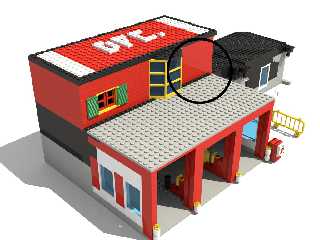
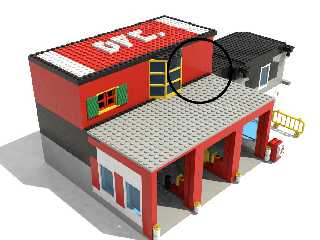
I still don't understand how I'm supposed to achieve the blurred
reflections possible in UberPOV by just using a little focal blur.
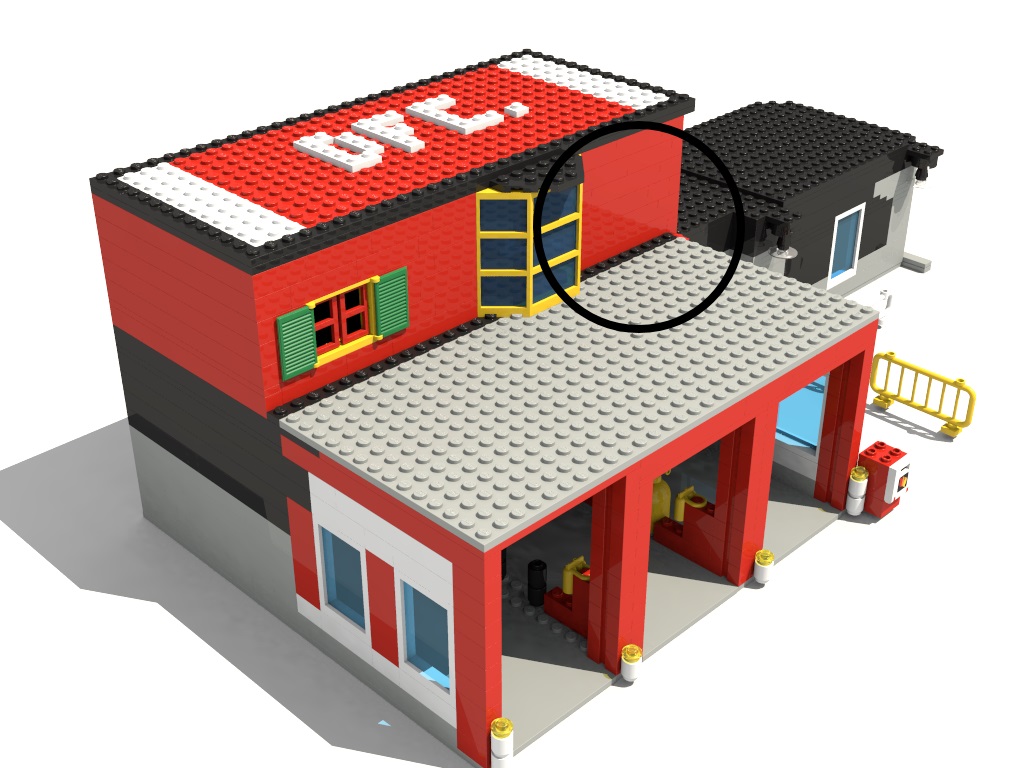
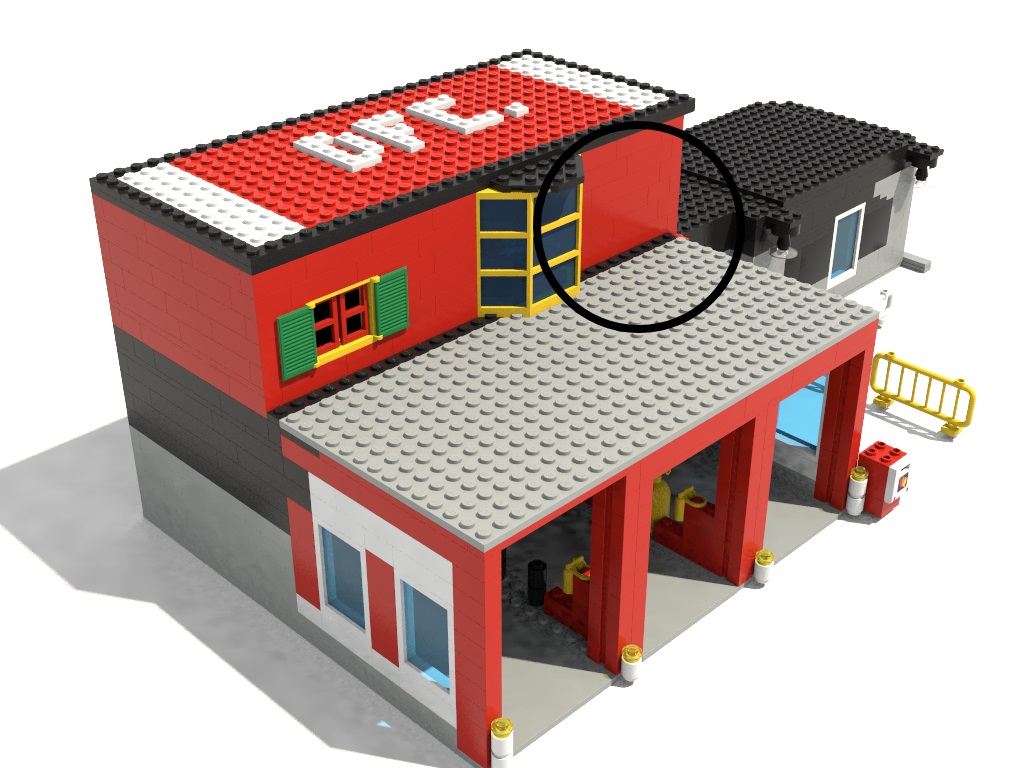
Compare the two attached images - especially the reflections in the
circled parts.


Mike
Post a reply to this message
Attachments:
Download 'building_007_firecompany_reflection_01.jpg' (197 KB)
Download 'building_007_firecompany_reflection_02.jpg' (200 KB)
Preview of image 'building_007_firecompany_reflection_01.jpg'
Preview of image 'building_007_firecompany_reflection_02.jpg'
|
|
| |
| |
|
|
|
|
| |
| |
|
|
Am 12.02.2018 um 14:08 schrieb Mike Horvath:
> I still don't understand how I'm supposed to achieve the blurred
> reflections possible in UberPOV by just using a little focal blur.
> Compare the two attached images - especially the reflections in the
> circled parts.

Focal blur is just part of the equation.

You need:

(1) A way to randomize the reflection. A `normal` statement with a very
small scale does nicely.

(2) A way to force POV-Ray to shoot a high number of rays per pixel
where the randomized reflection is. A small bit of focal blur (with high
quality settings) does nicely.

Together this gives you nice blurred reflections at a (hopefully)
reasonable speed.
Post a reply to this message
|
|
| |
| |
|
|
|
|
| |
| |
|
|
On 2/12/2018 1:21 PM, clipka wrote:
> Am 12.02.2018 um 14:08 schrieb Mike Horvath:
>> I still don't understand how I'm supposed to achieve the blurred
>> reflections possible in UberPOV by just using a little focal blur.
>> Compare the two attached images - especially the reflections in the
>> circled parts.
>
> Focal blur is just part of the equation.
>
> You need:
>
> (1) A way to randomize the reflection. A `normal` statement with a very
> small scale does nicely.
>
> (2) A way to force POV-Ray to shoot a high number of rays per pixel
> where the randomized reflection is. A small bit of focal blur (with high
> quality settings) does nicely.
>
> Together this gives you nice blurred reflections at a (hopefully)
> reasonable speed.
>

Is this random normal good?


#declare BlurAmount = 0.2*2; // Amount of blurring, double BlurAmount
since it's used in an average
#macro BlurredReflectionRandNormals(InPigment, InFinish, InNormal)
//	texture
//	{
		#declare S = seed(0);
		pigment { InPigment }
		finish { InFinish }
		normal
		{
			average
			normal_map
			{
				[1 bumps BlurAmount translate <rand(S),rand(S),rand(S)>*100 scale 0.001]
				[1 InNormal]
			}
		}
//	}
#end
Post a reply to this message
|
|
| |
| |
|
|
|
|
| |
| |
|
|
Am 12.02.2018 um 22:27 schrieb Mike Horvath:

>> You need:
>>
>> (1) A way to randomize the reflection. A `normal` statement with a very
>> small scale does nicely.
>>
>> (2) A way to force POV-Ray to shoot a high number of rays per pixel
>> where the randomized reflection is. A small bit of focal blur (with high
>> quality settings) does nicely.
>>
>> Together this gives you nice blurred reflections at a (hopefully)
>> reasonable speed.
>>
>
> Is this random normal good?

It should do the job. Note that since you're only using one copy of the
bumps normal, there's no need to translate the texture by a random amount.

Also, I'm not sure whether the average normal_map construct will give
you the desired result, or whether you should instead use a sequence of
`normal` statements. See tutorial section 2.3.5.2.2, "Blending Normals".
Post a reply to this message
|
|
| |
| |
|
|
|
|
| |
| |
|
|
On 2/12/2018 5:05 PM, clipka wrote:
> Am 12.02.2018 um 22:27 schrieb Mike Horvath:
>
>>> You need:
>>>
>>> (1) A way to randomize the reflection. A `normal` statement with a very
>>> small scale does nicely.
>>>
>>> (2) A way to force POV-Ray to shoot a high number of rays per pixel
>>> where the randomized reflection is. A small bit of focal blur (with high
>>> quality settings) does nicely.
>>>
>>> Together this gives you nice blurred reflections at a (hopefully)
>>> reasonable speed.
>>>
>>
>> Is this random normal good?
>
> It should do the job. Note that since you're only using one copy of the
> bumps normal, there's no need to translate the texture by a random amount.
>
> Also, I'm not sure whether the average normal_map construct will give
> you the desired result, or whether you should instead use a sequence of
> `normal` statements. See tutorial section 2.3.5.2.2, "Blending Normals".
>

Very nice, thank you.


Mike
Post a reply to this message
|
|
| |
| |
|
|
|
|
| |
| |
|
|
On 2/12/2018 5:05 PM, clipka wrote:
> Am 12.02.2018 um 22:27 schrieb Mike Horvath:
>
>>> You need:
>>>
>>> (1) A way to randomize the reflection. A `normal` statement with a very
>>> small scale does nicely.
>>>
>>> (2) A way to force POV-Ray to shoot a high number of rays per pixel
>>> where the randomized reflection is. A small bit of focal blur (with high
>>> quality settings) does nicely.
>>>
>>> Together this gives you nice blurred reflections at a (hopefully)
>>> reasonable speed.
>>>
>>
>> Is this random normal good?
>
> It should do the job. Note that since you're only using one copy of the
> bumps normal, there's no need to translate the texture by a random amount.
>
> Also, I'm not sure whether the average normal_map construct will give
> you the desired result, or whether you should instead use a sequence of
> `normal` statements. See tutorial section 2.3.5.2.2, "Blending Normals".
>

How do I control the amount of blurring? In my scene the textures are
maybe a little too blurred.


Mike
Post a reply to this message
|
|
| |
| |
|
|
|
|
| |
| |
|
|
Am 13.02.2018 um 06:12 schrieb Mike Horvath:

> How do I control the amount of blurring? In my scene the textures are
> maybe a little too blurred.

Reducing `BlurAmount` in your code should reduce the blurriness of the
reflections.

Reducing the camera's `aperture` setting should reduce any overall
blurriness of the image.
Post a reply to this message
|
|
| |
| |
|
|
|
|
| |
| |
|
|
Le 18-02-12 à 16:27, Mike Horvath a écrit :
> On 2/12/2018 1:21 PM, clipka wrote:
>> Am 12.02.2018 um 14:08 schrieb Mike Horvath:
>>> I still don't understand how I'm supposed to achieve the blurred
>>> reflections possible in UberPOV by just using a little focal blur.
>>> Compare the two attached images - especially the reflections in the
>>> circled parts.
>>
>> Focal blur is just part of the equation.
>>
>> You need:
>>
>> (1) A way to randomize the reflection. A `normal` statement with a very
>> small scale does nicely.
>>
>> (2) A way to force POV-Ray to shoot a high number of rays per pixel
>> where the randomized reflection is. A small bit of focal blur (with high
>> quality settings) does nicely.
>>
>> Together this gives you nice blurred reflections at a (hopefully)
>> reasonable speed.
>>
>
> Is this random normal good?
>
>
>
>
> #declare BlurAmount = 0.2*2; // Amount of blurring, double BlurAmount
> since it's used in an average
> #macro BlurredReflectionRandNormals(InPigment, InFinish, InNormal)
> //    texture
> //    {
>          #declare S = seed(0);
>          pigment { InPigment }
>          finish { InFinish }
>          normal
>          {
>              average
>              normal_map
>              {
>                  [1 bumps BlurAmount translate
> <rand(S),rand(S),rand(S)>*100 scale 0.001]
>                  [1 InNormal]
>              }
>          }
> //    }
> #end

It's good in the sense that it will not cause any error.
BUT.. At parse time, it will compute the average between the two normals
into a single one that will get used. This result in only a single
reflected ray been taken into count.
I did try averaging many normals and it always give a sharp reflection.

To use the averaged normals blurred reflection, you need to average
whole textures.

Move the seed before the average.
Enclose the texture in a loop construct.
Place that loop within your average.
Post a reply to this message
|
|
| |
| |
|
|
|
|
| |
| |
|
|
On 2/13/2018 1:56 AM, clipka wrote:
> Am 13.02.2018 um 06:12 schrieb Mike Horvath:
>
>> How do I control the amount of blurring? In my scene the textures are
>> maybe a little too blurred.
>
> Reducing `BlurAmount` in your code should reduce the blurriness of the
> reflections.
>
> Reducing the camera's `aperture` setting should reduce any overall
> blurriness of the image.
>

This is my latest macro. I used a sequential list of normals instead of
averaging them. It looks okay.

Mike


// this method is faster, but requires a focal blur and/or extra
antialiasing
#declare BlurAmount = 0.1;
#macro BlurredReflectionRegularNormals(InPigment, InFinish, InNormal)
//	texture
//	{
		pigment { InPigment }
		finish { InFinish }
		normal { InNormal }
		normal {bumps BlurAmount scale 0.001}
//	}
#end
Post a reply to this message
|
|
| |
| |
|
|
|
|
| |
| |
|
|
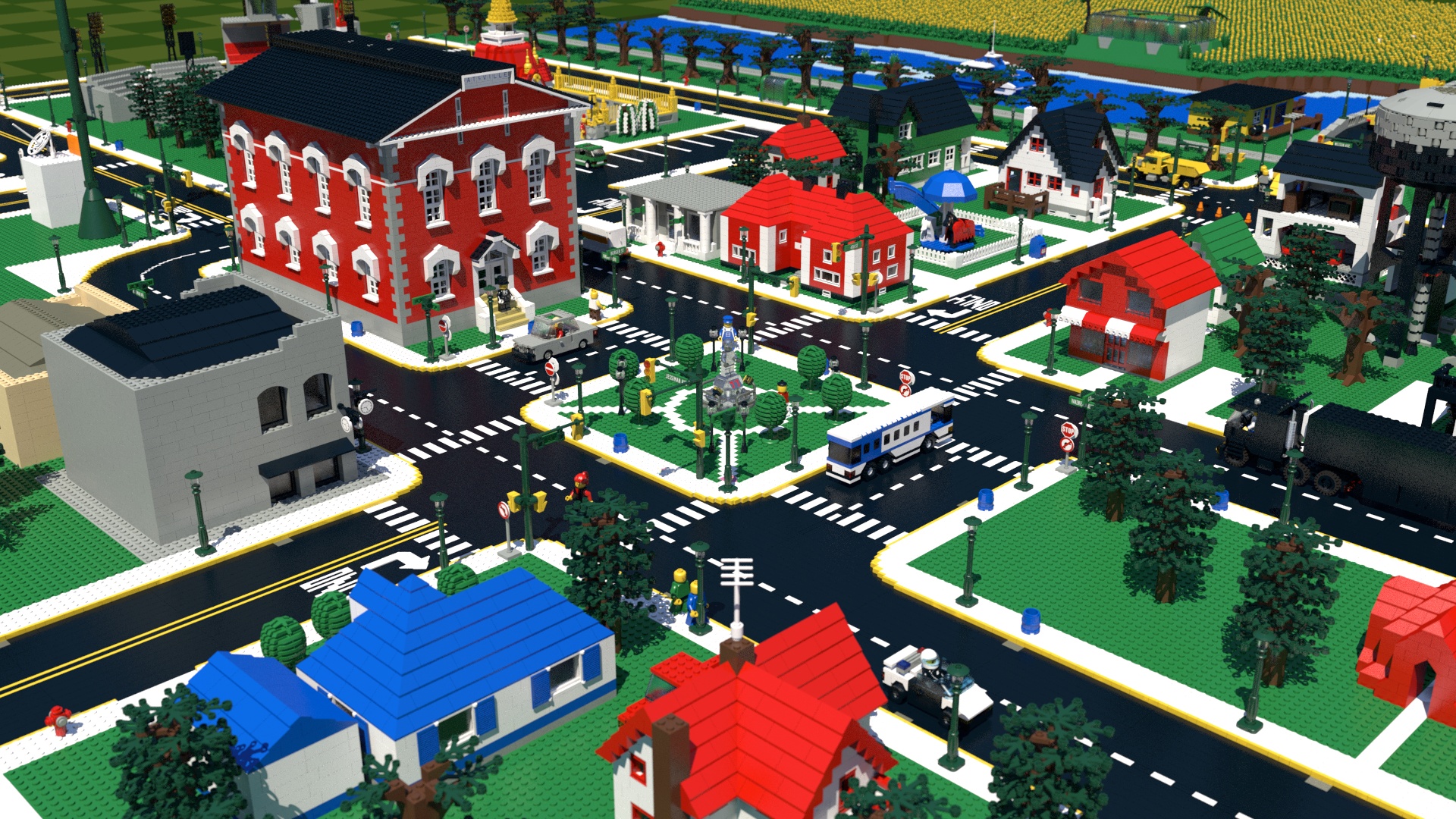
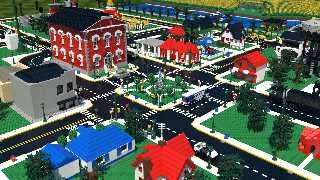
Here's my latest town render. You can see the pixelation in the
reflections. I haven't been able to get rid of it using more focal blur
and anti-aliasing. I will keep trying.


Mike
Post a reply to this message
Attachments:
Download 'wrapper_townview_10.jpg' (1057 KB)
Preview of image 'wrapper_townview_10.jpg'
|
|
| |
| |
|
|
|
|
| |
| |
|
|
Le 18-02-15 à 14:26, Mike Horvath a écrit :
> Here's my latest town render. You can see the pixelation in the
> reflections. I haven't been able to get rid of it using more focal blur
> and anti-aliasing. I will keep trying.
>
>
> Mike

It don't look like pixelisation but rather like some noise.
The possibilities to get rid if it are, in my biew :
1) Use +r4 +am2
2) increase the sample count of your camera's focal blur.

Increasing the maximum recursion level works great when using
reflection{roughness Something}. Most of the time, it have only a
negligeable effect on the rendering speed, but cause antialiasing to
work harder in those noisy areas. You also may want to reduce the aa
threshold from the default of 0.3 to something like 0.1 to 0.05.
Post a reply to this message
|
|
| |
| |
|
|
|
|
| |
| |
|
|
On 2/15/2018 7:32 PM, Alain wrote:
> Le 18-02-15 à 14:26, Mike Horvath a écrit :
>> Here's my latest town render. You can see the pixelation in the
>> reflections. I haven't been able to get rid of it using more focal
>> blur and anti-aliasing. I will keep trying.
>>
>>
>> Mike
>
> It don't look like pixelisation but rather like some noise.
> The possibilities to get rid if it are, in my biew :
> 1) Use +r4 +am2
> 2) increase the sample count of your camera's focal blur.
>
> Increasing the maximum recursion level works great when using
> reflection{roughness Something}. Most of the time, it have only a
> negligeable effect on the rendering speed, but cause antialiasing to
> work harder in those noisy areas. You also may want to reduce the aa
> threshold from the default of 0.3 to something like 0.1 to 0.05.

That worked well on my smaller scene. I tried on my larger scene too,
but it was taking a long long time to render. I will keep trying.


Mike
Post a reply to this message
|
|
| |
| |
|
|
|
|
| |
| |
|
|
Mike Horvath <mik### [at] gmail com> wrote:
>
> // this method is faster, but requires a focal blur and/or extra
> antialiasing
> #declare BlurAmount = 0.1;
> #macro BlurredReflectionRegularNormals(InPigment, InFinish, InNormal)
> // texture
> // {
> pigment { InPigment }
> finish { InFinish }
> normal { InNormal }
> normal {bumps BlurAmount scale 0.001}
> // }
I didn't know that multiple normal statements would actually 'combine'; I
thought the 2nd would completely override the 1st or cause an error (like trying
to use multiple pigment or finish blocks.) Interesting if true! I need to check
this out. com> wrote:
>
> // this method is faster, but requires a focal blur and/or extra
> antialiasing
> #declare BlurAmount = 0.1;
> #macro BlurredReflectionRegularNormals(InPigment, InFinish, InNormal)
> // texture
> // {
> pigment { InPigment }
> finish { InFinish }
> normal { InNormal }
> normal {bumps BlurAmount scale 0.001}
> // }
I didn't know that multiple normal statements would actually 'combine'; I
thought the 2nd would completely override the 1st or cause an error (like trying
to use multiple pigment or finish blocks.) Interesting if true! I need to check
this out.
Post a reply to this message
|
|
| |
| |
|
|
|
|
| |
| |
|
|
On 2/16/2018 11:08 PM, Kenneth wrote:
> I didn't know that multiple normal statements would actually 'combine'; I
> thought the 2nd would completely override the 1st or cause an error (like trying
> to use multiple pigment or finish blocks.) Interesting if true! I need to check
> this out.
>
>
>
>
>

I'm not really sure, but the effect might be the same as using a normal
map and averaging the two normals. Or not.


Mike
Post a reply to this message
|
|
| |
| |
|
|
|
|
| |
| |
|
|
Mike Horvath <mik### [at] gmailcom> wrote:
>
> I'm not really sure, but the effect might be the same as using a normal
> map and averaging the two normals. Or not.
>

Yeah, I just re-checked the documentation; you're right, there *can* be more
than one normal statement. (I obviously haven't taken a look there in awhile,
ha.) I probably never thought about it because of the 'caveat' that's mentioned,
about unpredictable behavior.

This is one of those situations that kind of bugs me: a texture can have more
than one of a *certain* kind of entry-- like normals-- but not another kind of
entry (like pigments). I know there are behind-the-scenes technical reasons for
this disparity-- but from a user standpoint, it does seem arbitrary. It's hard
to keep these 'special rules' (my phrase) in my head at all times :-/
Post a reply to this message
|
|
| |
| |
|
|
|
|
| |
| |
|
|
Am 17.02.2018 um 06:03 schrieb Mike Horvath:
> On 2/16/2018 11:08 PM, Kenneth wrote:
>> I didn't know that multiple normal statements would actually 'combine'; I
>> thought the 2nd would completely override the 1st or cause an error
>> (like trying
>> to use multiple pigment or finish blocks.) Interesting if true! I need
>> to check
>> this out.
>
> I'm not really sure, but the effect might be the same as using a normal
> map and averaging the two normals. Or not.

The latter, actually.
Post a reply to this message
|
|
| |
| |
|
|
|
|
| |
| |
|
|
I posted five images to Flickr showing my experiments with blurred
reflections.

https://www.eurobricks.com/forum/index.php?/forums/topic/159291-pov-ray-surface-realism/

I asked on Eurobricks which is the most realistic image? I will also ask
here. Which do you think look the most like real LEGO bricks?


Mike
Post a reply to this message
|
|
| |
| |
|
|
|
|
| |
| |
|
|
On 02/17/2018 03:28 PM, Mike Horvath wrote:
> I posted five images to Flickr showing my experiments with blurred
> reflections.
>
>
https://www.eurobricks.com/forum/index.php?/forums/topic/159291-pov-ray-surface-realism/

>
>
> I asked on Eurobricks which is the most realistic image? I will also ask
> here. Which do you think look the most like real LEGO bricks?
>
>
> Mike

I like #1 and #2. In all cases, the black road is way too reflective for
lego (although I like black reflective on principle).  Unless Lego has
changed a lot since I was a kid.

--
dik
Rendered 920576 of 921600 pixels (99%)
Post a reply to this message
|
|
| |
| |
|
|
|
|
| |
| |
|
|
On 2/17/2018 4:01 PM, dick balaska wrote:
> On 02/17/2018 03:28 PM, Mike Horvath wrote:
>> I posted five images to Flickr showing my experiments with blurred
>> reflections.
>>
>>
https://www.eurobricks.com/forum/index.php?/forums/topic/159291-pov-ray-surface-realism/

>>
>>
>> I asked on Eurobricks which is the most realistic image? I will also
>> ask here. Which do you think look the most like real LEGO bricks?
>>
>>
>> Mike
>
> I like #1 and #2. In all cases, the black road is way too reflective for
> lego (although I like black reflective on principle).  Unless Lego has
> changed a lot since I was a kid.
>

All my bricks are so old and scarred I can't really come to a conclusion
on my own. For instance, holding a brick so it reflects light from my
lamp, I can make out the bulb pretty clearly as well as the lamp shade.
But other nearby objects are barely visible. I don't know if brand new
bricks would reflect more.


Mike
Post a reply to this message
|
|
| |
| |
|
|
|
|
| |
| |
|
|
Mike Horvath <mik### [at] gmailcom> wrote:
> On 2/17/2018 4:01 PM, dick balaska wrote:
> > On 02/17/2018 03:28 PM, Mike Horvath wrote:
> >> I posted five images to Flickr showing my experiments with blurred
> >> reflections.
> >>
> >>
https://www.eurobricks.com/forum/index.php?/forums/topic/159291-pov-ray-surface-realism/
> >>
> >>
> >> I asked on Eurobricks which is the most realistic image? I will also
> >> ask here. Which do you think look the most like real LEGO bricks?
> >>
> >>
> >> Mike
> >
> > I like #1 and #2. In all cases, the black road is way too reflective for
> > lego (although I like black reflective on principle).  Unless Lego has
> > changed a lot since I was a kid.
> >
>
> All my bricks are so old and scarred I can't really come to a conclusion
> on my own. For instance, holding a brick so it reflects light from my
> lamp, I can make out the bulb pretty clearly as well as the lamp shade.
> But other nearby objects are barely visible. I don't know if brand new
> bricks would reflect more.
>
>
> Mike

Hi,

I have another observation for some blur reflection material, some surface is
more blur when you look it perpendicular. Just like variance reflection(aoi
pattern reflection amplitude), the blur has its aoi pattern.

But I don't know this is suitable for lego.
Post a reply to this message
|
|
| |
| |
|
|
|
|
| |
| |
|
|
Am 17.02.2018 um 21:28 schrieb Mike Horvath:
> I posted five images to Flickr showing my experiments with blurred
> reflections.
>
>
https://www.eurobricks.com/forum/index.php?/forums/topic/159291-pov-ray-surface-realism/
>
>
> I asked on Eurobricks which is the most realistic image? I will also ask
> here. Which do you think look the most like real LEGO bricks?

I find it difficult to judge, as I'm not used to such large LEGO models.
I'd consider a closeup helpful.

Another tip you may or may not already be aware of: For best realism,
make sure to use a modern (v3.7.1/v3.8.0) version of POV-Ray, and make
use of the finish-level `fresnel` statement, e.g.:

    #declare MyLegoMaterial = material {
      interior { ior 1.6 }
      texture {
        pigment { ... }
        finish {
          ambient 0
          diffuse albedo DIFF
          specular albedo SPEC roughness ROUGH
          fresnel on
          reflection { SPEC fresnel on }
          conserve_energy on
        }
        normal { ... }
      }
    }

Presuming you're using normal-based blurred reflections, DIFF and SPEC
should probably be exactly 1.0 each(!), and ROUGH should be very low
(e.g. 0.0001).

Setting the finish-level `fresnel` parameter to `on` causes both the
diffuse component and specular highlights to vary with the viewing angle
in a realistic manner, making specular highlights more pronounced at
shallow angles (just like reflection-level `fresnel on` does for
specular reflection), while reducing the diffuse component's brightness
accordingly (just like `conserve_energy` does for transmitted light).
Post a reply to this message
|
|
| |
| |
|
|
|
|
| |
| |
|
|
On 2/18/2018 7:00 AM, clipka wrote:
> Am 17.02.2018 um 21:28 schrieb Mike Horvath:
>> I posted five images to Flickr showing my experiments with blurred
>> reflections.
>>
>>
https://www.eurobricks.com/forum/index.php?/forums/topic/159291-pov-ray-surface-realism/
>>
>>
>> I asked on Eurobricks which is the most realistic image? I will also ask
>> here. Which do you think look the most like real LEGO bricks?
>
> I find it difficult to judge, as I'm not used to such large LEGO models.
> I'd consider a closeup helpful.
>
> Another tip you may or may not already be aware of: For best realism,
> make sure to use a modern (v3.7.1/v3.8.0) version of POV-Ray, and make
> use of the finish-level `fresnel` statement, e.g.:
>
>      #declare MyLegoMaterial = material {
>        interior { ior 1.6 }
>        texture {
>          pigment { ... }
>          finish {
>            ambient 0
>            diffuse albedo DIFF
>            specular albedo SPEC roughness ROUGH
>            fresnel on
>            reflection { SPEC fresnel on }
>            conserve_energy on
>          }
>          normal { ... }
>        }
>      }
>
> Presuming you're using normal-based blurred reflections, DIFF and SPEC
> should probably be exactly 1.0 each(!), and ROUGH should be very low
> (e.g. 0.0001).
>
> Setting the finish-level `fresnel` parameter to `on` causes both the
> diffuse component and specular highlights to vary with the viewing angle
> in a realistic manner, making specular highlights more pronounced at
> shallow angles (just like reflection-level `fresnel on` does for
> specular reflection), while reducing the diffuse component's brightness
> accordingly (just like `conserve_energy` does for transmitted light).
>


Thanks for the tip. However, I changed the finish to this:


#local ldrawPlasticFin=finish {
  ambient			0
  diffuse albedo		1
  specular albedo	1
  roughness			0.0001
  fresnel			on
  reflection {1 fresnel on}
  conserve_energy
};


Now I see no reflections at all on the bricks.


Mike
Post a reply to this message
|
|
| |
| |
|
|
|
|
| |
| |
|
|
Am 19.02.2018 um 00:16 schrieb Mike Horvath:

> #local ldrawPlasticFin=finish {
>  ambient            0
>  diffuse albedo        1
>  specular albedo    1
>  roughness            0.0001
>  fresnel            on
>  reflection {1 fresnel on}
>  conserve_energy
> };
>
>
>
> Now I see no reflections at all on the bricks.

Make sure that your materials have an `interior { ior FLOAT }` setting.
For LEGO materials, I recommend a value of 1.6.

When `fresnel` is set to `on`, the intensity of reflections not only
depends on the viewing angle, but also on the ratio between the
refractive index of the material and the refractive index of the medium
around (typically the "atmosphere", which has an ior of 1.0). The more
this ratio deviates from 1.0, the stronger the reflections will be.

By default, POV-Ray materials have an IOR of 1.0.
Post a reply to this message
|
|
| |
| |
|
|
|
|
| |
| |
|
|
On 2/18/2018 8:03 PM, clipka wrote:
> Make sure that your materials have an `interior { ior FLOAT }` setting.
> For LEGO materials, I recommend a value of 1.6.
>
> When `fresnel` is set to `on`, the intensity of reflections not only
> depends on the viewing angle, but also on the ratio between the
> refractive index of the material and the refractive index of the medium
> around (typically the "atmosphere", which has an ior of 1.0). The more
> this ratio deviates from 1.0, the stronger the reflections will be.
>
> By default, POV-Ray materials have an IOR of 1.0.
>

Thanks, that worked. Would you be willing to take a look at each of the
different LDraw materials? Currently, there are about 7 different ones,
I think.


Mike
Post a reply to this message
|
|
| |
| |
|
|
|
|
| |
| |
|
|
Am 19.02.2018 um 03:07 schrieb Mike Horvath:
> On 2/18/2018 8:03 PM, clipka wrote:
>> Make sure that your materials have an `interior { ior FLOAT }` setting.
>> For LEGO materials, I recommend a value of 1.6.
>>
>> When `fresnel` is set to `on`, the intensity of reflections not only
>> depends on the viewing angle, but also on the ratio between the
>> refractive index of the material and the refractive index of the medium
>> around (typically the "atmosphere", which has an ior of 1.0). The more
>> this ratio deviates from 1.0, the stronger the reflections will be.
>>
>> By default, POV-Ray materials have an IOR of 1.0.
>>
>
> Thanks, that worked. Would you be willing to take a look at each of the
> different LDraw materials? Currently, there are about 7 different ones,
> I think.

Dunno. Let me know what those materials are, and I'll try to give
recommendations.

I don't currently have the time to set up some LDraw->POV-Ray workflow
myself.


As mentioned before, LEGO's standard opaque plastic has a refractive
index of about 1.6, which also happens to be a good approximation for
LEGO's standard transparent plastic (both clear and tinted).
Post a reply to this message
|
|
| |
| |
|
|
|
|
| |
| |
|
|
On 2/18/2018 9:54 PM, clipka wrote:
> Am 19.02.2018 um 03:07 schrieb Mike Horvath:
>> Thanks, that worked. Would you be willing to take a look at each of the
>> different LDraw materials? Currently, there are about 7 different ones,
>> I think.
>
> Dunno. Let me know what those materials are, and I'll try to give
> recommendations.
>
> I don't currently have the time to set up some LDraw->POV-Ray workflow
> myself.
>
>
> As mentioned before, LEGO's standard opaque plastic has a refractive
> index of about 1.6, which also happens to be a good approximation for
> LEGO's standard transparent plastic (both clear and tinted).
>

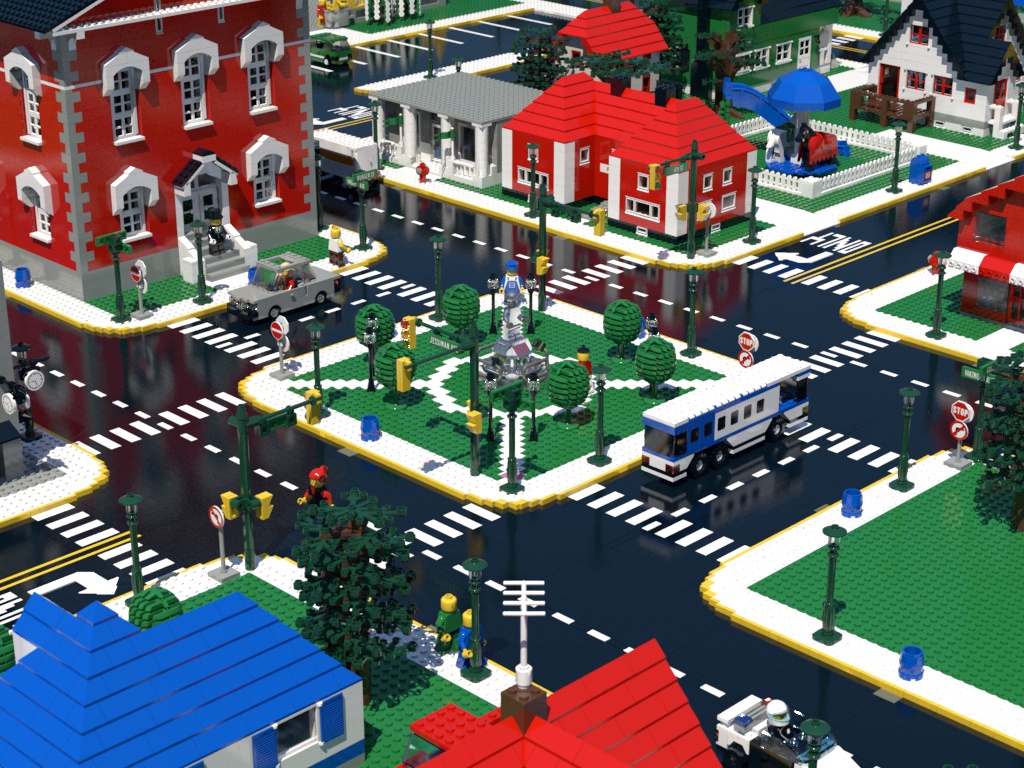
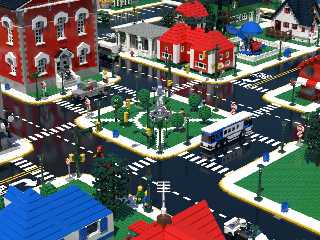
I attached the latest render as well as a copy of the material
definitions I used to make the render. Currently, only the
`ldrawPlasticABSFin` and `ldrawPlasticPolyFin` finishes are configured
to your specifications. Good luck.


Mike
Post a reply to this message
Attachments:
Download 'wrapper_townview_close_06.jpg' (408 KB)
Download 'materials_mjh_shadowno.inc.txt' (22 KB)
Download 'blurred_reflection.inc.txt' (1 KB)
Preview of image 'wrapper_townview_close_06.jpg'
|
|
| |
| |
|
|
|
|
| |
| |
|
|
I forgot to make some important changes to the material definitions.
I've attached the updated file.


Mike
Post a reply to this message
Attachments:
Download 'materials_mjh_shadowno.inc.txt' (22 KB)
|
|
| |
| |
|
|
|
|
| |
| |
|
|
On 2/19/2018 4:23 AM, Mike Horvath wrote:
> I forgot to make some important changes to the material definitions.
> I've attached the updated file.
>
>
> Mike

Christoph, do you have any tips on these materials? Thanks.


Mike
Post a reply to this message
|
|
| |
| |
|
|
|
|
| |