 |
|
|
|
|
|
| |
| |
|
|
|
|
| |
| |
|
|
Hmmm... I am getting frustrated now. I fine tuned the geometry and the
textures and still get the same problem, concentrated as it were, in the
green field in this false colours proximity image. I don't know what is
happening. :-/

--
Thomas
Post a reply to this message
Attachments:
Download 'ep_proximity_test1.jpg' (135 KB)
Preview of image 'ep_proximity_test1.jpg'

|
|
| |
| |
|
|
|
|
| |
| |
|
|
Am 20.09.2017 um 13:35 schrieb Thomas de Groot:
> Hmmm... I am getting frustrated now. I fine tuned the geometry and the
> textures and still get the same problem, concentrated as it were, in the
> green field in this false colours proximity image. I don't know what is
> happening. :-/

If the building isn't a single solid chunk, the walls might be too thin
for the proximity algorithm to work properly.
Post a reply to this message
|
|
| |
| |
|
|
|
|
| |
| |
|
|
On 20-9-2017 14:16, clipka wrote:
> Am 20.09.2017 um 13:35 schrieb Thomas de Groot:
>> Hmmm... I am getting frustrated now. I fine tuned the geometry and the
>> textures and still get the same problem, concentrated as it were, in the
>> green field in this false colours proximity image. I don't know what is
>> happening. :-/
>
> If the building isn't a single solid chunk, the walls might be too thin
> for the proximity algorithm to work properly.
>

That is true, which is why I closed all the openings. I am presently
testing a hunch which might be the solution...

--
Thomas
Post a reply to this message
|
|
| |
| |
|
|
|
|
| |
| |
|
|
[reading]
"Elementary, my dear Watson", said Sherlock Holmes, picking up the violin.
"Come on, Holmes, you do not pretend to have solved the disappearance of
Lord Gutenbach, do you? Even for you this case might be too difficult!"
The detective smiled while tuning the violin. "But I do have solved the
case, my friend. I often told you that when you had ruled out all the
obvious reasons, the most unlikely ones would prove to hold the key to
the mystery."
"And what was the key in this case?", asked Watson with a sceptical air.
"Oh, it was obvious once I thought about it. The key, my dear Watson,
was the index finger of Lord Gutenbach's left glove".
"You have lost me now, Holmes. Please explain."
"The key was the fact that it was a /yellow/ glove."

		From: The Gutenbach House Mystery; unpublished
[/reading]
==============================================================================

Somehow the solution was elementary and yet still puzzling for me. The
object had been rotated 180 degrees /before/ calculating the df3, and
normally this should not have made a difference... except if I had
failed to take this rotation into account, somewhere, at a later stage.
I am unable yet to see where I went wrong but taking the rotation out
solves the case as the image shows.

--
Thomas
Post a reply to this message
Attachments:
Download 'ep_proximity_test.jpg' (136 KB)
Preview of image 'ep_proximity_test.jpg'

|
|
| |
| |
|
|
|
|
| |
| |
|
|
"Norbert Kern" <nor### [at] t-online de> wrote:
> probably you overcame the texture fit problem.
> If not I can recommend proximity pattern by using an ambient occlusion render
> together with the usage of Rune's illusion code. This method is fast and very
> precise for small details.
>
That's a beautiful image.
I'm a big fan of Rune's illusion.inc code. If I understand your method
correctly, it means generating an ambient occlusion render first (in whichever
way you want to go about that--a grayscale image, with the entire scene and
object using a temporary white pigment?) Then, using illusion.inc to
'camera-project' that AO render back onto the object's real texture, as an
additional overlay.
If I'm correct about the method, then the grayscale AO render first needs to be
taken into, say, Photoshop, to create an alpha-channel mask (using the *same*
image for that but inverted, to create transparency for the white parts of the
image.) *Then* it's overlayed onto the object, so that the real texture can show
through--except where the AO render has darker areas.
Correct so far? (I hope I'm making sense.) Or does your method use an actual
'proximity pattern' as well, in some way?
To Thomas: Nice work with your trials and experiments. I still haven't played
around with the proximity pattern code yet; real-life chores keep getting in the
way. Very irritating :-/ de> wrote:
> probably you overcame the texture fit problem.
> If not I can recommend proximity pattern by using an ambient occlusion render
> together with the usage of Rune's illusion code. This method is fast and very
> precise for small details.
>
That's a beautiful image.
I'm a big fan of Rune's illusion.inc code. If I understand your method
correctly, it means generating an ambient occlusion render first (in whichever
way you want to go about that--a grayscale image, with the entire scene and
object using a temporary white pigment?) Then, using illusion.inc to
'camera-project' that AO render back onto the object's real texture, as an
additional overlay.
If I'm correct about the method, then the grayscale AO render first needs to be
taken into, say, Photoshop, to create an alpha-channel mask (using the *same*
image for that but inverted, to create transparency for the white parts of the
image.) *Then* it's overlayed onto the object, so that the real texture can show
through--except where the AO render has darker areas.
Correct so far? (I hope I'm making sense.) Or does your method use an actual
'proximity pattern' as well, in some way?
To Thomas: Nice work with your trials and experiments. I still haven't played
around with the proximity pattern code yet; real-life chores keep getting in the
way. Very irritating :-/
Post a reply to this message
|
|
| |
| |
|
|
|
|
| |
| |
|
|
On 22-9-2017 16:47, Kenneth wrote:
> "Norbert Kern" <nor### [at] t-onlinede> wrote:
>
>> probably you overcame the texture fit problem.
>> If not I can recommend proximity pattern by using an ambient occlusion render
>> together with the usage of Rune's illusion code. This method is fast and very
>> precise for small details.
>>
>
> That's a beautiful image.
>
> I'm a big fan of Rune's illusion.inc code. If I understand your method
> correctly, it means generating an ambient occlusion render first (in whichever
> way you want to go about that--a grayscale image, with the entire scene and
> object using a temporary white pigment?) Then, using illusion.inc to
> 'camera-project' that AO render back onto the object's real texture, as an
> additional overlay.
>
> If I'm correct about the method, then the grayscale AO render first needs to be
> taken into, say, Photoshop, to create an alpha-channel mask (using the *same*
> image for that but inverted, to create transparency for the white parts of the
> image.) *Then* it's overlayed onto the object, so that the real texture can show
> through--except where the AO render has darker areas.
>
> Correct so far? (I hope I'm making sense.) Or does your method use an actual
> 'proximity pattern' as well, in some way?
>
> To Thomas: Nice work with your trials and experiments. I still haven't played
> around with the proximity pattern code yet; real-life chores keep getting in the
> way. Very irritating :-/
>
>

Thanks Kenneth.

I have used AO myself in other contexts but I never used (yet)
illusion.inc; the ToDo list is getting too long. ;-)

If your description of the method is correct, the draw back would be
that you have to produce a new transparency map for every new camera
setting or transformation to the object. This is not the case with the
DF3 method.

--
Thomas
Post a reply to this message
|
|
| |
| |
|
|
|
|
| |
| |
|
|
"Kenneth" <kdw### [at] gmailcom> wrote:

>
> That's a beautiful image.
>
> I'm a big fan of Rune's illusion.inc code. If I understand your method
> correctly, it means generating an ambient occlusion render first (in whichever
> way you want to go about that--a grayscale image, with the entire scene and
> object using a temporary white pigment?) Then, using illusion.inc to
> 'camera-project' that AO render back onto the object's real texture, as an
> additional overlay.
>
> If I'm correct about the method, then the grayscale AO render first needs to be
> taken into, say, Photoshop, to create an alpha-channel mask (using the *same*
> image for that but inverted, to create transparency for the white parts of the
> image.) *Then* it's overlayed onto the object, so that the real texture can show
> through--except where the AO render has darker areas.
>
> Correct so far? (I hope I'm making sense.) Or does your method use an actual
> 'proximity pattern' as well, in some way?
>
> To Thomas: Nice work with your trials and experiments. I still haven't played
> around with the proximity pattern code yet; real-life chores keep getting in the
> way. Very irritating :-/


The AO render uses good radiosity settings, no background, a simple texture and
an emissive sphere like that:

sphere {
        0, 10000
        texture {
                pigment {color rgb 1}
                finish {emission 1.2 diffuse 0}
        }
}

#declare T2 =
material {
 texture {
  pigment {color rgb 1}
  finish {ambient 0 diffuse 0.8}
 }
 interior {ior 1}
}

No transparency is used.

Rune's Illusion code is used to create a pigment pattern with perfect fit for a
texture map:

//______________________________________________________________________________

// illusion

#declare illusion_image     = "AO render.png"          ///////////////////////
#declare illusion_scale     = 10;
#declare illusion_samples   = 50;
#declare illusion_location  = <50,0,-201.5>; // camera location
#declare illusion_angle     = 46;            // camera angle
#declare illusion_look_at   = <0,0,0>;       // camera look at

#ifndef (illusion_location)  #declare illusion_location  = <0,0,0>; #end
#ifndef (illusion_right)     #declare illusion_right     =
image_width/image_height*x;  #end
#ifndef (illusion_up)        #declare illusion_up        = y;       #end
#ifndef (illusion_direction) #declare illusion_direction = z;       #end
#ifndef (illusion_sky)       #declare illusion_sky       = y;       #end
#ifndef (illusion_angle)     #declare illusion_angle     = degrees (atan2
(vlength (illusion_right)/2/vlength (illusion_direction),1))*2; #end
#ifndef (illusion_look_at)   #declare illusion_look_at   =
illusion_location+illusion_direction; #end

#ifndef (illusion_image)     #debug "\n\n--> you must specify
'illusion_image'!\n\n"  #end

#declare illusion_format = strlwr (substr (illusion_image,strlen
(illusion_image)-3,4))
#if (strcmp (illusion_format,".png") != 0 & strcmp (illusion_format,".tga") !=
0)
        #debug concat (
                "\n\n--> extension of illusion_image: ",
                strlwr (substr (illusion_image, strlen (illusion_image)-3,4)),
                "\n--> illusion_image must be a .png or .tga file!\n\n"
        )
#end

// CREATE THE IMAGE MAP USED IN THE ILLUSION
// *****************************************
#ifdef (illusion_image_function)
        #undef illusion_image_function
#end
#declare illusion_image_function =
function {
        #if (strcmp (illusion_format,".png") = 0)
                pigment {image_map {png illusion_image gamma 2.2 once} translate
-0.5}
        #else
                pigment {image_map {tga illusion_image gamma 2.2 once} translate
-0.5}
        #end
}

// CREATE THE RAW ILLUSION ALIGNED ALONG Z AXIS
// ********************************************
#declare illusion_raw =
pigment {
        average
        pigment_map {
                [1      function {illusion_image_function (x/z,y/z,z).red}
color_map {[0  rgb 0][1  rgb <4,0,0>]}]
                [1      function {illusion_image_function (x/z,y/z,z).green}
color_map {[0  rgb 0][1  rgb <0,4,0>]}]
                [1      function {illusion_image_function (x/z,y/z,z).blue}
color_map {[0  rgb 0][1  rgb <0,0,4>]}]
                [1      function {illusion_image_function (x/z,y/z,z).transmit}
color_map {[0  rgb 0][1  transmit 4]}]
        }
}

// ALIGNMENT CALCULATIONS
// **********************
#declare illusion_t = illusion_location;
#declare illusion_z = vnormalize (illusion_look_at-illusion_location);
#declare illusion_x = vnormalize (vcross (illusion_sky, illusion_z))*tan
(radians (illusion_angle/2))*2;
#declare illusion_y = vnormalize (vcross (illusion_z, illusion_x))*tan (radians
(illusion_angle/2))*2*vlength (illusion_up)/vlength (illusion_right);

// CREATE AND ALIGN THE ILLUSION
// *****************************
#declare illusion =
pigment {
        illusion_raw
        matrix <
                illusion_x.x,illusion_x.y,illusion_x.z,
                illusion_y.x,illusion_y.y,illusion_y.z,
                illusion_z.x,illusion_z.y,illusion_z.z,
                illusion_t.x,illusion_t.y,illusion_t.z
        >
}

#declare f_illu = function {pigment {illusion}}

#declare T3 =
material {
 texture {
                pigment_pattern {
                        illusion_raw
                        matrix <
                                illusion_x.x,illusion_x.y,illusion_x.z,
                                illusion_y.x,illusion_y.y,illusion_y.z,
                                illusion_z.x,illusion_z.y,illusion_z.z,
                                illusion_t.x,illusion_t.y,illusion_t.z
                        >
                }
                texture_map {
                 [0.5   copper3]  // copper rust
                 [0.8   copper2]  // copper patina
                 [0.9   copper2]
                        [1     copper1]  // polished copper
                }
        }
 interior {ior 1.6}
 scale 1
}

//______________________________________________________________________________

Norbert
Post a reply to this message
|
|
| |
| |
|
|
|
|
| |
| |
|
|
"Norbert Kern" <nor### [at] t-onlinede> wrote:

>
> The AO render uses good radiosity settings, no background, a simple
> texture and an emissive sphere like that:
>
> sphere {
>         0, 10000
>         texture {
>                 pigment {color rgb 1}
>                 finish {emission 1.2 diffuse 0}
>         }
> }
>
> #declare T2 =
> material {
>  texture {
>   pigment {color rgb 1}
>   finish {ambient 0 diffuse 0.8}
>  }
>  interior {ior 1}
> }
>

Yes, that make sense for the initial AO render. Thanks. Although, I'm not sure
what the reason is for interior{ior 1}.

My own 'fake AO' method-- actually just a few experiments years ago-- was to
have a similarly white object, but I also used a white plane under it, to pick
up the AO effect where the object met the plane. And a similar white outer
sphere--but used just as a background, and without radiosity(!). To create the
AO effect, I placed hundreds of point lights in a distant hemispherical pattern.
The many overlapping shadows on the object looked *similar* to a radiosity
render. But if I were to do it again, I would use your method ;-)

> Rune's Illusion code is used to create a pigment pattern with perfect fit
> for a texture map:
>
[snip]

Wow! I need to digest your code (your math trickery is something I need to
study; it uses techniques that I'm not too familiar with-- but that I really
need to learn and apply.) In all of my own uses of illusion.inc, I've never
actually tried 'mathematically' fitting the projected image to an object. I've
always done the opposite: choosing a pre-made digital photo image, then
constructing all the scene's geometry to 'fit' the photo details, when
'projected' onto the geometry! A very tedious procedure, I admit. Your code is
very much appreciated, as an alternative method for a different kind of use.
Post a reply to this message
|
|
| |
| |
|
|
|
|
| |
| |
|
|
Thomas de Groot <tho### [at] degrootorg> wrote:

>
> If your description of the method is correct, the draw back would be
> that you have to produce a new transparency map for every new camera
> setting or transformation to the object. This is not the case with the
> DF3 method.
>

You're correct, if you intend to move the camera or object(s) around.
Illusion.inc is really for a pre-set static scene (more or less, which I'll
describe below.)

Basically, illusion.inc can be thought of a an old-style 'color slide
projector', placed *at* the POV-Ray scene's camera position. The projected image
fills the entire rendered frame--but you choose which objects in the scene to
apply the projected image onto. (Each object shows only that particular portion
of the full image 'texture'.) In other words, the *same* illusion.inc image is
'attached' to any/all of the objects. The visual effect of this is fundamentally
different from applying typical image_maps to the objects: The z-depth of the
individial objects doesn't matter-- the projected image itself will always
appear the same size on them, and undistorted, even on spherical objects (for
example.)

But here's a really interesting feature (the most important one, IMO): Although
the illusion.inc 'camera position' is supposed to match the scene's real
camera-- for the best undistorted image reproduction-- the scene camera CAN be
moved around (somewhat, within limits.) I've used this for some really cool
animations; the visual result is like a 3-D 'matte painting'.

A caveat: When trying to use illusion.inc for the first time, it can be a bit
confusing to understand, visually speaking. IMO, it has a few features that are
unnecessary and only 'get in the way.' I've re-written my own version, to remove
that stuff.
Post a reply to this message
|
|
| |
| |
|
|
|
|
| |
| |
|
|
On 23/09/2017 14:39, Kenneth wrote:
> Thomas de Groot <tho### [at] degrootorg> wrote:
>
>>
>> If your description of the method is correct, the draw back would be
>> that you have to produce a new transparency map for every new camera
>> setting or transformation to the object. This is not the case with the
>> DF3 method.
>>
>
> You're correct, if you intend to move the camera or object(s) around.
> Illusion.inc is really for a pre-set static scene (more or less, which I'll
> describe below.)
>
> Basically, illusion.inc can be thought of a an old-style 'color slide
> projector', placed *at* the POV-Ray scene's camera position. The projected image
> fills the entire rendered frame--but you choose which objects in the scene to
> apply the projected image onto. (Each object shows only that particular portion
> of the full image 'texture'.) In other words, the *same* illusion.inc image is
> 'attached' to any/all of the objects. The visual effect of this is fundamentally
> different from applying typical image_maps to the objects: The z-depth of the
> individial objects doesn't matter-- the projected image itself will always
> appear the same size on them, and undistorted, even on spherical objects (for
> example.)
>

I'm sure that you can use illusion.inc in animations. You would need to
run two animations. The first to generate the AO images the second to
use that in the final images. If you could create the alpha-channel mask
in PovRay. It might be possible to do it in a continuous three step
animation.

I too am a big fan of Rune's illusion.inc code.

> But here's a really interesting feature (the most important one, IMO): Although
> the illusion.inc 'camera position' is supposed to match the scene's real
> camera-- for the best undistorted image reproduction-- the scene camera CAN be
> moved around (somewhat, within limits.) I've used this for some really cool
> animations; the visual result is like a 3-D 'matte painting'.
>

Examples, please. :-)
Flaunt it. :-)


--

Regards
     Stephen
Post a reply to this message
|
|
| |
| |
|
|
|
|
| |
| |
|
|
Gentlemen, you make it almost compulsory for me to try and use
illusion.inc :-)  Time however...

--
Thomas
Post a reply to this message
|
|
| |
| |
|
|
|
|
| |
| |
|
|
On 24/09/2017 07:52, Thomas de Groot wrote:
> Gentlemen, you make it almost compulsory for me to try and use
> illusion.inc :-)  Time however...
>

Time however does not get any longer. ;-)

And speaking of illusion.inc
Rune's Particle System is worth having a look at too.
I once used it to create a Bagatelle scene years ago. I'm sure I posted
an animation to the newsgroup but cannot find it now.

--

Regards
     Stephen
Post a reply to this message
|
|
| |
| |
|
|
|
|
| |
| |
|
|
On 24-9-2017 11:30, Stephen wrote:
> On 24/09/2017 07:52, Thomas de Groot wrote:
>> Gentlemen, you make it almost compulsory for me to try and use
>> illusion.inc :-)  Time however...
>>
>
> Time however does not get any longer. ;-)
>
> And speaking of illusion.inc
> Rune's Particle System is worth having a look at too.
> I once used it to create a Bagatelle scene years ago. I'm sure I posted
> an animation to the newsgroup but cannot find it now.
>

Ah yes...! smoke, explosions, fountains... :-) I tested them out but did
not use them properly yet.

--
Thomas
Post a reply to this message
|
|
| |
| |
|
|
|
|
| |
| |
|
|
On 24/09/2017 12:06, Thomas de Groot wrote:
> On 24-9-2017 11:30, Stephen wrote:
>> On 24/09/2017 07:52, Thomas de Groot wrote:
>>> Gentlemen, you make it almost compulsory for me to try and use
>>> illusion.inc :-)  Time however...
>>>
>>
>> Time however does not get any longer. ;-)
>>
>> And speaking of illusion.inc
>> Rune's Particle System is worth having a look at too.
>> I once used it to create a Bagatelle scene years ago. I'm sure I
>> posted an animation to the newsgroup but cannot find it now.
>>
>
> Ah yes...! smoke, explosions, fountains... :-) I tested them out but did
> not use them properly yet.
>

But it's in your armoury, waiting, waiting...

--

Regards
     Stephen
Post a reply to this message
|
|
| |
| |
|
|
|
|
| |
| |
|
|
Stephen <mca### [at] aolcom> wrote:
> On 23/09/2017 14:39, Kenneth wrote:
>
> > But here's a really interesting feature (the most important one, IMO):
> > Although the illusion.inc 'camera position' is supposed to match the
> > scene's real camera-- for the best undistorted image reproduction--
> > the scene camera CAN be moved around (somewhat, within limits.) I've
> > used this for some really cool animations; the visual result is like
> > a 3-D 'matte painting'.
> >
>
> Examples, please. :-)
> Flaunt it. :-)
>
Unfortunately, those animations (and LOTS of my older POV-ray files and such)
are on a backup hard-drive that failed(!). HOPEFULLY it's just the motor or
drive electronics. I hope to resurrect those files at some point, even if I have
to pay one of those 'forensic' companies to extract the data. Not cheap though,
ouch.
Post a reply to this message
|
|
| |
| |
|
|
|
|
| |
| |
|
|
On 25/09/2017 11:52, Kenneth wrote:
> Stephen <mca### [at] aolcom> wrote:
>> On 23/09/2017 14:39, Kenneth wrote:
>>
>>> But here's a really interesting feature (the most important one, IMO):
>>> Although the illusion.inc 'camera position' is supposed to match the
>>> scene's real camera-- for the best undistorted image reproduction--
>>> the scene camera CAN be moved around (somewhat, within limits.) I've
>>> used this for some really cool animations; the visual result is like
>>> a 3-D 'matte painting'.
>>>
>>
>> Examples, please. :-)
>> Flaunt it. :-)
>>
> Unfortunately, those animations (and LOTS of my older POV-ray files and such)
> are on a backup hard-drive that failed(!).

Ouch!
At least it wasn't your own fault. I've just wiped two hard disks by my
own carelessness. Three years worth of stuff. (Rude word! rude word!
rude word!)

> HOPEFULLY it's just the motor or
> drive electronics. I hope to resurrect those files at some point, even if I have
> to pay one of those 'forensic' companies to extract the data. Not cheap though,
> ouch.
>

I've just looked at some prices. Ouch indeed.


--

Regards
     Stephen
Post a reply to this message
|
|
| |
| |
|
|
|
|
| |
| |
|
|
Stephen <mca### [at] aolcom> wrote:
> On 24/09/2017 07:52, Thomas de Groot wrote:
> > Gentlemen, you make it almost compulsory for me to try and use
> > illusion.inc :-)  Time however...
> >
>
> Time however does not get any longer. ;-)

Au contraire.

https://en.wikipedia.org/wiki/Time_dilation

So, the faster Thomas works, the slower time will pass....  ;)
Post a reply to this message
|
|
| |
| |
|
|
|
|
| |
| |
|
|
Stephen <mca### [at] aolcom> wrote:

> > HOPEFULLY it's just the motor or
> > drive electronics. I hope to resurrect those files at some point, even if I have
> > to pay one of those 'forensic' companies to extract the data. Not cheap though,
> > ouch.

I've had sporadic success with the "put the HDD in the freezer" technique.
In theory, you should only need to get the drive working reliably _once_ for as
long as you need to transfer the files to a shiny new drive(s).

My preferred embodiment of this is to freeze the drive overnight in an external
drive enclosure, and then while keeping the drive in the freezer, transfer the
files with a USB cable (3.0).

Depending on the weather here in NH, I could just do it on a cold winter day
when it's 20 below.

Following that logic, I'm sure that all of us here at news.povray.org would very
much appreciate HD video of you transferring files from your drive while it's
submerged in a Dewar filled with liquid nitrogen, argon, or helium.
Post a reply to this message
|
|
| |
| |
|
|
|
|
| |
| |
|
|
On 26-9-2017 1:04, Bald Eagle wrote:
> Stephen <mca### [at] aolcom> wrote:
>> On 24/09/2017 07:52, Thomas de Groot wrote:
>>> Gentlemen, you make it almost compulsory for me to try and use
>>> illusion.inc :-)  Time however...
>>>
>>
>> Time however does not get any longer. ;-)
>
> Au contraire.
>
> https://en.wikipedia.org/wiki/Time_dilation
>
> So, the faster Thomas works, the slower time will pass....  ;)
>
>
>

[pant] I am already doing the best I can and still time passes me by at
a frightening speed :-)


--
Thomas
Post a reply to this message
|
|
| |
| |
|
|
|
|
| |
| |
|
|
On 26-9-2017 8:47, Thomas de Groot wrote:
> On 26-9-2017 1:04, Bald Eagle wrote:
>> Stephen <mca### [at] aolcom> wrote:
>>> On 24/09/2017 07:52, Thomas de Groot wrote:
>>>> Gentlemen, you make it almost compulsory for me to try and use
>>>> illusion.inc :-)  Time however...
>>>>
>>>
>>> Time however does not get any longer. ;-)
>>
>> Au contraire.
>>
>> https://en.wikipedia.org/wiki/Time_dilation
>>
>> So, the faster Thomas works, the slower time will pass....  ;)
>>
>>
>>
>
> [pant] I am already doing the best I can and still time passes me by at
> a frightening speed :-)
>
>
..and to support my case: I have been doing some little sculpture in
between.

--
Thomas
Post a reply to this message
Attachments:
Download 'ep_proximity_test.jpg' (61 KB)
Preview of image 'ep_proximity_test.jpg'

|
|
| |
| |
|
|
|
|
| |
| |
|
|
On 26/09/2017 08:11, Thomas de Groot wrote:

>>
>>
> ...and to support my case: I have been doing some little sculpture in
> between.
>

I'm seeing Giacometti, here. :-)

http://www.dailyartfixx.com/wp-content/uploads/2010/10/Walking-Man-Alberto-Giacometti.jpg


--

Regards
     Stephen
Post a reply to this message
|
|
| |
| |
|
|
|
|
| |
| |
|
|
On 26/09/2017 00:04, Bald Eagle wrote:
> Stephen <mca### [at] aolcom> wrote:
>> On 24/09/2017 07:52, Thomas de Groot wrote:
>>> Gentlemen, you make it almost compulsory for me to try and use
>>> illusion.inc :-)  Time however...
>>>
>>
>> Time however does not get any longer. ;-)
>
> Au contraire.
>
> https://en.wikipedia.org/wiki/Time_dilation
>
> So, the faster Thomas works, the slower time will pass....  ;)
>
>
>

But for us it will seem to take forever.

--

Regards
     Stephen
Post a reply to this message
|
|
| |
| |
|
|
|
|
| |
| |
|
|
On 26-9-2017 9:40, Stephen wrote:
> On 26/09/2017 00:04, Bald Eagle wrote:
>> Stephen <mca### [at] aolcom> wrote:
>>> On 24/09/2017 07:52, Thomas de Groot wrote:
>>>> Gentlemen, you make it almost compulsory for me to try and use
>>>> illusion.inc :-)  Time however...
>>>>
>>>
>>> Time however does not get any longer. ;-)
>>
>> Au contraire.
>>
>> https://en.wikipedia.org/wiki/Time_dilation
>>
>> So, the faster Thomas works, the slower time will pass....  ;)
>>
>>
>>
>
> But for us it will seem to take forever.
>

That is more to the point indeed.

--
Thomas
Post a reply to this message
|
|
| |
| |
|
|
|
|
| |
| |
|
|
On 26-9-2017 9:38, Stephen wrote:
> On 26/09/2017 08:11, Thomas de Groot wrote:
>
>>>
>>>
>> ...and to support my case: I have been doing some little sculpture in
>> between.
>>
>
> I'm seeing Giacometti, here. :-)
>
>
http://www.dailyartfixx.com/wp-content/uploads/2010/10/Walking-Man-Alberto-Giacometti.jpg

>

His cousin.

While testing some features in Silo, I started with a low poly bust
provided by them and got this. I think I shall add a few little things
and hone the textures.

--
Thomas
Post a reply to this message
|
|
| |
| |
|
|
|
|
| |
| |
|
|
> Stephen <mca### [at] aolcom> wrote:
>
> I've had sporadic success with the "put the HDD in the freezer" technique.
> In theory, you should only need to get the drive working reliably _once_ for as
> long as you need to transfer the files to a shiny new drive(s).

Hmm, sounds a bit like 'Monty Python' science. Do I cast the Runes while doing
so, to see if the auspices are good? (Kidding, kidding. Sorry, I couldn't resist
;-P

I guess that's basically for a drive that's overheating(?) The trouble with mine
is that it no longer even starts or comes on electrically. I *think* the problem
stems from the fact that I dropped it onto a (rug-covered) floor, from a 3-foot
height off my desk. Dumb. But I didn't think such a minor(??) shock would affect
it so badly. A hard lesson learned.
>
> Following that logic, I'm sure that all of us here at news.povray.org would very
> much appreciate HD video of you transferring files from your drive while it's
> submerged in a Dewar filled with liquid nitrogen, argon, or helium.

I've already ordered the helium. Now I just need to build the Dewar...and the
pumps...
Post a reply to this message
|
|
| |
| |
|
|
|
|
| |
| |
|
|
"Kenneth" <kdw### [at] gmailcom> wrote:

> Hmm, sounds a bit like 'Monty Python' science. Do I cast the Runes while doing
> so, to see if the auspices are good?

It's likely the hard drives are Made In China (TM), so you need to use the I
Ching.

> I guess that's basically for a drive that's overheating(?)

No. I'm not sure _exactly_ why, but empirically it seems to work > 0% of the
time for people that Santa has on his Nice list.
I hate speculate, but, oh, well, if you insist...

I think it has something to do with the metal contracting in the cold, and
freeing up parts that are binding (bearings) or touching when they're not
supposed to be (platters & read/write heads}


> The trouble with mine
> is that it no longer even starts or comes on electrically. I *think* the problem
> stems from the fact that I dropped it onto a (rug-covered) floor, from a 3-foot
> height off my desk. Dumb. But I didn't think such a minor(??) shock would affect
> it so badly. A hard lesson learned.

Hmm.  I take _everything_ apart, and I'd say that 90% of the time it's bad
contacts.  In technical terms, "It's a loose wire", or with motors, it's usually
a filthy commutator and soot-caked graphite brushes.
This is different than having a brush with a filthy communist.
You can get head lice from that.
That's a pattern of proximity you don't want to repeat (or initialize).
[just to stay on-topic  ;) ]

So I'd say disconnect any ribbon cables or connectors, and re-seat them,
possibly after wiping or rinsing with electrical cleaner, isopropyl alcohol, or
just a dry paper towel or cotton swab.


> I've already ordered the helium.

Excellent!   The boil-off ought to spectacularly enhance your girlish squeals of
delight when my ingenious plan comes to fruition!

> Now I just need to build the Dewar

"Large Thermos bottle" / styrofoam cooler

....and the
> pumps...

I'm not sure where you're going with that, but it sounds NSFW....


:P
Post a reply to this message
|
|
| |
| |
|
|
|
|
| |
| |
|
|
"Bald Eagle" <cre### [at] netscapenet> wrote:

> I think it has something to do with the metal contracting in the cold, and
> freeing up parts that are binding (bearings) or touching when they're not
> supposed to be (platters & read/write heads}

I guess it depends on the vintage.
Yours is likely Digitalais nouveau...

(That's different than digitalis, which is a cardiotoxic glycoside from the
heart-stoppingly beautiful foxglove.)

https://www.pcworld.com/article/3035017/storage/that-old-freezer-trick-to-save-a-hard-drive-doesnt-work-anymore.html

https://www.google.com/search?q=hard+drive+in+freezer&rlz=1C1CHFX_enUS633US634&oq=hard+drive+in+freezer&aqs=chrome.0.0l
6.3498j0j7&sourceid=chrome&ie=UTF-8


I actually have 2 old IDE Western Digital HDD's that I need to see if I can
transfer the data from one to the other (or any other drive)
One looks good, and the other is slightly corroded...
I'd explain why, but it's a long and terrifying story - because reality is
SOOOOO much stranger than fiction.
Post a reply to this message
|
|
| |
| |
|
|
|
|
| |
| |
|
|
On 26/09/2017 20:11, Bald Eagle wrote:
> "Bald Eagle" <cre### [at] netscapenet> wrote:
>
>> I think it has something to do with the metal contracting in the cold, and
>> freeing up parts that are binding (bearings) or touching when they're not
>> supposed to be (platters & read/write heads}
>
> I guess it depends on the vintage.
> Yours is likely Digitalais nouveau...
>
> (That's different than digitalis, which is a cardiotoxic glycoside from the
> heart-stoppingly beautiful foxglove.)
>

You're pushing your metaphors. ;)

>
https://www.pcworld.com/article/3035017/storage/that-old-freezer-trick-to-save-a-hard-drive-doesnt-work-anymore.html
>
>
https://www.google.com/search?q=hard+drive+in+freezer&rlz=1C1CHFX_enUS633US634&oq=hard+drive+in+freezer&aqs=chrome.0.0l
> 6.3498j0j7&sourceid=chrome&ie=UTF-8
>
>

I was going to mention the freezing the HDD. But the above put me off.
You're other advice about cleaning contacts, is spot on. :)
I used to use an old fashioned eraser if no one was looking.


> I actually have 2 old IDE Western Digital HDD's that I need to see if I can
> transfer the data from one to the other (or any other drive)
> One looks good, and the other is slightly corroded...
> I'd explain why, but it's a long and terrifying story - because reality is
> SOOOOO much stranger than fiction.
>

Yes, that's an acceptable reason not to say. :)
--

Regards
     Stephen
Post a reply to this message
|
|
| |
| |
|
|
|
|
| |
| |
|
|
On 26/09/2017 20:36, Stephen wrote:

> You're other

Sorry. :(


--

Regards
     Stephen
Post a reply to this message
|
|
| |
| |
|
|
|
|
| |
| |
|
|
Am 26.09.2017 um 21:01 schrieb Bald Eagle:

> Hmm.  I take _everything_ apart, and I'd say that 90% of the time it's bad
> contacts.  In technical terms, "It's a loose wire", or with motors, it's usually
> a filthy commutator and soot-caked graphite brushes.
> This is different than having a brush with a filthy communist.
> You can get head lice from that.
> That's a pattern of proximity you don't want to repeat (or initialize).
> [just to stay on-topic  ;) ]
...
>> I've already ordered the helium.
>
> Excellent!   The boil-off ought to spectacularly enhance your girlish squeals of
> delight when my ingenious plan comes to fruition!

How about liquid nitrous oxide as an alternative? Sounds like you have
some experience with that ;)
Post a reply to this message
|
|
| |
| |
|
|
|
|
| |
| |
|
|
Le 17-09-26 à 15:01, Bald Eagle a écrit :
> "Kenneth" <kdw### [at] gmailcom> wrote:
>
>> Hmm, sounds a bit like 'Monty Python' science. Do I cast the Runes while doing
>> so, to see if the auspices are good?
>
> It's likely the hard drives are Made In China (TM), so you need to use the I
> Ching.
>
>> I guess that's basically for a drive that's overheating(?)
>
> No. I'm not sure _exactly_ why, but empirically it seems to work > 0% of the
> time for people that Santa has on his Nice list.
> I hate speculate, but, oh, well, if you insist...
>
> I think it has something to do with the metal contracting in the cold, and
> freeing up parts that are binding (bearings) or touching when they're not
> supposed to be (platters & read/write heads}
>

Not overheating per see, but often a thermal correction problem.
When a drive get warm, it expand, making it gain in radius. This cause
the tracks to shift.
The frimware is designed to compensate for that by adjusting the heads
placement according to the current temperature of the drive. It can
happen that the thermal sensor could fail, or the logic could get
corrupted, preventing the correction from taking place.
If you coll it down enough, then, no thermal correction is needed and
you can access the data, untill the drive get warm again.
Post a reply to this message
|
|
| |
| |
|
|
|
|
| |
| |
|
|
"Bald Eagle" <cre### [at] netscapenet> wrote:
> "Kenneth" <kdw### [at] gmailcom> wrote:
>
>
> Hmm.  I take _everything_ apart, and I'd say that 90% of the time it's bad
> contacts.

Taking things apart is my usual modus operandi as well; but a hard drive seems
like a Rolex watch to me-- finicky, full of tiny mysterious precision parts,
etc. (Not that I own a Rolex!) But now that you mention it: The HD data-recovery
companies I've researched all say this on their websites, in one form or
another: "WE have a dust-free *clean room* for fixing your HD. That's better
than taking it apart yourself." Well, my first thought was: "People actually
take apart their own HDs themselves and fix them??!" I've never been bold enough
to attempt it... but the thought intriques me. (I do understand the 'dust-free
environment' warning, but maybe its been a bit overhyped? After all, those
companies are in the business of selling a service-- while making sure we are
SCARED to attempt it on our own workbenches.)
>
> ....and the
> > pumps...
>
> I'm not sure where you're going with that, but it sounds NSFW....
>
No, not that kind of pumps, the other kind of pumps! REFRIGERATION pumps! ;-P
Post a reply to this message
|
|
| |
| |
|
|
|
|
| |
| |
|
|
On 26-9-2017 9:11, Thomas de Groot wrote:
> ..and to support my case: I have been doing some little sculpture in
> between.
>

... and here is the latest version; using the Norbert Kern / James
Holsenback brass texture for the clothing.

--
Thomas
Post a reply to this message
|
|
| |
| |
|
|
|
|
| |
| |
|
|
On 27-9-2017 9:45, Thomas de Groot wrote:
> On 26-9-2017 9:11, Thomas de Groot wrote:
>> ..and to support my case: I have been doing some little sculpture in
>> between.
>>
>
> ... and here is the latest version; using the Norbert Kern / James
> Holsenback brass texture for the clothing.
>

Well, should have attached the image :-)

--
Thomas
Post a reply to this message
Attachments:
Download 'ep_proximity_test.jpg' (94 KB)
Preview of image 'ep_proximity_test.jpg'

|
|
| |
| |
|
|
|
|
| |
| |
|
|
On 27/09/2017 08:46, Thomas de Groot wrote:
> On 27-9-2017 9:45, Thomas de Groot wrote:
>> On 26-9-2017 9:11, Thomas de Groot wrote:
>>> ..and to support my case: I have been doing some little sculpture in
>>> between.
>>>
>>
>> ... and here is the latest version; using the Norbert Kern / James
>> Holsenback brass texture for the clothing.
>>
>
> Well, should have attached the image :-)
>

I think you can say that it worked.

Very nice. :-)

--

Regards
     Stephen
Post a reply to this message
|
|
| |
| |
|
|
|
|
| |
| |
|
|
On 27-9-2017 9:46, Thomas de Groot wrote:
> On 27-9-2017 9:45, Thomas de Groot wrote:
>> On 26-9-2017 9:11, Thomas de Groot wrote:
>>> ..and to support my case: I have been doing some little sculpture in
>>> between.
>>>
>>
>> ... and here is the latest version; using the Norbert Kern / James
>> Holsenback brass texture for the clothing.
>>
>
> Well, should have attached the image :-)
>

... of course, this texture demands a light probe ;-)

--
Thomas
Post a reply to this message
Attachments:
Download 'ep_proximity_test.jpg' (112 KB)
Preview of image 'ep_proximity_test.jpg'

|
|
| |
| |
|
|
|
|
| |
| |
|
|
Thomas de Groot <tho### [at] degrootorg> wrote:
> On 27-9-2017 9:46, Thomas de Groot wrote:
> > On 27-9-2017 9:45, Thomas de Groot wrote:
> >> On 26-9-2017 9:11, Thomas de Groot wrote:
> >>> ..and to support my case: I have been doing some little sculpture in
> >>> between.
> >>>
> >>
> >> ... and here is the latest version; using the Norbert Kern / James
> >> Holsenback brass texture for the clothing.
> >>
> >
> > Well, should have attached the image :-)
> >
>
> ... of course, this texture demands a light probe ;-)
>
> --
> Thomas

Hi, it looks like a good basis, but reflections appear slightly too strong/
crisp/ homogenous:

Here are three workarounds maybe some already used:
*roughness in uberpov reflection block
*use conserve_energy / albedo + fresnel in reflection block with an explicit ior
*use the proximity pattern as a texture map for the "finish map" trick
(http://www.povray.org/documentation/view/3.6.2/82/) to modulate reflections and
make less of them where metal is corroded/oxidized
Post a reply to this message
|
|
| |
| |
|
|
|
|
| |
| |
|
|
Thomas de Groot <tho### [at] degrootorg> wrote:
[...] Sorry for this off topic comment, but I also like how you wrote
"persistence of vision" instead of POV-Ray which makes it more modern
("Ray(tracer)" sounds so nineties); and also more "marketable" to french
speaking people!

I which I would have dared naming it as fully when first setting up the Blender
exporter's repository...
Post a reply to this message
|
|
| |
| |
|
|
|
|
| |
| |
|
|
On 29-9-2017 10:56, Mr wrote:
> Thomas de Groot <tho### [at] degrootorg> wrote:
> [...] Sorry for this off topic comment, but I also like how you wrote
> "persistence of vision" instead of POV-Ray which makes it more modern
> ("Ray(tracer)" sounds so nineties); and also more "marketable" to french
> speaking people!
>
> I which I would have dared naming it as fully when first setting up the Blender
> exporter's repository...
>

Nothing to do with me ;-) Is an image_map which came with Edouard Poor's
set of files almost ten years ago.

--
Thomas
Post a reply to this message
|
|
| |
| |
|
|
|
|
| |
| |
|
|
On 29-9-2017 10:45, Mr wrote:
> Thomas de Groot <tho### [at] degrootorg> wrote:
>> On 27-9-2017 9:46, Thomas de Groot wrote:
>>> On 27-9-2017 9:45, Thomas de Groot wrote:
>>>> On 26-9-2017 9:11, Thomas de Groot wrote:
>>>>> ..and to support my case: I have been doing some little sculpture in
>>>>> between.
>>>>>
>>>>
>>>> ... and here is the latest version; using the Norbert Kern / James
>>>> Holsenback brass texture for the clothing.
>>>>
>>>
>>> Well, should have attached the image :-)
>>>
>>
>> ... of course, this texture demands a light probe ;-)
>>
>> --
>> Thomas
>
> Hi, it looks like a good basis, but reflections appear slightly too strong/
> crisp/ homogenous:
>
> Here are three workarounds maybe some already used:
> *roughness in uberpov reflection block

Yes, something to try indeed.

> *use conserve_energy / albedo + fresnel in reflection block with an explicit ior

I used the finish statement as given by Norbert Kern in his brass
texture. Can be improved of course ;-)

> *use the proximity pattern as a texture map for the "finish map" trick
> (http://www.povray.org/documentation/view/3.6.2/82/) to modulate reflections and
> make less of them where metal is corroded/oxidized

As far as I know, it does that already.

--
Thomas
Post a reply to this message
|
|
| |
| |
|
|
|
|
| |
| |
|
|
Thomas de Groot <tho### [at] degrootorg> wrote:

> ... of course, this texture demands a light probe ;-)
>
> --
> Thomas

Yes, "demand" is an understatement.
When I rendered my first iteration of the bell, I had nothing but a light source
and a gray background.
It looked like featureless gravel dust blown onto old soap scum.

"Why does this look SOOO bad?"

So then I pasted in the hdr light probe code (and botched it) so that _HALF_ of
my bell was light from one side and the gray was on the other.
Direct side-by-side contrast of "visually offensive yuk" and "OMG, _WOW_" on the
same object with the same texture and finish in the same scene.

No number of forum posts could have convinced me more about how metals are
_completely_ dependent on their surroundings for what they look like, and in
further test renders, how lighting and radiosity add yet another level of
goodness.


Your model is very cool - I like the way you textured and finished the upper
part of the model and gave the lower base a contrasting material for it rise up
out of.
This proximity pattern is the way to go - I'm going to have to learn how to
apply that if I'm going to make any meaningful progress on scenes worth looking
at   :)


Thanks for sharing your experiments and the progressive improvement and
development of your scenes, as always!
Post a reply to this message
|
|
| |
| |
|
|
|
|
| |
| |
|
|
Thomas de Groot <tho### [at] degrootorg> wrote:
> On 29-9-2017 10:45, Mr wrote:
> >
> > Hi, it looks like a good basis, but reflections appear slightly too strong/
> > crisp/ homogenous:
> >
> > Here are three workarounds maybe some already used:
> > *roughness in uberpov reflection block
>
> Yes, something to try indeed.
>
> > *use conserve_energy / albedo + fresnel in reflection block with an explicit ior
>
> I used the finish statement as given by Norbert Kern in his brass
> texture. Can be improved of course ;-)
>
> > *use the proximity pattern as a texture map for the "finish map" trick
> > (http://www.povray.org/documentation/view/3.6.2/82/) to modulate reflections and
> > make less of them where metal is corroded/oxidized
>
> As far as I know, it does that already.

Before reading what Mr wrote I was only going to mention the shininess of the
green oxidation too.
Was thinking along the lines of specular highlight and diffuse plus brilliance,
not reflection.

Anyway... your sculpture or bust is somewhat creepy. I see it as an Egyptian
mummy emerging from a golden cocoon.
Post a reply to this message
|
|
| |
| |
|
|
|
|
| |
| |
|
|
Le 17-09-29 à 04:45, Mr a écrit :
> Thomas de Groot <tho### [at] degrootorg> wrote:
>> On 27-9-2017 9:46, Thomas de Groot wrote:
>>> On 27-9-2017 9:45, Thomas de Groot wrote:
>>>> On 26-9-2017 9:11, Thomas de Groot wrote:
>>>>> ..and to support my case: I have been doing some little sculpture in
>>>>> between.
>>>>>
>>>>
>>>> ... and here is the latest version; using the Norbert Kern / James
>>>> Holsenback brass texture for the clothing.
>>>>
>>>
>>> Well, should have attached the image :-)
>>>
>>
>> ... of course, this texture demands a light probe ;-)
>>
>> --
>> Thomas
>
> Hi, it looks like a good basis, but reflections appear slightly too strong/
> crisp/ homogenous:
>
> Here are three workarounds maybe some already used:
> *roughness in uberpov reflection block
> *use conserve_energy / albedo + fresnel in reflection block with an explicit ior

fresnel and metallic reflection are not compatible in the same
reflection block. You need to layer the fresnel reflection, with a
totally transparent pigment of course, over the metallic one.
Also, that won't work if you use any kind of patterned texture.

> *use the proximity pattern as a texture map for the "finish map" trick
> (http://www.povray.org/documentation/view/3.6.2/82/) to modulate reflections and
> make less of them where metal is corroded/oxidized
>
>
Post a reply to this message
|
|
| |
| |
|
|
|
|
| |
| |
|
|
Am 29.09.2017 um 23:57 schrieb Alain:

>> Here are three workarounds maybe some already used:
>> *roughness in uberpov reflection block
>> *use conserve_energy / albedo + fresnel in reflection block with an
>> explicit ior
>
> fresnel and metallic reflection are not compatible in the same
> reflection block. You need to layer the fresnel reflection, with a
> totally transparent pigment of course, over the metallic one.
> Also, that won't work if you use any kind of patterned texture.

Actually, `metallic` already includes a fresnel term (even one which is
more realistic for metals than the standard one, which is only realistic
for dielectrics).
Post a reply to this message
|
|
| |
| |
|
|
|
|
| |
| |
|
|
On 29-9-2017 19:56, omniverse wrote:

> Before reading what Mr wrote I was only going to mention the shininess of the
> green oxidation too.
> Was thinking along the lines of specular highlight and diffuse plus brilliance,
> not reflection.

I think that is the 'shininess' of the brass /behind/ or /below/ the
oxidation showing through somehow. The texture_map would allow that as
the textures go from one label to the next.

>
> Anyway... your sculpture or bust is somewhat creepy. I see it as an Egyptian
> mummy emerging from a golden cocoon.
>

LOL I had not thought of that! I certainly was not in a Gothic mind when
I modelled it ;-)

--
Thomas
Post a reply to this message
|
|
| |
| |
|
|
|
|
| |
| |
|
|
On 29-9-2017 13:55, Bald Eagle wrote:
> Thomas de Groot <tho### [at] degrootorg> wrote:
>
>> ... of course, this texture demands a light probe ;-)
>>
>> --
>> Thomas
>
> Yes, "demand" is an understatement.
> When I rendered my first iteration of the bell, I had nothing but a light source
> and a gray background.
> It looked like featureless gravel dust blown onto old soap scum.
>
> "Why does this look SOOO bad?"
>
> So then I pasted in the hdr light probe code (and botched it) so that _HALF_ of
> my bell was light from one side and the gray was on the other.
> Direct side-by-side contrast of "visually offensive yuk" and "OMG, _WOW_" on the
> same object with the same texture and finish in the same scene.
>
> No number of forum posts could have convinced me more about how metals are
> _completely_ dependent on their surroundings for what they look like, and in
> further test renders, how lighting and radiosity add yet another level of
> goodness.

Absolutely! I sometimes forget about a light probe and wonder what
happens, only to jerk awake again and call myself a fool :-)

>
>
> Your model is very cool - I like the way you textured and finished the upper
> part of the model and gave the lower base a contrasting material for it rise up
> out of.

I must confess here that I love to watch and study RL sculptures. This
is something that shows up sometimes. I wanted to use that feature one
way or another.

> This proximity pattern is the way to go - I'm going to have to learn how to
> apply that if I'm going to make any meaningful progress on scenes worth looking
> at   :)

It is so incredibly easy to apply that it would be a shame to leave it
aside. It needs some tweaking to get the textures as you want them but
that is part of the fun of course. A little trick that is very helpful
with this tweaking is using a false colours map first to see where the
subsequent textures will be placed. That may look like this:

#declare My_map =
#if (False)
texture_map {
	[ 0.30 + Offset pigment {Violet} ]
	[ 0.40 + Offset pigment {NavyBlue} ]
	[ 0.50 + Offset pigment {LightBlue} ]
	[ 0.60 + Offset pigment {Red} ]
	[ 0.65 + Offset pigment {Orange} ]
	[ 0.70 + Offset pigment {Yellow} ]
	[ 0.80 + Offset pigment {Green} ]
	[ 1.00 + Offset pigment {LimeGreen} ]
}
#else
texture_map {
	[ 0.30 + Offset T_WhiteWashDark6 ]
	[ 0.40 + Offset T_WhiteWashDark5 ]
	[ 0.50 + Offset T_WhiteWashDark4 ]
	[ 0.60 + Offset T_WhiteWashDark3 ]
	[ 0.65 + Offset T_WhiteWashDark2 ]
	[ 0.70 + Offset T_WhiteWashDark1 ]
	[ 0.80 + Offset T_WhiteWash ]
	[ 1.00 + Offset T_WhiteWash ]
}
#end

>
>
> Thanks for sharing your experiments and the progressive improvement and
> development of your scenes, as always!
>

You are welcome. It is something I do as much for my own benefit as for
the benefit of people interested. I always keep a series of images (and
often scene files too) from the different development stages. It allows
me to assess the direction to go and/or branch of on alternatives.

--
Thomas
Post a reply to this message
|
|
| |
| |
|
|
|
|
| |
| |
|
|
On 29-9-2017 13:23, Thomas de Groot wrote:
> On 29-9-2017 10:45, Mr wrote:
>> Hi, it looks like a good basis, but reflections appear slightly too
>> strong/
>> crisp/ homogenous:
>>
>> Here are three workarounds maybe some already used:
>> *roughness in uberpov reflection block
>
> Yes, something to try indeed.
>
>> *use conserve_energy / albedo + fresnel in reflection block with an
>> explicit ior
>
> I used the finish statement as given by Norbert Kern in his brass
> texture. Can be improved of course ;-)
>
>> *use the proximity pattern as a texture map for the "finish map" trick
>> (http://www.povray.org/documentation/view/3.6.2/82/) to modulate
>> reflections and
>> make less of them where metal is corroded/oxidized
>
> As far as I know, it does that already.
>

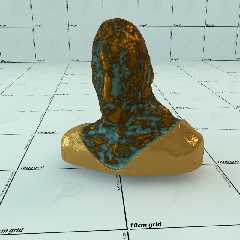
There were more things no working correctly.
- I put in a proper radiosity block, which was lacking;
- corrected the light probe illumination;
- used roughness on the reflections of the brass

I shall stop here for now.


--
Thomas
Post a reply to this message
Attachments:
Download 'ep_proximity_test.jpg' (93 KB)
Preview of image 'ep_proximity_test.jpg'
|
|
| |
| |
|
|
|
|
| |
| |
|
|
On 02/10/2017 08:22, Thomas de Groot wrote:
> I shall stop here for now.

Not bad for a doodle. :-)


--

Regards
     Stephen
Post a reply to this message
|
|
| |
| |
|
|
|
|
| |
| |
|
|
On 2-10-2017 9:36, Stephen wrote:
> On 02/10/2017 08:22, Thomas de Groot wrote:
>> I shall stop here for now.
>
> Not bad for a doodle. :-)
>
>

Indeed, isn't it? ;-)

--
Thomas
Post a reply to this message
|
|
| |
| |
|
|
|
|
| |
| |
|
|
On 10/2/2017 3:36 AM, Stephen wrote:
> On 02/10/2017 08:22, Thomas de Groot wrote:
>> I shall stop here for now.
>
> Not bad for a doodle. :-)
>
>
agreed ... love it when that happens
Post a reply to this message
|
|
| |
| |
|
|
|
|
| |








