|
|
|
|
|
|
| |
| |
|
|
|
|
| |
| |
|
|
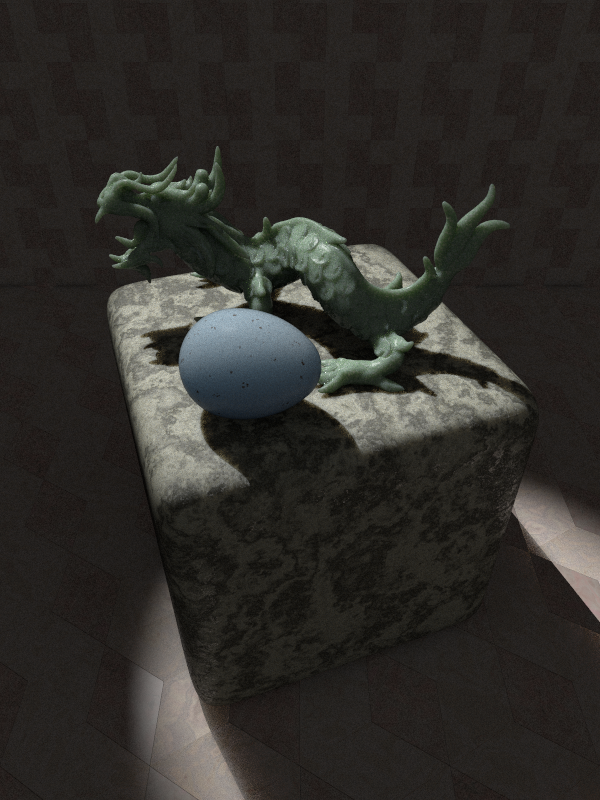
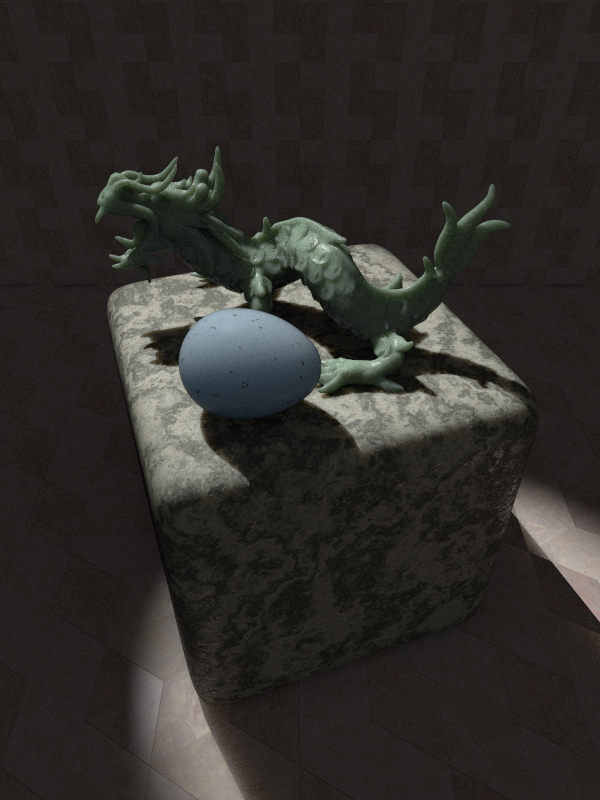
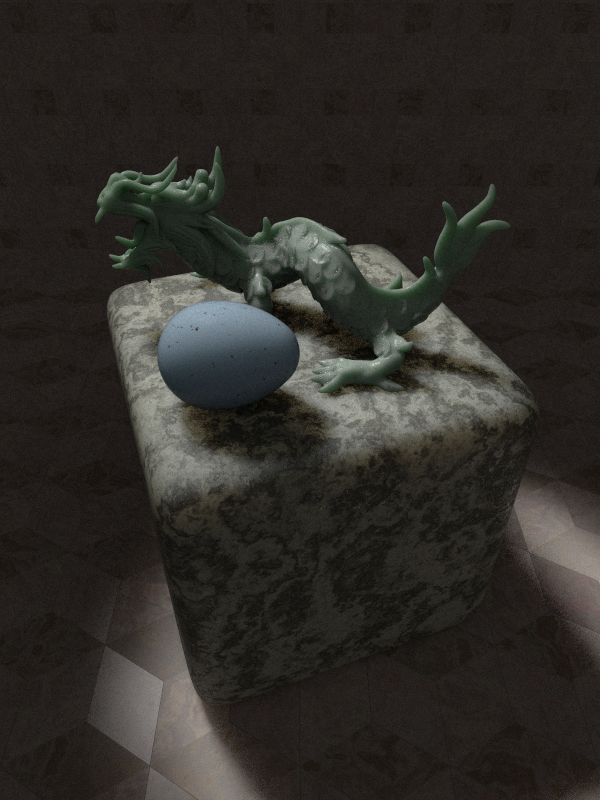
Recently, I found a blackbird eggshell and wanted to model its texture.
It gave me the opportunity to play again with some (UberPOV) settings I
like and using subsurface scattering throughout the scene.

So, here we are with all objects showing subsurface scattering.

UberPOV antialiasing set at +am3 +a0.01 +ac0.90 +r3 and using no_cache.
2h20' render time with 6 cores. This would be much longer if using
+ac0.99 of course.

--
Thomas
Post a reply to this message
Attachments:
Download 'sslt_test_uber_02.png' (707 KB)
Preview of image 'sslt_test_uber_02.png'
|
|
| |
| |
|
|
|
|
| |
| |
|
|
On 4/26/2017 12:21 PM, Thomas de Groot wrote:
> Recently, I found a blackbird eggshell and wanted to model its texture.
> It gave me the opportunity to play again with some (UberPOV) settings I
> like and using subsurface scattering throughout the scene.
>
> So, here we are with all objects showing subsurface scattering.
>
> UberPOV antialiasing set at +am3 +a0.01 +ac0.90 +r3 and using no_cache.
> 2h20' render time with 6 cores. This would be much longer if using
> +ac0.99 of course.
>

Did you use stochastic rendering? It looks a little bit grainy. Other
than that it is excellent.

+am3 - I see that you did.

--

Regards
     Stephen
Post a reply to this message
|
|
| |
| |
|
|
|
|
| |
| |
|
|
Hi(gh)!

On 26.04.2017 13:21, Thomas de Groot wrote:
> Recently, I found a blackbird eggshell and wanted to model its texture.
> It gave me the opportunity to play again with some (UberPOV) settings I
> like and using subsurface scattering throughout the scene.
>
> So, here we are with all objects showing subsurface scattering.
>
> UberPOV antialiasing set at +am3 +a0.01 +ac0.90 +r3 and using no_cache.
> 2h20' render time with 6 cores. This would be much longer if using
> +ac0.99 of course.
>

A dragon's egg... and when reading your subject, I initially thought (or
better, hoped!) you tried to render the same-named neutron star of the
cheela!

That would be a cool project... but I would postpone it until I acquired
reliable knowledge of spectral rendering, as to humans, the Egg is
white-hot at about 9000 K, and any features on its surface are only
discernible when viewed through cheela eyes!

See you in Khyberspace!

Yadgar

Now playing: Under the Orangish Sky (Michael Garrison)
Post a reply to this message
|
|
| |
| |
|
|
|
|
| |
| |
|
|
Le 17-04-26 à 09:00, Stephen a écrit :
> On 4/26/2017 12:21 PM, Thomas de Groot wrote:
>> Recently, I found a blackbird eggshell and wanted to model its texture.
>> It gave me the opportunity to play again with some (UberPOV) settings I
>> like and using subsurface scattering throughout the scene.
>>
>> So, here we are with all objects showing subsurface scattering.
>>
>> UberPOV antialiasing set at +am3 +a0.01 +ac0.90 +r3 and using no_cache.
>> 2h20' render time with 6 cores. This would be much longer if using
>> +ac0.99 of course.
>>
>
> Did you use stochastic rendering? It looks a little bit grainy. Other
> than that it is excellent.
>
> +am3 - I see that you did.
>

You bet he did.

no_cache and +am+ both enable stochastic rendering. The first in the
radiosity evaluation, the second in antialiasing.
Post a reply to this message
|
|
| |
| |
|
|
|
|
| |
| |
|
|
On 4/26/2017 8:46 PM, Alain wrote:
> Le 17-04-26 à 09:00, Stephen a écrit :
>> On 4/26/2017 12:21 PM, Thomas de Groot wrote:
>>> Recently, I found a blackbird eggshell and wanted to model its texture.
>>> It gave me the opportunity to play again with some (UberPOV) settings I
>>> like and using subsurface scattering throughout the scene.
>>>
>>> So, here we are with all objects showing subsurface scattering.
>>>
>>> UberPOV antialiasing set at +am3 +a0.01 +ac0.90 +r3 and using no_cache.
>>> 2h20' render time with 6 cores. This would be much longer if using
>>> +ac0.99 of course.
>>>
>>
>> Did you use stochastic rendering? It looks a little bit grainy. Other
>> than that it is excellent.
>>
>> +am3 - I see that you did.
>>
>
> You bet he did.
>

I don't gamble. At least with anything as trivial as money. ;)
I did not see Thomas's setting until I was about to post.


> no_cache and +am+ both enable stochastic rendering. The first in the
> radiosity evaluation, the second in antialiasing.

Thanks, I did not know that. At least the no_cache setting. I don't
normally use radiosity myself.
Does that mean +am1 or +am2 enables stochastic rendering? I thought it
was only +am3 that did that. But then I've only used UberPov when I was
working on Dhalgren with Thomas and he set the quality settings.

I am an egg. :-)
Albeit a thousand-year-old egg. Yum yum.

--

Regards
     Stephen
Post a reply to this message
|
|
| |
| |
|
|
|
|
| |
| |
|
|
On 26-4-2017 15:42, Jörg "Yadgar" Bleimann wrote:
> Hi(gh)!
>
> On 26.04.2017 13:21, Thomas de Groot wrote:
>> Recently, I found a blackbird eggshell and wanted to model its texture.
>> It gave me the opportunity to play again with some (UberPOV) settings I
>> like and using subsurface scattering throughout the scene.
>>
>> So, here we are with all objects showing subsurface scattering.
>>
>> UberPOV antialiasing set at +am3 +a0.01 +ac0.90 +r3 and using no_cache.
>> 2h20' render time with 6 cores. This would be much longer if using
>> +ac0.99 of course.
>>
>
> A dragon's egg... and when reading your subject, I initially thought (or
> better, hoped!) you tried to render the same-named neutron star of the
> cheela!
>
> That would be a cool project... but I would postpone it until I acquired
> reliable knowledge of spectral rendering, as to humans, the Egg is
> white-hot at about 9000 K, and any features on its surface are only
> discernible when viewed through cheela eyes!
>
> See you in Khyberspace!
>
> Yadgar
>
> Now playing: Under the Orangish Sky (Michael Garrison)

Only by chance I am afraid. I am not acquainted with Robert Forward's
work so I am out. Still, a nice example of syzygy isn't it?

--
Thomas
Post a reply to this message
|
|
| |
| |
|
|
|
|
| |
| |
|
|
On 27-4-2017 0:29, Stephen wrote:
> On 4/26/2017 8:46 PM, Alain wrote:
>> Le 17-04-26 à 09:00, Stephen a écrit :
>>> On 4/26/2017 12:21 PM, Thomas de Groot wrote:
>>>> Recently, I found a blackbird eggshell and wanted to model its texture.
>>>> It gave me the opportunity to play again with some (UberPOV) settings I
>>>> like and using subsurface scattering throughout the scene.
>>>>
>>>> So, here we are with all objects showing subsurface scattering.
>>>>
>>>> UberPOV antialiasing set at +am3 +a0.01 +ac0.90 +r3 and using no_cache.
>>>> 2h20' render time with 6 cores. This would be much longer if using
>>>> +ac0.99 of course.
>>>>
>>>
>>> Did you use stochastic rendering? It looks a little bit grainy. Other
>>> than that it is excellent.
>>>
>>> +am3 - I see that you did.
>>>
>>
>> You bet he did.
>>
>
> I don't gamble. At least with anything as trivial as money. ;)
> I did not see Thomas's setting until I was about to post.
>
>
>> no_cache and +am+ both enable stochastic rendering. The first in the
>> radiosity evaluation, the second in antialiasing.
>
> Thanks, I did not know that. At least the no_cache setting. I don't
> normally use radiosity myself.
> Does that mean +am1 or +am2 enables stochastic rendering? I thought it
> was only +am3 that did that. But then I've only used UberPov when I was
> working on Dhalgren with Thomas and he set the quality settings.

Only +am3 sets stochastic rendering. I like it but it is much slower imo
when set to high quality like +ac99. However, I may be wrong as I have
not compared renders seriously. Clipka would know ;-) I little bit of
grainy image is not a problem to me although it is difficult to balance
quality versus (acceptable) render time. I am not always that patient.

With Dhalgren, I used +am2, so no stochastic rendering there.

>
> I am an egg. :-)
> Albeit a thousand-year-old egg. Yum yum.
>

Hum... I am a bit reluctant to have a bite :-)

--
Thomas
Post a reply to this message
|
|
| |
| |
|
|
|
|
| |
| |
|
|
On 4/27/2017 7:59 AM, Thomas de Groot wrote:
> On 27-4-2017 0:29, Stephen wrote:

>
> Only +am3 sets stochastic rendering. I like it but it is much slower imo
> when set to high quality like +ac99. However, I may be wrong as I have
> not compared renders seriously. Clipka would know ;-) I little bit of
> grainy image is not a problem to me although it is difficult to balance
> quality versus (acceptable) render time. I am not always that patient.
>

That is the crux of the matter. How long you are willing to wait for the
quality you want.


> With Dhalgren, I used +am2, so no stochastic rendering there.
>

But I did a couple of runs with +am3 as it was the first time I had used
UberPov.

>>
>> I am an egg. :-)
>> Albeit a thousand-year-old egg. Yum yum.
>>
>
> Hum... I am a bit reluctant to have a bite :-)
>

They are really nice. They are a bit like haggis, in the way the taste
is linked to the way you catch them. ;-)

--

Regards
     Stephen
Post a reply to this message
|
|
| |
| |
|
|
|
|
| |
| |
|
|
On 27-4-2017 10:07, Stephen wrote:
> On 4/27/2017 7:59 AM, Thomas de Groot wrote:
>> On 27-4-2017 0:29, Stephen wrote:
>
>>
>> Only +am3 sets stochastic rendering. I like it but it is much slower imo
>> when set to high quality like +ac99. However, I may be wrong as I have
>> not compared renders seriously. Clipka would know ;-) I little bit of
>> grainy image is not a problem to me although it is difficult to balance
>> quality versus (acceptable) render time. I am not always that patient.
>>
>
> That is the crux of the matter. How long you are willing to wait for the
> quality you want.

Indeed. I am running a render now with slightly increased quality
(+ac0.95 +r4) which is already more satisfactory. 80% done after 3h23'.

>
>
>> With Dhalgren, I used +am2, so no stochastic rendering there.
>>
>
> But I did a couple of runs with +am3 as it was the first time I had used
> UberPov.

I am a fan. :-)

>
>>>
>>> I am an egg. :-)
>>> Albeit a thousand-year-old egg. Yum yum.
>>>
>>
>> Hum... I am a bit reluctant to have a bite :-)
>>
>
> They are really nice. They are a bit like haggis, in the way the taste
> is linked to the way you catch them. ;-)
>

Really? Well, I shall have to taste haggis too then. ;-)

--
Thomas
Post a reply to this message
|
|
| |
| |
|
|
|
|
| |
| |
|
|
On 27-4-2017 13:12, Thomas de Groot wrote:

> Indeed. I am running a render now with slightly increased quality
> (+ac0.95 +r4) which is already more satisfactory. 80% done after 3h23'.
>

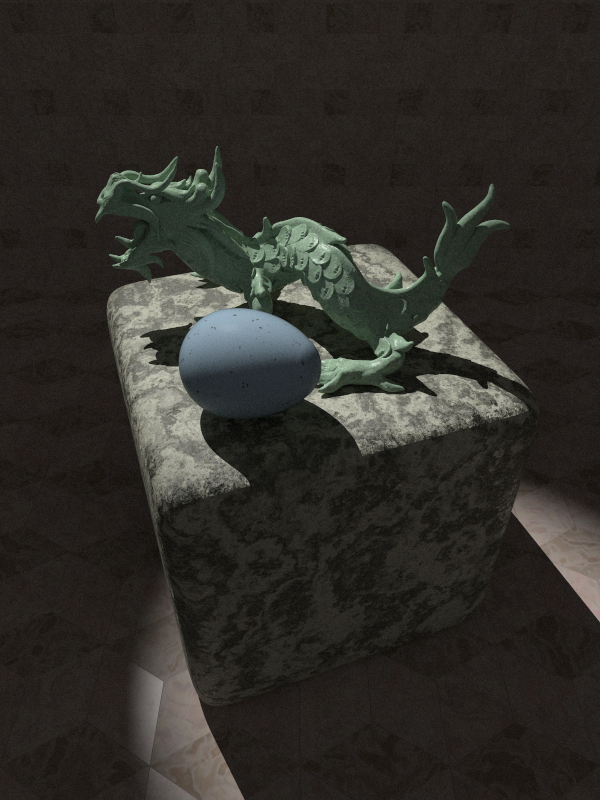
...which completed looks like this.

--
Thomas
Post a reply to this message
Attachments:
Download 'sslt_test_uber_03.png' (672 KB)
Preview of image 'sslt_test_uber_03.png'
|
|
| |
| |
|
|
|
|
| |
| |
|
|
On 4/27/2017 12:12 PM, Thomas de Groot wrote:
> On 27-4-2017 10:07, Stephen wrote:
>> On 4/27/2017 7:59 AM, Thomas de Groot wrote:
>>> On 27-4-2017 0:29, Stephen wrote:

>>
>> But I did a couple of runs with +am3 as it was the first time I had used
>> UberPov.
>
> I am a fan. :-)
>

I had noticed. :)

I appreciate the speed up more than the other features. I have an 800
frame animation that I am working on. I'll certainly use it for that.

>>
>>>>
>>>> I am an egg. :-)
>>>> Albeit a thousand-year-old egg. Yum yum.
>>>>
>>>
>>> Hum... I am a bit reluctant to have a bite :-)
>>>
>>
>> They are really nice. They are a bit like haggis, in the way the taste
>> is linked to the way you catch them. ;-)
>>
>
> Really? Well, I shall have to taste haggis too then. ;-)
>


If you don't try it before Brexit you will have to catch your own or
import it. ;)
Tatties and neeps are available everywhere. Although not always called
the same thing.

--

Regards
     Stephen
Post a reply to this message
|
|
| |
| |
|
|
|
|
| |
| |
|
|
On 4/27/2017 12:29 PM, Thomas de Groot wrote:
> On 27-4-2017 13:12, Thomas de Groot wrote:
>
>> Indeed. I am running a render now with slightly increased quality
>> (+ac0.95 +r4) which is already more satisfactory. 80% done after 3h23'.
>>
>
> ....which completed looks like this.
>

That does make a positive difference. It is more the dragon that shows
it up. To my eyes it looks as if it hasn't been polished to a high degree.

--

Regards
     Stephen
Post a reply to this message
|
|
| |
| |
|
|
|
|
| |
| |
|
|
Thomas de Groot <tho### [at] degroot org> wrote:
> On 27-4-2017 13:12, Thomas de Groot wrote:
>
> > Indeed. I am running a render now with slightly increased quality
> > (+ac0.95 +r4) which is already more satisfactory. 80% done after 3h23'.
> >
>
> ...which completed looks like this.
>
> --
> Thomas
The subsurface scattering in the dragon must add to the render time.
http://www.3d-imaging.co.uk org> wrote:
> On 27-4-2017 13:12, Thomas de Groot wrote:
>
> > Indeed. I am running a render now with slightly increased quality
> > (+ac0.95 +r4) which is already more satisfactory. 80% done after 3h23'.
> >
>
> ...which completed looks like this.
>
> --
> Thomas
The subsurface scattering in the dragon must add to the render time.
http://www.3d-imaging.co.uk
Post a reply to this message
|
|
| |
| |
|
|
|
|
| |
| |
|
|
On 27-4-2017 17:24, j3dj3d wrote:
> Thomas de Groot <tho### [at] degrootorg> wrote:
>> On 27-4-2017 13:12, Thomas de Groot wrote:
>>
>>> Indeed. I am running a render now with slightly increased quality
>>> (+ac0.95 +r4) which is already more satisfactory. 80% done after 3h23'.
>>>
>>
>> ...which completed looks like this.
>>
>> --
>> Thomas
>
> The subsurface scattering in the dragon must add to the render time.
> http://www.3d-imaging.co.uk
>
>

Yes indeed, and like Stephen said, it mostly shows up on the dragon too.
To answers here stephen's other comment: the reflections have been kept
rather low so the polish is almost absent.

--
Thomas
Post a reply to this message
|
|
| |
| |
|
|
|
|
| |
| |
|
|
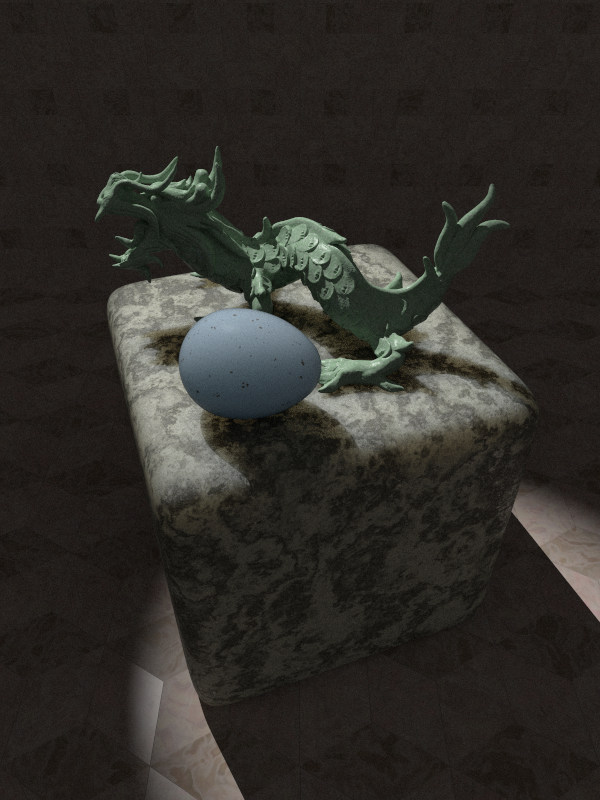
As a comparison, a render without any subsurface scattering.

--
Thomas
Post a reply to this message
Attachments:
Download 'sslt_test_uber_noss.png' (682 KB)
Preview of image 'sslt_test_uber_noss.png'
|
|
| |
| |
|
|
|
|
| |
| |
|
|
On 2017-04-28 06:59 AM (-4), Thomas de Groot wrote:
> As a comparison, a render without any subsurface scattering.

That definitely makes a huge difference with the dragon.  It looks like
modeling clay, not jade.  But there seems only a slight difference with
the floor, and the egg and cube look the same.
Post a reply to this message
|
|
| |
| |
|
|
|
|
| |
| |
|
|
On 29-4-2017 17:05, Cousin Ricky wrote:
> On 2017-04-28 06:59 AM (-4), Thomas de Groot wrote:
>> As a comparison, a render without any subsurface scattering.
>
> That definitely makes a huge difference with the dragon.  It looks like
> modeling clay, not jade.  But there seems only a slight difference with
> the floor, and the egg and cube look the same.
>

I think I need to explore more the translucency strength for each
object, increasing or decreasing the value. I am not yet done ;-)

--
Thomas
Post a reply to this message
|
|
| |
| |
|
|
|
|
| |
| |
|
|
On 30-4-2017 8:43, Thomas de Groot wrote:
> On 29-4-2017 17:05, Cousin Ricky wrote:
>> On 2017-04-28 06:59 AM (-4), Thomas de Groot wrote:
>>> As a comparison, a render without any subsurface scattering.
>>
>> That definitely makes a huge difference with the dragon.  It looks like
>> modeling clay, not jade.  But there seems only a slight difference with
>> the floor, and the egg and cube look the same.
>>
>
> I think I need to explore more the translucency strength for each
> object, increasing or decreasing the value. I am not yet done ;-)
>


In fact, the differences are more subtle. For the cube, compare the
shadows of dragon and egg: their edges show the stone's translucency. In
my next render I hope to show this better.

--
Thomas
Post a reply to this message
|
|
| |
| |
|
|
|
|
| |
| |
|
|
On 30-4-2017 9:48, Thomas de Groot wrote:
> In fact, the differences are more subtle. For the cube, compare the
> shadows of dragon and egg: their edges show the stone's translucency. In
> my next render I hope to show this better.
>

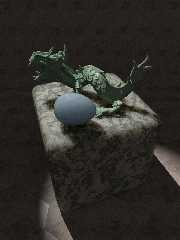
In this render:

- Dragon: no SSLT
- Floor: no SSLT
- Cube: SSLT with 5*translucency vector (was 2* in earlier example)
- Egg: SSLT with 3*translucency vector (was 2* in earlier example)

The cube is showing markedly more translucency in the shadows cast on
it. I see not much difference in the egg, although if I increase the
translucency exaggeratedly (*100 for instance) the effect becomes distorted.

Question: In the wiki about SSLT it is said: "The effect doesn't scale
with the object". Does this mean that SSLT works in the same way as a
scattering media where the amount of scattering has to be compensated
for the amount of media object's scale? It appears so to me at least
although this is not mentioned in the wiki.

--
Thomas
Post a reply to this message
Attachments:
Download 'sslt_test_uber.png' (679 KB)
Preview of image 'sslt_test_uber.png'
|
|
| |
| |
|
|
|
|
| |
| |
|
|
Le 17-04-30 à 07:05, Thomas de Groot a écrit :
> On 30-4-2017 9:48, Thomas de Groot wrote:
>> In fact, the differences are more subtle. For the cube, compare the
>> shadows of dragon and egg: their edges show the stone's translucency. In
>> my next render I hope to show this better.
>>
>
> In this render:
>
> - Dragon: no SSLT
> - Floor: no SSLT
> - Cube: SSLT with 5*translucency vector (was 2* in earlier example)
> - Egg: SSLT with 3*translucency vector (was 2* in earlier example)
>
> The cube is showing markedly more translucency in the shadows cast on
> it. I see not much difference in the egg, although if I increase the
> translucency exaggeratedly (*100 for instance) the effect becomes
> distorted.
>
> Question: In the wiki about SSLT it is said: "The effect doesn't scale
> with the object". Does this mean that SSLT works in the same way as a
> scattering media where the amount of scattering has to be compensated
> for the amount of media object's scale? It appears so to me at least
> although this is not mentioned in the wiki.
>

It does work similarly to medias, both emissive, absorbing and scattering.

So, if you scale your scene by 10 and want SSLT to look the same, then
you need to multiply your SSLT vector by 10. Alternately, you can
increase mm_per_unit by the same amount in the global_settings block.
Post a reply to this message
|
|
| |
| |
|
|
|
|
| |
| |
|
|
On 30-4-2017 18:30, Alain wrote:
> Le 17-04-30 à 07:05, Thomas de Groot a écrit :
>> On 30-4-2017 9:48, Thomas de Groot wrote:
>>> In fact, the differences are more subtle. For the cube, compare the
>>> shadows of dragon and egg: their edges show the stone's translucency. In
>>> my next render I hope to show this better.
>>>
>>
>> In this render:
>>
>> - Dragon: no SSLT
>> - Floor: no SSLT
>> - Cube: SSLT with 5*translucency vector (was 2* in earlier example)
>> - Egg: SSLT with 3*translucency vector (was 2* in earlier example)
>>
>> The cube is showing markedly more translucency in the shadows cast on
>> it. I see not much difference in the egg, although if I increase the
>> translucency exaggeratedly (*100 for instance) the effect becomes
>> distorted.
>>
>> Question: In the wiki about SSLT it is said: "The effect doesn't scale
>> with the object". Does this mean that SSLT works in the same way as a
>> scattering media where the amount of scattering has to be compensated
>> for the amount of media object's scale? It appears so to me at least
>> although this is not mentioned in the wiki.
>>
>
> It does work similarly to medias, both emissive, absorbing and scattering.
>
> So, if you scale your scene by 10 and want SSLT to look the same, then
> you need to multiply your SSLT vector by 10. Alternately, you can
> increase mm_per_unit by the same amount in the global_settings block.
>

OK. Only difference would be that with scattering media (for instance)
you have to /divide/ the scattering vector by the scale of the container
to get the same result, but I get the point indeed.

I am a bit wary about the mm_per_unit and prefer not to touch it too
much, especially if different objects have different scales.

--
Thomas
Post a reply to this message
|
|
| |
| |
|
|
|
|
| |
| |
|
|
On 5/1/2017 7:50 AM, Thomas de Groot wrote:
>
> I am a bit wary about the mm_per_unit and prefer not to touch it too
> much, especially if different objects have different scales.

Yes Clipka has put the fear of god into us. :-)
I suppose it depends what you intend by scaling the models.

--

Regards
     Stephen
Post a reply to this message
|
|
| |
| |
|
|
|
|
| |
| |
|
|
On 1-5-2017 12:08, Stephen wrote:
> On 5/1/2017 7:50 AM, Thomas de Groot wrote:
>>
>> I am a bit wary about the mm_per_unit and prefer not to touch it too
>> much, especially if different objects have different scales.
>
> Yes Clipka has put the fear of god into us. :-)
> I suppose it depends what you intend by scaling the models.
>

Indeed, yes. Take my image as example, the dragon is scaled 0.01, the
egg 0.25, the cube is not scaled, and the floor 0.50. It seems best to
use a standard mm_per_unit and change translucency as needed.

--
Thomas
Post a reply to this message
|
|
| |
| |
|
|
|
|
| |
| |
|
|
On 5/1/2017 12:11 PM, Thomas de Groot wrote:
> On 1-5-2017 12:08, Stephen wrote:
>> On 5/1/2017 7:50 AM, Thomas de Groot wrote:
>>>
>>> I am a bit wary about the mm_per_unit and prefer not to touch it too
>>> much, especially if different objects have different scales.
>>
>> Yes Clipka has put the fear of god into us. :-)
>> I suppose it depends what you intend by scaling the models.
>>
>
> Indeed, yes. Take my image as example, the dragon is scaled 0.01, the
> egg 0.25, the cube is not scaled, and the floor 0.50. It seems best to
> use a standard mm_per_unit and change translucency as needed.
>

My understanding is that the mm_per_unit is the world/scene scale

And to add to the confusion (on my part at least) meshes can have an
internal scale and an external one. By internal scale I mean the scaling
you can change in PoseRay before exporting and external is how you
change it in PovRay.
In Blender when using the physics engine the scale should be 1.0. So to
scale a mesh. You need to edit it and scale it there. Otherwise you get
unexpected results.
So if the dragon is an ornament. I would scale it down in PoseRay. If it
is a statue scale it up in PoseRay. Keep the mm_per_unit as the default.
Having said that. I have not used SSLT since its RC3. :-(
So what do I know?


--

Regards
     Stephen
Post a reply to this message
|
|
| |
| |
|
|
|
|
| |
| |
|
|
On 5/1/2017 1:06 PM, Stephen wrote:
> On 5/1/2017 12:11 PM, Thomas de Groot wrote:

>>
>> Indeed, yes. Take my image as example, the dragon is scaled 0.01, the
>> egg 0.25, the cube is not scaled, and the floor 0.50. It seems best to
>> use a standard mm_per_unit and change translucency as needed.
>>
>

Another thought:
If you use the same material for your three objects. There should be no
difference in the look of the objects. That might be a way to check if I
am talking rubbish or not. And I am talking about meshes not primitives.

--

Regards
     Stephen
Post a reply to this message
|
|
| |
| |
|
|
|
|
| |
| |
|
|
Le 17-05-01 à 02:50, Thomas de Groot a écrit :
> On 30-4-2017 18:30, Alain wrote:
>> Le 17-04-30 à 07:05, Thomas de Groot a écrit :
>>> On 30-4-2017 9:48, Thomas de Groot wrote:
>>>> In fact, the differences are more subtle. For the cube, compare the
>>>> shadows of dragon and egg: their edges show the stone's
>>>> translucency. In
>>>> my next render I hope to show this better.
>>>>
>>>
>>> In this render:
>>>
>>> - Dragon: no SSLT
>>> - Floor: no SSLT
>>> - Cube: SSLT with 5*translucency vector (was 2* in earlier example)
>>> - Egg: SSLT with 3*translucency vector (was 2* in earlier example)
>>>
>>> The cube is showing markedly more translucency in the shadows cast on
>>> it. I see not much difference in the egg, although if I increase the
>>> translucency exaggeratedly (*100 for instance) the effect becomes
>>> distorted.
>>>
>>> Question: In the wiki about SSLT it is said: "The effect doesn't scale
>>> with the object". Does this mean that SSLT works in the same way as a
>>> scattering media where the amount of scattering has to be compensated
>>> for the amount of media object's scale? It appears so to me at least
>>> although this is not mentioned in the wiki.
>>>
>>
>> It does work similarly to medias, both emissive, absorbing and
>> scattering.
>>
>> So, if you scale your scene by 10 and want SSLT to look the same, then
>> you need to multiply your SSLT vector by 10. Alternately, you can
>> increase mm_per_unit by the same amount in the global_settings block.
>>
>
> OK. Only difference would be that with scattering media (for instance)
> you have to /divide/ the scattering vector by the scale of the container
> to get the same result, but I get the point indeed.
>
> I am a bit wary about the mm_per_unit and prefer not to touch it too
> much, especially if different objects have different scales.
>

You should set it according to the overall scale of your scene.
The default of 10 mean 1 POV unit = 1 cm. Set it to 1000 if your scale
is 1 POV unit = 1 m, and 25.4 for 1 inch = 1 POV unit.

In my suggestion, it would make a scene scalled in cm work in mm. So,
you can change mm_per_unit from it's default of 10 to 1 to reflect the
change in overall scale.
Post a reply to this message
|
|
| |
| |
|
|
|
|
| |
| |
|
|
On 1-5-2017 14:06, Stephen wrote:
> On 5/1/2017 12:11 PM, Thomas de Groot wrote:
>> On 1-5-2017 12:08, Stephen wrote:
>>> On 5/1/2017 7:50 AM, Thomas de Groot wrote:
>>>>
>>>> I am a bit wary about the mm_per_unit and prefer not to touch it too
>>>> much, especially if different objects have different scales.
>>>
>>> Yes Clipka has put the fear of god into us. :-)
>>> I suppose it depends what you intend by scaling the models.
>>>
>>
>> Indeed, yes. Take my image as example, the dragon is scaled 0.01, the
>> egg 0.25, the cube is not scaled, and the floor 0.50. It seems best to
>> use a standard mm_per_unit and change translucency as needed.
>>
>
> My understanding is that the mm_per_unit is the world/scene scale
>
> And to add to the confusion (on my part at least) meshes can have an
> internal scale and an external one. By internal scale I mean the scaling
> you can change in PoseRay before exporting and external is how you
> change it in PovRay.
> In Blender when using the physics engine the scale should be 1.0. So to
> scale a mesh. You need to edit it and scale it there. Otherwise you get
> unexpected results.
> So if the dragon is an ornament. I would scale it down in PoseRay. If it
> is a statue scale it up in PoseRay. Keep the mm_per_unit as the default.
> Having said that. I have not used SSLT since its RC3. :-(
> So what do I know?
>
>

This all makes a lot of sense indeed. Generally, I do not build a scene
with a particular scale in mind so I just assemble the elements and let
the observer do the rest. Thus, a landscape can very well be built by
either relatively small elements or by big ones, I do not care as I am
only interested in the final effect.

With SSLT it seems I have to be much more careful.... ;-)

--
Thomas
Post a reply to this message
|
|
| |
| |
|
|
|
|
| |
| |
|
|
On 2-5-2017 5:57, Alain wrote:
[snip]
>
> You should set it according to the overall scale of your scene.
> The default of 10 mean 1 POV unit = 1 cm. Set it to 1000 if your scale
> is 1 POV unit = 1 m, and 25.4 for 1 inch = 1 POV unit.
>
> In my suggestion, it would make a scene scalled in cm work in mm. So,
> you can change mm_per_unit from it's default of 10 to 1 to reflect the
> change in overall scale.
>
>

As I wrote in my answer to Stephen, I am shamefully negligent about
overall scales and just throw together elements to be brewed in the same
pot. I need to be a bit more careful if I want to include SSLT. :-)

--
Thomas
Post a reply to this message
|
|
| |
| |
|
|
|
|
| |
| |
|
|
On 5/2/2017 7:48 AM, Thomas de Groot wrote:

>>
>>
>
> This all makes a lot of sense indeed.

Gosh! a first. :-)

> Generally, I do not build a scene
> with a particular scale in mind so I just assemble the elements and let
> the observer do the rest.

I'm the same. I tend to build my scenes small. For some reason I don't
like wasting Pov space. Which means I use a lot of decimals but decimals
are cheap.


> Thus, a landscape can very well be built by
> either relatively small elements or by big ones, I do not care as I am
> only interested in the final effect.

I tend to use Poser figures as a reference. Michael is about six feet,
in my mind.

>
> With SSLT it seems I have to be much more careful.... ;-)
>

I am sure if Clikpa were about. He would agree. ;-)


--

Regards
     Stephen
Post a reply to this message
|
|
| |
| |
|
|
|
|
| |
| |
|
|
On 2-5-2017 9:25, Stephen wrote:
> On 5/2/2017 7:48 AM, Thomas de Groot wrote:
>
>>>
>>>
>>
>> This all makes a lot of sense indeed.
>
> Gosh! a first. :-)

Really?

>
>> Generally, I do not build a scene
>> with a particular scale in mind so I just assemble the elements and let
>> the observer do the rest.
>
> I'm the same. I tend to build my scenes small. For some reason I don't
> like wasting Pov space. Which means I use a lot of decimals but decimals
> are cheap.

They are indeed. However, I try to avoid too small ones. They are more
difficult to find when they drop to the floor. :-)

>
>
>> Thus, a landscape can very well be built by
>> either relatively small elements or by big ones, I do not care as I am
>> only interested in the final effect.
>
> I tend to use Poser figures as a reference. Michael is about six feet,
> in my mind.

Typically, I scale the figures to the environment they are to live in. :-)

>
>>
>> With SSLT it seems I have to be much more careful.... ;-)
>>
>
> I am sure if Clikpa were about. He would agree. ;-)
>
>

Ah! The Clipka! He seems to have gone on holiday? Shame. He /knows/ he
cannot go without our permission. ;-)

--
Thomas
Post a reply to this message
|
|
| |
| |
|
|
|
|
| |
| |
|
|
On 5/2/2017 8:48 AM, Thomas de Groot wrote:
> On 2-5-2017 9:25, Stephen wrote:
>> On 5/2/2017 7:48 AM, Thomas de Groot wrote:
>>>
>>> This all makes a lot of sense indeed.
>>
>> Gosh! a first. :-)
>
> Really?
>

I meant a first for today.

>>
>>> Generally, I do not build a scene
>>> with a particular scale in mind so I just assemble the elements and let
>>> the observer do the rest.
>>
>> I'm the same. I tend to build my scenes small. For some reason I don't
>> like wasting Pov space. Which means I use a lot of decimals but decimals
>> are cheap.
>
> They are indeed. However, I try to avoid too small ones. They are more
> difficult to find when they drop to the floor. :-)
>

Alt+ LMB + drag scoops them up. :-)
(Bishop3D setting)

>>
>>
>>> Thus, a landscape can very well be built by
>>> either relatively small elements or by big ones, I do not care as I am
>>> only interested in the final effect.
>>
>> I tend to use Poser figures as a reference. Michael is about six feet,
>> in my mind.
>
> Typically, I scale the figures to the environment they are to live in. :-)
>

I was talking my dreams. In truth I scale my scenes by the first object
I create.

>>
>>>
>>> With SSLT it seems I have to be much more careful.... ;-)
>>>
>>
>> I am sure if Clikpa were about. He would agree. ;-)
>>
>>
>
> Ah! The Clipka! He seems to have gone on holiday? Shame. He /knows/ he
> cannot go without our permission. ;-)
>

As long as he hasn't taken a marching band with him. It is okay. ;-)

--

Regards
     Stephen
Post a reply to this message
|
|
| |
| |
|
|
|
|
| |
| |
|
|
On 1-5-2017 14:06, Stephen wrote:
> On 5/1/2017 12:11 PM, Thomas de Groot wrote:
>> On 1-5-2017 12:08, Stephen wrote:
>>> On 5/1/2017 7:50 AM, Thomas de Groot wrote:
>>>>
>>>> I am a bit wary about the mm_per_unit and prefer not to touch it too
>>>> much, especially if different objects have different scales.
>>>
>>> Yes Clipka has put the fear of god into us. :-)
>>> I suppose it depends what you intend by scaling the models.
>>>
>>
>> Indeed, yes. Take my image as example, the dragon is scaled 0.01, the
>> egg 0.25, the cube is not scaled, and the floor 0.50. It seems best to
>> use a standard mm_per_unit and change translucency as needed.
>>
>
> My understanding is that the mm_per_unit is the world/scene scale
>
> And to add to the confusion (on my part at least) meshes can have an
> internal scale and an external one. By internal scale I mean the scaling
> you can change in PoseRay before exporting and external is how you
> change it in PovRay.
> In Blender when using the physics engine the scale should be 1.0. So to
> scale a mesh. You need to edit it and scale it there. Otherwise you get
> unexpected results.
> So if the dragon is an ornament. I would scale it down in PoseRay. If it
> is a statue scale it up in PoseRay. Keep the mm_per_unit as the default.
> Having said that. I have not used SSLT since its RC3. :-(
> So what do I know?
>
>
I have been pondering this a bit. I think that you do achieve the same
(using meshes of course) if you first do basic transforms (in POV-Ray)
and /then/ use that copy of the original object with SSLT. In fact, I do
that exercise quite often:

#declare MyObject =
object {MyMesh_POV_
   transform {MyTransforms}
}

object {MyObject
   material {MyMaterial}
   rotate {MyRotate}
   translate {MyTranslate}
}


--
Thomas
Post a reply to this message
|
|
| |
| |
|
|
|
|
| |
| |
|
|
Am 30.04.2017 um 13:05 schrieb Thomas de Groot:

> Question: In the wiki about SSLT it is said: "The effect doesn't scale
> with the object". Does this mean that SSLT works in the same way as a
> scattering media where the amount of scattering has to be compensated
> for the amount of media object's scale? It appears so to me at least
> although this is not mentioned in the wiki.

That depends on what you want to achieve.

If you want the object to look like a larger item made of the same
material, scale the object and use the same SSLT parameters.

If you want the object to look exactly the same, but take up a larger
portion on the screen, scale the object and adjust the SSLT parameters.
(Or zoom in on the object ;))
Post a reply to this message
|
|
| |
| |
|
|
|
|
| |
| |
|
|
Am 01.05.2017 um 14:06 schrieb Stephen:
> On 5/1/2017 12:11 PM, Thomas de Groot wrote:
>> On 1-5-2017 12:08, Stephen wrote:
>>> On 5/1/2017 7:50 AM, Thomas de Groot wrote:
>>>>
>>>> I am a bit wary about the mm_per_unit and prefer not to touch it too
>>>> much, especially if different objects have different scales.
>>>
>>> Yes Clipka has put the fear of god into us. :-)
>>> I suppose it depends what you intend by scaling the models.
>>>
>>
>> Indeed, yes. Take my image as example, the dragon is scaled 0.01, the
>> egg 0.25, the cube is not scaled, and the floor 0.50. It seems best to
>> use a standard mm_per_unit and change translucency as needed.
>>
>
> My understanding is that the mm_per_unit is the world/scene scale

Indeed.

Also, I might take the opportunity to re-iterate that it is not an SSLT
setting /per se/. It only just so happens that SSLT is currently the
only feature that makes use of it.
Post a reply to this message
|
|
| |
| |
|
|
|
|
| |
| |
|
|
Am 02.05.2017 um 08:51 schrieb Thomas de Groot:
> On 2-5-2017 5:57, Alain wrote:
> [snip]
>>
>> You should set it according to the overall scale of your scene.
>> The default of 10 mean 1 POV unit = 1 cm. Set it to 1000 if your scale
>> is 1 POV unit = 1 m, and 25.4 for 1 inch = 1 POV unit.
>>
>> In my suggestion, it would make a scene scalled in cm work in mm. So,
>> you can change mm_per_unit from it's default of 10 to 1 to reflect the
>> change in overall scale.
>>
>>
>
> As I wrote in my answer to Stephen, I am shamefully negligent about
> overall scales and just throw together elements to be brewed in the same
> pot. I need to be a bit more careful if I want to include SSLT. :-)

Technically, you only need to be careful if you intend to re-use (or
have others re-use) your SSLT stuff in any other scene.

For instance, if you've concocted a convincing ivory material, that
ivory material will only look convincing in other scenes if both your
original scene and the new scene have proper mm_per_unit settings (or if
both have the mm_per_unit setting screwed up by the same factor).
Post a reply to this message
|
|
| |
| |
|
|
|
|
| |
| |
|
|
On 5/2/2017 7:52 PM, clipka wrote:
> Am 01.05.2017 um 14:06 schrieb Stephen:

>>>
>>
>> My understanding is that the mm_per_unit is the world/scene scale
>
> Indeed.
>
> Also, I might take the opportunity to re-iterate that it is not an SSLT
> setting /per se/. It only just so happens that SSLT is currently the
> only feature that makes use of it.
>

Yet? :-)

--

Regards
     Stephen
Post a reply to this message
|
|
| |
| |
|
|
|
|
| |
| |
|
|
Am 02.05.2017 um 10:03 schrieb Stephen:

>> Ah! The Clipka! He seems to have gone on holiday? Shame. He /knows/ he
>> cannot go without our permission. ;-)
>>
>
> As long as he hasn't taken a marching band with him. It is okay. ;-)

Nah, no marching band for me yet.

But eight bells for someone dear.
Post a reply to this message
|
|
| |
| |
|
|
|
|
| |
| |
|
|
On 5/2/2017 8:44 PM, clipka wrote:
> Am 02.05.2017 um 10:03 schrieb Stephen:
>
>>> Ah! The Clipka! He seems to have gone on holiday? Shame. He /knows/ he
>>> cannot go without our permission. ;-)
>>>
>>
>> As long as he hasn't taken a marching band with him. It is okay. ;-)
>
> Nah, no marching band for me yet.
>
> But eight bells for someone dear.
>

Sorry to hear that. :-(

--

Regards
     Stephen
Post a reply to this message
|
|
| |
| |
|
|
|
|
| |
| |
|
|
On 2-5-2017 21:44, clipka wrote:
> Am 02.05.2017 um 10:03 schrieb Stephen:
>
>>> Ah! The Clipka! He seems to have gone on holiday? Shame. He /knows/ he
>>> cannot go without our permission. ;-)
>>>
>>
>> As long as he hasn't taken a marching band with him. It is okay. ;-)
>
> Nah, no marching band for me yet.
>
> But eight bells for someone dear.
>

Well, I am very sorry to hear that, Christoph. You have my sincere support.

--
Thomas
Post a reply to this message
|
|
| |
| |
|
|
|
|
| |
| |
|
|
On 2-5-2017 20:47, clipka wrote:
> Am 30.04.2017 um 13:05 schrieb Thomas de Groot:
>
>> Question: In the wiki about SSLT it is said: "The effect doesn't scale
>> with the object". Does this mean that SSLT works in the same way as a
>> scattering media where the amount of scattering has to be compensated
>> for the amount of media object's scale? It appears so to me at least
>> although this is not mentioned in the wiki.
>
> That depends on what you want to achieve.
>
> If you want the object to look like a larger item made of the same
> material, scale the object and use the same SSLT parameters.
>
> If you want the object to look exactly the same, but take up a larger
> portion on the screen, scale the object and adjust the SSLT parameters.
> (Or zoom in on the object ;))
>

Hmmm... yes, that is well put. I guess I have to ponder this a bit and
add it to my own little reminders.

Thanks a lot!

--
Thomas
Post a reply to this message
|
|
| |
| |
|
|
|
|
| |
| |
|
|
On 2-5-2017 21:04, clipka wrote:
> Am 02.05.2017 um 08:51 schrieb Thomas de Groot:
>> On 2-5-2017 5:57, Alain wrote:
>> [snip]
>>>
>>> You should set it according to the overall scale of your scene.
>>> The default of 10 mean 1 POV unit = 1 cm. Set it to 1000 if your scale
>>> is 1 POV unit = 1 m, and 25.4 for 1 inch = 1 POV unit.
>>>
>>> In my suggestion, it would make a scene scalled in cm work in mm. So,
>>> you can change mm_per_unit from it's default of 10 to 1 to reflect the
>>> change in overall scale.
>>>
>>>
>>
>> As I wrote in my answer to Stephen, I am shamefully negligent about
>> overall scales and just throw together elements to be brewed in the same
>> pot. I need to be a bit more careful if I want to include SSLT. :-)
>
> Technically, you only need to be careful if you intend to re-use (or
> have others re-use) your SSLT stuff in any other scene.
>
> For instance, if you've concocted a convincing ivory material, that
> ivory material will only look convincing in other scenes if both your
> original scene and the new scene have proper mm_per_unit settings (or if
> both have the mm_per_unit setting screwed up by the same factor).
>

Yes, that was what I thought indeed.

--
Thomas
Post a reply to this message
|
|
| |
| |
|
|
|
|
| |
| |
|
|
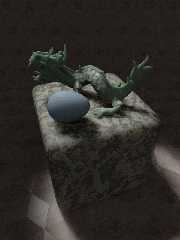
As far as I am concerned, the final version. I streamlined the code for
better reproducibility, made an area_light of the spotlight, and
increased the translucency of the cube. Using: +am3 +a0.01 +ac0.95 +r4

--
Thomas
Post a reply to this message
Attachments:
Download 'sslt_test_uber_final.png' (673 KB)
Preview of image 'sslt_test_uber_final.png'
|
|
| |
| |
|
|
|
|
| |
| |
|
|
On 5/6/2017 11:51 AM, Thomas de Groot wrote:
> As far as I am concerned, the final version. I streamlined the code for
> better reproducibility, made an area_light of the spotlight, and
> increased the translucency of the cube. Using: +am3 +a0.01 +ac0.95 +r4
>

Excellent job.

--

Regards
     Stephen
Post a reply to this message
|
|
| |
| |
|
|
|
|
| |
| |
|
|
On 6-5-2017 13:03, Stephen wrote:
> On 5/6/2017 11:51 AM, Thomas de Groot wrote:
>> As far as I am concerned, the final version. I streamlined the code for
>> better reproducibility, made an area_light of the spotlight, and
>> increased the translucency of the cube. Using: +am3 +a0.01 +ac0.95 +r4
>>
>
> Excellent job.
>

Thanks indeed. For the curious, I am going to put the material macros
used in p.t.scene-files.

--
Thomas
Post a reply to this message
|
|
| |
| |
|
|
|
|
| |