|
|
|
|
|
|
| |
| |
|
|
|
|
| |
| |
|
|
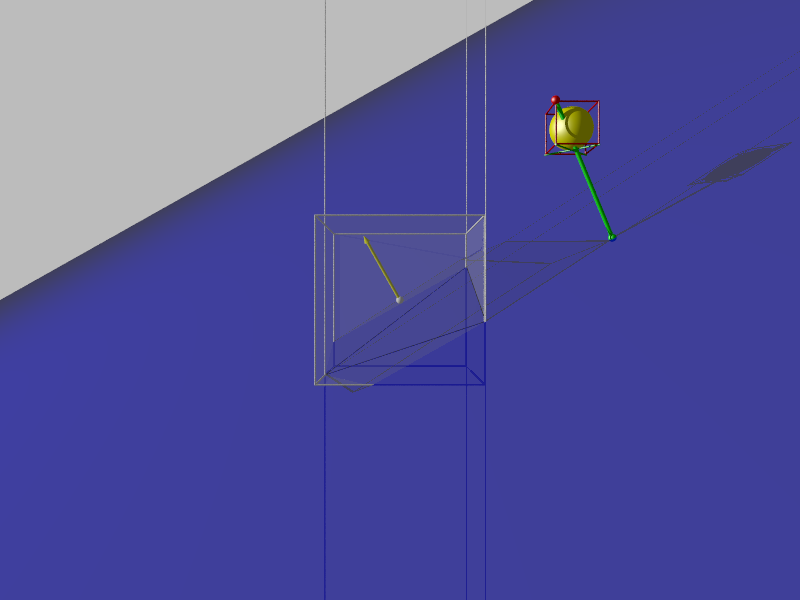
I worked a lot of what I needed out, and it mostly works the way I want it to.
Still a few small things that I haven't fixed / perfected.

But now I can plot out the camera's view frustum, and do some basic culling /
clipping.

Questions, comments, and suggestions for fixes & further developments welcome.
Post a reply to this message
Attachments:
Download 'viewfrustrumtest1.png' (533 KB)
Preview of image 'viewfrustrumtest1.png'
|
|
| |
| |
|
|
|
|
| |
| |
|
|
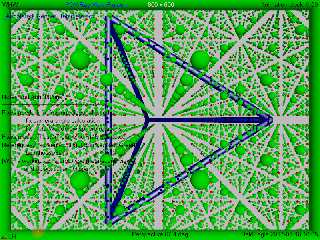
meta-view:
Post a reply to this message
Attachments:
Download 'viewfrustumtest2.png' (379 KB)
Preview of image 'viewfrustumtest2.png'
|
|
| |
| |
|
|
|
|
| |
| |
|
|
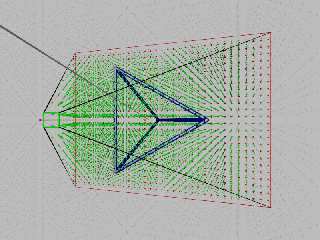
Working on some of this to do bounding boxes, and if that works, I might look
into octree culling.
Currently I need to figure out a quick and direct way to establish the p-vertex
and n-vertex.

https://books.google.com/books?id=CCqzMm_-WucC&pg=PA74&lpg=PA74&dq=ned+greene+frustum&source=bl&ots=mtnu29NEfj&sig=TvSJ
4OWFFaRb6c0RiSbtXD9pbww&hl=en&sa=X&ved=0ahUKEwjzsZm9mcfRAhVCOCYKHcBuCXYQ6AEIIjAB#v=onepage&q=ned%20greene%20frustum&f=f
alse
Post a reply to this message
|
|
| |
| |
|
|
|
|
| |
| |
|
|
On 1/16/2017 10:17 AM, Bald Eagle wrote:
> I worked a lot of what I needed out, and it mostly works the way I want it to.
> Still a few small things that I haven't fixed / perfected.
>
> But now I can plot out the camera's view frustum, and do some basic culling /
> clipping.
>
> Questions, comments, and suggestions for fixes & further developments welcome.
>

Are you using a perspective camera or orthographic?

Mike
Post a reply to this message
|
|
| |
| |
|
|
|
|
| |
| |
|
|
Mike Horvath <mik### [at] gmail com> wrote:
> Are you using a perspective camera or orthographic?
I had hoped that the diagram would clearly show the perspective camera's frustum
- an orthographic view frustum would appear as a rectangular solid instead of a
[truncated] square-base pyramid.
I found a good an very fast method of determining the p-vertex,
http://www.txutxi.com/?p=584
but I'm currently struggling with understanding _exactly_ how planes and their
normals get calculated.
I'm using equations from Paul Bourke's site to calculate the A, B, C and (-)D
coefficients in the plane equation,
#declare Point1 = <-1, 0.5, 1>;
#declare Point2 = <1, -0.25, 1>;
#declare Point3 = <0, -1, -1>;
cylinder {Point1, Point2 0.005 texture {pigment {Black}} }
cylinder {Point2, Point3 0.005 texture {pigment {Black}} }
cylinder {Point3, Point1 0.005 texture {pigment {Black}} }
// derive the plane equation
#declare A1 = Point1.y*(Point2.z-Point3.z) + Point2.y*(Point3.z-Point1.z) +
Point3.y*(Point1.z-Point2.z);
#declare B1 = Point1.z*(Point2.x-Point3.x) + Point2.z*(Point3.x-Point1.x) +
Point3.z*(Point1.x-Point2.x);
#declare C1 = Point1.x*(Point2.y-Point3.y) + Point2.x*(Point3.y-Point1.y) +
Point3.x*(Point1.y-Point2.y);
#declare D1 = -1*(Point1.x*(Point2.y*Point3.z-Point3.y*Point2.z) +
Point2.x*(Point3.y*Point1.z-Point1.y*Point3.z) +
Point3.x*(Point1.y*Point2.z-Point2.y*Point1.z));
#declare L = vlength (<A1, B1, C1>);
and after much fiddling, got the plane to pass through the three points, and the
p-vertex to be where I think it ought to be.
I'd like to figure out the length and direction of the normal vector of the
plane, and how to calculate the position of a point in the plane that is closest
to a point not in the plane (in this case, the p-vertex).
Likely there's a way to use POV-Ray's vector functions, and macros, with
rotations and translations, but I'd like to use a direct calculation - something
that would be straight out of analytical geometry.
(I looked through Friedrich Lohmueller's site and his analytical_g.inc file, but
I didn't find exactly what I was looking for - maybe I missed it)
[I am, admittedly, probably not thinking about this in the right way, and am
thus overcomplicating it for myself as usual] com> wrote:
> Are you using a perspective camera or orthographic?
I had hoped that the diagram would clearly show the perspective camera's frustum
- an orthographic view frustum would appear as a rectangular solid instead of a
[truncated] square-base pyramid.
I found a good an very fast method of determining the p-vertex,
http://www.txutxi.com/?p=584
but I'm currently struggling with understanding _exactly_ how planes and their
normals get calculated.
I'm using equations from Paul Bourke's site to calculate the A, B, C and (-)D
coefficients in the plane equation,
#declare Point1 = <-1, 0.5, 1>;
#declare Point2 = <1, -0.25, 1>;
#declare Point3 = <0, -1, -1>;
cylinder {Point1, Point2 0.005 texture {pigment {Black}} }
cylinder {Point2, Point3 0.005 texture {pigment {Black}} }
cylinder {Point3, Point1 0.005 texture {pigment {Black}} }
// derive the plane equation
#declare A1 = Point1.y*(Point2.z-Point3.z) + Point2.y*(Point3.z-Point1.z) +
Point3.y*(Point1.z-Point2.z);
#declare B1 = Point1.z*(Point2.x-Point3.x) + Point2.z*(Point3.x-Point1.x) +
Point3.z*(Point1.x-Point2.x);
#declare C1 = Point1.x*(Point2.y-Point3.y) + Point2.x*(Point3.y-Point1.y) +
Point3.x*(Point1.y-Point2.y);
#declare D1 = -1*(Point1.x*(Point2.y*Point3.z-Point3.y*Point2.z) +
Point2.x*(Point3.y*Point1.z-Point1.y*Point3.z) +
Point3.x*(Point1.y*Point2.z-Point2.y*Point1.z));
#declare L = vlength (<A1, B1, C1>);
and after much fiddling, got the plane to pass through the three points, and the
p-vertex to be where I think it ought to be.
I'd like to figure out the length and direction of the normal vector of the
plane, and how to calculate the position of a point in the plane that is closest
to a point not in the plane (in this case, the p-vertex).
Likely there's a way to use POV-Ray's vector functions, and macros, with
rotations and translations, but I'd like to use a direct calculation - something
that would be straight out of analytical geometry.
(I looked through Friedrich Lohmueller's site and his analytical_g.inc file, but
I didn't find exactly what I was looking for - maybe I missed it)
[I am, admittedly, probably not thinking about this in the right way, and am
thus overcomplicating it for myself as usual]
Post a reply to this message
|
|
| |
| |
|
|
|
|
| |
| |
|
|
Whee!

Thanks to:
http://math.stackexchange.com/questions/723937/find-the-point-on-a-plane-3x-4y-z-1-that-is-closest-to-1-0-1

I worked out:

sphere {Pvertex 0.05 texture {pigment {Red} finish {specular 0.6}} }

// for plane A1*x+B1*y+C1*z=D1, what is closest point on plane to Pvertex?
// Normal vector to plane is <A1, B1, C1>
// closest point is some multiple of <A1, B1, C1> added to <Pvertex.x,
Pvertex.y, Pvertex.z>
// P = <Pvertex.x, Pvertex.y, Pvertex.z> + c*<A1, B1, C1> = <(Pvertex.x+c*A1),
(Pvertex.y+c*B1), (Pvertex.z+c*C1)>
// substitute this into the plane equation
// A1*(Pvertex.x+c*A1) + B1*(Pvertex.y+c*B1) + C1*(Pvertex.z+c*C1)> = D1
// A1*Pvertex.x+pow(A1,2)*c) + B1*Pvertex.y+pow(B1,2)*c) +
C1*Pvertex.z+pow(C1,2)*c) = D1
// (A1*Pvertex.x) + (B1*Pvertex.y) + (C1*Pvertex.z) + pow(A1,2)*c) +
pow(B1,2)*c) + pow(C1,2)*c) = D1
// pow(A1,2)*c) + pow(B1,2)*c) + pow(C1,2)*c) = D1 - ( (A1*Pvertex.x) +
(B1*Pvertex.y) + (C1*Pvertex.z) )
// c = D1 - ( (A1*Pvertex.x) + (B1*Pvertex.y) + (C1*Pvertex.z) ) / ( pow(A1,2) +
pow(B1,2) + pow(C1,2) )
#declare c = (D1 - ( (A1*Pvertex.x) + (B1*Pvertex.y) + (C1*Pvertex.z) ) ) / (
pow(A1,2) + pow(B1,2) + pow(C1,2) );
#debug concat ("c = ", str(c, 3, 3), "\n")
#declare P = Pvertex + (c*<A1, B1, C1>);
#debug concat ("Point on plane is: <", vstr(3, P, ", ", 3, 3), ">  \n")

sphere {P 0.05 texture {pigment {Green} finish {specular 0.6}} }
cylinder {P, Pvertex, 0.025 texture {pigment {Green} finish {specular 0.6} }}


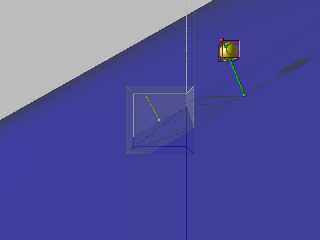
and this looks good.  (finally)

Hopefully I'll have more time to work out some more of the code, optimize the
macros, and make a nice test scene.
Post a reply to this message
Attachments:
Download 'octanttest.png' (46 KB)
Preview of image 'octanttest.png'
|
|
| |
| |
|
|
|
|
| |
| |
|
|
Mike Horvath <mik### [at] gmailcom> wrote:

> Are you using a perspective camera or orthographic?

I re-read this, and:
The camera for the native scene - using screen.inc, is perspective.
I have rear, side, and orthographic views that use an orthographic camera to
view the native perspective camera's frustum in the "meta-scene"
The side-rear view of the perspective frustum uses a perspective camera.

I've seen some references that define other frustrums (frusta?) that reshape the
perspective frustum into a rectangular solid ("clipping frustum") I suppose for
easier handling of the data.
That uses a matrix to transform the perspective frustum and object coordinates.

I don't see why a frustum for the native scene couldn't be orthographic - future
work.   :)
Post a reply to this message
|
|
| |
| |
|
|
|
|
| |
| |
|
|
On 1/20/2017 10:08 AM, Bald Eagle wrote:
> Mike Horvath <mik### [at] gmailcom> wrote:
>
>> Are you using a perspective camera or orthographic?
>
> I re-read this, and:
> The camera for the native scene - using screen.inc, is perspective.
> I have rear, side, and orthographic views that use an orthographic camera to
> view the native perspective camera's frustum in the "meta-scene"
> The side-rear view of the perspective frustum uses a perspective camera.
>
> I've seen some references that define other frustrums (frusta?) that reshape the
> perspective frustum into a rectangular solid ("clipping frustum") I suppose for
> easier handling of the data.
> That uses a matrix to transform the perspective frustum and object coordinates.
>
> I don't see why a frustum for the native scene couldn't be orthographic - future
> work.   :)
>
>
>


I made a habit of using direction, location, up and right instead of
look_at, angle and sky. This makes such calculations a lot easier.

Mike
Post a reply to this message
|
|
| |
| |
|
|
|
|
| |
| |
|
|
I was trying to work out a few things, and was using my code and that in
screen.inc as a guide, but of course nothing ever works out the way it's
supposed to.

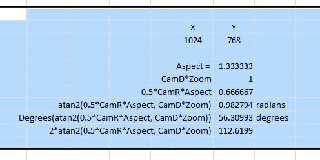
Excel gives me wildly different results from what POV-Ray returns for the camera
view angle formula.

#declare Angle = 2*atan2d (0.5*CamR.x*Camera_Aspect_Ratio, CamD.z*Camera_Zoom);

I was hoping someone could run a quick check and confirm.

This certainly wouldn't be the first time Excel was just plain wrong.
Post a reply to this message
Attachments:
Download 'excel - angle.jpg' (24 KB)
Preview of image 'excel - angle.jpg'
|
|
| |
| |
|
|
|
|
| |
| |
|
|
On 4/17/2017 7:47 AM, Bald Eagle wrote:
>
> I was trying to work out a few things, and was using my code and that in
> screen.inc as a guide, but of course nothing ever works out the way it's
> supposed to.
>
> Excel gives me wildly different results from what POV-Ray returns for the camera
> view angle formula.
>
> #declare Angle = 2*atan2d (0.5*CamR.x*Camera_Aspect_Ratio, CamD.z*Camera_Zoom);
>
> I was hoping someone could run a quick check and confirm.
>
> This certainly wouldn't be the first time Excel was just plain wrong.
>

Make sure you are using radians and degrees properly. You may have to
convert between the two.


Mike
Post a reply to this message
|
|
| |
| |
|
|
|
|
| |
| |
|
|
Mike Horvath <mik### [at] gmailcom> wrote:

> Make sure you are using radians and degrees properly. You may have to
> convert between the two.

Well, the thing is, when I do it all in SDL, it works out fine.

I send the value of angle out to the debug stream, and it's the expected 68.3
degrees or whatever.

Then I work it all out step by step in Excel, and it's just looking WAY off.
See my rows labeled radians and degrees.
I'm using degrees = (radians /pi)*180, and it gives me the same result as
Excel's degrees() function.   So I'm wondering if the atan2 function is flawed.
Post a reply to this message
|
|
| |
| |
|
|
|
|
| |
| |
|
|
On 4/17/2017 3:05 PM, Bald Eagle wrote:
> I send the value of angle out to the debug stream, and it's the expected 68.3
> degrees or whatever.

Do you know for sure this is the correct answer?


Mike
Post a reply to this message
|
|
| |
| |
|
|
|
|
| |
| |
|
|
On 4/17/2017 7:47 AM, Bald Eagle wrote:
>
> I was trying to work out a few things, and was using my code and that in
> screen.inc as a guide, but of course nothing ever works out the way it's
> supposed to.
>
> Excel gives me wildly different results from what POV-Ray returns for the camera
> view angle formula.
>
> #declare Angle = 2*atan2d (0.5*CamR.x*Camera_Aspect_Ratio, CamD.z*Camera_Zoom);
>
> I was hoping someone could run a quick check and confirm.
>
> This certainly wouldn't be the first time Excel was just plain wrong.
>


What input values are you using?


Mike
Post a reply to this message
|
|
| |
| |
|
|
|
|
| |
| |
|
|
Mike Horvath <mik### [at] gmailcom> wrote:

> > #declare Angle = 2*atan2d (0.5*CamR.x*Camera_Aspect_Ratio, CamD.z*Camera_Zoom);

> What input values are you using?
>
>
> Mike

It's just the standard default camera.
So, CamR.x = 1
Aspect ratio = 1.33333333333.......
CamD.z = 1
and Camera zoom = 1

so the calculation basically works out to be 2 * atan2 (0.666666666666666.....)
  converted to degrees
which ought to be very close to 67.38

It works just fine in POV-Ray, I'm just wondering what's getting buggered up in
Excel, or if I'm having an extended "senior moment"
Post a reply to this message
|
|
| |
| |
|
|
|
|
| |
| |
|
|
> so the calculation basically works out to be 2 * atan2 (0.666666666666666.....)

atan2 takes 2 parameters, this is important and likely where you've gone
wrong. Make sure you've got the parameters the right way round - Excel
takes (x,y) not (y,x).

If you've already pre-calculated the y/x gradient (eg 0.66666) then for
atan2 to give the correct result in Excel you need to use
atan2(1,0.666666). If you do it the other way round atan2(0.66666,1)
then you're going to get the wrong answer.

>   converted to degrees
> which ought to be very close to 67.38

2*degrees(atan2(1,0.666666)) gives 67.38 degrees in Excel.
Post a reply to this message
|
|
| |
| |
|
|
|
|
| |
| |
|
|
Am 18.04.2017 um 13:51 schrieb Bald Eagle:

> It works just fine in POV-Ray, I'm just wondering what's getting buggered up in
> Excel, or if I'm having an extended "senior moment"

As Scott just pointed out, Excel has `ATAN2(X;Y)`, while virtually all
proper programming languages have `atan2(y,x)`.
Post a reply to this message
|
|
| |
| |
|
|
|
|
| |
| |
|
|
clipka <ano### [at] anonymousorg> wrote:
> Am 18.04.2017 um 13:51 schrieb Bald Eagle:
>
> > It works just fine in POV-Ray, I'm just wondering what's getting buggered up in
> > Excel, or if I'm having an extended "senior moment"
>
> As Scott just pointed out, Excel has `ATAN2(X;Y)`, while virtually all
> proper programming languages have `atan2(y,x)`.

Ah yes.
Apparently I was having a "Microsoft Moment".

Thanks for restoring my sanity (such as it is)  ;)
Post a reply to this message
|
|
| |
| |
|
|
|
|
| |
| |
|
|
Le 17/04/2017 à 21:05, Bald Eagle a écrit :
> Mike Horvath <mik### [at] gmailcom> wrote:
>
>> Make sure you are using radians and degrees properly. You may have to
>> convert between the two.
>
> Well, the thing is, when I do it all in SDL, it works out fine.
>
> I send the value of angle out to the debug stream, and it's the expected 68.3
> degrees or whatever.
>
> Then I work it all out step by step in Excel, and it's just looking WAY off.
> See my rows labeled radians and degrees.
> I'm using degrees = (radians /pi)*180, and it gives me the same result as
> Excel's degrees() function.   So I'm wondering if the atan2 function is flawed.
>
>
>
>

Beware, atan2 is not always taking parameters in same order.
In Povray SDL, atan2(A,B) gives the angle in radians of tangent (A/B).

In C (man page), atan2(y,x) gives the angle in radians of tangent (y/x)

In Excel, atan2(x_num,y_num) ... yes, they swapped the parameters !
Post a reply to this message
|
|
| |
| |
|
|
|
|
| |
|
|