 |
|
|
|
|
|
| |
| |
|
|
|
|
| |
| |
|
|
I am trying to render the following isosurface.

isosurface
{
	function {fFinal(fInpX(x,y,z),fInpY(x,y,z),fInpZ(x,y,z))}
	threshold	0
	accuracy	0.001
	contained_by
	{
		box {0,1}
	}
	max_gradient	50	// was 20000
}

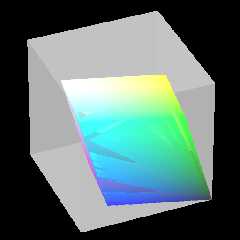
However, from certain angles there appear gaps or cuts in the surface,
and you can see inside. The gaps disappear when viewed from other angles.

Does anyone have any tips on how to fix this? I already tried scaling by
200 but it does not help.


Mike
Post a reply to this message
Attachments:
Download 'ciexyz_color_solid_cube_isosurface10.png' (56 KB)
Preview of image 'ciexyz_color_solid_cube_isosurface10.png'
|
|
| |
| |
|
|
|
|
| |
| |
|
|
Mike Horvath <mik### [at] gmail com> wrote:
> I am trying to render the following isosurface.
>
> isosurface
> {
> function {fFinal(fInpX(x,y,z),fInpY(x,y,z),fInpZ(x,y,z))}
> threshold 0
> accuracy 0.001
> contained_by
> {
> box {0,1}
> }
> max_gradient 50 // was 20000
> }
>
> However, from certain angles there appear gaps or cuts in the surface,
> and you can see inside. The gaps disappear when viewed from other angles.
>
> Does anyone have any tips on how to fix this? I already tried scaling by
> 200 but it does not help.
The outer box isn't there but I'm guessing your isosurface is part of CSG, so
maybe if you add all_intersections or max_trace 3 (or whatever integer) might
fix it. com> wrote:
> I am trying to render the following isosurface.
>
> isosurface
> {
> function {fFinal(fInpX(x,y,z),fInpY(x,y,z),fInpZ(x,y,z))}
> threshold 0
> accuracy 0.001
> contained_by
> {
> box {0,1}
> }
> max_gradient 50 // was 20000
> }
>
> However, from certain angles there appear gaps or cuts in the surface,
> and you can see inside. The gaps disappear when viewed from other angles.
>
> Does anyone have any tips on how to fix this? I already tried scaling by
> 200 but it does not help.
The outer box isn't there but I'm guessing your isosurface is part of CSG, so
maybe if you add all_intersections or max_trace 3 (or whatever integer) might
fix it.
Post a reply to this message
|
|
| |
| |
|
|
|
|
| |
| |
|
|
On 3/7/2017 4:09 PM, omniverse wrote:
> Mike Horvath <mik### [at] gmailcom> wrote:
>> I am trying to render the following isosurface.
>>
>> isosurface
>> {
>>  function {fFinal(fInpX(x,y,z),fInpY(x,y,z),fInpZ(x,y,z))}
>>  threshold 0
>>  accuracy 0.001
>>  contained_by
>>  {
>>   box {0,1}
>>  }
>>  max_gradient 50 // was 20000
>> }
>>
>> However, from certain angles there appear gaps or cuts in the surface,
>> and you can see inside. The gaps disappear when viewed from other angles.
>>
>> Does anyone have any tips on how to fix this? I already tried scaling by
>> 200 but it does not help.
>
> The outer box isn't there but I'm guessing your isosurface is part of CSG, so
> maybe if you add all_intersections or max_trace 3 (or whatever integer) might
> fix it.
>

I tried your suggestion and took the isosurface out of the union it
belonged to:

isosurface
{
	function {fFinal(fInpX(x,y,z),fInpY(x,y,z),fInpZ(x,y,z))}
	threshold	0
	accuracy	0.001
	contained_by
	{
		box {0,2}
	}
	max_gradient	50	// was 20000
	all_intersections
	max_trace 3
}

But it did not solve the problem. I still get the jagged looking artifacts.


Mike
Post a reply to this message
|
|
| |
| |
|
|
|
|
| |
| |
|
|
On 3/8/2017 12:30 AM, Mike Horvath wrote:
> On 3/7/2017 4:09 PM, omniverse wrote:
>> Mike Horvath <mik### [at] gmailcom> wrote:
>>> I am trying to render the following isosurface.
>>>
>>> isosurface
>>> {
>>>  function {fFinal(fInpX(x,y,z),fInpY(x,y,z),fInpZ(x,y,z))}
>>>  threshold 0
>>>  accuracy 0.001
>>>  contained_by
>>>  {
>>>   box {0,1}
>>>  }
>>>  max_gradient 50 // was 20000
>>> }
>>>
>>> However, from certain angles there appear gaps or cuts in the surface,
>>> and you can see inside. The gaps disappear when viewed from other
>>> angles.
>>>
>>> Does anyone have any tips on how to fix this? I already tried scaling by
>>> 200 but it does not help.
>>
>> The outer box isn't there but I'm guessing your isosurface is part of
>> CSG, so
>> maybe if you add all_intersections or max_trace 3 (or whatever
>> integer) might
>> fix it.
>>
>
> I tried your suggestion and took the isosurface out of the union it
> belonged to:
>
> isosurface
> {
>     function {fFinal(fInpX(x,y,z),fInpY(x,y,z),fInpZ(x,y,z))}
>     threshold    0
>     accuracy    0.001
>     contained_by
>     {
>         box {0,2}
>     }
>     max_gradient    50    // was 20000
>     all_intersections
>     max_trace 3
> }
>
> But it did not solve the problem. I still get the jagged looking artifacts.
>
>
> Mike

Here it is again with pigment and scaling:

#declare ScaleAmount = 400;

isosurface
{
	function {fFinal(fInpX(x,y,z),fInpY(x,y,z),fInpZ(x,y,z))}
	threshold	0
	accuracy	0.001
	contained_by
	{
		box {0,2}
	}
	max_gradient	50	// was 20000
	all_intersections
	max_trace 3
	pigment {pigmentRGB}
	translate	<-1/2,-1/2,-1/2>
	rotate		y * clock * 360
	scale		ScaleAmount
}

Mike
Post a reply to this message
|
|
| |
| |
|
|
|
|
| |
| |
|
|
On 8-3-2017 8:08, Mike Horvath wrote:
> On 3/8/2017 12:30 AM, Mike Horvath wrote:
>> On 3/7/2017 4:09 PM, omniverse wrote:
>>> Mike Horvath <mik### [at] gmailcom> wrote:
>>>> I am trying to render the following isosurface.
>>>>
>>>> isosurface
>>>> {
>>>>  function {fFinal(fInpX(x,y,z),fInpY(x,y,z),fInpZ(x,y,z))}
>>>>  threshold 0
>>>>  accuracy 0.001
>>>>  contained_by
>>>>  {
>>>>   box {0,1}
>>>>  }
>>>>  max_gradient 50 // was 20000
>>>> }
>>>>
>>>> However, from certain angles there appear gaps or cuts in the surface,
>>>> and you can see inside. The gaps disappear when viewed from other
>>>> angles.
>>>>
>>>> Does anyone have any tips on how to fix this? I already tried
>>>> scaling by
>>>> 200 but it does not help.
>>>
>>> The outer box isn't there but I'm guessing your isosurface is part of
>>> CSG, so
>>> maybe if you add all_intersections or max_trace 3 (or whatever
>>> integer) might
>>> fix it.
>>>
>>
>> I tried your suggestion and took the isosurface out of the union it
>> belonged to:
>>
>> isosurface
>> {
>>     function {fFinal(fInpX(x,y,z),fInpY(x,y,z),fInpZ(x,y,z))}
>>     threshold    0
>>     accuracy    0.001
>>     contained_by
>>     {
>>         box {0,2}
>>     }
>>     max_gradient    50    // was 20000
>>     all_intersections
>>     max_trace 3
>> }
>>
>> But it did not solve the problem. I still get the jagged looking
>> artifacts.
>>
>>
>> Mike
>
> Here it is again with pigment and scaling:
>
> #declare ScaleAmount = 400;
>
> isosurface
> {
>     function {fFinal(fInpX(x,y,z),fInpY(x,y,z),fInpZ(x,y,z))}
>     threshold    0
>     accuracy    0.001
>     contained_by
>     {
>         box {0,2}
>     }
>     max_gradient    50    // was 20000
>     all_intersections
>     max_trace 3
>     pigment {pigmentRGB}
>     translate    <-1/2,-1/2,-1/2>
>     rotate        y * clock * 360
>     scale        ScaleAmount
> }
>
> Mike

To test this I need the fFinal() fInpX() fInpY() fInpZ() functions too.

--
Thomas
Post a reply to this message
|
|
| |
| |
|
|
|
|
| |
| |
|
|
On 3/8/2017 2:52 AM, Thomas de Groot wrote:
> To test this I need the fFinal() fInpX() fInpY() fInpZ() functions too.
>

I posted a new thread in p.t.s-f.

Mike
Post a reply to this message
|
|
| |
| |
|
|
|
|
| |
| |
|
|
Thomas de Groot <tho### [at] degrootorg> wrote:
>
> To test this I need the fFinal() fInpX() fInpY() fInpZ() functions too.

Okay, maybe Thomas has figured this out too. I was just trying to think it out
using other functions and got nowhere but I did suspect something I had happen
before:

I ran your files as animation and found nothing wrong...
except after about clock=0.52 and until about clock=0.72

What's going on is simply a case of max_gradient 50 being too low for that
particular segment of frames.

That isosurface requires up to max_gradient 60 from what I found during that
part of the animation.

Try this instead of max_gradient:

evaluate 15,4,0.7

That will give a minimum gradient value with a multiple of 4 (=60) and change
rate.
Better yet, read about that at:

http://wiki.povray.org/content/Reference:Isosurface
Post a reply to this message
|
|
| |
| |
|
|
|
|
| |
| |
|
|
On 3/8/2017 4:41 AM, omniverse wrote:
> Thomas de Groot <tho### [at] degrootorg> wrote:
>>
>> To test this I need the fFinal() fInpX() fInpY() fInpZ() functions too.
>
> Okay, maybe Thomas has figured this out too. I was just trying to think it out
> using other functions and got nowhere but I did suspect something I had happen
> before:
>
> I ran your files as animation and found nothing wrong...
> except after about clock=0.52 and until about clock=0.72
>
> What's going on is simply a case of max_gradient 50 being too low for that
> particular segment of frames.
>
> That isosurface requires up to max_gradient 60 from what I found during that
> part of the animation.
>
> Try this instead of max_gradient:
>
> evaluate 15,4,0.7
>
> That will give a minimum gradient value with a multiple of 4 (=60) and change
> rate.
> Better yet, read about that at:
>
> http://wiki.povray.org/content/Reference:Isosurface
>
>

That seems to work. Thank you!

Mike
Post a reply to this message
|
|
| |
| |
|
|
|
|
| |
| |
|
|
On 8-3-2017 12:52, Mike Horvath wrote:
> On 3/8/2017 4:41 AM, omniverse wrote:
>> Thomas de Groot <tho### [at] degrootorg> wrote:
>>>
>>> To test this I need the fFinal() fInpX() fInpY() fInpZ() functions too.
>>
>> Okay, maybe Thomas has figured this out too. I was just trying to
>> think it out
>> using other functions and got nowhere but I did suspect something I
>> had happen
>> before:
>>
>> I ran your files as animation and found nothing wrong...
>> except after about clock=0.52 and until about clock=0.72
>>
>> What's going on is simply a case of max_gradient 50 being too low for
>> that
>> particular segment of frames.
>>
>> That isosurface requires up to max_gradient 60 from what I found
>> during that
>> part of the animation.
>>
>> Try this instead of max_gradient:
>>
>> evaluate 15,4,0.7
>>
>> That will give a minimum gradient value with a multiple of 4 (=60) and
>> change
>> rate.
>> Better yet, read about that at:
>>
>> http://wiki.povray.org/content/Reference:Isosurface
>>
>>
>
> That seems to work. Thank you!
>
> Mike

I was not yet that far, but I was thinking in the same direction.
Evaluate is a good tool to use in this context.

--
Thomas
Post a reply to this message
|
|
| |
| |
|
|
|
|
| |
| |
|
|
I haven't had a chance to look over the isosurface functions, but it looks like
the final shape is a parallelpiped.
If so, couldn't you just make a box and shear it in all 3 directions?
Simpler and lots faster, if that's the case.

I enjoy these color models you work on.
They are very pleasing to my eye.
Keep up the good work!  :)
Post a reply to this message
|
|
| |
| |
|
|
|
|
| |
| |
|
|
I am having the same problem in a different scene posted in p.t.s-f.

This time I used "evaluate" from the start. Render times are long but
artifacts still appear.


Mike
Post a reply to this message
|
|
| |
| |
|
|
|
|
| |
| |
|
|
On 3/8/2017 10:02 AM, Bald Eagle wrote:
> I haven't had a chance to look over the isosurface functions, but it looks like
> the final shape is a parallelpiped.
> If so, couldn't you just make a box and shear it in all 3 directions?
> Simpler and lots faster, if that's the case.
>
> I enjoy these color models you work on.
> They are very pleasing to my eye.
> Keep up the good work!  :)
>

No, I don't want to do this.


Mike
Post a reply to this message
|
|
| |
| |
|
|
|
|
| |
| |
|
|
On 3/8/2017 11:58 AM, Mike Horvath wrote:
> I am having the same problem in a different scene posted in p.t.s-f.
>
> This time I used "evaluate" from the start. Render times are long but
> artifacts still appear.
>
>
> Mike


Disregard.


Mike
Post a reply to this message
|
|
| |
| |
|
|
|
|
| |
| |
|
|
Mike Horvath <mik### [at] gmailcom> wrote:
> I am having the same problem in a different scene posted in p.t.s-f.
>
> This time I used "evaluate" from the start. Render times are long but
> artifacts still appear.

Yow! I used max_gradient alone to see what POV-Ray was saying it wanted that to
be and its way beyond what the other isosurface evaluate parameters were.
Which BTW I finally ended up using MinFactor=0.7 to prevent any missing portions
of that one.

This current isosurface using max_gradient 10000 (sans evaluate) is rendering 5
minutes at only 160X120 resolution, incomplete of course.

Render message told me it needed max_gradient 7131910.500, so that really puts
the evaluate numbers up there and the render time is obviously going to increase
dramatically.

Sorry I don't have a solution, can only tell you that much. If there's a way to
reduce render times and still get a complete isosurface for this one I sure
don't know the answer. Unless something can be manipulated to do so and someone
else knows how to go about it anyway.

Bob
Post a reply to this message
|
|
| |
| |
|
|
|
|
| |
| |
|
|
On 3/8/2017 1:15 PM, omniverse wrote:
> Mike Horvath <mik### [at] gmailcom> wrote:
>> I am having the same problem in a different scene posted in p.t.s-f.
>>
>> This time I used "evaluate" from the start. Render times are long but
>> artifacts still appear.
>
> Yow! I used max_gradient alone to see what POV-Ray was saying it wanted that to
> be and its way beyond what the other isosurface evaluate parameters were.
> Which BTW I finally ended up using MinFactor=0.7 to prevent any missing portions
> of that one.
>
> This current isosurface using max_gradient 10000 (sans evaluate) is rendering 5
> minutes at only 160X120 resolution, incomplete of course.
>
> Render message told me it needed max_gradient 7131910.500, so that really puts
> the evaluate numbers up there and the render time is obviously going to increase
> dramatically.
>
> Sorry I don't have a solution, can only tell you that much. If there's a way to
> reduce render times and still get a complete isosurface for this one I sure
> don't know the answer. Unless something can be manipulated to do so and someone
> else knows how to go about it anyway.
>
> Bob
>

I think clipka told me to use this:

	#declare cie_fClip1 = function(X,A) {select(X-A,A,X)}
	#declare cie_fClip2 = function(X,A) {select(-(X-A),A,X)}
	#declare cie_fD = function(C)
{abs(cie_fClip2(cie_fClip1(C,-0.1),1.1)-0.5)-0.5}

instead of this:

	#declare cie_fD = function(C) {abs(C-0.5)-0.5}

as a workaround.


Mike
Post a reply to this message
|
|
| |
| |
|
|
|
|
| |
| |
|
|
On 3/7/2017 12:21 PM, Mike Horvath wrote:
> I am trying to render the following isosurface.
>
> isosurface
> {
>     function {fFinal(fInpX(x,y,z),fInpY(x,y,z),fInpZ(x,y,z))}
>     threshold    0
>     accuracy    0.001
>     contained_by
>     {
>         box {0,1}
>     }
>     max_gradient    50    // was 20000
> }
>
> However, from certain angles there appear gaps or cuts in the surface,
> and you can see inside. The gaps disappear when viewed from other angles.
>
> Does anyone have any tips on how to fix this? I already tried scaling by
> 200 but it does not help.
>
>
> Mike

I wish I could replace these with meshes. Then I could make an animation
with many frames.


Mike
Post a reply to this message
|
|
| |
| |
|
|
|
|
| |
|
|






