|
|
|
|
|
|
| |
| |
|
|
|
|
| |
| |
|
|
Am 04.08.2016 um 18:59 schrieb clipka in povray.general:

>>> To compare this with a real camera lens, the camera location can be
>>> thought of as the center of the diaphragm (or, more precisely, the
>>> diaphragm's virtual image as seem through the lens), and the jittering
>>> of the rays accounts for the fact that the diaphragm's aperture is not
>>> infinitesimally small.
>>
>> I didn't really get this part. How would jittering account for the aperture
>> size? Would it be possible for you to explain this with the help of an image?
>> It would be really helpful.
>
> I'll try to throw together something.

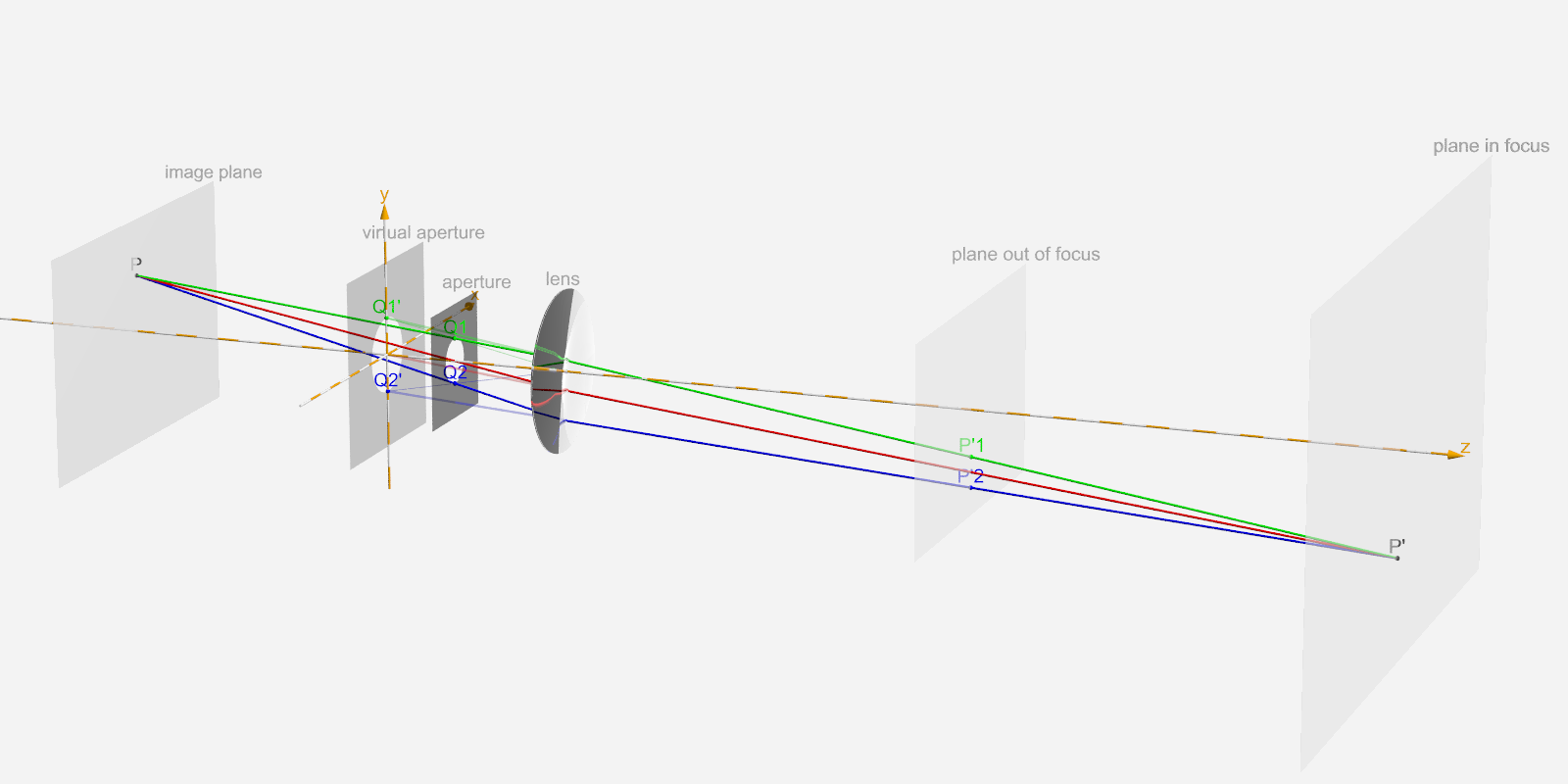
The attached image shows key elements of a real-life camera; from left
to right we can see:

- The "image plane", representing the camera's image recording element
(e.g. photographic film or CCD sensor).

- The "virtual aperture", representing the aperture's /apparent/
location and size when viewed through the lens.

- The "aperture", representing the primary limiting element in the beam
path (note that in real-life cameras this is usually the
variable-diameter opening of a diaphragm, /not/ the lens opening).

- The "lens", representing the optical assembly that focuses the light
onto the image recording element.

- A "plane out of focus", representing an arbitrary plane parallel to
the image plane that is currently not in focus.

- The "plane in focus", representing the plane parallel to the image
plane that is currently in focus.


To visualize what is happening in such a camera assembly, a few selected
points and light rays are shown:

- P represents an arbitrary point on the image plane, e.g. a grain on a
photographic film or a single pixel on a CCD sensor.

- The red, green and blue lines represent different selected light rays
that would all register at P. The red line represents the ray passing
right through the center of the aperture, while the green and blue lines
represent two rays traveling as far off the red ray as the aperture allows.

- P' represents the one and only point in space from which all three
light rays could originate. In fact, /any/ ray originating from this
point would inevitably register at P (provided they make it through the
aperture). As a result, P' would show up on the image at P as a single
crisp spot.

- P'1 and P'2 represent arbitrary alternate points from which the green
and blue rays, respectively, could originate. Note that in contrast to
P', /any other/ ray from these two points would inevitably register at a
point /different/ from P (again provided they make it through the
aperture at all). As a result, P'1 and P'2 would show up on the image as
big faint splotches, both covering (but not centered at) P.

- Q1 and Q2 represent the points at which the green and blue light rays,
respectively, pass through the aperture.

- Q1' and Q2' represent the points in the virtual aperture corresponding
to Q1 and Q2 in the actual aperture.


POV-Ray's focal blur mechanism can be thought of as follows:

(1) The nominal camera location always corresponds to the center of the
virtual aperture.

(2) From the camera settings, POV-Ray computes the parameters for a
simple pinhole camera equivalent, with the pinhole at the nominal camera
location.

(3) For a given point P in the image space, POV-Ray first uses the
simple pinhole model to compute the ray shown in red as originating from
the nominal camera location (= center of virtual aperture).

(4) POV-Ray now computes P' as the intersection of the red ray with the
plane in focus.

(5) POV-Ray now jitters the ray origin within the virtual aperture to
come up with a point Q'; for example, it might come up with point Q1' or
Q2'.

(6) POV-Ray computes a new ray, using Q' as the origin and (P'-Q') as
the direction. Note that this ray still travels through P'.

(7) POV-Ray traces the chosen ray; note that it might hit an object at
P', but it might just as well hit an object at P'1 if the origin was
Q1', or P'2 if the origin was Q2', or anywhere else along the ray in
question.

(8) POV-Ray sums up the result colour.

(9) POV-Ray repeats steps (5) to (8) a couple of times.

(10) From the sum of the result colours, POV-Ray computes the average,
and colours the pixel accordingly.

(11) POV-Ray proceeds to the next pixel, repeating steps (3) to (10).


I hope this helps understand what's going on with POV-Ray's focal blur.
Post a reply to this message
Attachments:
Download 'aperture.png' (92 KB)
Preview of image 'aperture.png'
|
|
| |
| |
|
|
|
|
| |
| |
|
|
That's a very nice diagram.   :)

Pretty impressive for something "thrown together"   ;)

{"Wow, that's a great looking dress"
"Oh, this old thing? It's just something I threw on at the last minute..."
}


Thanks for that, it will be a great reference.
Post a reply to this message
|
|
| |
| |
|
|
|
|
| |
| |
|
|
That was a really nice illustration. It clarified the question asked in the
previous post quite well. Thanks!

I hope you can help with another small clarification. You mentioned to udyank
previously that the virtual aperture plane could indeed be anywhere and could
also thus be at the plane of the lens. But in your illustration, isn't there a
change in direction of the ray between say Q1' and P1 because of the presence of
the lens in between? Wouldn't it be incorrect to assume a ray straight from Q1'
to P' without tracing the deviation caused due to refraction?

If we were to assume that the virtual aperture was actually at the location of
the (thin-)lens , then does this jittering exactly correspond to simulating a
thin-lens by tracing multiple points on the lens and shooting rays towards P' on
the object side and towards P on the image side?

Again, thanks a lot for your explanation. It has really helped understanding the
focal blur pipeline of POVRay.
Post a reply to this message
|
|
| |
| |
|
|
|
|
| |
| |
|
|
Am 06.08.2016 um 13:25 schrieb pkrskr:

> I hope you can help with another small clarification. You mentioned to udyank
> previously that the virtual aperture plane could indeed be anywhere and could
> also thus be at the plane of the lens. But in your illustration, isn't there a
> change in direction of the ray between say Q1' and P1 because of the presence of
> the lens in between? Wouldn't it be incorrect to assume a ray straight from Q1'
> to P' without tracing the deviation caused due to refraction?

No, there is no such deviation through refraction.

First of all, it may be necessary to clarify a potential cause for
misunderstanding: POV-Ray does /not/ actually simulate a lens at the
position shown in the diagram.

Instead, POV-Ray uses the "virtual aperture" as the ray origin
/specifically/ to /avoid/ having to simulate the lens. The whole idea of
the virtual aperture is that (to the extent required by POV-Ray) it
gives the same results /without/ the lens as the true aperture does
/with/ the lens.


> If we were to assume that the virtual aperture was actually at the location of
> the (thin-)lens , then does this jittering exactly correspond to simulating a
> thin-lens by tracing multiple points on the lens and shooting rays towards P' on
> the object side and towards P on the image side?

I'm not sure I understand exactly what you are asking.

In a simple camera with no diaphragm, in which the lens opening also
constitutes the effective aperture, the aperture plane does indeed
coincide with the lens.

Consequently, in such a scenario, jittering of the ray origin does
indeed occur at the lens plane, and across the entire lens opening.

(Shooting rays toward P on the image side is not necessary, as P' is
computed from P using a quite simple formula, and there are no
intervening objects between the aperture and the image plane.)


In a scenario with a diaphragm in a different plane than the lens, this
simplification does not hold, as we would have to place the virtual
aperture at different X/Y coordinates depending on the point P (compare
the diagram, in which the red ray -- which should be at the center of
the virtual aperture -- passes through the lens at an offset from the
camera axis).
Post a reply to this message
|
|
| |
| |
|
|
|
|
| |
| |
|
|
Thank you very much for setting out such a detailed explanaition, I have wanted
to try out this feature for quite some time. Best wishes! /A
Post a reply to this message
|
|
| |
| |
|
|
|
|
| |
| |
|
|
clipka <ano### [at] anonymous org> wrote:
> Am 06.08.2016 um 13:25 schrieb pkrskr:
>
> No, there is no such deviation through refraction.
>
> First of all, it may be necessary to clarify a potential cause for
> misunderstanding: POV-Ray does /not/ actually simulate a lens at the
> position shown in the diagram.
>
> Instead, POV-Ray uses the "virtual aperture" as the ray origin
> /specifically/ to /avoid/ having to simulate the lens. The whole idea of
> the virtual aperture is that (to the extent required by POV-Ray) it
> gives the same results /without/ the lens as the true aperture does
> /with/ the lens.
>
Understood!
> I'm not sure I understand exactly what you are asking.
>
> In a simple camera with no diaphragm, in which the lens opening also
> constitutes the effective aperture, the aperture plane does indeed
> coincide with the lens.
>
> Consequently, in such a scenario, jittering of the ray origin does
> indeed occur at the lens plane, and across the entire lens opening.
>
This was what I was trying to say earlier, about the method being similar to
simulating a camera where the aperture stop and the lens are effectively at the
same location.
> (Shooting rays toward P on the image side is not necessary, as P' is
> computed from P using a quite simple formula, and there are no
> intervening objects between the aperture and the image plane.)
Yes this is true. I used the 'tracing both sides' phrase loosely. Apologies for
that.
>
> In a scenario with a diaphragm in a different plane than the lens, this
> simplification does not hold, as we would have to place the virtual
> aperture at different X/Y coordinates depending on the point P (compare
> the diagram, in which the red ray -- which should be at the center of
> the virtual aperture -- passes through the lens at an offset from the
> camera axis).
This is the most interesting point. In your first explanation, you mentioned
that the red ray is originally drawn through the center of the nominal camera
location (which is the virtual aperture), and I thus presumed that the ray went
through the pole of this virtual aperture (since we were tracing through a
pinhole). However, now that you mention it, I see that the pinhole ray was
traced through the center of the real aperture and thus happens to be shifted in
X/Y on the plane of the virtual aperture and the jitter is applied across this
shifted point. This is indeed different from the above scenario where the lens
and the diaphragm are at the same plane.
However, could you clarify how the locations of the real aperture and the
virtual aperture are decided? And does this mean that the nominal camera
location is the position of the real aperture?
Thanks for spending time on such detailed explanations. You have been very
helpful. org> wrote:
> Am 06.08.2016 um 13:25 schrieb pkrskr:
>
> No, there is no such deviation through refraction.
>
> First of all, it may be necessary to clarify a potential cause for
> misunderstanding: POV-Ray does /not/ actually simulate a lens at the
> position shown in the diagram.
>
> Instead, POV-Ray uses the "virtual aperture" as the ray origin
> /specifically/ to /avoid/ having to simulate the lens. The whole idea of
> the virtual aperture is that (to the extent required by POV-Ray) it
> gives the same results /without/ the lens as the true aperture does
> /with/ the lens.
>
Understood!
> I'm not sure I understand exactly what you are asking.
>
> In a simple camera with no diaphragm, in which the lens opening also
> constitutes the effective aperture, the aperture plane does indeed
> coincide with the lens.
>
> Consequently, in such a scenario, jittering of the ray origin does
> indeed occur at the lens plane, and across the entire lens opening.
>
This was what I was trying to say earlier, about the method being similar to
simulating a camera where the aperture stop and the lens are effectively at the
same location.
> (Shooting rays toward P on the image side is not necessary, as P' is
> computed from P using a quite simple formula, and there are no
> intervening objects between the aperture and the image plane.)
Yes this is true. I used the 'tracing both sides' phrase loosely. Apologies for
that.
>
> In a scenario with a diaphragm in a different plane than the lens, this
> simplification does not hold, as we would have to place the virtual
> aperture at different X/Y coordinates depending on the point P (compare
> the diagram, in which the red ray -- which should be at the center of
> the virtual aperture -- passes through the lens at an offset from the
> camera axis).
This is the most interesting point. In your first explanation, you mentioned
that the red ray is originally drawn through the center of the nominal camera
location (which is the virtual aperture), and I thus presumed that the ray went
through the pole of this virtual aperture (since we were tracing through a
pinhole). However, now that you mention it, I see that the pinhole ray was
traced through the center of the real aperture and thus happens to be shifted in
X/Y on the plane of the virtual aperture and the jitter is applied across this
shifted point. This is indeed different from the above scenario where the lens
and the diaphragm are at the same plane.
However, could you clarify how the locations of the real aperture and the
virtual aperture are decided? And does this mean that the nominal camera
location is the position of the real aperture?
Thanks for spending time on such detailed explanations. You have been very
helpful.
Post a reply to this message
|
|
| |
| |
|
|
|
|
| |
| |
|
|
Am 08.08.2016 um 09:32 schrieb pkrskr:

>> In a scenario with a diaphragm in a different plane than the lens, this
>> simplification does not hold, as we would have to place the virtual
>> aperture at different X/Y coordinates depending on the point P (compare
>> the diagram, in which the red ray -- which should be at the center of
>> the virtual aperture -- passes through the lens at an offset from the
>> camera axis).
>
> This is the most interesting point. In your first explanation, you mentioned
> that the red ray is originally drawn through the center of the nominal camera
> location (which is the virtual aperture), and I thus presumed that the ray went
> through the pole of this virtual aperture (since we were tracing through a
> pinhole). However, now that you mention it, I see that the pinhole ray was
> traced through the center of the real aperture and thus happens to be shifted in
> X/Y on the plane of the virtual aperture and the jitter is applied across this
> shifted point. This is indeed different from the above scenario where the lens
> and the diaphragm are at the same plane.

No, that's a misunderstanding there. The pinhole ray is also traced
through the center of the /virtual/ aperture.

> However, could you clarify how the locations of the real aperture and the
> virtual aperture are decided? And does this mean that the nominal camera
> location is the position of the real aperture?

As I said before:

"(1) The nominal camera location always corresponds to the center of the
virtual aperture."

As a matter of fact, POV-Ray /never/ actually "thinks" of the real
camera geometry in the first place, since the geometry is only specified
indirectly. When you set up a camera in POV-Ray, you are essentially
specifying:

- The camera location = center of the virtual aperture.
- The direction of the camera axis (via `direction` or `look_at`).
- The distance between the virtual aperture and the plane in focus
(again via `direction` or `look_at`).
- The effective horizontal and vertical opening angle of the camera
(either via `up`/`right` and `direction`, or via `angle`).

There is an infinite number of physical cameras that satisfy any given
combination of these parameters.
Post a reply to this message
|
|
| |
| |
|
|
|
|
| |
| |
|
|
>
> No, that's a misunderstanding there. The pinhole ray is also traced
> through the center of the /virtual/ aperture.
>

Okay. So it seems like in the illustration you provided earlier, the red ray
should be corrected to pass through the center of the virtual aperture and not
the real aperture, since it represents the pinhole ray. And then it seems like
the jitter is applied around the location of the pinhole?

>
> As I said before:
>
> "(1) The nominal camera location always corresponds to the center of the
> virtual aperture."
>
> As a matter of fact, POV-Ray /never/ actually "thinks" of the real
> camera geometry in the first place, since the geometry is only specified
> indirectly. When you set up a camera in POV-Ray, you are essentially
> specifying:
>
> - The camera location = center of the virtual aperture.
> - The direction of the camera axis (via `direction` or `look_at`).
> - The distance between the virtual aperture and the plane in focus
> (again via `direction` or `look_at`).
> - The effective horizontal and vertical opening angle of the camera
> (either via `up`/`right` and `direction`, or via `angle`).
>
> There is an infinite number of physical cameras that satisfy any given
> combination of these parameters.

Okay. I think I understand what you are saying here. You are right about the
existence of several cameras for which the same parameter combination holds.
Post a reply to this message
|
|
| |
| |
|
|
|
|
| |
| |
|
|
Am 09.08.2016 um 11:56 schrieb pkrskr:
>>
>> No, that's a misunderstanding there. The pinhole ray is also traced
>> through the center of the /virtual/ aperture.
>
> Okay. So it seems like in the illustration you provided earlier, the red ray
> should be corrected to pass through the center of the virtual aperture and not
> the real aperture, since it represents the pinhole ray.

No, the illustration is correct in that the _refracted_ red ray passes
through the center of the _real_ aperture, while the _unrefracted_ red
ray (shown semi-transparent) passes through the center of the _virtual_
aperture.

> And then it seems like
> the jitter is applied around the location of the pinhole?

Yes.
Post a reply to this message
|
|
| |
| |
|
|
|
|
| |
| |
|
|
>
> No, the illustration is correct in that the _refracted_ red ray passes
> through the center of the _real_ aperture, while the _unrefracted_ red
> ray (shown semi-transparent) passes through the center of the _virtual_
> aperture.
>

I see the semi-transparent ray and that it originates at the center of the
virtual aperture. This precisely clarifies the method you detailed in elaborate
steps earlier.

Can you elaborate on how the nominal pinhole camera location is computed as
mentioned in step 2?

>
> (2) From the camera settings, POV-Ray computes the parameters for a
> simple pinhole camera equivalent, with the pinhole at the nominal camera
> location.
>
Post a reply to this message
|
|
| |
| |
|
|
|
|
| |
| |
|
|
Am 09.08.2016 um 13:52 schrieb pkrskr:

> I see the semi-transparent ray and that it originates at the center of the
> virtual aperture. This precisely clarifies the method you detailed in elaborate
> steps earlier.
>
> Can you elaborate on how the nominal pinhole camera location is computed as
> mentioned in step 2?
>>
>> (2) From the camera settings, POV-Ray computes the parameters for a
>> simple pinhole camera equivalent, with the pinhole at the nominal camera
>> location.

I'll re-iterate:

"As a matter of fact, POV-Ray /never/ actually "thinks" of the real
camera geometry in the first place, since the geometry is only specified
indirectly. [...]"

Both the virtual aperture center and the pinhole are placed at the
nominal camera location, as per the camera block.
Post a reply to this message
|
|
| |
| |
|
|
|
|
| |
| |
|
|
Hey!
@clipka: Thanks for your earlier clarifications. They really helped!

I need a little more help. I am trying out a sample scene with 3 horizontal bars
in the front and 3 vertical ones at the back. I have an image of this scene I
want to compare POVRay's result to, but I'm having problems setting up a few
parameters.
- First of all, in the picture you attached before (aperture.png) with the
standard lens diagram, We had an image plane along with the lens an object. My
understanding was that the camera parameters in POVRay are for the 'lens' part.
I set the focal length using the 'direction' variable (I hope that's correct).
So how do I specify where the image plane is to be?
- Also regarding the aperture, the official doc says "while this behaves as a
real camera does, the values for aperture are purely arbitrary and are not
related to f-stops." If I want to specify the aperture value as 'f/X' as in a
camera (ie. with respect to focal length), how can I specify that?
- Regarding the confidence value: the doc says "The confidence value is used to
determine when the samples seem to be close enough to the correct color." How
does POVRay 'know' the correct color? Suppose I have a point (like P in the
image) I'm shooting a number of rays from, which are slightly deviated from each
other going to the lens, and converging at 1 pt P' on the other side. Suppose
some hit an object before P' and some hit it after, but hit different objects.
So how do you know the correct color in such a case, and subsequently, when to
stop tracing more samples as the color is 'close enough'?
- Finally, I have a different setup where I've configured my rays to just pick
up the color value of the object the ray hits and add it up on the target pixel
the ray comes from. Is there a way to bypass the color calculations (the
diffuse/ambient/specular etc. values) and just make POVRay add up the color
value to the pixel where it's color is to be added?

I'm attaching the files I'm using in the setup, along with the 'aperture.png'
used for reference. The testing1.png is when i'm using the 'focal_point'
parameter, and testing2.png is when that is removed. Why is such an effect
happening? Because from my understanding, f-value=1 unit (As set by
'direction').
Thanks in advance!
Post a reply to this message
Attachments:
Download 'files.zip' (940 KB)
|
|
| |
| |
|
|
|
|
| |
| |
|
|
Le 16-09-13 à 08:58, udyank a écrit :
> Hey!
> @clipka: Thanks for your earlier clarifications. They really helped!
>
> I need a little more help. I am trying out a sample scene with 3 horizontal bars
> in the front and 3 vertical ones at the back. I have an image of this scene I
> want to compare POVRay's result to, but I'm having problems setting up a few
> parameters.
> - First of all, in the picture you attached before (aperture.png) with the
> standard lens diagram, We had an image plane along with the lens an object. My
> understanding was that the camera parameters in POVRay are for the 'lens' part.
> I set the focal length using the 'direction' variable (I hope that's correct).
> So how do I specify where the image plane is to be?

The direction vector set the reference plane of the image. Objects in
front of that point appear larger and those beyond appear smaller. Along
with the up and right vectors, it determine the field of view, not a
focal length.
The image plane is where the point computer by adding the camera's
location and the direction vector, and is perpendicular to the direction
vector. It's further modified if you use look_at or any transformation
on the camera.

> - Also regarding the aperture, the official doc says "while this behaves as a
> real camera does, the values for aperture are purely arbitrary and are not
> related to f-stops." If I want to specify the aperture value as 'f/X' as in a
> camera (ie. with respect to focal length), how can I specify that?

The f/x is a ratio. Say the focal_point is 100 unit in front of the
camera and you want an f/x of f100, you divide the distance between the
camera and focal_point by your f/x, in this case, it gives an aperture of 1.
Formula:
vlength(Camera_Location - focal_point)/ (f/x)

> - Regarding the confidence value: the doc says "The confidence value is used to
> determine when the samples seem to be close enough to the correct color." How
> does POVRay 'know' the correct color? Suppose I have a point (like P in the
> image) I'm shooting a number of rays from, which are slightly deviated from each
> other going to the lens, and converging at 1 pt P' on the other side. Suppose
> some hit an object before P' and some hit it after, but hit different objects.
> So how do you know the correct color in such a case, and subsequently, when to
> stop tracing more samples as the color is 'close enough'?

confidence is the probability that the resulting colour is correct.
It's a statistical thing. It's recommended to always use a value smaller
than 1.
variance is how much you are willing to deviate from the exact colour.
Using a value of zero is not recommended. Instead, use a very small
value like 1e-6 or smaller.
After each samples are taken, they are averaged and compared with the
average of the previous samples. If the change after adding a new sample
is small enough, you can say that you are close enough. That evaluation
also depends on variance and adc_bailout from the global_settings.

> - Finally, I have a different setup where I've configured my rays to just pick
> up the color value of the object the ray hits and add it up on the target pixel
> the ray comes from. Is there a way to bypass the color calculations (the
> diffuse/ambient/specular etc. values) and just make POVRay add up the color
> value to the pixel where it's color is to be added?

Remove all light.
Set all finish as :
finish{ambient 1 diffuse 0 reflection 0 specular 0 phong 0}
Alternatively, but without focal blur, use +q0 on the command line.

>
> I'm attaching the files I'm using in the setup, along with the 'aperture.png'
> used for reference. The testing1.png is when i'm using the 'focal_point'
> parameter, and testing2.png is when that is removed. Why is such an effect
> happening? Because from my understanding, f-value=1 unit (As set by
> 'direction').
> Thanks in advance!
>
You need to set focal_point.
If left undefined, it may get located at the same place as the camera,
or extremely far away.

A warning: You must use look_at AFTER you set the direction vector.
Normally, it's the last item when using a standard camera, and you only
set the focal blur parameters after it.
Good : direction <0,0,0>  look_at   <0.0, 1.0,  0.0>
Bad :  look_at  <0.0, 1.0,  0.0>   direction <0,0,0>
Post a reply to this message
|
|
| |
| |
|
|
|
|
| |
| |
|
|
> The direction vector set the reference plane of the image. Objects in
> front of that point appear larger and those beyond appear smaller. Along
> with the up and right vectors, it determine the field of view, not a
> focal length.
> The image plane is where the point computer by adding the camera's
> location and the direction vector, and is perpendicular to the direction
> vector. It's further modified if you use look_at or any transformation
> on the camera.

So if the direction vector is used to determine the field of view, how do I set
the 'f' value exactly? Suppose I've made a scene where I assume focal length=2
'units' and all objects, lens and image plane are set according to that.
How/Where do I set that in POVRay? As you must have seen in the .pov file, I say
"X units" from the camera. What I really want is that distance to be as "Y*f",
as in a multiplier of the f-value. How can I do that?

> The f/x is a ratio. Say the focal_point is 100 unit in front of the
> camera and you want an f/x of f100, you divide the distance between the
> camera and focal_point by your f/x, in this case, it gives an aperture of 1.
> Formula:
> vlength(Camera_Location - focal_point)/ (f/x)

Here the f/X I meant was like the f/1.4 or f/1.7 in real cameras. Supposing the
focal_point is X*f from the camera, and I want an aperture of f/2.0, what should
I set the 'aperture' parameter as? [Given that I know how to set 'f' value
first?]

> confidence is the probability that the resulting colour is correct.
> It's a statistical thing. It's recommended to always use a value smaller
> than 1.
> variance is how much you are willing to deviate from the exact colour.

I still didn't get how you say you know the 'correct' color. For computing
probabilities, that knowledge
is reqd. Is it approximated such that you keep adding the colors to the target
pixel, and when that pixel's
color stops changing much, you say you don't need more rays?

> You need to set focal_point.
> If left undefined, it may get located at the same place as the camera,
> or extremely far away.

But what does focal_point really do in the context of the tracing done?
Post a reply to this message
|
|
| |
| |
|
|
|
|
| |
| |
|
|
Le 16-09-13 à 13:26, udyank a écrit :
>> The direction vector set the reference plane of the image. Objects in
>> front of that point appear larger and those beyond appear smaller. Along
>> with the up and right vectors, it determine the field of view, not a
>> focal length.
>> The image plane is where the point computer by adding the camera's
>> location and the direction vector, and is perpendicular to the direction
>> vector. It's further modified if you use look_at or any transformation
>> on the camera.
>
> So if the direction vector is used to determine the field of view, how do I set
> the 'f' value exactly? Suppose I've made a scene where I assume focal length=2
> 'units' and all objects, lens and image plane are set according to that.
> How/Where do I set that in POVRay? As you must have seen in the .pov file, I say
> "X units" from the camera. What I really want is that distance to be as "Y*f",
> as in a multiplier of the f-value. How can I do that?
>
>> The f/x is a ratio. Say the focal_point is 100 unit in front of the
>> camera and you want an f/x of f100, you divide the distance between the
>> camera and focal_point by your f/x, in this case, it gives an aperture of 1.
>> Formula:
>> vlength(Camera_Location - focal_point)/ (f/x)
>
> Here the f/X I meant was like the f/1.4 or f/1.7 in real cameras. Supposing the
> focal_point is X*f from the camera, and I want an aperture of f/2.0, what should
> I set the 'aperture' parameter as? [Given that I know how to set 'f' value
> first?]

f/2 mean that the aperture is exactly half the distance between the
optical center of the lens and the film/detector.
In POV-Ray terms, that should be about half the direction vector length.
Do some testing using a fraction of the direction vector and the
distance between the camera and focal_point.

>
>> confidence is the probability that the resulting colour is correct.
>> It's a statistical thing. It's recommended to always use a value smaller
>> than 1.
>> variance is how much you are willing to deviate from the exact colour.
>
> I still didn't get how you say you know the 'correct' color. For computing
> probabilities, that knowledge
> is reqd. Is it approximated such that you keep adding the colors to the target
> pixel, and when that pixel's
> color stops changing much, you say you don't need more rays?
Yes. When the change from a new sample get less that a threshold value,
you say, this is close enough and I don't need to get any new sample.

>
>> You need to set focal_point.
>> If left undefined, it may get located at the same place as the camera,
>> or extremely far away.
>
> But what does focal_point really do in the context of the tracing done?
>
It define the plane of sharpness, every ray shot toward any given point
on that plane will represent exactly the same pixel in the final image.
Post a reply to this message
|
|
| |
| |
|
|
|
|
| |
| |
|
|
> f/2 mean that the aperture is exactly half the distance between the
> optical center of the lens and the film/detector.
> In POV-Ray terms, that should be about half the direction vector length.
> Do some testing using a fraction of the direction vector and the
> distance between the camera and focal_point.

> > But what does focal_point really do in the context of the tracing done?
> >
> It define the plane of sharpness, every ray shot toward any given point
> on that plane will represent exactly the same pixel in the final image.

It seems like from what you are saying is that the distance between the camera
location
set by the 'location' parameter and the 'focal_point' = focal length of lens.
But wouldn't that mean that all rays always come from infinity? Because if my
'plane of sharpness' is always around the focal plane of the lens, that means
rays always
come from infinity, which would mean I cannot test any other in-focus pair. For
example,
by the simple thin lens formula, if v=1.1f, then u=11f. Which means for an
object placed
11f on one side of the lens, I should be able to place a film 1.1f on the other
side and
be able to see at least the object at 11f in focus and other objects blurred
with respect
to their distance from the 'plane of sharpness' (which would now be around 11f).
How can I see such an effect in POVRay?

> Yes. When the change from a new sample get less that a threshold value,
> you say, this is close enough and I don't need to get any new sample.
Understood!

1 more request: Will it be possible to have a chat with you somehow? I would
like to have
a bit more back-and-forth on this, if that's okay with you. Should I mail you,
or is any
other platform more suitable?

Thanks for all your clarifications regarding this!
Post a reply to this message
|
|
| |
| |
|
|
|
|
| |
|
|