 |
|
|
|
|
|
| |
| |
|
|
|
|
| |
| |
|
|
On 21-5-2016 19:41, Samuel B. wrote:
> Thomas de Groot <tho### [at] degroot org> wrote:
>> To keep myself from the streets, I am leisurely strolling through
>> different codes and utilities I have collected over the years, many of
>> them never really used in a scene.
>>
>> I thought it would be interesting to combine two techniques from Sam
>> Benge: his strands utility and his rockhead code.
>>
>> This is a very first result, needing some fine tuning of course, but you
>> get the idea.
>>
>
> Hey Thomas, those utilities still work? Cool result :)
>
Hi Sam! I am a great collector of utilities so, yes, some day, I dig
them up and try to make them useful. Eventually, they get used in a
scene. Not sure yet how this is going to boil down but some ideas are
taking shape.
--
Thomas org> wrote:
>> To keep myself from the streets, I am leisurely strolling through
>> different codes and utilities I have collected over the years, many of
>> them never really used in a scene.
>>
>> I thought it would be interesting to combine two techniques from Sam
>> Benge: his strands utility and his rockhead code.
>>
>> This is a very first result, needing some fine tuning of course, but you
>> get the idea.
>>
>
> Hey Thomas, those utilities still work? Cool result :)
>
Hi Sam! I am a great collector of utilities so, yes, some day, I dig
them up and try to make them useful. Eventually, they get used in a
scene. Not sure yet how this is going to boil down but some ideas are
taking shape.
--
Thomas
Post a reply to this message
|
|
| |
| |
|
|
|
|
| |
| |
|
|
Thomas de Groot <tho### [at] degrootorg> wrote:
> I need a bit of help. I made a depth_map of a Poser head...
> and thought that using it in the Rockhead code would be straightforward.
> It is, except that the face remains flat with hardly a hint of features...

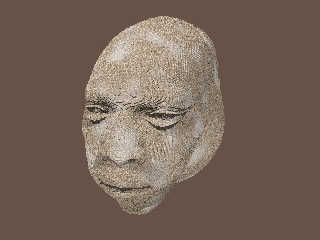
I couldn't resist the urge to continue playing with your code. I've been doing
some experiments with it that look promising.

But at the last minute, I decided to try a simple trick instead: changing the
gamma of your depth-map .png image (i.e., 'abusing' the gamma, ha!)

The facial features suddenly appeared much more pronounced-- although the ears
disappeared! (Probably because the gamma change made them completely black, in
the depth-map image.)

This gamma-tweaking was an interesting discovery, just by itself. It's probably
useful in other contexts as well.

For doing other experiments with your code, I decided to make my own depth-map
(of a 'girl' model I downloaded years ago.) The method I used was the standard
one (I think), applying a white-to-black color_map to the face in +z. But I may
have made mine in a slightly different way than you did: I made the scale of the
color_map fade rather quickly, so that the black color came in just behind the
ears of the model (rather than behind the entire head.) This way, there was more
tonal difference in the facial features. I'll post more about that as I continue
to experiment...

Anyway, these are the only changes I made to your code, to get the results here
(and I used your original .png depth-map):

....
pigment_map {
       [0.0 rgb 0]
       [0.5 pigment_pattern {
              image_map {
                png"mapping_test.png" gamma 7 interpolate 2
                .....

....
pigment_map {
           [0.0 rgb 0]
           [0.5 granite
           scale 10*<5, 0.5, 5> // the 10* multiplier is to temporarily
// eliminate the 'rock' texture, to show just the 3-D facial features more
// clearly.
Post a reply to this message
Attachments:
Download 'rockman_1_ken.jpg' (113 KB)
Preview of image 'rockman_1_ken.jpg'
|
|
| |
| |
|
|
|
|
| |
| |
|
|
Very interesting Kenneth! I did a bit of tweaking too, by adding a plane
effectively cutting the head behind the ears. It improved the result a
bit but not as much as your work. Yours is much more promising; I played
a bit with gamma values on the image but obviously not well enough ;-)

I shall go try that, in parallel with other work I started towards the
Metal Monster...

--
Thomas
Post a reply to this message
|
|
| |
| |
|
|
|
|
| |
| |
|
|
Am 5/22/2016 um 13:22 schrieb Thomas de Groot:
> Very interesting Kenneth! I did a bit of tweaking too, by adding a plane
> effectively cutting the head behind the ears. It improved the result a
> bit but not as much as your work. Yours is much more promising; I played
> a bit with gamma values on the image but obviously not well enough ;-)
>
> I shall go try that, in parallel with other work I started towards the
> Metal Monster...
>

When using images as depth-map, or bump-map, or heightfield, or anything
else that has nothing to do with a "picture" you'll have to make sure
that there is at no point in the whole workflow any gamma correction
applied - starting with the generation of the image itself.
Simply changing the gamma later is not what you want as this will throw
away a lot of information and you will loose detail.

This has nothing to do with "abusing" gamma - this is just the way
things do work and should be obvious after all this gamma correction
talk in these NG.

-Ive
Post a reply to this message
|
|
| |
| |
|
|
|
|
| |
| |
|
|
On 05/21/2016 02:14 PM, Samuel B. wrote:
...
> Hope some of that made sense :)
>
> As for the source code: if it's not in the archive I posted way back, then it's
> in my older computer. Also, I chose the name "Strands" for lack of anything else
> to call it; it's not a term used with whatever technique my program used.
>
> Sam
>

Hi Sam,

Thanks much! Your description was great. I think I now understand what
you are doing with "Strands" well enough I can attempt something like it
myself.

Bill P.
Post a reply to this message
|
|
| |
| |
|
|
|
|
| |
| |
|
|
Ive <ive### [at] lilysoftorg> wrote:

>
> When using images as depth-map, or bump-map, or heightfield, or anything
> else that has nothing to do with a "picture" you'll have to make sure
> that there is at no point in the whole workflow any gamma correction
> applied - starting with the generation of the image itself.
> Simply changing the gamma later is not what you want as this will throw
> away a lot of information and you will loose detail.
>

Yes, I agree with that... to a point. My little gamma trick was just an
experiment-- which happened to work out rather nicely. But I would not recommend
changing gamma willy-nilly (without an understanding of the problems it will
introduce.) In the case of Thomas's "mapping test" image, it certainly *did*
introduce a problem--- the ears of his model disappeared! ;-) But it was
interesting to see how the gamma shift 'improved' the facial features of his
isosurface, without any other code changes.

My own overall philosophy about POV-Ray is that it is a wonderful 'visual tool
box'... with tools that can be used in various ways (even 'non-recommended'
ways, if that happens to work for a certain effect.) I recall that when I first
started using the program, the one thing mentioned over and over again in the
newsgroups was, "Don't be afraid to experiment and see what happens!" I still
think that's a useful philosophy to have.
Post a reply to this message
|
|
| |
| |
|
|
|
|
| |
| |
|
|
On 22-5-2016 16:34, Kenneth wrote:
> Ive <ive### [at] lilysoftorg> wrote:
>
>>
>> When using images as depth-map, or bump-map, or heightfield, or anything
>> else that has nothing to do with a "picture" you'll have to make sure
>> that there is at no point in the whole workflow any gamma correction
>> applied - starting with the generation of the image itself.
>> Simply changing the gamma later is not what you want as this will throw
>> away a lot of information and you will loose detail.
>>
>
> Yes, I agree with that... to a point. My little gamma trick was just an
> experiment-- which happened to work out rather nicely. But I would not recommend
> changing gamma willy-nilly (without an understanding of the problems it will
> introduce.) In the case of Thomas's "mapping test" image, it certainly *did*
> introduce a problem--- the ears of his model disappeared! ;-) But it was
> interesting to see how the gamma shift 'improved' the facial features of his
> isosurface, without any other code changes.
>
> My own overall philosophy about POV-Ray is that it is a wonderful 'visual tool
> box'... with tools that can be used in various ways (even 'non-recommended'
> ways, if that happens to work for a certain effect.) I recall that when I first
> started using the program, the one thing mentioned over and over again in the
> newsgroups was, "Don't be afraid to experiment and see what happens!" I still
> think that's a useful philosophy to have.
>
>

I agree with Kenneth: while the rules are there to be followed
strictly... they need also to be broken when artistic needs call for it
and yield interesting results.

--
Thomas
Post a reply to this message
|
|
| |
| |
|
|
|
|
| |
| |
|
|
>
> I agree with Kenneth: while the rules are there to be followed
> strictly... they need also to be broken when artistic needs call for it
> and yield interesting results.
>
Let me get this straight: you are trying to use a depth map but do not
get the result you desire, so you ask for help. I give you an
explanation why it is not working es you expect and also a hint what you
should do.
But - you cannot agree with that because you would feel limited in your
artistic freedom.
Hmm, that's like Vermeer would have said: mixing black and white gives
me a shade of gray and not gold. So now I cannot express myself anymore
and the pearl earrings will remain unfinished.

-Ive
Post a reply to this message
|
|
| |
| |
|
|
|
|
| |
| |
|
|
On 23-5-2016 13:09, Ive wrote:
>>
>> I agree with Kenneth: while the rules are there to be followed
>> strictly... they need also to be broken when artistic needs call for it
>> and yield interesting results.
>>
> Let me get this straight: you are trying to use a depth map but do not
> get the result you desire, so you ask for help. I give you an
> explanation why it is not working es you expect and also a hint what you
> should do.
> But - you cannot agree with that because you would feel limited in your
> artistic freedom.
> Hmm, that's like Vermeer would have said: mixing black and white gives
> me a shade of gray and not gold. So now I cannot express myself anymore
> and the pearl earrings will remain unfinished.
>

No, no! That is not what I said! As I understand the whole thing here,
the straightforward/correct way to do things does not get me the results
I want (and I do not see how I can obtain that otherwise) so I turn to
unconventional ways to reach my goal. Personally, I think that is an
acceptable artistic way to do things.

I, modern Vermeer, do not paint the earring but glue the photograph of
one in its place (collage) :-)

--
Thomas
Post a reply to this message
|
|
| |
| |
|
|
|
|
| |
| |
|
|
Am 5/23/2016 um 13:37 schrieb Thomas de Groot:
> No, no! That is not what I said! As I understand the whole thing here,
> the straightforward/correct way to do things does not get me the results
> I want (and I do not see how I can obtain that otherwise) so I turn to
> unconventional ways to reach my goal. Personally, I think that is an
> acceptable artistic way to do things.
>
OK. While I still do not understand why the word "artistic" does popup
within a context I consider a purely technical problem (it almost seems
like a curse in these NG, as soon as someone mentions "gamma" inevitable
someone else replies "but for artistic reasons" as if one would have
anything to do with the other as I have tried to explain with the ironic
Vermeer example).
Anyway, I simply do not believe you have used the
"straightforward/correct" way. So step by step: you are using a linear
gradient to generate the depth-map image within POV-Ray. Right? Then you
make sure that POV-Ray writes the depth-map image in linear color space
by using the appropriate file output options (or, much easier use
OpenEXR as output file format). Right? Then, when using the image again
in POV-Ray you add gamma 1.0 to the image_map statement. Right? And in
case you really need to edit the depth-map outside of POV-Ray you make
sure that the used editor does not apply gamma correction when opening
or saving the image file (hint: AFAIK this is not possible with Gimp,
but can be done e.g. with Photoshop). Right?
Anything else will give you an distorted result and/or a loss of quickly
estimated 85% of detail information.

> I, modern Vermeer, do not paint the earring but glue the photograph of
> one in its place (collage) :-)
>
This *is* called artistic nowadays I guess, but this is certainly not my
field of expertise.

-Ive
Post a reply to this message
|
|
| |
| |
|
|
|
|
| |
| |
|
|
Am 23.05.2016 um 09:19 schrieb Thomas de Groot:

> I agree with Kenneth: while the rules are there to be followed
> strictly... they need also to be broken when artistic needs call for it
> and yield interesting results.

I'd like to put it this way:

Rules are there to be respected -- every one of them, always, and
without exception.
But there is a difference between respect and obedience.
Post a reply to this message
|
|
| |
| |
|
|
|
|
| |
| |
|
|
On 23-5-2016 14:55, clipka wrote:
> Am 23.05.2016 um 09:19 schrieb Thomas de Groot:
>
>> I agree with Kenneth: while the rules are there to be followed
>> strictly... they need also to be broken when artistic needs call for it
>> and yield interesting results.
>
> I'd like to put it this way:
>
> Rules are there to be respected -- every one of them, always, and
> without exception.
> But there is a difference between respect and obedience.
>

Absolutely. While I /respect/ the rules in every traditional way and for
every traditional purpose, I certainly shall /disobey/ them if, for any
reason, I can reach my goal through another way.

And let us be frank: if you were not told in the example under scrutiny,
you would not know. :-)

--
Thomas
Post a reply to this message
|
|
| |
| |
|
|
|
|
| |
| |
|
|
On 23-5-2016 14:45, Ive wrote:
> OK. While I still do not understand why the word "artistic" does popup
> within a context I consider a purely technical problem (it almost seems
> like a curse in these NG, as soon as someone mentions "gamma" inevitable
> someone else replies "but for artistic reasons" as if one would have
> anything to do with the other as I have tried to explain with the ironic
> Vermeer example).

In my view because creating an image is not just /only/ or /purely/ a
technical problem. To get the end result I want I shall not hesitate to
twist the rules. The technique is but a means to me towards an
"artistic" goal. That may sound very extreme but I can assure you that I
am very obedient towards the rules in general but I sometimes need to
punch them in the face :-)

> Anyway, I simply do not believe you have used the
> "straightforward/correct" way. So step by step: you are using a linear
> gradient to generate the depth-map image within POV-Ray. Right? Then you
> make sure that POV-Ray writes the depth-map image in linear color space
> by using the appropriate file output options (or, much easier use
> OpenEXR as output file format). Right? Then, when using the image again
> in POV-Ray you add gamma 1.0 to the image_map statement. Right? And in
> case you really need to edit the depth-map outside of POV-Ray you make
> sure that the used editor does not apply gamma correction when opening
> or saving the image file (hint: AFAIK this is not possible with Gimp,
> but can be done e.g. with Photoshop). Right?

I have done all that exactly to prescription (except I forgot about exr
indeed) and initially have not edited the image, and still it does not
give the result I want. My solution now would be to forget about most of
the head and concentrate the output exclusively to the face. It would
not matter as only the central part of the image is important for the
final isosurface. I have not tried that thoroughly yet but I will.

> Anything else will give you an distorted result and/or a loss of quickly
> estimated 85% of detail information.

Agreed.

>
>> I, modern Vermeer, do not paint the earring but glue the photograph of
>> one in its place (collage) :-)
>>
> This *is* called artistic nowadays I guess, but this is certainly not my
> field of expertise.

Nor mine really but the field is larger than what we may consider
familiar or appropriate. The ready-mades of Surrealism can either be
considered brilliant concepts or a hoax.

--
Thomas
Post a reply to this message
|
|
| |
| |
|
|
|
|
| |
| |
|
|
Before I am condemned to the stake, here are my latest results, using an
exr depth_map (attached).

Two attached result images: SB_rockhead1a with, in the corresponding
section:
exr "Mapping_test.exr" gamma 1.0 interpolate 2

and SB_rockhead1b with, in the corresponding section:
exr "Mapping_test.exr" gamma 3.0 interpolate 2

The latest of course is what I want. I plead innocent M'Lord.

--
Thomas
Post a reply to this message
Attachments:
Download 'mapping_test.exr.dat' (126 KB)
Download 'sb_rockhead1a.png' (410 KB)
Download 'sb_rockhead1b.png' (366 KB)
Preview of image 'sb_rockhead1a.png'

Preview of image 'sb_rockhead1b.png'

|
|
| |
| |
|
|
|
|
| |
| |
|
|
On 5/24/2016 8:49 AM, Thomas de Groot wrote:
> Before I am condemned to the stake, here are my latest results, using an
> exr depth_map (attached).
>
> Two attached result images: SB_rockhead1a with, in the corresponding
> section:
> exr "Mapping_test.exr" gamma 1.0 interpolate 2
>
> and SB_rockhead1b with, in the corresponding section:
> exr "Mapping_test.exr" gamma 3.0 interpolate 2
>
> The latest of course is what I want. I plead innocent M'Lord.
>

Change your plea to not guilty you are innocent. :-P

I prefer the gamma 3.0 image.

I did some experimenting with images and gamma using PaintShop Pro (does
not auto gamma correct) and height fields.

Changing the gamma in the image changes the position of where the detail
is brought out. Or so it seems to me.
If that is the aim then it is a bonus that it can be done inside
Pov-Ray. Rather than using an external process that will slowdown the
workflow.


--

I will not let ignorance stand in the way of opening my gob.

Regards
     Stephen
Post a reply to this message
|
|
| |
| |
|
|
|
|
| |
| |
|
|
On 24-5-2016 10:41, Stephen wrote:
> On 5/24/2016 8:49 AM, Thomas de Groot wrote:
>> Before I am condemned to the stake, here are my latest results, using an
>> exr depth_map (attached).
>>
>> Two attached result images: SB_rockhead1a with, in the corresponding
>> section:
>> exr "Mapping_test.exr" gamma 1.0 interpolate 2
>>
>> and SB_rockhead1b with, in the corresponding section:
>> exr "Mapping_test.exr" gamma 3.0 interpolate 2
>>
>> The latest of course is what I want. I plead innocent M'Lord.
>>
>
> Change your plea to not guilty you are innocent. :-P

Oups, yes, that would be more correct indeed!

>
> I prefer the gamma 3.0 image.
>
> I did some experimenting with images and gamma using PaintShop Pro (does
> not auto gamma correct) and height fields.
>
> Changing the gamma in the image changes the position of where the detail
> is brought out. Or so it seems to me.
> If that is the aim then it is a bonus that it can be done inside
> Pov-Ray. Rather than using an external process that will slowdown the
> workflow.
>

Exactly. I prefer not to mess with external processes and in this case
the final result can be controlled better inside POV-Ray.

--
Thomas
Post a reply to this message
|
|
| |
| |
|
|
|
|
| |
| |
|
|
On 5/24/2016 12:19 PM, Thomas de Groot wrote:
>
> Exactly. I prefer not to mess with external processes and in this case
> the final result can be controlled better inside POV-Ray.

I tend to change the image but that is because of the tools I use. In
this instance the image is being used as a data source, to be
manipulated. So I don't see that there is a problem. Colour to position,
no break in the photorealism rules, there. ;)


--

Regards
     Stephen
Post a reply to this message
|
|
| |
| |
|
|
|
|
| |
| |
|
|
On 24-5-2016 13:46, Stephen wrote:
> On 5/24/2016 12:19 PM, Thomas de Groot wrote:
>>
>> Exactly. I prefer not to mess with external processes and in this case
>> the final result can be controlled better inside POV-Ray.
>
> I tend to change the image but that is because of the tools I use. In
> this instance the image is being used as a data source, to be
> manipulated. So I don't see that there is a problem. Colour to position,
> no break in the photorealism rules, there. ;)
>

The problem is in the eye of the beholder :-)

--
Thomas
Post a reply to this message
|
|
| |
| |
|
|
|
|
| |
| |
|
|
On 5/25/2016 7:42 AM, Thomas de Groot wrote:
> On 24-5-2016 13:46, Stephen wrote:
>> On 5/24/2016 12:19 PM, Thomas de Groot wrote:
>>>
>>> Exactly. I prefer not to mess with external processes and in this case
>>> the final result can be controlled better inside POV-Ray.
>>
>> I tend to change the image but that is because of the tools I use. In
>> this instance the image is being used as a data source, to be
>> manipulated. So I don't see that there is a problem. Colour to position,
>> no break in the photorealism rules, there. ;)
>>
>
> The problem is in the eye of the beholder :-)
>

And that problem would be a "beam"?

Sorry, I could not resist. :)

--

Regards
     Stephen
Post a reply to this message
|
|
| |
| |
|
|
|
|
| |
| |
|
|
On 25-5-2016 10:45, Stephen wrote:
> On 5/25/2016 7:42 AM, Thomas de Groot wrote:
>> On 24-5-2016 13:46, Stephen wrote:
>>> On 5/24/2016 12:19 PM, Thomas de Groot wrote:
>>>>
>>>> Exactly. I prefer not to mess with external processes and in this case
>>>> the final result can be controlled better inside POV-Ray.
>>>
>>> I tend to change the image but that is because of the tools I use. In
>>> this instance the image is being used as a data source, to be
>>> manipulated. So I don't see that there is a problem. Colour to position,
>>> no break in the photorealism rules, there. ;)
>>>
>>
>> The problem is in the eye of the beholder :-)
>>
>
> And that problem would be a "beam"?
>
> Sorry, I could not resist. :)
>

Lol! I don't know. Too many rays in the Pov I guess.

--
Thomas
Post a reply to this message
|
|
| |
| |
|
|
|
|
| |








