 |
|
|
|
|
|
| |
| |
|
|
|
|
| |
| |
|
|
Thomas de Groot <tho### [at] degroot org> wrote:
> I need a bit of help. I made a depth_map of a Poser head (see attached)
> and thought that using it in the Rockhead code would be straightforward.
> It is, except that the face remains flat with hardly a hint of features.
Hi, Thomas.
I've been testing out your code (which is very cool, by the way), and the only
problem seems to be with the depth-map image itself ("mapping_test".) The facial
features apparently do not have enough contrast, from dark to light. I took your
image and toyed with it in Photoshop-- adding some simple, darker 'test
features' to the face-- and they successfully showed up on your isosurface. If
it helps, I'll try to upload my test image here, so you can plug it into
your code, to see the difference. (It's a jpeg image, with a gamma of 2.2.)
By the way (and a bit off-topic): I'm currently running one of Clipka's
'development builds' (not the latest one, unfortunately), and I noticed that, in
your code, I could substitute "MAPPING_TEST" for "mapping test" (i.e., all
capital letters), even though your image's name wasn't written that way-- but
your .png image still loaded successfully, without a fatal error(!) That came as
a big surprise to me; up until now, I was sure that things like image_map names
(in an SDL scene) had to be spelled *exactly* like the image itself, or the
scene wouldn't run. I don't know if this is a new 'feature', or if it's just a
temporary glitch in my particular development build.
(I discovered this quirk by chance; your code had a small typo in the image_map
entry, that didn't quite match your .png image's actual name. But it rendered
successfully anyway!) org> wrote:
> I need a bit of help. I made a depth_map of a Poser head (see attached)
> and thought that using it in the Rockhead code would be straightforward.
> It is, except that the face remains flat with hardly a hint of features.
Hi, Thomas.
I've been testing out your code (which is very cool, by the way), and the only
problem seems to be with the depth-map image itself ("mapping_test".) The facial
features apparently do not have enough contrast, from dark to light. I took your
image and toyed with it in Photoshop-- adding some simple, darker 'test
features' to the face-- and they successfully showed up on your isosurface. If
it helps, I'll try to upload my test image here, so you can plug it into
your code, to see the difference. (It's a jpeg image, with a gamma of 2.2.)
By the way (and a bit off-topic): I'm currently running one of Clipka's
'development builds' (not the latest one, unfortunately), and I noticed that, in
your code, I could substitute "MAPPING_TEST" for "mapping test" (i.e., all
capital letters), even though your image's name wasn't written that way-- but
your .png image still loaded successfully, without a fatal error(!) That came as
a big surprise to me; up until now, I was sure that things like image_map names
(in an SDL scene) had to be spelled *exactly* like the image itself, or the
scene wouldn't run. I don't know if this is a new 'feature', or if it's just a
temporary glitch in my particular development build.
(I discovered this quirk by chance; your code had a small typo in the image_map
entry, that didn't quite match your .png image's actual name. But it rendered
successfully anyway!)
Post a reply to this message
Attachments:
Download 'mapping_test_2_for_thomas.jpg' (68 KB)
Preview of image 'mapping_test_2_for_thomas.jpg'

|
|
| |
| |
|
|
|
|
| |
| |
|
|
Something I forgot to mention (not critical, just an observation):

When I rotate your isosurface (about +45-degrees around y, using the typical
'left-hand rule'), I notice what looks like a small smooth spherical shape
protruding from the center. I was wondering what that is, or what's producing
it.
Post a reply to this message
|
|
| |
| |
|
|
|
|
| |
| |
|
|
On 16-5-2016 10:16, Le_Forgeron wrote:
> Le 16/05/2016 09:32, Thomas de Groot a écrit :
>> I need a bit of help. I made a depth_map of a Poser head (see attached) and thought
that using it in the Rockhead code would be straightforward. It is, except that the
face remains flat with hardly a hint of features. I believe there is nothing wrong
with the depth_map
>> itself, so how can I improve on this? Here is the basic code used:
>> ================================
>>
>> Thanks!
>>
> If it can help... look at attached scene
>
> then compare with your scene. (and please next time, give me camera & light sources
too)
>

Like Kenneth said, the contrast of the depth_map is too small. I had
been thinking about that but am not sure about what the best way to go
would be to achieve that.

Otherwise yes, Sam's code shows the map on both opposite sides of the
isosurface.

Shall give camera and light next time. Personally, I always prefer to
put the code to test into my own generalised scene.

--
Thomas
Post a reply to this message
|
|
| |
| |
|
|
|
|
| |
| |
|
|
On 16-5-2016 12:26, Kenneth wrote:
> Thomas de Groot <tho### [at] degrootorg> wrote:
>> I need a bit of help. I made a depth_map of a Poser head (see attached)
>> and thought that using it in the Rockhead code would be straightforward.
>> It is, except that the face remains flat with hardly a hint of features.
>
> Hi, Thomas.
>
> I've been testing out your code (which is very cool, by the way), and the only
> problem seems to be with the depth-map image itself ("mapping_test".) The facial
> features apparently do not have enough contrast, from dark to light. I took your
> image and toyed with it in Photoshop-- adding some simple, darker 'test
> features' to the face-- and they successfully showed up on your isosurface.  If
> it helps, I'll try to upload my test image here, so you can plug it into
> your code, to see the difference. (It's a jpeg image, with a gamma of 2.2.)

Thanks Kenneth. I indeed suspected the contrast of the depth_map and
wondered how I could best improve that. I tried first to vary the
pigment_map {} range with different shade values of grey; then I used
the Gimp to see if I could improve the contrast but neither was good
enough. Clearly the image needs contrast from the start or like you did.
Sam's original map was better and with better results (see attachments).
I had hoped to get away with mine but have to invent some clever tricks
apparently. I think I am going to put the image through a more thorough
laundering in Gimp ;-)

>
> By the way (and a bit off-topic): I'm currently running one of Clipka's
> 'development builds' (not the latest one, unfortunately), and I noticed that, in
> your code, I could substitute "MAPPING_TEST" for "mapping test" (i.e., all
> capital letters), even though your image's name wasn't written that way-- but
> your .png image still loaded successfully, without a fatal error(!) That came as
> a big surprise to me; up until now, I was sure that things like image_map names
> (in an SDL scene) had to be spelled *exactly* like the image itself, or the
> scene wouldn't run. I don't know if this is a new 'feature', or if it's just a
> temporary glitch in my particular development build.

Good to know. I thought names had to be consistent especially with
capitals.

>
> (I discovered this quirk by chance; your code had a small typo in the image_map
> entry, that didn't quite match your .png image's actual name. But it rendered
> successfully anyway!)

Oh? I don't see any difference between the two names on my side.


--
Thomas
Post a reply to this message
Attachments:
Download 'sb_rockhead1.png' (192 KB)
Download 'rockman.png' (107 KB)
Preview of image 'sb_rockhead1.png'

Preview of image 'rockman.png'

|
|
| |
| |
|
|
|
|
| |
| |
|
|
Le 16-05-16 06:26, Kenneth a écrit :
> Thomas de Groot <tho### [at] degrootorg> wrote:
>> I need a bit of help. I made a depth_map of a Poser head (see attached)
>> and thought that using it in the Rockhead code would be straightforward.
>> It is, except that the face remains flat with hardly a hint of features.
>
> Hi, Thomas.
>
> I've been testing out your code (which is very cool, by the way), and the only
> problem seems to be with the depth-map image itself ("mapping_test".) The facial
> features apparently do not have enough contrast, from dark to light. I took your
> image and toyed with it in Photoshop-- adding some simple, darker 'test
> features' to the face-- and they successfully showed up on your isosurface.  If
> it helps, I'll try to upload my test image here, so you can plug it into
> your code, to see the difference. (It's a jpeg image, with a gamma of 2.2.)
>
> By the way (and a bit off-topic): I'm currently running one of Clipka's
> 'development builds' (not the latest one, unfortunately), and I noticed that, in
> your code, I could substitute "MAPPING_TEST" for "mapping test" (i.e., all
> capital letters), even though your image's name wasn't written that way-- but
> your .png image still loaded successfully, without a fatal error(!) That came as
> a big surprise to me; up until now, I was sure that things like image_map names
> (in an SDL scene) had to be spelled *exactly* like the image itself, or the
> scene wouldn't run. I don't know if this is a new 'feature', or if it's just a
> temporary glitch in my particular development build.
>
> (I discovered this quirk by chance; your code had a small typo in the image_map
> entry, that didn't quite match your .png image's actual name. But it rendered
> successfully anyway!)
>

If you are under Windows, file paths, including files names, are always
case insencitive.


Alain
Post a reply to this message
|
|
| |
| |
|
|
|
|
| |
| |
|
|
Alain <kua### [at] videotronca> wrote:

>
> If you are under Windows, file paths, including files names, are always
> case insencitive.
>

Really?! That is something I didn't know. In all my years of using POV-Ray on
Windows, I've always been extremely careful to spell file names exactly as they
should be-- when I didn't have to be so precise, apparently! Strange that I've
never noticed that before.

Thanks!

Actually, I think that it's going to be hard for me to get used to this 'new'
idea (new to me!)-- trying to change about 15 years' worth of old habits. Ha!
Post a reply to this message
|
|
| |
| |
|
|
|
|
| |
| |
|
|
Thomas de Groot <tho### [at] degrootorg> wrote:
> On 16-5-2016 12:26, Kenneth wrote:

> >
> > (I discovered this quirk by chance; your code had a small typo in the image_map
> > entry, that didn't quite match your .png image's actual name. But it rendered
> > successfully anyway!)
>
> Oh? I don't see any difference between the two names on my side.
>

Hmm, that's strange. On my end (using Firefox as a browser), here's what I
see...

(your code snippet)
image_map {
                png"Mapping_test.png" gamma 1.0 interpolate 2
              }

Attachments:
download "mapping_test.png" (48 KB)

.... and the .png file is saved on my system as "mapping_test"

About the depth map: I assume that you created it in POV-Ray (using a
white-to-black color_map laid over the model in +z?) Perhaps you could run TWO
renders, one for just the face, and one for the areas behind the face (ears,
neck, etc.), using some kind of (precise!) trick with *different* color_maps,
plus appropriate inner/outer transparency for each render (to separate the
areas.) Then combine them in GIMP.

OR, you could separate your original depth-map image into two parts with a
precise mask, and boost the contrast of just the face.

I can't say for sure if either method would actually produce a 'correct'
isosurface face shape, but it might be worth a try.  It's kind of like trying to
make a face using a height_field and a depth-map; I've tried doing that, with
not-very-good results. The image_map artwork has to be made *just so*, and bears
little resemblance to an actual face!
Post a reply to this message
|
|
| |
| |
|
|
|
|
| |
| |
|
|
Le 16-05-16 16:39, Kenneth a écrit :
> Alain <kua### [at] videotronca> wrote:
>
>>
>> If you are under Windows, file paths, including files names, are always
>> case insencitive.
>>
>
> Really?! That is something I didn't know. In all my years of using POV-Ray on
> Windows, I've always been extremely careful to spell file names exactly as they
> should be-- when I didn't have to be so precise, apparently! Strange that I've
> never noticed that before.
>
> Thanks!
>
> Actually, I think that it's going to be hard for me to get used to this 'new'
> idea (new to me!)-- trying to change about 15 years' worth of old habits. Ha!
>
>

It's a leftover from DOS 1.0. DOS 0.1 alpha to DOS 7.xx, and Windows 1.0
to Windows 10, have always been case insencitive. But, who know, maybe
in some future time Windows could become case sencitive...
Also, the infamous backslash "\" comes from the bad decision of using
the forward slash for switches and command lines options that where not
to be set ON/Off (+ -) but activated by presence, like dir /w. They also
used the pipe "|" in some cases for no real reasons.

If you are on Unix/Linux, then the paths ARE case sencitives. Probably
on MacOS to. So, it's may be a good habit to have.


Alain
Post a reply to this message
|
|
| |
| |
|
|
|
|
| |
| |
|
|
On 16-5-2016 23:25, Alain wrote:
> Le 16-05-16 16:39, Kenneth a écrit :
>> Alain <kua### [at] videotronca> wrote:
>>
>>>
>>> If you are under Windows, file paths, including files names, are always
>>> case insencitive.
>>>
>>
>> Really?! That is something I didn't know. In all my years of using
>> POV-Ray on
>> Windows, I've always been extremely careful to spell file names
>> exactly as they
>> should be-- when I didn't have to be so precise, apparently! Strange
>> that I've
>> never noticed that before.
>>
>> Thanks!
>>
>> Actually, I think that it's going to be hard for me to get used to
>> this 'new'
>> idea (new to me!)-- trying to change about 15 years' worth of old
>> habits. Ha!
>>
>>
>
> It's a leftover from DOS 1.0. DOS 0.1 alpha to DOS 7.xx, and Windows 1.0
> to Windows 10, have always been case insencitive. But, who know, maybe
> in some future time Windows could become case sencitive...
> Also, the infamous backslash "\" comes from the bad decision of using
> the forward slash for switches and command lines options that where not
> to be set ON/Off (+ -) but activated by presence, like dir /w. They also
> used the pipe "|" in some cases for no real reasons.
>

Like Kenneth, I have never been aware of that either! It won't change my
habit though ;-)

The use of "|" in e.g. #if (x>10 | z<=20) is legitimate though? What
other, invalid, use are you talking of?


--
Thomas
Post a reply to this message
|
|
| |
| |
|
|
|
|
| |
| |
|
|
On 16-5-2016 23:03, Kenneth wrote:
> Thomas de Groot <tho### [at] degrootorg> wrote:
>> On 16-5-2016 12:26, Kenneth wrote:
>
>>>
>>> (I discovered this quirk by chance; your code had a small typo in the image_map
>>> entry, that didn't quite match your .png image's actual name. But it rendered
>>> successfully anyway!)
>>
>> Oh? I don't see any difference between the two names on my side.
>>
>
> Hmm, that's strange. On my end (using Firefox as a browser), here's what I
> see...
>
> (your code snippet)
> image_map {
>                  png"Mapping_test.png" gamma 1.0 interpolate 2
>                }
>
> Attachments:
> download "mapping_test.png" (48 KB)
>
> .... and the .png file is saved on my system as "mapping_test"

Strange. Using Firefox myself, I have no differences made with the
downloads. They are exactly conform the originals.

>
> About the depth map: I assume that you created it in POV-Ray (using a
> white-to-black color_map laid over the model in +z?) Perhaps you could run TWO
> renders, one for just the face, and one for the areas behind the face (ears,
> neck, etc.), using some kind of (precise!) trick with *different* color_maps,
> plus appropriate inner/outer transparency for each render (to separate the
> areas.) Then combine them in GIMP.

Yes, That may be an interesting experiment to do.

>
> OR, you could separate your original depth-map image into two parts with a
> precise mask, and boost the contrast of just the face.

I tried that with no particular success.

>
> I can't say for sure if either method would actually produce a 'correct'
> isosurface face shape, but it might be worth a try.  It's kind of like trying to
> make a face using a height_field and a depth-map; I've tried doing that, with
> not-very-good results. The image_map artwork has to be made *just so*, and bears
> little resemblance to an actual face!

I have to agree with you on that. I had hoped for a straightforward use
of a depth map but it is not as simple as that.

A third option I might try is to scale the head excessively in the z
direction before making the depth map. But even then subtle details like
the eyes may get lost.

--
Thomas
Post a reply to this message
|
|
| |
| |
|
|
|
|
| |
| |
|
|
On 5/17/2016 7:52 AM, Thomas de Groot wrote:
> I have to agree with you on that. I had hoped for a straightforward use
> of a depth map but it is not as simple as that.


Is this the sort of effect you are looking for?

I used a bump map from Poser. I thought Kenneth was on the right track.
I tried reducing the colour depth. Which wasn't very useful.
The bump map was just copied from P4 woman bump.TIF and had no processing

--

Regards
     Stephen
Post a reply to this message
Attachments:
Download 'face map.png' (696 KB)
Preview of image 'face map.png'

|
|
| |
| |
|
|
|
|
| |
| |
|
|
On 17-5-2016 9:23, Stephen wrote:
> Is this the sort of effect you are looking for?
>
> I used a bump map from Poser. I thought Kenneth was on the right track.
> I tried reducing the colour depth. Which wasn't very useful.
> The bump map was just copied from P4 woman bump.TIF and had no processing
>

That is indeed something along the right track. However, bump maps are
essentially identical to depth maps. In your example the contrasts are
appropriately stronger and thus giving better results.

Doing some tricks on my depth map along these lines I got an alien
sculpture.

--
Thomas
Post a reply to this message
Attachments:
Download 'sb_rockhead1.png' (169 KB)
Preview of image 'sb_rockhead1.png'

|
|
| |
| |
|
|
|
|
| |
| |
|
|
On 17-5-2016 9:51, Thomas de Groot wrote:
> Doing some tricks on my depth map along these lines I got an alien
> sculpture.
>

I think this is about the best I can do. I quit now.

--
Thomas
Post a reply to this message
Attachments:
Download 'sb_rockhead1.png' (115 KB)
Preview of image 'sb_rockhead1.png'

|
|
| |
| |
|
|
|
|
| |
| |
|
|
On 5/17/2016 8:51 AM, Thomas de Groot wrote:
> On 17-5-2016 9:23, Stephen wrote:
>> Is this the sort of effect you are looking for?
>>
>> I used a bump map from Poser. I thought Kenneth was on the right track.
>> I tried reducing the colour depth. Which wasn't very useful.
>> The bump map was just copied from P4 woman bump.TIF and had no processing
>>
>
> That is indeed something along the right track. However, bump maps are
> essentially identical to depth maps. In your example the contrasts are
> appropriately stronger and thus giving better results.
>
> Doing some tricks on my depth map along these lines I got an alien
> sculpture.
>

I recognise that face. :)
You've just about got the scale right.

The thing about poser bump maps is that they are designed as a depth map
for the human body. The nose doesn't work very well as it should be
mapped to a mesh.

--

Regards
     Stephen
Post a reply to this message
|
|
| |
| |
|
|
|
|
| |
| |
|
|
On 5/17/2016 9:02 AM, Thomas de Groot wrote:
> On 17-5-2016 9:51, Thomas de Groot wrote:
>> Doing some tricks on my depth map along these lines I got an alien
>> sculpture.
>>
>
> I think this is about the best I can do. I quit now.
>

That is acceptable. :)

I might try creating a df3 and see what that does.


--

Regards
     Stephen
Post a reply to this message
|
|
| |
| |
|
|
|
|
| |
| |
|
|
On 5/17/2016 9:11 AM, Stephen wrote:
> On 5/17/2016 9:02 AM, Thomas de Groot wrote:
>> On 17-5-2016 9:51, Thomas de Groot wrote:
>>> Doing some tricks on my depth map along these lines I got an alien
>>> sculpture.
>>>
>>
>> I think this is about the best I can do. I quit now.
>>
>
> That is acceptable. :)
>
> I might try creating a df3 and see what that does.
>
>


Using a rough and ready df3 made from a poser mesh and tga2df3.
I got this. I quite like it.

--

Regards
     Stephen
Post a reply to this message
Attachments:
Download 'face map02.png' (562 KB)
Preview of image 'face map02.png'

|
|
| |
| |
|
|
|
|
| |
| |
|
|
Am 16.05.2016 um 22:39 schrieb Kenneth:
> Alain <kua### [at] videotronca> wrote:
>
>>
>> If you are under Windows, file paths, including files names, are always
>> case insencitive.
>>
>
> Really?! That is something I didn't know. In all my years of using POV-Ray on
> Windows, I've always been extremely careful to spell file names exactly as they
> should be-- when I didn't have to be so precise, apparently! Strange that I've
> never noticed that before.
>
> Thanks!
>
> Actually, I think that it's going to be hard for me to get used to this 'new'
> idea (new to me!)-- trying to change about 15 years' worth of old habits. Ha!

Don't even try. Keep working as if size -- um, I mean, case -- matters.
It's the better habit anyway.
Post a reply to this message
|
|
| |
| |
|
|
|
|
| |
| |
|
|
Am 17.05.2016 um 08:44 schrieb Thomas de Groot:

>> It's a leftover from DOS 1.0. DOS 0.1 alpha to DOS 7.xx, and Windows 1.0
>> to Windows 10, have always been case insencitive. But, who know, maybe
>> in some future time Windows could become case sencitive...
>> Also, the infamous backslash "\" comes from the bad decision of using
>> the forward slash for switches and command lines options that where not
>> to be set ON/Off (+ -) but activated by presence, like dir /w. They also
>> used the pipe "|" in some cases for no real reasons.
>>
>
> Like Kenneth, I have never been aware of that either! It won't change my
> habit though ;-)
>
> The use of "|" in e.g. #if (x>10 | z<=20) is legitimate though? What
> other, invalid, use are you talking of?

If I'm understanding correctly, he's talking about the command-line
parameters of some (very) old DOS commands.

At the command prompt (and in batch files), the pipe symbol has special
meaning in both the DOS/Windows and Unix world, and thus designing
commands to use the pipe symbol for their own purposes has gone out of
favour.

It has nothing to do with scene files.
Post a reply to this message
|
|
| |
| |
|
|
|
|
| |
| |
|
|
Le 16-05-17 02:44, Thomas de Groot a écrit :

>
> Like Kenneth, I have never been aware of that either! It won't change my
> habit though ;-)
>
> The use of "|" in e.g. #if (x>10 | z<=20) is legitimate though? What
> other, invalid, use are you talking of?
>
>

dir |more

This induce a pose after each creen full with the display of [more] on
the last line. Press any key, the [more] goes away, and you get the next
screen full.

"dir /w |more" will display on 5 column and pose after a screen full.
I think that "dir |more /w" will causse an error or ignore the /w option.


Alain
Post a reply to this message
|
|
| |
| |
|
|
|
|
| |
| |
|
|
Le 17/05/2016 19:39, Alain a écrit :
> Le 16-05-17 02:44, Thomas de Groot a écrit :
>
>>
>> Like Kenneth, I have never been aware of that either! It won't change my
>> habit though ;-)
>>
>> The use of "|" in e.g. #if (x>10 | z<=20) is legitimate though? What
>> other, invalid, use are you talking of?
>>
>>
>
> dir |more
>
> This induce a pose after each creen full with the display of [more] on the last
line. Press any key, the [more] goes away, and you get the next screen full.
>
> "dir /w |more" will display on 5 column and pose after a screen full.
> I think that "dir |more /w" will causse an error or ignore the /w option.
>

Isn't that the traditional piping of output in the input of another command ?
Post a reply to this message
|
|
| |
| |
|
|
|
|
| |
| |
|
|
Am 17.05.2016 um 19:39 schrieb Alain:
> Le 16-05-17 02:44, Thomas de Groot a écrit :
>
>>
>> Like Kenneth, I have never been aware of that either! It won't change my
>> habit though ;-)
>>
>> The use of "|" in e.g. #if (x>10 | z<=20) is legitimate though? What
>> other, invalid, use are you talking of?
>>
>>
>
> dir |more
>
> This induce a pose after each creen full with the display of [more] on
> the last line. Press any key, the [more] goes away, and you get the next
> screen full.
>
> "dir /w |more" will display on 5 column and pose after a screen full.
> I think that "dir |more /w" will causse an error or ignore the /w option.

The "|more" is not actually an option to the "dir" command; instead, the
pipe symbol adds an /output filter/ to the command, which takes the
output of the primary command (in this case "dir") and does some magic
tricks with it (in this case, "more", waiting for a key press every X
lines). In that sense, it is pretty similar (and, as far as the syntax
is concerned, identical) to the Unix command shell's concept of a "pipe"
(feeding a program's textual output to another program as textual
input), though IIRC in DOS there were some serious limitations regarding
the choice of programs you could use as an output filter (in DOS, for
instance, I'd guess the filter program had to be a .com rather than an
.exe), and I'm also not sure whether DOS supported the chaining of
multiple such filters.
Post a reply to this message
|
|
| |
| |
|
|
|
|
| |
| |
|
|
On 17-5-2016 15:14, Stephen wrote:
> On 5/17/2016 9:11 AM, Stephen wrote:
>> On 5/17/2016 9:02 AM, Thomas de Groot wrote:
>>> On 17-5-2016 9:51, Thomas de Groot wrote:
>>>> Doing some tricks on my depth map along these lines I got an alien
>>>> sculpture.
>>>>
>>>
>>> I think this is about the best I can do. I quit now.
>>>
>>
>> That is acceptable. :)
>>
>> I might try creating a df3 and see what that does.
>>
>>
>
>
> Using a rough and ready df3 made from a poser mesh and tga2df3.
> I got this. I quite like it.
>

Indeed! The df3 way is a good one. If you remember, I used the technique
for making ghostly material figures a couple of years ago.

Well done.

--
Thomas
Post a reply to this message
|
|
| |
| |
|
|
|
|
| |
| |
|
|
On 5/18/2016 7:43 AM, Thomas de Groot wrote:
> On 17-5-2016 15:14, Stephen wrote:
>> On 5/17/2016 9:11 AM, Stephen wrote:
>>> On 5/17/2016 9:02 AM, Thomas de Groot wrote:
>>>> On 17-5-2016 9:51, Thomas de Groot wrote:
>>>>> Doing some tricks on my depth map along these lines I got an alien
>>>>> sculpture.
>>>>>
>>>>
>>>> I think this is about the best I can do. I quit now.
>>>>
>>>
>>> That is acceptable. :)
>>>
>>> I might try creating a df3 and see what that does.
>>>
>>>
>>
>>
>> Using a rough and ready df3 made from a poser mesh and tga2df3.
>> I got this. I quite like it.
>>
>
> Indeed! The df3 way is a good one. If you remember, I used the technique
> for making ghostly material figures a couple of years ago.
>

No, I cannot remember. Would you post a link?

I quite liked the effect but it is the wrong one for what you wanted.


--

Regards
     Stephen
Post a reply to this message
|
|
| |
| |
|
|
|
|
| |
| |
|
|
Thomas de Groot wrote on 17/05/2016 10.02:
> On 17-5-2016 9:51, Thomas de Groot wrote:
>> Doing some tricks on my depth map along these lines I got an alien
>> sculpture.
>>
>
> I think this is about the best I can do. I quit now.
>
Very good!
Paolo
Post a reply to this message
|
|
| |
| |
|
|
|
|
| |
| |
|
|
On 18-5-2016 11:38, Stephen wrote:
> On 5/18/2016 7:43 AM, Thomas de Groot wrote:
>> On 17-5-2016 15:14, Stephen wrote:
>>> On 5/17/2016 9:11 AM, Stephen wrote:
>>>> On 5/17/2016 9:02 AM, Thomas de Groot wrote:
>>>>> On 17-5-2016 9:51, Thomas de Groot wrote:
>>>>>> Doing some tricks on my depth map along these lines I got an alien
>>>>>> sculpture.
>>>>>>
>>>>>
>>>>> I think this is about the best I can do. I quit now.
>>>>>
>>>>
>>>> That is acceptable. :)
>>>>
>>>> I might try creating a df3 and see what that does.
>>>>
>>>>
>>>
>>>
>>> Using a rough and ready df3 made from a poser mesh and tga2df3.
>>> I got this. I quite like it.
>>>
>>
>> Indeed! The df3 way is a good one. If you remember, I used the technique
>> for making ghostly material figures a couple of years ago.
>>
>
> No, I cannot remember. Would you post a link?

http://news.povray.org/povray.binaries.images/thread/%3C5246ef8f%40news.povray.org%3E/?ttop=408176&toff=450&mtop=387104

>
> I quite liked the effect but it is the wrong one for what you wanted.
>

Not that wrong, but interesting nonetheless in the present context.

--
Thomas
Post a reply to this message
|
|
| |
| |
|
|
|
|
| |
| |
|
|
On 5/18/2016 12:26 PM, Thomas de Groot wrote:
> On 18-5-2016 11:38, Stephen wrote:

>>>
>>> Indeed! The df3 way is a good one. If you remember, I used the technique
>>> for making ghostly material figures a couple of years ago.
>>>
>>
>> No, I cannot remember. Would you post a link?
>
>
http://news.povray.org/povray.binaries.images/thread/%3C5246ef8f%40news.povray.org%3E/?ttop=408176&toff=450&mtop=387104
>
>

I missed that.
How did you make the df3 file? I take images in an animation of a box
slicing the object. Then stitching them into a df3 using tga3df3. It is
a bit time consuming and the layers are obvious.


>>
>> I quite liked the effect but it is the wrong one for what you wanted.
>>
>
> Not that wrong, but interesting nonetheless in the present context.
>

Yes, that's what I thought.
--

Regards
     Stephen
Post a reply to this message
|
|
| |
| |
|
|
|
|
| |
| |
|
|
On 18-5-2016 13:46, Stephen wrote:
> On 5/18/2016 12:26 PM, Thomas de Groot wrote:
>> On 18-5-2016 11:38, Stephen wrote:
>
>>>>
>>>> Indeed! The df3 way is a good one. If you remember, I used the
>>>> technique
>>>> for making ghostly material figures a couple of years ago.
>>>>
>>>
>>> No, I cannot remember. Would you post a link?
>>
>>
http://news.povray.org/povray.binaries.images/thread/%3C5246ef8f%40news.povray.org%3E/?ttop=408176&toff=450&mtop=387104
>>
>>
>>
>
> I missed that.
> How did you make the df3 file? I take images in an animation of a box
> slicing the object. Then stitching them into a df3 using tga3df3. It is
> a bit time consuming and the layers are obvious.

Hmmm... it has been quite a long time ago. If I remember, I used the
cloud making code by Gilles Tran. I shall look it up.

--
Thomas
Post a reply to this message
|
|
| |
| |
|
|
|
|
| |
| |
|
|
Le 16-05-18 07:46, Stephen a écrit :
> On 5/18/2016 12:26 PM, Thomas de Groot wrote:
>> On 18-5-2016 11:38, Stephen wrote:
>
>>>>
>>>> Indeed! The df3 way is a good one. If you remember, I used the
>>>> technique
>>>> for making ghostly material figures a couple of years ago.
>>>>
>>>
>>> No, I cannot remember. Would you post a link?
>>
>>
http://news.povray.org/povray.binaries.images/thread/%3C5246ef8f%40news.povray.org%3E/?ttop=408176&toff=450&mtop=387104
>>
>>
>>
>
> I missed that.
> How did you make the df3 file? I take images in an animation of a box
> slicing the object. Then stitching them into a df3 using tga3df3. It is
> a bit time consuming and the layers are obvious.
>
>

You can reduce the obviousness of the layers by using interpolation.
In many cases, linear interpolation is enough. If you use tricubic
interpolation, be sure that you have a non-zero background to prevent
the artefacts caused by negative intermediate values that tend to be
interpreted as large positive values.
Post a reply to this message
|
|
| |
| |
|
|
|
|
| |
| |
|
|
Thomas de Groot <tho### [at] degrootorg> wrote:
> To keep myself from the streets, I am leisurely strolling through
> different codes and utilities I have collected over the years, many of
> them never really used in a scene.
>
> I thought it would be interesting to combine two techniques from Sam
> Benge: his strands utility and his rockhead code.
>
> This is a very first result, needing some fine tuning of course, but you
> get the idea.
>

Hey Thomas, those utilities still work? Cool result :)

Sam
Post a reply to this message
|
|
| |
| |
|
|
|
|
| |
| |
|
|
William F Pokorny <ano### [at] anonymousorg> wrote:
> If anyone - Sam? - has a pointer to the original theory or perhaps
> source code for the strands technique I would appreciate it. I've done
> some searches with the word strands, but come up empty and I don't quite
> see what is being done.
>

Hi Bill.

The basic idea is to create a 2D array (representing a bitmap) initialized with
zero values. Seed it with some non-zero values, then start testing pixels at
random.

If a tested pixel is non-zero, then start moving from that position in some
(possibly meandering) direction and keep moving until either the particle's
lifespan is over, or until another non-zero pixel has been detected. Store every
position the particle traverses during this step into a temporary 1D array. Now
draw the particle's path to the 2D array (and to the screen), interpolating from
the gray scale value found at its starting point to the value found at its
endpoint (black if it never hit anything).

You can also keep track of angles, which is what I did in the program so the
lines wouldn't just shoot off in any random direction (unless you wanted them
to). There was also a gap-filling step you could initiate, since filling up the
entire 2D array by randomly testing points can take a long time.

Hope some of that made sense :)

As for the source code: if it's not in the archive I posted way back, then it's
in my older computer. Also, I chose the name "Strands" for lack of anything else
to call it; it's not a term used with whatever technique my program used.

Sam
Post a reply to this message
|
|
| |
| |
|
|
|
|
| |
| |
|
|
On 21-5-2016 19:41, Samuel B. wrote:
> Thomas de Groot <tho### [at] degrootorg> wrote:
>> To keep myself from the streets, I am leisurely strolling through
>> different codes and utilities I have collected over the years, many of
>> them never really used in a scene.
>>
>> I thought it would be interesting to combine two techniques from Sam
>> Benge: his strands utility and his rockhead code.
>>
>> This is a very first result, needing some fine tuning of course, but you
>> get the idea.
>>
>
> Hey Thomas, those utilities still work? Cool result :)
>

Hi Sam! I am a great collector of utilities so, yes, some day, I dig
them up and try to make them useful. Eventually, they get used in a
scene. Not sure yet how this is going to boil down but some ideas are
taking shape.

--
Thomas
Post a reply to this message
|
|
| |
| |
|
|
|
|
| |
| |
|
|
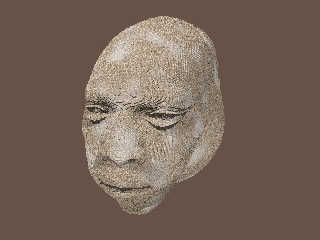
Thomas de Groot <tho### [at] degrootorg> wrote:
> I need a bit of help. I made a depth_map of a Poser head...
> and thought that using it in the Rockhead code would be straightforward.
> It is, except that the face remains flat with hardly a hint of features...

I couldn't resist the urge to continue playing with your code. I've been doing
some experiments with it that look promising.

But at the last minute, I decided to try a simple trick instead: changing the
gamma of your depth-map .png image (i.e., 'abusing' the gamma, ha!)

The facial features suddenly appeared much more pronounced-- although the ears
disappeared! (Probably because the gamma change made them completely black, in
the depth-map image.)

This gamma-tweaking was an interesting discovery, just by itself. It's probably
useful in other contexts as well.

For doing other experiments with your code, I decided to make my own depth-map
(of a 'girl' model I downloaded years ago.) The method I used was the standard
one (I think), applying a white-to-black color_map to the face in +z. But I may
have made mine in a slightly different way than you did: I made the scale of the
color_map fade rather quickly, so that the black color came in just behind the
ears of the model (rather than behind the entire head.) This way, there was more
tonal difference in the facial features. I'll post more about that as I continue
to experiment...

Anyway, these are the only changes I made to your code, to get the results here
(and I used your original .png depth-map):

....
pigment_map {
       [0.0 rgb 0]
       [0.5 pigment_pattern {
              image_map {
                png"mapping_test.png" gamma 7 interpolate 2
                .....

....
pigment_map {
           [0.0 rgb 0]
           [0.5 granite
           scale 10*<5, 0.5, 5> // the 10* multiplier is to temporarily
// eliminate the 'rock' texture, to show just the 3-D facial features more
// clearly.
Post a reply to this message
Attachments:
Download 'rockman_1_ken.jpg' (113 KB)
Preview of image 'rockman_1_ken.jpg'
|
|
| |
| |
|
|
|
|
| |
| |
|
|
Very interesting Kenneth! I did a bit of tweaking too, by adding a plane
effectively cutting the head behind the ears. It improved the result a
bit but not as much as your work. Yours is much more promising; I played
a bit with gamma values on the image but obviously not well enough ;-)

I shall go try that, in parallel with other work I started towards the
Metal Monster...

--
Thomas
Post a reply to this message
|
|
| |
| |
|
|
|
|
| |
| |
|
|
Am 5/22/2016 um 13:22 schrieb Thomas de Groot:
> Very interesting Kenneth! I did a bit of tweaking too, by adding a plane
> effectively cutting the head behind the ears. It improved the result a
> bit but not as much as your work. Yours is much more promising; I played
> a bit with gamma values on the image but obviously not well enough ;-)
>
> I shall go try that, in parallel with other work I started towards the
> Metal Monster...
>

When using images as depth-map, or bump-map, or heightfield, or anything
else that has nothing to do with a "picture" you'll have to make sure
that there is at no point in the whole workflow any gamma correction
applied - starting with the generation of the image itself.
Simply changing the gamma later is not what you want as this will throw
away a lot of information and you will loose detail.

This has nothing to do with "abusing" gamma - this is just the way
things do work and should be obvious after all this gamma correction
talk in these NG.

-Ive
Post a reply to this message
|
|
| |
| |
|
|
|
|
| |
| |
|
|
On 05/21/2016 02:14 PM, Samuel B. wrote:
...
> Hope some of that made sense :)
>
> As for the source code: if it's not in the archive I posted way back, then it's
> in my older computer. Also, I chose the name "Strands" for lack of anything else
> to call it; it's not a term used with whatever technique my program used.
>
> Sam
>

Hi Sam,

Thanks much! Your description was great. I think I now understand what
you are doing with "Strands" well enough I can attempt something like it
myself.

Bill P.
Post a reply to this message
|
|
| |
| |
|
|
|
|
| |
| |
|
|
Ive <ive### [at] lilysoftorg> wrote:

>
> When using images as depth-map, or bump-map, or heightfield, or anything
> else that has nothing to do with a "picture" you'll have to make sure
> that there is at no point in the whole workflow any gamma correction
> applied - starting with the generation of the image itself.
> Simply changing the gamma later is not what you want as this will throw
> away a lot of information and you will loose detail.
>

Yes, I agree with that... to a point. My little gamma trick was just an
experiment-- which happened to work out rather nicely. But I would not recommend
changing gamma willy-nilly (without an understanding of the problems it will
introduce.) In the case of Thomas's "mapping test" image, it certainly *did*
introduce a problem--- the ears of his model disappeared! ;-) But it was
interesting to see how the gamma shift 'improved' the facial features of his
isosurface, without any other code changes.

My own overall philosophy about POV-Ray is that it is a wonderful 'visual tool
box'... with tools that can be used in various ways (even 'non-recommended'
ways, if that happens to work for a certain effect.) I recall that when I first
started using the program, the one thing mentioned over and over again in the
newsgroups was, "Don't be afraid to experiment and see what happens!" I still
think that's a useful philosophy to have.
Post a reply to this message
|
|
| |
| |
|
|
|
|
| |
| |
|
|
On 22-5-2016 16:34, Kenneth wrote:
> Ive <ive### [at] lilysoftorg> wrote:
>
>>
>> When using images as depth-map, or bump-map, or heightfield, or anything
>> else that has nothing to do with a "picture" you'll have to make sure
>> that there is at no point in the whole workflow any gamma correction
>> applied - starting with the generation of the image itself.
>> Simply changing the gamma later is not what you want as this will throw
>> away a lot of information and you will loose detail.
>>
>
> Yes, I agree with that... to a point. My little gamma trick was just an
> experiment-- which happened to work out rather nicely. But I would not recommend
> changing gamma willy-nilly (without an understanding of the problems it will
> introduce.) In the case of Thomas's "mapping test" image, it certainly *did*
> introduce a problem--- the ears of his model disappeared! ;-) But it was
> interesting to see how the gamma shift 'improved' the facial features of his
> isosurface, without any other code changes.
>
> My own overall philosophy about POV-Ray is that it is a wonderful 'visual tool
> box'... with tools that can be used in various ways (even 'non-recommended'
> ways, if that happens to work for a certain effect.) I recall that when I first
> started using the program, the one thing mentioned over and over again in the
> newsgroups was, "Don't be afraid to experiment and see what happens!" I still
> think that's a useful philosophy to have.
>
>

I agree with Kenneth: while the rules are there to be followed
strictly... they need also to be broken when artistic needs call for it
and yield interesting results.

--
Thomas
Post a reply to this message
|
|
| |
| |
|
|
|
|
| |
| |
|
|
>
> I agree with Kenneth: while the rules are there to be followed
> strictly... they need also to be broken when artistic needs call for it
> and yield interesting results.
>
Let me get this straight: you are trying to use a depth map but do not
get the result you desire, so you ask for help. I give you an
explanation why it is not working es you expect and also a hint what you
should do.
But - you cannot agree with that because you would feel limited in your
artistic freedom.
Hmm, that's like Vermeer would have said: mixing black and white gives
me a shade of gray and not gold. So now I cannot express myself anymore
and the pearl earrings will remain unfinished.

-Ive
Post a reply to this message
|
|
| |
| |
|
|
|
|
| |
| |
|
|
On 23-5-2016 13:09, Ive wrote:
>>
>> I agree with Kenneth: while the rules are there to be followed
>> strictly... they need also to be broken when artistic needs call for it
>> and yield interesting results.
>>
> Let me get this straight: you are trying to use a depth map but do not
> get the result you desire, so you ask for help. I give you an
> explanation why it is not working es you expect and also a hint what you
> should do.
> But - you cannot agree with that because you would feel limited in your
> artistic freedom.
> Hmm, that's like Vermeer would have said: mixing black and white gives
> me a shade of gray and not gold. So now I cannot express myself anymore
> and the pearl earrings will remain unfinished.
>

No, no! That is not what I said! As I understand the whole thing here,
the straightforward/correct way to do things does not get me the results
I want (and I do not see how I can obtain that otherwise) so I turn to
unconventional ways to reach my goal. Personally, I think that is an
acceptable artistic way to do things.

I, modern Vermeer, do not paint the earring but glue the photograph of
one in its place (collage) :-)

--
Thomas
Post a reply to this message
|
|
| |
| |
|
|
|
|
| |
| |
|
|
Am 5/23/2016 um 13:37 schrieb Thomas de Groot:
> No, no! That is not what I said! As I understand the whole thing here,
> the straightforward/correct way to do things does not get me the results
> I want (and I do not see how I can obtain that otherwise) so I turn to
> unconventional ways to reach my goal. Personally, I think that is an
> acceptable artistic way to do things.
>
OK. While I still do not understand why the word "artistic" does popup
within a context I consider a purely technical problem (it almost seems
like a curse in these NG, as soon as someone mentions "gamma" inevitable
someone else replies "but for artistic reasons" as if one would have
anything to do with the other as I have tried to explain with the ironic
Vermeer example).
Anyway, I simply do not believe you have used the
"straightforward/correct" way. So step by step: you are using a linear
gradient to generate the depth-map image within POV-Ray. Right? Then you
make sure that POV-Ray writes the depth-map image in linear color space
by using the appropriate file output options (or, much easier use
OpenEXR as output file format). Right? Then, when using the image again
in POV-Ray you add gamma 1.0 to the image_map statement. Right? And in
case you really need to edit the depth-map outside of POV-Ray you make
sure that the used editor does not apply gamma correction when opening
or saving the image file (hint: AFAIK this is not possible with Gimp,
but can be done e.g. with Photoshop). Right?
Anything else will give you an distorted result and/or a loss of quickly
estimated 85% of detail information.

> I, modern Vermeer, do not paint the earring but glue the photograph of
> one in its place (collage) :-)
>
This *is* called artistic nowadays I guess, but this is certainly not my
field of expertise.

-Ive
Post a reply to this message
|
|
| |
| |
|
|
|
|
| |
| |
|
|
Am 23.05.2016 um 09:19 schrieb Thomas de Groot:

> I agree with Kenneth: while the rules are there to be followed
> strictly... they need also to be broken when artistic needs call for it
> and yield interesting results.

I'd like to put it this way:

Rules are there to be respected -- every one of them, always, and
without exception.
But there is a difference between respect and obedience.
Post a reply to this message
|
|
| |
| |
|
|
|
|
| |
| |
|
|
On 23-5-2016 14:55, clipka wrote:
> Am 23.05.2016 um 09:19 schrieb Thomas de Groot:
>
>> I agree with Kenneth: while the rules are there to be followed
>> strictly... they need also to be broken when artistic needs call for it
>> and yield interesting results.
>
> I'd like to put it this way:
>
> Rules are there to be respected -- every one of them, always, and
> without exception.
> But there is a difference between respect and obedience.
>

Absolutely. While I /respect/ the rules in every traditional way and for
every traditional purpose, I certainly shall /disobey/ them if, for any
reason, I can reach my goal through another way.

And let us be frank: if you were not told in the example under scrutiny,
you would not know. :-)

--
Thomas
Post a reply to this message
|
|
| |
| |
|
|
|
|
| |
| |
|
|
On 23-5-2016 14:45, Ive wrote:
> OK. While I still do not understand why the word "artistic" does popup
> within a context I consider a purely technical problem (it almost seems
> like a curse in these NG, as soon as someone mentions "gamma" inevitable
> someone else replies "but for artistic reasons" as if one would have
> anything to do with the other as I have tried to explain with the ironic
> Vermeer example).

In my view because creating an image is not just /only/ or /purely/ a
technical problem. To get the end result I want I shall not hesitate to
twist the rules. The technique is but a means to me towards an
"artistic" goal. That may sound very extreme but I can assure you that I
am very obedient towards the rules in general but I sometimes need to
punch them in the face :-)

> Anyway, I simply do not believe you have used the
> "straightforward/correct" way. So step by step: you are using a linear
> gradient to generate the depth-map image within POV-Ray. Right? Then you
> make sure that POV-Ray writes the depth-map image in linear color space
> by using the appropriate file output options (or, much easier use
> OpenEXR as output file format). Right? Then, when using the image again
> in POV-Ray you add gamma 1.0 to the image_map statement. Right? And in
> case you really need to edit the depth-map outside of POV-Ray you make
> sure that the used editor does not apply gamma correction when opening
> or saving the image file (hint: AFAIK this is not possible with Gimp,
> but can be done e.g. with Photoshop). Right?

I have done all that exactly to prescription (except I forgot about exr
indeed) and initially have not edited the image, and still it does not
give the result I want. My solution now would be to forget about most of
the head and concentrate the output exclusively to the face. It would
not matter as only the central part of the image is important for the
final isosurface. I have not tried that thoroughly yet but I will.

> Anything else will give you an distorted result and/or a loss of quickly
> estimated 85% of detail information.

Agreed.

>
>> I, modern Vermeer, do not paint the earring but glue the photograph of
>> one in its place (collage) :-)
>>
> This *is* called artistic nowadays I guess, but this is certainly not my
> field of expertise.

Nor mine really but the field is larger than what we may consider
familiar or appropriate. The ready-mades of Surrealism can either be
considered brilliant concepts or a hoax.

--
Thomas
Post a reply to this message
|
|
| |
| |
|
|
|
|
| |
| |
|
|
Before I am condemned to the stake, here are my latest results, using an
exr depth_map (attached).

Two attached result images: SB_rockhead1a with, in the corresponding
section:
exr "Mapping_test.exr" gamma 1.0 interpolate 2

and SB_rockhead1b with, in the corresponding section:
exr "Mapping_test.exr" gamma 3.0 interpolate 2

The latest of course is what I want. I plead innocent M'Lord.

--
Thomas
Post a reply to this message
Attachments:
Download 'mapping_test.exr.dat' (126 KB)
Download 'sb_rockhead1a.png' (410 KB)
Download 'sb_rockhead1b.png' (366 KB)
Preview of image 'sb_rockhead1a.png'

Preview of image 'sb_rockhead1b.png'

|
|
| |
| |
|
|
|
|
| |
| |
|
|
On 5/24/2016 8:49 AM, Thomas de Groot wrote:
> Before I am condemned to the stake, here are my latest results, using an
> exr depth_map (attached).
>
> Two attached result images: SB_rockhead1a with, in the corresponding
> section:
> exr "Mapping_test.exr" gamma 1.0 interpolate 2
>
> and SB_rockhead1b with, in the corresponding section:
> exr "Mapping_test.exr" gamma 3.0 interpolate 2
>
> The latest of course is what I want. I plead innocent M'Lord.
>

Change your plea to not guilty you are innocent. :-P

I prefer the gamma 3.0 image.

I did some experimenting with images and gamma using PaintShop Pro (does
not auto gamma correct) and height fields.

Changing the gamma in the image changes the position of where the detail
is brought out. Or so it seems to me.
If that is the aim then it is a bonus that it can be done inside
Pov-Ray. Rather than using an external process that will slowdown the
workflow.


--

I will not let ignorance stand in the way of opening my gob.

Regards
     Stephen
Post a reply to this message
|
|
| |
| |
|
|
|
|
| |
| |
|
|
On 24-5-2016 10:41, Stephen wrote:
> On 5/24/2016 8:49 AM, Thomas de Groot wrote:
>> Before I am condemned to the stake, here are my latest results, using an
>> exr depth_map (attached).
>>
>> Two attached result images: SB_rockhead1a with, in the corresponding
>> section:
>> exr "Mapping_test.exr" gamma 1.0 interpolate 2
>>
>> and SB_rockhead1b with, in the corresponding section:
>> exr "Mapping_test.exr" gamma 3.0 interpolate 2
>>
>> The latest of course is what I want. I plead innocent M'Lord.
>>
>
> Change your plea to not guilty you are innocent. :-P

Oups, yes, that would be more correct indeed!

>
> I prefer the gamma 3.0 image.
>
> I did some experimenting with images and gamma using PaintShop Pro (does
> not auto gamma correct) and height fields.
>
> Changing the gamma in the image changes the position of where the detail
> is brought out. Or so it seems to me.
> If that is the aim then it is a bonus that it can be done inside
> Pov-Ray. Rather than using an external process that will slowdown the
> workflow.
>

Exactly. I prefer not to mess with external processes and in this case
the final result can be controlled better inside POV-Ray.

--
Thomas
Post a reply to this message
|
|
| |
| |
|
|
|
|
| |
| |
|
|
On 5/24/2016 12:19 PM, Thomas de Groot wrote:
>
> Exactly. I prefer not to mess with external processes and in this case
> the final result can be controlled better inside POV-Ray.

I tend to change the image but that is because of the tools I use. In
this instance the image is being used as a data source, to be
manipulated. So I don't see that there is a problem. Colour to position,
no break in the photorealism rules, there. ;)


--

Regards
     Stephen
Post a reply to this message
|
|
| |
| |
|
|
|
|
| |
| |
|
|
On 24-5-2016 13:46, Stephen wrote:
> On 5/24/2016 12:19 PM, Thomas de Groot wrote:
>>
>> Exactly. I prefer not to mess with external processes and in this case
>> the final result can be controlled better inside POV-Ray.
>
> I tend to change the image but that is because of the tools I use. In
> this instance the image is being used as a data source, to be
> manipulated. So I don't see that there is a problem. Colour to position,
> no break in the photorealism rules, there. ;)
>

The problem is in the eye of the beholder :-)

--
Thomas
Post a reply to this message
|
|
| |
| |
|
|
|
|
| |
| |
|
|
On 5/25/2016 7:42 AM, Thomas de Groot wrote:
> On 24-5-2016 13:46, Stephen wrote:
>> On 5/24/2016 12:19 PM, Thomas de Groot wrote:
>>>
>>> Exactly. I prefer not to mess with external processes and in this case
>>> the final result can be controlled better inside POV-Ray.
>>
>> I tend to change the image but that is because of the tools I use. In
>> this instance the image is being used as a data source, to be
>> manipulated. So I don't see that there is a problem. Colour to position,
>> no break in the photorealism rules, there. ;)
>>
>
> The problem is in the eye of the beholder :-)
>

And that problem would be a "beam"?

Sorry, I could not resist. :)

--

Regards
     Stephen
Post a reply to this message
|
|
| |
| |
|
|
|
|
| |
| |
|
|
On 25-5-2016 10:45, Stephen wrote:
> On 5/25/2016 7:42 AM, Thomas de Groot wrote:
>> On 24-5-2016 13:46, Stephen wrote:
>>> On 5/24/2016 12:19 PM, Thomas de Groot wrote:
>>>>
>>>> Exactly. I prefer not to mess with external processes and in this case
>>>> the final result can be controlled better inside POV-Ray.
>>>
>>> I tend to change the image but that is because of the tools I use. In
>>> this instance the image is being used as a data source, to be
>>> manipulated. So I don't see that there is a problem. Colour to position,
>>> no break in the photorealism rules, there. ;)
>>>
>>
>> The problem is in the eye of the beholder :-)
>>
>
> And that problem would be a "beam"?
>
> Sorry, I could not resist. :)
>

Lol! I don't know. Too many rays in the Pov I guess.

--
Thomas
Post a reply to this message
|
|
| |
| |
|
|
|
|
| |
|
|








