|
|
|
|
|
|
| |
| |
|
|
|
|
| |
| |
|
|
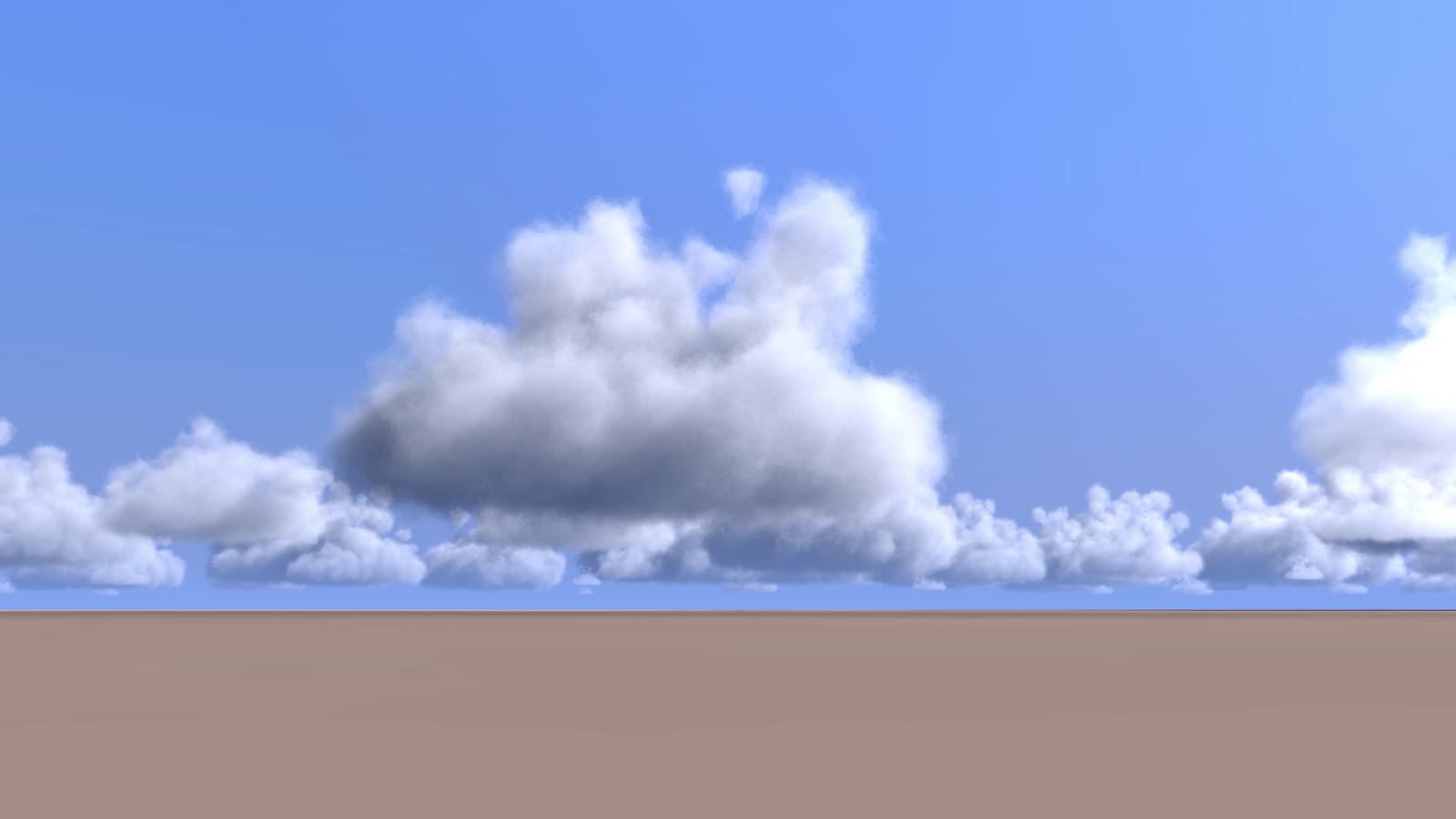
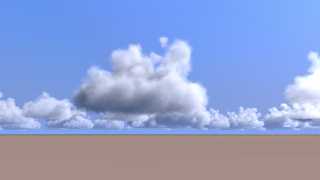
I was going to add some cumulus to my sea scene, but the ones I had from
the project tierra where not very convincing, so... I started another
experiment.

The approach is similar to that of my previous cumulus include, but with
a trick to make softer media. As the method involved the object pattern,
the media was a bit sharp with just 0 or 1 in the density map.

The trick is to create an array of blob components positions and radius,
then use that to create 4 blobs with concentric shapes and use them on
an averaged density map. The results are surprisingly fast... this one
took "only" 47 min.

--
jaime
Post a reply to this message
Attachments:
Download 'blob-clouds-test-03d.jpg' (52 KB)
Preview of image 'blob-clouds-test-03d.jpg'
|
|
| |
| |
|
|
|
|
| |
| |
|
|
Jaime Vives Piqueres <jai### [at] ignorancia org> wrote:
> The trick is to create an array of blob components positions and radius,
> then use that to create 4 blobs with concentric shapes and use them on
> an averaged density map. The results are surprisingly fast... this one
> took "only" 47 min.
Nice and fluffy as it should be.
The method of averaging object patterns will be of further use - at least I hope
so...
Norbert org> wrote:
> The trick is to create an array of blob components positions and radius,
> then use that to create 4 blobs with concentric shapes and use them on
> an averaged density map. The results are surprisingly fast... this one
> took "only" 47 min.
Nice and fluffy as it should be.
The method of averaging object patterns will be of further use - at least I hope
so...
Norbert
Post a reply to this message
|
|
| |
| |
|
|
|
|
| |
| |
|
|
Jaime Vives Piqueres <jai### [at] ignoranciaorg> wrote:
> I was going to add some cumulus to my sea scene, but the ones I had from
> the project tierra where not very convincing, so... I started another
> experiment.
>
> The approach is similar to that of my previous cumulus include, but with
> a trick to make softer media. As the method involved the object pattern,
> the media was a bit sharp with just 0 or 1 in the density map.
>
> The trick is to create an array of blob components positions and radius,
> then use that to create 4 blobs with concentric shapes and use them on
> an averaged density map. The results are surprisingly fast... this one
> took "only" 47 min.
>
> --
> jaime

Here is a resource about the simulation on cloud phenomenon which I know.

http://wiki.flightgear.org/Atmospheric_light_scattering
Post a reply to this message
|
|
| |
| |
|
|
|
|
| |
| |
|
|
On 04/26/2016 08:47 AM, Jaime Vives Piqueres wrote:
> I was going to add some cumulus to my sea scene, but the ones I had from
> the project tierra where not very convincing, so... I started another
> experiment.
>
> The approach is similar to that of my previous cumulus include, but with
> a trick to make softer media. As the method involved the object pattern,
> the media was a bit sharp with just 0 or 1 in the density map.
>
> The trick is to create an array of blob components positions and radius,
> then use that to create 4 blobs with concentric shapes and use them on
> an averaged density map. The results are surprisingly fast... this one
> took "only" 47 min.
>
> --
> jaime
>
Impressive - though am I correct there are some artifacts in the right
part of the center top plume? Was it run with AA ?

Asking mostly because of my continuing look into blob related bugs.Those
spots look like other issues I have seen related to media and blobs at
the blob(s) boundary.

Bill P.
Post a reply to this message
|
|
| |
| |
|
|
|
|
| |
| |
|
|
El 26/04/16 a las 15:02, Norbert Kern escribió:
> Nice and fluffy as it should be.

   Thanks... perhaps too fluffy, tough.

> The method of averaging object patterns will be of further use - at least I hope
> so...

  Well, it's nothing fancy, just the average pattern. The real trick is
that the averaged blobs are concentric (with diminishing radius and the
same threshold):


   interior{
     media{
       method 3 intervals 1 samples Cloud_Samples
       scattering{2,.01}
       absorption .005
       density{
         average
         density_map{
           [1
             object{
               cloud_a
               color rgb 0
               color rgb .25
             }
             warp{turbulence .5}
             scale 2 warp{turbulence .67} scale 1/2
             scale 4 warp{turbulence 1} scale 1/4
           ]
           [1
             object{
               cloud_b
               color rgb 0
               color rgb .5
             }
             warp{turbulence .5}
             scale 2 warp{turbulence .67} scale 1/2
           ]
           [1
             object{
               cloud_c
               color rgb 0
               color rgb .75
             }
             warp{turbulence .5}
           ]
           [1
             object{
               cloud_d
               color rgb 0
               color rgb 1
             }
             warp{turbulence .5}
           ]
         }
       }
     }
   }

--
jaime
Post a reply to this message
|
|
| |
| |
|
|
|
|
| |
| |
|
|
El 26/04/16 a las 15:43, And escribió:
> Here is a resource about the simulation on cloud phenomenon which I
> know.
>
> http://wiki.flightgear.org/Atmospheric_light_scattering

   Well, fortunately POV-Ray media scattering type 2 takes care of all
that... what I'm really looking for is some method to create convincing
cumulus shapes. Right now they are just a bunch of blob spheres filling
a random conical shape, but I've got some ideas to try from this paper:

   https://hal.inria.fr/inria-00537462/file/BN04_clouds.pdf

   I will try to start with a base blob with just a few big components
and then trace a lot of smaller ones on the surface of it.

--
jaime
Post a reply to this message
|
|
| |
| |
|
|
|
|
| |
| |
|
|
El 26/04/16 a las 15:52, William F Pokorny escribió:
> Impressive - though am I correct there are some artifacts in the
> right part of the center top plume? Was it run with AA ?

   You have a good eye... I had to zoom several times to see them! Yes,
it was run without AA, and the artifacts are likely due to the media
container (another blob, BTW... I forgot to mention this).

> Asking mostly because of my continuing look into blob related
> bugs.Those spots look like other issues I have seen related to media
> and blobs at the blob(s) boundary.

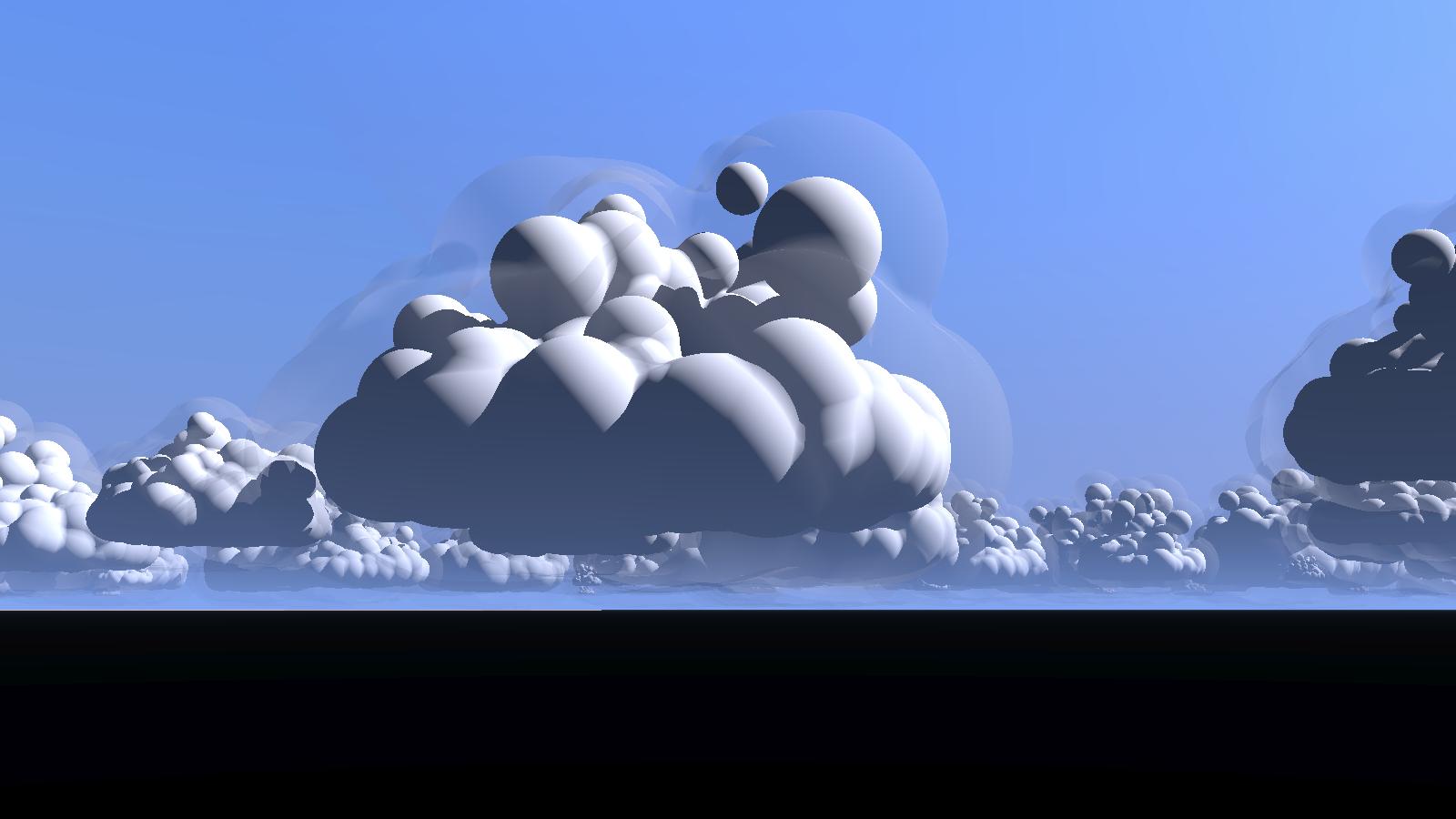
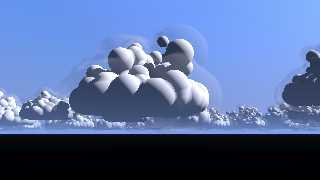
   Yes, that's likely the problem: see the attached test. The inner solid
blob is the object used on the density pattern, and the transparent
outer blob is the media container: you can clearly see the artifacts are
coincident with a blob boundary.

--
jaime
Post a reply to this message
Attachments:
Download 'blob-clouds-test-03d-containers.jpg' (74 KB)
Preview of image 'blob-clouds-test-03d-containers.jpg'
|
|
| |
| |
|
|
|
|
| |
| |
|
|
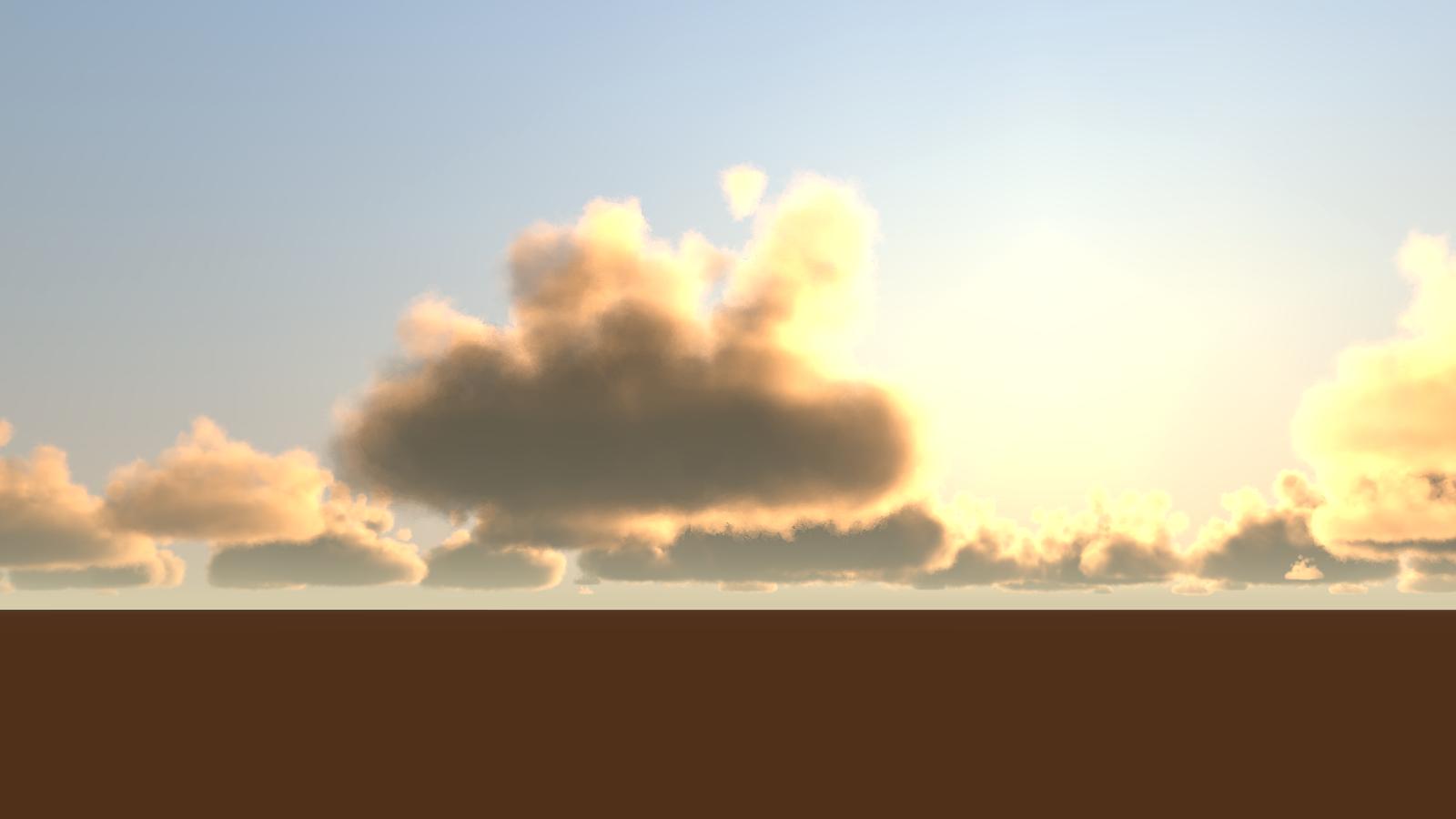
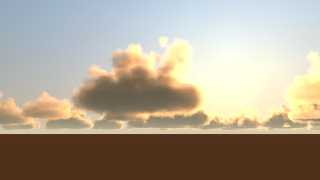
Another one using the exact same clouds but with a sunset lighting.

--
jaime
Post a reply to this message
Attachments:
Download 'blob-clouds-test-03e.jpg' (49 KB)
Preview of image 'blob-clouds-test-03e.jpg'
|
|
| |
| |
|
|
|
|
| |
| |
|
|
Jaime Vives Piqueres <jai### [at] ignoranciaorg> wrote:
> El 26/04/16 a las 15:02, Norbert Kern escribió:
> > Nice and fluffy as it should be.
>
>    Thanks... perhaps too fluffy, tough.
>
> > The method of averaging object patterns will be of further use - at least I hope
> > so...
>
>   Well, it's nothing fancy, just the average pattern. The real trick is
> that the averaged blobs are concentric (with diminishing radius and the
> same threshold):
>
>
>    interior{
>      media{
>        method 3 intervals 1 samples Cloud_Samples
>        scattering{2,.01}
>        absorption .005
>        density{
>          average
>          density_map{
>            [1
>              object{
>                cloud_a
>                color rgb 0
>                color rgb .25
>              }
>              warp{turbulence .5}
>              scale 2 warp{turbulence .67} scale 1/2
>              scale 4 warp{turbulence 1} scale 1/4
>            ]
>            [1
>              object{
>                cloud_b
>                color rgb 0
>                color rgb .5
>              }
>              warp{turbulence .5}
>              scale 2 warp{turbulence .67} scale 1/2
>            ]
>            [1
>              object{
>                cloud_c
>                color rgb 0
>                color rgb .75
>              }
>              warp{turbulence .5}
>            ]
>            [1
>              object{
>                cloud_d
>                color rgb 0
>                color rgb 1
>              }
>              warp{turbulence .5}
>            ]
>          }
>        }
>      }
>    }
>
> --
> jaime


Thank you for the code snippet.
Concentric is clear, otherwise it would be similar to proximity patterns.
But, who knows...

Norbert
Post a reply to this message
|
|
| |
| |
|
|
|
|
| |
| |
|
|
Am 26.04.2016 um 18:58 schrieb Jaime Vives Piqueres:
> Another one using the exact same clouds but with a sunset lighting.

You folks are amazing!
Post a reply to this message
|
|
| |
| |
|
|
|
|
| |
| |
|
|
On 26-4-2016 18:58, Jaime Vives Piqueres wrote:
> Another one using the exact same clouds but with a sunset lighting.
>

Very nice indeed Jaime. How does this method relate to the df3 one used
by Gilles Tran? I am familiar with that; I also used blobs for making
smoke (Chris Huff or Michael Carneholm macros) but they are pretty slow.

--
Thomas
Post a reply to this message
|
|
| |
| |
|
|
|
|
| |
| |
|
|
Jaime Vives Piqueres wrote on 26/04/2016 14.47:
> I was going to add some cumulus to my sea scene, but the ones I had from
> the project tierra where not very convincing, so... I started another
> experiment.
>
> The approach is similar to that of my previous cumulus include, but with
> a trick to make softer media. As the method involved the object pattern,
> the media was a bit sharp with just 0 or 1 in the density map.
>
> The trick is to create an array of blob components positions and radius,
> then use that to create 4 blobs with concentric shapes and use them on
> an averaged density map. The results are surprisingly fast... this one
> took "only" 47 min.
>
> --
> jaime
>

I like a lot this one!
Paolo
Post a reply to this message
|
|
| |
| |
|
|
|
|
| |
| |
|
|
Gorgeous !
I find them an impressionism touch...
Can't wait to see the composition with the sea.


Jaime Vives Piqueres <jai### [at] ignoranciaorg> wrote:
> I was going to add some cumulus to my sea scene, but the ones I had from
> the project tierra where not very convincing, so... I started another
> experiment.
>
> The approach is similar to that of my previous cumulus include, but with
> a trick to make softer media. As the method involved the object pattern,
> the media was a bit sharp with just 0 or 1 in the density map.
>
> The trick is to create an array of blob components positions and radius,
> then use that to create 4 blobs with concentric shapes and use them on
> an averaged density map. The results are surprisingly fast... this one
> took "only" 47 min.
>
> --
> jaime
Post a reply to this message
|
|
| |
| |
|
|
|
|
| |
| |
|
|
This is excellent. Whenever I've tried to use this type of technique before, I
can never get the media settings right - my clouds either end up
not-really-opaque, i.e. I can see other stuff through even the densest regions,
or so dense that they saturate to black underneath.

Your code looks very straightforward - I must play with it!

Bill
Post a reply to this message
|
|
| |
| |
|
|
|
|
| |
| |
|
|
El 27/04/16 a las 08:56, Thomas de Groot escribió:
> Very nice indeed Jaime. How does this method relate to the df3 one
> used by Gilles Tran? I am familiar with that;

   Well, in fact I started first trying df3 clouds: I did my own
"makecloud" using ARRAYS_WriteDF3() to write the cloud files, sampling
the same blobs I'm using now. It worked fine, but it was slow to
generate clouds with decent resolution, and the look was too fluffy.
Also, I found no way to make the clouds less turbulent at bottom.

> I also used blobs for making smoke (Chris Huff or Michael Carneholm
> macros) but they are pretty slow.

   Well, I'm using another blob as container, and perhaps that's making
them faster, because I find them not much slower than the df3 ones.

--
jaime
Post a reply to this message
|
|
| |
| |
|
|
|
|
| |
| |
|
|
On 27-4-2016 9:38, Jaime Vives Piqueres wrote:
> El 27/04/16 a las 08:56, Thomas de Groot escribió:
>> Very nice indeed Jaime. How does this method relate to the df3 one
>> used by Gilles Tran? I am familiar with that;
>
>    Well, in fact I started first trying df3 clouds: I did my own
> "makecloud" using ARRAYS_WriteDF3() to write the cloud files, sampling
> the same blobs I'm using now. It worked fine, but it was slow to
> generate clouds with decent resolution, and the look was too fluffy.
> Also, I found no way to make the clouds less turbulent at bottom.

Ah yes, the cloud bottom was a problem indeed.

>
>> I also used blobs for making smoke (Chris Huff or Michael Carneholm
>> macros) but they are pretty slow.
>
>    Well, I'm using another blob as container, and perhaps that's making
> them faster, because I find them not much slower than the df3 ones.
>

That's interesting. Thanks!


--
Thomas
Post a reply to this message
|
|
| |
| |
|
|
|
|
| |
| |
|
|
El 27/04/16 a las 09:08, Paolo Gibellini escribió:
> I like a lot this one!

   Thanks!

--
jaime
Post a reply to this message
|
|
| |
| |
|
|
|
|
| |
| |
|
|
El 27/04/16 a las 09:10, BayashiPascal escribió:
> Gorgeous ! I find them an impressionism touch...

   Thanks. The "impressionism" touch is nice, but to be frank is only the
result of not being realistic enough... :(

> Can't wait to see the composition with the sea.
>

   I still have some things to try with the clouds, but I will let it
render this evening, as I've to leave for some hours... will post tonight.

--
jaime
Post a reply to this message
|
|
| |
| |
|
|
|
|
| |
| |
|
|
On 04/26/2016 12:56 PM, Jaime Vives Piqueres wrote:
> El 26/04/16 a las 15:52, William F Pokorny escribió:
>> Impressive - though am I correct there are some artifacts in the
>> right part of the center top plume? Was it run with AA ?
>
>    You have a good eye... I had to zoom several times to see them! Yes,
> it was run without AA, and the artifacts are likely due to the media
> container (another blob, BTW... I forgot to mention this).
>
>> Asking mostly because of my continuing look into blob related
>> bugs.Those spots look like other issues I have seen related to media
>> and blobs at the blob(s) boundary.
>
>    Yes, that's likely the problem: see the attached test. The inner solid
> blob is the object used on the density pattern, and the transparent
> outer blob is the media container: you can clearly see the artifacts are
> coincident with a blob boundary.
>
> --
> jaime

Thanks for checking Jaime. The image is also helpful for understanding
your cloud technique.

Let me add my apologies for the many times I've no doubt mistyped your
name. I typed again this morning - Jamie - but saw it this time.

Many days, my eyes & brain fail to see in the moment the scrambled
things my fingers type!

Bill P.
Post a reply to this message
|
|
| |
| |
|
|
|
|
| |
| |
|
|
El 27/04/16 a las 09:30, Bill Pragnell escribió:
> This is excellent. Whenever I've tried to use this type of technique
> before, I can never get the media settings right - my clouds either
> end up not-really-opaque, i.e. I can see other stuff through even the
> densest regions, or so dense that they saturate to black underneath.

   Yeah... POV-Ray media isn't easy to setup. In fact it can drive you
crazy most of the time. It's happening to me now as I'm trying to add
another media for the haze (I was using a ground fog until now). But it
looks gorgeous when you find the right setup for your scene...

--
jaime
Post a reply to this message
|
|
| |
| |
|
|
|
|
| |
| |
|
|
El 27/04/16 a las 12:34, William F Pokorny escribió:
> Thanks for checking Jaime. The image is also helpful for
> understanding your cloud technique.

   What you don't see on the image is the other 3 concentric blobs inside
the solid one: they use the same components placement but with
increasingly smaller radius.

> Let me add my apologies for the many times I've no doubt mistyped
> your name. I typed again this morning - Jamie - but saw it this
> time.

   Don't worry... I'm already used to being called Jamie. In fact I
rarely notice it: as long as all the characters are there, it looks right.

--
jaime
Post a reply to this message
|
|
| |
| |
|
|
|
|
| |
| |
|
|
El 27/04/16 a las 09:10, BayashiPascal escribió:
> Can't wait to see the composition with the sea.

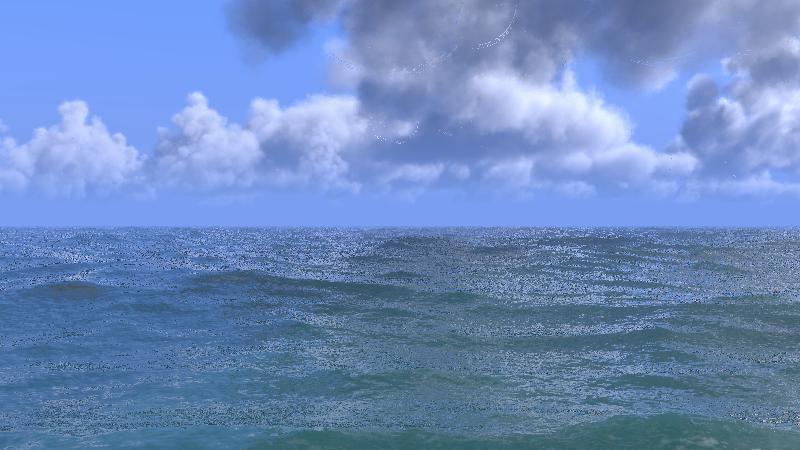
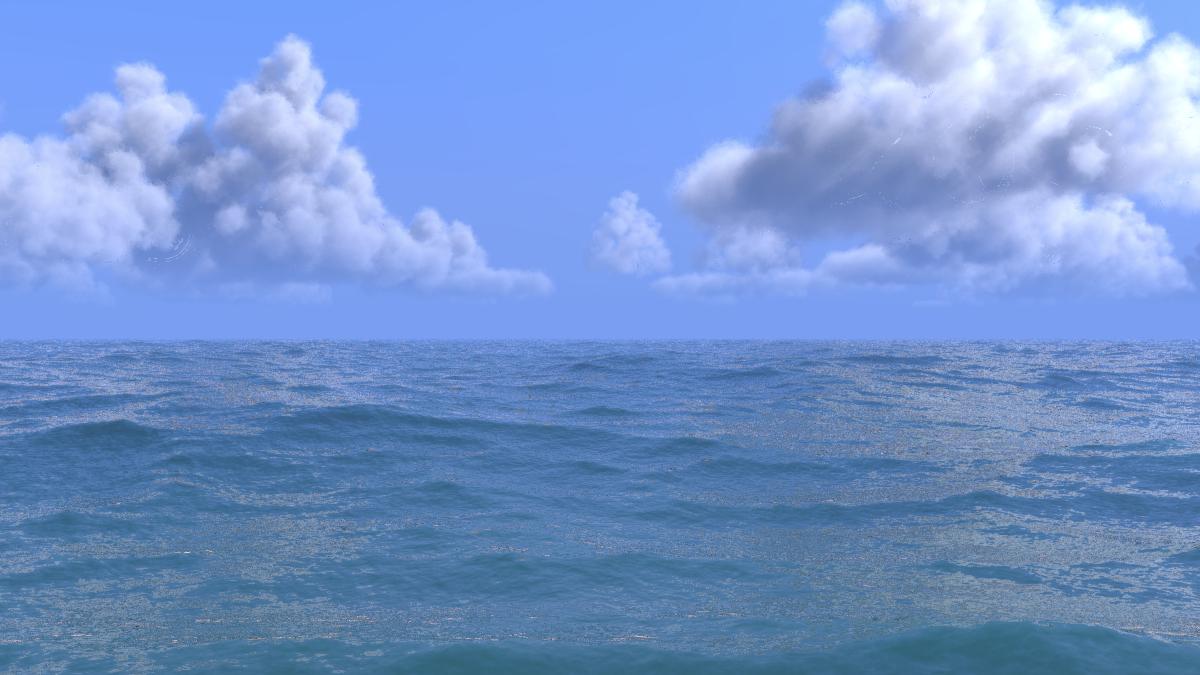
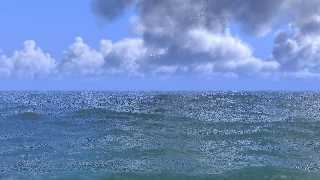
   Well, lots of artifacts and no AA, but looks promising...

--
jaime
Post a reply to this message
Attachments:
Download 'ocean-18.jpg' (55 KB)
Preview of image 'ocean-18.jpg'
|
|
| |
| |
|
|
|
|
| |
| |
|
|
On 2016/04/27 11:49 PM, Jaime Vives Piqueres wrote:
> El 27/04/16 a las 09:10, BayashiPascal escribió:
>> Can't wait to see the composition with the sea.
>
>    Well, lots of artifacts and no AA, but looks promising...
>
> --
> jaime
>

It's a UFO!
=:o

--
________________________________________

-Nekar Xenos-
Post a reply to this message
|
|
| |
| |
|
|
|
|
| |
| |
|
|
Jaime Vives Piqueres <jai### [at] ignoranciaorg> wrote:
> El 27/04/16 a las 09:10, BayashiPascal escribió:
> > Can't wait to see the composition with the sea.
>
>    Well, lots of artifacts and no AA, but looks promising...

Awesome. I look forward to this time next year when the full size version
finishes rendering!
Post a reply to this message
|
|
| |
| |
|
|
|
|
| |
| |
|
|
El 28/04/16 a las 04:24, Nekar Xenos escribió:
> It's a UFO!

   Good idea: if I cannot get ride of the artifacts, I could pass it for
a UFO trying to hide on the clouds using some invisibility trick... :)

--
jaime
Post a reply to this message
|
|
| |
| |
|
|
|
|
| |
| |
|
|
El 28/04/16 a las 09:22, Bill Pragnell escribió:
> Awesome. I look forward to this time next year when the full size
> version finishes rendering!

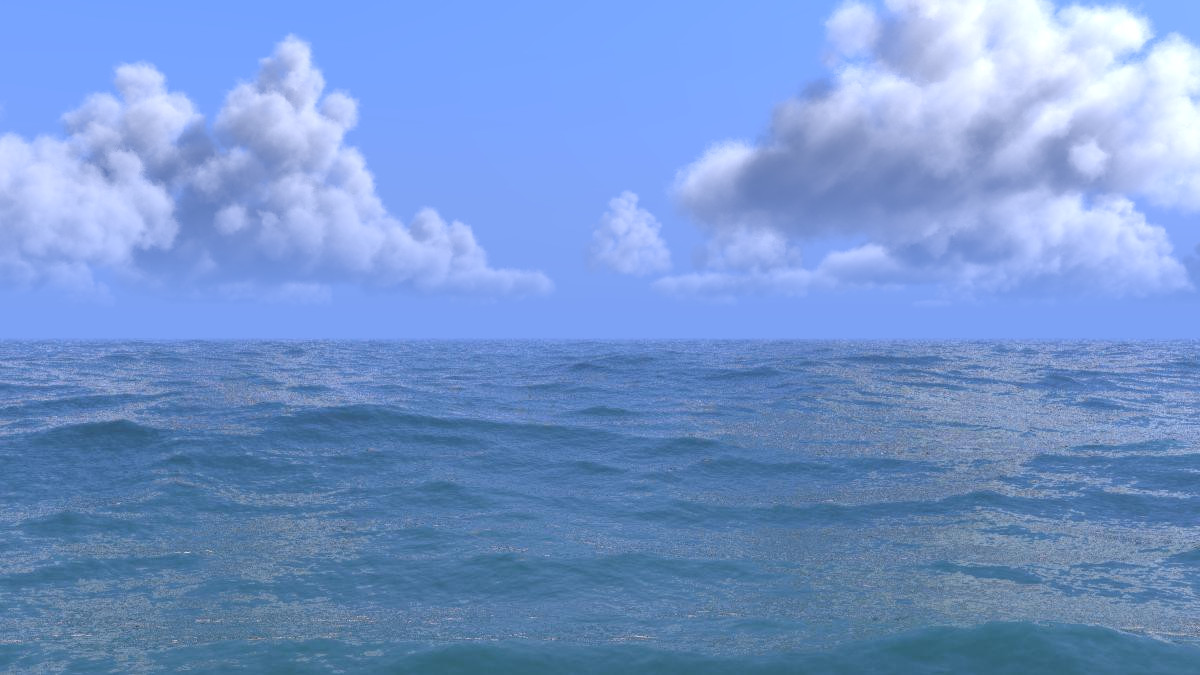
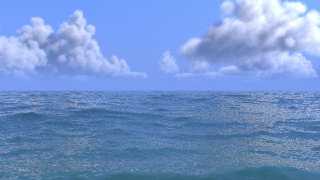
   Thanks, but it's not that slow... that test took just 29 min, and the
one attached here, using +a, took 1h45m using only 4 out of 6 cores. I
guess the full render at 1600x900 will take about 4 hours with 6 cores.
The idea of using a blob as container, instead a box or sphere, works
pretty well... it's just a shame it generates some artifacts. :(

--
jaime
Post a reply to this message
Attachments:
Download 'ocean-18b.jpg' (84 KB)
Preview of image 'ocean-18b.jpg'
|
|
| |
| |
|
|
|
|
| |
| |
|
|
El 27/04/16 a las 10:05, Thomas de Groot escribió:
> Ah yes, the cloud bottom was a problem indeed.

   BTW, I've just found a way to avoid the "bottom" problem with df3
clouds: do not use the df3 directly on the density, but declare it first
as a pigment, then use it on a "gradient y" density map with a less
turbulent version at the bottom. Works nicely...

       density{
         gradient y
         density_map{
           [0 pigment_pattern{p_df3}
             ...little turbulence at bottom...
           ]
           [1 pigment_pattern{p_df3}
             ...full turbulence at the top...
           ]
         }
       }


--
jaime
Post a reply to this message
|
|
| |
| |
|
|
|
|
| |
| |
|
|
Jaime Vives Piqueres <jai### [at] ignoranciaorg> wrote:
> El 28/04/16 a las 09:22, Bill Pragnell escribió:
> > Awesome. I look forward to this time next year when the full size
> > version finishes rendering!
>
>    Thanks, but it's not that slow... that test took just 29 min, and the
> one attached here, using +a, took 1h45m using only 4 out of 6 cores. I
> guess the full render at 1600x900 will take about 4 hours with 6 cores.
> The idea of using a blob as container, instead a box or sphere, works
> pretty well... it's just a shame it generates some artifacts. :(

I guess the blob containers makes for fewer media calculations - that's a decent
time for such a render.

What causes the artifacts, is it something about the way blobs are implemented?
How about using a merge of the blob component spheres instead?
Post a reply to this message
|
|
| |
| |
|
|
|
|
| |
| |
|
|
Jaime Vives Piqueres <jai### [at] ignoranciaorg> wrote:
> El 28/04/16 a las 09:22, Bill Pragnell escribió:
> > Awesome. I look forward to this time next year when the full size
> > version finishes rendering!
>
>    Thanks, but it's not that slow... that test took just 29 min, and the
> one attached here, using +a, took 1h45m using only 4 out of 6 cores. I
> guess the full render at 1600x900 will take about 4 hours with 6 cores.
> The idea of using a blob as container, instead a box or sphere, works
> pretty well... it's just a shame it generates some artifacts. :(
>
> --
> jaime

I feel for you concerning the artifacts. I have tried all kinds of tricks to get
rid of them and usually end up in a worse place than I began with. Blasted
container objects! May they be for ever confined to the ninth circle of hell
(the one reserved for treachery)!

I ended up using a single containing object (box or plane) and then filling it
with a skewed y-gradient density to get a flat bottom and then adding a mixture
of wrinkles, bozo and crackle (form<1, 0, 0>) to try to approximate fluffy tops.
Some of my images over at www.landofthefirst.com were created using this. I am
still not 100% happy with them.

I think your idea much better (and I love the results). More ideas to play with.
Post a reply to this message
|
|
| |
| |
|
|
|
|
| |
| |
|
|
On 28-4-2016 12:59, Jaime Vives Piqueres wrote:
> El 27/04/16 a las 10:05, Thomas de Groot escribió:
>> Ah yes, the cloud bottom was a problem indeed.
>
>    BTW, I've just found a way to avoid the "bottom" problem with df3
> clouds: do not use the df3 directly on the density, but declare it first
> as a pigment, then use it on a "gradient y" density map with a less
> turbulent version at the bottom. Works nicely...

Thanks! Shall try!

--
Thomas
Post a reply to this message
|
|
| |
| |
|
|
|
|
| |
| |
|
|
El 28/04/16 a las 13:04, Bill Pragnell escribió:
> What causes the artifacts, is it something about the way blobs are
> implemented? How about using a merge of the blob component spheres
> instead?

   Damn... that was so obvious and easy! Indeed it works great, thanks!
Currently rendering with your solution the exact same clouds for comparison.

--
jaime
Post a reply to this message
|
|
| |
| |
|
|
|
|
| |
| |
|
|
El 28/04/16 a las 13:13, Simon J. Cambridge escribió:
> I ended up using a single containing object (box or plane) and then filling it
> with a skewed y-gradient density to get a flat bottom and then adding a mixture
> of wrinkles, bozo and crackle (form<1, 0, 0>) to try to approximate fluffy tops.
> Some of my images over at www.landofthefirst.com were created using this. I am
> still not 100% happy with them.

   The ones at Othil Homtoh look very nice...

--
jaime
Post a reply to this message
|
|
| |
| |
|
|
|
|
| |
| |
|
|
On 04/28/2016 07:04 AM, Bill Pragnell wrote:
> Jaime Vives Piqueres <jai### [at] ignoranciaorg> wrote:
>> El 28/04/16 a las 09:22, Bill Pragnell escribió:
>>> Awesome. I look forward to this time next year when the full size
>>> version finishes rendering!
>>
>>     Thanks, but it's not that slow... that test took just 29 min, and the
>> one attached here, using +a, took 1h45m using only 4 out of 6 cores. I
>> guess the full render at 1600x900 will take about 4 hours with 6 cores.
>> The idea of using a blob as container, instead a box or sphere, works
>> pretty well... it's just a shame it generates some artifacts. :(
>
> I guess the blob containers makes for fewer media calculations - that's a decent
> time for such a render.
>
> What causes the artifacts, is it something about the way blobs are implemented?
> How about using a merge of the blob component spheres instead?
>

Answering without going back to refresh my old brain cells...

When Gail Shaw hit this issue back in 2005. At that time Slime wrote:

-------
This is probably just a problem with the accuracy of the blob solver; I
think it's not noticing the second (backside) surface near the edges, so
it thinks there's a long distance of media and makes it very bright as a
result. (In 3.5 this may have been diminished by anti-aliasing.)

A suggestion: Use a small box as your media container instead of a blob,
and then use a density{} in the media with the object pattern with the
blob, so that all points outside of the blob have no media.

- Slime
-------

In my digging I've found blob surfaces are actually a bit noisy
especially as the rays hit the surface in a more tangential way - so I
think Slime's thinking as to the cause is probably right.

Things that tend to help:

1) Try running with sturm off.

2) Lower the blob threshold - start extreme with 0.0001 say - though you
may of course lose the blob effect you want, but perhaps in the case of
these clouds this would be OK?

3) The code change I have been working to verify against blob problem
cases from years past tends to help a little with bright artifacts -
more with dark artifacts. Specifically the change in blob.cpp is changing:

const DBL DEPTH_TOLERANCE = 1.0e-2;

to:

const DBL DEPTH_TOLERANCE = 1.0e-4;

4) AA sometimes helps - and sometimes not - depending on how tangential
the super samples themselves are I guess.

5) What the other Bill P suggested should help too - if the merge
eliminates internal blob surfaces causing the artifacts.

Hope one or more things here enough to get this cloud method working
generally.

Bill P.
Post a reply to this message
|
|
| |
| |
|
|
|
|
| |
| |
|
|
El 28/04/16 a las 14:32, William F Pokorny escribió:
> Hope one or more things here enough to get this cloud method working
> generally.

   Thanks for the detailed explanation, but in this case the best
solution was the one the other Bill P. suggested. A merge of spheres
with same radius and placement did work pretty well, and in this case it
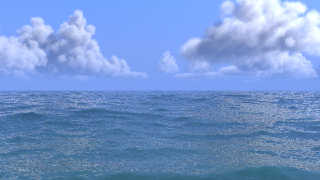
doesn't matter as it is an invisible container. It still does the job of
being a close container, and the speed up provided is even a little
better too.

--
jaime
Post a reply to this message
Attachments:
Download 'ocean-18c.jpg' (130 KB)
Preview of image 'ocean-18c.jpg'
|
|
| |
| |
|
|
|
|
| |
| |
|
|
On 04/28/2016 08:44 AM, Jaime Vives Piqueres wrote:
> El 28/04/16 a las 14:32, William F Pokorny escribió:
>> Hope one or more things here enough to get this cloud method working
>> generally.
>
>    Thanks for the detailed explanation, but in this case the best
> solution was the one the other Bill P. suggested. A merge of spheres
> with same radius and placement did work pretty well, and in this case it
> doesn't matter as it is an invisible container. It still does the job of
> being a close container, and the speed up provided is even a little
> better too.
>
> --
> jaime
>

Great! At least it was one of the Bill P's helped out... :-)

Perhaps I missed it, but are these renders with 3.7.0 or that latest
3.7.1 ?

Asking because Christoph made media related fixes in 3.7.1 which in my
few experiences help both performance and result.

Bill P.
Post a reply to this message
|
|
| |
| |
|
|
|
|
| |
| |
|
|
El 28/04/16 a las 15:08, William F Pokorny escribió:
> Perhaps I missed it, but are these renders with 3.7.0 or that latest
> 3.7.1 ?

   3.7.1, latest alpha...

> Asking because Christoph made media related fixes in 3.7.1 which in my
> few experiences help both performance and result.

   I didn't know, but yes, that must have helped too...

--
jaime
Post a reply to this message
|
|
| |
| |
|
|
|
|
| |
| |
|
|
Jaime Vives Piqueres <jai### [at] ignoranciaorg> wrote:
> El 28/04/16 a las 13:13, Simon J. Cambridge escribió:
> > I ended up using a single containing object (box or plane) and then filling it
> > with a skewed y-gradient density to get a flat bottom and then adding a mixture
> > of wrinkles, bozo and crackle (form<1, 0, 0>) to try to approximate fluffy tops.
> > Some of my images over at www.landofthefirst.com were created using this. I am
> > still not 100% happy with them.
>
>    The ones at Othil Homtoh look very nice...
>
> --
> jaime

Here is the code:

    #macro SkyShell(minAlt, maxAlt, Int)
        difference
        {
            sphere {<0, 0, 0> 1000000+maxAlt}
            sphere {<0, 0, 0> 1000000+minAlt}
            hollow
            texture {pigment {color rgbf 1}}
            interior {Int}
            translate <0, -1000000, 0>
        }
    #end

    SkyShell(4000, 5000,
        interior {
            media {
                method 3
                samples 20
                scattering {2, color rgb 0.0075 extinction 1}
                density
                {
                    wrinkles
                    scale <4000, 1000, 4000>
                    warp { turbulence 2 }
                    lambda 4
                    color_map
                    {
                        [0.00 color rgb 1.0]
                        [0.50 color rgb 0.8]
                        [0.55 color rgb 0.0]
                        [1.00 color rgb 0.0]
                    }
                    translate <-4000, 0, -1000>
                }
                density
                {
                    gradient y
                    scale 1000
                    color_map
                    {
                        [0.0  color rgb 0.00]
                        [0.4  color rgb 1.00]
                        [0.9  color rgb 1.00]
                        [1.0  color rgb 0.00]
                    }
                }
            }
        }
    )

I lied. It was concentric spheres!

And nice solution for the artifacts! One to remember.
Post a reply to this message
|
|
| |
| |
|
|
|
|
| |
| |
|
|
On 4/26/2016 12:39 PM, Jaime Vives Piqueres wrote:
> El 26/04/16 a las 15:02, Norbert Kern escribió:
>> Nice and fluffy as it should be.
>
>   Thanks... perhaps too fluffy, tough.
>
>> The method of averaging object patterns will be of further use - at
>> least I hope
>> so...
>
>  Well, it's nothing fancy, just the average pattern. The real trick is
> that the averaged blobs are concentric (with diminishing radius and the
> same threshold):

maybe i'm misunderstanding ... more complicated than taking the base
blob object and making scaled copies?
Post a reply to this message
|
|
| |
| |
|
|
|
|
| |
| |
|
|
El 28/04/16 a las 19:48, Jim Holsenback escribió:
> maybe i'm misunderstanding ... more complicated than taking the base
> blob object and making scaled copies?

   Just scaling down the copies only works for objects which are
symmetric on all axes. Scaling down an irregular, asymmetric blob makes
some components to be displaced towards the center, thus they get
outside the component on the original copy (and yes, I too though it
would work and tried that first... ;).

--
jaime
Post a reply to this message
|
|
| |
| |
|
|
|
|
| |
| |
|
|
William F Pokorny <ano### [at] anonymousorg> wrote:
> On 04/28/2016 08:44 AM, Jaime Vives Piqueres wrote:
> >    Thanks for the detailed explanation, but in this case the best
> > solution was the one the other Bill P. suggested. A merge of spheres
> > with same radius and placement did work pretty well, and in this case it
> > doesn't matter as it is an invisible container. It still does the job of
> > being a close container, and the speed up provided is even a little
> > better too.
> >
>
> Great! At least it was one of the Bill P's helped out... :-)
>
> Bill P.

Haha, I keep meaning to call this out. Too many Bill Ps! At least you come up as
a William on your account name, that saves huge confusion on the digest page (I
usually use the web view).

Jaime, glad my suggestion worked well. Honestly I nearly didn't say anything, I
thought it was too obvious and that you were bound to have tried it already! I
shall wheel out random suggestions more often in that case :)

Bill (the other P)
Post a reply to this message
|
|
| |
| |
|
|
|
|
| |
| |
|
|
El 28/04/16 a las 21:17, Bill Pragnell escribió:
> Jaime, glad my suggestion worked well. Honestly I nearly didn't say anything, I
> thought it was too obvious and that you were bound to have tried it already! I
> shall wheel out random suggestions more often in that case :)

   Nothing is too obvious, at least if I'm involved...

--
jaime
Post a reply to this message
|
|
| |
| |
|
|
|
|
| |
| |
|
|
On 28-4-2016 12:59, Jaime Vives Piqueres wrote:
>    BTW, I've just found a way to avoid the "bottom" problem with df3
> clouds:

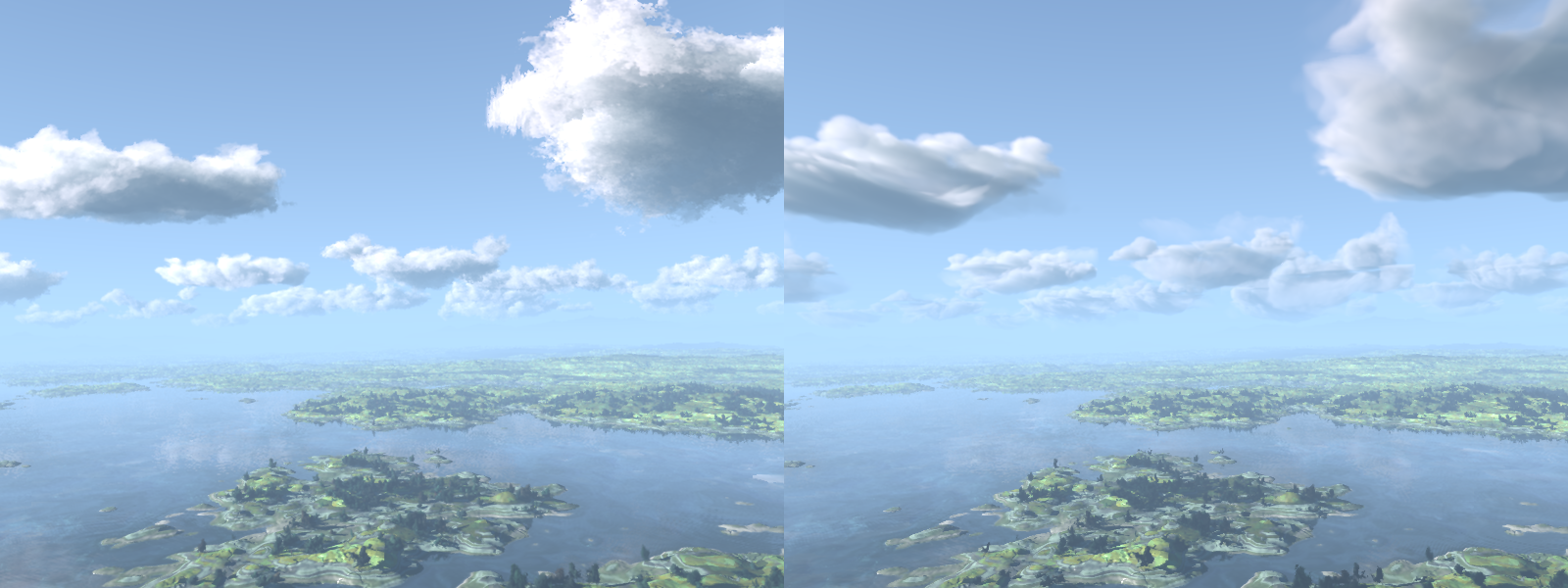
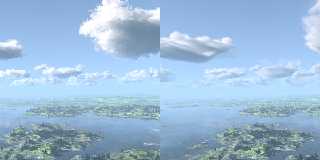
It makes for different types of clouds of course. Left image is the
original use of the df3 files as densities; right used as pigment
patterns and with a gradient y density.

I had to substantially increase samples to eliminate artifacts. While
left I could get away with samples 10, on the right - to keep on the
safe side - I used samples 100. I probably could easily get away with
samples 50 though.

--
Thomas
Post a reply to this message
Attachments:
Download 'my_makecloud2_test_day.png' (852 KB)
Preview of image 'my_makecloud2_test_day.png'
|
|
| |
| |
|
|
|
|
| |
| |
|
|
El 30/04/16 a las 13:27, Thomas de Groot escribió:
> I had to substantially increase samples to eliminate artifacts. While
> left I could get away with samples 10, on the right - to keep on the
> safe side - I used samples 100. I probably could easily get away with
> samples 50 though.

   That's strange... I'm getting good results with just 16 samples.

--
jaime
Post a reply to this message
|
|
| |
| |
|
|
|
|
| |
| |
|
|
Am 30.04.2016 um 18:26 schrieb Jaime Vives Piqueres:
> El 30/04/16 a las 13:27, Thomas de Groot escribió:
>> I had to substantially increase samples to eliminate artifacts. While
>> left I could get away with samples 10, on the right - to keep on the
>> safe side - I used samples 100. I probably could easily get away with
>> samples 50 though.
>
>   That's strange... I'm getting good results with just 16 samples.

Different version?

Media sampling method 3 had various bogosities until somewhen between
3.7.0 and today.
Post a reply to this message
|
|
| |
| |
|
|
|
|
| |
| |
|
|
Thomas de Groot <tho### [at] degrootorg> wrote:
> It makes for different types of clouds of course. Left image is the
> original use of the df3 files as densities; right used as pigment
> patterns and with a gradient y density.

How do you achieve the atmospheric haze effect?
Post a reply to this message
|
|
| |
| |
|
|
|
|
| |
| |
|
|
On 30-4-2016 19:06, Cousin Ricky wrote:
> Thomas de Groot <tho### [at] degrootorg> wrote:
>> It makes for different types of clouds of course. Left image is the
>> original use of the df3 files as densities; right used as pigment
>> patterns and with a gradient y density.
>
> How do you achieve the atmospheric haze effect?
>
>

That is a fog. The scene is Gilles Tran's.

--
Thomas
Post a reply to this message
|
|
| |
| |
|
|
|
|
| |
| |
|
|
On 30-4-2016 18:26, Jaime Vives Piqueres wrote:
>    That's strange... I'm getting good results with just 16 samples.
>

This is basically what I do; most other details are Gilles' original
settings (more or less):

   #declare P_cloud2_1 =
   pigment {density_file df3 "cloud2_1.df3"
     lambda 3
     omega 0.6
     interpolate 1
     translate -0.5
     scale <1, -1, 1>
   }

   #declare Cloud1 =
   box {-0.5,0.5
     texture {pigment {Clear} finish {ambient 0 diffuse 0}}
     hollow
     interior {
       media {
         scattering {1, C_Sun*0.006 extinction 0.25}
         intervals 1
         samples 100, 1000
         density {
           gradient y
           density_map {
             [0 pigment_pattern {P_cloud2_1}
                turbulence Turbulence*0.1
             ]
             [1 pigment_pattern {P_cloud2_1}
                turbulence Turbulence*2
             ]
           }
         }
       }
     }
     scale <4/3,1,1>
   }


--
Thomas
Post a reply to this message
|
|
| |
| |
|
|
|
|
| |
| |
|
|
Sorry, forgot to mention: version 3.7.1 alpha (blablabla) +av123
--
Thomas
Post a reply to this message
|
|
| |
| |
|
|
|
|
| |
| |
|
|
El 01/05/16 a las 08:52, Thomas de Groot escribió:
>          scattering {1, C_Sun*0.006 extinction 0.25}

   The only notable difference I see is that I'm using scattering type 2
with default extinction.

--
jaime
Post a reply to this message
|
|
| |
| |
|
|
|
|
| |
| |
|
|
On 1-5-2016 9:35, Jaime Vives Piqueres wrote:
> El 01/05/16 a las 08:52, Thomas de Groot escribió:
>>          scattering {1, C_Sun*0.006 extinction 0.25}
>
>    The only notable difference I see is that I'm using scattering type 2
> with default extinction.
>

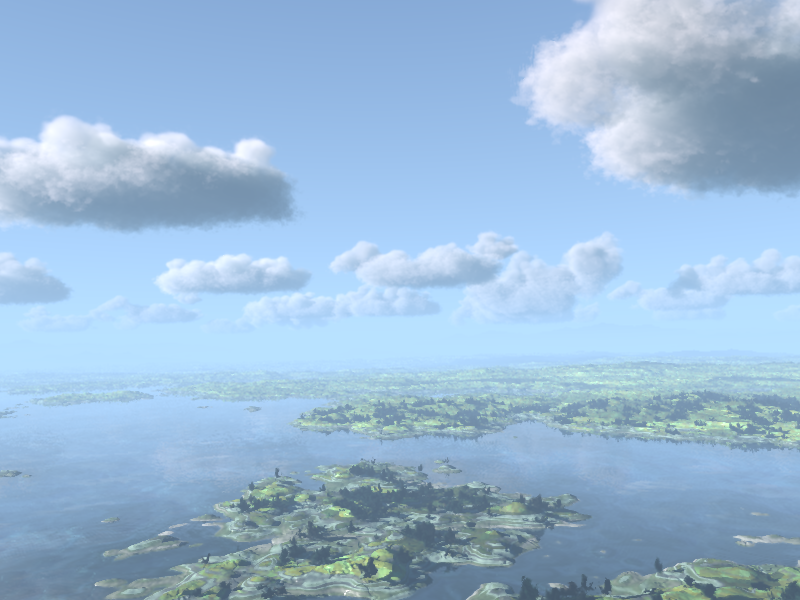
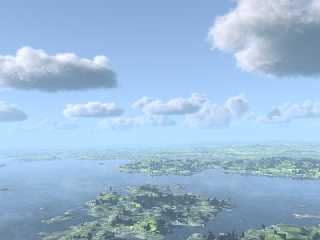
The solution was straightforward (see also image):

   #declare Cloud1 =
   box {-0.5,0.5
     texture {pigment {Clear} finish {ambient 0 diffuse 0}}
     hollow
     interior {
       media {
         scattering {1, C_Sun*0.006 extinction 0.25}
         intervals 1
         samples 50, 1000
         density {
           gradient y
           density_map {
             [0 pigment_pattern {P_cloud2_1}
                scale 50 warp {turbulence 0.1} scale 1/50
             ]
             [1 pigment_pattern {P_cloud2_1}
                scale 50 warp {turbulence 2} scale 1/50
             ]
           }
         }
       }
     }
     scale <4/3,1,1>
   }

I shall try your scattering now.


--
Thomas
Post a reply to this message
Attachments:
Download 'my_makecloud2_test_day_2016.png' (391 KB)
Preview of image 'my_makecloud2_test_day_2016.png'
|
|
| |
| |
|
|
|
|
| |