|
|
|
|
|
|
| |
| |
|
|
|
|
| |
| |
|
|
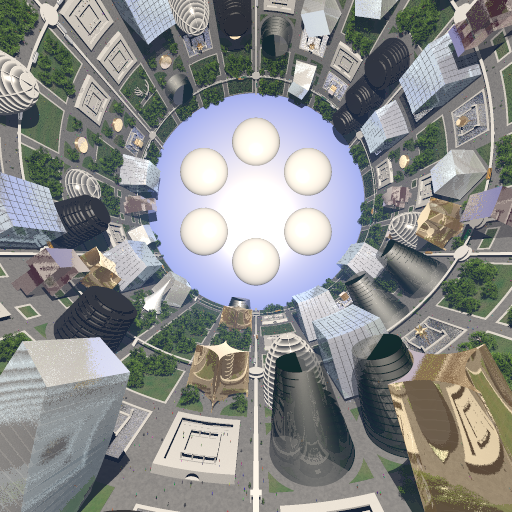
I'm trying to add some haze as seen in the attached image I rendered a
long time ago. Unfortunately, I lost the code I used at the time, and my
current code is not working at all. Can anyone please assist? Here is my
current non working code, thanks.

#local atmos_material = material
{
	// check TexQual here?
	texture {pigment {gamma_color_adjust(1) transmit 1}}
	interior
	{
		media
		{
			scattering
			{
				4, color rgb <0.2,0.4,1.0>/10000	// crappy approximaion of TerraPOV
value
				extinction	1
			}
			samples	1,1
			density
			{
				cylindrical
				poly_wave	0.25
				color_map
				{
					[0	srgb 1.0]
					[1	srgb 0.0]
				}
			}
		}
	}
	scale	city_radius
	rotate	x * 90
}
Post a reply to this message
Attachments:
Download 'gh_scene_spinner_interior_06.png' (477 KB)
Preview of image 'gh_scene_spinner_interior_06.png'
|
|
| |
| |
|
|
|
|
| |
| |
|
|
Here's a 'complete' scene including your scattering media (with a camera and a
light-- having a LIGHT is important for seeing this media type) plus a HOLLOW
container object for the media to be enclosed in. (A simple sphere here.) At
least you'll see *something* now! ;-)

Note a few changes: I changed the material's pigment color to plain srgbt 1, for
simplicity. I eliminated the '10000' divisor in your media color, as that would
have made the media way too dark to see (or not enough 'density'). I also
commented-out the scale and rotation at the end of the material statement;
that's probably best done in the OBJECT instead. (But note that scaling an
object with media also scales the media density, which you may not want.
Here's a kind of rule-of-thumb: If you scale up the size of the final object,
say scale 10, then you should probably scale the media itself to 1/10, to
compensate. *Then* experiment with further scaling if you want.)

#version 3.7
global_settings{assumed_gamma 1.0}

camera {
  perspective
  location  <0, 0, -5>
  look_at   <0, 0,  0>
  right     x*image_width/image_height
  // angle 67
}

light_source {
  0*x  // light's position (translated below)
  color rgb <1,1,1>
  translate <-20, 40, -20>
}


#local atmos_material =
     material
     {
 // check TexQual here?
     texture {
       pigment {srgbt 1}}
       interior
        {
         media
        {
          scattering
         {
         4, color rgb <0.2,0.4,1.0>// crappy approximaion of TerraPOV value
          extinction 1
          }
          samples 1,1
          density
               {
               cylindrical
               poly_wave 0.25
              color_map
                {
                 [0 srgb 1.0]
                 [1 srgb 0.0]
                 }
              }
           }
        }
 //scale 10
 //rotate x * 90
}

sphere{0,1
 hollow // IMPORTANT!
 material{atmos_material}
 }
Post a reply to this message
|
|
| |
| |
|
|
|
|
| |
| |
|
|
Forgot to mention that your 'samples' values of 1,1 in the media are *really*
low. Increase them to, say, 50,50 for much better quality (but a slower render.)
Post a reply to this message
|
|
| |
| |
|
|
|
|
| |
| |
|
|
On 25-1-2016 10:46, Kenneth wrote:
>
> Forgot to mention that your 'samples' values of 1,1 in the media are *really*
> low. Increase them to, say, 50,50 for much better quality (but a slower render.)
>
>
>

Hardly slower, and only use 1 (one) parameter as defaults are: intervals
1 and method 3.

You can easily use samples 100 without noticeable slowing down.

--
Thomas
Post a reply to this message
|
|
| |
| |
|
|
|
|
| |
| |
|
|
Mike Horvath <mik### [at] gmail com> wrote:
> I'm trying to add some haze as seen in the attached image I rendered a
> long time ago. Unfortunately, I lost the code I used at the time, and my
> current code is not working at all. Can anyone please assist? Here is my
> current non working code, thanks.
Did you make sure that the object containing the media has "hollow on"? com> wrote:
> I'm trying to add some haze as seen in the attached image I rendered a
> long time ago. Unfortunately, I lost the code I used at the time, and my
> current code is not working at all. Can anyone please assist? Here is my
> current non working code, thanks.
Did you make sure that the object containing the media has "hollow on"?
Post a reply to this message
|
|
| |
| |
|
|
|
|
| |
| |
|
|
Le 16-01-25 03:42, Mike Horvath a écrit :
> I'm trying to add some haze as seen in the attached image I rendered a
> long time ago. Unfortunately, I lost the code I used at the time, and my
> current code is not working at all. Can anyone please assist? Here is my
> current non working code, thanks.
>
> #local atmos_material = material
> {
>      // check TexQual here?
>      texture {pigment {gamma_color_adjust(1) transmit 1}}
>      interior
>      {
>          media
>          {
>              scattering
>              {
>                  4, color rgb <0.2,0.4,1.0>/10000    // crappy
> approximaion of TerraPOV value
>                  extinction    1
>              }
>              samples    1,1

Ok ONLY if using sampling method 1 or 2.
For the default method 3, use only a single value NO SMALLER than 3. In
your case, the default of 10 should be correct.
NEVER set intervals but rely on the default value of 1. Larger values
dramaticaly slow you down and can introduce artefacts.

>              density
>              {
>                  cylindrical
>                  poly_wave    0.25
>                  color_map
>                  {
>                      [0    srgb 1.0]
>                      [1    srgb 0.0]
>                  }
>              }
>          }
>      }
>      scale    city_radius
>      rotate    x * 90
> }

Make absolutely sure that you set any container object to hollow.
Also, if enclosed into another object that is not the container, that
object to need to be set as hollow.
If you use a world sphere, that MUST be set as hollow.

Alain
Post a reply to this message
|
|
| |
| |
|
|
|
|
| |
| |
|
|
On 1/25/2016 4:28 AM, Kenneth wrote:
>
> Here's a 'complete' scene including your scattering media (with a camera and a
> light-- having a LIGHT is important for seeing this media type) plus a HOLLOW
> container object for the media to be enclosed in. (A simple sphere here.) At
> least you'll see *something* now! ;-)

I should have clarified. I can *see* the media, it is either the right
color but too dense if I set the scattering to <0.2,0.4,1.0>, or it is
properly dense but too dark. There seems to be no way to set the density
independently of the color.


> Note a few changes: I changed the material's pigment color to plain srgbt 1, for
> simplicity. I eliminated the '10000' divisor in your media color, as that would
> have made the media way too dark to see (or not enough 'density'). I also
> commented-out the scale and rotation at the end of the material statement;
> that's probably best done in the OBJECT instead. (But note that scaling an
> object with media also scales the media density, which you may not want.
> Here's a kind of rule-of-thumb: If you scale up the size of the final object,
> say scale 10, then you should probably scale the media itself to 1/10, to
> compensate. *Then* experiment with further scaling if you want.)

I can't scale the container object because the container object is
already the correct size to begin with. Scaling it any further would
make it the wrong size.


Mike
Post a reply to this message
|
|
| |
| |
|
|
|
|
| |
| |
|
|
Here is the code for the container object:


#local atmos_object = difference
{
	merge
	{
		cylinder {+z*(city_length/2), -z*(city_length/2), city_radius}
		Spheroid(+z*(city_length/2),
<inner_shell_radius3,inner_shell_radius3,inner_shell_bulge>)
		Spheroid(-z*(city_length/2),
<inner_shell_radius3,inner_shell_radius3,inner_shell_bulge>)
		hollow
	}
	hollow
	material {atmos_material}
}
Post a reply to this message
|
|
| |
| |
|
|
|
|
| |
| |
|
|
Thomas de Groot <tho### [at] degrootorg> wrote:
> On 25-1-2016 10:46, Kenneth wrote:


>
> Hardly slower...
>
> You can easily use samples 100 without noticeable slowing down.
>

Interesting. On my old single-core Windows machine, samples of 50 is definitely
slower than samples of 1-- which I'm used to seeing anyway, in POV-Ray versions
3.61 and v3.62. As I understand, v3.7 was basically designed for multi-core
machines, not my old 'clunker.' (In fact, I've noticed that all of my older 3.62
scenes render a bit slower in v3.7, across the board.)

*Someday*, I'll upgrade to a multi-core machine, and join the 20th century
(oops, I mean the 21st century.)  ;-)
Post a reply to this message
|
|
| |
| |
|
|
|
|
| |
| |
|
|
Am 25.01.2016 um 21:06 schrieb Mike Horvath:
> On 1/25/2016 4:28 AM, Kenneth wrote:
>>
>> Here's a 'complete' scene including your scattering media (with a
>> camera and a
>> light-- having a LIGHT is important for seeing this media type) plus a
>> HOLLOW
>> container object for the media to be enclosed in. (A simple sphere
>> here.) At
>> least you'll see *something* now! ;-)
>
> I should have clarified. I can *see* the media, it is either the right
> color but too dense if I set the scattering to <0.2,0.4,1.0>, or it is
> properly dense but too dark. There seems to be no way to set the density
> independently of the color.

The question to be examined here is this:

Is the media not to your liking because it differs from the original
image, or because you think it looks wrong?

Your original image may have been generated by a version of POV-Ray that
got the maths wrong, for instance because it didn't use proper gamma
handling or because of certain bugs that have been eliminated by now.

If you use "assumed_gamma 1" in the global settings, and "extinction 1"
in the scattering media declaration, then the results will be physically
accurate under the given lighting conditions and for a medium that is
purely scattering. There is no additional tweakable -- nor is there any
physical justification for one -- that you could use to mess with the
brightness.

Unless the medium is supposed to be partially absorbing (in which case
you could model this by setting the "extinction" parameter to a value
>1, or explicitly adding an absorbing component to the media statement)
or glowing (which you could model by setting the "extinction" parameter
to a value <1, or explicitly adding an emitting component).

So if you want realism, you should stick to the current settings. If on
the other hand you want a certain effect and screw realism, you are free
to mess with the "extinction" parameter to brighten up the haze.
Post a reply to this message
|
|
| |
| |
|
|
|
|
| |
| |
|
|
On 1/25/2016 3:46 PM, clipka wrote:
> Am 25.01.2016 um 21:06 schrieb Mike Horvath:
>> On 1/25/2016 4:28 AM, Kenneth wrote:
>>>
>>> Here's a 'complete' scene including your scattering media (with a
>>> camera and a
>>> light-- having a LIGHT is important for seeing this media type) plus a
>>> HOLLOW
>>> container object for the media to be enclosed in. (A simple sphere
>>> here.) At
>>> least you'll see *something* now! ;-)
>>
>> I should have clarified. I can *see* the media, it is either the right
>> color but too dense if I set the scattering to <0.2,0.4,1.0>, or it is
>> properly dense but too dark. There seems to be no way to set the density
>> independently of the color.
>
> The question to be examined here is this:
>
> Is the media not to your liking because it differs from the original
> image, or because you think it looks wrong?

Because it differs from the original image. Can I lower the density
without changing the color?


Mike
Post a reply to this message
|
|
| |
| |
|
|
|
|
| |
| |
|
|
On 1/25/2016 4:00 PM, Mike Horvath wrote:
> Because it differs from the original image. Can I lower the density
> without changing the color?
>
>
> Mike


Can I use a density statement? How do I make a density function that
simply lowers the density to 1/10 everywhere?


Mike
Post a reply to this message
|
|
| |
| |
|
|
|
|
| |
| |
|
|
Am 25.01.2016 um 22:00 schrieb Mike Horvath:
> On 1/25/2016 3:46 PM, clipka wrote:
>> Am 25.01.2016 um 21:06 schrieb Mike Horvath:
>>> On 1/25/2016 4:28 AM, Kenneth wrote:
>>>>
>>>> Here's a 'complete' scene including your scattering media (with a
>>>> camera and a
>>>> light-- having a LIGHT is important for seeing this media type) plus a
>>>> HOLLOW
>>>> container object for the media to be enclosed in. (A simple sphere
>>>> here.) At
>>>> least you'll see *something* now! ;-)
>>>
>>> I should have clarified. I can *see* the media, it is either the right
>>> color but too dense if I set the scattering to <0.2,0.4,1.0>, or it is
>>> properly dense but too dark. There seems to be no way to set the density
>>> independently of the color.
>>
>> The question to be examined here is this:
>>
>> Is the media not to your liking because it differs from the original
>> image, or because you think it looks wrong?
>
> Because it differs from the original image. Can I lower the density
> without changing the color?

I thought I had given a clear enough answer, but here it is again in a
nutshell:

Yes, you /can/ do that by reducing the "extinction" parameter. /But/
tampering with the setting will void your warranty (read: break physical
realism).
Post a reply to this message
|
|
| |
| |
|
|
|
|
| |
| |
|
|
"Kenneth" <kdw### [at] gmailcom> wrote:
> *Someday*, I'll upgrade to a multi-core machine, and join the 20th century
> (oops, I mean the 21st century.)  ;-)

When you do, you'll wonder how you got along without one.
Post a reply to this message
|
|
| |
| |
|
|
|
|
| |
| |
|
|
On 1/25/2016 4:22 PM, clipka wrote:
>> Because it differs from the original image. Can I lower the density
>> without changing the color?
>
> I thought I had given a clear enough answer, but here it is again in a
> nutshell:
>
> Yes, you /can/ do that by reducing the "extinction" parameter. /But/
> tampering with the setting will void your warranty (read: break physical
> realism).
>

I've lowered extinction to 1/100000000 and it has zero effect. Here is
the code I am using now.

Mike


#declare atmos_material = material
{
	texture {pigment {color rgbt 1}}
	interior
	{
		media
		{
			scattering
			{
				4, rgb <0.2,0.4,1.0>/10000
				extinction	1/100000000
			}
			samples	10
		}
	}
}
Post a reply to this message
|
|
| |
| |
|
|
|
|
| |
| |
|
|
Am 25.01.2016 um 22:15 schrieb Mike Horvath:
> On 1/25/2016 4:00 PM, Mike Horvath wrote:
>> Because it differs from the original image. Can I lower the density
>> without changing the color?
>>
>>
>> Mike
>
>
> Can I use a density statement? How do I make a density function that
> simply lowers the density to 1/10 everywhere?

Of course you can use a density statement -- you're already doing that.
To lower the density to 1/10 everywhere, all you need to do is divide
all the values in the color_map by 10 (but use rgb instead of srgb instead).

/But/ by lowering the density you not only make the background more
visible again -- you also reduce the scattering effect.

Think of it this way: If you reduce the density of a gas, you reduce the
probability that any given light ray hits a gas molecule and is diverted
from its original direction to a new one: Light en route to the camera
from the background has less chance of being diverted /away/ from the
camera, while light en route to anywhere in the scene from a light
source has less chance of being diverted /towards/ the camera.

I might also add that dividing the scattering media colour by 10 has
exactly the same effect as dividing the density values by 10.
Post a reply to this message
|
|
| |
| |
|
|
|
|
| |
| |
|
|
On 1/25/2016 4:37 PM, clipka wrote:
> Think of it this way: If you reduce the density of a gas, you reduce the
> probability that any given light ray hits a gas molecule and is diverted
> from its original direction to a new one: Light en route to the camera
> from the background has less chance of being diverted /away/ from the
> camera, while light en route to anywhere in the scene from a light
> source has less chance of being diverted /towards/ the camera.

I still don't understand why lowering the density of the gas darkens the
scene more than not having any media at all.


Mike
Post a reply to this message
|
|
| |
| |
|
|
|
|
| |
| |
|
|
Am 25.01.2016 um 22:35 schrieb Mike Horvath:
> On 1/25/2016 4:22 PM, clipka wrote:
>>> Because it differs from the original image. Can I lower the density
>>> without changing the color?
>>
>> I thought I had given a clear enough answer, but here it is again in a
>> nutshell:
>>
>> Yes, you /can/ do that by reducing the "extinction" parameter. /But/
>> tampering with the setting will void your warranty (read: break physical
>> realism).
>
> I've lowered extinction to 1/100000000 and it has zero effect. Here is
> the code I am using now.

Then I must confess I have no idea what you are talking about when you
say you want to "lower the density without changing the colour" because
it is "too dark" when "properly dense".

If extinction doesn't have any noticeable effect, it means that the "too
dark" effect you observe is not due to a lack of light from the
background getting through to the camera.

I must consequently assume that the "too dark" effect you observe is
instead due to a lack of light /scattered to/ the camera, but to get
more of this light you need a /higher/ density rather than a lower one.
Post a reply to this message
|
|
| |
| |
|
|
|
|
| |
| |
|
|
Am 25.01.2016 um 22:46 schrieb Mike Horvath:
> On 1/25/2016 4:37 PM, clipka wrote:
>> Think of it this way: If you reduce the density of a gas, you reduce the
>> probability that any given light ray hits a gas molecule and is diverted
>> from its original direction to a new one: Light en route to the camera
>> from the background has less chance of being diverted /away/ from the
>> camera, while light en route to anywhere in the scene from a light
>> source has less chance of being diverted /towards/ the camera.
>
> I still don't understand why lowering the density of the gas darkens the
> scene more than not having any media at all.

Are you absolutely sure it does, and you're not seeing the effect from
any other difference?
Post a reply to this message
|
|
| |
| |
|
|
|
|
| |
| |
|
|
On 1/25/2016 4:48 PM, clipka wrote:
> Am 25.01.2016 um 22:46 schrieb Mike Horvath:
>> On 1/25/2016 4:37 PM, clipka wrote:
>>> Think of it this way: If you reduce the density of a gas, you reduce the
>>> probability that any given light ray hits a gas molecule and is diverted
>>> from its original direction to a new one: Light en route to the camera
>>> from the background has less chance of being diverted /away/ from the
>>> camera, while light en route to anywhere in the scene from a light
>>> source has less chance of being diverted /towards/ the camera.
>>
>> I still don't understand why lowering the density of the gas darkens the
>> scene more than not having any media at all.
>
> Are you absolutely sure it does, and you're not seeing the effect from
> any other difference?
>


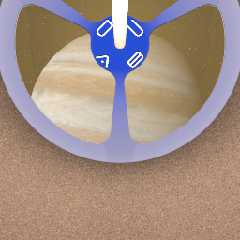
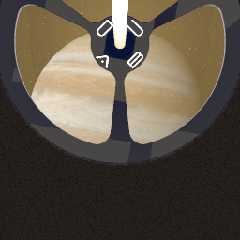
I've attached two renders. One is with no media at all. The other is
with the media, but the scattering color set to rgb 0.


Mike
Post a reply to this message
Attachments:
Download 'gh_scene_spinner_cutaway_e_no_media.png' (91 KB)
Download 'gh_scene_spinner_cutaway_e_zero_density.png' (77 KB)
Preview of image 'gh_scene_spinner_cutaway_e_no_media.png'
Preview of image 'gh_scene_spinner_cutaway_e_zero_density.png'
|
|
| |
| |
|
|
|
|
| |
| |
|
|
Am 25.01.2016 um 22:56 schrieb Mike Horvath:
> On 1/25/2016 4:48 PM, clipka wrote:
>> Am 25.01.2016 um 22:46 schrieb Mike Horvath:
>>> On 1/25/2016 4:37 PM, clipka wrote:
>>>> Think of it this way: If you reduce the density of a gas, you reduce
>>>> the
>>>> probability that any given light ray hits a gas molecule and is
>>>> diverted
>>>> from its original direction to a new one: Light en route to the camera
>>>> from the background has less chance of being diverted /away/ from the
>>>> camera, while light en route to anywhere in the scene from a light
>>>> source has less chance of being diverted /towards/ the camera.
>>>
>>> I still don't understand why lowering the density of the gas darkens the
>>> scene more than not having any media at all.
>>
>> Are you absolutely sure it does, and you're not seeing the effect from
>> any other difference?
>
> I've attached two renders. One is with no media at all. The other is
> with the media, but the scattering color set to rgb 0.

This is seriously odd, entirely unexpected, and to my present knowledge
as a developer only explicable by a bug.

As I cannot reproduce the behaviour here with a simple scene, I would
kindly ask you to post some minimalistic version of your scene as an
attachment in povray.binary.scene-files so I can have a closer look at it.

Also, please let me know exactly which version of POV-Ray you are using.
Post a reply to this message
|
|
| |
| |
|
|
|
|
| |
| |
|
|
On 1/25/2016 4:46 PM, clipka wrote:
> I must consequently assume that the "too dark" effect you observe is
> instead due to a lack of light /scattered to/ the camera, but to get
> more of this light you need a /higher/ density rather than a lower one.
>

I found the problem. It had to do with the gas container object having
the same radius as the outer metal shell. When I increased the radius so
that the surfaces were not touching, the darkness went away and the
scene rendered normally.

Sorry for the trouble.


Mike
Post a reply to this message
|
|
| |
| |
|
|
|
|
| |
| |
|
|
Am 25.01.2016 um 23:15 schrieb Mike Horvath:
> On 1/25/2016 4:46 PM, clipka wrote:
>> I must consequently assume that the "too dark" effect you observe is
>> instead due to a lack of light /scattered to/ the camera, but to get
>> more of this light you need a /higher/ density rather than a lower one.
>
> I found the problem. It had to do with the gas container object having
> the same radius as the outer metal shell. When I increased the radius so
> that the surfaces were not touching, the darkness went away and the
> scene rendered normally.

Still a bit odd, but I guess the coincident surface problem can cause
any number of side effects.
Post a reply to this message
|
|
| |
| |
|
|
|
|
| |
| |
|
|
On 1/25/2016 5:35 PM, clipka wrote:
> Am 25.01.2016 um 23:15 schrieb Mike Horvath:
>> On 1/25/2016 4:46 PM, clipka wrote:
>>> I must consequently assume that the "too dark" effect you observe is
>>> instead due to a lack of light /scattered to/ the camera, but to get
>>> more of this light you need a /higher/ density rather than a lower one.
>>
>> I found the problem. It had to do with the gas container object having
>> the same radius as the outer metal shell. When I increased the radius so
>> that the surfaces were not touching, the darkness went away and the
>> scene rendered normally.
>
> Still a bit odd, but I guess the coincident surface problem can cause
> any number of side effects.
>

It would be cool if, instead of messing with the sizes of objects, you
could flag one or another object as dominant. I.e. when they touch, the
dominant object's textures take precedence.


Mike
Post a reply to this message
|
|
| |
| |
|
|
|
|
| |