|
|
|
|
|
|
| |
| |
|
|
|
|
| |
| |
|
|
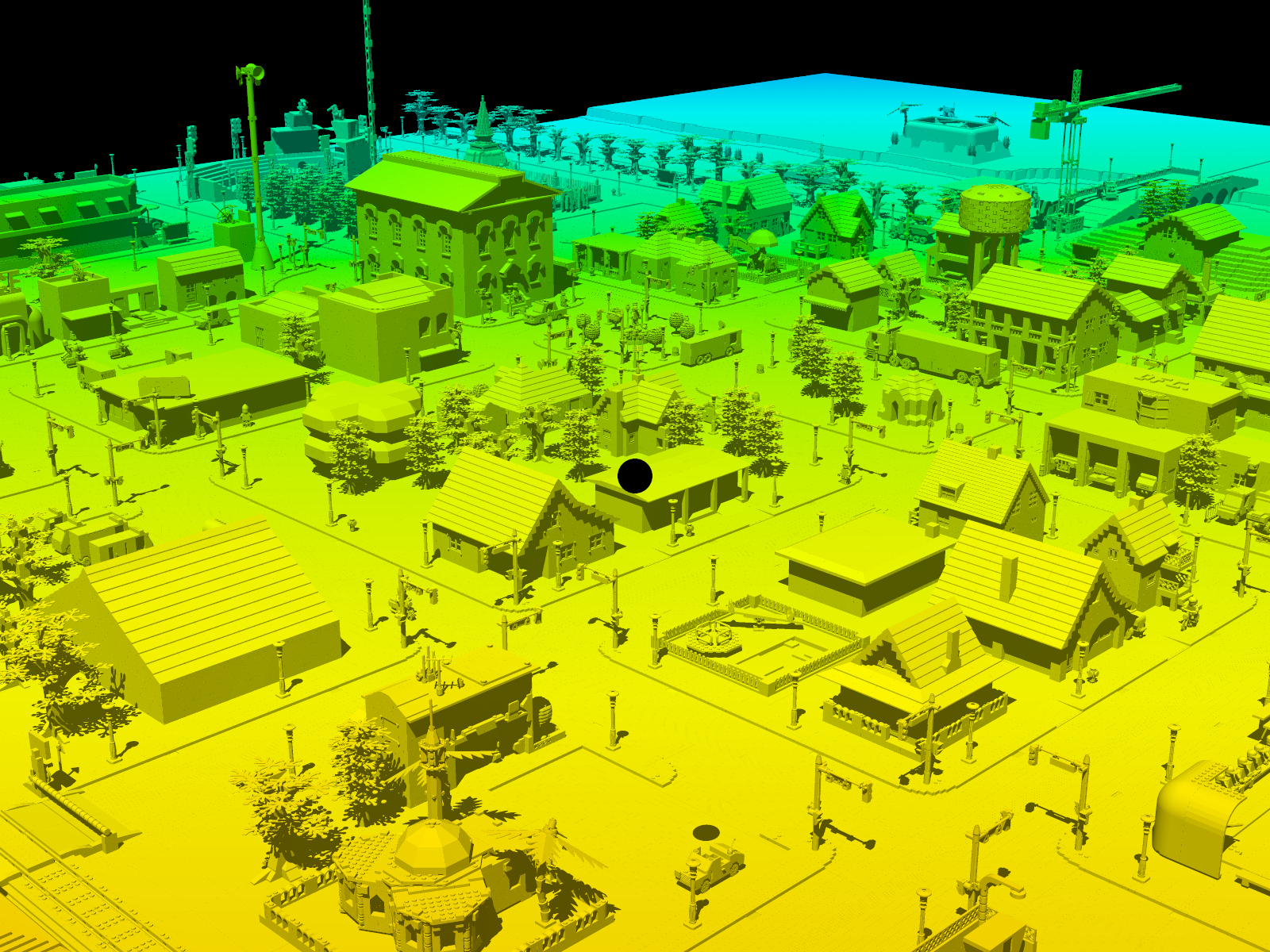
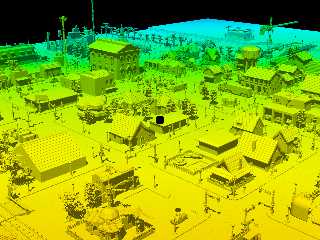
Here's my attempt at creating a ChromaDepth scene in POV-Ray. There is a
3D effect when wearing the glasses, but it is not very pronounced due to
the long distances involved. The colors are also not calibrated to the
scene's coordinate system. I have no idea how to do that.


Mike
Post a reply to this message
Attachments:
Download 'l3p_datsville_townview_boxed_chromadepth_01.png' (1048 KB)
Preview of image 'l3p_datsville_townview_boxed_chromadepth_01.png'
|
|
| |
| |
|
|
|
|
| |
| |
|
|
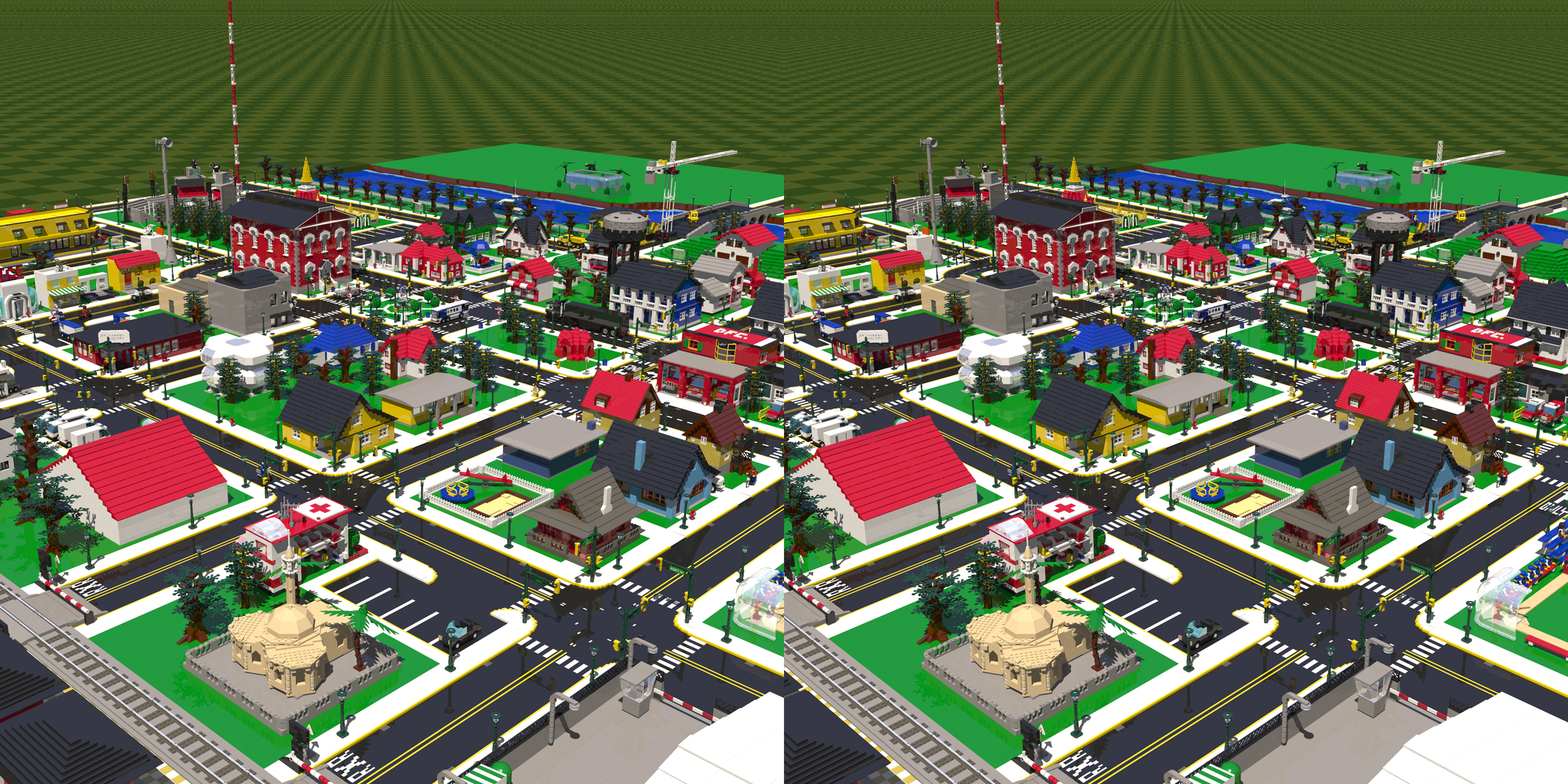
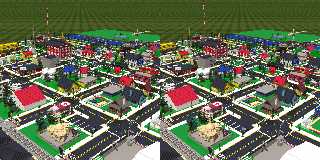
Here's a stereoscopic version, since I got my stereoscope in the mail
this week. I used StereoPhoto Maker to assemble the image.

I am disappointed that:

1. The printed images are so small. If I print them larger, then they
are out of focus due to the magnification of the lenses.
2. At small sizes, the printed images are not very crisp. Maybe taking
the images to a photo lab will produce better results than my desktop
printer.
3. The colors are much darker when printed than in the program preview.
4. I'm still not sure if I should make the cameras converge on a single
point or not. I'm not sure which is better.
5. If I mess with the paper orientation in the printer dialog, then the
images get cropped or misaligned in weird ways, wasting paper and ink.
It's better to stick with the defaults I guess.
6. The program doesn't label the left and right source images, so I
forget which is which. Because of this I don't know for sure whether the
stereoscope uses the cross-eyed method or not.
7. I can't figure out how to resize the program window so that I can
preview the images using the stereoscope before printing.

Otherwise, the experience was okay, and did not require a lot of
preparation or configuration to get good results.


Mike
Post a reply to this message
Attachments:
Download 'datsville_townview_stereoscopic.png' (3105 KB)
Preview of image 'datsville_townview_stereoscopic.png'
|
|
| |
| |
|
|
|
|
| |
| |
|
|
Mike Horvath <mik### [at] gmail com> wrote:
> 6. The program doesn't label the left and right source images, so I
> forget which is which. Because of this I don't know for sure whether the
> stereoscope uses the cross-eyed method or not.
This image pair is definitely not cross-eyed. com> wrote:
> 6. The program doesn't label the left and right source images, so I
> forget which is which. Because of this I don't know for sure whether the
> stereoscope uses the cross-eyed method or not.
This image pair is definitely not cross-eyed.
Post a reply to this message
|
|
| |
| |
|
|
|
|
| |
| |
|
|
Am 19.01.2016 um 14:59 schrieb Cousin Ricky:
> Mike Horvath <mik### [at] gmailcom> wrote:
>> 6. The program doesn't label the left and right source images, so I
>> forget which is which. Because of this I don't know for sure whether the
>> stereoscope uses the cross-eyed method or not.
>
> This image pair is definitely not cross-eyed.

I think it definitely is.
Post a reply to this message
|
|
| |
| |
|
|
|
|
| |
| |
|
|
Le 16-01-18 23:49, Mike Horvath a écrit :
> Here's a stereoscopic version, since I got my stereoscope in the mail
> this week. I used StereoPhoto Maker to assemble the image.
>
> I am disappointed that:
>
> 1. The printed images are so small. If I print them larger, then they
> are out of focus due to the magnification of the lenses.
> 2. At small sizes, the printed images are not very crisp. Maybe taking
> the images to a photo lab will produce better results than my desktop
> printer.
> 3. The colors are much darker when printed than in the program preview.
> 4. I'm still not sure if I should make the cameras converge on a single
> point or not. I'm not sure which is better.
> 5. If I mess with the paper orientation in the printer dialog, then the
> images get cropped or misaligned in weird ways, wasting paper and ink.
> It's better to stick with the defaults I guess.
> 6. The program doesn't label the left and right source images, so I
> forget which is which. Because of this I don't know for sure whether the
> stereoscope uses the cross-eyed method or not.
> 7. I can't figure out how to resize the program window so that I can
> preview the images using the stereoscope before printing.
>
> Otherwise, the experience was okay, and did not require a lot of
> preparation or configuration to get good results.
>
>
> Mike

Parallel view. It print small so that it'spossible to view that way.
If you print larger, then, you'll need mirrors to compensate for the
larger size.

Print using the highest DPI setting available. Home printers should be
able to go up to 1400 DPI or more without problem.

Having convergence or not is dependent on the scale of the scene.
Converging for compact, close up images.
Non-converging for vast scenes like this one.

Flip the images and print at a larger size for cross-eyed view.


Alain

Alain
Post a reply to this message
|
|
| |
| |
|
|
|
|
| |
| |
|
|
On 1/19/2016 11:11 AM, clipka wrote:
> Am 19.01.2016 um 14:59 schrieb Cousin Ricky:
>> Mike Horvath <mik### [at] gmailcom> wrote:
>>> 6. The program doesn't label the left and right source images, so I
>>> forget which is which. Because of this I don't know for sure whether the
>>> stereoscope uses the cross-eyed method or not.
>>
>> This image pair is definitely not cross-eyed.
>
> I think it definitely is.
>

Cousin Ricky is right. It is not.


Mike
Post a reply to this message
|
|
| |
| |
|
|
|
|
| |
| |
|
|
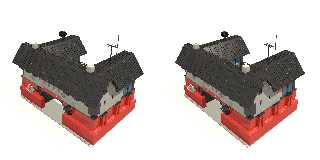
Here's another image.
Post a reply to this message
Attachments:
Download 'l3p_building_031_carriagehouse_lgeo_stereoscopic_both.png' (808 KB)
Preview of image 'l3p_building_031_carriagehouse_lgeo_stereoscopic_both.png'
|
|
| |
| |
|
|
|
|
| |
| |
|
|
Am 19.01.2016 um 18:22 schrieb Mike Horvath:
> On 1/19/2016 11:11 AM, clipka wrote:
>> Am 19.01.2016 um 14:59 schrieb Cousin Ricky:
>>> Mike Horvath <mik### [at] gmailcom> wrote:
>>>> 6. The program doesn't label the left and right source images, so I
>>>> forget which is which. Because of this I don't know for sure whether
>>>> the
>>>> stereoscope uses the cross-eyed method or not.
>>>
>>> This image pair is definitely not cross-eyed.
>>
>> I think it definitely is.
>
> Cousin Ricky is right. It is not.

Took me another while of staring at the image, but yes, you're right indeed.
Post a reply to this message
|
|
| |
| |
|
|
|
|
| |
| |
|
|
On 1/19/2016 12:21 PM, Alain wrote:
> Having convergence or not is dependent on the scale of the scene.
> Converging for compact, close up images.
> Non-converging for vast scenes like this one.
>
> Flip the images and print at a larger size for cross-eyed view.

I tested both methods, and convergence definitely looks better. Even on
my largish scene.


Mike
Post a reply to this message
|
|
| |
| |
|
|
|
|
| |
| |
|
|
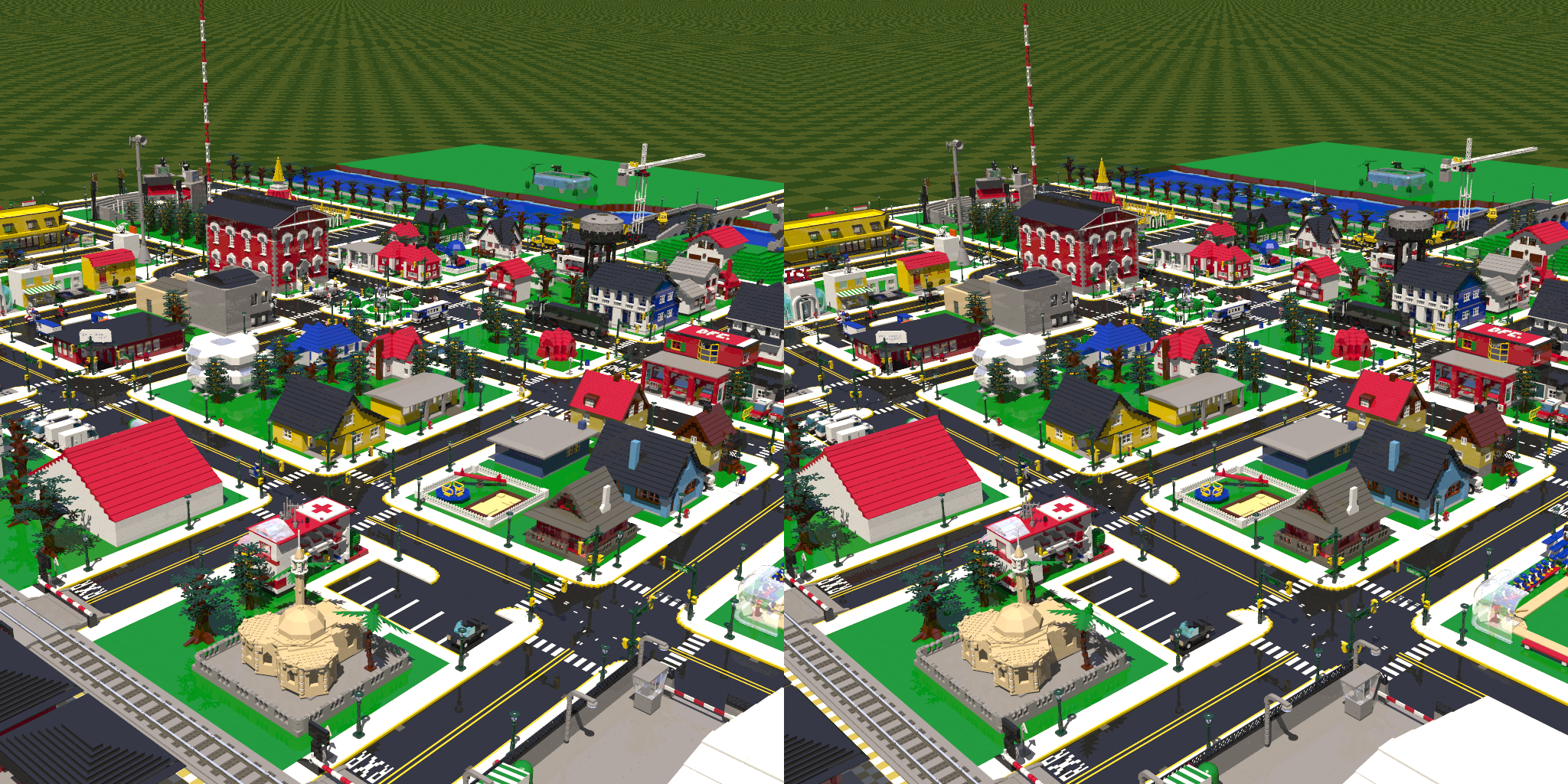
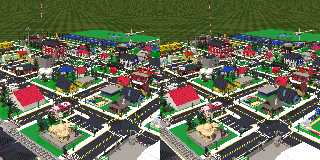
Here is the same scene again, except the cameras converge.


Mike
Post a reply to this message
Attachments:
Download 'l3p_datsville_townview_boxed_stereoscopic_both.png' (2118 KB)
Preview of image 'l3p_datsville_townview_boxed_stereoscopic_both.png'
|
|
| |
| |
|
|
|
|
| |
| |
|
|
On 1/19/2016 12:21 PM, Alain wrote:
> Print using the highest DPI setting available. Home printers should be
> able to go up to 1400 DPI or more without problem.

Also, here are the specs for my printer.

http://support.brother.com/g/b/spec.aspx?c=us&lang=en&prod=mfcj825dw_all

The highest quality has a pretty good dpi, but to me the images still
look fuzzy. I wonder if big box stores like Staples can print at higher
resolution. Or maybe a regular photo lab.


Mike
Post a reply to this message
|
|
| |
| |
|
|
|
|
| |
| |
|
|
On 1/19/2016 1:38 PM, Mike Horvath wrote:
> On 1/19/2016 12:21 PM, Alain wrote:
>> Print using the highest DPI setting available. Home printers should be
>> able to go up to 1400 DPI or more without problem.
>
> Also, here are the specs for my printer.
>
> http://support.brother.com/g/b/spec.aspx?c=us&lang=en&prod=mfcj825dw_all
>
> The highest quality has a pretty good dpi, but to me the images still
> look fuzzy. I wonder if big box stores like Staples can print at higher
> resolution. Or maybe a regular photo lab.

Actually, those are nominally poor specs for graphics printing.
(203x196) Sure, print your iPhone photos, but for the density of your
pic, it's pretty weak.  And they don't mention the size of the smallest
dot, usually on low end 300x300 printers it's 1/72 inch for black and
1/40 inch for color.  I'll bet you get lots of bleed.

203x196 (not even 300x300!) means they used cheap servos that can't
accurately position the head and paper and were too cheap to even use a
reduction gear.

Definitely go check out the photo shop at walmart. You can run some
1200x1200 (or maybe 1440x1440) photo-chemistry test prints fairly cheap.
Alain, 1400 dpi on a home/inkjet printer is only a half truth. That
defines how accurately the paper and head can be positioned, but there
is no chance of spraying 3 colored dots of ink in a 0.0007 inch square.
It's not chemically possible. You need to know the size of the dot to
determine actual resolution.

(I'm not a printing expert, but I played one on TV
http://patft.uspto.gov/netacgi/nph-Parser?patentnumber=4728783 ;) )
Post a reply to this message
|
|
| |
| |
|
|
|
|
| |
| |
|
|
On 1/19/2016 3:19 PM, dick balaska wrote:
> Actually, those are nominally poor specs for graphics printing.
> (203x196) Sure, print your iPhone photos, but for the density of your
> pic, it's pretty weak.  And they don't mention the size of the smallest
> dot, usually on low end 300x300 printers it's 1/72 inch for black and
> 1/40 inch for color.  I'll bet you get lots of bleed.
>
> 203x196 (not even 300x300!) means they used cheap servos that can't
> accurately position the head and paper and were too cheap to even use a
> reduction gear.
>
> Definitely go check out the photo shop at walmart. You can run some
> 1200x1200 (or maybe 1440x1440) photo-chemistry test prints fairly cheap.
> Alain, 1400 dpi on a home/inkjet printer is only a half truth. That
> defines how accurately the paper and head can be positioned, but there
> is no chance of spraying 3 colored dots of ink in a 0.0007 inch square.
> It's not chemically possible. You need to know the size of the dot to
> determine actual resolution.
>
> (I'm not a printing expert, but I played one on TV
> http://patft.uspto.gov/netacgi/nph-Parser?patentnumber=4728783 ;) )
>
>
>


For regular printing, the spec sheet says "Resolution Up to 1200 × 6000
dpi", which works out to 1 dot in 0.01290994448735805628393088466594
inches. Maybe you were looking at the Fax section?


Mike
Post a reply to this message
|
|
| |
| |
|
|
|
|
| |
| |
|
|
On 1/19/2016 6:21 PM, Mike Horvath wrote:
> For regular printing, the spec sheet says "Resolution Up to 1200 × 6000
> dpi", which works out to 1 dot in 0.01290994448735805628393088466594
> inches. Maybe you were looking at the Fax section?
>
>
> Mike

Never mind. Dots per inch is measured in a straight line, not an area.


Mike
Post a reply to this message
|
|
| |
| |
|
|
|
|
| |
| |
|
|
Can you tell from this page whether my other printer is better?

http://support.hp.com/us-en/document/c00856588#AbT1

I don't see the dpi listed anywhere except for the scanner.


Mike
Post a reply to this message
|
|
| |
| |
|
|
|
|
| |
| |
|
|
On 1/19/2016 7:43 PM, Mike Horvath wrote:
> Can you tell from this page whether my other printer is better?
>
> http://support.hp.com/us-en/document/c00856588#AbT1
>
> I don't see the dpi listed anywhere except for the scanner.
>
>
> Mike

Here's a better link.

https://www.google.com/shopping/product/8050965094118643781/specs?sclient=psy-ab&espv=2&biw=1838&bih=995&q=hp+deskjet+f4180+specs&oq=hp+deskjet+f4180+specs&pbx=1&bav=on.2,or.r_cp.&bvm=bv.112064104,d.cGc&ion=1&tch=1&ech=1&psi=TdeeVvLgLYKSjwOnn5nABw.1453250382123.7&sa=X&ved=0ahUKEwizhaTbk7fKAhVJyGMKHZMRBjwQuC8IhAE


Mike
Post a reply to this message
|
|
| |
| |
|
|
|
|
| |
| |
|
|
On 1/19/2016 6:24 PM, Mike Horvath wrote:
> On 1/19/2016 6:21 PM, Mike Horvath wrote:
>> For regular printing, the spec sheet says "Resolution Up to 1200 × 6000
>> dpi", which works out to 1 dot in 0.01290994448735805628393088466594
>> inches. Maybe you were looking at the Fax section?
>>
>>
>> Mike
>
> Never mind. Dots per inch is measured in a straight line, not an area.
>
>
> Mike

Wat the frig.

Did you get an email from me?  Now I am trying Thunderbird for nntp and
I keep hitting "Reply" instead of "Followup".  But there's no mail in my
outbox, so I don't know what happened.
Post a reply to this message
|
|
| |
| |
|
|
|
|
| |
| |
|
|
On 1/19/2016 6:24 PM, Mike Horvath wrote:
> On 1/19/2016 6:21 PM, Mike Horvath wrote:
>> For regular printing, the spec sheet says "Resolution Up to 1200 × 6000
>> dpi", which works out to 1 dot in 0.01290994448735805628393088466594
>> inches. Maybe you were looking at the Fax section?
>>
>>
>> Mike
>
> Never mind. Dots per inch is measured in a straight line, not an area.
>
>
> Mike

[ yay, found the post that went out as email ]

Ha! Yes I was looking at the fax section (which is limited by the T4 and
T30 ancient FAX specs)

So 1200x6000 is very decent, but you still have the "size of dot" issue.
One thing you can do is photo paper, which has less bleeding/absorbancy
than regular paper. - Make sure to select the photo paper type driver as
this prints a lot more slowly to minimize the amount of wet ink sitting
on the paper.

A pro printing shop will have a loupe with a ruler in it so you can
measure the size and bleed of dots from your paper.  Walmart (not a pro
shop) will do an 8x10 for $2.89 .  Photo chemistry is going to give you
the best true resolution. (Although I don't know the resolution of the
Fuji gear at Walmart, in 2000 they used our Gretag[1] boxes which did
true 4800x4800).

[1] I worked on the UI and drivers for the machine. I bowed to the
superior intelligence of the Swiss engineers who used the width of
molecules in their chemistry calculations.
Post a reply to this message
|
|
| |
| |
|
|
|
|
| |
| |
|
|
Le 16-01-19 23:56, dick balaska a écrit :
> On 1/19/2016 6:24 PM, Mike Horvath wrote:
>> On 1/19/2016 6:21 PM, Mike Horvath wrote:
>>> For regular printing, the spec sheet says "Resolution Up to 1200 × 6000
>>> dpi", which works out to 1 dot in 0.01290994448735805628393088466594
>>> inches. Maybe you were looking at the Fax section?
>>>
>>>
>>> Mike
>>
>> Never mind. Dots per inch is measured in a straight line, not an area.
>>
>>
>> Mike
>
> [ yay, found the post that went out as email ]
>
> Ha! Yes I was looking at the fax section (which is limited by the T4 and
> T30 ancient FAX specs)
>
> So 1200x6000 is very decent, but you still have the "size of dot" issue.
> One thing you can do is photo paper, which has less bleeding/absorbancy
> than regular paper. - Make sure to select the photo paper type driver as
> this prints a lot more slowly to minimize the amount of wet ink sitting
> on the paper.
>
> A pro printing shop will have a loupe with a ruler in it so you can
> measure the size and bleed of dots from your paper.  Walmart (not a pro
> shop) will do an 8x10 for $2.89 .  Photo chemistry is going to give you
> the best true resolution. (Although I don't know the resolution of the
> Fuji gear at Walmart, in 2000 they used our Gretag[1] boxes which did
> true 4800x4800).
>
> [1] I worked on the UI and drivers for the machine. I bowed to the
> superior intelligence of the Swiss engineers who used the width of
> molecules in their chemistry calculations.

One *BIG* limiting factor is the paper used.
Most paper will make the ink from an ink jet printer bleed and spread,
possibly a lot. For the best quality, you need a coated, low capilarity,
paper. That will make the ink take longer to dry, but prevent most
spreading of the ink.

It's not such a problem with laser printer that use dry inks, but it
still can affect the pring quality. For laser printers, the main
limiting factor is the quality of the optics.
Post a reply to this message
|
|
| |
| |
|
|
|
|
| |
| |
|
|
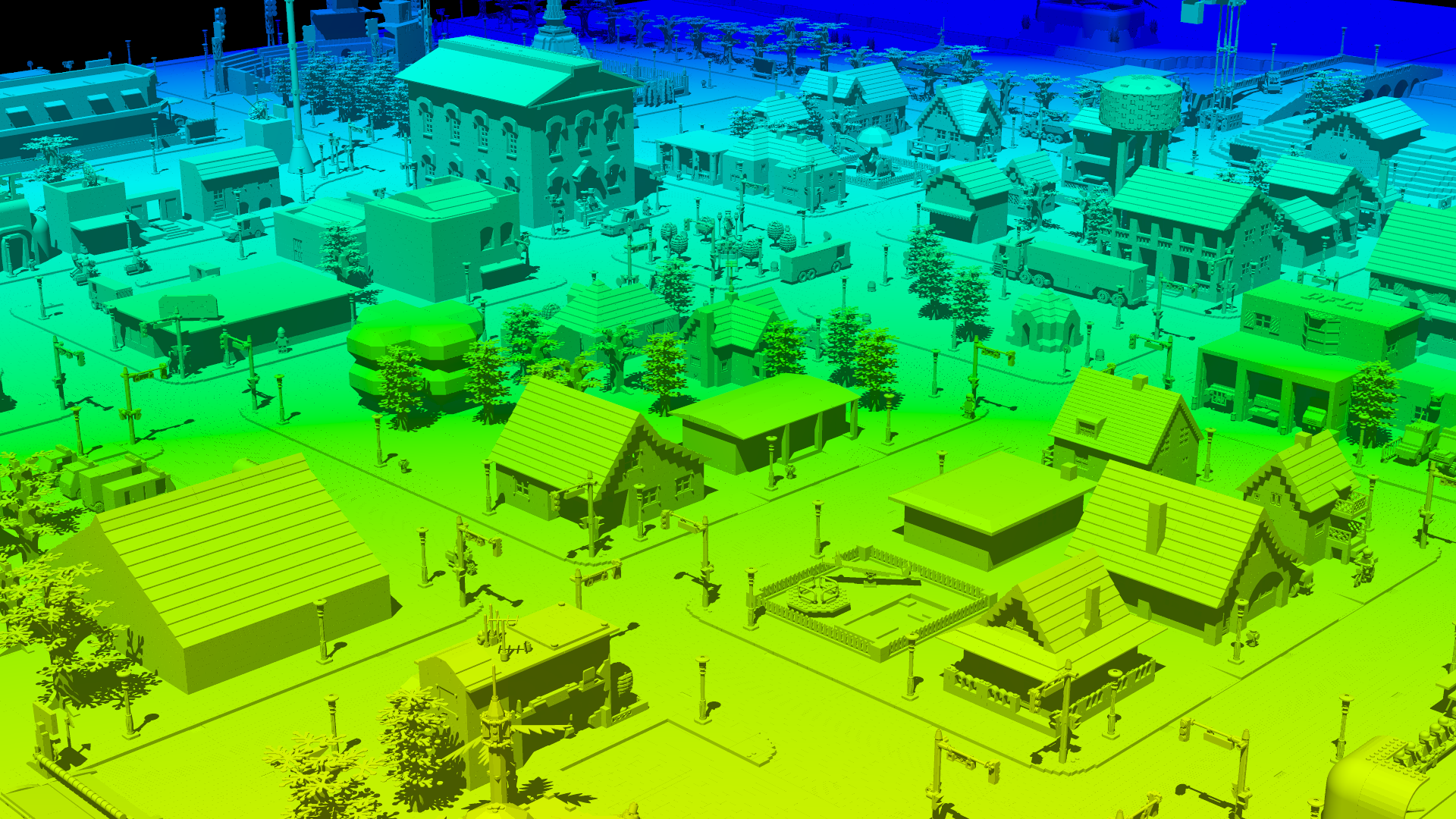
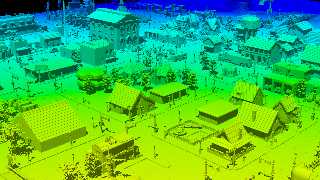
Here is the chromadepth scene again after changing the pattern from
gradient to spherical. Unfortunately, I don't really sense any 3D
effect. In fact the tree line in the distance is messed up. The leaves
of the trees appear much closer than the trunks. I don't consider this
experiment a success. :(


Mike
Post a reply to this message
Attachments:
Download 'l3p_datsville_townview_boxed_chromadepth_03.png' (1263 KB)
Preview of image 'l3p_datsville_townview_boxed_chromadepth_03.png'
|
|
| |
| |
|
|
|
|
| |
| |
|
|
On 20.01.2016 5:27, dick balaska wrote:

> Did you get an email from me?  Now I am trying Thunderbird for nntp and
> I keep hitting "Reply" instead of "Followup".  But there's no mail in my
> outbox, so I don't know what happened.

How do you reply? In my Thunderbird both Reply button in toolbar and
the Ctrl+R shortcut seem to default to "followup" for newsgroup posts.
Only "reply all" or "reply to sender only" include email address.

Also if you do accidentally send a mail via the newsgroup account it
is possible its outbox / sent folder is configured differently from the
email account. Possibly the mail ended up under "Local folders".
Post a reply to this message
|
|
| |
| |
|
|
|
|
| |
| |
|
|
On 1/26/2016 6:59 PM, Christian Froeschlin wrote:
> On 20.01.2016 5:27, dick balaska wrote:
>
>> Did you get an email from me?  Now I am trying Thunderbird for nntp and
>> I keep hitting "Reply" instead of "Followup".  But there's no mail in my
>> outbox, so I don't know what happened.
>
> How do you reply? In my Thunderbird both Reply button in toolbar and
> the Ctrl+R shortcut seem to default to "followup" for newsgroup posts.
> Only "reply all" or "reply to sender only" include email address.
>
> Also if you do accidentally send a mail via the newsgroup account it
> is possible its outbox / sent folder is configured differently from the
> email account. Possibly the mail ended up under "Local folders".
>

I have the same problem as Dick. You have to press the Followup button.
I never tried the shortcuts though.


Mike
Post a reply to this message
|
|
| |
| |
|
|
|
|
| |
| |
|
|
On 27-1-2016 0:59, Christian Froeschlin wrote:
> On 20.01.2016 5:27, dick balaska wrote:
>
>> Did you get an email from me?  Now I am trying Thunderbird for nntp and
>> I keep hitting "Reply" instead of "Followup".  But there's no mail in my
>> outbox, so I don't know what happened.
>
> How do you reply? In my Thunderbird both Reply button in toolbar and
> the Ctrl+R shortcut seem to default to "followup" for newsgroup posts.
> Only "reply all" or "reply to sender only" include email address.
>
> Also if you do accidentally send a mail via the newsgroup account it
> is possible its outbox / sent folder is configured differently from the
> email account. Possibly the mail ended up under "Local folders".
>

My 'Outbox'folder in Thunderbird is always empty. However, look into the
'Sent/Local Folders' folder: there is where the messages go, from
'Followup' as well as from 'reply'.

--
Thomas
Post a reply to this message
|
|
| |
| |
|
|
|
|
| |
| |
|
|
On 1/26/2016 8:21 PM, Mike Horvath wrote:
> On 1/26/2016 6:59 PM, Christian Froeschlin wrote:
>> On 20.01.2016 5:27, dick balaska wrote:
>>
>>> Did you get an email from me?  Now I am trying Thunderbird for nntp and
>>> I keep hitting "Reply" instead of "Followup".  But there's no mail in my
>>> outbox, so I don't know what happened.
>>
>> How do you reply? In my Thunderbird both Reply button in toolbar and
>> the Ctrl+R shortcut seem to default to "followup" for newsgroup posts.
>> Only "reply all" or "reply to sender only" include email address.
>>
>> Also if you do accidentally send a mail via the newsgroup account it
>> is possible its outbox / sent folder is configured differently from the
>> email account. Possibly the mail ended up under "Local folders".

I did find the mail in Local Folders after I didn't need it.

> I have the same problem as Dick. You have to press the Followup button.
> I never tried the shortcuts though.

In the message header pane, right-click -> Customize.  Remove the reply
button. I never hit Reply anymore. ;)
Post a reply to this message
|
|
| |
| |
|
|
|
|
| |