|
|
|
|
|
|
| |
| |
|
|
|
|
| |
| |
|
|
Hi(gh)!

I want to model my now-defunct bathroom scales and started with the
glass pane - when viewed edge on, it should display a dark bluish green.
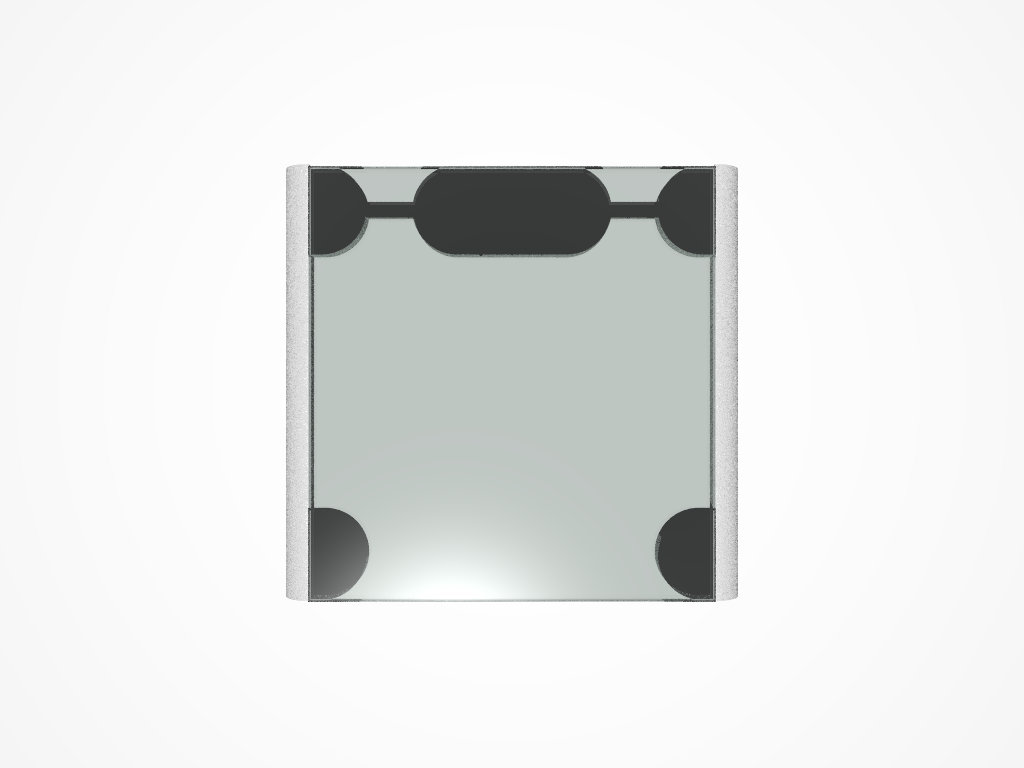
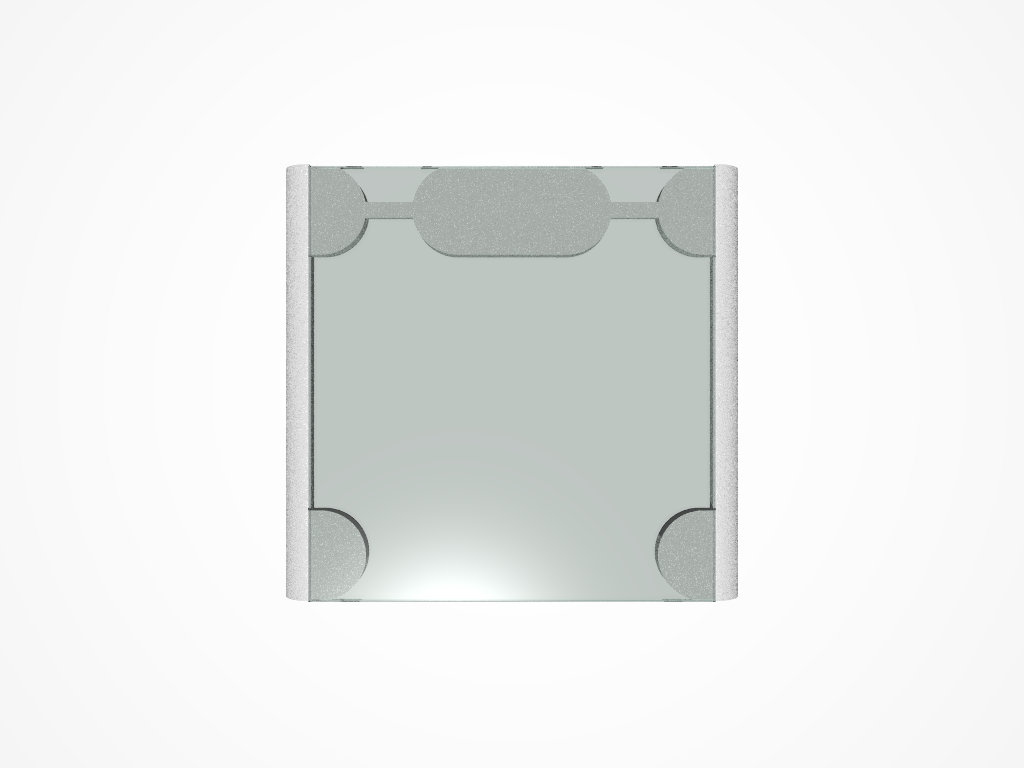
I used scattering media to achieve this (first attached image) but then
noticed that the media color almost disappeared when viewed against a
non-black background (second image). I tried to fix this by adding an
interior_texture (without reflection) to the material statement, but
then the media color was even less visible (third image).

What do I wrong? Should I try absorbing media instead?

See you in Khyberspace!

Yadgar
Post a reply to this message
Attachments:
Download '2015-10-08 korona scales, take 1.jpg' (16 KB)
Download '2015-10-08 korona scales, take 4.jpg' (14 KB)
Download '2015-10-08 korona scales, take 5.jpg' (12 KB)
Preview of image '2015-10-08 korona scales, take 1.jpg'

Preview of image '2015-10-08 korona scales, take 4.jpg'

Preview of image '2015-10-08 korona scales, take 5.jpg'

|
|
| |
| |
|
|
|
|
| |
| |
|
|
On 10/8/2015 9:56 PM, Jörg 'Yadgar' Bleimann wrote:
> I want to model my now-defunct bathroom scales

Sorry I can't help with your media problem, Yadgar.
But you reminded me of a jape I did a few years back.
I had been working on a crane upgrading the load indicator. I took the
old 100 ton scale and put it in my bathroom scales. My wife's screams
could be heard from miles away.
I did not know she could punch that hard. But it was worth it. ;-)

--

Regards
     Stephen
Post a reply to this message
|
|
| |
| |
|
|
|
|
| |
| |
|
|
Am 08.10.2015 um 22:56 schrieb Jörg 'Yadgar' Bleimann:
> Hi(gh)!
>
> I want to model my now-defunct bathroom scales and started with the
> glass pane - when viewed edge on, it should display a dark bluish green.
> I used scattering media to achieve this (first attached image) but then
> noticed that the media color almost disappeared when viewed against a
> non-black background (second image). I tried to fix this by adding an
> interior_texture (without reflection) to the material statement, but
> then the media color was even less visible (third image).
>
> What do I wrong? Should I try absorbing media instead?
>
> See you in Khyberspace!
>
> Yadgar
I'm not quiet sure how to fix this issue, but I think media will not
help here. Glass has no media inside. This seems to be more a issue of
refraction. The problem may be that POV cannot calculate different
refractions for different wavelenghts at once by default. IIRC there is
a work around utilising an animation and combing the results to a final
image for this issue posted by Ive (IIRC again) some time ago to
p.b.s-f. A search for "spectral rendering" should yield it (There were
more than one posting).

Best regards,
Michael
Post a reply to this message
|
|
| |
| |
|
|
|
|
| |
| |
|
|
Am 08.10.2015 um 22:56 schrieb Jörg 'Yadgar' Bleimann:

> I want to model my now-defunct bathroom scales and started with the
> glass pane - when viewed edge on, it should display a dark bluish green.
> I used scattering media to achieve this (first attached image) but then
> noticed that the media color almost disappeared when viewed against a
> non-black background (second image). I tried to fix this by adding an
> interior_texture (without reflection) to the material statement, but
> then the media color was even less visible (third image).
>
> What do I wrong? Should I try absorbing media instead?

Think physics: Why does the effect you wish to model occur in nature?

You will find that it is not due to scattering, but due to absorption.

Now this would imply that you should definitely use absorbing media
instead of scattering media: While the latter does include an
absorbtion-like component (to model the effect that part of the light is
being diverted _to_ elsewhere), it also has an emission-like component
(to model the effect that light is being diverted _from_ elsewhere)
which you don't want.

That said, note that to model uniformly absorbing interior, the
fade_colour, fade_distance and fade_power keywords provide a more
efficient mechanism.
Post a reply to this message
|
|
| |
| |
|
|
|
|
| |
| |
|
|
On 8-10-2015 23:12, Stephen wrote:
> On 10/8/2015 9:56 PM, Jörg 'Yadgar' Bleimann wrote:
>> I want to model my now-defunct bathroom scales
>
> Sorry I can't help with your media problem, Yadgar.
> But you reminded me of a jape I did a few years back.
> I had been working on a crane upgrading the load indicator. I took the
> old 100 ton scale and put it in my bathroom scales. My wife's screams
> could be heard from miles away.
> I did not know she could punch that hard. But it was worth it. ;-)
>

Now, that was not nice to do sir! Poor woman!

You made my day :-)

--
Thomas
Post a reply to this message
|
|
| |
| |
|
|
|
|
| |
| |
|
|
On 8-10-2015 22:56, Jörg 'Yadgar' Bleimann wrote:
> What do I wrong? Should I try absorbing media instead?
>

You certainly might. I am not sure about the physics of glass but maybe
it is a combination of scattering and absorption you need?


--
Thomas
Post a reply to this message
|
|
| |
| |
|
|
|
|
| |
| |
|
|
On 10/9/2015 7:55 AM, Thomas de Groot wrote:
> Now, that was not nice to do sir! Poor woman!
>
> You made my day :-)

Thanks Thomas.
I reminded her about it last night and she laughed again. But she did
not punch me. I've been forgiven. :-)

--

Regards
     Stephen
Post a reply to this message
|
|
| |
| |
|
|
|
|
| |
| |
|
|
Le 15-10-08 17:12, Stephen a écrit :
> On 10/8/2015 9:56 PM, Jörg 'Yadgar' Bleimann wrote:
>> I want to model my now-defunct bathroom scales
>
> Sorry I can't help with your media problem, Yadgar.
> But you reminded me of a jape I did a few years back.
> I had been working on a crane upgrading the load indicator. I took the
> old 100 ton scale and put it in my bathroom scales. My wife's screams
> could be heard from miles away.
> I did not know she could punch that hard. But it was worth it. ;-)
>

An 100 TON scale? In a bathroom? That's just plain mean !
Post a reply to this message
|
|
| |
| |
|
|
|
|
| |
| |
|
|
Le 15-10-08 16:56, Jörg 'Yadgar' Bleimann a écrit :
> Hi(gh)!
>
> I want to model my now-defunct bathroom scales and started with the
> glass pane - when viewed edge on, it should display a dark bluish green.
> I used scattering media to achieve this (first attached image) but then
> noticed that the media color almost disappeared when viewed against a
> non-black background (second image). I tried to fix this by adding an
> interior_texture (without reflection) to the material statement, but
> then the media color was even less visible (third image).
>
> What do I wrong? Should I try absorbing media instead?
>
> See you in Khyberspace!
>
> Yadgar

I would use fade_colour, fade_distance and fade_power for that purpose.
A side bonus is a much faster rendering.

If you absolutely want to use some media, then, absorbing media is the
kind that you want.


Alain
Post a reply to this message
|
|
| |
| |
|
|
|
|
| |
| |
|
|
Am 09.10.2015 um 08:58 schrieb Thomas de Groot:
> On 8-10-2015 22:56, Jörg 'Yadgar' Bleimann wrote:
>> What do I wrong? Should I try absorbing media instead?
>>
>
> You certainly might. I am not sure about the physics of glass but maybe
> it is a combination of scattering and absorption you need?

Nope.

There's virtually no scattering in modern regular glass - except maybe
for some dirt on the surface, but that's obviously not some interior effect.

Ancient glass did often have impurities that would scatter light, but as
a result the material would appear misty or even opaque at reasonable
thickness (because that's what scattering ultimately does to a medium).
Post a reply to this message
|
|
| |
| |
|
|
|
|
| |
| |
|
|
On 10/9/2015 8:32 PM, Alain wrote:
> Le 15-10-08 17:12, Stephen a écrit :
>> On 10/8/2015 9:56 PM, Jörg 'Yadgar' Bleimann wrote:
>>> I want to model my now-defunct bathroom scales
>>
>> Sorry I can't help with your media problem, Yadgar.
>> But you reminded me of a jape I did a few years back.
>> I had been working on a crane upgrading the load indicator. I took the
>> old 100 ton scale and put it in my bathroom scales. My wife's screams
>> could be heard from miles away.
>> I did not know she could punch that hard. But it was worth it. ;-)
>>
>
> An 100 TON scale? In a bathroom? That's just plain mean !

Bows :-)

My wife is quite thin so it was an obvious joke.
I also took a "Cold Work" permit book home as well, but chickened out
giving that to her. She always had a list of jobs for me to do after
being offshore for two weeks. In the end I thought that it was pushing it.

In case you don't know UK electrical plugs and sockets look like this:

https://s-media-cache-ak0.pinimg.com/236x/5f/1b/a9/5f1ba98a5d187b3f733e8c867d8898eb.jpg

It was fun watching my brother-in-law try to fit this plug into a
standard socket.

http://www.flameport.com/electric_museum/plugs_13A_non_standard/walsall_gauge_13a_plug.jpg

--

Regards
     Stephen
Post a reply to this message
|
|
| |
| |
|
|
|
|
| |
| |
|
|
=?UTF-8?B?SsO2cmcgJ1lhZGdhcicgQmxlaW1hbm4=?= <yazdegird@gmx.de> wrote:
> Hi(gh)!
>
> I want to model my now-defunct bathroom scales and started with the
> glass pane - when viewed edge on, it should display a dark bluish green.
> I used scattering media to achieve this (first attached image) but then
> noticed that the media color almost disappeared when viewed against a
> non-black background (second image). I tried to fix this by adding an
> interior_texture (without reflection) to the material statement, but
> then the media color was even less visible (third image).
>
> What do I wrong? Should I try absorbing media instead?
>
> See you in Khyberspace!
>
> Yadgar

I concur with Clipka and Alain.  Use fade_power 1001, fade_color, and
fade_distance in the media block.  Absorbing media may be easier conceptually,
but it is slower and (in my experience) artifact prone.
Post a reply to this message
|
|
| |
| |
|
|
|
|
| |
| |
|
|
On 9-10-2015 21:56, clipka wrote:
> Am 09.10.2015 um 08:58 schrieb Thomas de Groot:
>> On 8-10-2015 22:56, Jörg 'Yadgar' Bleimann wrote:
>>> What do I wrong? Should I try absorbing media instead?
>>>
>>
>> You certainly might. I am not sure about the physics of glass but maybe
>> it is a combination of scattering and absorption you need?
>
> Nope.
>
> There's virtually no scattering in modern regular glass - except maybe
> for some dirt on the surface, but that's obviously not some interior effect.
>
> Ancient glass did often have impurities that would scatter light, but as
> a result the material would appear misty or even opaque at reasonable
> thickness (because that's what scattering ultimately does to a medium).
>
Ah! Thanks for answering my cancelled post. ;-) I thought mine
irrelevant after I discovered you had a much better option to give.

--
Thomas
Post a reply to this message
|
|
| |
| |
|
|
|
|
| |
| |
|
|
Hi(gh)!

On 09.10.2015 01:45, clipka wrote:
> Am 08.10.2015 um 22:56 schrieb Jörg 'Yadgar' Bleimann:

> Think physics: Why does the effect you wish to model occur in nature?
>
> You will find that it is not due to scattering, but due to absorption.

Meanwhile, I tried absorption on my own (see attachmealso with bevnts),
and now it looks believable, at least to me (the glass pane now also has
bevelled edges)

Note that I multiplied the absorption color with 7, otherwise the
coloring would have turned out too faint.

See you in Khyberspace!

Yadgar
Post a reply to this message
Attachments:
Download '2015-10-09 korona scales, take 18.jpg' (21 KB)
Download '2015-10-09 korona scales, take 22.jpg' (14 KB)
Preview of image '2015-10-09 korona scales, take 18.jpg'

Preview of image '2015-10-09 korona scales, take 22.jpg'
|
|
| |
| |
|
|
|
|
| |
| |
|
|
Le 15-10-09 16:24, Stephen a écrit :
> On 10/9/2015 8:32 PM, Alain wrote:
>> Le 15-10-08 17:12, Stephen a écrit :
>>> On 10/8/2015 9:56 PM, Jörg 'Yadgar' Bleimann wrote:
>>>> I want to model my now-defunct bathroom scales
>>>
>>> Sorry I can't help with your media problem, Yadgar.
>>> But you reminded me of a jape I did a few years back.
>>> I had been working on a crane upgrading the load indicator. I took the
>>> old 100 ton scale and put it in my bathroom scales. My wife's screams
>>> could be heard from miles away.
>>> I did not know she could punch that hard. But it was worth it. ;-)
>>>
>>
>> An 100 TON scale? In a bathroom? That's just plain mean !
>
> Bows :-)
>
> My wife is quite thin so it was an obvious joke.
> I also took a "Cold Work" permit book home as well, but chickened out
> giving that to her. She always had a list of jobs for me to do after
> being offshore for two weeks. In the end I thought that it was pushing it.
>
> In case you don't know UK electrical plugs and sockets look like this:
>
>
https://s-media-cache-ak0.pinimg.com/236x/5f/1b/a9/5f1ba98a5d187b3f733e8c867d8898eb.jpg
It's a standard socket, in the UK.
>
>
> It was fun watching my brother-in-law try to fit this plug into a
> standard socket.
>
>
http://www.flameport.com/electric_museum/plugs_13A_non_standard/walsall_gauge_13a_plug.jpg
>
>

The standard sockets in America are radicaly different from the standard
sockets in Europe whitch are different from those in Asia whitch are
different than...

I have a multi-standard adaptor. It have no less than 8 different plugs
for 8 regions of the world.


Alain
Post a reply to this message
|
|
| |
| |
|
|
|
|
| |
| |
|
|
Hi(gh)!

On 10.10.2015 04:53, Cousin Ricky wrote:

> I concur with Clipka and Alain.  Use fade_power 1001, fade_color, and
> fade_distance in the media block.  Absorbing media may be easier conceptually,
> but it is slower and (in my experience) artifact prone.

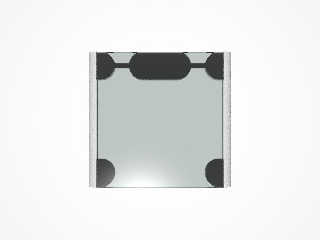
Now I added a (yet to be detailed further) plastic frame, replaced the
absorption media by the following:

     fade_color <0, 0.6, 0.35>
     fade_power 1001
     fade_distance 0.1

...but I wonder why the plastic parts below the glass pane are black now
(see attachment)! They should be of the same light grey as the side
parts, only slightly darkened by the glass...

See you in Khyberspace!

Yadgar
Post a reply to this message
Attachments:
Download '2015-10-11 korona scales, take 35.jpg' (28 KB)
Preview of image '2015-10-11 korona scales, take 35.jpg'
|
|
| |
| |
|
|
|
|
| |
| |
|
|
Am 11.10.2015 um 01:40 schrieb Jörg 'Yadgar' Bleimann:

> ....but I wonder why the plastic parts below the glass pane are black
> now (see attachment)! They should be of the same light grey as the side
> parts, only slightly darkened by the glass...

Too low max_trace_level maybe?

Also, behaviour may differ depending on whether you make the glass and
plastic planes overlap, merely touch, or have a tiny gap.
Post a reply to this message
|
|
| |
| |
|
|
|
|
| |
| |
|
|
On 10/10/2015 10:41 PM, Alain wrote:
> The standard sockets in America are radicaly different from the standard
> sockets in Europe whitch are different from those in Asia whitch are
> different than...
>

I know, I know. :-)
I've worked in more than a dozen different countries on every continent
except Antarctica. (Can't keep a job, it seems. ;-) )


> I have a multi-standard adaptor. It have no less than 8 different plugs
> for 8 regions of the world.

I generally use a standard UK extension socket and replace its plug or
cable when I get there.

--

Regards
     Stephen
Post a reply to this message
|
|
| |
| |
|
|
|
|
| |
| |
|
|
Hi(gh)!

On 11.10.2015 05:00, clipka wrote:

> Too low max_trace_level maybe?

Meanwhile, I increased it to 10 - but still the plastic parts below the
glass are black!

>
> Also, behaviour may differ depending on whether you make the glass and
> plastic planes overlap, merely touch, or have a tiny gap.

Yes, I provided for a tiny gap... but it did not help!

See you in Khyberspace!

Yadgar
Post a reply to this message
|
|
| |
| |
|
|
|
|
| |
| |
|
|
Hi(gh)!

This is how it should look:
http://img.dooyoo.de/DE_DE/orig/1/2/6/2/0/1262007.jpg

See you in Khyberspace!

Yadgar
Post a reply to this message
|
|
| |
| |
|
|
|
|
| |
| |
|
|
Am 11.10.2015 um 12:45 schrieb Jörg 'Yadgar' Bleimann:
> Hi(gh)!
>
> On 11.10.2015 05:00, clipka wrote:
>
>> Too low max_trace_level maybe?
>
> Meanwhile, I increased it to 10 - but still the plastic parts below the
> glass are black!
>
>>
>> Also, behaviour may differ depending on whether you make the glass and
>> plastic planes overlap, merely touch, or have a tiny gap.
>
> Yes, I provided for a tiny gap... but it did not help!

<shrugs>

We'll probably need more information then.
Maybe you simply got the colour wrong?
Post a reply to this message
|
|
| |
| |
|
|
|
|
| |
| |
|
|
Hi(gh)!

 > <shrugs>
>
> We'll probably need more information then.
> Maybe you simply got the colour wrong?
>
O.k., here is the code:

// begin code

#version 3.7;
#include "glass.inc"

global_settings
{
   max_trace_level 10
}

// TEXTURES
#declare T_Grey_Matted_Plastic=
texture
{
   pigment { color rgb 0.7 }
   finish
   {
     ambient 0.1
     diffuse 1
     brilliance 0.4
     phong 0.8
     phong_size 60
   }
   normal
   {
     granite
     turbulence 100
   }
}


// MATERIALS

#declare M_PaneGlass=
material
{
   texture
   {
     pigment
     {
       color rgbft <0.99, 1, 0.99, 0.49, 0.49>
     }
     finish { F_Glass5 }
   }
   interior
   {
     ior 1.52
     fade_color <0, 0.6, 0.35>
     fade_power 1001
     fade_distance 0.1

   }
}

light_source
{
   <0, 2.4, -0.5>
   color rgb 1
}

sky_sphere
{
   pigment
   {
     gradient y
     color_map
     {
       [0 rgb 1]
       [1 rgb 0]
     }
   }
}

/* plane
{
   y, 0
   texture
   {
     pigment { color rgb 1 }
     finish { ambient 0.15 diffuse 1 brilliance 0.2 }
   }
} */

#declare Glass_Pane_Bevel_Cutoff =
box
{
   <-0.155, -0.001*sqrt(2)/2, -0.025>, <0.155, 0.001*sqrt(2)/2, 0.025>
}


#declare Glass_Pane =
difference
{
   box
   {
     0, <0.28, 0.013, 0.3>
   }
   object // upper front bevel
   {
     Glass_Pane_Bevel_Cutoff
     rotate <315, 0, 0>
     translate <0.14, 0.013, 0>
   }
   object // lower front bevel
   {
     Glass_Pane_Bevel_Cutoff
     rotate <45, 0, 0>
     translate <0.14, 0, 0>
   }
   object // upper right bevel
   {
     Glass_Pane_Bevel_Cutoff
     rotate <45, 90, 0>
     translate <0.28, 0.013, 0.15>
   }
   object // lower right bevel
   {
     Glass_Pane_Bevel_Cutoff
     rotate <315, 90, 0>
     translate <0.28, 0, 0.15>
   }
   object // upper left bevel
   {
     Glass_Pane_Bevel_Cutoff
     rotate <45, -90, 0>
     translate <0, 0.013, 0.15>
   }
   object // lower left bevel
   {
     Glass_Pane_Bevel_Cutoff
     rotate <315, -90, 0>
     translate <0, 0, 0.15>
   }
   object // upper back bevel
   {
     Glass_Pane_Bevel_Cutoff
     rotate <45, 0, 0>
     translate <0.14, 0.013, 0.3>
   }
   object // lower back bevel
   {
     Glass_Pane_Bevel_Cutoff
     rotate <315, 0, 0>
     translate <0.14, 0, 0.3>
   }
   hollow
}

#declare Frame_Corner_Base_Raw=
union
{
   box { 0, <0.00788, 0.02214, 0.06224> }
   difference
   {
     cylinder { <0.00788, 0, 0.03112>, <0.00788, 0.02214, 0.03112>,
0.03112 }
     box { <-0.05, -0.01, -0.01>, <0.00788, 0.03, 0.07> }
   }
}

#declare Plastic_Frame_Side_Part=
difference
{
   cylinder
   {
     0, <0, 0, 0.302>, 1
     scale <0.02, 0.03056, 1>
   }
   box
   {
     <-0.05, -0.05, -0.01>, <0.05, 0, 0.31>
   }
   box
   {
     <0, -0.05, -0.01>, <0.05, 0.1, 0.31>
   }
}

#declare Central_Unit_Block=
union
{
   cylinder { 0, <0, 0.02214, 0>, 0.03112 }
   box { <0, 0, -0.03112>, <0.07566, 0.02214, 0.03112> }
   cylinder { <0.07566, 0, 0>, <0.07566, 0.02214, 0>, 0.03112 }
}

#declare Fillet=
box
{
   0, <0.036, 0.009, 0.011>
}

#declare Plastic_Frame=
union
{
   object { Plastic_Frame_Side_Part }
   object { Frame_Corner_Base_Raw }
   object { Frame_Corner_Base_Raw  translate <0, 0, 0.23976>}
   object { Plastic_Frame_Side_Part rotate <0, 180, 0> translate <0.28,
0, 0.302>}
   object { Frame_Corner_Base_Raw rotate <0, 180, 0> translate <0.28, 0,
0.06224>}
   object { Frame_Corner_Base_Raw rotate <0, 180, 0> translate <0.28, 0,
0.302>}
   object { Central_Unit_Block translate <0.10217, 0, 0.27088> }
   object { Fillet translate <0.03718, 0.01314, 0.26538> }
   object { Fillet translate <0.20713, 0.01314, 0.26538> }
}


// 0.03236 x
// 0.009 y
// 0.011 z

object
{
   Glass_Pane
   material { M_PaneGlass }
   translate <0, 0.022141, 0>
}

object
{
   Plastic_Frame
   texture { T_Grey_Matted_Plastic }
}

#declare view=4;

camera
{
   #switch(view)
     #case (0)
       location <0.01, 0.015, -0.2>
       look_at <0.01, 0.015, 0.30>
     #break
     #case (1)
       location <0.14, 0.65, -0.7>
       look_at <0.14, 0.0125, 0.001>
     #break
     #case (2)
       location <0.95, 0.65, 0.15>
       look_at <0.14, 0.0065, 0.15>
     #break
     #case (3)
       location <0.14, 0.65, -0.7>
       look_at <0.14, 0.0065, 0.15>
     #break
     #case (4)
       location <0.14, 1, 0.15>
       look_at <0.14, 0, 0.15>
     #break
   #end
   angle 40
}

// end code

See you in Khyberspace!

Yadgar
Post a reply to this message
|
|
| |
| |
|
|
|
|
| |
| |
|
|
Am 11.10.2015 um 20:50 schrieb Jörg 'Yadgar' Bleimann:

> O.k., here is the code:

Looks like the gap between the frame and glass pane is too small. You
may want to use a different scale to increase your absolute scene size.
Post a reply to this message
|
|
| |
| |
|
|
|
|
| |
| |
|
|
Hi(gh)!

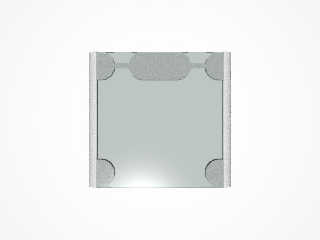
On 13.10.2015 09:05, clipka wrote:

> Looks like the gap between the frame and glass pane is too small. You
> may want to use a different scale to increase your absolute scene size.

Yes, originally the gap was only 0.000001 POV units wide... I increased
this to 0.00016 POV units, and now it looks as it was meant to look (see
attachment)!

See you in Khyberspace!

Yadgar
Post a reply to this message
Attachments:
Download '2015-10-13 korona scales, take 36.jpg' (30 KB)
Preview of image '2015-10-13 korona scales, take 36.jpg'
|
|
| |
| |
|
|
|
|
| |
|
|