|
|
|
|
|
|
| |
| |
|
|
|
|
| |
| |
|
|
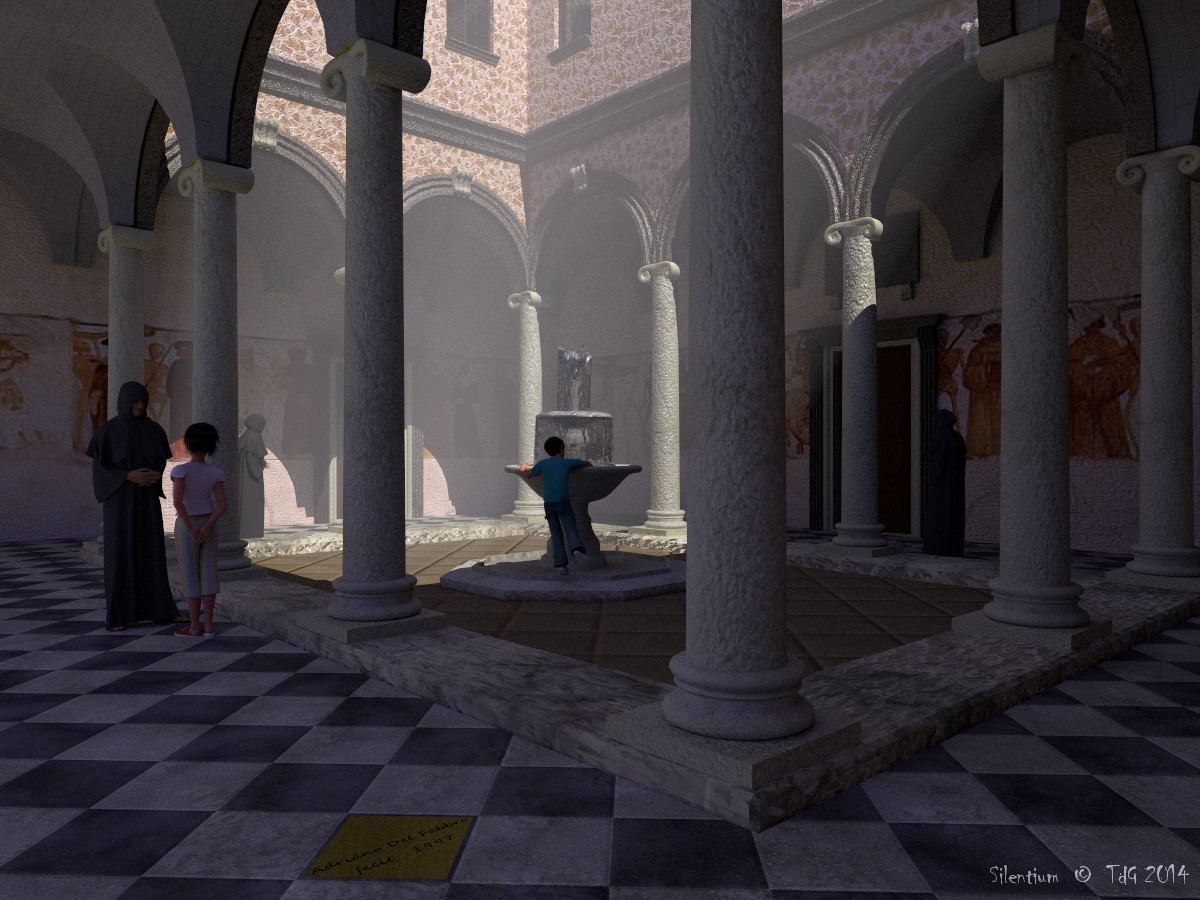
Never being satisfied, I made some last changes: I added an extra
pigment_pattern normal to the tiled floor /and/ I rendered with
stochastic antialiasing (render time: 9.5 hours). I believe this subtly
improved the scene.

Now I have a question for Clipka!
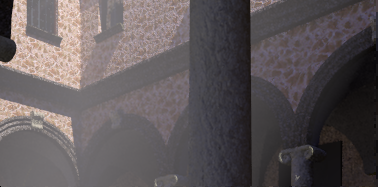
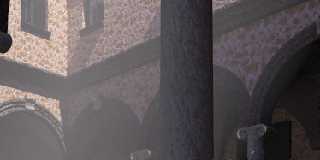
*Why* is the light source moved when rendered with UberPOV???? See the
small cut-out from a render with POV-Ray 3.7 and compare. Also the
fountain is more lighted using UberPOV...

Using /exactly/ the same scene code.

Thomas
Post a reply to this message
Attachments:
Download 'silentium_final2.jpg' (259 KB)
Download 'silentium_partial.png' (111 KB)
Preview of image 'silentium_final2.jpg'
Preview of image 'silentium_partial.png'
|
|
| |
| |
|
|
|
|
| |
| |
|
|
On 23/09/2014 09:00, Thomas de Groot wrote:
> Never being satisfied, I made some last changes: I added an extra
> pigment_pattern normal to the tiled floor /and/ I rendered with
> stochastic antialiasing (render time: 9.5 hours). I believe this subtly
> improved the scene.


I like this one very much.

--

Regards
     Stephen
Post a reply to this message
|
|
| |
| |
|
|
|
|
| |
| |
|
|
Am 23.09.2014 10:00, schrieb Thomas de Groot:

> Now I have a question for Clipka!
> *Why* is the light source moved when rendered with UberPOV???? See the
> small cut-out from a render with POV-Ray 3.7 and compare. Also the
> fountain is more lighted using UberPOV...

Frankly, I don't have the slightest idea. (*)

You mind posting the relevant portions of the scene? (light source, plus
either the architecture or some information about the dimension thereof?)

(* Well, that's not entirely true; my best bet would be that you're
using area lights and that my stochastic area light handling code is
buggy; but that would most likely cause a sideways offset of the light
source. To me the difference in the images looks more like the light
source is closer to the origin - or as if the POV-Ray 3.7 version used a
parallel light source where the UberPOV version used a point light source.)
Post a reply to this message
|
|
| |
| |
|
|
|
|
| |
| |
|
|
Am 23.09.2014 13:10, schrieb clipka:
> Am 23.09.2014 10:00, schrieb Thomas de Groot:
>
>> Now I have a question for Clipka!
>> *Why* is the light source moved when rendered with UberPOV???? See the
>> small cut-out from a render with POV-Ray 3.7 and compare. Also the
>> fountain is more lighted using UberPOV...
>
> Frankly, I don't have the slightest idea. (*)

Well, now I do have some that's far from slight; see this thread:

news://news.povray.org:119/web.54214e42b2c0e8b8b6820d7a0@news.povray.org

If you examine the shadows in your scene closely, it hits you like a
hammer (well, at least that's how it hit me): The light source hasn't
budged an inch - it's the shadows of your pillars, arches and ledges
that have vanished /entirely/!

Oh bugger.

Could you do me a favor and post the respective material definitions?
Thanks a lot!
Post a reply to this message
|
|
| |
| |
|
|
|
|
| |
| |
|
|
On 23-9-2014 13:10, clipka wrote:
> Am 23.09.2014 10:00, schrieb Thomas de Groot:
>
>> Now I have a question for Clipka!
>> *Why* is the light source moved when rendered with UberPOV???? See the
>> small cut-out from a render with POV-Ray 3.7 and compare. Also the
>> fountain is more lighted using UberPOV...
>
> Frankly, I don't have the slightest idea. (*)
>
> You mind posting the relevant portions of the scene? (light source, plus
> either the architecture or some information about the dimension thereof?)
>
> (* Well, that's not entirely true; my best bet would be that you're
> using area lights and that my stochastic area light handling code is
> buggy; but that would most likely cause a sideways offset of the light
> source. To me the difference in the images looks more like the light
> source is closer to the origin - or as if the POV-Ray 3.7 version used a
> parallel light source where the UberPOV version used a point light source.)
>

No area light is used here (I have it available but is not used in this
scene). Light info is:

#declare Sun_alt 			  = 50;
#declare Sun_azm 			  = -80;
#include "CIE.inc"
#declare SunColor     = Blackbody(6500)*2;
#declare SunPosition  = <0, 0, -2>*10e4;
#declare SunPosition  = vrotate(SunPosition, <Sun_alt, Sun_azm, 0>);
   light_source {
     <0, 0, 0>
     color rgb SunColor
     translate SunPosition
     parallel
     point_at <0, 0, 0>
   }

I am trying to get a simplified version of the cloister (only bounding
boxes from Poseray) and put it here as soon as I have made it work...

Thomas
Post a reply to this message
|
|
| |
| |
|
|
|
|
| |
| |
|
|
On 23-9-2014 14:00, clipka wrote:
> Am 23.09.2014 13:10, schrieb clipka:
>> Frankly, I don't have the slightest idea. (*)
>
> Well, now I do have some that's far from slight; see this thread:
>
> news://news.povray.org:119/web.54214e42b2c0e8b8b6820d7a0@news.povray.org
>
> If you examine the shadows in your scene closely, it hits you like a
> hammer (well, at least that's how it hit me): The light source hasn't
> budged an inch - it's the shadows of your pillars, arches and ledges
> that have vanished /entirely/!
>
> Oh bugger.
>
> Could you do me a favor and post the respective material definitions?
> Thanks a lot!
>

Oh gosh, yes, it is a shadow vanishing trick indeed!

I attach the material file of the building. Note that a few elements
have been subjected to a proximity pattern. I shall test if /those/
render differently; if so, you will get them too but I think that will
not be necessary.

Thomas
Post a reply to this message
Attachments:
Download 'cloister_pievedicadore_pov_mat.inc.txt' (33 KB)
|
|
| |
| |
|
|
|
|
| |
| |
|
|
Le 23/09/2014 10:00, Thomas de Groot a écrit :
> Never being satisfied, I made some last changes: I added an extra
> pigment_pattern normal to the tiled floor /and/ I rendered with
> stochastic antialiasing (render time: 9.5 hours). I believe this subtly
> improved the scene.
>
> Now I have a question for Clipka!
> *Why* is the light source moved when rendered with UberPOV???? See the
> small cut-out from a render with POV-Ray 3.7 and compare. Also the
> fountain is more lighted using UberPOV...
>
> Using /exactly/ the same scene code.
>
> Thomas
Well done, you have made some very good jobs actually. I want also to
thank and congratulate you for your reeds_in_the_winds files, very
useful and realistic.


Lionel
--
Do not judge my words, judge my actions.

---
Ce courrier électronique ne contient aucun virus ou logiciel malveillant parce que la
protection avast! Antivirus est active.
http://www.avast.com
Post a reply to this message
|
|
| |
| |
|
|
|
|
| |
| |
|
|
On 23-9-2014 16:20, Thomas de Groot wrote:
> Oh gosh, yes, it is a shadow vanishing trick indeed!
>
> I attach the material file of the building. Note that a few elements
> have been subjected to a proximity pattern. I shall test if /those/
> render differently; if so, you will get them too but I think that will
> not be necessary.

Well, I can now say definitively that the culprits are the elements that
have gone through the proximity pattern mill. However, the strange thing
is that the shadow of the window sill on the first floor also vanishes
although no element with a proximity pattern is present there.

So the problem might be slightly different from what you were fearing.

Info:
- I used Edouard Poor's Proximity Pattern macro.
- You may have them one way or another, but I attach Edouard's files, as
I use them, to be sure.
- The arcs, columns, and the fountain are processed.
- I attach de .df3 and .prox files of these elements.

I think you have everything necessary to test. If not, yell.

Thomas
Post a reply to this message
Attachments:
Download 'arcs.df3.dat' (82 KB)
Download 'windows-1252' (1 KB)
Download 'columns.df3.dat' (83 KB)
Download 'windows-1252' (1 KB)
Download 'fountain.df3.dat' (79 KB)
Download 'windows-1252' (1 KB)
Download 'windows-1252' (15 KB)
Download 'windows-1252' (13 KB)
|
|
| |
| |
|
|
|
|
| |
| |
|
|
On 23-9-2014 16:46, FractRacer wrote:
> Well done, you have made some very good jobs actually. I want also to
> thank and congratulate you for your reeds_in_the_winds files, very
> useful and realistic.

Thank you indeed. The pleasure is mine :-)

As far as the reeds are concerned, I guess there are possibilities for
improvement. This is about what I can do, others may come up with some
smart solutions.

Thomas
Post a reply to this message
|
|
| |
| |
|
|
|
|
| |
| |
|
|
Am 23.09.2014 16:44, schrieb Thomas de Groot:
> On 23-9-2014 16:20, Thomas de Groot wrote:
>> Oh gosh, yes, it is a shadow vanishing trick indeed!
>>
>> I attach the material file of the building. Note that a few elements
>> have been subjected to a proximity pattern. I shall test if /those/
>> render differently; if so, you will get them too but I think that will
>> not be necessary.
>
> Well, I can now say definitively that the culprits are the elements that
> have gone through the proximity pattern mill. However, the strange thing
> is that the shadow of the window sill on the first floor also vanishes
> although no element with a proximity pattern is present there.

Can you help me with identifying those textures?


> So the problem might be slightly different from what you were fearing.

Well, what /was/ I "fearing" then? ;-)

I have no doubt that the Prox Pattern macros are perfectly fine. I
presume that they just happen to make use of a language construct that's
broken, which may also be used in (and therefore affect) other materials.

Say, do the vanished non-proxed objects perchance also make use of a
texture_map?
Post a reply to this message
|
|
| |
| |
|
|
|
|
| |
| |
|
|
On 23-9-2014 19:54, clipka wrote:
> Can you help me with identifying those textures?

Yes of course.

>
>
>> So the problem might be slightly different from what you were fearing.
>
> Well, what /was/ I "fearing" then? ;-)

Good point indeed :-)

>
> I have no doubt that the Prox Pattern macros are perfectly fine. I
> presume that they just happen to make use of a language construct that's
> broken, which may also be used in (and therefore affect) other materials.
>
> Say, do the vanished non-proxed objects perchance also make use of a
> texture_map?
>

I need to plunge into this and see how the textures are built and are
affected. I'll be back.

Thomas
Post a reply to this message
|
|
| |
| |
|
|
|
|
| |
| |
|
|
On 23-9-2014 19:54, clipka wrote:
> I have no doubt that the Prox Pattern macros are perfectly fine. I
> presume that they just happen to make use of a language construct that's
> broken, which may also be used in (and therefore affect) other materials.
>
> Say, do the vanished non-proxed objects perchance also make use of a
> texture_map?
>

Right. This is what I found:

- The proximity pattern textures have the following build-up with
pigment_pattern and a texture_map:
   texture {
     pigment_pattern {
       average
       pigment_map {
         #if( proximity_pattern_strength != 0 )
           [ proximity_pattern_strength*3 df3_pattern scale 1/texture_scale]
         #end
         #if( slope_pattern_strength != 0 )
           [ slope_pattern_strength*0.6 slope { y altitude <0,1,0> }
color_map { [0 rgb 1] [1 rgb 0] } scale 140 * 1/texture_scale ]
         #end
         #if( noise_pattern_strength != 0 )
           [ noise_pattern_strength *0.4 bozo color_map { [0 rgb 0] [1
rgb 1] } scale 4 * noise_scale ]
           [ noise_pattern_strength *0.3 bozo color_map { [0 rgb 0] [1
rgb 1] } scale 1 * noise_scale]
           [ noise_pattern_strength *0.2 bozo color_map { [0 rgb 0] [1
rgb 1] } scale 0.33 * noise_scale ]
           [ noise_pattern_strength *0.1 bozo color_map { [0 rgb 0] [1
rgb 1] } scale 0.1 * noise_scale ]
         #end
       }
     }
     texture_map { map }
     scale texture_scale
   }

- Consequently, in my image, the fountain, the columns, the arcs, and
the combined ridges, window sills, window arcs, are missing (part of)
their shadows.

- As far as I can tell, all other elements have rendered correctly.

Thomas
Post a reply to this message
|
|
| |
| |
|
|
|
|
| |
| |
|
|
On 23-9-2014 10:22, Stephen wrote:
> I like this one very much.
>

I do too. Especially the subtle graininess left by the stochastic
antialiasing is something I appreciate.

Thomas
Post a reply to this message
|
|
| |
| |
|
|
|
|
| |
| |
|
|
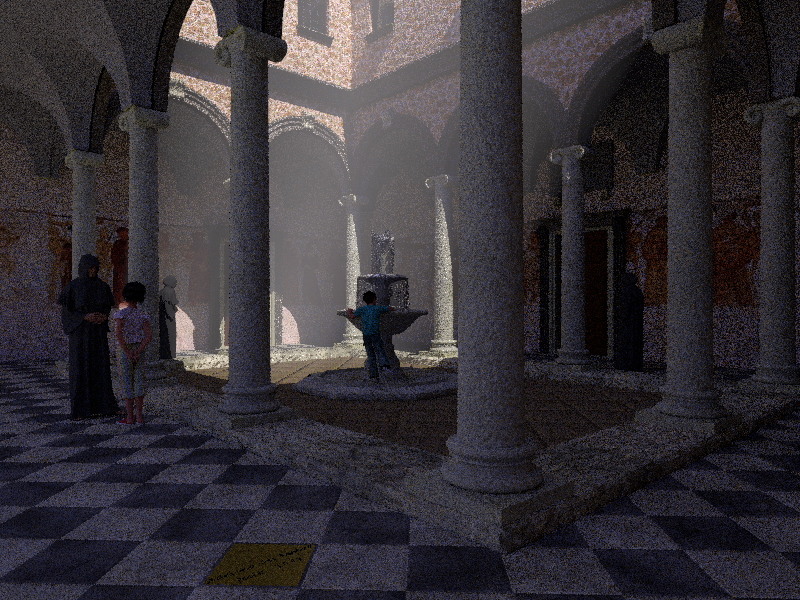
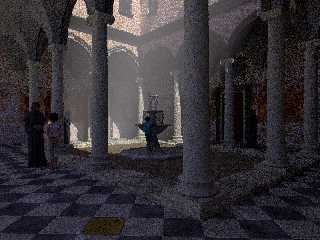
A pointillist version ;-)

I added a tiny transparency to the image_maps involved in the proximity
patterns and that proved to be a good workaround. Thanks Christoph.

Tomorrow I shall render a better final version.

Thomas
Post a reply to this message
Attachments:
Download 'silentium.png' (1064 KB)
Preview of image 'silentium.png'
|
|
| |
| |
|
|
|
|
| |
| |
|
|
On 24/09/14 15:48, Thomas de Groot wrote:
> A pointillist version ;-)
>
> I added a tiny transparency to the image_maps involved in the proximity
> patterns and that proved to be a good workaround. Thanks Christoph.
>
> Tomorrow I shall render a better final version.
>
> Thomas
>

This I really like.

John
--
Protect the Earth
It was not given to you by your parents
You hold it in trust for your children
Post a reply to this message
|
|
| |
| |
|
|
|
|
| |
| |
|
|
On 24/09/2014 16:01, Doctor John wrote:
> On 24/09/14 15:48, Thomas de Groot wrote:
>> A pointillist version ;-)
>>
>> I added a tiny transparency to the image_maps involved in the proximity
>> patterns and that proved to be a good workaround. Thanks Christoph.
>>
>> Tomorrow I shall render a better final version.
>>
>> Thomas
>>
>
> This I really like.
>

The graininess adds to the atmosphere.

@Clipka would it be feasible to add a feature to UberPov so that it
takes a snapshot at different stages to see the progress of the render?
It is just a thought as an animation of the building of the picture
might be interesting to see.


--

Regards
     Stephen
Post a reply to this message
|
|
| |
| |
|
|
|
|
| |
| |
|
|
Am 24.09.2014 17:34, schrieb Stephen:

> @Clipka would it be feasible to add a feature to UberPov so that it
> takes a snapshot at different stages to see the progress of the render?
> It is just a thought as an animation of the building of the picture
> might be interesting to see.

Such a feature is on my to-do list (has always been, actually), but I'm
waiting for some other changes to happen in POV-Ray proper that will
make it a whole lot easier.
Post a reply to this message
|
|
| |
| |
|
|
|
|
| |
| |
|
|
On 24/09/2014 16:49, clipka wrote:
> Am 24.09.2014 17:34, schrieb Stephen:
>
>> @Clipka would it be feasible to add a feature to UberPov so that it
>> takes a snapshot at different stages to see the progress of the render?
>> It is just a thought as an animation of the building of the picture
>> might be interesting to see.
>
> Such a feature is on my to-do list (has always been, actually), but I'm
> waiting for some other changes to happen in POV-Ray proper that will
> make it a whole lot easier.
>

Excellent!


--

Regards
     Stephen
Post a reply to this message
|
|
| |
| |
|
|
|
|
| |
| |
|
|
Am 24.09.2014 18:03, schrieb Stephen:
> On 24/09/2014 16:49, clipka wrote:
>> Am 24.09.2014 17:34, schrieb Stephen:
>>
>>> @Clipka would it be feasible to add a feature to UberPov so that it
>>> takes a snapshot at different stages to see the progress of the render?
>>> It is just a thought as an animation of the building of the picture
>>> might be interesting to see.
>>
>> Such a feature is on my to-do list (has always been, actually), but I'm
>> waiting for some other changes to happen in POV-Ray proper that will
>> make it a whole lot easier.
>
> Excellent!

Did I ever mention that whatever features MCPov has (*) is also on the
to-do list for UberPOV? ;-)

(* uh, wait... MCPov is based on MegaPOV, isn't it? Well, I won't be
able to add all /that/ to UberPOV... not in the one-man show UberPOV
currently is.)
Post a reply to this message
|
|
| |
| |
|
|
|
|
| |
| |
|
|
On 24/09/2014 17:56, clipka wrote:
> Did I ever mention that whatever features MCPov has (*) is also on the
> to-do list for UberPOV? ;-)
>
No.

> (* uh, wait... MCPov is based on MegaPOV, isn't it? Well, I won't be
> able to add all /that/ to UberPOV... not in the one-man show UberPOV
> currently is.)

Do we change the name to UnterPov? ;-)
Or UnterMcPov Hoots!

I've never really used these unofficial versions as I need a modeller.
And neither Moray nor Bishop3D supported them. You are making be
re-evaluate that. Especially considering the way Blender is being developed.

--

Regards
     Stephen
Post a reply to this message
|
|
| |
| |
|
|
|
|
| |
| |
|
|
On 24/09/2014 17:56, clipka wrote:
> Did I ever mention that whatever features MCPov has (*) is also on the
> to-do list for UberPOV? ;-)
>
> (* uh, wait... MCPov is based on MegaPOV, isn't it? Well, I won't be
> able to add all /that/ to UberPOV... not in the one-man show UberPOV
> currently is.)


Do we change the name to UnterPov?
Or UnterMcPov Hoots!

I've never really used these unofficial versions as I need a modeller.
And neither Moray nor Bishop3D supported them. You are making me
re-evaluate that. Especially considering the way Blender is being
developed.

--

Regards
     Stephen
Post a reply to this message
|
|
| |
| |
|
|
|
|
| |
| |
|
|
Am 24.09.2014 19:25, schrieb Stephen:

> I've never really used these unofficial versions as I need a modeller.
> And neither Moray nor Bishop3D supported them. You are making me
> re-evaluate that. Especially considering the way Blender is being
> developed.

That's one more design goal of UberPOV: Make it as simple as possible to
make use of the added features from a classic POV-Ray scene.
Post a reply to this message
|
|
| |
| |
|
|
|
|
| |
| |
|
|
Stephen <mca### [at] aol com> wrote:
> I've never really used these unofficial versions as I need a modeller.
> And neither Moray nor Bishop3D supported them. You are making be
> re-evaluate that. Especially considering the way Blender is being developed.
>
> --
>
> Regards
> Stephen
It's not too difficult. Just model, export to Povray, and then edit the Povray
code to your liking. com> wrote:
> I've never really used these unofficial versions as I need a modeller.
> And neither Moray nor Bishop3D supported them. You are making be
> re-evaluate that. Especially considering the way Blender is being developed.
>
> --
>
> Regards
> Stephen
It's not too difficult. Just model, export to Povray, and then edit the Povray
code to your liking.
Post a reply to this message
|
|
| |
| |
|
|
|
|
| |
| |
|
|
On 24-9-2014 23:41, clipka wrote:
> That's one more design goal of UberPOV: Make it as simple as possible to
> make use of the added features from a classic POV-Ray scene.
>

May I assume that the shadow-dropping issue has been circumscribed
enough for you to find a vaccine?

Thomas
Post a reply to this message
|
|
| |
| |
|
|
|
|
| |
| |
|
|
On 25/09/2014 05:39, jhu wrote:
> Stephen <mca### [at] aolcom> wrote:
>
>> I've never really used these unofficial versions as I need a modeller.
>> And neither Moray nor Bishop3D supported them. You are making be
>> re-evaluate that. Especially considering the way Blender is being developed.
>>
>> --
>>
>> Regards
>>       Stephen
>
> It's not too difficult. Just model, export to Povray, and then edit the Povray
> code to your liking.
>

Yes you can and you can use workarounds in the modellers to export hand
written code so that there is less need to edit in Pov.

I am more interested in animations so I generally do not want the long
render times that these quality features take. And I am lazy, I still
use code that Thomas created for Moray for a lot of my materials as a
starting point. So there has not been any point, for me up to now. But I
find the graininess of these images very attractive.
The other point is that Blender is alive and being developed while Moray
and Bishop3D are not. Also the direction that the official Blender
PovRay exporter and LanuHum’s is exciting. His images of how he is
working on the reed stalks looks comparable to what you would do in
Poser, if you could do it.


--

Regards
     Stephen
Post a reply to this message
|
|
| |
| |
|
|
|
|
| |
| |
|
|
Am 25.09.2014 09:20, schrieb Thomas de Groot:
> On 24-9-2014 23:41, clipka wrote:
>> That's one more design goal of UberPOV: Make it as simple as possible to
>> make use of the added features from a classic POV-Ray scene.
>
> May I assume that the shadow-dropping issue has been circumscribed
> enough for you to find a vaccine?

It has, indeed. I'll need to do some vivisecting and microscoping, but I
can do that with lab rats - no need for further examination of cases in
the wild.
Post a reply to this message
|
|
| |
| |
|
|
|
|
| |
| |
|
|
Thomas de Groot wrote on 24/09/2014 16.48:
> A pointillist version ;-)
>
> I added a tiny transparency to the image_maps involved in the proximity
> patterns and that proved to be a good workaround. Thanks Christoph.
>
> Tomorrow I shall render a better final version.
>
> Thomas
>
A very particular effect!
Paolo
Post a reply to this message
|
|
| |
| |
|
|
|
|
| |