|
|
|
|
|
|
| |
| |
|
|
|
|
| |
| |
|
|
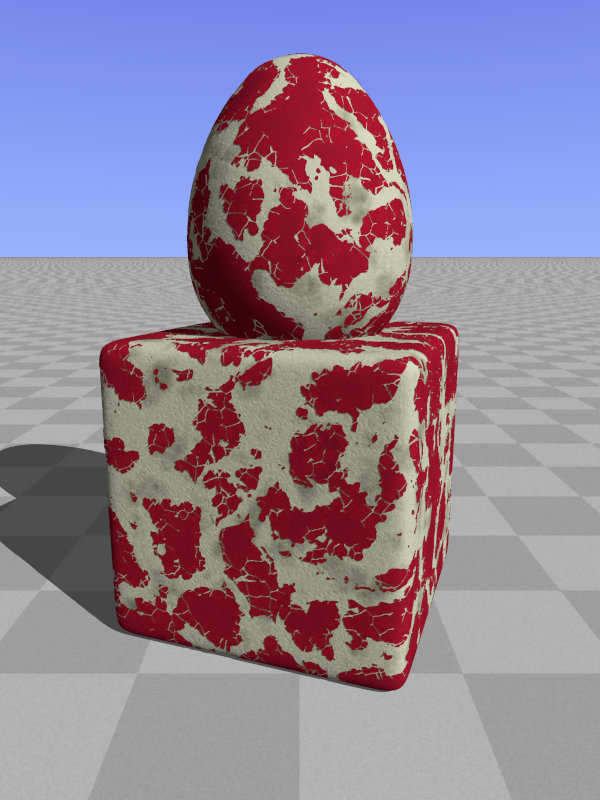
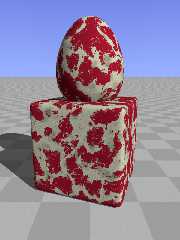
For a new scene, I have been working on a peeling paint texture. What do
you think?

Thomas
Post a reply to this message
Attachments:
Download 'peeling_test.png' (403 KB)
Preview of image 'peeling_test.png'
|
|
| |
| |
|
|
|
|
| |
| |
|
|
Le 22/05/2014 10:19, Thomas de Groot a écrit :
> For a new scene, I have been working on a peeling paint texture. What do
> you think?
>
> Thomas

Nice.
A bit too much peeled, assuming the paint is red.
The cracks are fine.
can you reduce the white big area, while keeping the cracks ?


--
Just because nobody complains does not mean all parachutes are perfect.
Post a reply to this message
|
|
| |
| |
|
|
|
|
| |
| |
|
|
On 22-5-2014 11:39, Le_Forgeron wrote:
> Nice.
> A bit too much peeled, assuming the paint is red.
> The cracks are fine.
> can you reduce the white big area, while keeping the cracks ?
>

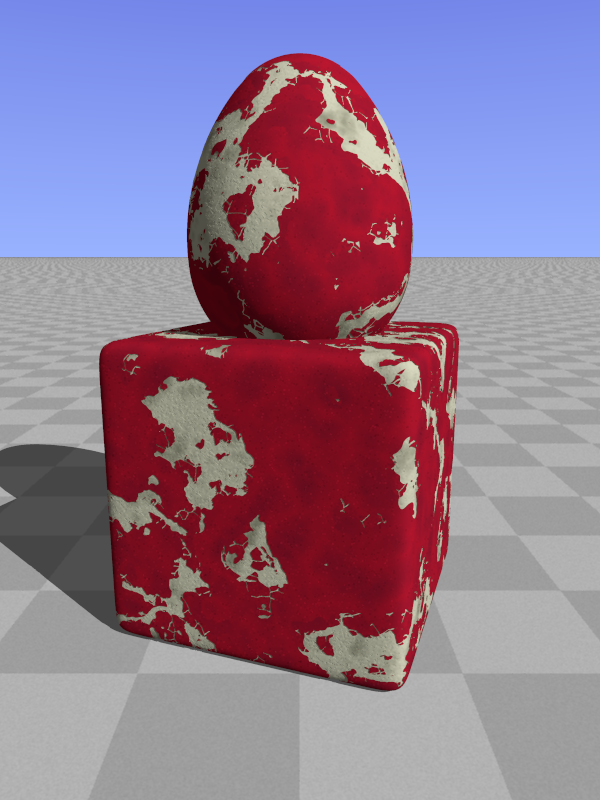
The code is a bit messy at present, but I work towards a macro that will
enable the whole range. For instance this image.

Thomas
Post a reply to this message
Attachments:
Download 'peeling_test.png' (337 KB)
Preview of image 'peeling_test.png'
|
|
| |
| |
|
|
|
|
| |
| |
|
|
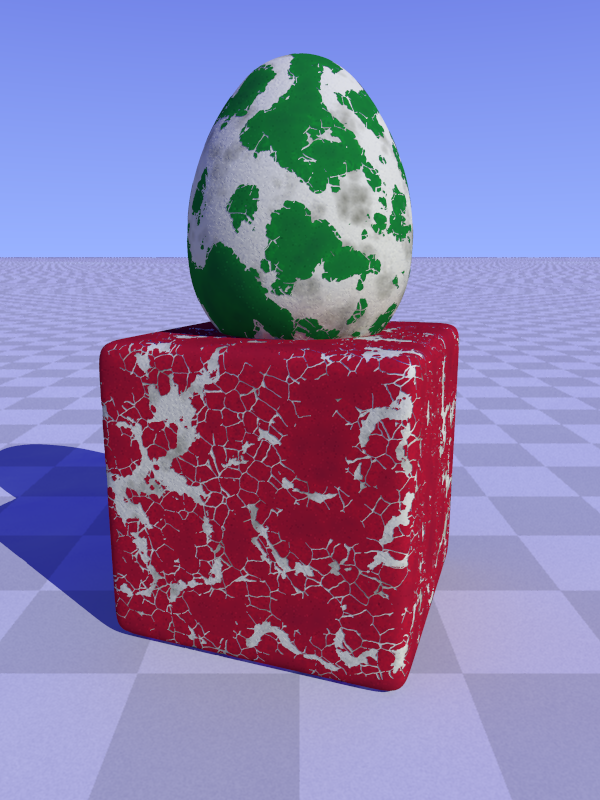
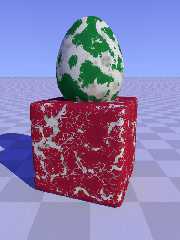
A first version of the macro would yield this.

Thomas
Post a reply to this message
Attachments:
Download 'peeling_test.png' (479 KB)
Preview of image 'peeling_test.png'
|
|
| |
| |
|
|
|
|
| |
| |
|
|
Le 22/05/2014 13:38, Thomas de Groot a écrit :
> A first version of the macro would yield this.
>
> Thomas

lovely.

The red is paint... crackling, peeling. So real.

The green might be interesting for moss if a quick gradient is available
at the boundary... give me a finger, I take the whole arm!

--
Just because nobody complains does not mean all parachutes are perfect.
Post a reply to this message
|
|
| |
| |
|
|
|
|
| |
| |
|
|
On 22-5-2014 16:05, Le_Forgeron wrote:
> lovely.
>
> The red is paint... crackling, peeling. So real.
>
> The green might be interesting for moss if a quick gradient is available
> at the boundary... give me a finger, I take the whole arm!
>

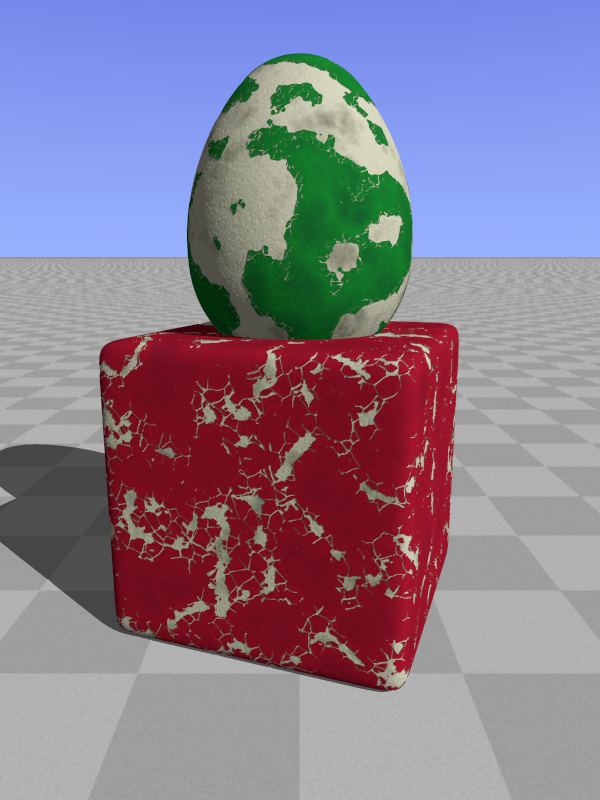
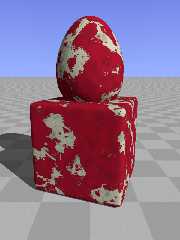
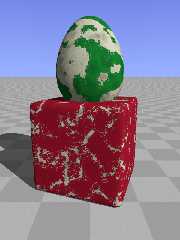
My final macro (for the time being?) gives the following output. Paint
can be peeled from 0 to 100%.

I shall post the macro in p.b.s-f. Usage is included.

Enjoy!

Thomas
Post a reply to this message
Attachments:
Download 'peeling_test.png' (371 KB)
Preview of image 'peeling_test.png'
|
|
| |
| |
|
|
|
|
| |
| |
|
|
On 22-5-2014 16:05, Le_Forgeron wrote:
> The green might be interesting for moss if a quick gradient is available
> at the boundary... give me a finger, I take the whole arm!
>

To me, moss would need a different kind of macro...

I have not done it (yet) but you might want to use the macro in
combination with a proximity pattern.

Thomas
Post a reply to this message
|
|
| |
| |
|
|
|
|
| |
| |
|
|
Thomas de Groot <tho### [at] degroot org> wrote:
> For a new scene, I have been working on a peeling paint texture. What do
> you think?
The cracking looks great. It doesn't look like it's peeling, though. (PeelED,
yes; peelING, no.) org> wrote:
> For a new scene, I have been working on a peeling paint texture. What do
> you think?
The cracking looks great. It doesn't look like it's peeling, though. (PeelED,
yes; peelING, no.)
Post a reply to this message
|
|
| |
| |
|
|
|
|
| |
| |
|
|
On 23/05/14 19:11, Cousin Ricky wrote:
> Thomas de Groot <tho### [at] degrootorg> wrote:
>> For a new scene, I have been working on a peeling paint texture. What do
>> you think?
>
> The cracking looks great.  It doesn't look like it's peeling, though.  (PeelED,
> yes; peelING, no.)
>
>
So, improve it. Thomas has given us a starting position.

Don't criticise, improve

John
--
Protect the Earth
It was not given to you by your parents
You hold it in trust for your children
Post a reply to this message
|
|
| |
| |
|
|
|
|
| |
| |
|
|
Doctor John <j.g### [at] gmailcom> wrote:
> On 23/05/14 19:11, Cousin Ricky wrote:
> > Thomas de Groot <tho### [at] degrootorg> wrote:
> >> For a new scene, I have been working on a peeling paint texture. What do
> >> you think?
> >
> > The cracking looks great.  It doesn't look like it's peeling, though.  (PeelED,
> > yes; peelING, no.)
> >
> >
> So, improve it. Thomas has given us a starting position.
>
> Don't criticise, improve

Thomas asked us what we think; what was I supposed to say?  In order to improve,
one must know what to improve.  But the way I saw it, this is Thomas's texture,
and I was leaving it up to him to carry it in whatever direction he desires.

Racking my brain a bit, I recalled the cracked mud in "Age of Innocence"
(Cathy's World).  Perhaps the peeling effect in that texture can somehow be
merged with the cracked paint texture.
Post a reply to this message
|
|
| |
| |
|
|
|
|
| |
| |
|
|
On 23/05/2014 20:01, Cousin Ricky wrote:
> Thomas asked us what we think; what was I supposed to say?

Yes, to me it is peeled. Peeling needs another dimension. It is very
good as Thomas's textures generally are.

--

Regards
     Stephen
Post a reply to this message
|
|
| |
| |
|
|
|
|
| |
| |
|
|
On 23-5-2014 20:11, Cousin Ricky wrote:
> Thomas de Groot <tho### [at] degrootorg> wrote:
>> For a new scene, I have been working on a peeling paint texture. What do
>> you think?
>
> The cracking looks great.  It doesn't look like it's peeling, though.  (PeelED,
> yes; peelING, no.)
>
>
Aaahh... I would like it to /peel/ indeed, but how? The peeling should
follow the texture. I have experimented with some mesh generation but
that remains totally unconvincing.

Your mention of Age of Innocence is correct but that will not work here
and it only concerns the cracking not the peeling.

I need somebody smart... ;-)

Thomas
Post a reply to this message
|
|
| |
| |
|
|
|
|
| |
| |
|
|
On 23-5-2014 22:09, Stephen wrote:
> On 23/05/2014 20:01, Cousin Ricky wrote:
>> Thomas asked us what we think; what was I supposed to say?
>
> Yes, to me it is peeled. Peeling needs another dimension. It is very
> good as Thomas's textures generally are.
>

Thanks Stephen. As said above, the peeling is the most difficult part
and I do not know how to do that presently. However, I am quite
satisfied with the texture :-)

Thomas
Post a reply to this message
|
|
| |
| |
|
|
|
|
| |
| |
|
|
On 23-5-2014 20:34, Doctor John wrote:
> On 23/05/14 19:11, Cousin Ricky wrote:
>> The cracking looks great.  It doesn't look like it's peeling, though.  (PeelED,
>> yes; peelING, no.)
>>
>>
> So, improve it. Thomas has given us a starting position.
>
> Don't criticise, improve
>

It is a challenge for all of us ;-)

Somehow, I am certain there is somebody somewhere who would know exactly
what to do...

Thomas
Post a reply to this message
|
|
| |
| |
|
|
From: Thomas de Groot
Subject: Re: Peeling paint texture: Urbex wip
Date: 24 May 2014 07:39:47
Message: <53808503@news.povray.org>
|
|
|
| |
| |
|
|
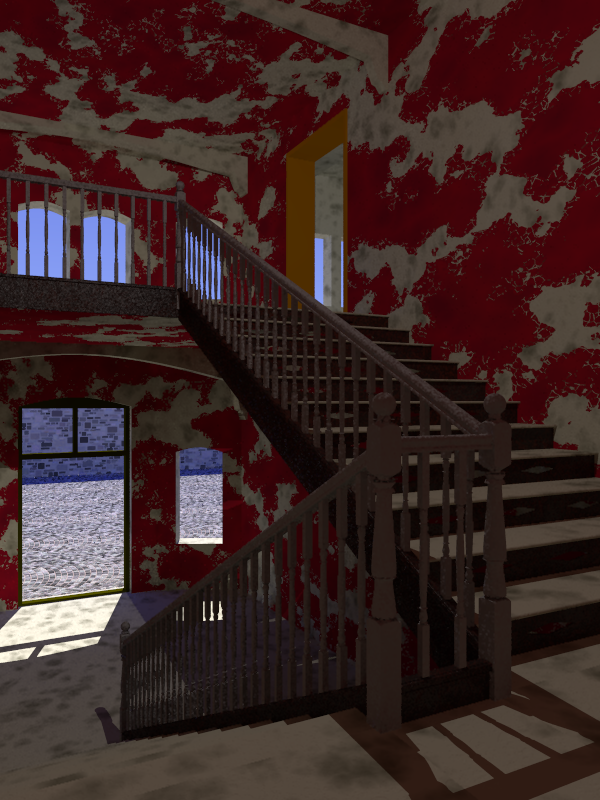
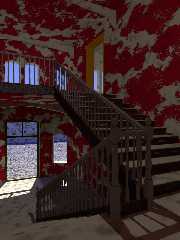
It is maybe a bit too soon, but I would like to show what the texture is
presently used for.

I have taken as a working basis a photograph by Urbex (Urban
Exploration) photographer Daanoe (http://www.daanoe.nl/en/): German
Hospital aka Red.

The scene is heavily under construction, not in the least because
degradation of structures is quite difficult to achieve in a natural
looking way.

Staircase, outside pavement, and outside wall, are macros by Chris B.
The building is mesh2 using Silo.

Thomas
Post a reply to this message
Attachments:
Download 'urbex.png' (567 KB)
Preview of image 'urbex.png'
|
|
| |
| |
|
|
|
|
| |
| |
|
|
On 24/05/2014 12:10, Thomas de Groot wrote:
> On 23-5-2014 22:09, Stephen wrote:
>> On 23/05/2014 20:01, Cousin Ricky wrote:
>>> Thomas asked us what we think; what was I supposed to say?
>>
>> Yes, to me it is peeled. Peeling needs another dimension. It is very
>> good as Thomas's textures generally are.
>>
>
> Thanks Stephen. As said above, the peeling is the most difficult part
> and I do not know how to do that presently. However, I am quite
> satisfied with the texture :-)
>

Well it is a texture and it looks great in your hospital image.
We cannot expect lifting and curling of a surface to be more than an
impression unless the surface is actually uneven. Normals help but
shadows and edges give the game away.
Your texture works perfectly in your dilapidated hospital.


--

Regards
     Stephen
Post a reply to this message
|
|
| |
| |
|
|
|
|
| |
| |
|
|
On 24-5-2014 15:01, Stephen wrote:
> Well it is a texture and it looks great in your hospital image.
> We cannot expect lifting and curling of a surface to be more than an
> impression unless the surface is actually uneven. Normals help but
> shadows and edges give the game away.
> Your texture works perfectly in your dilapidated hospital.
>
>
Indeed. And yet, as I constantly compare the image with the original, I
feel the need for curling edges, especially where you expect their
shadows to be. I would like to go beyond the texture.

Maybe I should do something with EvalPig()... I am stuck, no doubt about
it :-)

Thomas
Post a reply to this message
|
|
| |
| |
|
|
|
|
| |
| |
|
|
On 24/05/2014 15:11, Thomas de Groot wrote:
> On 24-5-2014 15:01, Stephen wrote:
>> Well it is a texture and it looks great in your hospital image.
>> We cannot expect lifting and curling of a surface to be more than an
>> impression unless the surface is actually uneven. Normals help but
>> shadows and edges give the game away.
>> Your texture works perfectly in your dilapidated hospital.
>>
>>
> Indeed. And yet, as I constantly compare the image with the original, I
> feel the need for curling edges, especially where you expect their
> shadows to be. I would like to go beyond the texture.
>
> Maybe I should do something with EvalPig()... I am stuck, no doubt about
> it :-)
>

I don't see how it can be faked. The Mesh route is too mich, I think.
Do you think that it would be possible to throw triangles at it using trace?


--

Regards
     Stephen
Post a reply to this message
|
|
| |
| |
|
|
|
|
| |
| |
|
|
On 24-5-2014 18:34, Stephen wrote:
> I don't see how it can be faked. The Mesh route is too mich, I think.
> Do you think that it would be possible to throw triangles at it using
> trace?
>

Faking is impossible indeed as far as I can judge. As a prove of
concept, I have written a macro that draws little triangles randomly
down from a surface, but that is totally ugly. I wonder how one could
trace the paint boundary and place little pre-made peels of paint there,
correctly oriented of course ;-)

Thomas
Post a reply to this message
|
|
| |
| |
|
|
|
|
| |
| |
|
|
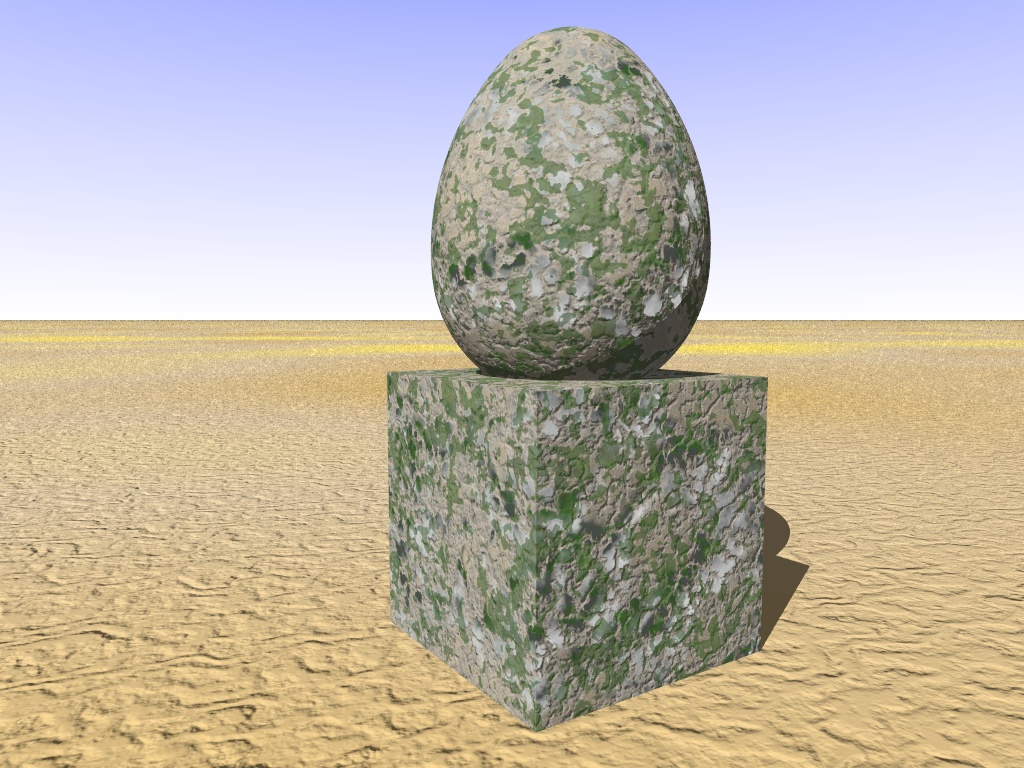
>Thomas de Groot  on date 22/05/2014 10.19 wrote:
> For a new scene, I have been working on a peeling paint texture. What do
> you think?
>
> Thomas
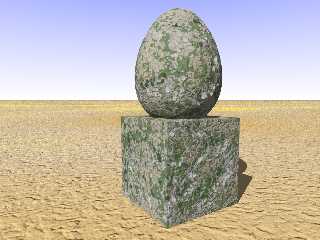
Nice texture, It remembers somehow the one I used for an old IRTC entry.
My start point was a tutorial of Alex Ivanov (the link seems to be no
longer active).
;-)
Paolo

-----

#declare t_stone=texture{
	pigment{
         granite
         color_map {
            [0.0 rgb<0.67, 0.50, 0.32>]
            [1.0 rgb<0.94, 0.88, 0.79>]
         }
         turbulence 0.75
         ramp_wave
         scale  0.01
	}
}

#declare t_grunge_wall=	texture{pigment{color rgbt <0.8,0.8,1,1>}}
	texture{
	    pigment {
	        granite
	        color_map {
	            [0.0 rgbt <0.60, 0.60, 0.60, 0.005>]
	            [0.4 rgbt <0.70, 0.70, 0.70, 0.007>]
	            [0.5 rgbt <0.70, 0.70, 0.70,1>]
	            [0.6 rgbt <0.50, 0.50, 0.50,1>]
	            [1.0 rgbt <0.60, 0.60, 0.60,1>]
			}
		}
		normal{
			granite 1.2
		}
	}
	texture{
	    pigment {
	        granite
	        color_map {
	            [0.0 rgbt <0.60, 0.55, 0.50, 0.005>]
	            [0.4 rgbt <0.70, 0.60, 0.50, 0.007>]
	            [0.5 rgbt <0.70, 0.65, 0.60,1>]
	            [0.6 rgbt <0.50, 0.45, 0.40,1>]
	            [1.0 rgbt <0.60, 0.55, 0.50,1>]
			}
		}
		normal{
			granite 0.6
		}
		rotate 20*z
		scale 0.1
	}

#declare t_grunge_moss=texture{
	pigment{
		bumps
         color_map {
             [0.0 rgbt <0.11, 0.29, 0.02, 0.31>]
             [0.4 rgbt <0.03, 0.15, 0.00, 0.32>]
             [0.45 rgbt <0.03, 0.20, 0.00, 0.32>]
             [0.5 rgbt <0.11, 0.25, 0.00, 1>]
             [0.6 rgbt <0.03, 0.19, 0.08, 0.8>]
             [1.0 rgbt <0.11, 0.29, 0.02, 0.9>]
		}
		turbulence 1.5
	}
	normal {
		bumps 0.6
		turbulence 1.5
	}
	scale .04
}

#declare t_final=	texture{t_stone}
			texture{t_grunge_wall}
			texture{t_grunge_moss}
Post a reply to this message
Attachments:
Download 'm_texture_030.jpg' (298 KB)
Preview of image 'm_texture_030.jpg'
|
|
| |
| |
|
|
|
|
| |
| |
|
|
Am 04.06.2014 13:31, schrieb Paolo Gibellini:
>  >Thomas de Groot  on date 22/05/2014 10.19 wrote:
>> For a new scene, I have been working on a peeling paint texture. What do
>> you think?
>>
>> Thomas
> Nice texture, It remembers somehow the one I used for an old IRTC entry.
> My start point was a tutorial of Alex Ivanov (the link seems to be no
> longer active).
> ;-)

Now that's one living breathing texture.
Post a reply to this message
|
|
| |
| |
|
|
|
|
| |
| |
|
|
>clipka  on date 04/06/2014 23.29 wrote:
> Am 04.06.2014 13:31, schrieb Paolo Gibellini:
>>  >Thomas de Groot  on date 22/05/2014 10.19 wrote:
>>> For a new scene, I have been working on a peeling paint texture.
> Now that's one living breathing texture.
>
Thank you!
;-)
Paolo
Post a reply to this message
|
|
| |
| |
|
|
|
|
| |