|
|
|
|
|
|
| |
| |
|
|
|
|
| |
| |
|
|
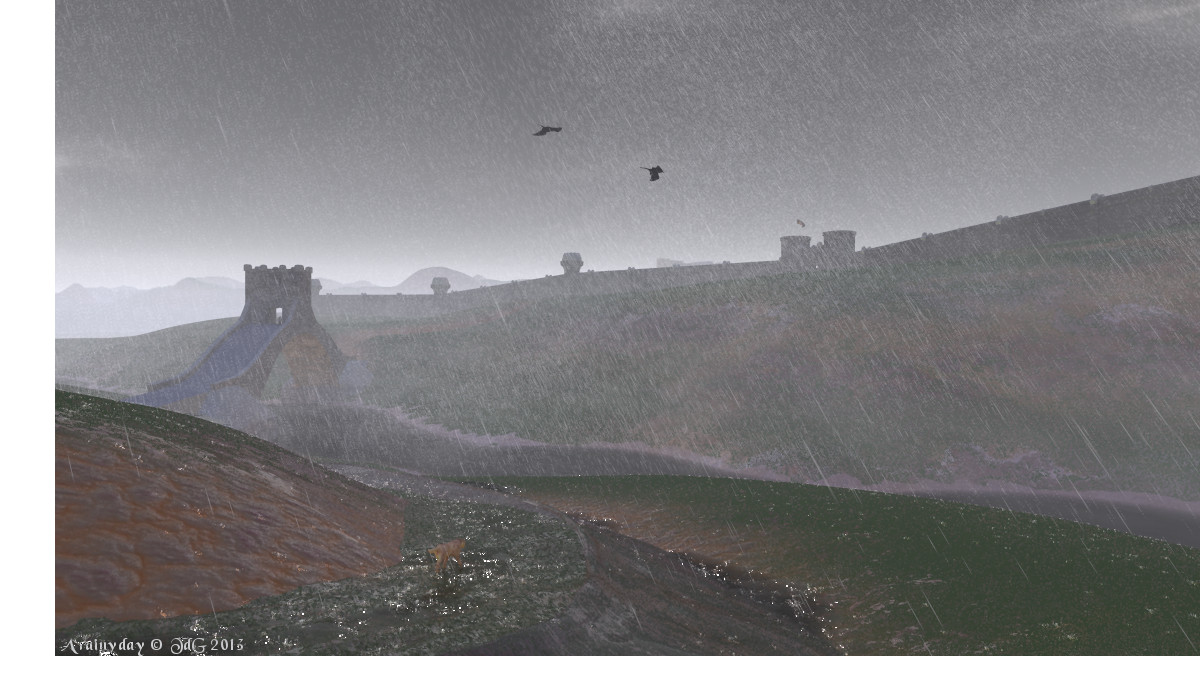
The road leading to the city was in such bad conditions that it needed a
new embankment. Its texture took some time. After a couple of weeks of
painstakingly testing and testing again I have come up with a compromise
I can live with.

Here, the third rain macro of Jaime has been used: rain splashes with
rings on a water surface. These are the pools on the road surface and at
the base of the road embankment.

Those splashes are a bit too bright to my taste. I already dimmed the
emission value as can be seen from the splashes on the rocks but
somehow, the splashes on the water get brighter perhaps because of the
reflection.

Thomas
Post a reply to this message
Attachments:
Download 'gancaloon_two4joy_06.jpg' (179 KB)
Preview of image 'gancaloon_two4joy_06.jpg'
|
|
| |
| |
|
|
|
|
| |
| |
|
|
Hi Thomas,

yes the splashes are a bit too bright, but I think you are working on them.
Otherwise it renders the mood of very wet weather very well. The birds give a
little bit life to the scene. I would add a lone walker close to the brigde and
close to safety as well.

Fine art so far,
Michael
Post a reply to this message
|
|
| |
| |
|
|
|
|
| |
| |
|
|
On 24/10/13 17:51, MichaelJF wrote:
> Hi Thomas,
>
> yes the splashes are a bit too bright, but I think you are working on them.
> Otherwise it renders the mood of very wet weather very well. The birds give a
> little bit life to the scene. I would add a lone walker close to the brigde and
> close to safety as well.
>
> Fine art so far,
> Michael
>
>
Surely there is a small figure sheltering in the middle of the gateway.
Or is that an illusion?

BTW Great work, as usual, Thomas

John
--
Protect the Earth
It was not given to you by your parents
You hold it in trust for your children
Post a reply to this message
|
|
| |
| |
|
|
|
|
| |
| |
|
|
On 24-10-2013 18:51, MichaelJF wrote:
> Hi Thomas,
>
> yes the splashes are a bit too bright, but I think you are working on them.
> Otherwise it renders the mood of very wet weather very well. The birds give a
> little bit life to the scene. I would add a lone walker close to the brigde and
> close to safety as well.
>
> Fine art so far,
> Michael
>
>

Thanks indeed. The splashes are still of some concern to me and I shall
experiment further. I also slightly changed the road texture too. There
is too much 'green' in this version.

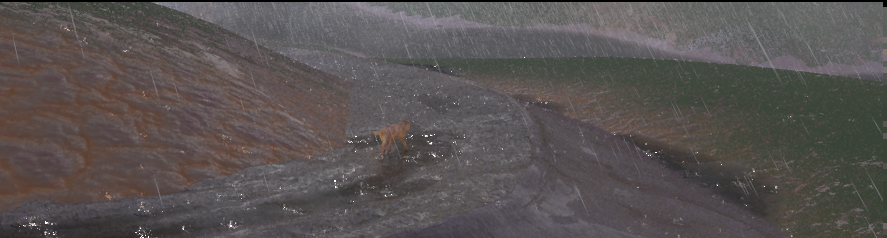
There is a lone, wet dog on the road in the foreground ;-)

There is indeed a figure on the bridge too. Well spotted, John!

I intend to add some trees, and stones on the embankment. For the need
of the tale, a couple of figures are going to appear soon.

Thomas
Post a reply to this message
|
|
| |
| |
|
|
|
|
| |
| |
|
|
On 24-10-2013 22:59, Doctor John wrote:
> Surely there is a small figure sheltering in the middle of the gateway.
> Or is that an illusion?
>
> BTW Great work, as usual, Thomas

Thanks John. I am going to release soon the changed rain macros. When I
get my splashes right.

Thomas
Post a reply to this message
|
|
| |
| |
|
|
From: Thomas de Groot
Subject: Re: Bad weather in Gancaloon: wip 4 -- the macros
Date: 25 Oct 2013 10:26:49
Message: <526a7fa9@news.povray.org>
|
|
|
| |
| |
|
|
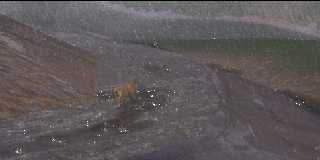
I have posted the used rain macros in p.b.s-f.

I have tried rather unsuccessfully to get rid of the bright highlights
of the splashes in the water pools (see image). If somebody has a
/bright/ idea about this instead...

Thomas
Post a reply to this message
Attachments:
Download 'gancaloon.png' (312 KB)
Preview of image 'gancaloon.png'
|
|
| |
| |
|
|
|
|
| |
| |
|
|
> I have tried rather unsuccessfully to get rid of the bright highlights
> of the splashes in the water pools (see image). If somebody has a
> /bright/ idea about this instead...

Maybe a very small amount of focal blur would help?
Post a reply to this message
|
|
| |
| |
|
|
|
|
| |
| |
|
|
Thomas de Groot <tho### [at] degroot org> wrote:
> I have posted the used rain macros in p.b.s-f.
>
> I have tried rather unsuccessfully to get rid of the bright highlights
> of the splashes in the water pools (see image). If somebody has a
> /bright/ idea about this instead...
>
> Thomas
Hi Thomas,
that is really hard to judge without the full code. If I understand the
function{abs(y)} used in p_drop_base correct your splashes should have a clear
pigment at the base (rgbt <0,0,0,0>) and rgbt <1,1,1,0.416> at the top (of the
cylindrical part). But that should not cause this very bright white spots. But I
admit that function patterns and double_illuminate are still at my to do list
(volume IX page 317 ;-). Have you changed the back_ground color to white? Sorry
no further ideas so far.
Best regards,
Michael org> wrote:
> I have posted the used rain macros in p.b.s-f.
>
> I have tried rather unsuccessfully to get rid of the bright highlights
> of the splashes in the water pools (see image). If somebody has a
> /bright/ idea about this instead...
>
> Thomas
Hi Thomas,
that is really hard to judge without the full code. If I understand the
function{abs(y)} used in p_drop_base correct your splashes should have a clear
pigment at the base (rgbt <0,0,0,0>) and rgbt <1,1,1,0.416> at the top (of the
cylindrical part). But that should not cause this very bright white spots. But I
admit that function patterns and double_illuminate are still at my to do list
(volume IX page 317 ;-). Have you changed the back_ground color to white? Sorry
no further ideas so far.
Best regards,
Michael
Post a reply to this message
|
|
| |
| |
|
|
|
|
| |
| |
|
|
Doctor John <j.g### [at] gmailcom> wrote:
> On 24/10/13 17:51, MichaelJF wrote:
> > Hi Thomas,
> >
> > yes the splashes are a bit too bright, but I think you are working on them.
> > Otherwise it renders the mood of very wet weather very well. The birds give a
> > little bit life to the scene. I would add a lone walker close to the brigde and
> > close to safety as well.
> >
> > Fine art so far,
> > Michael
> >
> >
> Surely there is a small figure sheltering in the middle of the gateway.
> Or is that an illusion?
>
> BTW Great work, as usual, Thomas
>
> John
> --
> Protect the Earth
> It was not given to you by your parents
> You hold it in trust for your children

As you mentioned it, I spotted the figure too. Please excuse my low eye sight
here. I'm suffering from a very rare eye disease. Sometimes I see more than
others sometimes less. A change in visus during the day is typical for my
disease (a ceratoconus). So please forgive me, that I overlooked the figure at
the bridge.

Best regards,
Michael
Post a reply to this message
|
|
| |
| |
|
|
|
|
| |
| |
|
|
On 25-10-2013 19:55, MichaelJF wrote:
>
> As you mentioned it, I spotted the figure too. Please excuse my low eye sight
> here. I'm suffering from a very rare eye disease. Sometimes I see more than
> others sometimes less. A change in visus during the day is typical for my
> disease (a ceratoconus). So please forgive me, that I overlooked the figure at
> the bridge.

There is nothing to forgive, Michael. In any case the figure could be
very easily overlooked by anyone. One thing that its size underscores is
that the bridge was built in a time of wealth and power: large, able to
cope with lots of travellers at the same time. In the time of the image,
power has dwindled and even the original gateway has been reduced in size.

I think I remember that you mentioned your low eye sight before. To be
deprived of even a part of it is very handicapping indeed.

Thomas
Post a reply to this message
|
|
| |
| |
|
|
From: Thomas de Groot
Subject: Re: Bad weather in Gancaloon: wip 4 -- the macros
Date: 26 Oct 2013 03:28:41
Message: <526b6f29$1@news.povray.org>
|
|
|
| |
| |
|
|
On 25-10-2013 18:09, MichaelJF wrote:
> that is really hard to judge without the full code. If I understand the
> function{abs(y)} used in p_drop_base correct your splashes should have a clear
> pigment at the base (rgbt <0,0,0,0>) and rgbt <1,1,1,0.416> at the top (of the
> cylindrical part). But that should not cause this very bright white spots. But I
> admit that function patterns and double_illuminate are still at my to do list
> (volume IX page 317 ;-). Have you changed the back_ground color to white? Sorry
> no further ideas so far.

I am not yet sure about what causes it. Essentially, I use Jaime's
texture, only a little adapted in the case of the splashes. They are
almost transparent. It seems to have to do with splashes on a water
surface. I am still trying to exclude causes.

Thomas
Post a reply to this message
|
|
| |
| |
|
|
From: Thomas de Groot
Subject: Re: Bad weather in Gancaloon: wip 4 -- the macros
Date: 26 Oct 2013 03:29:38
Message: <526b6f62$1@news.povray.org>
|
|
|
| |
| |
|
|
On 25-10-2013 16:56, scott wrote:
> Maybe a very small amount of focal blur would help?

It would not make the bright spots/pixels disappear I am afraid.

Thomas
Post a reply to this message
|
|
| |
| |
|
|
|
|
| |
| |
|
|
Thomas de Groot <tho### [at] degrootorg> wrote:
> On 25-10-2013 18:09, MichaelJF wrote:
> > that is really hard to judge without the full code. If I understand the
> > function{abs(y)} used in p_drop_base correct your splashes should have a clear
> > pigment at the base (rgbt <0,0,0,0>) and rgbt <1,1,1,0.416> at the top (of the
> > cylindrical part). But that should not cause this very bright white spots. But I
> > admit that function patterns and double_illuminate are still at my to do list
> > (volume IX page 317 ;-). Have you changed the back_ground color to white? Sorry
> > no further ideas so far.
>
> I am not yet sure about what causes it. Essentially, I use Jaime's
> texture, only a little adapted in the case of the splashes. They are
> almost transparent. It seems to have to do with splashes on a water
> surface. I am still trying to exclude causes.
>
> Thomas

What i meant with the question after a white background is the possibility of an
max trace level issue.
Post a reply to this message
|
|
| |
| |
|
|
From: Thomas de Groot
Subject: Re: Bad weather in Gancaloon: wip 4 -- the macros
Date: 27 Oct 2013 03:54:33
Message: <526cc6b9$1@news.povray.org>
|
|
|
| |
| |
|
|
On 26-10-2013 17:43, MichaelJF wrote:
> What i meant with the question after a white background is the possibility of an
> max trace level issue.

An interesting suggestion. I have no background defined, so it should be
black (default). However, I shall test with a higher max_trace value, to
be sure.

Thomas
Post a reply to this message
|
|
| |
| |
|
|
From: Thomas de Groot
Subject: Re: Bad weather in Gancaloon: wip 4 -- the macros
Date: 30 Oct 2013 11:15:58
Message: <527122ae$1@news.povray.org>
|
|
|
| |
| |
|
|
On 26-10-2013 17:43, MichaelJF wrote:
> What i meant with the question after a white background is the possibility of an
> max trace level issue.

After testing: no, as expected.

Note: a new version of the rain macros is posted in p.b.s-f.

Thomas
Post a reply to this message
|
|
| |
| |
|
|
|
|
| |
| |
|
|
Thomas de Groot <tho### [at] degrootorg> wrote:
> On 26-10-2013 17:43, MichaelJF wrote:
> > What i meant with the question after a white background is the possibility of an
> > max trace level issue.
>
> After testing: no, as expected.

It was only a desperate idea. With a black (default) background not very likely.
I found another image with strange white areas within a glass-object popping up
as a wallpaper at my screen (I use nearly all IRTC entries which I can render
without to much work as wallpapers) but have not found the code so far. I
suspect some issue with ior here but I'm not sure about it. Unfortunatelly RL
issues are demanding at the moment and I encounter problems with my lightning
appraoch, I have not expected.

Best regards,
Michael
Post a reply to this message
|
|
| |
| |
|
|
From: Thomas de Groot
Subject: Re: Bad weather in Gancaloon: wip 4 -- the macros
Date: 31 Oct 2013 03:50:27
Message: <52720bc3$1@news.povray.org>
|
|
|
| |
| |
|
|
On 30-10-2013 20:23, MichaelJF wrote:
> It was only a desperate idea. With a black (default) background not very likely.
> I found another image with strange white areas within a glass-object popping up
> as a wallpaper at my screen (I use nearly all IRTC entries which I can render
> without to much work as wallpapers) but have not found the code so far. I
> suspect some issue with ior here but I'm not sure about it. Unfortunatelly RL
> issues are demanding at the moment and I encounter problems with my lightning
> appraoch, I have not expected.
>

I am still a bit puzzled as the problem does not happen in other
settings, like Jaime's original demo scene which I use for testing. For
now, I have opted for switching off the splash in that particular case.

Thomas
Post a reply to this message
|
|
| |
| |
|
|
|
|
| |