|
|
|
|
|
|
| |
| |
|
|
|
|
| |
| |
|
|
On 27/05/2013 11:44 PM, James Holsenback wrote:> On 05/27/2013 10:22 AM,
Stephen wrote:
 >> FYI
 >> If I export the model as an OBJ then import it into a new scene. It will
 >> render in Pov.
 >>
 >
 > have you tried saving as blender file ... then render? i've had some
 > problems when i import 3ds files, do some cleanup then re-export the
 > modified file as 3ds for use with poseray. some minor problems with
 > origin cleared up when i did save 1st ... then export

Not too sure what you mean when you say "saving", saving what?

If I export a mesh as 3ds then import it, some objects are displaced.
If I export a mesh as Obj then import it, it is fine.
Both methods loose any hierarchies built using "empty" objects.
Using 3ds I have to scale up by 100 after importing.
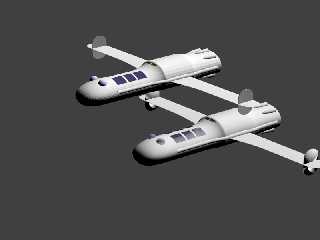
3ds imported model is not as smooth as the Obj one. (See attached image,
3ds is the one at the top. Incidentally Blender hung after Pov rendered
this and I had to cheat to render it to post it here.)

Question:
How do you pass commands from Blender to PovRay. Such as output types
and save file?
How do you pass PovRay materials in Blender?

I'm too new to Blender I should not be trying to run before I can walk.
But heigh ho! that's life.


--
Regards
     Stephen
Post a reply to this message
Attachments:
Download 'xtmp3ufugo.png' (70 KB)
Preview of image 'xtmp3ufugo.png'
|
|
| |
| |
|
|
From: James Holsenback
Subject: Re: Continuing Blender-PovRay discussion
Date: 28 May 2013 05:11:41
Message: <51a474cd@news.povray.org>
|
|
|
| |
| |
|
|
On 05/28/2013 03:39 AM, Stephen wrote:
> Not too sure what you mean when you say "saving", saving what?

saving the imported 3ds object as .blender file first before doing a
povray render from with-in blender ... more of a curiosity on my part
than anything else because of the problem that i'm seeing!

>
> If I export a mesh as 3ds then import it, some objects are displaced.

it /seems/ to be with how the object was built. now i'm speaking in pov.
-z behind, -x left +x right.

example: my current project 8 melted candles on a box, wax dripping down
over the edge.  the candles are roughly in two rows and the x position
is flipped: instead of 1-2-3-4 i get 2-1-4-3. i took each of the candles
(and wicks) cleared rotation, location, scale and origin, then properly
built the object centered at 0,0,0 the placed them in the scene. setting
of the origin seems key. now i'm able to select the wick of each candle
then snap 3d cursor to the wick for /proper/ location information,
because in povray i'm going to place a media/light source flame on each
candle.

> If I export a mesh as Obj then import it, it is fine.
> Both methods loose any hierarchies built using "empty" objects.
> Using 3ds I have to scale up by 100 after importing.
> 3ds imported model is not as smooth as the Obj one. (See attached image,
> 3ds is the one at the top. Incidentally Blender hung after Pov rendered
> this and I had to cheat to render it to post it here.)
>
> Question:
> How do you pass commands from Blender to PovRay. Such as output types
> and save file?

the render options tab (little camera)

> How do you pass PovRay materials in Blender?

i don't do that ... usually just add simple texture to identify in
scene. i do material work either in pose or pov ... ray

>
> I'm too new to Blender I should not be trying to run before I can walk.
> But heigh ho! that's life.

for sure i'm no expert either
Post a reply to this message
|
|
| |
| |
|
|
|
|
| |
| |
|
|
On 28/05/2013 10:11 AM, James Holsenback wrote:
> On 05/28/2013 03:39 AM, Stephen wrote:
>> Not too sure what you mean when you say "saving", saving what?
>
> saving the imported 3ds object as .blender file first before doing a
> povray render from with-in blender ... more of a curiosity on my part
> than anything else because of the problem that i'm seeing!
>

That is what I thought you meant but I wanted to be sure.
It does not seem to make any difference to me.
Import > render - Okay
Import > save > render - Okay

What version are you using?
Blender seems to be updated daily and I now appreciate PovRay's version
control, more than ever.

My problem (one of them ;-) ) was scenes that I had created before
activating the PovRay addon did not render with Pov. But exporting the
models then importing them as meshes would allow me to render them in Pov.

>>
>> If I export a mesh as 3ds then import it, some objects are displaced.
>
> it /seems/ to be with how the object was built. now i'm speaking in pov.
> -z behind, -x left +x right.
>
> example: my current project 8 melted candles on a box, wax dripping down
> over the edge.  the candles are roughly in two rows and the x position
> is flipped: instead of 1-2-3-4 i get 2-1-4-3. i took each of the candles
> (and wicks) cleared rotation, location, scale and origin, then properly
> built the object centered at 0,0,0 the placed them in the scene. setting
> of the origin seems key. now i'm able to select the wick of each candle
> then snap 3d cursor to the wick for /proper/ location information,
> because in povray i'm going to place a media/light source flame on each
> candle.
>

That makes sense. I do try to create things at the origin. But it is too
easy to right click instead of left clicking to select. And change the
location of the 3D cursor.

>>
>> Question:
>> How do you pass commands from Blender to PovRay. Such as output types
>> and save file?
>
> the render options tab (little camera)
>

Thanks. :-)
>> How do you pass PovRay materials in Blender?
>
> i don't do that ... usually just add simple texture to identify in
> scene. i do material work either in pose or pov ... ray
>

Yes I remember. But since I am starting out I'll try to do things properly.

>>
>> I'm too new to Blender I should not be trying to run before I can walk.
>> But heigh ho! that's life.
>
> for sure i'm no expert either
>
I am too old to be able to spend the time becoming an expert. ;-)

--
Regards
     Stephen
Post a reply to this message
|
|
| |
| |
|
|
|
|
| |
| |
|
|
On 28/05/2013 11:40 AM, Stephen wrote:
>
> That makes sense. I do try to create things at the origin. But it is too
> easy to right click instead of left clicking to select. And change the
> location of the 3D cursor.


I told you!
Got it A for E again. :-)

--
Regards
     Stephen
Post a reply to this message
|
|
| |
| |
|
|
From: James Holsenback
Subject: Re: Continuing Blender-PovRay discussion
Date: 28 May 2013 08:48:13
Message: <51a4a78d@news.povray.org>
|
|
|
| |
| |
|
|
On 05/28/2013 05:11 AM, James Holsenback wrote:
> it /seems/ to be with how the object was built.

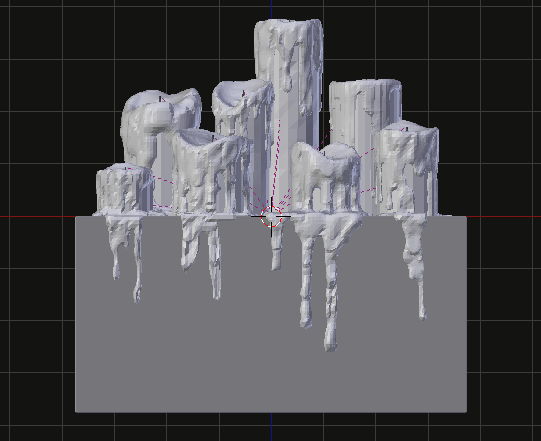
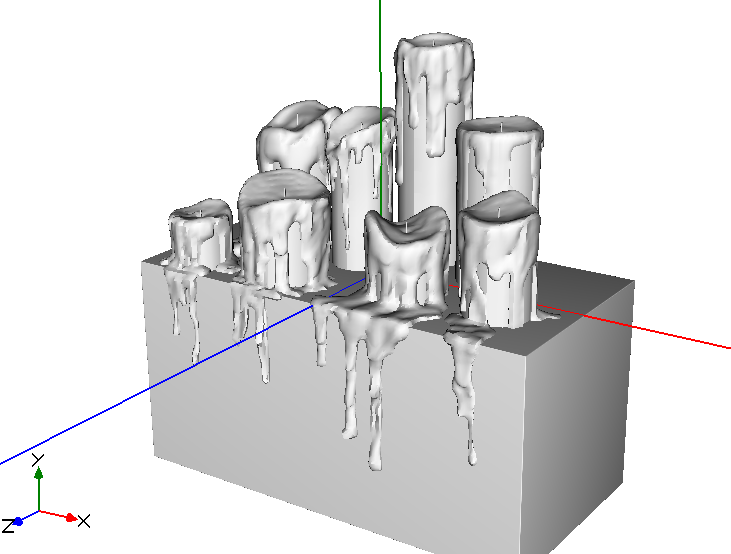
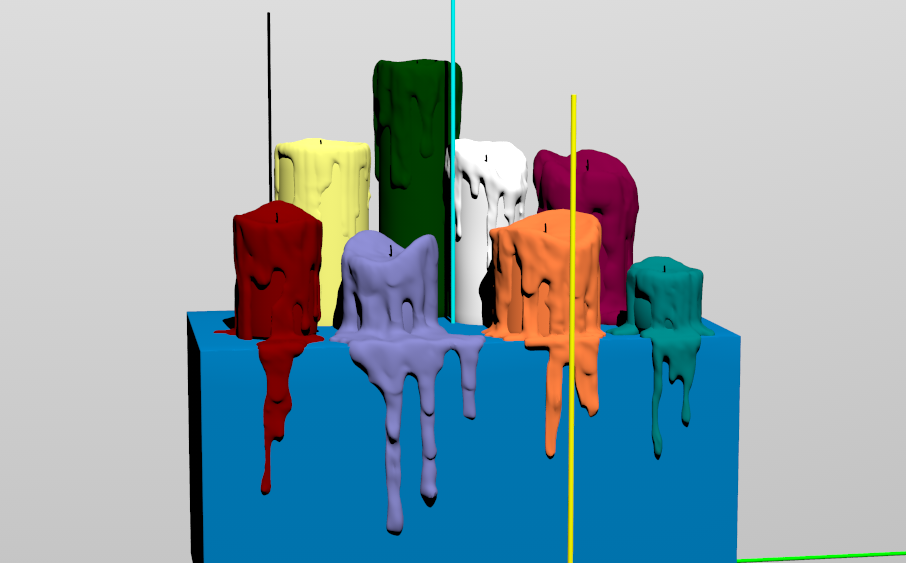
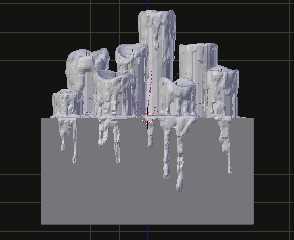
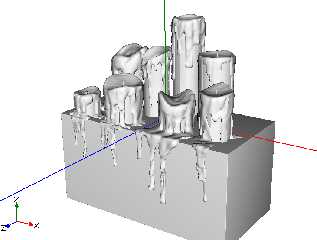
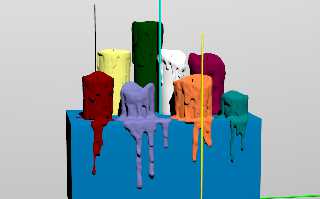
well now i'm not so sure about that anymore ... curious i did some
slightly more than casual tests. i'm starting to think it's how poseray
is exporting or how povray is parsing. the images are appropriately
titled, and the orientation problem doesn’t show up until i render the
output from poseray.
Post a reply to this message
Attachments:
Download 'blender.png' (75 KB)
Download 'poseray.png' (112 KB)
Download 'povray.png' (182 KB)
Preview of image 'blender.png'
Preview of image 'poseray.png'
Preview of image 'povray.png'
|
|
| |
| |
|
|
|
|
| |
| |
|
|
On 28/05/2013 1:47 PM, James Holsenback wrote:
> On 05/28/2013 05:11 AM, James Holsenback wrote:
>> it /seems/ to be with how the object was built.
>
> well now i'm not so sure about that anymore ... curious i did some
> slightly more than casual tests. i'm starting to think it's how poseray
> is exporting or how povray is parsing. the images are appropriately
> titled, and the orientation problem doesn’t show up until i render the
> output from poseray.

It's not something silly like PoseRay's default export handiness is
Right handiness?

I generally only export the geometry and change the handiness to Left
handiness (PovRay default).

--
Regards
     Stephen
Post a reply to this message
|
|
| |
| |
|
|
|
|
| |
| |
|
|
On 05/28/2013 09:02 AM, Stephen wrote:
> On 28/05/2013 1:47 PM, James Holsenback wrote:
>> On 05/28/2013 05:11 AM, James Holsenback wrote:
>>> it /seems/ to be with how the object was built.
>>
>> well now i'm not so sure about that anymore ... curious i did some
>> slightly more than casual tests. i'm starting to think it's how poseray
>> is exporting or how povray is parsing. the images are appropriately
>> titled, and the orientation problem doesn’t show up until i render the
>> output from poseray.
>
> It's not something silly like PoseRay's default export handiness is
> Right handiness?
>
> I generally only export the geometry and change the handiness to Left
> handiness (PovRay default).
>

nope ... on the input tab reorient 3ds and dfx models is checked if
that's what you're talking about. i do however see flip options in
groups tab
Post a reply to this message
|
|
| |
| |
|
|
|
|
| |
| |
|
|
On 28/05/2013 2:39 PM, James Holsenback wrote:
> i do however see flip options in groups tab


No, it is in the PovRay Output tab.
World axis orientation, again PoseRay scene (Right handiness)

I use PoseRay 3.12.2 as that is the highest version that Bishop3D will
import.

--
Regards
     Stephen
Post a reply to this message
|
|
| |
| |
|
|
|
|
| |
| |
|
|
On 28-5-2013 15:39, James Holsenback wrote:
> nope ... on the input tab reorient 3ds and dfx models is checked if
> that's what you're talking about. i do however see flip options in
> groups tab

Yep. Typically a world orientation choice in Poseray's POV-Ray Output,
like Stephen said, right-handed vs left-handed. Same in latest versions
of Poseray.

Thomas
Post a reply to this message
|
|
| |
| |
|
|
From: James Holsenback
Subject: Re: Continuing Blender-PovRay discussion
Date: 28 May 2013 10:28:54
Message: <51a4bf26@news.povray.org>
|
|
|
| |
| |
|
|
On 05/28/2013 10:01 AM, Stephen wrote:
> On 28/05/2013 2:39 PM, James Holsenback wrote:
>> i do however see flip options in groups tab
>
>
> No, it is in the PovRay Output tab.
> World axis orientation, again PoseRay scene (Right handiness)
>
> I use PoseRay 3.12.2 as that is the highest version that Bishop3D will
> import.
>

well hell .. give the man a cheroot
Post a reply to this message
|
|
| |
| |
|
|
|
|
| |
| |
|
|
On 28/05/2013 3:28 PM, James Holsenback wrote:
> On 05/28/2013 10:01 AM, Stephen wrote:
>> On 28/05/2013 2:39 PM, James Holsenback wrote:
>>> i do however see flip options in groups tab
>>
>>
>> No, it is in the PovRay Output tab.
>> World axis orientation, again PoseRay scene (Right handiness)
>>
>> I use PoseRay 3.12.2 as that is the highest version that Bishop3D will
>> import.
>>
>
> well hell .. give the man a cheroot

Cheroot? Well I suppose that will do. :-)

I keep doing the same thing myself. I wish that you could set a default.

--
Regards
     Stephen
Post a reply to this message
|
|
| |
| |
|
|
|
|
| |
| |
|
|
>Stephen  on date 28/05/2013 9.39 wrote:
> I'm too new to Blender I should not be trying to run before I can walk.
> But heigh ho! that's life.
>
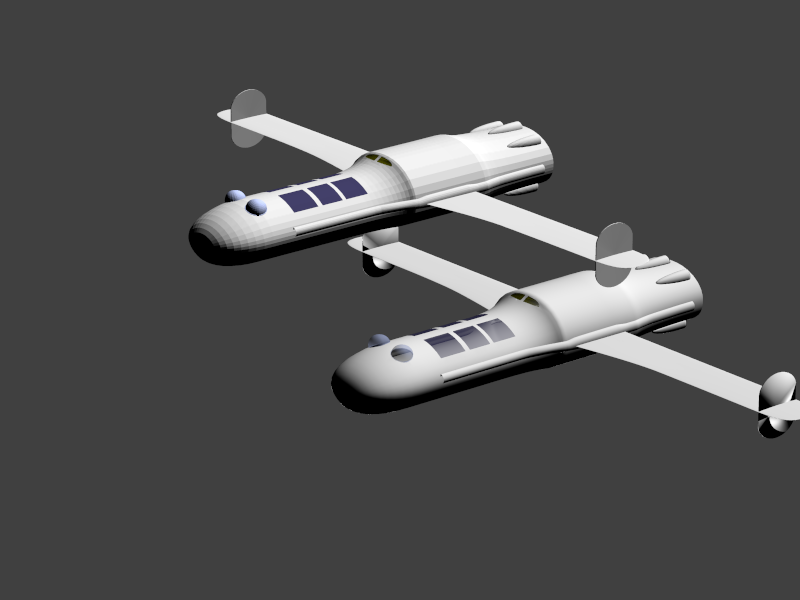
Nice aircraft.
The new Blender Stack Exchange site is now open to the public:
http://blender.stackexchange.com/
;-)
Paolo
Post a reply to this message
|
|
| |
| |
|
|
|
|
| |
| |
|
|
On 30/05/2013 8:21 AM, Paolo Gibellini wrote:
>  >Stephen  on date 28/05/2013 9.39 wrote:
>> I'm too new to Blender I should not be trying to run before I can walk.
>> But heigh ho! that's life.
>>
> Nice aircraft.

Thank you but it is actually "Anastasia" Dan Dare's (Pilot of the
future, The Eagle comic 1950 ~ 1967) personal spacecraft.
I'm quite pleased with it as it is my very first attempt at modelling
with Blender.

> The new Blender Stack Exchange site is now open to the public:
> http://blender.stackexchange.com/
> ;-)
> Paolo
>

Thanks Paolo.

That site looks just what I need.


--
Regards
     Stephen
Post a reply to this message
|
|
| |
| |
|
|
|
|
| |
| |
|
|
>Stephen  on date 30/05/2013 10.41 wrote:
> Thank you but it is actually "Anastasia" Dan Dare's (Pilot of the
> future, The Eagle comic 1950 ~ 1967) personal spacecraft.
> I'm quite pleased with it as it is my very first attempt at modelling
> with Blender.
Unfortunately I missed this interesting comic... I'll have to do a bit
of searching on the net ;-)

> That site looks just what I need.
Mm, Blender people seems to be responsive there

Paolo
Post a reply to this message
|
|
| |
| |
|
|
|
|
| |
| |
|
|
On 28-5-2013 9:39, Stephen wrote:
> I'm too new to Blender I should not be trying to run before I can walk.
> But heigh ho! that's life.
>
>

Hey! You have gone beyond the first steps, Stephen. Looks good.

Thomas
Post a reply to this message
|
|
| |
| |
|
|
|
|
| |
| |
|
|
On 30/05/2013 10:53 AM, Paolo Gibellini wrote:
>  >Stephen  on date 30/05/2013 10.41 wrote:
>> Thank you but it is actually "Anastasia" Dan Dare's (Pilot of the
>> future, The Eagle comic 1950 ~ 1967) personal spacecraft.
>> I'm quite pleased with it as it is my very first attempt at modelling
>> with Blender.

> Unfortunately I missed this interesting comic... I'll have to do a bit
> of searching on the net ;-)
>

I found it interesting as a pre-teenager. But I have no idea how it
would hold up today with modern production methods for comics.

Beware the Mekon!

>> That site looks just what I need.
> Mm, Blender people seems to be responsive there
>

They do indeed. The answer I got to my question does not work 100% with
the PovRay renderer. But no matter I found out how to get round that.

I wish there were some way to get in touch with the addon developers. To
get some ground rules for it.

--
Regards
     Stephen
Post a reply to this message
|
|
| |
| |
|
|
|
|
| |
| |
|
|
On 30/05/2013 12:20 PM, Thomas de Groot wrote:
> On 28-5-2013 9:39, Stephen wrote:
>> I'm too new to Blender I should not be trying to run before I can walk.
>> But heigh ho! that's life.
>>
>>
>
> Hey! You have gone beyond the first steps, Stephen. Looks good.
>

Thanks Thomas,
I’m maybe passed the first steps stage but I still have to hold on to
the hand rail.


--
Regards
     Stephen
Post a reply to this message
|
|
| |
| |
|
|
|
|
| |
| |
|
|
Stephen <mca### [at] aol com> wrote:
> I wish there were some way to get in touch with the addon developers. To
> get some ground rules for it.
>
> --
> Regards
> Stephen
I don't know if you mean the Blender to POV-Ray exporter addon or another one,
but if you do, I am currently responsible / guilty :-)
for maintaining it.
For basic usage, from the user preference window where you activate the addon,
there is a link to this help page:
http://wiki.blender.org/index.php/Extensions:2.6/Py/Scripts/Render/POV-Ray
There are many instructions for the addon there but also in the tooltips when
you hover your mouse on any of the interface buttons or field. Also feel free to
ask me questions directly, note that there is now also a POV-Ray usergroup over
at the blenderartists.org forum.
About the earlier question on command line arguments, as the exporter wiki
states it, the Blender interface shows a "command line switches" field, it
behaves just like the command line of POV editors:
Command line switches allow some command line arguments to be passed to POV-Ray.
Arguments are separated by spaces. Command line switches consist of a / (Slash),
+ (plus) or - (minus) sign, followed by one or more alphabetic characters and
possibly a numeric value.
/EXIT is a good default there.
If you POVers want to reach the exported POV file, uncheck OStempfiles, to point
a directory on your hardrive where to write it.(otherwise, it's simply stored in
Blender temp file with a random name and deleted afterwards.
Enjoy. com> wrote:
> I wish there were some way to get in touch with the addon developers. To
> get some ground rules for it.
>
> --
> Regards
> Stephen
I don't know if you mean the Blender to POV-Ray exporter addon or another one,
but if you do, I am currently responsible / guilty :-)
for maintaining it.
For basic usage, from the user preference window where you activate the addon,
there is a link to this help page:
http://wiki.blender.org/index.php/Extensions:2.6/Py/Scripts/Render/POV-Ray
There are many instructions for the addon there but also in the tooltips when
you hover your mouse on any of the interface buttons or field. Also feel free to
ask me questions directly, note that there is now also a POV-Ray usergroup over
at the blenderartists.org forum.
About the earlier question on command line arguments, as the exporter wiki
states it, the Blender interface shows a "command line switches" field, it
behaves just like the command line of POV editors:
Command line switches allow some command line arguments to be passed to POV-Ray.
Arguments are separated by spaces. Command line switches consist of a / (Slash),
+ (plus) or - (minus) sign, followed by one or more alphabetic characters and
possibly a numeric value.
/EXIT is a good default there.
If you POVers want to reach the exported POV file, uncheck OStempfiles, to point
a directory on your hardrive where to write it.(otherwise, it's simply stored in
Blender temp file with a random name and deleted afterwards.
Enjoy.
Post a reply to this message
|
|
| |
| |
|
|
|
|
| |
| |
|
|
On 02/06/2013 11:26 AM, Mr wrote:
> Stephen <mca### [at] aolcom> wrote:
>
>> I wish there were some way to get in touch with the addon developers. To
>> get some ground rules for it.
>>
>> --
>> Regards
>>       Stephen
>
> I don't know if you mean the Blender to POV-Ray exporter addon or another one,
> but if you do, I am currently responsible / guilty :-)
> for maintaining it.
>

Thanks Mr

Yes, that was the one.

> For basic usage, from the user preference window where you activate the addon,
> there is a link to this help page:
>
> http://wiki.blender.org/index.php/Extensions:2.6/Py/Scripts/Render/POV-Ray
>
> There are many instructions for the addon there but also in the tooltips when
> you hover your mouse on any of the interface buttons or field. Also feel free to
> ask me questions directly, note that there is now also a POV-Ray usergroup over
> at the blenderartists.org forum.
>

Thank you, I have read the page and have joined the forum. I had been
waiting until I had more experience with Blender so not to post too many
simple questions.

> About the earlier question on command line arguments, as the exporter wiki
> states it, the Blender interface shows a "command line switches" field, it
> behaves just like the command line of POV editors:
>
> Command line switches allow some command line arguments to be passed to POV-Ray.
> Arguments are separated by spaces. Command line switches consist of a / (Slash),
> + (plus) or - (minus) sign, followed by one or more alphabetic characters and
> possibly a numeric value.
> /EXIT is a good default there.
>

Yes /exit would be a good default I am using the option in PovRay to
exit after completion.

Where exactly can I find the Command line switches for exporting? (See I
said that I was new to Blender. :-) )

> If you POVers want to reach the exported POV file, uncheck OStempfiles, to point
> a directory on your hardrive where to write it.(otherwise, it's simply stored in
> Blender temp file with a random name and deleted afterwards.
>

Now that is good to know I have to jump through loops to get the pov
file before it was deleted. But again, where does the field live?


--
Regards
     Stephen
Post a reply to this message
|
|
| |
| |
|
|
|
|
| |