|
|
|
|
|
|
| |
| |
|
|
|
|
| |
| |
|
|
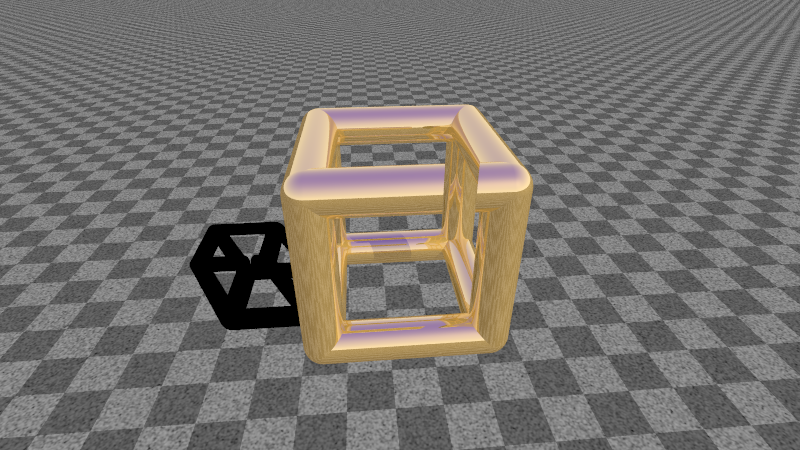
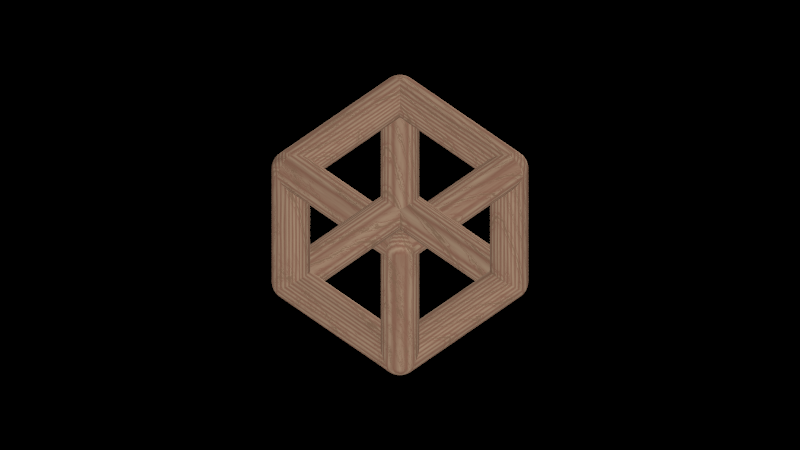
You had something like this in mind?

And yes, it's animatable to some extend.

--
Ger
Post a reply to this message
Attachments:
Download 'cube.png' (411 KB)
Preview of image 'cube.png'
|
|
| |
| |
|
|
From: Stephen
Subject: Re: To Encore, Making part of an object tranparent
Date: 8 Nov 2012 16:45:49
Message: <509c280d@news.povray.org>
|
|
|
| |
| |
|
|
On 08/11/2012 6:56 PM, Ger wrote:
> And yes, it's animatable to some extend.

What does the shadow do? I look forward to seeing your code when you
tidy it up.

--
Regards
     Stephen
Post a reply to this message
|
|
| |
| |
|
|
|
|
| |
| |
|
|
Stephen <mca### [at] aol com> wrote:
> On 08/11/2012 6:56 PM, Ger wrote:
> > And yes, it's animatable to some extend.
>
> What does the shadow do? I look forward to seeing your code when you
> tidy it up.
>
> --
> Regards
> Stephen
I think, the shadow should show the trick.
Best regards,
Michael com> wrote:
> On 08/11/2012 6:56 PM, Ger wrote:
> > And yes, it's animatable to some extend.
>
> What does the shadow do? I look forward to seeing your code when you
> tidy it up.
>
> --
> Regards
> Stephen
I think, the shadow should show the trick.
Best regards,
Michael
Post a reply to this message
|
|
| |
| |
|
|
|
|
| |
| |
|
|
MichaelJF wrote:

> Stephen <mca### [at] aolcom> wrote:
>> On 08/11/2012 6:56 PM, Ger wrote:
>> > And yes, it's animatable to some extend.
>>
>> What does the shadow do? I look forward to seeing your code when you
>> tidy it up.
>>
>> --
>> Regards
>>      Stephen
>
> I think, the shadow should show the trick.
>
>
> Best regards,
> Michael

Nope, the shadow doesn't give anything away :)

--
Ger
Post a reply to this message
|
|
| |
| |
|
|
|
|
| |
| |
|
|
"MichaelJF" <mi-### [at] t-onlinede> wrote:
> Stephen <mca### [at] aolcom> wrote:
> > On 08/11/2012 6:56 PM, Ger wrote:
> > > And yes, it's animatable to some extend.
> >
> > What does the shadow do? I look forward to seeing your code when you
> > tidy it up.
> >
> > --
> > Regards
> >      Stephen
>
> I think, the shadow should show the trick.
>

Hi guys, yeah that's pretty much what I have in mind.
If you could send me some sort of code to study it that'd be great. I managed to
kind of tidy up the code in the first attempt that was posted in the other
thread, but the cylindrical cube is also amazing. I wouldn't really worry about
the shape though for the moment (even though having the code for this would be
greatly appreciated!)

Can I make a fixed time animation for a start?

There are two thoughts on this:

a) we can animate the light, this way seeing if the light position affects the
illusion (and to what extend)

b) we can animate the object by rotating the camera. This will also require to
move the difference objects accordingly along each axis of camera rotation.

Do you guys have any idea?
Post a reply to this message
|
|
| |
| |
|
|
|
|
| |
| |
|
|
"Encore" <nomail@nomail> wrote:
> "MichaelJF" <mi-### [at] t-onlinede> wrote:
> > Stephen <mca### [at] aolcom> wrote:
> > > On 08/11/2012 6:56 PM, Ger wrote:
> > > > And yes, it's animatable to some extend.
> > >
> > > What does the shadow do? I look forward to seeing your code when you
> > > tidy it up.
> > >
> > > --
> > > Regards
> > >      Stephen
> >
> > I think, the shadow should show the trick.
> >
>
> Hi guys, yeah that's pretty much what I have in mind.
> If you could send me some sort of code to study it that'd be great. I managed to
> kind of tidy up the code in the first attempt that was posted in the other
> thread, but the cylindrical cube is also amazing. I wouldn't really worry about
> the shape though for the moment (even though having the code for this would be
> greatly appreciated!)
>
> Can I make a fixed time animation for a start?
>
> There are two thoughts on this:
>
> a) we can animate the light, this way seeing if the light position affects the
> illusion (and to what extend)
>
> b) we can animate the object by rotating the camera. This will also require to
> move the difference objects accordingly along each axis of camera rotation.
>
> Do you guys have any idea?

And One more thing:

I think that we do not need to have any surface or background. A black
background is always better for experiments like this and surely, it will not
reveal the illusion that easily.

Regards,

Alex
Post a reply to this message
|
|
| |
| |
|
|
|
|
| |
| |
|
|
> And One more thing:
>
> I think that we do not need to have any surface or background. A black
> background is always better for experiments like this and surely, it will not
> reveal the illusion that easily.
>
> Regards,
>
> Alex
>
Hi guys,

I figured a way to animate it for a fixed period, I put the line

rotate<0,-360*(clock+0.00),0>

in my pov object and then I created a .ini file with the following code inside:

; POV-Ray animation ini file
Antialias=Off
Antialias_Threshold=0.1
Antialias_Depth=2

Input_File_Name="transpAttempt1.pov"

Initial_Frame=1
Final_Frame=300
Initial_Clock=0
Final_Clock=1

Cyclic_Animation=on
Pause_when_Done=off

This rotates the object of course but the thing is that the "invisible" boxes
should move respectively. That's where I'm stuck at the moment.
Post a reply to this message
Attachments:
Download 'transpattempt1002.bmp.dat' (577 KB)
|
|
| |
| |
|
|
|
|
| |
| |
|
|
Encore wrote:

> "MichaelJF" <mi-### [at] t-onlinede> wrote:
>> Stephen <mca### [at] aolcom> wrote:
>> > On 08/11/2012 6:56 PM, Ger wrote:
>> > > And yes, it's animatable to some extend.
>> >
>> > What does the shadow do? I look forward to seeing your code when you
>> > tidy it up.
>> >
>> > --
>> > Regards
>> >      Stephen
>>
>> I think, the shadow should show the trick.
>>
>
> Hi guys, yeah that's pretty much what I have in mind.
> If you could send me some sort of code to study it that'd be great. I
> managed to kind of tidy up the code in the first attempt that was posted
> in the other thread, but the cylindrical cube is also amazing. I wouldn't
> really worry about the shape though for the moment (even though having the
> code for this would be greatly appreciated!)
>
> Can I make a fixed time animation for a start?
>
> There are two thoughts on this:
>
> a) we can animate the light, this way seeing if the light position affects
> the illusion (and to what extend)
>
> b) we can animate the object by rotating the camera. This will also
> require to move the difference objects accordingly along each axis of
> camera rotation.
>
> Do you guys have any idea?

Have you checked povray.binaries.animations?
Have you checked povray.text.scene-files?

--
Ger
Post a reply to this message
|
|
| |
| |
|
|
|
|
| |
| |
|
|
> Have you checked povray.binaries.animations?
> Have you checked povray.text.scene-files?
>
> --
> Ger

This looks great, I will play around with the camera angle to see how this works
exactly,  there seems to be many things I need to study here.
But still, how am I achieving the animation with such a file? This is a pov file
after all, do I need to make an .ini file too?

Thanks,

Alex
Post a reply to this message
|
|
| |
| |
|
|
From: Stephen
Subject: Re: To Encore, Making part of an object tranparent
Date: 13 Nov 2012 14:02:15
Message: <50a29937@news.povray.org>
|
|
|
| |
| |
|
|
On 13/11/2012 5:42 PM, Encore wrote:
> This looks great, I will play around with the camera angle to see how this works
> exactly,  there seems to be many things I need to study here.

This is true for all of us. :-)

> But still, how am I achieving the animation with such a file? This is a pov file
> after all, do I need to make an .ini file too?

No you can use toolbar command-line.
See help 1.4.2.2 Toolbar Command Line


--
Regards
     Stephen
Post a reply to this message
|
|
| |
| |
|
|
|
|
| |
| |
|
|
Ger <ger### [at] gmailcom> wrote:
> MichaelJF wrote:
>
> > Stephen <mca### [at] aolcom> wrote:
> >> On 08/11/2012 6:56 PM, Ger wrote:
> >> > And yes, it's animatable to some extend.
> >>
> >> What does the shadow do? I look forward to seeing your code when you
> >> tidy it up.
> >>
> >> --
> >> Regards
> >>      Stephen
> >
> > I think, the shadow should show the trick.
> >
> >
> > Best regards,
> > Michael
>
> Nope, the shadow doesn't give anything away :)
>
> --
> Ger

Sorry to be a little bit insistent. The shadow of the upper beam to the front
seems to have a gap.

Best regards,
Michael
Post a reply to this message
|
|
| |
| |
|
|
|
|
| |
| |
|
|
MichaelJF wrote:

> Ger <ger### [at] gmailcom> wrote:
>> MichaelJF wrote:
>>
>> > Stephen <mca### [at] aolcom> wrote:
>> >> On 08/11/2012 6:56 PM, Ger wrote:
>> >> > And yes, it's animatable to some extend.
>> >>
>> >> What does the shadow do? I look forward to seeing your code when you
>> >> tidy it up.
>> >>
>> >> --
>> >> Regards
>> >>      Stephen
>> >
>> > I think, the shadow should show the trick.
>> >
>> >
>> > Best regards,
>> > Michael
>>
>> Nope, the shadow doesn't give anything away :)
>>
>> --
>> Ger
>
> Sorry to be a little bit insistent. The shadow of the upper beam to the
> front seems to have a gap.
>
> Best regards,
> Michael
You're correct as far as this image goes. In the final renderings though
there are no more gaps.

--
Ger
Post a reply to this message
|
|
| |
| |
|
|
|
|
| |
| |
|
|
> Have you checked povray.binaries.animations?
> Have you checked povray.text.scene-files?
>
> --
> Ger

OK, I am still trying to work out the camera and how it's bound to the planes
going to the object to create the invisible patch.
I played around with the Cam0Location and the vrotate comand and changed the
line

#declare Cam0Location = vrotate(Cam0Location, <0, CamAngle/3, 0>) + <-4, 3, -5>;

to this

#declare Cam0Location = vrotate(Cam0Location, <0, CamAngle/3, 0>) + <-4,
CamAngle, -5>;

In the attachment theres the location of the camera when i run it. At this
stage, I want to cover a bigger area along the yaxis. What happens here when I
run it with the illusioncamera on, is that the "end" of the invisible patch is
revealed, and from this angle, it doesn't cover the back corner up till it top.
Any suggestions as to how to fix this?

Another thing I did is to change the settings in ViewVector. I did this only for
the yWedge for experimenting's sake. By changing the length to something like

#local ViewVector = vlength(<0, Top.y*-5 , Top.z*2>-<0, Cam.y, Cam.z>);

I realised that the red plane exceeds the top of the object along the y axis.
With unaltered settings for Cam0Location vrotate, this seems to be working just
fine. But when I change the vrotate as shown above, I get the result of the
screenshot attached.

Regards,
Alex
Post a reply to this message
Attachments:
Download 'cam1location.png' (64 KB)
Preview of image 'cam1location.png'

|
|
| |
| |
|
|
|
|
| |
| |
|
|
> --
> Ger

From: "Encore" <nomail@nomail>
Newsgroups: povray.binaries.images
Subject: Re: To Encore, Making part of an object tranparent


> Have you checked povray.binaries.animations?
> Have you checked povray.text.scene-files?
>
> --
> Ger

OK, I am still trying to work out the camera and how it's bound to the planes
going to the object to create the invisible patch.
I played around with the Cam0Location and the vrotate comand and changed the
line

#declare Cam0Location = vrotate(Cam0Location, <0, CamAngle/3, 0>) + <-4, 3, -5>;

to this

#declare Cam0Location = vrotate(Cam0Location, <0, CamAngle/3, 0>) + <-4,
CamAngle, -5>;

In the attachment theres the location of the camera when i run it. At this
stage, I want to cover a bigger area along the yaxis. What happens here when I
run it with the illusioncamera on, is that the "end" of the invisible patch is
revealed, and from this angle, it doesn't cover the back corner up till it top.
Any suggestions as to how to fix this?

Another thing I did is to change the settings in ViewVector. I did this only for
the yWedge for experimenting's sake. By changing the length to something like

#local ViewVector = vlength(<0, Top.y*-5 , Top.z*2>-<0, Cam.y, Cam.z>);

I realised that the red plane exceeds the top of the object along the y axis.
With unaltered settings for Cam0Location vrotate, this seems to be working just
fine. But when I change the vrotate as shown above, I get the result of the
screenshot attached.

Regards,
Alex
Post a reply to this message
Attachments:
Download 'cam1location.png' (64 KB)
Preview of image 'cam1location.png'

|
|
| |
| |
|
|
|
|
| |
| |
|
|
"Encore" <nomail@nomail> wrote:
> > --
> > Ger
>
> From: "Encore" <nomail@nomail>

Also, if someone can provide some solution as to how to make the same effect
with an orthographic camera that's be great. The problem with the regular camera
is that when the back cylinder passes "in front" of the front cylinder, it is
quite obvious that it's the back on, due to the perspective. The depth makes it
look smaller. With an orthographic view, it MIGHT lose some realism but all
edges will be of the same size. This is what I made in Blender, and I'm now
trying to achieve here with povray.
Post a reply to this message
Attachments:
Download 'firstcube2.jpg' (584 KB)
Preview of image 'firstcube2.jpg'

|
|
| |
| |
|
|
From: Ger
Subject: Re: To Encore, Making part of an object tranparent
Date: 20 Nov 2012 13:58:13
Message: <50abd2c5@news.povray.org>
|
|
|
| |
| |
|
|
Encore wrote:

>
>> Have you checked povray.binaries.animations?
>> Have you checked povray.text.scene-files?
>>
>> --
>> Ger
>
> OK, I am still trying to work out the camera and how it's bound to the
> planes going to the object to create the invisible patch.
> I played around with the Cam0Location and the vrotate comand and changed
> the line
>
> #declare Cam0Location = vrotate(Cam0Location, <0, CamAngle/3, 0>) + <-4,
> #3, -5>;
>
> to this
>
> #declare Cam0Location = vrotate(Cam0Location, <0, CamAngle/3, 0>) + <-4,
> CamAngle, -5>;
>
> In the attachment theres the location of the camera when i run it. At this
> stage, I want to cover a bigger area along the yaxis. What happens here
> when I run it with the illusioncamera on, is that the "end" of the
> invisible patch is revealed, and from this angle, it doesn't cover the
> back corner up till it top. Any suggestions as to how to fix this?
>
> Another thing I did is to change the settings in ViewVector. I did this
> only for the yWedge for experimenting's sake. By changing the length to
> something like
>
> #local ViewVector = vlength(<0, Top.y*-5 , Top.z*2>-<0, Cam.y, Cam.z>);
>
> I realised that the red plane exceeds the top of the object along the y
> axis. With unaltered settings for Cam0Location vrotate, this seems to be
> working just fine. But when I change the vrotate as shown above, I get the
> result of the screenshot attached.
>
> Regards,
> Alex

In the code for the Ywedge you'll find

      difference {
	object { wedge rotate y * Angle }
	object { TopPlane }
	object { BottomPlane }
	translate Cam
    pigment {Red}
  }

If you remove the TopPlane the wedge will extend well above the cube.

--
Ger
Post a reply to this message
|
|
| |
| |
|
|
|
|
| |
| |
|
|
> Ger

I still can't figure out how to change the camera to an orthographic view.
When I set the camera to orthographic, it simply messes up my "cuts", I would
guess because those cuts are something like cone shapes that extend from the
camera position to the point on the object, whereas it should now be more like a
long parallelogram because of the different perspective. Any ideas how I can
tackle this problem? :/
Post a reply to this message
|
|
| |
| |
|
|
From: Le Forgeron
Subject: Re: To Encore, Making part of an object tranparent
Date: 28 Nov 2012 12:34:09
Message: <50b64b11$1@news.povray.org>
|
|
|
| |
| |
|
|
Le 28/11/2012 16:24, Encore nous fit lire :
>
>> Ger
>
> I still can't figure out how to change the camera to an orthographic view.
> When I set the camera to orthographic, it simply messes up my "cuts", I would
> guess because those cuts are something like cone shapes that extend from the
> camera position to the point on the object, whereas it should now be more like a
> long parallelogram because of the different perspective. Any ideas how I can
> tackle this problem? :/
>
There is two options to specify an orthographic camera (after the
opening keyword "orthographic") :
 1. direction+right+up :(not for you), length of direction is
irrelevant, length of right is the number of povunit for the width,
length of up is the number of povunit for the height.

 2. same+specify an angle. At that moment, the length of direction
become as meaningful as for the perspective camera, and only the ratio
between up & right is kept (their length is "recomputed" from the
direction's length).

It's all there (for 3.7RC6):

> http://wiki.povray.org/content/Reference:Camera#Orthographic_projection

Default values are at the top of the page (angle is about 67.380° for a
4/3 default perspective camera, but it must be explicitly using at least
"angle" keyword in orthographic if you want to use the second computation)
Post a reply to this message
|
|
| |
| |
|
|
|
|
| |
| |
|
|
> Default values are at the top of the page (angle is about 67.380° for a
> 4/3 default perspective camera, but it must be explicitly using at least
> "angle" keyword in orthographic if you want to use the second computation)

Thanks for this I could already fix this option, however, this messes up with
the invisible cuts that create the  illusion. The output is what is show in the
screenshot. How can I tackle this now? :/
Post a reply to this message
Attachments:
Download 'orthographic.png' (103 KB)
Preview of image 'orthographic.png'

|
|
| |
| |
|
|
From: Le Forgeron
Subject: Re: To Encore, Making part of an object tranparent
Date: 1 Dec 2012 12:49:37
Message: <50ba4331@news.povray.org>
|
|
|
| |
| |
|
|
Le 01/12/2012 17:57, Encore nous fit lire :
>
>> Default values are at the top of the page (angle is about 67.380° for a
>> 4/3 default perspective camera, but it must be explicitly using at least
>> "angle" keyword in orthographic if you want to use the second computation)
>
> Thanks for this I could already fix this option, however, this messes up with
> the invisible cuts that create the  illusion. The output is what is show in the
> screenshot. How can I tackle this now? :/
>
Well... you cannot have the same cut for perspective and for orthographic.

With perspective, the cut should be something like a prism-truncated
pyramid (top of the pyramid at the camera).

With orthographic, the cut should be something like a box (sides aligned
with the camera)
Post a reply to this message
|
|
| |
| |
|
|
|
|
| |
| |
|
|
> With orthographic, the cut should be something like a box (sides aligned
> with the camera)

Currently, there is a code block which handles the planes that cause the cut to
make the back post invisible.

To achieve this, two planes are created like this:

#declare Plane1 = plane {-x, 0 rotate y * Alpha};
#declare Plane2 = plane { x, 0 rotate y *-Alpha};

Where Alpha is the distance from the camera position to the vertical post that
needs to be visible. This is done by the following:

#local r = R;
#local Alpha = asin(r / ViewVector) * 180 / pi;

This makes the conical shape from the cube to the camera.
Since I now use the orthographic camera, I need to change this setting by making
the two planes simply parallel to each other and fixed to the ViewVector for
animation purposes.
What should I do to solve this problem?

I am also attaching a screenshot of what the scene looks like with the
orthographic camera and the default angle.
Post a reply to this message
Attachments:
Download 'orthographic.png' (106 KB)
Preview of image 'orthographic.png'

|
|
| |
| |
|
|
From: Le Forgeron
Subject: Re: To Encore, Making part of an object tranparent
Date: 3 Dec 2012 13:56:46
Message: <50bcf5ee$1@news.povray.org>
|
|
|
| |
| |
|
|
Le 03/12/2012 17:00, Encore nous fit lire :
>
>> With orthographic, the cut should be something like a box (sides aligned
>> with the camera)
>
> Currently, there is a code block which handles the planes that cause the cut to
> make the back post invisible.
>
> To achieve this, two planes are created like this:
>
> #declare Plane1 = plane {-x, 0 rotate y * Alpha};
> #declare Plane2 = plane { x, 0 rotate y *-Alpha};
>
> Where Alpha is the distance from the camera position to the vertical post that
> needs to be visible. This is done by the following:
>
> #local r = R;
> #local Alpha = asin(r / ViewVector) * 180 / pi;
>

Well, instead of rotating your plane, translate it.
something along:
#declare Plane1 = plane { -x, 0 translate r*x }; // and so on

now, I wonder if it should be asin or atan ? (given that r is probably
small when compared to ViewVector, that might be irrelevant)
Or maybe I do not understand R, r & ViewVector.

Alpha is not a distance, it's an angle.

> This makes the conical shape from the cube to the camera.
> Since I now use the orthographic camera, I need to change this setting by making
> the two planes simply parallel to each other and fixed to the ViewVector for
> animation purposes.
> What should I do to solve this problem?
>
> I am also attaching a screenshot of what the scene looks like with the
> orthographic camera and the default angle.
>
Post a reply to this message
|
|
| |
| |
|
|
|
|
| |
| |
|
|
> Well, instead of rotating your plane, translate it.
> something along:
> #declare Plane1 = plane { -x, 0 translate r*x }; // and so on
>
> now, I wonder if it should be asin or atan ? (given that r is probably
> small when compared to ViewVector, that might be irrelevant)
> Or maybe I do not understand R, r & ViewVector.
>
> Alpha is not a distance, it's an angle.
>
Yeah sorry for that I meant the angle. Well I've tried the translate r*x
and at first it looks just fine (it's attached to the left and right part of the
back edge) but then if I start animating the scene, the planes are just messed
up, as if they don't track that edge any more. I am pretty sure I'm not tracking
the edge with the ViewVector that's why it's messed up when I animate it
Post a reply to this message
|
|
| |
| |
|
|
From: Ger
Subject: Re: To Encore, Making part of an object tranparent
Date: 6 Dec 2012 03:33:29
Message: <50c05859@news.povray.org>
|
|
|
| |
| |
|
|
Encore wrote:

>
> I still can't figure out how to change the camera to an orthographic view.
> When I set the camera to orthographic, it simply messes up my "cuts", I
> would guess because those cuts are something like cone shapes that extend
> from the camera position to the point on the object, whereas it should now
> be more like a long parallelogram because of the different perspective.
> Any ideas how I can tackle this problem? :/

I have it figured out, by not using the orthographic camera, but pulling the
camera way back from the object and then zooming in. It didn't work the
first time because I had a mix-up in my math.

Camera distance increased by 1000
--
Ger
Post a reply to this message
Attachments:
Download 'transpattempt2000.png' (93 KB)
Preview of image 'transpattempt2000.png'
|
|
| |
| |
|
|
|
|
| |
| |
|
|
> I have it figured out, by not using the orthographic camera, but pulling the
> camera way back from the object and then zooming in. It didn't work the
> first time because I had a mix-up in my math.
>
> Camera distance increased by 1000
> --
> Ger

So basically you change the Cam0Location to something like
#declare Cam0Location =  < 0 , 1 ,-1000>;

which puts it to -1000 on the z-axis. How would you zoom in then after that?
Post a reply to this message
|
|
| |
| |
|
|
From: Le Forgeron
Subject: Re: To Encore, Making part of an object tranparent
Date: 6 Dec 2012 10:44:25
Message: <50c0bd59$1@news.povray.org>
|
|
|
| |
| |
|
|
Le 06/12/2012 16:33, Encore nous fit lire :
>
>> I have it figured out, by not using the orthographic camera, but pulling the
>> camera way back from the object and then zooming in. It didn't work the
>> first time because I had a mix-up in my math.
>>
>> Camera distance increased by 1000
>> --
>> Ger
>
> So basically you change the Cam0Location to something like
> #declare Cam0Location =  < 0 , 1 ,-1000>;
>
> which puts it to -1000 on the z-axis. How would you zoom in then after that?
>
I guess: a small angle.
Post a reply to this message
|
|
| |
| |
|
|
|
|
| |
| |
|
|
> > So basically you change the Cam0Location to something like
> > #declare Cam0Location =  < 0 , 1 ,-1000>;
> >
> > which puts it to -1000 on the z-axis. How would you zoom in then after that?
> >
> I guess: a small angle.

Yeah I was about to post  another reply about that.
I changed the angle to about 0.380
and the #declare Cam0Location =  < 0 , 1000 ,-1000>;

After that, I needed to translate the camera along the x-axis like this:
#declare Cam0Location = vrotate(Cam0Location, <0, CamAngle/1, 0>) + <450, 30,
-3>;

It still needs some configurations but the problem is that the wedges do not
extend until the object anymore, so the result looks something like what you can
see in the screenshot:
Post a reply to this message
Attachments:
Download 'transpattempt.png' (35 KB)
Preview of image 'transpattempt.png'

|
|
| |
| |
|
|
From: Ger
Subject: Re: To Encore, Making part of an object tranparent
Date: 6 Dec 2012 12:31:02
Message: <50c0d656@news.povray.org>
|
|
|
| |
| |
|
|
Encore wrote:

>
>> I have it figured out, by not using the orthographic camera, but pulling
>> the camera way back from the object and then zooming in. It didn't work
>> the first time because I had a mix-up in my math.
>>
>> Camera distance increased by 1000
>> --
>> Ger
>
> So basically you change the Cam0Location to something like
> #declare Cam0Location =  < 0 , 1 ,-1000>;
>
> which puts it to -1000 on the z-axis. How would you zoom in then after
> that?

Code is in povray.text.scene-files

--
Ger
Post a reply to this message
|
|
| |
| |
|
|
|
|
| |
| |
|
|
Le_Forgeron wrote:

> Le 06/12/2012 16:33, Encore nous fit lire :
>>
>>> I have it figured out, by not using the orthographic camera, but pulling
>>> the camera way back from the object and then zooming in. It didn't work
>>> the first time because I had a mix-up in my math.
>>>
>>> Camera distance increased by 1000
>>> --
>>> Ger
>>
>> So basically you change the Cam0Location to something like
>> #declare Cam0Location =  < 0 , 1 ,-1000>;
>>
>> which puts it to -1000 on the z-axis. How would you zoom in then after
>> that?
>>
> I guess: a small angle.

No, what I did was increase direction

#declare CamFactor = frame_number/100;
//#declare CamFactor = 1000;
#declare CamAngle = frame_number;
#declare Cam0Location =  < 0 , (1+CamFactor) ,0>;

#declare Cam0Location = vrotate(Cam0Location, <0, 0, CamAngle>);
#declare Cam0Location = vrotate(Cam0Location, <0, CamAngle, 0>) + (<-3, 3,
-3>*(1+CamFactor));


#declare Cam1Location =  <8.0 , 1.5 ,5>;

/*
  Declare the illusion camera pointing along the z-axis
*/
#declare UseIllusionCamera = 1;
#if (UseIllusionCamera)
  camera {
        location Cam0Location
        look_at   <0.0 , 0.0 , 0.0>
        direction z * CamFactor
        right image_width / image_height * x
    }


Doing it this way gives me a perfect view on what the difference is

--
Ger
Post a reply to this message
|
|
| |
| |
|
|
|
|
| |
| |
|
|
Encore wrote:

>> > So basically you change the Cam0Location to something like
>> > #declare Cam0Location =  < 0 , 1 ,-1000>;
>> >
>> > which puts it to -1000 on the z-axis. How would you zoom in then after
>> > that?
>> >
>> I guess: a small angle.
>
> Yeah I was about to post  another reply about that.
> I changed the angle to about 0.380
> and the #declare Cam0Location =  < 0 , 1000 ,-1000>;
>
> After that, I needed to translate the camera along the x-axis like this:
> #declare Cam0Location = vrotate(Cam0Location, <0, CamAngle/1, 0>) + <450,
> #30,
> -3>;
>
> It still needs some configurations but the problem is that the wedges do
> not extend until the object anymore, so the result looks something like
> what you can see in the screenshot:

I had a mix-up in my code which wasn't apparent at short distances. I have
tried it with direction z * 1e8 and it still works now.

--
Ger
Post a reply to this message
|
|
| |
| |
|
|
|
|
| |
| |
|
|
> I had a mix-up in my code which wasn't apparent at short distances. I have
> tried it with direction z * 1e8 and it still works now.
>
> --
> Ger

Ah so that was the problem with direction. I tried z*1000 but it wouldn't work.
Thanks a lot, I'll animate this and upload my results soon!
Post a reply to this message
|
|
| |
| |
|
|
|
|
| |
| |
|
|
"Encore" <nomail@nomail> wrote:
> > I had a mix-up in my code which wasn't apparent at short distances. I have
> > tried it with direction z * 1e8 and it still works now.
> >
> > --
> > Ger
>
> Ah so that was the problem with direction. I tried z*1000 but it wouldn't work.
> Thanks a lot, I'll animate this and upload my results soon!

I have a question:
Why is the CamFactor first set to frame_number/100 and then instantly changed to
1000?

What is the use of that?
#declare CamFactor = frame_number/100;
#declare CamFactor = 1000;
Post a reply to this message
|
|
| |
| |
|
|
|
|
| |
| |
|
|
Encore wrote:

> "Encore" <nomail@nomail> wrote:
>> > I had a mix-up in my code which wasn't apparent at short distances. I
>> > have tried it with direction z * 1e8 and it still works now.
>> >
>> > --
>> > Ger
>>
>> Ah so that was the problem with direction. I tried z*1000 but it wouldn't
>> work. Thanks a lot, I'll animate this and upload my results soon!
>
> I have a question:
> Why is the CamFactor first set to frame_number/100 and then instantly
> changed to 1000?
>
> What is the use of that?
> #declare CamFactor = frame_number/100;
> #declare CamFactor = 1000;

I used the first one to create an animation that showed me the progress when
increasing the camera distance. So, if you remark the second one out you'll
get an animation where the camera starts close to the cube and gradually
moves back.

--
Ger
Post a reply to this message
|
|
| |
| |
|
|
|
|
| |
| |
|
|
>
> --
> Ger

Great. I would also like to report a bug. During the animation rendering, I
noticed several frame where the back pipe is glitchy, when it come in front of
the front left horizontal pipe. I'll post one of those frames to show you what I
mean.
It definitely not a shadow problem, I tried this with both shadows and without
and I get the same problem.

Alex
Post a reply to this message
Attachments:
Download 'transpattempt4256.bmp.dat' (2305 KB)
|
|
| |
| |
|
|
|
|
| |
| |
|
|
Encore wrote:

>
>>
>> --
>> Ger
>
> Great. I would also like to report a bug. During the animation rendering,
> I noticed several frame where the back pipe is glitchy, when it come in
> front of the front left horizontal pipe. I'll post one of those frames to
> show you what I mean.
> It definitely not a shadow problem, I tried this with both shadows and
> without and I get the same problem.
>
> Alex

Yes, I noticed that too, but so far I have not found what the problem is.

--
Ger
Post a reply to this message
|
|
| |
| |
|
|
From: Ger
Subject: Re: To Encore, Making part of an object tranparent
Date: 6 Dec 2012 15:01:37
Message: <50c0f9a1@news.povray.org>
|
|
|
| |
| |
|
|
Ger wrote:

> Encore wrote:
>
>>
>>>
>>> --
>>> Ger
>>
>> Great. I would also like to report a bug. During the animation rendering,
>> I noticed several frame where the back pipe is glitchy, when it come in
>> front of the front left horizontal pipe. I'll post one of those frames to
>> show you what I mean.
>> It definitely not a shadow problem, I tried this with both shadows and
>> without and I get the same problem.
>>
>> Alex
>
> Yes, I noticed that too, but so far I have not found what the problem is.
>
Oh, and as an aside, please don't post .bmp files. Use either .png when
quality is important or .jpeg. Not everyone here has Mb internet access.

--
Ger
Post a reply to this message
|
|
| |
| |
|
|
|
|
| |
| |
|
|
> --
> Ger

Yeah thanks for letting me know, it was my intention to post this file. Do you
know how I can remove a post?
Post a reply to this message
|
|
| |
| |
|
|
|
|
| |
| |
|
|
Encore wrote:

>
>> --
>> Ger
>
> Yeah thanks for letting me know, it was my intention to post this file. Do
> you know how I can remove a post?

You can simply cancel it.

--
Ger
Post a reply to this message
|
|
| |
| |
|
|
|
|
| |