|
|
|
|
|
|
| |
| |
|
|
|
|
| |
| |
|
|
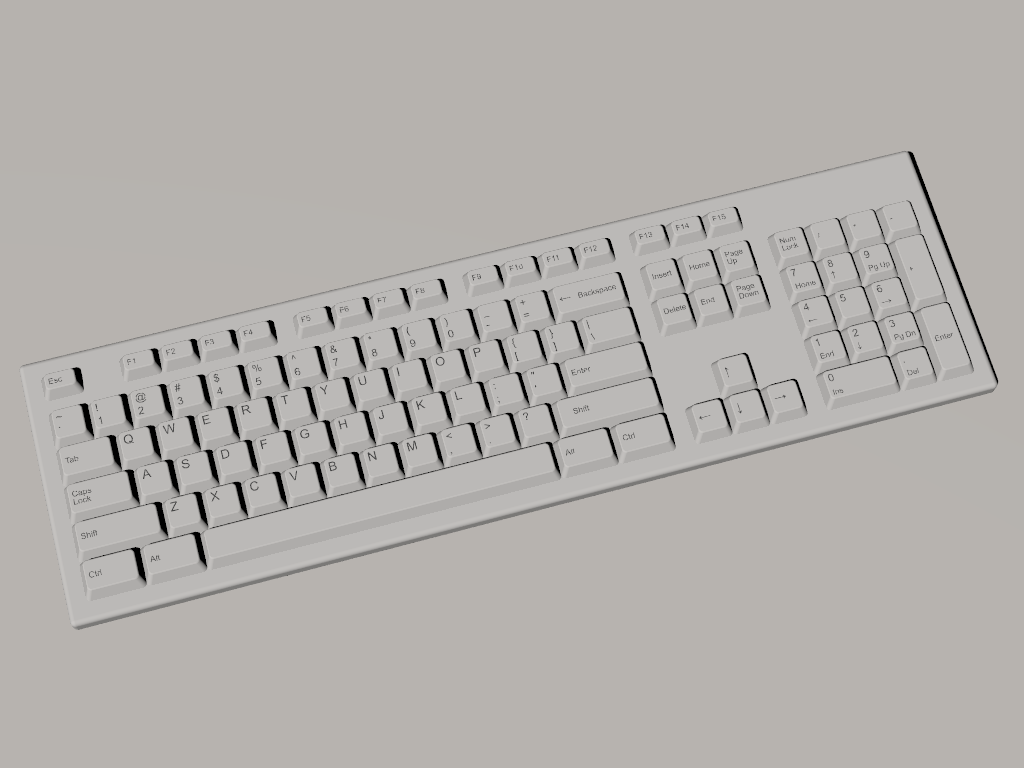
I'm scheming a scene which is going to have a bunch of computers at
desks, and here's the keyboard.

The chief problem with this model is that it contains 2152 scene-level
objects.  There are ways to lower this, but that'll take some work.

(It won't animate, either, but I'm not planning an shots where that will
be an issue.)

(And I'm sure some of you would prefer a different color.)

Regards,
John
Post a reply to this message
Attachments:
Download 'desktest.png' (169 KB)
Preview of image 'desktest.png'
|
|
| |
| |
|
|
|
|
| |
| |
|
|
Am 03.11.2012 04:26, schrieb John VanSickle:
> I'm scheming a scene which is going to have a bunch of computers at
> desks, and here's the keyboard.

Looks good; but shouldn't "F13" to "F15" be "Print Screen/SysReq",
"Scroll Lock" and "Pause/Break"?

The right "Shift" key text also doesn't seem properly left-aligned.

Aside from that the labeling looks remarkably faithful.

(What about the Windows keys? And the LEDs?)
Post a reply to this message
|
|
| |
| |
|
|
|
|
| |
| |
|
|
On 3-11-2012 6:03, clipka wrote:
> Am 03.11.2012 04:26, schrieb John VanSickle:
>> I'm scheming a scene which is going to have a bunch of computers at
>> desks, and here's the keyboard.
>
> Looks good; but shouldn't "F13" to "F15" be "Print Screen/SysReq",
> "Scroll Lock" and "Pause/Break"?
>
> The right "Shift" key text also doesn't seem properly left-aligned.
>
> Aside from that the labeling looks remarkably faithful.
>
> (What about the Windows keys? And the LEDs?)
>
Looking good indeed.

This seems to me an /older/ (?) type keyboard. Maybe 10 years ago? My
own looks quite different in places: four keys left of the space bar,
and three right; and the section above the arrows group is much
different. But that is not of importance I guess. The contrast with the
background is however. And I am missing a bit of texturing.

Thomas
Post a reply to this message
|
|
| |
| |
|
|
From: Jaime Vives Piqueres
Subject: Re: One Small Problem... (169kbbu)
Date: 3 Nov 2012 04:22:26
Message: <5094d442@news.povray.org>
|
|
|
| |
| |
|
|
On 03/11/12 04:26, John VanSickle wrote:
> The chief problem with this model is that it contains 2152
> scene-level objects.  There are ways to lower this, but that'll take
> some work.

   What? ...you used text{} for every label? WOW, what a patience! When I
tried to model one for my office scene, I ended up modeling it as a
heighfield with an image_map... I'm that lazy.

   BTW, I think I've not seen a one-row enter key on the last 20 years...
but as clipka said, the labeling is "awsome rolex" material.

--
Jaime
Post a reply to this message
|
|
| |
| |
|
|
|
|
| |
| |
|
|
John VanSickle wrote:

> I'm scheming a scene which is going to have a bunch of computers at
> desks, and here's the keyboard.

Looks great, my only complaint would be that the keys sit on a solid
body without any holes cut out for them. This is most notable on the
left/lower keys of each block where no shadow coverts the missing gap.

Also F, J, and Numpad 5 usually have different shape for touch
recognition, either with a more concave surface or with a tiny point
on the center. Funny I never noticed up to now that my current keyboard
uses the deeper cut for F and J but the prickly dot on the 5.

> The chief problem with this model is that it contains 2152 scene-level
> objects.  There are ways to lower this, but that'll take some work.

if you don't want an external image map you can probably transform the
text labels separately from the keys and use them as "object" texture.

> (It won't animate, either, but I'm not planning an shots where that will
> be an issue.)

With "does not animate" do you mean the keys can't be pressed?
Post a reply to this message
|
|
| |
| |
|
|
|
|
| |
| |
|
|
John VanSickle wrote:

> (And I'm sure some of you would prefer a different color.)

I actually have a black keyboard but replaced the black enter
key with a white one from an old keyboard ;)
Post a reply to this message
|
|
| |
| |
|
|
|
|
| |
| |
|
|
Am 03.11.2012 14:36, schrieb Christian Froeschlin:
> John VanSickle wrote:
>
>> (And I'm sure some of you would prefer a different color.)
>
> I actually have a black keyboard but replaced the black enter
> key with a white one from an old keyboard ;)

Sounds neat.

How about this one:

http://www.amazona.de/media/articles/article_images/article_1735/5_ProTools_Keyboard.JPG
Post a reply to this message
|
|
| |
| |
|
|
|
|
| |
| |
|
|
Jaime Vives Piqueres <jai### [at] ignorancia org> wrote:
> On 03/11/12 04:26, John VanSickle wrote:
> > The chief problem with this model is that it contains 2152
> > scene-level objects. There are ways to lower this, but that'll take
> > some work.
>
> What? ...you used text{} for every label? WOW, what a patience! When I
> tried to model one for my office scene, I ended up modeling it as a
> heighfield with an image_map... I'm that lazy.
>
> BTW, I think I've not seen a one-row enter key on the last 20 years...
> but as clipka said, the labeling is "awsome rolex" material.
>
> --
> Jaime
That's odd... I haven't seen a two-row enter key in years. they're usually on
REALLY OLD computers that don't have the windows and menu keys to the right of
the spacebar.
both of my keyboards have single-row enter keys. The last keyboard I had with a
big enter key was the ergonomic that I used on my Mac Performa about 13 years
ago, or so... I loved that keyboard, it even had a touchpad, which was awesome,
but it used an Apple ADB connector and my next computer was all usb.
As for the image, I think that it's good, but it needs a recess around the keys,
to make it look more realistic. Perhaps, if you modeled the keys separately
fromthe rest of the keyboard, and had them sitting over a recess, you could
achieve the effect I'm thinking of.
the addition of the windows/apple and menu keys next to the spacebar would be a
plus too. If it is a Windows/DOS style keyboard, f13 - f15 should be labeled as
mentioned above with Print Scrn/SysRq, Scroll Lock and Pause/Break.
I don't think it's a bad thing that the labels are done with text, considering
certain limitations I've run into recently with texturing CSG. If you wanted
to, for instance, overlay a grime texture, this might be the way to go, sure it
takes time, and patience, but it's worth the effort.
Great start though.
Regards,
A.D.B. org> wrote:
> On 03/11/12 04:26, John VanSickle wrote:
> > The chief problem with this model is that it contains 2152
> > scene-level objects. There are ways to lower this, but that'll take
> > some work.
>
> What? ...you used text{} for every label? WOW, what a patience! When I
> tried to model one for my office scene, I ended up modeling it as a
> heighfield with an image_map... I'm that lazy.
>
> BTW, I think I've not seen a one-row enter key on the last 20 years...
> but as clipka said, the labeling is "awsome rolex" material.
>
> --
> Jaime
That's odd... I haven't seen a two-row enter key in years. they're usually on
REALLY OLD computers that don't have the windows and menu keys to the right of
the spacebar.
both of my keyboards have single-row enter keys. The last keyboard I had with a
big enter key was the ergonomic that I used on my Mac Performa about 13 years
ago, or so... I loved that keyboard, it even had a touchpad, which was awesome,
but it used an Apple ADB connector and my next computer was all usb.
As for the image, I think that it's good, but it needs a recess around the keys,
to make it look more realistic. Perhaps, if you modeled the keys separately
fromthe rest of the keyboard, and had them sitting over a recess, you could
achieve the effect I'm thinking of.
the addition of the windows/apple and menu keys next to the spacebar would be a
plus too. If it is a Windows/DOS style keyboard, f13 - f15 should be labeled as
mentioned above with Print Scrn/SysRq, Scroll Lock and Pause/Break.
I don't think it's a bad thing that the labels are done with text, considering
certain limitations I've run into recently with texturing CSG. If you wanted
to, for instance, overlay a grime texture, this might be the way to go, sure it
takes time, and patience, but it's worth the effort.
Great start though.
Regards,
A.D.B.
Post a reply to this message
|
|
| |
| |
|
|
|
|
| |
| |
|
|
On 03/11/12 21:13, Anthony D. Baye wrote:
> That's odd... I haven't seen a two-row enter key in years.  they're
> usually on REALLY OLD computers that don't have the windows and menu
> keys to the right of the spacebar.

   Must be a Spanish thing... every keyboard around here has a tall but
narrow enter key: must be because the extra Ñ on that row leaves little
space for a key as important as enter, so it's expanded to the row above.

--
Jaime
Post a reply to this message
|
|
| |
| |
|
|
|
|
| |
| |
|
|
Am 03.11.2012 22:33, schrieb Jaime Vives Piqueres:
> On 03/11/12 21:13, Anthony D. Baye wrote:
>> That's odd... I haven't seen a two-row enter key in years.  they're
>> usually on REALLY OLD computers that don't have the windows and menu
>> keys to the right of the spacebar.
>
>    Must be a Spanish thing... every keyboard around here has a tall but
> narrow enter key: must be because the extra Ñ on that row leaves little
> space for a key as important as enter, so it's expanded to the row above.

German keyboards, too, typically have a tall Enter key; in addition,
they also a very narrow left shift key, to make room for yet another key.

I do prefer the tall Enter key.
Post a reply to this message
|
|
| |
| |
|
|
|
|
| |
| |
|
|
Hi(gh)!

On 03.11.2012 21:13, Anthony D. Baye wrote:

> overlay a grime texture

...not to forget bread crumbs, potato chip/crisp splinters, coffee
crusts, scalp and beard hairs making their way into the keyboard over time!

See you in Khyberspace!

Yadgar
Post a reply to this message
|
|
| |
| |
|
|
|
|
| |
| |
|
|
On 11/2/2012 10:26 PM, John VanSickle wrote:
> I'm scheming a scene which is going to have a bunch of computers at
> desks, and here's the keyboard.
>
> The chief problem with this model is that it contains 2152 scene-level
> objects.  There are ways to lower this, but that'll take some work.
>
> (It won't animate, either, but I'm not planning an shots where that will
> be an issue.)
>
> (And I'm sure some of you would prefer a different color.)

To answer some of the questions:

* Yes, the key board base should have a cut-out area around the keys.  I
was getting to the point where I wanted to post something.

* The texturing is done with object patterns based on text objects.
That way the detail is there at any magnification.

* Why, yes, there are no OS keys.  That is deliberate.

* I was thinking of texturing the F13-F15 keys with the usual text like
the keyboard I'm typing this on, but I got lazy there.  It's not hard to
change.  I might also make a full row of function keys, going to F20.

* I might replace the caps lock key with something else.  It will
probably be security-related because the intended scene is a military
command-and-control center.

* The final version will use meshes for the keys to cut down on the
object count (each key contains 21 CSG primitives).  It will also
support animating the keys so that they move when pressed.

Regards,
John
Post a reply to this message
|
|
| |
| |
|
|
|
|
| |
| |
|
|
On 4-11-2012 0:48, Jörg 'Yadgar' Bleimann wrote:
> Hi(gh)!
>
> On 03.11.2012 21:13, Anthony D. Baye wrote:
>
>> overlay a grime texture
>
> ...not to forget bread crumbs, potato chip/crisp splinters, coffee
> crusts, scalp and beard hairs making their way into the keyboard over time!
>

LOL! Very true indeed.

Thomas
Post a reply to this message
|
|
| |
| |
|
|
|
|
| |
| |
|
|
On 3-11-2012 23:22, clipka wrote:
> Am 03.11.2012 22:33, schrieb Jaime Vives Piqueres:
>> On 03/11/12 21:13, Anthony D. Baye wrote:
>>> That's odd... I haven't seen a two-row enter key in years.  they're
>>> usually on REALLY OLD computers that don't have the windows and menu
>>> keys to the right of the spacebar.
>>
>>    Must be a Spanish thing... every keyboard around here has a tall but
>> narrow enter key: must be because the extra Ñ on that row leaves little
>> space for a key as important as enter, so it's expanded to the row above.
>
> German keyboards, too, typically have a tall Enter key; in addition,
> they also a very narrow left shift key, to make room for yet another key.
>
> I do prefer the tall Enter key.


And so do Dutch keyboards ;-)

In fact, that is probably the European version.

Thomas
Post a reply to this message
|
|
| |
| |
|
|
|
|
| |
| |
|
|
Le 03/11/12 9:51 PM, John VanSickle a écrit :
> On 11/2/2012 10:26 PM, John VanSickle wrote:
>> I'm scheming a scene which is going to have a bunch of computers at
>> desks, and here's the keyboard.
>>
>> The chief problem with this model is that it contains 2152 scene-level
>> objects.  There are ways to lower this, but that'll take some work.
>>
>> (It won't animate, either, but I'm not planning an shots where that will
>> be an issue.)
>>
>> (And I'm sure some of you would prefer a different color.)
>
> To answer some of the questions:
>
> * Yes, the key board base should have a cut-out area around the keys.  I
> was getting to the point where I wanted to post something.
>
> * The texturing is done with object patterns based on text objects. That
> way the detail is there at any magnification.
Just use a scale statement.

>
> * Why, yes, there are no OS keys.  That is deliberate.
>
> * I was thinking of texturing the F13-F15 keys with the usual text like
> the keyboard I'm typing this on, but I got lazy there.  It's not hard to
> change.  I might also make a full row of function keys, going to F20.

That would make it a "special purpose" keyboard... If that's the case,
why don't you go overboard and make TWO rows of 20, or more, Fn keys? :P

>
> * I might replace the caps lock key with something else.  It will
> probably be security-related because the intended scene is a military
> command-and-control center.
Something like a "Launch" key...?
>
> * The final version will use meshes for the keys to cut down on the
> object count (each key contains 21 CSG primitives).  It will also
> support animating the keys so that they move when pressed.
>
> Regards,
> John

Using a mesh for the generic key would greatly help here.
Another possibility would be to use a height field with a water level
used to cut off the bottom part.
You could create an image of all the keys' marking and apply it to an
union of meshes composing the complete keyboard. This should support
some animation as the keys movment is parallel to the axis of the image map.


Alain
Post a reply to this message
|
|
| |
| |
|
|
From: Jörg 'Yadgar' Bleimann
Subject: Re: One Small Problem... (169kbbu)
Date: 5 Nov 2012 11:32:47
Message: <5097ea2f@news.povray.org>
|
|
|
| |
| |
|
|
Hi(gh)!

On 04.11.2012 02:51, John VanSickle wrote:

> * Yes, the key board base should have a cut-out area around the keys. I
> was getting to the point where I wanted to post something.
>
> * The texturing is done with object patterns based on text objects. That
> way the detail is there at any magnification.
>
> * Why, yes, there are no OS keys. That is deliberate.
>
> * I was thinking of texturing the F13-F15 keys with the usual text like
> the keyboard I'm typing this on, but I got lazy there. It's not hard to
> change. I might also make a full row of function keys, going to F20.
>
> * I might replace the caps lock key with something else. It will
> probably be security-related because the intended scene is a military
> command-and-control center.
>
> * The final version will use meshes for the keys to cut down on the
> object count (each key contains 21 CSG primitives). It will also support
> animating the keys so that they move when pressed.

What about making it a contribution to the object library on
www.povray.org? POVers who like to build huge, consistent worlds would
be grateful about that...

See you in Khyberspace!

Yadgar
Post a reply to this message
|
|
| |
| |
|
|
|
|
| |
| |
|
|
John VanSickle <evi### [at] KOSHERhotmailcom> wrote:
> * Why, yes, there are no OS keys.  That is deliberate.
>
> [snip]
>
> * [snip] the intended scene is a military
> command-and-control center.

I understand! ;-)
Post a reply to this message
|
|
| |
| |
|
|
|
|
| |
| |
|
|
On Sat, 03 Nov 2012 09:22:16 +0100, Jaime Vives Piqueres wrote:

>    BTW, I think I've not seen a one-row enter key on the last 20
>    years...
> but as clipka said, the labeling is "awsome rolex" material.

My HP media keyboard has a one-row enter key - it looks almost identical
to this image, but with rounded corners (I smell an Apple lawsuit against
HP for it <g>).

Seriously, though, great image. :)

Jim
Post a reply to this message
|
|
| |
| |
|
|
|
|
| |