|
|
|
|
|
|
| |
| |
|
|
|
|
| |
| |
|
|
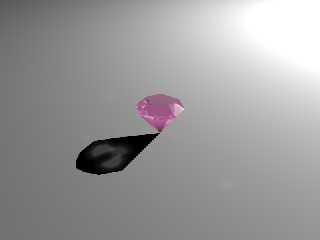
After /still/ having problems my amethyst ring I decided to isolate just
the stone and I think I've uncovered another bug. It appears that
filtered transparency isn't working with photons.

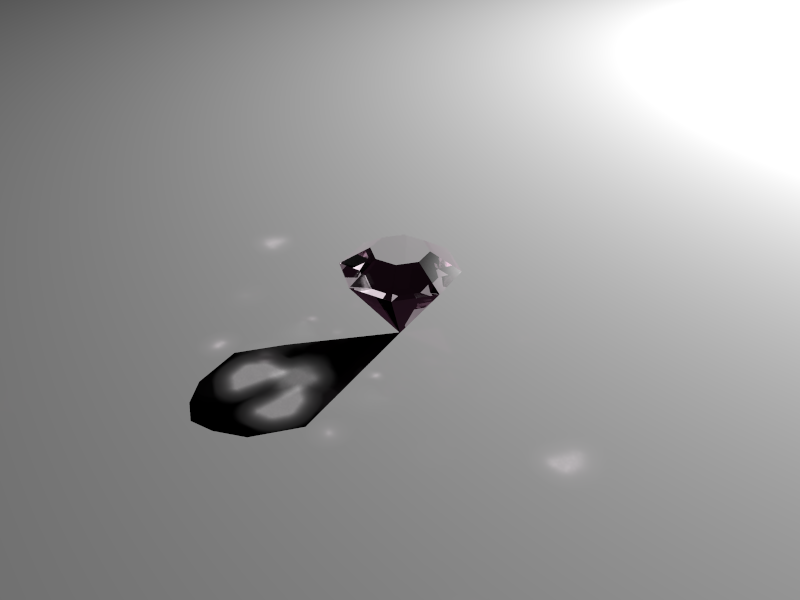
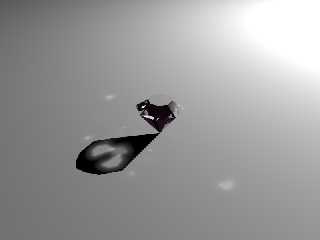
In the first image you can see the photons when I have srgbt <0.4980,
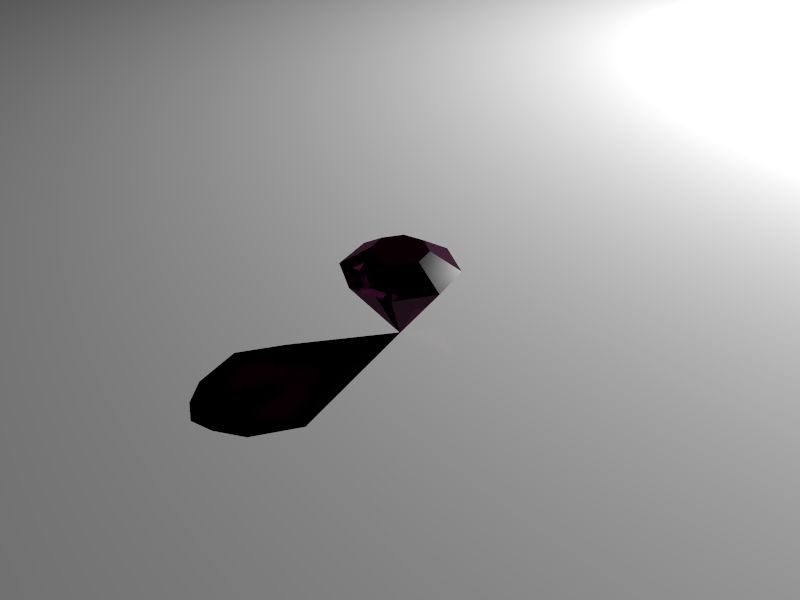
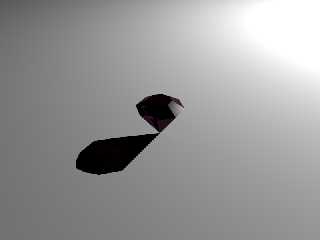
0.2902, 0.4235,1> in the material definition, and the second image the
photons aren't showing up when I have srgbf <0.4980, 0.2902, 0.4235,1>
in the material definition: that is the ONLY difference is srgbt then srgbf

The scene file is posted in p.b.scene-files
Post a reply to this message
Attachments:
Download 'p_test1.png' (67 KB)
Download 'p_test2.png' (44 KB)
Preview of image 'p_test1.png'
Preview of image 'p_test2.png'
|
|
| |
| |
|
|
|
|
| |
| |
|
|
Am 23.09.2012 14:45, schrieb James Holsenback:
> After /still/ having problems my amethyst ring I decided to isolate just
> the stone and I think I've uncovered another bug. It appears that
> filtered transparency isn't working with photons.
>
> In the first image you can see the photons when I have srgbt <0.4980,
> 0.2902, 0.4235,1> in the material definition, and the second image the
> photons aren't showing up when I have srgbf <0.4980, 0.2902, 0.4235,1>
> in the material definition: that is the ONLY difference is srgbt then srgbf
>
> The scene file is posted in p.b.scene-files

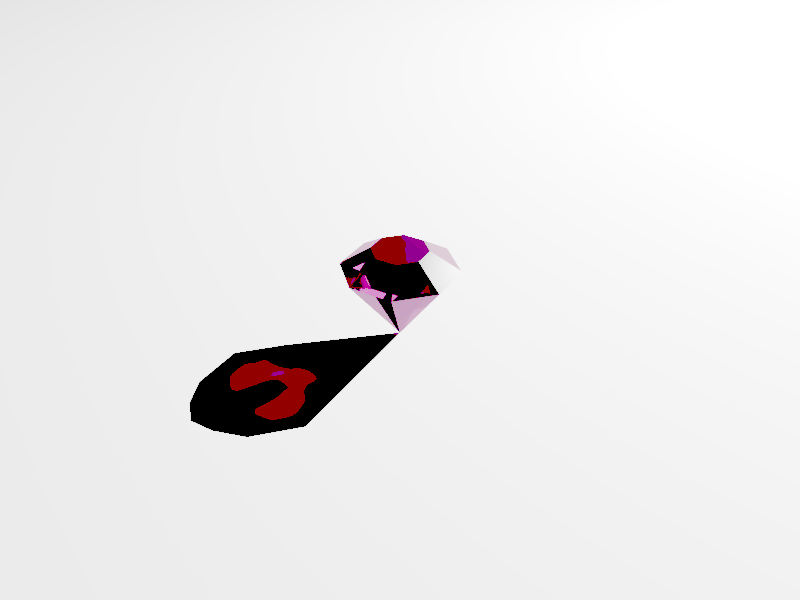
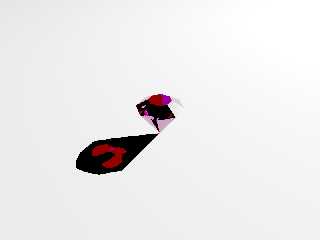
That's a negative. Here's an enhanced version of your image, showing
that photons /are/ at work.

Try using solely fade interior for the color; it's more realistic anyway.
Post a reply to this message
Attachments:
Download 'p_test2_enhanced.png' (36 KB)
Preview of image 'p_test2_enhanced.png'
|
|
| |
| |
|
|
|
|
| |
| |
|
|
On 09/23/2012 09:34 AM, clipka wrote:
> Am 23.09.2012 14:45, schrieb James Holsenback:
>> After /still/ having problems my amethyst ring I decided to isolate just
>> the stone and I think I've uncovered another bug. It appears that
>> filtered transparency isn't working with photons.
>>
>> In the first image you can see the photons when I have srgbt <0.4980,
>> 0.2902, 0.4235,1> in the material definition, and the second image the
>> photons aren't showing up when I have srgbf <0.4980, 0.2902, 0.4235,1>
>> in the material definition: that is the ONLY difference is srgbt then
>> srgbf
>>
>> The scene file is posted in p.b.scene-files
>
> That's a negative. Here's an enhanced version of your image, showing
> that photons /are/ at work.
>
> Try using solely fade interior for the color; it's more realistic anyway.
>

so yer sayin' srgbf <0.4980, 0.2902, 0.4235,1> as the pigment is a no-no?
Post a reply to this message
|
|
| |
| |
|
|
|
|
| |
| |
|
|
On 09/23/2012 09:34 AM, clipka wrote:
> Am 23.09.2012 14:45, schrieb James Holsenback:
>> After /still/ having problems my amethyst ring I decided to isolate just
>> the stone and I think I've uncovered another bug. It appears that
>> filtered transparency isn't working with photons.
>>
>> In the first image you can see the photons when I have srgbt <0.4980,
>> 0.2902, 0.4235,1> in the material definition, and the second image the
>> photons aren't showing up when I have srgbf <0.4980, 0.2902, 0.4235,1>
>> in the material definition: that is the ONLY difference is srgbt then
>> srgbf
>>
>> The scene file is posted in p.b.scene-files
>
> That's a negative. Here's an enhanced version of your image, showing
> that photons /are/ at work.
>
> Try using solely fade interior for the color; it's more realistic anyway.
>

OK ... so been playing around with fade_color/distance/power in interior
and not even close to looking like an amethyst!

Mind posting the material definition you used?
Post a reply to this message
|
|
| |
| |
|
|
|
|
| |
| |
|
|
On 09/23/2012 10:50 AM, James Holsenback wrote:
> On 09/23/2012 09:34 AM, clipka wrote:
>> Am 23.09.2012 14:45, schrieb James Holsenback:
>>> After /still/ having problems my amethyst ring I decided to isolate just
>>> the stone and I think I've uncovered another bug. It appears that
>>> filtered transparency isn't working with photons.
>>>
>>> In the first image you can see the photons when I have srgbt <0.4980,
>>> 0.2902, 0.4235,1> in the material definition, and the second image the
>>> photons aren't showing up when I have srgbf <0.4980, 0.2902, 0.4235,1>
>>> in the material definition: that is the ONLY difference is srgbt then
>>> srgbf
>>>
>>> The scene file is posted in p.b.scene-files
>>
>> That's a negative. Here's an enhanced version of your image, showing
>> that photons /are/ at work.
>>
>> Try using solely fade interior for the color; it's more realistic anyway.
>>
>
> OK ... so been playing around with fade_color/distance/power in interior
> and not even close to looking like an amethyst!
>
> Mind posting the material definition you used?

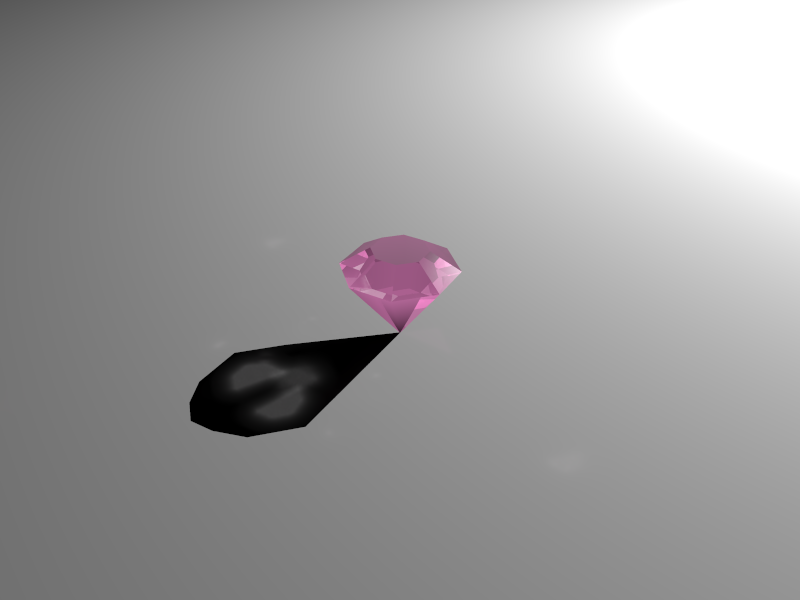
LOL ... never mind I found a way to do it (still some tweaking left) . I
made the pigment in the material srgbf 0.85 and put some colored
emission media in the interior ... not exactly intuitive (to me anyways)
Post a reply to this message
Attachments:
Download 'work.png' (55 KB)
Preview of image 'work.png'
|
|
| |
| |
|
|
|
|
| |
| |
|
|
Le 23/09/12 10:50 AM, James Holsenback a écrit :
> On 09/23/2012 09:34 AM, clipka wrote:
>> Am 23.09.2012 14:45, schrieb James Holsenback:
>>> After /still/ having problems my amethyst ring I decided to isolate just
>>> the stone and I think I've uncovered another bug. It appears that
>>> filtered transparency isn't working with photons.
>>>
>>> In the first image you can see the photons when I have srgbt <0.4980,
>>> 0.2902, 0.4235,1> in the material definition, and the second image the
>>> photons aren't showing up when I have srgbf <0.4980, 0.2902, 0.4235,1>
>>> in the material definition: that is the ONLY difference is srgbt then
>>> srgbf
>>>
>>> The scene file is posted in p.b.scene-files
>>
>> That's a negative. Here's an enhanced version of your image, showing
>> that photons /are/ at work.
>>
>> Try using solely fade interior for the color; it's more realistic anyway.
>>
>
> OK ... so been playing around with fade_color/distance/power in interior
> and not even close to looking like an amethyst!
>
> Mind posting the material definition you used?

When using fading interiors, the key is fade_distance. If you want
deeper colour, use a smaller value.
Use fade_power 1. Aletrnatively, you may want to use fade_power 1001.

For gemms, I tend to use a fade_distance value between 1/2 and 1/10 the
dimention of the gemm. Larger values are used for make the stone look
smaller.


Alain
Post a reply to this message
|
|
| |
| |
|
|
|
|
| |
| |
|
|
Am 23.09.2012 19:18, schrieb James Holsenback:
>
> LOL ... never mind I found a way to do it (still some tweaking left) . I
> made the pigment in the material srgbf 0.85 and put some colored
> emission media in the interior ... not exactly intuitive (to me anyways)

This is not a good idea. A gemstone does absorb light and not emit it.


I've found this page with some spectral data for gemstones:

http://www.octonus.com/oct/projects/adsorbtion_spectra.phtml

and used this data to play a bit around with your stone. And after
getting some strange effects I noticed that you have a coincident
surface problem within the merge.

This is exactly your gem shape but without coincident surface and it
renders even a bit faster.

#declare Gem = intersection {
   #local ndx = 0;
   #while ( ndx < 360 )
     plane {-x, 0 rotate z*-55 translate x*-2.75 rotate y*ndx }
     plane {-x, 0 rotate z*35  translate x*-2.75 rotate y*ndx }
     #local ndx = ndx + 45;
   #end
   plane {y, 0 translate y*1}
}


And I would use something like this for gems:

#macro M_Gem (Color, IOR, FadeDist)
   material {
     texture {
       pigment {rgb Color filter 1}
       finish {
         ambient 0  emission 0  diffuse 0
         reflection {0 1 fresnel on} conserve_energy
       }
     }
     interior {
       ior IOR
       fade_power 1001
       fade_distance FadeDist
       fade_power rgb < pow(Color.red,3),
                        pow(Color.green,3)
                        pow(Color.blue,3) >
     }
   }

#end


Note that I do usually use 1cm = 1 POV-Unit and in this case
fade_distance 1 works pretty well. You have scaled your gem much
bigger so you have to adjust fade_distance to fit your scale.


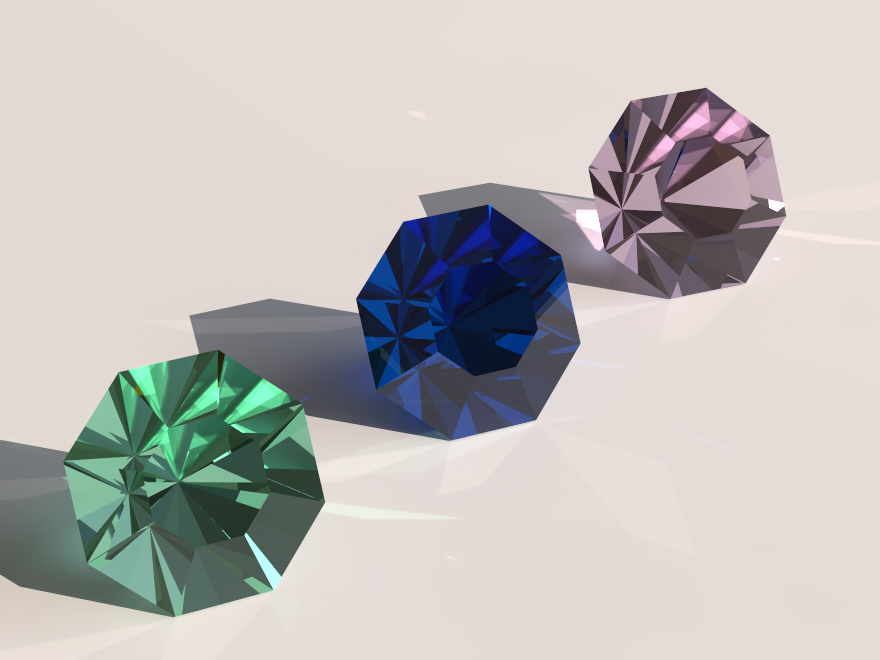
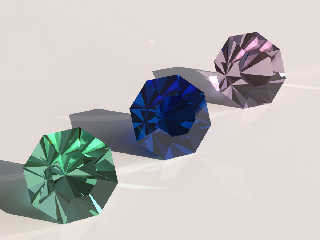
Attached is a quick lo-quality (90 seconds) preview render - not a
spectral one - featuring your stone: from left to right emerald,
sapphire and amethyst.

-Ive
Post a reply to this message
Attachments:
Download 'gems.jpg' (87 KB)
Preview of image 'gems.jpg'
|
|
| |
| |
|
|
|
|
| |
| |
|
|
On 09/23/2012 06:59 PM, Ive wrote:
> Am 23.09.2012 19:18, schrieb James Holsenback:
>>
>> LOL ... never mind I found a way to do it (still some tweaking left) . I
>> made the pigment in the material srgbf 0.85 and put some colored
>> emission media in the interior ... not exactly intuitive (to me anyways)
>
> This is not a good idea. A gemstone does absorb light and not emit it.

Yes this was a fail ... and after I thought about it for a bit I thought
the same thing.

> I've found this page with some spectral data for gemstones:
>
> http://www.octonus.com/oct/projects/adsorbtion_spectra.phtml
>
> and used this data to play a bit around with your stone. And after
> getting some strange effects I noticed that you have a coincident
> surface problem within the merge.

Yes it left a visible line shadow on the ground plane ... thought merge
would have gotten rid of coincident surface ( where the two cones met
before difference ) but obviously not ... hmmm

> This is exactly your gem shape but without coincident surface and it
> renders even a bit faster.
>
> #declare Gem = intersection {
>    #local ndx = 0;
>    #while ( ndx < 360 )
>      plane {-x, 0 rotate z*-55 translate x*-2.75 rotate y*ndx }
>      plane {-x, 0 rotate z*35  translate x*-2.75 rotate y*ndx }
>      #local ndx = ndx + 45;
>    #end
>    plane {y, 0 translate y*1}
> }

way more elegant ... thanks

> And I would use something like this for gems:
>
> #macro M_Gem (Color, IOR, FadeDist)
>    material {
>      texture {
>        pigment {rgb Color filter 1}
>        finish {
>          ambient 0  emission 0  diffuse 0
>          reflection {0 1 fresnel on} conserve_energy
>        }
>      }
>      interior {
>        ior IOR
>        fade_power 1001
>        fade_distance FadeDist
>        fade_power rgb < pow(Color.red,3),
>                         pow(Color.green,3)
>                         pow(Color.blue,3) >
>      }
>    }
>
> #end
>
>
> Note that I do usually use 1cm = 1 POV-Unit and in this case
> fade_distance 1 works pretty well. You have scaled your gem much
> bigger so you have to adjust fade_distance to fit your scale.
>
>
> Attached is a quick lo-quality (90 seconds) preview render - not a
> spectral one - featuring your stone: from left to right emerald,
> sapphire and amethyst.
>
> -Ive

Wow ... thanks for the macro and all the advise. I really appreciate it!
Post a reply to this message
|
|
| |
| |
|
|
|
|
| |
| |
|
|
Am 24.09.2012 02:24, schrieb James Holsenback:

> Yes it left a visible line shadow on the ground plane ... thought merge
> would have gotten rid of coincident surface ( where the two cones met
> before difference ) but obviously not ... hmmm
>
Well, merge gets rid of *internal* surfaces but in this case, depending
on viewing angle and floating point inaccuracy, it is not clear if a ray
has left one surface and then enters the other or if the objects
actually get merged.


>> #macro M_Gem (Color, IOR, FadeDist)
>>    material {
>>      texture {
>>        pigment {rgb Color filter 1}
>>        finish {
>>          ambient 0  emission 0  diffuse 0
>>          reflection {0 1 fresnel on} conserve_energy
>>        }
>>      }
>>      interior {
>>        ior IOR
>>        fade_power 1001
>>        fade_distance FadeDist
>>        fade_power rgb < pow(Color.red,3),
>>                         pow(Color.green,3)
>>                         pow(Color.blue,3) >
>>      }
>>    }
>>
>> #end
>>

Err, sorry, this was out of my head and has the usual bugs. It should be
like this:

#macro M_Gem (Color, IOR, FadeDist)
    material {
      texture {
        pigment {Color filter 1}
        finish {
          ambient 0  emission 0  diffuse 0
           reflection {0 1 fresnel on} conserve_energy
        }
      }
      interior {
        ior IOR
        fade_power 1001
        fade_distance FadeDist
        fade_color rgb < pow(Color.red,3),
                         pow(Color.green,3)
                         pow(Color.blue,3) >
      }
    }
#end

Hopefully this time I've got it right ;)

And BTW the rgb (not srgb !!! because the power of 3 would give wrong
results) values I did use for the picture are

Emerald:  rgb < 0.7276, 0.9320, 0.8543>
Sapphire: rgb <-0.0044, 0.3702, 0.7609>
Amethyst: rgb < 0.8981, 0.8441, 0.8972>

and are calculated from the absorption spectral data. And yes, the red
components for the Sapphire is negative, it is an out-of-gamut value.

> Wow ... thanks for the macro and all the advise. I really appreciate it!

Glad to be of help and again, sorry for the errors in the macro.

-Ive
Post a reply to this message
|
|
| |
| |
|
|
|
|
| |
| |
|
|
Am 24.09.2012 00:59, schrieb Ive:

> Attached is a quick lo-quality (90 seconds) preview render - not a
> spectral one - featuring your stone: from left to right emerald,
> sapphire and amethyst.

Looking forward to see a spectral render... you're gonna do one, right?
Post a reply to this message
|
|
| |
| |
|
|
|
|
| |
| |
|
|
On 09/24/2012 12:20 AM, Ive wrote:

> Err, sorry, this was out of my head and has the usual bugs.

no worries ... saw and fixed those last evening
Post a reply to this message
|
|
| |
| |
|
|
|
|
| |
| |
|
|
On 09/24/2012 05:27 AM, clipka wrote:
> Am 24.09.2012 00:59, schrieb Ive:
>
>> Attached is a quick lo-quality (90 seconds) preview render - not a
>> spectral one - featuring your stone: from left to right emerald,
>> sapphire and amethyst.
>
> Looking forward to see a spectral render... you're gonna do one, right?

lol ... hadn't considered that ... maybe i will give it a try
Post a reply to this message
|
|
| |
| |
|
|
|
|
| |
| |
|
|
Ive <ive### [at] lilysoft org> wrote:
> #macro M_Gem (Color, IOR, FadeDist)
> material {
> texture {
> pigment {rgb Color filter 1}
> finish {
> ambient 0 emission 0 diffuse 0
> reflection {0 1 fresnel on} conserve_energy
> }
> }
> interior {
> ior IOR
> fade_power 1001
> fade_distance FadeDist
> fade_power rgb < pow(Color.red,3),
> pow(Color.green,3)
> pow(Color.blue,3) >
> }
> }
>
> #end
Seems I have missed this discussion about gems due to RL issues. Your main idea
seems to be to use the interior with fade_color to color the stones. I used a
similiar approach for my stone of orloff mainly derived from a macro given by
Bruno Cabasson. I only wonder about the pow(x,3). You have given the colors used
in a later posting. Since this were floats you could even used the
pow(x,3)-values instead. Is it due to a color space conversion? I'm puzzled.
Best regards,
Michael org> wrote:
> #macro M_Gem (Color, IOR, FadeDist)
> material {
> texture {
> pigment {rgb Color filter 1}
> finish {
> ambient 0 emission 0 diffuse 0
> reflection {0 1 fresnel on} conserve_energy
> }
> }
> interior {
> ior IOR
> fade_power 1001
> fade_distance FadeDist
> fade_power rgb < pow(Color.red,3),
> pow(Color.green,3)
> pow(Color.blue,3) >
> }
> }
>
> #end
Seems I have missed this discussion about gems due to RL issues. Your main idea
seems to be to use the interior with fade_color to color the stones. I used a
similiar approach for my stone of orloff mainly derived from a macro given by
Bruno Cabasson. I only wonder about the pow(x,3). You have given the colors used
in a later posting. Since this were floats you could even used the
pow(x,3)-values instead. Is it due to a color space conversion? I'm puzzled.
Best regards,
Michael
Post a reply to this message
|
|
| |
| |
|
|
|
|
| |
| |
|
|
Am 12.10.2012 18:43, schrieb MichaelJF:
> Seems I have missed this discussion about gems due to RL issues. Your main idea
> seems to be to use the interior with fade_color to color the stones. I used a
> similiar approach for my stone of orloff mainly derived from a macro given by
> Bruno Cabasson. I only wonder about the pow(x,3). You have given the colors used
> in a later posting. Since this were floats you could even used the
> pow(x,3)-values instead. Is it due to a color space conversion? I'm puzzled.
>
> Best regards,
> Michael
>

The colors given in my reply to James are calculated from the absorbing
spectrum of the "real" objects. Note that I do use the same color (and
not ^3) within the pigment statement and this has influence on the final
appearance even with ambient and diffuse = 0.

And BTW here are two colors calculated from spectral data of two typical
diamonds:

Diamond ("natural yellow") : rgb <0.9856, 0.9924, 0.8726>
Diamond ("lemon yellow")   : rgb <0.9909, 0.9697, 0.8961>

-Ive


P.S. sorry for the mail, since T'birds user interface has changed it
happens to me all the time :(
Post a reply to this message
|
|
| |
| |
|
|
|
|
| |
| |
|
|
Ive <ive### [at] lilysoftorg> wrote:

> P.S. sorry for the mail, since T'birds user interface has changed it
> happens to me all the time :(
Of course I was puzzled again and tried to answer you in private. But since my
Mail-System seems to be a little bit puzzled too I'm not quiet sure if I was
successful. The first major flaw with my new machine. I aimply copied the data
from Windows Live Mail into the same directory. As I saw all my mails from my
old machine, I was content, may be to early...

> Note that I do use the same color (and
> not ^3) within the pigment statement and this has influence on the final
> appearance even with ambient and diffuse = 0.

Yes, I must admit, I overlooked that. A very valuable hint. I soon implemented
it in my new WIP and yielded better results. It's not about gems but "only"
glass. I try to find a material for old roman glasses by using a similiar
material but filling it with proper scattering and absorbing media. First
results with a glass by Gilles Tran are promising. I will post them here as soon
as possible. At the moment I'm trying to model the geometry of roman glasses in
Wings but observe annoying miscalculations of the normals. I have observed this
not for the first time, in some areas the normals in wings models seems to be
inverted. But that's an other issue. And very annoying baking textures...

Best regards,
Michael
Post a reply to this message
|
|
| |
| |
|
|
|
|
| |
| |
|
|
On 14-10-2012 19:57, MichaelJF wrote:
At the moment I'm trying to model the geometry of roman glasses in
> Wings but observe annoying miscalculations of the normals. I have observed this
> not for the first time, in some areas the normals in wings models seems to be
> inverted. But that's an other issue. And very annoying baking textures...

I have not used Wings for a very long time, but even in Silo, when doing
complex modelling sometimes faces end up with reversed normals. I
suppose that you can flip them back, like in Silo. However, I seem to
remember that Wings had a problem with normal consistency one way or
another...

Thomas
Post a reply to this message
|
|
| |
| |
|
|
|
|
| |
| |
|
|
On 15/10/12 09:00, Thomas de Groot wrote:
> I seem to remember that Wings had a problem with normal consistency
> one way or another...
>

   I never encountered such problems in my extensive (tough simple) usage
of Wings3D. On my own modeled objects, normals are always fine even if I
do really weird things. I only found such "inverted normals" problem
when importing some OBJ/3DS files from 3rd parties (it never happens if
the imported OBJ/3DS comes from my own objects).

--
Jaime
Post a reply to this message
|
|
| |
| |
|
|
|
|
| |
| |
|
|
On 15-10-2012 13:30, Jaime Vives Piqueres wrote:
>    I never encountered such problems in my extensive (tough simple) usage
> of Wings3D. On my own modeled objects, normals are always fine even if I
> do really weird things. I only found such "inverted normals" problem
> when importing some OBJ/3DS files from 3rd parties (it never happens if
> the imported OBJ/3DS comes from my own objects).

Must be my dim, degraded memory then, or some past imports I used... :-)

In Silo it can happen sometimes, but because of modelling errors by user ;-)

Thomas
Post a reply to this message
|
|
| |
| |
|
|
|
|
| |
| |
|
|
> In Silo it can happen sometimes, but because of modelling errors by user ;-)

May be I did something wrong, but unfortunetaly I have stored only the repaired
version of my old roman decanter. I will have three areas of spiraling bulges
around it and with two of them I encountered this phenomenon which I can only
explain with inverted normals. Usually with wings you can circulize a serious of
similiar edge sequences in one step. With the first two spirals I experienced
that in a certain - and parted - area the circles were inward the object but
with all others outward, which was intended. Unfortunetaly I just tried it with
the third spiral, which I haven't completed so far, and had only outward bounded
circles. That's for the proof by example...
with my orloff diamond I had a similiar experience. Since I will model at least
five different roman glasses (with different materials) the next days I promise
to save and post my next experience with this normal issue within the
newsgroups.

Best regards,
Michael
Post a reply to this message
|
|
| |
| |
|
|
|
|
| |
|
|