|
|
|
|
|
|
| |
| |
|
|
From: Jörg 'Yadgar' Bleimann
Subject: Realistic indoor radiosity - I still don't get it!
Date: 16 Nov 2011 12:49:51
Message: <4ec3f7bf@news.povray.org>
|
|
|
| |
| |
|
|
Hi(gh)!

After finally having compiled and installed PoV-Ray 3.7 for Linux, I
still can't figure out how to tweak radiosity in a way that I get
realistic light levels both outside and inside a building.

I tried Hildur Kolbrun Andresdottir's radiosity settings from her
tutorial (http://www.simnet.is/hildurka/content/tut1page.htm, the left
one of the two final settings, see almost bottom of page), decreased the
brightness value to 1 (with Mrs. Andresdottir's original 2, everything
outside would simply drown in white), and also upped gray_threshold to
0.8 - but still inside, the contrast ist too low (and, compared to Mrs.
Andresdottir's rendering, surfaces are generally too dark), while
outside scenes are still not far from "drowning in white"!

My current radiosity settings:

       radiosity
       {
         brightness 1.5
       	count 100
       	error_bound 0.15
         gray_threshold 0.8
         low_error_factor 0.2
         minimum_reuse 0.015
         nearest_count 10
       	recursion_limit 5
         adc_bailout 0.01
         max_sample 1 // -1
         always_sample 1
       	pretrace_start 0.08
       	pretrace_end 0.002
       }
       ambient_light 0

What did I happen to not understand?

See you in Khyberspace!

Yadgar
Post a reply to this message
Attachments:
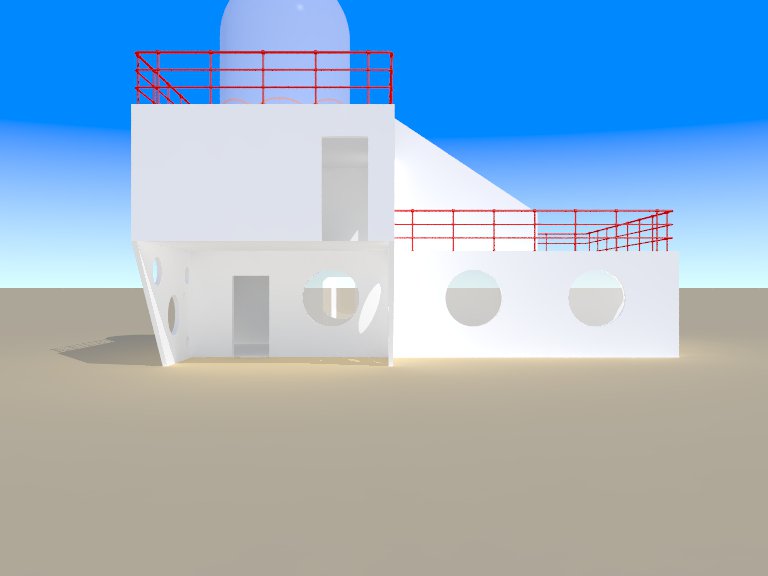
Download '2011-11-16 port whatmough residential building 1, take 262 - view from kitchen into atelier, andresdottir radiosity (mod' (17 KB)
Download '2011-11-16 port whatmough residential building 1, take 263 - view from north, andresdottir radiosity (modified).jpg' (26 KB)
Preview of image '2011-11-16 port whatmough residential building 1, take 262 - view from kitchen into atelier, andresdottir radiosity (mod'
Preview of image '2011-11-16 port whatmough residential building 1, take 263 - view from north, andresdottir radiosity (modified).jpg'
|
|
| |
| |
|
|
From: nemesis
Subject: Re: Realistic indoor radiosity - I still don't get it!
Date: 16 Nov 2011 14:19:55
Message: <4ec40cdb@news.povray.org>
|
|
|
| |
| |
|
|
it's black magic from past days. You should consult some wizard of olde.
Post a reply to this message
|
|
| |
| |
|
|
From: clipka
Subject: Re: Realistic indoor radiosity - I still don't get it!
Date: 16 Nov 2011 14:44:54
Message: <4ec412b6$1@news.povray.org>
|
|
|
| |
| |
|
|
Am 16.11.2011 18:49, schrieb Jörg 'Yadgar' Bleimann:
> Hi(gh)!
>
> After finally having compiled and installed PoV-Ray 3.7 for Linux, I
> still can't figure out how to tweak radiosity in a way that I get
> realistic light levels both outside and inside a building.

The secret here is that what you get /is/ realistic: Outdoor places are
usually /much/ brighter than indoor places. You just don't normally
notice, because your eyes automatically adapt to the brightness level,
while POV-Ray file output does not.

One way around this is to use OpenEXR file output, which can handle such
difference in brightness, and use some suitable image viewer/converter -
such as Lilysoft's IC - to generate standard PNG or JPG images from the
output, with brightness adjusted as needed.

Another approach is - obviously - to adjust the brightness of all the
light sources in your scene (including the sky, and any emissive
surfaces or media) depending on whether you want to show an indoor or
outdoor view.


(I'm presuming that you did your homework regarding gamma, as that's
something that might mess things up as well. You should have
assumed_gamma 1.0, and proper Display_Gamma and File_Gamma settings.)
Post a reply to this message
|
|
| |
| |
|
|
From: Alain
Subject: Re: Realistic indoor radiosity - I still don't get it!
Date: 16 Nov 2011 22:52:12
Message: <4ec484ec@news.povray.org>
|
|
|
| |
| |
|
|
Le 2011/11/16 12:49, Jörg 'Yadgar' Bleimann a écrit :
> Hi(gh)!
>
> After finally having compiled and installed PoV-Ray 3.7 for Linux, I
> still can't figure out how to tweak radiosity in a way that I get
> realistic light levels both outside and inside a building.
>
> I tried Hildur Kolbrun Andresdottir's radiosity settings from her
> tutorial (http://www.simnet.is/hildurka/content/tut1page.htm, the left
> one of the two final settings, see almost bottom of page), decreased the
> brightness value to 1 (with Mrs. Andresdottir's original 2, everything
> outside would simply drown in white), and also upped gray_threshold to
> 0.8 - but still inside, the contrast ist too low (and, compared to Mrs.
> Andresdottir's rendering, surfaces are generally too dark), while
> outside scenes are still not far from "drowning in white"!
>
> My current radiosity settings:
>
> radiosity
> {
> brightness 1.5
In most cases, this should stay at 1. Especialy when you use a large
recursion_limit like 5.
It can also be what causes your inside contrast to be to low...

> count 100
I would use a higher count and use importance to lower the sampling for
the exterior parts.
> error_bound 0.15
> gray_threshold 0.8
> low_error_factor 0.2
> minimum_reuse 0.015
> nearest_count 10
> recursion_limit 5
> adc_bailout 0.01
> max_sample 1 // -1
> always_sample 1
> pretrace_start 0.08
> pretrace_end 0.002
> }
> ambient_light 0
NOT needed with version 3.7. It's now done automaticaly whenever
radiosity is used.

>
> What did I happen to not understand?
>
> See you in Khyberspace!
>
> Yadgar

In real life, you can very easily have lighting variation of 100:1 to
10000:1 between the interior and the exterior.
Take an interior photo where you see the exterior. The exterior is often
totaly flooded with light to the point that you can't distinguish
anything but white.
In the oposite case, when you see the interior from outside, the
interior is usualy to dark to see anything, unless you have a large
window/opening relative to the interior dimentions AND the interior have
light colours or is strongly lighted.


Alain
Post a reply to this message
|
|
| |
| |
|
|
From: Thomas de Groot
Subject: Re: Realistic indoor radiosity - I still don't get it!
Date: 17 Nov 2011 03:11:57
Message: <4ec4c1cd@news.povray.org>
|
|
|
| |
| |
|
|
Everything has already been said above I guess, still allow me a few
thoughts:

- Hildur's radiosity settings are intended for version 3.6 and megapov,
NOT 3.7 RC3.

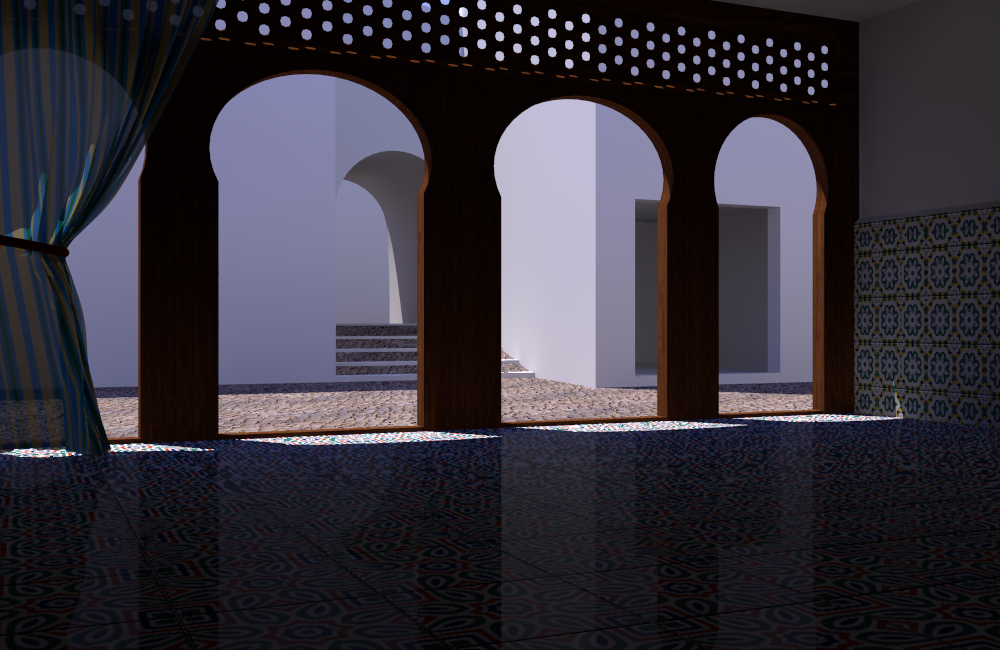
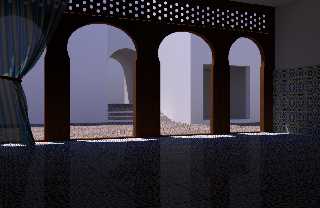
- For the latest image of a similar scene to yours (see the attachment)
and which I believe is satisfyingly illuminated inside and outside, I
use the following settings:

Radiosity:
   radiosity {
     pretrace_start 0.08
     pretrace_end   0.004
     count 100
     nearest_count 10, 5
     error_bound 1
     recursion_limit 2
     low_error_factor .3
     gray_threshold 0.0
     minimum_reuse 0.015
     maximum_reuse 0.1
     brightness 1
     adc_bailout 0.01/2
     normal off
     media off
     always_sample off
   }

As sunlight (only lightsource) I use the LightSysIV system:
   #include "CIE.inc"
   #declare SunColor     = Blackbody(6500)*2;

My skysphere is a simple sphere with the following finish:
   finish {emission 1 diffuse 0}

Typically, the finish of the textures shown here are as follows:
material {
   texture {
     uv_mapping
     pigment{srgb <0.9,0.9,0.9> transmit  0/100}
     finish {
       specular 0.1
       roughness 0.00286312
       ambient rgb <0.00,0.00,0.00>
       diffuse 0.8
       brilliance 1
       reflection{0.0}
       conserve_energy
     }
   }
}

I hope this helps. Particularly, check out the gamma settings like
Clipka told you in his message! This is essential with version 3.7.

Thomas
Post a reply to this message
Attachments:
Download 'at the jackal.png' (624 KB)
Preview of image 'at the jackal.png'
|
|
| |
| |
|
|
From: Jörg 'Yadgar' Bleimann
Subject: Re: Realistic indoor radiosity - I still don't get it!
Date: 17 Nov 2011 15:27:30
Message: <4ec56e32@news.povray.org>
|
|
|
| |
| |
|
|
High!

On 17.11.2011 09:11, Thomas de Groot wrote:
> Everything has already been said above I guess, still allow me a few
> thoughts:
>
> - Hildur's radiosity settings are intended for version 3.6 and megapov,
> NOT 3.7 RC3.
>
> - For the latest image of a similar scene to yours (see the attachment)
> and which I believe is satisfyingly illuminated inside and outside, I
> use the following settings:
>
> Radiosity:
> radiosity {
> pretrace_start 0.08
> pretrace_end 0.004
> count 100
> nearest_count 10, 5
> error_bound 1
> recursion_limit 2
> low_error_factor .3
> gray_threshold 0.0
> minimum_reuse 0.015
> maximum_reuse 0.1
> brightness 1
> adc_bailout 0.01/2
> normal off
> media off
> always_sample off
> }

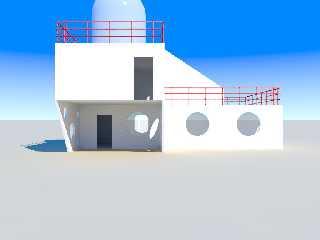
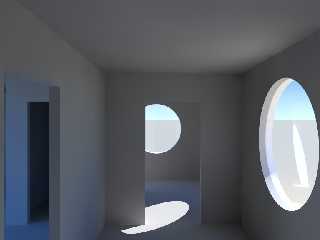
I tried this (see below) - and simply was stunned: few artifacts and
FAST! However, one problem remains: increasing gray_threshold doesn't
help this time, the shadows remain bluish! Where do I find a 3.7 manual
to look it up (no, I don't have the Windows version)?

> As sunlight (only lightsource) I use the LightSysIV system:
> #include "CIE.inc"
> #declare SunColor = Blackbody(6500)*2;

Currently I only use a cheap point light sun...

> My skysphere is a simple sphere with the following finish:
> finish {emission 1 diffuse 0}

I instead use a proper sky_sphere with a gradient y from almost white
cyan to rgb <0, 0.3, 1>!

> I hope this helps. Particularly, check out the gamma settings like
> Clipka told you in his message! This is essential with version 3.7.

Once more my question: where do I find a 3.7 manual?

See you in Khyberspace!

Yadgar
Post a reply to this message
Attachments:
Download '2011-11-17 port whatmough residential building 1, take 274 - view from north, 2011 thomas de groot radiosity (modified).' (28 KB)
Download '2011-11-17 port whatmough residential building 1, take 283 - inside kitchen, looking west into atelier, 2011 thomas de g' (22 KB)
Preview of image '2011-11-17 port whatmough residential building 1, take 274 - view from north, 2011 thomas de groot radiosity (modified).'
Preview of image '2011-11-17 port whatmough residential building 1, take 283 - inside kitchen, looking west into atelier, 2011 thomas de g'
|
|
| |
| |
|
|
From: Jim Holsenback
Subject: Re: Realistic indoor radiosity - I still don't get it!
Date: 17 Nov 2011 16:12:36
Message: <4ec578c4$1@news.povray.org>
|
|
|
| |
| |
|
|
On 11/17/2011 03:27 PM, Jörg 'Yadgar' Bleimann wrote:
> Once more my question: where do I find a 3.7 manual?

http://wiki.povray.org/content/Documentation:Contents

This is our most up to date documentation ... all the RC4 changes are
here but for what you're looking for it will do!
Post a reply to this message
|
|
| |
| |
|
|
From: Jim Holsenback
Subject: Re: Realistic indoor radiosity - I still don't get it!
Date: 17 Nov 2011 19:37:44
Message: <4ec5a8d8@news.povray.org>
|
|
|
| |
| |
|
|
On 11/17/2011 04:12 PM, Jim Holsenback wrote:
> On 11/17/2011 03:27 PM, Jörg 'Yadgar' Bleimann wrote:
>> Once more my question: where do I find a 3.7 manual?
>
> http://wiki.povray.org/content/Documentation:Contents
>
> This is our most up to date documentation ... all the RC4 changes are
> here but for what you're looking for it will do!

an after thought ... take a peek in /usr/local/share/doc/povray-3.7
Post a reply to this message
|
|
| |
| |
|
|
From: Thomas de Groot
Subject: Re: Realistic indoor radiosity - I still don't get it!
Date: 18 Nov 2011 03:05:49
Message: <4ec611dd$1@news.povray.org>
|
|
|
| |
| |
|
|
On 17-11-2011 21:27, Jörg 'Yadgar' Bleimann wrote:

> I tried this (see below) - and simply was stunned: few artifacts and
> FAST! However, one problem remains: increasing gray_threshold doesn't
> help this time, the shadows remain bluish! Where do I find a 3.7 manual
> to look it up (no, I don't have the Windows version)?

The bluish hue comes from the sky. I think that in RL the same happens,
only we unconsciously compensate for it :-) In my image this also
happens by the way. Like me, you can reduce its effect by (1) creating
(e.g. white) objects around your house, blocking the horizon and part of
the sky. Where they are not visible by the camera, simple screens may
do. This is a simple trick I learned from Hildur by the way.
Alternatively, you can make the sky less blue; (2) you can increase the
light's intensity which will drown out the sky hue to some measure; (3)
If you want to use the LightSys IV system you can control the way in
which horizon and/or overhead atmosphere influence the sunlight.

Like Jim says below, there are the online docs for 3.7 to browse through ;-)

>> My skysphere is a simple sphere with the following finish:
>> finish {emission 1 diffuse 0}
>
> I instead use a proper sky_sphere with a gradient y from almost white
> cyan to rgb <0, 0.3, 1>!

Obviously, my code was not complete. My complete sky code is:

sphere { <0, 0, 0>, 1
   pigment {
     gradient y
     color_map {
       [0.0 rgb <0.6,0.7,1.0>]
       [0.7 rgb <0.0,0.1,0.8>]
     }
   }
   finish {emission 1 diffuse 0}
   scale 5*10e4
   inverse
}


Thomas
Post a reply to this message
|
|
| |
| |
|
|
From: Jörg 'Yadgar' Bleimann
Subject: Re: Realistic indoor radiosity - I still don't get it!
Date: 18 Nov 2011 04:28:09
Message: <4ec62529@news.povray.org>
|
|
|
| |
| |
|
|
High!

On 18.11.2011 09:05, Thomas de Groot wrote:

> Obviously, my code was not complete. My complete sky code is:
>
> sphere { <0, 0, 0>, 1
> pigment {
> gradient y
> color_map {
> [0.0 rgb <0.6,0.7,1.0>]
> [0.7 rgb <0.0,0.1,0.8>]
> }
> }
> finish {emission 1 diffuse 0}
> scale 5*10e4
> inverse
> }

Meanwhile, before I even tried this, I tried to modularize my scene
script (which started to become difficult to handle, at 1,800 lines of
code) by placing the radiosity, pigment, finish and texture definition
in separate files - and instantly messed up the code completely!

Your sophisticated radiosity is gone (though I did not change
anything!), instead I once more got some dull, contrastless rendering!

I obviously am too stupid to learn anything from any mistake...

I'm about to catch the next time machine to some Nazi death camp and get
myself gassed... I HATE MYSELF FOR BEING SO DYSFUNCTIONAL!!!

Or is there anyone among you who would like to kill me? I'm totally fed
up with myself!!!

UARGH!!!!
Post a reply to this message
|
|
| |
| |
|
|
From: Thomas de Groot
Subject: Re: Realistic indoor radiosity - I still don't get it!
Date: 18 Nov 2011 07:20:54
Message: <4ec64da6$1@news.povray.org>
|
|
|
| |
| |
|
|
On 18-11-2011 10:28, Jörg 'Yadgar' Bleimann wrote:

> Meanwhile, before I even tried this, I tried to modularize my scene
> script (which started to become difficult to handle, at 1,800 lines of
> code) by placing the radiosity, pigment, finish and texture definition
> in separate files - and instantly messed up the code completely!

Building a scene from modules is a good way to go instead. It is
something I often do myself. Learning from past errors: I always start
from a copy of the original scene :-) I know perfectly well what you are
going through.
However, you can best leave the radiosity statement in the main scene
file along with all general things like the light, the sky, etc, and
include the texture definitions from an external file.

> I obviously am too stupid to learn anything from any mistake...

Don't hate yourself. Shit happens, like they say...

>
> I'm about to catch the next time machine to some Nazi death camp and get
> myself gassed... I HATE MYSELF FOR BEING SO DYSFUNCTIONAL!!!
>
> Or is there anyone among you who would like to kill me? I'm totally fed
> up with myself!!!

Before you go, or before the next hitman makes an appointment with you,
just take a beer and consider life without POV-Ray ;-)

>
> UARGH!!!!

Now, that should have relieved you! Yell again!

Thomas
Post a reply to this message
|
|
| |
| |
|
|
|
|
| |
| |
|
|
=?ISO-8859-1?Q?J=F6rg_=27Yadgar=27_Bleimann?= <yaz### [at] gmx de> wrote:
> I obviously am too stupid to learn anything from any mistake...
I don't believe you.
Look back at your personal Web site. You confess to having lots of setbacks and
mistakes over the years trying to model Afghanistan. And you learned.
You can do it again. Just give it more time and effort.
> I'm about to catch the next time machine to some Nazi death camp and get
> myself gassed... I HATE MYSELF FOR BEING SO DYSFUNCTIONAL!!!
I hope you're just kidding. If not, then please see a doctor.
> Or is there anyone among you who would like to kill me? I'm totally fed
> up with myself!!!
If we kill you, then you'll *never* learn about radiosity. Plus, we'll lose a
fellow POV-Ray user.
This too, shall pass.
Sleep on it. de> wrote:
> I obviously am too stupid to learn anything from any mistake...
I don't believe you.
Look back at your personal Web site. You confess to having lots of setbacks and
mistakes over the years trying to model Afghanistan. And you learned.
You can do it again. Just give it more time and effort.
> I'm about to catch the next time machine to some Nazi death camp and get
> myself gassed... I HATE MYSELF FOR BEING SO DYSFUNCTIONAL!!!
I hope you're just kidding. If not, then please see a doctor.
> Or is there anyone among you who would like to kill me? I'm totally fed
> up with myself!!!
If we kill you, then you'll *never* learn about radiosity. Plus, we'll lose a
fellow POV-Ray user.
This too, shall pass.
Sleep on it.
Post a reply to this message
|
|
| |
| |
|
|
|
|
| |
| |
|
|
=?ISO-8859-1?Q?J=F6rg_=27Yadgar=27_Bleimann?= <yaz### [at] gmxde> wrote:
> However, one problem remains: increasing gray_threshold doesn't
> help this time, the shadows remain bluish! Where do I find a 3.7 manual
> to look it up (no, I don't have the Windows version)?

Shadows actually /are/ bluish on a sunny day with clear blue sky, and your sky
is very blue; I think the radiosity is taking that into account, just as in the
real world.

Try changing your sky color to red and see if you get red shadows...

Cheers,
Rob
-------------------------------------------------
www.McGregorFineArt.com
Post a reply to this message
|
|
| |
| |
|
|
From: Jörg 'Yadgar' Bleimann
Subject: Re: Realistic indoor radiosity - I still don't get it!
Date: 19 Nov 2011 16:24:17
Message: <4ec81e81$1@news.povray.org>
|
|
|
| |
| |
|
|
Hi(gh)!

Am 18.11.2011 19:26, schrieb Cousin Ricky:

> I don't believe you.
>
> Look back at your personal Web site.  You confess to having lots of setbacks and
> mistakes over the years trying to model Afghanistan.  And you learned.

But my learning curve is very, very flat... when I compare myself to
those whizkids who know PoV-Ray barely for a year and come up with
sophisticated scenes, then I really would like to kill not myself (I'm
even too phlegmatic for suicide!), but to delete all PoV-Ray
applications and project data and from now on content myself with
watching TV and drinking cheap canned beer like all the other underclass
losers do...

> You can do it again.  Just give it more time and effort.

And that's the problem... I'm not used to giving effort (in any fields
of life) anymore, effort just HURTS! And when I try and try and try and
even the 22nd attempt is the same failure as the first, then I wonder
whether the whole Jörg "Yadgar" Bleimann is just one big failure...

> I hope you're just kidding.  If not, then please see a doctor.

Fortunately, there are no time machines... and as I mentioned, I'm even
too dysfunctional to kill myself! If I tried, I probably would totally
blow the job and instead of simply ceasing to exist (or, the Christian
version, ending up in Satan's eternal Auschwitz, as I'm no born-again
turbo-evangelical), I would find myself as a coma patient for years and
years in some intensive neurology ward...

> This too, shall pass.
>
> Sleep on it.

Not even this works after gallons of strong "programmer's coffee"...

See you in Khyberspace!

Yadgar
Post a reply to this message
|
|
| |
| |
|
|
From: Jörg 'Yadgar' Bleimann
Subject: Re: Realistic indoor radiosity - I still don't get it!
Date: 19 Nov 2011 16:28:22
Message: <4ec81f76@news.povray.org>
|
|
|
| |
| |
|
|
Hi(gh)!

Am 19.11.2011 00:28, schrieb Robert McGregor:

> Shadows actually /are/ bluish on a sunny day with clear blue sky, and your sky
> is very blue; I think the radiosity is taking that into account, just as in the
> real world.
>
> Try changing your sky color to red and see if you get red shadows...

Of course I know of this... but I would like to create a scene matching
my *subjective* recalls of bright summer days - even in the
Mediterranean, I can't remember shadows being THAT blue!

But meanwhile I found out that it's simply because of the missing
#version 3.7 - after I added this at the beginning of my code, the
gray_threshold value was taken into account once more!

See you in Khyberspace!

Yadgar
Post a reply to this message
|
|
| |
| |
|
|
From: clipka
Subject: Re: Realistic indoor radiosity - I still don't get it!
Date: 19 Nov 2011 20:28:57
Message: <4ec857d9@news.povray.org>
|
|
|
| |
| |
|
|
Am 19.11.2011 22:24, schrieb Jörg 'Yadgar' Bleimann:
>
> But my learning curve is very, very flat... when I compare myself to
> those whizkids who know PoV-Ray barely for a year and come up with
> sophisticated scenes, then I really would like to kill not myself (I'm
> even too phlegmatic for suicide!), but to delete all PoV-Ray
> applications and project data and from now on content myself with
> watching TV and drinking cheap canned beer like all the other underclass
> losers do...

Oh, come on - I know we're heading towards winter time, and people all
over the northern hemisphere are going into hibernation mode (aka
depression), but please... we just managed to convince Orchid aka
Invisible that /he/'s not "completely dysfunctional", so don't /you/
start now... >_<

Just look at me, for instance. I guess you'd file me under "whizkid",
with all those code contributions to POV-Ray 3.7, having made radiosity
easier to use and all that jazz. Guess what - that's just one facet of
my life you see. The rest of it is probably neither more nor less
brilliant than anybody else's (including yours). Struggling with
depressions myself, BTW - been there, done that. (Well, not publicly
declaring how dysfunctional I am, but anyway...) So I guess I can say
with some authority of experience: "If you think you suck, I think
you're sick." (pun intended)

'Nuff said for now. If you're interested in some further advice along
these lines, feel free to contact me via electionic mail to Christoph at
Lipka-Koeln in Germany (de).
Post a reply to this message
|
|
| |
| |
|
|
From: Thomas de Groot
Subject: Re: Realistic indoor radiosity - I still don't get it!
Date: 20 Nov 2011 02:57:12
Message: <4ec8b2d8$1@news.povray.org>
|
|
|
| |
| |
|
|
On 19-11-2011 22:28, Jörg 'Yadgar' Bleimann wrote:
> Of course I know of this... but I would like to create a scene matching
> my *subjective* recalls of bright summer days - even in the
> Mediterranean, I can't remember shadows being THAT blue!

But you sky is *much* bluer than the Mediterranean sky! Look at
photographs, I think you will see the blue hue in the shadows,
especially on white walls.

Note also that the blue is tempered by all the colors that are
reflected/refracted from other objects around.

Thomas
Post a reply to this message
|
|
| |
| |
|
|
From: Thomas de Groot
Subject: Re: Realistic indoor radiosity - I still don't get it!
Date: 20 Nov 2011 03:14:41
Message: <4ec8b6f1@news.povray.org>
|
|
|
| |
| |
|
|
Sincerely, Jörg, if this is a call for help and it feels like that, you
should seriously seek more professional help. We all here can certainly
try to make you see the bright side of life, and we shall, but that is
not enough. You may need a little extra support. Whatever you may think,
keep faith in yourself. Something I can advise in the mean time from
experience, shut down you PC, forget POV-Ray for a while, take your bike
(if you have one, else put on good walking shoes) and make big tours,
without exerting yourself unnecessarily, but putting on a good effort.
Do that for a week. And think of nothing else, least about yourself. Not
a cure, but a balm.

Thomas
Post a reply to this message
|
|
| |
| |
|
|
|
|
| |
| |
|
|
=?ISO-8859-1?Q?J=F6rg_=27Yadgar=27_Bleimann?= <yaz### [at] gmxde> wrote:
>
> But my learning curve is very, very flat... when I compare myself to
> [snip]

Whoops!  Comparing yourself to others is generally a bad move.

> Am 18.11.2011 19:26, schrieb Cousin Ricky:
>
> > You can do it again.  Just give it more time and effort.
>
> And that's the problem... I'm not used to giving effort (in any fields
> of life) anymore, effort just HURTS!

   Life is difficult.
                              --the Buddha

   This is a great truth, one of the greatest truths.  It is a great
   truth because once we truly see this truth, we transcend it.  Once
   we know that life is difficult--once we truly understand and accept
   it--then life is no longer difficult.  Because once it is accepted,
   the fact that life is difficult no longer matters.
                              --M. Scott Peck, M.D., _The Road Less Traveled_

> And when I try and try and try and
> even the 22nd attempt is the same failure as the first, then I wonder
> whether the whole Jörg "Yadgar" Bleimann is just one big failure...

This is an example of a "cognitive distortion."  See:
   http://psychcentral.com/lib/2009/15-common-cognitive-distortions/

Find a psychologist who practices cognitive behavioral therapy.  Avoid
psychoanalysis.

I personally have been impressed by your determination over the years.  Please
don't give that up!  Take it from someone who's struggled with clinical
depression for 20 years: as hopeless as your situation may *seem* to you today,
you will not always feel this way.
Post a reply to this message
|
|
| |
| |
|
|
|
|
| |
| |
|
|
> What did I happen to not understand?

Sorry Yadgar, I didn´t see this post earlier.

You seem to be on the right track. But... well, let me see.

It seems like you forgot to set the material finishes to 0 on your white walls?
Right?
This is the most important step because without it you will never get realistic
bouncing of light off the surfaces.

In that old tutorial I used
finish {
        ambient 0
        diffuse 1

for all materials except the sky sphere.

Sometimes I use diffuse 0.9 or even 0.8 in outdoors situations only, depends on
the situation, but ambient finish should always be 0 when using radiosity.

Another thing, you can never use the same radiosity setting for bot indoors and
outdoors situation. Unless you cheat with fill lights perhaps. But if you want
to mimic real daylight it is not possible. The light on the outside will always
be brighter than the light bouncing inside the room. The outside light is more
direct, while the inside light is mostly indirect. Our eyes will automatically
adjust to this in reality. No camera can take pictures both inside and outside
without adjusting so you can´t really expect Povray (or any other raytracer) to
do it.

So if you wan´t to make realistic renderings of a building from both outside and
inside you have to use two different radiosity settings for each situation.

One tip: try to avoid using colors for surfaces that are 100% white (or 100%
black for that matter) they can never be realistic.

One more thing. The recursion limit of 5 is probably a bit too high for your
scene as you are getting more light in through the windows than in the tutorial.
"recursion limit" controls how many times indirect light bounces off the
surfaces. Where there is little light coming in you typically use higher values
to get more light in you room. Every situation is unique so you may have to try
out a few variations. Too much recursion washes away the contrast, too little
and your scene is too dark. Only do this AFTER you set the material finishes to
0 or it won´t work.

Try playing with the balance between "recursion limit" and "brightness".

I usually use recursion limit of 3-5 indoors and 1-3 outdoors.

If you start getting "dirt" or dark smudges on your surfaces, that means you are
on the right track. Those you should be able to get rid of in the final
rendering by raising "count" to 400-600. It takes longer to render but that is
the necessary evil of radiosity.

Hope this helps and happy raytracing.

Hildur K.
Post a reply to this message
|
|
| |
| |
|
|
From: Jörg 'Yadgar' Bleimann
Subject: Re: Realistic indoor radiosity - I still don't get it!
Date: 17 Jan 2012 07:18:01
Message: <4f1566f9$1@news.povray.org>
|
|
|
| |
| |
|
|
Hi(gh)!

On 13.01.2012 16:29, Hildur K. wrote:

> So if you wan´t to make realistic renderings of a building from both outside and
> inside you have to use two different radiosity settings for each situation.

...and as I aim at building consistent worlds which I would like to
animate, this is a show-stopper! How can I move the camera from inside
to outside (e. g. through an open door) without getting those weird
brightness oscillations like with cheap digital cameras in video mode?

> One tip: try to avoid using colors for surfaces that are 100% white (or 100%
> black for that matter) they can never be realistic.
>
> One more thing. The recursion limit of 5 is probably a bit too high for your
> scene as you are getting more light in through the windows than in the tutorial.
> "recursion limit" controls how many times indirect light bounces off the
> surfaces. Where there is little light coming in you typically use higher values
> to get more light in you room. Every situation is unique so you may have to try
> out a few variations. Too much recursion washes away the contrast, too little
> and your scene is too dark. Only do this AFTER you set the material finishes to
> 0 or it won´t work.
>
> Try playing with the balance between "recursion limit" and "brightness".
>
> I usually use recursion limit of 3-5 indoors and 1-3 outdoors.
>
> If you start getting "dirt" or dark smudges on your surfaces, that means you are
> on the right track. Those you should be able to get rid of in the final
> rendering by raising "count" to 400-600. It takes longer to render but that is
> the necessary evil of radiosity.

Thank you for your advice... but meanwhile, Thomas de Groot has provided
me with some settings which work well both inside and outside... and
render FAST, the "kitchen" scene takes only about 4 minutes on my Athlon
64 3500+!

When it comes to animation: is there any way to avoid that strange
"flickering" of radiosity between the frames?

See you in Khyberspace!

Yadgar
Post a reply to this message
|
|
| |
| |
|
|
From: Stephen
Subject: Re: Realistic indoor radiosity - I still don't get it!
Date: 17 Jan 2012 07:33:19
Message: <4f156a8f@news.povray.org>
|
|
|
| |
| |
|
|
On 17/01/2012 12:17 PM, Jörg 'Yadgar' Bleimann wrote:
> ...and as I aim at building consistent worlds which I would like to
> animate, this is a show-stopper! How can I move the camera from inside
> to outside (e. g. through an open door) without getting those weird
> brightness oscillations like with cheap digital cameras in video mode?

And just like our eyes too. Sometimes PovRay shows that our imagination
is better than real life.

I am pleased that Thomas has come up with a compromise solution.

--
Regards
     Stephen
Post a reply to this message
|
|
| |
| |
|
|
From: Thomas de Groot
Subject: Re: Realistic indoor radiosity - I still don't get it!
Date: 17 Jan 2012 07:48:03
Message: <4f156e03$1@news.povray.org>
|
|
|
| |
| |
|
|
On 17-1-2012 13:17, Jörg 'Yadgar' Bleimann wrote:
> Hi(gh)!
>
> On 13.01.2012 16:29, Hildur K. wrote:
>
>> So if you wan´t to make realistic renderings of a building from both
>> outside and
>> inside you have to use two different radiosity settings for each
>> situation.
>
> ...and as I aim at building consistent worlds which I would like to
> animate, this is a show-stopper! How can I move the camera from inside
> to outside (e. g. through an open door) without getting those weird
> brightness oscillations like with cheap digital cameras in video mode?

Not only cheap cameras you know. Watch any TV documentary and you will
see brightness adjustments being made while the camera moves from inside
to out or vice versa. In movies I suspect they avoid this by shooting
scenes either inside or outside and making the view through the window
artificial by using a backdrop for instance which they can tune to the
scene. By the way, there is a method to achieve this brought to us by
Tim Nikias back in 2005: www.nolights.de using his glare.inc macro for
creating a backdrop image. His example is the Waiting for Company scene.
>
>
> Thank you for your advice... but meanwhile, Thomas de Groot has provided
> me with some settings which work well both inside and outside... and
> render FAST, the "kitchen" scene takes only about 4 minutes on my Athlon
> 64 3500+!
...And I learned a lot about radiosity in version 3.6 from Hildur! :-)
Good to see you here again once in a while, Hildur!

Thomas
Post a reply to this message
|
|
| |
| |
|
|
|
|
| |
| |
|
|
=?ISO-8859-1?Q?J=F6rg_=27Yadgar=27_Bleimann?= <yaz### [at] gmxde> wrote:
> When it comes to animation: is there any way to avoid that strange
> "flickering" of radiosity between the frames?

The +HR command line switch in 3.7 may help with this.  I haven't tried it
myself, so you'll have to experiment.

You are, of course, using -J for anti-aliasing.  (That actually hasn't worked
for me in 3.7, but Christoph hasn't reproduced the problem.)
Post a reply to this message
|
|
| |
| |
|
|
|
|
| |
|
|