|
|
|
|
|
|
| |
| |
|
|
|
|
| |
| |
|
|
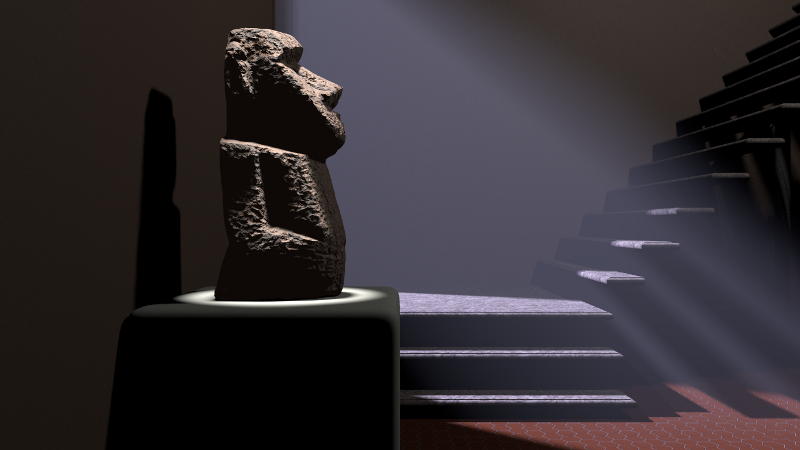
This scene was fun ... The Moai came from the AIM Shape Repository, but
it was of fairly low quality. When I first brought it into my scene you
could visibly see the triangles, then I roughed him up a bit with a
fairly aggressive agate pattern. The scattering media turned out cool as
well.
Post a reply to this message
Attachments:
Download 'moai.png' (295 KB)
Preview of image 'moai.png'
|
|
| |
| |
|
|
|
|
| |
| |
|
|
Jim Holsenback <jho### [at] povray org> wrote:
> This scene was fun ... The Moai came from the AIM Shape Repository, but
> it was of fairly low quality. When I first brought it into my scene you
> could visibly see the triangles, then I roughed him up a bit with a
> fairly aggressive agate pattern. The scattering media turned out cool as
> well.
Looks pretty good.
Why'd you have to rough him up a bit? Wouldn't talk? Shaking him down for
lunch money? :D
-tgq org> wrote:
> This scene was fun ... The Moai came from the AIM Shape Repository, but
> it was of fairly low quality. When I first brought it into my scene you
> could visibly see the triangles, then I roughed him up a bit with a
> fairly aggressive agate pattern. The scattering media turned out cool as
> well.
Looks pretty good.
Why'd you have to rough him up a bit? Wouldn't talk? Shaking him down for
lunch money? :D
-tgq
Post a reply to this message
|
|
| |
| |
|
|
|
|
| |
| |
|
|
On 03/28/2011 10:52 AM, Trevor G Quayle wrote:
> Jim Holsenback<jho### [at] povrayorg>  wrote:
>> This scene was fun ... The Moai came from the AIM Shape Repository, but
>> it was of fairly low quality. When I first brought it into my scene you
>> could visibly see the triangles, then I roughed him up a bit with a
>> fairly aggressive agate pattern. The scattering media turned out cool as
>> well.
>
> Looks pretty good.

thanks ... if this were an outdoor scene I wonder if your crevice grim
might be able to make him look as if he had lichens or moss in places.

>
> Why'd you have to rough him up a bit?  Wouldn't talk?  Shaking him down for
> lunch money? :D

to continue the pun ... he was stoned and very uncooperative ;-)
Post a reply to this message
|
|
| |
| |
|
|
|
|
| |
| |
|
|
Jim Holsenback <jho### [at] povrayorg> wrote:
> This scene was fun ... The Moai came from the AIM Shape Repository, but
> it was of fairly low quality. When I first brought it into my scene you
> could visibly see the triangles, then I roughed him up a bit with a
> fairly aggressive agate pattern. The scattering media turned out cool as
> well.

Good one, Jim!

Nice use of media. Is it contained by a box or global? I never had much luck
with global media...

BTW, have you ever tried Sculptris? It provides a much easier way to model
things than other apps, if you're into that sort of thing.

~Sam

------------

Now playing:

 Gold Dust Woman - Fleetwood Mac
Post a reply to this message
|
|
| |
| |
|
|
|
|
| |
| |
|
|
"Jim Holsenback" <jho### [at] povrayorg> schreef in bericht
news:4d908c9f@news.povray.org...
> This scene was fun ... The Moai came from the AIM Shape Repository, but
> it was of fairly low quality. When I first brought it into my scene you
> could visibly see the triangles, then I roughed him up a bit with a
> fairly aggressive agate pattern. The scattering media turned out cool as
> well.
>

Nice scene, Jim!

To get a better resolution, you can also pass the model through Poseray and
use the subdivision utility.

Thomas
Post a reply to this message
|
|
| |
| |
|
|
|
|
| |
| |
|
|
On 03/28/2011 09:49 PM, Samuel Benge wrote:
> Jim Holsenback<jho### [at] povrayorg>  wrote:
>> This scene was fun ... The Moai came from the AIM Shape Repository, but
>> it was of fairly low quality. When I first brought it into my scene you
>> could visibly see the triangles, then I roughed him up a bit with a
>> fairly aggressive agate pattern. The scattering media turned out cool as
>> well.
>
> Good one, Jim!

thanks ...

>
> Nice use of media. Is it contained by a box or global? I never had much luck
> with global media...

yeah global media IS a little harder to get it to behave like I'd have
hoped so it's containerized ... type 4 scattering

>
> BTW, have you ever tried Sculptris? It provides a much easier way to model
> things than other apps, if you're into that sort of thing.
>
> ~Sam

It's mac/pc platform ... I'm on linux. I've been using blender, but not
much lately. It has a sculpting tool but when I tried to give that a go
on this model, I found that I'd unlearned most of what I'd picked up
with casual use. Now that blender has hooks into povray I really need to
sit down and learn it proper. Blender is pretty nice ... and it fits my
budget too ;-)
Post a reply to this message
|
|
| |
| |
|
|
|
|
| |
| |
|
|
On 03/29/2011 04:23 AM, Thomas de Groot wrote:
> "Jim Holsenback"<jho### [at] povrayorg>  schreef in bericht
> news:4d908c9f@news.povray.org...
>> This scene was fun ... The Moai came from the AIM Shape Repository, but
>> it was of fairly low quality. When I first brought it into my scene you
>> could visibly see the triangles, then I roughed him up a bit with a
>> fairly aggressive agate pattern. The scattering media turned out cool as
>> well.
>>
>
> Nice scene, Jim!

merci ...

>
> To get a better resolution, you can also pass the model through Poseray and
> use the subdivision utility.

I've not been getting any joy out of getting Wine running on my linux
machine ... the version in my platform repository is fairly old so I
tried to build from source without much luck. I started looking into
CrossOver last week but got diverted on other stuff. I'd like to get
Poseray up and running so I can convert more or of the models that I've
been finding ... there's a pretty limited number of models in .ply
format (which I can convert)
Post a reply to this message
|
|
| |
| |
|
|
|
|
| |
| |
|
|
On 03/29/2011 04:23 AM, Thomas de Groot wrote:
> "Jim Holsenback"<jho### [at] povrayorg>  schreef in bericht
> news:4d908c9f@news.povray.org...
>> This scene was fun ... The Moai came from the AIM Shape Repository, but
>> it was of fairly low quality. When I first brought it into my scene you
>> could visibly see the triangles, then I roughed him up a bit with a
>> fairly aggressive agate pattern. The scattering media turned out cool as
>> well.
>>
>
> Nice scene, Jim!
>
> To get a better resolution, you can also pass the model through Poseray and
> use the subdivision utility.
>
> Thomas
>
>
well hot damn ... Poseray appears to run just fine under CrossOver :-)
Now I know what I want for my b'day!
Post a reply to this message
|
|
| |
| |
|
|
|
|
| |
| |
|
|
On 3/29/2011 3:53 AM, Jim Holsenback wrote:
> On 03/28/2011 09:49 PM, Samuel Benge wrote:
>>
>> BTW, have you ever tried Sculptris? It provides a much easier way to
>> model
>> things than other apps, if you're into that sort of thing.
>>
>
> It's mac/pc platform ... I'm on linux.

Sculptris *might* work under Wine, though from what I've heard
(discussions from 2010) it may be buggy...

> I've been using blender, but not
> much lately. It has a sculpting tool but when I tried to give that a go
> on this model, I found that I'd unlearned most of what I'd picked up
> with casual use. Now that blender has hooks into povray I really need to
> sit down and learn it proper. Blender is pretty nice ... and it fits my
> budget too ;-)

Is dynamic tessellation working with Blender's sculpting tool yet? It's
really the way to go, as you can control the density of a mesh very easily.
Post a reply to this message
|
|
| |
| |
|
|
|
|
| |
| |
|
|
On 03/29/2011 11:37 AM, stbenge wrote:
> On 3/29/2011 3:53 AM, Jim Holsenback wrote:
>> On 03/28/2011 09:49 PM, Samuel Benge wrote:
>>>
>>> BTW, have you ever tried Sculptris? It provides a much easier way to
>>> model
>>> things than other apps, if you're into that sort of thing.
>>>
>>
>> It's mac/pc platform ... I'm on linux.
>
> Sculptris *might* work under Wine, though from what I've heard
> (discussions from 2010) it may be buggy...

just tried it and the tool itself works but the tool menu to the left
doesn't have any labels (and no hints when hovering) ... I was able to
push and pull on the sphere and deform it, so fail yes but /not/ epic

>
>> I've been using blender, but not
>> much lately. It has a sculpting tool but when I tried to give that a go
>> on this model, I found that I'd unlearned most of what I'd picked up
>> with casual use. Now that blender has hooks into povray I really need to
>> sit down and learn it proper. Blender is pretty nice ... and it fits my
>> budget too ;-)
>
> Is dynamic tessellation working with Blender's sculpting tool yet? It's
> really the way to go, as you can control the density of a mesh very easily.

I don't think so ... I found this blog entry (dated last summer)
http://farsthary.wordpress.com/2010/05/22/unlimited-clay-sculptris-hollygrail-soon-in-blender/

Then went to the blender site and it did /not/ mention it in the
features list, but did find this cool video:

http://www.blender.org/features-gallery/feature-videos/?video=head_sculpt

Jim
Post a reply to this message
|
|
| |
| |
|
|
|
|
| |
| |
|
|
Jim Holsenback wrote:

> Then went to the blender site and it did /not/ mention it in the
> features list

It appears to say "Full multiresolution sculpting capabilities"
under Modeling at http://www.blender.org/features-gallery/features/
Post a reply to this message
|
|
| |
| |
|
|
|
|
| |
| |
|
|
On 3/29/2011 8:45 AM, Jim Holsenback wrote:
> On 03/29/2011 11:37 AM, stbenge wrote:
>> On 3/29/2011 3:53 AM, Jim Holsenback wrote:
>>> On 03/28/2011 09:49 PM, Samuel Benge wrote:
>>>>
>>>> BTW, have you ever tried Sculptris? It provides a much easier way to
>>>> model
>>>> things than other apps, if you're into that sort of thing.
>>>
>>> It's mac/pc platform ... I'm on linux.
>>
>> Sculptris *might* work under Wine, though from what I've heard
>> (discussions from 2010) it may be buggy...
>
> just tried it and the tool itself works but the tool menu to the left
> doesn't have any labels (and no hints when hovering) ... I was able to
> push and pull on the sphere and deform it, so fail yes but /not/ epic

A minor fail, but a bummer nonetheless.

Every tool in Sculptris has a hotkey associated with it, so viewing a
tool palette is not 100% necessary. Can you undo your work and save it
as well? If you can save, undo your work, and use hotkeys, then you
should be good-to-go :) I'm not so sure about entering paint mode though...

>>
>> Is dynamic tessellation working with Blender's sculpting tool yet? It's
>> really the way to go, as you can control the density of a mesh very
>> easily.
>
> I don't think so ... I found this blog entry (dated last summer)
>
http://farsthary.wordpress.com/2010/05/22/unlimited-clay-sculptris-hollygrail-soon-in-blender/

Yeah, I saw that. Farsthary is great at what he does!
Post a reply to this message
|
|
| |
| |
|
|
|
|
| |
| |
|
|
Hi,
Nice picture Jim,
I'm glad Blender is getting a little attention. You're getting the grips of it?

About its sculpting abilities, Blender is useable with multi resolution
sculpting in official versions, but for clay like, on the fly, subdivision, then
Test builds must be used. You can get some here (spot Fasthary builds, and there
are PTex experiments too):
http://www.graphicall.org/builds/

About Sculptris, It has been bought by Pyxologic the makers of ZBrush. So in the
long run, it won't evolve so much as a free application.

You are right about the difference you noticed between standard Blender modeling
and its sculpting tools, they first look almost completely different
philosophies.
But in fact, once you get too the workflow (I suggest you start with Blender
2.49 to get better tutorials) and find your panels around, it's actually really
cool to have the choice whether to bake details or not, because you don't have
to switch app. (and baking can look a little clumsy in the old interface).
Also Since Povray won't be able to use your normal maps yet, baking won't be of
much use.


So the best workflow for now is to model as much as you can with polygon tools,
getting the masses right, then switch to sculpting, subdividing as much as your
machine will take (save first) with multires,  use textured brushes for fine
details only like skin pores, etc. (procedurals can be used for brushes)...

Have fun

P.S: One of the Blender advances that I'most eager to see happen is Bmesh, and
the sooner the better, to make sure it's compatible with the rest (e.g.sculpting
tools)
Post a reply to this message
|
|
| |
| |
|
|
|
|
| |
| |
|
|
On 03/30/2011 11:53 AM, Mr wrote:
> Hi,
> Nice picture Jim,

Hey ... thanks Maurice. It was inspired by the example image I saw at
the bottom of the blender->povray exporter project wiki.


> I'm glad Blender is getting a little attention. You're getting the grips of it?

Yes Blender is a great tool ... between projects I tried to move forward
with a light house (Peggy's Cove) that I've been doing in blender. After
a brief absence I was shocked at all I'd forgotten, but it quickly came
back ;-)

> About its sculpting abilities, Blender is useable with multi resolution
> sculpting in official versions, but for clay like, on the fly, subdivision, then
> Test builds must be used. You can get some here (spot Fasthary builds, and there
> are PTex experiments too):
> http://www.graphicall.org/builds/

Thanks for the clarification ... and the link. I'll have to check it
out. I like bleeding edge/preview stuff!

Jim
Post a reply to this message
|
|
| |
| |
|
|
|
|
| |
| |
|
|
On 03/28/2011 10:26 AM, Jim Holsenback wrote:
> This scene was fun ... The Moai came from the AIM Shape Repository, but
> it was of fairly low quality. When I first brought it into my scene you
> could visibly see the triangles, then I roughed him up a bit with a
> fairly aggressive agate pattern. The scattering media turned out cool as
> well.

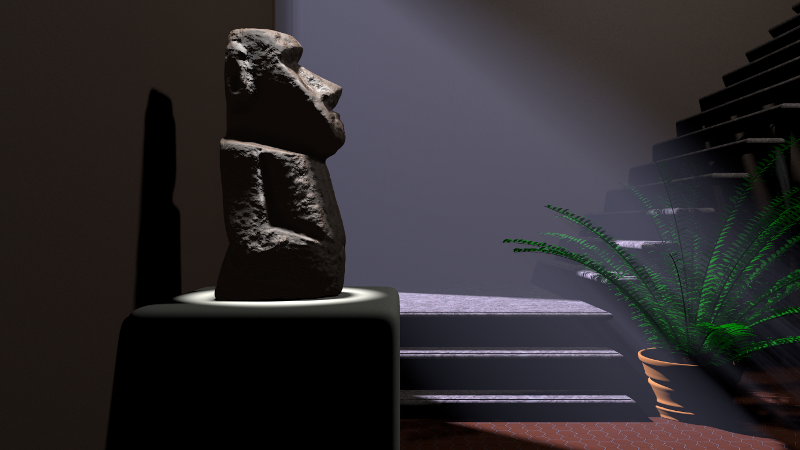
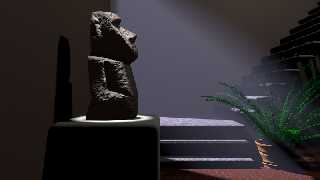
Man I'm really digging PoseRay ... nifty piece of software! I cleaned up
the moai, and added the fern. The clay pot is a lathe object that I'd
created for use in another scene, but goes well with the fern.
Post a reply to this message
Attachments:
Download 'moai.png' (332 KB)
Preview of image 'moai.png'
|
|
| |
| |
|
|
|
|
| |
| |
|
|
Jim Holsenback <jho### [at] povrayorg> wrote:
> Man I'm really digging PoseRay ... nifty piece of software!

Oh yeah, it's a gem; I use PoseRay for almost everything mesh related.
Displacement, subdivisions, UV maps, and nice light domes too.

FlyerX should get some sort of POVvy award or something; really cool program.

(apologies AND tip of the hat to Christoph Hormann)

-------------------------------------------------
www.McGregorFineArt.com
Post a reply to this message
Attachments:
Download 'povvy.png' (92 KB)
Preview of image 'povvy.png'

|
|
| |
| |
|
|
|
|
| |
| |
|
|
El 31/03/11 22:42, Jim Holsenback escribió:
> Man I'm really digging PoseRay ... nifty piece of software!

   It's so useful, that I even would install Windows here if Wine didn't
exist!

> the moai, and added the fern. The clay pot is a lathe object that I'd
>  created for use in another scene, but goes well with the fern.

   Very nice, but I'm missing some radiosity... this kind of composition
seems to be crying for it.


--
Jaime Vives Piqueres

La Persistencia de la Ignorancia
http://www.ignorancia.org
Post a reply to this message
|
|
| |
| |
|
|
|
|
| |
| |
|
|
On 04/01/2011 03:58 AM, Jaime Vives Piqueres wrote:
> El 31/03/11 22:42, Jim Holsenback escribió:
>> Man I'm really digging PoseRay ... nifty piece of software!
>
> It's so useful, that I even would install Windows here if Wine didn't
> exist!
>
>> the moai, and added the fern. The clay pot is a lathe object that I'd
>> created for use in another scene, but goes well with the fern.
>
> Very nice, but I'm missing some radiosity... this kind of composition
> seems to be crying for it.
>
>
That's what I might end up doing because I'm not totally happy with
certain aspects of the lighting just yet ... I tried putting the statue
and pedestal in a light group. btw: this is supposed to be "after hours"
lighting
Post a reply to this message
|
|
| |
| |
|
|
|
|
| |
| |
|
|
On 01/04/2011 10:26 AM, Jim Holsenback wrote:
> That's what I might end up doing because I'm not totally happy with
> certain aspects of the lighting just yet ... I tried putting the statue
> and pedestal in a light group. btw: this is supposed to be "after hours"
> lighting

I looks great to me.

--
Regards
     Stephen
Post a reply to this message
|
|
| |
| |
|
|
|
|
| |
| |
|
|
On 01/04/2011 2:59 AM, Robert McGregor wrote:
> FlyerX should get some sort of POVvy award or something; really cool program.
>

I can't agree more.

--
Regards
     Stephen
Post a reply to this message
|
|
| |
| |
|
|
|
|
| |
| |
|
|
On 04/01/2011 06:30 AM, Stephen wrote:
> On 01/04/2011 10:26 AM, Jim Holsenback wrote:
>> That's what I might end up doing because I'm not totally happy with
>> certain aspects of the lighting just yet ... I tried putting the statue
>> and pedestal in a light group. btw: this is supposed to be "after hours"
>> lighting
>
> I looks great to me.
>
Thanks, but I DO see what Jamie was getting at ... the wall behind the
statue, and the moai/pedestal itself desperately needs some lighting work.

After reviewing the "Light Attenuation" thread in p.gen I was wondering
if my problem was what I was doing for fade_distance when I discovered
that my scattering box was intercepting my room fill light (doh!) I
/really/ wanted to try to do this scene w/o radiosity and use a 3 point
lighting scheme ... the key light being the spot on the moai, the back
light being the light through the window firing up the scattering and
the room fill to even things out.

As far as fade_distance ... I'm still investigating but I think the
nugget here is what Christoph said:

"As I already mentioned, the key is not the fade_power, but the
fade_distance. Sufficiently far away from the light source - relative to
fade_distance (or, in other words, with sufficiently small fade_distance
relative to the scene dimensions) - the formula gets arbitrarily close
to 1/x2. "

I've been using:
#declare LightDist = vlength(LightPos);

as my value for fade_distance, Which is WRONG ... I want a smaller value
for that and up the intensity of the light source to compensate ...
@Christoph: Did I get that right?

Jim
Post a reply to this message
|
|
| |
| |
|
|
|
|
| |
| |
|
|
Jim Holsenback <jho### [at] povrayorg> wrote:

> I've been using:
> #declare LightDist = vlength(LightPos);
>
> as my value for fade_distance, Which is WRONG ... I want a smaller value
> for that and up the intensity of the light source to compensate ...
> @Christoph: Did I get that right?
>
> Jim

This is something I learned from doing the matinee scene.

What I have ended up doing, is set a relatively small fade distance (say the
size of the light itself).  I then figure out what general value I want it at a
certain distance (i.e., distance from light to your object or scene centre).
Then use the formula given in the help to back calculate the initial intensity.

For example, in my matinee scene for the projector, the distance from my
projector light to the screen is about 2400, I set the fade distance to about
4.5.  Back-calculating to get a value of 1 at the screen (calculate the
attenutaion value and take the inverse), gives an initial value of ~142,000!
This seems very high, but it works out well because of the samll fade distance.

-tgq
Post a reply to this message
|
|
| |
| |
|
|
|
|
| |
| |
|
|
On 04/01/2011 08:47 AM, Trevor G Quayle wrote:
> Jim Holsenback<jho### [at] povrayorg>  wrote:
>
>> I've been using:
>> #declare LightDist = vlength(LightPos);
>>
>> as my value for fade_distance, Which is WRONG ... I want a smaller value
>> for that and up the intensity of the light source to compensate ...
>> @Christoph: Did I get that right?
>>
>> Jim
>
> This is something I learned from doing the matinee scene.
>
> What I have ended up doing, is set a relatively small fade distance (say the
> size of the light itself).  I then figure out what general value I want it at a
> certain distance (i.e., distance from light to your object or scene centre).
> Then use the formula given in the help to back calculate the initial intensity.
>
> For example, in my matinee scene for the projector, the distance from my
> projector light to the screen is about 2400, I set the fade distance to about
> 4.5.  Back-calculating to get a value of 1 at the screen (calculate the
> attenutaion value and take the inverse), gives an initial value of ~142,000!
> This seems very high, but it works out well because of the samll fade distance.
>
> -tgq
>
Sweet ... I think I'm getting some material here for [3.4.7.9] ... also
explains what Ive was talking about with a value of 125000 in one of his
recent scenes. My initial response was ... WTF!!!

Cool ... another "teaching moments" :-)
Post a reply to this message
|
|
| |
| |
|
|
|
|
| |
| |
|
|
"Robert McGregor" <rob### [at] mcgregorfineartcom> schreef in bericht
news:web.4d95306edc0638694d713cc0@news.povray.org...
>
> FlyerX should get some sort of POVvy award or something; really cool
> program.

Absolutely right.

Thomas
Post a reply to this message
|
|
| |
| |
|
|
|
|
| |
| |
|
|
On 04/01/2011 08:47 AM, Trevor G Quayle wrote:
> Jim Holsenback<jho### [at] povrayorg>  wrote:
>
>> I've been using:
>> #declare LightDist = vlength(LightPos);
>>
>> as my value for fade_distance, Which is WRONG ... I want a smaller value
>> for that and up the intensity of the light source to compensate ...
>> @Christoph: Did I get that right?
>>
>> Jim
>
> This is something I learned from doing the matinee scene.
>
> What I have ended up doing, is set a relatively small fade distance (say the
> size of the light itself).  I then figure out what general value I want it at a
> certain distance (i.e., distance from light to your object or scene centre).
> Then use the formula given in the help to back calculate the initial intensity.
>
> For example, in my matinee scene for the projector, the distance from my
> projector light to the screen is about 2400, I set the fade distance to about
> 4.5.  Back-calculating to get a value of 1 at the screen (calculate the
> attenutaion value and take the inverse), gives an initial value of ~142,000!
> This seems very high, but it works out well because of the samll fade distance.
>
> -tgq
>

OK ... so here's what I've come up with and it seems to work.

#declare Intensity = function (LD,FD) { 1/(2/((1+(LD/FD))*(1+(LD/FD)))) };

 From your example I used LD=2400 and FD=4.5 and get 142756 and some
change ;-) ... If I missed something feel free to set me straight as I'd
like to include this in [3.4.7.9] along with a small narrative.

Jim
Post a reply to this message
|
|
| |
| |
|
|
|
|
| |
| |
|
|
> >
>
> OK ... so here's what I've come up with and it seems to work.
>
> #declare Intensity = function (LD,FD) { 1/(2/((1+(LD/FD))*(1+(LD/FD)))) };
>
>  From your example I used LD=2400 and FD=4.5 and get 142756 and some
> change ;-) ... If I missed something feel free to set me straight as I'd
> like to include this in [3.4.7.9] along with a small narrative.
>
> Jim

That's exactly it.  However I would maybe modify it slightly for presentation.
You can simplify by removing the double reciprocal (just invert the original
equation).  Also, this is true for fade_power of 2, I would leave fade_power as
part of it for completeness and to avoid confusion:

#declare Intensity = function (LD,FD) {pow(1+(LD/FD),FP)/2};

Also I would perhaps call it 'intensity multiplier' or similar.  If you want a
base intensity of 2, you would multiply this factor by 2, etc.

-tgq
Post a reply to this message
|
|
| |
| |
|
|
|
|
| |
| |
|
|
On 04/01/2011 01:32 PM, Trevor G Quayle wrote:
>>>
>>
>> OK ... so here's what I've come up with and it seems to work.
>>
>> #declare Intensity = function (LD,FD) { 1/(2/((1+(LD/FD))*(1+(LD/FD)))) };
>>
>>   From your example I used LD=2400 and FD=4.5 and get 142756 and some
>> change ;-) ... If I missed something feel free to set me straight as I'd
>> like to include this in [3.4.7.9] along with a small narrative.
>>
>> Jim
>
> That's exactly it.  However I would maybe modify it slightly for presentation.
> You can simplify by removing the double reciprocal (just invert the original
> equation).  Also, this is true for fade_power of 2, I would leave fade_power as
> part of it for completeness and to avoid confusion:
>
> #declare Intensity = function (LD,FD) {pow(1+(LD/FD),FP)/2};

LOL ... thanks fer makin' it purdy ;-)

>
> Also I would perhaps call it 'intensity multiplier' or similar.  If you want a
> base intensity of 2, you would multiply this factor by 2, etc.
>
> -tgq
>
When you get a second I'd appreciate a little QA:
http://wiki.povray.org/content/Documentation:Reference_Section_4.4#Light_Fading

Thanks :-)
Post a reply to this message
|
|
| |
| |
|
|
|
|
| |
| |
|
|
Jim Holsenback <jho### [at] povrayorg> wrote:
> On 04/01/2011 01:32 PM, Trevor G Quayle wrote:
> >
> > Also I would perhaps call it 'intensity multiplier' or similar.  If you want a
> > base intensity of 2, you would multiply this factor by 2, etc.
> >
> > -tgq
> >
> When you get a second I'd appreciate a little QA:
> http://wiki.povray.org/content/Documentation:Reference_Section_4.4#Light_Fading
>
> Thanks :-)

I think the two paragraphs following the graph need to be expanded somewhat or
the ideas better explained.

A few items:
"First, when Fade_Distance is larger than one, the light intensity at distances
smaller than Fade_Distance actually increases."
Actually this is true for any fade_distance, even when it is smaller than one.

"This is necessary to get the light source color if the distance traveled equals
Fade_Distance."
This isn't really necessary, as the function *could* have been set up the
regular way with 1 instead of 2 in the numerator (as it is for material
attenuation).  I believe it was set up the way it is so that one could set the
fade distance and know that at the fade_distance the light value would equal the
set intensity (a=1).  Meant to somewhat simplify it.

This is the way I had always treated it before until recently.  Now I am seeing
how it doesn't follow a very good inverse-squared relationship over
fade_distance and somwhat beyond if it is used this way.

The way I have come to use it now is to recognize that the function does break
down to be very close to inverse squared as the distance from fade_distance gets
significantly larger.  I think that perhaps this concept should be separated and
explained, as this is the purpose of the example code you have.
If I can find some time in the next few days I will try to consider some wording
for you if you don't come up with something in the meantime.

Also, as proof-reading note, don't use i.e. when you mean e.g.  I.e. means "that
is" and should be used to clarify a general statement that has a specific
meaning, and should not be used in place of e.g. "for example".  In the case
here "i.e.: the size of the light itself" I believe this should be e.g. as it is
one good (and appropriate) example of a value you could choose, but certainly
not the only one.

Sorry if I got a bit too carried away on you, no offense is intended, I have to
review reports for peers at work and for my wife at home, so I tend to get
carried away when doing this.
Post a reply to this message
|
|
| |
| |
|
|
|
|
| |
| |
|
|
On 04/01/2011 06:10 PM, Trevor G Quayle wrote:
> Jim Holsenback<jho### [at] povrayorg>  wrote:
>> On 04/01/2011 01:32 PM, Trevor G Quayle wrote:
>>>
>>> Also I would perhaps call it 'intensity multiplier' or similar.  If you want a
>>> base intensity of 2, you would multiply this factor by 2, etc.
>>>
>>> -tgq
>>>
>> When you get a second I'd appreciate a little QA:
>> http://wiki.povray.org/content/Documentation:Reference_Section_4.4#Light_Fading
>>
>> Thanks :-)
>
> I think the two paragraphs following the graph need to be expanded somewhat or
> the ideas better explained.

yep ... I tried to punch it up a bit and was hoping that you'd offer
some insight.

>
> A few items:
<snip> ... I can work with what you posted here!

> Sorry if I got a bit too carried away on you, no offense is intended

no worries Trevor ... if it makes the docs better, ego's shouldn't be
getting in the way ... I'm good to go. You've been a BIG help!

Cheers
Post a reply to this message
|
|
| |
| |
|
|
|
|
| |
| |
|
|
About the sculpting part of this discussion, Here's a very nic tutorial about
blender "sculpting" without adding geometry but directly painting the bump map:

http://www.blendernation.com/2011/03/31/tutorial-glsl-bump-painting/

Of course the final part where he consolidates everything into a Normal map is
not usable for POV-Ray.
Post a reply to this message
|
|
| |
| |
|
|
|
|
| |
| |
|
|
Also,
about the image, The plant adds a lot, wouldn't it be even nicer with more
backside diffuse (translucency) or even double_illuminate?

For the flower pot, temporarily switching media off and tweaking the brilliance
so that light bleeds a little deeper into shaded parts could make a quite
realistic terra cotta.

Is the downards light over the statue excluded from media? this looks a little
odd compared to the light entering the room which has a lot.
Post a reply to this message
|
|
| |
| |
|
|
|
|
| |
| |
|
|
On 04/01/2011 06:10 PM, Trevor G Quayle wrote:
> If I can find some time in the next few days I will try to consider some wording
> for you if you don't come up with something in the meantime.

Take two:
http://wiki.povray.org/content/Documentation:Reference_Section_4.4#Light_Fading
Post a reply to this message
|
|
| |
| |
|
|
|
|
| |
| |
|
|
On 04/02/2011 07:00 AM, Mr wrote:
> Also,
> about the image, The plant adds a lot, wouldn't it be even nicer with more
> backside diffuse (translucency) or even double_illuminate?
>
> For the flower pot, temporarily switching media off and tweaking the brilliance
> so that light bleeds a little deeper into shaded parts could make a quite
> realistic terra cotta.
>
> Is the downards light over the statue excluded from media? this looks a little
> odd compared to the light entering the room which has a lot.
>
>
All good points, that I'll try to work into the final version ... just
wanted to get the docs squared away 1st ... business before pleasure right!
Post a reply to this message
|
|
| |
| |
|
|
|
|
| |
| |
|
|
Am 01.04.2011 13:34, schrieb Jim Holsenback:

> As far as fade_distance ... I'm still investigating but I think the
> nugget here is what Christoph said:
>
> "As I already mentioned, the key is not the fade_power, but the
> fade_distance. Sufficiently far away from the light source - relative to
> fade_distance (or, in other words, with sufficiently small fade_distance
> relative to the scene dimensions) - the formula gets arbitrarily close
> to 1/x2. "
>
> I've been using:
> #declare LightDist = vlength(LightPos);
>
> as my value for fade_distance, Which is WRONG ... I want a smaller value
> for that and up the intensity of the light source to compensate ...
> @Christoph: Did I get that right?

Yup. For area lights, I typically use half the area light's size as
fade_distance; for point lights I pick some distance that might be a
reasonable radius of the light source (e.g. radius of a light bulb).
Post a reply to this message
|
|
| |
| |
|
|
|
|
| |
| |
|
|
On 03/28/2011 10:26 AM, Jim Holsenback wrote:
> This scene was fun ... The Moai came from the AIM Shape Repository, but
> it was of fairly low quality. When I first brought it into my scene you
> could visibly see the triangles, then I roughed him up a bit with a
> fairly aggressive agate pattern. The scattering media turned out cool as
> well.

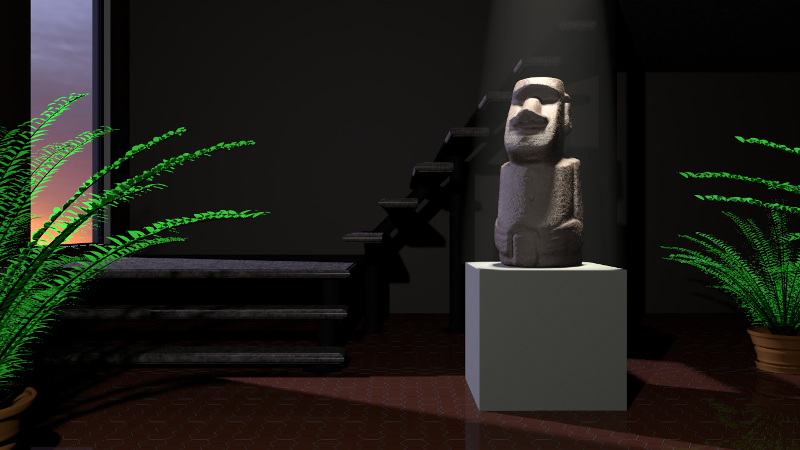
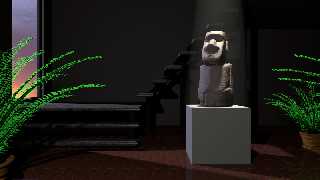
Here's another version after playing around with the lighting and
composition.

Jim
Post a reply to this message
Attachments:
Download 'moai.png' (367 KB)
Preview of image 'moai.png'
|
|
| |
| |
|
|
|
|
| |
| |
|
|
On 05/04/2011 8:48 PM, Jim Holsenback wrote:

>
> Here's another version after playing around with the lighting and
> composition.
>

Getting better and better.
Maybe a little more "normal" in the floor reflection. Not too much though.

--
Regards
     Stephen
Post a reply to this message
|
|
| |
| |
|
|
|
|
| |