|
|
|
|
|
|
| |
| |
|
|
|
|
| |
| |
|
|
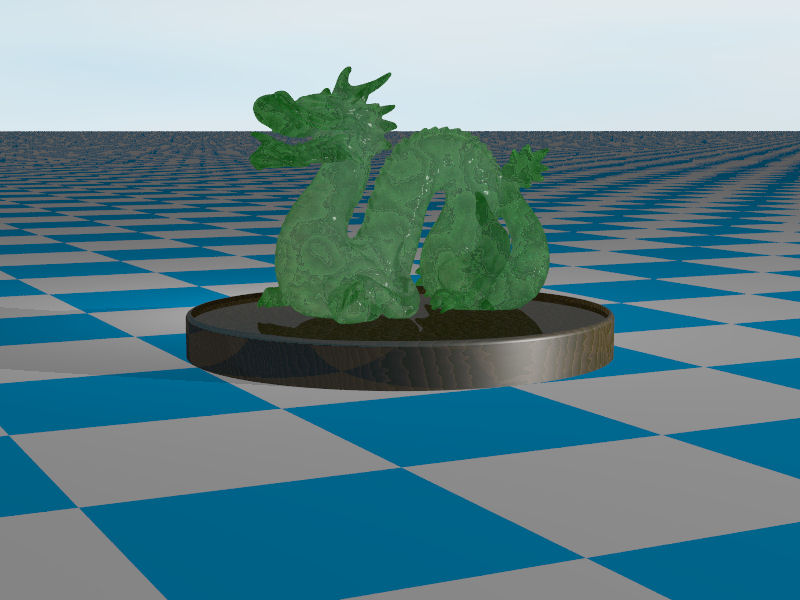
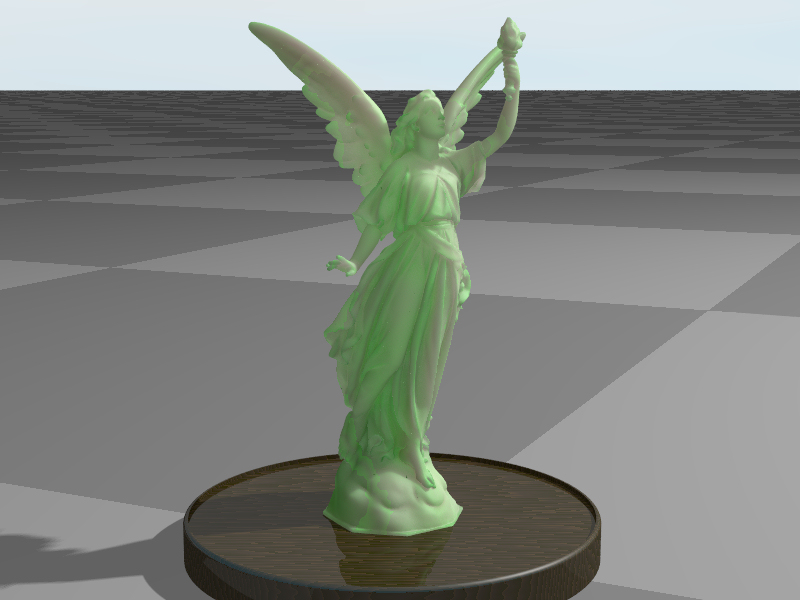
With a bit of a back light.
I think I'll wait until the next RC before continuing.

--
Regards
     Stephen
Post a reply to this message
Attachments:
Download 'dragon_01_c4b_.jpg' (73 KB)
Preview of image 'dragon_01_c4b_.jpg'
|
|
| |
| |
|
|
|
|
| |
| |
|
|
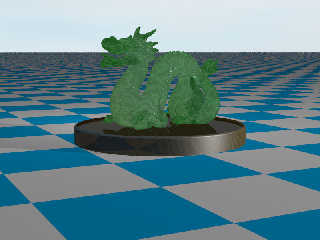
On 02/22/2011 03:50 PM, Stephen wrote:
> With a bit of a back light.
> I think I'll wait until the next RC before continuing.
>
cool subject choice ... i forget the artist but a dragon image was what
brought me to povray. hey where you been coming up with the cool test
objects ... bishop?
Post a reply to this message
|
|
| |
| |
|
|
|
|
| |
| |
|
|
On 22/02/2011 10:05 PM, Jim Holsenback wrote:
> cool subject choice ...

Thanks :-D

i forget the artist but a dragon image was what
> brought me to povray. hey where you been coming up with the cool test
> objects ... bishop?

No, I do the scene setting, CSG and rendering from B3D. The mesh models
I generally make in Poser. This dragon is from "The Stanford 3D Scanning
Repository". I downloaded Lucy but could not get it converted to a
format I could use.

--
Regards
     Stephen
Post a reply to this message
|
|
| |
| |
|
|
|
|
| |
| |
|
|
"Stephen" <mcavoys_at@aoldotcom> schreef in bericht
news:4d643b91@news.povray.org...
> No, I do the scene setting, CSG and rendering from B3D. The mesh models I
> generally make in Poser. This dragon is from "The Stanford 3D Scanning
> Repository". I downloaded Lucy but could not get it converted to a format
> I could use.

I had the same problem with Lucy, using MeshLab. Somehow I could not get it
converted.

Thomas
Post a reply to this message
|
|
| |
| |
|
|
|
|
| |
| |
|
|
"Thomas de Groot" <tDOTdegroot@interDOTnlANOTHERDOTnet> wrote:
> "Stephen" <mcavoys_at@aoldotcom> schreef in bericht
> news:4d643b91@news.povray.org...
> > No, I do the scene setting, CSG and rendering from B3D. The mesh models I
> > generally make in Poser. This dragon is from "The Stanford 3D Scanning
> > Repository". I downloaded Lucy but could not get it converted to a format
> > I could use.
>
> I had the same problem with Lucy, using MeshLab. Somehow I could not get it
> converted.

What seemed to be the issue? I also converted Lucy (I think with Meshlab +
Poseray) a couple of years ago and had no problems. I did lower the triangle
count a bit, since the file size was vast and I knew most of it would be
sub-pixel in the scene I was making...
Post a reply to this message
|
|
| |
| |
|
|
|
|
| |
| |
|
|
On 24/02/2011 9:30 AM, Bill Pragnell wrote:
>> I had the same problem with Lucy, using MeshLab. Somehow I could not get it
>> >  converted.
> What seemed to be the issue? I also converted Lucy (I think with Meshlab +
> Poseray) a couple of years ago and had no problems. I did lower the triangle
> count a bit, since the file size was vast and I knew most of it would be
> sub-pixel in the scene I was making...
>
>
MeshLab fails with an error message saying that the application has
requested the Runtime to terminate in an unusual way.

PoseRay might do it. But slowly, slowly!
After about 10 minutes loading the PLY file the % completed bar is at
about 2%.

--
Regards
     Stephen
Post a reply to this message
|
|
| |
| |
|
|
|
|
| |
| |
|
|
"Stephen" <mcavoys_at@aoldotcom> schreef in bericht
news:4d663e0f@news.povray.org...
> MeshLab fails with an error message saying that the application has
> requested the Runtime to terminate in an unusual way.
>
> PoseRay might do it. But slowly, slowly!
> After about 10 minutes loading the PLY file the % completed bar is at
> about 2%.

Same for me.

Thomas
Post a reply to this message
|
|
| |
| |
|
|
|
|
| |
| |
|
|
On 25/02/2011 8:07 AM, Thomas de Groot wrote:
>> PoseRay might do it. But slowly, slowly!
>> >  After about 10 minutes loading the PLY file the % completed bar is at
>> >  about 2%.
> Same for me.

I gave up after 21 hours and about 20% ~ 25% done

--
Regards
     Stephen
Post a reply to this message
|
|
| |
| |
|
|
|
|
| |
| |
|
|
Stephen <mcavoys_at@aoldotcom> wrote:
> On 25/02/2011 8:07 AM, Thomas de Groot wrote:
> >> PoseRay might do it. But slowly, slowly!
> >> >  After about 10 minutes loading the PLY file the % completed bar is at
> >> >  about 2%.
> > Same for me.
>
> I gave up after 21 hours and about 20% ~ 25% done

I'll try again next time I'm in front of it... failing that, I might still have
the converted .inc file, if it's still useful?
Post a reply to this message
|
|
| |
| |
|
|
|
|
| |
| |
|
|
On 25/02/2011 9:11 AM, Bill Pragnell wrote:
> I'll try again next time I'm in front of it... failing that, I might still have
> the converted .inc file, if it's still useful?

That would be great, Bill.

--
Regards
     Stephen
Post a reply to this message
|
|
| |
| |
|
|
|
|
| |
| |
|
|
"Bill Pragnell" <bil### [at] hotmail com> schreef in bericht
news:web.4d677237d81bd80d6dd25f0b0@news.povray.org...
> I'll try again next time I'm in front of it... failing that, I might still
> have
> the converted .inc file, if it's still useful?
Yes, Bill, that would be fine indeed.
Thomas com> schreef in bericht
news:web.4d677237d81bd80d6dd25f0b0@news.povray.org...
> I'll try again next time I'm in front of it... failing that, I might still
> have
> the converted .inc file, if it's still useful?
Yes, Bill, that would be fine indeed.
Thomas
Post a reply to this message
|
|
| |
| |
|
|
|
|
| |
| |
|
|
Stephen <mcavoys_at@aoldotcom> wrote:
> On 25/02/2011 9:11 AM, Bill Pragnell wrote:
> > I'll try again next time I'm in front of it... failing that, I might still have
> > the converted .inc file, if it's still useful?
>
> That would be great, Bill.

http://www.infradead.org/~wmp/lucy.inc.zip

It's about 60mb. One mesh2, #declared as 'lucy'. Enjoy!
Post a reply to this message
|
|
| |
| |
|
|
|
|
| |
| |
|
|
"Bill Pragnell" <bil### [at] hotmailcom> schreef in bericht
news:web.4d6ade48d81bd80da7b682960@news.povray.org...
>
> It's about 60mb. One mesh2, #declared as 'lucy'. Enjoy!


Thank you indeed, Bill!

Thomas
Post a reply to this message
|
|
| |
| |
|
|
|
|
| |
| |
|
|
On 27/02/2011 11:29 PM, Bill Pragnell wrote:
> It's about 60mb. One mesh2, #declared as 'lucy'. Enjoy!

Thanks Bill, quick to download too. :-D

--
Regards
     Stephen
Post a reply to this message
|
|
| |
| |
|
|
|
|
| |
| |
|
|
Stephen <mcavoys_at@aoldotcom> wrote:
> On 24/02/2011 9:30 AM, Bill Pragnell wrote:
> >> I had the same problem with Lucy, using MeshLab. Somehow I could not get it
> >> >  converted.
> > What seemed to be the issue? I also converted Lucy (I think with Meshlab +
> > Poseray) a couple of years ago and had no problems. I did lower the triangle
> > count a bit, since the file size was vast and I knew most of it would be
> > sub-pixel in the scene I was making...
> >
> >
> MeshLab fails with an error message saying that the application has
> requested the Runtime to terminate in an unusual way.
>
> PoseRay might do it. But slowly, slowly!
> After about 10 minutes loading the PLY file the % completed bar is at
> about 2%.

I thought I'd give this a go - I grabbed the PLY file of Lucy and wrote a few
lines of Smalltalk to convert into a mesh2 file - took about 30 minutes. Flat
polygons, but, as Bill said, they're probably going to be sub-pixel anyway.

But. But... The resulting file (with 5 decimal places of accuracy) is 1.2GB in
size, and when I tried to render it on my 4GB MacBook Pro, POV took about 3.8GB
of Virtual Memory, which nowhere near fitted into the 2.3GB of free RAM I had
after the OS and file buffers took their slices. I left it trying to parse the
file for about 50 minutes then just gave up.

I might give it a go on an AWS EC2 cloud instance - it's US$0.68 per hour for a
8 CPU/7G RAM/64 Bit machine. But I've still got to get a 1.2GB file onto it!

I'm *not* going to give anyone the file, but you welcome to take the code and
run it yourself in Pharo 1.2 (a Smalltalk development environment). You *will*
need a 6GB, 8GB or greater machine to use the mesh2 though!

Cheers,
Edouard.
Post a reply to this message
|
|
| |
| |
|
|
|
|
| |
| |
|
|
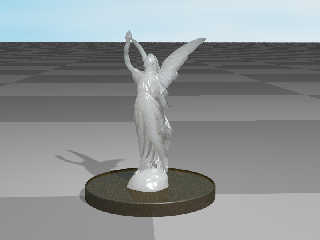
On 01/03/2011 9:58 AM, Edouard wrote:
> I thought I'd give this a go -

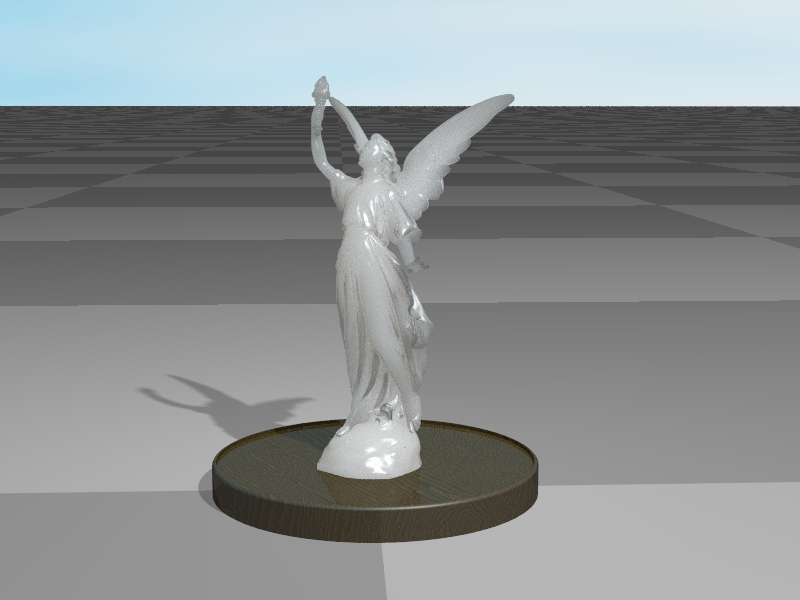
What might be of help, if you can do it, is to simplify the model. Using
a trial version of 3DS Max I reduced the vertex count to 20% of the
original (28 Meg, 9 Meg zipped)


--
Regards
     Stephen
Post a reply to this message
Attachments:
Download 'lucy20_01b_1.jpg' (156 KB)
Preview of image 'lucy20_01b_1.jpg'
|
|
| |
| |
|
|
|
|
| |
| |
|
|
On 03/01/2011 08:05 AM, Stephen wrote:
> On 01/03/2011 9:58 AM, Edouard wrote:
>> I thought I'd give this a go -
>
> What might be of help, if you can do it, is to simplify the model. Using
> a trial version of 3DS Max I reduced the vertex count to 20% of the
> original (28 Meg, 9 Meg zipped)
>
>
sweet ... excellent material!
Post a reply to this message
|
|
| |
| |
|
|
|
|
| |
| |
|
|
On 01/03/2011 1:59 PM, Jim Holsenback wrote:
> sweet ... excellent material!

Thanks but it is the bog standard marble. It is backlit and that makes a
difference. :-)
I think I'll try Lucy with the material map I used for the Buddha.

--
Regards
     Stephen
Post a reply to this message
|
|
| |
| |
|
|
|
|
| |
| |
|
|
On 01/03/2011 4:53 PM, Stephen wrote:
> On 01/03/2011 1:59 PM, Jim Holsenback wrote:
>> sweet ... excellent material!
>
> Thanks but it is the bog standard marble. It is backlit and that makes a
> difference. :-)
> I think I'll try Lucy with the material map I used for the Buddha.
>

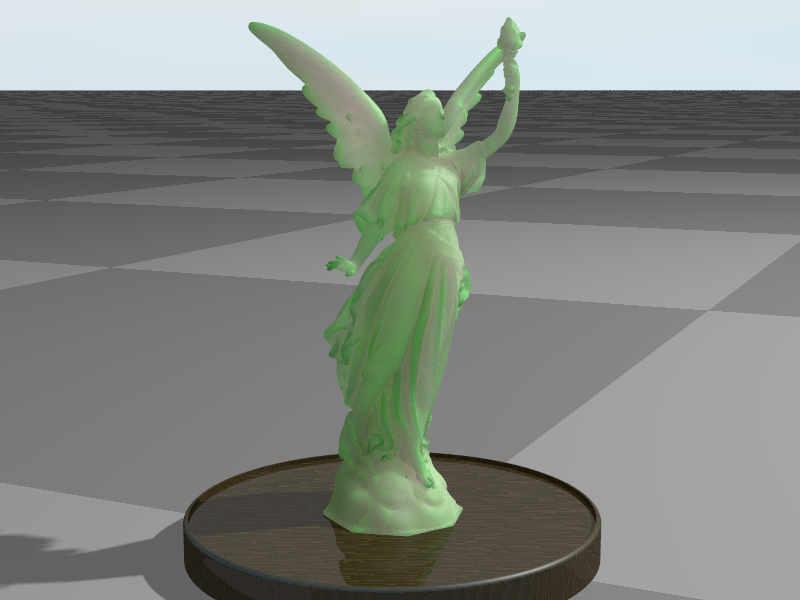
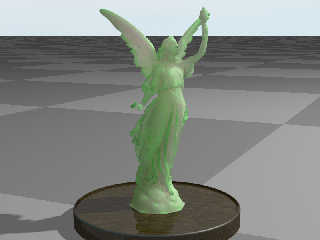
And here it is. I've created another simplified mesh using 10% of the
vertexes (14 Meg zipped to 5 Meg). It messes up my big idea of
mm_per_unit though.
I don't mind sharing it even though 3DS Max says the mesh is a rats nest.

--
Regards
     Stephen
Post a reply to this message
Attachments:
Download 'lucy10_01_.jpg' (191 KB)
Preview of image 'lucy10_01_.jpg'
|
|
| |
| |
|
|
|
|
| |
| |
|
|
Stephen <mcavoys_at@aoldotcom> wrote:
> And here it is. I've created another simplified mesh using 10% of the
> vertexes (14 Meg zipped to 5 Meg). It messes up my big idea of
> mm_per_unit though.

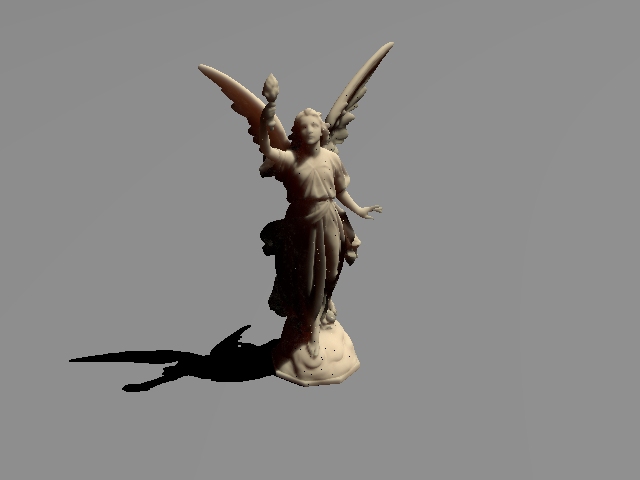
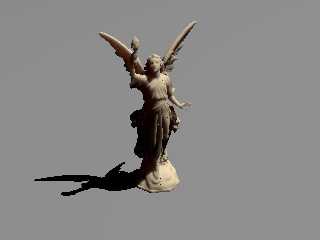
Here's my little attempt. Rendered in 10mins, without aa though. One thing I've
noticed is that I get a large number of bright single-pixel artifacts unless I
use large sample counts (using 1000,100 here), even when also using aa. Is there
any way to avoid this, or is it just the nature of the beast?

Bill
Post a reply to this message
Attachments:
Download 'sublucy.jpg' (36 KB)
Preview of image 'sublucy.jpg'
|
|
| |
| |
|
|
|
|
| |
| |
|
|
Am 01.03.2011 13:05, schrieb Stephen:

> What might be of help, if you can do it, is to simplify the model. Using
> a trial version of 3DS Max I reduced the vertex count to 20% of the
> original (28 Meg, 9 Meg zipped)

Very beautiful texture!
Post a reply to this message
|
|
| |
| |
|
|
|
|
| |
| |
|
|
On 01/03/2011 11:58 PM, Bill Pragnell wrote:
> Here's my little attempt. Rendered in 10mins, without aa though. One thing I've
> noticed is that I get a large number of bright single-pixel artifacts unless I
> use large sample counts (using 1000,100 here), even when also using aa. Is there
> any way to avoid this, or is it just the nature of the beast?

Nice but use aa it makes a difference. My samples are only 100, 50. Back
lighting makes a difference as well.
I used mm_per_unit = 1.105 for the first one and 28.6 for the green one.
It took well over an hour.
Your image looks more like marble what settings did you you use?

--
Regards
     Stephen
Post a reply to this message
|
|
| |
| |
|
|
|
|
| |
| |
|
|
On 02/03/2011 12:09 AM, clipka wrote:
> Am 01.03.2011 13:05, schrieb Stephen:
>
>> What might be of help, if you can do it, is to simplify the model. Using
>> a trial version of 3DS Max I reduced the vertex count to 20% of the
>> original (28 Meg, 9 Meg zipped)
>
> Very beautiful texture!

Thanks but as I said to Jim it is the marble from the paper.
I like the jade one posted later better.
I'm going to run some more test renders overnight.

--
Regards
     Stephen
Post a reply to this message
|
|
| |
| |
|
|
|
|
| |
| |
|
|
On 02/03/2011 12:14 AM, Stephen wrote:
> My samples are only 100, 50.

I lied, I've just noticed that they are 500, 250

--
Regards
     Stephen
Post a reply to this message
|
|
| |
| |
|
|
|
|
| |
| |
|
|
Stephen <mcavoys_at@aoldotcom> wrote:
> Nice but use aa it makes a difference.

But does it? I thought aa was wasted on otherwise supersampled features like
area lights, focal blur, media etc? The edges of lucy's self-shadows are lovely,
it's just the floor shadow and her horizon that show aliasing. I'll do some aa
tests tonight.

> Your image looks more like marble what settings did you you use?

Excellent, I was shooting for a very translucent marble.

mm_per_unit = 80 (the model is about 1 unit high)
samples 1000, 100 (only way I could get rid of bright point artifacts)
subsurface { 5*colour, 0.5*(1-colour) } (IIRC!)

Bill
Post a reply to this message
|
|
| |
| |
|
|
|
|
| |
| |
|
|
On 02/03/2011 9:19 AM, Bill Pragnell wrote:
> Stephen<mcavoys_at@aoldotcom>  wrote:
>> Nice but use aa it makes a difference.
>
> But does it? I thought aa was wasted on otherwise supersampled features like
> area lights, focal blur, media etc? The edges of lucy's self-shadows are lovely,
> it's just the floor shadow and her horizon that show aliasing. I'll do some aa
> tests tonight.
>

I did a test without aa and there are more artefacts in the non-aa
rendering.

>> Your image looks more like marble what settings did you you use?
>
> Excellent, I was shooting for a very translucent marble.
>
> mm_per_unit = 80 (the model is about 1 unit high)
> samples 1000, 100 (only way I could get rid of bright point artifacts)
> subsurface { 5*colour, 0.5*(1-colour) } (IIRC!)
>

So your model is about 80 mm (3 inches) why pick that value?
This is something I'm having difficulty getting my head around. :-(

--
Regards
     Stephen
Post a reply to this message
|
|
| |
| |
|
|
|
|
| |
| |
|
|
Stephen <mcavoys_at@aoldotcom> wrote:
> I did a test without aa and there are more artefacts in the non-aa
> rendering.

I see what you mean. The artifacts were definitely lessened by aa, but they were
lessened much more by increasing the sampling :)

> > mm_per_unit = 80 (the model is about 1 unit high)
> > samples 1000, 100 (only way I could get rid of bright point artifacts)
> > subsurface { 5*colour, 0.5*(1-colour) } (IIRC!)
>
> So your model is about 80 mm (3 inches) why pick that value?
> This is something I'm having difficulty getting my head around. :-(

Well, I was basically just tweaking until it looked good. I don't really
understand what the subsurface:mm_per_unit ratio means, although the
scattering:absorption ratio of the subsurface values seems more intuitive (not
dissimilar to media).

I think the mm_per_unit value kind of makes sense - most everyday experience
with translucent stone objects is small statues/knick-knacks. For larger items
(metres and larger), I would expect the translucency to be much more subtle, or
even invisible, due to the greater path lengths.

I think word-of-god elucidation is required :)
Post a reply to this message
|
|
| |
| |
|
|
|
|
| |
| |
|
|
On 02/03/2011 11:59 AM, Bill Pragnell wrote:
> Stephen<mcavoys_at@aoldotcom>  wrote:
>> I did a test without aa and there are more artefacts in the non-aa
>> rendering.
>
> I see what you mean. The artifacts were definitely lessened by aa, but they were
> lessened much more by increasing the sampling :)
>

OK, that saves me some experimenting.

>
> Well, I was basically just tweaking until it looked good. I don't really
> understand what the subsurface:mm_per_unit ratio means, although the
> scattering:absorption ratio of the subsurface values seems more intuitive (not
> dissimilar to media).
>

I agree that the subsurface values seems more intuitive.

> I think the mm_per_unit value kind of makes sense - most everyday experience
> with translucent stone objects is small statues/knick-knacks. For larger items
> (metres and larger), I would expect the translucency to be much more subtle, or
> even invisible, due to the greater path lengths.
>
> I think word-of-god elucidation is required :)
>
>
I think that I'll wait until RC4, where the syntax will change, before
playing any more.

--
Regards
     Stephen
Post a reply to this message
|
|
| |
| |
|
|
|
|
| |
| |
|
|
On 02/03/2011 9:19 AM, Bill Pragnell wrote:
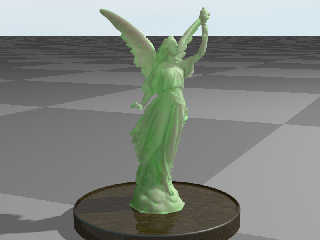
> mm_per_unit = 80

Using your setting of mm_per_unit  80 and subsurface {samples 500, 100 }
I think that this one turns out nice. It took five and a half hours to
render but I was only using 4 threads. (I’m getting to be an old feartie
after my laptop overheated)


--
Regards
     Stephen
Post a reply to this message
Attachments:
Download 'lucy10_01c_.jpg' (183 KB)
Preview of image 'lucy10_01c_.jpg'
|
|
| |
| |
|
|
|
|
| |
| |
|
|
On 03/02/2011 01:40 PM, Stephen wrote:
> On 02/03/2011 9:19 AM, Bill Pragnell wrote:
>> mm_per_unit = 80
>
> Using your setting of mm_per_unit  80 and subsurface {samples 500, 100 }
> I think that this one turns out nice. It took five and a half hours to
> render but I was only using 4 threads. (I’m getting to be an old feartie
> after my laptop overheated)
>
>
I thought you were gonna wait for RC4
Now go have a cup of tea and let the ole laptop cool down for a bit ;-)
Post a reply to this message
|
|
| |
| |
|
|
|
|
| |
| |
|
|
On 02/03/2011 5:50 PM, Jim Holsenback wrote:
> I thought you were gonna wait for RC4
> Now go have a cup of tea and let the ole laptop cool down for a bit;-)

LOL
It was already rendering when I wrote that.
A cup of tea sounds good though.

--
Regards
     Stephen
Post a reply to this message
|
|
| |
| |
|
|
|
|
| |
| |
|
|
Stephen <mcavoys_at@aoldotcom> wrote:
> On 24/02/2011 9:30 AM, Bill Pragnell wrote:
> >> I had the same problem with Lucy, using MeshLab. Somehow I could not get it
> >> >  converted.
> > What seemed to be the issue? I also converted Lucy (I think with Meshlab +
> > Poseray) a couple of years ago and had no problems. I did lower the triangle
> > count a bit, since the file size was vast and I knew most of it would be
> > sub-pixel in the scene I was making...
> >
> >
> MeshLab fails with an error message saying that the application has
> requested the Runtime to terminate in an unusual way.
>
> PoseRay might do it. But slowly, slowly!
> After about 10 minutes loading the PLY file the % completed bar is at
> about 2%.
>
> --
> Regards
>      Stephen

Wow, I'm having deja vu; I converted Lucy with MeshLab and rendered a few SSLT
versions right after the feature first appeared about a year and half ago:
http://news.povray.org/web.4a9f2cce63e55f164726e92b0@news.povray.org

And uploaded the inc file to my web site, the link is here:
http://news.povray.org/web.4aa18ba663e55f164726e92b0@news.povray.org

I'm going to have to try that dragon now though...

Cheers,
Rob

-------------------------------------------------
www.McGregorFineArt.com
Post a reply to this message
|
|
| |
| |
|
|
|
|
| |
| |
|
|
Stephen <mcavoys_at@aoldotcom> wrote:
> On 02/03/2011 5:50 PM, Jim Holsenback wrote:
> > I thought you were gonna wait for RC4
> > Now go have a cup of tea and let the ole laptop cool down for a bit;-)
>
> LOL
> It was already rendering when I wrote that.
> A cup of tea sounds good though.

You could boil the water on your cpu heatsink ;-)
Post a reply to this message
|
|
| |
| |
|
|
|
|
| |
| |
|
|
On 03/02/2011 03:39 PM, Robert McGregor wrote:
> And uploaded the inc file to my web site, the link is here:
> http://news.povray.org/web.4aa18ba663e55f164726e92b0@news.povray.org

OK what am I doing wrong? I've used mesh objects before so I'm not
blazing any new territory here. I see the parse (tokens) of the object
then the render ... get an empty scene except my ground plane and light
source (zoomed way back looked u/d ... scaled too) don't see nuttin' ...
I should be able to (after including the Lucy file I downloaded from
your site and do:

object { Lucy_Statue pigment {rgb 1}}

btw stats just show 2 objects (plane and light_source)

shucks ... I wanted to play too ;-)
Post a reply to this message
|
|
| |
| |
|
|
|
|
| |
| |
|
|
On 02/03/2011 8:18 PM, Bill Pragnell wrote:
> You could boil the water on your cpu heatsink;-)

I could burn the heal of my hands on my laptop. (No kidding)

--
Regards
     Stephen
Post a reply to this message
|
|
| |
| |
|
|
|
|
| |
| |
|
|
On 02/03/2011 9:19 PM, Jim Holsenback wrote:
> object { Lucy_Statue pigment {rgb 1}}
>
> btw stats just show 2 objects (plane and light_source)
>
> shucks ... I wanted to play too;-)


Try
object { Lucy pigment {rgb 1}}

Or
object { Lucy pigment {rgb 1}
  scale     <0.010000,0.010000,0.010000>
  rotate    <-90.000000,0.000000,0.000000>
  translate <0.000000,6.000000,0.000000>

}

There is an offset and she's on her back (too much ambrosia IMO)

Then join the fun :-)

--
Regards
     Stephen
Post a reply to this message
|
|
| |
| |
|
|
|
|
| |
| |
|
|
Am 02.03.2011 12:59, schrieb Bill Pragnell:
> Stephen<mcavoys_at@aoldotcom>  wrote:
>> I did a test without aa and there are more artefacts in the non-aa
>> rendering.
>
> I see what you mean. The artifacts were definitely lessened by aa, but they were
> lessened much more by increasing the sampling :)

I'd expect AA - instead of increasing samples - to give a benefit
nonetheless, as it avoids increasing the number of samples shot in areas
where everything is smooth as a baby's behind.

(I personally favor focal blur over AA though, as I think the
confidence/variance approach is superior the AA's mechanism.)

> Well, I was basically just tweaking until it looked good. I don't really
> understand what the subsurface:mm_per_unit ratio means, although the
> scattering:absorption ratio of the subsurface values seems more intuitive (not
> dissimilar to media).

The "mm_per_unit" ratio specifies - not surprisingly - how many mm are
in a POV-Ray unit.

This is required because the subsurface coefficients are specified in
[average scattering/absorption events] "per mm", rather than "per
POV-Ray unit", in order to faciliate creating re-usable material
libraries. Otherwise what would like marble in one scene might look like
soap in another, depending on the scene's dimensions.

If you feel like multiplying "mm_per_unit" by some value just to make
your material look right, instead divide the coefficients by that value.

> I think the mm_per_unit value kind of makes sense - most everyday experience
> with translucent stone objects is small statues/knick-knacks. For larger items
> (metres and larger), I would expect the translucency to be much more subtle, or
> even invisible, due to the greater path lengths.

Yup, that's exactly the point of it.
Post a reply to this message
|
|
| |
| |
|
|
|
|
| |
| |
|
|
On 03/02/2011 06:28 PM, Stephen wrote:
> On 02/03/2011 9:19 PM, Jim Holsenback wrote:
>> object { Lucy_Statue pigment {rgb 1}}
>>
>> btw stats just show 2 objects (plane and light_source)
>>
>> shucks ... I wanted to play too;-)
>
>
> Try
> object { Lucy pigment {rgb 1}}
>
> Or
> object { Lucy pigment {rgb 1}
>  scale     <0.010000,0.010000,0.010000>
>  rotate    <-90.000000,0.000000,0.000000>
>  translate <0.000000,6.000000,0.000000>
>
> }
>
> There is an offset and she's on her back (too much ambrosia IMO)
>
> Then join the fun :-)
>

thanks uncle steve ... didn't need the rotate, however still odd stats
behavior /without/ scale ... sheesh tried scale 0.1 when I didn't get
any joy moved the cam WAY back and still nuttin' ... long day (yawn)


Ray->Shape Intersection          Tests       Succeeded  Percentage
----------------------------------------------------------------------------
----------------------------------------------------------------------------
----------------------------------------------------------------------------
----------------------------------------------------------------------------

then /with/ scale
Ray->Shape Intersection          Tests       Succeeded  Percentage
----------------------------------------------------------------------------
Mesh                            260598          109403     41.98
Bounding Box                  31313889         8252368     26.35
----------------------------------------------------------------------------
Shadow Ray Tests:             50670   Succeeded:                 21223
Shadow Cache Hits:            21221
Post a reply to this message
|
|
| |
| |
|
|
|
|
| |
| |
|
|
clipka <ano### [at] anonymousorg> wrote:
> I'd expect AA - instead of increasing samples - to give a benefit
> nonetheless, as it avoids increasing the number of samples shot in areas
> where everything is smooth as a baby's behind.

I was a bit more scientific about it yesterday, and it seems aa is more helpful
than I thought - I had some reflection in the texture before that was confusing
the issue.

> (I personally favor focal blur over AA though, as I think the
> confidence/variance approach is superior the AA's mechanism.)

Agreed!

> The "mm_per_unit" ratio specifies - not surprisingly - how many mm are
> in a POV-Ray unit.

Sorry, I wasn't clear enough, I meant the ratio of "mm_per_unit" to the
magnitude of the subsurface values. But your other comments make it much clearer
what's going on, I hadn't realised the subsurface coefficients were mm-1.
(should have read the reference paper!)

> If you feel like multiplying "mm_per_unit" by some value just to make
> your material look right, instead divide the coefficients by that value.

Right.

Thanks for the clarification. :)
Post a reply to this message
|
|
| |
| |
|
|
|
|
| |
| |
|
|
On 03/03/2011 12:52 AM, Jim Holsenback wrote:
> thanks uncle steve ... didn't need the rotate, however still odd stats
> behavior/without/  scale ... sheesh tried scale 0.1 when I didn't get
> any joy moved the cam WAY back and still nuttin' ... long day (yawn)
>
>
> Ray->Shape Intersection          Tests       Succeeded  Percentage
> ----------------------------------------------------------------------------
> ----------------------------------------------------------------------------
> ----------------------------------------------------------------------------
> ----------------------------------------------------------------------------
>
> then/with/  scale
> Ray->Shape Intersection          Tests       Succeeded  Percentage
> ----------------------------------------------------------------------------
> Mesh                            260598          109403     41.98
> Bounding Box                  31313889         8252368     26.35
> ----------------------------------------------------------------------------
> Shadow Ray Tests:             50670   Succeeded:                 21223
> Shadow Cache Hits:            21221

Wimp! ;-)


Mesh                        7855178046      4549713063     57.92
Bounding Box             1118966758944    315950707952     28.24

Shadow Ray Tests:        7404170367   Succeeded:            4072760477
Shadow Cache Hits:        129165794

   Trace Time:       6 hours 47 minutes 10 seconds (24430.593 seconds)
               using 6 thread(s) with 141346.808 CPU-seconds total

I've uploaded to povray.binaries.misc a cut down version of the mesh, if
that is any help.
I can now see the advantage of using a modeller that has an OpenGl display.

--
Regards
     Stephen
Post a reply to this message
|
|
| |
| |
|
|
|
|
| |
| |
|
|
On 03/03/2011 9:26 AM, Bill Pragnell wrote:
>> If you feel like multiplying "mm_per_unit" by some value just to make
>> >  your material look right, instead divide the coefficients by that value.
> Right.
>
> Thanks for the clarification.:)
>
>

Me too. :-)

--
Regards
     Stephen
Post a reply to this message
|
|
| |
| |
|
|
|
|
| |
| |
|
|
On 03/03/2011 9:26 AM, Bill Pragnell wrote:
>> >  (I personally favor focal blur over AA though, as I think the
>> >  confidence/variance approach is superior the AA's mechanism.)
> Agreed!
>

I've not used focal blur much. What settings would be a good starting point?

--
Regards
     Stephen
Post a reply to this message
|
|
| |
| |
|
|
|
|
| |
| |
|
|
On 3/3/2011 5:09 AM, Stephen wrote:
> On 03/03/2011 9:26 AM, Bill Pragnell wrote:
>>> > (I personally favor focal blur over AA though, as I think the
>>> > confidence/variance approach is superior the AA's mechanism.)
>> Agreed!
>>
>
> I've not used focal blur much. What settings would be a good starting
> point?
>

My personal recipe:

Confidence .9
Variance 1/64
Samples to taste, for quicker renders, 10 does the job. For final
renders I'll go as high as 1000.

Why 1/64 on variance? Well, pixel-to-pixel it's very hard to see the
difference between a value that's 4 levels different than the next
(Though 3.7's gamma may change that in shadow or highlight areas) If you
must, go for the default variance. It slows a little bit, but not much.
As for confidence? Dunno. .9 is just sort of an arbitrary value.

Either than or start with the defaults, They're good enough (except
samples) occasionally I'll push confidence to 3 nines or even 4 nines,
if I think I'm going to get anything out of it.
Post a reply to this message
|
|
| |
| |
|
|
|
|
| |
| |
|
|
On 03/03/2011 06:03 AM, Stephen wrote:
> I've uploaded to povray.binaries.misc a cut down version of the mesh, if
> that is any help.

cool .. thanks my brother from another mother
Post a reply to this message
|
|
| |
| |
|
|
|
|
| |
| |
|
|
On 03/03/2011 1:50 PM, Jim Holsenback wrote:
> On 03/03/2011 06:03 AM, Stephen wrote:
>> I've uploaded to povray.binaries.misc a cut down version of the mesh, if
>> that is any help.
>
> cool .. thanks my brother from another mother
>

LOL
Whatever you're smoking, I want some. :-D

--
Regards
     Stephen
Post a reply to this message
|
|
| |
| |
|
|
|
|
| |
| |
|
|
On 03/03/2011 1:44 PM, Mike Raiford wrote:
> My personal recipe:
>
> Confidence .9
> Variance 1/64
> Samples to taste, for quicker renders, 10 does the job. For final
> renders I'll go as high as 1000.
>
> Why 1/64 on variance? Well, pixel-to-pixel it's very hard to see the
> difference between a value that's 4 levels different than the next
> (Though 3.7's gamma may change that in shadow or highlight areas) If you
> must, go for the default variance. It slows a little bit, but not much.
> As for confidence? Dunno. .9 is just sort of an arbitrary value.
>
> Either than or start with the defaults, They're good enough (except
> samples) occasionally I'll push confidence to 3 nines or even 4 nines,
> if I think I'm going to get anything out of it.

Thanks I'm running a render on my old dual core laptop. with the default
values and samples 10 and aperture 0.400.
It is rendering at 8 pps 2 hours into it an 17% done.

I'll try variance = 1/64 next.

--
Regards
     Stephen
Post a reply to this message
|
|
| |
| |
|
|
|
|
| |
| |
|
|
On 03/03/2011 09:59 AM, Stephen wrote:
> On 03/03/2011 1:50 PM, Jim Holsenback wrote:
>> On 03/03/2011 06:03 AM, Stephen wrote:
>>> I've uploaded to povray.binaries.misc a cut down version of the mesh, if
>>> that is any help.
>>
>> cool .. thanks my brother from another mother
>>
>
> LOL
> Whatever you're smoking, I want some. :-D
>
it's called insomnia ... and I think I'll scream if we don't get some
sunshine soon (sick of winter and gray days)
Post a reply to this message
|
|
| |
| |
|
|
|
|
| |
| |
|
|
On 03/03/2011 2:48 PM, Jim Holsenback wrote:
>> LOL
>> >  Whatever you're smoking, I want some.:-D
>> >
> it's called insomnia ... and I think I'll scream if we don't get some
> sunshine soon (sick of winter and gray days)

I sympathise my wife has that problem. I on the other hand sleep the
sleep of the just.
It’s not fair, is it? :-P

I would have thought that long nights and short days would meen that you
sleep longer.


--
Regards
     Stephen
Post a reply to this message
|
|
| |
| |
|
|
|
|
| |
| |
|
|
Jim Holsenback <jho### [at] povrayorg> wrote:
> On 03/02/2011 03:39 PM, Robert McGregor wrote:
> > And uploaded the inc file to my web site, the link is here:
> > http://news.povray.org/web.4aa18ba663e55f164726e92b0@news.povray.org
>
> OK what am I doing wrong? I've used mesh objects before so I'm not
> blazing any new territory here. I see the parse (tokens) of the object
> then the render ... get an empty scene except my ground plane and light
> source (zoomed way back looked u/d ... scaled too) don't see nuttin' ...
> I should be able to (after including the Lucy file I downloaded from
> your site and do:
>
> object { Lucy_Statue pigment {rgb 1}}
>
> btw stats just show 2 objects (plane and light_source)
>
> shucks ... I wanted to play too ;-)

Jim, she's ~929 units tall; try this with my version of the mesh to make her ~5
units tall:

camera {
   location <0, 0, -15>
   look_at  <0, 0, 0>
   right    x*image_width/image_height
   angle    60
}

light_source{ <-300, 300, -300> rgb 1 }

#include "shapes.inc"
#include "Lucy_POV_geom.inc"

#declare Lucy_Statue = object {
   Center_Object(Lucy_Statue, x+y+z)
   scale 1/929*5
   rotate y*180
}
object { Lucy_Statue pigment { rgb 1 } }

Cheers,
Rob

-------------------------------------------------
www.McGregorFineArt.com
Post a reply to this message
|
|
| |
| |
|
|
|
|
| |
| |
|
|
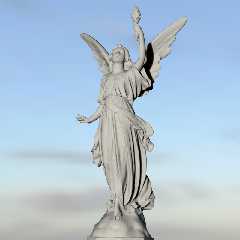
On 03/03/2011 06:03 AM, Stephen wrote:
> I've uploaded to povray.binaries.misc a cut down version of the mesh, if
> that is any help.
> I can now see the advantage of using a modeller that has an OpenGl display.

Ok ... here's my version rendered with RC4. I've settled for a more
subtle effect
Post a reply to this message
Attachments:
Download 'work.png' (318 KB)
Preview of image 'work.png'
|
|
| |
| |
|
|
|
|
| |