|
|
|
|
|
|
| |
| |
|
|
|
|
| |
| |
|
|
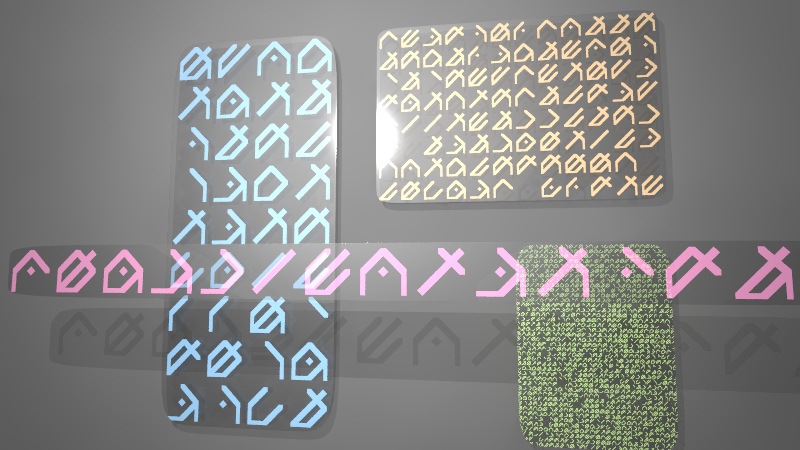
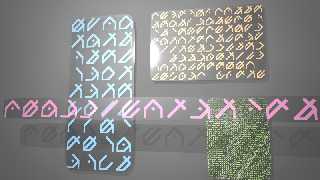
I wanted some random meaningless alien letters for a space scene I've been
working on, so I decided to make a pigment filled with random alien
gibberish!

The letters are built out of segments, like the numbers on a calculator, but
the segments can overlap. I use object pigments with a repeat warp and a
cells pattern to randomly light up every possible combination of segments,
in an infinitely large pigment.

Here's the code:

//--start
// Alienese - by Tek

#include "transforms.inc"

#declare AlienLetters = array[6];

// build it in boxes of 11x11, from 0,0 to 11,11 with 0-1 and 10-11 as space
between letters
#declare AlienLetters[0] =
 union { box { <1,1>, <2,6,1> } box { 0, <1,4,1> Shear_Trans(x-y,y+x,z)
translate <1,6> } box { <5,9>, <6,10,1> } scale <1,1,11>/11 };
#declare AlienLetters[1] =
 union { box { <9,1>, <10,6,1> } box { -x, <0,4,1> Shear_Trans(x+y,y-x,z)
translate <10,6> } box { <5,9>, <6,10,1> } scale <1,1,11>/11 };
#declare AlienLetters[2] = box { 0,1 Shear_Trans(x-y,y+x,z) translate
<4.5,5.5> scale <1,1,11>/11 };
#declare AlienLetters[3] =
 union { box { <1,1>, <6,2,1> } box { 0, <1,4,1> Shear_Trans(x-y,y+x,z)
translate <5,2> } box { <9,5>, <10,6,1> } scale <1,1,11>/11 };
#declare AlienLetters[4] =
 union { box { <9,5>, <10,6,1> } box { -x, <0,4,1> Shear_Trans(x+y,y-x,z)
translate <10,6> } box { <5,9>, <6,10,1> } scale <1,1,11>/11 };
#declare AlienLetters[5] =
 box { 0, <1,8,1> Shear_Trans(x-y,y+x,z) translate <1,2> scale
<1,1,11>/11 };

#declare Alienese =
 pigment {
  // combine an on/off pattern for each of the cells making the characters
  // optimal version would test empty space first, then combinations of
cells, then individual ones, but lazy approach is just test all using
average and saturate that
  pigment_pattern {
   pigment_pattern {
    average
    pigment_map {
     // toggle each one randomly, by using 2x frequency with each letter
part, so every combination appears in the colour map.
     // could instead get a nice effect by having a list of every valid
combo and doing one big colour map on cells for that.
     #local i=0; #while ( i < dimension_size(AlienLetters,1) )
      [1 cells frequency pow(2,i) pigment_map { [.5 rgb 0][.5 object {
AlienLetters[i] rgb 0, rgb 1 } warp { repeat x } warp { repeat y } warp {
repeat z } ] } ]
     #local i=i+1; #end
    }
   }
   colour_map {
    [.5/dimension_size(AlienLetters,1) rgb 0]
    [.5/dimension_size(AlienLetters,1) rgb 1]
   }
  }
 }

//--end

Enjoy!

--
Tek
http://evilsuperbrain.com
Post a reply to this message
Attachments:
Download 'alienese.jpg' (134 KB)
Preview of image 'alienese.jpg'
|
|
| |
| |
|
|
|
|
| |
| |
|
|
you know you're awesome, mr. big brain... :)
Post a reply to this message
|
|
| |
| |
|
|
|
|
| |
| |
|
|
Tek wrote:

> I wanted some random meaningless alien letters for a space scene I've been
> working on, so I decided to make a pigment filled with random alien
> gibberish!

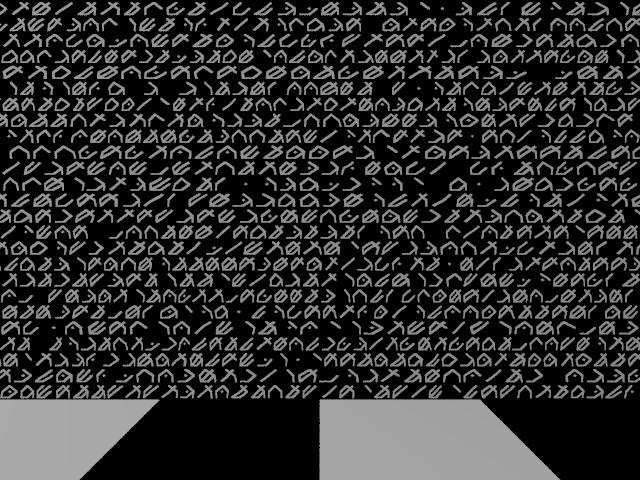
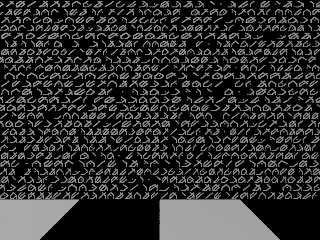
Looks neat and very elegant solution! The only problem I see
is that the perfect grid may be a bit distracting. I just played
with a derived pigment that uses different spacings for each
line although it is not really a proportional font:

#declare CELL_WIDTH = 10000;
#declare LINE_STEPS = 10;
#declare MAX_FACTOR = 0.5;

#declare AlieneseProportional = pigment
{
   cells translate -0.5*x scale <CELL_WIDTH,1,1>
   pigment_map
   {
     [0.0 Alienese scale <1.0/CELL_WIDTH,1,1>]
     #local LINE_STEP=1;
     #while (LINE_STEP < LINE_STEPS)
       [LINE_STEP/LINE_STEPS Alienese scale
        <(1.0+(LINE_STEP-1)*MAX_FACTOR/(LINE_STEPS-1))/CELL_WIDTH,1,1>]
       [LINE_STEP/LINE_STEPS Alienese scale
        <(1.0+(LINE_STEP)*MAX_FACTOR/(LINE_STEPS-1))/CELL_WIDTH,1,1>]
       #local LINE_STEP=LINE_STEP+1;
     #end
     [1.0 Alienese scale <(1.0+MAX_FACTOR)/CELL_WIDTH,1,1>]
   }
   warp {turbulence <0.2,0.0,0.0> lambda 1.0 octaves 1}
}

I added a slight bit of turbulence in x direction as well,
although that causes the spacing to vary at different y
positions within a line as well. To get rid of that I think one
would need to use turbulence with a tweaked noise function.
Using stronger turbulence can also give a nice
"handwritten alienese" effect.

One thing I completely didn't understand was the need to
reverse the cell scaling for the inner pigment. I would have
expected that scaling the cell pattern up would give me larger
cells but not affect the scaling of pigments in the pigment_map.
But leaving out the correction factor just gave me horizontal
streaks (3.6.1 and 3.7 beta 39).
Post a reply to this message
|
|
| |
| |
|
|
|
|
| |
| |
|
|
Forgot the image
Post a reply to this message
Attachments:
Download 'alienese_spacing.jpg' (96 KB)
Preview of image 'alienese_spacing.jpg'
|
|
| |
| |
|
|
|
|
| |
| |
|
|
Le 2010-09-19 11:34, Christian Froeschlin a écrit :

> One thing I completely didn't understand was the need to
> reverse the cell scaling for the inner pigment. I would have
> expected that scaling the cell pattern up would give me larger
> cells but not affect the scaling of pigments in the pigment_map.
> But leaving out the correction factor just gave me horizontal
> streaks (3.6.1 and 3.7 beta 39).

When you scale a pigment or texture, you scale all of it, including any
sub pattern or texture. The pigment_map is effectively part of the cells
pattern.
You can think of scaling as similar to a magnifying glass. It don't
discriminate between the various parts.


Alain
Post a reply to this message
|
|
| |
| |
|
|
|
|
| |
| |
|
|
"Alain" <aze### [at] qwerty org> wrote in message
news:4c963893$1@news.povray.org...
> Le 2010-09-19 11:34, Christian Froeschlin a écrit :
>
>> One thing I completely didn't understand was the need to
>> reverse the cell scaling for the inner pigment. I would have
>> expected that scaling the cell pattern up would give me larger
>> cells but not affect the scaling of pigments in the pigment_map.
>> But leaving out the correction factor just gave me horizontal
>> streaks (3.6.1 and 3.7 beta 39).
>
> When you scale a pigment or texture, you scale all of it, including any
> sub pattern or texture. The pigment_map is effectively part of the cells
> pattern.
> You can think of scaling as similar to a magnifying glass. It don't
> discriminate between the various parts.
Exactly. You can avoid this using pigment_pattern, like so:
pigment_pattern { cells scale <CELL_WIDTH,1,1> } //prevent scale from
affecting child pigments
translate -0.5*x // allow this to affect child pigments
pigment_map {
[etc..
--
Tek
http://evilsuperbrain.com org> wrote in message
news:4c963893$1@news.povray.org...
> Le 2010-09-19 11:34, Christian Froeschlin a écrit :
>
>> One thing I completely didn't understand was the need to
>> reverse the cell scaling for the inner pigment. I would have
>> expected that scaling the cell pattern up would give me larger
>> cells but not affect the scaling of pigments in the pigment_map.
>> But leaving out the correction factor just gave me horizontal
>> streaks (3.6.1 and 3.7 beta 39).
>
> When you scale a pigment or texture, you scale all of it, including any
> sub pattern or texture. The pigment_map is effectively part of the cells
> pattern.
> You can think of scaling as similar to a magnifying glass. It don't
> discriminate between the various parts.
Exactly. You can avoid this using pigment_pattern, like so:
pigment_pattern { cells scale <CELL_WIDTH,1,1> } //prevent scale from
affecting child pigments
translate -0.5*x // allow this to affect child pigments
pigment_map {
[etc..
--
Tek
http://evilsuperbrain.com
Post a reply to this message
|
|
| |
| |
|
|
|
|
| |
| |
|
|
"Christian Froeschlin" <chr### [at] chrfrde> wrote in message
news:4c962d8c@news.povray.org...
>
> Looks neat and very elegant solution! The only problem I see
> is that the perfect grid may be a bit distracting. I just played
> with a derived pigment that uses different spacings for each
> line although it is not really a proportional font:

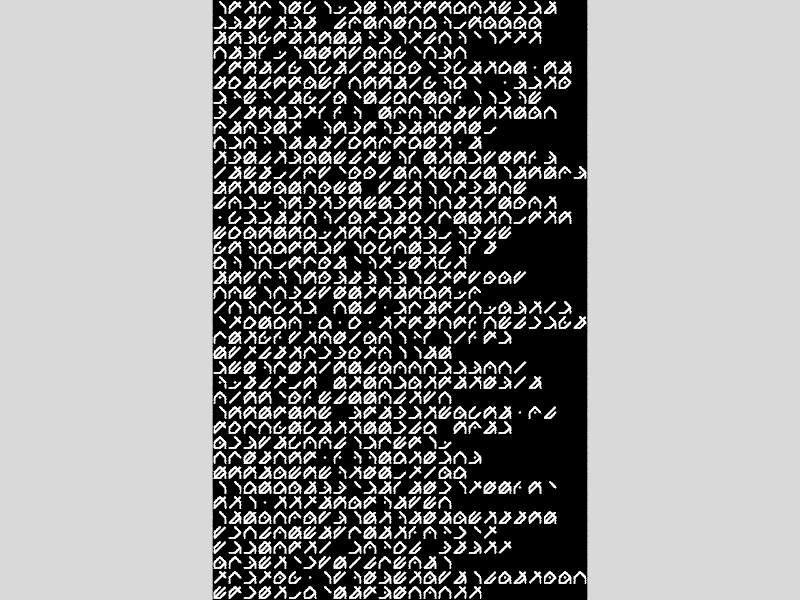
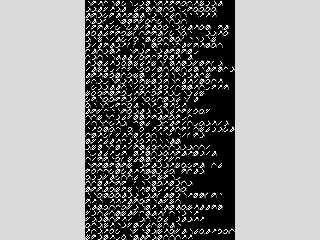
Cool, though for my purposes I don't need a wall of text so the pattern
should never be obvious.

Though I did think about how to make each line be a random number of
characters long...

...In fact I've given that a quick try, turns out to be pretty simple.
Here's the code:

#local f_cells = function { pattern { cells } }

#macro AlieneseWrap( LineLength, Variation )
 function {
  select( LineLength - int(f_cells(x/LineLength,y,z)*Variation) - x, 0, 1 )
 }
 pigment_map {
  [0 rgb 0]
  [1 Alienese]
 }
#end

 pigment { AlieneseWrap( 25, 10 ) }

Obviously this can be adapted easily to have chinese style downwards writing
instead of left-to-right. Dunno what the syntax is for this language :)

--
Tek
http://evilsuperbrain.com
Post a reply to this message
Attachments:
Download 'temp.png' (95 KB)
Preview of image 'temp.png'
|
|
| |
| |
|
|
|
|
| |
| |
|
|
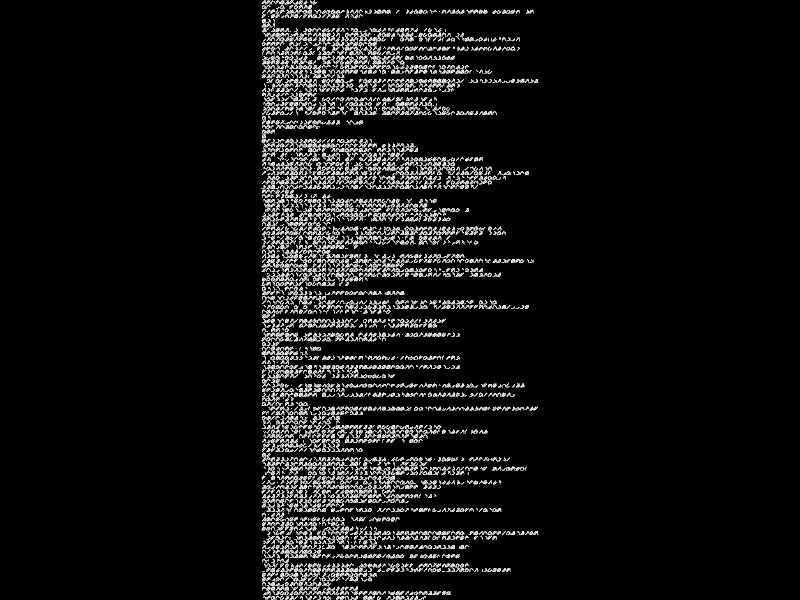
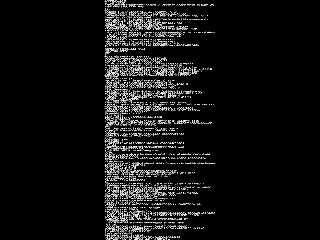
Extreme example!
AlieneseWrap( 60, 60 )

It looks like code, maybe I need to add some hierarchical indenting!
(probably putting too much thought into this, should get on with the sci-fi
picture I created it for!)

--
Tek
http://evilsuperbrain.com


"Tek" <tek### [at] evilsuperbraincom> wrote in message
news:4c96af79@news.povray.org...
> "Christian Froeschlin" <chr### [at] chrfrde> wrote in message
> news:4c962d8c@news.povray.org...
>>
>> Looks neat and very elegant solution! The only problem I see
>> is that the perfect grid may be a bit distracting. I just played
>> with a derived pigment that uses different spacings for each
>> line although it is not really a proportional font:
>
> Cool, though for my purposes I don't need a wall of text so the pattern
> should never be obvious.
>
> Though I did think about how to make each line be a random number of
> characters long...
>
> ...In fact I've given that a quick try, turns out to be pretty simple.
> Here's the code:
>
> #local f_cells = function { pattern { cells } }
>
> #macro AlieneseWrap( LineLength, Variation )
> function {
>  select( LineLength - int(f_cells(x/LineLength,y,z)*Variation) - x, 0, 1 )
> }
> pigment_map {
>  [0 rgb 0]
>  [1 Alienese]
> }
> #end
>
> pigment { AlieneseWrap( 25, 10 ) }
>
> Obviously this can be adapted easily to have chinese style downwards
> writing
> instead of left-to-right. Dunno what the syntax is for this language :)
>
> --
> Tek
> http://evilsuperbrain.com
>
>
>
Post a reply to this message
Attachments:
Download 'temp.png' (83 KB)
Preview of image 'temp.png'
|
|
| |
| |
|
|
|
|
| |
| |
|
|
"Tek" <tek### [at] evilsuperbraincom> schreef in bericht
news:4c96b1c1@news.povray.org...
> Extreme example!
> AlieneseWrap( 60, 60 )
>
> It looks like code, maybe I need to add some hierarchical indenting!
> (probably putting too much thought into this, should get on with the
> sci-fi picture I created it for!)
>

Sure! But together with Christian, you have now been at the sart of a whole
new body of literature!  ;-)

Thanks!!

Thomas
Post a reply to this message
|
|
| |
| |
|
|
|
|
| |
| |
|
|
"Tek" <tek### [at] evilsuperbraincom> wrote:
> Extreme example!
> AlieneseWrap( 60, 60 )

This is very cool--looks like the 'matrix' code at he beginning of the MATRIX
films.

I shall have fun experimenting with these ideas; I'm still looking over your
code to fully understand it.  Nice work!  (I'm imagining the letters being used
to create a height_field--then you'd have a 'Rosetta Stone' generator.) I'm
guessing that the letters can be made to look less 'aligned' somehow--as if
hand-drawn (or hand-chisled!) by a non-artist.

Ken
Post a reply to this message
|
|
| |
| |
|
|
|
|
| |
| |
|
|
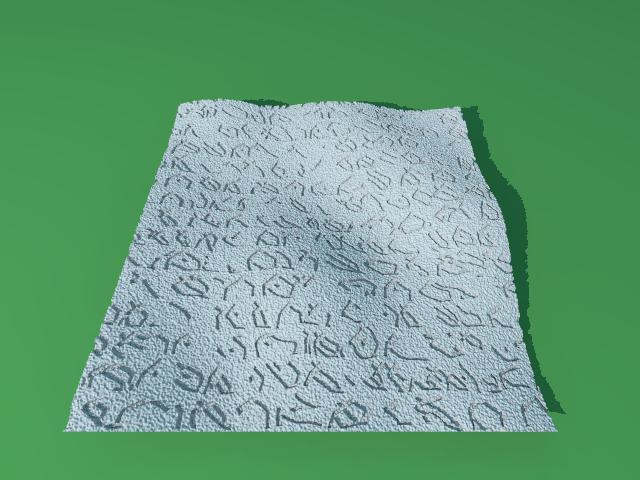
Kenneth wrote:

> I'm imagining the letters being used to create a height_field--then
> you'd have a 'Rosetta Stone' generator. I'm guessing that the letters
> can be made to look less 'aligned' somehow--as if hand-drawn (or
> hand-chisled!) by a non-artist.

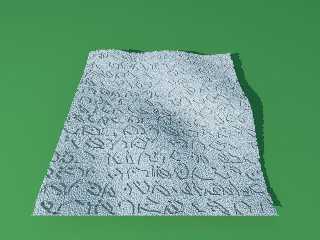
I tried my variant with increased turbulence to break up
the alignment even more:

   warp {turbulence <0.4,0.2,0.2> lambda 1.0 octaves 1}

And tested it with a height_field:

#declare f_alienese = function
{
   pigment { AlieneseProportional scale 0.07}
}

height_field
{
   function 1024,1024
   {
     f_bozo(x*3,y*3,z*3) - 0.04*f_alienese(x,y,0).red -
     0.04 * f_noise3d(x*250,y*250,z*250)
   }
   pigment {color White}
   translate <-0.5,0,-0.5>
   rotate 180*y
   scale <6,1,6>
}

I think the results look quite promising. Of course,
for a Rosetta stone you'd also need a translation into
a widely known language such as Klingonese ;)
Post a reply to this message
Attachments:
Download 'alienesehf.jpg' (50 KB)
Preview of image 'alienesehf.jpg'
|
|
| |
| |
|
|
|
|
| |
| |
|
|
Christian Froeschlin <chr### [at] chrfrde> wrote:

> I tried my variant with increased turbulence to break up
> the alignment even more:
>
> I think the results look quite promising.

Indeed! Very happy to see that the HF idea works so well. (Thanks for posting
the code example, too.) Makes me want to whip up an isosurface-block version, or
perhaps some kind of superellipsoid/HF difference.

> Of course,
> for a Rosetta stone you'd also need a translation into
> a widely known language such as Klingonese ;)

LOL.  And, of course, that old stand-by, Greek--the well-known intergalactic
language...
Post a reply to this message
|
|
| |
| |
|
|
|
|
| |
| |
|
|
Nice work!
Post a reply to this message
|
|
| |
| |
|
|
|
|
| |
| |
|
|
On 9/19/2010 7:58 PM, Tek wrote:
> Extreme example!
> AlieneseWrap( 60, 60 )
>
> It looks like code, maybe I need to add some hierarchical indenting!
> (probably putting too much thought into this, should get on with the sci-fi
> picture I created it for!)
>

I didn't realize they made a translation of MS-DOS to Glabraxian III ... :)

Good work!

--
~Mike
Post a reply to this message
|
|
| |
| |
|
|
|
|
| |
| |
|
|
Le 2010-09-24 08:45, Mike Raiford a écrit :
> On 9/19/2010 7:58 PM, Tek wrote:
>> Extreme example!
>> AlieneseWrap( 60, 60 )
>>
>> It looks like code, maybe I need to add some hierarchical indenting!
>> (probably putting too much thought into this, should get on with the
>> sci-fi
>> picture I created it for!)
>>
>
> I didn't realize they made a translation of MS-DOS to Glabraxian III ... :)
>
> Good work!
>

Don't talk to loud, or they will start printing contracts and publishing
end user licences in Glabraxian ;)


Alain
Post a reply to this message
|
|
| |
| |
|
|
|
|
| |
| |
|
|
On 9/24/2010 1:12 PM, Alain wrote:

> Don't talk to loud, or they will start printing contracts and publishing
> end user licences in Glabraxian ;)

I think they already do ;)

--
~Mike
Post a reply to this message
|
|
| |
| |
|
|
|
|
| |
|
|