|
|
|
|
|
|
| |
| |
|
|
|
|
| |
| |
|
|
Hi All:

    Google image search is becoming my first source for unexpected
inspiration... as usual, I was searching for something else, when found a
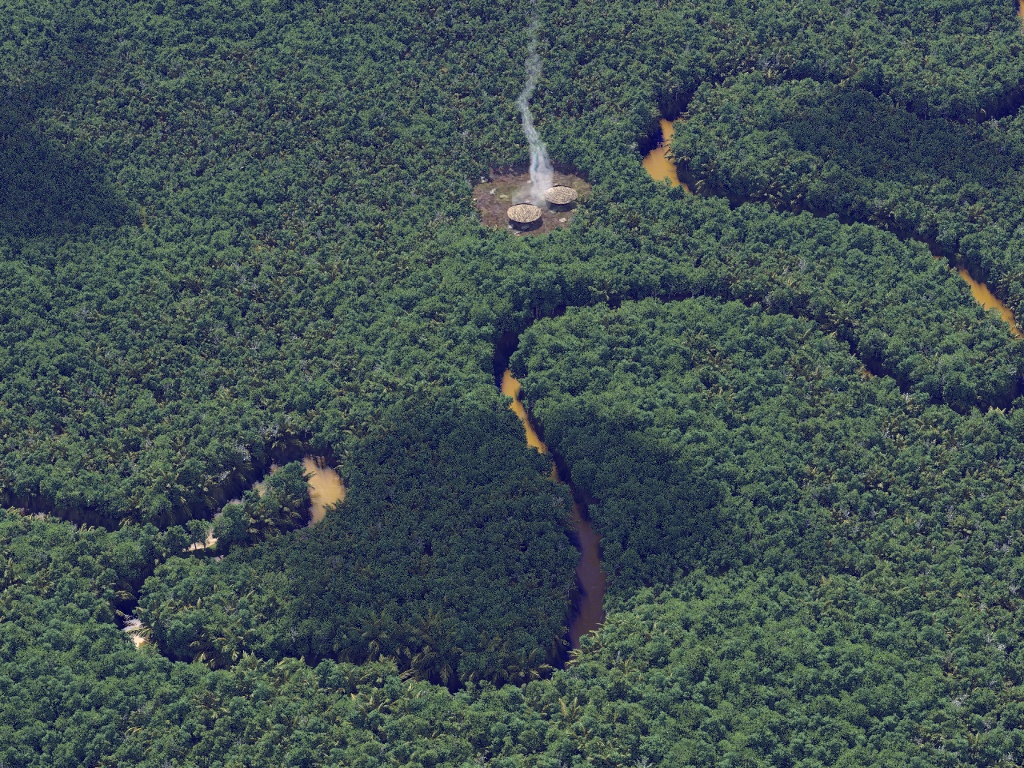
nice aerial pic of the Amazon river.

    Here are some details about this "quick hack":

    + The base terrain is a heighfield, hand-painted over a googlemaps
screen-shot.

    + The river is just a plane, with a bump map also hand-painted in The
Gimp, and a simple orange scattering media for the "muddy water" effect.

    + There are 50,000 POVTrees, using only 4 different meshes. The tree
sizes and distribution are half-guided by a pigment function.

    + The huts were made with Wings3D in about a minute (well, maybe two...)
and the smoke column was borrowed from my office scene (the cigarette smoke).

    + Of course, skylight.inc was used for the lighting.

    + render time was 40 min for the first pass, and just 20 for the final one.

    Regards,


--
Jaime Vives Piqueres

http://www.ignorancia.org
Post a reply to this message
Attachments:
Download 'amazonas-05.jpg' (545 KB)
Preview of image 'amazonas-05.jpg'
|
|
| |
| |
|
|
|
|
| |
| |
|
|
On 15.05.10 09:48, Jaime Vives Piqueres wrote:
> Hi All:
>
> Google image search is becoming my first source for unexpected
> inspiration... as usual, I was searching for something else, when found a
> nice aerial pic of the Amazon river.
>
> Here are some details about this "quick hack":

Wow!

> + render time was 40 min for the first pass, and just 20 for the final one.

Hmm, out of curiosity, do you have the full stats output?

	Thorsten
Post a reply to this message
|
|
| |
| |
|
|
|
|
| |
| |
|
|
El 15/05/10 12:57, Thorsten Froehlich escribió:
> Wow!

   Thanks!

> Hmm, out of curiosity, do you have the full stats output?

   Not exactly from that render, but from a later one, and it's the one for
the second pass (load rad data). But now that you mentioned it, I had a look
and I don't see the memory usage reported anywhere...

----------------------------------------------------------------------------
Parser Statistics
----------------------------------------------------------------------------
Finite Objects:        87816
Infinite Objects:          3
Light Sources:             1
Total:                 87820
----------------------------------------------------------------------------
Parser Time
   Parse Time:       0 hours  0 minutes 25 seconds (25.317 seconds)
               using 1 thread(s) with 0.000 CPU-seconds total
   Bounding Time:    0 hours  0 minutes  0 seconds (0.402 seconds)
               using 1 thread(s) with 0.000 CPU-seconds total
----------------------------------------------------------------------------
Render Options
   Quality:  9
   Bounding boxes.......On   Bounding threshold: 3
   Antialiasing.........On  (Method 1, Threshold 0.300, Depth 3, Jitter 1.00)
----------------------------------------------------------------------------
Render Statistics
Image Resolution 1280 x 1024
----------------------------------------------------------------------------
Pixels:          1356736   Samples:         5215014   Smpls/Pxl: 3.84
Rays:           15074112   Saved:              4139   Max Level: 5/5
----------------------------------------------------------------------------
Ray->Shape Intersection          Tests       Succeeded  Percentage
----------------------------------------------------------------------------
Cone/Cylinder                  3342726         1780362     53.26
Height Field                   3219015          817029     25.38
Height Field Box               3219015         3219015    100.00
Height Field Triangle          5380051          817596     15.20
Height Field Block             3904363         3786916     96.99
Height Field Cell             24247797         2860313     11.80
Mesh                         902968045        83344410      9.23
Plane                         69571292        28473669     40.93
Bounding Box               21383554215      6333642173     29.62
----------------------------------------------------------------------------
Function VM calls:         20064015
----------------------------------------------------------------------------
Media Intervals:            2926561   Media Samples:          22925739 (7.83)
Shadow Ray Tests:          24682060   Succeeded:              18434758
Shadow Cache Hits:          4966386
Reflected Rays:              116095   Total Internal:               10
Refracted Rays:              117042
Transmitted Rays:           1303897
----------------------------------------------------------------------------
Radiosity samples calculated:           435333 (5.75 %)
   discarded due to low quality:          37446
   retained for re-use:                  397887
Radiosity samples reused:              7137913
Radiosity sample rays shot:            6965328
Radiosity octree nodes:                    318
Radiosity octree samples/node:         1368.97
Radiosity blocks examined:         56662982852
Radiosity blocks passed test 0:    56662982852 (100.00 %)
Radiosity blocks passed test 1:     8028250024 (14.17 %)
Radiosity blocks passed test 2:     5199114000 (9.18 %)
Radiosity blocks passed test 3:      124735498 (0.22 %)
Radiosity blocks passed test 4:       52627425 (0.09 %)
Radiosity blocks passed test 5:       48446158 (0.09 %)
Radiosity blocks rejected:         56614536694 (99.91 %)
----------------------------------------------------------------------------
Radiosity Depth 0 calculated:           435333 (5.75 %)
Radiosity Depth 0 reused:              7137913
Radiosity Depth 0 rays shot:           6965328
----------------------------------------------------------------------------
Radiosity (final) calculated:           435333 (5.75 %)
Radiosity (final) reused:              7137913
Radiosity (final) rays shot:           6965328
----------------------------------------------------------------------------
   Pass     Depth 0           Total
----------------------------------------------------------------------------
   Final     435333          435333
----------------------------------------------------------------------------
   Total     435333          435333
   Weight     0.274
----------------------------------------------------------------------------
----------------------------------------------------------------------------
Render Time:
   Photon Time:      No photons
   Radiosity Time:   0 hours  0 minutes  0 seconds (0.190 seconds)
               using 4 thread(s) with 0.000 CPU-seconds total
   Trace Time:       0 hours 16 minutes 11 seconds (971.306 seconds)
               using 4 thread(s) with 0.000 CPU-seconds total

--
Jaime Vives Piqueres

http://www.ignorancia.org
Post a reply to this message
|
|
| |
| |
|
|
|
|
| |
| |
|
|
Jaime Vives Piqueres <jai### [at] ignorancia org> wrote:
> Here are some details about this "quick hack":
That's marvelous. Please give us some views from within the forest!
--
jussi org> wrote:
> Here are some details about this "quick hack":
That's marvelous. Please give us some views from within the forest!
--
jussi
Post a reply to this message
|
|
| |
| |
|
|
|
|
| |
| |
|
|
Jaime Vives Piqueres wrote:
> Hi All:
>
>    Google image search is becoming my first source for unexpected
> inspiration... as usual, I was searching for something else, when found a
> nice aerial pic of the Amazon river.
>
>    Here are some details about this "quick hack":
>
>    + The base terrain is a heighfield, hand-painted over a googlemaps
> screen-shot.
>
>    + The river is just a plane, with a bump map also hand-painted in The
> Gimp, and a simple orange scattering media for the "muddy water" effect.
>
>    + There are 50,000 POVTrees, using only 4 different meshes. The tree
> sizes and distribution are half-guided by a pigment function.
>
>    + The huts were made with Wings3D in about a minute (well, maybe two...)
> and the smoke column was borrowed from my office scene (the cigarette
> smoke).
>
>    + Of course, skylight.inc was used for the lighting.
>
>    + render time was 40 min for the first pass, and just 20 for the
> final one.
>
>    Regards,
>
>
>
> ------------------------------------------------------------------------
>
What fun!  Keep it simple.

I take it the shadows are from clouds?  Nice touch.
Post a reply to this message
|
|
| |
| |
|
|
|
|
| |
| |
|
|
You're making me wonder if Avatar is such an achievement after all.

Regards,
John
Post a reply to this message
|
|
| |
| |
|
|
|
|
| |
| |
|
|
Jaime Vives Piqueres <jai### [at] ignoranciaorg> wrote:
>     Here are some details about this "quick hack":

For being a "quick hack", this render is very nicely done! A little more color
variation could help the trees, and the smoke looks a little off, possibly
because it was designed for a smaller-scale scene. For the most part, though, it
looks good!

It must be nice to have inspiration :(
Post a reply to this message
|
|
| |
| |
|
|
|
|
| |
| |
|
|
"Jaime Vives Piqueres" <jai### [at] ignoranciaorg> schreef in bericht
news:4bee520e@news.povray.org...
>    Here are some details about this "quick hack":
>
"Quick hack"... you are joking Jaime! Such a scene would take me a couple of
days at least.

Excellent, as always. Very photographic.

Please, keep us in wonder.

Thomas
Post a reply to this message
|
|
| |
| |
|
|
|
|
| |
| |
|
|
El 15/05/10 14:03, jute escribió:
> That's marvelous.

   Thanks!

> Please give us some views from within the forest!

   I'm sorry but a shot inside the forest will reveal there is nothing under
the trees, apart from a pixelated soil texture... it was intended as a sort
of "aerial impressionism". :)


--
Jaime Vives Piqueres

http://www.ignorancia.org
Post a reply to this message
|
|
| |
| |
|
|
|
|
| |
| |
|
|
El 15/05/10 19:16, Jim Charter escribió:
> What fun! Keep it simple.

   Thanks!

> I take it the shadows are from clouds? Nice touch.

   Yes, I forgot to mention the clouds: it is just a plane with a turbulent
leopard pattern, to cast some shadows.


--
Jaime Vives Piqueres

http://www.ignorancia.org
Post a reply to this message
|
|
| |
| |
|
|
|
|
| |
| |
|
|
El 15/05/10 19:28, John VanSickle escribió:
> You're making me wonder if Avatar is such an achievement after all.

   I don't know: I haven't watched that film, and I've not read anything
about it... all I know is that it features CG people with blue skin! But
thanks for the comparison: must mean it looked convincing enough... :)


--
Jaime Vives Piqueres

http://www.ignorancia.org
Post a reply to this message
|
|
| |
| |
|
|
|
|
| |
| |
|
|
El 15/05/10 21:12, Samuel Benge escribió:
> For being a "quick hack", this render is very nicely done!

   It's just one of these rare cases where everything was right almost at
first try.

> A little more color variation could help the trees,

   I tried it at first, but then I didn't like it, and made the variation
more subtle, perhaps too much.

> and the smoke looks a little off, possibly because it was designed for a
> smaller-scale scene.

   Yes, and also because the shape is too simple.

> For the most part, though, it looks good!

   Thanks!

> It must be nice to have inspiration :(

   It's a shame that nonexistent things can't be shared... :)


--
Jaime Vives Piqueres

http://www.ignorancia.org
Post a reply to this message
|
|
| |
| |
|
|
|
|
| |
| |
|
|
El 16/05/10 09:04, Thomas de Groot escribió:
> "Quick hack"... you are joking Jaime! Such a scene would take me a couple
> of days at least.

   Well, at least by my POV-Ray standards, a couple of days IS a quick hack!

> Excellent, as always. Very photographic.

   Thanks!

--
Jaime Vives Piqueres

http://www.ignorancia.org
Post a reply to this message
|
|
| |
| |
|
|
|
|
| |
| |
|
|
spot-on!  Even the muddy waters:

http://i.treehugger.com/images/2007/10/24/amazon-river.jpg

Would it be too hard to introduce some variance to the density of distribution
and color of the trees?  Also, some are larger than others...
Post a reply to this message
|
|
| |
| |
|
|
|
|
| |
| |
|
|
Very nice. This will be my background for a while.

Maybe I've been playing with video games too long, but my first thought was
"he could make that tileable if he moved the river a bit."

I think shorter trees near the river might lend a bit more of an air of realism.

--
Darren New, San Diego CA, USA (PST)
    Ada - the programming language trying to avoid
    you literally shooting yourself in the foot.
Post a reply to this message
|
|
| |
| |
|
|
|
|
| |
| |
|
|
This picture makes me want to travel to the Amazon for an adventure! It's very
beautiful!

Regards,
Dave Blandston
Post a reply to this message
|
|
| |
| |
|
|
|
|
| |
| |
|
|
>Jaime Vives Piqueres  on date 15/05/2010 09:48 wrote:
> Hi All:
>
> Google image search is becoming my first source for unexpected
> inspiration... as usual, I was searching for something else, when found a
> nice aerial pic of the Amazon river.
>
It's impressive, looks so... natural!
;-)
Paolo
Post a reply to this message
|
|
| |
| |
|
|
|
|
| |
| |
|
|
El 16/05/10 15:58, nemesis escribió:
> spot-on!  Even the muddy waters:
>
> http://i.treehugger.com/images/2007/10/24/amazon-river.jpg

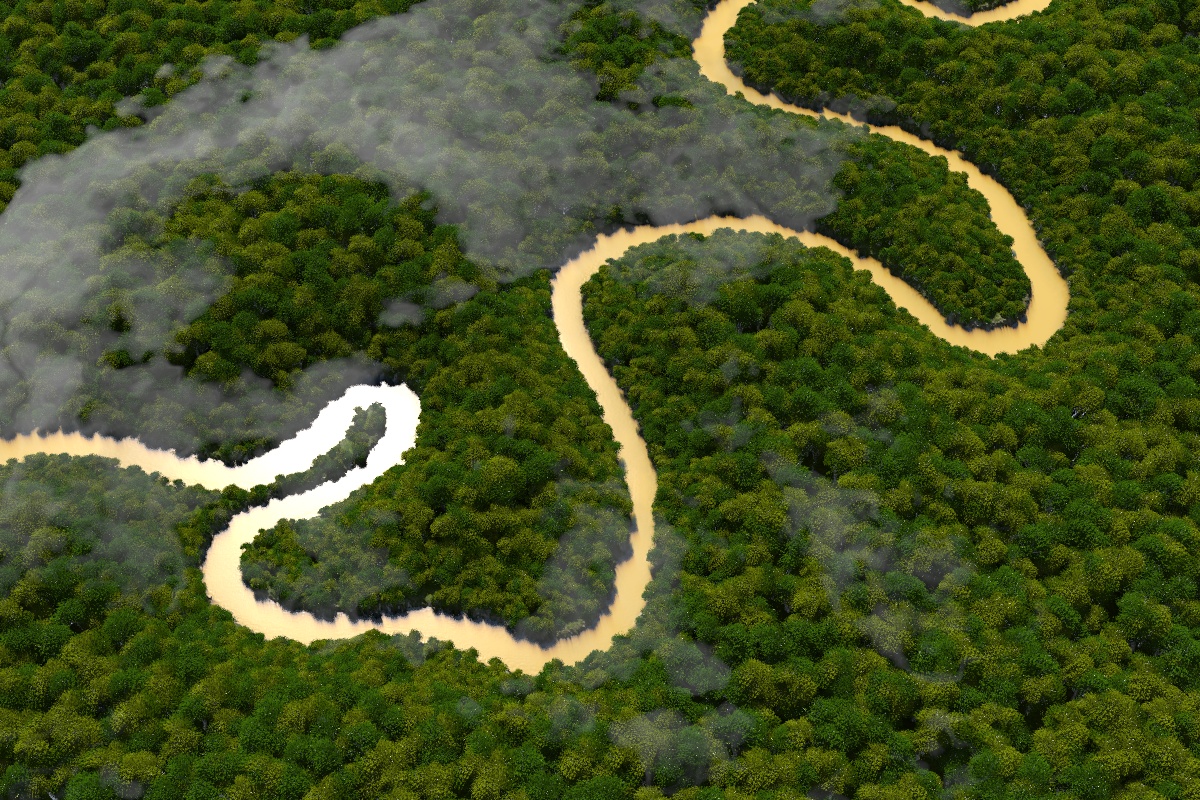
   Thanks, also for the reference pic, as it served to polish some details,
including some of the ones you mention later.

   For the color variation I used directly colors picked from the pic you
linked, but they don't look so natural... perhaps because the sunlight color
is somewhat yellowish.

   I think the density of the distribution is now better, but that was a nice
side effect of trying to implement a suggestion from Darren... ;)

--
Jaime Vives Piqueres

http://www.ignorancia.org
Post a reply to this message
Attachments:
Download 'amazonas-07.jpg' (572 KB)
Preview of image 'amazonas-07.jpg'
|
|
| |
| |
|
|
|
|
| |
| |
|
|
El 16/05/10 19:12, Darren New escribió:
> Very nice. This will be my background for a while.

   Thanks!

> I think shorter trees near the river might lend a bit more of an air of
> realism.

   Actually, this was a great suggestion, specially because it lead to many
other little but important changes.

   At first it looked too difficult to implement your suggestion, but in fact
it was very easy when I figured it out... again, the pigment function came
to the rescue: I used a heavily blurred version of the heightfield image
(which is basically a black river over a white background), and used that as
a multiplier to the trees scale. Simple, isn't? :)

   I used additional tricks based on the same function, like translating the
trees down as they approach the river, so the ones just at the edge only
show the foliage, or like increasing the density of the distribution also
near the river (see the pic on my response to nemesis).

   Thanks again!


--
Jaime Vives Piqueres

http://www.ignorancia.org
Post a reply to this message
|
|
| |
| |
|
|
|
|
| |
| |
|
|
El 16/05/10 20:41, Dave Blandston escribió:
> This picture makes me want to travel to the Amazon for an adventure! It's
> very beautiful!

   Thanks!

--
Jaime Vives Piqueres

http://www.ignorancia.org
Post a reply to this message
|
|
| |
| |
|
|
|
|
| |
| |
|
|
El 17/05/10 11:54, Paolo Gibellini escribió:
> It's impressive, looks so... natural!

   Thanks, but these greens still need much work to look really natural!

--
Jaime Vives Piqueres

http://www.ignorancia.org
Post a reply to this message
|
|
| |
| |
|
|
|
|
| |
| |
|
|
On Sat, 15 May 2010 09:48:41 +0200, Jaime Vives Piqueres
<jai### [at] ignoranciaorg> wrote:

> Hi All:
>
>     Google image search is becoming my first source for unexpected
> inspiration... as usual, I was searching for something else, when found a
> nice aerial pic of the Amazon river.
>
>     Here are some details about this "quick hack":
>
>     + The base terrain is a heighfield, hand-painted over a googlemaps
> screen-shot.
>
>     + The river is just a plane, with a bump map also hand-painted in The
> Gimp, and a simple orange scattering media for the "muddy water" effect.
>
>     + There are 50,000 POVTrees, using only 4 different meshes. The tree
> sizes and distribution are half-guided by a pigment function.
>
>     + The huts were made with Wings3D in about a minute (well, maybe
> two...)
> and the smoke column was borrowed from my office scene (the cigarette
> smoke).
>
>     + Of course, skylight.inc was used for the lighting.
>
>     + render time was 40 min for the first pass, and just 20 for the
> final one.
>
>     Regards,
>
>
Awesome!

How do you place trees with a pigment function? I would like to do the
same with the grass in my alley scene, so the grass won't grow on the
asphalt...

-Nekar Xenos-
Post a reply to this message
|
|
| |
| |
|
|
|
|
| |
| |
|
|
El 18/05/10 13:53, Nekar Xenos escribió:
> Awesome!

   Thanks!

> How do you place trees with a pigment function? I would like to do the
> same with the grass in my alley scene, so the grass won't grow on the
> asphalt...

   Indeed you could use this technique for that... it's very easy, specially
if you are already using a heighfield for the ground. Make a copy of the
grayscale map, and paint black the zones where you don't want grass, and
white for the rest. Then declare a pigment function of it:

#declare f_grass_distribution=
   function{
    pigment{
     image_map{png "your_image.png"}
     rotate 90*x
     translate <-.5,0,-.5>
     scale as_your_heightfield
    }
   }

   Now, build the classic while loop where you shot the heighfield with
trace(), but for each placement found, test first if the grass distribution
allows a grass patch there:

   ...
   #if (f_grass_distribution(Inter.x,0,Inter.z).gray>0)
    object{grass_patch
      ...
      translate Inter
    }
   #end
   ...

   Hope this helps...


--
Jaime Vives Piqueres

http://www.ignorancia.org
Post a reply to this message
|
|
| |
| |
|
|
|
|
| |
| |
|
|
On Tue, 18 May 2010 14:59:20 +0200, Jaime Vives Piqueres

<jai### [at] ignoranciaorg> wrote:

> El 18/05/10 13:53, Nekar Xenos escribió:
>> Awesome!
>
>    Thanks!
>
>> How do you place trees with a pigment function? I would like to do th
e
>> same with the grass in my alley scene, so the grass won't grow on the

>> asphalt...
>
>    Indeed you could use this technique for that... it's very easy,

> specially
> if you are already using a heighfield for the ground. Make a copy of t
he
> grayscale map, and paint black the zones where you don't want grass, a
nd
> white for the rest. Then declare a pigment function of it:
>
> #declare f_grass_distribution=
>    function{
>     pigment{
>      image_map{png "your_image.png"}
>      rotate 90*x
>      translate <-.5,0,-.5>
>      scale as_your_heightfield
>     }
>    }
>
>    Now, build the classic while loop where you shot the heighfield wit
h
> trace(), but for each placement found, test first if the grass

> distribution
> allows a grass patch there:
>
>    ...
>    #if (f_grass_distribution(Inter.x,0,Inter.z).gray>0)
>     object{grass_patch
>       ...
>       translate Inter
>     }
>    #end
>    ...
>
>    Hope this helps...
>
>
Thanks! I'll give it a try.

-Nekar Xenos-
Post a reply to this message
|
|
| |
| |
|
|
|
|
| |
| |
|
|
Jaime Vives Piqueres wrote:
>   Thanks, also for the reference pic, as it served to polish some details,
> including some of the ones you mention later.

Nice. I liked the other trees better. These look like those tufts of foam or
moss you get for making model railroad tracks. The previous version had
fronds and branches visible, and even some trunks.

--
Darren New, San Diego CA, USA (PST)
    Ada - the programming language trying to avoid
    you literally shooting yourself in the foot.
Post a reply to this message
|
|
| |
| |
|
|
|
|
| |
| |
|
|
Darren New escreveu:
> Jaime Vives Piqueres wrote:
>>   Thanks, also for the reference pic, as it served to polish some
>> details,
>> including some of the ones you mention later.
>
> Nice. I liked the other trees better. These look like those tufts of
> foam or moss you get for making model railroad tracks. The previous
> version had fronds and branches visible, and even some trunks.

I agree, but perhaps it's because they were a bit further away?  Also,
in the original there seems there were a few palm trees scattered.

I did enjoy the variation in color and size, though.  And in the light
reflection in the river. :)

--
a game sig: http://tinyurl.com/d3rxz9
Post a reply to this message
|
|
| |
| |
|
|
|
|
| |
| |
|
|
nemesis wrote:
> I agree, but perhaps it's because they were a bit further away?  Also,
> in the original there seems there were a few palm trees scattered.

Indeed. The bits of details give the reality. :-)

> I did enjoy the variation in color and size, though.  And in the light
> reflection in the river. :)

Oh, yes. The only complaint was the consistency of folliage.

--
Darren New, San Diego CA, USA (PST)
    Ada - the programming language trying to avoid
    you literally shooting yourself in the foot.
Post a reply to this message
|
|
| |
| |
|
|
|
|
| |
| |
|
|
Darren New <dne### [at] sanrrcom> wrote:
 > nemesis wrote:
 > > I agree, but perhaps it's because they were a bit further away?  Also,
 > > in the original there seems there were a few palm trees scattered.
 >
 > Indeed. The bits of details give the reality. :-)

Sometimes it doesn't even need so much detail.  Here's something I
hacked away today in Blender inspired by Jaime.

http://blenderartists.org/forum/showthread.php?p=1628561#post1628561

no leafs, just some blob-like object with some "cloud bump mapping" on...

hope Sam gets inspired too... :)

--
a game sig: http://tinyurl.com/d3rxz9
Post a reply to this message
|
|
| |
| |
|
|
|
|
| |
| |
|
|
Jaime Vives Piqueres <jai### [at] ignoranciaorg> wrote:
> Hi All:
>
>     Google image search is becoming my first source for unexpected
> inspiration... as usual, I was searching for something else, when found a
> nice aerial pic of the Amazon river.
>
>     Here are some details about this "quick hack":

Sorry to be so late in replying to your wonderful images; when I was looking
through the 'image digest' days ago, I thought someone had simply posted a
reference photograph of the Amazon! I didn't think of looking more closely 'til
now... :-(  How embarrassing...

Beautiful!  And thanks for posting all the nice how-to details.

Ken
Post a reply to this message
|
|
| |
| |
|
|
|
|
| |
| |
|
|
Sorry, no. I think the first image was much better. The color variation of
the canopy looks artificial here (only two colors? or so it appears) and the
mist/cloud is a bit too stiff/heavy.

Thomas
Post a reply to this message
|
|
| |
| |
|
|
|
|
| |
| |
|
|
"Jaime Vives Piqueres" <jai### [at] ignoranciaorg> schreef in bericht
news:4bf28f4b@news.povray.org...
>   Indeed you could use this technique for that... it's very easy,
> specially
> if you are already using a heighfield for the ground. Make a copy of the
> grayscale map, and paint black the zones where you don't want grass, and
> white for the rest. Then declare a pigment function of it:
>

...and using red, green, and/or blue you can add even more distribution
possibilities; or using the greyscale intensity of course. As this, in the
end, may need much parse time, it is efficient to save the values (position,
distribution type, etc) to file and read them separately. I used that
technique for the vegetation of my TC-RTC entries:
http://www.tc-rtc.co.uk/imagenewdisplay/stills/index118.html and
http://www.tc-rtc.co.uk/imagenewdisplay/stills/index153.html

Thomas
Post a reply to this message
|
|
| |
| |
|
|
|
|
| |
| |
|
|
Am 18.05.2010 13:11, schrieb Jaime Vives Piqueres:

> For the color variation I used directly colors picked from the pic you
> linked, but they don't look so natural... perhaps because the sunlight
> color
> is somewhat yellowish.

... or perhaps because you didn't gamma-adjust the colors you picked?

Note that image manipulation programs usually give you
gamma-precorrected colors, while if you follow best practices you will
need linear colors in POV-Ray, i.e. you'll usually want to use e.g.

   color rgb <pow(R/255, 2.2), pow(G/255, 2.2), pow(B/255, 2.2)>
Post a reply to this message
|
|
| |
| |
|
|
|
|
| |
| |
|
|
Thomas de Groot wrote:
> Sorry, no. I think the first image was much better. The color variation
 of
> the canopy looks artificial here (only two colors? or so it appears) an
d the
> mist/cloud is a bit too stiff/heavy.
>
	Plus, the light reflecting off the river looks wrong to me...

		Jerome
--
mailto:jeb### [at] freefr
http://jeberger.free.fr
Jabber: jeb### [at] jabberfr
Post a reply to this message
Attachments:
Download 'us-ascii' (1 KB)
|
|
| |
| |
|
|
|
|
| |
| |
|
|
Wow!
Post a reply to this message
|
|
| |
| |
|
|
|
|
| |