|
|
|
|
|
|
| |
| |
|
|
|
|
| |
| |
|
|
Thanks Alain and Darren of suggestions.

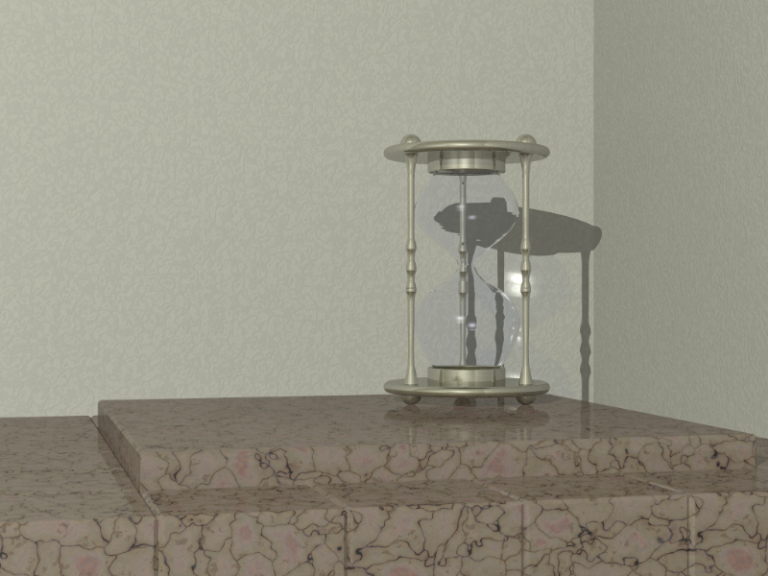
Thought I'd share what I have so far. I'm getting some artifacts with the
glass container, and the upright connectors (lathe objects), perhaps my
Bishop skills need further development. I DO have sturm on  but don't know
where they (artifacts) are coming from ... perhaps viewing angle, or
lighting angle

Jim
Post a reply to this message
Attachments:
Download 'HourGlass.png' (600 KB)
Preview of image 'HourGlass.png'
|
|
| |
| |
|
|
|
|
| |
| |
|
|
Jim Holsenback wrote:
> Thanks Alain and Darren of suggestions.
>
> Thought I'd share what I have so far. I'm getting some artifacts with the
> glass container, and the upright connectors (lathe objects), perhaps my
> Bishop skills need further development. I DO have sturm on  but don't know
> where they (artifacts) are coming from ... perhaps viewing angle, or
> lighting angle
>

I’ve noticed that even with the sturm flag set, I often get artefacts in
line with the horizon. I wonder if changing the orientation of the scene
would help. I can’t remember many problems with Moray which uses Z = up.
That is pretty expensive marble you’re using with the grain running from
one block through to another. You can add a degree of randomness (if you
are using B3D’s Object Array) by adding a small degree of Rot Axis Offset.
Nice modelling BTW. Is the shape of the hourglass from RL?


--

Best Regards,
	Stephen
Post a reply to this message
|
|
| |
| |
|
|
|
|
| |
| |
|
|
"Stephen" <mca### [at] aolDOT com> wrote in message
news:4b827e01$1@news.povray.org...
> I’ve noticed that even with the sturm flag set, I often get artefacts in
> line with the horizon. I wonder if changing the orientation of the scene
> would help. I can’t remember many problems with Moray which uses Z = up.
thanks for the tip ... I'll give that a try!
> That is pretty expensive marble you’re using with the grain running from
> one block through to another. You can add a degree of randomness (if you
> are using B3D’s Object Array) by adding a small degree of Rot Axis Offset.
ha-ha ... yes the texture was just a quick and dirty effort for now,
I have a little random routine that I had not cloned from another scene yet!
> Nice modelling BTW. Is the shape of the hourglass from RL?
yes ... it WAS in the shop last year and didn't sell. I liked it so it's on
my desk now ;-)
I'm having a good time with Bishop and I like it. Modelling in general is
hard and it takes a lot of patience. I've also had to get in the habit of
saving more often especially when I finally get something looking like I
want.
Jim com> wrote in message
news:4b827e01$1@news.povray.org...
> I’ve noticed that even with the sturm flag set, I often get artefacts in
> line with the horizon. I wonder if changing the orientation of the scene
> would help. I can’t remember many problems with Moray which uses Z = up.
thanks for the tip ... I'll give that a try!
> That is pretty expensive marble you’re using with the grain running from
> one block through to another. You can add a degree of randomness (if you
> are using B3D’s Object Array) by adding a small degree of Rot Axis Offset.
ha-ha ... yes the texture was just a quick and dirty effort for now,
I have a little random routine that I had not cloned from another scene yet!
> Nice modelling BTW. Is the shape of the hourglass from RL?
yes ... it WAS in the shop last year and didn't sell. I liked it so it's on
my desk now ;-)
I'm having a good time with Bishop and I like it. Modelling in general is
hard and it takes a lot of patience. I've also had to get in the habit of
saving more often especially when I finally get something looking like I
want.
Jim
Post a reply to this message
|
|
| |
| |
|
|
|
|
| |
| |
|
|
Jim Holsenback wrote:
> "Stephen" <mca### [at] aolDOTcom> wrote in message
> news:4b827e01$1@news.povray.org...
>> I’ve noticed that even with the sturm flag set, I often get artefacts in
>> line with the horizon. I wonder if changing the orientation of the scene
>> would help. I can’t remember many problems with Moray which uses Z = up.
>
> thanks for the tip ... I'll give that a try!
>

It didn’t work for me. :(

>> That is pretty expensive marble you’re using with the grain running from
>> one block through to another. You can add a degree of randomness (if you
>> are using B3D’s Object Array) by adding a small degree of Rot Axis Offset.
>
> ha-ha ... yes the texture was just a quick and dirty effort for now,
> I have a little random routine that I had not cloned from another scene yet!
>

I’ve been meaning to spec a variant to the object array that adds a
random variation to the objects, for a while. Also a tab to translate
the texture would be useful.

>> Nice modelling BTW. Is the shape of the hourglass from RL?
>
> yes ... it WAS in the shop last year and didn't sell. I liked it so it's on
> my desk now ;-)

The glass seams less “teardrop” shaped than I’ve seen before. Very
attractive, though.

> I'm having a good time with Bishop and I like it. Modelling in general is
> hard and it takes a lot of patience.

I’m glad that you like it. I’ve spent a long time, along with your
countryman StephenS, guiding its development. Wait until you try the
animation features ;)

> I've also had to get in the habit of
> saving more often especially when I finally get something looking like I
> want.

Hint: When you save a scene the last save is renamed as MyScene.bak, so
you can revert by renaming the extension to .bsp. Also, I like the Undo
Multiple feature.

--

Best Regards,
	Stephen
Post a reply to this message
|
|
| |
| |
|
|
|
|
| |
| |
|
|
"Stephen" <mca### [at] aolDOTcom> wrote in message
news:4b82e6f5$1@news.povray.org...
> Jim Holsenback wrote:
>> "Stephen" <mca### [at] aolDOTcom> wrote in message
>> news:4b827e01$1@news.povray.org...
>>> I’ve noticed that even with the sturm flag set, I often get artefacts in
>>> line with the horizon. I wonder if changing the orientation of the scene
>>> would help. I can’t remember many problems with Moray which uses Z = up.
>>
>> thanks for the tip ... I'll give that a try!
>>
>
> It didn’t work for me. :(

I had camera y and look_at y the same. A couple of degrees of x rotation
made most of the artefacts go away, the rest appear to be ripples in the
lathe shape itself. I imagine a few more strategic points probably wouldn't
hurt!

Jim
Post a reply to this message
|
|
| |
| |
|
|
|
|
| |
| |
|
|
Jim Holsenback wrote:
> "Stephen" <mca### [at] aolDOTcom> wrote in message
> news:4b82e6f5$1@news.povray.org...
>> Jim Holsenback wrote:
>>> "Stephen" <mca### [at] aolDOTcom> wrote in message
>>> news:4b827e01$1@news.povray.org...
>>>> I’ve noticed that even with the sturm flag set, I often get artefacts in
>>>> line with the horizon. I wonder if changing the orientation of the scene
>>>> would help. I can’t remember many problems with Moray which uses Z = up.
>>> thanks for the tip ... I'll give that a try!
>>>
>> It didn’t work for me. :(
>
> I had camera y and look_at y the same. A couple of degrees of x rotation
> made most of the artefacts go away,

Actually Thomas deG once recommended that you should roll the camera a
bit, for artistic effect.

> the rest appear to be ripples in the
> lathe shape itself. I imagine a few more strategic points probably wouldn't
> hurt!
>

That sometimes helps as well ;-)

--

Best Regards,
	Stephen
Post a reply to this message
|
|
| |
| |
|
|
|
|
| |
| |
|
|
"Stephen" <mca### [at] aolDOTcom> schreef in bericht
news:4b84247d@news.povray.org...
>
> Actually Thomas deG once recommended that you should roll the camera a
> bit, for artistic effect.
>

hehe! Indeed...  :) just a couple of degrees.
It more or less simulate the fact that nobody is holding a camera perfectly
level. And it adds an extra, unconscious, tension to the image that is
difficul to trace back to its origin if you are unaware of the trick.

Thomas
Post a reply to this message
|
|
| |
| |
|
|
|
|
| |