|
|
|
|
|
|
| |
| |
|
|
|
|
| |
| |
|
|
Radiosity still bears its mysteries, even to me - must be some magic in
there...

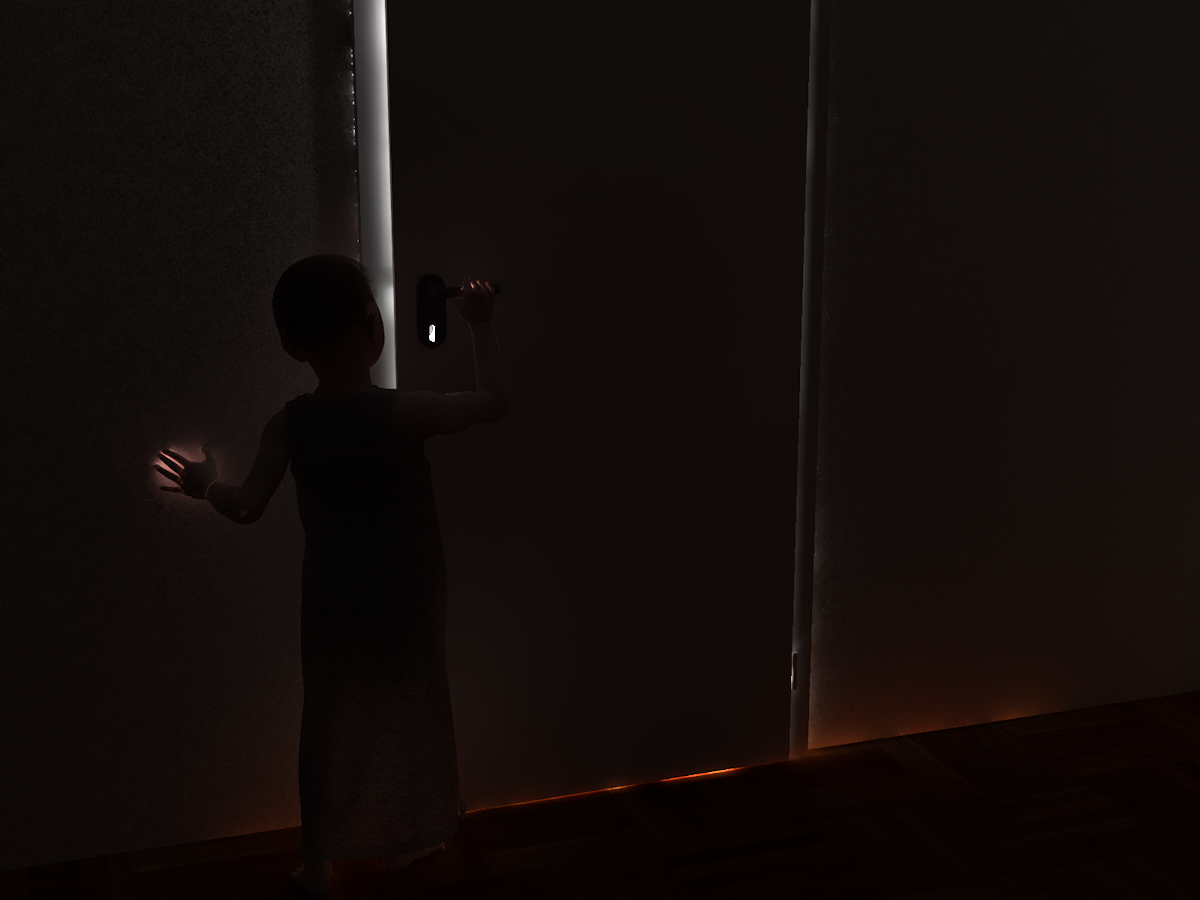
*This* is what I'd call a lighting challenge... quite pathological case,
I must confess: The door is almost closed, leaving no direct path of
light to the adjacent room whatsoever. Unfortunately, the high radiosity
recursion depth makes the light not only "seep" through the gap, but
also through the walls.

Well, I thought I'd share it anyway. It's a lot better already than
earlier experiments with the setting.

Render time: Days. Something around 48 hours I guess.
Post a reply to this message
Attachments:
Download 'the_secret.png' (860 KB)
Preview of image 'the_secret.png'
|
|
| |
| |
|
|
|
|
| |
| |
|
|
clipka <ano### [at] anonymous org> wrote:
> Radiosity still bears its mysteries, even to me - must be some magic in
> there...
>
> *This* is what I'd call a lighting challenge... quite pathological case,
> I must confess: The door is almost closed, leaving no direct path of
> light to the adjacent room whatsoever. Unfortunately, the high radiosity
> recursion depth makes the light not only "seep" through the gap, but
> also through the walls.
>
> Well, I thought I'd share it anyway. It's a lot better already than
> earlier experiments with the setting.
>
> Render time: Days. Something around 48 hours I guess.
I remember that scene when someone was trying to figure out how to make it work
(i.e. complete before their great-great-grandchildren are born) in MCPov. I did
get it working, but it wasn't the whole scene, just the doors and walls. The
answer had to do portals and making sure that the container sphere wasn't too
large. After that, it started to converge reasonably quickly (instead of the
wait 20 minutes, see single bright pixel appear, wait 20 more, see it
disappear). Anyway, isn't that bleed through more of an error bound and reuse
of samples issue as opposed to depth?
-Reactor org> wrote:
> Radiosity still bears its mysteries, even to me - must be some magic in
> there...
>
> *This* is what I'd call a lighting challenge... quite pathological case,
> I must confess: The door is almost closed, leaving no direct path of
> light to the adjacent room whatsoever. Unfortunately, the high radiosity
> recursion depth makes the light not only "seep" through the gap, but
> also through the walls.
>
> Well, I thought I'd share it anyway. It's a lot better already than
> earlier experiments with the setting.
>
> Render time: Days. Something around 48 hours I guess.
I remember that scene when someone was trying to figure out how to make it work
(i.e. complete before their great-great-grandchildren are born) in MCPov. I did
get it working, but it wasn't the whole scene, just the doors and walls. The
answer had to do portals and making sure that the container sphere wasn't too
large. After that, it started to converge reasonably quickly (instead of the
wait 20 minutes, see single bright pixel appear, wait 20 more, see it
disappear). Anyway, isn't that bleed through more of an error bound and reuse
of samples issue as opposed to depth?
-Reactor
Post a reply to this message
|
|
| |
| |
|
|
|
|
| |
| |
|
|
Reactor schrieb:

> I remember that scene when someone was trying to figure out how to make it work
> (i.e. complete before their great-great-grandchildren are born) in MCPov.

That was me I guess :-)

 > I did
> get it working, but it wasn't the whole scene, just the doors and walls.  The
> answer had to do portals and making sure that the container sphere wasn't too
> large.  After that, it started to converge reasonably quickly (instead of the
> wait 20 minutes, see single bright pixel appear, wait 20 more, see it
> disappear).

Yes, I recall someone giving it a try also (the scene didn't feature the
child back then) - but IIRC that person "cheated" by having the door
open much wider...

I'm also using a POV-Ray 3.7 beta feature for the child's clothing
(diffuse backside illumination), so MCPov is no longer an option anyway.

 > Anyway, isn't that bleed through more of an error bound and reuse
> of samples issue as opposed to depth?

If I had the slightest idea what kind of error it is, I'd be a good deal
happier :-)
Post a reply to this message
|
|
| |
| |
|
|
|
|
| |
| |
|
|
clipka <ano### [at] anonymousorg> wrote:
> Reactor schrieb:
>
> > I remember that scene when someone was trying to figure out how to make it work
> > (i.e. complete before their great-great-grandchildren are born) in MCPov.
>
> That was me I guess :-)
>
>  > I did
> > get it working, but it wasn't the whole scene, just the doors and walls.  The
> > answer had to do portals and making sure that the container sphere wasn't too
> > large.  After that, it started to converge reasonably quickly (instead of the
> > wait 20 minutes, see single bright pixel appear, wait 20 more, see it
> > disappear).
>
> Yes, I recall someone giving it a try also (the scene didn't feature the
> child back then) - but IIRC that person "cheated" by having the door
> open much wider...
>

I never posted the results for that - the scene was really my first introduction
to MCPov and I got it working much later without changing the scene as posted,
albeit before my rebuild.  I do not have the scene anymore, but I have trouble
running MCPov on this machine anyway.


> I'm also using a POV-Ray 3.7 beta feature for the child's clothing
> (diffuse backside illumination), so MCPov is no longer an option anyway.
>

If you don't mind posting it, I am curious as to how your radiosity block looks.


>  > Anyway, isn't that bleed through more of an error bound and reuse
> > of samples issue as opposed to depth?
>
> If I had the slightest idea what kind of error it is, I'd be a good deal
> happier :-)

I hope the walls are of realistic thickness, and not a single flat polygon!


-Reactor
Post a reply to this message
|
|
| |
| |
|
|
|
|
| |
| |
|
|
Reactor schrieb:

>> Yes, I recall someone giving it a try also (the scene didn't feature the
>> child back then) - but IIRC that person "cheated" by having the door
>> open much wider...
>
> I never posted the results for that - the scene was really my first introduction
> to MCPov and I got it working much later without changing the scene as posted,
> albeit before my rebuild.  I do not have the scene anymore, but I have trouble
> running MCPov on this machine anyway.

That must have been someone else then. But as I said, MCPov is no longer
an option for me anyway (not for this case at any rate).

>> I'm also using a POV-Ray 3.7 beta feature for the child's clothing
>> (diffuse backside illumination), so MCPov is no longer an option anyway.
>
> If you don't mind posting it, I am curious as to how your radiosity block looks.

As it is undergoing frequent experimental changes I'd need to
reconstruct it first from the current settings.


>>  > Anyway, isn't that bleed through more of an error bound and reuse
>>> of samples issue as opposed to depth?
>> If I had the slightest idea what kind of error it is, I'd be a good deal
>> happier :-)
>
> I hope the walls are of realistic thickness, and not a single flat polygon!

Not only do they possess true volume of course - they also have their
interior texture set to pitch black, and another pitch black core
occupying 80% of the walls' inside... still no luck.

I guess the main problem is that I need very bright light in the
adjacent room, so that even a radiosity sample deemed to have a "quality
  rating" as low as 0.1% on this side of the door will still have a
noticeable effect.

I'm thinking of changing the interpretation of the nearest_count
parameter: While it is currently interpreted simply as the desired
number of valid samples in the vicinity of any given point - however
low-quality they might be - I think it would be better to interpret it
as the desired "quality rating sum", i.e. a setting of 10 could be
satisfied by e.g. 10 samples of 100% quality or 100 samples of 10%
quality. This would (hopefully) lead to more high-quality samples to be
gathered, which would result in a stronger suppression of the
low-quality ones.
Post a reply to this message
|
|
| |
| |
|
|
|
|
| |
| |
|
|
Le 2010-02-10 20:57, clipka a écrit :
> Radiosity still bears its mysteries, even to me - must be some magic in
> there...
>
> *This* is what I'd call a lighting challenge... quite pathological case,
> I must confess: The door is almost closed, leaving no direct path of
> light to the adjacent room whatsoever. Unfortunately, the high radiosity
> recursion depth makes the light not only "seep" through the gap, but
> also through the walls.
>
> Well, I thought I'd share it anyway. It's a lot better already than
> earlier experiments with the setting.
>
> Render time: Days. Something around 48 hours I guess.
>

Nice one. Brings back some prety old memories...

Some suggestions for the light going through the wall:
Add interior_texture{rgb 0 ambient 0 diffuse0} to the walls.
Make the walls thicker and have them penetrate the floor.
Place a box, or two, inside the wall, make them ambient -1 to absorb
leaking light.
Stop the floor under the wall, and make the inner box extend well below
the floor.
Add a plynth along the base of the wall. This will also add some
realism, as all houses walls have those.
Around the door, increase the overlap between the wall and the door frame.
Depending on the scale of the scene, scale it up by a factor of 2, 3 or 4.


Alain
Post a reply to this message
|
|
| |
| |
|
|
|
|
| |
| |
|
|
Le 2010-02-11 13:53, clipka a écrit :
> Reactor schrieb:
>
>>> Yes, I recall someone giving it a try also (the scene didn't feature the
>>> child back then) - but IIRC that person "cheated" by having the door
>>> open much wider...
>>
>> I never posted the results for that - the scene was really my first
>> introduction
>> to MCPov and I got it working much later without changing the scene as
>> posted,
>> albeit before my rebuild. I do not have the scene anymore, but I have
>> trouble
>> running MCPov on this machine anyway.
>
> That must have been someone else then. But as I said, MCPov is no longer
> an option for me anyway (not for this case at any rate).
>
>>> I'm also using a POV-Ray 3.7 beta feature for the child's clothing
>>> (diffuse backside illumination), so MCPov is no longer an option anyway.
>>
>> If you don't mind posting it, I am curious as to how your radiosity
>> block looks.
>
> As it is undergoing frequent experimental changes I'd need to
> reconstruct it first from the current settings.
>
>
>>> > Anyway, isn't that bleed through more of an error bound and reuse
>>>> of samples issue as opposed to depth?
>>> If I had the slightest idea what kind of error it is, I'd be a good deal
>>> happier :-)
>>
>> I hope the walls are of realistic thickness, and not a single flat
>> polygon!
>
> Not only do they possess true volume of course - they also have their
> interior texture set to pitch black, and another pitch black core
> occupying 80% of the walls' inside... still no luck.
>
> I guess the main problem is that I need very bright light in the
> adjacent room, so that even a radiosity sample deemed to have a "quality
> rating" as low as 0.1% on this side of the door will still have a
> noticeable effect.
>
> I'm thinking of changing the interpretation of the nearest_count
> parameter: While it is currently interpreted simply as the desired
> number of valid samples in the vicinity of any given point - however
> low-quality they might be - I think it would be better to interpret it
> as the desired "quality rating sum", i.e. a setting of 10 could be
> satisfied by e.g. 10 samples of 100% quality or 100 samples of 10%
> quality. This would (hopefully) lead to more high-quality samples to be
> gathered, which would result in a stronger suppression of the
> low-quality ones.

I see that you alweady implemented at least 2 of my suggestions.
Maybe you'll have more luck using 2 cores, each roughly 1/3 or 1/4 the
thickness of the wall.
Try a pigment rgb -1 for the core.
Maybe adding some high density absorbing media inside the wall could help.


Alain
Post a reply to this message
|
|
| |
| |
|
|
|
|
| |
| |
|
|
> That must have been someone else then. But as I said, MCPov is no longer
> an option for me anyway (not for this case at any rate).

AIUI the modifications made to POV 3.6 to get MCPov were not huge, I wonder
if there are any blocking points to prevent the same being applied to the
official POV 3.7 release?
Post a reply to this message
|
|
| |
| |
|
|
|
|
| |
| |
|
|
El 11/02/10 19:53, clipka escribió:
> Reactor schrieb:
>
>>> Yes, I recall someone giving it a try also (the scene didn't feature the
>>> child back then) - but IIRC that person "cheated" by having the door
>>> open much wider...
>>
>> I never posted the results for that - the scene was really my first
>> introduction
>> to MCPov and I got it working much later without changing the scene as
>> posted,
>> albeit before my rebuild. I do not have the scene anymore, but I have
>> trouble
>> running MCPov on this machine anyway.
>
> That must have been someone else then.

   IIRC, I was the cheater... ;)

--
Jaime Vives Piqueres

http://www.ignorancia.org
Post a reply to this message
|
|
| |
| |
|
|
|
|
| |
| |
|
|
scott schrieb:
>> That must have been someone else then. But as I said, MCPov is no
>> longer an option for me anyway (not for this case at any rate).
>
> AIUI the modifications made to POV 3.6 to get MCPov were not huge, I
> wonder if there are any blocking points to prevent the same being
> applied to the official POV 3.7 release?

There's one potential stumbling block: The "main loop", as I'd call it.
In order to implement SMP this has changed quite a lot. Re-starting the
render phase over and over again might not be as easy as it was in 3.6.

Aside from that, I guess applying the MCPov magic to POV 3.7 should be
as easy as eating pancakes, at least for someone familiar with the inner
workings of both MCPov and POV 3.7 - given a bit of time.

I hope, however, that whoever picks up that glove will not copy MCPov
behaviour 1:1, as I recently found out that MCPov gets diffuse
illumination wrong by what appears to be a factor of 2 in brightness.
Post a reply to this message
|
|
| |
| |
|
|
|
|
| |
| |
|
|
> There's one potential stumbling block: The "main loop", as I'd call it. In
> order to implement SMP this has changed quite a lot. Re-starting the
> render phase over and over again might not be as easy as it was in 3.6.

Once all blocks have finished in the current image, I wonder if you could
re-submit blocks again from the beginning to be re-rendered?  The main loop
code would have to deal with averaging the results rather than just writing
them to the screen/file.

> I hope, however, that whoever picks up that glove will not copy MCPov
> behaviour 1:1, as I recently found out that MCPov gets diffuse
> illumination wrong by what appears to be a factor of 2 in brightness.

Really?  What exactly do you mean by this (the whole scene is 2x bright, but
relative brightnesses are correct)? How do I check it?
Post a reply to this message
|
|
| |
| |
|
|
|
|
| |
| |
|
|
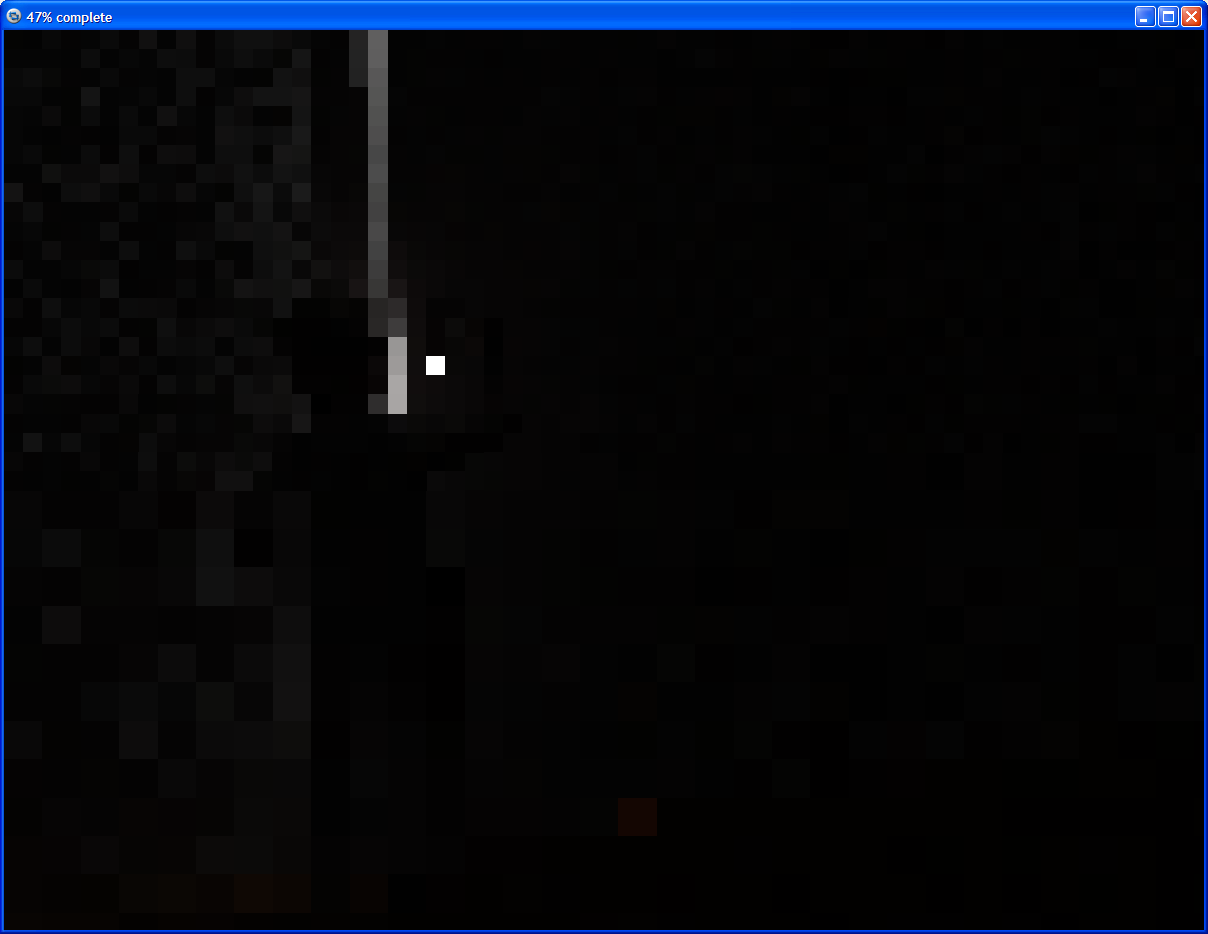
Hum... now this one looks promising so far. First thing to notice is
that it's somewhat darker than the previous shots (thank God I chose
OpenEXR output!), and has a noticeable brightness "imbalance" towards
the left side; so far, the only hint of light "seeping" through is below
the door, which is perfectly ok.

Oh boy, these settings really kill render time (1 day 6 hours already):

       pretrace_start 0.064
       pretrace_end   0.001
       count 1600
       nearest_count 20
       error_bound 0.3
       recursion_limit 4
       low_error_factor 0.5
       gray_threshold 0
       minimum_reuse 1.0e-4
       maximum_reuse 1.0e-3
       brightness 1.0
       always_sample off
       adc_bailout 0.001
       normal on

It also eats memory like hell, using as much as 4 GB by now (with only
200 MB being due to geometry and texture images). I guess I should try
reducing nearest_count, or I might wind up in Swapping Hell.

(As a side note, I'm using a patch that changes maximum_reuse handling,
which hasn't been included in any beta yet.)
Post a reply to this message
Attachments:
Download 'the secret.png' (36 KB)
Preview of image 'the secret.png'
|
|
| |
| |
|
|
|
|
| |
| |
|
|
scott schrieb:
>> There's one potential stumbling block: The "main loop", as I'd call
>> it. In order to implement SMP this has changed quite a lot.
>> Re-starting the render phase over and over again might not be as easy
>> as it was in 3.6.
>
> Once all blocks have finished in the current image, I wonder if you
> could re-submit blocks again from the beginning to be re-rendered?  The
> main loop code would have to deal with averaging the results rather than
> just writing them to the screen/file.

That should be possible indeed. However, the render threads would have
to be paused somehow while writing to the screen/file.

At any rate, I guess the problem can be solved, but it is the major
obstacle to expect.

>> I hope, however, that whoever picks up that glove will not copy MCPov
>> behaviour 1:1, as I recently found out that MCPov gets diffuse
>> illumination wrong by what appears to be a factor of 2 in brightness.
>
> Really?  What exactly do you mean by this (the whole scene is 2x bright,
> but relative brightnesses are correct)? How do I check it?

Essentially, MCPov behaves like radiosity with a "brightness 0.5"
setting, that is, diffuse illumination is attenuated by a factor of 0.5
/per bounce/, messing with the brightness of shadows in relation to that
of non-shadowed portions of the scene.

Initially I found out by comparing radiosity and MCPov results, leading
me to the assumption that radiosity might be wrong in using a defailt
brightness of 1.0; however, a carefully designed test revealed that
brightness 1.0 is indeed the right setting to use, and that MCPov is
doing it wrong; see news://news.povray.org:119/4b093e4b@news.povray.org
in povray.unofficial.patches for details of the test setup.
Post a reply to this message
|
|
| |
| |
|
|
|
|
| |
| |
|
|
clipka <ano### [at] anonymousorg> wrote:
> Hum... now this one looks promising so far. First thing to notice is
> that it's somewhat darker than the previous shots (thank God I chose
> OpenEXR output!), and has a noticeable brightness "imbalance" towards
> the left side; so far, the only hint of light "seeping" through is below
> the door, which is perfectly ok.
>
> Oh boy, these settings really kill render time (1 day 6 hours already):
>
>        pretrace_start 0.064
>        pretrace_end   0.001
>        count 1600
>        nearest_count 20
>        error_bound 0.3
>        recursion_limit 4
>        low_error_factor 0.5
>        gray_threshold 0
>        minimum_reuse 1.0e-4
>        maximum_reuse 1.0e-3
>        brightness 1.0
>        always_sample off
>        adc_bailout 0.001
>        normal on
>
> It also eats memory like hell, using as much as 4 GB by now (with only
> 200 MB being due to geometry and texture images). I guess I should try
> reducing nearest_count, or I might wind up in Swapping Hell.
>
> (As a side note, I'm using a patch that changes maximum_reuse handling,
> which hasn't been included in any beta yet.)

Goodness, that's after 1 day??  If I were you, I would reduce the count and
error bound, and increase the pretrace start.  I'd try something more like:

    pretrace_start 0.100
    pretrace_end   0.001
    count 400
    nearest_count 15
    error_bound 0.125
    recursion_limit 4
    low_error_factor 0.5
    gray_threshold 0
    minimum_reuse 1.0e-4
    maximum_reuse 1.0e-3
    brightness 1.0
    always_sample on
    adc_bailout 0.001
    normal on


Also, I noticed what you said about MCPov and making it from a 3.7 base.  A long
time ago, I had the half baked idea that the radiosity block could be enclosed
in a global_illumination block within the global settings, and you'd have the
option of using radiosity or other algorithms.

GLOBAL_ILLUMINATION:
    global_illumination { GLOBAL_ILLUMINATION_ITEMS }
GLOBAL_ILLUMINATION_ITEMS:
    RADIOSITY | AMBIENT_OCCULSION | MONTECARLO


 RADIOSITY
     radiosity{ [RADIOSITY_ITEMS] }

 AMBIENT_OCCULSION
     ambient_occulsion{ [AMBIENT_OCCULSION_ITEMS] }

 MONTECARLO
     montecarlo{ [MONTECARLO_ITEMS] }

This, of course, is down the line, perhaps for version 4.0, but I liked the idea
of people creating various lighting methods that would follow more or less a
plugin style architecture, and you could select whichever one you needed.

Anyway, that's just one of many half-baked ideas I've had.

-Reactor
Post a reply to this message
|
|
| |
| |
|
|
|
|
| |
| |
|
|
Reactor schrieb:
>
> Goodness, that's after 1 day??  If I were you, I would reduce the count and
> error bound, and increase the pretrace start.  I'd try something more like:

No, if you were me, then you wouldn't :-P

A high count is vital, as the light coming through the keyhole otherwise
creates a "disco ball" effect, i.e. bright splotches scattered across
the room, and the light from the slightly opened door would form streaks
on the ground. Been there, seen that. Reducing the error_bound would not
be sufficient to fix that (and create even more samples anyway, which
not only means again more rays to shoot, but also more samples to look up).

And increasing pretrace_start isn't likely to change a thing - not at
these *_reuse settings, which mandate the sample density to roughly
match pixel size (at a resolution of 1200x900 pixels).
Post a reply to this message
|
|
| |
| |
|
|
|
|
| |
| |
|
|
clipka <ano### [at] anonymousorg> wrote:
> Reactor schrieb:
> >
> > Goodness, that's after 1 day??  If I were you, I would reduce the count and
> > error bound, and increase the pretrace start.  I'd try something more like:
>
> No, if you were me, then you wouldn't :-P
>
> A high count is vital, as the light coming through the keyhole otherwise
> creates a "disco ball" effect, i.e. bright splotches scattered across
> the room, and the light from the slightly opened door would form streaks
> on the ground. Been there, seen that. Reducing the error_bound would not
> be sufficient to fix that (and create even more samples anyway, which
> not only means again more rays to shoot, but also more samples to look up).
>
> And increasing pretrace_start isn't likely to change a thing - not at
> these *_reuse settings, which mandate the sample density to roughly
> match pixel size (at a resolution of 1200x900 pixels).

Ah, I stand corrected.  But wouldn't reducing the error_bound reduce or prevent
bleed through?  Also... yikes on the rendering time.

-Reactor
Post a reply to this message
|
|
| |
| |
|
|
|
|
| |
| |
|
|
clipka <ano### [at] anonymousorg> wrote:
> Render time: Days. Something around 48 hours I guess.

I'm mostly amused by the noise in that image.  I thought radiosity was mostly
patchy...

Radiosity is not right for this kind of scene.  I'm fed up trying to make it
work right under the assumption that any object may emit light.  See that hand
emitting light?  See the corners of the room emitting light?  Fact is that when
you force it to treat a bright object outside as emitting light, other geometry
too close to each other also begin to misteriously emit light themselves.  It
doesn't simulate light, only radiation from surfaces and we not always want that
radiation.

MCPov is not a good option for this because AFAIK, it only implements simple
path tracing.  Scenes with very small openings through which the light may pass
is a very hard challenge for plain random path tracing:  most light paths will
simply not go through.  It's unbiased, so it'll eventually converge into the
right image, but may take ages.

Metropolis Light Transport combined with the more robust Bidirectional Path
Tracing -- where lights are traced both from the camera and from light sources
-- is far more effective at that, converging much, much faster:

http://graphics.stanford.edu/papers/metro/

It was formulated with that precise kind of issue in mind.

This Blender scene rendered with Lux took 4 hours for a total of 970
samples/sec on my Q6600 (only 3 cores, one for web surfing :):

http://img534.imageshack.us/img534/24/mlt4h970sps.jpg

You'd need much more samples with plain path tracing.  The only light source is
a small Blender plane giving light outside.  Geometry of course is not nearly as
complex except for the 2 monkeys -- I just quickly hacked this up -- but you get
the idea... it's still a full room with proper thick walls, floor and ceiling.

OTOH, althought it shows no double-illuminate nor SSS, the 2 monkeys sport a
copper material and a jade glass one.  Seen on the scene are glossy reflections,
some very slight indirectly-lit reflective and refractive caustics and crisp
smooth shadows under the table legs from indirect light.  None of which come
with radiosity, which means fill lights should be set up and tested.

It's not even using portals because for some reason the binary I have here was
complaining it was not possible to "statically load" the portal material.  guess
I should update... anyway, MLT is able to just find the right paths.
Post a reply to this message
|
|
| |
| |
|
|
|
|
| |
| |
|
|
Reactor schrieb:

> Ah, I stand corrected.  But wouldn't reducing the error_bound reduce or prevent
> bleed through?  Also... yikes on the rendering time.

That's what I'm currently thinking, too. Maybe if I reduce that even
further I can increase the *_reuse parameters again - especially
increasing maximum_reuse should drastically reduce the number of
samples, and speed up rendering accordingly.

I might also try increasing the low_error_bound in this special case, so
that I can keep error_bound comparatively high without getting "light
leaks" in the final render.
Post a reply to this message
|
|
| |
| |
|
|
|
|
| |
| |
|
|
nemesis schrieb:

> I'm mostly amused by the noise in that image.  I thought radiosity was mostly
> patchy...

I'm not sure what you're talking about; as for the clothes, they use a
very small-patterned texture; and the walls uses small-scaled bumps.

As for the "light leaks" to the left of the wall, they are quite pointy
due to the pathologically high sample density.

> Radiosity is not right for this kind of scene.

That's a perfectly correct observation, and I'd try bidirectional
tracing anytime if it was implemented in POV-Ray :-P

 > I'm fed up trying to make it
> work right under the assumption that any object may emit light.  See that hand
> emitting light?  See the corners of the room emitting light?  Fact is that when
> you force it to treat a bright object outside as emitting light, other geometry
> too close to each other also begin to misteriously emit light themselves.

Yes, that's the symptoms we see, but...

 > It
> doesn't simulate light, only radiation from surfaces and we not always want that
> radiation.

... I don't know whether you understand how POV-Ray's radiosity works.
It does /not/ assume that /all/ surfaces emit light - it doesn't even
focus on /emitted/ light; what it does is choose sample points for which
it computes the amount of incoming light by means of classic raytracing
during a pretrace pass, then during final trace interpolate between
nearby sample points.

The problem here is that depending on geometry it may fail to recognize
that a certain sample point is absolutely unfit to serve as a reference
to interpolate from.

> MCPov is not a good option for this because AFAIK, it only implements simple
> path tracing.  Scenes with very small openings through which the light may pass
> is a very hard challenge for plain random path tracing:  most light paths will
> simply not go through.  It's unbiased, so it'll eventually converge into the
> right image, but may take ages.

MCPov does provide means to "hint" a scene, so that the tracing
algorithm will favor rays pointing at particular objects or regions in
3D space (weighting them to compensate of course), so that those regions
are scanned at a higher "resolution" than others.

> This Blender scene rendered with Lux took 4 hours for a total of 970
> samples/sec on my Q6600 (only 3 cores, one for web surfing :):
>
> http://img534.imageshack.us/img534/24/mlt4h970sps.jpg

Note that the geometry of your scene lacks one particularly difficult
feature of mine: The door is closed so much that light cannot travel
directly from one room to the other, but must do at least one bounce
between door and frame. With the setup of your scene, I guess mine would
yield pleasing results as well, even with much simpler radiosity
settings, as the illumination of the adjacent room could be way lower,
while "this" room would be much brighter, so that the visual impact of
"light leaks" would be reduced a good deal.
Post a reply to this message
|
|
| |
| |
|
|
|
|
| |
| |
|
|
damn!

clipka <ano### [at] anonymousorg> wrote:
> nemesis schrieb:
> > I'm mostly amused by the noise in that image.  I thought radiosity was mostly
> > patchy...
>
> I'm not sure what you're talking about; as for the clothes, they use a
> very small-patterned texture; and the walls uses small-scaled bumps.

look like noise in the dark anyway...

>  > It
> > doesn't simulate light, only radiation from surfaces and we not always want that
> > radiation.
>
> ... I don't know whether you understand how POV-Ray's radiosity works.
> It does /not/ assume that /all/ surfaces emit light - it doesn't even
> focus on /emitted/ light;

I know, I'm talking about the ambient term which is used to distinguish what is
"emitting" and what is not.

> The problem here is that depending on geometry it may fail to recognize
> that a certain sample point is absolutely unfit to serve as a reference
> to interpolate from.

Indeed.

> MCPov does provide means to "hint" a scene, so that the tracing
> algorithm will favor rays pointing at particular objects or regions in
> 3D space (weighting them to compensate of course), so that those regions
> are scanned at a higher "resolution" than others.

yes, but even with portals it's still far from being able to handle complex
light paths in a timely fashion.  And toying around with portals can be as
tiresome as toying around with fill lights and GI settings...

> > http://img534.imageshack.us/img534/24/mlt4h970sps.jpg
>
> Note that the geometry of your scene lacks one particularly difficult
> feature of mine: The door is closed so much that light cannot travel
> directly from one room to the other, but must do at least one bounce
> between door and frame.

damn! Just let it cooking for a full 12 hours (about 3000 samples/pixel) and
*now* you tell me this! :P

http://img34.imageshack.us/img34/8139/mlt12h.jpg

also reworked the tone mapping settings a bit for more clarity.  And there's the
color aberration postpro.

It was just very slightly open, see:
http://img268.imageshack.us/img268/8780/mltwire.jpg

tomorrow I guess I'll close the damn door... :P
Post a reply to this message
|
|
| |
| |
|
|
|
|
| |
|
|