|
|
|
|
|
|
| |
| |
|
|
|
|
| |
| |
|
|
Hello,

Here's a method for slicing a height_field into many pieces and
translating/scaling the parts to create caves and overhangs. It renders
faster than an isosurface, but produces visible seams. It's still pretty
slow :(

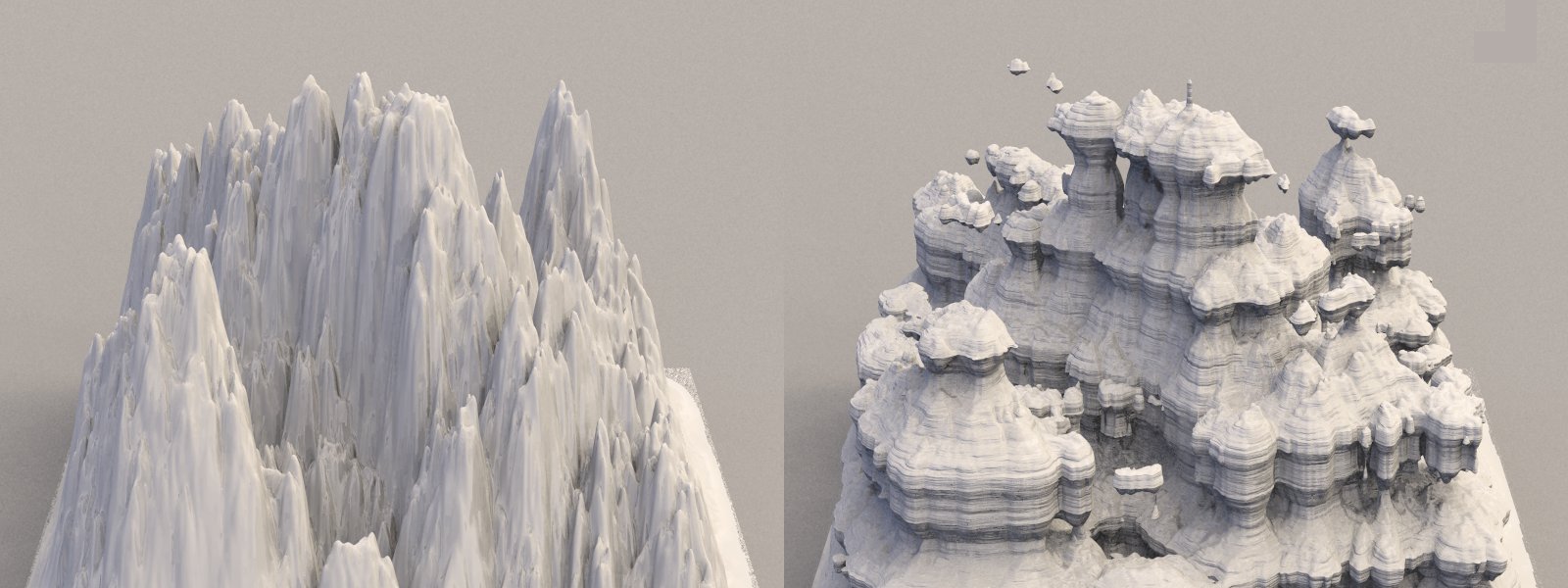
The left portion of the attached image shows an unmodified height_field.
The portion to the right is the same height_field sliced 50 times. A
surface normal was added to diminish the appearance of seams. With
enough slices, and with a smoother controlling pigment to create the
overhangs, some of the sharper features can go away.

The coincident surfaces near the base is a consequence of giving the
ground plane a difference pigment than the height_field.

The macro places the object between <0,0,0> & <1,1,1>.

// code

// the slicer macro
// you can add this to hf_tools.inc for convenience
// hfs =                        your height_field
// hfs_control_pigment =        the controlling pigment
// hfs_n_slices =               number of slices
#macro hf_slicer(hfs, hfs_control_pigment, hfs_n_slices)
  #local hfs_incre=1/hfs_n_slices;
  #local hfs_function=function{pigment{hfs_control_pigment}}
  #local hfs_p1=0;
  #local hfs_V=0;
  union{
   #while(hfs_V<=1)
    #local hfs_pv=hfs_function(0,hfs_V,0).x;
    #local hfs_p2=hfs_p1;
    #local hfs_p1=hfs_pv;
    #if(hfs_V>0)
     object{hfs
      #if(hfs_p1>hfs_p2)
       clipped_by{plane{y,hfs_p1}} clipped_by{plane{y,hfs_p2 inverse}}
      #else
       clipped_by{plane{y,hfs_p1 inverse}} clipped_by{plane{y,hfs_p2}}
      #end
      translate -y*hfs_p2
      scale<1,hfs_incre/(hfs_p1-hfs_p2),1>
      translate y*hfs_V
     }
    #else
     #declare hfs_rectifier = hfs_p1;
    #end
    #local hfs_V=hfs_V+hfs_incre;
   #end
   translate -y*hfs_incre
  }
#end

// the height_field
#declare hf=
height_field{
  function 512,512{
   pigment{
    pigment_pattern{spherical translate(x+y) scale 1/2}
    poly_wave .25

    pigment_map{
     [0 rgb 0]
     [1
      granite scale 1.5
      cubic_wave
     ]
    }
   }
  }
  smooth
}

// This pigment controls the overhangs.
// 'hf_slicer' tests values between <0,0,0> & <0,1,0>.
#declare modifying_pigment=
pigment{
  planar
  pigment_map{
   [0 rgb 1]
   [.5 bumps scale .07]
   [1 rgb 0]
  }
}

// the ground plane
plane{y,0 pigment{rgb 1}}

// the height_field-based object
object{
  // Here's the macro instance using:
  // -the pre-declared height_field
  // -the pre-declared pigment controlling the overhangs
  // -50 slices
  hf_slicer(hf, modifying_pigment, 50)

  // center and scale the object
  translate-(x+z)/2
  scale<10,5,10>

  pigment{rgb 1}
  //normal{granite .5 scale<10,.5,10> no_bump_scale accuracy .001}
}

// end code

Sam
Post a reply to this message
Attachments:
Download 'hf_slicer.jpg' (148 KB)
Preview of image 'hf_slicer.jpg'
|
|
| |
| |
|
|
|
|
| |
| |
|
|
Oops, there was some vestigial code in that last macro. Here's a better
version:

#macro hf_slicer(hfs, hfs_control_pigment, hfs_n_slices)
  #local hfs_incre=1/hfs_n_slices;
  #local hfs_function=function{pigment{hfs_control_pigment}}
  #local hfs_p1=0;
  #local hfs_V=0;
  union{
   #while(hfs_V<=1)
    #local hfs_pv=hfs_function(0,hfs_V,0).x;
    #local hfs_p2=hfs_p1;
    #local hfs_p1=hfs_pv;
    object{hfs
     #if(hfs_p1>hfs_p2)
      clipped_by{plane{y,hfs_p1}} clipped_by{plane{y,hfs_p2 inverse}}
     #else
      clipped_by{plane{y,hfs_p1 inverse}} clipped_by{plane{y,hfs_p2}}
     #end
     translate -y*hfs_p2
     scale<1,hfs_incre/(hfs_p1-hfs_p2),1>
     translate y*hfs_V
    }
    #local hfs_V=hfs_V+hfs_incre;
   #end
   translate -y*hfs_incre
  }
#end
Post a reply to this message
|
|
| |
| |
|
|
|
|
| |
| |
|
|
Going from the Alps to the Gran Canyon. Nice! :)
Post a reply to this message
|
|
| |
| |
|
|
|
|
| |
| |
|
|
stbenge <UN### [at] hotmail com> wrote:
> Oops, there was some vestigial code in that last macro. Here's a better
> version:
Fantastic idea - although this updated macro doesn't work for me on 3.7. The
original does, so I'm playing with that.
Cheers,
Edouard. com> wrote:
> Oops, there was some vestigial code in that last macro. Here's a better
> version:
Fantastic idea - although this updated macro doesn't work for me on 3.7. The
original does, so I'm playing with that.
Cheers,
Edouard.
Post a reply to this message
|
|
| |
| |
|
|
|
|
| |
| |
|
|
Those other ones were quite buggy. Odd numbers wouldn't work, the
function for testing the control pigment wasn't accurate, and the thing
was not filling a unit cube correctly.

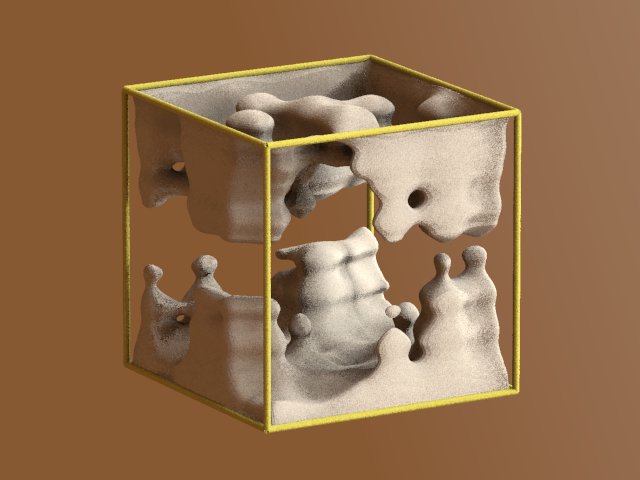
While testing this, also I realized that the more it stretches a
height_field, the slower it becomes. I wish I could make it more
efficient somehow.

#macro hf_slicer(hfs, hfs_control_pigment, hfs_n_slices)
  #local hfs_n_slices=hfs_n_slices-1;
  #local hfs_incre=1/(hfs_n_slices+1.001);
  #local hfs_function=function{pigment{hfs_control_pigment}}
  #local hfs_p1=0;
  #local hfs_V=0;
  union{
   #local hfs_counter=0;
   #while(hfs_counter<=hfs_n_slices)
    #local hfs_pv=hfs_function(0,(hfs_V+1/hfs_n_slices),0).x;
    #local hfs_p2=hfs_p1;
    #local hfs_p1=hfs_pv;
    object{hfs
     #if(hfs_p1>hfs_p2)
      clipped_by{plane{y,hfs_p1}} clipped_by{plane{y,hfs_p2 inverse}}
     #else
      clipped_by{plane{y,hfs_p1 inverse}} clipped_by{plane{y,hfs_p2}}
     #end
     translate -y*hfs_p2
     scale<1,hfs_incre/(hfs_p1-hfs_p2),1>
     translate y*hfs_V
    }
    #local hfs_V=hfs_V+hfs_incre;
    #local hfs_counter=hfs_counter+1;
   #end
  }
#end
Post a reply to this message
Attachments:
Download 'hf_slicer_5_27.jpg' (35 KB)
Preview of image 'hf_slicer_5_27.jpg'
|
|
| |
| |
|
|
|
|
| |
| |
|
|
Edouard wrote:
> stbenge <UN### [at] hotmailcom> wrote:
>> Oops, there was some vestigial code in that last macro. Here's a better
>> version:
>
> Fantastic idea - although this updated macro doesn't work for me on 3.7. The
> original does, so I'm playing with that.

Thanks. Were you getting anything at all? How many segments were you
specifying for it?

I just reworked the entire code. Too few slices won't work. Currently,
you can have a minimum of three slices.
Post a reply to this message
|
|
| |
| |
|
|
|
|
| |
| |
|
|
nemesis wrote:
> Going from the Alps to the Gran Canyon.  Nice! :)

Thanks!
Post a reply to this message
|
|
| |
| |
|
|
|
|
| |
| |
|
|
stbenge <UN### [at] hotmailcom> wrote:
> Those other ones were quite buggy. Odd numbers wouldn't work, the
> function for testing the control pigment wasn't accurate, and the thing
> was not filling a unit cube correctly.
>
> While testing this, also I realized that the more it stretches a
> height_field, the slower it becomes. I wish I could make it more
> efficient somehow.

Hi Samuel

I had a look at your macro to see if I could make it more efficient.
Here's what I came up with:


#macro SliceHF(HeightField, ControlPigment, NrOfSlices)

  #local Step = 1/NrOfSlices;
  #local M_Fn = function { pigment { ControlPigment } }
  #local N_Fn = function(_C) { M_Fn(0, _C*Step, 0).gray }

  union {
    #local Cn = 0;
    #local Dn = N_Fn(Cn);
    #while (Cn < NrOfSlices)
      #local Cp = Cn;
      #local Cn = Cn + 1;
      #local Dp = Dn;
      #local Dn = N_Fn(Cn);
      #if (Dn != Dp)
        intersection {
          object { HeightField }
          box { <0, Dp, 0>, <1, Dn, 1> }
          translate -Dp*y
          scale <1, Step/(Dn - Dp), 1>
          translate Cp*Step*y
        }
      #end // if
    #end // while
  }

#end // macro SliceHF


But I'm not sure if it still works like you intended.

--
Tor Olav
http://subcube.com
Post a reply to this message
|
|
| |
| |
|
|
|
|
| |
| |
|
|
Tor Olav Kristensen wrote:
> stbenge <UN### [at] hotmailcom> wrote:
>> Those other ones were quite buggy. Odd numbers wouldn't work, the
>> function for testing the control pigment wasn't accurate, and the thing
>> was not filling a unit cube correctly.
>>
>> While testing this, also I realized that the more it stretches a
>> height_field, the slower it becomes. I wish I could make it more
>> efficient somehow.
>
> Hi Samuel
>
> I had a look at your macro to see if I could make it more efficient.
> Here's what I came up with:
>
> But I'm not sure if it still works like you intended.

It seems to work better than my versions.

With the changes you made, it might be actually be advantageous to use
this instead of an isosurface for some things.

Thanks! If I release another version of hf_tools.inc, I'll include your
version and give you proper credit :)
Post a reply to this message
|
|
| |
| |
|
|
|
|
| |
| |
|
|
stbenge <UN### [at] hotmailcom> wrote:
> Hello,
>
> Here's a method for slicing a height_field into many pieces and
> translating/scaling the parts to create caves and overhangs. It renders
> faster than an isosurface...

Once again, you've come up with some magical sleight-of-hand! (Your POV code
creations are coming so fast, I can't keep up with them!) I was hoping someone
might come up with a method for producing HFs with overhangs. Kudos to you!

Results so far just astound me; it's one amazing tool. (I haven't yet tried Tor
Olav's version; just noticed it.) In the short time I've been playing with your
version #3 code, there seem to be endless shapes it can produce (by varying this
or that parameter.)  Yeah, I'm experimenting with some of your code, adding
things here and there, doing everything I can to break it (!) just to see what
will happen--then putting it back together, of course. :-) I continue to
'examine' the code to see how it operates, and what exactly it does. Seems like
voodoo at present.  :-p

BTW, a question about one of your #while loop lines:
hfs_pv=hfs_function(0,hfs_V,0).x

Any particular reason why you used .x (i.e., .red) rather than .gray?  Just
curious.

Your slicing method shows GREAT promise, so by all means continue with its
development. I foresee *many* uses for your technique.

Ken
Post a reply to this message
|
|
| |
| |
|
|
|
|
| |
| |
|
|
stbenge <UN### [at] hotmailcom> wrote:

> > [Tor Olav wrote:]
> > I had a look at your macro to see if I could make it more efficient.
> > Here's what I came up with:
> >
> > But I'm not sure if it still works like you intended.
>
> It seems to work better than my versions.
>

I just did an A/B test of your 3rd version with Tor's reworked version, and the
first thing I noticed in Tor's was some coincident-surface speckling of the HF
base--NOT related to the plane (I moved that out of the way.) Perhaps there are
some duplicate slices at the base? (Just a guess.)

Also, with your version, water_level can be used in the HF to erase the base (or
any part of the HF.)  In Tor's version, water_level doesn't behave normally, and
instead produces some odd results (a square block shows up below the
water_level.)  Just thought I'd mention these differences.

Keep those developments coming!!

Ken
Post a reply to this message
|
|
| |
| |
|
|
|
|
| |
| |
|
|
Le 2009-12-19 15:22, Kenneth a écrit :
>
> BTW, a question about one of your #while loop lines:
> hfs_pv=hfs_function(0,hfs_V,0).x
>
> Any particular reason why you used .x (i.e., .red) rather than .gray?  Just
> curious.
>
> Ken
>
>

If all 3 colour chanels are the same, it's faster and gives the same result.
Using ".x", you only access one value.
Using ".gray" you need to access all 3 chanels, then you perform a
ponderated average.


Alain
Post a reply to this message
|
|
| |
| |
|
|
|
|
| |
| |
|
|
Alain <aze### [at] qwertyorg> wrote:
> Le 2009-12-19 15:22, Kenneth a écrit :

> > Any particular reason why you used .x (i.e., .red) rather than .gray?  Just
> > curious.

>
> If all 3 colour chanels are the same, it's faster and gives the same result.
> Using ".x", you only access one value.
> Using ".gray" you need to access all 3 chanels, then you perform a
> ponderated average.
>
Thanks, Alain. I never thought about that, when using a grayscale image to begin
with.

Ken
Post a reply to this message
|
|
| |
| |
|
|
|
|
| |
| |
|
|
Alain <aze### [at] qwertyorg> wrote:
> Le 2009-12-19 15:22, Kenneth a écrit :

> If all 3 colour chanels are the same, it's faster and gives the same result.

Going back over sbenge's code, I see that his version uses a pigment for the
function (i.e., rgb colors)--which might benefit from .gray (if we happen to use
something other than grayscale 'bumps' as the pigment pattern); whereas Tor's
code *does* use .gray for all pigments. BUT, I assume that bumps as a PIGMENT
(rather than as a PATTERN) has three color channels internally? All three the
same, of course. In which case, .red would make sense.

Ken
Post a reply to this message
|
|
| |
| |
|
|
|
|
| |
| |
|
|
Kenneth wrote:
> stbenge <UN### [at] hotmailcom> wrote:
>> Hello,
>>
>> Here's a method for slicing a height_field into many pieces and
>> translating/scaling the parts to create caves and overhangs. It renders
>> faster than an isosurface...
>
> Once again, you've come up with some magical sleight-of-hand! (Your POV code
> creations are coming so fast, I can't keep up with them!) I was hoping someone
> might come up with a method for producing HFs with overhangs. Kudos to you!
>
> Results so far just astound me; it's one amazing tool. (I haven't yet tried Tor
> Olav's version; just noticed it.) In the short time I've been playing with your
> version #3 code, there seem to be endless shapes it can produce (by varying this
> or that parameter.)  Yeah, I'm experimenting with some of your code, adding
> things here and there, doing everything I can to break it (!) just to see what
> will happen--then putting it back together, of course. :-) I continue to
> 'examine' the code to see how it operates, and what exactly it does. Seems like
> voodoo at present.  :-p

Thanks.

It was a good idea, executed poorly. Tor's version is faster and more
accurate. If I end up making a scene with this, I'll be using his version :)
Post a reply to this message
|
|
| |
| |
|
|
|
|
| |
| |
|
|
Le 2009-12-19 16:33, Kenneth a écrit :
> Alain<aze### [at] qwertyorg>  wrote:
>> Le 2009-12-19 15:22, Kenneth a écrit :
>
>> If all 3 colour chanels are the same, it's faster and gives the same result.
>
> Going back over sbenge's code, I see that his version uses a pigment for the
> function (i.e., rgb colors)--which might benefit from .gray (if we happen to use
> something other than grayscale 'bumps' as the pigment pattern); whereas Tor's
> code *does* use .gray for all pigments. BUT, I assume that bumps as a PIGMENT
> (rather than as a PATTERN) has three color channels internally? All three the
> same, of course. In which case, .red would make sense.
>
> Ken
>
>

If you use the bozo, wood or agate pigment, you need to use .gray. Those
use a default colour map that have colours other than gray.

For all other pigments, .red, .green or .blue are OK as they use a gray
scale by default.

Alain
Post a reply to this message
|
|
| |
| |
|
|
From: Sven Littkowski
Subject: Re: rendering height fields with overhangs
Date: 16 Jan 2010 20:59:19
Message: <4b526ef7@news.povray.org>
|
|
|
| |
| |
|
|
Something here reminds me for the flying mountains of Pandora ("Avatar"
movie)...

Good idea, your way to create over-hangs.

Sven
Post a reply to this message
|
|
| |
| |
|
|
|
|
| |
|
|