|
|
|
|
|
|
| |
| |
|
|
|
|
| |
| |
|
|
Hello,

Here are some example shots from hf_tools.inc, which I just dropped at
p.b.scene-files.

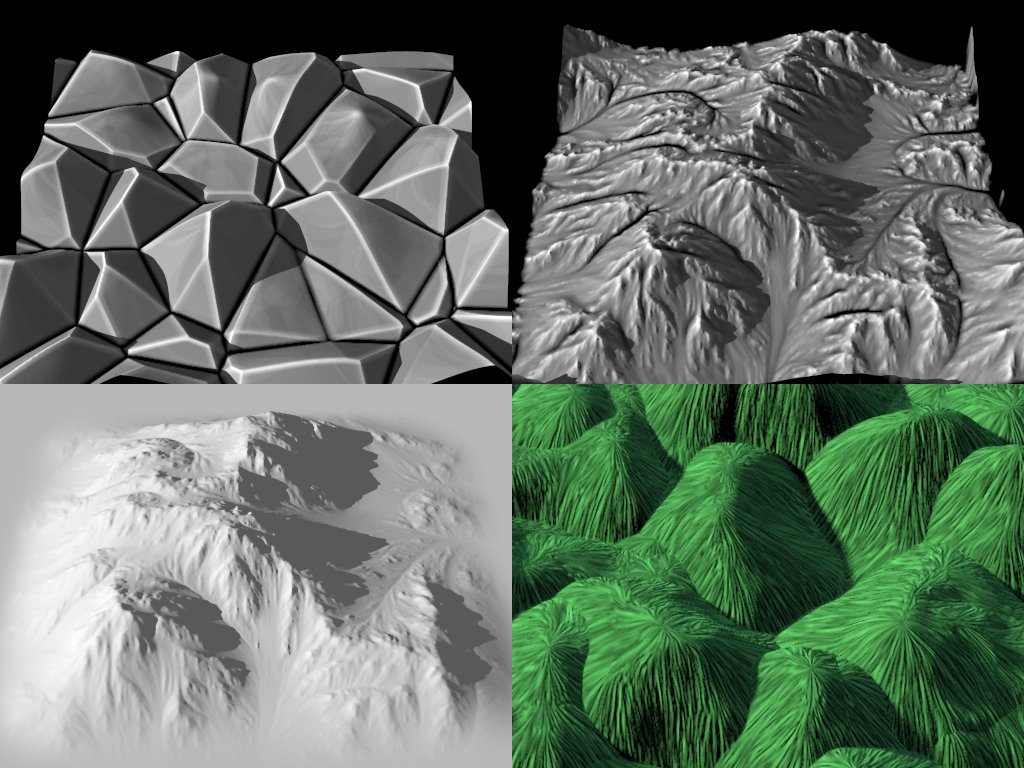
The top two images show the edge pattern at work. The edge pigment in
the upper-left image was rendered at less than one third quality; it
does get better than that :) The upper-right image is using a
pre-rendered edge map at full quality. The edge radius is adjustable.

The bottom left image shows the superellisoidal pigment encasing a
height field. It lets you make smooth transitions from height field to
plane, while keeping more detail at the corners (as opposed to using,
say a spherical pigment).

The bottom right image shows how an angle map can be used to transform
textures according to the different angles of a height field.

Just a few features. Maybe they will prove useful...

Sam

P.S. The upper-right image shows some strange behavior at the height
field's edges. POV-Ray is handling image maps incorrectly, I think.
Post a reply to this message
Attachments:
Download 'hf_tools.jpg' (156 KB)
Preview of image 'hf_tools.jpg'
|
|
| |
| |
|
|
|
|
| |
| |
|
|
El 15/12/09 07:45, stbenge escribió:
> Just a few features. Maybe they will prove useful...

   I'm without words... really. :O

--
Jaime Vives Piqueres

http://www.ignorancia.org
Post a reply to this message
|
|
| |
| |
|
|
|
|
| |
| |
|
|
"stbenge" <UN### [at] hotmail com> schreef in bericht
news:4b2730dc@news.povray.org...
> P.S. The upper-right image shows some strange behavior at the height
> field's edges. POV-Ray is handling image maps incorrectly, I think.
>
Well, that is easy for us to cut off in a difference or intersection.... :-)
This is really incredible. I need to experiment with this now!
You rule, Sam! You rule!
Thomas com> schreef in bericht
news:4b2730dc@news.povray.org...
> P.S. The upper-right image shows some strange behavior at the height
> field's edges. POV-Ray is handling image maps incorrectly, I think.
>
Well, that is easy for us to cut off in a difference or intersection.... :-)
This is really incredible. I need to experiment with this now!
You rule, Sam! You rule!
Thomas
Post a reply to this message
|
|
| |
| |
|
|
|
|
| |
| |
|
|
High!

stbenge wrote:
> Hello,
>
> Here are some example shots from hf_tools.inc, which I just dropped at
> p.b.scene-files.

Awesome! When I saw the upper right and lower left image, I instantly
thought "Afghanistan!"... yes, this tool would be great for rugged
desert landscapes on DM +19 279 e XI (or Ghurghusht, how it is called by
its colonists). For real Afghanistan, I better rely on actual elevation
data... but perhaps there might be a way to enrich them with small-scale
erosion details!

See you in Khyberspace!

Yadgar
Post a reply to this message
|
|
| |
| |
|
|
|
|
| |
| |
|
|
Two words:  A Mazing!  ;-)

On 2009-12-15 01:45, stbenge wrote:
> Hello,
>
> Here are some example shots from hf_tools.inc, which I just dropped at
> p.b.scene-files.
>
> The top two images show the edge pattern at work. The edge pigment in
> the upper-left image was rendered at less than one third quality; it
> does get better than that :) The upper-right image is using a
> pre-rendered edge map at full quality. The edge radius is adjustable.
>
> The bottom left image shows the superellisoidal pigment encasing a
> height field. It lets you make smooth transitions from height field to
> plane, while keeping more detail at the corners (as opposed to using,
> say a spherical pigment).
>
> The bottom right image shows how an angle map can be used to transform
> textures according to the different angles of a height field.
>
> Just a few features. Maybe they will prove useful...
>
> Sam
>
> P.S. The upper-right image shows some strange behavior at the height
> field's edges. POV-Ray is handling image maps incorrectly, I think.
Post a reply to this message
|
|
| |
| |
|
|
|
|
| |
| |
|
|
Holy grab!
Post a reply to this message
|
|
| |
| |
|
|
|
|
| |
| |
|
|
stbenge wrote:
> The top two images show the edge pattern at work. The edge pigment in
> the upper-left image was rendered at less than one third quality; it
> does get better than that :)
>
> Just a few features. Maybe they will prove useful...

WOW!
That top left one looks like a polycrystalline surface under high
magnification, it already looks useful!
Post a reply to this message
|
|
| |
| |
|
|
|
|
| |
| |
|
|
Jörg 'Yadgar' Bleimann wrote:
> High!

Not yet! Maybe my second cup of coffee will do the trick ;)

> Awesome! When I saw the upper right and lower left image, I instantly
> thought "Afghanistan!"... yes, this tool would be great for rugged
> desert landscapes on DM +19 279 e XI (or Ghurghusht, how it is called by
> its colonists). For real Afghanistan, I better rely on actual elevation
> data... but perhaps there might be a way to enrich them with small-scale
> erosion details!

I hope you know that this file _does_not_ produce erosion... That height
map is an example I included from World Machine :/
Post a reply to this message
|
|
| |
| |
|
|
|
|
| |
| |
|
|
Jaime Vives Piqueres wrote:
> El 15/12/09 07:45, stbenge escribió:
>> Just a few features. Maybe they will prove useful...
>
>   I'm without words... really. :O

That's the best way to be, at least until you learn the tool's
limitations ;D
Post a reply to this message
|
|
| |
| |
|
|
|
|
| |
| |
|
|
Thomas de Groot wrote:
> "stbenge" <UN### [at] hotmailcom> schreef in bericht
> news:4b2730dc@news.povray.org...
>> P.S. The upper-right image shows some strange behavior at the height
>> field's edges. POV-Ray is handling image maps incorrectly, I think.
>
> Well, that is easy for us to cut off in a difference or intersection.... :-)

Yeah, but it's an annoying way to go about it. You can always use the
boxed pigment to cut off the edges while building you HF.

> This is really incredible. I need to experiment with this now!
>
> You rule, Sam! You rule!

After reading Yadgar's reply, I started to worry that everybody thinks
this file can produce erosion... it cannot... It only does what I said
it does, plus some near-useless red/green functions that I'm not
particularly proud of :/
Post a reply to this message
|
|
| |
| |
|
|
|
|
| |
| |
|
|
Rick Gutleber wrote:
> Two words:  A Mazing!  ;-)

Thanks... Hmm, your comment is making me think about height field mazes.
It might just be possible with arrays and a variation of Tek's Cells
pattern...
Post a reply to this message
|
|
| |
| |
|
|
|
|
| |
| |
|
|
nemesis wrote:
> Holy grab!

Clear the streets, the Caped Crusader is passing through ;)
Post a reply to this message
|
|
| |
| |
|
|
|
|
| |
| |
|
|
CShake wrote:
> stbenge wrote:
>> The top two images show the edge pattern at work. The edge pigment in
>> the upper-left image was rendered at less than one third quality; it
>> does get better than that :)
>>
>> Just a few features. Maybe they will prove useful...
>
> WOW!
> That top left one looks like a polycrystalline surface under high
> magnification, it already looks useful!

I hope so :)
Post a reply to this message
|
|
| |
| |
|
|
|
|
| |
| |
|
|
Le 2009-12-15 01:45, stbenge a écrit :
> Hello,
>
> Here are some example shots from hf_tools.inc, which I just dropped at
> p.b.scene-files.
>
> The top two images show the edge pattern at work. The edge pigment in
> the upper-left image was rendered at less than one third quality; it
> does get better than that :) The upper-right image is using a
> pre-rendered edge map at full quality. The edge radius is adjustable.
>
> The bottom left image shows the superellisoidal pigment encasing a
> height field. It lets you make smooth transitions from height field to
> plane, while keeping more detail at the corners (as opposed to using,
> say a spherical pigment).
>
> The bottom right image shows how an angle map can be used to transform
> textures according to the different angles of a height field.
>
> Just a few features. Maybe they will prove useful...
>
> Sam
>
> P.S. The upper-right image shows some strange behavior at the height
> field's edges. POV-Ray is handling image maps incorrectly, I think.

It looks like it can be prety usefull. I'll play with that one.


Alain
Post a reply to this message
|
|
| |
| |
|
|
|
|
| |
| |
|
|
stbenge wrote:

> P.S. The upper-right image shows some strange behavior at the height
> field's edges. POV-Ray is handling image maps incorrectly, I think.

Did you use the "once" keyword? Otherwise the image_map will repeat and
the value at 1.0 will be identical to the value at 0.0 by definition.
Post a reply to this message
|
|
| |
| |
|
|
|
|
| |
| |
|
|
Christian Froeschlin wrote:
> stbenge wrote:
>
>> P.S. The upper-right image shows some strange behavior at the height
>> field's edges. POV-Ray is handling image maps incorrectly, I think.
>
> Did you use the "once" keyword? Otherwise the image_map will repeat and
> the value at 1.0 will be identical to the value at 0.0 by definition.

Yes, I tried that. I also tried using repeat warps with the flip
command, in the hope that mirrored edges would eliminate the problem. In
theory, it should work, but it doesn't.

I really need to make a small functioning example to provide along with
a bug report.
Post a reply to this message
|
|
| |
| |
|
|
|
|
| |
| |
|
|
Alain wrote:
> It looks like it can be prety usefull. I'll play with that one.

The edge map is probably the most useful feature :)
Post a reply to this message
|
|
| |
| |
|
|
|
|
| |
| |
|
|
"stbenge" <UN### [at] hotmailcom> schreef in bericht
news:4b283e59@news.povray.org...
>
> I really need to make a small functioning example to provide along with a
> bug report.

I may be talking nonsense here, but those same features are often also
created by WM or GeoControl. I don't remember them from Leveller, but it has
been a while since I last used that app. Do you think they have the same
origin? Are they the same kind of bug?

In GeoControl I can correct manually with a brush, but in hf's from WM I
just cut off a thin slice around from it by using an intersection in POV.
Not very elegant as a solution but it works.

Thomas
Post a reply to this message
|
|
| |
| |
|
|
|
|
| |
| |
|
|
Where was this years ago??!!  You've created some real magic here. It must be
the coffee--drink lots more, so you can come up with more cool ideas!

I'm really looking forward to trying this out (and looking over your code, to
glean some ideas from 'the Master.')

Ken
Post a reply to this message
|
|
| |
| |
|
|
|
|
| |
| |
|
|
stbenge escreveu:
> Jörg 'Yadgar' Bleimann wrote:
>> High!
>
> Not yet! Maybe my second cup of coffee will do the trick ;)

bwahaha.  Always wanted to do some fun with that... :D

--
a game sig: http://tinyurl.com/d3rxz9
Post a reply to this message
|
|
| |
| |
|
|
|
|
| |
| |
|
|
Thomas de Groot wrote:
> "stbenge" <UN### [at] hotmailcom> schreef in bericht
> news:4b283e59@news.povray.org...
>> I really need to make a small functioning example to provide along with a
>> bug report.
>
> I may be talking nonsense here, but those same features are often also
> created by WM or GeoControl. I don't remember them from Leveller, but it has
> been a while since I last used that app. Do you think they have the same
> origin? Are they the same kind of bug?

I doubt they are the same bug.

Check this out:

height_field{
  png"mountains.png"
  ...
}

It works just fine, always has.

Compare it to this:

height_field{
  function 513, 513{
   pigment{
    image_map{
     png"mountains.png"
     interpolate 2 once
    }
   }
  }
  ...
}

This is when edge artifacts show up. The dimensions are correct. The
problem happens regardless of image_map attributes such as interpolation
and repetition.

I would say it's a height_field issue, but I know it's not. I have
encountered this same problem when using image_maps at other times, like
for my luminous bloom code.

> In GeoControl I can correct manually with a brush, but in hf's from WM I
> just cut off a thin slice around from it by using an intersection in POV.
> Not very elegant as a solution but it works.

Whatever works :)
Post a reply to this message
|
|
| |
| |
|
|
|
|
| |
| |
|
|
Kenneth wrote:
> Where was this years ago??!!  You've created some real magic here. It must be
> the coffee--drink lots more, so you can come up with more cool ideas!

Drink more coffee? Okay :)

> I'm really looking forward to trying this out (and looking over your code, to
> glean some ideas from 'the Master.')

Whatever you do, have fun!
Post a reply to this message
|
|
| |
| |
|
|
|
|
| |
| |
|
|
"stbenge" <UN### [at] hotmailcom> schreef in bericht
news:4b2931c8@news.povray.org...
> Check this out:
>
> height_field{
>  png"mountains.png"
>  ...
> }
>
> It works just fine, always has.
>
> Compare it to this:
>
> height_field{
>  function 513, 513{
>   pigment{
>    image_map{
>     png"mountains.png"
>     interpolate 2 once
>    }
>   }
>  }
>  ...
> }
>
> This is when edge artifacts show up. The dimensions are correct. The
> problem happens regardless of image_map attributes such as interpolation
> and repetition.
>
> I would say it's a height_field issue, but I know it's not. I have
> encountered this same problem when using image_maps at other times, like
> for my luminous bloom code.

Ah, right. I see your point. One way or another I have never noticed this
difference. Strange indeed. Thanks for drawing my attention to it.

Thomas
Post a reply to this message
|
|
| |
| |
|
|
|
|
| |
| |
|
|
stbenge <UN### [at] hotmailcom> wrote:

> I doubt they are the same bug.
>
> Check this out:
>
> height_field{
>   png"mountains.png"
>   ...
> }
>
> It works just fine, always has.
>
> Compare it to this:
>
> height_field{
>   function 513, 513{
>    pigment{
>     image_map{
>      png"mountains.png"
>      interpolate 2 once
>     }
>    }
>   }
>   ...
> }

Yeah, there are some strange goings-on in HFs made from functions.  I think I've
noticed the edge artifacts you mentioned.  But there's also the odd fact that
the applied pattern (or image_map) ends up being flipped upside down(?) like a
mirror-image, AND that the 'origin point' of the pattern/image is out of place.
The usual origin that we all know and love is at <0,0,0>; with a HF function,
the 'origin' is mysteriously at <0,0,1>, and the applied pattern/image
scales out from there. I've come up with simple workarounds to these particular
situations--but, along with the edge artifacts, it's apparent that HF functions
are not working correctly. I suppose, though, that re-engineering the
problematic code (whatever it is!) would cause lots of backward-compatibility
problems with previously-made scenes.

Ken
Post a reply to this message
|
|
| |
| |
|
|
|
|
| |
| |
|
|
"Kenneth" <kdw### [at] earthlinknet> wrote:
> ...But there's also the odd fact that
> the applied pattern (or image_map) ends up being flipped upside down(?) like a
> mirror-image, AND that the 'origin point' of the pattern/image is out of
> place...

BY 'image_map,' what I meant to say was "an image_map used as [or used as part
of] the HF function"--not an image_map *texture* applied to the HF afterward
(which is applied as it should be.) Sorry if that confused anyone.

Ken
Post a reply to this message
|
|
| |
| |
|
|
|
|
| |
| |
|
|
Kenneth wrote:
> "Kenneth" <kdw### [at] earthlinknet> wrote:
>> ...But there's also the odd fact that
>> the applied pattern (or image_map) ends up being flipped upside down(?) like a
>> mirror-image, AND that the 'origin point' of the pattern/image is out of
>> place...
>
> BY 'image_map,' what I meant to say was "an image_map used as [or used as part
> of] the HF function"--not an image_map *texture* applied to the HF afterward
> (which is applied as it should be.) Sorry if that confused anyone.

It didn't confuse me, Kenneth :) It's an annoying problem, but easy
enough to work around. It probably should be fixed, but you're right
when saying that by doing so, many older scenes will be broken.
Post a reply to this message
|
|
| |
| |
|
|
|
|
| |