|
|
|
|
|
|
| |
| |
|
|
|
|
| |
| |
|
|
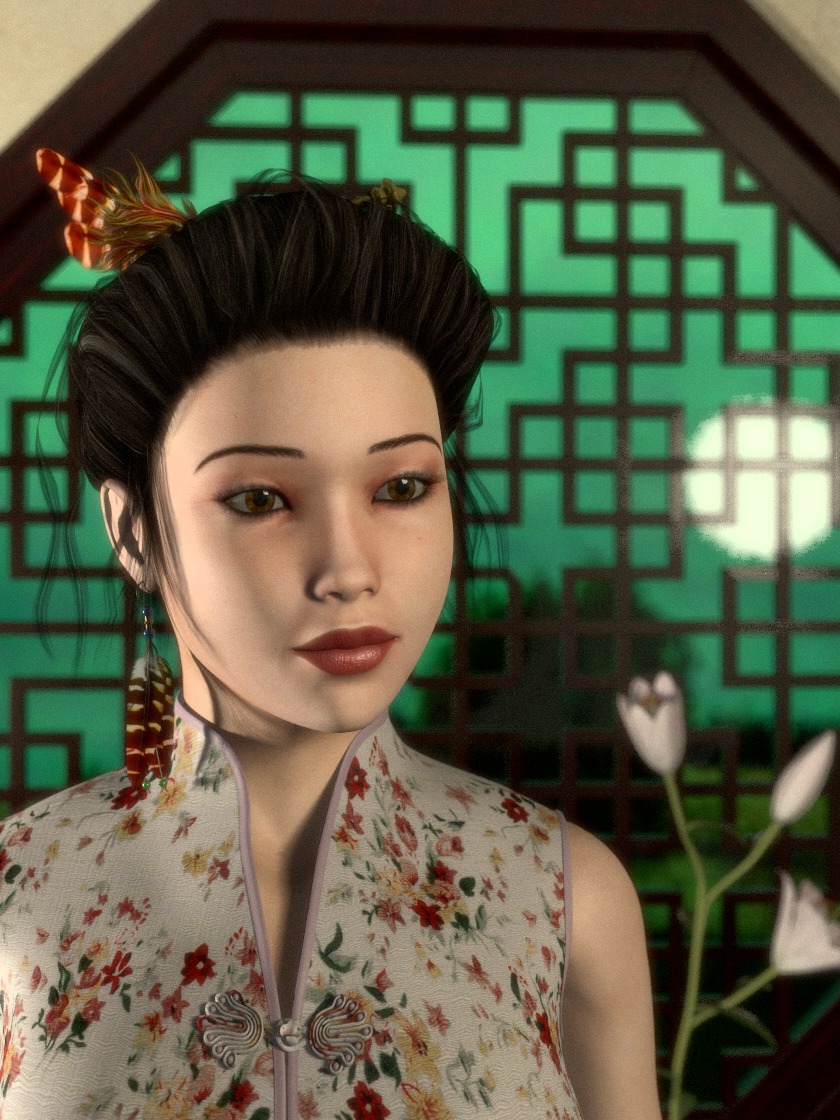
About once in a year I'm trying to improve my textures used for poser
people.

Here is my latest attempt: media based SSS and lot's of pigment_patterns
(for non uniform specularity and transparency), also the makeup is not a
pre-painted texture but created by various pigment_pattern maps that are
combined within POV-Ray and are made with the help of a friend of mine
who is makeup-artist at our local opera house.
It is really incredible what can be learned about real world things I
never have thought I would be interested in (like making a pro-blush) by
using POV-Ray.

I had hoped it would turn out better but at least it is different to the
effect seen by most professional renderer as most people seem to use the
same skin shader there that gives this overdone and waxy look.
And my last minute addition of this feather earring was a bad idea as it
throws a quite unfortunate shadow.

As for this image my attempt was again to go for this "Wong Kar-Way
movie look" I did add a transparent plane with a granite pattern in
front of the camera to simulate some film grain.


Criticism as usual quite welcome,
-Ive
Post a reply to this message
Attachments:
Download 'chineseroom.jpg' (262 KB)
Preview of image 'chineseroom.jpg'
|
|
| |
| |
|
|
|
|
| |
| |
|
|
Ive <"ive### [at] lilysoft org"> wrote:
> Here is my latest attempt: media based SSS and lot's of pigment_patterns
> (for non uniform specularity and transparency), also the makeup is not a
> pre-painted texture but created by various pigment_pattern maps that are
> combined within POV-Ray and are made with the help of a friend of mine
> who is makeup-artist at our local opera house.
procedural makeup. Now I've seen everything...
> I had hoped it would turn out better but at least it is different to the
> effect seen by most professional renderer as most people seem to use the
> same skin shader there that gives this overdone and waxy look.
The skin is very well-done, except perhaps for the ear. But why not pov's new
SSS feature?
Hair could get a bit of an overhaul.
I also believe some catch lights would do wonders for the eyes.
http://en.wikipedia.org/wiki/Catch_light org"> wrote:
> Here is my latest attempt: media based SSS and lot's of pigment_patterns
> (for non uniform specularity and transparency), also the makeup is not a
> pre-painted texture but created by various pigment_pattern maps that are
> combined within POV-Ray and are made with the help of a friend of mine
> who is makeup-artist at our local opera house.
procedural makeup. Now I've seen everything...
> I had hoped it would turn out better but at least it is different to the
> effect seen by most professional renderer as most people seem to use the
> same skin shader there that gives this overdone and waxy look.
The skin is very well-done, except perhaps for the ear. But why not pov's new
SSS feature?
Hair could get a bit of an overhaul.
I also believe some catch lights would do wonders for the eyes.
http://en.wikipedia.org/wiki/Catch_light
Post a reply to this message
|
|
| |
| |
|
|
|
|
| |
| |
|
|
Stunning picture. Great work of art.

Don't take nemesis's post to heart - he tries to live up to his nickname ;-)
I did not even notice anything wrong about the ear before he pointed it
out - in fact I did not notice the ear at all because the picture is this
perfect and lifelike. And IMO especially the eyes are captivating.

All I can say is: WOW!
Post a reply to this message
|
|
| |
| |
|
|
|
|
| |
| |
|
|
Really beautiful across the board, in lightng/texturing/composition.  Reminds me
of your equally-stunning "Myrna Loy in Technicolor" image from awhile back (one
of my favorite POV images.) The girl's dress pattern is quite nicely done as
well.

How did you 'apply' or use all of those skin pigment patterns you speak of?  Was
it done using uv_mapping? (Sorry to ask such a simplistic question--I'm *still*
not familiar with that technique.) Or is it a procedural technique? (Or both?!)

I tend to agree with nemesis--a little bit of glint in the eye would be nice. In
many behind-the-scene photos of 'old Hollywood', you can see a small light
attached to the motion-picture camera, usually above it, to get just such an
effect in an actress's eyes, especially in close-ups.

Ken
Post a reply to this message
|
|
| |
| |
|
|
|
|
| |
| |
|
|
As an intensive Poser user, I feel ashamed at my laziness to not do at least
something about the skin textures. You have done a great job, reminiscent
indeed of your Myrna Loy picture. Very well done indeed.

Like Kenneth, I am interested in knowing how you applied your technique. It
sounds like fully procedural for creating the textures, but I imagine that
the final run is uv-mapped on the figure?

Thomas
Post a reply to this message
|
|
| |
| |
|
|
|
|
| |
| |
|
|
On 2009-12-13 15:34, TC wrote:
> Stunning picture. Great work of art.
>
> Don't take nemesis's post to heart - he tries to live up to his nickname ;-)
> I did not even notice anything wrong about the ear before he pointed it
> out - in fact I did not notice the ear at all because the picture is this
> perfect and lifelike. And IMO especially the eyes are captivating.
>
> All I can say is: WOW!
>

I think Nemesis' criticisms were spot-on.  The ear looked weird to me
too.  I think the strong light makes it look too washed out. And
although I didn't realize why, I also thought the eyes looked rather
lifeless.  I think her hair looks fine, though.

This is a fine piece of work and a real accomplishment, but it's not
perfect.  Don't let a little constructive criticism get you down.

The only criticism I have about the feather is that it doesn't seem to
go with the style of her outfit.  The shadow highlights the outline of
her face for what it's worth.

In any event this is a great picture.
Post a reply to this message
|
|
| |
| |
|
|
|
|
| |
| |
|
|
Rick Gutleber wrote:
> I also thought the eyes looked rather lifeless.

I did too, although I attributed it to the 1000-league stare. Swivel the
eyeballs to point at the camera, as if there's actually a brain back there
in control, and it might look better.

> In any event this is a great picture.

Seconded.

--
Darren New, San Diego CA, USA (PST)
   Human nature dictates that toothpaste tubes spend
   much longer being almost empty than almost full.
Post a reply to this message
|
|
| |
| |
|
|
|
|
| |
| |
|
|
Darren New escreveu:
> Rick Gutleber wrote:
>> I also thought the eyes looked rather lifeless.
>
> I did too, although I attributed it to the 1000-league stare. Swivel the
> eyeballs to point at the camera, as if there's actually a brain back
> there in control, and it might look better.

This is a very good observation too.  As it is now, she looks a bit like
Boomer in a bad day...

>> In any event this is a great picture.
>
> Seconded.

Thirded. (if such a thing exists)

--
a game sig: http://tinyurl.com/d3rxz9
Post a reply to this message
|
|
| |
| |
|
|
|
|
| |
| |
|
|
El 13/12/09 14:53, Ive escribió:

> Here is my latest attempt: media based SSS and lot's of pigment_patterns
>  (for non uniform specularity and transparency), also the makeup is not a
>  pre-painted texture but created by various pigment_pattern maps that are
>  combined within POV-Ray and are made with the help of a friend of mine
> who is makeup-artist at our local opera house.

   Great work, and very well researched as usual!

> It is really incredible what can be learned about real world things I
> never have thought I would be interested in (like making a pro-blush) by
>  using POV-Ray.

   One of the main reasons I use POV-Ray, indeed.

> I had hoped it would turn out better but at least it is different to the
>  effect seen by most professional renderer as most people seem to use the
>  same skin shader there that gives this overdone and waxy look. And my
> last minute addition of this feather earring was a bad idea as it throws
> a quite unfortunate shadow.

   Yes, your skin texture is really different, and more convincing than 99%
I've seen... I too was thinking there was something a little wrong with it,
but then, when I opened a newsreader window to write this message, the upper
half of the image got hidden, and suddenly the image looked like a photo:
the skin looks beautiful, and the lips are just so real... the lower part of
the nose is also really convincing. So I think there is a problem with the
eyes zone, but I can't say exactly what it is... Perhaps is the makeup layer
which is somehow occluding the SSS efect?

   Regards,

--
Jaime Vives Piqueres

http://www.ignorancia.org
Post a reply to this message
|
|
| |
| |
|
|
|
|
| |
| |
|
|
El 14/12/09 17:01, Darren New escribió:
> Rick Gutleber wrote:
>> I also thought the eyes looked rather lifeless.
>
> I did too, although I attributed it to the 1000-league stare. Swivel the
> eyeballs to point at the camera, as if there's actually a brain back
> there in control, and it might look better.

   My one and only experience with this, seemed to show that the whole thing
works better when the eyes look to the camera, and even better if you make
the eyes lines converge on the camera location... in my case, given the ugly
head I modeled with Wings3d, it was even scary!


--
Jaime Vives Piqueres

http://www.ignorancia.org
Post a reply to this message
|
|
| |
| |
|
|
|
|
| |
| |
|
|
TC wrote:

> Stunning picture. Great work of art.
>
> Don't take nemesis's post to heart - he tries to live up to his nickname ;-)
> I did not even notice anything wrong about the ear before he pointed it
> out - in fact I did not notice the ear at all because the picture is this
> perfect and lifelike. And IMO especially the eyes are captivating.
>
> All I can say is: WOW!
>

No problem, I asked for criticism, I got it and I agree with it. But off
course your positive feedback is also much appreciated, so thank you ;)

-Ive
Post a reply to this message
|
|
| |
| |
|
|
|
|
| |
| |
|
|
nemesis wrote:
> Ive <"ive### [at] lilysoftorg"> wrote:
>> Here is my latest attempt: media based SSS and lot's of pigment_patterns
>> (for non uniform specularity and transparency), also the makeup is not a
>> pre-painted texture but created by various pigment_pattern maps that are
>> combined within POV-Ray and are made with the help of a friend of mine
>> who is makeup-artist at our local opera house.
>
> procedural makeup.  Now I've seen everything...
>
>> I had hoped it would turn out better but at least it is different to the
>> effect seen by most professional renderer as most people seem to use the
>> same skin shader there that gives this overdone and waxy look.
>
> The skin is very well-done, except perhaps for the ear.

Yes, there is something wrong with the ear and it seems to me there is
no SSS happening at all. I might have messed something up with the uv-
mapping and will check this out.


> But why not pov's new SSS feature?

This was my first idea, but it is in an early alpha stage and not
working for anything that is more complicated than a simple wax candle
and a point light. E.g. it does not work if *any* partially or fully
transparent textured object is involved (like the hair, eyebrows and
eyelids within this image). It also does not work when the light-source
does contain a looks_like statement or the SSS object multi-layered
textures.


> Hair could get a bit of an overhaul.

I'm quite satisfied with the hair and I tell you why: within almost all
images from the "pros" I've seen so far the hair is either completely
cut & paste from a real photo or at least heavily post-processed within
photoshop.
I'm not a POV purist but I would like to have the hair rendered within
POV-Ray and for what I see there are just two minor problems, the
transparency map needs a bit more work at the forehead and the
bangs/strands should be formed like a cross and not be just a plane (if
you know what I mean) and both issues are quite easy to solve.


> I also believe some catch lights would do wonders for the eyes.
>
Sure, but this is not a "beauty-shot", its only a skin test and not much
more. The Chinese room and its lighting was already made for the TINA
CHeP competition at
http://www.tc-rtc.co.uk/
and I simply did put the poser girl into various interior scenes I have
done over the years to see how realistic the skin will look under
different lighting conditions without adjusting anything else. In this
case it just happened that there is just a wall paneled with almost
black wood to be reflected in the eyes and this is the most unfortunate
object to create a lively reflection ;)

thanks for the input
-Ive
Post a reply to this message
|
|
| |
| |
|
|
|
|
| |
| |
|
|
Rick Gutleber wrote:
> I think Nemesis' criticisms were spot-on.  The ear looked weird to me
> too.  I think the strong light makes it look too washed out. And
> although I didn't realize why, I also thought the eyes looked rather
> lifeless.  I think her hair looks fine, though.
>
> This is a fine piece of work and a real accomplishment, but it's not
> perfect.  Don't let a little constructive criticism get you down.

No problem, I did post it to *get* some criticism, especially about the
look of the skin. See my reply to nemesis for more details.


> The only criticism I have about the feather is that it doesn't seem to
> go with the style of her outfit.  The shadow highlights the outline of
> her face for what it's worth.
>
> In any event this is a great picture.
>

thank you
-Ive
Post a reply to this message
|
|
| |
| |
|
|
|
|
| |
| |
|
|
Darren New wrote:
> Rick Gutleber wrote:
>> I also thought the eyes looked rather lifeless.
>
> I did too, although I attributed it to the 1000-league stare.

I've learned a new expression ;)

> Swivel the
> eyeballs to point at the camera, as if there's actually a brain back
> there in control, and it might look better.
>
Are you insulting my girl? Then stand up and fight like a man!

>> In any event this is a great picture.
>
> Seconded.
>

thanks
-Ive
Post a reply to this message
|
|
| |
| |
|
|
|
|
| |
| |
|
|
Jaime Vives Piqueres wrote:

>   Great work, and very well researched as usual!
thank you!

>   Yes, your skin texture is really different, and more convincing than 99%
> I've seen... I too was thinking there was something a little wrong with it,
> but then, when I opened a newsreader window to write this message, the
> upper
> half of the image got hidden, and suddenly the image looked like a photo:
> the skin looks beautiful, and the lips are just so real... the lower
> part of
> the nose is also really convincing. So I think there is a problem with the
> eyes zone, but I can't say exactly what it is... Perhaps is the makeup
> layer
> which is somehow occluding the SSS efect?
>
This is very interesting and it is indeed very helpful to just look at
parts of the face instead of the whole. Great suggestion!
And your mentioning of the lips brings something to my mind that was
already rumbling back in my head somewhere.
The "lipstick-layer" uses fresnel reflection and no specular/phong
highlights and I think to better model the oiliness of the skin there is
also a fresnel falloff needed for the highlights. As this is not
possible with specular some *real* reflection with a good normal should
do the trick and would also work with radiosity-only lit scenes (or
MCPov). Well, render time will sky rocket but lets see...

thanks for the input
-Ive
Post a reply to this message
|
|
| |
| |
|
|
|
|
| |
| |
|
|
Thomas de Groot wrote:
> Like Kenneth, I am interested in knowing how you applied your technique. It
> sounds like fully procedural for creating the textures, but I imagine that
> the final run is uv-mapped on the figure?
>

Basically it is fairly simple and it is just about creating a stack of
partial transparent textures.
And for each of these texture the various properties (pigment & finish)
of the skin are controlled by uv_mapped grayscale images used within
pigment_pattern statements.
This technique to control not only the pigment but also apply variations
within the finish is around since many within these newsgroups.

In case SSS is used even the ground layer is not fully opaque but e.g.
P_Face is based on an uv-mapped pigment_pattern "pigment" where the used
grayscale image should represent the distance of the scull bones from
the surface in the same way as a specularity map represents the oiliness
of a specific part of the skin.

The basic pigment might be one of the usual image maps for poser people
or it can be just procedural to add some freckles or it can be again a
pigment_pattern where the grayscale image represents e.g. brightness
variations or freckles.
The skin of the "Chinese lady" does not use any "image"-map at all.


#declare SkinColor    = <0.6, 0.5, 0.33>;
#declare SkinOiliness = 0.3;
#declare ...


#declare PP_Head = pigment{image_map{png "HeadBaseSkin" interpolate 2}}
#declare S_Head  = pigment{image_map{png "HeadBaseSpec" interpolate 2}}

#local C_Face_0 = rgb SkinColor * 1.05;
#local C_Face_1 = rgb SkinColor * 0.95;


#local P_Face = pigment {
   pigment_pattern {uv_mapping PP_Head}
   pigment_map {
     [0 C_Face_0 transmit 0.1]
     [1 C_Face_0 transmit 0.3]
   }
}

#local F_Skin_S0 = finish {
   ambient 0  diffuse 1
   specular 0.01 roughness 0.11
   phong 0.01  phong_size 2
   brilliance 1
}

#local F_Skin_S1 = finish {
   ambient 0  diffuse 1 - 0.1 * SkinOil
   specular 0.01 + 0.75 * SkinOil roughness 0.06
   phong 0.01+0.5*MyLin_SkinOil  phong_size 5
   metallic 0.4 brilliance 1.05
}

#local T_Face_S0 = texture {
   pigment {P_Face}
   normal {N_Face}
   finish {F_Skin_S0}
}

#local T_Head_S1 = texture {
   pigment {P_Face}
   normal {N_Face}
   finish {F_Skin_S1}
}


When the pigment_pattern statements are nested into depth the placement
of the uv_mapping statement is important as otherwise POV-Ray claims
that it "cannot layer over a patterned texture" even if it obviously can
- in this case.


#local M_Head = material {
   texture {
     pigment_pattern {uv_mapping S_Head}
     texture_map{
       [0 T_Head_S0]
       [1 T_Head_S1]
     }
   }
}

#declare M_Face = material {
   texture {T_Head}
   texture {T_MakeupGround)
   texture {T_MakeupRouge}
   texture {T_MakeupEyeliner}
   texture {T_MakeupLipstick}
   ...
   // for SSS
   interior {
     media {
       scattering...
     }
   }
}

to give you an idea but this is just out of my head as I'm not at home
and in fact the source itself is really a mess as I'm currently just
experimenting and testing. My final goal is to have full parametrized
control over the skin appearance only by declaring a for a few variables
(or by using a macro) like e.g.

#declare SkinColor    = ...
#declare SkinTone     = ...
#declare SkinAge      = ...
#declare SkinFreckles = ...
#declare SkinOil      = ...

and then just applying the generated M_Face, M_Torso, M_Limbs and so on
materials to the poser figure body parts.

hope this helps

-Ive
Post a reply to this message
|
|
| |
| |
|
|
|
|
| |
| |
|
|
Kenneth wrote:
> Really beautiful across the board, in lightng/texturing/composition.  Reminds me
> of your equally-stunning "Myrna Loy in Technicolor" image from awhile back (one
> of my favorite POV images.) The girl's dress pattern is quite nicely done as
> well.
>
thank you

> How did you 'apply' or use all of those skin pigment patterns you speak of?  Was
> it done using uv_mapping? (Sorry to ask such a simplistic question--I'm *still*
> not familiar with that technique.) Or is it a procedural technique? (Or both?!)

see my reply to Thomas for a bit of explanation.

> I tend to agree with nemesis--a little bit of glint in the eye would be nice. In
> many behind-the-scene photos of 'old Hollywood', you can see a small light
> attached to the motion-picture camera, usually above it, to get just such an
> effect in an actress's eyes, especially in close-ups.
>
Yes, I know and meanwhile I do regret that I did not put a little bit
more work into such details but this was just a test for the skin and I
didn't care much about other things. Sorry.

-Ive
Post a reply to this message
|
|
| |
| |
|
|
|
|
| |
| |
|
|
If and when you have some free time, it would be nice if you could write
down some kind of tutorial about all this.... It would be highly appreciated
by the Poser freaks in this community :)

Thomas
Post a reply to this message
|
|
| |
| |
|
|
|
|
| |
| |
|
|
"Thomas de Groot" <tDOTdegroot@interDOTnlANOTHERDOTnet> schreef in bericht
news:4b2899b3$1@news.povray.org...
> If and when you have some free time, it would be nice if you could write
> down some kind of tutorial about all this.... It would be highly
> appreciated by the Poser freaks in this community :)

Ah! Just read your answer to my message below! I shall have to study that.
Thanks.

Thomas
Post a reply to this message
|
|
| |
| |
|
|
|
|
| |
| |
|
|
Ive <"ive### [at] lilysoftorg"> wrote:

> Basically it is fairly simple and it is just about creating a stack of
> partial transparent textures.
> And for each of these texture the various properties (pigment & finish)
> of the skin are controlled by uv_mapped grayscale images used within
> pigment_pattern statements.

Thanks much for your detailed explanation.  I need to really study this to fully
understand it--a good exercise for my ol' brain, as your technique seems to be a
very powerful one, with many uses. Some of it I grasp immediately, which is a
good start!

Ken
Post a reply to this message
|
|
| |
| |
|
|
|
|
| |
| |
|
|
El 15/12/09 10:42, Ive escribió:
> This is very interesting and it is indeed very helpful to just look at
> parts of the face instead of the whole. Great suggestion!

   In a related point, when creating an image, I usually get too accustomed
to my own creation, and don't really see how well I'm doing... reversing the
image horizontally helps there, as you see the image as if it were a new,
never seen image. I read somewhere that classic painters did it using a
mirror... Another trick I figured myself was to look at the image through a
cardboard tube (no, not a toilette paper one... that one is too wide! ;).

--
Jaime Vives Piqueres

http://www.ignorancia.org
Post a reply to this message
|
|
| |
| |
|
|
|
|
| |
| |
|
|
Thomas de Groot wrote:
> "Thomas de Groot" <tDOTdegroot@interDOTnlANOTHERDOTnet> schreef in bericht
> news:4b2899b3$1@news.povray.org...
>> If and when you have some free time, it would be nice if you could write
>> down some kind of tutorial about all this.... It would be highly
>> appreciated by the Poser freaks in this community :)
>
> Ah! Just read your answer to my message below! I shall have to study that.
> Thanks.
>
> Thomas
>
>

And write a tutorial? :twisted:

--

Best Regards,
	Stephen
Post a reply to this message
|
|
| |
| |
|
|
|
|
| |
| |
|
|
Jaime Vives Piqueres wrote:

>   In a related point, when creating an image, I usually get too accustomed
> to my own creation, and don't really see how well I'm doing... reversing
> the image horizontally helps there, as you see the image as if it were a new,
> never seen image.

Many moons ago I was taught to look photographs upside down. That is the
photograph is upside down not me standing on my head. ;)

--

Best Regards,
	Stephen
Post a reply to this message
|
|
| |
| |
|
|
|
|
| |
| |
|
|
Stephen wrote:

> Many moons ago I was taught to look photographs upside down.

Like this one? ;)

http://www.moillusions.com/2006/09/margaret-thatcher-illusion.html
Post a reply to this message
|
|
| |
| |
|
|
|
|
| |
| |
|
|
Christian Froeschlin wrote:
> Stephen wrote:
>
>> Many moons ago I was taught to look photographs upside down.
>
> Like this one? ;)
>
> http://www.moillusions.com/2006/09/margaret-thatcher-illusion.html

Yes and no. looking at the modified, upside photo, it only takes a
second or two for the mouth and eyes to jump out at you as being
“normal”. But I am familiar with that image as I lived through Mrs T’s time.
No, because the images are too small to look at properly. I had been
thinking of seeing dust marks, hairs and scratches on the negatives that
were reproduced on the positives.
Well found though :D


--

Best Regards,
	Stephen
Post a reply to this message
|
|
| |
| |
|
|
|
|
| |
| |
|
|
"Stephen" <mca### [at] aolDOTcom> schreef in bericht
news:4b294423$1@news.povray.org...
>
> And write a tutorial? :twisted:

Well, there starts to be a need for some tutorials indeed.  :)
Did I promise one? I have a number of notes that should be turned into a
tutorial. Maybe Christmas will be a good time to round that up...

Thomas
Post a reply to this message
|
|
| |
| |
|
|
|
|
| |
| |
|
|
"Stephen" <mca### [at] aolDOTcom> schreef in bericht
news:4b294510$1@news.povray.org...
>
> Many moons ago I was taught to look photographs upside down. That is the
> photograph is upside down not me standing on my head. ;)


I was on the point of suggesting that technique too.... :)

Thomas
Post a reply to this message
|
|
| |
| |
|
|
From: Thomas de Groot
Subject: Re: Chinese Lady - testing some techniques
Date: 17 Dec 2009 05:28:25
Message: <4b2a07c9@news.povray.org>
|
|
|
| |
| |
|
|
I have started to play with Ive's skin techniques and come up - for the time
being - with the following ideas, illustrated by the attached image.

First of all, defining a skin color means that you need to define separate
basic image_maps for the different skin features, e.g. one for the face
skin, one for the lips, one for the eye sockets, one for the skull maybe,
etc, depending on the details you want to show. This is not impossible to do
using the basic image template but it is a delicate work.

That said, for most purposes, the skin image maps provided by Poser are of
enough quality for direct use. What is often needed though is a better
control of the apparent texture of the skin, the gloss, the transparancy.
This last one could certainly be obtained by SSS but I do not want to go
into that right now. I think that others are better qualified than me to
give advice there.

The shininess or gloss of the skin can be improved however quite easily by
applying a correct finish to the skin texture. You can do this in Poseray,
by manipulating the finish box in the material section, fine-tuning later in
POV-Ray itself. Alternatively, you can define your own finish code in
Poseray or in POV-Ray. Ive's finish code with the SkinOil parameter is very
interesting for that purpose and I have modified his texture code in order
to be ablt to fully apply it to the standard skin textures of Poser.

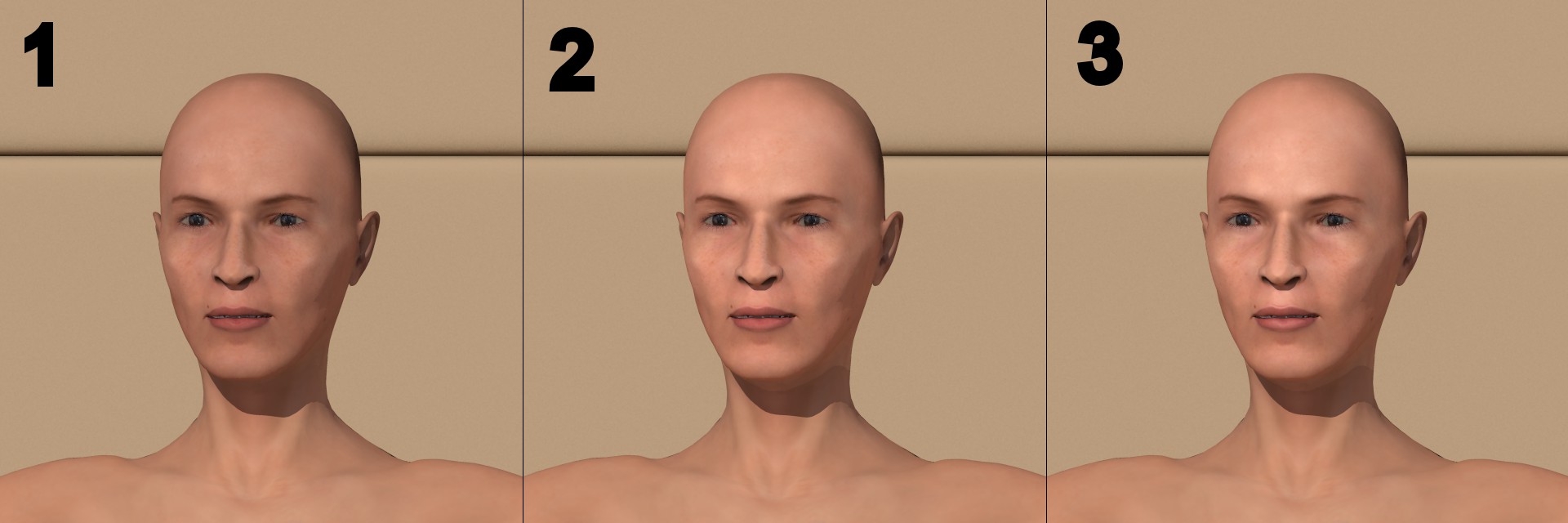
The three images (Poser 8, Alyson figure; morphed to unique facial
characteristics)  below, all with 16bps png image maps, have the following
characteristics (only the heads have been modified):

1. Original figure with minimal finish improvements (specular 0.05 roughness
0.005 for the gloss)

2. A skin material derived fro Ive's have been used, with SkinOil value
0.01. The code for the texture here is:

//the different image maps:
#declare PP_Head = pigment{p_map4}
#declare S_Head  = pigment{p_map6}
#declare N_Head  = normal {p_map5}

#local N_Face =
normal {
   uv_mapping N_Head
   bump_size 1
}

#local F_Skin_S0 =
finish {
   ambient 0  diffuse 1
   specular 0.01 roughness 0.11
   phong 0.01  phong_size 2
   brilliance 1
}

#local F_Skin_S1 =
finish {
   ambient 0  diffuse 1 - 0.1 * SkinOil
   specular 0.01 + 0.75 * SkinOil roughness 0.06
   phong 0.01 + 0.5 * SkinOil  phong_size 5
   metallic 0.4 brilliance 1.05
}

#local T_Head_S0 =
texture {
   pigment {uv_mapping PP_Head}
   normal {N_Face}
   finish {F_Skin_S0}
}

#local T_Head_S1 =
texture {
   pigment {uv_mapping PP_Head}
   normal {N_Face}
   finish {F_Skin_S1}
}

#local M_Head =
material {
   texture {
     pigment_pattern {uv_mapping S_Head}
     texture_map{
       [0 T_Head_S0]
       [1 T_Head_S1]
     }
   }
}

3. Same as 2 but with SkinOil value 0.1.


The results show that Ive's finish is giving a more natural aspect to the
face imo.

For the eye's cornea (the transparant outer layer), I use a material I
developed myself:

#declare F_EyeTrans=
finish {
  specular 1
  roughness 0.001
  ambient 0
  diffuse 0
  reflection 0.05
}

#declare I_EyeTrans =
interior { ior 1.5 }

#declare T_EyeTrans =
texture {
  pigment { rgbf<1.0, 1.0, 1.0, 0.7> }
  finish  { F_EyeTrans }
}
#declare M_EyeTrans =
material {
  texture { T_EyeTrans }
  interior { I_EyeTrans }
}


Thomas
Post a reply to this message
Attachments:
Download 'PoserFiguretest_comb.jpg' (114 KB)
Preview of image 'PoserFiguretest_comb.jpg'
|
|
| |
| |
|
|
|
|
| |
| |
|
|
Thomas de Groot wrote:
> "Stephen" <mca### [at] aolDOTcom> schreef in bericht
> news:4b294423$1@news.povray.org...
>> And write a tutorial? :twisted:
>
> Well, there starts to be a need for some tutorials indeed.  :)
> Did I promise one? I have a number of notes that should be turned into a
> tutorial. Maybe Christmas will be a good time to round that up...
>

Great Thomas, you have promised now ;)

--

Best Regards,
	Stephen
Post a reply to this message
|
|
| |
| |
|
|
|
|
| |
| |
|
|
Thomas de Groot wrote:
> I have started to play with Ive's skin techniques and come up - for the time
> being - with the following ideas, illustrated by the attached image.
> ...

I'm glad my hastily written explanation full of typos (I was interrupted
multiple times) is already of help. And I'm in a hurry again as we are
going to see the brand new James Cameron movie this evening, I'm already
sooo curious...

-Ive
Post a reply to this message
|
|
| |
| |
|
|
|
|
| |
| |
|
|
Ive escreveu:
> Thomas de Groot wrote:
>> I have started to play with Ive's skin techniques and come up - for
>> the time being - with the following ideas, illustrated by the attached
>> image.
>> ...
>
> I'm glad my hastily written explanation full of typos (I was interrupted
> multiple times) is already of help. And I'm in a hurry again as we are
> going to see the brand new James Cameron movie this evening, I'm already
> sooo curious...

I take that to mean your next skin texture will be blue? ;)

--
a game sig: http://tinyurl.com/d3rxz9
Post a reply to this message
|
|
| |
| |
|
|
|
|
| |
| |
|
|
Really nice to see more people characters being used in Povray! Always great.
Post a reply to this message
|
|
| |
| |
|
|
|
|
| |