 |
|
|
|
|
|
| |
| |
|
|
|
|
| |
| |
|
|
scott wrote:
> I think it would be easiest (ie not take 400 years) if you made a
> program in a faster language (eg C++) to write a df3 file, and then used
> POV to render the df3 file as an isosurface.

  Why does it have to be an isosurface? If you created a mesh out of it,
it would probably render about a thousand times faster, in which case
you could start adding fancy texturing, lighting and other effects
without having to wait until the Sun dies.
Post a reply to this message
|
|
| |
| |
|
|
|
|
| |
| |
|
|
CShake wrote:
> Well, I'm seeing that the actual surface generation and rendering is
> probably best left to people like you who seem to get good results, so I
> figured I might as well go another direction with it.
>
Wow!  That's gorgeous!  I can imagine some good uses for it.

To see about making an animated fly-through, I zoomed way in by using trace() to
place the camera on a surface a few iteration levels above the look_at point on
the iteration ten (10) surface here rendered.  Since I picked starting and
target points more-or-less at random, I have no idea where this surface is, and
there is only a single light source placed at the camera location.  I also
shrunk the contained_by (too much, it turned out) to avoid overheating the CPU
when the sun goes nova.

Are we having too much fun yet?

~David


  Trace Time:       1 hours 45 minutes 26 seconds (6326.522 seconds)
              using 8 thread(s) with 47526.303 CPU-seconds total
Post a reply to this message
Attachments:
Download 'mb8i10_zoom_1.png' (220 KB)
Preview of image 'mb8i10_zoom_1.png'

|
|
| |
| |
|
|
|
|
| |
| |
|
|
waggy wrote:
> CShake wrote:
>> Well, I'm seeing that the actual surface generation and rendering is
>> probably best left to people like you who seem to get good results, so I
>> figured I might as well go another direction with it.
>>
> Wow!  That's gorgeous!  I can imagine some good uses for it.
>
> To see about making an animated fly-through, I zoomed way in by using trace() to
> place the camera on a surface a few iteration levels above the look_at point on
> the iteration ten (10) surface here rendered.  Since I picked starting and
> target points more-or-less at random, I have no idea where this surface is, and
> there is only a single light source placed at the camera location.  I also
> shrunk the contained_by (too much, it turned out) to avoid overheating the CPU
> when the sun goes nova.
>
> Are we having too much fun yet?
>
> ~David
>
>
>   Trace Time:       1 hours 45 minutes 26 seconds (6326.522 seconds)
>               using 8 thread(s) with 47526.303 CPU-seconds total
>
>
> ------------------------------------------------------------------------
>

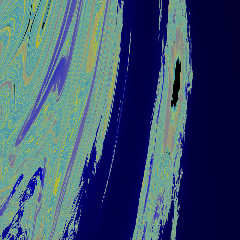
Here's another one, grayscale generated in c++ in 5 minutes or so
(5000x5000), used as an image_pattern in povray with a color map
applied, rendered at 2500x2500 (15 seconds), then resized down for
upload (and to smooth a bit).
The hardest part is finding where to zoom in actually, there are a lot
of places with nothing, then others with lots of curved lines going the
same way.
Post a reply to this message
Attachments:
Download 'mbslice_colored3.jpg' (281 KB)
Preview of image 'mbslice_colored3.jpg'
|
|
| |
| |
|
|
|
|
| |
| |
|
|
I dare you to render this thing as glass.

--
Tim Cook
http://empyrean.freesitespace.net
Post a reply to this message
|
|
| |
| |
|
|
|
|
| |
| |
|
|
Warp <war### [at] tag povrayorg> wrote:
> scott wrote:
> > I think it would be easiest (ie not take 400 years) if you made a
> > program in a faster language (eg C++) to write a df3 file, and then used
> > POV to render the df3 file as an isosurface.
>
> Why does it have to be an isosurface? If you created a mesh out of it,
> it would probably render about a thousand times faster, in which case
> you could start adding fancy texturing, lighting and other effects
> without having to wait until the Sun dies.
Hi, Warp.
How do you turn a df3 density file into a mesh? Or do you mean convert the voxel
data into a mesh before feeding it to povray? Is there an easy way to do this? I
know how to turn a heightfield into a mesh, but not a solid 3D object like the
Mandelbulb, with its many internal holes.
Here is a monochrome GIF anim of XY plane cross sections through a 121³ voxel
Mandelbulb. (174410 bytes)
http://i2.photobucket.com/albums/y43/PM2Ring/Mandel3danim2a.gif
Here's my most recent render, a stereo pair using 500³ voxels. povrayorg> wrote:
> scott wrote:
> > I think it would be easiest (ie not take 400 years) if you made a
> > program in a faster language (eg C++) to write a df3 file, and then used
> > POV to render the df3 file as an isosurface.
>
> Why does it have to be an isosurface? If you created a mesh out of it,
> it would probably render about a thousand times faster, in which case
> you could start adding fancy texturing, lighting and other effects
> without having to wait until the Sun dies.
Hi, Warp.
How do you turn a df3 density file into a mesh? Or do you mean convert the voxel
data into a mesh before feeding it to povray? Is there an easy way to do this? I
know how to turn a heightfield into a mesh, but not a solid 3D object like the
Mandelbulb, with its many internal holes.
Here is a monochrome GIF anim of XY plane cross sections through a 121³ voxel
Mandelbulb. (174410 bytes)
http://i2.photobucket.com/albums/y43/PM2Ring/Mandel3danim2a.gif
Here's my most recent render, a stereo pair using 500³ voxels.
Post a reply to this message
Attachments:
Download 'mandelbulbg9rls90.jpg' (149 KB)
Preview of image 'mandelbulbg9rls90.jpg'

|
|
| |
| |
|
|
|
|
| |
| |
|
|
"waggy" <hon### [at] handbasketorg> wrote:

> I modified the (illegal, but still renders) recursive function formulation
> posted by Warp and managed to get a straight SDL isosurface.  This is the result
> of six iterations.  The render time isn't too terribly bad if you can find a
> good combination of accuracy and max_gradient.  Due to the object's fractal
> nature, the reported maximum gradient doesn't help, though.

So is this a function that you have defined within povray for the isosurface or
are you using a df3 file?

Instead of fiddling with user-definable functions within povray I added a new
function to povray's fnintern.cpp which allowed me to render mandelbulbs with
povray.

The patch:
http://softwareprocess.es/x/x/mandelbulb/fnintern.cpp.patch

How I call it:
http://softwareprocess.es/x/x/mandelbulb/mandelbulb.pov

And a description of how I got here:
http://softwareprocess.us/index.cgi/Mandelbulb

I really think the functional approach is superior to the voxel approach since
getting 1000x1000x1000 voxels is time consuming and space consuming.

But if you did define your own function in isosurface I'd love to see it.

abram
Post a reply to this message
Attachments:
Download '1povaa.640480.png' (182 KB)
Preview of image '1povaa.640480.png'

|
|
| |
| |
|
|
|
|
| |
| |
|
|
abram wrote:
> So is this a function that you have defined within povray for the isosurface or
> are you using a df3 file?
>
> Instead of fiddling with user-definable functions within povray I added a new
> function to povray's fnintern.cpp which allowed me to render mandelbulbs with
> povray.
>
> The patch:
> http://softwareprocess.es/x/x/mandelbulb/fnintern.cpp.patch
>
> How I call it:
> http://softwareprocess.es/x/x/mandelbulb/mandelbulb.pov
>
> And a description of how I got here:
> http://softwareprocess.us/index.cgi/Mandelbulb
>
> I really think the functional approach is superior to the voxel approach since
> getting 1000x1000x1000 voxels is time consuming and space consuming.
>
> But if you did define your own function in isosurface I'd love to see it.
>
> abram
>
>
> ------------------------------------------------------------------------
>
Very nice!

I was hoping that someone would take that approach, I looked into the
source but didn't understand it quite well enough to make my own patch.

On that note, I wonder if it would be feasible to add some sort of
user-defined recursive function to the fractal class (z=z^n+c for this,
but replace that ^n part with whatever you want), much like
julia_fractal takes the function name as a parameter. It would make POV
into a very usable fractal generator, since the raytracing side of it is
so well defined already, and most of the other fractal tracers are
homebrew contraptions that are struggling to get good shading but have
the math down.
Post a reply to this message
|
|
| |
| |
|
|
|
|
| |
| |
|
|
PM 2Ring wrote:
> How do you turn a df3 density file into a mesh?

  You don't turn a df3 density file into a mesh. You calculate a mesh
from the original fractal.

  (Granted, it's not a trivial task, requiring using something like the
marching triangles algorithm, but still beneficial in terms of rendering
speed.)
Post a reply to this message
|
|
| |
| |
|
|
|
|
| |
| |
|
|
abram schrieb:

> Instead of fiddling with user-definable functions within povray I added a new
> function to povray's fnintern.cpp which allowed me to render mandelbulbs with
> povray.

Good stuff!

However, regarding the return value, note that the "threshold" parameter
in the isosurface statement is a /borderline/ value; with your
implementation, the default value will cause the isosurface to misbehave
in situations where "insideness" needs to be tested. This can easily be
fixed by using an isosurface threshold of e.g. -0.5, but I think it
would be more elegant to have the function return -1 and 1, respectively.

I'd also be curious whether rendering speed might be improved by
choosing different return values, that might give POV-Ray a hint how
close it might be to the surface. Anyone some experience with that?
Post a reply to this message
|
|
| |
| |
|
|
|
|
| |
| |
|
|
"abram" wrote:

> So is this a function that you have defined within povray for the isosurface or
> are you using a df3 file?

It's a pair of functions, one to do the iterations, and another to return a
value suitable for making an isosurface.  The plan was to add additional
functions better suited to use as a pattern, media, etc.

> Instead of fiddling with user-definable functions within povray I added a new
> function to povray's fnintern.cpp which allowed me to render mandelbulbs with
> povray.

I agree, and thanks for making the patch available.  I may take a whack at
modifying it to use  PM 2Ring's trigless algorithm.

> I really think the functional approach is superior to the voxel approach since
> getting 1000x1000x1000 voxels is time consuming and space consuming.
>
> But if you did define your own function in isosurface I'd love to see it.

OK.  I've avoided posting it since it's an illegal recursive function and can
crash 3.7.  It seems to work only when there is just one recursive function
defined, and this recursive function does not call any other user-defined
function.  There are posts to this site showing how to unroll these type of
functions using macros to make everything legal, and I may try that, as well.

However, to make a good isosurface I found it necessary to modify the return
value so it is no longer strictly a step function returning a value proportional
to just the iteration number.  It seems this is needed so the isosurface's
surface normal can be calculated correctly, and it also speeds rendering and
works with lower max_gradient and larger accuracy values.  I probably don't have
the quite the right formulation yet, but what's below works pretty well.

~David Wagner

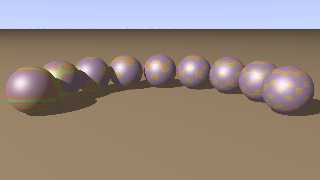
P.S. Attached are some Easter eggs courtesy of the Basic scene template.

// Persistence of Vision Ray Tracer Scene Description File
// File: mandelbulb.inc
// Vers: 3.6.1, 3.7
// Desc: Mandelbulb Functions
// Date: 11/18/09
// Auth: David Wagner


//Making the return value a float by adding how close to the radius of
convergence REALLY helps!
//Returns 0 to mb_imax+2?  Taking off 3 seems to work best.
//This new version seems to have interior surfaces, too.

#declare mb_fn_iterator_frac = function(mb_i,mb_imax, mb_in, x,y,z,
mb_ix,mb_iy,mb_iz) {
   select(mb_i > mb_imax | pow(mb_ix,2) + pow(mb_iy,2) + pow(mb_iz,2) >4, 0,
      mb_fn_iterator_frac(mb_i+1,mb_imax, mb_in, x,y,z,

         x + pow(pow(mb_ix,2) + pow(mb_iy,2) + pow(mb_iz,2) , mb_in/2)
             * sin( atan2( sqrt(pow(mb_ix,2) + pow(mb_iy,2)), mb_iz) * mb_in)
             * cos( atan2(mb_iy,mb_ix) * mb_in),

         y + pow(pow(mb_ix,2) + pow(mb_iy,2) + pow(mb_iz,2) , mb_in/2)
             * sin( atan2( sqrt(pow(mb_ix,2) + pow(mb_iy,2)), mb_iz) * mb_in)
             * sin( atan2(mb_iy,mb_ix) * mb_in),

         z + pow(pow(mb_ix,2) + pow(mb_iy,2) + pow(mb_iz,2) , mb_in/2)
             * cos( atan2( sqrt(pow(mb_ix,2) + pow(mb_iy,2)), mb_iz) * mb_in)
         ),
      mb_i + 1/(pow(mb_ix,2) + pow(mb_iy,2) + pow(mb_iz,2) -3 )
      )//end select
   };

#declare mb_fn_iso = function(x,y,z, mb_fn_n, mb_fn_iterations) {
   ( mb_fn_iterations - mb_fn_iterator_frac(0,mb_fn_iterations-1, mb_fn_n,
x,y,z, x,y,z) -0.5 )
   / mb_fn_iterations
   };

/*
  The iteration number is negated so the inside is defined correctly.
  Taking off 0.5 here may be a mistake now that the iteration is no longer an
integer...
    but it seems to work best for isosurfaces.
*/

/*
//Use the include file as follows:

#include "mandelbulb.inc"

#local mb_n=8;           // Mandelbulb Power
#local mb_iterations=6;
#local mb_zoom=2;        // Use higher values for tighter views.

isosurface {
  function { mb_fn_iso(y, x, z, mb_n, mb_iterations) }
  threshold 0.0
  contained_by { sphere { <0,0,0>, 1.2 } } //Power 8

  //For power 8
  accuracy     pow(2,-mb_iterations  )  /32 /mb_zoom
  max_gradient pow(2, mb_iterations/2)  *32 *mb_zoom

texture{pigment{color White}}
finish{ambient 0 diffuse 0.9 phong 0.1 specular 0.0}
}
*/
Post a reply to this message
Attachments:
Download 'mb_pattern_basic_set.png' (134 KB)
Preview of image 'mb_pattern_basic_set.png'
|
|
| |
| |
|
|
|
|
| |
| |
|
|
Well, now here's an accidental isosurface at today's Astronomy Picture of the
Day.

http://antwrp.gsfc.nasa.gov/apod/ap091122.html

It kinda looks like someone hit a lower-power mandelbulb with a turbulence warp.

That inspired me to try mandelbulbs with fractional powers.  Attached is a power
2.3 mandelbulb, 20 iterations, rotated off-axis, and rendered as media.
Post a reply to this message
Attachments:
Download 'mb2-3i20_media.png' (193 KB)
Preview of image 'mb2-3i20_media.png'

|
|
| |
| |
|
|
|
|
| |
| |
|
|
waggy schrieb:

> That inspired me to try mandelbulbs with fractional powers.  Attached is a power
> 2.3 mandelbulb, 20 iterations, rotated off-axis, and rendered as media.

Tried that, too, with solids. Doesn't look too pretty though, as such
variants exhibit a distinctive discontinuity at one side. Apparently
you'd need more than 360 degrees in a circle to give them rotational
symmetry...
Post a reply to this message
|
|
| |
| |
|
|
|
|
| |
| |
|
|
>> I think it would be easiest (ie not take 400 years) if you made a
>> program in a faster language (eg C++) to write a df3 file, and then used
>> POV to render the df3 file as an isosurface.
>
>  Why does it have to be an isosurface? If you created a mesh out of it,
> it would probably render about a thousand times faster,

But take a thousand times longer to code :-)
Post a reply to this message
|
|
| |
| |
|
|
|
|
| |
| |
|
|
abram wrote:
> The patch:
> http://softwareprocess.es/x/x/mandelbulb/fnintern.cpp.patch

Looking at it again, I can see a simple improvement that shouldn't cost
too much computing power and would make it much more usable for pigments
and media - returning smooth values based on rate of divergence.

No change needed on your if(cnt<=0){return -1.0;}, but what you can do
for the other condition is:
return (cnt+log(log(r)/log(2.0))/log(n))/(iterations);

In words: find the count you got down to, and add a fraction to it that
approximates how close it was to taking one less iteration, then
normalizing that so it will return a range from 0 to 1+, where 0 is when
you've reached nearly the max iterations, and 1+ when it takes only 1
iteration to diverge, and higher than that when it diverges really far
in the first step.
The actual formula for that fraction is log[base n](log[base
threshold](cnt)), where your threshold for the radius is 2.0.

This would let you get smoothly colored pigment patterns if you want to
do any rate of divergence coloring, which could be interesting. Of
course feel free to change the range of returned values, this is just an
idea for normalizing. To save very minor computational cost you can
pre-calculate the log(2.0), or even change your divergence radius to E.

Chris
Post a reply to this message
|
|
| |
| |
|
|
|
|
| |
| |
|
|
Warp <war### [at] tagpovrayorg> wrote:
> PM 2Ring wrote:
> > How do you turn a df3 density file into a mesh?
>
>   You don't turn a df3 density file into a mesh. You calculate a mesh
> from the original fractal.
>
>   (Granted, it's not a trivial task, requiring using something like the
> marching triangles algorithm, but still beneficial in terms of rendering
> speed.)

Thanks, Warp.

I found the Marching Cubes C code (cunningly disguised as C++ code...) in p.b.u.
It
converts 8 bit df3 files ok, but of course the resulting mesh isn't quite as
accurate as a POV isosurface. The mesh renders much faster, but it does take
more memory & is much slower to render. So for some applications (eg a lot of
small renders for an animation) I prefer to use the isosurface.

Maybe I need to use the df3 file more efficiently. Currently, I'm only storing 1
bit per voxel: 0 if it's not in the Mandelbulb, 255 if it is. I'm wondering if
there's a better way.


Someone mentioned earlier about doing a glass Mandelbulb. I don't know if this
would work very well, since the surface is fractally bumpy. I've done a glassy
one of a 100³ grid (ior 1.5, no dispersion, photons, or radiosity) amd a shiny
metallic one, and they both look interesting, but a metallic one of a 500³ grid
doesn't look very shiny; as you can see below, it's more like a scrunched up
ball of foil.
Post a reply to this message
Attachments:
Download 'mandelbulbi5s90.jpg' (160 KB)
Preview of image 'mandelbulbi5s90.jpg'

|
|
| |
| |
|
|
|
|
| |
| |
|
|
waggy wrote:
> That inspired me to try mandelbulbs with fractional powers.  Attached is a power
> 2.3 mandelbulb, 20 iterations, rotated off-axis, and rendered as media.

  There's a skull in that image.
Post a reply to this message
|
|
| |
| |
|
|
|
|
| |
| |
|
|
PM 2Ring a écrit :
> Warp <war### [at] tagpovrayorg> wrote:
>> PM 2Ring wrote:
>>> How do you turn a df3 density file into a mesh?
>>   You don't turn a df3 density file into a mesh. You calculate a mesh
>> from the original fractal.
>>
>>   (Granted, it's not a trivial task, requiring using something like the
>> marching triangles algorithm, but still beneficial in terms of rendering
>> speed.)
>
> Thanks, Warp.
>
> I found the Marching Cubes C code (cunningly disguised as C++ code...) in p.b.u.
> It
> converts 8 bit df3 files ok, but of course the resulting mesh isn't quite as
> accurate as a POV isosurface. The mesh renders much faster, but it does take
> more memory & is much slower to render. So for some applications (eg a lot of
> small renders for an animation) I prefer to use the isosurface.
>
> Maybe I need to use the df3 file more efficiently. Currently, I'm only storing 1
> bit per voxel: 0 if it's not in the Mandelbulb, 255 if it is. I'm wondering if
> there's a better way.
>
>
> Someone mentioned earlier about doing a glass Mandelbulb. I don't know if this
> would work very well, since the surface is fractally bumpy. I've done a glassy
> one of a 100³ grid (ior 1.5, no dispersion, photons, or radiosity) amd a shiny
> metallic one, and they both look interesting, but a metallic one of a 500³ grid
> doesn't look very shiny; as you can see below, it's more like a scrunched up
> ball of foil.
>
>
>
> ------------------------------------------------------------------------
>
If you want to make it glass or metallic, you need to change a few
things for the DF3 way:
Outside value: 16
Inside value: 200
This is to get rid of the overshot artefacts you can get with the
interpolation. Interpolate 2 realy don't work well when you have sharp
jumps to zero and 255.

Use interpolate 2
Gives you a nice smooth, curvy, interpolation.


Alain
Post a reply to this message
|
|
| |
| |
|
|
|
|
| |
| |
|
|
PM 2Ring wrote:
> Someone mentioned earlier about doing a glass Mandelbulb. I don't know if this
> would work very well, since the surface is fractally bumpy. I've done a glassy
> one of a 100³ grid (ior 1.5, no dispersion, photons, or radiosity) amd a shiny
> metallic one, and they both look interesting, but a metallic one of a 500³ grid
> doesn't look very shiny; as you can see below, it's more like a scrunched up
> ball of foil.

Goodness!  Who let a mathematician into the Brillo factory?

--
Tim Cook
http://empyrean.freesitespace.net
Post a reply to this message
|
|
| |
| |
|
|
|
|
| |
| |
|
|
Warp wrote:
>   There's a skull in that image.

These things can look weirdly organic, especially when rendered in media.
Attached is "side" view of a power 2, iteration 20 image.

Oh, for those who don't watch the binaries.animations newsgroup, I posted an
animation of mandelbulb powers 1 through 100 rendered in media.

http://news.povray.org/povray.binaries.animations/message/%3Cweb.4b09e469315ec22ef99d05c80%40news.povray.org%3E/#%3Cweb
.4b09e469315ec22ef99d05c80%40news.povray.org%3E

(Just remove the .dat extension and it should play on MS, Mac, and Linux
systems.)
Post a reply to this message
Attachments:
Download 'mb2i20_media_1024.png' (428 KB)
Preview of image 'mb2i20_media_1024.png'

|
|
| |
| |
|
|
|
|
| |
| |
|
|
"PM 2Ring" wrote:
> Someone mentioned earlier about doing a glass Mandelbulb. I don't know if this
> would work very well, since the surface is fractally bumpy. I've done a glassy
> one of a 100³ grid (ior 1.5, no dispersion, photons, or radiosity) amd a shiny
> metallic one, and they both look interesting, but a metallic one of a 500³ grid
> doesn't look very shiny; as you can see below, it's more like a scrunched up
> ball of foil.

I found the same thing.  However, lower iteration mandelbulbs show some promise,
especially if you just cut out part of it.  Attached are power 8, iteration 3
mandelbulbs in stock glass and chrome.  (I apologize I suck at glass.)

~David
Post a reply to this message
Attachments:
Download 'mb8i3_glass_chrome.png' (769 KB)
Preview of image 'mb8i3_glass_chrome.png'

|
|
| |
| |
|
|
|
|
| |
| |
|
|
PM 2Ring wrote:
> I found the Marching Cubes C code

  AFAIK the Marching Triangles algorithm produces meshes of much higher
quality than Marching Cubes.

  Marching Cubes tends to produce randomly-sized triangles and very thin
triangles whose size is in no way related to the shape, and it doesn't
take into account the curvature of the surface being tesselated.

  Marching Triangles, on the other hand, produces nice about
evenly-sized triangles for surfaces with the same curvature, and does so
adaptively, ie. producing smaller triangles at high curvature places and
larger triangles at low curvature places. The end result (when eg.
rendered as a wireframe) tends to look a lot more pleasing.
Post a reply to this message
|
|
| |
| |
|
|
|
|
| |
| |
|
|
Alain <aze### [at] qwertyorg> wrote:

> If you want to make it glass or metallic, you need to change a few
> things for the DF3 way:
> Outside value: 16
> Inside value: 200
> This is to get rid of the overshot artefacts you can get with the
> interpolation. Interpolate 2 realy don't work well when you have sharp
> jumps to zero and 255.
>
> Use interpolate 2
> Gives you a nice smooth, curvy, interpolation.

Thanks for the suggestion, Alain. It does look better, but it needs a much
higher max_gradient. And I noticed some strange artifacts when rendering a
simple cubical frame with interpolate 2, even though all the outer voxels in my
cube df3 are supposed to be outside the surface.

FWIW, the metallic Mandelbulb I posted was done using a mesh produced by
Marching Cubes.
Post a reply to this message
|
|
| |
| |
|
|
|
|
| |
| |
|
|
Warp <war### [at] tagpovrayorg> wrote:
> PM 2Ring wrote:
> > I found the Marching Cubes C code
>
>   AFAIK the Marching Triangles algorithm produces meshes of much higher
> quality than Marching Cubes.
>
>   Marching Cubes tends to produce randomly-sized triangles and very thin
> triangles whose size is in no way related to the shape, and it doesn't
> take into account the curvature of the surface being tesselated.
>
>   Marching Triangles, on the other hand, produces nice about
> evenly-sized triangles for surfaces with the same curvature, and does so
> adaptively, ie. producing smaller triangles at high curvature places and
> larger triangles at low curvature places. The end result (when eg.
> rendered as a wireframe) tends to look a lot more pleasing.

That sounds great, Warp. But after over an hour of searching for Marching
Triangles code, I haven't located anything yet, not even pseudocode. :( Do you
have any suggestions for where I should look? I have found some articles in PDF
format, but I haven't downloaded any of them to check if they contain source
code.
Post a reply to this message
|
|
| |
| |
|
|
|
|
| |
| |
|
|
On Sat, 28 Nov 2009 02:49:38 +0100, PM 2Ring <nomail@nomail> wrote:
>
> That sounds great, Warp. But after over an hour of searching for Marching
> Triangles code, I haven't located anything yet, not even pseudocode. :(
> Do you have any suggestions for where I should look? I have found some
> articles in PDF format, but I haven't downloaded any of them to check if
> they contain source code.

http://en.wikipedia.org/wiki/Marching_tetrahedrons

The Wikipedia article links to:
http://local.wasp.uwa.edu.au/~pbourke/geometry/polygonise/#tetra


--
FE
Post a reply to this message
|
|
| |
| |
|
|
|
|
| |
| |
|
|
PM 2Ring a écrit :
> Alain <aze### [at] qwertyorg> wrote:
>
>> If you want to make it glass or metallic, you need to change a few
>> things for the DF3 way:
>> Outside value: 16
>> Inside value: 200
>> This is to get rid of the overshot artefacts you can get with the
>> interpolation. Interpolate 2 realy don't work well when you have sharp
>> jumps to zero and 255.
>>
>> Use interpolate 2
>> Gives you a nice smooth, curvy, interpolation.
>
> Thanks for the suggestion, Alain. It does look better, but it needs a much
> higher max_gradient. And I noticed some strange artifacts when rendering a
> simple cubical frame with interpolate 2, even though all the outer voxels in my
> cube df3 are supposed to be outside the surface.
>
> FWIW, the metallic Mandelbulb I posted was done using a mesh produced by
> Marching Cubes.
>

If the values reach zero or the highest possible value (255 for 8 bits),
  you get overshots, and those results in warping around the resulting
values from your density_map. If you go to zero, you get areas that will
eroneously use the entry for 1 on the density map. If you go to 255, you
get areas that will use the values for zero, or close to zero.

That's why I told tou to restrict the range of values used.


Alain
Post a reply to this message
|
|
| |
| |
|
|
|
|
| |
| |
|
|
"Fredrik Eriksson" <fe79}--at--{yahoo}--dot--{com> wrote:
> On Sat, 28 Nov 2009 02:49:38 +0100, PM 2Ring <nomail@nomail> wrote:
> >
> > That sounds great, Warp. But after over an hour of searching for Marching
> > Triangles code, I haven't located anything yet, not even pseudocode. :(
>
> http://en.wikipedia.org/wiki/Marching_tetrahedrons
>
> The Wikipedia article links to:
> http://local.wasp.uwa.edu.au/~pbourke/geometry/polygonise/#tetra

Thanks, Fredrik, but I've already seen those links. Marching Tetrahedrons is a
slight improvenent on Marching Cubes, but Marching Triangles appears to be quite
a different algorithm, with adaptive triangle sizes.
Post a reply to this message
|
|
| |
| |
|
|
|
|
| |
| |
|
|
Alain <aze### [at] qwertyorg> wrote:

> >> If you want to make it glass or metallic, you need to change a few
> >> things for the DF3 way:
> >> Outside value: 16
> >> Inside value: 200
> >> This is to get rid of the overshot artefacts you can get with the
> >> interpolation. Interpolate 2 realy don't work well when you have sharp
> >> jumps to zero and 255.

>
> If the values reach zero or the highest possible value (255 for 8 bits),
>   you get overshots, and those results in warping around the resulting
> values from your density_map. If you go to zero, you get areas that will
> eroneously use the entry for 1 on the density map. If you go to 255, you
> get areas that will use the values for zero, or close to zero.
>
> That's why I told you to restrict the range of values used.

I understand, Alain, and I have restricted the values: my df3 test files only
use 16 & 200 (I used tr to translate my existing files). But I still get these
artifacts. I didn't bother saving an image, but I'll generate a new one, if
you'd like to see for yourself.
Post a reply to this message
|
|
| |
| |
|
|
|
|
| |
| |
|
|
On Sat, 28 Nov 2009 03:24:08 +0100, PM 2Ring <nomail@nomail> wrote:
>
> Marching Tetrahedrons is a slight improvenent on Marching Cubes,
> but Marching Triangles appears to be quite a different algorithm,
> with adaptive triangle sizes.

Source code for that does seem to be scarce, but the original article (by
Hilton & Illingworth) has a pretty detailed stepwise description of the
algorithm. It should not be to difficult to work from that.


--
FE
Post a reply to this message
|
|
| |
| |
|
|
|
|
| |
| |
|
|
PM 2Ring wrote:
...
> That sounds great, Warp. But after over an hour of searching for Marching
> Triangles code, I haven't located anything yet, not even pseudocode. :( Do you
> have any suggestions for where I should look?
...

You can find some code in this thread:

http://news.povray.org/povray.binaries.scene-files/thread/%3C47be20ab%40news.povray.org%3E/

Subject: "Isosurface Approximation macros rewrite"
From: Tor Olav Kristensen
Date: 22 Feb 2008 01:08:59

--
Tor Olav
http://subcube.com
Post a reply to this message
|
|
| |
| |
|
|
|
|
| |
| |
|
|
Tor Olav Kristensen <tor### [at] TOBEREMOVEDgmailcom> wrote:
> PM 2Ring wrote:
> ...
> > That sounds great, Warp. But after over an hour of searching for Marching
> > Triangles code, I haven't located anything yet, not even pseudocode. :( Do you
> > have any suggestions for where I should look?
> ...
>
> You can find some code in this thread:

Thanks, Tor Olav. I'll have a look at it when I wake up. :)
Post a reply to this message
|
|
| |
| |
|
|
|
|
| |
| |
|
|
PM 2Ring wrote:
> Tor Olav Kristensen <tor### [at] TOBEREMOVEDgmailcom> wrote:
>> PM 2Ring wrote:
>> ...
>>> That sounds great, Warp. But after over an hour of searching for Marching
>>> Triangles code, I haven't located anything yet, not even pseudocode. :( Do you
>>> have any suggestions for where I should look?
>> ...
>>
>> You can find some code in this thread:
>
> Thanks, Tor Olav. I'll have a look at it when I wake up. :)

I see from your answer to Fredrik that it is not Marching Tetrahedrons you're after,
so what I linked to is probably not relevant for you.

--
Tor Olav
http://subcube.com
Post a reply to this message
|
|
| |
| |
|
|
|
|
| |
| |
|
|
Tor Olav Kristensen <tor### [at] TOBEREMOVEDgmailcom> wrote:
> PM 2Ring wrote:
> > Tor Olav Kristensen <tor### [at] TOBEREMOVEDgmailcom> wrote:
> >> PM 2Ring wrote:
> >> ...
> >>> That sounds great, Warp. But after over an hour of searching for Marching
> >>> Triangles code, I haven't located anything yet, not even pseudocode. :( Do you
> >>> have any suggestions for where I should look?
> >> ...
> >>
> >> You can find some code in this thread:
> >
> > Thanks, Tor Olav. I'll have a look at it when I wake up. :)
>
> I see from your answer to Fredrik that it is not Marching Tetrahedrons you're after,
> so what I linked to is probably not relevant for you.
>
> --
> Tor Olav
> http://subcube.com

That's OK. Once I had a look at the code, I realized it wasn't Marching
Triangles, but decided to try it out anyway. The meshes it produces do look
better than Marching Cubes, but of course it is very slow on large data sets,
being in POV SDL rather than C. Especially with recursion depth of 3 or more.

FWIW, in one of my tests I got an error message from POV saying that a normal
vector can't be <0,0,0>.
Post a reply to this message
|
|
| |
| |
|
|
|
|
| |
| |
|
|
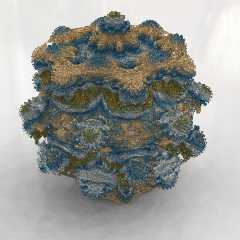
Here's my latest Mandelbulb, rendered using the isosurface / df3 method.
Resolution = 800³. It uses pseudo-HDRI, with a light dome of 159 light sources,
but no radiosity: it was just too slow. This render took over 7 days on my
480MHz machine. I was hoping for a more impressive looking result, after all
that render time. Oh well.
Post a reply to this message
Attachments:
Download 'mandelbulbja0s90.jpg' (124 KB)
Preview of image 'mandelbulbja0s90.jpg'
|
|
| |
| |
|
|
|
|
| |
| |
|
|
"PM 2Ring" <nomail@nomail> schreef in bericht
news:web.4b247f29ce81d185f4c648ed0@news.povray.org...
> Here's my latest Mandelbulb, rendered using the isosurface / df3 method.
> Resolution = 800³. It uses pseudo-HDRI, with a light dome of 159 light
> sources,
> but no radiosity: it was just too slow. This render took over 7 days on my
> 480MHz machine. I was hoping for a more impressive looking result, after
> all
> that render time. Oh well.

I do find it pretty impressive. Reminds me of some kind of delicate
porcelaine vase. The absence of shadows increases that feeling. I am
impressed by your patience too ;)

Thomas
Post a reply to this message
|
|
| |
| |
|
|
|
|
| |
| |
|
|
"Thomas de Groot" <tDOTdegroot@interDOTnlANOTHERDOTnet> wrote:

> I do find it pretty impressive. Reminds me of some kind of delicate
> porcelaine vase. The absence of shadows increases that feeling. I am
> impressed by your patience too ;)

Thanks, Thomas. I think my next Mandelbulb renders will be close-ups rather than
trying to do the whole thing. And I might compromise & use a mesh instead of the
isosurface. These complex objects take up so much memory, I couldn't really do
much else while rendering, or the machine would start using virtual memory. That
would've taken months!
Post a reply to this message
|
|
| |
| |
|
|
|
|
| |
| |
|
|
PM 2Ring wrote:
> Here's my latest Mandelbulb, rendered using the isosurface / df3 method.
> Resolution = 800³. It uses pseudo-HDRI, with a light dome of 159 light sources,
> but no radiosity: it was just too slow. This render took over 7 days on my
> 480MHz machine. I was hoping for a more impressive looking result, after all
> that render time. Oh well.
>
>
>
>
> ------------------------------------------------------------------------
>
Nice.

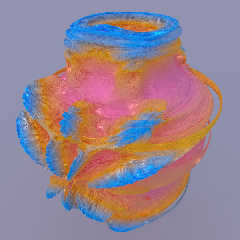
Here's a 800^3 isosurface/df3, with radiosity and real HDRI, but I can't
figure out what's wrong with my code, since the shape isn't right. It
was supposed to be the n=8 shape from <-1.2,-1.2,-1.2> to <1.2,1.2,1.2>.

Time: 26 minutes with max_gradient 200 on a 2.6 GHz quad-core (AMD
Phenom 9950) for the render, and somewhere around there for the
generation on an older dual-core linux box.

Here's my c++ code for the iterations if anyone can figure out what is
wrong, I've gone through it many times and can't figure out what's not
right...

Chris

--------------------------------------------------------------------------
/* Iterates the formula at a given x,y,z and returns the smoothed number
of iterations used */
float IteratePoint(double cx, double cy, double cz, double n, double
bailout, int maxiter){
	double x=0.0,y=0.0,z=0.0;
	double r=0.0,rn=0.0,phin,thetan,sinthetan;
	for(int i=0;i<maxiter;i++){
		r=sqrt(pow(x,2)+pow(y,2)+pow(z,2));
		if(r>bailout){
			rn=pow(r,n);
			thetan=atan2(sqrt(pow(x,2)+pow(y,2)),z)*n;
			phin=atan2(y,z)*n;
			x=rn*sin(thetan)*cos(phin)+cx;
			y=rn*sin(thetan)*sin(phin)+cy;
			z=rn*cos(thetan)+cz;
			r=sqrt(pow(x,2)+pow(y,2)+pow(z,2));
			return (float)i + 1 - (log(log(r)/log(bailout)))/log(n);
		}
		rn=pow(r,n);
		thetan=atan2(sqrt(pow(x,2)+pow(y,2)),z)*n;
		phin=atan2(y,z)*n;
		x=rn*sin(thetan)*cos(phin)+cx;
		y=rn*sin(thetan)*sin(phin)+cy;
		z=rn*cos(thetan)+cz;
	}
	return (float)maxiter;
}

-------------------
and the loop part : (xs/xe are x-start, x-end values, same for y and z)
for (i=0;i<nx;i++){
	for (j=0;j<ny;j++){
	#pragma omp parallel
shared(df3,nx,ny,nz,xs,xe,ys,ye,zs,ze,bailout,maxiter,n,i,j,chunk)
private(k,cx,cy,cz)
	{
		#pragma omp for schedule(dynamic,chunk) nowait
		for (k=0;k<nz;k++){
			cx = (((double)i+0.5)/(double)nx)*(xe-xs)+xs;
			cy = (((double)j+0.5)/(double)ny)*(ye-ys)+ys;
			cz = (((double)k+0.5)/(double)nz)*(ze-zs)+zs;
			df3[i][j][k]=IteratePoint(cx,cy,cz,n,bailout,maxiter);
		}
	}
	if(j%2==0)
		ShowStatus(i*nx+j,nx*ny,"Iterating Fractal: ");
	}
}
Post a reply to this message
Attachments:
Download 'mandel_df3.jpg' (69 KB)
Preview of image 'mandel_df3.jpg'
|
|
| |
| |
|
|
|
|
| |
| |
|
|
CShake wrote:
[...]
>  return (float)i + 1 - (log(log(r)/log(bailout)))/log(n);
[...]

You're return value may be a bit off.  The function log(r)/log(bailout) is the
base bailout logarithm of r,* which may not be what you intended.  The usual
formulation of this part is the (base n log of the natural log of the bailout)
minus (the base n log of natural log of the radius), where n is the power of the
mandelbulb.  This can then be simplified a little.

  return (float)i + 1 - ( log(log(bailout))-log(log(r)) )/log(n)
//then
  return (float)i + 1 - log(log(bailout)/log(r)) / log(n)

(Somebody check my math, please.  This might be simplified a bit more using the
root/log relationships...)

I don't know if this is the root of your current problem; the formulation you're
using may be just fine.  I would like to test it, since I've been monkeying with
continuous return values for the last couple of weeks, but won't be able to do
much more on this until after finals.

* http://en.wikipedia.org/wiki/Logarithms#Change_of_base
Post a reply to this message
|
|
| |
| |
|
|
|
|
| |
| |
|
|
waggy wrote:
> CShake wrote:
> [...]
>>  return (float)i + 1 - (log(log(r)/log(bailout)))/log(n);
> [...]
>
> You're return value may be a bit off.  The function log(r)/log(bailout) is the
> base bailout logarithm of r,* which may not be what you intended.  The usual
> formulation of this part is the (base n log of the natural log of the bailout)
> minus (the base n log of natural log of the radius), where n is the power of the
> mandelbulb.  This can then be simplified a little.
>
>   return (float)i + 1 - ( log(log(bailout))-log(log(r)) )/log(n)
> //then
>   return (float)i + 1 - log(log(bailout)/log(r)) / log(n)

I spent a bit of time on that problem too, and ended up with my equation
based on the Escape Time Algorithm as presented at:
http://en.wikipedia.org/wiki/Mandelbrot_set#Continuous_.28smooth.29_coloring

Unless I'm reading it wrong, that formula is effectively ( i - log[base
N](log[base bailout](r))), which is what I'm using. I assumed that in
the formula on wiki that the inner log (hardcoded as base 2) is actually
base 'bailout', where most formulations of the mandelbrot equation use 2
as the bailout value. The Zn value is stated as the value after n
iterations, which in this case is r. Either I interpreted that equation
wrong, or I'm erroneous in applying the '2d' equation in '3d'.

However, I don't think that's the problem in my equations, since I still
get the same basic shape if I return 'i' instead of the 'smooth'
coloring. Also, I wouldn't expect it to completely remove some of the
features if I got this part of it wrong.

Chris

(I'm also between class and finals, this is how I'm procrastinating
instead of studying and grading a pile of lab reports... )
Post a reply to this message
|
|
| |
| |
|
|
|
|
| |
| |
|
|
CShake wrote:
> I spent a bit of time on that problem too, and ended up with my equation
> based on the Escape Time Algorithm as presented at:
> http://en.wikipedia.org/wiki/Mandelbrot_set#Continuous_.28smooth.29_coloring

I'm an idiot, please note that I mean 'Normalized Iteration Count
Algorithm' instead of Escape Time in that sentence.
Post a reply to this message
|
|
| |
| |
|
|
|
|
| |
| |
|
|
CShake wrote:
[...]
>    phin=atan2(y,z)*n;
[...]
>   phin=atan2(y,z)*n;
[...]

Hmm.  Perhaps these have a small error?  I think maybe they should be like this.

   phin=atan2(y,x)*n;

http://www.skytopia.com/project/fractal/2mandelbulb.html#formula

Also, I used the same starting point, then grabbed one of the wikipedia
references and read some more.  (I also think I found a small improvement and
plan to write it up over the break.)
Post a reply to this message
|
|
| |
| |
|
|
|
|
| |
| |
|
|
"PM 2Ring" wrote:
> Here's my latest Mandelbulb, rendered using the isosurface / df3 method.
> Resolution = 800³. It uses pseudo-HDRI, with a light dome of 159 light sources,
> but no radiosity: it was just too slow. This render took over 7 days on my
> 480MHz machine. I was hoping for a more impressive looking result, after all
> that render time. Oh well.

I like your color scheme, and also find the surface can have a nice, porcelain
look with the right finish.

Did you leave Jitter on?  Jitter on is the default, but I've found using -J
helps reduce "smearing" and "fuzzing" in the final image.
Post a reply to this message
|
|
| |
| |
|
|
|
|
| |
| |
|
|
waggy wrote:
> CShake wrote:
> [...]
>>    phin=atan2(y,z)*n;
> [...]
>>   phin=atan2(y,z)*n;
> [...]
>
> Hmm.  Perhaps these have a small error?  I think maybe they should be like this.
>
>    phin=atan2(y,x)*n;
>
> http://www.skytopia.com/project/fractal/2mandelbulb.html#formula
>
> Also, I used the same starting point, then grabbed one of the wikipedia
> references and read some more.  (I also think I found a small improvement and
> plan to write it up over the break.)
>
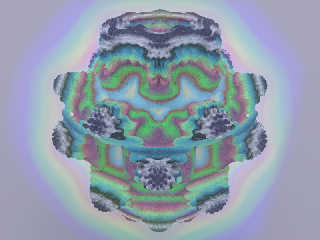
Right you are, once again one character causes all the problem... Thanks!

That fixed code takes a bit longer to run, but all told this image took
less than an hour, 800^3, n=8.0, radiosity, and the media halo uses the
same df3 (you can see how the smooth scaling works). This isosurface was
created by using function{0.06 - df3_func(x,y,z)}, the 0.06 part can
then be tuned to make the surface 'grow'.

Now I wonder if it's worth doubling the integer size in the df3 to
remove some of the grain.
Post a reply to this message
Attachments:
Download 'mandelbulb_df3.jpg' (79 KB)
Preview of image 'mandelbulb_df3.jpg'
|
|
| |
| |
|
|
|
|
| |
| |
|
|
PM 2Ring wrote:
> but no radiosity: it was just too slow. This render took over 7 days on my
> 480MHz machine. I was hoping for a more impressive looking result, after all
> that render time. Oh well.

I haven't used any raytracing software for years, but am wondering how
much do the modern machines change the rendering times with something
like this? for instance, i am currently using a quad-core 2.00 ghz
machine with lots of ram. obviously, the quad-core would be faster, but
by how much?

zutroi
Post a reply to this message
|
|
| |
| |
|
|
|
|
| |
| |
|
|
zutroi wrote:
> PM 2Ring wrote:
>> but no radiosity: it was just too slow. This render took over 7 days
>> on my
>> 480MHz machine. I was hoping for a more impressive looking result,
>> after all
>> that render time. Oh well.
>
> I haven't used any raytracing software for years, but am wondering how
> much do the modern machines change the rendering times with something
> like this? for instance, i am currently using a quad-core 2.00 ghz
> machine with lots of ram. obviously, the quad-core would be faster, but
> by how much?
>
> zutroi

Not only are current CPUs running faster clock speeds than old ones, but
they tend to do more per clock cycle too.

My quad-core Q6600 (overclocked from 2.4GHz to 3.2GHz) really shovels
through renders. It is easily four times as fast as my old dual core
D820. I thought that was fast when I got it!

What CPU do you have? Look it up on Tom's Hardware for an idea how fast
it is compared with others
(http://www.tomshardware.co.uk/charts/processors,6.html)

Remember that POVRay 3.6 only uses a single core.. to use multi-core
CPUs you need to move up to the 3.7 beta.

Rarius
Post a reply to this message
|
|
| |
| |
|
|
|
|
| |
| |
|
|
>PM 2Ring  on date 13/12/2009 06:44 wrote:
> Here's my latest Mandelbulb, rendered using the isosurface / df3 method.
> Resolution = 800³. It uses pseudo-HDRI, with a light dome of 159 light sources,
> but no radiosity: it was just too slow. This render took over 7 days on my
> 480MHz machine. I was hoping for a more impressive looking result, after all
> that render time. Oh well.
>
>
I find it somehow impressive.
;-)
Paolo
Post a reply to this message
|
|
| |
| |
|
|
|
|
| |
| |
|
|
Le 2009-12-14 06:04, zutroi a écrit :
> PM 2Ring wrote:
>> but no radiosity: it was just too slow. This render took over 7 days
>> on my
>> 480MHz machine. I was hoping for a more impressive looking result,
>> after all
>> that render time. Oh well.
>
> I haven't used any raytracing software for years, but am wondering how
> much do the modern machines change the rendering times with something
> like this? for instance, i am currently using a quad-core 2.00 ghz
> machine with lots of ram. obviously, the quad-core would be faster, but
> by how much?
>
> zutroi

Taking the overhead needed when multithreading, 4 cores and 4.166 times
the CPU speed, around 14 to 16 times faster would seems like a realist
estimate. Can even be a LOT faster if the slower machine had to use the
swap and you don't need to on the new one.


Alain
Post a reply to this message
|
|
| |
| |
|
|
|
|
| |
| |
|
|
"PM 2Ring" <nomail@nomail> wrote:
> Simple "Mandelbulb" C source code.
> Compile with
> gcc -o Mandelbulb Mandelbulb.c -lm -O3

Greetings all,

Here's my humble contribution. The attached archive contains a C++ program that
computes the density file for the Mandelbulb, but using the GPU through an
OpenGL shader. The OpenGL context is provided by SDL 1.3 (currently still in
beta, but already working well).
Compile with:
g++ -Wall -O3 -msse2 -o mandelbulb_gpu -lGL $($SDL13_DIR/bin/sdl-config --cflags
--libs) mandelbulb_gpu.cpp
....where $SDL13_DIR is where you installed SDL 1.3.
On my system (AMD Athlon 64 X2, nVidia 8500 GT), it computes a density file of
1000x1000x1000 in about 12 seconds (using non-trigonometric expansion provided
elsewhere).

Hope this helps.

Best regards,
Post a reply to this message
Attachments:
Download 'mandelbulb.tar.gz' (3 KB)
|
|
| |
| |
|
|
|
|
| |
| |
|
|
Kafka wrote:
> "PM 2Ring" <nomail@nomail> wrote:
>> Simple "Mandelbulb" C source code.
>> Compile with
>> gcc -o Mandelbulb Mandelbulb.c -lm -O3
>
> Greetings all,
>
> Here's my humble contribution. The attached archive contains a C++ program that
> computes the density file for the Mandelbulb, but using the GPU through an
> OpenGL shader. The OpenGL context is provided by SDL 1.3 (currently still in
> beta, but already working well).
> Compile with:
> g++ -Wall -O3 -msse2 -o mandelbulb_gpu -lGL $($SDL13_DIR/bin/sdl-config --cflags
> --libs) mandelbulb_gpu.cpp
> ....where $SDL13_DIR is where you installed SDL 1.3.
> On my system (AMD Athlon 64 X2, nVidia 8500 GT), it computes a density file of
> 1000x1000x1000 in about 12 seconds (using non-trigonometric expansion provided
> elsewhere).
>
> Hope this helps.
>
> Best regards,
>
Nice. I wanted to play with GPGPU code, but just now finished final
exams for the semester and didn't find the time.
Without looking at the code, I have to ask a few questions:
Can you specify where to zoom in?
Is there any noticeable difference due to using single precision, or are
you using the double registers on the GPU directly (and using 1/10th the
power of the card)?

While I spent a bunch of time on my mbulb df3 generator, I'm probably
going to move on to the native function patch for the ability to
arbitrarily transform the surface (and not need to 'render' twice for
each image)
Post a reply to this message
|
|
| |
| |
|
|
|
|
| |
| |
|
|
CShake <cshake+pov### [at] gmailcom> wrote:
> Kafka wrote:
> > "PM 2Ring" <nomail@nomail> wrote:
> >> Simple "Mandelbulb" C source code.
> > Here's my humble contribution. The attached archive contains a C++ program that
> > computes the density file for the Mandelbulb, but using the GPU through an
> > OpenGL shader. The OpenGL context is provided by SDL 1.3 (currently still in
> > beta, but already working well).
> >
> Nice. I wanted to play with GPGPU code, but just now finished final
> exams for the semester and didn't find the time.
> Without looking at the code, I have to ask a few questions:
> Can you specify where to zoom in?

No, values (boundaries, max_iters, etc.) are hard-coded in a bunch of constants
at the beginning of the source file. But feel free to change them, or I can
modify the code so that they're given as command-line parameters.

> Is there any noticeable difference due to using single precision, or are
> you using the double registers on the GPU directly (and using 1/10th the
> power of the card)?

I can't use double with OpenCL nor GLSL, as the driver and chipset I have don't
provide that extension. From what I read here and there, using double would
reduce performances by a factor of 5 to 10. That said, most of the time is
acutally spend into writing the file: see the attached code, it displays the
mandelbulb in less than a second (not generating the .df3 file, just displaying
using the shader).

> While I spent a bunch of time on my mbulb df3 generator, I'm probably
> going to move on to the native function patch for the ability to
> arbitrarily transform the surface (and not need to 'render' twice for
> each image)

Regards,
Post a reply to this message
Attachments:
Download 'mandelbulb.tar.gz' (3 KB)
|
|
| |
| |
|
|
|
|
| |
| |
|
|
On 12/13/2009 9:40 PM, CShake wrote:

 > ...

Interesting image... the grayish protrusions remind me a bit of
ferrofluid under the influence of a strong magnet. Cool!

--
~Mike
Post a reply to this message
|
|
| |
| |
|
|
|
|
| |
|
|








